HOBT7719FW - Fridge HOOVER - Free user manual and instructions
Find the device manual for free HOBT7719FW HOOVER in PDF.


Frequently Asked Questions - HOBT7719FW HOOVER
User questions about HOBT7719FW HOOVER
0 question about this device. Answer the ones you know or ask your own.
Ask a new question about this device
Download the instructions for your Fridge in PDF format for free! Find your manual HOBT7719FW - HOOVER and take your electronic device back in hand. On this page are published all the documents necessary for the use of your device. HOBT7719FW by HOOVER.
USER MANUAL HOBT7719FW HOOVER
EN. 1
BG 9
CS 17
DA 25
DE 33
EL 41
ES 49
FI 57
FR 65
HR 73
HU 81
IT 89
NL 97
NO. 106
PL 114
PT 122
RO 130
RU 138
SK 146
SL 154
SR 162
SV 170
UK 178
AR. 186
Summary
PRODUCT DESCRIPTION 2
USE 3
Use 3
Customized temperature 4
Super Cool function. 4
Super Freeze function 5
Eco mode. 5
Holiday function 6
Defrosting. 6
Demo mode. 6
WI-FI USE 7
In app pairing procedure. 7
Step 1 7
Step 2 7
Step 3 7
Wi-Fi Use 8
TROUBLESHOOTING
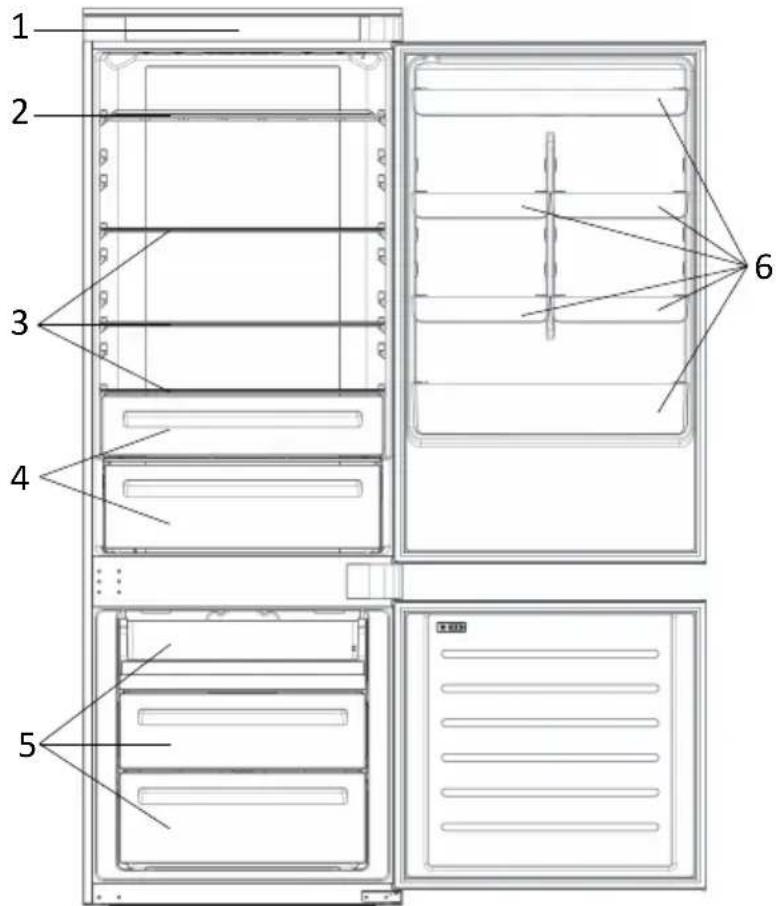
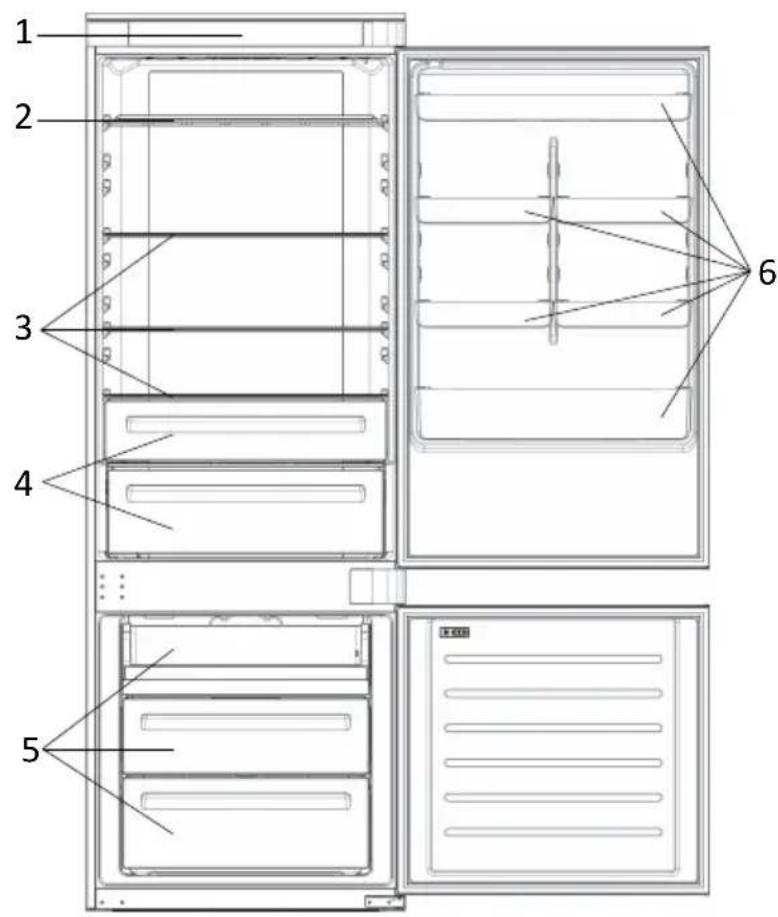
PRODUCT DESCRIPTION
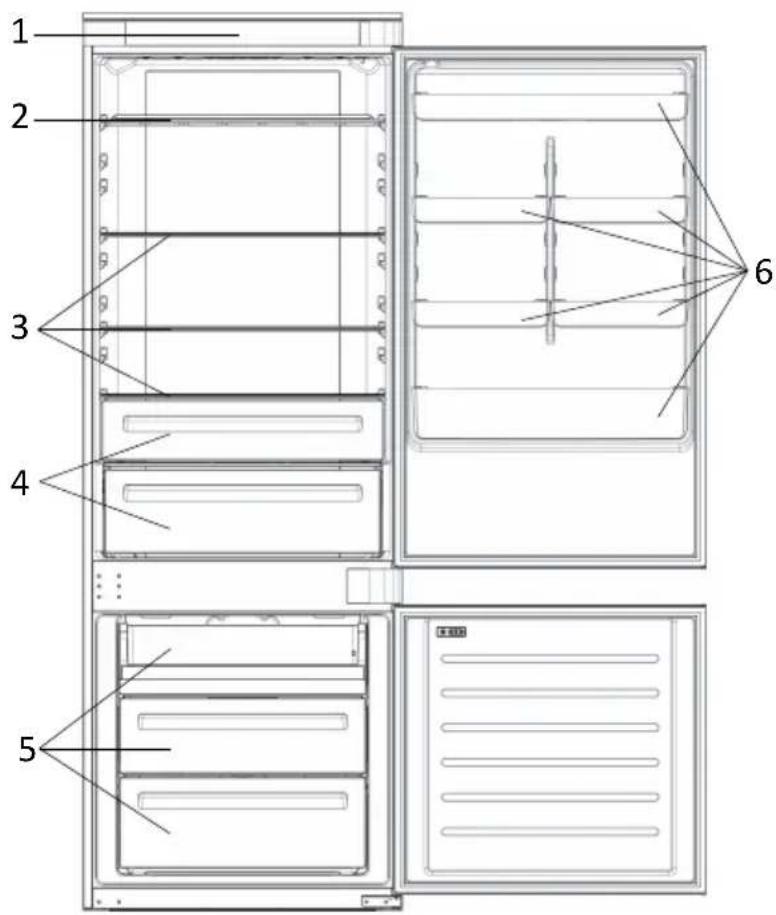
- Control Panel
2.Wine Rack
3.Shelves - Crisper
- Freezer Boxes
-
Door Rack
-
The most energy-saving configuration requires drawers, food box and shelves to be positioned in the product and fan to be off, please refer to the above pictures.
** The pictures above are only for reference. The actual configuration will depend on the physical product or statement by the distributor.
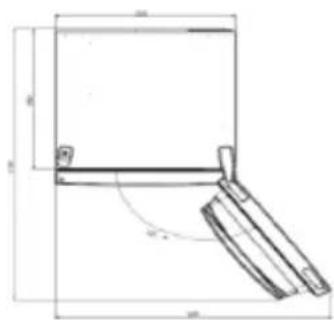
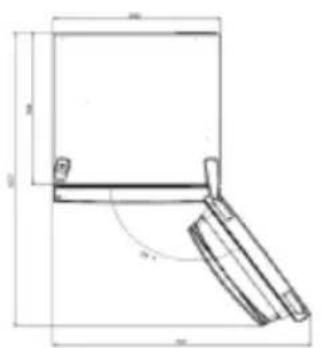
Space requirements
The unit's door must be able to fully open as shown. Spare enough space for convenient opening of the doors and drawers.
Keep a distance of at least 50mm between the side walls of the product and adjacent parts.
Width: min. 920 mm
Depth: min. 1137 mm
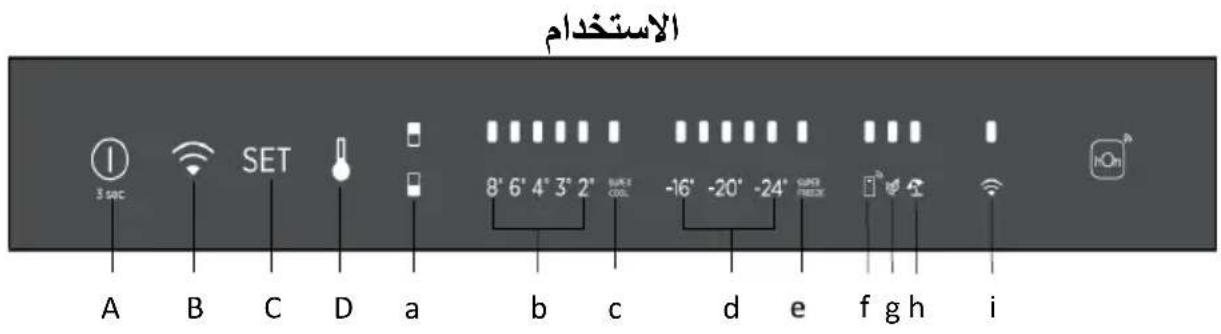
USE
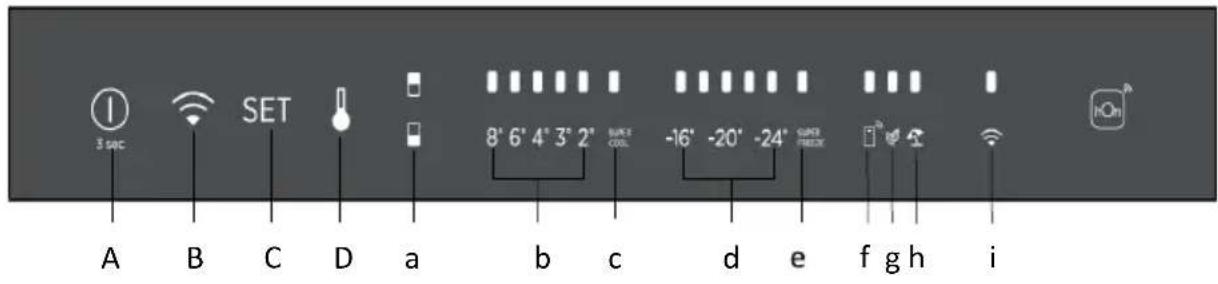
A. ON/OFF key, used to switch on/off the appliance
B. Wi-Fi key, used to switch on/off the Wi-Fi
C. Mode key, used to selected the special functions (Eco and holiday)
D. TEMP key, used to selected the fridge and freezer temperature
a. Fridge /freezer area icon, shows which compartment of the appliance is selected
b. Fridge temperature levels, show which is the selected temperature
c. Super Cool icon, shows if the Super Cool function is activated
d. Freezer temperature levels, show which is the selected temperature in the freezer
e. Super Freeze icon, shows if the Super Freeze function is activated
f. Customized temperature icon, show if the temperature has been selected by app
g. Eco mode icon, shows whether the eco mode is activated
h. Holiday function icon, show whether the holiday function is activated
i. Wi-Fi icon, shows whether the Wi-Fi is working and the appliance is connected
Use
- Plug on the appliance and it automatically turns on.
- The temperature will automatically set at 4^ C in the fridge and -18^ C in the freezer.
NOTE: wait at least 2/3 hours before putting food in the appliance, so as to ensure the temperature inside the fridge.
- To change the temperature, press the TEMP key for 5 seconds, an acoustic signal is made and the icon of the selected compartment (fridge or freezer) as well as all the temperature LEDs of the corresponding compartment turn on for 2s, after 2s the selection of the compartment is confirmed. With the selected compartment icon on, quick press the TEMP key to change the temperature. When the setting increases, the corresponding LED light will turn on. An acoustic signal is made every time the TEMP key is pressed and the temperature is changed, after 5 seconds the selection is confirmed. After 30s without operation the fridge/freezer icons and the LEDs of the selected temperatures turn off. When the TEMP key is touched again, the icon of the last are selected (Fridge or freezer) turns on.
- In case of power loss, the last cooling level set will be restored.
To restore the default setting, keep pressed the door switch inside the
refrigerator and simultaneously press the ON/OFF key for 5 seconds.
- Under the normal operating condition (in spring and autumn), it is recommended to set the temperature at 4^ . In summer when the ambient temperature is high, it is recommended to set temperature at 6 8^ , so as to guarantee the fridge and freezer temperatures and reduce the refrigerator continuous running time; and in winter when the ambient temperature is low, it is recommended to set temperature at 3 4^ to avoid frequent start/stop of the refrigerator.
Customized temperature
From the app it is possible to customize the temperature for both fridge and freezer. The temperature can be set with 1^ sensitivity. It is possible to select a temperature from 2^ to 8^ in the fridge, and from -16^ to -24^ in the freezer.
When the temperature is selected by the app, the customized temperature icon turns on, while all the temperature LED lights of the affected compartment are turned off (i.e. if the refrigerator temperature is selected from the app, LEDs from 2^ to 8^ are turned off. If the freezer temperature is selected from the app, LEDs from -16^ to -24^ are turned off).
If only a single area (freezer or fridge) has the customized temperature, the temperature selection of the other area is not changed and the LED light of the selected temperature of that area remains on. An acoustic signal is made every time the temperature is changed.
Super Cool function
It is suggested to switch on the Super Cool function if a large quantity of food should be stored (for example after the purchase). The Super-Cool function accelerates the cooling of fresh food and protects the goods already stored from undesirable warming. When the function is activated, the temperature of the fridge is automatically set at 2^ .
How to use the Super Cool function:
- The function can be activated by long pressing TEMP key to select the fridge compartment, and then quick pressing the TEMP key until the Super Cool icon led is turned on, or it can be turned on from the app. When the function is activated, the Super Cool LED is always ON.
To exit the Super Cool function, press the TEMP key or turn it off from the app. - The Super Cool function automatically ends when the function has lasted for more than 12 hours.
- When the Super Cool ends, the icon of the control panel is switched off and the previously set cooling level is restored.
Note: Super Cool and Super Freeze function cannot be activated simultaneously.
Super Freeze function
The super freezing function accelerates the freezing of fresh food and protects the goods already stored from undesirable warming. If a large amount of food has to be freeze, it is recommended to set the Super-Freeze function on 24h before the usage. When the function is activated, the temperature is automatically set at -28^ .
How to use the Super Freeze function:
- The function can be launched by long pressing TEMP key to select the freezer compartment, and then quick pressing TEMP key until the Super Freeze icon led is turned on, or it can be turned on from the app. When the function is activated, the Super Freeze LED is always ON.
- To exit the Super Freeze function, press the TEMP key or turn it off from the app.
- The Super Freeze function automatically ends when the function has lasted for more than 50 hours.
- When the Super Freeze ends, the icon of the control panel is switched off and the previously set freezing level is restored.
Note: Super Cool and Super Freeze function cannot be activated simultaneously.
Eco mode
The Eco mode can be activated to optimize the performance of the appliance, whereas obtaining the best food storage. The Eco mode will automatically set the temperature at 4^ in fridge and at -18^ in the freezer.
How to use the Eco mode:
- The function can be activated from control panel by pressing the "mode" key until the Eco mode icon turns on (an acoustic signal confirms the selection), or by selecting the function from the app. When the function is activated, the Eco mode icon is always ON.
- To exit the Eco turn it off from the app or chose another function from the control panel.
- When the Eco Mode ends, the icon of the control panel is switched off and the previously set cooling levels are restored.
Holiday function
The Holiday function can be used to reduce the energy consumption of the appliance, when it is not used regularly. When the function is on, the LED lights will be off (even if the door is open) and the fridge will work on low power consumption mode, whereas the freezer will keep working normally.
How to use the Holiday function:
- The function can be activated from control panel by pressing the "mode" key until the Holiday icon turns on (an acoustic signal confirms the selection), or by selecting the function from the app. When the function is activated, the Holiday icon is always ON.
- To exit the Holiday function, turn it off from the app or chose another function from the control panel.
- When the Holiday function ends, the icon of the control panel is switched off and the previously set cooling levels are restored.
Defrosting
The defrosting of the refrigerator and freezer compartment are done automatically: no manual operation is needed.
Slider
Near the vegetable basket there is a slider that allows you to adjust the humidity inside it: moving it to the right decreases the humidity, moving it to the left increases the humidity.
Demo mode
To enter the demo mode, with the display unlocked, keep pressed the Wi-Fi key (B) and press the MODE key (C) 5 times within 5 seconds. To exit the demo mode, perform the same operation or power off the refrigerator.
Error Codes
Communication error
[-16^; - 18^; - 20^; - 22^; - 24^] Lights in the fridge turn on sequentially, it means there has been a communication error between the main control board and the display board. Please, contact the technical assistance to help solve the problem
Fan
[-16^; -20^; -22^; -24^] lights in the fridge flashing simultaneously if the fan is not working properly. Please, contact the technical assistance to help solve the problem
WI-FI USE
In app pairing procedure
Step 1
Download the hOn app on the stores


GETITON GooglePlay

Download on the App Store

EXPLORE IT ON AppGallery
Step 2
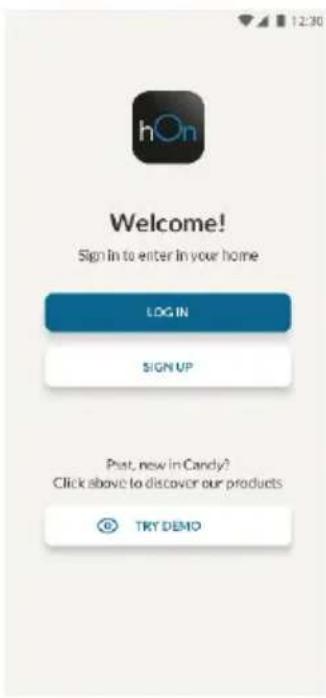
Create your account on the hOn App or log in if you already have an account
Step 3
- Follow pairing instructions in the hOn App
Wi-Fi Use
To activate the Wi-Fi, long press the Wi-Fi key for 2 seconds, the Wi-Fi icon will turn on and an acoustic signal is made.
If the Wi-Fi has not been configured yet, when the refrigerator turns on, it will automatically enter the configuration mode and keep this status for 30 minutes. To use the configuration mode:
- Press the Wi-Fi key for 2s, the refrigerator enters the Wi-Fi configuration mode and an acoustic signal is made. The Wi-Fi icon starts blinking.
- Follow in app instructions to configure the Wi-Fi (see above).
- Once the Wi-Fi is configured and the connection established, the Wi-Fi icon is on and fixed.
After 30 minutes without performing any operation, the Wi-Fi will automatically exit the configuration mode. - If the Wi-Fi has already been configured, it will automatically reconnect according to the configuration information.
To reset the Wi-Fi, long press the Wi-Fi key and Mode for 2s, the Wi-Fi is reset and an acoustic signal is made. After this, the Wi-Fi will automatically enter the configuration state (Wi-Fi icon will start blinking again).
To turn off the Wi-Fi, press the Wi-Fi key for 3s.
Radio-module - Technical data
| Frequency rate (OFR) | 2400 MHz-2843.5 MHz |
| Channel frequencies | 2412...2472 MHz(step size 5 MHz) |
| Maximum power(EIRP) | 100 mW |
Radio equipment type is in compliance with Directive 2014/53/EU.
TROUBLESHOOTING
| The inside light bulb does not turn on. | ·No electricity. | ·The power cable is not properly plugged in. ·Check if the appliance is switched off (see Temperature Adjustment). ·Check the power socket is working correctly (e.g. with another electric device). |
| ·Holiday Mode is activated. | ·Doactivate Holiday mode. | |
| The internal temperature of the refrigerator and/or freezer is not cold enough. | ·The doors are not closed. | ·Check that the door and gaskets close properly. |
| ·The doors are frequently opened. | ·Avoid opening the doors unnecessarily for some time. | |
| ·Incorrect temperature setting. | ·Check the temperature setting and, if possible, set a lower temperature (see Temperature Adjustment). | |
| ·The refrigerator and/or freezer are too full. | ·Wait for the temperature of the refrigerator/frezer to stabilise. ·Avoid filling the refrigerator and freezer excessively. | |
| ·The surrounding temperature is too low. | ·Move the unit to a warmer place or heat the current room. | |
| ·Warm items have been stored. | ·Always allow items to cool before storing them. | |
| The food in the refrigerator freezes. | ·Incorrect temperature setting. | ·Check the temperature setting and, if possible, increase the temperature. |
| ·Food in contact with the back wall. | ·Keep the food away from the refrigerator's back wall. | |
| The bottom of the refrigerator compartment is wet or water droplets are present. | ·The drain hose could be clogged. | ·Clean the drain hose with a stick or similar item to allow the water to drain. |
| Presence of drops of water or frost on the rear wall of the refrigerator. | ·Depending on the function, drops of water or frost form on the rear wall of the refrigerator during operation. | ·It is not a defect. |
| ·Warm items have been stored. | ·Always allow items to cool before storing them. | |
| ·There are open food containers or liquids. | ·Always cover food and liquids. | |
| ·The doors are not closed. | ·Check that the door and gaskets close properly. | |
| ·The doors are frequently opened. | ·Avoid opening the doors unnecessarily for some time. | |
| Presence of water in the vegetable drawer. | ·Lack of air circulation. | ·Verify that your appliance is not too full. |
| ·Vegetables and fruit with too much moisture. | ·Wrap the fruit and vegetables in plastic materials, e.g. cling film, bags or containers. | |
| The motor runs continuously. | ·The doors are not closed. | ·Make sure the doors are closed and check the seals close properly. |
| ·The doors are opened frequently. | ·Avoid opening the doors unnecessarily for some time. | |
| ·Ambient temperature is very high. | ·Verify that the ambient temperature is in the range set out in the specifications on the appliance tag. ·Set the display screen/thermostat to a warmer temperature. | |
| ·The appliance has been off (no power) for some time. | ·It normally takes the appliance 8-12h to cool completely. | |
| The frozen food is thawing. | ·Surrounding temperature is too low. | ·Move the unit to a warmer place or heat the current room. |
| ·The freezer door is not closed. | ·Make sure the door is closed and that the gasket is sealing proper. | |
| Fridge door alarm. | ·Fridge door alarm (acoustic beep) activates whenever the door is left open for more than 3 minutes. | ·Avoid leaving the door open when not needed. The beep ceases when the door is closed. |
| The appliance makes noises such as gurgling, buzzing, clicking, creaking. | ·No breakdowns. An engine is running, e.g. refrigeration unit, fan. The refrigerant flows into the pipes. Motor, switches and solenoid valves are switched on or off. | ·No action needed. |
| ·The appliance is not located on level ground. | ·Adjust the feet to level the appliance. | |
| ·The appliance touches an object around it. | ·Remove objects around the appliance. | |
| The appliance does not cool, the temperature and lighting indicators are on. | ·Demo mode is activated. | ·Deactivate DEMO mode. |
| Strong ice and frost in the freezer compartment. | ·The items were not adequately packaged. | ·Always pack the items well. |
| ·A door/drawer of the appliance is not tightly closed. | ·Close the door/drawer. | |
| ·The door/drawer has been opened too frequently or for too long. | ·Do not open the door/drawer too frequently. | |
| ·The door/drawer gasket is dirty, worn, cracked or mismatched. | ·Clean the door/drawer gasket or replace it with a new one. | |
| ·Something on the inside prevents the door/drawer from closing properly. | ·Reposition the shelves, door racks or internal containers to allow the door/drawer to close. | |
| The sides of the appliance are warm. | ·This is normal. |
Pe3HMe
ONICAHNE HA IPOyKTA 10
YIOTPEEA 11
YnoTe6a 11
IepcoHaJIu3npaHa TeMnepeAtypa 12
Функця Super Cool" 12
Функця „Super Freeze" 13
PexnM ,Eco" 13
Функця „Holiday" 14
Pa3mpa3BaHe. 14
Демонстрацноен реким 14
YNOTPEBA HA WI-FI 15
IpoeDypa 3a cDBoBaHe C npNoJKeHneTo 15
Ctbnka 1. 15
Ctbnka 2. 15
CTbIka 3. 15
YnoTe6a Ha Wi-Fi 16
OTCTPAHЯBAHE HA HEN3ПРABHOCTN
Опиcaне HA порукTA
- KoHTpOJIeH naHeJ
- PaΦT 3a BnHo
- PaΦToBe
- Yekmeje 3a no-dbJroTaHa CBexKecT
- Kyttn 3a 3ampa3raBaHe
-
PaΦT 3a Bpata
-
Hau-eneproceTBAaata KOHcHpyaunn N3NCKBa YekMeJKeTaTa, Kytna 3a XpaHa n paTOBete Da 6bDaT pa3NoJoxeHn B npOyKta n BeHTnlaTopbT da 6bJe N3KIOUeH, MOJI, BIXTe rOpHnte CHIMKN.
** N3o6paXeHnra Ta no-rope ca camo 3a cnpaBka. DeiCTBnteJHaTa KOHfNpyaunr Iue 3aBnCn OT fH3nueckn npOdyKT nnn dEknapaunrTa Ha nIcTpnbTyopa.
N3nCKBaHna 3a npocTpaHCTBO
BpaataHa ypeDa Tp6Ba Da MoKe Da ce OTBapr DOKpa, KaKTo e Noka3aHo. OCTaBeTe DOCTaTbUHO MRCTo 3a YDo6Ho OTBaprHe Ha BpaTHe N YeKMeJKeTata.Cna3BaIte pa3CTOHNHe OT Ha-NMaIKo 50 MM MeKdy CTpaHnHHTe CTeHn Ha npOdyKTa N CbCeHNTe YaactN.
山ipoounHa:MH.920MM
Download on the App Store

EXPLORE IT ON AppGallery
Trin 2
Super Freeze-Function
Download on the App Store

EXPLORE IT ON AppGallery
Paso 2
Download on the App Store

EXPLORE IT ON AppGallery
2. korak
PRODUCTBESCHRIJVING 98
GEBRUK 99
I app-paringsprosedyren
Trinn 1
Download on the App Store

EXPLORE IT ON AppGallery
Passo 2
Download on the App Store

EXPLORE IT ON AppGallery
Pasul 2
Download on the App Store

EXPLORE IT ON AppGallery
2. korak
Padiomodylb - Texhichi daHi
| Частота (OFR) | 2400 MHz-2843.5 MHz |
| ЧастOTи Каналу | 2412...2472 MHz(pondimяр краку 5 MHz) |
| Мakсималha пotingужнисть(EIRP) | 100 mW |
Tnpipaioo6jiaHaHnHbIIOBidae IpukeTnBi 2014/53/EU.
NOWYK TA YCYHEHHA HECNPABHOCTEN
| BHytprilna Namnochka He BmHKaetbca. | Hemae eJelKtpoxmbenHHa. | Kaboku JxngHbOHe He NpIeKnIOHO HnAloxHbMun. |
| Pexim Holiday akTibobHao. | Tepebiot, uH He BmHKoHko pRanlaid (dHa, PeryhBaHbHm. Tepebiot, u PrabaiHbHn pRanIOOpoaOaOH (HapriHauad, 3 IHNIM enEeKTHHm nprictocm). | |
| Pexim Holiday akTibobHao. | BmKoHb prOxim Holiday. | |
| BHytprilna Tempepatyra XoNoDinbHnka Ta/abo Mop03NbHoi Kamepi HeNDCTATNb O HN3bKa. | Deepurta He ZaunHEni. | TepekohaiTece, uO Deepurta y uZi#bHKoBaui ZaunHeni HaneKuYHOM. |
| Deepurta Tacto B iDzunHiaotbc. | Deekui cac He bDzunHaiTie Daepurta 6e3 noTpe6i. | |
| HeprabinbHe HanaHTBuHnma Tempepatyru. | Tepebiot hanaHTaBnHnma Tempepatyr Ta, kZuo moXnHBO, acTo HnKuy Tempepatpyr (duA, PeryhBaHbHm Tempepatyr). | |
| XoNoDinbHnK Ta/abo Mop03NbHa Kamepa ZaONBHeH. | DOnoukaiTece cStaBinaaII Tempepatyr XoNoDinbHnKA/Mop03nKamOpri. | |
| Tempepatyra HanaHTaBnHoo cepeoBnua a zhaJI HN3bKa. | YUnKaiHauHdIpHoro HanaHTBnHnK HAonOaHnKHa TA Mop03NbHnK KaamOpri. | |
| Ha 36eipirAHn NaKlaedei H tenPi npOdykTu xapUvBaHn. | TepeMiCTb npInayd y tenPiue MicJe a npOipayd oboa'3aXoAO daaaiTe im OxoHoyTu. | |
| Ha npABinbHe HanaHTaBnHnma Tempepatyru. | Tepebiot hanaHTaBnHnMa Tepepatyr Ta, kZuo moKoBVO, 3aBilbHb Ttemepatyyu. | |
| IPOdukTu In XoNoDinbHnkuZaMePAaOTb | 3ZnBnHn 57aHn Moe 6yTu 3aBHTMI. | TrpMaTe npOdykTu nOaJIi bU dazHbO tCtinHxoNoDinbHnka. |
| Днохунь kranpenь Bodn abo HAMOPc Ha 3aDni stHcji XoNoDinbHnka. | 3aLZKHO bID fynKuZii nd cac poBtu H naZdHi CT xoNoDinbHnka YTBPOIOTOB C KpanPi Bodn abo HAMOp03b. | OChtItb 31aBnHn 57aHn TnAnKko abo NpOioBHM npdeMetom, zuoBoda CTKagua. |
| Ha 36eipirAHn NocKlaedei TtenPi npOdykTu xapUvBaHn. | Lle He dePekr. | |
| Ha 36eipirAHn NocKlaedei TtenPi npOdykTu xapUvBaHn. | Tepeu HIX KIACTs npOdykTu do npInayd y oboa'3aXoAO daaaiTe im OxoONyTu. | |
| C B iDzKPiTI KOtheyepri dIra XapOboix npOdykTu a piDinHn. | 3aBxdu IooKpBaiTe IyTu pIzDHI. | |
| Deepurta He ZaunHeni. | TepekOHaiTece, uO Deepurta y uZi#bHKoBaui ZaunHeni HaneKuYHOM. | |
| Deepurta Tacto B iDzunHiaotbc. | TepekOHaiTece, uO Deepurta y uZi#bHKoBaui ZaunHeni HaneKuYHOM. | |
| HABHnCTb Bodn in Baxikny dne Oboy. | Bicdytchtb 3uPckyLaui novitry. | TepekOHaiTece, uO npInayd nOpeKoHenn. |
| Oboch iФpuyTK 3 3aHndTo BeNKOIO KIbKCTIOB BoI | 3aOOrHb TpOpyKu IooBtu y IpuAIOKOB MATEpAlu, HaneKuLDA, y xapOboYuPiBAY, abo NpOmitcIb ix y paKetu YH konTeHepri. | |
| DnBunHn npaizoe 6be3nepebpHnO. | Deepurta He ZaunHeni. | TepekOHaiTece, uO Deepurta zaunHeni, i npOpeTpO, uZaunHoi HaneKuHm YUnKoHm UzuLiNeHn. |
| Deepurta Tacto B iDzunHiaotbc. | TepekiHauHaiTie Daepurta 6e3 noTpe6i. | |
| Ttempepatyra HanaOoHbHnO cepeoBnua duye B VBCOKa. | TepekOHaiTece, uO Ttempepatyr HanaOoHbHnO cepeoBnua duye B VBCOKa. | |
| Ppivad 6bV BVMKHeHn (6e3 JxIBLeHn) npOtaTQo Deakoro Yach. | 3aBamHau nOpaHoro OdoNooHnn npOtaTb6 8-12 ro. | |
| 3amopokheni npOdoKoJyOtbc | Tepepatyra HanaOoHbHnO cepeoBnua 3aHa HN3bKa. | TepeMeCTb npInayd y tenPiue MicJe a oboi npOtoHe npImuHn. |
| Deepurta MOp03NbHO Kamepi He ZaunHeni. | TepekOHaiTece, uO Deepurta zaunHeni, a uZaunHoi HaneKuHn. | |
| CnHnA13aui B iDzunHenix DBeepart XoNoDinbHnka. | CnHnA13aui B iDzunHenix DBeepart XoNoDinbHnka (3byKoBum CnHnA13aui B dIaIaONaO, BkZa3aHOM y xapaTePcRcTbKxHa B EINK. | He 3aZaunHaiTie Daepurta B iDzunHnMm B63 noTpe6i, 3byKoBum c BVMKAcTbC, kOin DBePcRcTbA 3aZaunHai Tc. |
| Ppivad BnDaes taKi 3aByK,ЯбБКаннДзИЗУСИЗДЗИЗДЗ,срп. | Ppivad He pOst3aWbAbHn Ha pIBN nobErHni. | BdIPegyBoIte HxKx, uOb BiPbEHTAI npInayd. |
| Ppivad ToppKcAeTcB JAKOROB TpEpmMeT apoRy 13 H | BdIaIIb npOpeMeT npAkoKo npInayd. | |
| Ppivad He oxoOdoJyEcb, IIndikatod Tempepatyr in OsBittlenHnCBITbcs. | DemohCTpaizhiHn peKem AkTbOBaHO. | BmKoHb DEMOHCTALIHN pReKIM. |
| 3aHnA kInbKcTb IbOody i HAmopozb y Mop03NbHnKamepi. | PpOoKTu He 6bIy To HaneKHm CYNHom UpaKoBHO. | 3aBxdu IdoBe pAnkyte npOyTK. |
| DBeepurta/YaunKpnipady He 3aZunHeno DoctaTbO 5uzlbHo. | 3aZunHaiTb Daepurta/YaunK. | |
| DBeepurta/YaunKpnipady B iDzunHinLncs 3aHaTDo qacto a bO ha 3aHaTDo TpAunT. | He 3aZunHaiTie Daepurta/YaunK 3aHaTDo qacto. | |
| UzilbHnOubav DBeepart/YaunKzIa 3aBpUdHenHn, 3aUnenHn, Trichytun 6ao He BILNOBIAe BVMorAM. | OChtItb yUzilbHnOaui Daepurta/YaunK 3aMInHbIy IroTO HovIM. | |
| UzilbHnOubav DBeepart/YaunKzIa 3aBpUdHenHn, 3aUnenHn, Trichytun 6ao He BILNOBIAe BVMorAM. | 3aMInHb NpOzKanHn POnLb, DBeepurTa/YaunLb AboBHTUIHx KONTeHepB, 6ao BDeepurTa/YaunLk MoJIg 3aHnHInHn. | |
| 5BnH cTknnpiauayden. | LcHopMaJIbHO. |
187
188
188
189
189 "A" Super Cool
190 "Super Freeze
190 "ECO
191
191
191
192 WI-FI
192 1
192 1
192 2
192 3
193 Wi-Fi
1
5ill 1.
iiill 2
3.
4
5.
6.
i
y
.
iill
a 150 50 50 920 1137
- jie jie
Jy 1
S OBC = S COD + S BOC - S BOC
aallgaiiie 1
i j 1
aal aal al aal aal aal aal aal aal aal aal
"Super Cool Super Cool
aall a jlll jlll qjg jlll jll
Super Freeze Super Freeze
aill bll aow y jll a jy dai y dai la cay y aai aai all y jll a jy
y 1111 y1 1111 1111 1111 11
a a a a a a a a a a a a a a a a a a a a
8-6 1
i 1
4 3
aaiiaai 1
1 1 1 1 1 1 1 1 1 1 1 1 1 1 1 1 1 1 1 1 1 1 1 1 1 1 1 1 1 1 1 1 1 1 1 1 1 1 1 1 1 1
2011
L 1 1 1 1 1 1 1 1 1 1 1 1 1 1 1 1 1 1 1 1 1 1 1 1 1 1 1 1 1 1 1 1 1 1 1 1
-24 16 LED
aaii aai i aai i aai i aai i aai i aai i aai i aai i aai i aai i aai i aai i aai i aai i aai i aai i aai i aai i aai i aai i aai i aai i aai i aai i aai i aai i aai i aai i aai i aai i aai i aai i aai i aai i
J 1
"Super Cool
Jaa. (c) Jaa Jaa Jaa Jaa Jaa Jaa Jaa Jaa Jaa Jaa Jaa Jaa Jaa Jaa Jaa Jaa Jaa Jaa Jaa Jaa Jaa Jaa Jaa Jaa Jaa Jaa Jaa Jaa Jaa Jaa Jaa Jaa Jaa Jaa Jaa Jaa Jaa Jaa Jaa Jaa Jaa Jaa Jaa Jaa Jaa Jaa Jaa Jaa Jaa Jaa JAA
