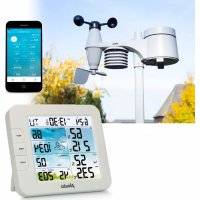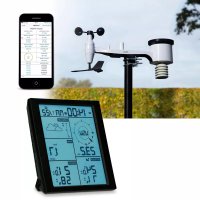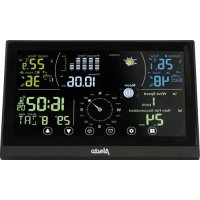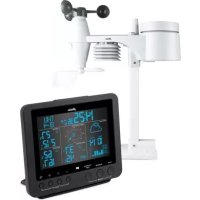
WS5300 - Weather Station ALECTO - Free user manual and instructions
Find the device manual for free WS5300 ALECTO in PDF.


| Features | Details |
|---|---|
| Product type | Weather Station |
| Display | Backlit LCD screen |
| Weather measurements | Indoor/outdoor temperature, humidity, atmospheric pressure |
| Temperature measurement range | -20°C to 60°C |
| Humidity measurement range | 20% to 95% |
| Power supply | Power adapter or batteries |
| Connectivity | Wireless, data transmission |
| Usage | Ideal for home or professional use |
| Maintenance | Regular cleaning of the screen and sensors |
| Safety | Avoid exposure to water and extreme temperatures |
| Warranty | Check conditions with the seller |
| Included accessories | Outdoor sensor, power adapter |
Frequently Asked Questions - WS5300 ALECTO
User questions about WS5300 ALECTO
0 question about this device. Answer the ones you know or ask your own.
Ask a new question about this device
Download the instructions for your Weather Station in PDF format for free! Find your manual WS5300 - ALECTO and take your electronic device back in hand. On this page are published all the documents necessary for the use of your device. WS5300 by ALECTO.
USER MANUAL WS5300 ALECTO
*9:
STORM = ≥ 88 km/h (≥ 55 mph)
STRONG = 42-87 km/h (26-54 mph)
MODERATE = 14-41 km/h (9-25 mph)
LIGHT = 3-13km/h (2-8mph)
resolution: 0.1^ of 0.1^
resolution: 0.1^ of 0.1^
Weekdag in 5 talen: EN, FR, DE, ES, IT
Tijdsignal: DCF
12. Declaration of Conformity
FORT = 26-54 mph (42-87 km/h)
MODER = 9 - 25 mph (14-41 km/h)
LEGER = 2-8mph (3-13km/h)
dimensions:343.5x393.5x136mm
resolution: 0.4 mm (0.0157 in)
préciision : ±7%
Frequence: 868.288 MHz
MASSIG = 9-25 mph (14-41 km/h)
LEICHT = 2-8 mph (3-13 km/h)
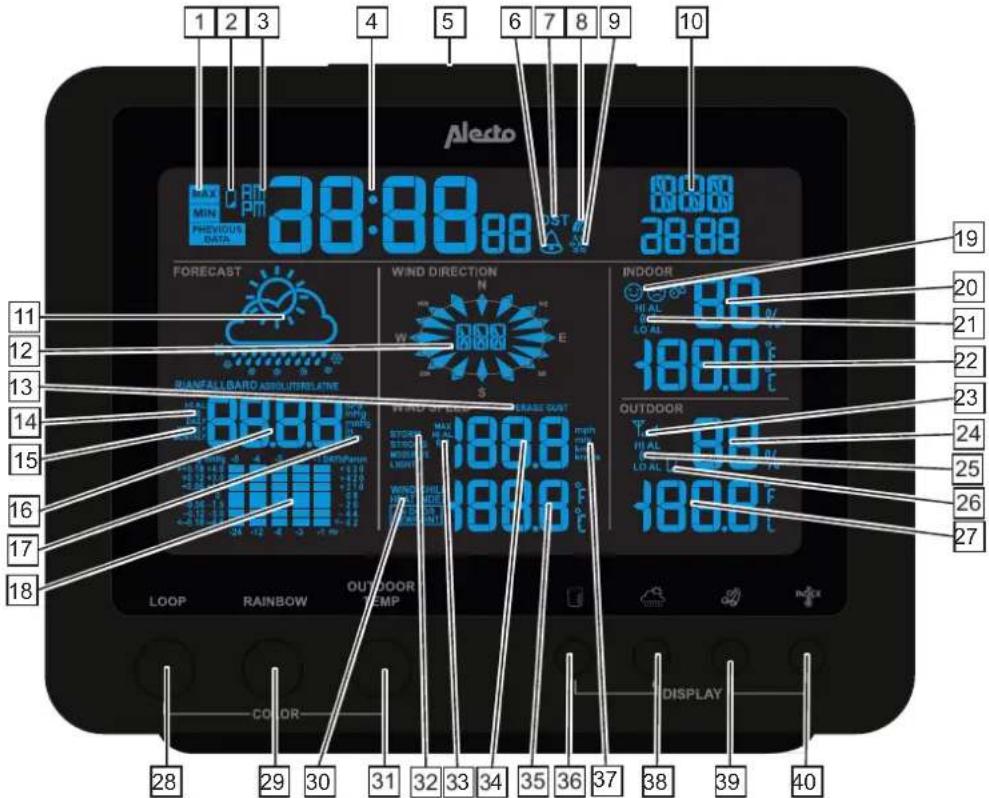
1.1 Weather station:
-
minimum, maximum and historic data display indication.
-
low backup battery capacity indication of the weather station.
-
pm or am indicator for 12 hours clock format.
-
clock display.
-
snooze function button for alarm clock.
-
alarm clock activated indicator.
-
DST active indicator (Day Saving Time, i.e. summer time (DCF77 reception only)).
8 reception indicator icon for DCF77 reception.
-
chance of frost icon.
-
date display.
-
weather forecast animation icon.
-
wind direction display.
-
wind speed display indication for average or gust.
-
amount of rainfall alert indication icon.
-
rainfall period of time indication (day, week or month).
-
value for rainfall or air pressure display.
-
notation value for rainfall or air pressure.
-
trend value for rainfall or air pressure display in graph form.
-
emoticons indicating a comfortable or uncomfortable environment.
-
indoor humidity value in %.
-
high/low indoor temperature alert indicator.
-
indoor temperature display.
-
outdoor sensor reception signal indicator.
-
outdoor humidity value in %.
-
high/low outdoor temperature alert indicator.
-
low battery capacity indicator for the outdoor sensor.
-
outdoor temperature display.
-
button for activating the display colour change.
-
button for selecting the fixed colour (8) of the display.
-
indication for display: wind chill, heat index, or indoor dew point.
-
button for making a random colour and then keep that colour.
-
wind speed description indication: light, moderate, strong and storm.
-
wind speed alarm indicator.
-
wind speed value.
-
value index.
-
selection button for rainfall value, per day, per week or per month.
-
wind speed notation display: mph, ms, km/h or Knots.
-
selection button barometer notation display: hPa, inHg or mmHg.
-
wind speed display selection button for average or gust.
-
display selection button for: wind chill, heat index or indoor dew point.
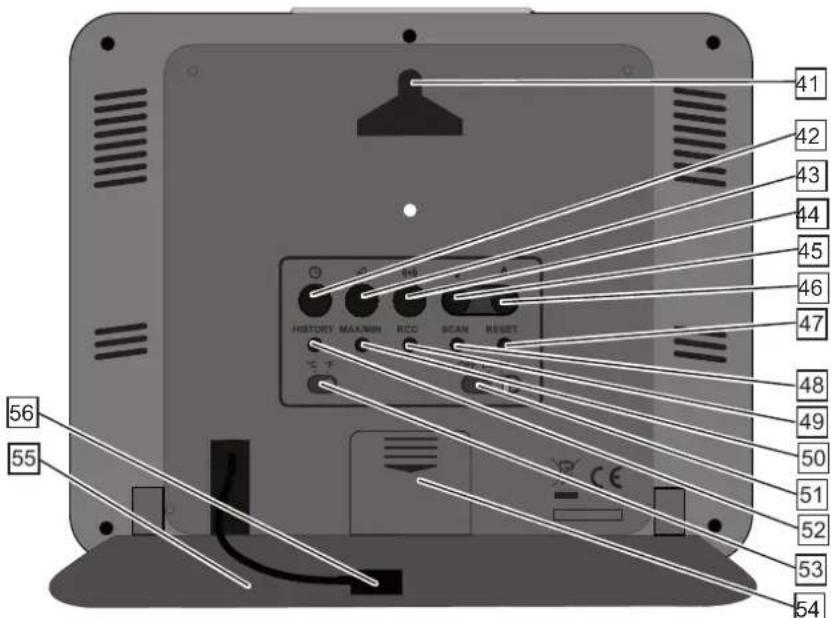
- suspension hole for wall-mounting with 1 screw.
- clock setup button.
- alert setup button.
- outdoor sensor reception setup button.
45.up button function. - down button function.
- reset button.
- receiving new data from the outdoor sensor.
- RCC button (radio controlled clock) to start the DCF77 reception.
- selection button for displaying maximum and minimum measured value.
- display light intensity selection button (high, low or off).
- selection button for displaying historic data.
- selection button for temperature display in ^ C or ^ F .
- battery compartment for backup battery (CR-2032).
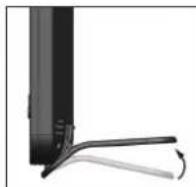
- table stand
- mains adaptor input.
1.2 Outdoor sensor:
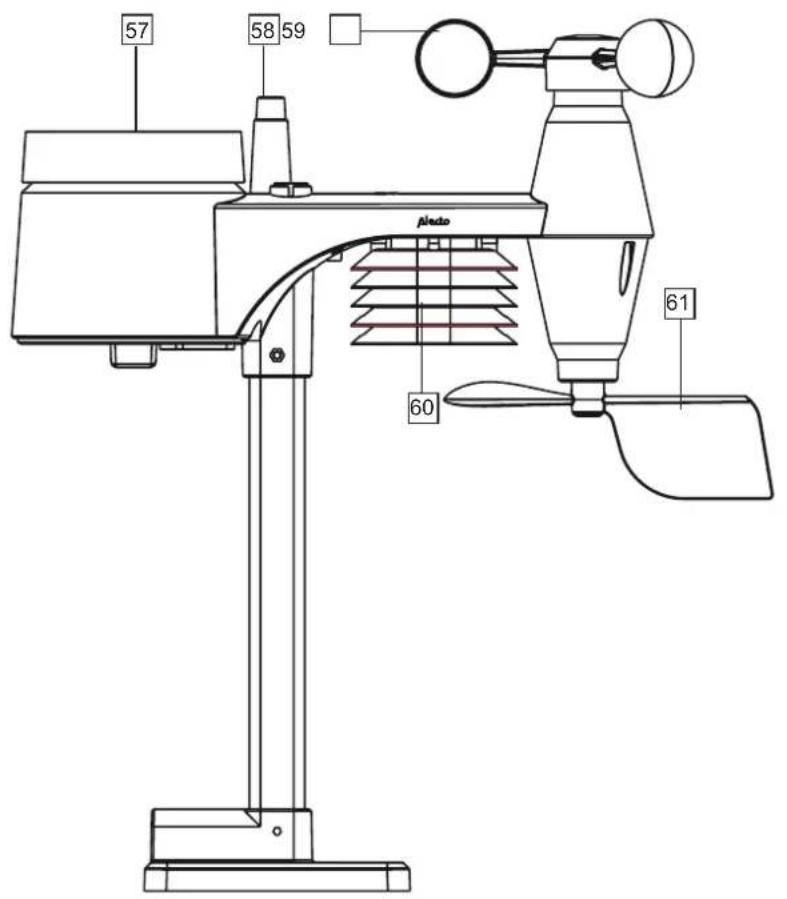
side view bottom view
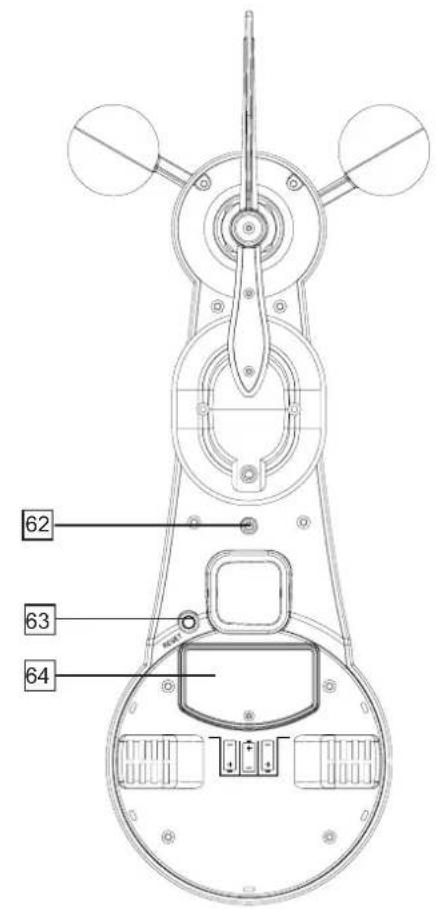
- rain meter
- antenna
- wind speed meter
-
temperature + humidity sensor
-
wind direction vane
- LED (transmitting indicator)
- RESET button
- battery compartment
2. INSTALLATION

Attention: after the installation, it may take several hours up to a day before the correct values are displayed.
2.1 Power supply:
Advice regarding batteries:
A CR-2032 button cell is located inside the weather station (included). When the empty battery icon (2) illuminates, this button cell must be replaced by an equivalent battery type.
Also the outdoor sensor is powered by 3 × AA 1.5 ~V batteries, but because normal Alkaline batteries perform poorly or not at all at temperatures of around or below 0^ C , it's not recommended to use standard Alkaline batteries for the outdoor sensor.
For that reason, we advise you to use Lithium batteries for the outdoor sensor that are designed to function well within a temperature range of -20^ to 60^ . These batteries can be ordered via the service department of Alecto (www.alecto.nl).
Lithium batteries with a capacity of 2900mAh have a lifespan of over one year.
Weather station:
Slide the battery cover at the rear downward, replace the CR-2032 battery according to the markings inside the battery compartment and slide the battery cover back onto the weather station. Connect the supplied mains adaptor. The weather station will now start searching for the outdoor sensor for 1 minute. Therefore, insert batteries into the outdoor sensor within that 1 minute.
Outdoor sensor:
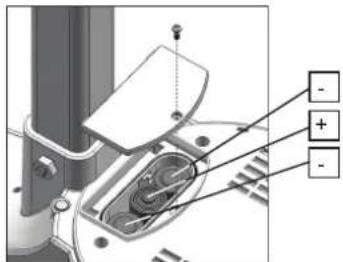
Open the battery compartment by sliding the battery cover downward with a small screwdriver. Insert 3 × size AA 1.5V batteries according to the figure below, paying attention to the polarity (+ and -). Replace the cover (batteries are not included).
2.2 Pairing the weather station / outdoor sensor:
Automatically:
As soon as the mains adaptor is connected to the weather station, the weather station starts searching for a signal from the outdoor sensor for 1 minute. Therefore, if you insert the batteries into the outdoor sensor within that minute and the units will 'find' each other, they will be automatically paired and the display of the weather station will show the temperature transmitted by the outdoor sensor.
Manually:
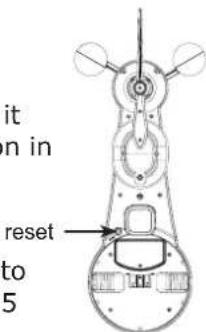
If the units cannot be paired automatically, or after replacing the batteries, you can pair the outdoor sensor (again) with the weather station unit as follows:
- press and hold the SCAN button on the weather station for 2 seconds until the antenna symbol starts flashing in the display
- Press briefly press the RESET button on the outdoor sensor
- the units will have found each other (again) after several seconds
2.3 Positioning:
Weather station:
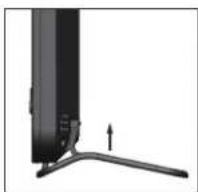
You may choose to suspend the weather station from a wall using a simple screw or to use it as a desk model using the supplied table stand. In any case, never place the weather station in direct sunlight or nest to a heat-radiating lamp or stove.
Outdoor sensor:
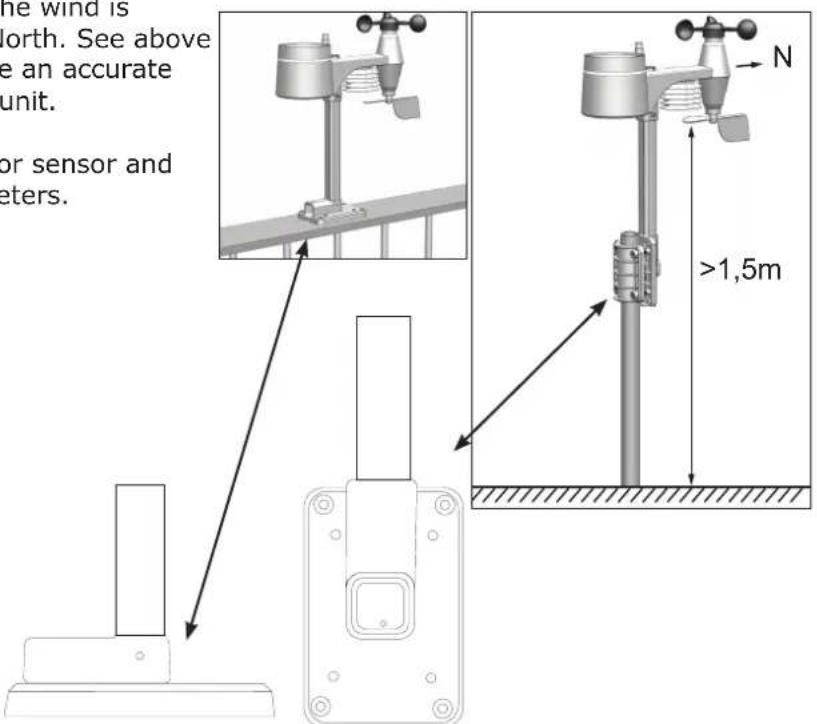
You may choose to place the outdoor sensor on a flat surface (e.g. a fence or railing) or onto a pole (max. 032.5mm (excluded)). In any case, make sure to position the unit at least 1.5 meters above the ground, standing freely in the rain and wind.
Outdoor sensor placement tips:
To have the rain and wind meter function as accurate as possible, the outdoor sensor must be positioned exactly horizontal. To do so, use the built-in spirit level on top of the outdoor sensor.
To be able to indicate from which direction the wind is blowing, the outdoor sensor must face the North. See above the designation N on the outside sensor. Use an accurate compass (not included) to properly aim the unit.
Ensure that the distance between the outdoor sensor and weather station is no more than 30 to 50 meters.
2.4Clock:
Introduction
The WS-5300 is provided with a built-in DCF receiver which receives the DCF time signal from Frankfurt. This signal ensures that the clock shows the time very accurately, provided a strong enough signal is being received.
Automatic:
As soon as you connect the mains adaptor to the weather station, the clock starts searching for the DCF radio signal to determine the time and date while the antenna symbol is flashing and the display turns green. After several seconds or minutes the WS-5300 will start showing the correct time. In extreme cases, it can take over a day before the DCF time is shown. The DCF time is synchronised daily at 2am, 8am, 2pm and 8pm.
Manually:
If the clock cannot receive the radio signal or cannot receive it well enough, you can set the clock manually as follows:
-
press and hold the button 2 seconds, 12Hr or 24Hr will appear in the display
-
Use V/A to set the time format, then briefly press the button
-
use V/Λ to set the hours and then briefly press the ⑤ button
-
use V/ʌ to set the minutes and then briefly press the ⑤ button
-
use V/Λ to set the seconds to 0 (this allows you to have the clock run synchronously with your own clock) and then briefly press the button
-
use V/ʌ to set the year and then briefly press the ⑤ button
-
use V/ʌ to set the month and then briefly press the ⑤ button
-
use V/ʌ to set the date and then briefly press the ⑤ button
-
use V/Λ to set the difference in hours as compared to the DCF time. For use in the Benelux, select '0' and briefly press the button
-
use V/ʌ to set the language for displaying the days, you may choose from: EN (English), FR (French), DE (German), ES (Spanish) or IT (Italian), briefly press the button
-
use V/ʌ to determine whether the clock must automatically switch to daylight saving time (AUTO) or this must be done manually (OFF), briefly press the button The clock is now set manually.
When the DCF receiver is enabled and a strong signal is being received, the receiver will overwrite the clock display.
To switch the DCF receiver on/off:
You may switch off the DCF receiver as follows to only display the time and date you've programmed yourself:
to switch off: press and hold the RCC button at the rear of the weather station for 8 seconds until OFF illuminates and the antenna symbol disappears
You may switch the receiver back on as follows:
- to switch on: press and hold the RCC button at the rear of the weather station for 8 seconds until ON illuminates, the antenna symbol starts flashing and the display turns green.
The symbol in the upper part and in the middle of the display shows the status of the DCF clock:
no symbol: the DCF receiver is switched off; the displayed time is determined by the internal clock of the WS-5300
flashing: the DCF receiver is switched on and is searching for the DCF signal; the displayed time is determined by the internal clock of the WS-5300
remains lit: the DCF receiver is switched on and is receiving the DCF signal; the displayed time and date are determined by the atomic DCF clock in Frankfurt
2.5 To reset the rain data:
After everything is installed, press and hold the HISTORY button for 10 seconds to delete all measurement data up to that moment. This prevents you from seeing measurement data at a later time that was caused by movements during the installation.
3. USE
3.1 General functions:
The display shows the following basic functions / data:
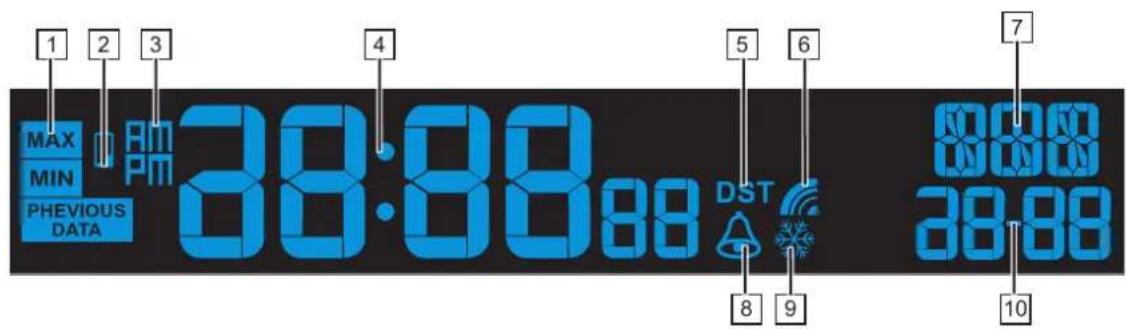
- illuminates when using the MAX/MIN button to show the maximum or minimum values on the display (*1).
- illuminates when the backup battery of the weather stations is nearly empty.
- am or pm indicator for the 12 hours clock format.
- display of the actual time.
- illuminates when daylight saving time is activated (for DCF77 reception).
- illuminates when the DCF clock radio signal is being received.
- display of the day.
- Illuminates when the alarm clock is set (see ALARM CLOCK).
- illuminates when the alarm clock is set to frost alert (see ALARM CLOCK).
- display of the date.
*1: By repeatedly pressing the MAX/MIN button, the display indicates the following data in order:
| max. outdoor temperature | min. outdoor temperature | max. outdoor humidity | min. outdoor humidity | max. indoor temperature |
| min. indoor temperature | max. indoor humidity | min. indoor humidity | max. wind chill | min. wind chill |
| max. heat index | min. heat index | max. indoor temperature dew point | min. indoor temperature dew point | max. air pressure |
| min. air pressure | max. average wind speed | max. wind gust | max. rainfall | |
The upper right corner of the display indicates on which day and time the concerned minimum or maximum value was measured.
Press and hold the MAX/MIN button for 2 seconds to erase this memory. Press any button to leave the min./max. screen.
3.2 Indoor temperature and humidity:
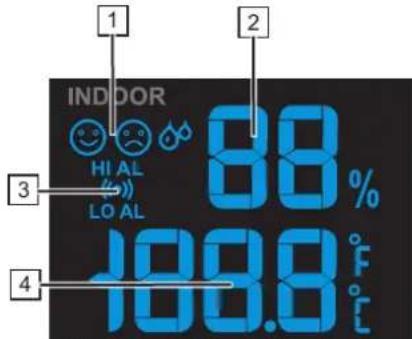
- comfort icon, this is a combination of temperature and humidity (^*2)
- indoor humidity
- Illuminates when the max. or min. alert is set
- indoor temperature
*2:
comfortable
comfort not OK (too cold / too dry)
comfort not OK (too warm / too humid), there's no comfort indication at temperatures
< 32^ (0^) or >140^ 60^
3.3 Outdoor temperature and humidity:
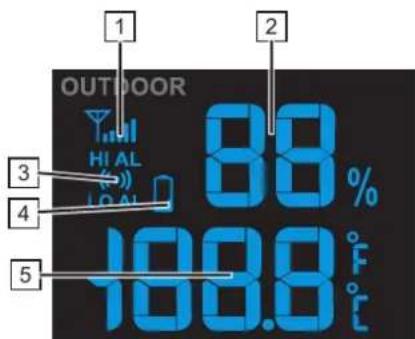
- indicates the connection of the radio signal with the outdoor sensor
- outdoor humidity
- Illuminates when the max. or min. alert is set
- illuminates when the batteries in the outdoor sensor are nearly empty
- outdoor temperature
3.4 Weather forecast:
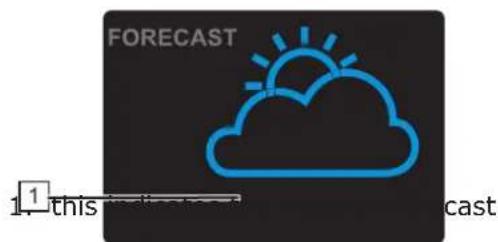

Remarks:
- a weather forecast based on air pressure has an accuracy of 70% to 75% ; please keep in mind that a correct weather forecast cannot be guaranteed
- the forecast is based on the upcoming 12 hours and may not represent the current situation
- the 'snow' forecast is based in air pressure combined with the temperature: when the forecast is actually 'rain', but the outdoor temperature is below 26^ (-3^) , then 'snow' is expected
3.5 Barometer (air pressure):
If this screen isn't visible, first briefly press the button
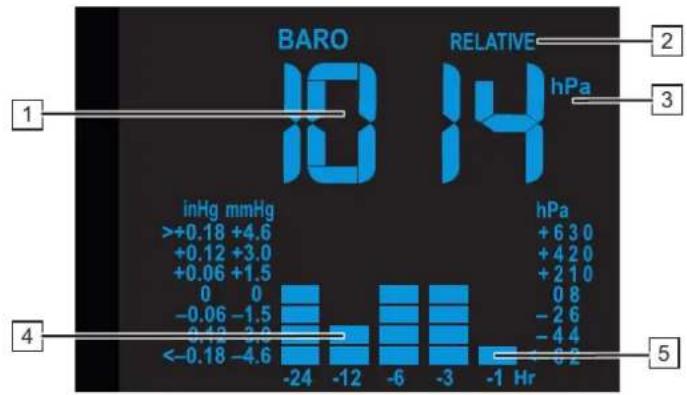
- actual air pressure
- indication of whether the relative or absolute (^*3) air pressure is displayed
- indication of whether the air pressure is displayed in hPa (hectopascal), in inHg (inch mercury pressure) or in mmHg (millimetre mercury pressure). (*4)
- and 5. this shows the trend of the air pressure over the past 24 hours
*3: The absolute air pressure shows the air pressure that's present independent from the altitude (take this value as reference). For the weather forecast, it's essential to measure the correct air pressure. Also when you're located e.g. 100 meters above sea level. This is called the relative air pressure. For every 8 meters the air pressure is reduced by 1 hPa. When you're not located in the mountains, there's no need to adjust the relative air pressure.
You may set the desired unit as follows:
- press and hold the button for 2 seconds
- use to select the desired unit
- briefly press the button (if the air pressure now starts flashing, press the button again)
Refer to the chapter "RELATIVE AIR PRESSURE" for adjusting the relative air pressure display in case you're using the weather station somewhere a lot higher than sea level.
*4: In the Benelux one uses the hectopascal notation. Before, the air pressure was sometimes also expressed in bars. 1 mbar equals 1 hPa.
Briefly press the button to switch between these notations.
3.6 Rain:
If this screen isn't visible, first briefly press the button
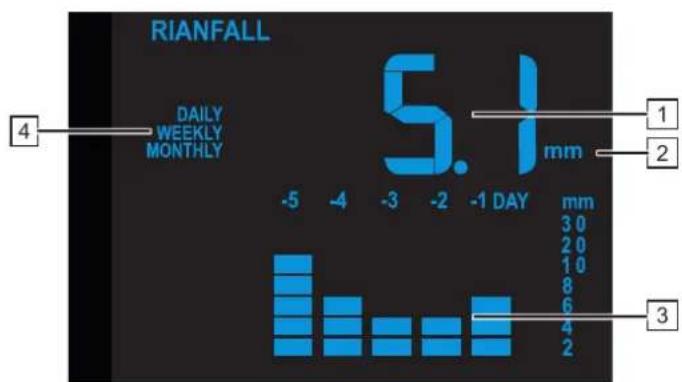
- amount of rainfall
- indication of whether the amount of rainfall is displayed in in (inch) or in mm (millimetre). (*5)
- this shows the trend of the rainfall over the past 5 days
- this shows over which period of time the indicated rainfall was measured (^*6)
- illuminates when the max. rain alert is set
*5: You may set the desired unit as follows:
- press and hold the button for 2 seconds
- use to select the desired unit
- briefly press the buttons
*6:
blank = : the rainfall during the past hour (this is updated every 6 minutes and shows the amount of rainfall during the past 60 minutes).
DAILY = : rainfall of today, calculated from midnight.
WEEKLY = : rainfall from the beginning of the week (Monday)
MONTHLY = : rainfall in this month
Briefly press the button to switch between these indications.
3.7 Wind (direction + speed):
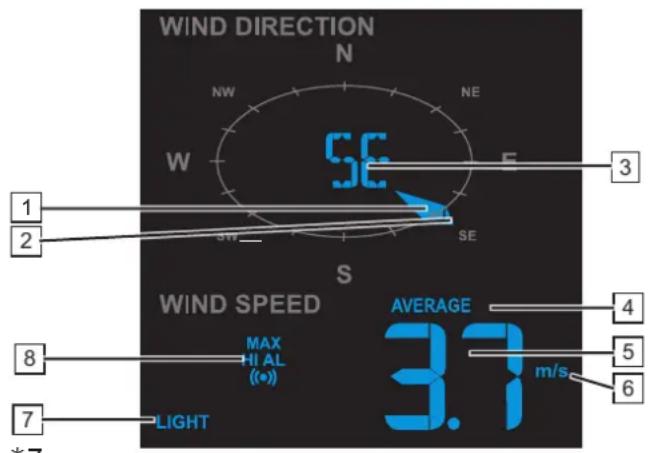
AVERAGE = average speed
GUST = wind gust
Briefly press the button to switch between these indications.
*9:
STORM = ≥ 55 mph (≥ 88 km/h)
STRONG = 26-54 mph (42-87 km/h)
MODERATE = 9 - 25 mph (14-41 km/h)
LIGHT = 2-8mph (3-13km/h)
3.8 Wind chill and dew temperature:
- actual wind direction
- measured wind directions (max. 6) in the last 5 minutes
- wind direction
- indication of whether the displayed wind speed is an average speed or a wind gust (*7)
- wind speed
- indication of whether the wind speed is displayed in mph (miles per hour), in m/s (meters per second), in km/h (kilometers per hour) or in Knots (1 KNOTS = 1.151 mph (1.852 km/h)) (*8)
- wind speed, expressed in vernacular (*9)
- Illuminates when the max. wind speed alert is set
*8:
You may set the desired unit as follows:
- press and hold the button for 2 seconds
- use V/ʌ to select the desired unit
-
briefly press the button
-
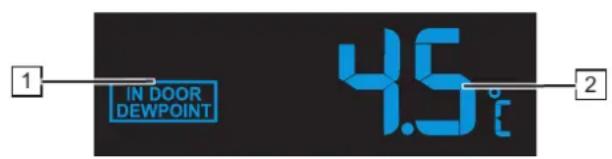
indication of whether this displayed temperature is the Wind chill, the Heat Index or the Indoor Dew Point (*10)
- temperature according to the indication shown under 1 (*11)
*10:
Wind chill: combination of the measured temperature and the wind speed
Heat index: combination of the measured temperature and the humidity
Dew point temperature, indoors: the temperature at which water vapour turns to water (mist, dew or frost). This temperature depends on the indoor temperature and the air pressure.
Briefly press the button to switch between these indications.
*11:
At HEAT INDEX: the alert level is:
< 27^ C (display 'LO') no danger
80^ - 90^ (27^ - 32^) pay attention (risk of exhaustion due to heat)
91°F - 105°F (33°C - 40°C) pay close attention (risk of dehydration due to heat)
106^ - 129^ 41^ - 54^) danger (increased risk of exhaustion due to heat)
≥ 130^ (≥ 55^) extreme danger (high risk of dehydration / stroke)
4. DISPLAY LIGHTING
To change the display colour:
The display colour of the weather station may be set in different ways.
Choose one of the fixed colours, the automatic colour change or a colour that depends on the outdoor temperature.
Fixed colour:
Press the "Rainbow" button. The current colour will change. Press repeatedly for the following colours:
| WHITEREDORANGEYELLOWGREENCYANBLUEPURPLE |
When the desired colour appears, stop repeatedly pressing the "Rainbow" button and the display colour will remain visible.
Press and hold the "Tune" button. The colour of the display will now change and scroll through 256 colours.
When the desired colour is reached, release the button.
Automatic colour change:
Press the "Loop" button. The display colour will now gradually change into all other colours. Press the "Loop" button to cancel this function.
Outdoor temperature based colour:
Press the "Outdoor temp" button.
The display will turn to a colour at a certain temperature.
The diagram below shows at which temperature which colour is displayed.
| starting tempera-ture | end tempera-ture | COLOURS | ||||
| RGB | ||||||
| 1≤ | -20°C 0 0 255 | |||||
| 2 | -19,9°C | -11,0°C | 0 | 102 | 255 | |
| 3 | -10,9°C | -5,0°C | 51 | 204 | 255 | |
| 4 | -4,9°C | -2,0°C | 0 | 255 | 255 | |
| 5 | -1,9°C | 1,0°C | 255 | 255 | 255 | |
| 6 | 1,1°C | 4,0°C | 153 | 255 | 51 | |
| 7 | 4,1°C | 8,0°C | 0 | 255 | 0 | |
| 8 | 8,1°C | 12,0°C | 255 | 255 | 0 | |
| 9 | 12,1°C | 16,0°C | 255 | 179 | 0 | |
| 10 | 16,1°C | 20,0°C | 255 | 128 | 0 | |
| 11 | 20,1°C | 24,0°C | 255 | 102 | 0 | |
| 12 | 24,1°C | 28,0°C | 255 | 51 | 0 | |
| 13 | 28,1°C | 32,0°C | 255 | 0 | 0 | |
| 14 | 32,1°C | 36,0°C | 255 | 128 | 128 | |
| 15 | 36,1°C | 40,0°C | 255 | 204 | 204 | |
| 16 | 40,1°C | 45,0°C | 204 | 0 | 255 | |
| 17 | ≥ 45,1°C | 230 | 230 | 230 | ||
Remark:
While synchronising the DCF time, the reception from the outdoor sensor will be briefly switched off. This happens at 2am, 8am, 2pm and 8pm and lasts for several minutes.
The colour of the display may change and no longer correspond to the diagram above. After several minutes, when the outdoor sensor is transmitting its data again, the colour will again correspond to the above diagram.
5. ALARM CLOCK
5.1 Introduction:
You may program an alarm (wake-up) time in the WS-5300.
You may then also enable a frost alert; when the outdoor temperature falls below -3^ , the wake-up signal will sound 30 minutes before the set wake-up time.
5.2 To set the alarm time:
- press and hold the button at the rear of the weather station for 2 seconds until the hour digits start flashing
- use V/ to set the hours and then briefly press ; the minute digits start flashing
- use V/ʌ to set the minutes and then briefly press ;the alarm time is now set
5.3 To set the alarm function:
- press the button once or several times to check the alarm or to switch it on/off Only "AL" appears: the time being displayed is the set alarm time, but the alarm itself is switched off "AL" + "illuminates: the alarm is switched on and the wake-up signal will sound at the set alarm time "AL" + "G + "appears: the frost alert is set
- release the button, after several seconds the actual time is displayed and the alarm status, according to the above description, remains visible
5.4 Operation:
- At the set time, the alarm will sound for up to 120 seconds
- For the first 4 seconds, the alarm signal has a slow rhythm
- Between 4 and 8 seconds, the rhythm of the alarm signal increases
- Between 9 and 12 seconds, the rhythm of the alarm signal increases further
After 13 seconds, the rhythm of the alarm signal is the fastest - Press the button to stop the alarm signal beforehand OR press the SNOOZE button on top of the weather station to enable the snooze function; the wake-alarm will then sound again after 5 minutes
The alarm is repeated daily unless you disable it according to the above instructions. - If you've enabled the frost alert 串 and the outdoor temperature falls below -3^, the wake-up signal will sound 30 minutes earlier than the time you've set. If the outdoor temperature is above -3^, the alarm will sound at the set time.
6. HISTORY
6.1 Introduction:
The weather station of the WS-5300 automatically stores all measurement data of the past 24 hours to allow you to check the trend of the past 24 hours at any moment
6.2 To view historic data:
- press the HISTORY button, the most recently stored measurement data is shown in the display including the time and date of the concerned data in the upper part of the display
- repeatedly press the HISTORY button to scroll the memory
The data of the indoor and outdoor temperature and humidity, air pressure, wind chill, wind speed and rainfall is saved in the history memory.
6.3 To delete historic data:
Press and hold the HISTORY button for 10 seconds to erase all measurement data up to that moment.
7. MAX/MIN MEMORY FUNCTION
7.1 Introduction:
For the following measurement you may view the maximum and minimum value measured. The display will indicate the time of the measured value. Functions indicated with "alarm" also have a Hi and/or Lo alarm. When the actual value becomes lower or higher than the set alert value, an alarm will sound while the orange LED at the front starts flashing.
Indoor temperature max/min alarm Hi and Lo
Indoor humidity max/min alarm Hi and Lo
Outdoor temperature max/min alarm Hi and Lo
Outdoor humidity max/min alarm Hi and Lo
Wind chill max/min
Wind heat index max/min
Indoor dew point max/min
air pressure max/min
Wind speed alarm Hi
Wind average max
Wind gust max
Rainfall max alarm Hi
7.2 To set the Hi-Lo limits:
- press the () button once or several times until the desired display starts flashing followed by 'HI AL' or 'LO AL' (if applicable)
- use / to set the limit
- briefly press the () button to save the value
- press the (▶) button again to skip to the following display or wait several seconds until the setup is ended automatically
7.3 To set the Hi-Lo alert function:
- press the (bullet) button once or several times until the desired display starts flashing followed by 'HI AL' or 'LO AL' (if applicable)
- briefly press the button to switch the alert on or off
7.4 Operation:
As soon as the set limit is exceeded, an alert will sound for up to 2 minutes while also the concerned display and the orange LED are flashing in the display. You may stop this alert by briefly pressing the "SNOOZE" or (bullet) button. The flashing stops automatically as soon as the concerned measurement value returns to within the set limits (or as soon as you adjust the limit or disable the alert function for that measurement).
8. RELATIVE AIR PRESSURE
8.1 Introduction:
If you're living in an area considerably higher than sea level, you'll experience a lower air pressure. To have the device calculate the weather forecast accurately, you must correct the air pressure for this altitude.
8.2 To set the relative air pressure:
- refer to the internet or your local authorities for information regarding your local air pressure
- press and hold the button for approx. 2 seconds until 'absolute' or 'relative' starts flashing
- use V/ʌ to ensure 'relative' is flashing
- briefly press, the air pressure display starts flashing
- use V/An to correct the display according to the information obtained via the internet or from your local authorities
- briefly press to save the air pressure value
9. TROUBLESHOOTING
| Problems Solutions | |
| No or strange measurement values from the rain sensor | Check the drainage hole in the rain meter. It must be open. Check whether the rain meter sits horizontally. |
| No or strange measurement values of the thermometer and for the humidity. | Check whether the air grooves are open. Check the sensor housing. |
| No or strange measuremeny values for wind speed and wind direction | Check the wind vane. Check the wind cups of the wind speed meter. |
| and _, (reception signal lost for 1 minute) | Move the weather station closer to the outdoor unit. Ensure that the weather station is not located near other electronic devices that may cause interference because of wireless communication (TVs, PCs, microwaves). When this doesn't resolve the problems, please reset both the indoor and outdoor unit. |
| and _, (reception signal lost for 1 hour) |
10. MAINTENANCE
10.1 Rain meter:
You may dismantle the rain meter as follows to remove any spiders or other insects:
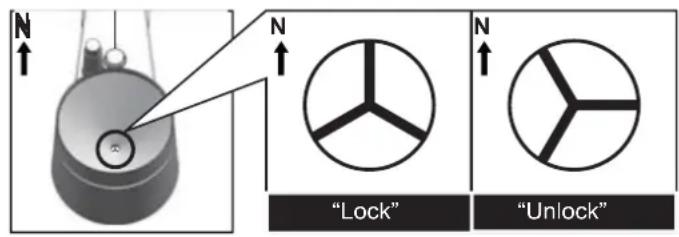
- Loosen the upper ring of the rain water collector by rotating it 30^ anti-clockwise until the star symbol at the bottom of the funnel is in the "Unlock" position. You may now remove this ring to have access to the interior of the rain meter.
- Use a soft brush with long bristles to clean the rain meter.
- Replace the ring onto the rain meter and fasten it by rotating it clockwise until the star sign at the bottom of the funnel is in the "Lock" position.
10.2 Outdoor temperature and humidity sensor:
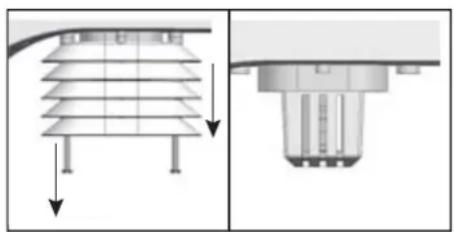
- Refer to the illustration and remove the wind guides from the outdoor sensor.
- Blow into the holder containing the temperature and humidity sensor until clean and use a soft brush with long bristles to clean the wind guides. DO NOT USE WATER.
- Replace and tighten the wind guides.
11. SPECIFICATIONS
Weather station:
dimensions: 136 × 168 × 24.5 ~mm
weight: 370gr (including batteries)
power supply: Button cell CR-2032
frequency: 868MHz
Outdoor sensor:
dimensions: 343.5 × 393.5 × 136 ~mm
weight: 734gr (including batteries)
power supply: 3x 1.5V AA battery
frequency: 868.288 MHz
transmitting power: - 9.1 dBm
transmission: every 12 seconds
Indoor temperature:
units of measurement: ^ C or ^
display range: -40^ to 70^ (-40°F to 158°F) ('LO' at < -40^ , 'Hi' at >70^
effective range: -10°C to 50°C (14°F to 122°F)
resolution: 0.1^ or 0.1^
accuracy: ±1°C or 2°F (at 25°C (77°F)
memory display: history of the past 24 hours, MIN/MAX temperature with time and date
alert: HI/LO alert
Outdoor temperature:
units of measurement: ^ C or ^
display range: -40^ to 80^ (-40°F to 176°F) ('LO' at < -40^ , 'Hi' at >80^
effective range: -40^ to 60^ (-40^ to 140^)
resolution: 0.1^ or 0.1^
accuracy: ± 0.5^ or 1^ (at 25^ 77^
memory display: history of the past 24 hours, MIN/MAX temperature with time and date
alert: HI/LO alert
Indoor humidity:
display range: 20% to 90% ('LO' at < 20% 'Hi' at >90% ) (at temperatures between 0^ and 60^)
effective range: 20% to 90% humidity
resolution: 1 %
accuracy: ±5% at 25°C (77°F)
memory display: history of the past 24 hours, MIN/MAX humidity with time and date
alert: HI/LO alert
Outdoor humidity:
display range: 1% to 99% ('LO' at < 1% 'Hi' at >99%
effective range: 1% to 99% humidity
resolution: 1%
accuracy: ±3% at 25°C (77°F)
memory display: history of the past 24 hours, MIN/MAX humidity with time and date
alert: HI/LO alert
Air pressure:
units of measurement: hPa, inHg, mmHg
display range: 540 to 1100hPa / 15.95 to 32.48 inHg / 405 to 825 mmHg
resolution: 1hPa, 0.01inHg, 0.1mmHg
accuracy: (540-699hPa ±9hPa at 0-50°C) / (700hPa-1100hPa ±4hPa at 0-50°C)
(15.95-20.66inHg ±0.24inHg at 32-122°F) / (20.67-32.48inHg ±0.12inHg at 32-122°F)
(405-524mmHg ±6mmHg at 0-50°C) / (525-825mmHg ±3mmHg at 0-50°C)
weather forecast: sunny, partially cloudy, cloudy, rain, storm, snow
memory display: history of the past 24 hours, MIN/MAX air pressure with time and date
Wind speed:
units of measurement: mph, m/s, km/h, knots
display range: 0 112mph 50m / s 180km / h ,97knots
resolution: 0.1mph or 0.1knot or 0.1m/s
accuracy: < 5m/s : ± 0.5m/s ; >5m/s : ± 6%
display units: average, gust
memory display: history of the past 24 hours, MAX wind gust with direction, time and date alert: HI alert (for average and for wind gust)
Wind direction:
number of wind directions:16
Rainfall:
units of measurement: mm, inch
display range: 0-9999mm (0~393.7inch)
resolution: 0.4mm (0.0157 in)
accuracy: ±7%
display units: actual rainfall, this day, this week, this month
memory display: history of the past 24 hours,
alert: HI alert
DCF radio controlled clock:
synchronization: automatic (2am, 8am, 2pm and 8pm) or off
display: HH:MM:SS / day and date
clock format: 12 hours AM/PM or 24 hours
Calendar: DD/MM
Day of the week in 5 languages: EN, FR, DE, ES, IT
Time signal: DCF
Time zone: -23 to +23 hours
DST (daylight saving time): automatic or off
HH = hours
MM = minutes
SS = seconds
DD/MM = date/month
EN = English
FR = French
DE = German
ES = Spanish
IT = Italian
12. Declaration of Conformity
Product conforms to the Directive 2014/53/EU.
This declaration is available on: http://DOC.hesdo.com/WS-5300-DoC.pdf
Frequency: 868.288 MHz
Transmitting power: -9.1 dBm
Alecto®
ServiceHelp



WWW.ALECTO.NL
SERVICE@ALECTO.NL

Hesdo,Australielaan 1
5232 BB, 's-Hertogenbosch
The Netherlands
v3.0