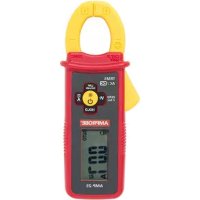
AMP25 - Multimeter Amprobe - Free user manual and instructions
Find the device manual for free AMP25 Amprobe in PDF.


Frequently Asked Questions - AMP25 Amprobe
User questions about AMP25 Amprobe
0 question about this device. Answer the ones you know or ask your own.
Ask a new question about this device
Download the instructions for your Multimeter in PDF format for free! Find your manual AMP25 - Amprobe and take your electronic device back in hand. On this page are published all the documents necessary for the use of your device. AMP25 by Amprobe.
USER MANUAL AMP25 Amprobe
Limited Warranty and Limitation of Liability
Your Amprobe product will be free from defects in material and workmanship for one year from the date of purchase unless local laws require otherwise. This warranty does not cover fuses, disposable batteries or damage from accident, neglect, misuse, alteration, contamination, or abnormal conditions of operation or handling. Resellers are not authorized to extend any other warranty on the behalf of Amprobe. To obtain service during the warranty period, return the product with proof of purchase to an authorized Amprobe Service Center or to an Amprobe dealer or distributor. See Repair Section for details. THIS WARRANTY IS YOUR ONLY REMEDY. ALL OTHER WARRANTIES - WHETHER EXPRESS, IMPLIED OR STATUTORY - INCLUDING IMPLIED WARRANTIES OF FITNESS FOR A PARTICULAR PURPOSE OR MERCHANTABILITY, ARE HEREBY DISCLAIMED. MANUFACTURER SHALL NOT BE LIABLE FOR ANY SPECIAL, INDIRECT, INCIDENTAL OR CONSEQUENTIAL DAMAGES OR LOSSES, ARISING FROM ANY CAUSE OR THEORY. Since some states or countries do not allow the exclusion or limitation of an implied warranty or of incidental or consequential damages, this limitation of liability may not apply to you.
Repair
All Amprobe returned for warranty or non-warranty repair or for calibration should be accompanied by the following: your name, company's name, address, telephone number, and proof of purchase. Additionally, please include a brief description of the problem or the service requested and include the test leads with the meter. Non-warranty repair or replacement charges should be remitted in the form of a check, a money order, credit card with expiration date, or a purchase order made payable to Amprobe.
In-Warranty Repairs and Replacement – All Countries
Please read the warranty statement and check your battery before requesting repair. During the warranty period, any defective test tool can be returned to your Amprobe distributor for an exchange for the same or like product. Please check the "Where to Buy" section on amprobe.com for a list of distributors near you. Additionally, in the United States and Canada, in-warranty repair and replacement units can also be sent to an Amprobe Service Center (see address below).
Non-warranty Repairs and Replacement – United States and Canada
Non-warranty repairs in the United States and Canada should be sent to an Amprobe Service Center. Call Amprobe or inquire at your point of purchase for current repair and replacement rates.
USA: Canada:
Amprobe Amprobe
Everett, WA 98203 Mississauga, ON L4Z 1X9
Tel: 877-AMPROBE (267-7623) Tel: 905-890-7600
Non-Warranty Repairs and Replacement – Europe
European non-warranty units can be replaced by your Beha-Amprobe distributor for a nominal charge. Please check the "Where to Buy" section on beha-amprobe.com for a list of distributors near you.
Beha-Amprobe
Division and reg. trademark of Fluke Corp. (USA)
Germany* United Kingdom The Netherlands - Headquarters**
In den Engematten 14 52 Hurricane Way Science Park Eindhoven 5110
79286 Glottertal Norwich, Norfolk 5692 EC Son
Germany NR6 6JB United Kingdom The Netherlands
Tel.: +49 (0) 7684 8009 - 0 Tel.: +44 (0) 1603 25 6662 Tel.: +31 (0) 40 267 51 00
beha-amprobe.de
beha-amprobe.com
beha-amprobe.com
*(Correspondence only – no repair or replacement available from this address. European customers please contact your distributor.)
**single contact address in EEA Fluke Europe BV
CONTENTS
SYMBOL....3
SAFETY INFORMATION .... 4
UNPACKING AND INSPECTION 6
MEASUREMENTS......6
Measuring AC and DC Current 8
DC A ZERO....9
Low Pass Filter....9
Inrush Current....9
Non-Contact Voltage Detection 10
Data Hold 11
Auto Power Off 11
SPECIFICATIONS....12
ELECTRICAL SPECIFICATIONS ....14
MAINTENANCE AND REPAIR 16
BATTERY REPLACEMENT....17
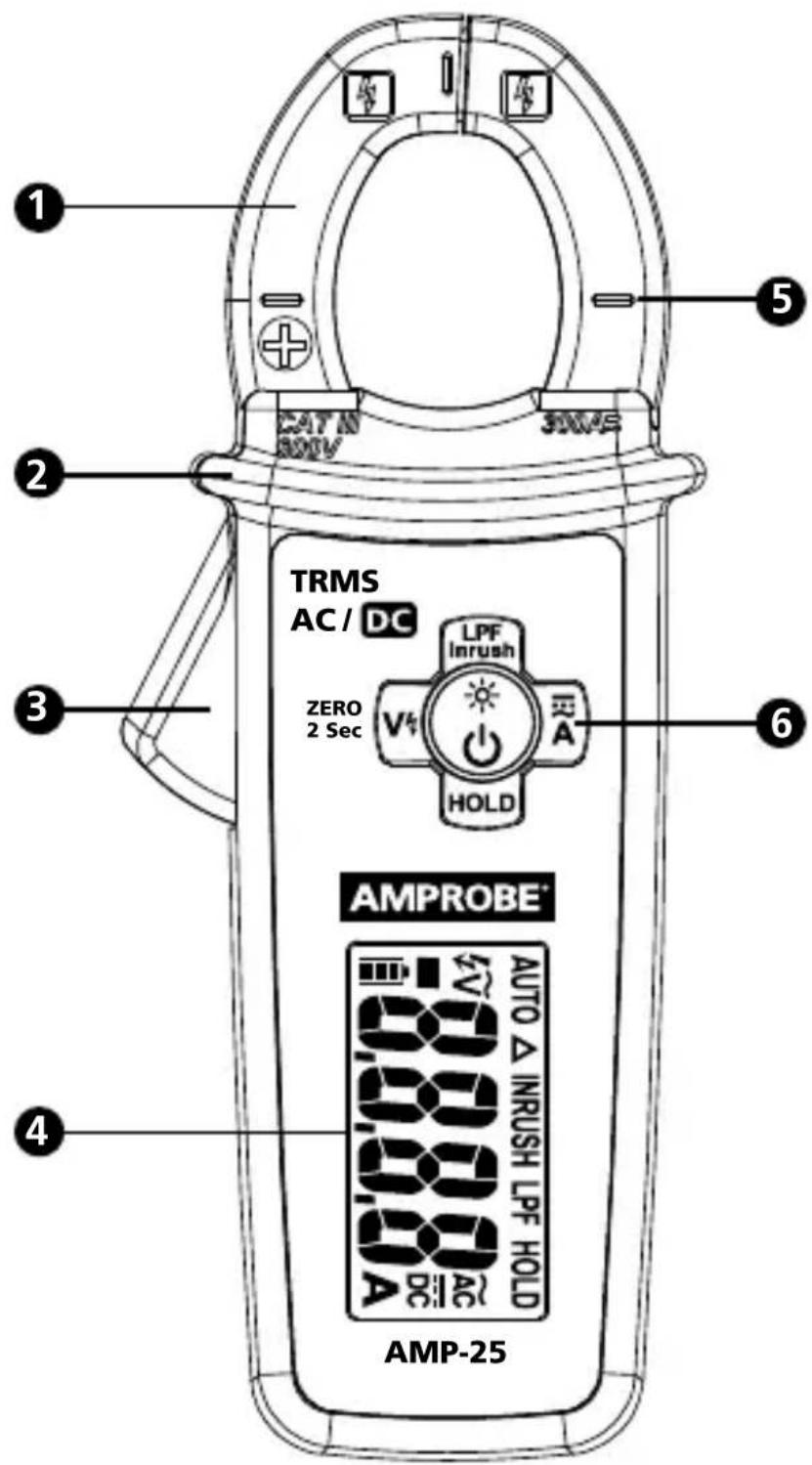
text_image
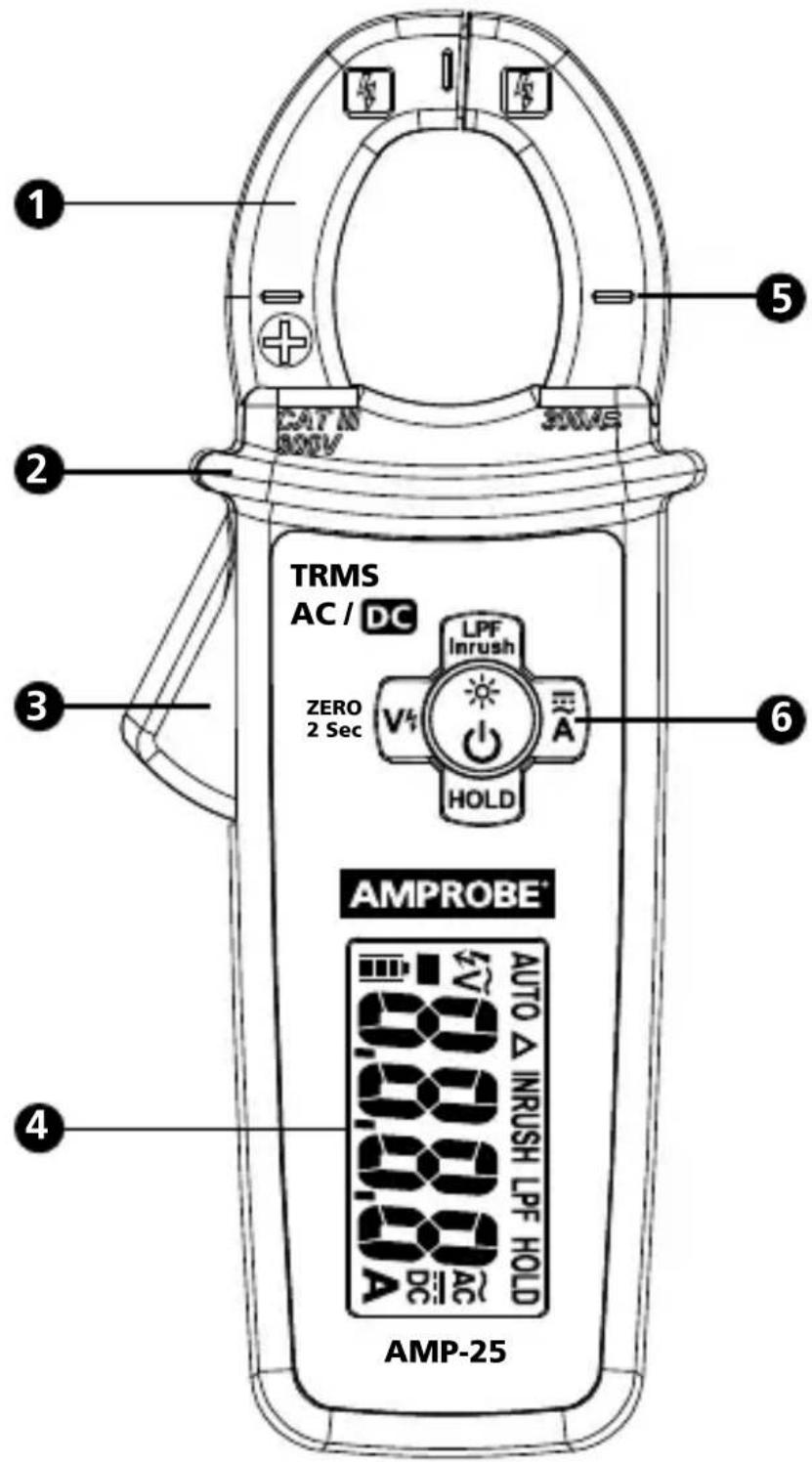
1 CAT IN 300V 300A 2 TRMS AC / DC LPF Inrush ZERO 2 Sec V4 A HOLD 6 AMPROBE® AUTO △ INRUSH LPF HOLD 80.00 A DC AC AMP-251 Jaw
2 Hand Guard
3 Jaw Trigger
4 LCD Display
5 Indicator of the Jaw Center for Current Measurement
6 Backlight / Flashlight & Function Buttons
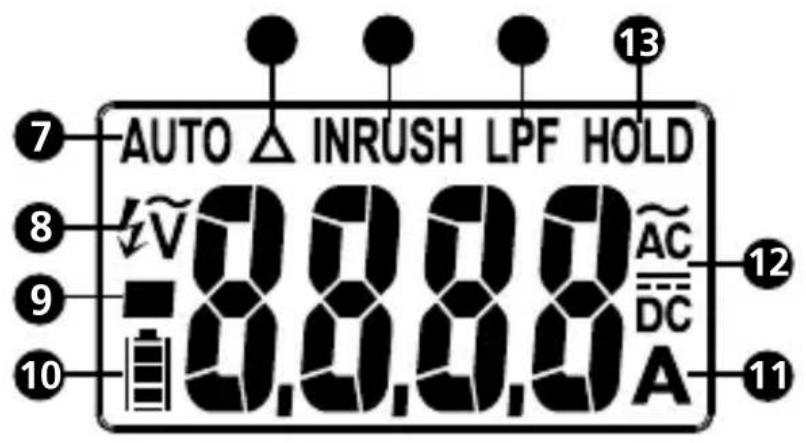
text_image
AUTO INRUSH LPF HOLD AV 0.0.0.0 AC DC A 13 7 8 9 10 12 117 AUTO: Auto AC/DC current measurement mode active
8 4V Non-Contact Voltage mode active
9 ■ Negative reading
10 Battery status indicator
11 A: Amps
12 Alternating Current (AC)
DC Direct Current (DC)
13 HOLD: Data hold
14 LPF: Low Pass Filter mode active
15 INRUSH: Inrush current mode active
16 △ Relative ZERO is active
SYMBOLS
 | Application and removal from hazardous live conductors permitted |
 | Caution! Risk of electric shock |
 | Caution! Refer to the explanation in this manual |
 | The equipment is protected by double insulation or reinforced insulation |
 | Earth (Ground) |
| CAT III | Overvoltage Category III |
| ~ | Alternating Current (AC) |
| Direct Current (DC) | |
 | Battery |
 | Canadian Standards Association (NRTL/C) |
 | Complies with European Directives |
 | Conforms to relevant Australian standards |
 | Do not dispose this product as unsorted municipal waste. Contact aqualified recycler |
SAFETY INFORMATION
The Meter complies with:
- UL/IEC/EN 61010-1, CAN/CSA C22.2 No. 61010-1-12, Pollution Degree 2, Measurement Category III 600 V
• IEC/EN 61010-2-032, CAN/CSA-C22.2 No. 61010-2-032-12
• EMC IEC/EN 61326-1
Measurement Category III (CAT III) refers to measurements of hard-wired equipment in fixed installations, distribution boards, and circuit breakers. Also includes cables, bus bars, junction boxes, switches, socket outlets in the fixed installation, and stationary motors with permanent connections to fixed installations.
CENELEC Directives
The instruments conform to CENELEC Low-voltage directive 2006/95/EC and Electromagnetic compatibility directive 2004/108/EC.
⚠️ Warning: Read Before Using
To avoid possible electric shock or personal injury:
- Use the Meter only as specified in this manual or the protection provided by the Meter might be impaired.
- Avoid working alone so assistance can be rendered.
- Do not use the Meter in wet or dirty environments.
- Do not use the Meter if it appears damaged. Inspect the Meter before use. Look for cracks or missing plastic. Pay particular attention to the insulation around the connectors.
- Have the Meter serviced only by qualified service personnel.
- Use extreme caution when working around bare conductors or bus bars. Contact with the conductor could result in electric shock.
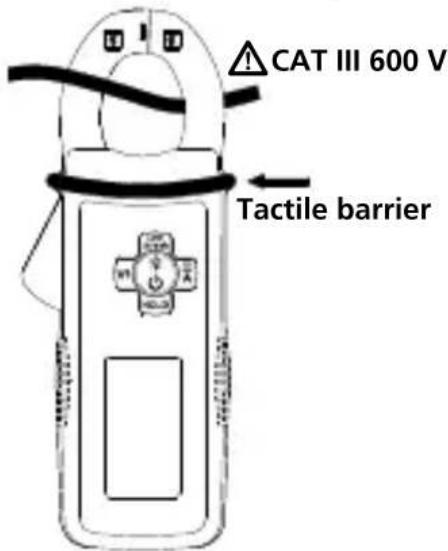
- Do not hold the Meter anywhere beyond the tactile barrier.
- When measuring current, center the conductor in the clamp.
- Never operate the Meter with the battery cover removed or the case open.
- Never remove the battery cover or open the case of the Meter without first removing the jaws from a live conductor.
- Use caution when working with voltages above 30 V AC rms, 42 V AC peak, or 60 V DC. These voltages pose a shock hazard.
- Do not attempt to measure any voltage that might exceed the maximum range of the Meter.
- Use the proper function for your measurements.
- Do not operate the Meter around explosive gas, vapor, or dust.
- Use only 1.5 V LR44 batteries, properly installed in the Meter case, to power the Meter.
- To avoid false readings that can lead to electrical shock and injury, replace the battery as soon as the low battery indicator (☐) appears. Check Meter operation on a known source before and after use.
- When servicing, use only specified replacement parts.
- Adhere to local and national safety codes. Individual protective equipment must be used to prevent shock and arc blast injury where hazardous live conductors are exposed.
Your shipping carton should include:
1 Clamp meter
2 1.5 V LR44 batteries
1 Carrying case
1 User Manual
If any of these items are damaged or missing, return the complete package to the place of purchase for an exchange.
MEASUREMENTS
Warning
To avoid possible electric shock or personal injury:
• To avoid electric shock or personal injury:
- When measuring current, center the conductor in the clamp.
- Keep fingers behind Tactile Barrier.
- Use the proper function for measurements.
| Button Description | |||
 | Press button to turn ON the meter (the default is auto AC/DC A mode). Press > one second to turn OFF. | ||
 | 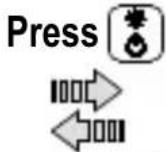 |  | |
| OFF | Press >1 Sec | ||
 | |||
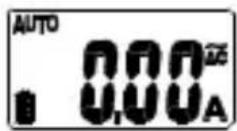 |  | 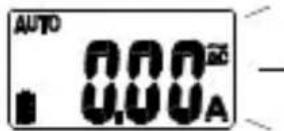 | |
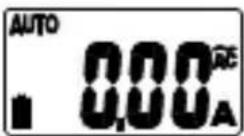
| A | Press button to select AC A or DC A mode.Press button > one second to return to AUTO AC/DC A mode. |
| LPF Inrush | Press Inrush to enter Low Pass Filter mode (LPF is displayed). Press a second time to enter Inrush mode (INRUSH is displayed). Press again to exit the function. |
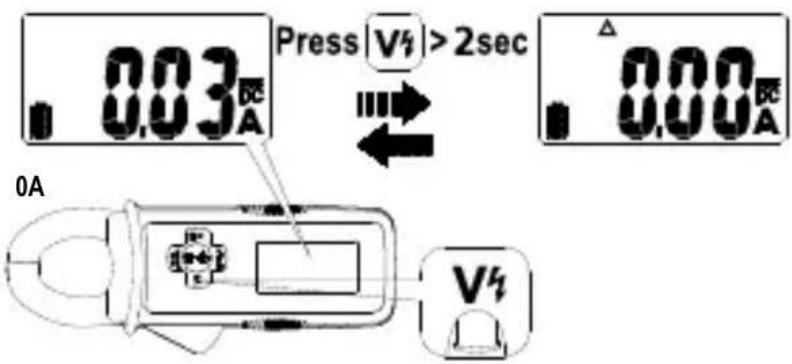
| V4 / ZERO 2 Sec | Press V button to activate non-contact voltage mode. Press a second time to exit non-contact voltage mode.Press V button > two seconds to clear DC A reading from the display (Δ is displayed) and establish a baseline for DC A. Press V button > two seconds again to exit this mode.Caution1. ZERO mode can be activated in DC A and DC A of Auto DC/AC A mode only.2. When ZERO is activated (symbol Δ is displayed in DC A and Auto DC A mode only), the offset residual value will not be reset until the Meter is turned OFF.3. ZERO can be activated if residual value < 6 A in DC A mode, < 6 A DC and <0.1 A AC in Auto DC/AC A mode. |
| HOLD Press | HOLD button to freeze the display reading (HOLD is displayed) and releases the reading when pressed a second time.WarningTo avoid possible electric shock or personal injury, when Display HOLD is activated, be aware that the display will not change when you apply a different current. |
Measuring AC and DC Current
Warning
To avoid electrical shock and injury:
- Do not hold the Meter anywhere beyond the tactile barrier.
- Do not use the Meter to measure currents above the maximum rated frequency (400Hz). Circulating currents may cause the magnetic circuits of the Jaws reach hazardous excessive temperatures.
To measure AC or DC current:
-
Switch on the Meter by pressing ⚙️ button, the default is auto AC/DC A detection mode (AUTO is displayed). Press ≡ button to choose AC A or DC A. The display reflects the chosen function mode.
-
Open the clamp by pressing the jaw release and insert the conductor to be measured into the clamp. Ensure the jaws are firmly closed.
-
Close the clamp and center the conductor using the jaw alignment marks.
-
View the current reading on the display.
Caution
During current measurement keep the jaws away from other current carrying devices such as transformers, motors or energized wires, as they may negatively influence accuracy of the measurement.
text_image
CAT III 600 V Tactile barrier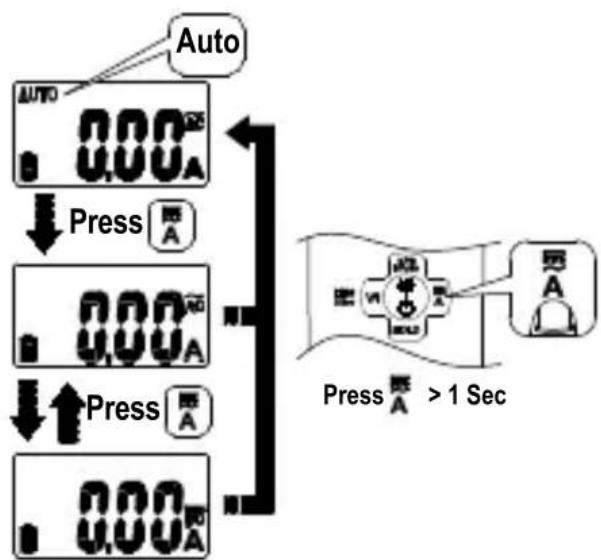
flowchart
graph TD
    A["Auto"] --> B["Press"]
    B --> C["Press"]
    C --> D["Press"]
    D --> E["Press"]
    style A fill:#f9f,stroke:#333
    style B fill:#ccf,stroke:#333
    style C fill:#ccf,stroke:#333
    style D fill:#ccf,stroke:#333
    style E fill:#cfc,stroke:#333
DC A ZERO (DC A and Auto DC/AC A mode)
Press V/1 ZERO button > two second to clear DC A reading from the display and establish a baseline for DC A.
text_image
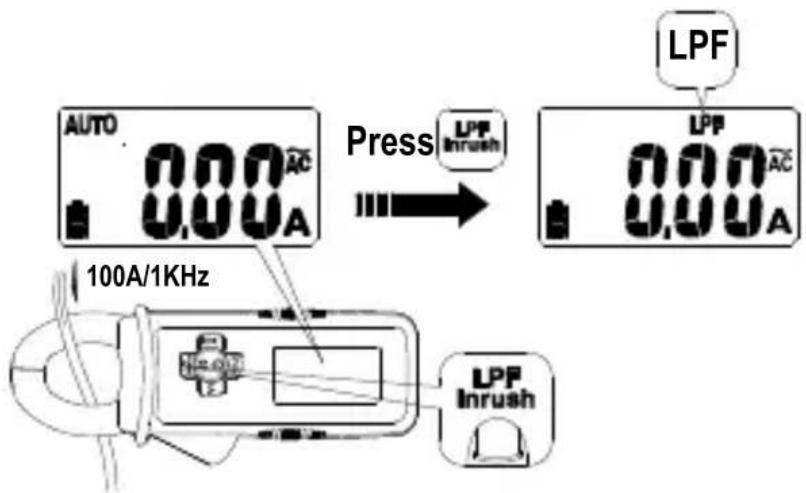
Press |V4| >2sec 0A V4 0.03 A 0.00 ALow Pass Filter
Press In button to activate Low Pass Filter mode ("LPF" is displayed).
Press a second time, the Meter goes into Inrush mode (INRUSH is displayed). Press again to exit the function.
text_image
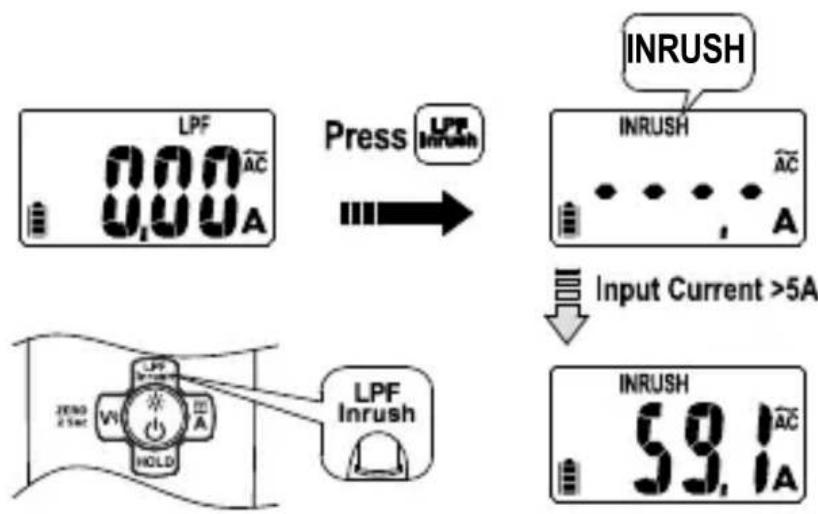
AUTO 0.00A Press LPP Inrush LPF 0.00A 100A/1KHz LPF InrushInrush Current
Press Inburst to enter Low Pass Filter mode (LPF is displayed) first. Press a second time to enter Inrush mode ("INRUSH" is displayed). Press again to exit the function.
The Meter calculates the RMS value for 100ms when detecting a current above 5A.
text_image
LPF 000 AC 000 A Press Inrush INRUSH INRUSH AC A Input Current >5A LPF Inrush INRUSH 59.1 AC ANon-Contact Voltage Detection
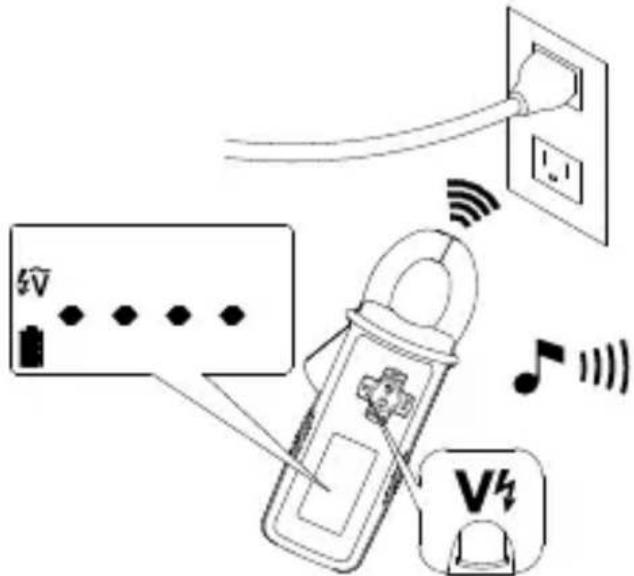
- Press V button to activate non-contact voltage mode ( V is displayed).
- The voltage detection antenna is located along the top end of the stationary clamp jaw for detecting electric field surrounding energized conductors
- Detected electric field signal strength is indicated by a series of bar-graph segments on the display and beeper. The stronger the electric field detected, the more bar-graph segments are displayed and more intense beep-sound is generated.
text_image
Diagram illustrating wireless connections between a power outlet, switch, and a device with signal icons and labelsData Hold
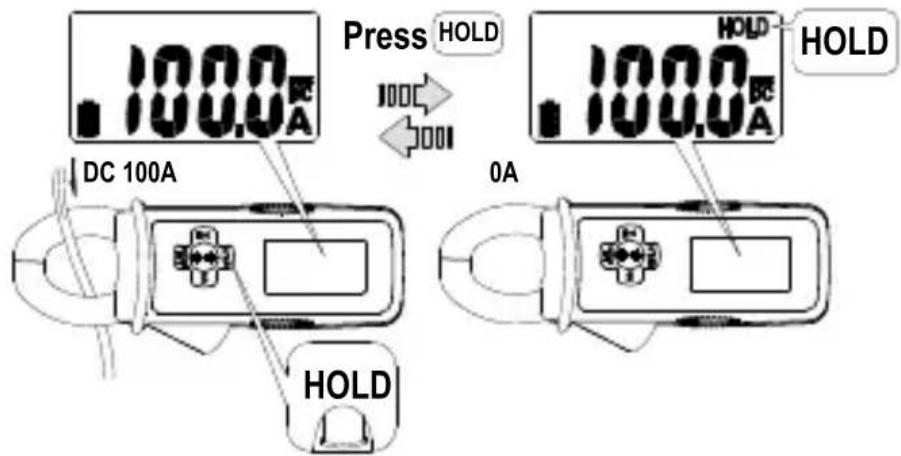
Press HOLD button to freeze the display reading (HOLD is displayed) and releases the reading when pressed a second time.
Warning
To avoid possible electric shock or personal injury, when Display HOLD is activated, be aware that the display will not change when you apply a different current.
text_image
Press HOLD DC 100A 0A HOLD HOLD HOLDNote: During data hold, the display flashes if the measured signal is 50 counts larger than the display reading. The Meter cannot detect across the AC and DC current.
Auto Power Off
The Meter turns off if there is no button pushed operation for 20 minutes.
To turn the Meter back on, press ⏻ button and release to restart the Meter. The Meter goes into default mode (auto AC/DC A) when the Meter is turned back ON.
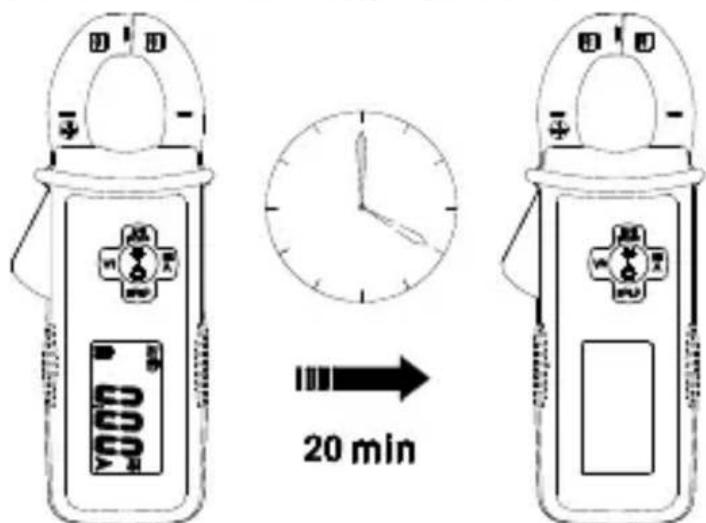
text_image
20 minDisable auto power off:
Press and hold V4 button while pressing button.
"RoFF" is displayed, then release V4 and button. The meter is turned ON and goes into default measurement function (auto AC/DC A).
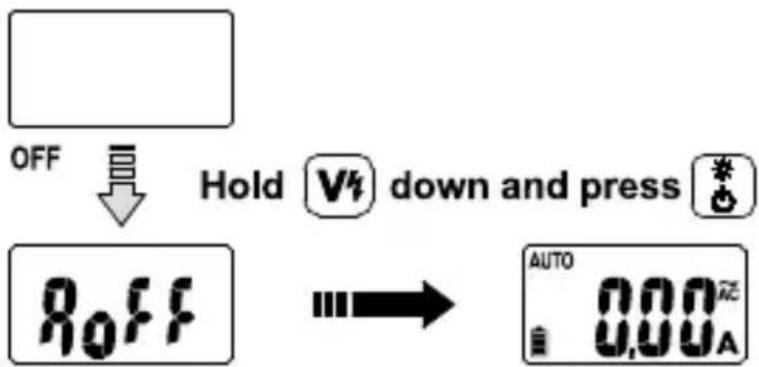
text_image
OFF Hold V4 down and press * OFF AUTO 0.00AThe auto power off mode resumes back when the Meter is OFF and is turned ON again.
SPECIFICATIONS
| Display 6000 counts | |
| Sensing True-RMS | |
| Polarity Automatic | |
| Over-Range Display | “OL” or “-OL” |
| Update Rate 2 | times per second nominal |
| Operating Temperature | 32 °F to 122 °F (0 °C to 50 °C) |
| Relative Humidity | Non-condensing,32 °F to 86 °F (0 °C to 30 °C) ≤ 80%,>86 °F to 104 °F (>30 °C to 40 °C) ≤ 75%,>104 °F to 122 °F (>40 °C to 50 °C) ≤ 45% |
| Storage Temperature | -4 °F to 140 °F (-20 °C to 60 °C), 0% to 80% R.H. (with battery removed) |
| Pollution Degree | 2 |
| Operating Altitude | ≤ 2000 m |
| Temperature Coefficient | nominal 0.2 x (specified accuracy)/ °C, <18°C, >28°C) |
| Transient Protection | 6.0 kV (1.2/50 μs surge) |
| E.M.C. Meets IEC/EN 61326-1 | |
| Safety Compliance | IEC/EN 61010-1, IEC/EN 61010-2-032 |
| Agency Approval |  [SHA6] [SHA6]  |
| Shock Vibration | MIL-PRF-28800F for A class 2 instrument |
| Drop-Proof 4 feet (120 cm) | |
| Power Supply | Two 1.5V LR44 size battery |
| Battery Life 20 hours | |
| Low Battery Indication |  |
| Auto Power Off | Idle for 20 minutes |
| Dimension (L x W x H) | 5.8 x 2.4x 1.3 in (147 x 60 x 32 mm) |
| Weight 0.31 lb | (140 g) |
| Jaw Opening & Conductor Diameter | 0.98 in (25 mm) max. |
Accuracy is given as ±(% of reading + counts of least significant digit) at 23^ ± 5^ , with relative humidity less than 80% R.H., AC A specifications are ac coupled, true R.M.S. The crest factor may be up to 3.0 as 4000 counts.
For non-sinusoidal waveforms, additional accuracy by Crest Factor (C.F.):
Add 3.0% for C.F. 1.0 \~ 2.0
Add 5.0% for C.F. 2.0 \~ 2.5
Add 7.0% for C.F. 2.5 \~ 3.0
Position Error of Clamp: ±1.5% of display reading
AC Current
| Range 60.00 A 300.0 A | ||
| Resolution 0.01 A | 0.1 A | |
| Accuracy50 Hz to 100 Hz | ± (1.5 % + 25 LSD)at < 3 A± (1.5 % + 5 LSD)at ≥ 3 A | ± (1.5 % + 5 LSD) |
| Accuracy100 Hz to 400 Hz | ± (2.5 % + 25 LSD)at < 3 A± (2.5 % + 5 LSD)at ≥ 3 A | ± (2.5 % + 5 LSD) |
Frequency Response: 50 to 400Hz (Sine Wave)
DC Current
| Range 60.00 A | 1) | 300.0 A |
| Resolution 0.01 A | 0.1 A | |
| Accuracy ± (1.5 % + 10 LSD) | 2) | ± (1.5 % + 5 LSD) |
1) There are less than 0.3A variations as measuring in different directions.
2) Add 10 LSD to accuracy in Auto AC / DC A mode.
Low Pass Filter
| Range 60.00 A 30 | 0.0 A | |
| Resolution 0.01 A | 0.1 A | |
| Accuracy50 Hz to 60 Hz | ± (3.5 % + 25 LSD)at < 3 A± (3.5 % + 5 LSD)at ≥ 3 A | ± (3.5 % + 5 LSD) |
Cut-off Frequency (-3dB): Approx. 160 Hz
Attenuation Characteristic: Approx. -24 dB/Octave
Inrush Current
| Range 300.0 A | |
| Resolution 0.1 A |
CIntegration Time: 100 ms
Trigger Current: 5.0 A
Non-Contact Voltage Detection
Voltage range: 80 V to 600 V, 50 Hz to 60 Hz
Indication: bar-graph segments and audible beep tones
proportional to the field strength
Detection frequency: 50/60 Hz
Detection antenna: inside the top side of the stationary jaw
If the Meter fails to operate, check battery, test leads, etc., and replace as necessary.
Double check the following:
- Replace the fuse or battery if the meter does not work.
- Review the operating instructions for possible mistakes in operating procedure.
Except for the replacement of the battery, repair of the meter should be performed only by a Factory Authorized Service Center or by other qualified instrument service personnel.
The front panel and case can be cleaned with a mild solution of detergent and water. Apply sparingly with a soft cloth and allow to dry completely before using. Do not use aromatic hydrocarbons, gasoline or chlorinated solvents for cleaning.
When battery voltage drops below the value required for proper operation, the battery symbol (☐) appears.
Warning
To avoid shock, injury, or damage to the Meter, disconnect test leads before opening case.
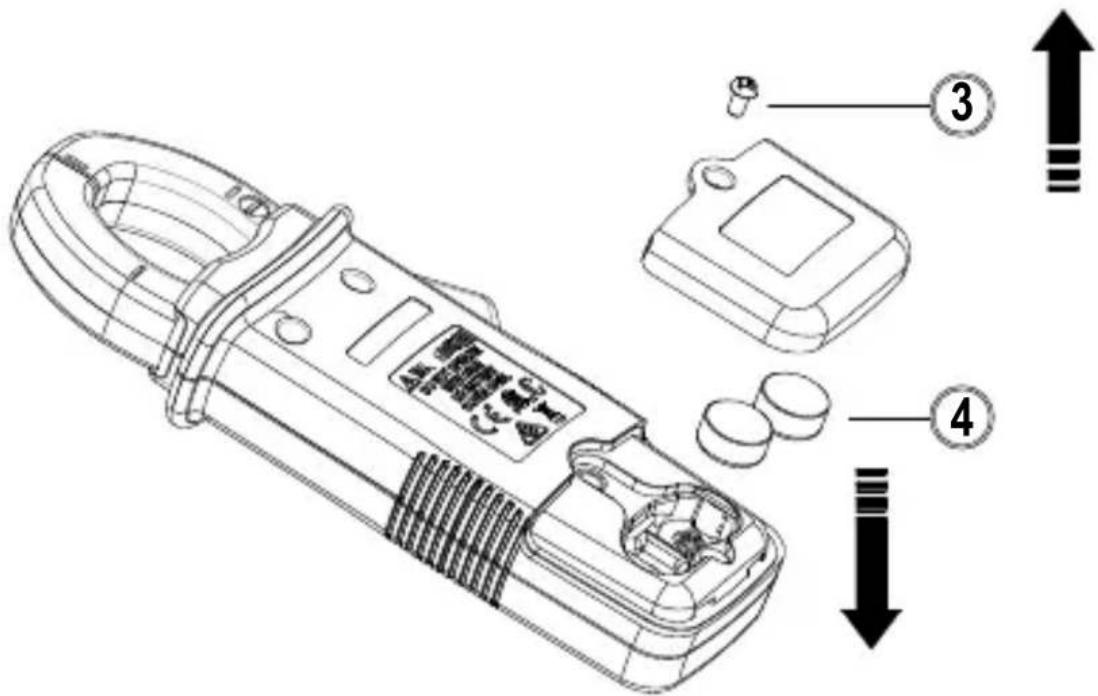
Replacing BATTERY follow below steps:
- Remove the Meter from measuring circuit.
- Turn the Meter to OFF position.
- Remove the screw from the battery cover and open the battery cover
- Remove the batteries and replace with two 1.5 V batteries (LR44). Observe correct polarity when installing the batteries.
- Put the battery cover back and re-fasten the screw. Battery: 2 x 1.5 V (LR44)
text_image
Technical diagram of a handheld device with labeled parts and directional arrows indicating assembly or operation.AMP-25 Mini-Pince
Guide d'utilisation
REEMPLACEMENT DES PILES....17
text_image
1 CAT IN 300V 300MS 2 TRMS AC / DC LPF Inrush ZERO 2 Sec V½ A HOLD 6 AMPROBE® AUTO △ INRUSH LPF HOLD 80.00.00 AC DC AMP-25 4text_image
Diagram illustrating wireless connections to a power outlet, showing signal transmission via a clamp and display with icons for V̅V and V4.text_image
Press HOLD DC 100A 0A HOLD HOLD HOLDtext_image
Technical diagram of a handheld device with labeled parts and directional arrows indicating assembly or operation.AMP-25 Minipinza amperimétrica
Manual de usuario
DC A ZERO (modo DC A (CC A) y Auto DC/AC A (CC/CA A Auto)
text_image
Diagram illustrating wireless connections between a power outlet, switch, and a device with signal icons and labelstext_image
Press HOLD DC 100A 0A HOLD HOLD HOLDtext_image
Technical diagram of a handheld device with labeled parts and directional arrows indicating assembly or installation steps.Visit amprobe.com for
- Catalog
- Application notes
• Product specifications - User manuals
Amprobe®
amprobe.com Division of Fluke Corp. 6920 Seaway Blvd. M/S 143F Everett, WA 98203 USA Tel: 877-AMPROBE (267-7623)
Beha-Amprobe®
beha-amprobe.com c/o Fluke Europe BV Science Park Eindhoven 5110 NL-5692 EC Son Tel.: +49 (0) 7684 8009 - 0