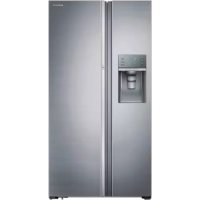
RH77H90507F - Fridge SAMSUNG - Free user manual and instructions
Find the device manual for free RH77H90507F SAMSUNG in PDF.


Frequently Asked Questions - RH77H90507F SAMSUNG
User questions about RH77H90507F SAMSUNG
0 question about this device. Answer the ones you know or ask your own.
Ask a new question about this device
Download the instructions for your Fridge in PDF format for free! Find your manual RH77H90507F - SAMSUNG and take your electronic device back in hand. On this page are published all the documents necessary for the use of your device. RH77H90507F by SAMSUNG.
USER MANUAL RH77H90507F SAMSUNG
Refrigeratoruser manual
imagine the possibilities
Thank you for purchasing this Samsung product.
Free Standing Appliance
SAMSUNG
Contents
SAFETY INFORMATION 2
SETTING UP YOUR REFRIGERATOR 15
- Before operating the appliance, please read this manual thoroughly and retain it in a safe place near the appliance for your future reference.
- Use this appliance only for its intended purpose as described in this instruction manual. This appliance is not intended for use by persons (including children) with reduced physical, sensory or mental capabilities, or lack of experience and knowledge, unless they have been given supervision or instruction concerning use
of the appliance by a person responsible for their safety.
- This appliance can be used by children aged from 8 years and above and persons with reduced physical, sensory or mental capabilities or lack of experience and knowledge if they have been given supervision or instruction concerning use of the appliance in a safe way and understand the hazards involved.
Children shall not play with the appliance.
Cleaning and user maintenance shall not be made by children without supervision.
-Warnings and Important Safety Instructions in this manual do not cover all possible conditions and situations that may occur. It is your responsibility to use common sense, caution, and care when installing, maintaining, and operating your appliance.
- Because the following operating instructions cover various models, the characteristics of your refrigerator may differ slightly from those described in this manual and not all warning signs may be applicable. If you have any questions or concerns, contact your nearest service center or find help and information online at www.samsung.com.
Important safety symbols and precautions:
| WARNING | Hazards or unsafe practices that may result in severe personal injury or death. |
| CAUTION | Hazards or unsafe practices that may result in minor personal injury or property damage. |
| Do NOT attempt. | |
| Do NOT disassemble. | |
| Do NOT touch. | |
| Follow directions carefully. | |
| Unplug the power plug from the wall socket. | |
| Make sure the machine is grounded to prevent electric shock. | |
| Call the contact center for help. | |
| Note. | |
These warning signs are here to prevent injury to you and others. Please follow them carefully. After reading this section, keep it in a safe place for future reference.

SEVERE WARNING SIGNS FOR TRANSPORTATION AND SITE

-
When transporting and installing the appliance, care should be taken to ensure that no parts of the refrigerating circuit are damaged.
-
R-600a or R-134a is used as a refrigerant. Check the compressor label on the rear of the appliance or the rating label inside the refrigerator to see which refrigerant is used for your refrigerator.
-
When this product contains flammable gas (Refrigerant R-600a),
-
Refrigerant leaking from the pipe work could ignite or cause an eye injury. If a leak is detected, avoid any naked flames or potential sources of ignition and air the room in which the appliance is standing for several minutes.
- In order to avoid the creation of a flammable gas-air mixture if a leak in the refrigerating circuit occurs,
the size of the room in which the appliance may be sited depends on the amount of refrigerant used.
- Never start up an appliance showing any signs of damage. If in doubt, consult your dealer.
The room where the refrigerator will be sited must be 1m^3 in size for every 8 g of R-600a refrigerant inside the appliance.
The amount of refrigerant in your particular appliance is shown on the identification plate inside the appliance. - Refrigerant squirting out of the pipes could ignite or cause an eye injury. When refrigerant leaks from the pipe, avoid any naked flames and move anything flammable away from the product and ventilate the room immediately.
- Failing to do so may result in fire or explosion.
- If the appliance contains isobutane refrigerant (R-600a), a natural gas with high environmental compatibility that is, however, also combustible.
When transporting and installing the appliance, care should be taken to ensure that no parts of the refrigerating circuit are damaged.

SEVERE WARNING SIGNS FOR INSTALLATION

-
Do not install this appliance in a humid, oily or dusty location, in a location exposed to direct sunlight and water (rain drops).
-
Deteriorated insulation of electrical parts may cause an electric shock or fire.
-
Do not place this refrigerator in direct sunlight or expose to the heat from stoves, room heaters or other appliances.
-
Do not plug several appliances into the same multiple power board. The refrigerator should always be plugged into its own individual electrical outlet which has a voltage rating that matched the rating plate.
-
This provides the best performance and also prevents overloading house wiring circuits, which could cause a fire hazard from overheated wires. If the wall socket is loose, do not insert the power plug.
-
There is a risk of electric shock or fire.
-
Do not use a cord that shows cracks or abrasion damage along its length or at either end.
- Do not bend the power cord excessively or place heavy articles on it.
-
Do not use aerosols near the refrigerator.
-
Aerosols used near the refrigerator may cause an explosion or fire.
-
Do not install this appliance in a location where gas may leak.
- This may result in an electric shock or fire.

-
The installation or any service of this appliance is recommended by a qualified technician or service company.
-
Failing to do so may result
in an electric shock, fire, explosion, problems with the product, or injury.
- This refrigerator must be properly installed and located in accordance with the manual before it is used.
- Connect the power plug in the proper position with the cord hanging down.
- If you connect the power plug upside down, the wire can get cut off and cause fire or an electric shock.
- Make sure that the power plug is not squashed or damaged by the back of the refrigerator.
- When moving the refrigerator, be careful not to roll over or damage the power cord.
- This constitutes a fire hazard
- The appliance must be positioned so that the plug is accessible after installation.

-
The refrigerator must be grounded.
-
You must ground the refrigerator to prevent any power leakages or electric shocks caused by current leakage from the refrigerator.
-
Never use gas pipes,
telephone lines or other potential lightening rods as ground.
- Improper use of the ground plug can result in an electric shock.

-
If the power cord is damaged, have it replaced immediately by the manufacturer or its service agent.
-
The fuse on the refrigerator must be changed by a qualified technician or service company.
-
Failing to do so may result in an electric shock or personal injury.

CAUTION SIGNS FOR INSTALLATION

-
Keep ventilation opening in the appliance enclosure or mounting structure clear of obstruction.
-
Allow the appliance to stand for 2 hours after installation.
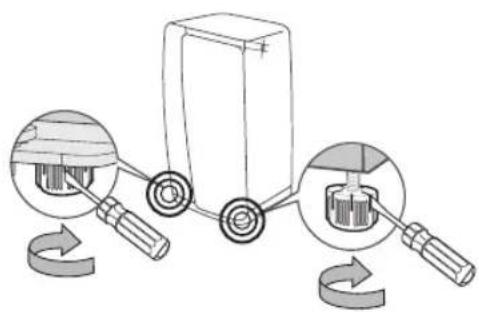
- When installing the refrigerator, make sure both legs contact the floor for secure installation. Legs are located at the bottom back of each door. Insert a flathead screwdriver and turn it in the direction of the arrow until it is level.
- Always balance the load on each door.
- Overload on any one door may fell the refrigerator, causing physical injury.

SEVERE WARNING SIGNS FOR USING

-
Do not insert the power plug with wet hands.
-
Do not store items on top of the appliance.
- When you open or close the door, items may fall and cause a personal injury and/or material damage.
- Do not put items filled with water on the refrigerator.
- If spilled, there is a risk of fire or electric shock.
- Do not let children hang on the door.
- Failure to do so may cause serious personal injury.
- Do not leave the doors of the refrigerator open while the refrigerator is unattended and do not let children enter inside the refrigerator.
- Do not allow babies or children to go inside the drawers.
- It can cause death from suffocation by entrapment or personal injury.
- Do not sit on the Freezer door.
-
The door can be broken and cause personal injury.
-
When remove the divider from the drawer to clean or other reason, should reassemble the divider with provided screws to prevent children trapped.
-
Never put fingers or other objects into the dispenser hole.
-
Failure to do so may cause personal injury or material damage.
-
Do not store volatile or flammable substances such as benzene, thinner, alcohol, ether or LP gas in the refrigerator.
-
The storage of any of such products may cause an explosion.
-
Do not store low temperature-sensitive pharmaceutical products, scientific materials or other low temperature-sensitive products in the refrigerator.
-
Products that require strict temperature controls must not be stored in the refrigerator.
-
Do not place or use electrical appliances inside the refrigerator, unless they are of a type recommended by the
manufacturer.
-
Do not use a hair dryer to dry the inside of the refrigerator. Do not place a lighted candle in the refrigerator for removing bad odours.
-
This may result in an electric shock or fire.
-
Do not touch the inside walls of the freezer or products stored in the freezer with wet hands.
-
This may cause frostbite.
-
Do not use mechanical devices or any other means to accelerate the defrosting process, other than those recommended by the manufacturer.
-
Do not damage the refrigerant circuit.

-
This product is intended only for the storage of food in a domestic environment.
-
Bottles should be stored tightly together so that they do not fall out.
-
In the event of a gas leak (such as propane gas, LP gas, etc.), ventilate immediately without touching the power plug.
Do not touch the appliance or power cord.
- Do not use a ventilating fan.
-
A spark may result in an explosion or fire.
-
Use only the LED Lamps provided by manufacturer or service agent.
Children should be supervised to ensure that they do not play with and/or climb into the appliance.

-
Do not disassemble or repair the refrigerator by yourself.
-
You run a risk of causing a fire, malfunction and/ or personal injury. In case of malfunction, please contact your service agent.

- If the appliance generates a strange noise, a burning or smell or smoke, unplug the power plug immediately and contact your nearest service centre.
- Failing to do so may result in an electric shock or fire hazards.
If you experience difficulty when changing the light,
contact service agent.
- If the products is equipped with LED Lamps, do not disassemble the Lamp Cover and LED Lamps by yourself.
- Please contact your service agent.
- If any dust or water is in the refrigerator, pull out power plug and contact your Samsung Electronics service centre.
- There is a risk of fire.

CAUTION SIGNS FOR USING

To get best performance from the product,
- Do not place foods too closely in front of the vents at the rear of the appliance as it can obstruct free air circulation in the refrigerator compartment.
- Wrap the food up properly or place it in airtight containers before putting it into the refrigerator.
- Do not put any newly introduced food for freezing near to already existing food.
- Do not place carbonated
or fizzy drinks in the freezer compartment.
Do not put bottles or glass containers in the freezer.
-
When the contents freeze, the glass may break and cause personal injury and property damage.
-
Do not change or modify the functionality of the refrigerator.
-
Changes or modifications may result in a personal injury and/or property damage. Any changes or modifications performed by a 3rd party on this completed appliance are neither covered under Samsung warranty service, nor is Samsung responsible for safety issues and damages that result from 3rd party modifications.
-
Do not block air holes.
-
If the air holes are blocked, especially with a plastic bag, the refrigerator can be over cooled.
If this cooling period lasts too long, the water filter may break and cause water leakage.
- Do not put any newly introduced food for freezing
near to already existing food.
-
Please observe maximum storage times and expiry dates of frozen goods.
-
Do not spray volatile material such as insecticide onto the surface of the appliance.
-
As well as being harmful to humans, it may also result in an electric shock, fire or problems with the product.
-
Do not apply strong shock or excessive force onto the surface of glass.
-
Broken glass may result in a personal injury and/or property damage.
-
Do not keep vegetable oil in your refrigerator's door bins. The oil can solidify, making it foul-tasting and difficult to use. In addition, the open container can leak and the leaked oil can cause the door bin to crack. After opening an oil container, it is best to keep the container in a cool and shaded place such as a cupboard or pantry.
-Examples of vegetable oil: olive oil, corn oil, grape-seed oil, etc.

CAUTION SIGNS FOR CLEANING AND MAINTENANCE

-
Do not directly spray water inside or outside the refrigerator.
-
There is a risk of fire or electric shock.
-
Do not use or place any substances sensitive to temperature such as inflammable sprays, inflammable objects, dry ice, medicine, or chemicals near the refrigerator.
Do not keep volatile or inflammable objects or substances (benzene, thinner, propane gas, etc.) in the refrigerator.
-
This refrigerator is for storing food only.
-
This may result in a fire or an explosion.
-
Do not spray cleaning products directly on the display.
-
Printed letters on the display may come off.
-
Remove any foreign matter or dust from the power plug pins.
But do not use a wet or
damp cloth when cleaning the plug, remove any foreign material or dust from the power plug pins.
-
Otherwise there is a risk of fire or electric shock.
-
Never put fingers or other objects into the dispenser hole and ice chute.
-
It may cause a personal injury or material damage.
-
Clean the unreachable parts such as hinges by using a brush or toothbrush.

-
Unplug the refrigerator before cleaning and performing maintenance.
-
If any foreign substance such as water has entered the appliance, unplug the power plug and contact your nearest service centre.
-
Failing to do so may result in an electric shock or fire.
-
Use a clean sponge or soft cloth and a mild detergent in warm water to clean the refrigerator.
-
Do not use abrasive or harsh cleansers such as window sprays, scouring cleansers, flammable fluids, muriatic acid, cleaning waxes,
concentrated detergents, bleaches, or cleansers containing petroleum products on exterior surfaces (doors and cabinet), plastic parts, door and interior liners, and gaskets.
-These can scratch or damage the material.
- Do not clean glass shelves or covers with warm water when they are cold. Glass shelves and covers may break if exposed to sudden temperature changes or impacts such as bumping or dropping.

SEVERE WARNING SIGNS FOR DISPOSAL

-
Ensure that none of the pipes on the back of the appliance are damaged prior to disposal.
-
R-600a or R-134a is used as a refrigerant.
Check the compressor label on the rear of the appliance or the rating label inside the refrigerator to see which refrigerant is used for your
refrigerator.
When this product contains flammable gas (Refrigerant R-134a), contact your local authority in regard to safe disposal of this product.
Cyclopentane is used as an insulation blowing gas.
The gases in insulation material require special disposal procedure.
Please contact your local authorities in regard to the environmentally safe disposal of this product.
Ensure that none of the pipes on the back of the appliances are damaged prior to disposal.
The pipes shall be broken in the open space.
- When disposing of this product or other refrigerators, remove the door/door seals, door latch so that small children or animals cannot become trapped inside.
Leave the shelves in place so that children may not easily climb inside.
Children should be supervised to ensure that they do not play with the old appliance.
- Please dispose of the packaging material for this product in an environmentally friendly manner.

ADDITIONAL TIPS FOR PROPER USAGE
- In the event of a power failure, call the local office of your Electricity Company and ask how long it is going to last.
- Most power failures that are corrected within an hour or two will not affect your refrigerator temperatures. However, you should minimise the number of door openings while the power is off.
- Should the power failure last more than 24 hours, remove all frozen food.
- If keys are provided with the refrigerator, the keys should be kept out of the reach of children and not be in the vicinity of the appliance.
The appliance might not operate consistently (possibility of temperature becoming too warm in the
refrigerator) when sited for an extended period of time below the cold end of the range of temperature for which the refrigerating appliance is designed.
- Do not store food which spoils easily at low temperature, such as bananas, melons.
- Your appliance is frost free, which means there is no need to manually defrost your appliance, as this will be carried out automatically.
- Temperature rise during defrosting can comply with ISO requirements. But if you want to prevent an undue rise in the temperature of the frozen food while defrosting the appliance, please wrap the frozen food up in several layers of newspaper.
- Any increase in temperature of frozen food during defrosting can shorten its storage life.
Saving Energy Tips
- Install the appliance in a cool, dry room with adequate ventilation.
Ensure that it is not exposed to direct sunlight and never put it near a direct source of heat (radiator, for example).
- Never block any vents or grills on the appliance.
- Allow warm food to cool down before placing it in the appliance.
- Put frozen food in the refrigerator to thaw.
You can then use the low temperatures of the frozen products to cool food in the refrigerator.
- Do not keep the door of the appliance open for too long when putting food in or taking food out.
The shorter time for which the door is open, the less ice will form in the freezer.
- Clean the rear of the refrigerator regularly.
Dust increases energy consumption.
- Do not set temperature colder than necessary.
- Ensure sufficient air flow at the refrigerator base and at
the back of the refrigerator. Do not cover air vent openings.
- Allow clearance to the right, left, back and top when installing.
This will help reduce power consumption and keep your energy bills lower.
- For the most efficient use of energy, please keep the all inner fittings such as baskets, drawers, shelves on the position supplied by manufacturer.
This appliance is intended to be used in household and similar applications such as
- staff kitchen areas in shops, offices and other working environments;
-farm houses and by clients in hotels, motels and other residential type environments;
-bed and breakfast type environments;
-catering and similar non-retail applications.
Setting up your refrigerator
GETTING READY TO INSTALL THE REFRIGERATOR
Congratulations on your purchase of the Samsung refrigerator.
We hope you enjoy the state-of-art features and efficiencies that this new appliance offers.
Selecting the best location for the Refrigerator
- Select a location with easy access to a water supply.
- Select a location without direct exposure to sunlight.
- Select a location with level (or nearly level) flooring.
- Select a location with enough space for the refrigerator doors to open easily.
- Select a location that allows sufficient space to the right, left, back, and top for air circulation.
- Select a location that allows you to move the refrigerator easily if it needs maintenance or service.
- Do not install the refrigerator in locations where the temperature is over 43^ or below 5^ .
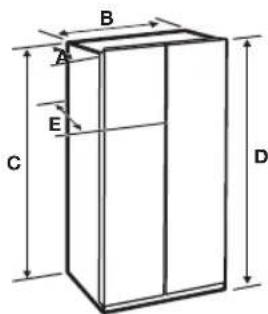
| Depth “A” 893 mm | |
| Width “B” 912 mm | |
| Height “C” 1742 mm | |
| Overall Height “D” 1774 mm | |
| Depth “E” 896 mm |
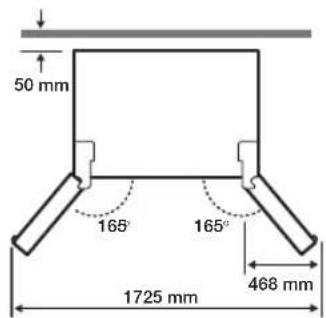
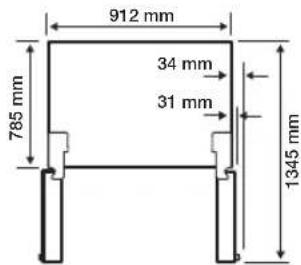

Each measurement based on the design dimension, so it may differ depending on the measuring method.
When moving your refrigerator
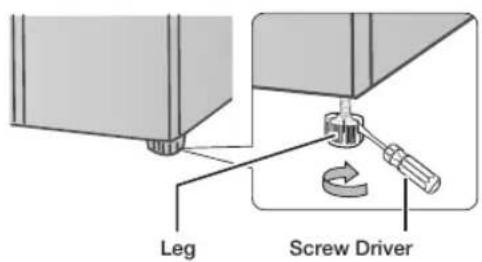
To prevent floor damage, be sure the front leveling legs are in the up position (above the floor).
Refer to "How to level the refrigerator" in the manual on page 21.
Flooring
For proper installation, you must place this refrigerator on a level, hard surface that is the same height as the rest of the floor.
This surface should be strong enough to support a fully loaded refrigerator.
To protect the finish of the flooring, cut a large section of the cardboard carton and place it under the refrigerator where you are working.
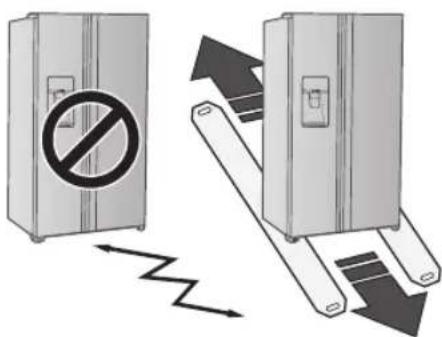
When moving the refrigerator, you need to pull and push it straight forwards or back.
Do not wiggle it from side to side.
Required Tools (Not provided)
| Philips screwdriver (+) | Flat-blade screw driver (-) | Socket wrench 10 mm |
| Allen wrench 5 mm |
SETTING UP THE REFRIGERATOR
Now that you have your new Refrigerator installed in place, you are ready to set up and enjoy the features and functions of the appliance.
By completing the following steps, your Refrigerator should be fully operational.
If not, first check the power supply and electricity source or try the troubleshooting section at the back of this user's guide.
If you have any further questions, contact your Samsung Electronics service centre.
- Place the Refrigerator in an appropriate location with reasonable clearance between the wall and the Refrigerator. Refer to installation instructions in this manual.
- Once the Refrigerator is plugged in, make sure the interior light comes on when you open the doors.
- Set the Temperature control to the coldest temperature and wait for an hour. The Freezer will get slightly chilled and the motor will run smoothly.
- After powering the Refrigerator, it will take a few hours to reach the appropriate temperature. You can store food and drinks in the Refrigerator after the temperature is sufficiently cool.
- Once installation is complete, press the dispenser lever to check if the water or the ice is properly dispensed.
- Make sure the front side of the refrigerator is 0.6 degree higher than its rear side.
SETTING UP THE REFRIGERATOR DOORS
If your entrance won't allow the refrigerator to pass easily through it, you can remove the doors.
Separating the water supply line from the refrigerator
- Pull the two water lines (which are in the Fixer) out to the front.
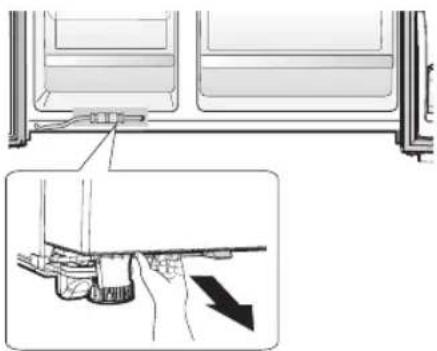
- Remove two water lines (White one is for water and the other one is for ice) by pressing the coupler (1) and pulling the water line (2) away.
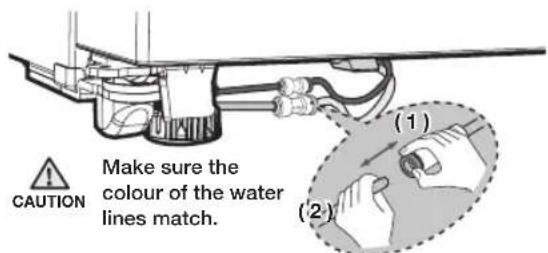
CAUTION When reconnecting the supply hoses, make sure the same colored hoses are inserted with each other.
Reattaching the Water Supply Line
- The Water Line must be fully Inserted to the centre of transparent coupler to prevent water leakage from the dispenser.
- Insert the 2 clips in the install pack and check that each clip holds the line firmly.
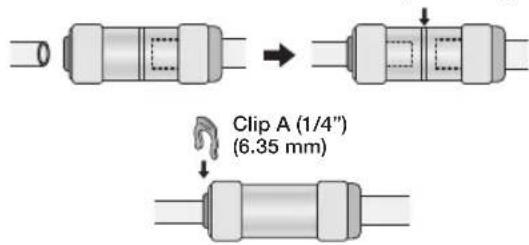
Center of Transparent coupler

Do not cut the water
Gently separate it from the coupler.

Keep the clips out of the reach of children and make sure that children do not play with them or put them into their mouths.
- Disconnect the power cord, and remove 2 cover screws using a Phillips screwdriver (1). Then open the refrigerator door and pull the hooks on the sides to loosen the cover (2).
Lift up the cover and towards you to detach it (3).
- Detach the hinge cover with the door open and then close the door once the hinge cover has been detached.
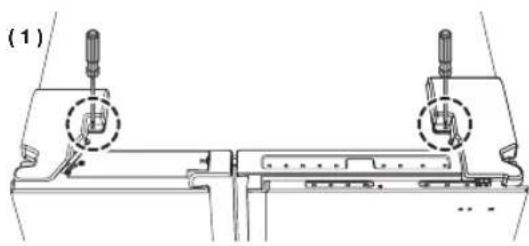
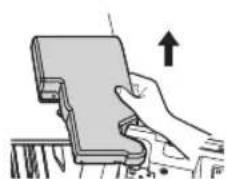
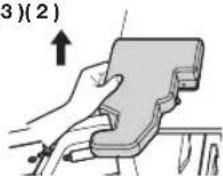
(3)(2)
- Remove the hinge cover and then disconnect the electrical wire connector.
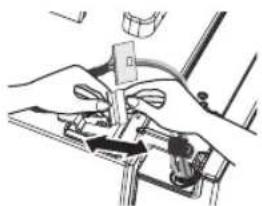
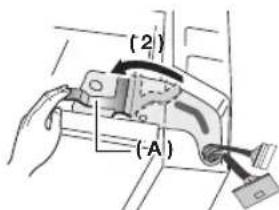
- Flip the clamp (A) up in direction (1) and then pull it off in direction (2).
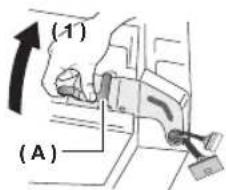
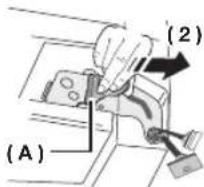
- Remove the hinge (B).
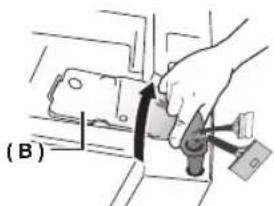
- Lift up the door and detach it from the refrigerator.

- Be careful not to damage the electrical wires when assembling or disassembling the doors.
Make sure the doors do not fall over and become damaged while they are detached from the refrigerator.
-
Be sure to re-attach the Freezer Door before re-attaching the Fridge Door.
-
Before re-attaching, make sure that all the wire connectors at the bottom of the Freezer Door are connected.
How to Assemble Door
- Attach the doors to the hinges at the bottom of the refrigerator.
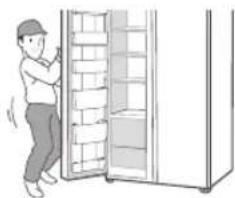
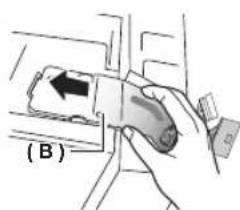
- Insert the hinge ( B ) into the hinge slot on the refrigerator and then press down over the hinge hole on the door.
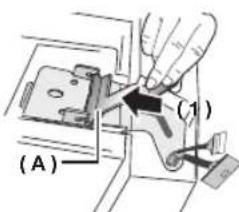
- Insert the clamp (A) in the direction of arrow (1) and then lower it in the direction of arrow (2) to lock it in place.
- Hook up the electrical wire connector.
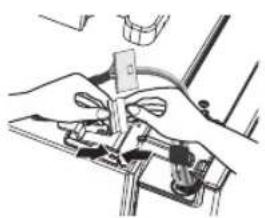
- Insert 2 front parts of the cover first, push down on both side parts of the cover, and then secure the cover in place using a Phillips screwdriver.
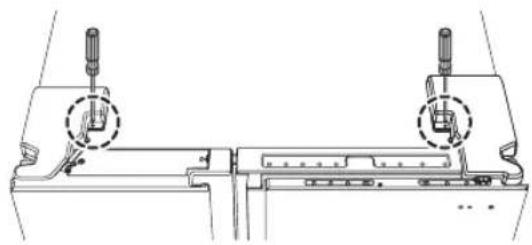

The doors can be assembled in the reverse order of their disassembly.
- The display may not function properly if you neglect to connect the electrical wires while assembling the door.
DISASSEMBLE THE REFRIGERATOR DOORS (SHOW CASE OF COLD COMPARTMENT)
-
Disconnect the power cord, and remove 2 cover screws using a Phillips screwdriver Then open the refrigerator door and pull the hooks on the sides to loosen the cover (2). Lift up the cover and towards you to detach it (3).
-
Detach the hinge cover with the door open and then close the door once the hinge cover has been detached.
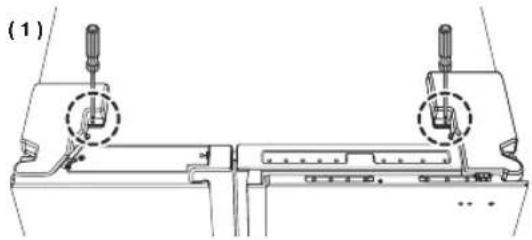
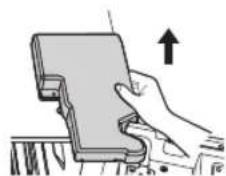
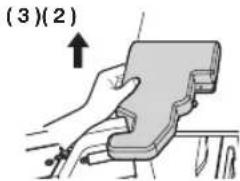
- Disassemble the housing connector.
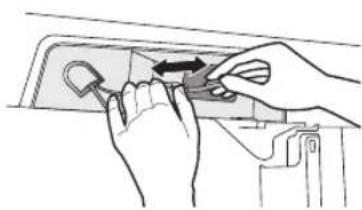
- Disassemble the three fastening screws on the top hinge of the show case.
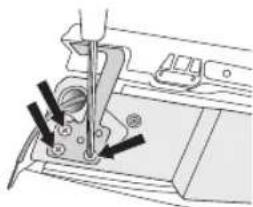
- Disassemble the show case.
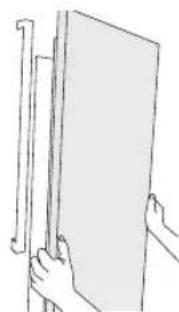
DISASSEMBLE THE REFRIGERATOR DOORS
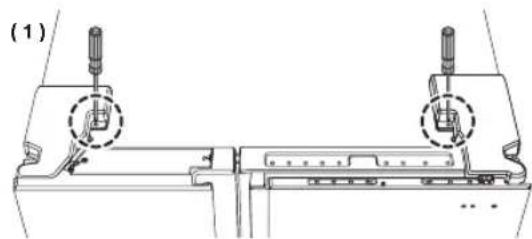
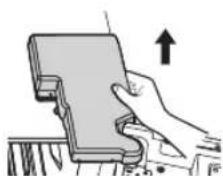
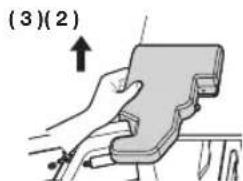
- Disconnect the power cord, and remove 2 cover screws using a Phillips screwdriver (1). Then open the refrigerator door and pull the hooks on the sides to loosen the cover (2).
Lift up the cover and towards you to detach it (3).
- Detach the hinge cover with the door open and then close the door once the hinge cover has been detached.
- Disassemble the housing connector.
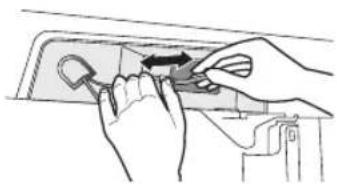
- Push the fixer hinge up, and pull it forward to remove it.
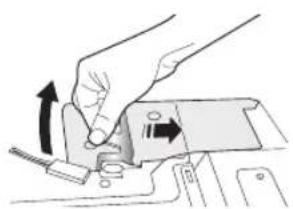
- Disassemble the top hinge from the front of the door.
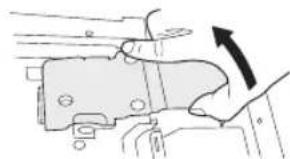
- Disassemble the show case.
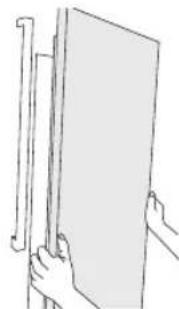
CAUTION
Fix the wire on the Hinge Hook to prevent the damage on the wire when reassembling.
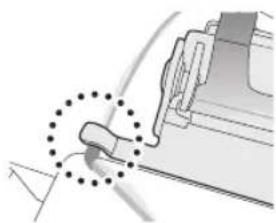
RE-ATTACHING REFRIGERATOR DOORS
To reattach the REFRIGERATOR doors, assemble parts in reverse order.
How to level the refrigerator
To avoid a hazard due to instability of the refrigerator, please place the refrigerator on a horizontal support and levelled in accordance with the following instruction for installation.
Failing to do so may result in the refrigerator tipping and a personal injury.
If the front of the appliance is slightly higher than the rear, the door can be opened and closed more easily.
Setting up the refrigerator on an uneven surface will cause the refrigerator to be uneven.
-
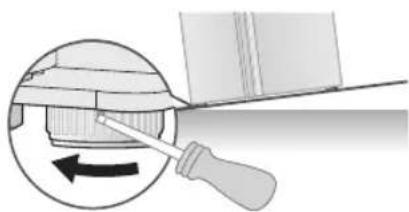
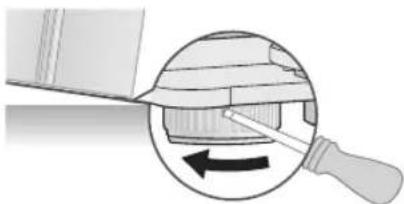
When install the refrigerator, the legs should touch the floor surely. The legs should be located on the back of under the each door. Insert it with flathead screwdriver and tighten up to arrow direction.
-
Do not put the food on only one side when store the food. If put it on only one side, it is able to occur the conduction and injury.
If the freezer side is lower:
- Insert a flathead screwdriver into the height leveler located at the bottom back of the freezer door and turn it in the direction of the arrow until it is level.
If the refrigerator side is lower:
- Insert a flathead screwdriver into the height leveler located at the bottom back of the refrigerator door and turn in the direction of the arrow until it is level.

-
Raise the front of the refrigerator so that the doors close by themselves. Adjusting the levelers so that the back of the refrigerator is much higher than the front of the refrigerator can make it difficult to open the doors.
-
If the back of the refrigerator is not level, support the bottom with an appropriately sized object and secure the object in place using tape. Slide the refrigerator into its spot and then adjust the level.
-
When pushing the refrigerator in, be careful not to damage the floor.
HOW TO ADJUST THE DOOR HEIGHT
If refrigerator door is lower than the other:
- The door height levels can be adjusted using the adjustment nut located at the bottom of refrigerator door.
- Raising the door too high can cause the door to interfere with the hinge cover when it is opened or closed.
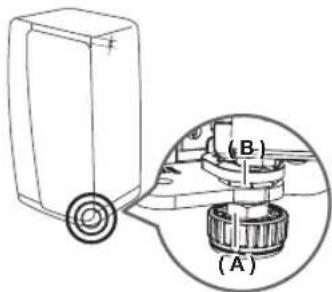
- Open the door that needs to be adjusted and loosen the clamping nut (A) at the bottom of the door by turning it in the clockwise direction (v) using the spanner included in the product package.
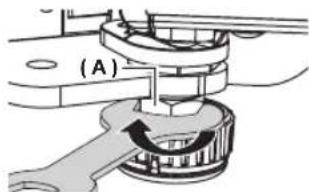
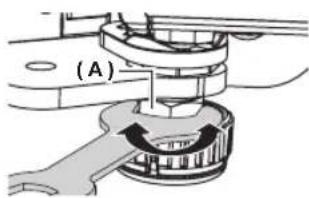
- Adjust the height of the door by turning the adjustment nut (B) in the counterclockwise direction (C) with a spanner.
(Turn it in the counterclockwise direction to increase the height of the door and in the clockwise direction to decrease it.)
- Open the door and adjust it from the inside.
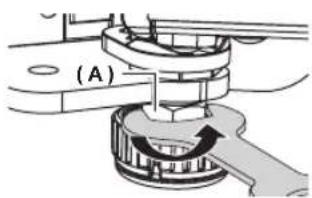
- Once the doors are level, turn the clamping nut (A) in the counterclockwise direction ( ) to tighten it.

Adjusting the level when the refrigerator is empty can result in the refrigerator becoming uneven again once items have been placed inside.
If this occurs, adjust the level again.
HOW TO ADJUST THE DOOR GAP
If the gap between the refrigerator door and the freezer door is uneven:
- Use the gap adjustor located at the top of the refrigerator door (right side).
-
Excessive force can cause the adjustor bolt to break.
-
Remove the refrigerator door's hinge cover.
-
Detach the hinge cover with the door open and then close the door once the hinge cover has been detached.
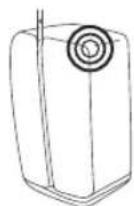
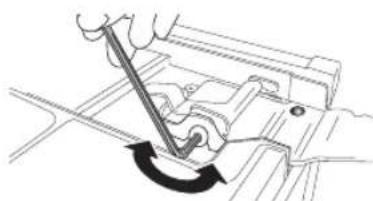
- Adjust the gap using a 4 mm Allen wrench (not included).
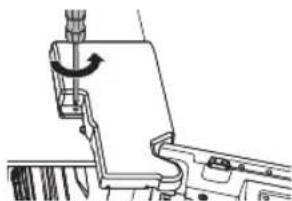
- Rotate the bolt in the clockwise direction ( ) to widen the gap.
Rotate it in the counterclockwise direction ( ) to narrow the gap.
Adjust until the gap between the refrigerator door and the freezer door appears even.

When arranging the cables, take caution not to tear or peel off the cable coating.
HOW TO ADJUST THE REFRIGERATOR DOOR GAP (BACK)
If the gap between the refrigerator door and the refrigerator is uneven:
- Use the adjustors located at the top edge inside each door.
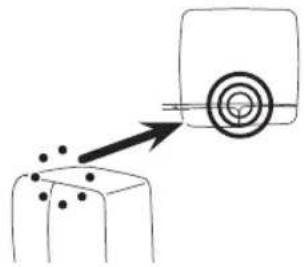
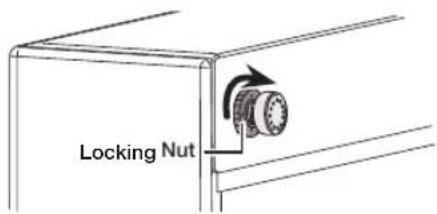
- Open the door where the gap with the refrigerator is narrower and then turn the adjustor in the counterclockwise direction ( ) until the gap is even.
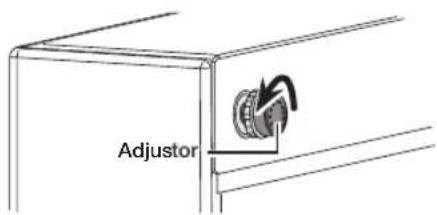
- Once the gap between the door and the refrigerator has been adjusted, turn the adjustor nut in the clockwise direction ( to lock the adjustor in place.
CHECKING THE WATER DISPENSER LINE
A water dispenser is one of the helpful features on your new Samsung Refrigerator.
To help promote better health, the Samsung water filter removes unwanted particles from your water. However, it does not sterilize or destroy microorganisms.
You may need to purchase a water purifying system to do that.
In order for the ice maker to operate properly, a water pressure of 20~125 psi (138~862 kPa) (pound per square inch) is required.
Under normal conditions, a 170 cc (5.75 oz.) paper cup can be filled in 10 seconds.
If the Refrigerator is installed in an area with low water pressure (below 20 psi), you can install a booster pump to compensate for the low pressure. Make sure the water storage tank inside the Refrigerator is properly filled.
To do this, press the water dispenser lever until the water runs from the water outlet.

Water line installation kits are available at extra cost from your dealer.
We recommend using a water supply kit that contains copper tubing.

The new hose-sets supplied with the appliance are to be used and that old hose-sets should not be reused.

Check the accessory list.
Connecting to the water supply line
- First, shut off the main water supply line.
- Locate the nearest cold, drinking water line.
- Follow the Water Line Installation Instructions in the installation kit.
CAUTION
The water line must be connected to the cold water pipe. If it is connected to the hot water pipe, it may cause the purifier to malfunction.
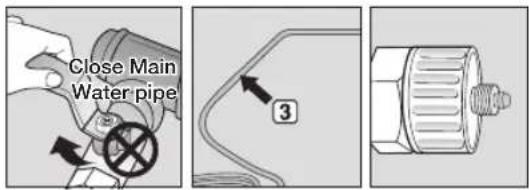
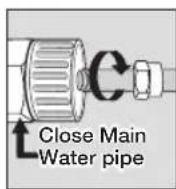
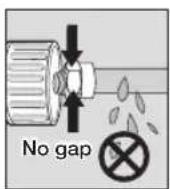
- After connecting the water supply to the water filter, turn your main water supply back on and Dispense about 3 L to clear and prime the water filter.
Connecting the water line to the refrigerator
- Remove the cap from water line on the unit and insert compression nut to the water line on the unit after disassembling from provided water line.
- Connect both water line from the unit and water line in the kit.
- Tighten the compression nut onto the compression fitting. Be careful no gap between two items
- Turn water on and check for any leakage.
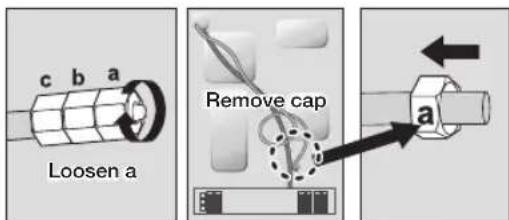
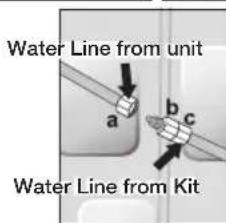
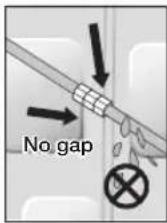

Only connect the water line to a drinkable water source.
If you have to repair or disassemble the water line, cut off 6.5mm of the plastic tubing to make sure you get a snug, leak-free connection.

Before being used, the leakage in these places should be examined.
Samsung Warranty does not cover WATER LINE INSTALLATION.
- It'll be done at customer's charge unless the retail price includes installation cost.
- Please contact Plumber or Authorized Installer for the installation if needed.
- If Water leakage occurs due to improper installation, Please contact installer.
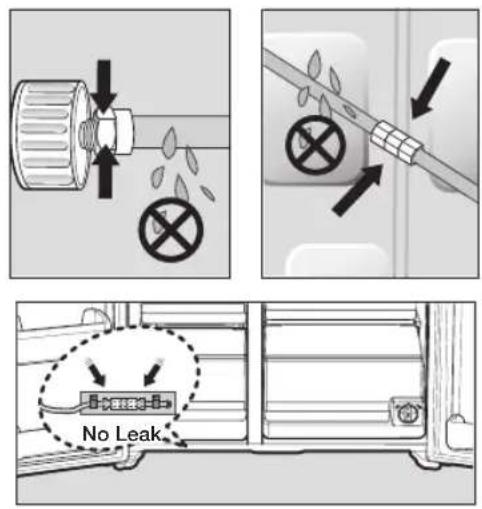
- Slip the compression nut ( A ) through the supplied plastic tubing ( A ).
- Tighten the compression nut (A) onto the 1/4" compression fitting.
- If you are using copper tubing, slip the compression nut (B) (not included) and ferrule (not included) on copper tubing (not included) as shown.
- If you are using plastic tubing (B), insert the molded end (Bulb) of the plastic tubing (B) into the compression fitting.

Do not use without the molded end(Bulb) of the plastic tubing (B).
- Tighten the compression nut ( B ) onto the compression fitting.
Do not over-tighten the compression nut (B).
- Turn water on and check for any leakage.

Only connect the water line to a drinkable water source.
If you have to repair or disassemble the water line, cut off 1/4 of the plastic tubing to make sure you get a snug, leak-free connection.
BEFORE USING ICEMAKER
Remove
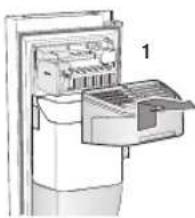
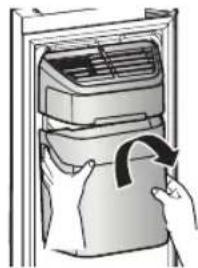
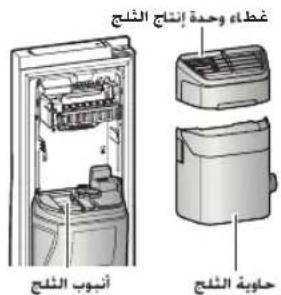
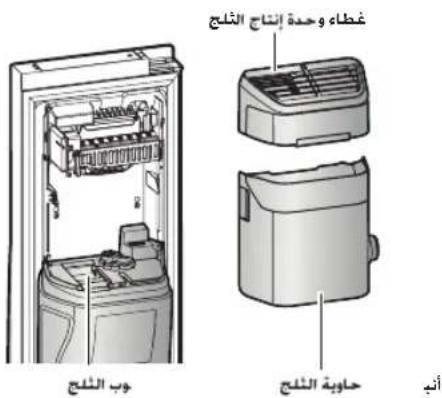
- Remove the Icemaker Bucket by lifting it up and pulling it out slowly.
- Grip the handle as shown in the figure.
- Remove the Ice Bucket slowly to prevent damage.
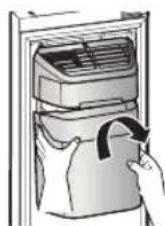
Figure 1

Do not use excessive force when removing the drawer cover.
Otherwise, the cover may break and cause injury.

Before removing any accessories, make sure that no food is in the way.
When possible, remove the food altogether to reduce the risk of accidents.
Install
- Assemble the icemaker in the reverse order of disassembly.
- Push the bucket in firmly until you hear a clicking sound.
Before calling service
- Any sounds you hear when the ice maker dumps ice into the bucket are part of normal operation.
- If you don't dispense ice for a long period of time, the ice may form clumps in the ice bucket. If ice clumps form, remove the remaining ice and empty the bucket.
- When ice does not come out, check for ice stuck in the chute and remove it.
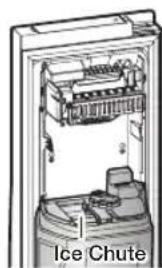
Figure 3
-
When Ice O blinks on the display panel, reinsert the bucket and/or make sure it's installed properly.
-
When the door is open, the Ice and water dispenser do not work.
- If you close the door hard, it may cause water spilling over the ice maker.
- To prevent dropping the ice bucket, use both hands when removing it.
- To prevent injury, be sure to clean up any ice or water that may have dropped on the floor.
- Do not let the children hang on the ice dispenser or on the bucket. They may get hurt.
- Be sure not to put your hand or any object into the ice chute. It may cause personal injury or damage mechanical parts.
Removing residual matter inside the water supply line after installing filter.
- Turn ON the main water supply.
- Push the Dispenser Lever.
- Flush 1 gallons of water through the filter before use. (Flush approximately 6 minutes.)
This will clean the water supply system and remove air from the lines.
- Additional flushing may be required in some households.
- Open the refrigerator door and make sure there are no water leaks coming from the water filter.
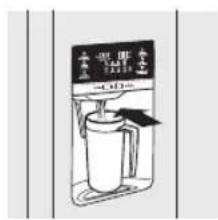
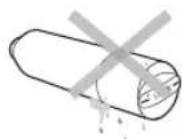
A newly installed water filter cartridge may cause water to briefly spurt from the water dispenser.
This is due to air getting into the line. It should pose no problem to operation.
Check the amount of water supplied to the ice tray.
- Lift up the icemaker cover and gently pull it out.
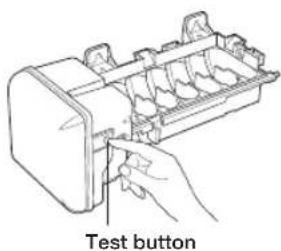
- When you press the Test button for 3 seconds, the ice cube container is filled with water from the water supply tap.
Check to make sure the amount of water is correct (see the illustration below).
If the water level is too low, the ice cubes will be small.
This is a water pressure problem from within the main water pipes, not the refrigerator.
Ice maker
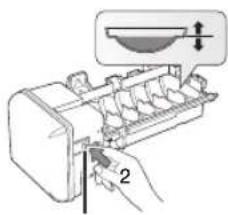
Check the water level
Test button

-
It will take a few minutes for the water to reach the correct level after you push the Test button.
-
Do not press the test button continuously when the tray is filled with ice or water.
Water may overflow or ice jamming may occur. - When the bucket is not installed, the ice maker does not work.
- When Ice Off blinks on the display panel, reinsert the bucket and/or make sure it's installed properly.
Operating your Samsung refrigerator
USING THE CONTROL PANEL
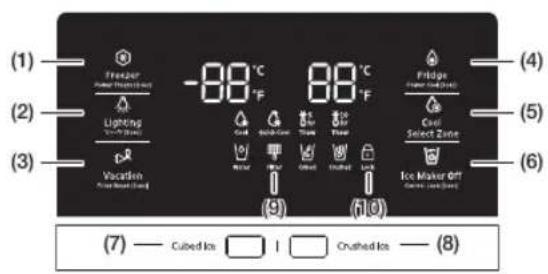
COOLSELECT MODEL (RH77H90*)
DISPENSER MODEL (RH77H80*)
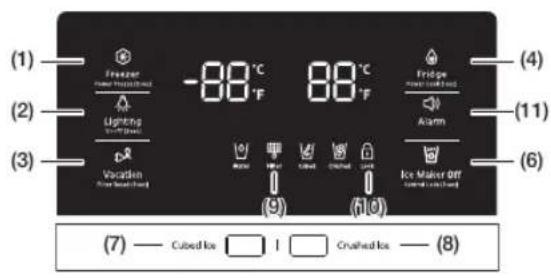
NORMAL MODEL
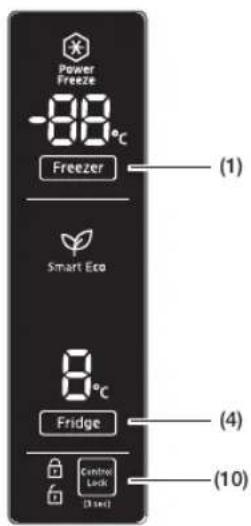
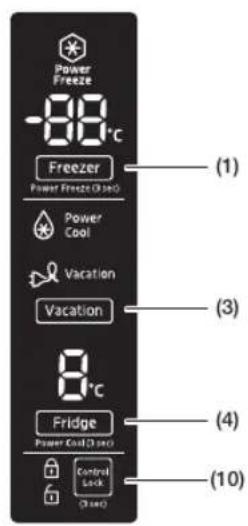
(1) Freezer / Power Freeze (3 sec)
The Freezer button serves two purposes:
- To set the Freezer to your desired temperature.
-
To turn the Power Freeze function on and off.
-
To set the Freezer temperature, touch the Freezer button.
You can set the temperature between 5^(-15^) and -8^(-23^) .
- Power Freeze function
Touch and hold this button for 3 seconds to decrease the time needed to freeze products in the Freezer.
It can be helpful if you need to quickly freeze easily spoiled items or if the temperature in the freezer has warmed dramatically.
(For example, if the door was left open.) When you use this function, the energy consumption of the refrigerator will increase.
Remember to turn it off when you don't need it and return the freezer to your original temperature setting.
If you need to freeze a large amount of food, activate the Power Freeze function at least 20 hours before you put the food into the freezer.
(2) Lighting / °C °F (3 sec)

The Lighting button serves two purposes:
- To turn the dispenser light on and off
-
To switch the temperature units between ^ C and ^ F .
-
Light Function
Touching the Lighting button turns on the Dispenser LED lamp in continuous mode so that it stays on continuously.
The button also lights up.
If you want the Dispenser lamp to come on only when some one uses the dispenser, press the Lighting button to turn the continuous mode off. - To switch the temperature units between ^ C and ^
Touch and hold this button for 3 seconds to select the temperature display you want. Each time you press and hold the button, the ^ C and ^ F temperature modes alternate and the ^ C or ^ F icon lights up, indicating your selection.
(3) Vacation / Filter Reset (3 sec)
The Vacation button serves two purposes:
- To turn Vacation mode on and off
-
To reset the water filter life indicator.
-
Vacation Function
If you are going on vacation or business trip or you do not need to use the refrigerator, press the Vacation button.
When you select vacation button for fridge compartment off, display LED of Vacation will be on.
It is strongly requested to remove foods in the fresh-food compartment and do not leave the door open when you select Vacation function.
- Water Filter Life Indicator Function After you replace the water filter, touch and hold this button for 3 seconds to reset the water filter life indicator. When you reset the water filter life indicator, the Filter icon on the panel turns Off.
The Filter icon will turn red to let you know it is time to change the water filter after six months (about 300 gallons).
Some areas have large amounts of lime in their water, which causes the water filter to clog more quickly.
If this is the case in your area, you will have to change the filter more frequently than every six months.
(4) Fridge / Power Cool (3 sec)

The Fridge button serves two purposes:
- To set the Fridge to your desired temperature.
-
To turn the Power Cool function on and off.
-
To set the Fridge temperature, press the Fridge button.
You can set the temperature between 44^ (7^) and 34^ (1^) . - Power Cool function
Touch and hold this button for 3 seconds to decrease the time needed to cool products in the Refrigerator.
It can be helpful if you need to quickly cool easily spoiled items or if the temperature in the fridge has warmed dramatically.
(For example, if the door was left open)
(6) Ice Maker Off
The Ice Maker Off button serves two purposes:
-To turn the Ice maker on and off
-To turn the Control Lock Function on and off.
-Note that Ice Maker Off mode will be deactivated if you press and hold the ice lever for more than 5 seconds.

- Ice Maker Off Function If you don't want to make more ice, press the Ice Maker Off button.
- Control Lock Function Touch and hold this button for 3 seconds to lock the display and the dispenser buttons so the buttons cannot be used.
When Control Lock is on, the refrigerator does not dispense ice or water, even if the Dispenser Lever is pressed.
The Control Lock icon lights up to indicate you've activated the Control Lock function. Press for 3 seconds to unlock.
If the ice maker function is ON, and the water line is not connected, there will be a water valve noise from the back of the unit.
Press the Ice Maker Off (Control Lock (3 sec)) button for less than 3 seconds until the Ice Off Indicator ( lights up.
(5) Cool Select Zone

Touch this button to select your desired CoolSelect Zone type.
(Refer to the detailed information on the page 39.)
To save electricity, the Panel Display turns off automatically under the following conditions: When no button has been pressed, when no doors are open, or when no Dispenser Lever has been pushed.
However, the icon indicating your cubed or crushed ice selection, will stay on.
When you press a button, open a door, or push a Dispenser Lever, the Panel Display will turn on again.
Except for the Water, and Cubed / Crushed Ice buttons, all function buttons will become operational after you remove your finger from the button you are currently pressing.
Water

Water
The indicator is supposed to turn on at all times as it indicates that the water can be dispensed properly.
(7) Cubed Ice
(8) Crushed Ice

Cubed

Crushed
Press the Cubed Ice or Crushed Ice button to select the type of ice you want dispensed.
Each time you press the button, the cubed and crushed ice modes alternate and
the Cubed or Crushed ice icon lights up, indicating your selection.
If you don't need ice, turn the function off to save on water and energy consumption (See Ice Maker Off below).
(9)Filter

Water filter usage
This icon lights up when you need to change the filter, usually after the refrigerator has dispensed about 300 gallons of water (after about 6 months).
The icon will blink red for several seconds when you open or close the door.
After you install the new water filter, reset the filter indicator by touching and holding the Hold 3 sec for Filter Reset button for 3 seconds.
- If water is not dispensing or dispensing slowly, you need to replace the water filter because the water filter is clogged.
- Some areas have large amounts of lime in their water, which causes the water filter to clog more quickly.
(10) Control Lock

This icon lights up when you activate the Lock function.
When the Control Lock icon is lit, all the panel buttons, including the Ice button and the dispensers, are locked and deactivated.
Press and hold the Ice Maker Off/Control Lock button for 3 seconds to turn Control Lock off and re-activate the panel buttons.
(11) Alarm

Touching this button turns the door open alarm on and off.
If the door alarm is set to On, an alarm beeps if any refrigerator door is left open for more than two minutes.
The beeping stops when you close the door.
The door alarm function is pre-set to On in the factory.
You can turn it off by pressing and then releasing the Alarm button.
You can turn it back on in the same fashion.
The icon lights up when the function is on. When the Door Alarm function is on and the alarm sound is triggered, the Door Alarm Icon will blink while the alarm sounds.
PARTS AND FEATURES
Use this page to become more familiar with the parts and features of the Refrigerator. (This image may different depends on the model.)
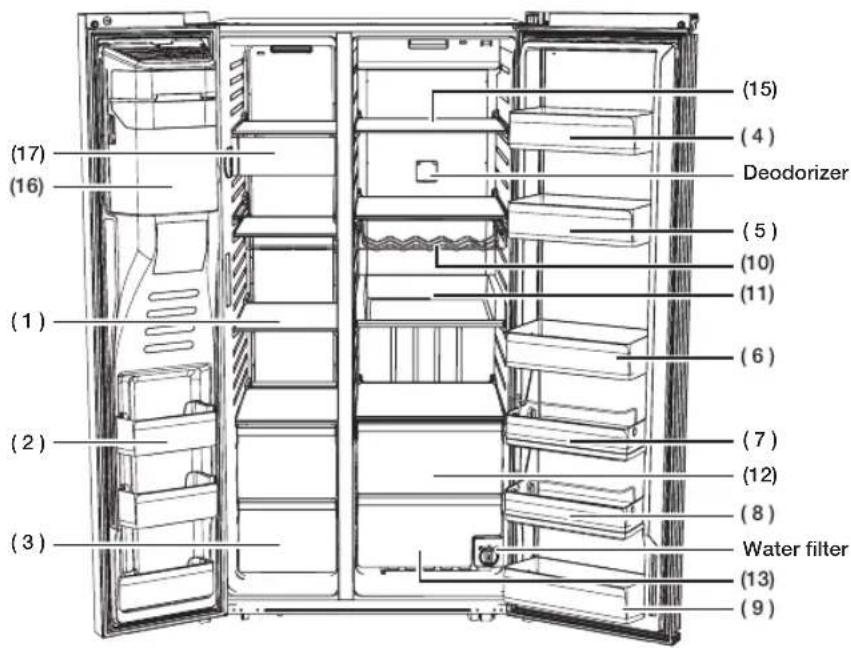
RH77H90, RH77H80
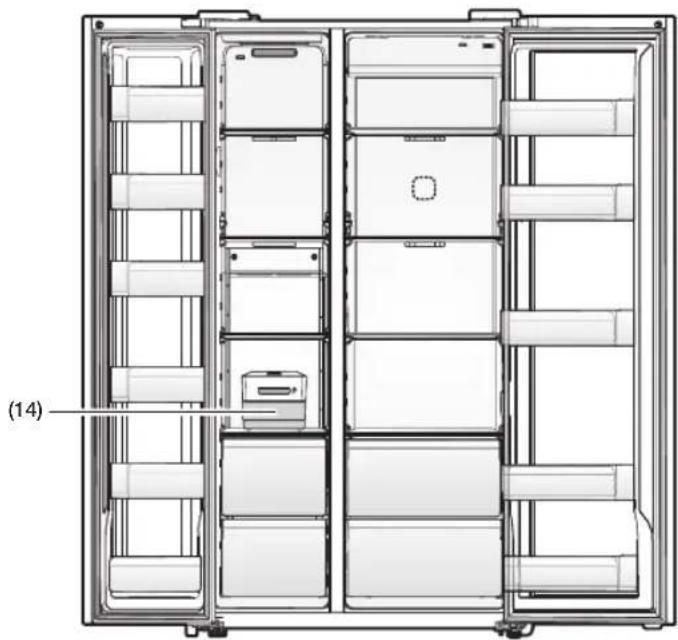
NORMAL MODEL
English-33
(1) Freezer Shelves
This is used for storing meat, fish, ice cream and other types of frozen food.
(2) Multipurpose Freezer Compartments
Features tall freezer compartments for more efficient food storage. However, do not use these compartments for items you intend to store for a long time.
(3) Dried Food and Meat Storage Bin
This is used for long-term storage of dried food and meat. Wrap the items in aluminum foil or kitchen wrap before storing them.
(4) Cheese Case
This is used for storing eggs, cheese, butter, and other types of dairy products.
(5) Sauce Case
Used for storing different types of sauces.
(6) Drink Case
This is used for storing water, milk, juice, and other types of beverage.
(7) Snack Case (Optional)
This is used for storing salads and side dishes.
(8) Kids' Case (Optional)
Located at a height within easy reach of children. Use for storing yogurt, snacks, and other items for kids.
(9) Multi Case
It is used for storing the dehydrated food such as dried noodle (spaghetti), beef jerky etc.
(10) Wine Rack (Optional)
Helps wines maintain their taste by providing an optimized place for storing your wine bottles.
(11) EZ slide shelves (Optional)
It is easier to take out the food.
(12) Cool Select Zone (Optional)
This is used for storing items that need to be kept slightly colder and meat and fish that will be prepared right away.
(13) Well-Being Vegetable Bin
This is used for keeping fruit and vegetables fresh.
(14) Ice Storage Box
This is used for storing ice. Alternatively, you can take out the bin and free up more space inside the freezer.
(15) Refrigerator Shelves
This is used for storing general types of food that require refrigeration.
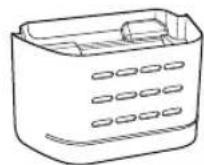
(16) Ice Maker Bucket (Only dispenser model)
Designed to store lots of ice easily.

Do not put your fingers, hands or any other objects in the ice chute or the ice maker bucket.
Doing so can cause personal injury or material damage
(17) Snack Bin (Optional)
This is used for storing small frozen food such as the ice cream.

-
If you plan to go away for a significant time, empty the refrigerator and turn it off. Wipe the excess moisture from the inside of the appliance and leave the doors open. This helps keep odor and mold from developing.
-
If the refrigerator is not to be used for a long period of time, pull out the power plug.
- Deterioration in the power cord insulation may cause fire.
CONTROLLING THE TEMPERATURE
Basic temperature of Freezer and Refrigerator Compartments
The basic and recommended temperatures of the Freezer and Fridge compartments are -2°F and 37°F (or -19°C and 3°C) respectively. If the temperature of the Freezer or Refrigerator Compartments are too high or low, adjust the temperature manually.
Controlling the Freezer temperature
RH77*
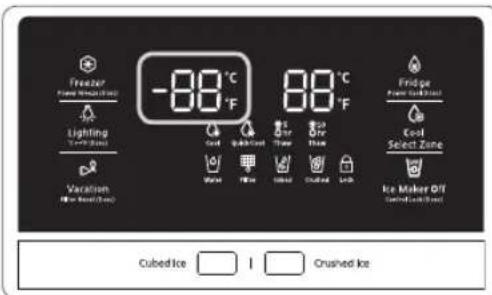
Recommend Temp (Freezer) : -2°F (or -19°C) (This image may different depends on the model.)
The Freezer temperature can be set between -8^ and 5^ (or between -23^ and -15^) to suit your particular needs. Press the Freezer button repeatedly until the desired temperature is shown in the temperature display.
The temperature will change by 1^ (or 1^ ) with each press. See below.
$$ \begin{array}{l}\text {F a h r e n h e i t :} 0 ^ {\circ} F \rightarrow - 1 ^ {\circ} F \rightarrow - 2 ^ {\circ} F \rightarrow - 3 ^ {\circ} F \rightarrow - 4 ^ {\circ} F\\rightarrow - 5 ^ {\circ} F \rightarrow - 6 ^ {\circ} F \rightarrow - 7 ^ {\circ} F \rightarrow - 8 ^ {\circ} F \rightarrow 5 ^ {\circ} F \rightarrow 4 ^ {\circ} F \rightarrow\3 ^ {\circ} F \rightarrow 2 ^ {\circ} F \rightarrow 1 ^ {\circ} F \rightarrow 0 ^ {\circ} F.\end{array} $$
$$ \begin{array}{l} \text {C e n t i g r a d e : - 1 8 ° C \to - 1 9 ° C \to - 2 0 ° C \to - 2 1 ° C} \ \text { \to - 2 2 ° C \to - 2 3 ° C \to - 1 5 ° C \to - 1 6 ° C \to - 1 7 ° C} \ \text { \to - 1 8 ° C .} \end{array} $$
Keep in mind that foods such as ice cream may melt at 4^ (or -15.5^ ).
The temperature display will move sequentially from -8^ to 5^ (or from -23^ to -15^ ).
Controlling the Fridge temperature
RH77*
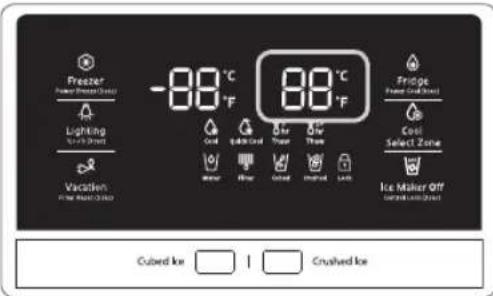
Recommend Temp (Fridge): 37^ F (or 3^ C ) (This image may different depends on the model.)
The fridge temperature can be set between 34^ and 44^ (or between 1^ and 7^ ) to suit your particular needs.
Press the Fridge button repeatedly until the desired temperature is shown in the temperature display.
The temperature will change by 1^ (or 1^ ) with each press. See below.
$$ \begin{array}{l}\text {F a r h e n e i t : 3 7 ° F \rightarrow 3 6 ° F \rightarrow 3 5 ° F \rightarrow 3 4 ° F \rightarrow}\4 4 ^ {\circ} \mathrm {F} \rightarrow 4 3 ^ {\circ} \mathrm {F} \rightarrow 4 2 ^ {\circ} \mathrm {F} \rightarrow 4 1 ^ {\circ} \mathrm {F} \rightarrow 4 0 ^ {\circ} \mathrm {F} \rightarrow 3 9 ^ {\circ} \mathrm {F}\\rightarrow 3 8 ^ {\circ} \mathrm {F} \rightarrow 3 7 ^ {\circ} \mathrm {F}.\end{array} $$
$$ \begin{array}{l}\text {C e n t i g r a d e : 3 ° C \rightarrow 2 ° C \rightarrow 1 ° C \rightarrow 7 ° C \rightarrow 6 ° C}\\rightarrow 5 ^ {\circ} \mathrm {C} \rightarrow 4 ^ {\circ} \mathrm {C} \rightarrow 3 ^ {\circ} \mathrm {C}.\end{array} $$
The temperature control process for the Fridge works just like the Freezer process.
Press the Fridge button to set your desired temperature.
After a few seconds, the Fridge will begin adjusting towards the newly set temperature.
This will be reflected in the digital display.

-
The temperature of the Freezer or Fridge may rise when you open the doors too frequently, or if a large amount of warm or hot food is placed inside.
-
This may cause the digital display to blink. Once the Freezer and Fridge temperatures return to their normal set temperatures, the blinking will stop.
- If the blinking continues, you may need to "reset" the Refrigerator. Try unplugging the appliance, wait for around 10 minutes, and then plug the power cord back in.
USING THE COLD WATER DISPENSER
Push the appropriate ice type button to select what you want dispensed.
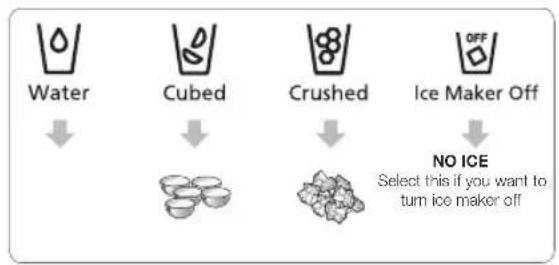
Using the ice lever (1)
Push the ice lever dispenser (1) gently with your glass.
Ice will be released from the dispenser.
You can choose the type of ice by pushing the cubed or crushed button first.
Using the Water lever (2)
Push the Water lever dispenser (2) gently with your glass.
Water will be released from the dispenser.
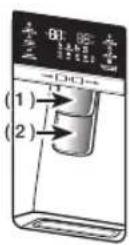

Even if you push the water and ice lever at about the same time, the dispenser operates only the option you actually selected or pushed first.

Please wait 1 second before removing the cup after dispensing water to prevent spills.
Do not pull out the lever dispenser after dispensing ice or water.
It comes back automatically.
Using the Ice & Water Dispenser together
To get ice and water, push the ice lever (1) first for ice, then move your glass down and press the water dispenser lever (2) for water.

Please wait 2 seconds before removing the glass under the dispenser to prevent spills.
If the Refrigerator door opens, the Dispenser does not work.
- Do not pull the lever out.
You could damage or break the lever's spring. - To clean the ice bin/bucket, wash with a mild detergent, rinse well, and dry thoroughly it. Do not use harsh or abrasive cleaners or solvents.
- In case ice doesn't come out, pull out the ice bucket and press the test button located on the right side of ice maker.
- Do not press the test button continuously when the tray is filled with ice or water.
Water may overflow or ice may jam the bucket.

- When you press the Test button, you will hear the refrigerator chime (ding-dong). When the chime sounds, release the Test button.
The chime sounds automatically again to let you know the ice maker is working well.

If a power failure occurs, ice cubes may melt then freeze together when the power comes back on, causing the dispenser to be out of order.
To prevent this problem, after a power failure, pull out the ice bucket and discard the residual ice or water.

After you dump the ice from the ice bucket, you should press the dispenser lever once with the ICE CUBED' or 'CRUSHED' function ON.
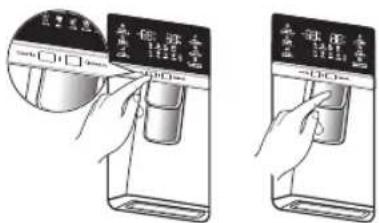
The ice maker will make new ice faster after you return the ice bucket to the refrigerator.

-
Do not put your fingers, hands, or any unsuitable objects in the chute or ice-maker bucket.
-
This can cause personal injury or material damage.
-
Use only the ice maker provided with the refrigerator.
-
The water line to this refrigerator must be installed / connected by a suitably qualified person and must be connected to a potable water supply.
The ice maker requires water pressure of 20 - 125 psi (138-862 kPa) to operate properly.

If you are going on a long vacation or business trip and won't be using the water or ice dispensers for that period of time, close the water valve to prevent leaks.
If you have not used the ice maker for a while, or you have opened the Freezer door frequently, the Ice may stick together. If this occurs, empty the ice bucket or break up the ice with a wooden kitchen tool. Do not use sharp items such as knives or forks.
- When you remove the ice bucket, there may still be some residual ice in the ice maker. The ice maker may eject this ice into the freezer.
Using the ice Dispenser
Press the ice button to select the type of ice you want.
Place your cup under the ice outlet, and then push gently against the dispenser pad.
Make sure the glass is in line with the dispenser to prevent the ice from bouncing out.
If you select Cubed Ice after using the Crushed Ice feature, a small amount of residual crushed ice might be produced.
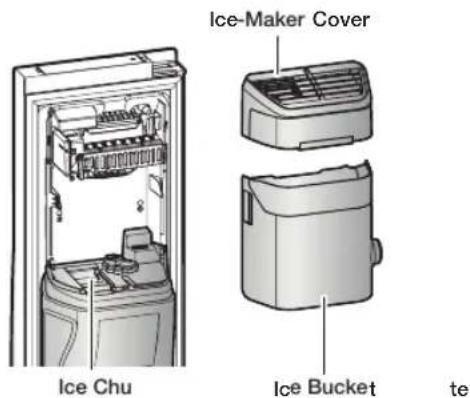

If ice does not dispense, pull out the icemaker cover and press test button located on the ice maker.
- Do not press the test button continuously when the tray is filled with ice or water. Water may overflow or the ice may jam the icemaker or dispenser.

For more space, you can store food with Guard FRE-UPP instead of the ice bucket, and remove the COVER-ICE MAKER and Snack Bin.
If you remove the ice bucket, ICE OFF will blink on the display panel.
Furthermore, you can remove the freezer Upper drawer and put the shelf on that place.
Since it does not affect thermal and mechanical characteristics.
A declared storage volume of frozen food storage compartment is calculated with "Guard FRE-UPP" positioned and "COVER-ICE MAKER", "Snack Bin", "Upper Printer" removed.
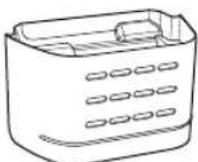
GUARD FRE (Freezer)-UPP (Optional)
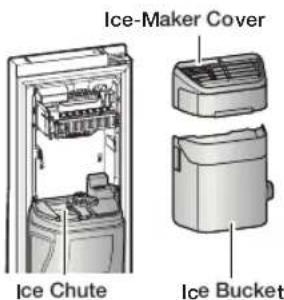
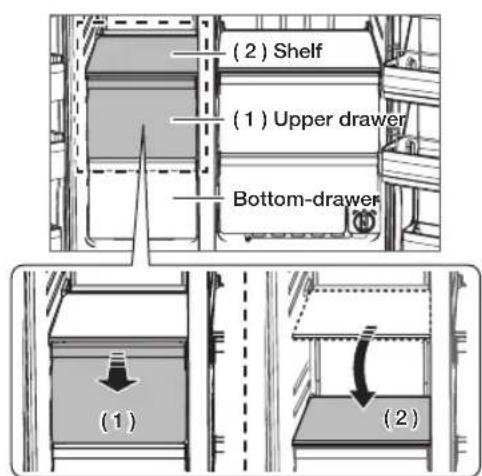
USING THE COOLSELECT ZONETM DRAWER (OPTIONAL)
The CoolSelect Zone™ Printer is designed to make your busy life just a little bit easier.
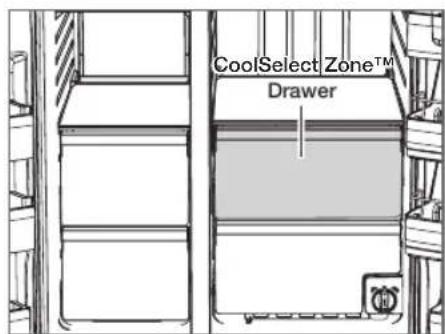
Thaw

When "Thaw" is selected, cool air is alternately blown into the CoolSelect Zone Printer.
Depending on the weight of the frozen food, you can select a 5 hrs, 10 hrs thawing time.
When "Thaw" ends, food is in a half-frozen state, making it easy to cut for cooking.
In addition, when "Thaw" ends, the CoolSelect Zone Printer returns to the original "Cool" condition.
To cancel this function mid cycle, just press CoolSelect Zone button and select other function.
Quick Cool

You can use the "Quick Cool" operation with the CoolSelect Zone™ Printer to quickly cool 1~3 canned beverages in about an hour.
When the "Quick Cool" process ends, the CoolSelect Zone™ Printer automatically returns to the original "Cool" condition.
To cancel this operation, press the "Quick Cool" button again and the CoolSelect Zone™ Printer returns to the previously set temperature.
Cool
When "Cool" is selected, the temperature in the CoolSelect Zone™ Printer will be the same as the overall temperature setting of the refrigerator. The printer digital panel shows the same temperature as that of the refrigerator display panel.
Since the "Cool" function mimics the refrigerator temperature, you have extra general storage space.

Depending on the size and thickness of the meat or fish, thawing times may vary.

When "Thaw" is in operation, any items that you do not want affected should be moved out of the drawer.
SMART ECO FEATURES
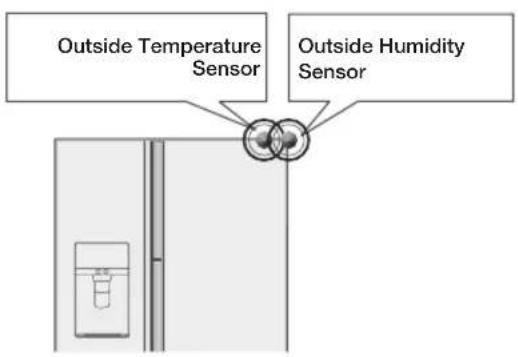
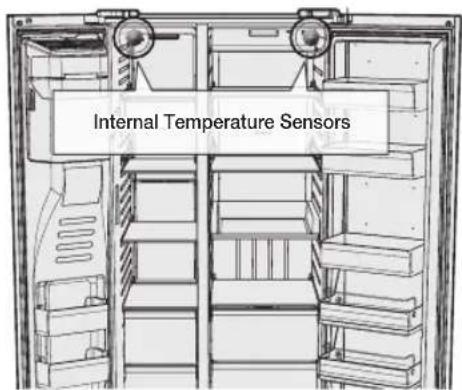
Smart Eco System
Keep freshness of food using 4 sensors according to the operating environment, usage pattern and the refrigerator operating status while saving electricity costs.
FRIDGE MULTI-PURPOSE DOOR BIN
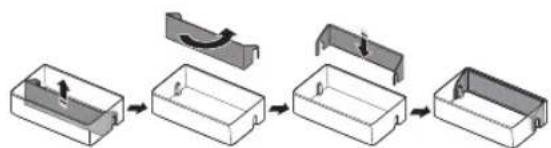
A detachable divider makes it convenient to store food.
Food products can be stored by items.
- Put the divider in place when storing slim-size condiment bottles and canned drinks together.
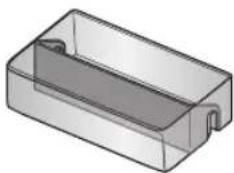
Take out the divider when storing carton-size milks or drinks.
How to use the divider
- Insert the divider as shown in the diagram to compartmentalize the case.
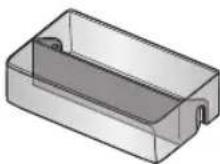
- When not in use, simply flip it around and move it out of the way as shown in the diagram.
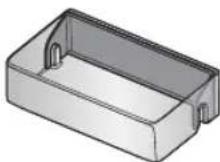
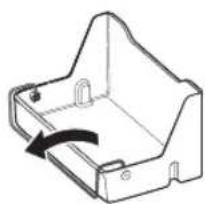
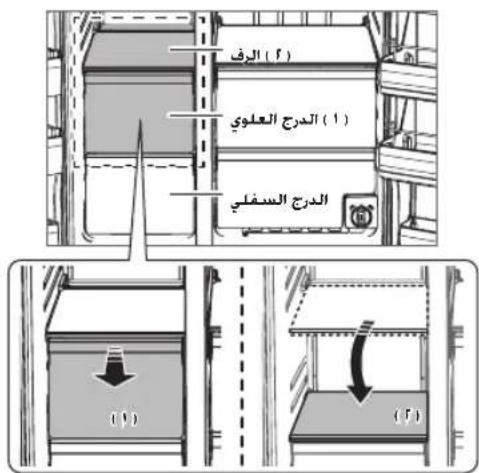
How to use the multi supporter
- When not in use, leave the Multi Supporter flipped over as shown in the diagram.
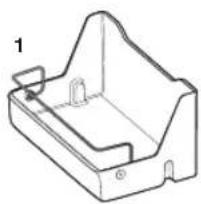
- Flip the Multi Supporter to position 1 to prevent items from falling out and over.
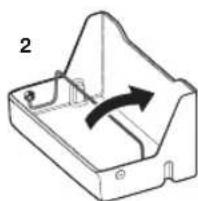
- Flip the Multi Supporter to position 2 to use it as a divider.
REMOVING THE REFRIGERATOR ACCESSORIES
- Shelves (Freezer/Fridge)
- Open the door completely and then lift up the shelf as you pull it out to remove it.
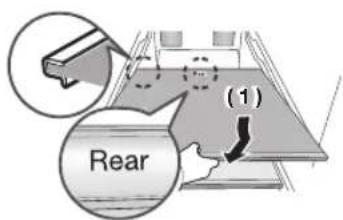
- If you are unable to open the door completely, pull out the shelf, lift it up, and turn it to remove it.
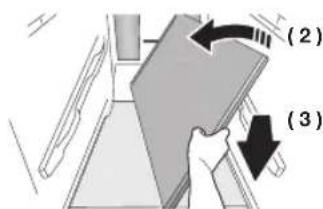

Be careful not to insert the shelf upside down.

Glass containers can scratch the surface of the glass shelves.
-
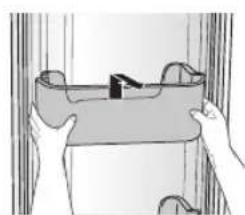
Door Bin
-
Remove the Door Bin by holding the door bin with both hands and then gently lift it up.
-
Drawer
-
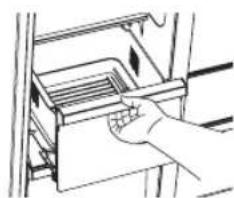
Remove the Printer by pulling it out and lifting it up slightly.

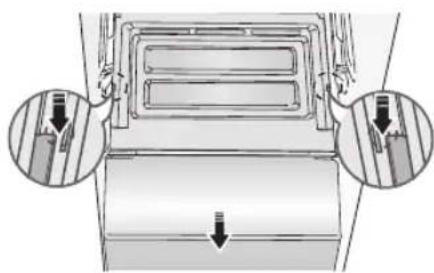
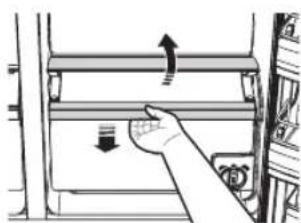
- Vegetable Bin/Dry Bin Cover
Take out the bin above the Vegetable Bin (refrigerator)/Dry Bin (freezer).
- Press down on the clips on either side of the Vegetable Bin (refrigerator)/Dry Bin (freezer) and pull them out towards you to remove the bin.
(Optional)
-
Vegetable Bin/Dry Bin
-
Before taking out the Vegetable Bin/Dry Bin, you need to remove the multipurpose compartments from the door.
- Lift the bin up slightly as you pull it out.
-
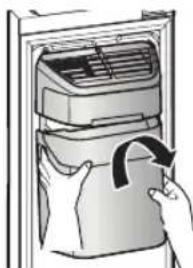
Ice Bucket (Freezer)
-
Remove the Icemaker Bucket by lifting it up and pulling it out slowly.
- Grip the handle as shown in the figure.
- Remove the Ice Bucket slowly to prevent damage.

Do not use excessive force when removing the drawer cover.
You can break the cover and cause injury.

Before removing any accessories, make sure that no food is in the way.
When possible, remove the food altogether to reduce the risk of accidents.
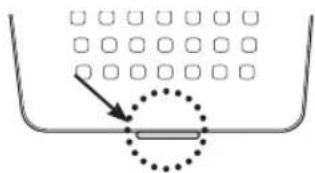
- Removing the Deodorizer
Pull out the shelf slightly and then pull out the unit while pushing the deodorizer cover clip up using a flathead screwdriver.
- Cleaning the Deodorizer
- Clean the deodorizer once every two years or whenever you feel its performance has diminished.
- Dry the deodorizer under the sun for 24 hours and then replace it in the reverse order of its removal.
CLEANING THE REFRIGERATOR

WARNING
-
Do not use benzene, thinner, Clorox, or car detergent to clean the refrigerator. They can damage the surface of the appliance and may cause a fire.
-
Do not spray the refrigerator with water while it is plugged in.
This can cause an electric shock. To clean the refrigerator, follow these steps:
- Unplug the power code of the refrigerator.
- Slightly dampen a soft lint-free cloth or paper towel with water.

Do not use any kind of detergent to clean the refrigerator because that can discolour or damage the refrigerator.
- Wipe the inside and outside of refrigerator until it is clean and dry.
- Plug the power cord of the refrigerator back in.
CHANGING THE INTERIOR LIGHTS
Freezer / Fridge LED Lamp
- If the LED Lamp Cover is stained with foreign substances, the LED lamp may not look bright. Wipe the surface cover with clean dry cloth to return the light to full brightness.

Do not disassemble or replace the LED lighting yourself.
To replace the LED lights, contact a Samsung service centre or your authorized Samsung dealer.

If you attempt to replace the LED lamps yourself, you risk subjecting yourself to an electric shock or serious personal injury.
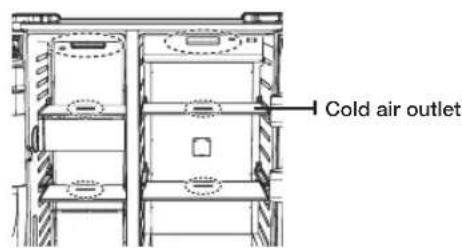
TO IMPROVE THE COOLING PERFORMANCE

If the cold air outlet is blocked by food items, the cold air cannot penetrate the entire compartment and will be unable to freeze the food efficiently which results in a degraded cooling performance.
CHANGING THE WATER FILTER

To reduce risk of water damage to your property DO NOT use generic brands of water filers in your SAMSUNG Refrigerator.
USE ONLY SAMSUNG BRAND WATER FILTERS. SAMSUNG is not legally responsible for any damage, including, but not limited to property damage caused by water leakage from the use of a generic water filter.
SAMSUNG Refrigerators are designed to work ONLY WITH SAMSUNG Water Filters.
The "Filter Indicator" light lets you know when it is time to change your water filter cartridge.
To give you preparation time to get a new filter, the red light will come on just before the capacity of the current filter runs out.
Changing the filter on time provides you with the freshest, cleanest water from your fridge.
To change the water filter, follow these steps:
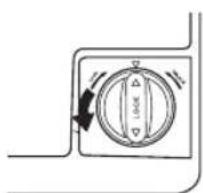
- Turn the water filter 90^ counter-clockwise.
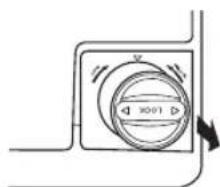
- Pull the water filter from the filter housing.
- Insert new water filter inside the filter housing.

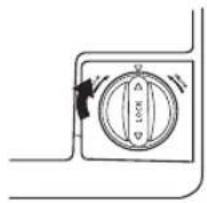
- Turn the new water filter 90^ clockwise.
- Press the "Lighting / °C °F (3 sec)" button (A) for about 3 seconds to reset the water filter. The color of indicator changes from red to light off.

A newly installed water filter cartridge may cause water to briefly spurt from the water dispenser.
This is due to air getting into the line. It should pose no problem to operation.

When you replace the water filter, water can drip from the bottom front of the refrigerator.
Make sure to clean up any drips or spills after you have changed the filter.
Removing residual matter inside the water supply line after installing a new filter
-
Press the Water button, and then push the Dispenser Lever with a cup or glass.
-
Flush 1 gallon of water through the filter, one cup or glass at a time. (Flush approximately 6 minutes.) This will clean the water supply system and remove air from the lines.
-
Additional flushing may be required in some households.
-
Open the refrigerator door and make sure there are no water leaks coming from the water filter.
Reverse Osmosis Water Supply IMPORANT:
The pressure of the water supply coming out of a reverse osmosis system going to the water inlet valve of the refrigerator needs to be between 35 and 120 psi (241 and 827kPa
If a reverse osmosis water filtration system is connected to your cold water supply, the water pressure to the reverse osmosis system needs to be a minimum of 40 to 60 psi (276 to 414kPa .
If the water pressure to the reverse osmosis system is less than 40 to 60 psi (276 to 414kPa
- Check to see whether the sediment filter in the reverse osmosis system is blocked. Replace the filter if necessary.
- Allow the storage tank on the reverse osmosis system to refill after heavy usage.
If your refrigerator has a water filter, it may further reduce the water pressure when used in conjunction with a reverse osmosis system. Remove the water filter.
If you have questions about your water pressure, call a licensed, qualified plumber.
Ordering replacement filters
To order more water filter cartridges, contact your authorized Samsung dealer.
USING THE ICE MAKER (OPTIONAL)
-
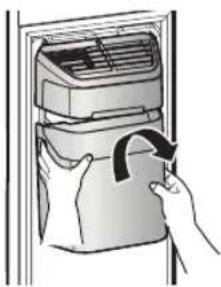
To Remove the Ice Bucket.
-
Hold the handle as shown in figure1.
- Lift up and pull the Bucket out slowly.
- Take out Ice Bucket out slowly to prevent damage.
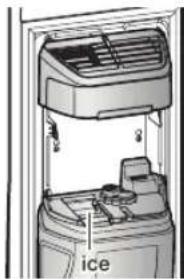
- When you reinstall the ice bucket, press and hold the ICE button for 6 seconds.
-
Normal Operation
-
Any sounds you hear when the ice maker dumps ice into the bucket are part of normal operation.
- Ice may clump in the bucket if you do not dispense ice for long periods of time. If this occurs, remove all the ice and empty the bucket.
- If ice does not come out, check for any ice stuck in the chute and remove it.
- The first batch of ice cubes after installation may be small because air has entered the water line. Any air will be purged during normal use.

-
When ICE OFF blinks on the display panel, reinsert the ice bucket and/or make sure it's installed properly.
-
When the door is open, the ice and water dispenser do not work.
If you close the door hard, it may cause water to spill over the ice maker. - To prevent the ice bucket from dropping, use both hands when removing it.
- To prevent injury, be sure to clean up any ice or water that may have dropped on the floor.
- Do not let the children hang on the ice dispenser or on the bucket. They may get hurt.
- Be sure not to put your hand or any object into the ice chute. It may cause personal injury or damage mechanical parts.
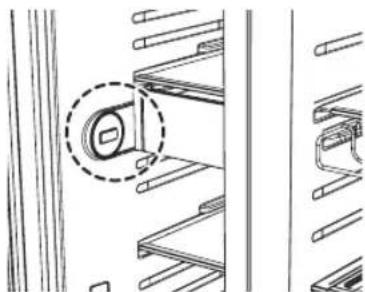
Use care when storing food in plastic bags in the freezer. Incorrectly stored bags can get caught in the ice bucket's Motor and prevent the refrigerator from dispensing ice or cause the freezer door to open unexpectedly.
Troubleshooting
| PROBLEM SOLUTION | |
| The refrigerator does not work at all or it does not chill sufficiently. | Check that the power plug is properly connected. Is the temperature control on the display panel set to the correct temperature? Try setting it to a lower temperature. Is the refrigerator in direct sunlight or located too near a heat source? Is the back of the refrigerator too close to the wall and therefore keeping air from circulating? |
| The food in the fridge is frozen. | Is the temperature control on the display panel set to the correct temperature? Try setting it to a warmer temperature. Is the temperature in the room very low? Did you store the food with a high water content in the coldest part of the fridge? |
| You hear unusual noise or sounds. | Check that the refrigerator is level and stable. Is the back of the refrigerator too close to the wall and therefore keeping air from circulating? Was anything dropped behind or under the refrigerator? If you hear a “ticking” sound from inside the refrigerator, this is normal. It occurs because various parts contract or expand in response to temperature changes in the refrigerator interior. |
| The front corners of the appliance are hot and condensation is occurring. | Some heat is normal as anti-condensators are installed in the front corners of the refrigerator to prevent condensation. Is the refrigerator door ajar? Condensation can occur when you leave the door open for a long time. Water condensation in a drawer may occur if the drawer contains vegetables. The condensation will dissipate naturally as time passes. |
| Ice is not dispensing. | Did you wait for 12 hours after installation of the water supply line before making ice? Is the water line connected and the shut-off valve open? Did you manually stop the ice making function? Make sure Ice is set to Cubed or Crushed. Are there any ice clumps in the ice maker bucket? Remove them. Is the freezer temperature too warm? Try setting the freezer temperature lower. |
| You can hear water bubbling in the refrigerator. | This is normal. The bubbling comes from the refrigerant coolant liquid circulating through the refrigerator. |
| There is a bad smell in the refrigerator. | ·Has a food item spoiled? ·Make sure that strong smelling food (for example, fish) is wrapped so that it is airtight. ·Clean out your freezer periodically and throw away any spoiled or suspect food. |
| Frost forms on the walls of the freezer. | ·Is the air vent blocked? Remove any obstructions so air can circulate freely. ·Allow sufficient space between the foods stored for efficient air circulation. ·Is the freezer door closed properly? |
| The water dispenser is not functioning. | ·Is the water line connected and the shut-off valve open? ·Has the water supply line tubing been crushed or kinked? Make sure the tubing is free and clear of any obstruction. ·Is the water tank frozen because the refrigerator temperature is too low? Try selecting a warmer setting on the main display panel. |
| What can be done when freezer door is not closed well. | ·Push lever dispenser and check water supply. ·Push lever dispenser (Ice mode) and check operation of auger motor. ·Remove objects on shelves that might obstruct drive auger. Precautions: If you have not dispensed the water or ice for an extended time, the ice bucket may accumulate ice chunk that interferes with the drive auger, causing the inability to dispense. Remove the remaining ice of bucket and object that might obstruct drive Auger. Please operate dispenser (water & ice) and it will improve auto-closing of freezer door. |
English - 48
Memo
Memo
Memo
Ambient Room Temperature Limits
This refrigerator is designed to operate in ambient temperatures specified by its temperature class marked on the rating plate.
| Class Symbol | Ambient Temperature range (°C) | ||
| IEC 62552 (ISO 15502) ISO | 8561 | ||
| Extended Temperate SN +10 to +32 +10 to +32 | |||
| Temperate N +16 to +32 +16 to +32 | |||
| Subtropical ST +16 to +38 +18 to +38 | |||
| Tropical T +16 to +43 +18 to +43 | |||

Internal temperatures may be affected by such factors as the location of the fridge/freezer, ambient temperature and the frequency with which you open the door. Adjust the temperature as required to compensate for these factors.
Correct Disposal of This Product
(Waste Electrical & Electronic Equipment)
English
(Applicable in countries with separate collection systems)
This marking on the product, accessories or literature indicates that the product and its electronic accessories (e.g. charger, headset, USB cable) should not be disposed of with other household waste at the end of their working life. To prevent possible harm to the environment or human health from uncontrolled waste disposal, please separate these items from other types of waste and recycle them responsibly to promote the sustainable reuse of material resources.
Household users should contact either the retailer where they purchased this product, or their local government office, for details of where and how they can take these items for environmentally safe recycling.
Business users should contact their supplier and check the terms and conditions of the purchase contract. This product and its electronic accessories should not be mixed with other commercial wastes for disposal.
For more information on safe disposal and recycling, visit our web site www.samsung.com or contact our Helpline numbers on below contact SAMSUNG WORLD WIDE.
Contact SAMSUNG WORLD WIDE
If you have any questions or comments relating to Samsung products, please contact the SAMSUNG customer care center.
| COUNTRY CALL | WEBSITE | ||
| MENA | U.A.E | 800-SAMSUNG (800 - 726 7864) | www.samsung.com/ae/support (English) www.samsung.com/ae_ar/support (Arabic) |
| OMAN | 800-SAMSUNG (800 - 726 7864) | ||
| KUWAIT | 183-CALL (183-2255) | ||
| BAHRAIN | 8000-GSAM (8000-4726) | ||
| QATAR | 800-CALL (800-2255) | ||
| EGYPT | 08000-7267864 16580 | www.samsung.com/eg/support | |
| ALGERIA | 3004 | www.samsung.com/n_africa/support | |
| PAKISTAN | 0800-Samsung (72678) | www.samsung.com/pk/support | |
| TUNISIA | 80 1000 12 | www.samsung.com/n_africa/support | |
| JORDAN | 0800-22273 06 5777444 | www.samsung.com/levant/support | |
| SYRIA | 962 5777444 | ||
| MOROCCO | 080 100 22 55 | www.samsung.com/n_africa/support | |
| IRAN | 021-8255 [CE] 021-42132 [HHP] | www.samsung.com/iran/support | |
| Israel | *6963 | www.samsung.com.il/support/ | |
| SAUDI ARABIA | (+966) 8002474357 (800 24/7 HELP) | www.samsung.com/sa/home www.samsung.com/sa_en | |
| TURKEY | 444 77 11 | www.samsung.com/tr/support | |
| Lebanon | 961 1484 999 1299 | www.samsung.com/levant/support | |
| Iraq | 80010080 | www.samsung.com/levant/support | |


(5) Cool Select Zone (Zone Cool Select)

(8) Crushed Ice (Glace pilee)

Cubed

Crushed
(9) Compartment multiple
REPLACER LES AMPOULES INTÉRIÉURES
sui jai aao sLo gwo aoaoglo, jz jz ci
sU1 ggo 00
gjll logh j ggl Jg
Jill aol alcfoa Jg
Aaill Jaiu gaiy, gui yoo Jiau wic
auiuuguiuuiuuaiaaae aieae
△"Lighting/°C(>0F(


m = 311
LJWADLED JIJISSGJAA
Samsung aJSSJLADJLADJLADJLADJLADJLADJLADJLADJLADJLADJLADJLADJLADJLADJLADJLADJLADJLADJLADJLADJLADJLADJLADJLADJLADJLADJLADJLAD

LLED JIaJlaljla JALg aJ L 150 gS aas jn jn

S_ OBC = S_ COD + S_ BOC
- g1 log31 aI JU W O A
8 8

.
- S AOB = S COD + S_ BOC
[\left( {x - {a}{1}}\right) \left( x - {a}{2}\right) = 0]
a1111 a1111 1111 1111 1111 1111 1111 1111 1111 1111 1111 11
Jellal aljie aolal gall pssu X

3 2 aoeolg pao 251 2a111 1 J
.2128
Egog jao Jldai I aoeolj J5 cJy,po .S01
.

Laiyao jgj 15 aagw w 15 15 15 15 15 15 15 15 15 15 15 15 15 15 15 15 15 15 15 15 15 15 15 15 15
Laiag g jnuolc J5 2g,11 cgl,11 allj 101 a b i a Lgai jalnly a aclw f2 2auiu y agy,11 cgl,11 allj 101 a a a a Lgai aLoJ uWsc uji ng ai
- 私
1 1
Jl CoolSelect Zone 1,2,3,4,5,6,7,8,9,10,11,12,13,14,15,16,17,18,19,20,21,22,23,24,25,26,27,28,29,30,31,32,33,34,35,36,37,38,39,40,41,42,43,44,45,46,47,48,49,50,51,52,53,54,55,56,57,58,59,60,61,62,63,64,65,66,67,68,69,70,71,72,73,74,75,76,77,78,79,80

(QuickCool
Jc (g) Quick Cool J a 111111111111111111111111111111111111111111111111111111111111111111
J 10000000000000000000000000000000000000000000000000000000000000000000000000000000000

(g)
Egpo
glll (gll) Ice ll l 1
gllc gao gllg c 0050
Cubed gllg Cn
Crushed
111 111 111 111 111 111 111 111 111 111 111 111 111 111 111 111 111 111 111 1
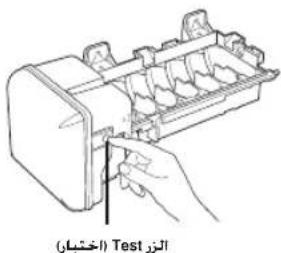
I 1 I I I I I I I I I I I I I I I I I I I I I I I I I I I I I I I I I I I I I I I I I I I I I I I I I I I I I I I I I I I I

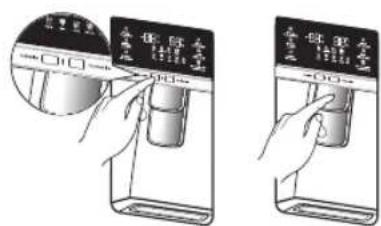
Jcuii joo aos s Jcuii Cuij oao Joeiu
y 100000000000000000000000000000000000000000000000000000000000000000000000000
plaswglgagalacglaolc algo 100
1g j 1g 1g
crushed gj (sso) cubed jillglc Inaillly Lillgj lss
(,)
(1)cU∈jρ
gJ1 p1s1uL jj()CJIJI 00
8g1100slll 9g
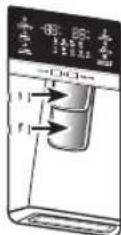
g j 100

11 1
gJgj
JL

-RH77
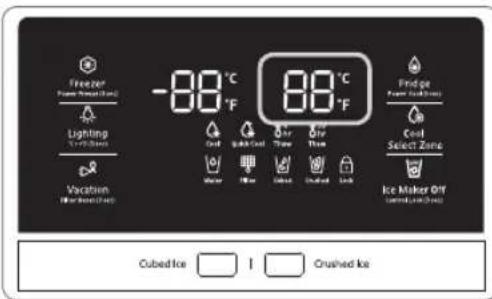
(g)cglgiv:(a)Lgagol 1
Vg1 ygi) CgjgEg rLo aJlJI aJyJ aJyJ aJyJ S
aill a j 15 Lgbl (a) Fridge jll l 15
jll aol 15 15
aaii
1g281 2a a2+11 g 2a+10 yj-2a+23y j 2a+10 yj-2a+23y

a aal l aalw waglll s g 1
aall al ydl l al l l l l l l l l l l l l l l l l l l l l l l l l l l l l l l l l l l l l l l l l l l l l l l l l l l l l l l l l l l l l l l l l l l l l
a1
1211g 121
a 111111111111111111111111111111 00000000000000000000000000000000000000000000000000000
a 1
-RH77
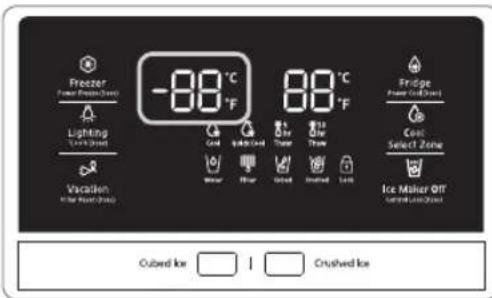
(a10 19-g)cogf-(g)gagaiy
gio 1c 1u 1u u 1u 1u 1u 1u 1u
1
jll jie Jg 100
y = - ( x - 2) ^2 + 9 = - x^2 + 4x + 5
y
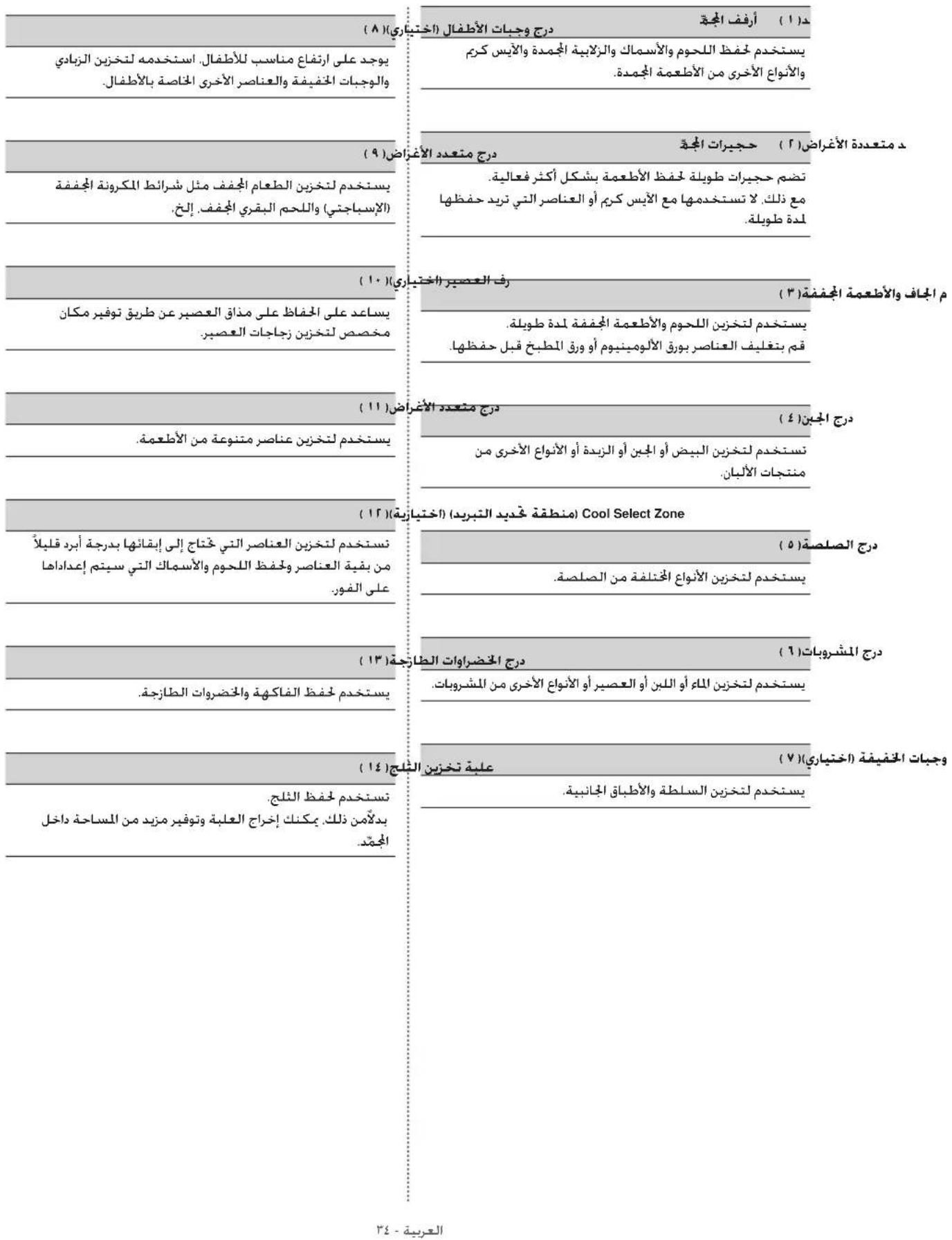
Lg aolal g aolal
(jIJIJI 0jgai 0i(1
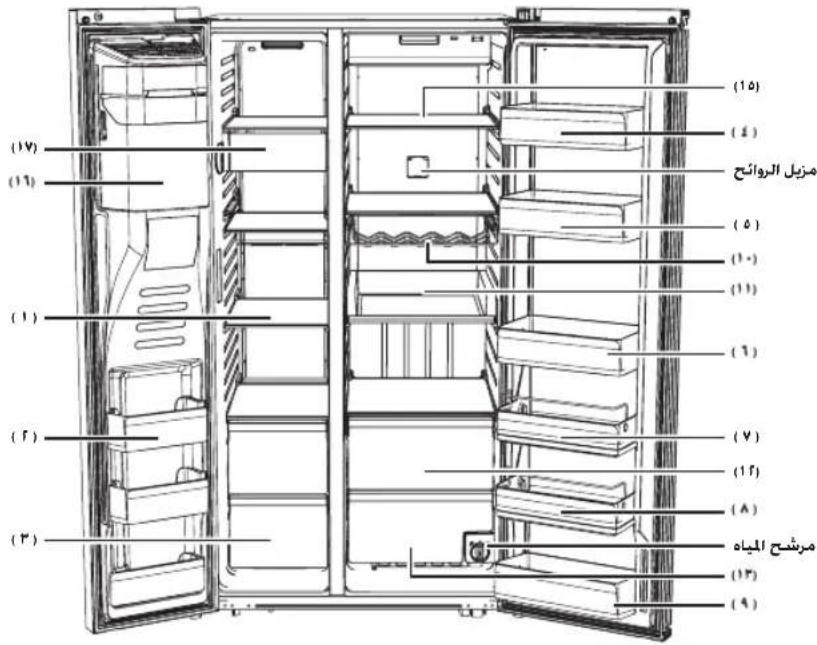
RH77H90, RH77H80
gai jia
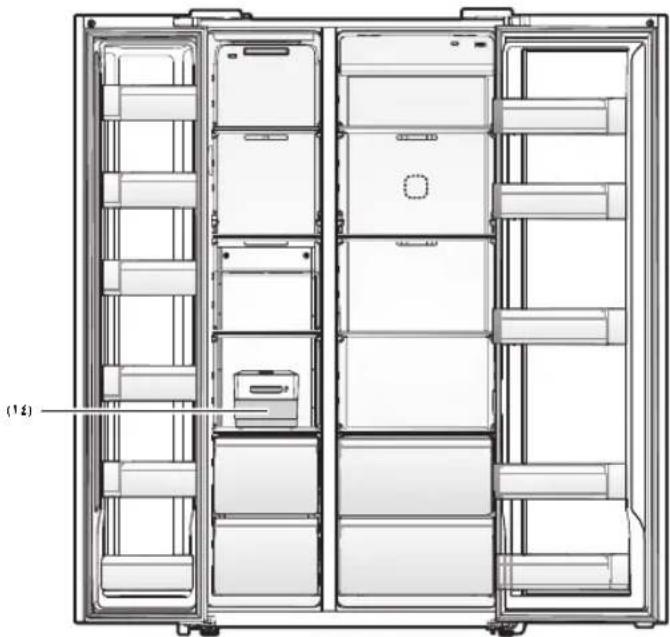
[ + 1 - a + b = 1]
| (1) lgdded Control Lock (la JI L) Cubed Ice | ||
| (JaJI) Lock (la JI L) Cubed Ice | ||
| (La JI) Control Lock (la JI L) Cubed Ice | ||
| (La JI) Control Lock (la JI L) Cubed Ice | ||
| Ice Maker Off/Control Lock (la JI L) Cubed Ice | ||
| Control (la JI L) Cubed Ice | ||
| Ice Maker Off/Control Lock (la JI L) Cubed Ice |
| (1) Water | |
| (aLL) Water | |
| Water | |
| Δφ20 (sec) / Δt20 (sec) | (τ) | ← → Δφ20/Δt20 (1/2π) | (τ) |
| Δφ20 (sec) / Δt20 (sec) | (1/2π) | ||
| Δφ20 (sec) / Δt20 (sec) | (1/2π) | ||
| Δφ20 (sec) / Δt20 (sec) | (1/2π) | ||
| Δφ20 (sec) / Δt20 (sec) | (1/2π) | ||
| Δφ20 (sec) / Δt20 (sec) |
Samsung
Clll lcll oao Joo 8, aS S yoc Clll l aag Lg Si Loic
Jee aag J (zlll lai) Ice Off j 2000
J 15


PA = AQ_2 三
sui 111 100 100 100 100
JGL
(L)
AJI LJI JIOOg sUJ 10000000000000000000000000000000000
1

sU1 gdi a2o sLo c y o aogb, jc j
sU1 ejo o yaae oL
JgJgJgJgJgJgJg
Jiei 1 aao 15 20

2013j5yJLw281
cI11 cI11 cI11 100000000000000000000000000
- jyj jll jwadg jil 00 y
1gjglgjglglgglgglgglgglgglgglgglgglgglgglgglgglgglgglgglgglgglgglgglgglgglgglgglgglgglgglgglgglgglgglgglgglgglgglgglgglggl
j 1
Wu aagell aggagagall gaaal pssui
()
aaiil aai jao yu5 ayal algai gaj
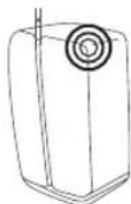
yll 20 Jauell sllc Jaa a Jauell sllc Jaa yll jie
Jclico pliszulogaiI J
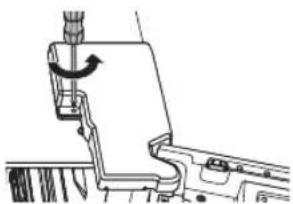
aagai gwj()acLwJbAcolg jaoLWjegypa
gai gai jao jai gai jao aaiiaao aaiy iaiiagai iaiy aaiiy aaiy aaiy aaiy aaiy aaiy aaiy aaiy aaiy aaiy aaiy aaiy aaiy aaiy aaiy aaiy aaiy aaiy aaiy aaiy aaiy aaiy aaiy aaiy aaiy aaiy aaiy aaiy aaiy aaiy aaiy aaiy aaiy aaiy aaiy

a a a a a a a a a a a a a a a a a a a a a a a a a a a a a a a a a a a a a a a a a a
gaiyI 1000000000000000000000000000000000000000000000000
a>1111
1a 1
J 1
g
a081n jzdiic 1
1g j 20
Jg
1
iic 1
g 1g 1g 1g 1g 1g
aJslil slgwi bni aab
L
1 + x + 21 + x + 4 = 6
AaJJI JI JI JI Lgag aag
J L
A
L 1 L
a 1
a
1g
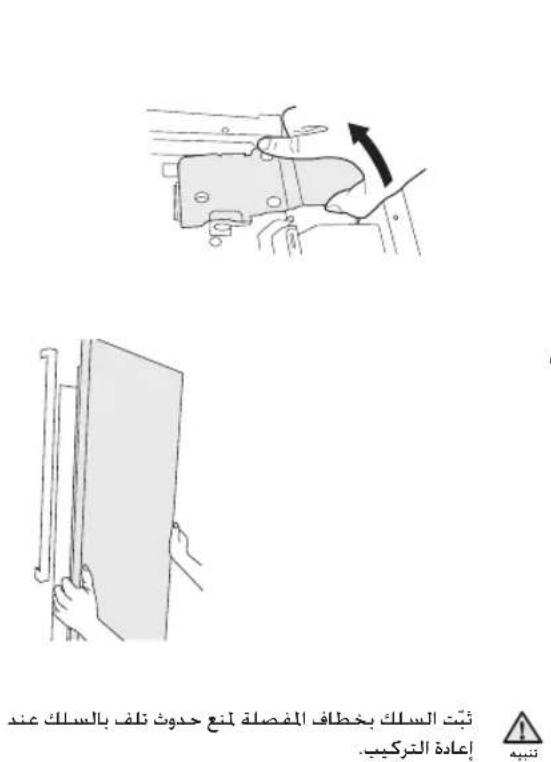
2 1
aogglal Lgolgo J5 0s 0s jll oLcI
1
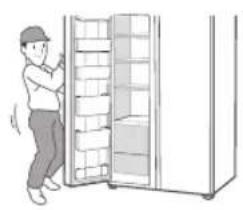
JUUL Juaill
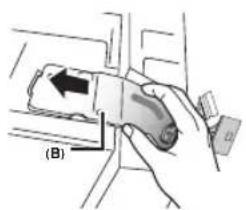
LJIgLaJr
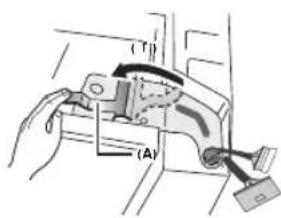
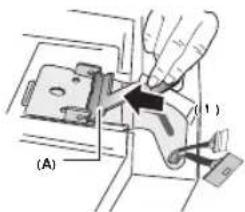
1 28
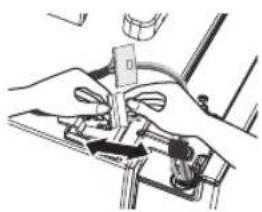
- a4 = a1 + 2d( 4 - 3)
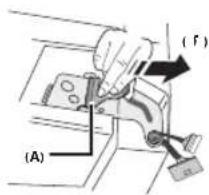
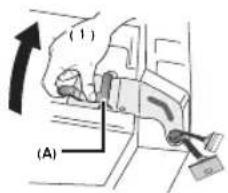
f Jaxie Ic biai a iuJauill Jauill axie (B) Jauill Jauill
2(B)ALa11AJIjLpa
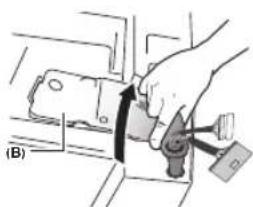
1051 g Lgaiu 1 (1) aagllol 1 (A) alall j
aLgS1111111111111111111111
1.45 < g^2| 0.8,0.8| g_10.3.1.3.

aLi j 100
aJxJIyCAL
[ \Rightarrow A = \frac{1}{2}A \cdot {AQ} = {51}]
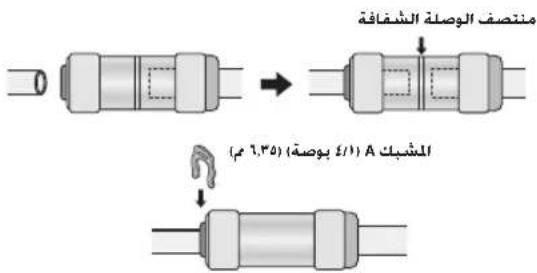

LJI Ia 2
pLg JlalbJgIoo Lg, LlalbIaI 10gol g

S_ ACD = S_ COD + S_ DCE - S_ CDE
a + b = 5
JgJ 15g
J 1
(oljJ0) 0
gai gai iiai jao ai la hao
lg34 < lg1.6 < lg5.6
jLgJ JzJzJzJzJzJz
1
a1
a
algdoIogaoJg 1y
gai jia 1 aae b8gao
L4 = 0 L3 = 2
a 1111111111111111111
a.11 1 a.011 1 a.011 1
aLj Lc JzJx Jao .pIiJl
· = | | · | |
j0000
15 15
aLJI 1
a + g = 1 在 Rt XYZ 中:
jLg1Jg>wllo a>Luwo
a1g sssg a
Srrjj jic aagolg
Jg:wl JLa Jc Jd sLw
sLgJ1jglgsjog.
Pc:J 11 jg 11
8gjgl 10
- iLalji:ii iaIooJI o.o
aLc sllj aJrJg JgJg
gJ 1
1 5
aee b8 0
jLgJnGJJJI JAcLcIe
a
1 1
aJg 1
J1IJI J1J 1
j
y<11jllglaill 11L 1
45 11111111111 1
Jl l 1111111111
Joo Jaaal ygag aaoa 10
a 2
12 = 12
aLjgglgJg
S ACD = S COD + S_ DCE
C. 1,2,3 , 4,5 , 6,7 , 8,9
gJ 1
jL
g
A = 511
a
g
g aal aai 1
a11
aJ 1
gai 150
J 1
5
a
aLi g wll jg
aai jia aie aoe 81
Lg 20
gillso no hwo 2 y
jL (J) jL
J Log JLwU 1234567890
J 1
1
y
a < 0 或 b > 0
gagjgljg jgj
LED
15 15
pao 511 Jla8a afo
Ae g 00g 00g1/g jLg Lg C
pL 1 a g i a Jg j 2 . JlabJgds Cawxg.Lg Lolj.
J 1 Jg
aagg g 113 4
0jgl jgl 111
a aagg g a J
aagg g a J
J 1 J 1 J 1 J 1 J 1
aLac a afoolwI pldy L y
y I y Jn Lg c g J
J J J J J
sIgLolhoo 8
1 1111111111111111111
aIJIgIgIgIgIgIgIgIgIgIgIgIgIgIgIgIg
1 1
1g1g1g1g1g1g1g1g1g1g1g1g1g1g1g1g1g1g1g1g1g1g1g1g1g1g1
1bii jll 1jlln jz jpc -
0jlr l a b jy Lg a Jg
Jllo aossi g Lg 5 lg 28 oJg21 aCGj no s JLo.
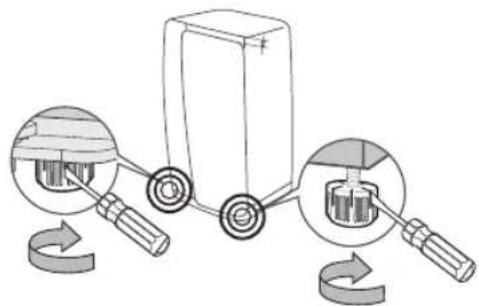
g Lgoad j 5Li .AaLlI I Sic - aXwJnla JxJyI cui Li g
aJ1 JaaJlaaJ a
g 10000000000000000000000000000000000000000000
1
-
LgJcJd1sLj
aL 1
aLalil Lc 1
y
jg 0
111 baaa aalg! glll jic 1g/og aasw ylaLg dgsg 1g
. 11111111111111111111111111111111111
JL
J! Loo 10 oog pjj521 PDC gg -
J

5
y
J 1
.
jllgolpdsicwlpc
gglgogj gllgln
1c 1 Loc
LALI pI 1
a 1
Lw y

J 1
aai1i 45
LgJgJJIaJIJI Jg
a h wlg a jy
.
11 Loo:11 o: pJ21 PDC s
a> a|g a
aolal 1
J
aagai 1c gicg
s
jg
JcLw dJgJg
A
a5g
g
jai g jg 5 a
A
a a
LgolsswJgJyJggs
4000000000000000000000000000000
1
Joo
y
gJ gJgJgJgJgJgJgJgJgJg
45
y
a.11 1 a.13 1 a.14 1 a.15 g
Jai Jic
J 8
= 1
-
Jg
1


15g gaa 11w s pssx
4
a
Aeg aai sIg
aJ1JnBnBnBnBnBnBnBnBnBnBnBnBnBnBnBnBnBnBnBnBnBnBnBnBnBnBnBnBnBnBnBnBnBnBnBnBnBnBnBnBnBnBnBnBnBnBnBnBnBnBn
n 1
g
jI
a
g
aL
5jL 1
j1g 110
jLc gJgJgJgJgJg
J 150
()olLg
1J 1
gaiy 5 aoo
= - g
g1g11g>g1
.
a>gl o0o jgj 1
Lg wai jolil lossio aoljI
J 1
J2g20g20g20g20g20g20g20g20g20g20g20g20g20g20g20g20g20g20g20g20g20g20g20g20g20g20g
a>g20 golg yS11 8
aLJIa aIJI
x11s1j 10
L 1 L
g 1
LwU 1J 1J 1
aai 8.05000000010000000
J 1
gaiy5 aoo 0g jh s
· = 0
Jg Jg Jg Jg Jg Jg Jg Jg Jg Jg Jg Jg Jg Jg Jg Jg Jg Jg Jg Jg Jg Jg Jg Jg Jg Jg Jg Jg Jg Jg Jg Jg Jg Jg Jg Jg Jg Jg Jg Jg Jg Jg Jg Jg Jg Jg Jg Jg Jg Jg Jg
aJLALI Lc 1
g 15jL jic 4
s p c J
L aJ
.
jL≤R-134a g|R-600a jLp#i#i#i#
a gI ygll hclal galo jol l 1
i iil glo jlgjll a 1
ii jlc egai ayel jls 2ggl
yll pss
JLc Jc Jc jll Iis gic (R600a jLc JIs) JLeiU
JyBjIyBjIyBjLc Jei
JyBjIyBjIyBjLc Jei
JyBjIyBjIyBjLc Jei
JyBjIyBjIyBjLc Jei
JyBjIyBjIyBjLc Jei
JyBjIyBjIyBjLc Jei
JyBjIyBjIyBjLac Jei
JyBjIyBjIyBjLc Jei
jLg1110p000000000000000000000000000000000000000000000000000000000000000000000000000000



LlL LlS
Samsung 1
SAMSUNG
l0( 12 - 1) + l1( 12 - 1) = 0
DA68-02976G-07