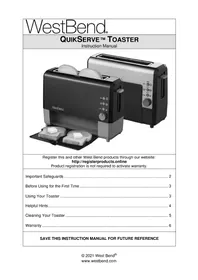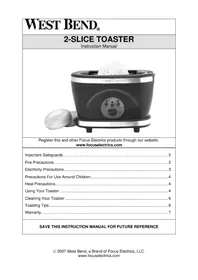
78224 - Toaster WestBend - Free user manual and instructions
Find the device manual for free 78224 WestBend in PDF.



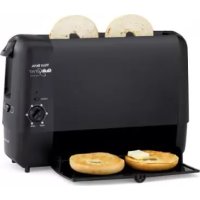
| Brand | WestBend |
| Model | 78224 |
| Product Type | Toaster |
| Power | 120 V AC, 60 Hz |
| Number of Slots | 2 |
| Browning Setting | 6 levels (1 light to 6 dark) |
| Toasting Modes | Bread (toast both sides), Bagel (toast cut side only) |
| Functions | Cancel button, push-down lever, removable serving tray |
| Serving Tray | Removable, hand wash in warm soapy water (do not put in dishwasher) |
| Interior Cleaning | Shake appliance to remove crumbs |
| Exterior Cleaning | Wipe with a damp cloth, do not use abrasive cleaners |
| Cord Length | Short (wraps under base) |
| Safety | Do not immerse, do not use with damaged cord, do not insert metal objects, unplug before cleaning |
| Usage | Household only, on a flat and heat-resistant surface |
| Warranty | 1 year (parts and labor) in USA and Canada |
| Customer Service | Focus Electronics: (866) 290-1851, service@focuselectrics.com |
Frequently Asked Questions - 78224 WestBend
User questions about 78224 WestBend
0 question about this device. Answer the ones you know or ask your own.
Ask a new question about this device
Download the instructions for your Toaster in PDF format for free! Find your manual 78224 - WestBend and take your electronic device back in hand. On this page are published all the documents necessary for the use of your device. 78224 by WestBend.
USER MANUAL 78224 WestBend
Register this and other Focus Electronics products through our website:
www.registerfocus.com
Important Safeguards 2
Before Using for the First Time 3
Using Your Toaster 3
Helpful Hints 4
Cleaning Your Toaster 5
Warranty. 6
SAVE THIS INSTRUCTION MANUAL FOR FUTURE REFERENCE
IMPORTANT SAFEGUARDS

CAUTION
To prevent personal injury or property damage, read and follow all instructions and warnings.
When using electrical appliances, basic safety precautions should always be followed including:
- Read all instructions.
- Do not touch hot surfaces. Use handles or knobs.
- To protect against fire, electric shock, and injury to persons do not immerse cord, plugs, or other electric parts in water or other liquids.
- Close supervision is necessary when this appliance is used by or near children.
- Always unplug from outlet when not in use and before cleaning. Allow to cool before putting on or taking off parts and before cleaning.
- Do not operate any appliance with a damaged cord or plug, after the appliance malfunctions, or has been damaged in any manner. For service information see warranty page.
- The use of accessory attachments not recommended by Focus Electronics may cause fire, electric shock, or injury.
- Do not use this appliance outdoors.
- Do not let cord hang over the edge of the table or counter, or touch hot surfaces.
- Do not place on or near a hot gas or electric burner, or in a heated oven.
- Always plug cord into wall outlet. To disconnect, turn any control to "OFF," then remove plug from wall outlet.
- Do not use appliance for other than intended use.
- Do not attempt to repair this appliance yourself.
- A short power-supply cord is provided to reduce risks resulting from becoming entangled in or tripping over a longer cord.
- Longer extension cords are available, but care must be exercised in their use. While use of an extension cord is not recommended, if you must use one, ensure that the marked electrical rating of the extension cord is equal to or greater than that of the appliance. If the plug is of the grounded type, the extension cord must be a grounding-type 3-wire cord. To avoid pulling, tripping or entanglement, position the extension cord so that it does not hang over the edge of the counter, table or other area where it can be pulled on by children or tripped over.
- This appliance has a polarized plug (one blade is wider than the other). To reduce the risk of electric shock, this plug is intended to fit into a polarized outlet only one way. If the plug does not fit fully into the outlet, reverse the plug. If it still does not fit, contact a qualified electrician. Do not attempt to modify the plug in any way.
- Do not use an outlet or extension cord if the plug fits loosely or if the outlet or extension cord feels hot.
-
Oversize foods, metal foil packages, and utensils must not be inserted in a toaster as they may involve a risk of fire or electric shock.
-
A fire may occur if toasters are covered or touching flammable material, including curtains, draperies, walls, and the like, when in operation.
- Do not attempt to dislodge food when toaster is plugged in.
- For household use only.
SAVE THESE INSTRUCTIONS
BEFORE USING FOR THE FIRST TIME
Please check all packaging material carefully before discarding. Many accessory parts are contained within the packaging material. Before using, wipe the outside of the toaster with a damp cloth then dry thoroughly. Operate the toaster the first time without any food in the toaster slots and with the browning setting set to darkest setting. This will eliminate any residual manufacturing oils.
USING YOUR APPLIANCE
- Place toaster on a dry, level, heat-resistant surface, away from any edge or flammable materials.
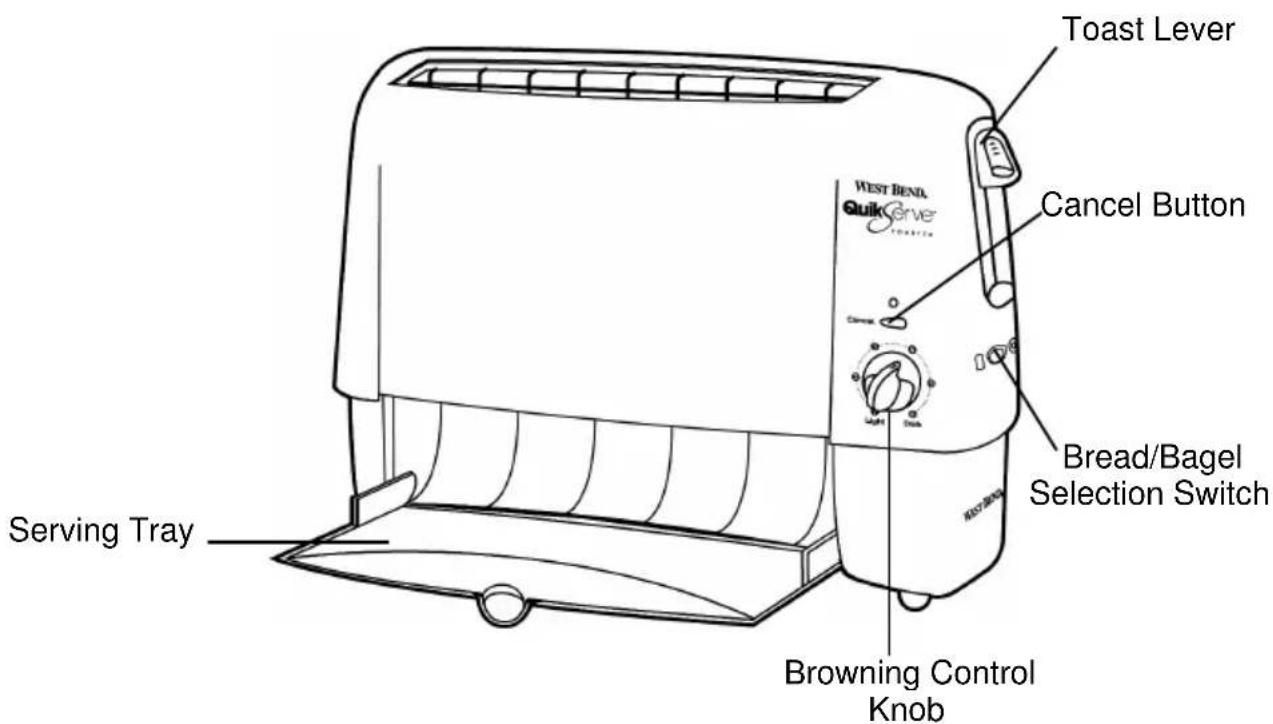
- Plug cord into 120 volt AC outlet only. Open serving tray. Note: Toaster will not function unless serving tray is open.
- Set bread/bagel select switch to desired setting. When set at bread both sides of food will be toasted. When set at bagel the cut side of food will be toasted.
- Place a maximum of two slices of bread or bagel into the bread slot. Be sure to place bagel into toaster with cut side to front as indicated on toaster.
-
Select desired toast color setting from 1 (light) to 6 (dark). We recommend you start with setting 3 (medium) until you become familiar with your toaster. Note: Toaster pastries, tarts and the like can ignite if over-heated. Toast at lowest setting with constant attention.
-
Press the toast lever down until it locks into place. Power light will glow and toasting cycle will begin. Note: Toaster must be plugged in and serving tray open for toast lever to lock in place.
- When selected color is reached, toast rack will open in bottom of toaster and toast will slide out onto serving tray. Power light and toaster will turn off. After a few seconds you will hear a click as the toast rack automatically closes. The toast cycle can be stopped anytime by pressing the cancel button. If toasting additional food, always allow a few seconds between toasting for toast rack to close.
-
When finished toasting, unplug the cord from wall outlet and allow toaster to cool before cleaning. Wipe serving tray to remove crumbs. Close serving tray when not in use. Wrap cord around clips on underside of toaster for storage.
-
A small amount of smoke and/or odor may occur upon heating due to the release of manufacturing oils – this is normal.
- Some minor expansion/contraction sounds may occur during heating and cooling – this is normal.
HELPFUL HINTS
- Toasting can be stopped any time by pressing the cancel button.
- Use bread setting when toasting bread, English muffins, waffles, toaster pastries, etc., for toasting on both sides.
- Frozen foods may require a darker setting.
- If toasting foods with frosting or icing, place food into toaster with frosting side to front.
- After toasting, toast may be buttered or spread with your favorite topping while on serving tray.
- Do not cut on serving tray, as damage to tray will occur.
- Unplug toaster if fire or smoke is observed.
- If food becomes lodged inside toaster, unplug cord from wall outlet and allow toaster to cool completely. Turn toaster upside down and shake to dislodge.
- Never insert metal fork or other metal objects into toasting slots.
| PROBLEM | SOLUTION |
| Toast lever will not lock in place. | Toaster must be plugged in and serving tray opened for toaster to start. |
| Food slides through toaster onto serving tray before toasting. | Toast rack must be closed. Carefully place food into bread slot, do not drop in. |
| Toast rack is not closed. | Allow a few seconds for toast rack to close automatically after toasting. Lift toast lever up slightly. |
| Food does not slide onto serving tray. | Uneven or ragged edges can catch on toast rack, trim off ragged edges before toasting. |
| Food is not toasted on both sides. | Set bread/bagel select switch to bread. |
| Crust side of bagel is too dark. | Set bread/bagel select switch to bagel, place cut side of bagel to front of toaster. |
Note: Failure to clean serving tray may result in fire hazard. Do not attempt to dislodge food when toaster is plugged in.
-
Unplug toaster from outlet and allow to cool before cleaning.
-
Wipe serving tray and outside surfaces with damp cloth to remove crumbs or remove serving tray for cleaning as needed. Wash serving tray in hot soapy water, rinse and dry. Note: Do not use any abrasive scouring pads or cleansers on toaster surfaces as scratching will occur. Do not wash the serving tray in an automatic dishwasher, as warping will occur.
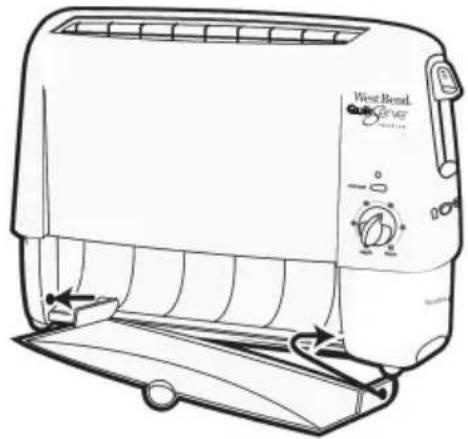
To remove serving tray, push in lower right corner and pull tray forward. To replace tray, first insert left pin into round side opening. Attach right side opening over pin, pushing in slightly.
-
To clean inside of toaster, turn toaster upside down and shake crumbs free. Clean toaster regularly. Do not allow breadcrumbs to accumulate in toaster.
-
Close tray. Wrap cord around clips on underside of toaster for storage.
PRODUCT WARRANTY
Appliance 1 Year Limited Warranty
Focus Electronics, LLC ("Focus Electronics") warrants this appliance from failures in the material and workmanship for one (1) year from the date of original purchase with proof of purchase, provided the appliance is operated and maintained in conformity with the provided Instruction Manual. Any failed part of the appliance will be repaired or replaced without charge at Focus Electronics' discretion. This warranty applies to indoor household use only.
This warranty does not cover any damage, including discoloration, to any non-stick surface of the appliance. This warranty is null and void, as determined solely by Focus Electronics if the appliance is damaged through accident, misuse, abuse, negligence, scratching, or if the appliance is altered in any way.
THIS WARRANTY IS IN LIEU OF ALL IMPLIED WARRANTYES, INCLUDING WARRANTYES OF MERCHANTABILITY, FITNESS FOR A PARTICULAR PURPOSE, PERFORMANCE, OR OTHERWISE, WHICH ARE HEREBY EXCUSED. IN NO EVENT SHALL FOCUS ELECTRICS BE LIABLE FOR ANY DAMAGES, WHETHER DIRECT, INDIRECT, INCIDENTAL, FORSEEABLE, CONSEQUENTIAL, OR SPECIAL, ARISING OUT OF OR IN CONNECTION WITH THIS APPLIANCE.
If you think the appliance has failed or requires service within its warranty period, please contact the Focus Electronics Customer Service Department at (866) 290-1851, or e-mail us at service@focuselectrics.com. A receipt proving the original purchase date will be required for all warranty claims, hand written receipts are not accepted. You may also be required to return the appliance for inspection and evaluation. Return shipping costs are not refundable. Focus Electronics is not responsible for returns lost in transit.
Valid only in USA and Canada
REPLACEMENT PARTS
Replacement parts, if available, may be ordered directly from Focus Electronics, LLC several ways. Order online at www.Focuselectrics.com, e-mail service@focuselectrics.com, over the phone by calling (866)290-1851, or by writing to:
Focus Electrics, LLC
Attn: Customer Service
P.O.Box 2780
West Bend, WI 53095
To order with a check or money order, please first contact Customer Service for an order total. Mail your payment along with a letter stating the model or catalog number of your appliance, which can be found on the bottom or back of the unit, a description of the part or parts you are ordering, and the quantity you would like. Your check should be made payable to Focus Electronics, LLC.
Your state/province's sales tax and a shipping fee will be added to your total charge. Please allow two weeks for processing and delivery.
This manual contains important and helpful information regarding the safe use and care of your new Focus Electronics product. For future reference, attach dated sales receipt for warranty proof of purchase and record the following information:
Date purchased or received as gift:
Where purchased and price, if known:
Item number and Date Code (shown bottom/back of product):
WestBend®
GRILLE-PAIN QUIKSERVER™
Mode d'emploi
Focus Electrics, LLC
Attn: Service clientèle
P.O.Box 2780
West Bend, WI 53095
Focus Electronics, LLC
Attn: Customer Service
P.O.Box 2780
West Bend, WI 53095