 ManualGo.com
DMP-BDT160 - DMP-BDT161 - Blu-ray player PANASONIC - Free user manual and instructions
Find the device manual for free DMP-BDT160 - DMP-BDT161 PANASONIC in PDF.



Download the instructions for your Blu-ray player in PDF format for free! Find your manual DMP-BDT160 - DMP-BDT161 - PANASONIC and take your electronic device back in hand. On this page are published all the documents necessary for the use of your device. DMP-BDT160 - DMP-BDT161 by PANASONIC.
USER MANUAL DMP-BDT160 - DMP-BDT161 PANASONIC
Basic Operating Instructions Blu-ray DiscTM Player DVD-R Video, AVCHD, MKV, Xvid, JPEG, MPO*,
AAC, FLAC, MP3, WAV, WMA
DVD DVD-R DL DVD-RW Video, AVCHD
+R/+RW/+R DL Musik CD
- [BDT260] [BDT161] [BDT160] Per Kabel WLAN RETURN Netzwerk [BDT260] [BDT161] [BDT160] Blu-ray Disc-Player Blu-ray Disc-Player Fotos Setup Benutzer 1 3D-Einstellungen
[BDT260] [BDT161] [BDT160]
[BDT260] [BDT161] [BDT160]
10BASE-T/100BASE-TX 1 System [BDT260] W-LAN Maximale Abtastrate: 192 kHz/24 bit WAV “.WAV”, “.wav” Maximale Abtastrate: 192 kHz/24 bit [BDT260] [BDT161] “.MPO”, “.mpo” [BDT160] MPO 3D-Foto AAC “.M4A”, “.m4a”, “.AAC”, “.aac” Quick Start Guide STEP 1 : Connecting to a TV HDMI cable HDMI IN To a household mains socket AC mains lead (supplied) STEP 2 : Connecting to the network ∫ Wireless LAN connection Wireless router, etc. Internet DY-WL5 [BDT161] [BDT160] [BD813] [BD81] : For wireless capability, connect the Wireless LAN Adaptor DY-WL5 (optional). Only DY-WL5 can be used. Read the operating instructions for DY-WL5 thoroughly when using it. Broadband router, etc. Internet Use category 5 or above straight LAN cables (STP) when connecting to peripheral devices.
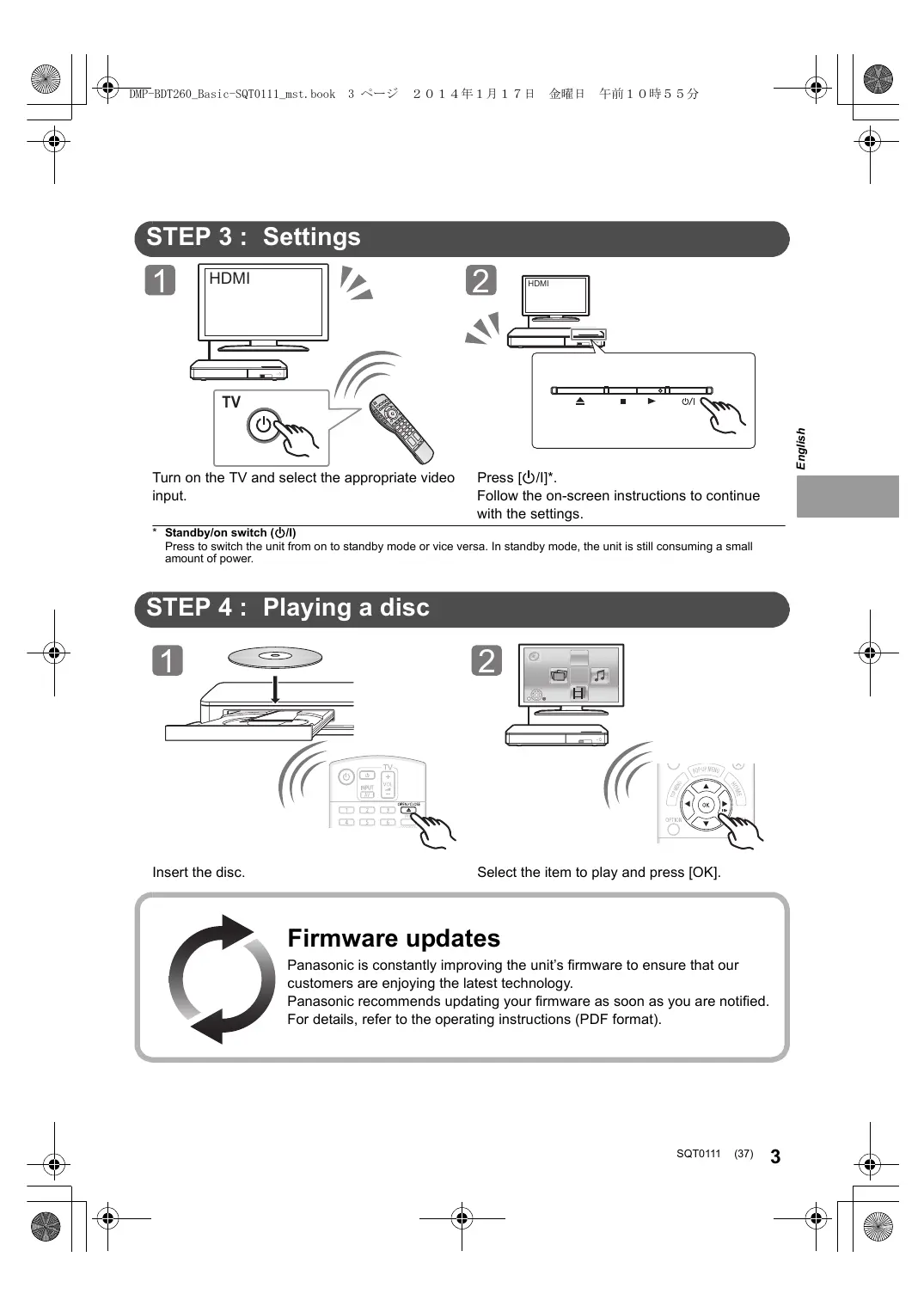
(36) SQT0111 Turn on the TV and select the appropriate video input. English
Press [Í/I]*. Follow the on-screen instructions to continue with the settings.
- Standby/on switch (Í/I) Press to switch the unit from on to standby mode or vice versa. In standby mode, the unit is still consuming a small amount of power. STEP 4 : Playing a disc
PIP SECONDARY Select the item to play and press [OK]. Firmware updates Panasonic is constantly improving the unit’s firmware to ensure that our customers are enjoying the latest technology. Panasonic recommends updating your firmware as soon as you are notified. For details, refer to the operating instructions (PDF format). SQT0111 (37)
Thank you for purchasing this product. Please read these instructions carefully before using this product, and save this manual for future use. Reading the Operating Instructions This document explains basic operations of the unit. For more detailed explanation, please refer to “Operating Instructions (PDF format)” which is recorded in the enclosed CD-ROM. ∫ How to open the Operating Instructions (PDF format) When you insert the CD-ROM and open the [INDEX.pdf] in the CD-ROM, the Operating Instructions list will be displayed. Click the document name of the Operating Instructions you would like to open. ≥ Adobe Reader is required to view the PDF file. Please download it from the homepage of Adobe Systems Incorporated. Operating Instructions (PDF format) cannot be played back on the player itself. Unless otherwise indicated, illustrations in these operating instructions are of DMP-BDT260.
Accessories Check the supplied accessories before using this unit. 1 Remote control (N2QAYB000956) 2 Batteries for remote control 1 AC mains lead 1 CD-ROM ≥ Product numbers are provided in these operating instructions correct as of January 2014. These may be subject to change. ≥ Do not use AC mains lead with other equipment. ≥ Using the remote control
R6/LR6, AA (Alkaline or manganese batteries) – Insert the batteries to the terminal so that it (i and j) matches those in the remote control. Point it at the remote control signal sensor on this unit. WARNING Unit To reduce the risk of fire, electric shock or product damage, ≥ Do not expose this unit to rain, moisture, dripping or splashing. ≥ Do not place objects filled with liquids, such as vases, on this unit. ≥ Use only the recommended accessories. ≥ Do not remove covers. ≥ Do not repair this unit by yourself. Refer servicing to qualified service personnel. ≥ Do not let metal objects fall inside this unit. ≥ Do not place heavy items on this unit. AC mains lead To reduce the risk of fire, electric shock or product damage, ≥ Ensure that the power supply voltage corresponds to the voltage printed on this unit. ≥ Insert the mains plug fully into the socket outlet. ≥ Do not pull, bend, or place heavy items on the lead. ≥ Do not handle the plug with wet hands. ≥ Hold onto the mains plug body when disconnecting the plug. ≥ Do not use a damaged mains plug or socket outlet. The mains plug is the disconnecting device. Install this unit so that the mains plug can be unplugged from the socket outlet immediately. CAUTION Unit ≥ This unit utilizes a laser. Use of controls or adjustments or performance of procedures other than those specified herein may result in hazardous radiation exposure. ≥ Do not place sources of naked flames, such as lighted candles, on this unit. ≥ This unit may receive radio interference caused by mobile telephones during use. If such interference occurs, please increase separation between this unit and the mobile telephone. ≥ This unit is intended for use in moderate climates. Placement Place this unit on an even surface. To reduce the risk of fire, electric shock or product damage, ≥ Do not install or place this unit in a bookcase, built-in cabinet or in another confined space. Ensure this unit is well ventilated. ≥ Do not obstruct this unit’s ventilation openings with newspapers, tablecloths, curtains, and similar items. ≥ Do not place the unit on amplifiers/receivers or equipment that may become hot. The heat can damage the unit. ≥ Do not expose this unit to direct sunlight, high temperatures, high humidity, and excessive vibration. Batteries Mishandling of batteries can cause electrolyte leakage and may cause a fire. ≥ Danger of explosion if battery is incorrectly replaced. Replace only with the type recommended by the manufacturer. ≥ When disposing of the batteries, please contact your local authorities or dealer and ask for the correct method of disposal. ≥ Do not mix old and new batteries or different types at the same time. ≥ Do not heat or expose to flame. ≥ Do not leave the battery(ies) in a car exposed to direct sunlight for a long period of time with doors and windows closed. ≥ Do not take apart or short circuit. ≥ Do not recharge alkaline or manganese batteries. ≥ Do not use batteries if the covering has been peeled off.
Wireless LAN connection The following limits are in place regarding the usage of this unit or Wireless LAN Adaptor. You must be aware of these limits before using these devices. Panasonic will in no way be responsible for any incidental damage which may arise due to a failure to obey these limits, or to any condition of use or disuse of these devices. ≥ Data transmitted and received over radio waves may be intercepted and monitored. ≥ This unit and Wireless LAN Adaptor contain delicate electronic components. Please use these devices in the manner in which they were intended and follow the following points: – Do not expose these devices to high temperatures or direct sunlight. – Do not bend, or subject these devices to strong impacts. – Keep these devices away from moisture. – Do not disassemble or alter these devices in any way. To dispose or transfer this unit The unit may keep the user settings information in the unit. If you discard this unit either by disposal or transfer, then follow the procedure to return all the settings to the factory presets to delete the user settings. For details, refer to the operating instructions (PDF format). ≥ The operation history may be recorded in the memory of this unit. Disposal of Old Equipment and Batteries Only for European Union and countries with recycling systems These symbols on the products, packaging, and/or accompanying documents mean that used electrical and electronic products and batteries must not be mixed with general household waste. For proper treatment, recovery and recycling of old products and used batteries, please take them to applicable collection points in accordance with your national legislation. By disposing of them correctly, you will help to save valuable resources and prevent any potential negative effects on human health and the environment. For more information about collection and recycling, please contact your local municipality. Penalties may be applicable for incorrect disposal of this waste, in accordance with national legislation. Note for the battery symbol (bottom symbol): This symbol might be used in combination with a chemical symbol. In this case it complies with the requirement set by the Directive for the chemical involved. Remove batteries if you do not intend to use the remote control for a long period of time. Store in a cool, dark place. SQT0111 (39)
Copyrights and Trademarks This product uses Cinavia technology to limit the use of unauthorized copies of some commercially-produced film and videos and their soundtracks. For details, refer to the operating instructions (PDF format). “AVCHD” is a trademark of Panasonic Corporation and Sony Corporation. Java is a registered trademark of Oracle and/or its affiliates. Manufactured under license from Dolby Laboratories. Dolby and the double-D symbol are trademarks of Dolby Laboratories. For DTS patents, see http://patents.dts.com. Manufactured under license from DTS Licensing Limited. DTS, DTS-HD, the Symbol, & DTS and the Symbol together are registered trademarks, and DTS-HD Master Audio is a trademark of DTS, Inc. © DTS, Inc. All Rights Reserved. HDMI, the HDMI Logo, and High-Definition Multimedia Interface are trademarks or registered trademarks of HDMI Licensing LLC in the United States and other countries. This product is licensed under the AVC patent portfolio license and VC-1 patent portfolio license for the personal and non-commercial use of a consumer to (i) encode video in compliance with the AVC Standard and VC-1 Standard (“AVC/VC-1 Video”) and/or (ii) decode AVC/VC-1 Video that was encoded by a consumer engaged in a personal and non-commercial activity and/or was obtained from a video provider licensed to provide AVC/VC-1 Video. No license is granted or shall be implied for any other use. Additional information may be obtained from MPEG LA, LLC. See http://www.mpegla.com. MPEG Layer-3 audio coding technology licensed from Fraunhofer IIS and Thomson. “DVD Logo” is a trademark of DVD Format/Logo Licensing Corporation. The Wi-Fi CERTIFIED Logo is a certification mark of the Wi-Fi Alliance. The Wi-Fi Protected Setup Mark is a mark of the Wi-Fi Alliance. “Wi-Fi”, “Wi-Fi Protected Setup”, “WPA” and “WPA2” are marks or registered marks of the Wi-Fi Alliance. DLNA, the DLNA Logo and DLNA CERTIFIED are trademarks, service marks, or certification marks of the Digital Living Network Alliance. Windows is a trademark or a registered trademark of Microsoft Corporation in the United States and other countries. Copyright 2004-2010 Verance Corporation. CinaviaTM is a Verance Corporation trademark. Protected by U.S. Patent 7,369,677 and worldwide patents issued and pending under license from Verance Corporation. All rights reserved. This product incorporates the following software: (1) the software developed independently by or for Panasonic Corporation, (2) the software owned by third party and licensed to Panasonic Corporation, (3) the software licensed under the GNU General Public License, Version 2.0 (GPL V2.0), (4) the software licensed under the GNU LESSER General Public License, Version 2.1 (LGPL V2.1), and/or (5) open source software other than the software licensed under the GPL V2.0 and/or LGPL V2.1.
The software categorized as (3) - (5) are distributed in the hope that it will be useful, but WITHOUT ANY WARRANTY, without even the implied warranty of MERCHANTABILITY or FITNESS FOR A PARTICULAR PURPOSE. Please refer to the detailed terms and conditions thereof shown in the Player Settings menu. At least three (3) years from delivery of this product, Panasonic will give to any third party who contacts us at the contact information provided below, for a charge no more than our cost of physically performing source code distribution, a complete machine-readable copy of the corresponding source code covered under GPL V2.0, LGPL V2.1 or the other licenses with the obligation to do so, as well as the respective copyright notice thereof. Contact Information: oss-cd-request@gg.jp.panasonic.com The source code and the copyright notice are also available for free in our website below. http://panasonic.net/avc/oss/bdplayer/AWBPM14A.html David M. Gay’s dtoa and strtod license The author of this software is David M. Gay. Copyright (c) 1991, 2000, 2001 by Lucent Technologies. Permission to use, copy, modify, and distribute this software for any purpose without fee is hereby granted, provided that this entire notice is included in all copies of any software which is or includes a copy or modification of this software and in all copies of the supporting documentation for such software. THIS SOFTWARE IS BEING PROVIDED “AS IS”, WITHOUT ANY EXPRESS OR IMPLIED WARRANTY. IN PARTICULAR, NEITHER THE AUTHOR NOR LUCENT MAKES ANY
REPRESENTATION OR WARRANTY OF ANY KIND
CONCERNING THE MERCHANTABILITY OF THIS SOFTWARE
OR ITS FITNESS FOR ANY PARTICULAR PURPOSE. “UNICODE, INC. LICENSE AGREEMENT - DATA FILES AND SOFTWARE Unicode Data Files include all data files under the directories http://www.unicode.org/Public/, http://www.unicode.org/reports/, and http://www.unicode.org/cldr/data/. Unicode Software includes any source code published in the Unicode Standard or under the directories http://www.unicode.org/Public/, http://www.unicode.org/reports/, and http://www.unicode.org/cldr/data/. NOTICE TO USER: Carefully read the following legal agreement.
BY DOWNLOADING, INSTALLING, COPYING OR OTHERWISE
USING UNICODE INC.’S DATA FILES (““DATA FILES””), AND/OR
SOFTWARE (““SOFTWARE””), YOU UNEQUIVOCALLY
ACCEPT, AND AGREE TO BE BOUND BY, ALL OF THE TERMS AND CONDITIONS OF THIS AGREEMENT. IF YOU DO NOT AGREE, DO NOT DOWNLOAD, INSTALL, COPY, DISTRIBUTE OR USE THE DATA FILES OR SOFTWARE.
COPYRIGHT AND PERMISSION NOTICE
Copyright (c) 1991-2009 Unicode, Inc. All rights reserved. Distributed under the Terms of Use in http://www.unicode.org/copyright.html. Permission is hereby granted, free of charge, to any person obtaining a copy of the Unicode data files and any associated documentation (the ““Data Files””) or Unicode software and any associated documentation (the ““Software””) to deal in the Data Files or Software without restriction, including without limitation the rights to use, copy, modify, merge, publish, distribute, and/or sell copies of the Data Files or Software, and to permit persons to whom the Data Files or Software are furnished to do so, provided that (a) the above copyright notice(s) and this permission notice appear with all copies of the Data Files or Software, (b) both the above copyright notice(s) and this permission notice appear in associated documentation, and (c) there is clear notice in each modified Data File or in the Software as well as in the documentation associated with the Data File(s) or Software that the data or software has been modified. THE DATA FILES AND SOFTWARE ARE PROVIDED ““AS IS””, WITHOUT WARRANTY OF ANY KIND, EXPRESS OR IMPLIED, INCLUDING BUT NOT LIMITED TO THE WARRANTIES OF
MERCHANTABILITY, FITNESS FOR A PARTICULAR PURPOSE
AND NONINFRINGEMENT OF THIRD PARTY RIGHTS. IN NO EVENT SHALL THE COPYRIGHT HOLDER OR HOLDERS INCLUDED IN THIS NOTICE BE LIABLE FOR ANY CLAIM, OR ANY SPECIAL INDIRECT OR CONSEQUENTIAL DAMAGES, OR ANY DAMAGES WHATSOEVER RESULTING FROM LOSS OF USE, DATA OR PROFITS, WHETHER IN AN ACTION OF CONTRACT, NEGLIGENCE OR OTHER TORTIOUS ACTION, ARISING OUT OF OR IN CONNECTION WITH THE USE OR PERFORMANCE OF THE DATA FILES OR SOFTWARE. Except as contained in this notice, the name of a copyright holder shall not be used in advertising or otherwise to promote the sale, use or other dealings in these Data Files or Software without prior written authorization of the copyright holder.” (1) MS/WMA This product is protected by certain intellectual property rights of Microsoft Corporation and third parties. Use or distribution of such technology outside of this product is prohibited without a license from Microsoft or an authorized Microsoft subsidiary and third parties. (2) MS/PlayReady/Final Product Labeling This product contains technology subject to certain intellectual property rights of Microsoft. Use or distribution of this technology outside of this product is prohibited without the appropriate license(s) from Microsoft. (3) MS/PlayReady/End User Notices Content owners use Microsoft PlayReady™ content access technology to protect their intellectual property, including copyrighted content. This device uses PlayReady technology to access PlayReady-protected content and/or WMDRM-protected content. If the device fails to properly enforce restrictions on content usage, content owners may require Microsoft to revoke the device’s ability to consume PlayReady-protected content. Revocation should not affect unprotected content or content protected by other content access technologies. Content owners may require you to upgrade PlayReady to access their content. If you decline an upgrade, you will not be able to access content that requires the upgrade. (4) FLAC, WPA Supplicant The software licenses are displayed when “Software Licence” in the Setup menu is selected.*
- [HOME] > “Setup” > “Player Settings” > “System” > “System Information” SQT0111 (41)
Router Wireless, ecc. Internet Wireless router stb. Internet
Manufactured by: Importer for Europe: Panasonic Corporation Kadoma, Osaka, Japan Panasonic Marketing Europe GmbH Panasonic Testing Centre Winsbergring 15, 22525 Hamburg, Germany