
FS-1320MFP - Multifunction Printer KYOCERA - Free user manual and instructions
Find the device manual for free FS-1320MFP KYOCERA in PDF.


| Brand | KYOCERA |
| Model | FS-1320MFP |
| Category | Multifunction Printer |
| Main Functions | Print, Copy, Scan |
| Duplex Printing | Automatic (built-in) |
| Print Type | Color Laser |
| Standard Paper Capacity | 500 sheets (Cassette 1), multi-purpose tray for various sizes |
| Supported Paper Weight | 60 to 220 g/m² depending on cassette |
| Power Consumption | Low consumption with sleep mode and auto sleep |
| Power Supply | 220-240 V, 50/60 Hz |
| Maintenance and Cleaning | Regular cleaning, replacement of toner cartridges and waste toner box |
| Security | User authentication, data encryption, network security (HTTPS, IPSec) |
| Spare Parts and Repairability | Original toner cartridges, options: paper feeder, SSD, wireless network kit |
| Connectivity | Ethernet network, USB 2.0, optional wireless |
| Display | Control panel with keys and LCD display |
| Included Software | KX drivers, KX XPS drivers, utilities (Status Monitor, KYOCERA Net Viewer) |
| Paper Size | A4, A5, A6, B5, Letter, Legal, Custom |
| Economy Functions | EcoPrint, silent mode, auto sleep |
| Document Storage | Custom Box (requires SSD), USB memory |
| Remote Management | Command Center RX via Web browser |
Frequently Asked Questions - FS-1320MFP KYOCERA
User questions about FS-1320MFP KYOCERA
0 question about this device. Answer the ones you know or ask your own.
Ask a new question about this device
Download the instructions for your Multifunction Printer in PDF format for free! Find your manual FS-1320MFP - KYOCERA and take your electronic device back in hand. On this page are published all the documents necessary for the use of your device. FS-1320MFP by KYOCERA.
USER MANUAL FS-1320MFP KYOCERA
Programme Energy Star (ENERGY STAR®) 1-11
Command Center RX 2-33
Programme Energy Star (ENERGY STAR®) 1-11
Avis
CLASS 3B LASER RADIATION WHEN OPEN.
AVOID DIRECT EXPOSURE TO BEAM.
ATTENTION · CLASE 3B RAYONNEMENT LASER EN CAS D'OUVERTURE.
EXPOSITION DANGEREUSE AU FAISCEAU.
VORSICHT KLASSE 3B LASERSTRAHLUNG, WENN ABDECKUNG GEOFFNET.
CLASS 1 LASER PRODUCT
KLASSE 1 LASER PRODUKT
EN ISO 7779
Copyright (c) 1998-2006 OpenSSL Project. All rights reserved.
Redistribution and use in source and binary forms, with or without modification, are permitted provided that the following conditions are met:
- Redistributions of source code must retain the above copyright notice, this list of conditions and the following disclaimer.
- Redistributions in binary form must reproduce the above copyright notice, this list of conditions and the following disclaimer in the documentation and/or other materials provided with the distribution.
- All advertising materials mentioning features or use of this software must display the following acknowledgment: "This product includes software developed by the OpensSL Project for use in the OpensSL Toolkit. (http://www.openssl.org/)
- The names "OpenSSL Toolkit" and "OpenSSL Project" must not be used to endorse or promote products derived from this software without prior written permission. For written permission, please contact openssl-core@openssl.org.
- Products derived from this software may not be called "OpenSSL" nor may "OpenSSL" appear in their names without prior written permission of the OpenSSL Project.
- Redistributions of any form whatsoever must retain the following acknowledgment: "This product includes software developed by the OpensSL Project for use in the OpensSL Toolkit (http://www.openssl.org/)
THIS SOFTWARE IS PROVIDED BY THE OpensSL PROJECT "AS IS" AND ANY EXPRESSED OR IMPLIED WARRANTY, INCLUDING, BUT NOT LIMITED TO, THE IMPLIED WARRANTY OF MERCHANTABILITY AND FITNESS FOR A PARTICULAR PURPOSE ARE DISCLAIMED. IN NO EVENT SHALL THE OpensSL PROJECT OR ITS COLLABORATORS BE LIABLE FOR ANY DIRECT, INDIRECT, INCIDENTAL, SPECIAL, EXEMPLARY, OR CONSEQUENTIAL DAMAGES (INCLUDING, BUT NOT LIMITED TO, PROCEDURE OF SUBSTITUTE GOODS OR SERVICES; LOSS OF USE, DATA, OR PROFITS; OR BUSINESS INTERRUsION) HOWEVER CAUSED AND ON ANY THEORY OF LIABILITY, WHETHER IN CONTRACT, STRICT LIABILITY, OR TORT (INCLUDING NEGLIGENCE OR OTHERWISE) ARISING IN ANY WAY OUT OF THE USE OF THIS SOFTWARE, EVEN IF ADVISED OF THE POSSIBILITY OF SUCH DAMAGE.
Original SSLeay License
This package is an SSL implementation written by Eric Young (eay@cryptsoft.com). The implementation was written so as to conform with Netscapes SSL.
This library is free for commercial and non-commercial use as long as the following conditions are adhered to. The following conditions apply to all code found in this distribution, be it the RC4, RSA, Ihash, DES, etc., code; not just the SSL code. The SSL documentation included with this distribution is covered by the same copyright terms except that the holder is Tim Hudson (tjh@cryptsoft.com).
Copyright remains Eric Young's, and as such any Copyright notices in the code are not to be removed.
If this package is used in a product, Eric Young should be given attribution as the author of the parts of the library used.
This can be in the form of a textual message at program startup or in documentation (online or textual) provided with the package.
Redistribution and use in source and binary forms, with or without modification, are permitted provided that the following conditions are met:
- Redistributions of source code must retain the copyright notice, this list of conditions and the following disclaimer.
- Redistributions in binary form must reproduce the above copyright notice, this list of conditions and the following disclaimer in the documentation and/or other materials provided with the distribution.
- All advertising materials mentioning features or use of this software must display the following acknowledgement: "This product includes cryptographic software written by Eric Young (eay@cryptsoft.com)" The word 'cryptographic' can be left out if the routines from the library being used are not cryptographic related :-).
- If you include any Windows specific code (or a derivative thereof) from the apps directory (application code) you must include an acknowledgement: "This product includes software written by Tim Hudson (tjh@cryptsoft.com)"
THIS SOFTWARE IS PROVIDED BY ERIC YOUNG "AS IS" AND ANY EXPRESS OR IMPLIED WARRANTY, INCLUDING, BUT NOT LIMITED TO, THE IMPLIED WARRANTY OF MERCHANTABILITY AND FITNESS FOR A PARTICULAR PURPOSE ARE DISCLAIMED. IN NO EVENT SHALL THE AUTHOR OR COLLECTORS BE LIABLE FOR ANY DIRECT, INDIRECT, INCIDENTAL, SPECIAL, EXEMPLARY, OR CONSEQUENTIAL DAMAGES (INCLUDING, BUT NOT LIMITED TO, PROCEDURE OF SUBSTITUTE GOODS OR SERVICES; LOSS OF USE, DATA, OR PROFITS; OR BUSINESS INTERRUsION) HOWEVER CAUSED AND ON ANY THEORY OF LIABILITY, WHETHER IN CONTRACT, STRICT LIABILITY, OR TORT (INCLUDING NEGLIGENCE OR OTHERWISE) ARISING IN ANY WAY OUT OF THE USE OF THIS SOFTWARE, EVEN IF ADVISED OF THE POSSIBILITY OF SUCH DAMAGE.
The licence and distribution terms for any publically available version or derivative of this code cannot be changed. i.e. this code cannot simply be copied and put under another distribution licence [including the GNU Public Licence.]
Monotype Imaging License Agreement
1 Software shall mean the digitally encoded, machine readable, scalable outline data as encoded in a special format as well as the UFST Software.
2 You agree to accept a non-exclusive license to use the Software to reproduce and display weights, styles and versions of letters, numerals, characters and symbols (Typefaces) solely for your own customary business or personal purposes at the address stated on the registration card you return to Monotype Imaging. Under the terms of this License Agreement, you have the right to use the Fonts on up to three printers. If you need to have access to the fonts on more than three printers, you need to acquire a multiuser license agreement which can be obtained from Monotype Imaging. Monotype Imaging retains all rights, title and interest to the Software and Typefaces and no rights are granted to you other than a License to use the Software on the terms expressly set forth in this Agreement.
3 To protect proprietary rights of Monotype Imaging, you agree to maintain the Software and other proprietary information concerning the Typefaces in strict confidence and to establish reasonable procedures regulating access to and use of the Software and Typefaces.
4 You agree not to duplicate or copy the Software or Typefaces, except that you may make one backup copy. You agree that any such copy shall contain the same proprietary notices as those appearing on the original.
This License shall continue until the last use of the Software and Typefaces, unless sooner terminated. This License may be terminated by Monotype Imaging if you fail to comply with the terms of this License and such failure is not remedied within thirty (30) days after notice from Monotype Imaging. When this License expires or is terminated, you shall either return to Monotype Imaging or destroy all copies of the Software and Typefaces and documentation as requested.
6 You agree that you will not modify, alter, disassemble, decrypt, reverse engineer or decompile the Software.
7 Monotype Imaging warrants that for ninety (90) days after delivery, the Software will perform in accordance with Monotype Imaging-published specifications, and the diskette will be free from defects in material and workmanship. Monotype Imaging does not warrant that the Software is free from all bugs, errors and omissions.
The parties agree that all other warranties, expressed or implied, including warranties of fitness for a particular purpose and merchantability, are excluded.
8 Your exclusive remedy and the sole liability of Monotype Imaging in connection with the Software and Typefaces is repair or replacement of defective parts, upon their return to Monotype Imaging.
In no event will Monotype Imaging be liable for lost profits, lost data, or any other incidental or consequential damages, or any damages caused by abuse or misapplication of the Software and Typefaces.
9 Massachusetts U.S.A. law governs this Agreement.
10 You shall not sublicense, sell, lease, or otherwise transfer the Software and/or Typefaces without the prior written consent of Monotype Imaging.
11 Use, duplication or disclosure by the Government is subject to restrictions as set forth in the Rights in Technical Data and Computer Software clause at FAR 252-227-7013, subdivision (b)(3)(ii) or subparagraph (c)(1)(ii), as appropriate. Further use, duplication or disclosure is subject to restrictions applicable to restricted rights software as set forth in FAR 52.227-19 (c)(2).
12 You acknowledge that you have read this Agreement, understand it, and agree to be bound by its terms and conditions. Neither party shall be bound by any statement or representation not contained in this Agreement. No change in this Agreement is effective unless written and signed by properly authorized representatives of each party. By opening this diskette package, you agree to accept the terms and conditions of this Agreement.
Programme Energy Star (ENERGY STAR®)

ENERGY STAR
(raccordement du cable LAN) 2-16
Command Center RX 2-33
1 | Onglet [Impression rapide]
Onglet [Publication]
Mémoire amovible (Impression de documents) (page 6-3)
Touche [▲] [▼] > [Retirer mémoire] > touche [OK]
3 Retirer la mémoire USB.
Card Authentication Kit(B) "Card Authentication Kit" (page 11-3)
1 Afficher l'écran.
1 Touche [Menu] > touche [▲] [▼] > [NomUtil/CptaTrav] > touche [OK]

REMARQUE
Color Registration Correction Chart
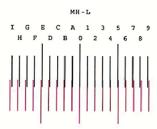
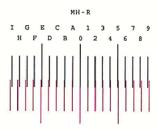

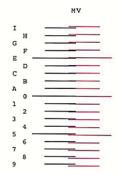
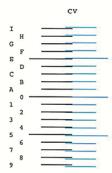
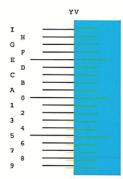
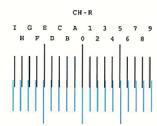
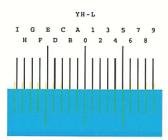
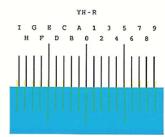
摇摇摇摇摇摇摇摇摇摇摇摇摇摇摇摇摇摇摇摇摇摇摇摇摇摇摇摇摇摇摇摇摇摇摇摇摇摇摇摇摇摇摇摇摇摇摇摇摇摇摇摇摇摇摇摇摇摇摇摇摇摇摇摇摇摇摇摇摇摇摇摇摇
(1) Card Authentication Kit(B) "Card Authentication Kit"
Card Authentication Kit(B) Operation Guide
(3) "Extension mémoire"
(8) Data Security Kit(E) "Data Security Kit"
DHCP (Dynamic Host Configuration Protocol)
KPDL (Kyocera Page Description Language)
NetBEUI (NetBIOS Extended User Interface)
TWAIN (Technology Without Any Interested Name)
WIA (Windows Imaging Acquisition)
Support stockage 4-19
Card Authentication Kit 11-3
Carte SD 11-5
Formater 8-14
Cartouche de toner (Black) 2-4
Cartouche de toner (Cyan) 2-4
Cartouche de toner (Magenta) 2-4
Cartouche de toner (Yellow) 2-4
Command Center RX 2-33
Data Security Kit 11-6
Date 8-15
Déconnexion 2-13
Monotype Imaging License Agreement 1-8
N
NetBEUI 11-27
Card Authentication Kit 11-3
Carte SD 11-5
Data Security Kit 11-6
Extension mémoire 11-3
Original SSLeay License 1-7
P
Page d'etat 11-27
Programme Energy Star (ENERGY STAR®) 1-11
R
RA(Stateless) 11-28
Paramètres 8-18
Raccordement
Câble réseau 2-6
Cable secteur 2-7
Cable USB 2-7
Rapport 8-5
Specifications 11-21
This machine has passed all quality controls and final inspection.
PASSIONATE PEOPLE.
KYOCERA Document Solutions (U.K.) Limited
Eldon Court, 75-77 London Road,
Reading, Berkshire RG1 5BS,
United Kingdom
Phone: +44-118-931-1500
Fax: +44-118-931-1108

KYOCERA Document Solutions Italia S.p.A.
Via Verdi, 89/91 20063 Cernusco s/N.(MI),
Italy
Phone: +39-02-921791
Fax: +39-02-92179-600

KYOCERA Document Solutions Belgium N.V.
Sint-Martinusweg 199-201 1930 Zaventem,
Belgium
Phone: +32-2-7209270
Fax: +32-2-7208748

KYOCERA Document Solutions France S.A.S.
Phone: +33-1-69852600
Fax: +33-1-69853409

KYOCERA Document Solutions Espana, S.A.
South Africa (Pty) Ltd.
KYOCERA House, Hertford Office Park,
90 Bekker Road (Cnr. Allandale), Midrand, South Africa
Phone: +27-11-540-2600
Fax: +27-11-466-3050

KYOCERA Document Solutions Russia LLC.
Building 2, 51/4, Schepkina St., 129110, Moscow,
Russia
Phone: +7(495)741-0004
Fax: +7(495)741-0018

KYOCERA Document Solutions Middle East
Dubai Internet City, Bldg. 17,
Office 157 P.O. Box 500817, Dubai,
United Arab Emirates
Phone: +971-04-433-0412

KYOCERA Document Solutions Inc.
2-28, 1-chome, Tamatsukuri, Chuo-ku
Osaka 540-8585, Japan
Phone: +81-6-6764-3555
http://www.kyocerdocumentsolutions.com
KYOCERA Document Solutions Inc. - 2-28, 1-Chome - Tamatsukuri - Chuo-Ku
Osaka 540-8585-Japan- www.kyoceradocumentsolutions.com