DEH-P6050UB - Receiver PIONEER - Free user manual and instructions
Find the device manual for free DEH-P6050UB PIONEER in PDF.


User questions about DEH-P6050UB PIONEER
0 question about this device. Answer the ones you know or ask your own.
Ask a new question about this device
Download the instructions for your Receiver in PDF format for free! Find your manual DEH-P6050UB - PIONEER and take your electronic device back in hand. On this page are published all the documents necessary for the use of your device. DEH-P6050UB by PIONEER.
USER MANUAL DEH-P6050UB PIONEER
Pleasereadthroughtheseoperatinginstructionsssoyouwillknowhowtooperate yourmodelproperly.Afteryouhavefinishedreadingtheinstructions,keepthismanualinasafeplaceforfuturereference.
01 BeforeYouStart
Aboutthisunit5
Visitourwebsite6
Protectingyourunitfromtheft6
-Removingthefrontpanel6
-Attachingthefrontpanel6
Resettingthemicroprocessor7
Aboutthedemomode7
Useandcareoftheremotecontrol7
-Installingthebattery7
-Usingtheremotecontrol8
02 Operatingthisunit
What'sWhat9
-Headunit9
-Remotecontrol9
BasicOperations10
-PowerON/OFF10
-Selectingasource10
-Adjustingthevolume11
Tuner11
-BasicOperations11
-Storingandrecallingbroadcast frequencies12
-Introductionofadvanced operations12
-Storingthestrongestbroadcast frequencies12
-Tuninginstrongsignals12
Built-inCDPlayer13
-BasicOperations13
-Selectingatrackdirectly14
-Displayingtextinformationondisc14
-Selectingtracksfromthetracktitle list15
-Selectingfilesfromthefilename list15
-Introductionofadvanced operations15
-Selectingarepeatplayrange16
-Playingtracksinrandomorder16
-Scanningfoldersandtracks16
-Pausing playback16
-UsingSoundRetriever17
-Usingdisctitlefunctions17
PlayingsongsonUSBportableaudioplayer/USBmemory18
-BasicOperations18
-Selectinganaudiofiledirectlyinthe currentfolder18
-Displayingtextinformationofanaudio file18
-Selectingfilesfromthefilename list18
-Introductionofadvanced operations19
PlayingsongsoniPod20
-BasicOperations20
-Browsingforasong20
-Displayingtextinformationon iPod21
-Introductionofadvanced operations21
-Playingsongsinarandomorder (shuffle)22
-Playingallsongsinarandomorder (shuffleall)22
-Selectingsongsfromalbumlistof currentlyplayingartist22
-Operatingthisunit'siPodfunction fromyouriPod22
-Changingaudiobookspeed23
03 AudioAdjustments
Introductionofaudioadjustments24
Usingbalanceadjustment24
Usingtheequalizer24
-Recallingequalizercurves24
-Adjustingequalizercurves25
-Adjusting7-bandgraphicequalizer25
Adjustingloudness26
Usingsubwooferoutput26
-Adjustingsubwoofersettings26
Boostingthebass27
Usingthehighpassfilter27
Adjustingsourcelevels27
04 InitialSettings
Adjustinginitialsettings28
Selectingthedisplaylanguage28
Settingthedate28
Settingtheclock29
SettingtheFMtuningstep29
SettingtheAMtuningstep29
Switchingthewarningtone29
Switchingthefaceautoopen30
Switchingtheauxiliarysetting30
Switchingthedimmersetting30
Adjustingthebrightness30
Settingtherearoutputandsubwoofer controller31
Switchingthesoundmuting/attenuation31
Switchingthefeaturedemo31
Switchingthereversemode32
Switchingtheeverscroll32
ActivatingtheBTAudiosource32
EnteringPINcodeforBluetoothwireless connection32
Displayingsystemversionforrepair33
05 OtherFunctions
UsingtheAUXsource34
-AboutAUX1andAUX234
-AUX1source:34
-AUX2source:34
-SelectingAUXasthesource34
-SettingtheAUXtitle34
Usingtheexternalunit34
-Selectingtheexternalunitasthe source34
-Basicoperation35
-Usingthefunctionsallocatedto1to6 keys35
-Advancedoperations35
Turningtheclockdisplayonoroff35
Switchingthedisplayindicationandbutton illumination35
Usingdifferententertainmentdisplays36
UsingthePGMbutton36
06 Availableaccessories
PlayingsongsoniPod37
-Basicoperation37
-Displayingtextinformationon iPod37
-Browsingforasong37
-Introductionofadvanced operations37
-Playingsongsinarandomorder (shuffle)38
BluetoothAudio38
-BasicOperations38
-Functionandoperation39
-ConnectingaBluetoothaudio player39
-PlayingsongsonBluetoothaudio player40
-Stoppingplayback40
-DisconnectingaBluetoothaudio player40
-DisplayingBD(BluetoothDevice) address40
BluetoothTelephone40
-BasicOperations40
-Settingupforhands-freephoning41
-Makingaphonecall42
-Takingaphonecall42
-Functionandoperation42
-Connectingacellularphone43
-Disconnectingacellularphone44
-Registeringaconnectedcellular phone44
-Deletingaregisteredphone44
-Connectingtoaregisteredcellular phone45
-Usingthephonebook45
-Usingthecallhistory47
-Usingpresetnumbers47
-Makingacallbyenteringphone number48
-Clearingmemory48
-Settingautomaticrejecting48
-Settingautomaticanswering49
-Switchingtheringtone49
-Echocancelingandnoise reduction49
Multi-CDPlayer49
-BasicOperations49
-UsingCDTEXTfunctions49
-Introductionofadvanced operations50
-Usingcompressionandbass emphasis50
-UsingITSplaylists51
-Usingdisctitlefunctions52
DVDPlayer53
-BasicOperations53
-Selectingadisc53
-Selectingafolder53
-Introductionofadvanced operations53
TVtuner54
-BasicOperations54
-Storingandrecallingbroadcast stations55
-Storingthestrongestbroadcast stationssequentially55
AdditionalInformation
Errormessages57
Handlingguidelineofdiscsandplayer58
DualDiscs59
Compressedaudiocompatibility59
USBaudioplayer/USBmemory59
-USBaudioplayer/USBmemory compatibility59
-Handlingguidelineandsupplemental information60
iPod61
-AbouthandlingtheiPod61
-AboutiPodsettings61
Compressedaudiofilesonthedisc61
-Exampleofahierarchy62
Specifications63
Aboutthisunit

CAUTION
- Donotallowthisunittocomeintocontact withliquids. Electricalshockcouldresult. Also, damagetothisunit, smoke, andoverheatingcouldresultfromcontactwithliquids.
- Keep this manual handy as a reference for operating procedures and precautions.
• Always keep the volumelowenough so that you can hear sounds from outside the vehicle. - Protect this unit from moisture.
- If the battery is disconnected, discharged, the preset memory will be erased and must be reprogrammed.
- If this unit does not operate properly, contact your dealer or nearest authorized Pioneer Service Station.
AboutWMA

TheWindowsMedia™logoprintedonthebox indicate that this unit can playback WMA data.
WindowsMediaandtheWindowslogoaretrademarksorregisteredtrademarksofMicrosoft CorporationintheUnitedStatesand/orother countries.
- ThisunitmaynotoperatecorrectlydependingontheapplicationusedtoencodeWMAfiles.
AboutMP3
Supplyofthisproductonlyconveysalicense forprivate,non-commercialuseanddoesnot conveyalicensenorimplyanyrighttouse thisproductinanycommercial(i.e.revenue-generating)realtimebroadcasting(terrestrial, satellite,cableand/oranyothermedia),broadcasting/streamingviinternet,intranetsand/orothernetworksorinotherelectroniccontentdistributionsystems,suchaspay-audioor audio-on-demandapplications.Anindependentlicenseforsuchuseisrequired.Fordetails,pleasevisit
http://www.mp3licensing.com.
AboutAAC
ThisunitplaysbackAACfilesencoded by iTunes®. iTunesisattrademarkofAppleInc., registered intheU.S.andothercountries.
Portableaudioplayercompatibility
- Inquireatthemanufactureraboutyour USBportableaudioplayer/USBmemory. Thisunitcorrespondstothefollowing.
—USBMSC(MassStorageClass) compliant portableaudioplayerandmemory
—WMA, MP3, AACandWAVfile playback Fordetails about the compatibility, refer to USBaudioplayer/USBmemorycompatibility on page 59.
iPod® compatibility
This unit can control and listent songs on an iPod.
- ThisunitsupportsonlyaniPodwithDock Connector.
- ThisunitsupportsonlythefollowingiPods. SupportediPodsoftwareversionsare shownbelow.OlderversionsofiPodsoftwaremaynotbesupported.
—iPodfifthgeneration(softwareversion 1.2.1)
—iPodnanofirstgeneration(softwareversion1.3.1)
—iPodnanosecondgeneration(software version1.1.3)
—iPodnanothirdgeneration(software version1.0.2)
—iPodclassic(softwareversion1.0.2)
—iPodtouch(softwareversion1.1.1) Formaximumperformance, were recommend that you usethelatestversion of the iPodsoftware. - OperationsmayvarydependingonthesoftwareversionofiPod.
- WhenusinganiPod,iPodDockConnector toUSBCableisrequired.
- PioneerCD-IU50interfacecableisalso available.Fordetails,consultyourdealer.
BeforeYouStart
- Thisunitcancontrolpreviousgenerations iPodmodelswithaPioneeriPodadapter (e.g.CD-IB100II). Fordetailsconcerningoperationwiththe iPodadapter,refertoPlayingsongsoniPod onpage37.
- iPodisatrademarkofAppleInc., registeredintheU.S.andothercountries.

CAUTION
- Pioneeracceptsnoresponsibilityfordatalost ontheUSBportableaudioplayer/USBmemoryevenifthatdataislostwhileusingthis unit.
- Pioneeracceptsnoresponsibilityfordatalost ontheiPodevenifthatdataislostwhile usingthisunit.
Visitourwebsite
Visitusatthefollowingsite: http://pioneer.jp/group/index-e.html
• Weofferthelatestinformationabout PioneerCorporationonourwebsite.

Protectingyourunitfrom theft
Thefrontpanelcanbedetachedtodetertheft.
- If the front panel is not detached from the head unit within five seconds, fastening off the ignition, awarning tones sounds.
- Youcanturnoffthewarningtone.See Switchingthewarningtoneonpage29.
- Youcanturnoffthefaceautoopen.See Switchingthefaceautoopenonpage30.

Important
- Handlegentlywhenremovingorattaching thefrontpanel.
- Avoid subjecting the front panel to excessive shock.
- Keepthefrontpaneloutofdirectsunlightand hightemperatures.
- Afewsecondsafterturningtheignition switchtoonoroff, thefrontpanelautomaticallymoves. Whenthishappens, yourfingers maybecomejammedinthepanel, sokeep yourhandsawayfromit.
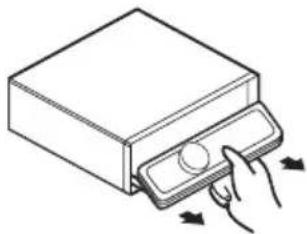
Removingthefrontpanel
1PressandholdOPENtoopenthefront panel.

natural_image
Simple line drawing of a rectangular box with a side tab and a circular button (no text or symbols)2Slideandremovethefrontpaneltowardyou.
Takecarenottogripittootightlyortodrop thefrontpanelandprotectitfromcontact withwaterorotherfluidstopreventpermanentdamage.
natural_image
Illustration of a hand pressing down on a rectangular electronic device with a knob, showing directional arrows (no text or symbols)3Putthefrontpanelintotheprovided protectivecaseforsafekeeping.
Attachingthefrontpanel
1 Makesuretheinnercoverisclosed.
2Replacethefrontpanelbyclippingit intoplace.

natural_image
Line drawing of a device with a hand inserting a button into a folder (no text or symbols)
Resettingthemicroprocessor
Themicroprocessormustberesetunderthe followingconditions:
- Priortousingthisunitforthefirsttime afterinstallation
- Iftheunitfailstooperateproperly
- Whenstrangeorincorrectmessagesappearonthedisplay
- PressRESETwithapentiporother pointedinstrument.

natural_image
Illustration of a computer monitor with a cable inserted into the front panel (no text or symbols visible)RESETbutton

Aboutthedemomode
Thisunitfeaturestwodemonstrationmodes. Oneisthereversemode, theotheristhefeatureddemomode.

Important
Theredlead(ACC)ofthisunitshouldbeconnectedtoaterminalcoupledwithignitionswitch on/offoperations.Ifthisisnotdone,thevehicle batterymaybedrained.
Reversemode
If you donot perform an operation within about 30 seconds, screen indications start to reverse, and then continue reversing every 10 seconds. Pressing BAND when powerto this unit is turned off while the ignition switch is set to ACC or ON cancel there reverse mode. Press BAND again to start there reverse mode.
Featuredemomode
Thefeatureddemoautomaticallystartswhen powertothisunitisturnedoffwhiletheigni-
tionswitchissettoACCorON.PressDISP duringfeaturedemooperationtocancelthe featuredemomode.PressDISPagaintostart. Rememberthatifthefeaturedemocontinues operatingwhenthecarengineisturnedoff, it maydrainbatterypower.
Useandcareoftheremote control
Installingthebattery
Slidethetrayonthebackoftheremotecontroloutandinsertthebatterywiththeplus(+) andminus(-)polesalignedproperly.
- When using for the first time, pull out the film protruding from the tray.

natural_image
Diagram showing two mechanical components with arrows indicating movement, one being folded and the other inserted into a housing (no text or symbols present)
WARNING
Keepthebatteryoutofthereachofchildren. Shouldthebatterybeswallowed,consultadoc- torimmediately.

CAUTION
• UseoneCR2025(3V) lithium battery.
- Removethebatteryiftheremotecontrolisnot usedforamonthorlonger.
- Thereisadangerofexplosionifthebatteryis incorrectlyreplaced.Replaceonlywiththe sameorequivalenttype.
- Donothandlethebatterywithmetallictools.
- Donotstorethebatterywithmetallicobjects.
- If the battery leaks, wipetheremote control completely clean and install anew battery.
- Whendisposingofusedbatteries,comply withgovernmentalregulationsorenvironmentalpublicinstitutions’rulesthatapplyinyour country/area.
Usingtheremotecontrol
Pointtheremotecontrolinthedirectionofthe frontpaneltooperate.
- Theremotecontrolmaynotfunctionproperlyindirectsunlight.

Important
- Donotstoretheremotecontrolinhighttemperaturesordirectsunlight.
- Donotlettheremotecontrolfallontothe floor,whereitmaybecomejammedunderthe brakeoracceleratorpedal.
text_image
① ② ③ ④ -SP SPC -DRLL DSP SRSV X PCM -PM SAND EC SW -DSL -32 PT -301 ⑪ ⑩ ⑨ ⑧ ⑦ ⑥ ⑤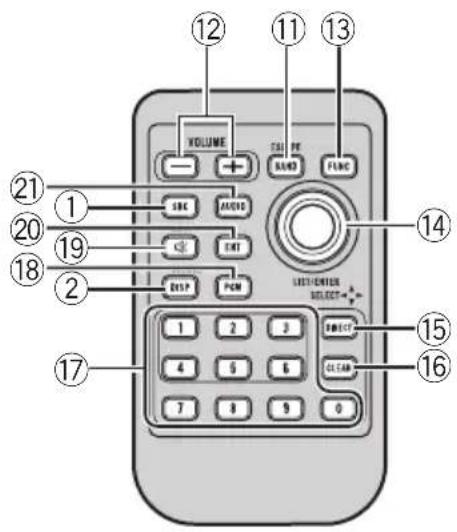
text_image
12 11 13 VOLUME TAL PE SAVE PLNC ABC AUDIO EXIT DISP PCM LIST-ORDER SELECT+ 1 2 3 DIRECT CLEAR 7 8 9 0 15 16 17 18 19 20 21What's What
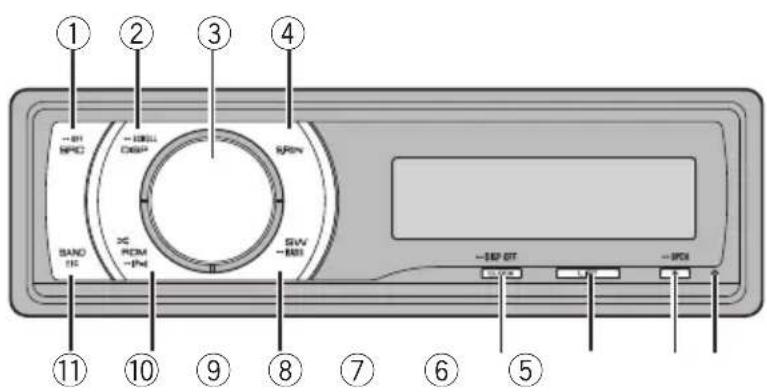
Headunit
① SRC/OFFbutton
Thisunitisturnedonbyselectingasource. Presstocyclethroughalltheavailable sources.
②DISP/SCROLLbutton
Presstoselectdifferentdisplays. Pressandholdtoscrollthetextinformation.
③MULTI-CONTROL
Movetoperformmanualseektuning, fast forward, reverse and track search controls. Alsoused for controlling functions. Turnto increase or decrease the volume.
④S.Rtrvbutton
PresstoswitchSoundRetrieversettings.
⑤RESETbutton
Presstoresetthemicroprocessor.
⑥EJECT/OPENbutton
PresstoejectaCDfromyourbuilt-inCD player. Pressandholdtoopenorclosethefront panel.
⑦LISTbutton
Presstodisplaythedisctitlelist,tracktitle list,folderlist,filelistorpresetchannellist dependingonthesource.
⑧CLOCK/DISPOFFbutton
Presstochangetotheclockdisplay. Pressandholdtoturnthedisplayindication andbuttonilluminationofforon.
⑨SW/BASSbutton
Presstoswitchtosubwoofersettingmenu. Whenoperatingsubwoofermenu, pressto switchsetting. Pressandholdtoswitchtobassboost menu.
⑩RDM/ ✕/ iPodbutton
Presstoturnrandomfunctiononoroff whileusingCDorUSB. WhileusingiPod, pressthisbuttontoshufflealltracks. Pressandholdtoswitchthecontrolmode whileusinganiPodconnectedUSBconnectorofthisunit. IfusingtheiPodwithaninterfaceadapter (CD-IB100Ⅱ), presstoswitchtheshuffle function.
⑪BAND/ESCbutton
PresstoselectamongthreeFMbandsand oneAMband. Presstoreturntotheordinarydisplaywhen operatingmenu.
Remotecontrol
Operationisthesameaswhenusingthebuttonsontheheadunit.
Operatingthisunit
⑫VOLUMEbuttons
Presstoincreaseordecreasethevolume.
⑬FUNCTIONbutton
Presstoselectfunctions.
⑭Thumbpad
Movetoperformmanualseektuning, fast forward, reverse and track search controls.
Alsousedforcontrollingfunctions.
Functionsarethesameas
MULTI-CONTROLexceptforvolumecontrol.
Presstodisplaythedisctitlelist,tracktitle list,folderlist,filelistorpresetchannellist dependingonthesource.
⑮DIRECTbutton
Presstodirectlyselectthedesiredtrack.
⑯CLEARbutton
Presstocanceltheinputnumberwhen0to9areused.
⑰0to9buttons
Presstodirectlyselectthedesiredtrack, presettuningordisc. Buttons1to6canoperatethepresettuningforthetunerordisc numbersearchforthemulti-CDplayer.
⑱PGMbutton
Presstoooperatethepreprogrammedfunctionsforeachsource.(RefertoUsingthePGMbuttononpage36.)
⑲MUTEbutton
Presstoturnoffthesound.Toturnonthe sound,pressagain.
⑳ENTbutton
Presstochangetotheentertainmentdisplay.
②1AUDIObutton
Presstoselectvarioussoundqualitycontrols.
BasicOperations
PowerON/OFF
Turningtheuniton
●PressSRCtoturntheuniton.
Turningtheunitoff
- PressOFFandholduntiltheunitturns off.
Selectingasource
Youcanselectasourceyouwanttolistento. Toswitchtothebuilt-inCDplayer,loadadisc intheunit(refertopage13).
- PressSRCrepeatedlytoswitchbetweenthefollowingsources.
Tuner—Television—DVDplayer/Multi-DVDplayer—Built-inCDplayer—Multi-CD player—iPod—USB—External unit 1—Externalunit2—AUX1—AUX2—BTAudio—BTTelephone

Notes
- In the following cases, the sound source will not change.
—When noun it corresponding to these-lected source is connected.
—Whenthereisnodiscormagazineinthe player.
—WhentheiPodisnotconnectedtothis unit.
—WhenAUX(auxiliaryinput)issettooff (refertopage30).
—WhentheBTAudiosourceissettooff (refertoActivatingtheBTAudiosourceon page32).
- AUX1issettoonbydefault.TurnofftheAUX1 whennotinuse(refertoSwitchingtheauxiliarysettingonpage30).
- Chargingtheportableaudioplayerusing car'sDCpowersourcewhileconnectingitto AUXinputmaygeneratenoise.Inthiscase, stopcharging.
Operatingthisunit
- ExternalunitreferstoaPioneerproduct(such asonesavailableinthefuture)that,although incompatibleasasource,enablescontrolof basicfunctionswiththisunit.Twoexternal unitscanbecontrolledwiththisunit.When twoexternalunitsareconnected,theexternal unitisautomaticallyallocatedtoexternalunit 1orexternalunit2bythisunit.
- Whenthisunit'sblue/whiteleadisconnected tothevehicle'sauto-antennarelaycontrol terminal,thevehicle'santennaextendswhen thisunit'ssourceisturnedon.Toretractthe antenna,turnthesourceoff.
Adjustingthevolume
●TurnMULTI-CONTROLtoadjustthe soundlevel.
Tuner
BasicOperations
If you are using this unit in North, Central or South America, reset the AM tuning step (see Setting the AM tuning step on page 29).
text_image
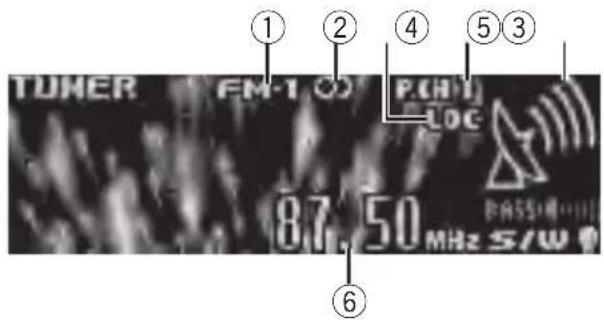
TUNER FM-1 P.CHY LOC 87.50 MHz S/W ① ② ④ ⑤ ③ ⑥①Bandindicator
②O(stereo)indicator
Appearswhentheselectedfrequencyisbeing
broadcastinstereo.
③LOCindicator
Appearswhenlocalseektuningison.
④Presetnumberindicator
⑤Signallevelindicator
Showstheradiowavestrength.
⑥Frequencyindicator
- Selectaband
PressBAND.
■ Band can be selected from among FM1, FM2, FM3orAM.
● Manualtuning(stepbystep)
PushMULTI-CONTROLleftorright.
- Seektuning
PushandholdMULTI-CONTROLleftorright foraboutonesecondandrelease.
■Youcancancelseektuningbypushing MULTI-CONTROLleftorright.
■ If you push and hold MULTI-CONTROL left for right, you can skip stations. Seek tuning starts as soon as you release MULTI-CONTROL.
Storingandrecallingbroadcast frequencies
Youcaneasilystoreuptosixbroadcastfrequenciesforlaterrecall.
- Sixstationsforeachbandcanbestoredin memory.
1PressLIST.
Presetscreenisdisplayed.
2UseMULTI-CONTROLtostorethese- lectedfrequencyinmemory.
Turntochangethepresetnumber.Pressand holdtostore.
3UseMULTI-CONTROLtoselectthedesiredstation.
Turntochangethestation.Presstoselect.
■Youcanalsochangethestationbypushing MULTI-CONTROLupordown.
■Toreturntotheordinarydisplay,pressBAND orLIST.
■Ifyoudonotoperatethelistwithinabout30 seconds,thedisplayautomaticallyreturnstothe ordinarydisplay.
Usingtheremotecontrol
- Whenyoufindafrequencythatyou wanttostoreinmemory,pressoneofpre-settuningbuttons1to6andholduntilthe presetnumberstopsflashing.
Thenumberyouhavepressedwillflashinthe presetnumberindicatorandthenremainlit. Theselectedradiostationfrequencyhasbeen storedinmemory.
Thenexttimeyoupressthesamepresettuningbuttontheradiostationfrequencyisrecalledfrommemory.
■Youcanalsorecallradiostationfrequencies assignedtopresettuningnumbersbypushing MULTI-CONTROLupordownduringthefrequencydisplay,
Introductionofadvanced operations
1PressMULTI-CONTROLtodisplaythe mainmenu.
2UseMULTI-CONTROLtoselect FUNCTION.
Turntochangethemenuoption.Presstose- lect. Thefunctionmenuisdisplayed.
3TurnMULTI-CONTROLtoselectthe function.
BSM(beststationsmemory)—Local(local seektuning)

Notes
- Youcanalsoselectthefunctionbypassing FUNCTIONontheremotecontrol.
• Toreturntotheordinarydisplay, pressBAND.
Storingthestrongestbroadcast frequencies
BSM(beststationsmemory)letsyouautomaticallystorethesixstrongestbroadcastfrequencies.
1Displaythefunctionmenu.
RefertoIntroductionofadvancedoperationson thispage.
2UseMULTI-CONTROLtoselectBSMin thefunctionmenu.
3PressMULTI-CONTROLtoturnBSMon.
Thesixstrongestbroadcastfrequenciesare storedintheorderoftheirsignalstrength.
■Tocancel, press MULTI-CONTROLagain.
Tuninginstrongsignals
Localseektuningletsyoutuneinonlythose radiostationswithsufficientlystrongsignals forgoodreception.
Operatingthisunit
1Displaythefunctionmenu.
Referto/Introductionofadvancedoperationson thepreviouspage.
2UseMULTI-CONTROLtoselectLocalin thefunctionmenu.
3PressMULTI-CONTROLtoturnlocal seektuningon.
■Toturnlocalseektuningoff, press MULTI-CONTROLagain.
4PushMULTI-CONTROLleftorrightto setthesensitivity.
FM: Level 1—Level 2—Level 3—Level 4
AM: Level1—Level2
TheLevel4settingallowsreceptionofonly thestrongeststations,whilelowersettingslet youreceiveprogressivelyweakerstations.
Built-inCDPlayer BasicOperations
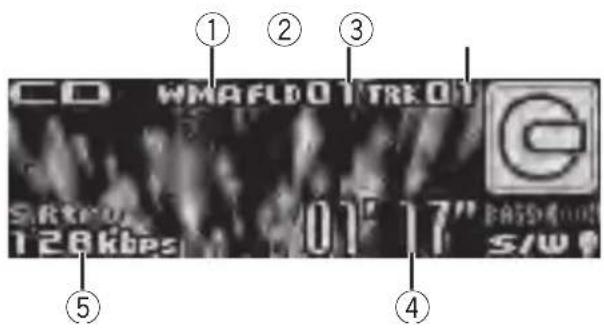
text_image
CD WMAFLD01TRK01 S/RW 128kbps 01'17" S/W ① ② ③ ④ ⑤①WMA/MP3/AAC/WAVindicator
Showsthetypeofaudiofilecurrentlyplaying
whenthecompressedaudioisplaying.
②Foldernumberindicator
Showsthefoldernumbercurrentlyplaying
whenthecompressedaudioisplaying.
③Tracknumberindicator
④Playtimeindicator
⑤Bitrate/samplingfrequencyindicator
Showsthebitrateorsamplingfrequencyof
thecurrenttrack(file)whenthecompressed
audioisplaying.
- WhenplayingbackVBR(variablebit rate)-recordedWMAfiles,theaverage bitratevalueisdisplayed.
- WhenplayingbackVBR(variablebit rate)-recordedMP3files, VBRisdisplayedinsteadofbitratevalue.
- Openthefrontpanel
PressEJECT.
Discloadingslotappears.

text_image
Discloadingslot■Whenloadingadisc,facethelabelsideof adiscup.
●Ejectadisc
PressEJECT.
Operatingthisunit
- Selectafolder
PushMULTI-CONTROLupordown.
■Youcannotselectafolderthatdoesnothave acompressedaudiofilerecordedinit.
- Selectatrack
PushMULTI-CONTROLleftorright.
●Fastforwardorreverse
PushandholdMULTI-CONTROLleftorright.
■Whenplayingcompressedaudio,thereisno soundonfastforwardorreverse.
●Returntorootfolder
PressandholdBAND.
■Iffolder01(ROOT)containsnofiles, playback commenceswithfolder02.
●Switchbetweencompressedaudioand CD-DA
PressBAND.
■Thisoperationisavailableonlywhenplaying CD-EXTRAorMIXED-MODECDs.
■ If you have switched between uncompressed audio and CD-DA, playback starts at the first track on the disc.

Notes
- The built-in CD player can playback audio CD and compressed audio recorded on a CD-ROM. (Refertopage 61 for file that can be played back.)
- Readtheprecautionsfordiscsandplayeron page58.
- Afteradischasbeeninserted, pressSRCto selectthebuilt-inCDplayer.
- Thereissometimesadelaybetweenstarting updiscplaybackandthesoundbeingissued. Whenbeingread,FORMATREADisdisplayed.
- Ifanerrormessageisdisplayed, refertoError messagesonpage57.
- Playbackiscarriedoutinorderoffilenumber. Foldersareskippediftheycontainnofiles.(If folder01(ROOT)containsnofiles, playback commenceswithfolder02.)
- YoucanejecttheCDbypassingandholding EJECTwithrejectpositionwhentheCDloadingorejectingcannotoperateproperly.
Selectingatrackdirectly
When using theremote control, you can select a track directly by entering the desired track number.
- Whenaudiofilesarebeingplayedback, youcanselecttrackinthecurrentfolder.
1PressDIRECT.
Tracknumberinputdisplayappears.
2Press0to9buttonstoenterthedesired tracknumber.
■Youcancanceltheinputnumberbypassing CLEAR.
3PressDIRECT.
Thetrackfortheenterednumberwillplay.
■Afterenteringthenumberinputmode, if you donotperformanoperationwithinabouteight seconds, themodeisautomatically canceled.
Displayingtextinformationon disc
- PressDISPtoselectthedesiredtextinformation.
- FortitleenteredCD
Playtime— Ⓧ:disctitleandplaytime
- ForCDTEXTdiscs
Playtime—:discartistnameand:tracktitle—:discartistnameand:disctitle—:disctitleand:tracktitle—:trackartistnameand:tracktitle—:tracktitleandplaytime—:tracktitle,:trackartistnameand:disctitle
• ForWMA/MP3/AAC
Playtime—:foldernameand:file name—:artistnameand:tracktitle —:artistnameand:albumtitle—; albumtitleand :tracktitle—:track titleandplaytime— :commentandplay time— :tracktitle,:artistnameand :albumtitle
- ForWAV
Playtime—☐:foldernameand:file name

Notes
- Youcanscrolltotheleftofthetitlebypassing andholdingDISP.
- AudioCDthatcontainscertaininformation suchastextand/ornumberisCDTEXT.
- If specific information is not recorded on a disc, title or name is not displayed.
- DependingontheversionofiTunes ^ usedto writeMP3filesontoadisc,commentinformationmaynotbecorrectlydisplayed.
- Depending on the version of Windows Media Player used to encode WMA files, album names and other text information may not be correctly displayed.
- WhenplayingbackVBR(variablebitrate)-recordedWMAfiles,theaveragebitratevalueis displayed.
- WhenplayingbackVBR(variablebitrate)-recordedMP3files, VBR is displayed instead of bitratevalue.
- Thesamplingfrequencyshowninthedisplay maybeabbreviated.
- When EverScrollissettoONattheinitialsetting,textinformationscrollscontinuouslyin thedisplay.RefertoSwitchingtheeverscroll onpage32.
Selectingtracksfromthetrack titlelist
Tracktitlelistletsyouseethelistoftracktitles onaCDTEXTdiscandselectoneofthemto playback.
1PressLISTtoswitchtothetracktitlelist mode.
2UseMULTI-CONTROLtoselectthedesiredtracktitle.
Turntochangethetracktitle.Presstoplay.
■Youcanalsochangethetracktitlebypushing MULTI-CONTROLupordown.
■Toreturntotheordinarydisplay,pressBAND orLIST.
■Ifyoudonotoperatethelistwithinabout30 seconds,thedisplayautomaticallyreturnstothe ordinarydisplay.
Selectingfilesfromthefile namelist
Filenamelistletsyouseethelistoffilenames (orfoldernames) and select one of them to playback.
1PressLISTtoswitchtothefilenamelist mode.
Namesoffilesandfoldersappearinthedisplay.
2UseMULTI-CONTROLtoselectthedesiredfilename(orfoldername).
Turntochangethenameoffileorfolder.
—whenafileisselected,presstoplay.
—whenafolderisselected, presstoseealist offiles (orfolders) in theseleted folder.
—whenafolderisselected,pressandholdto playasongintheselectedfolder.
■Youcanalsoplaythefilebypushing MULTI-CONTROLright.
■Youcanalsoplayasongintheselectedfolder bypushingandholdingMULTI-CONTROLright.
■Toreturntothepreviouslist(thefolderone levelhigher),pushMULTI-CONTROLleft.
■Numberofthefolders/filesinthecurrentlyselectedfolderwillbeindicatedontherightsideofthedisplay.
■Toreturntotheordinarydisplay,pressBAND orLIST.
■If you donot operatethelist within about 30 seconds, the display automatically return to the ordinary display.
Introductionofadvanced operations
1PressMULTI-CONTROLtodisplaythe mainmenu.
2UseMULTI-CONTROLtoselect FUNCTION.
Turntochangethemenuoption.Presstose-lect.
Thefunctionmenuisdisplayed.
3TurnMULTI-CONTROLtoselectthe function.
Playmode(repeatplay)—Randommode(randomplay)—Scanmode(scanplay)—Pause(pause)—SoundRetriever(soundretriever)—TitleInput"A"(disctitleinput)

Notes
- Youcanalsoselectthefunctionbypassing FUNCTIONnontheremotecontrol.
• To return to the ordinary display, press BAND. - If you donot operate function except for TitleInput "A" within about 30 seconds, the display automatically return to the ordinary display.
- WhenplayingacompressedaudiodiscorCD TEXTdisc,youcannotswitchtodisctitleinput display.
Selectingarepeatplayrange
1Displaythefunctionmenu.
RefertoIntroductionofadvancedoperationson thepreviouspage.
2UseMULTI-CONTROLtoselect Playmodeinthefunctionmenu.
3PressMULTI-CONTROLtoselecttherepeatrange.
- Discrepeat-Repeatalltracks
- Trackrepeat—Repeat the current track
- Folderrepeat-Repeatthecurrentfolder
■ If you select another folder during repeat play, therepeat play range changestodiscrepeat.
■Performingtracksearchorfastforward/reverseduringTrackrepeat(trackrepeat)changestherepeatplayrangetodisc/folder.
■WhenFolderrepeat(folderrepeat)isselected,itisnotpossibletoplaybackasubfolder ofthatfolder.
Playingtracksinrandomorder
Tracksinaselectedrepeatrangeareplayed in randomorder.
●PressRDMtoturnrandomplayon.
Tracksplayinarandomorder.
■Toturnrandomplayoff, pressRDMagain.

Note
Youcanalsoturnthisfunctiononoroffinthe menuthatappearsbyusingMULTI-CONTROL.
Scanningfoldersandtracks
Scanplaysearchesthesongwithinthese- lectedrepeatrange.
1Displaythefunctionmenu.
RefertoIntroductionofadvancedoperationson thepreviouspage.
2UseMULTI-CONTROLtoselect Scanmodeinthefunctionmenu.
3PressMULTI-CONTROLtoturnscanplay on.
The first 10 second so feach track is played.
4Whenyoufindthedesiredtrackpress MULTI-CONTROLtoturnscanplayoff.
■ Ifthedisplayhasautomaticallyreturned to the playbackdisplay, selectScanmodeagainby usingMULTI-CONTROL.
■Afterscanningofadisc(folder)isfinished, normal playbackofthetracksbegins.
Pausing playback
1Displaythefunctionmenu.
RefertoIntroductionofadvancedoperationson thepreviouspage.
2UseMULTI-CONTROLtoselectPausein thefunctionmenu.
3PressMULTI-CONTROLtoturnpause on.
Playbackofthecurrenttrackpauses.
■Toturnpauseoff, press MULTI-CONTROL again.
Operatingthisunit
UsingSoundRetriever
SoundRetrieverfunctionautomaticallyenhancescompressedaudioandrestoresrich sound.
- PressS.Rtrvrepeatedlytoselectthedesiredsetting.
OFF(off)—1—2
■2ismoreeffectivethan1.

Note
Youcanalsoperformthisoperationinthemenu thatappearsbyusingMULTI-CONTROL.
Usingdistitlefunctions
YoucaninputCDtitlesanddisplaythetitle. ThenexttimeyouinsertaCDforwhichyou haveenteredatitle, thetitleofthatCDisdisplayed.
Enteringdisctitles
Usethedisctitleinputfeaturetostoreupto 48CDtitlesintheunit.Eachtitlecanbeupto 10characterslong.
1Displaythefunctionmenu.
RefertoIntroductionofadvancedoperationson page15.
2PlaytheCDthatyouwanttoentera titlefor.
3UseMULTI-CONTROLtoselect TitleInput"A"inthefunctionmenu.
4PressDISPtoselectthedesiredcharactertype.
PressDISPrepeatedlytoswitchbetweenthe followingcharactertypes: Alphabet(uppercase),numbersandsymbols—Alphabet(lowercase)—Europeanletters, such as those with accents (e.g. á, à, ä, ç)—Numbersandsymbols
5PushMULTI-CONTROLupordownto selectaletterofthealphabet.
6PushMULTI-CONTROLleftorrightto movethecursorortothepreviousornext characterposition.
7Movethecursortothelastpositionby pushingMULTI-CONTROLrightafterenteringthetitle.
When you push MULTI-CONTROL rightone more time, the entered title is stored in memory.
8PressBANDtoreturntothe playback display.

Notes
- Titlesremaininmemory,evenafterthediscis removedfromtheunit,andarerecalledwhen thediscisreinserted.
- Afterdatafor48discsarestoredinthememory, dataforanewdiscoverwritestheoldest one.
- If you connect amulti-CD player, you can input disctitles for up to 100 discs.
- Whenamulti-CDplayerthatdoesnotsupport disctitlefunctionsisconnected, you cannot enterdisctitlesinthisunit.
PlayingsongsonUSBportable audioplayer/USBmemory
Fordetailsaboutthesupporteddevice,referto Portableaudioplayercompatibilityonpage5.
BasicOperations
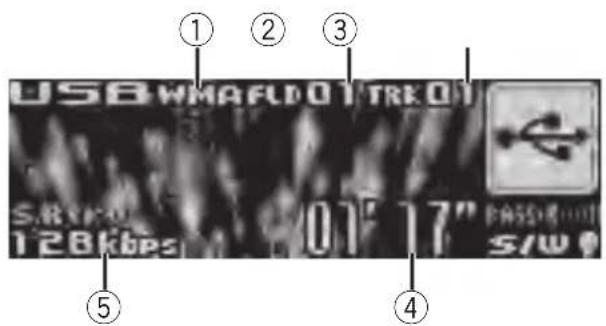
text_image
USB WMAFLD 01 TRK 01 S.R.K.01 128kbps 01'17" PASS:1111 S/W①WMA/MP3/AAC/WAVindicator
Showsthetypeoffilecurrentlyplaying.
②Foldernumberindicator
③Tracknumberindicator
④Playtimeindicator
⑤Bitrate/samplingfrequencyindicator
- WhenplayingbackVBR(variablebit rate)-recordedWMAfiles,theaverage bitratevalueisdisplayed.
- WhenplayingbackVBR(variablebit rate)-recordedMP3files, VBRisdisplayinsteadofbitratevalue.
- Selectafolder
Push MULTI-CONTROLupordown.
●Fastforwardorreverse
PushandholdMULTI-CONTROLleftorright.
- Selectatrack
Push MULTI-CONTROL leftor right.
●Returntorootfolder
PressandholdBAND.

Notes
- Optimumperformanceofthisunitmaynotbe obtaineddependingontheconnectedUSB portableaudioplayer/USBmemory.
-
lffolder01(ROOT)containsnofiles, playback commenceswithfolder02.
-
When the USB portable audioplayer having battery charging function is connected to this unit and the ignition switch is set to ACC or ON, the battery is charged.
- YoucandisconnecttheUSBportableaudio player/USBmemoryanytimeyouwanttofinishlisteningtoit.
- IfUSBportableaudioplayer/USBmemoryis connectedtothisunit,thesourceischanged toUSBautomatically.Ifyoudonotusean USBdevice,disconnectitfromthisunit.DependingontheconnectedUSBdevice,turningontheignitionswitchwhileUSBdeviceis connectedtothisunitmaychangethesource automatically.
Selectinganaudiofiledirectly inthecurrentfolder
Theoperationisthesameasthatofthebuilt-inCDplayer.
RefertoSelectingatrackdirectlyonpage14.
Displayingtextinformationof anaudiofile
Theoperationisthesameasthatofthebuilt-inCDplayer.
RefertoDisplayingtextinformationondiscon page14.

Notes
- If the characters recorded on the audio file are not compatible with the head unit, those characters are not displayed.
- Thetextinformationofsomeaudiofilesmay notbecorrectlydisplayed.
Selectingfilesfromthefile namelist
Theoperationisthesameasthatofthebuilt-inCDplayer.
RefertoSelectingfilesfromthefilenamelist onpage15.
Introduction of advanced operations
1PressMULTI-CONTROLtodisplaythe mainmenu.
2UseMULTI-CONTROLtoselect FUNCTION.
Turntochangethemenuoption.Presstose-lect.
Thefunctionmenuisdisplayed.
3TurnMULTI-CONTROLtoselectthe function.
Playmode(repeatplay)—Randommode
(randomplay)—Scanmode(scanplay)—
Pause(pause)—SoundRetriever(soundretriever)
Functionandoperation
Playmode, Randommode, Scanmode,
PauseandSoundRetrieveroperationsare basicallythesameasthatofthebuilt-inCD player.
FunctionnameOperation
| Playmode | RefertoSelectingarepeatplay rangeonpage16.However,therepeatplayranges youcanselectaredifferentfrom thatofthebuilt-inCDplayer.The repeatplayrangesoftheUSB portableaudioplayer/USBmemoryare:Trackrepeat-Repeatjust thecurrentfileFolderrepeat-Repeatthe currentfolderAllrepeat-Repeatallfiles |
| Randommode | RefertoPlayingtracksinrandom orderonpage16. |
| Scanmode | RefertoScanningfoldersand tracksonpage16. |
| Pause | RefertoPausingplaybackonpage 16. |
| SoundRetriever | RefertoUsingSoundRetrieveron page17. |

Notes
- Youcanalsoselectthefunctionbypassing FUNCTIONnontheremotecontrol.
- Toreturntotheordinarydisplay,pressBAND.
- If you select another folder during repeat play, therepeat play range changesto All repeat.
- If you perform track search or fast forward/ reversed during Track repeat, therepeat play range changesto Folder repeat.
- WhenFolderrepeatisselected,itisnotpossibletoplaybackasubfolderofthatfolder.
- Afterfileorfolderscanningisfinished,normalplaybackofthefilesbeginsagain.
PlayingsongsoniPod
FordetailsaboutthesupportediPod,referto iPod® compatibilityonpage5.
BasicOperations
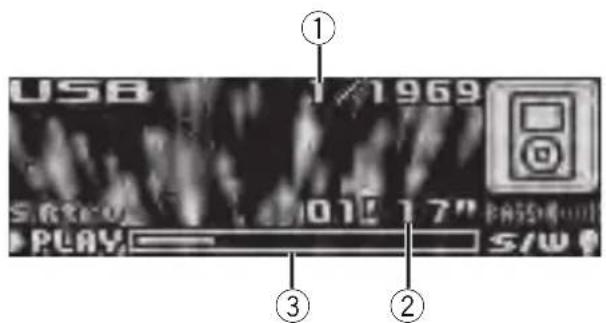
text_image
USB 1969 S/8200 1015 17" PLAY S/W ① ③ ②①Songnumberindicator
②Playtimeindicator
③Songtime(progressbar)
●Fastforwardorreverse
PushandholdMULTI-CONTROLleftorright.
- Selectatrack(chapter)
Push MULTI-CONTROL leftor right.

Notes
- WhenusinganiPod,iPodDockConnectorto USBCableisrequired.
- ReadtheprecautionsforiPodonpage61.
- WhileiPodisconnectedtothisunit, PIONEER (or √ (checkmark)) is displayed on the iPod.
- Ifanerrormessageisdisplayed, refertoError messagesonpage57.
- WhentheignitionswitchissettoACCorON, theiPod'sbatteryischargedwhiletheiPodis connectedtothisunit.
- WhiletheiPodisconnectedtothisunit,the iPodcannotbeturnedonoroff.
- Beforeconnectingthedockconnectorofthis unittotheiPod, disconnecttheheadphones fromtheiPod.
•TheiPodisturnedoffabouttwominutesafter theignitionswitchissettoOFF.
Browsingforasong
Searchingsbycategory
OperationstocontrolaniPodwiththisunitis designedtobeasclosetotheiPodaspossible tomakeoperationandsongsearcheasy.
- Dependingonthenumberoffilesinthe iPod,theremaybedelaywhendisplayinga list.
- If the characters recorded on the Pod are not compatible with this unit, those characters are not displayed.
1PressLIST.
2UseMULTI-CONTROLtoselectacategory.
Turntochangethecategory;presstoselect.
Playlists (playlists)—Artists (artists)—Albums (albums)—Songs (songs)—Podcasts (podcasts)—Genres (genres)—Composers (composers)—Audiobooks(audiobooks) Listfortheselectedcategoryisdisplayed.
■Youcanstart playback throughout these-
lected category bypassing and holding
MULTI-CONTROL.Youcanalsoperform this operation by pushing and holding
MULTI-CONTROLright.
■Youcanalsochangethecategorybypushing MULTI-CONTROLupordown.
■Youcanalsoselectthecategorybypushing MULTI-CONTROLright.
■Toreturntothepreviouscategory,push MULTI-CONTROLleft.
■Toreturntothetoptierofcategories, push andholdMULTI-CONTROLleft.
■Toreturntotheordinarydisplay,pressBAND.
■Ifyoudonotoperatethelistwithinabout30 seconds,thedisplayautomaticallyreturnstothe ordinarydisplay.
3Repeatstep2tofindasongyouwant tolistento.
Searchingsbyalphabet
1PressLIST.
Operatingthisunit
2UseMULTI-CONTROLtoselectacate-gory.
Turntochangethecategory.Presstoselect.
3PressLISTtoswitchtoalphabetsearch mode.
4TurnMULTI-CONTROLtoselectade-siredalphabet.
5PressMULTI-CONTROLtodisplaythealphabeticallist.
■Ifalphabetsearchisaborted,NotFound is displayed.
Displayingtextinformationon iPod
- PressDISPtoselectthedesiredtextinformation.
Playtime— 🎥 :artistnameand:songtitle — 🎥 :artistnameand:albumname—: albumnameand 🎥 :songtitle—:songtitle andplaytime— 🎥 :songtitle,:artistname and 🎥 :albumname
■ If the characters recorded on the Podarenot compatible with this unit, those characters are not displayed.

Notes
- Youcanscrollthetextinformationtotheleft bypressingandholdingDISP.
- When EverScrollissettoONattheinitialsetting,textinformationscrollscontinuouslyin thedisplay.RefertoSwitchingtheeverscroll onpage32.
Introductionofadvanced operations
1PressMULTI-CONTROLtodisplaythe mainmenu.
2UseMULTI-CONTROLtoselect FUNCTION.
Turntochangethemenuoption.Presstose-lect.
Thefunctionmenuisdisplayed.
3TurnMULTI-CONTROLtoselectthe function.
Playmode(repeatplay)—Shufflemode(shuffle)—Shuffleall(shuffleall)—
Linksearch(linksearch)—Controlmode (controlmode)—Pause(pause)—
Audiobooks(audiobookspeed)—
SoundRetriever(soundretriever)
Functionandoperation
Playmode, Pause and Sound Retriever operations are basically the same as that of the built-in CD player.
FunctionnameOperation
| Playmode | RefertoSelectingarepeatplay rangeonpage16.However,therepeatplayranges youcanselectaredifferentfrom thatofthebuilt-inCDplayer.The repeatplayrangesoftheiPod are:•RepeatOne–Repeatthecur-rentsong•RepeatAll–Repeatallsongs intheselectedlist |
| Pause | RefertoPausingplaybackonpage 16. |
| SoundRetriever | RefertoUsingSoundRetrieveron page17. |

Notes
- Youcanalsoselectthefunctionbypassing FUNCTIONontheremotecontrol.
• To return to the ordinary display, press BAND. - If you donot operate functions within about 30 seconds, the display automatically returns to the ordinary display.
- Controlmode(controlmode)functionis availableonlyforiPodnano(secondgeneration).
- When Controlmodeison, only Controlmode and SoundRetrievercan be operated.
Playingsongsinarandom order(shuffle)
1Displaythefunctionmenu.
RefertoIntroductionofadvancedoperationson thepreviouspage.
2UseMULTI-CONTROLtoselect Shufflemodeinthefunctionmenu.
3PressMULTI-CONTROLtoselectyourfavoritesetting.
- ShuffleSongs—Playbacksongsinthese-lectedlistinrandomorder.
- ShuffleAlbums—Playbacksongsfroma randomlyselectedalbuminorder.
- ShuffleOFF-Cancelrandomplay.
Playingallsongsinarandom order(shuffleall)
●Presstoturnshuffleallon.
AllsongsontheiPodplayrandomly.
■Toturnshufflealloff, setShufflemodeinthe FUNCTIONmenutooff.

Note
Youcanalsoturnthisfunctiononinthemenu thatappearsbyusingMULTI-CONTROL.
Selectingsongsfromalbumlist ofcurrentlyplayingartist
Albumlistofthecurrentlyselectedartistis displayed.Youcanselectanalbumorsong fromtheartistname.
- Dependingonthenumberoffilesinthe iPod,theremaybedelaywhendisplayinga list.
1PressandholdLISTtoturnlinksearch on.
Searchesalbumsoftheartistanddisplaysthe list.
2UseMULTI-CONTROLtoselectanalbum orsongfromthelist.
Formoredetailsabouttheselectingoperation, refertostep2ofBrowsingforasongonpage 20.

Notes
- Iflinksearchisaborted,NotFoundisdisplayed.
- Youcanalsoturnthisfunctiononinthemenu thatappearsbyusingMULTI-CONTROL.
Operatingthisunit'siPod functionfromyouriPod
ThisfunctionisavailableonlyforiPodnano (secondgeneration).
Thisunit'siPodfunctioncanbeoperatedfrom youriPod.Soundcanbeheardfromcar's speaker,andoperationcanbeconductedfrom youriPod.
- Whilethisfunctionisinuse, even if the ignition key is turned off, iPodis not turned off. Toturnoff power, operate thei Pod.
1PressiPodandholdtoswitchthecontrolmode.
■EachpressingandholdingiPodswitchesthe controlmode.
■Whileusingthisfunction, playtimeandtitles arenotdisplayedonthisunit.
■Evenifthisfunctionisperformed,trackup/downcanbeoperatedfromthisunit.
■Whileusingthisfunction, browsefunction cannotbeoperatedfromthisunit.
2OperatetheconnectediPodtoselecta songandplay.

Note
Youcanalsoturnthisfunctiononoroffinthe menuthatappearsbyusingMULTI-CONTROL.
Operatingthisunit
Changingaudiobookspeed
While listening to an audiobook on iPod, play-backspeed can be changed.
1Displaythefunctionmenu.
RefertoIntroductionofadvancedoperationson page21.
2UseMULTI-CONTROLtoselect
Audiobooksinthefunctionmenu.
3PressMULTI-CONTROLtoselectyourfavoritesetting.
Press MULTI-CONTROL repeatedly until the desired setting appears in the display.
- Faster-Playbackfasterthannormalspeed
• Normal-Playbackinnormalspeed - Slower-Playbackslowerthannormal speed
Introductionofaudio adjustments

text_image
Fader F/R 0 ①①Audiodisplay
Showstheaudioadjustmentstatus.
1PressMULTI-CONTROLtodisplaythe mainmenu.
2UseMULTI-CONTROLtoselectAUDIO.
Turntochangethemenuoption.Presstose-lect.
Theaudiomenuisdisplayed.
3TurnMULTI-CONTROLtoselectthe audiofunction.
Turn MULTI-CONTROL to switch between the audio functions in the following order.
Fader(balanceadjustment)—Powerful(graphicequalizeradjustment)—50Hz(7-band graphicequalizeradjustment)—LOUD(loudness)—Sub W.1 (subwoofer on/off setting)—
SubW.2(subwoofersetting)—Bass(bass boost)—HPF (high pass filter)—SLA (source leveladjustment)
■Youcanalsoselecttheaudiofunctionby pressingAUDIOontheremotecontrol.
■YoucanselecttheSubW.2onlywhensub-wooferoutputisturnedoninSubW.1.
■ WhenselectingFMasthesource, you cannot switchtoSLA.
■Toreturntothedisplayofeachsource,press BAND.
■ If you donot operate function except for 50Hz within about 30 seconds, the display is automatically returned to the ordinary display.
Usingbalanceadjustment
Youcanchangethefader/balancesettingso thatitcanprovidetheideallisteningenvironmentallooccupiedseats.
1Displaytheaudiomenu.
RefertoIntroductionofaudioadjustmentson thispage.
2UseMULTI-CONTROLtoselectFader.
■ If the balancesetting has been previously adjusted, Balance will be displayed.
3PushMULTI-CONTROLupordownto adjustfront/rearspeakerbalance.
Eachtime MULTI-CONTROL is pushed up or down, the front/rearspeaker balance moves toward the front or rear.
F 15 to R 15 is displayed as the front/rear speakerbalancemovesfromfronttorear.
■F/R0isthepropersettingwhenonlytwo speakersareused.
- When the rear output setting is Rear SP :S/W, you cannot adjust front/rearspeaker balance. RefertoSettingtherearoutput and subwoofer controller on page 31.
4PushMULTI-CONTROLleftorrightto adjustleft/rightspeakerbalance.
EachtimeMULTI-CONTROL is pushed left for right, the left/right speaker balance is moved forward to the left or right.
L 15 to R 15 is displayed as the left/right speakerbalancemovesfromlefttoright.

Usingtheequalizer
Theequalizerletyouadjusttheequalization to match the car's interior acoustic characteristics as desired.
Recallingequalizercurves
Therearesevenstoredequalizercurveswhich youcaneasilyrecallatanytime. Hereisalist oftheequalizercurves.
| DisplayEqualizercurve |
| PowerfulPowerful |
| NaturalNatural |
| VocalVocal |
| Custom1Custom1 |
| Custom2Custom2 |
| FlatFlat |
| S.BassSuperbass |
- Custom1andCustom2areadjustedequalizercurvesthatyoucreate.Adjustments canbemadewitha7-bandgraphicequalizer.
- When Flatisselected, nosupplementor correctionismadetothesound. This is useful to check the effect of the equalizer curves by switching alternatively between Flat and a set equalizer curve.
1Displaytheaudiomenu.
RefertoIntroductionofaudioadjustmentson thepreviouspage.
2UseMULTI-CONTROLtoselectthegraphicequalizeradjustment.
Powerfulappearsinthedisplay. Iftheequalizercurvehasbeenpreviouslyselected, thecurveofthatpreviouslyselected willbedisplayedinsteadofPowerful.
3PushMULTI-CONTROLleftorrightto selectanequalizercurve.
EachtimeMULTI-CONTROL is pushed left for right, equalizer curves are selected in the following order:
Powerful—Natural—Vocal—Custom1—Custom2—Flat—S.Bass
Adjustingequalizercurves
Thefactorysuppliedequalizercurves, with the exception of Flat, can be adjusted to a finedegree (nuance control).
1Recalltheequalizercurveyouwantto adjust.
SeeRecallingequalizercurvesontheprevious page.
2PushMULTI-CONTROLupordownto adjusttheequalizercurve.
EachtimeMULTI-CONTROL is pushed up or down, the equalizer curve increases or decreases respectively.
+6 to -4 (or -6) is displayed as the equalizer curveisincreasedordecreased.
■ The actual range of the headjustments are different depending on which equalizer curve is selected.
■ Theequalizercurvewithallfrequenciessetto 0 cannotbeadjusted.
Adjusting7-bandgraphicequalizer
ForCustom1 and Custom2 equalizer curves, you can adjust the level of each band.
- AseparateCustom1curvecanbecreated foreachsource.(Thebuilt-inCDplayerand themulti-CDplayeraresettothesame equalizeradjustmentsettingautomatically.)Ifyoumakeadjustmentswhena curveotherthanCustom2isselected,the equalizercurvesettingswillbememorized inCustom1.
- ACustom2curvecanbecreatedcommon toallsources.Ifyoumakeadjustments whentheCustom2curveisselected,the Custom2curvewillbeupdated.
1Recalltheequalizercurveyouwantto adjust.
SeeRecallingequalizercurvesontheprevious page.
2UseMULTI-CONTROLtoselect7-band graphicequalizeradjustment.
Frequencyandthelevel(e.g.,50Hz+4)appearsinthedisplay.
3PushMULTI-CONTROLleftorrightto selecttheequalizerbandtoadjust.
EachtimeMULTI-CONTROL is pushed left for right, equalizer bands are selected in the following order:
50Hz—125Hz—315Hz—800Hz—2kHz—5kHz—12.5kHz
4PushMULTI-CONTROLupordownto adjusttheleveloftheequalizerband.
Eachtime MULTI-CONTROL is pushed up or down, the level of the equalization band increases or decreases.
+6 to -6 is displayed as the level is increased or decreased.
■Youcanthenselectanotherbandandadjust thelevel.
5PressBANDtocancelthe7-bandgraphicequalizeradjustment.
Adjustingloudness
Loudnesscompensatesfordeficienciesinthe low-andhigh-soundrangesatlowvolume.
1Displaytheaudiomenu.
RefertoIntroductionofaudioadjustmentson page24.
2UseMULTI-CONTROLtoselectLOUD.
3PressMULTI-CONTROLtoturnloudness on.
Loudnesslevel(e.g.,Mid)appearsinthedisplay.
■Toturnloudnessoff,pressMULTI-CONTROL again.
4PushMULTI-CONTROLleftorrightto selectadesiredlevel.
EachtimeMULTI-CONTROL is pushed left for right, levelisselected in the following order:
Low (low)—Mid (mid)—High (high)
Usingsubwooferoutput
Thisunitisequippedwithasubwooferoutput whichcanbeturnedonoroff.
1Displaytheaudiomenu.
RefertoIntroductionofaudioadjustmentson page24.
■Youcanalsoselectthesubwoofersetting menubypressingSWontheunit.
2UseMULTI-CONTROLtoselectSubW.1.
3PressMULTI-CONTROLtoturnsubwooferoutputon.
Normalappearsinthedisplay.Subwooferoutputisnowon.
■Toturnsubwooferoutputoff, press MULTI-CONTROLagain.
4PushMULTI-CONTROLleftorrightto select the phase of subwoofer output.
Push MULTI-CONTROL left to select reverse phase and Reverse appears in the display. Push MULTI-CONTROL right to select normal phase and Normal appears in the display.
Adjustingsubwoofersettings
Whenthesubwooferoutputison,youcanadjustthecut-offfrequencyandtheoutputlevel ofthesubwoofer.
Only frequencies lower than those in these selected range are outputted from the subwoofer.
- Whenthesubwooferoutputison, you can select SubW.2.
1Displaytheaudiomenu.
RefertoIntroductionofaudioadjustmentson page24.
■Youcanalsoselectthesubwoofersetting menubypressingSWontheunit.
2UseMULTI-CONTROLtoselectSubW.2.
3PushMULTI-CONTROLleftorrightto selectcut-offfrequency.
EachtimeMULTI-CONTROL is pushed left for right, cut-off frequencies are selected in the following order:
50Hz—63Hz—80Hz—100Hz—125Hz
4PushMULTI-CONTROLupordownto adjusttheoutputlevelofthesubwoofer.
EachtimeMULTI-CONTROLispushedupor down, subwooferlevelincreasesordecreases. +6to-24isdisplayedasthelevelisincreased ordecreased.
Boostingthebass
Bassboostfunctionbooststhebasslevelof sound.
1Displaytheaudiomenu.
RefertoIntroductionofaudioadjustmentson page24.
■Youcanalsoselectthebassboostsettingby pressingandholdingSW.
2UseMULTI-CONTROLtoselectBass.
3PushMULTI-CONTROLupordownto selectadesiredlevel.
0to+6isdisplayedasthelevelisincreasedor decreased.
Usingthehighpassfilter
When you donotwantlowsounds from the subwoofer output frequency rangetoplay from the frontorrearspeakers, turn on the HPF (highpassfilter). Only frequencies higher than those in these selected range are output from the frontorrearspeakers.
1Displaytheaudiomenu.
RefertoIntroductionofaudioadjustmentson page24.
2UseMULTI-CONTROLtoselectHPF.
3PressMULTI-CONTROLtoturnhigh passfilteron.
80Hzappearsinthedisplay.Highpassfilteris nowon.
■Ifthehighpassfilterhasbeenpreviouslyadjusted,thefrequencyofthatpreviouslyselected willbedisplayedinsteadof80Hz.
■Toturnhighpassfilteroff, press
MULTI-CONTROLagain.
4PushMULTI-CONTROLleftorrightto selectcut-offfrequency.
EachtimeMULTI-CONTROL is pushed left for right, cut-off frequencies are selected in the following order:
50Hz—63Hz—80Hz—100Hz—125Hz
Adjustingsourcelevels
Sourceleveladjustment(SLA) lets you adjust the volume level of each source to prevent radical changes in volumewhenswitching between sources.
- SettingsarebasedontheFMvolumelevel, whichremainsunchanged.
1 Compare the FM volume level with the level of the source you wish to adjust.
2Displaytheaudiomenu.
RefertoIntroductionofaudioadjustmentson page24.
3UseMULTI-CONTROLtoselectSLA.
4PushMULTI-CONTROLupordownto adjustthesourcevolume.
EachtimeMULTI-CONTROL is pushed up or down, source volume increases or decreases.
SLA+4toSLA-4isdisplayedasthesource volumeisincreasedordecreased.

Notes
• The AM volume level can also be adjusted with source level adjustments.
• The built-in CD player and them multi-CD player aresettothesamesourcelevel adjustment volume automatically.
- Externalunit1andexternalunit2aresetto thesamesourceleveladjustmentvolume automatically.
Adjustinginitialsettings
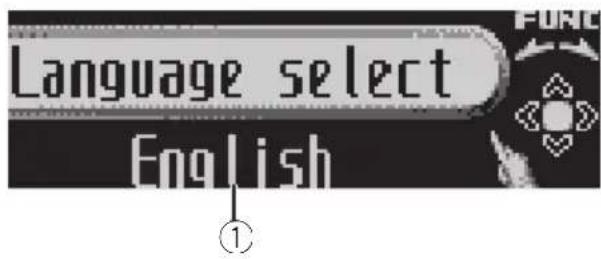
text_image
Language select EnglishUsing the initial settings, you can customize various system settings to achieve optimal performance from this unit.
①Functiondisplay
• Showsthefunctionstatus.
1PressSRCandholduntiltheunitturns off.
2PressMULTI-CONTROLandholduntil theinitialsettingmenuappearsinthedisplay.
3TurnMULTI-CONTROLtoselectoneof theinitialsettings.
Turn MULTI-CONTROL to switch between the functions in the following order.
Languageselect(languageselection)—
Calendar (calendar)—Clock (clock)—FM step (FMtuningstep)—AMstep(AMtuningstep)
—Warningtone(warningtone)—
Faceautoopen(faceautoopen)—AUX1
(auxiliary input 1)—AUX2 (auxiliary input 2)—
Dimmer(dimmer)—Brightness(brightness)
—S/Wcontrol(rearoutputandsubwoofer controller)—Mute(soundmuting/attenuation)—Demonstration(featuredemo)—
Reversemode(reversemode)—Ever-scroll (everscroll)—BTAUDIO(Bluetoothaudio)—
Pincodeinput(pincodeinput)—
BTVersioninfo.(Bluetoothversioninformation)
Usethefollowinginstructionstooperateeach particularsetting.
■Youcanalsoselectthefunctionbypassing
FUNCTIONontheremotecontrol.
■ BTAUDIO and Pincode input can be selected only when Bluetooth adapter (e.g., CD-BTB100) is connected to this unit.
■Tocancelinitialsettings, pressBAND.

Selectingthedisplaylanguage
Foryourconvenience, thisunitequipsmulti-plelanguagedisplay. You can select the language best suited to your first language.
- Forthisfunction, verify the topic Adjusting initial settings before initiating the operation.
1Displaytheintialsettingmenu.
2UseMULTI-CONTROLtoselect Languageselect.
3PressMULTI-CONTROLtoselectthelanguage.
Each press of MULTI-CONTROL selects languages in the following order:
- Forthisfunction, verify the topic Adjusting initial settings before initiating the operation.
1Displaytheintialsettingmenu.
2UseMULTI-CONTROLtoselect Calendar.
Calendarappearsinthedisplay.
3PushMULTI-CONTROLleftorrightto selectthesegmentofthecalendardisplay youwishtoset.
PushingMULTI-CONTROLleftorrightwillselectonesegmentofthecalendardisplay:
Day—Month—Year
Asyouselectsegmentsofthecalendardisplaythesegmentselectedwillblink.
4PushMULTI-CONTROLupordownto setthedate.
Pushing MULTI-CONTROLupwillincrease theselectedday,monthoryear.Pushing MULTI-CONTROLdownwilldecreasetheselectedday,monthoryear.
Settingtheclock
Usetheseinstructionstosettheclock.
- For this function, verify the topic Adjusting initial settings before initiating the operation.
1Displaytheintialsettingmenu.
2UseMULTI-CONTROLtoselectClock.
3PushMULTI-CONTROLleftorrightto selectthesegmentoftheclockdisplayyou wishtoset.
Pushing MULTI-CONTROL leftor rightwill selectonesegmentoftheclockdisplay: Hour—Minute Asyouselectsegmentsoftheclockdisplay, theselectedsegmentblinks.
4PushMULTI-CONTROLupordownto putaclockright.

Note
You can match the clock to times signal by pressing MULTI-CONTROL.
- If00to29, theminutesareroundeddown. (e.g., 10:18 becomes 10:00.)
- If 30 to 59, the minutes are rounded up. (e.g., 10:36 becomes 11:00.)
SettingtheFMtuningstep
TheFMtuningstepemployedbyseektuning canbeswitchedbetween100kHz,thepreset step,and50kHz.
- Ifseektuningisperformedin50kHzsteps, stationsmaybetunedinimprecisely.Tune inthestationswithmanualtuningoruse seektuningagain.
- For this function, verify the topic Adjusting initial settings before initiating the operation.
1UseMULTI-CONTROLtoselectFMstep.
2PressMULTI-CONTROLtoselecttheFM tuningstep.
PressingMULTI-CONTROLrepeatedlywill switchtheFMtuningstepbetween50kHz and100kHz.TheselectedFMtuningstepwill appearinthedisplay.
SettingtheAMtuningstep
TheAMtuningstepcanbeswitchedbetween 9kHz, thepresetstep, and 10kHz. When usingthetunerinNorth, CentralorSouth America, resetthetuningstepfrom9kHz(531 kHz to 1602kHz allowable) to 10kHz (530kHz to 1640kHz allowable).
- For this function, verify the topic Adjusting initial settings before initiating the operation.
1UseMULTI-CONTROLtoselectAMstep.
2PressMULTI-CONTROLtoselecttheAM tuningstep.
PressingMULTI-CONTROLrepeatedlywill switchtheAMtuningstepbetween9kHzand 10kHz.TheselectedAMtuningstepwillappearinthedisplay.
Switchingthewarningtone
If the front panel is not detached from the head unit within four second soft turning off the ignition, awarning tones sounds. You can turn off the warning tone.
InitialSettings
- Forthisfunction, verify the topic Adjusting initial settings before initiating the operation.
1Displaytheintialsettingmenu.
2UseMULTI-CONTROLtoselect Warningtone.
3PressMULTI-CONTROLtoturnwarning toneon.
■Toturnwarningtoneoff,press MULTI-CONTROLagain.
Switchingthefaceautoopen
Toprotectagainsttheft, thisunitfeaturesdetachablefrontpanel. Todetachthefrontpanel easily, thefrontpanelopensautomatically. Thisfunctionisonasadefault.
- For this function, verify the topic Adjusting initial settings before initiating the operation.
1Displaytheintialsettingmenu.
2UseMULTI-CONTROLtoselect Faceautoopen.
3PressMULTI-CONTROLtoturntheface autoopenon.
■Toturnthefaceautoopenoff,press MULTI-CONTROLagain.
Switchingtheauxiliarysetting
Auxiliarydevicesconnectedtothisunitcanbe activatedindividually.SeteachAUXsourceto ONwhenusing.Formoreinformationabout connectingorusingauxiliarydevices,referto UsingtheAUXsourceonpage34.
- For this function, verify the topic Adjusting initial settings before initiating the operation.
1Displaytheintialsettingmenu.
2UseMULTI-CONTROLtoselectAUX1/AUX2.
3PressMULTI-CONTROLtoturnAUX1/AUX2on.
■ToturnAUXoff,pressMULTI-CONTROL again.
Switchingthedimmersetting
Topreventthedisplayfrombeingtoobrightat night,thedisplayisautomaticallydimmed whenthecar'sheadlightsareturnedon.You canturnthedimmeronoroff.
- Forthisfunction, verify the topic Adjusting initial settings before initiating the operation.
1Displaytheintialsettingmenu.
2UseMULTI-CONTROLtoselectDimmer.
3PressMULTI-CONTROLtoturndimmer on.
■Toturndimmeroff,pressMULTI-CONTROL again.
Adjustingthebrightness
Youcanadjustthedisplaybrightness.
- Forthisfunction, verify the topic Adjusting initial settings before initiating the operation.
1Displaytheintialsettingmenu.
2UseMULTI-CONTROLtoselect Brightness.
3PushMULTI-CONTROLleftorrightto adjustthebrightnesslevel.
0to15isdisplayedasthelevelisincreasedor decreased.
■Whendimmerisfunctioning,thebrightness levelcanbeadjusted0to10.
Settingtherearoutputand subwoofercontroller
Thisunit'srearoutput(rearspeakerleadsoutputandRCArearoutput)canbeusedforfull-rangespeaker(RearSP:F.Range)orsubwoofer(RearSP:S/W)connection.Ifyouswitch therearoutputsettingtoRearSP:S/W,you canconnectarearspeakerleaddirectlytoa subwooferwithoutusinganauxiliaryamp. Initially,theunitissetforrearfull-rangespeakerconnection(RearSP:F.Range).
- For this function, verify the topic Adjusting initial settings before initiating the operation.
1Displaytheintialsettingmenu.
2UseMULTI-CONTROLtoselect S/Wcontrol.
3PressMULTI-CONTROLtoswitchthe rearoutputsetting.
PressingMULTI-CONTROLwillswitchbetweenRearSP:F.Range(full-rangespeaker) andRearSP:S/W(subwoofer)andthatstatus willbedisplayed.
■ Whennosubwooferisconnectedtotherear output, selectRearSP:F.Range.
■Whenasubwooferisconnectedtotherear output,setforsubwooferRearSP:S/W.

Notes
- Evenifyouchangethissetting,thereisno outputunlessyouturnthesubwooferoutput on(refertoUsingsubwooferoutputonpage 26).
- If you chan get his setting, subwoofer output in the audiomenure turn to the factory settings.
- BothrearspeakerleadoutputsandRCArear outputareswitchedsimultaneouslyinthis setting.
Switchingthesound muting/attenuation
Soundfromthissystemismutedorattenuatedautomaticallywhenthesignalfromthe equipmentwithmutefunctionisreceived.
- Thesoundismutedorattenuated,MUTE orATTaredisplayedandnoaudioadjust-mentispossible.
- Soundfromthissystemreturnstonormal whenthemutingorattenuationisfty.
- For this function, verify the topic Adjusting initial settings before initiating the operation.
1Displaytheintialsettingmenu.
2UseMULTI-CONTROLtoselectMute.
3PressMULTI-CONTROLtoswitchthetelephonemuting/attenuation.
Pressing MULTI-CONTROL will switch between TELATT (attenuation) and TELmute (muting) and that status will be displayed.

Switchingthefeaturedemo
The featured demo automatically starts when powerto this unit is turned off while the ignitions switch it's set to ACCorON.
- For this function, verify the topic Adjusting initial settings before initiating the operation.
1Displaytheintialsettingmenu.
2UseMULTI-CONTROLtoselect Demonstration.
3PressMULTI-CONTROLtoturnthefea- turedemoon.
■Toturnthefeatureddemooff,press MULTI-CONTROLagain.

Notes
- Remember that if the featured demo continues operating when the care engine is turned off, it may drain battery power.
- Youcanalsoturnonorofffeaturedemoby pressingDISPwhilethisunitisturnedoff. For moredetails, seeAboutthedemomodeon page7.
Switchingthereversemode
If you donot perform an operation for about 30 seconds, screen indications start to reverse, and continuereversing every 10 seconds.
- For this function, verify the topic Adjusting initial settings before initiating the operation.
1Displaytheintialsettingmenu.
2UseMULTI-CONTROLtoselect Reversemode.
3PressMULTI-CONTROLtoturnthere- versemodeon.
■Toturnthereversemodeoff, press MULTI-CONTROLagain.

Note
YoucanalsoturnonoroffreversemodebypressingBANDwhilethisunitisturnedoff.Formore details,seeReversemodeonpage7.
Switchingtheeverscroll
Wheneverscrollissettoon, CDtextinformationscrollscontinuouslyinthedisplay.Setto offifyouprefertheinformationtoscrolljust once.
- For this function, verify the topic Adjusting initial settings before initiating the operation.
1Displaytheintialsettingmenu.
2UseMULTI-CONTROLtoselect Ever-scroll.
3PressMULTI-CONTROLtoturntheever scrollon.
■ToturntheEverScrolloff,press MULTI-CONTROLagain.
ActivatingtheBTAudiosource
YouneedtoactivatetheBTAudiosourcein ordertouseaBluetoothaudioplayer.
- Youcanonlyoperatethisfunctionwhen Bluetoothadapter(e.g.CD-BTB100)isconnectedtothisunit.
- For this function, verify the topic Adjusting initial settings before initiating the operation.
1Displaytheintialsettingmenu.
2UseMULTI-CONTROLtoselect BTAUDIO.
3PressMULTI-CONTROLtoturnthe BTAudiosourceon.
■ToturntheBTAudiosourceoff,press MULTI-CONTROLagain.
EnteringPINcodefor Bluetoothwirelessconnection
Toconnectyourcellularphonetothisunitvia Bluetoothwirelesstechnology,youneedto enterPINcodeonyourphonetoverifythe connection.Thedefaultcodeis0000,butyou canchangethisinthisfunction.
- WithsomeBluetoothaudioplayers, you may berequired to enter the Bluetooth audioplayerPINcode in advance to this unit for a connection.
- Youcanonlyoperatethisfunctionwhen Bluetoothadapter(e.g.CD-BTB100)isconnectedtothisunit.
InitialSettings
- For this function, verify the topic Adjusting initial settings before initiating the operation.
1Displaytheintialsettingmenu.
2UseMULTI-CONTROLtoselect Pincodeinput.
3PushMULTI-CONTROLupordownto selectanumber.
4PushMULTI-CONTROLleftorrightto movethecursorortothepreviousornextposition.
5AfterinputtingPINcode(upto16digits),pressMULTI-CONTROL.
PINcodecanbestoredinmemory. WhenyoupressMULTI-CONTROLagainon thesamedisplay,thePINcodeyouenteredis storedinthisunit.
- PushingMULTI-CONTROLrightintheconfirmationdisplayreturnsyoutothePINcodeinput display, andyoucanchangethePINcode.
Displayingsystemversion forrepair
Should this unit fail to operate properly and you consult your dealer for repair, you maybe asked to indicate the system version of this unit and of Bluetooth module. You can display the versions and confirm them.
- For this function, verify the topic Adjusting initial settings before initiating the operation.
1Displaytheintialsettingmenu.
2UseMULTI-CONTROLtoselect BTVersioninfo.
Thesystem(microprocessor)versionofthis unitisdisplayed.
3PushMULTI-CONTROLlefttoswitchto theversionoftheBluetoothmoduleofthis unit.
- PushingMULTI-CONTROLrightreturnstothe systemversionofthisunit.
UsingtheAUXsource
UptotwoauxiliarydevicessuchasVCRor portabledevices(soldseparately)canbeconnectedtothisunit.Whenconnected,auxiliary devicesareautomaticallyreadasAUXsources andassignedtoAUX1orAUX2. TherelationshipbetweenAUX1andAUX2sourcesisexplainedbelow.
AboutAUX1andAUX2
Therearetwomethodstoconnectauxiliarydevicestothisunit.
AUX1source:
When connecting auxiliary equipment using a stereominiplugcable
- Insertthestereominiplugintothe inputjackonthisunit.
Formoredetails, refertotheinstallationmanual.
Thisauxiliarydeviceisautomaticallysetto AUX1.
AUX2source:
When connecting auxiliary equipment using an IP-BUS-RCA Interconnector(soldseparately)
- UseanIP-BUS-RCAInterconnectorsuch astheCD-RB20/CD-RB10(soldseparetely) toconnectthisunittoauxiliaryequipment featuringRCAoutput.
Formoredetails, refertotheIP-BUS-RCAInterconnectorowner'smanual.
Thisauxiliarydeviceisautomaticallysetto AUX2.
■Youcanonlymakethistypeofconnectionif theauxiliarydevicehasRCAoutputs.
SelectingAUXasthesource
- PressSRCtoselectAUXasthesource.
■Iftheauxiliarysettingisnotturnedon,AUX cannotbeselected.Formoredetails,seeSwitchingtheauxiliarysettingonpage30.
SettingtheAUXtitle
ThetitledisplayedfortheAUX1orAUX2 sourcecanbechanged.
1AfteryouhaveselectedAUXasthe source,useMULTI-CONTROLandselect FUNCTIONtodisplayTitleInput"A".
2Enteratitleinthesamewayasthe built-inCDplayer.
Fordetailsconcerningoperation,refertoEnteringdisctitlesonpage17.
Usingtheexternalunit
ExternalunitreferstoaPioneerproduct(such asonesavailableinthefuture)that,although incompatibleasasource,enablescontrolof basicfunctionswiththisunit.Twoexternal unitscanbecontrolledwiththisunit.When twoexternalunitsareconnected,theexternal unitisautomaticallyallocatedtoexternalunit 1orexternalunit2bythisunit.
Basicoperationsoftheexternalunitareexplainedbelow.Allocatedfunctionsaredifferentdependingontheconnectedexternalunit. Fordetailsconcerningfunctions,refertoexternalunit'sowner'smanual.
Selectingtheexternalunitas thesource
- PressSRCtoselectEXTERNALasthe source.
Basicoperation
Functionsallocatedtothefollowingoperationsaredifferentdependingontheconnectedexternalunit.Fordetailsconcerning functions,refertotheconnectedexternal unit'sowner'smanual.
- PressBAND.
●PressandholdBAND.
●PushMULTI-CONTROLleftorright. - PushandholdMULTI-CONTROLLeftor right.
●PushMULTI-CONTROLupordown.
Using the functions allocated to 1 to 6 keys
- Pressanyof1to6ontheremotecontrol.
Advancedoperations
1PressMULTI-CONTROLtodisplaythe mainmenu.
2UseMULTI-CONTROLtoselect FUNCTION.
Turntochangethemenuoption.Presstose-lect.
3TurnMULTI-CONTROLtoselectthe function.
Function1(function1)—Function2(function 2)—Function3 (function 3)—Function4 (function4)—Auto/Manual(auto/manual)
- YoucanalsoturnFunction1onoroffby pressingPGMontheremotecontrol.

Notes
- Youcanalsoselectthefunctionbypassing FUNCTIONnontheremotecontrol.
- Toreturntotheordinarydisplay, press BAND.
Turningtheclockdisplay onoroff
Youcanturntheclockdisplayonoroff.
- PressCLOCKtoturntheclockdisplay onoroff.
- Evenwhenthesourcesandthefeature demoareoff, theclockdisplayappearson thedisplay.
Each press of CLOCK turnsthe clock display onoroff.
■Theclockdisplaydisappearstemporarily whenyouperformotheroperations,buttheclock displayappearsagainafter4seconds.

Note
In the following conditions, the clock display cannot be turned on or off.
—While displaying three elin text information
—While displaying ENT CLOCK (entertainment clock) (Referto Using different entertainment display on then next page)
Switchingthedisplay indicationandbutton illumination
Displayindicationandbuttonilluminationcan beswitchedonoroff.
●PressandholdDISPOFF.
PressingandholdingDISPOFFswitchesthe displayindicationandbuttonilluminationon oroff.
■Whilethedisplayindicationisturnedoff, CLOCK/DISPOFFbuttonlightsup.
■Evenifthedisplayindicationisturnedoff,operationcanbeconducted.Ifoperationisconductedwhilethedisplayindicationisoff,displaywilllightupforafewsecondsandthenturnoffagain.
Usingdifferent entertainmentdisplays
Youcanenjoyentertainmentdisplayswhilelisteningtoeachsoundsource.
1PressMULTI-CONTROLtodisplaythe mainmenu.
2UseMULTI-CONTROLtoselect ENTERTAINMENT.
Turntochangethemenuoption.Presstose-lect.
3UseMULTI-CONTROLtochangethedis- play.
Turntochangethemenuoption.Presstose-lect.
BGV-1(backgroundvisual1)—BGV-2(backgroundvisual2)—BGP-1(backgroundpicture 1)—BGP-2 (background picture 2)—BGP-3 (backgroundpicture3)—BGP-4(background picture4)—SIMPLE-1(simpledisplay1)—SIMPLE-2(simpledisplay2)—LEVELMETER (levelmeter)—VISUALIZER1(visualizer1)—VISUALIZER2(visualizer2)—VISUALIZER3(visualizer3)—SPECTRUMANALYZER1(spectrumanalyzer1)—SPECTRUMANALYZER2 (spectrumanalyzer2)—MOVIE(movie)—ENTCLOCK(entertainmentclock)
■Youcanalsoswitchbetweenthedisplayby pressingENTontheremotecontrol.
■Toreturntothe playbackdisplay, press
BAND.
UsingthePGMbutton
Youcanoperatethepreprogrammedfunctions foreachsourcebyusingPGMontheremote control.
- PressPGMtoturnpauseonwhense-lectingthefollowingsources:
•COMPACTDISC-Built-inCDplayer
• MULTICD-Multi-CDplayer
- USB–USBportableaudioplayer/USB memory
•IPOD-iPod
• BTAudio-Bluetoothaudioplayer
• DVD-DVDplayer/multi-DVDplayer
■Toturnpauseoff, press PGMagain.
- PressPGMandholdtoturnBSMon whenselectingtunerasthesource. PressPGMandholduntiltheBSMturnson.
■Tocancelthestorageprocess,pressPGM again.
- PressPGMandholdtoturnBSSMon whenselectingtelevisionasthesource. PressPGMandholduntiltheBSSMturnson.
■Tocancelthestorageprocess,pressPGM again.
PlayingsongsoniPod Basicoperation
Youcanusethisunittocontrolaninterface adapterforiPod, whichissoldseparately.

text_image
iPod 1/1969 PLAY 015 17" BASO S/W①Songnumberindicator
②Playtimeindicator
③Songtime(progressbar)
●Fastforwardorreverse
Pushandhold MULTI-CONTROL leftor right.
- Selectatrack
Push MULTI-CONTROL leftor right.

Notes
- ReadtheprecautionsforiPodonpage61.
- WhileiPodisconnectedtothisunit, PIONEER (or √ (checkmark)) is displayed on the iPod.
- Ifanerrormessageisdisplayed, refertoError messagesonpage57.
- WhentheignitionswitchissettoACCorON, theiPod'sbatteryischargedwhiletheiPodis connectedtothisunit.
- While theiPodisconnectedtothisunit, the iPodcannotbeturnedonoroff.
- Beforeconnectingthedockconnectorofthis unittotheiPod, disconnecttheheadphones fromtheiPod.
•TheiPodisturnedoffabouttwominutesafter theignitionswitchissettoOFF.
Displayingtextinformationon iPod
- PressDISPtoselectthedesiredtextinformation.
Playtime— 🎥 :artistnameand:songtitle — 🎥 :artistnameand:albumname—: albumnameand 🎥 :songtitle—: songtitle and playtime
■ If the characters recorded on the Podarenot compatible with this unit, those characters are not displayed.

Notes
- Youcanscrollthetextinformationtotheleft bypassingandholdingDISP.
- When EverScrollissettoONattheinitialsetting, textinformationscrollscontinuously in the display. RefertoSwitchingtheeverscroll on page 32.
Browsingforasong
TheoperationisthesameasthatoftheiPod connectedtoUSBinterfaceofthisunit.(Refer toBrowsingforasongonpage20.) However,theselectablecategoriesareslightly different.Selectablecategoriesare Playlists (playlists)—Artists (artists)—Albums (albums)—Songs (songs)—Genres (genres)
Introductionofadvanced operations
1PressMULTI-CONTROLtodisplaythe mainmenu.
2UseMULTI-CONTROLtoselect FUNCTION.
Turntochangethemenuoption.Presstose-lect.
Thefunctionmenuisdisplayed.
3TurnMULTI-CONTROLtoselectthe function.
Playmode(repeatplay)—Shufflemode
(shuffle)—Pause(pause)
Functionandoperation
PlaymodeandPauseoperationsarebasically thesameasthatofthebuilt-inCDplayer.
FunctionnameOperation
| Playmode | RefertoSelectingarepeatplay rangeonpage16.However,therepeatplayranges youcanselectaredifferentfrom thatofthebuilt-inCDplayer.The repeatplayrangesoftheiPodare:•RepeatOne–Repeatthecur- rentsong•RepeatAll–Repeatallsongs intheselectedlist |
| Pause | RefertoPausingplaybackonpage 16. |

Notes
- Youcanalsoselectthefunctionbypassing FUNCTIONontheremotecontrol.
- Toreturntotheordinarydisplay,pressBAND.
- If you donot operate functions within about 30 seconds, the display automatically returns to the ordinary display.
Playingsongsinarandom order(shuffle)
- Pressrepeatedlytoselectthedesiredsetting.
- ShuffleSongs—Playbacksongsinthese-lectedlistinrandomorder.
- ShuffleAlbums—Playbacksongsfroma randomlyselectedalbuminorder.
- ShuffleOFF-Cancelrandomplay.

Note
Youcanalsoturnthisfunctiononinthemenu thatappearsbyusingMULTI-CONTROL.
BluetoothAudio
BasicOperations
If you connect a Bluetooth adapter (e.g. CD-BTB100) to this unit, you can control Bluetooth audioplayers via Bluetooth wireless technology.
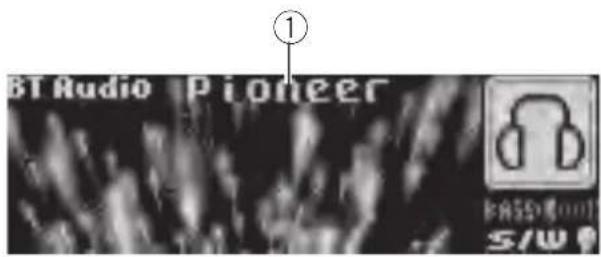
text_image
BT Audio Pioneer ① BASSO S/W①Devicename
Showsthedevicenameoftheconnected Bluetoothaudioplayer(orBluetoothadapter).

Important
- Depending on the Bluetooth audioplayer connected to this unit, the operations available with this unit are limited to the following two levels:
—Lowerlevel: Onlyplayingbacksongson youraudioplayerispossible.
—Higherlevel: Playingback, pausing, selectingsongs, etc., are possible (all the operations illustrated in this manual). - SincethereareanumberofBluetoothaudio playersavailableonthemarket,operations withyourBluetoothaudioplayerusingthis unitvaryingreatrange.RefertotheinstructionmanualthatcamewithyourBluetooth audioplayeraswellasthismanualwhileoperatingyourplayeronthisunit.
• Informationaboutsongs(e.g.theelapsed playingtime,songtitle,songindex,etc.)cannotbedisplayedonthisunit. - While you are listening to song on your Bluetooth audioplayer, refrain from operating your cellular phone as much as possible. If you try operating your cellular phone, the signal from your cellular phonemay caus noise on the song playback.
Availableaccessories
- When you are talking on cellular phone connected to this unit via Bluetooth wireless technology, song playback from your Bluetooth audioplayer connected to this unit is muted.
- Evenifwhileyouarelisteningtoasongon yourBluetoothaudioplayerandyouswitchto anothersource, playbackofsongcontinues.
●Fastforwardorreverse
Pushandhold MULTI-CONTROL leftorright.
- Selectatrack
Push MULTI-CONTROL leftor right.

Notes
- Fordetailsconcerningoperation, refertothe Bluetoothadapter'soperationmanual. This section provides brief information on Bluetooth audioplayer operations with this unit, which slightly differs or is abbreviated from that described in the Bluetooth adapter's operation manual.
- EventhoughyouraudioplayerdoesnotcontainaBluetoothmodule,youcanstillcontrolitfromthisunitviaBluetoothwirelestechnology.Tocontrolyouraudioplayerusingthisunit,connectaproductfeaturingBluetoothwirelestechnology(availableonthemarket)toyouraudioplayerandconnecttheBluetoothadapter(e.g.CD-BTB100)tothisunit.
Functionandoperation
1PressMULTI-CONTROLtodisplaythe mainmenu.
2UseMULTI-CONTROLtoselect FUNCTION.
Turntochangethemenuoption.Presstose-lect.
Thefunctionmenuisdisplayed.
3TurnMULTI-CONTROLtoselectthe function.
Connectionopen(connectionopen)—Disconnectaudio(disconnectaudio)—Play
(Play)—Stop (Stop)—Pause (pause)—Deviceinfo(deviceinformation)
■Pauseisthesameasthatofthebuilt-inCD player.(RefertoPausingplaybackonpage16.)

Notes
- Youcanalsoselectthefunctionbypassing FUNCTIONontheremotecontrol.
• To return to the ordinary display, press BAND. - IfaBluetoothaudioplayerisnotconnectedto thisunityet, Connectionopen and Deviceinfoappearinthefunctionmenuand otherfunctionsarenotavailable.
- IfaBluetoothaudioplayerisconnectedvia higherlevel, Connectionopendoesnotappearinthefunctionmenuandtheotherfunctionsareavailable.
- IfaBluetoothaudioplayerisconnectedvia lowerlevel,onlyDisconnectaudioand Deviceinfoappearinthefunctionmenu.
- If you donot operate function so other than Connection open and Disconnect audio within about 30 seconds, the display is automatically returned to the ordinary display.
ConnectingaBluetoothaudio player
1Displaythefunctionmenu.
RefertoFunctionandoperationonthispage.
2UseMULTI-CONTROLtoselect Connectionopeninthefunctionmenu.
3PressMULTI-CONTROLtoopentheconnection.
Alwayswaiting is displayed. This unit is now on stand by for connection from Bluetooth audioplayer.
If your Bluetooth audioplayerissetready for Bluetoothwireless connection, connection to this unitis automatically established.

Note
Beforeyoucanuseaudioplayersyoumayneed toenterthePINcodeintothisunit.Ifyourplayer requiresaPINcodetoestablishaconconnection, lookforthecodeontheplayerorinitsaccompanyingdocumentation.RefertoEnteringPINcode forBluetoothwirelessconnectiononpage32.
PlayingsongsonBluetooth audioplayer
1Displaythefunctionmenu.
RefertoFunctionandoperationontheprevious page.
2UseMULTI-CONTROLtoselectPlayin thefunctionmenu.
3PressMULTI-CONTROLtostartplay-back.
Stopping playback
1Displaythefunctionmenu.
RefertoFunctionandoperationontheprevious page.
2UseMULTI-CONTROLtoselectStopin thefunctionmenu.
3PressMULTI-CONTROLtostoptheplayback.
DisconnectingaBluetooth audioplayer
1Displaythefunctionmenu.
RefertoFunctionandoperationontheprevious page.
2UseMULTI-CONTROLtoselect
Disconnectaudiointhefunctionmenu.
3PressMULTI-CONTROLtodisconnect theBluetoothaudioplayer.
Disconnectedisdisplayed.TheBluetooth audioplayerisnowdiconnectedfromthis unit.
DisplayingBD(Bluetooth Device)address
1Displaythefunctionmenu.
RefertoFunctionandoperationontheprevious page.
2UseMULTI-CONTROLtoselect
Deviceinfointhefunctionmenu.
3PushMULTI-CONTROLlefttoswitchto theBDaddress.
12-digithexadecimalstringisdisplayed.
■PushingMULTI-CONTROLrightreturnstothe devicename.
BluetoothTelephone
BasicOperations
If you use a Bluetooth adapter (e.g. CD-BTB100), you can connect cellular phone features of Bluetooth wireless technology to this unit for hands-free, wireless calls, even while driving.

text_image
TEL PIONEER 12:00 PM on July 2008 5/4 ① ③ ② ④ S AUTO S AUTO ⑧ ⑦ ⑥ ⑤①Devicename
Showsthedevicenameofthecellularphone.
②Signallevelindicator
Showsthesignalstrengthofcellularphone.
- Signallevelindicatormaydifferfrom theactualsignallevel.
③Usernumberindicator
Showstheregistrationnumberofthecellular phone.
④Batterystrengthindicator
Showsthebatterystrengthofcellularphone.
- Batterystrengthindicatormaydiffer fromtheactualbatterystrength.
- If the battery strength is not available, nothing is displayed in the battery strength indicator area.
⑤Incomingcallnoticeindication
Showswhenanincomingcallhasbeenreceivedandnotcheckedyet.
- Incomingcallnoticeisnotdisplayedfor callsmadewhenyourcellularphoneis disconnectedfromthisunit.
⑥Automaticanswering/Automaticrejectingindicator
ShowsAUTOwhentheautomaticanswering functionison(formoredetails, refertoSetting automaticansweringonpage49).
ShowsREJECTwhentheautomaticrejecting functionison(formoredetails, refertoSetting automaticrejectingonpage48).
⑦Clockdisplay
Showsthetime(ifconnectedwithaphone).
⑧Calendardisplay
Showstheday, monthandyear(ifconnected withaphone).

Important
- Sincethisunitisonstandbytoconnectwith yourcellularphoneviaBluetoothwireless technology, using this unit without running the engine can result in battery drainage.
- Advancedoperationsthatrequireyourattentionsuchasdialingnumbersonthemonitor, usingphonebook,etc.,areprohibitedwhile youaredriving.Whenyouneedtousethese advancedoperations,stopyourvehicleina safeplace.

Notes
• Equalizercurveforthephonesourceisfixed.
- Whenselectingthephonesource, you can only operate Fader (balance adjustment) in the audiomenu.
Settingupforhands-freephoning
Beforeyoucanusethehands-freephoning functionyoumustsetuptheunitforusewith yourcellularphone. Thisentailsestablishinga Bluetoothwirelessconnectionbetween this unitandyourphone, registeringyourphone withthisunit,andadjustingthevolumelevel.
1Connection
Fordetailedinstructionsonconnectingyour phonetothisunitviaBluetoothwirelestechnology,refertoConnectingacellularphoneon page43.
- Yourphones should now be temporarily connected. However, to make best use of the technology, were recommend you register the phoneto this unit.
2Registration
Toregistryourtemporarilyconnectedphone, refertoRegisteringaconnectedcellularphone onpage44.
3Volumeadjustment
Adjusttheearpiecevolumeonyourcellular phoneforcomfort.Whenadjusted,thevolume levelismemorizedinthisunitasthedefault setting.
- Caller'svoicevolumeandringvolumemay varydependingonthetypeofcellularphone.
■ If the difference between the volume and caller's voice volume is big, overall volume level may become unstable.
■ Before disconnecting the cellular phone from this unit, makes sure to adjust the volumeto a proper level. If the volume is muted (zerolevel) on your cellular phone, the volume level of your cellular phoneremains muted even after the cellular phone is disconnected.
Makingaphonecall
Voicerecognition
1PressBANDandholduntilVoicedial appearsinthedisplay.
Voicedialappearsinthedisplay.When
VoicedialON is displayed, voicerecognition function is now ready.
■Ifyourcellularphonedoesnotfeaturevoice recognitionfunction, Novoicedialappearsin thedisplayandopeparationisnotavailable.
2 Pronouncethenameofyourcontact.
Takingaphonecall
Answeringorrejectinganincomingcall
●Answeringanincomingcall
Whenacallcomesin, press MULTI-CONTROL.
■YoucanalsoperformthisoperationbypushingMULTI-CONTROLup.
●Endacall
Push MULTI-CONTROLdown.
●Rejectinganincomingcall
Whenacallcomesin.pushMULTI-CONTROL down.

Notes
- Ifprivatemodeisselectedonthecellular phone,hands-freephoningmaynotbeperformed.
- Theestimatedcalltimeappearsinthedisplay (thismaydifferslightlyfromtheactualcall time).
Operatingacallwaiting
●Answeringacallwaiting
Whenacallcomesin, press MULTI-CONTROL.
■YoucanalsoperformthisoperationbypassingMULTI-CONTROLup.
●Endallcalls
Push MULTI-CONTROLdown.
●Switchbetweencallersonhold Press MULTI-CONTROL.
■YoucanalsoperformthisoperationbypushingMULTI-CONTROLup.
- Rejectingacallwaiting
PushMULTI-CONTROLdown.

Notes
- PushingMULTI-CONTROLdownendsall callsincludingcallswaitingtonline.
• Toendthecall, bothyouandyourcallerneed tohangupthephone.
Functionandoperation
1PressMULTI-CONTROLtodisplaythe mainmenu.
2UseMULTI-CONTROLtoselect FUNCTION.
Turntochangethemenuoption.Presstose-lect.
Thefunctionmenuisdisplayed.
3TurnMULTI-CONTROLtoselectthe function.
Search&Connect(searchandconnect)— Connectionopen(connectionopen)—
Disconnectphone(disconnectphone)—Connectphone(connectphone)—Setphone (registeringphone)—Deletephone(delete phone)—PH.B.Transfer(phonebooktransfer)
—PH.B.Nameview(phonebooknameview) —Clearmemory(clearmemory)—
Numberdial(callbyenteringnumber)—Refusecalls(automaticrejectsetting)—
Autoanswer(automaticanswersetting)—Ringtone(ringtoneselect)—Autoconnect(automaticconnectionsetting)—Echocancel(echocancel)—Deviceinfo(deviceinformation)
Ifnotconnectedyet
The following functions cannot be operated.
- Disconectphone(disconnectphone)
- Setphone(registeringphone)
- Clearmemory(clearmemory)
• PH.B.Nameview(phonebooknameview)
• Numberdial(callbyenteringnumber)
Ifconnectedbutnotregisteredyet
The following functions cannot be operated.
- Search&Connect(searchandconnect)
- Connectionopen(connectionopen)
- Connectphone(connectphone)
• PH.B.Nameview(phonebooknameview) - Clearmemory(clearmemory)
Ifalreadyconnectedandregistered
The following functions cannot be operated.
- Search&Connect(searchandconnect)
- Connectionopen(connectionopen)
- Connectphone(connectphone)
- Setphone(registeringphone)

Notes
- Youcanalsoselectthefunctionbypassing FUNCTIONontheremotecontrol.
• To return to the playback display, press BAND. - DeviceinfoisthesameasthatoftheBluetoothaudio.(RefertoDisplayingBD(Bluetooth Device)addressonpage40.)
- PH.B.Nameview(phonebooknameview) cannotbeselectedforcellularphoneregisteredguestphone.
- Ifcellularphoneisconnectedtothisunitvia BluetoothwirelesstechnologywithHSP (HeadSetProfile),PH.B.Nameview, Clearmemory, Numberdialand Refusecallscannotbeselected.
- If you donot operate function other than Search & Connect, Connection open, Connect phone, PH.B. Transfer, Disconect phone, Numberdial, Clearmemory and PH.B. Name view within about 30 seconds, the display automatically return to the ordinary display.
Connectingacellularphone
Searchingforavailablecellularphones
1Displaythefunctionmenu.
RefertoFunctionandoperationontheprevious page.
2UseMULTI-CONTROLtoselect
Search&Connectinthefunctionmenu.
3PressMULTI-CONTROLtosearchfor availablecellularphones.
Whilesearching, SEARCHINGflashes.When availablecellularphonesfeaturingBluetooth wirelesstechnologyarefound,devicenameor
Namenotfound(ifnames cannot be obtained) is displayed.
■ If this unit fail to find any available cellular phones, Not found is displayed.
4PushMULTI-CONTROLupordownto selectadevicenameyouwanttoconnect.
5PressMULTI-CONTROLtoconnectthe selectedcellularphone.
Whileconnecting, Connectingflashes.To completetheconnection,checkthedevice name(PioneerBTUnit)andenterthelink codeonyourcellularphone.Iftheconnection isestablished, Connectedisdisplayed.
■ Thelinkcodeissetto0000asdefault.You canchangethiscodeintheinitialsetting.Refer toEnteringPINcodeforBluetoothwirelessconnectiononpage32.
Usingacellularphonetoinitiatea connection
1Displaythefunctionmenu.
RefertoFunctionandoperationontheprevious page.
2UseMULTI-CONTROLtoselect
Connectionopeninthefunctionmenu.
Availableaccessories
3PressMULTI-CONTROLtoopentheconnection.
Alwayswaitingflashesandtheunitisnow onstandbyforconnectionfromacellular phone.
4Usecellularphonetoconnecttothis unit.
■ Thelinkcodeissetto0000asdefault.You canchangethiscodeintheinitialsetting.Refer toEnteringPINcodeforBluetoothwirelessconnectiononpage32.
Disconnectingacellularphone
1Displaythefunctionmenu.
RefertoFunctionandoperationonpage42.
2UseMULTI-CONTROLtoselect Disconectphoneinthefunctionmenu.
Devicenameoftheconnectedphoneappears inthedisplay.
3PressMULTI-CONTROLtodisconnecta cellularphonefromthisunit.
Afterdisconnectioniscompleted, Disconnectedisdisplayed.
Registeringaconnected cellularphone
1Displaythefunctionmenu.
RefertoFunctionandoperationonpage42.
2UseMULTI-CONTROLtoselect Setphoneinthefunctionmenu.
3PushMULTI-CONTROLupordownto selectaregistrationassignment.
P1 (user phone 1)—P2 (user phone 2)—P3 (user phone 3)—G1 (guest phone 1)—G2 (guestphone2)
■ Asyouselecteachassignment,youcansee whetherornotaphoneisalreadyregistered.If theassignmentisempty,Nodataisdisplayed.If theassignmentisalreadytaken,thedevicename appears.Toreplaceanassignmentwithanew phone,firstdeletethecurrentassignment.For
moredetailedinstructions,seeDeletingaregisteredphoneonthispage.
4PressMULTI-CONTROLtoregisterthe currentlyconnectedphone.
When registration is completed,
Reg.Completedisdisplayed.
■ Iftheregistrationfails, Reg.ERRORisdisplayed. In this case, return to step1 and try again.
Deletingaregisteredphone
1Displaythefunctionmenu.
RefertoFunctionandoperationonpage42.
2UseMULTI-CONTROLtoselect
Deletephoneinthefunctionmenu.
3PushMULTI-CONTROLupordownto selectaregistrationassignment.
P1 (user phone 1)—P2 (user phone 2)—P3 (user phone 3)—G1 (guest phone 1)—G2 (guestphone2)
■ If the assignment is empty, Nodata is displayed and operation is not possible.
4PushMULTI-CONTROLrighttoselect DeleteYES.
DeleteYESisdisplayed.Deletingphoneis nowonstandby.
5PressMULTI-CONTROLtodeletethe phone.
After the phone is deleted, Deleted is displayed.
Connectingtoaregistered cellularphone
Connectingtoaregisteredphone manually
1Displaythefunctionmenu.
RefertoFunctionandoperationonpage42.
2UseMULTI-CONTROLtoselect
Connectphoneinthefunctionmenu.
3PushMULTI-CONTROLupordownto selectaregistrationassignment.
P1 (user phone 1)—P2 (user phone 2)—P3 (user phone 3)—G1 (guest phone 1)—G2 (guestphone2)
■ If the assignment is empty, Nodata is displayed and operation is not possible.
4PressMULTI-CONTROLtoconnectthe selectedcellularphone.
Whileconnecting, Connecting is displayed. After the connection is completed, Connected is displayed.
Connectingtoaregisteredphone automatically
1Displaythefunctionmenu.
RefertoFunctionandoperationonpage42.
2UseMULTI-CONTROLtoselect
Autoconnectinthefunctionmenu.
3PressMULTI-CONTROLtoturnautomaticconnection.
If your cellular phone is ready for Bluetooth wireless connection, connection to this unit is automatically established.
■Toturnautomaticconnectionoff,press MULTI-CONTROLagain.
Using the phonebook
Transferringentriestothephonebook
ThePhoneBookcanholdatotalof500entries.300fromUser1,150fromUser2,and50fromUser3.
1Displaythefunctionmenu.
RefertoFunctionandoperationonpage42.
2UseMULTI-CONTROLtoselect
PH.B.Transferinthefunctionmenu.
3PressMULTI-CONTROLtoenterinthe phonebooktransferstandbymode.
TransferYESappearsinthedisplay.
4PressMULTI-CONTROLtoshowtheconfirmationdisplay.
TransferYESappearsinthedisplay.
5Usecellularphonetoperformphone booktransfer.
Performphonebooktransferusingthecellularphone. Fordetailedinstructions, referto theinstructionmanualthatcamewithyour cellularphone.
■Thedisplayindicateshowmanyentrieshave beentransferredandthetotalnumbertobe transferred.
6Datatransferredisdisplayed and phonebooktransferiscompleted.
Changing the phonebook display order
1Displaythefunctionmenu.
RefertoFunctionandoperationonpage42.
2UseMULTI-CONTROLtoselect
PH.B.Nameviewinthefunctionmenu.
InvertnamesYESappearsinthedisplay.
3PressMULTI-CONTROLtochangethe namevieworder.
Invertedisdisplayedandthenameview orderischanged.
PressingMULTI-CONTROL repeatedly changesthenamevieworderbetweenfirst nameandlastname.
Callinganumberinthephonebook

Important
Besuretoparkyourvehicleandapplytheparkingbrakewhenperformingthisoperation.
Afterfindingthenumberyouwanttocallin thephonebook,youcanselecttheentryand makethecall.
1PressLISTtodisplaythephonebook.
Availableaccessories
2PushMULTI-CONTROLleftorrightto selectthefirstletterofthenameyouare lookingfor.
3PressMULTI-CONTROLtodisplayentries.
ThedisplayshowsthefirstthreePhoneBook entriesstartingwiththatletter(e.g. "Ben", "Brian" and "Burt" when "B" is selected).
4PushMULTI-CONTROLupordownto selectaPhoneBookentryyouwanttocall.
5PushMULTI-CONTROLrighttodisplay thedetailedlistoftheselectedentry.
Thephonenumber,nameandgenre(ifassigned)ofentriesaredisplayedinthedetailed list.
■Youcanscrollthenameandphonenumber bypassingandholdingDISP.
■ Ifseveralphonenumbersareenteredtoan entry, selectonebyturning MULTI-CONTROL.
■ If you want to go back and select another entry, push MULTI-CONTROL left.
6PressMULTI-CONTROLtomakeacall.
7Toendthecall, pushMULTI-CONTROL down.
EditingthenameofaPhoneBookentry

Important
Besuretoparkyourvehicleandapplytheparkingbrakewhenperformingthisoperation.
YoucaneditthenamesofPhoneBookentries. Eachnamecanbeupto16characterslong.
1Displaythedetailedlistofyourdesired PhoneBookentry.
Seestep1to5onCallinganumberinthe phonebookonthepreviouspageforhowtodo this.
2PressandholdMULTI-CONTROLtodisplaythenameinputscreen.
Editname is displayed.
3PressDISPtoselectthedesiredcharactertype.
EachpressofDISPswitchesthecharacter typesinthefollowingorder:
Alphabet(uppercase), numbersandsymbols—alphabet(lowercase)—numbersandsymbols—Europeancharacters, such as those with accents (e.g., á, à, ä, ç) or Russian characters
- PressingandholdingDISPenablesyouto switchcharactersetbetweenISO8859-1(Europeancharacters)andISO8859-5(Russiancharacters)alternately.
■EuropeancharactersandRussiancharacters can'tbemixed.
4PushMULTI-CONTROLupordownto selectaletter.
■Todeleteacharacterandleaveaspace,select "_" (underbar).
5PushMULTI-CONTROLleftorrightto movethecursorortothepreviousornext characterposition.
6PressMULTI-CONTROLtostorethenew name.
Editingphonenumbers

Important
Besuretoparkyourvehicleandapplytheparkingbrakewhenperformingthisoperation.
YoucaneditthenumbersofPhoneBookentries.Eachphonenumbercanbeupto24digitslong.
1Displaythedetailedlistofyourdesired PhoneBookentry.
Seestep1to5onCallinganumberinthe phonebookonthepreviouspageforhowtodo this.
2PressandholdMULTI-CONTROLtodisplaythenameinputscreen.
Editnameisdisplayed.
3TurnMULTI-CONTROLtoswitchtothe numberinputscreen.
Editname(nameinputscreen)— Editnumber(numberinputscreen)— Clearmemory(clearmemoryscreen)
4PushMULTI-CONTROLleftorrightto movethecursorortothenumberyouwant tochange.
5PushMULTI-CONTROLupordownto changenumbers.
Repeat the seven steps until you have finished changing.
6PressMULTI-CONTROLtostorethenew number.
Clearingaphonebookentry

Important
Besuretoparkyourvehicleandapplytheparkingbrakewhenperformingthisoperation.
1Displaythedetailedlistofyourdesired PhoneBookentry.
Seestep1to5onCallinganumberinthe phonebookonpage45forhowtodothis.
2PressandholdMULTI-CONTROLtodisplaythenameinputscreen.
Editnameisdisplayed.
3TurnMULTI-CONTROLtoswitchtothe clearmemoryscreen.
Editname(nameinputscreen)—
Editnumber(numberinputscreen)—
Clearmemory(clearmemoryscreen)
4PushMULTI-CONTROLrighttoshowa confirmationdisplay.
ClearmemoryYESisdisplayed.
■If you donotwant to clear memory that you have selected, push MULTI-CONTROL left. The display reverts.
5PressMULTI-CONTROLtodeletethe PhoneBookentry.
Clearedisdisplayed.
ThePhoneBookentryisdeleted.Thedisplay returnstoPhoneBookentrylist.
Usingthecallhistory

Important
Besuretoparkyourvehicleandapplytheparkingbrakewhenperformingthisoperation.
The12mostrecentcallsmade(dialled),receivedandmissed,arestoredinthecallhistory.Youcanbrowsethecallhistoryandcall numbersfromit.
1PressLISTtodisplaythelist.
PressLIST repeatedlyytoswitchbetweenthe followinglists:
Phone book—Missed call—Dialled call—Receivedcall
■FormoredetailsaboutthePhoneBooklist, refertoUsingthephonebookonpage45.
■ Ifnophonenumbersarestoredinthese- lectedlist, Nodata is displayed.
2TurnMULTI-CONTROLtoselectaphone number.
Turning MULTI-CONTROL to changethe phonenumbers stored in the list.
■ If then number is already in the phonebook, then name is displayed.
■Youcanalsochangethephonenumberby pushingMULTI-CONTROLupordown.
3PushMULTI-CONTROLrighttodisplay thedetailedlist.
Nameandphonenumberaredisplayedinthe detailedlist.
■ IfthenumberisalreadyinthePhoneBook thenthenameisalsodisplayed.
■Turning MULTI-CONTROL switch the previous or next phonenumber displayed in the detailed list.
■If you donot operate anything within about 30 seconds, the list display is canceled automatically.
4PressMULTI-CONTROLtomakeacall.
■Foraninternationalcall,pressandhold MULTI-CONTROLtoadd+tothephonenumber.
5Toendthecall, pushMULTI-CONTROL down.
Usingpresetnumbers

Important
Besuretoparkyourvehicleandapplytheparkingbrakewhenperformingthisoperation.
Numbersthatyoudialfrequentlycanbeassignedtopresetsforquickrecall.
1Selectadesiredphonenumberfrom thephonebookorthecallhistory. Or directlyenteradesiredphonenumber.
Toselectadesiredphonenumberfromthe PhoneBookortheCallHistory,seetheinstructionsexplainedinpreviouspages.Todirectlyenteradesiredphonenumber,see Makingacallbyenteringphonenumberon thispage.
2Pressandholdoneof1to6ontheremotecontroltostorethephonenumber.
Theselectedphonenumberhasbeenstored inmemory.Thenexttimeyoupressthesame presetbutton,thephonenumberisrecalled frommemory.
Makingacallbyentering phonenumber

Important
Besuretoparkyourvehicleandapplytheparkingbrakewhenperformingthisoperation.
1Displaythefunctionmenu.
RefertoFunctionandoperationonpage42.
2UseMULTI-CONTROLtoselect Numberdialinthefunctionmenu.
■Youcanalsoenterinthismenufromthe standbydisplaybypassingDIRECTontheremotecontrol.
3PushMULTI-CONTROLupordownto selectanumber.
- You can also input numbers by pressing 0 to 9 ontheremotecontrol.
4PushMULTI-CONTROLleftorrightto movethecursorortothepreviousornextposition.
■Upto24digitscanbeentered.
5Whenyoucompletedenteringthe number,pressMULTI-CONTROL.
Callconfirmationappears.
6PressMULTI-CONTROLagaintomakea call.
7Toendthecall, pushMULTI-CONTROL down.
Clearingmemory
1Displaythefunctionmenu.
RefertoFunctionandoperationonpage42.
2UseMULTI-CONTROLtoselect Clearmemoryinthefunctionmenu.
3PushMULTI-CONTROLupordownto selectanitem.
EachtimeMULTI-CONTROL is pushed up or down, the items are switched in the following order:
Phonebook(phonebook)—Missedcalls (missedcallhistory)—Dialedcalls(dialled callhistory)—Receivedcalls(receivedcallhistory)—Dialpreset(presetphonenumbers)—Allclear(deleteallmemory)
■IfyouwanttoclearallthePhoneBook, dialled/received/missedcallhistorylistandpresetphonenumber,selectAllclear.
■Ifguestphoneisconnectedtothisunitvia Bluetoothwirelesstechnology,Phonebookcannotbeselected.
4PushMULTI-CONTROLrighttodeterminetheitemthatyouwanttodelete fromthisunit.
ClearmemoryYESisdisplayed.Clearing memoryisnowonstandby.
■If you donotwant to clear memory that you have selected, push MULTI-CONTROL left. The display reverts.
5PressMULTI-CONTROLtoclearthe memory.
Cleared is displayed and data on these selected item is cleared from this unit's memory.
Settingautomaticrejecting
1Displaythefunctionmenu.
RefertoFunctionandoperationonpage42.
2UseMULTI-CONTROLtoselect Refusecallsinthefunctionmenu.
3PressMULTI-CONTROLtoturnautomaticcallrejectionon.
■Toturnautomaticcallrejectionoff,press MULTI-CONTROLagain.
Settingautomaticanswering
1Displaythefunctionmenu.
RefertoFunctionandoperationonpage42.
2UseMULTI-CONTROLtoselect Autoanswerinthefunctionmenu.
3PressMULTI-CONTROLtoturnautomaticansweringon.
■Toturnautomaticansweringfunctionoff, pressMULTI-CONTROLagain.
Switchingtheringtone
1Displaythefunctionmenu.
RefertoFunctionandoperationonpage42.
2UseMULTI-CONTROLtoselect Ringtoneinthefunctionmenu.
3PressMULTI-CONTROLtoturnthering toneon.
■Toturntheringtoneoff, press MULTI-CONTROLagain.
Echocancelingandnoisereduction
1Displaythefunctionmenu.
RefertoFunctionandoperationonpage42.
2UseMULTI-CONTROLtoselect Echocancelinthefunctionmenu.
3PressMULTI-CONTROLtoturnechocancelingon.
■Toturnechocancelingoff, press MULTI-CONTROLagain.
Multi-CDPlayer
BasicOperations
Youcanusethisunittocontrolamulti-CD player, which is sold separately.
- Onlyfunctionsdescribedinthismanualare supportedby50-discmulti-CDplayers.
- Thisunitisnotdesignedtooperatedisctitle listfunctionswitha50-discmulti-CDplayer. Forinformationaboutthedisctitlelistfunctions,refertoSelectingdiscsfromthedisc titlelistonpage52.

text_image
MCD DISCOT TRKOT 01" 17" ① ② ③①Discnumberindicator
②Tracknumberindicator
③Playtimeindicator
- Selectadisc
PushMULTI-CONTROLupordown.
■ You can also select a disc by using 1 to 6 buttonsontheremotecontrol.
- Fordiscs1to6, pressthecorresponding buttonnumber.
- Fordiscs7to12, pressandholdthecorrespondingnumbers, suchas1fordisc7, untilthediscnumberappearsinthedisplay.
●Fastforwardorreverse
Pushandhold MULTI-CONTROL leftor right.
- Selectatrack
Push MULTI-CONTROL leftor right.

Notes
- When multi-CD player completes preparatory operations, READY is displayed.
- IfanerrormessagesuchasERROR-11isdis-played, refertothemulti-CDplayerowner's manual.
- If there are an odiscsin them multi-CD player magazine, Nodiscis displayed.
UsingCDTEXTfunctions
YoucanusethesefunctionsonlywithaCD TEXTcompatiblemulti-CDplayer.
Theoperationisthesameasthatofthebuilt-inCDplayer.
RefertoDisplayingtextinformationondiscon page14.
Introductionofadvanced operations
YoucanonlyuseCompression(compression andDBE)withamulti-CDplayerthatsupports them.
1PressMULTI-CONTROLtodisplaythe mainmenu.
2UseMULTI-CONTROLtoselect FUNCTION.
Turntochangethemenuoption.Presstose-lect.
Thefunctionmenuisdisplayed.
3TurnMULTI-CONTROLtoselectthe function.
Playmode(repeatplay)—Randommode (randomplay)—Scanmode(scanplay)—
Pause(pause)—compression(compression andDBE)—ITSplaymode(ITSplay)—
ITSmemo(ITSprogramming)—TitleInput"A"(disctitleinput)
■Ifyoudonotoperatefunctionsotherthan
ITSmemoandTitleInput"A"withinabout30 seconds,thedisplayautomaticallyreturnstothe ordinarydisplay.
■WhenplayingaCDTEXTdisconaCDTEXT
compatiblemulti-CDplayer,youcannotswitchto
TitleInput"A".Thedisctitleisalreadyrecorded ontheCDTEXTdisc.
Functionandoperation
Playmode, Randommode, Scanmode,
PauseandTitleInput"A"operationsarebasicallythesameasthatofthebuilt-inCDplayer.
FunctionnameOperation
| Playmode | RefertoSelectingarepeatplay rangeonpage16.However,therepeatplayranges youcanselectaredifferentfrom thatofthebuilt-inCDplayer. The repeatplayrangesofthemulti-CD playerare:•M-CDrepeat-Repeatall discsinthemulti-CDplayer•Trackrepeat-Repeatjustthe currenttrack•Discrepeat-Repeatthecur-rentdisc |
| Randommode | RefertoPlayingtracksinrandom orderonpage16. |
| Scanmode | RefertoScanningfoldersand tracksonpage16. |
| Pause | RefertoPausingplaybackonpage 16. |
| TitleInput"A" | RefertoEnteringdisctitleson page17. |

Notes
- Youcanalsoselectthefunctionbypassing FUNCTIONNontheremotecontrol.
• Toreturntothe playbackdisplay, pressBAND. - If you select other discsduring repeat play, therepeat play range changesto M-CDrepeat.
- If you perform track search forward/reversed during Trackrepeat, therepeat play rangechangesto Discrepeat.
• Aftertrackordiscscanningisfinished, normal playbackofthetracksbeginsagain.
Usingcompressionandbass emphasis
Youcanonlyusethesefunctionswithamulti-CDplayerthatsupportsthem.
COMP(compression)andDBE(dynamicbass emphasis)functionsletsyouadjustthesound playbackqualityofthemulti-CDplayer.
1Displaythefunctionmenu.
RefertoIntroductionofadvancedoperationson thispage.
2UseMULTI-CONTROLtoselect compressioninthefunctionmenu.
■ Ifthemulti-CDplayerdoesnotsupport COMP/DBE, NOCOMP is displayed when you attempt to select it.
3PressMULTI-CONTROLtoselectyourfavoritesetting.
COMPOFF—COMP1—COMP2— COMPOFF—DBE1—DBE2
UsingITSplaylists
ITS(instanttrackselection)letsyoumakea playlistoffavoritetracksfromthemulti-CD playermagazine.Afteryouhaveaddedyourfavoritetrackstotheplaylist,youcanturnonITS playandplayjustthoseselections.
YoucanuselTStoenterandplaybackupto 99tracksperdiscfromupto100discs(with thedisctitles).(Withmulti-CDplayerssoldbeforetheCDX-P1250andCDX-P650,upto24 trackscanbestoredintheplaylist.)
CreatingaplaylistwithITSprogramming
1PlayaCDthatyouwanttoprogram.
Push MULTI-CONTROLupordowntoselect theCD.
2Displaythefunctionmenu.
RefertoIntroductionofadvancedoperationson thepreviouspage.
3UseMULTI-CONTROLtoselect ITSmemointhefunctionmenu.
4Selectthedesiredtrackbypushing MULTI-CONTROLleftorright.
5PushMULTI-CONTROLuptostorethe currentlyplayingtrackintheplaylist.
Memorycomplete is displayed and the currently playing selection is added to your playlist.
6PressBANDtoreturntothe playback display.

Note
Afterdatafor100discsisstoredinmemory,data foranewdiscwilloverwritetheoldestone.
PlaybackfromyourITSplaylist
ITSplayletsyoulistentothetracksthatyou haveenteredintoyourITSplaylist.Whenyou turnonITSplay,tracksfromyourITSplaylist inthemulti-CDplayerbegintoplay.
1Selecttherepeatrange.
RefertoPlayingtracksinrandomorderon page16.
2Displaythefunctionmenu.
RefertoIntroductionofadvancedoperationson thepreviouspage.
3UseMULTI-CONTROLtoselect ITSplaymodeinthefunctionmenu.
4PressMULTI-CONTROLtoturnITSplay on.
ITSplayappearsinthedisplay.Playbackbeginsofthosetracksfromyourplaylistwithin thepreviouslyselectedM-CDrepeater
Discrepeatranges.
■IfnotracksinthecurrentrangeareprogrammedforITSplay,thenITSemptyisdisplayed.
■ToturnITSplayoff, pressMULTI-CONTROL again.
ErasingatrackfromyourITSplaylist
YoucandeleteatrackfromyourITSplaylistif ITSplayison.
IfITSplayisalreadyon, skiptostep2. If ITS playisnotalreadyon, use MULTI-CONTROL.
1PlaytheCDwiththetrackyouwantto deletefromyourITSplaylist,andturnITS playon.
RefertoPlaybackfromyourITSplaylistonthis page.
2Displaythefunctionmenu.
RefertoIntroductionofadvancedoperationson thepreviouspage.
3UseMULTI-CONTROLtoselect ITSmemointhefunctionmenu.
4Selectthedesiredtrackbypushing MULTI-CONTROLleftorright.
Availableaccessories
5PushMULTI-CONTROLdowntoerase thetrackfromyourITSplaylist.
The currently playing selection is erased from your ITS playlist and playback of then next track begins.
■ If there are not tracks from your playlist in the current range, ITSempty is displayed and normal playback resumes.
6PressBANDtoreturntothe playback display.
ErasingaCDfromyourITSplaylist
YoucandeletealltracksofaCDfromyourITS playlistifITSplayisoff.
1PlaytheCDthatyouwanttodelete.
PushMULTI-CONTROLupordowntoselect theCD.
2Displaythefunctionmenu.
RefertoIntroductionofadvancedoperationson page50.
3UseMULTI-CONTROLtoselect ITSmemointhefunctionmenu.
4PushMULTI-CONTROLdowntoerase alltracksonthecurrentlyplayingCDfrom yourITSplaylist.
AlltracksonthecurrentlyplayingCDaredeletedfromyourplaylistandMemorydeleted isdisplayed.
5PressBANDtoreturntothe playback display.
Usingdistitlefunctions
YoucaninputCDtitlesanddisplaythetitles. Then, youcaneasilysearchforandplayade-sireddisc.
Enteringdisctitles
Usethedisctitleinputfeaturetostoreupto 100CDtitles(withITSplaylist)intothemulti-CDplayer.Eachtitlecanbeupto10characterslong.
Fordetailsconcerningoperation,refertoEnteringdisctitlesonpage17.
- Titlesremaininthememoryevenafterthe discisremovedfromthemagazine,and arerecalledwhenthediscisreinserted.
- Afterdatafor100discsisstoredinmemory, dataforanewdiscwilloverwritetheoldestone.
Displayingdisctitles
- PressDISPtoselectthedesiredtextinformation.
- FortitleenteredCD Playtime— Ⓞ:disctitleandplaytime
- ForCDTEXTdiscs Playtime—:discartistnameand: tracktitle—:discartistnameand: disctitle—:disctitleand:tracktitle —:trackartistnameand:tracktitle —:tracktitleandplaytime
Selectingdiscsfromthedisctitlelist
Disctitlelistletsyouseethelistofdisctitles enteredinthemulti-CDplayerandselectone ofthemtoplayback.
1PressLISTtoswitchtothedisctitlelist modeduringtheplaybackdisplay.
2UseMULTI-CONTROLtoselectthedesireddisctitle.
Turntochangethedisctitle.Presstoplay.
■Youcanalsochangethedisctitlebypushing MULTI-CONTROLupordown.
■WhenplayingCDTEXTdisc,push MULTI-CONTROL righttoseealistofthetracks intheselecteddisc.PushMULTI-CONTROL left toreturntothedisclist.
■ If not title is entered for ad disc, No Title is displayed.
■Nodiscisdisplayednexttothediscnumber whenthereisnodiscinthemagazine.
■Ifyoudonotoperatethelistwithinabout30 seconds,thedisplayautomaticallyreturnstothe ordinarydisplay.
DVDPlayer
BasicOperations
YoucanusethisunittocontrolaDVDplayeror multi-DVDplayer,whichissoldseparately. Fordetailsconcerningoperation,refertothe DVDplayer'sormulti-DVDplayer'soperation manual.Thissectionprovidesinformationon DVDoperationswiththisunitwhichdiffers fromthatdescribedintheDVDplayer'sor multi-DVDplayer'soperationmanual.
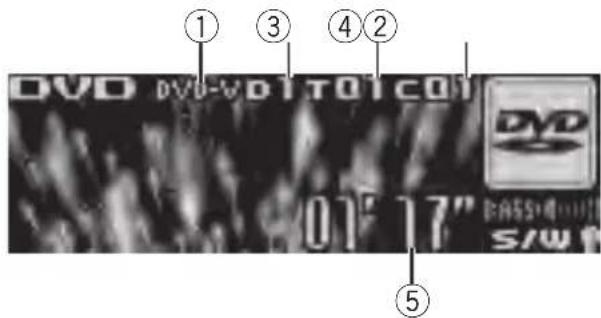
text_image
① ③ ④ ② DVD DVD-VOTOTCOI 01" 17" BASSO S/W① DVD-V/VCD/CD/MP3/WMA indicator Showsthetypeofdisccurrentlyplaying.
②Discnumberindicator
Showsthenumberofthedisccurrentlyplayingwhenusingamulti-DVDplayer.
③Title/Foldernumberindicator
Showsthetitle(whenplayingDVDvideo)or
folder(whenplayingcompressedaudio)of
theselectioncurrentlyplaying.
④Chapter/tracknumberindicator
Showsthechapter(whenplayingDVDvideo)
ortrack(whenplayingVideoCD,CDorcompressedaudio)currentlyplaying.
⑤Playtimeindicator
- Selectachapter/track
Push MULTI-CONTROL leftor right.
●Fastforwardorreverse
PushandholdMULTI-CONTROLleftorright.
■Whenplayingcompressedaudio,thereisno soundonfastforwardorreverse.
● Toskipbackorforwardtoanother chapter/track, pushMULTI-CONTROLleftor right.
Selectingadisc
- Youcanoperatethisfunctiononlywhena multi-DVDplayerisconnectedtothisunit.
- Pressanyof1to6ontheremotecontroltoselectthedesireddisc.
Selectingafolder
- Youcanoperatethisfunctiononlywhena DVDplayercompatiblewithcompressed audioplaybackisconnectedtothisunit.
●PushMULTI-CONTROLupordownto selectafolder.
Introductionofadvanced operations
1 PressMULTI-CONTROLtodisplaythe mainmenu.
2 UseMULTI-CONTROLtoselect FUNCTION.
Turntochangethemenuoption.Presstose-lect.
Thefunctionmenuisdisplayed.
3 TurnMULTI-CONTROLtoselectthe function.
DuringDVDvideoorVideoCD playback
Playmode(repeatplay)—Pause(pause) DuringCD playback
Playmode(repeatplay)—Randommode(randomplay)—Scanmode(scanplay)—
Pause (pause)—ITS play mode (ITS play)—ITS memo (ITS input)—TitleInput "A" (disc titleinput)
Duringcompressedaudioplayback Playmode(repeatplay)—Randommode (randomplay)—Scanmode(scanplay)— Pause(pause)
■Youcanalsoselectthefunctionbypassing FUNCTIONnontheremotecontrol.
■Toreturntothe playbackdisplay, pressBAND.
Availableaccessories
■ If you donot operate function except for
ITSmemoandTitleInput"A"withinabout30 seconds, the display is automatically returned to the ordinary display.
Functionandoperation
Playmode, Randommode, Scanmode,
PauseandTitleInput"A"operationsarebasicallythesameasthatofthebuilt-inCDplayer. Also, ITSplaymode and ITSmemooperationsarebasicallythesameasthatthemulti-CDplayer.
FunctionnameOperation
| Playmode | RefertoSelectingarepeatplay rangeonpage16.Buttherepeatplayrangethatyou canselectisvarydependingon thetypeofdiscorsystem.There-peatplayrangesoftheDVD player/multi-DVDplayerareas below:DuringPBCplaybackofVideo CDs,thisfunctioncannotbeoper-ated.•Discrepeat-Repeatthecur-rentdisc•Folderrepeat-Repeatthe currentfolder•Titlerepeat-Repeatjustthe currenttitle•Chapterrepeat-Repeatjust thecurrentchapter•Trackrepeat-Repeatthecur-renttrack |
| Randommode | RefertoPlayingtracksinrandom orderonpage16. |
| Scanmode | RefertoScanningfoldersand tracksonpage16. |
| Pause | RefertoPausingplaybackonpage 16. |
| ITSplaymode | RefertoUsingITSplaylistson page51. |
| ITSmemo | RefertoUsingITSplaylistson page51. |
| TitleInput"A" | RefertoEnteringdisctitleson page17. |

Notes
- If you select other discsduring repeat play, therepeat play range changesto Discrepeat.
- WhenplayingbackVideoCDorCD, ifyouperformtracksearchorfastforward/reverseduringTrackrepeat, therepeatplayrange changestoDiscrepeat.
- Whenplayingbackcompressedaudio, if you selectanotherfolder during repeat play, the repeat play range changesto Discrepeat.
- Whenplayingbackcompressedaudio, if you performtracksearchorfastforward/reverse duringTrackrepeat, therepeatplayrange changestoFolderrepeat.
- Multi-DVDplayerthathasITSfunctionsand disctitlefunctionscanalsobeconnectedto thisunit.Inthiscase,ITSplaymode,
ITSmemoanddisctitleinputcanbecontrolled.
- TheITSfunctionofaDVDplayerdiffers slightlyfromITSplaybackwithamulti-CD player.Withmulti-DVDplayer,ITSplaybackappliesonlytotheCDplaying.Fordetails,refer toUsingITSplaylistsonpage51.
TVtuner
BasicOperations
YoucanusethisunittocontrolaTVtuner, whichissoldseparately.
Fordetailsconcerningoperation, refertothe TVtuner'soperationmanual. ThissectionprovidesinformationonTVoperationswiththis unit, whichdiffersfromthatdescribedinthe TVtuner'soperationmanual.

text_image
① ② Channel 25/0①Bandindicator
②Presetnumberindicator
③Channelindicator
- Selectaband
PressBAND.
- Selectachannel(stepbystep)
Push MULTI-CONTROL leftorright.
- Seektuning
Pushandhold MULTI-CONTROL leftor right for about one second and release.

Notes
• Band can be selected from TV-1 or TV-2.
- Youcancancelseektuningbypushing MULTI-CONTROLleftorright.
- If you push and hold MULTI-CONTROL left for right, you can skip stations. Seek tuning starts as soon as you release MULTI-CONTROL.
Storingandrecallingbroadcast stations
Youcaneasilystoreupto12broadcaststationsforlaterrecall.
- 12stationsforeachbandcanbestoredin memory.
1PressLIST.
Presetscreenisdisplayed.
2UseMULTI-CONTROLtostorethese- lectedstationinmemory.
Turntochangethepresetnumber.Pressand holdtostore.
■Youcanalsostorethestationinmemoryby pushingandholdingMULTI-CONTROLright.
3UseMULTI-CONTROLtoselectthedesiredstation.
Turntochangethestation.Presstoselect.
■Youcanalsochangethestationbypushing MULTI-CONTROLupordown.
■If you donotoperatethelist within about 30 seconds, the display automatically return to the ordinary display.
Usingtheremotecontrol
Youcanalsostoreandrecallstationsassigned topresettuningnumbersP 1 to P 6 byusing theremotecontrol.
- Whenyoufindastationthatyouwant tostoreinmemory,pressoneofpreset tuningbuttons1to6andholduntilthe presetnumberstopsflashing.
Thenumberyouhavepressedwillflashinthe presetnumberindicatorandthenremainlit. Theselectedstationhasbeenstoredinmemory.
Thenexttimeyoupressthesamepresettuningbuttonthestationisrecalledfrommemory.
■Youcanalsorecallstationsassignedtopreset tuningnumbersbypushingMULTI-CONTROLup ordownduringthechanneldisplay.
Storingthestrongestbroadcast stationssequentially
1PressMULTI-CONTROLtodisplaythe mainmenu.
2UseMULTI-CONTROLandselect FUNCTIONtodisplayBSSM.
■Youcanalsoselectthefunctionbypassing FUNCTIONontheremotecontrol.
3PressMULTI-CONTROLtoturnBSSM on.
Searchingbeginstoflash.WhileSearchingis flashing,the12strongestbroadcaststations arestoredinorderfromthelowestchannel up.Whenfinished,thepresetchannellistappears.
■Tocancelthestorageprocess,press MULTI-CONTROLagain.
4UseMULTI-CONTROLtoselectthedesiredstation.
Turntochangethestation.Presstoselect.
■Youcanalsochangethestationbypushing MULTI-CONTROLupordown.
■Toreturntotheordinarydisplay,pressBAND.
■ If you donotoperatethelist within about 30 seconds, the display automatically return to the ordinary display.
AdditionalInformation
Errormessages
Whenyoucontactyourdealeroryournearest PioneerServiceCenter,besuretohavethe errormessagerecorded.
Built-inCDPlayer
| MessageCauseAction | ||
| ERROR-11,12, 17,30 | DirtydiscCleandisc. | |
| ERROR-11,12, 17,30 | ScratcheddiscReplacedisc. | |
| ERROR-10,11, 12,15,17,30, A0 | Electricalormechanical | Turntheignition switchOFFand backON,orswitch toadifferent source,thenback totheCDplayer. |
| ERROR-15Theinserteddisc doesnotcontain anydata | Replacedisc. | |
| ERROR-22,23TheCDformat cannotbeplayed back | Replacedisc. | |
| NoAudioTheinserteddisc doesnotcontain anyfilesthatcan beplayedback | Replacedisc. | |
| TRKSKIPPEDTheinserteddisc containsWMA filesthatareprotectedbyDRM | Replacedisc. | |
| PROTECTAllthefileson theinserteddisc aresecuredby DRM | Replacedisc. | |
USBaudioplayer/USBmemory
| MessageCauseAction | |
| NoAudioNosongsTransfertheaudio | |
| filestotheUSB portableaudio player/USBmemoryandconnect. | |
| USBmemory withsecurityenabledisconnected | FollowtheUSB memoryinstructionstodisablethe security. |
| NosongsTransferthesongs toiPod. | |
| TRKSKIPPED | Theconnected USBportable audioplayer/USBmemory containsWMA filesthatareprotectedby WindowsMedia DRM9/10 | Playanaudiofile notprotectedby WindowsMedia DRM9/10. |
| PROTECTAllthefileson theconnected USBportable audioplayer/USBmemoryare protectedby WindowsMedia DRM9/10 | Transferaudiofiles notprotectedby WindowsMedia DRM9/10tothe USBportable audioplayer/USB memoryandconnect. | |
| N/AUSB | TheUSBdevice connectedtois notsupportedby thisunit. | ConnectaUSB portableaudio playerorUSB memorythatis USBMassStorage Classcompliant. |
| CHECKUSB | TheUSBconnectororUSBcable isshort-circuited. | Confirmthatthe USBconnectoror USBcableisnot caughtinsome-thingordamaged. |
| Theconnected USBportable audioplayer/USBmemory consumesmore than500mA (maximumallow-ablecurrent). | Disconnectthe USBportable audioplayer/USB memoryanddo notuseit.Turnthe ignitionswitchto OFF,thentoACC orONandthen connectthecom-pliantUSBportableaudioplayer/USBmemory. | |
AdditionalInformation
| ERROR-19 | Communication failure | Performoneofthe followingoperations.-Turntheignition switchOFFand backON.-Disconnectthe USBportable audioplayer/USB memory.-Changetoadifferentsource. Then,returntothe USBportable audioplayer/USB memory. |
| ERROR-23 | USBdeviceis notformatted withFAT16or FAT32 | USBdeviceshould beformattedwith FAT16orFAT32. |
iPod
| MessageCauseAction | |
| ERROR-19Communication failure | Disconnectthe cablefromiPod.OnceiPodmain menuisdisplayed, connectthecable again. ResettheiPod. |
| iPodfailureDisconnectthe cablefromiPod.OnceiPodmain menuisdisplayed, connectthecable again. ResettheiPod. | |
| N/AUSBOldversionof iPod | UpdatetheiPod version. |
| iPodfailureResettheiPod. | |
| ERROR-16Oldversionof iPod | UpdatetheiPod version. |
| iPodfailureDisconnectthe cablefromiPod.OnceiPodmain menuisdisplayed, connectthecable again. ResettheiPod. | |
| ERROR-A1CHECKUSB | iPodisnot chargedbutoperatescorrectly | Checkiftheconnectioncablefor iPodshortedout (e.g., notcaughtin metalobjects). Afterchecking, turntheignition switchOFFand backONordisconnecttheiPodand connectagain. |
| NoSongsNosongsTransferthesongs | toiPod. | |
| STOPNosongsinthe currentlist | Selectalistthat containsthe songs. | |

Handlingguidelineofdiscs andplayer
- Useonlydiscsfeaturingeitheroffollowing twologos.


- Useonlyconventional,fullycirculardiscs. Donotuseshapeddiscs.


- Use12-cmor8-cmCD.Donotusean adapterwhenplaying8-cmCDs.
- DonotinsertanythingotherthanaCDinto theCDloadingslot.
- Donotusecracked, chipped, warped, or otherwisedamaged discsastheymaydamagetheplayer.
- UnfinalizedCD-R/CD-RWdiscplaybackis notpossible.
- Donottouchtherecordedsurfaceofthe discs.
- Storediscsintheircaseswhennotinuse.
AdditionalInformation
- Avoidleavingdiscsinexcessivelyhotenvir- onmentsincludingunderdirectsunlight.
- Donotattachlabels, writeonorapplychemicalstothesurfaceofthediscs.
- TocleanaCD, wipethediscwithasoft clothoutwardfromthecenter.
- Condensationmaytemporarilyimpairthe player'sperformance.Leaveittoadjustto thewarmertemperatureforaboutone hour.Also,wipeanydumpdiscswithasoft cloth.
- Playbackofdiscsmaynotbepossiblebe- causeofdisc characteristics, disc format, recorded application, playbackenvironment, storage conditions, and soon.
- Textinformationmaynotbecorrectlydis-playeddependingontherecordedenvironment.
- Roadshocksmayinterruptdiscplayback.
- Read the precautions for discs before using them.
DualDiscs
- DualDiscsaretwo-sideddiscsthathavea recordableCDforaudioononesideanda recordableDVDforvideoontheother.
- SincetheCDsideofDualDiscsisnotphysicallycompatiblewiththegeneralCD standard, itmaynotbepossibletoplaythe CDsidewiththisunit.
- FrequentloadingandejectingofaDual Discmayresultinscratchesonthedisc. Serioussscratchescanleadtoplaybackproblemsonthisunit.Insomecases,aDual Discmaybecomestuckinthediscloading slotandwillnoteject.Topreventthis,we recommendyourefrainfromusingDual Discwiththisunit.
- Pleaserefertotheinformationfromthe discmanufacturerformoredetailedinformationaboutDualDiscs.
Compressedaudio compatibility
WMA
- Compatible format: WMAencoded by WindowsMediaPlayer
- Bitrate:48kbpsto320kbps(CBR),48kbps to384kbps(VBR)
•Samplingfrequency:32kHzto48kHz - WindowsMediaAudio9Professional, Lossless, Voice: No
MP3
- Bitrate:8kbpsto320kbps
- Samplingfrequency:16kHzto48kHz(32, 44.1,48kHzforeemphasis)
- CompatibleID3tagversion:1.0,1.1,2.2, 2.3,2.4(ID3tagVersion2.xisgivenpriority thanVersion1.x.)
• M3uplaylist:No - MP3i(MP3interactive),mp3PRO:No
AAC
- Compatible format: AACencoded by iTunes®
•Samplingfrequency:11.025kHzto48kHz
•Transmissionrate:16kbpsto320kbps - AppleLossless:No
WAV
- Compatible format: Linear PCM(LPCM), MSADPCM
- Quantizationbits:8and16(LPCM),4(MS ADPCM)
- Samplingfrequency:16kHzto48kHz (LPCM),22.05kHzto44.1kHz(MSAD-PCM)
USBaudioplayer/USBmemory USBaudioplayer/USBmemory compatibility
- USBversion:2.0,1.1and1.0
• USBdatatransferrate:fullspeed - USBClass:MSC(MassStorageClass)device
AdditionalInformation
- Protocol:bulk
• Minimumamountofmemory:250MB
• Maximumamountofmemory:250GB - Filesystem:FAT32andFAT16
• Supplycurrent:500mA

Notes
- PartitionedUSBmemoryisnotcompatible withthisunit.
- DependingonthekindofUSBportableaudio player/USBmemoryyouuse,thisunitmay notrecognizetheUSBaudioplayer/USB memoryoraudiofilesmaynotbeplayedback properly.
- ThisunitcanplaybackfilesintheUSBportableaudioplayer/USBmemorythatisUSB MassStorageClass.However,copyrightprotectedfilesthatarestoredinabove-mentioned USBdevicescannotbeplayedback.(Ifthe iPodisconnectedtothisunit,file playback conditiondependsontheiPodspecifications.)
- YoucannotconnectaUSBportableaudio player/USBmemorytothisunitviaaUSB hub.
Handlingguidelineand supplementalinformation
- DonotleavetheUSBportableaudio player/USBmemoryindirectsunlightfor extendedamountsoftime.ExtendedexposuretodirectsunlightcanresultinUSB portableaudioplayer/USBmemorymal-functionduetotheresultinghighttemperature.
- DonotleavetheUSBportableaudio player/USBmemoryinhightemperature.
- FirmlysecuretheUSBportableaudio player/USBmemorywhendriving.Donot lettheUSBportableaudioplayer/USB memoryfallontothefloor,whereitmaybe-comejammedunderthebrakeoracceleratorpedal.
-
Theremaybeaslightdelaywhenstarting playbackofaudiofilesencodedwithimage data.
-
Depending on the USB devices connected to this unit, it may generate noise in the radio.
- Only32charactersfromthebeginningcan bedisplayedasafilename(includingthe extension)orafoldernamewhenUSBportableaudioplayer/USBmemoryisselected asasource.
- Thetextinformationofsomeaudiofiles maynotbecorrectlydisplayed.
- Fileextensionsmustbeusedproperly.
- Upto15000filesonaUSBportableaudio player/USBmemorycanbeplayedback.
- Upto500foldersonaUSBportableaudio player/USBmemorycanbeplayedback.
- UptoeighttiersdirectoryonaUSBportableaudioplayer/USBmemorycanbe playedback.
- Theremaybeaslightdelaywhenstarting playbackofaudiofilesonaUSBportable audioplayer/USBmemorywithnumerous folderhierarchies.
- Donotconnectanythingotherthanthe USBportableaudioplayer/USBmemory.
- Operationsmayvarydependingonthe kindofUSBaudioplayerandaUSBmemory.
ThesequenceofaudiofilesonUSB memory
ForUSBportableaudioplayers, thesequence is different from that of USB memory and depends on the player.
Exampleofahierarchy

Folder

:Compressedaudiofile

flowchart
graph TD
    01 --> 02
    02 --> 1
    02 --> 2
    02 --> 3
    03 --> 4
    03 --> 5
    03 --> 6
    04 --> 5
    04 --> 6
    05 --> 6
Level 1 L level 2 L level 3 L level 4
- 01to05representassignedfoldernumbers.①to⑥representtheplaybacksequence.Theusercannotassignfolder numbersandspecifytheplaybacksequencewiththisunit.
- Playbacksequenceoftheaudiofileisthe sameasrecordedsequenceintheUSBdevice.
- Tospecifythe playbacksequence, the following method is recommended.
1Createthefilenameincludingnumbers thatspecifythe playbacksequence(e.g., 001xxx.mp3and099yyy.mp3).
2Putthosefilesintoafolder.
3Recordthefoldercontainingfilesintothe USBdevice.
However, depending on the system environment, you cannot specify the file playback sequence.
iPod
AbouthandlingtheiPod
- DonotleavetheiPodindirectsunlightfor extendedamountsoftime.ExtendedexposuretodirectsunlightcanresultiniPod malfunctionduetotheresultinghightemperature.
- DonotleavetheiPodinahighttemperature.
- Connectdirectlythedockconnectorcable totheiPodsothatthisunitworksproperly.
- FirmlysecuretheiPodwhendriving.Do notlettheiPodfallontothefloor,whereit maybecomejammedunderthebrakeor acceleratorpedal.
• Fordetails, refertothei Pod's manuals.
AboutiPodsettings
- You cannot operate theiPodEqualizeron Pioneerproducts. Were recommend that you set theiPodEqualizertooff, before connecting to this unit.
- YoucannotsetRepeattooffontheiPod whenusingthisunit.EvenifyousetRepeat tooffontheiPod,Repeatisautomatically changedtoAllwhenconnectingtheiPod tothisunit.
Compressedaudiofileson thedisc
- DependingontheversionofWindows MediaPlayerusedtoencodeWMAfiles, albumnamesandothertextinformation maynotbecorrectlydisplayed.
- Theremaybeaslightdelaywhenstarting playbackofWMA/AACfilesencodedwith imagedata.
- ISO9660Level1and2compliant.Romeo andJolietfilesystemsarebothcompatible withthisplayer.
- Multi-session playback is possible.
- Compressedaudiofilesarenotcompatible withpacketwritedatatransfer.
- Only64charactersfromthebeginningcan bedisplayedasafilename(includingthe extensionsuchas.wma,.mp3,.m4aor.wav)orafoldername.
- Folderselectionsequenceorotheroperationmaybealtereddependingontheencodingorwritingsoftware.
AdditionalInformation
- Regardlessofthelengthofblanksection betweenthesongsoforiginalrecording, compressedaudiodiscsplaywithashort pausebetweenensongs.
- Fileextensionssuchas.wma,.mp3,.m4a or.wavmustbeusedproperly.
Exampleofahierarchy

Folder

Compressedaudiofile

flowchart
graph TD
    A["01"] --> B["02"]
    A --> C["03"]
    A --> D["04"]
    A --> E["05"]
    B --> F["①"]
    B --> G["②"]
    C --> H["③"]
    C --> I["④"]
    D --> J["⑤"]
    D --> K["⑥"]
Level 1 L level 2 L level 3 L level 4
- Thisunitassignsfoldernumbers.Theuser cannotassignfoldernumbers.
- Folderhierarchyisalloweduptoeighttiers. However,appracticalhierarchyoffolderis lessthantwotiers.
- Upto99foldersonadisccanbeplayed back.
AdditionalInformation
Specifications
General
Powersource....14.4VDC(12.0Vto14.4V allowable)
Groundingsystem......Negativetype
Max.currentconsumption 10.0A
Continuouspoweroutput...22W×4(50Hzto15000
Hz,5%THD,4Ωload,both
channelsdriven)
Load impedance .... 4 Ω to 8 Ω × 4
4 to 8 × 2 + 2 × 1
Preoutmaxoutputlevel.....4V
Equalizer(7-BandGraphicEqualizer):
Frequency....50/125/315/800/2k/5k/12.5k
Hz
Gain....±12dB
HPF:
Frequency.....50/63/80/100/125Hz
Slope....-12dB/oct
Subwoofer(mono):
Frequency.....50/63/80/100/125Hz
Slope....-18dB/oct
Gain....+6dBto-24dB
Phase......Normal/Reverse
Bassboost:
Gain....+12dBto0dB
CDplayer
System....Compactdiscaudiosystem
Usablediscs....Compactdisc
Signal-to-noiseratio....94dB(1kHz)(IECAnetwork)
Numberofchannels......2(stereo)
MP3decodingformat......MPEG-1&2AudioLayer3
WMAdecodingformat......Ver.7,7.1,8,9,10,11(2ch audio)
(WindowsMediaPlayer)
AACdecodingformat......MPEG-4AAC(iTunes encodedonly)(.m4a) (Ver.7.2andearlier)
WAVsignalformat....LinearPCM&MSADPCM
(Non-compressed)
USB
Specification.....USB2.0fullspeed
Supplycurrent.....500mA
Maximumamountofmemory 250GB
Filesystem.....FAT16,FAT32
MP3decodingformat......MPEG-1&2AudioLayer3
WMAdecodingformat......Ver.7,7.1,8,9,10,11(2ch audio)
(WindowsMediaPlayer)
AACdecodingformat......MPEG-4AAC(iTunes ^® en-
codedonly)(.m4a)
(Ver.7.2andearlier)
WAVsignalformat....LinearPCM&MSADPCM
(Non-compressed)
FMtuner
Frequencyrange....87.5MHzto108.0MHz
Usable sensitivity ....8 dBf (0.7 μV/75 Ω, mono, S/N:30dB)
Signal-to-noiseratio....75dB(IEC-Anetwork)
AMtuner
Frequencyrange.....531kHzto1602kHz(9kHz)
530kHzto1640kHz(10
kHz)
Usablesensitivity.....18μV(S/N:20dB)
Signal-to-noiseratio......65dB(IEC-Anetwork)
Infraredremotecontrol
Wavelength....940nm±50nm
Output.....typ;12mw/srperInfrared
LED

Note
Specificationsandthedesignaresubjecttomodificationswithoutnoticeduetoimprovements.

Visit us on the World Wide Web at
http://pioneer.jp/group/index-e.html
Pioneer Gulf.FZE
http://www.pioneer-uae.com
Pioneer Electronics Australia. Pty.Ltd
http://www.pioneeraus.com.au
Pioneer Electronics Asiacentre.Pte
http://www.pioneer.com.sg
Pioneer (HK) Ltd.
http://www.pioneerhongkong.com.hk
Pioneer High Fidelity Taiwan Co., Ltd.
http://www.pioneer-twn.com.tw
Pioneer International Latin America S.A.
http://www.pioneer-latin.com
PIONEERCORPORATION
4-1,MEGURO1-CHOME,MEGURO-KU
PIONEERELECTRONICSAUSTRALIAPTY.LTD.
178-184BoundaryRoad, Braeside, Victoria3195, Australia
TEL:(03)9586-6300
PIONEERELECTRONICSOFCANADA, INC.
300AllstateParkway, Markham, OntarioL3R0P2, Canada
TEL:1-877-283-5901
TEL:905-479-4411
PIONEERELECTRONICSDEMEXICO,S.A.deC.V.
Blvd.ManuelAvilaCamacho13810piso
Col.LomasdeChapultepec,Mexico,D.F.11000
TEL:55-9178-4270
先鋒股份有限公司
總公司:台北市中山北路二段44號13樓
電話:(02)2521-3588
先鋒電子(香港)有限公司
香港九龍尖沙咀海港城世界商業中心
9樓901-6室
電話:(0852)2848-6488
PublishedbyPioneerCorporation.
Copyright©2007byPioneerCorporation.
Allrightsreserved.