InnerScan V BC-545N - Scale TANITA - Free user manual and instructions
Find the device manual for free InnerScan V BC-545N TANITA in PDF.


User questions about InnerScan V BC-545N TANITA
0 question about this device. Answer the ones you know or ask your own.
Ask a new question about this device
Download the instructions for your Scale in PDF format for free! Find your manual InnerScan V BC-545N - TANITA and take your electronic device back in hand. On this page are published all the documents necessary for the use of your device. InnerScan V BC-545N by TANITA.
USER MANUAL InnerScan V BC-545N TANITA
natural_image
Illustration of a standard height measurement device with black and white panels, no visible text or symbols on the device itself.Model: BC-545N
EN Instruction Manual
Read this Instruction Manual carefully and keep it for future reference.
EN Table of Contents
INTRODUCTION 1
FEATURES AND FUNCTIONS ....1
PREPARATIONS BEFORE USE 2
GETTING ACCURATE READINGS ......2
AUTOMATIC SHUT-DOWN FUNCTION .....2
SETTING (RESETTING) DATE AND TIME .....3
SETTING AND STORING PERSONAL
DATA IN MEMORY 4
TAKING WEIGHT AND BODY FAT
READINGS 5
HOW TO SEE THE READING OF
EACH SEGMENT 7
RECALL FUNCTION 8
PROGRAMMING THE GUEST MODE....9
TAKING WEIGHT MEASUREMENT ONLY .....9
SWITCHING THE WEIGHT MODE 9
TROUBLESHOOTING 10
Thank you for selecting a Tanita Body Composition Monitor. This scale is one in a wide range of home healthcare products produced by Tanita.
This Instruction Manual will guide you through the setup procedures and outline the button features. Additional information on healthy living can be found on our website www.tanita.eu.
Tanita products incorporate the latest clinical research and technological innovations.
All data is monitored by our Tanita Medical Advisory Board to ensure accuracy.
Note: Read this Instruction Manual carefully and keep it handy for future reference.

text_image
BOARD TANITA MEDICAL ADVISORY TMABSafety Precautions
Note that people with an electronic medical implant, such as a pacemaker, should not use a Body Composition Monitor as it passes a low-level electrical signal through the body, which may interfere with its operation.
Pregnant women should use the weight function only. All other function are not intended for pregnant women.
Do not place this scale on slippery surfaces such as a wet floor.
Please do not use scale immediately after bathing or strenuous exercise. Scale platform will be slippery when wet. Please wipe platform with clean, dry cloth to remove any liquids.
Important Notes for Users
This Body Composition Monitor is intended for adults and children (ages 5-17) standard and athletic body types.
Tanita defines “athlete” as a person involved in intense physical activity of approximately 10 hours per week and who has a resting heart rate of approximately 60 beats per minute or less. Tanita’s athlete definition includes “lifetime of fitness” individuals who have been fit for years but currently exercise less than 10 hours per week. The body fat monitor function is not intended for pregnant women, professional athletes or bodybuilders.
Recorded data may be lost if the unit is used incorrectly or is exposed to electrical power surges. Tanita takes no responsibility for any kind of loss caused by the loss of recorded data.
Tanita takes no responsibility for any kind of damage or loss caused by these units, or any kind of claim made by a third person.
Note: Body fat percentage estimates will vary with the amount of water in the body, and can be affected by dehydration or overhydration due to such factors as alcohol consumption, menstruation, illness, intense exercise, etc.
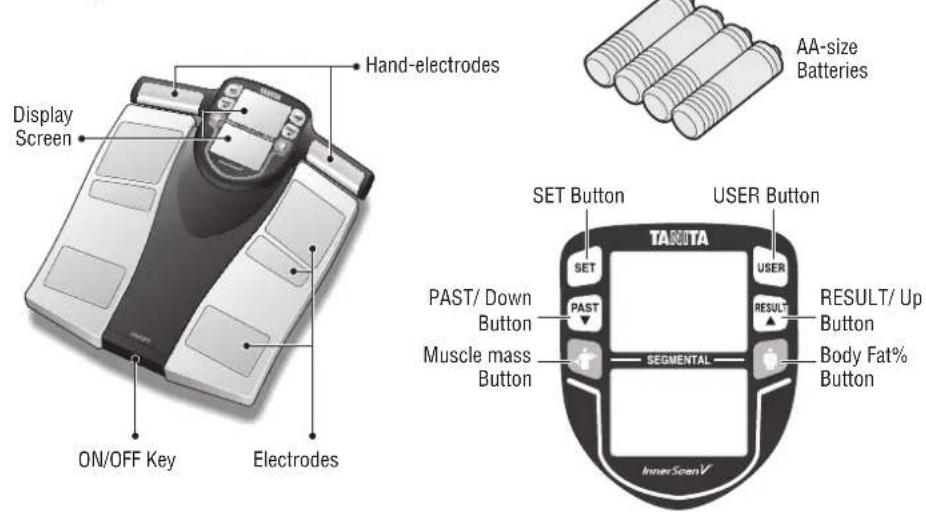
FEATURES AND FUNCTIONS
Measuring Platform
text_image
Display Screen ON/OFF Key Electrodes Hand-electrodes AA-size Batteries SET Button USER Button TANITA SET PAST/ Down Button Muscle mass Button RESULT/ Up Button Body Fat% Button SEGMENTAL InnerScanV
PREPARATIONS BEFORE USE
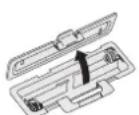
Open as shown.
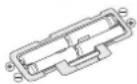
Direction of the batteries.
▲ Inserting the Batteries
Open the battery cover on the back of the measuring platform. Insert the supplied AA-batteries as indicated.
Note: Be sure that the polarity of the batteries is set properly. If the batteries are incorrectly positioned the fluid may leak and damage floors. If you do not intend to use this unit for a long period of time, it is advisable to remove the batteries before storage.
Please note that the included batteries from the factory may have decreased energy levels over time.

▲ Positioning the Scale
Place the measuring platform on a hard, flat surface where there is minimal vibration to ensure safe and accurate measurement.
Note: To avoid possible injury, do not step on the edge of the platform.
Do not pull the Hand-electrodes cable beyond the red band.
Handling Tips
This scale is a precision instrument utilising state-of-the-art technology.
To keep the unit in the best condition, please follow these instructions carefully:
avoid using soaps.
GETTING ACCURATE READINGS
To ensure accuracy, readings should be taken without clothing and under consistent conditions of hydration. If you do not undress, always remove your socks or stockings, and be sure the soles of your feet are clean before stepping onto the measuring platform. Be sure your heels are correctly aligned with the electrodes on the measuring platform. Don't worry if your feet appear too large for the unit, accurate readings can still be obtained if your toes overhang the platform. It is best to take readings at the same time of day. Try to wait about three hours after rising, eating, or exercising before taking measurements. While readings taken under other conditions may not have the same absolute values, they are accurate for determining the percentage of change as long as the readings are taken in a consistent manner. To monitor progress, compare weight and body fat percentage taken under the same conditions over a period of time.
Note: An accurate reading will not be possible if the soles of your feet are not clean, or if your knees are bent or you are in a sitting position.
AUTOMATIC SHUT-DOWN FUNCTION
The automatic shut-down function shuts off the power automatically in the following cases:
the type of operation.
*Note: If the power shuts off automatically, repeat the steps from "SETTING AND STORING PERSONAL DATA IN MEMORY" (page 4).
SETTING (RESETTING) DATE AND TIME
1. Set Year
Insert batteries into the scale and then press the ON/OFF key to start the Year setting. Press the Up or Down button to set year and then press the SET button. The unit will beep once to confirm.
2. Set Month
Press the Up or Down button to set month and then press the SET button. The unit will beep once to confirm.
3. Set Day
Press the Up or Down button to set day and then press the SET button. The unit will beep once to confirm.
4. Set Hour
Press the Up or Down button to set hour and then press the SET button. The unit will beep once to confirm.
5. Set Minute
Press the Up or Down button to set minute and then press the SET button.
The unit will beep twice to confirm the programming. The power will then shut down automatically.
Note:
programming process. Replacing the batteries will cause the loss of date and time settings.
off. No data will be saved as a result.

text_image
2012 Day 12:00 10:00SETTING AND STORING PERSONAL DATA IN MEMORY
The unit can be operated only if data has been programmed into one of the personal data memories.
1. Press the ON/OFF key while the Hand-electrodes is mounted on the platform scale
"0.0" will be shown.
2. Start Setting
Press the SET button.
The unit will beep to confirm activation, the Personal data number will be displayed, and the display will flash.
Note: If you don't operate the unit for 60 seconds after the unit has been turned on, the unit will turn off automatically.
Note: If you make a mistake or want to turn the unit off before you have finished programming it, press the ON/OFF key to force quit.
3. Select a Personal data Number
Press the Up or Down button to select a Personal data number (1, 2, 3, 4 and 5). Once you reach the Personal data number you wish to use, press the SET button. The unit will beep once to confirm.
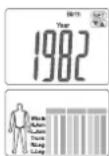
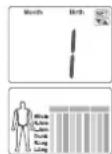
4. Set your Birthday
Set the date of your birthday (Year / Month / Day) using the Up or Down button. Press the SET button to confirm at each programming. The unit will beep once to confirm.
Note: The range of age is from 5 – 99.


5. Select Female or Male
Use the Up or Down button to scroll through Female ( ), Male ( ) Female/Athlete ( ) and Male/Athlete ( ) settings, then press the SET button. The unit will beep once to confirm.
6. Specify the Height
The display defaults to 170 cm (5' 7.0") (range of height is from 90 cm – 220 cm or 3' 0.0" – 7' 3.0"). Use the Up or Down button to specify Height and then press the SET button. The unit will beep once to confirm. The display shows the personal data one time to confirm, and then the display shows "0.0" and is ready for measurement.
7. Measuring your weight and body fat
Hold the Hand-electrodes and step on to the scale after "0.0" is shown on display within 30 seconds.
Do not step off until the unit beeps five times.
The readings will be shown for 40 seconds.
The unit will then shut off and the readings will be stored in the memory.
Note: If you step onto the scale before "0.0" appears in the display, then "Error" message will be displayed, and you have to step off and on again. If you do not step onto the scale within about 30 seconds after "0.0" being displayed, the scale will be shut off automatically. Please try the setting and storing personal data process again.

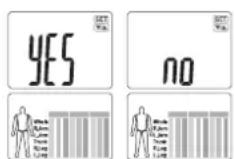
Note: If you change the birthday and/or gender, the unit will show "CLr".
If you select "YES" using the Up or Down button, the existing personal data will be deleted.
If you select "no" using the Up or Down button, no new data will be saved (existing data will be unchanged) then the unit will shut off.
TAKING WEIGHT AND BODY FAT READINGS
After programming your personal data you are ready to take a reading.
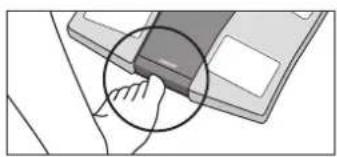
1. Press the ON/OFF key while the Hand-electrodes is mounted on the platform scale
"0.0" will be shown.
natural_image
Illustration of a hand pressing a button on a device (no text or symbols visible)2. Get your readings
Hold the Hand-electrodes and step on the scale.
Your Body weight will be shown first.
Continue to stand on the scale.
Your personal profile is shown on the display and then the Body weight, the BMI and the Body fat% reading are shown for 40 seconds.
Note: Do not step off until the unit beeps twice.


text_image
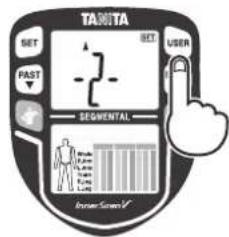
Make sure all of your fingers contact electrodes. Ensure that your arms are full extended and your elbows do not touch your body. Make sure your feet contact all of the electrodes. Do not bend your knees. Do not pull the Hand- electrodes cable beyond the red band.Note: If the wrong personal number appears on the display, you can change the personal number by using the USER button.
Press the USER button until your personal number and profile appears.
After you select your correct personal number and press the SET button, the display will show your correct readings automatically.
The readings will be stored in your personal number memory.
text_image
TAKITA SET BET USER PAST SEGMENTAL ImiTunes Screen√Continued on the next page.
▼

Step off the scale and press the RESULT button to see a desired reading.
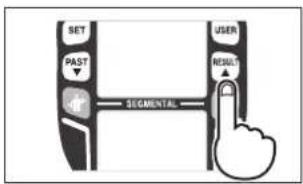
text_image
SET PAST SEGMENTAL USER RESULT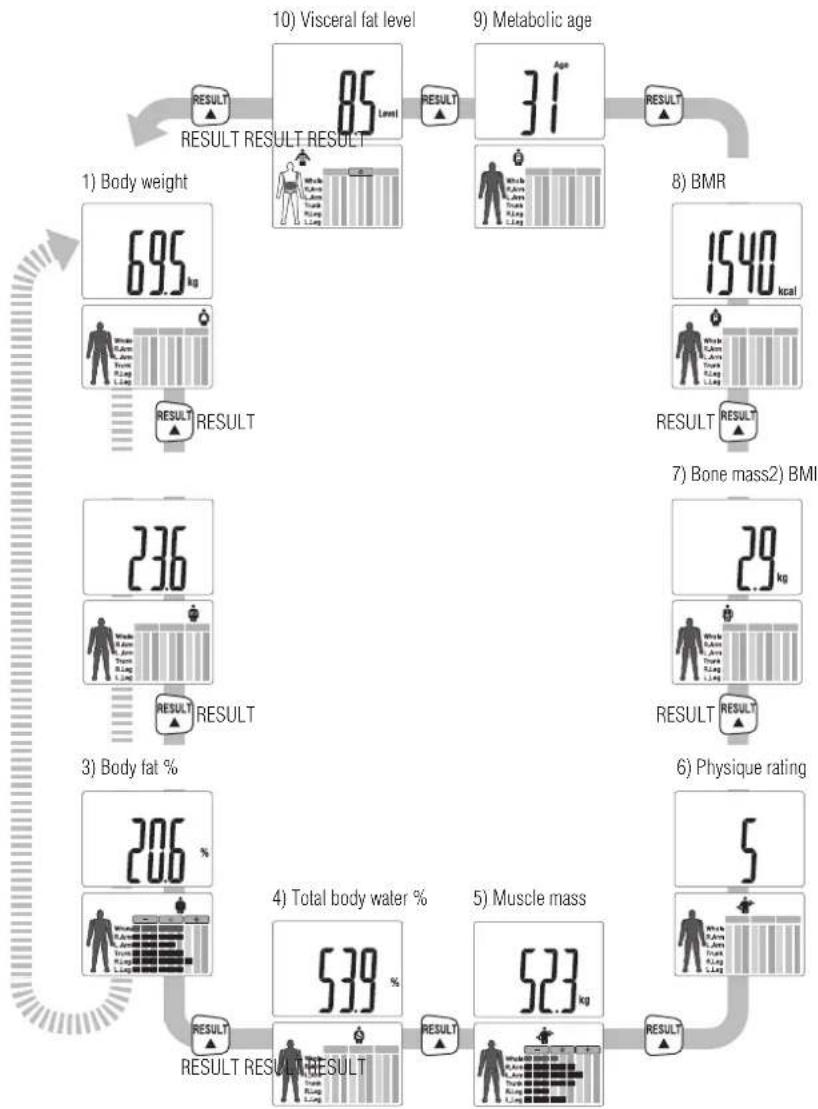
flowchart
graph TD
    A["1) Body weight"] --> B["695 kg"]
    B --> C["85 Level"]
    C --> D["31 Age"]
    D --> E["BMR"]
    E --> F["1540 kcal"]
    F --> G["7) Bone mass2) BMI"]
    G --> H["29 kg"]
    H --> I["6) Physique rating"]
    I --> J["5"]
    J --> K["53.9 %"]
    K --> L["4) Total body water %"]
    L --> M["523 kg"]
    M --> N["RESULT RESULT RESULT"]
    N --> O["RESULT RESULT RESULT"]
    O --> P["RESULT RESULT RESULT"]
    P --> Q["10) Visceral fat level"]
    Q --> R["9) Metabolic age"]
    R --> S["RESULT RESULT RESULT"]
    S --> T["RESULT RESULT RESULT"]
    T --> U["3) Body fat %"]
    U --> V["206 %"]
    V --> W["RESULT RESULT RESULT"]
    W --> X["RESULT RESULT RESULT"]
Note: For children (age 5-17), the unit will only display the Body weight, the BMI and the Body fat%.
HOW TO SEE THE READING OF EACH SEGMENT
Press button or button to see the readings of right arm, left arm, right leg, left leg, and trunk while readings are displayed.
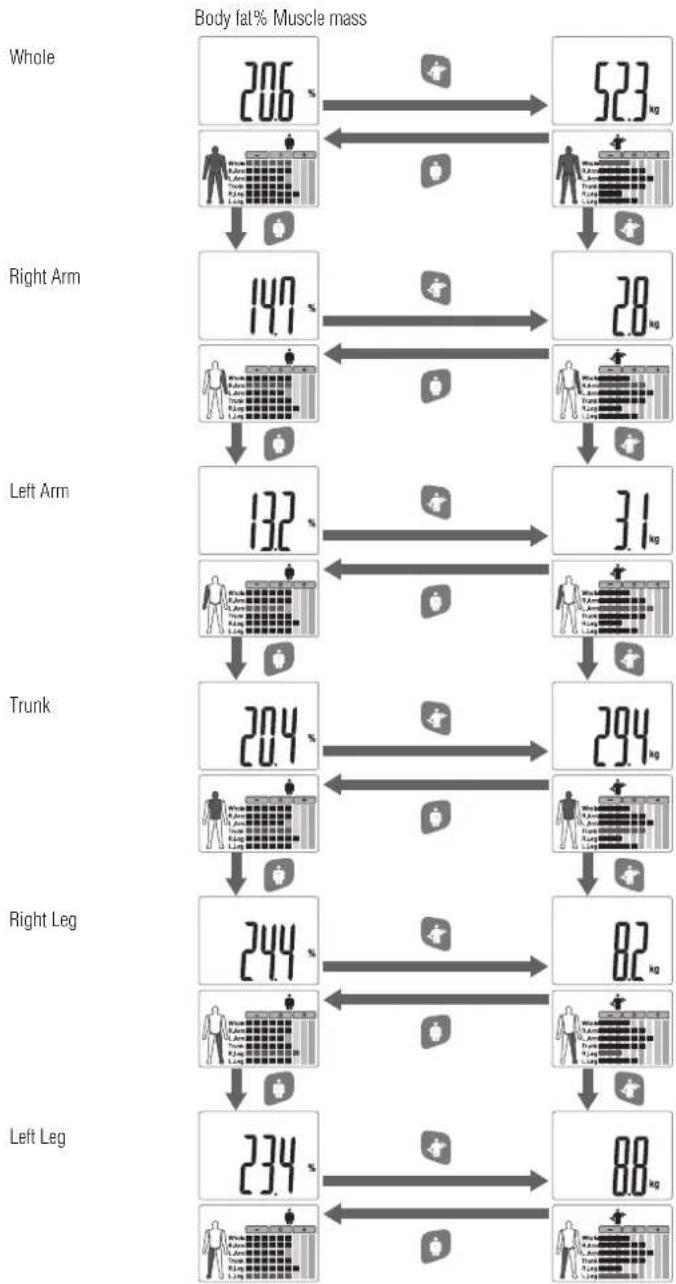
other
Body fat% Muscle mass | Body Part | Stage 1 (%) | Stage 2 (%) | Stage 3 (%) | | :--- | :--- | :--- | :--- | | Whole | 206 | 523 | 28 | | Right Arm | 149 | 28 | 31 | | Left Arm | 132 | 31 | 294 | | Trunk | 204 | 294 | 82 | | Right Leg | 244 | 82 | 88 | | Left Leg | 234 | 88 | 88 |RECALL FUNCTION
The previous readings of the following features can be obtained using the recall function.
To obtain previous readings, press the PAST button while the current readings are displayed.
To see other previous readings, press the RESULT button for each desired reading. Press the PAST button again to go back to the current result display.
Note: How to see the previous readings without taking measurement
Press the ON/OFF key. "0.0" will be shown.
Press the USER button until your personal number appears.
Press the SET button and PAST button to see the previous readings.
Current readings 12 months beforePrevious reading 1 week before

flowchart
graph LR
    A["6.95 kg"] --> B["PAST"]
    B --> C["6.99 kg"]
    C --> D["PAST"]
    D --> E["7.01 kg"]
    E --> F["PAST"]
    F --> G["7.13 kg"]
    G --> H["PAST"]
Press button or button to show reading of each segment while previous readings are displayed.
Note: For children (age 5-17), the unit will only display the Body weight, the BMI and the Body fat%.
PROGRAMMING THE GUEST MODE
Guest mode allows you to programme the unit for a one-time use without resetting a Personal data number.
Press the ON/OFF key while the Hand-electrodes is mounted on the platform scale. "0.0" will be shown.
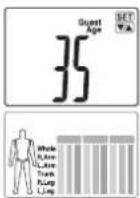
Hold the Hand-electrodes and the USER button until "Guest" appears.
Press the SET button and input your personal information such as Age, Sex, Height. Please see page 4 for more details.
After "0.0" will be shown, step on the scale holding the Hand-electrodes.
Do not step off until the unit beeps twice.
The readings will be shown for 40 seconds.
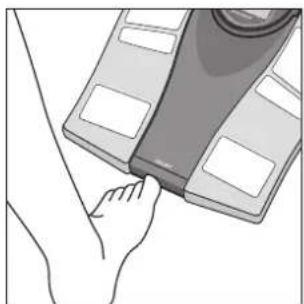
Press the ON/OFF key while the Hand-electrodes is mounted on the platform scale. After 2 or 3 seconds, "0.0" will appear in the display and the unit will beep. When "0.0" appears in the display, step onto the platform. The Body weight value will appear. The power will then shut down automatically.
natural_image
Illustration of a hand pressing down on a device component (no text or symbols visible)SWITCHING THE WEIGHT MODE
Note: For use only with models containing the weight mode switch.
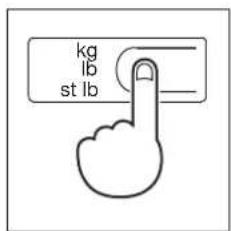
You can switch the unit indication by using the switch on the back of the scale (kg/lb/st lb).
text_image
kg lb st lbTROUBLESHOOTING
If the following problems occur ...then...
Refer to "SWITCHING THE WEIGHT MODE" (page 9).
lo appears on the display, or all the data appears and immediately disappears.
Batteries are low. When this message appears, be sure to replace the batteries immediately, since weak batteries will affect the accuracy of your measurements. Change all the batteries at the same time with new batteries.
Note: Your settings and past memory will not be erased from the memory when you remove the batteries.
Err appears while measuring.
Please stand on the platform keeping movement to a minimum.
The unit cannot accurately measure your weight if it detects movement.
The Body Fat Percentage is more than 75%, readings cannot be obtained from the unit.
Make sure socks or stockings are removed, and the soles of your feet are clean and properly aligned with the guides on the measuring platform.
OL appears while measuring.
Reading cannot be obtained if the weight capacity is exceeded.
Specifications
BC-545N
Weight Capacity
150 kg (330 lb) (23st 8 lb)
Weight Increments
0.1 kg (0.2 lb) (0.2 lb)
Body Fat Increments
0.1%
Personal Data
5 memories
Power Supply
4 AA batteries (included)
Power Consumption
60 mA maximum
Measuring Current
50 kHz, 100 μA

Notice:
These marks can be found out on contaminant-containing Batteries: Pb Pb = Battery contains lead,
Cd Cd = Battery contains cadmium,
Hg Hg = Battery contains mercury.
▲ Not allowed to mix batteries with consumer wastes!
As consumer you are legally bound to return used or discharged batteries. You can deposit your old batteries at the public collecting points in your town, or wherever the corresponding batteries are sold and specifically marked collecting boxes have been set up. In case of scrapping the apparatus, the batteries should be removed from it and deposited at the collecting points as well.

The device features radio interference suppression in compliance with EC regulation 2004/108/EC
Federal Communications Commission and Canadian ICES Notice
This equipment has been tested and found to comply with the limits for a Class B digital device, pursuant to Part 15 of the FCC Rules and Canadian ICES-003. These limits are designed to provide reasonable protection against harmful interference in a residential installation. This equipment generates, uses and can radiate radio frequency energy and, if not installed and used in accordance with the instructions, may cause harmful interference to radio communications. However, there is no guarantee that interference will not occur in a particular installation. If this equipment does cause harmful interference to radio or television reception, which can be determined by turning the equipment off and on, the user is encouraged to try to correct the interference by one or more of the following measures:
Modifications
The FCC requires the user to be notified that any changes or modifications made to this device that are not expressly approved by Tanita Corporation may void the user's authority to operate the equipment.
EINLEITUNG
natural_image
Illustration of a hand pressing a button on a device (no text or symbols visible)2. Ihre Messwerte
natural_image
Illustration of a hand pressing down on a device component (no text or symbols visible)DEN WIEGEMODUS ANDERN
text_image
kg lb st lb
FEHLERSUCHE
0.1kg (0.2lb) (0.2lb)
text_image
2012 Month Day 12:00 AM 10:00 AMRemarque:
natural_image
Illustration of a hand pressing a button on a device (no text or symbols visible)flowchart
graph TD
    A["204 kg"] --> B["294 kg"]
    B --> C["82 kg"]
    C --> D["88 kg"]
    D --> E["234 kg"]
    E --> F["244 kg"]
    F --> G["User avatars"]
    G --> H["User avatars with data processing icons"]
    H --> I["User avatars with data processing icons"]
    I --> J["User avatars with data processing icons"]
    J --> K["User avatars with data processing icons"]
    K --> L["User avatars with data processing icons"]
    L --> M["User avatars with data processing icons"]
    M --> N["User avatars with data processing icons"]
    N --> O["User avatars with data processing icons"]
    O --> P["User avatars with data processing icons"]
    P --> Q["User avatars with data processing icons"]
    Q --> R["User avatars with data processing icons"]
    R --> S["User avatars with data processing icons"]
    S --> T["User avatars with data processing icons"]
    T --> U["User avatars with data processing icons"]
    U --> V["User avatars with data processing icons"]
    V --> W["User avatars with data processing icons"]
    W --> X["User avatars with data processing icons"]
    X --> Y["User avatars with data processing icons"]
    Y --> Z["User avatars with data processing icons"]
    Z --> AA["User avatars with data processing icons"]
    AA --> AB["User avatars with data processing icons"]
    AB --> AC["User avatars with data processing icons"]
    AC --> AD["User avatars with data processing icons"]
    AD --> AE["User avatars with data processing icons"]
    AE --> AF["User avatars with data processing icons"]
    AF --> AG["User avatars with data processing icons"]
    AG --> AH["User avatars with data processing icons"]
    AH --> AI["User avatars with data processing icons"]
    AI --> AJ["User avatars with data processing icons"]
    AJ --> AK["User avatars with data processing icons"]
    AK --> AL["User avatars with data processing icons"]
    AL --> AM["User avatars with data processing icons"]
    AM --> AN["User avatars with data processing icons"]
    AN --> AO["User avatars with data processing icons"]
    AO --> AP["User avatars with data processing icons"]
    AP --> AQ["User avatars with data processing icons"]
    AQ --> AR["User avatars with data processing icons"]
    AR --> AS["User avatars with data processing icons"]
    AS --> AT["User avatars with data processing icons"]
    AT --> AU["User avatars with data processing icons"]
    AU --> AV["User avatars with data processing icons"]
    AV --> AW["User avatars with data processing icons"]
    AW --> AX["User avatars with data processing icons"]
    AX --> AY["User avatars with data processing icons"]
Jambe droite

flowchart
graph TD
    A["User Icon"] --> B["Step 1: Data Input"]
    B --> C["Step 2: User Interface"]
    C --> D["Output: 82 kg"]
    A --> E["User Icon"] --> F["Step 3: Data Input"]
    F --> G["Step 4: User Interface"]
    G --> H["Output: 88 kg"]
    A --> I["User Icon"] --> J["Step 5: Data Input"]
    J --> K["Step 6: User Interface"]
    K --> L["Output: 234 kg"]
    A --> M["User Icon"] --> N["Step 7: Data Input"]
    N --> O["Step 8: User Interface"]
    O --> P["Output: 244 kg"]
Jambe gauche

FONCTION DE RAPPEL
natural_image
Illustration of a hand pressing down on a device component (no text or symbols visible)CHANGEMENT DE MODE POIDS
text_image
kg lb st lbDÉPANNAGE
0.1 kg (0.2 lb) (0.2 lb)
Piles AA (4) (fournies)
natural_image
Illustration of a hand pressing a button on a device (no text or symbols visible)text_image
TAKITA SET PAST SEGMENTAL user screennatural_image
Illustration of a hand pressing down on a device component (no text or symbols visible)text_image
kg lb st lbPROBLEEMOPLOSSING
0.1 kg (0.2 lb) (0.2 lb)
Lichaamsvet Increment
0.1%
text_image
2012 Month Day 12:00 AM 10:00 AMNota:
natural_image
Illustration of a hand pressing a button on a device (no text or symbols visible)natural_image
Illustration of a hand pressing down on a device component (no text or symbols visible)CAMBIO DELLA MODALITÀ DI PESATURA
text_image
kg lb st lb0.1 kg (0.2 lb) (0.2 lb)
4 pile litio (incluse)
Consumo
Massimo di 60 mA
Corrente di misura
50 kHz, 100 μA

Avviso:
natural_image
Illustration of a hand pressing a button on a device (no text or symbols visible)natural_image
Illustration of a hand pressing down on a device with a cloth (no text or symbols visible)CAMBIAR EL MODO DE PESO
text_image
kg lb st lb0.1 kg (0.2 lb) (0.2 lb)
Incrementos de grasa corporal
0.1%
Datos personales
5 memorias
Alimentación
natural_image
Illustration of a hand inserting a device into a device (no text or symbols visible)2. Obter as suas leituras
natural_image
Illustration of a hand pressing down on a device component (no text or symbols visible)ALTERAR O MODO PESO
text_image
kg lb st lb0.1 kg (0.2 lb) (0.2 lb)
Aumentos da Gordura Corporal
0.1%
Dados Pessoais
5 memórias
natural_image
Illustration of a hand inserting a component into a device (no text or symbols visible)natural_image
Illustration of a hand pressing down on a device component (no text or symbols visible)text_image
kg lb st lbTel: +31-20-560-2970
Fax: +31-20-560-2988
www.tanita.eu
TANITA India Private Limited TANITA Corporation of America, Inc.
Unit 502 of 'A' Wing,
Mittal Commercia,
Marol, Andheri East,
Mumbai 400059 INDIA
TEL: +91 22 3192 6107
info@tanita.co.in
2625 South Clearbrook Drive
Arlington Heights, IL 60005 USA.
Tel: +1-847-640-9241
Fax: +1-847-640-9261
www.tanita.com
TANITA Health Equipment H.K. Ltd.
Unit 301-303 3/F Wing On Plaza,
62 Mody Road, Tsimshatsui East,
Kowloon, Hong Kong
Tel: +852-2838-7111
Fax: +852-2838-8667
www.tanita.com
Manufacturer
TANITA Corporation
1-14-2, Maeno-Cho, Itabashi-ku,
Tokyo, Japan 174-8630
Tel: +81-3-3968-7048
Fax: +81-3-3968-2661
www.tanita.co.jp
ISO 9001 Certified