MC-7205 - Receiver MCINTOSH - Free user manual and instructions
Find the device manual for free MC-7205 MCINTOSH in PDF.


User questions about MC-7205 MCINTOSH
0 question about this device. Answer the ones you know or ask your own.
Ask a new question about this device
Download the instructions for your Receiver in PDF format for free! Find your manual MC-7205 - MCINTOSH and take your electronic device back in hand. On this page are published all the documents necessary for the use of your device. MC-7205 by MCINTOSH.
USER MANUAL MC-7205 MCINTOSH
MC7205 THX® Five Channel Power Amplifier

MC7205
THX is a registered trademarks of Lucasfilm, Ltd. Manufactured under license from Lucasfilm Ltd.
Thank You
For your decision to own this McIntosh MC7205 Five Channel Power Amplifier ranks you at the very top among discriminating music listeners. You now have “The Best.” The McIntosh dedication to “Quality,” is assurance that you will receive many years of musical enjoyment from this unit.
Please take a short time to read the information in this manual. We want you to be as familiar as possible with all the features and functions of your new McIntosh MC7205. This will ensure that you receive all the performance benefits this equipment can offer you, and that it will become a highly valued part of your home entertainment system.
Please Take A Moment
The serial number, purchase date and McIntosh dealer name are important to you for possible insurance claim or future service. The serial number is located on the rear panel of the equipment. The spaces below have been provided for you to record that information:
Serial Number:
Purchase Date:
Dealer Name:
Customer Service
If at any time you have questions about your McIntosh MC7205 Five Channel Power Amplifier, contact your McIntosh dealer. Your dealer is familiar with your McIntosh equipment as well as other brands that may be included in your system and is best qualified to help you.
If it is determined that your MC7205 is in need of repair, you can return it to your dealer or you can return it to McIntosh Laboratory. Contact the McIntosh Repair Department for assistance at,
McIntosh Laboratory, Inc.
2 Chambers Street
Binghamton, New York 13903
Phone: 607-723-3512
FAX: 607-724-0549
Copyright 1998 by McIntosh Laboratory, Inc.
Table of Contents
Thank You....2
Please Take a Moment 2
Customer Service....2
Table of Contents 2
Safety Instructions 3
Introduction 4
Performance Features 4
Installation 5
Rear Panel Controls and Connections 6
How to Connect 7
Front Panel Displays and Controls 8
How to Operate....9
Specifications 10
Packing Instruction 11
NOTES:
- Connecting Cables and Connectors are available from the McIntosh Parts Department:
Data and Power Control Cable Part No. 170-202
Six foot, shielded 2 conductor, with 1/8 inch stereo mini phone plugs on each end.
Control Center to Multi Channel Power Amplifier Cable Part No. 170-631
Six foot, DB25, shielded, straight through, 25 conductor male-to-female cable.
-
For additional connection information, refer to the owner's manual(s) for any component(s) connected to the MC7205 Amplifier.
-
There is a built-in turn on delay which will mute the speaker outputs for approximately two seconds when the amplifier is turned on.
-
It is very important that loudspeaker cables of adequate size be used in your music system, to ensure that there will be no power loss or heating. Cable size is specified in Gauge numbers or AWG, (American Wire Gauge). The smaller the Gauge number, the larger the wire size:
If your loudspeaker cables are 25 feet (7.62m) or less, use at least 18 Gauge (AWG) wire size or larger.
If your loudspeaker cables are 50 feet (38.1m) or less, use at least 16 Gauge (AWG) wire size or larger.
If your loudspeaker cables are 100 feet (76.2m) or less, use at least 14 Gauge (AWG) wire size or larger.
IMPORTANT SAFETY INSTRUCTIONS!
PLEASE READ THEM BEFORE OPERATING THIS EQUIPMENT.

WARNING SHOCK HAZARD - DO NOT OPEN.
The lightning flash with arrowhead, within an equilateral triangle, is intended to alert the user to the presence of uninsulated “dangerous voltage” within the product’s enclosure that may be of sufficient magnitude to constitute a risk of electric shock to persons.

AVIS RISQUE DE CHOC - NE PAS OUVRIR.
The exclamation point within an equilateral triangle is intended to alert the user to the presence of important operating and maintenance (servicing) instructions in the literature accompanying the appliance.
NO USER-SERVICEABLE PARTS INSIDE. REFER SERVICING TO QUALIFIED PERSONNEL
To prevent the risk of electric shock, do not remove cover (or back). No user serviceable parts inside. Refer servicing to qualified personnel.
General:
- Read all the safety and operating instructions, contained in this owner's manual, before operating this equipment.
- Retain this owner's manual for future reference about safety and operating instructions.
- Adhere to all warnings and operating instructions.
- Follow all operating and use instructions.
- Warning: To reduce risk of fire or electrical shock, do not expose this equipment to rain or moisture. This unit is capable of producing high sound pressure levels. Continued exposure to high sound pressure levels can cause permanent hearing impairment or loss. User caution is advised and ear protection is recommended when playing at high volumes.
- Caution: to prevent electrical shock do not use this (polarized) plug with an extension cord, receptacle or other outlet unless the blades can be fully inserted to prevent blade exposure.
- For added protection for this product during a lightning storm, or when it is left unattended and unused for long periods of time, unplug it from the wall outlet and disconnect the antenna or cable system. This will prevent damage to the product due to lightning or power line surges.
- Do not use attachments not recommended in this owner's manual as they may cause hazards.
Installation:
- Locate the equipment for proper ventilation. For example, the equipment should not be placed on a bed, sofa, rug, or similar surface that may block ventilation openings; or, placed in a built-in installation, such as a bookcase or cabinet, that may impede the flow of air through the ventilation openings.
- Locate the equipment away from heat sources such as radiators, heat registers, stoves, or other appliance (including amplifiers) that produce heat.
- Mount the equipment in a wall or cabinet only as described in this owner's manual
- Do not use this equipment near water; for example, near a bathtub, washbowl, kitchen sink, laundry tub, in a wet basement or near a swimming pool, etc.
- Do not place this product on an unstable cart, stand, tripod, bracket, or table. The equipment may fall, causing serious injury to a person, and serious damage to the product.
Connection:
- Connect this equipment only to the type of AC power source as marked on the unit.
- Route AC power cords so that they are not likely to be walked on or pinched by items placed upon or against them, paying particular attention to cords at plugs, convenience receptacles, and the point where they exit from the instrument.
-
Do not defeat the inherent design features of the polarized plug. Non-polarized line cord adapters will defeat the safety provided by the polarized AC plug. If the plug should fail to fit, contact your electrician to replace your obsolete outlet. Do not defeat the safety purpose of the grounding-type plug.
-
Do not overload wall outlets, extension cords or integral convenience receptacles as this can result in a risk of fire or electric shock.
Care of Equipment:
- Clean the instrument by dusting with a dry cloth. Unplug this equipment from the wall outlet and clean the panel with a cloth moistened with a window cleaner. Do not use liquid cleaners or aerosol cleaners.
- Do not permit objects of any kind to be pushed and/or fall into the equipment through enclosure openings. Never spill liquids into the equipment through enclosure openings.
- Unplug the power cord from the AC power outlet when left unused for a long period of time.
Repair of Equipment:
- Unplug this equipment from the wall outlet and refer servicing to a qualified service personnel under the following conditions:
A. The AC power cord or the plug has been damaged.
B. Objects have fallen, or liquid has been spilled into the equipment.
C. The equipment has been exposed to rain or water.
D. The equipment does not operate normally by following the operating instructions contained within this owner's manual. Adjust only those controls that are covered by the operating instructions, as an improper adjustment of other controls may result in damage and will often require extensive work by a qualified technician to restore the product to its normal operation.
E. The equipment has been dropped or damaged in any way.
F. The equipment exhibits a distinct change in performance - this indicates a need for service.
- Do not attempt to service beyond that described in the operating instructions. All other service should be referred to qualified service personnel.
- When replacement parts are required, be sure the service technician has used replacement parts specified by McIntosh or have the same characteristics as the original part. Unauthorized substitutions may result in fire, electric shock, or other hazards.
- Upon completion of any service or repairs to this product, ask the service technician to perform safety checks to determine that the product is in proper operating condition.
Introduction
Now you can take advantage of traditional McIntosh standards of excellence in the MC7205, power amplifier. Five 200 watt, high current output channels will deliver outstanding audio performance for your McIntosh Home Theater System. The MC7205 is THX certified and easily meets the demanding Lucasfilm, Ltd., standards for accuracy in home theater electronics.
Performance Features
- Power Output
The MC7205 consists of five separate power amplifier channels, each capable of 200 watts into 4 ohm speakers with less than 0.005% distortion. This is 1000 watts of McIntosh power in a single package.
- Power Guard
All five channels include the patented McIntosh Power Guard circuit that prevents the amplifier from being overdriven into clipping with its harsh distorted sound that can also damage your valuable loudspeakers.
- Sentry Monitor and Thermal Protection
McIntosh Sentry Monitor power output stage protection circuits are present on all five channels to ensure the MC7205 will have a long and trouble free operating life. Built-in thermal protection circuits guard against overheating which could shorten the normal long life expectancy of your McIntosh power amplifier.
- Direct Current Protection
Direct Current sensing circuits on each channel provide extra protection for your valuable loudspeakers.
- Illuminated Power Meters
Three front panel, illuminated output wattmeters can be selected to precisely indicate the power output of each of the five channels as well as the relative power output produced by a THX certified powered subwoofer amplifier.
- Convenient Single Cable Hookup
A rear panel connector provides for the convenience of using a single cable, (DB25 computer style) to receive all audio and power control signals from a McIntosh THX Control Center.
Installation
The MC7205 can be placed upright on a table or shelf, standing on its four feet. It also can be custom installed in a piece of furniture or cabinet of your choice. The required panel cutout, ventilation cutout and unit dimensions are shown.
Always provide adequate ventilation for your MC7205. Cool operation ensures the longest possible operating life for any electronic instrument. Do not install the MC7205 directly above a heat generating component such as a high powered amplifier. If all the components are installed in a single cabinet, a quiet running ventilation fan can be a definite asset in maintaining all the system components at the coolest possible operating temperature.
A custom cabinet installation should provide the following minimum spacing dimensions for cool operation. Allow at least 2 inches (5.1 cm) above the top and 1 inch (2.54 cm) on each side of the amplifier, so that airflow is not obstructed. Allow 21 inches (53.3 cm) depth behind the mounting panel, which includes clearance for connectors. Allow 1-1/8 inches (2.9 cm) in front of the mounting panel for knob clearance. Be sure to cut out a ventilation hole in the mounting shelf according to the dimensions in the drawing.
Front View of a MC7205 custom installed
Side View of a MC7205 custom installed
Bottom View of a MC7205 custom installed

text_image
17 1/2" 44.4mm 17-1/16" 433.4mm Outline of Front Panel Edge of Cutout End Caps 7-1/16" 179.8mm 6.9*16" 165.7mm Panel Height 7.00" 177.8mm (Front View) 7/32" 5.3mm 3/16" 5.1mm Bottom of Cutout and Top of Support Shelf Must Coincide Support Shell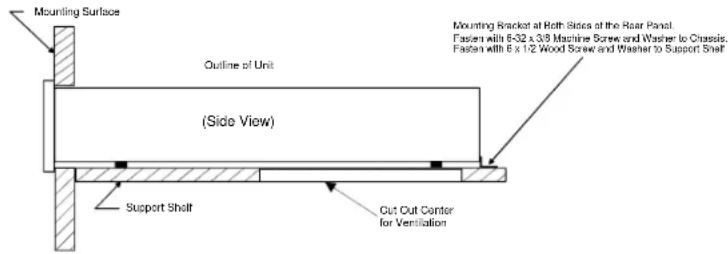
text_image
Mounting Surface Outline of Unit (Side View) Support Shelf Cut Out Center for Ventilation Mounting Bracket at Roth Sides of the Rear Panel. Fasten with 6-32 x 3/8 Machine Screw and Washer to Chassis. Fasten with 6 x 1/2 Wood Screw and Washer to Support Shelf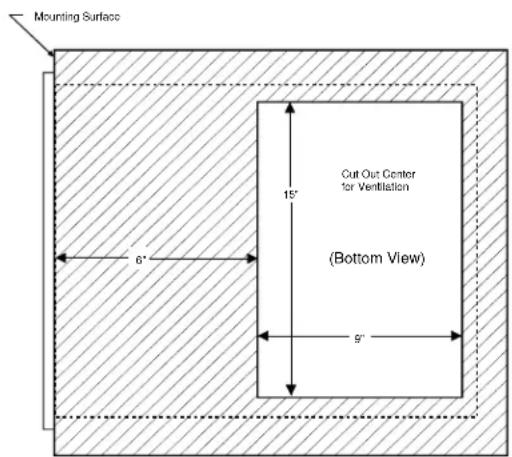
text_image
Mounting Surface 6" 15" Cut Out Center for Ventilation (Bottom View) 9"MC7205 Rear Panel Controls and Connections

text_image
INPUTS for discrete audio cables from a preamplifier or control center audio outputs Connect the MC7205 power cord to a live AC outlet. Refer to in- formation on the back panel to determine the correct voltage. SUB IN/OUT accepts a subwoofer input signal to activate the subwoofer power meter circuit. If a 25 conductor cable is being used with a McIntosh Con- trol Center this jack will provide a signal out to a subwoofer amplifier. THX INPUT Connector accepts a 25 conductor cable that connects all audio and power control signals from a McIntosh Control Center INPUTS for discrete audio cables from a preamplifier or control center audio outputs Individual Input LEVEL controls for the Left chan- nels INPUTS LEFT SURR LEFT FRONT 125V SMOCHA OUTPUT Connections for 8 or 4 ohm loudspeakers SUB METER CAL control for meter calibration of the Subwoofer Channel OUTPUT Connections for 8 or 4 ohm loudspeakers OUTPUT Connections for 8 or 4 ohm loudspeakers POWER CONTROL In receives turn on/off signals from a McIntosh component and the POWER CON- TROL Out sends that turn on/off signal to the next McIntosh compo- nent. Main Fuse holder, refer to infomration on the back panel of your MC7205 to determine the cor- rect fuse size and rating.How to Connect the MC7205
with a C39/MX130
- Connect the MC7205 power cord to a live AC outlet.
- Connect the loudspeaker cables to the appropriate channel output connectors, being careful to observe the correct polarities.
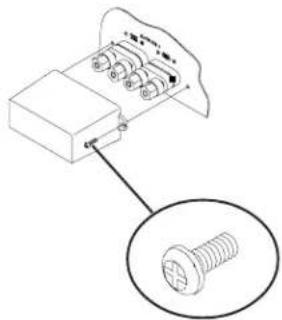
Note: To prevent the possibility of user contact with potentially dangerous voltages, install the protective cover(s) over the loudspeaker output terminals after the loudspeaker cables have been connected. The covers and cover mounting screws are located in an accessory package that is enclosed in
natural_image
Technical diagram of a screw assembly with a magnified inset showing the screw detail (no text or labels)McIntosh MX130 Control Center

text_image
AUDIO OUTPUTS AUDIO INPUTS INTRODUCTION MINI-5 MINI-4 MINI-3 MINI-2 MINI-1 MINI 0 MINI 1 MINI 2 MINI 3 MINI 4 MINI 5 MINI 6 MINI 7 MINI 8 MINI 9 MINI 10 MINI 11 MINI 12 MINI 13 MINI 14 MINI 15 MINI 16 MINI 17 MINI 18 MINI 19 MINI 20 MINI 21 MINI 22 MINI 23 MINI 24 MINI 25 MINI 26 MINI 27 MINI 28 MINI 29 MINI 30 MINI 31 MINI 32 MINI 33 MINI 34 MINI 35 MINI 36 MINI 37 MINI 38 MINI 39 MINI 40 MINI 41 MINI 42 MINI 43 MINI 44 MINI 45 MINI 46 MINI 47 MINI 48 MINI 49 MINI 50 MINI 51 MINI 52 MINI 53 MINI 54 MINI 55 MINI 56 MINI 57 MINI 58 MINI 59 MINI 60 MINI 61 MINI 62 MINI 63 MINI 64 MINI 65 MINI 66 MINI 67 MINI 68 MINI 69 MINI 70 MINI 71 MINI 72 MINI 73 MINI 74 MINI 75 MINI 76 MINI 77 MINI 78 MINI 79 MINI 80 MINI 81 MINI 82 MINI 83 MINI 84 MINI 85 MINI 86 MINI 87 MINI 88 MINI 89 MINI 90 MINI 91 MINI 92 MINI 93 MINI 94 MINI 95 MINI 96 MINI 97 MINI 98 MINI 99 MINI 100carton. There are two types of screws in the package. Install the protective covers with the Phillips, 6-32 by 5/16 inch self tapping screws. The other screws are No. 6 by ½ inch wood screws used to secure the amplifier custom mounting brackets to a shelf.
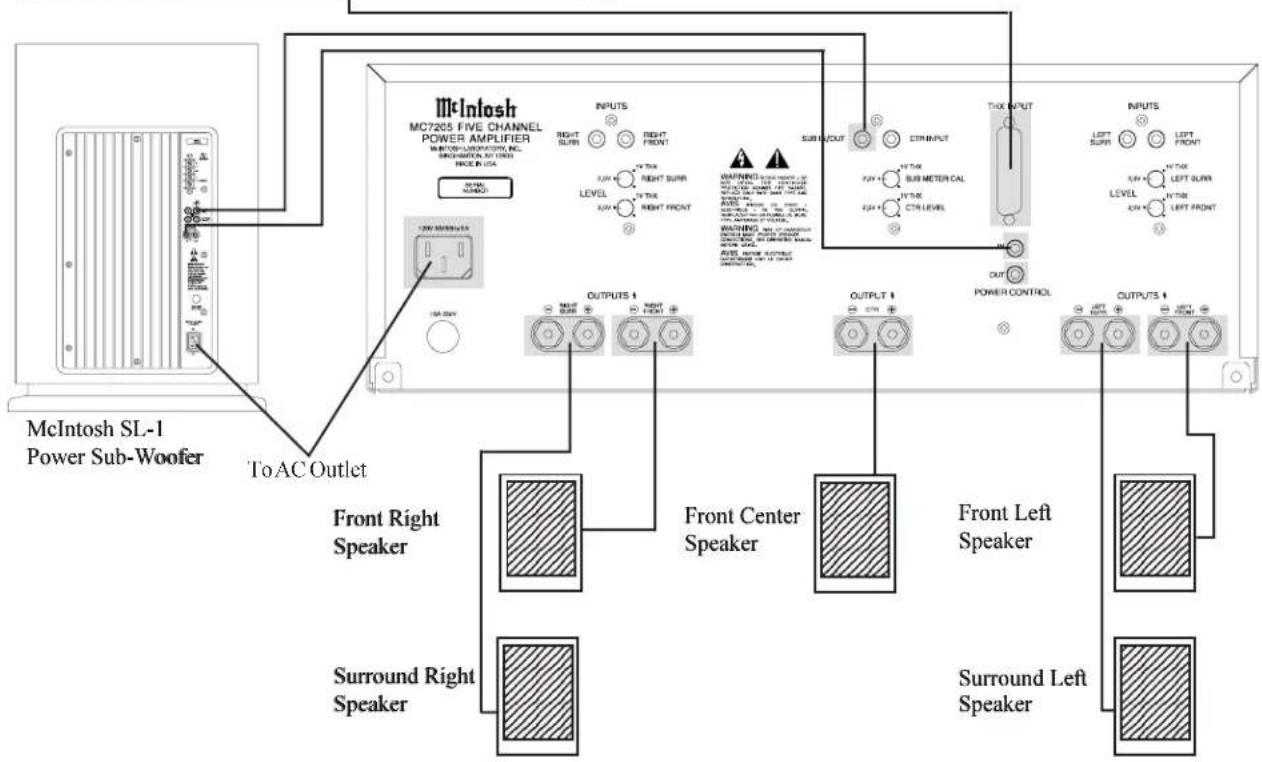
- Connect a single DB25 computer type cable from the THX output of a control center to the MC7205 THX Input connector for all six audio channels and power control.
- Connect the MC7205 Sub In/Out to the McIntosh SL-1 subwoofer amplifier THX input and a power control cable from the MC7205 Power Control Out to the SL-1 Power Control In.
Note: An optional hookup is to use discrete cables from a McIntosh Control Center to inputs of the MC7205. Connect a "Y" adapter to the Control Center Subwoofer Output, with one cable to the SL-1 subwoofer THX input and a second cable to the MC7205 Sub In/Out jack. Connect a power control cable from the Control Center Power Control Out to the MC7205 power control in jack and connect a power control cable from the MC7205 Power Control Out to the SL-1 Power Control In.
text_image
McIntosh MC7205 FIVE CHANNEL POWER AMPLIFIER MINTOER-LABRICATOR, INC. SPRING ON 1930 RICE IN USA INPUTS RIGHT SURF RIGHT FRONT LEVEL RIGHT TOP RIGHT FRONT WARNING AIDS RUNS RUNS RUNS RUNS RUNS RUNS RUNS RUNS RUNS RUNS RUNS RUNS RUNS RUNS RUNS RUNS RUNS RUNS RUNS RUNS RUNS RUNS RUNS RUNS RUNS RUNS RUNS RUNS RUNS RUNS RUNS RUNS RUNS RUNS 1 OUTPUT 1 OUTPUT 1 OUTPUT 1 OUTPUT 1 OUTPUT 1 OUTPUT 1 OUTPUT 1 OUTPUT 1 OUTPUT 1 OUTPUT 1 OUTPUT 1 OUTPUT 1 OUTPUT 1 OUTPUT 1 OUTPUT 1 OUTPUT 1 OUTPUT 1 OUTPUT 1 OUTPUT 1 OUTPUT 1 OUTPUT 1 OUTPUT 1 OUTPUT 1 OUTPUT 1 OUTPUT 1 Output OUT CIT INPUT SUB METER CAL SUB METER OUT SUB METER OUT SUB METER OUT SUB METER OUT SUB METER OUT SUB METER OUT SUB METER OUT SUB METER OUT SUB METER OUT SUB METER OUT SUB METER OUT SUB METER OUT SUB METER OUT SUB METER OUT SUB METER OUT SUB METER OUT Sub METER OUT Sub METER OUT Sub METER OUT Sub METER OUT Sub METER OUT Sub METER OUT Sub METER OUT Sub METER OUT Sub METER OUT Sub METER OUT Sub METER OUT Sub METER OUT Sub METER OUT Sub METER OUT Sub METER OUT Sub METER OUT Sub METER OUT Sub METER OUT Sub METER OUT Sub METER OUT Output CONTROL OUTPUT CONTROL OUTPUT CONTROL OUTPUT CONTROL OUTPUT CONTROL OUTPUT CONTROL OUTPUT CONTROL OUTPUT CONTROL OUTPUT CONTROL OUTPUT CONTROL OUTPUT CONTROL OUTPUT CONTROL OUTPUT CONTROL OUTPUT CONTROL OUTPUT CONTROL OUTPUT CONTROLMC7205 Front Panel Displays and Controls

text_image
POWER GUARD LED's light when the amplifier channel POWER GUARD circuit activates POWER GUARD LED's light when the amplifier channel POWER GUARD circuit activates POWER GUARD LED's light when the amplifier channel POWER GUARD circuit activates METER LED's Indicate which channel(s) the power meter is reading METER LED's Indicate which channel(s) the power meter is reading METER LED's Indicate which channel(s) the power meter is reading METER LED's Indicate which channel(s) the power meter is reading METER LED's Indicate which channel(s) the power meter is reading METER ON Indicator McInlash MC7205 POWER AMPLIFIER Remote On Indicator METER Switch selects the display modes of the power output meters Power Switch Turns AC power on/off, or on/ remote METERS indicate power out- put of the amplifier channels according to the Meter switch settingHow to Operate the MC7205
Input Level Controls
When using a McIntosh Control Center set all five level controls to the 2V position. If a preamplifier or control center has a 1V output rating and/or a built-in THX module, set the controls to the 1V position. If an increase or decrease in amplifier sensitivity is required for other applications, set the controls as desired. Refer to

text_image
2.0V • 1V THX SUB METER CAL 2.0V • 1V THX CTR LEVELFigure 2
Figure 2.
Subwoofer Meter Calibration
When using a McIntosh SL-1 powered subwoofer, set the Sub Meter Cal control to the 1V THX position for the correct subwoofer amplifier power output indication. Refer to Figure 1.
Power On
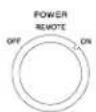
To have the MC7205 turn on or off when a control center turns on or off, rotate the power switch to the remote position. For manual operation, rotate the power switch to the on or off position as desired.
Note: There must be a power control connection between the MC7205 and the McIntosh Control Center in order for the remote power turn on to function.
Meter Selection
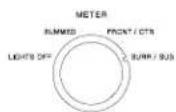
Rotate the meter mode switch to select the meter operation mode you desire:
Lights Off - Meter lights are turned off and the meters are in the summed mode.
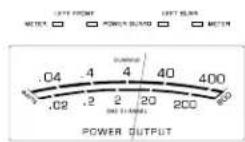
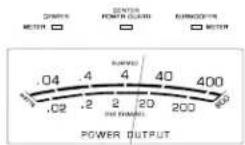
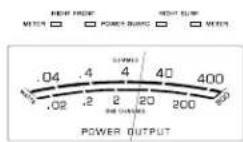
Summed - Each meter displays the combined outputs of two channels. The left meter indicates the left

line
| Voltage (Watts) | Power Output | |---|---| | 0.04 | 0.02 | | 0.4 | 0.2 | | 4 | 2 | | 40 | 20 | | 400 | 200 | | 800 | 800 |Figure 3
front combined with the left surround, the center meter indicates the center combined with the subwoofer and the right meter indicates the right front combined with the right surround. In this meter mode refer to the upper meter scale(s).
Front/Ctr - The left meter indicates the left front channel, the center meter indicates the center channel and the right meter indicates the right front channel. In this meter mode refer to the lower meter scale(s).
Surr/Sub - The left meter indicates the left surround channel, the center meter indicates the relative power of the subwoofer amplifier and the right meter indicates the right surround channel. In this meter mode refer to the lower meter scale(s).
How to Read the Power Output Meters
The MC7205 Power Output Meter scales are based on using 4 ohm loudspeakers. If 8 ohm speakers are used, the actual power output is one half the power available to drive 4 ohm loudspeakers. Use the chart(s) below to determine the actual power output sent to your loudspeakers. Refer to figure 3.
| Summed Channels Meter Readings | ||
| Meter Reading | With 4Ω Loudspeaker(s) | With 8Ω Loudspeaker(s) |
| .04 .04 Watts .02 Watts | ||
| .4 .4 Watts .2 Watts | ||
| 4 4 Watts 2 Watts | ||
| 40 40 Watts 20 Watts | ||
| 400 400 Watts 200 Watts | ||
| Single Channel Meter Readings | ||
| Meter Reading | With 4Ω Loudspeaker(s) | With 8Ω Loudspeaker(s) |
| .02 .02 Watts .01 Watts | ||
| .2 .2 Watts .01 Watts | ||
| 2 2 Watts 1 Watts | ||
| 20 20 Watts 10 Watts | ||
| 200 200 Watts 100 Watts | ||
Specifications
Power Output Per Channel
200 watts into 4 ohm loads or 120 watts into 8 ohm loads minimum sine wave continuous average power output per channel, all channels operating.
Output Load Impedance
8 or 4 ohms
Rated Power Band
20Hz to 20,000Hz
Dynamic Headroom
1.6dB
Frequency Response
+0,-0.25dB from 20Hz to 20,000Hz
+0, -3dB from 10Hz to 100,000Hz
Total Harmonic Distortion
0.005% maximum at any power level from 250 milliwatts to rated power per channel from 20Hz to 20,000Hz, all channels operating.
Intermodulation Distortion
0.005% maximum if instantaneous peak output per channel does not exceed twice the rated output with all channels operating for any combination of frequencies from 20Hz to 20,000Hz.
Signal To Noise Ratio
113dB below rated output, (A Weighted)
Sensitivity
1 volt (2.0V at level control center detent position)
Input Impedance
10,000 ohms
Damping Factor (Wide Band)
200 @ 8 ohms
100 @ 4 ohms
Power Supply Energy Storage
215 Joules
Power Requirements
100 Volts, 50/60Hz at 1080 watts 110 Volts, 50/60Hz at 1080 watts 120 Volts, 50/60Hz at 1080 watts 220 Volts, 50/60Hz at 1080 watts 230 Volts, 50/60Hz at 1080 watts 240 Volts, 50/60Hz at 1080 watts
NOTE: Refer to the rear panel of the MC7205 for the correct voltage
Dimensions
Front Panel: 17/1/2 inches (44.5cm) wide, 7-1/16 inches (17.9cm) high. Depth behind front mounting panel is 21 inches (53.3cm) including clearance for connectors. Panel clearance required in front of mounting panel is 1-1/8 inches (2.9cm).
Weight
53 pounds (24Kg) net, 72 pounds (32.7Kg) in shipping carton
Packing Instructions
In the event it is necessary to repack the equipment for shipment, the equipment must be packed exactly as shown below. It is very important that the four plastic feet are attached to the bottom of the equipment. Three #10 x 2-1/4" screws and washers must be used to fasten the unit securely to the bottom pad and wood skid This will ensure the proper equipment location on the bottom pad. Failure to do this will result in shipping damage.
Use the original shipping carton and interior parts only if they are all in good serviceable condition. If a shipping carton or any of the interior part(s) are needed, please call or write Customer Service Department of McIntosh Laboratory. Please see the Part List for the correct part numbers.
Quantity Part Number Description
1 033888 Shipping carton only
4 033887 End cap (Foam pad)
1 033697 Inside carton only
1 033725 Top Pad
1 034008 Bottom pad
3 017218 Plastic foot (spacer)
1 033699 Wood skid
3 101169 #10 x 2-¼" Wood screw
3 104033 #10 x 1-3/4" Wood screw
4 017218 Plastic foot
4 100159 #10-32 x ^3/4 " Machine screw
4 104083 #10 x 7/16" Flat washer
1 040542 Shipping carton complete with all the above parts

text_image
TOP PAD UNIT WITH (4) FEET ON BOTTOM COVER PLASTIC FOOT (4) 10-32 x -3/4" SCREW WITH WASHER (4) BOTTOM PAD PLASTIC FOOT SPACERS (3) WOOD SKID #10 x 1-3/4" WASHER (3) #10 x 2-1/4" SCREW (3) INSIDE CARTON IMPORTANT (Read Above) IMPORTANT (Read Above)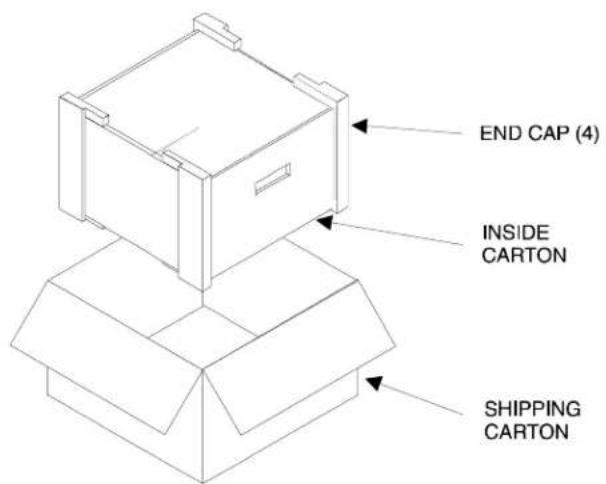
text_image
END CAP (4) INSIDE CARTON SHIPPING CARTONMcIntosh®
McIntosh Laboratory, Inc.
2 Chambers Street
Binghamton, NY 13903