Mic Mod EFX - Audio software ANTARES - Free user manual and instructions
Find the device manual for free Mic Mod EFX ANTARES in PDF.


User questions about Mic Mod EFX ANTARES
0 question about this device. Answer the ones you know or ask your own.
Ask a new question about this device
Download the instructions for your Audio software in PDF format for free! Find your manual Mic Mod EFX - ANTARES and take your electronic device back in hand. On this page are published all the documents necessary for the use of your device. Mic Mod EFX by ANTARES.
USER MANUAL Mic Mod EFX ANTARES
Mic Mod®efx Classic Microphone Modeler
Owner's Manual
Updated September 2015
©2015 Antares Audio Technologies. All rights reserved.
Certified Isinglass-free™
Antares®, Auto-Tune®, AVOX®, Harmony Engine® and Mic Mod® are registered trademarks of Antares Audio Technologies. All other trademarks are property of their respective owners.
The “Don’t Sue Us!” Disclaimer: All names of microphone manufacturers and microphone model designations appearing in this manual are used solely to identify the microphones analyzed in the development of our digital models and do not in any way imply any association with or endorsement by any of the named manufacturers. This product is not guaranteed to produce, and will not necessarily produce, audio results that are consistent with or match audio results that could be achieved using any of the referenced microphone models.
www.antarestech.com
The Obligatory Legal Mumbo-Jumbo
The Antares® Mic Mod® EFX software and this User's Manual are protected by copyright law. Making copies, adaptations, or derivative works without the prior written authorization of Antares Audio Technologies, is prohibited by law and constitutes a punishable violation of the law.
Antares Audio Technologies retains all ownership rights to the Mic Mod EFX software and its documentation. Use of Mic Mod EFX is limited by the following license agreement.
Please carefully read all the terms and conditions of this license agreement. At the time of installation of the Mic Mod EFX software you will be presented with a copy of the agreement and asked whether or not you agree to it. Continuing with the installation process beyond that point constitutes such agreement.
Mic Mod EFX License Agreement
Antares Audio Technologies grants you a non-transferable, non-exclusive license to use Mic Mod EFX under the terms and conditions stated in this agreement. Use of Mic Mod EFX indicates your agreement to the following terms and conditions.
License
You may:
- Use Mic Mod EFX on only one computer at a time.
You may not:
- Make copies of Mic Mod EFX or of the user manual in whole or in part except as expressly provided for in this agreement. Your right to copy Mic Mod EFX and the user manual is limited by copyright law. Making copies, verbal or media translations, adaptations, derivative works, or telecommunication data transmission of Mic Mod EFX without prior written authorization of Antares, is prohibited by law and constitutes a punishable violation of the law.
- Make alteration or modifications to Mic Mod EFX (or any copy) or disassemble or de-compile Mic Mod EFX (or any copy), or attempt to discover the source code of Mic Mod EFX.
- Sub-license, lease, lend, rent, or grant other rights in all or any portion of Mic Mod EFX (or any copy) to others.
Term of the Agreement
This agreement is effective until terminated by you or Antares. You may terminate the agreement at any time by notifying Antares and destroying all copies of the manual, and erasing Mic Mod EFX from all machine-readable media, whether on-line or on archival copies.
In the event of breach of any of the terms of this agreement, you shall pay the attorney's fees of Antares that are reasonably necessary to enforce the agreement plus resulting damages.
Limited Warranty And Disclaimer
MIC MOD EFX AND ACCOMPANYING MATERIALS ARE PROVIDED "AS IS" WITHOUT WARRANTY OF ANY KIND, EITHER EXPRESS OR IMPLIED, INCLUDING, BUT NOT LIMITED TO, THE IMPLIED WARRANTIES OF MERCHANTABILITY AND FITNESS FOR A PARTICULAR PURPOSE.
Antares Audio Technologies does not warrant that the functions contained in the program will meet your requirements. The entire risk as to the use, quality, and performance of Mic Mod EFX is with you.
SOME JURISDICTIONS DO NOT ALLOW LIMITATIONS ON HOW LONG AN IMPLIED WARRANTY LASTS, SO THE ABOVE LIMITATION MAY NOT APPLY TO YOU. THIS WARRANTY GIVES YOU SPECIFIC LEGAL RIGHTS. YOU MAY ALSO HAVE OTHER RIGHTS WHICH VARY FROM JURISDICTION TO JURISDICTION.
Limitation of Liability
IN NO EVENT WILL ANTARES BE LIABLE FOR ANY DAMAGES, INCLUDING LOSS OF DATA, LOST PROFITS OR OTHER SPECIAL, INCIDENTAL, CONSEQUENTIAL OR INDIRECT DAMAGES ARISING FROM THE USE OF MIC MOD EFX OR ACCOMPANYING MATERIALS. THIS LIMITATION WILL APPLY EVEN IF ANTARES OR ITS AUTHORIZED AGENT HAS BEEN ADVISED OF THE POSSIBILITY OF SUCH DAMAGE. YOU ACKNOWLEDGE THAT THE LICENSE FEE REFLECTS THIS ALLOCATION OF RISK. SOME JURISDICTIONS DO NOT ALLOW LIMITATION OR EXCLUSION OF LIABILITY FOR INCIDENTAL OR CONSEQUENTIAL DAMAGES, SO THE ABOVE LIMITATION MAY NOT APPLY TO YOU.
Whew! Now that that's over, let's get on to the good stuff.
Contents
Chapter 1 Getting Started 2
Installing and Authorizing
Technical Support
Chapter 2 Introducing Mic Mod EFX 3
About the Technology
So What Exactly Does It Do?
Chapter 3 Using Mic Mod EFX 5
Live or Mixdown
Signal Flow
Controls
Input Section 5
Source Mic Section 6
Modeled Mic Section 8
Tube Saturation 10
Output Level 10
Chapter 4 Realistic Expectations 11
Choice of Input Microphone
Microphone Variations
Microphone Technique
Excessive Frequency Boost
Polar Pattern Selection
Off-Axis Response
Chapter 5 Get Creative 13
Chapter 6 Appendix: The Mic Models 14
Welcome!

On behalf of everyone at Antares Audio Technologies, we'd like to offer both our thanks and congratulations on your decision to purchase Antares Mic Mod EFX, the world's only classic microphone modeler.
Before you proceed any further, we'd like to strongly encourage you to register and authorize your copy of Mic Mod EFX. (You can skip ahead to the Authorization and Installation instructions in the next chapter. We'll wait.)
At Antares, we are committed to excellence in quality, customer service, and technological innovation. With your purchase of the Antares Mic Mod EFX, you have created a relationship with Antares which we hope will be long and gratifying. Let us know what you think. You can count on us to listen
Again, thanks.
The Whole Antares Crew
Chapter 1: Getting Started
Installing Mic Mod EFX
Mic Mod EFX is designed to work with a wide variety of digital audio applications. Please refer to your host application's user manual for more information on installing and using plug-ins. (Although in most cases, simply double-clicking Mic Mod EFX installer and following the resulting directions will be all you need to do.)
Authorizing Mic Mod EFX
Authorization is the process by which Mic Mod EFX is allowed to permanently run on your computer. Detailed instructions can be found in the file "Authorization Read Me" which is included with your software download.

Mic Mod EFX authorization requires an iLok USB smart key. If you already own other audio plugins, you probably already have one. If not, they can be purchased from many local music stores as well as most online music technology retailers.

NOTE: You will need to authorize Mic Mod EFX before you can run it in your host. If you plan to follow along with a goal (a good idea), go do it now.
Technical Support
In the unlikely event that you experience a problem using Mic Mod EFX, try the following:
-
Make sure you have the latest version of the plug-in. You can download the installer for the latest version from our Latest Software Downloads page.
-
If you are having problems authorizing your software, be sure that you have the latest version of the iLok License Manager application installed on your computer.

IMPORTANT! Windows users: After downloading and installing the iLok License Manager, you must reboot your computer before running your software.
If your problem is not resolved after taking the above actions, try the following:
- Make another quick scan through this manual. Who knows? You may have stumbled onto some feature that you didn't notice the first time through.
- Visit our Support page.
- Join the Antares Forum. The Antares Forum is a place where Antares product users can gather to exchange information, compare notes, and get to know other Antares users from around the world.
- For the quickest access to new developments, follow us on Twitter and like us on Facebook or check out our YouTube and Google+ pages.
Chapter 2: Introducing Mic Mod EFX

A modern reincarnation of Antares' renowned Microphone Modeler plug-in, Mic Mod EFX lets any reasonable quality microphone sound like any of a variety of historical classic and rare exotic microphones. Using our patented Spectral Shaping Tool™ technology, we've created precise digital models that reproduce the subtle sonic characteristics that make each microphone unique. Simply tell Mic Mod EFX what microphone you are actually using and what microphone you'd like it to sound like. It's as simple as that.
With Mic Mod EFX, you can afford to record each track through a model of the specific mic that will best produce that ideal sound you're looking for. Or use it in live performance to get the sound of mics you'd never consider using on stage. You can even use it during mixdown to effectively change the mic on an already recorded track.
Not only do the models reproduce all of the subtle sonic characteristics that make each microphone unique, but they also give you control of each mic's specific options. Does the mic have a low cut filter? If so, it's in the model. Wind screen on or off? Close or far placement? Each option results in the same sonic effect that it would have with the actual modeled mic. And for that final touch of perfection, you can even add some tasty tube saturation.
About the Technology
The models employed by Mic Mod EFX are not derived from theoretical considerations. They are generated by a proprietary analysis process that is applied to each physical mic modeled.
The precision of these models allows Mic Mod EFX to reproduce even the subtle (and sometimes not-so-subtle) sonic variations that one often finds in different samples of the same model of microphone. Consequently, for some important mics, we've provided multiple models, each based on measurements taken from individual mics.
Another advantage of our model-based approach is that there is essentially no
processing delay apart from the natural phase effects of the microphones being modeled and any delay inherent in the operation of the host application or hardware environment.
Finally, the quality and signal-to-noise characteristics of the processing are pristine. Because of our commitment to model-based processing, there are none of the limitations or distortions characteristic of FFT-based algorithms. The quality of the output is limited only by the quality of the input.
So What Exactly Does It Do?
While there is a lot of fairly complicated stuff going on under the hood, the essential functionality of Mic Mod EFX is really quite simple. Basically, audio from a microphone is input to Mic Mod EFX where it is first processed by a "Source Model" which serves to neutralize the known characteristics of the input mic. The audio is then processed by a second "Modeled Mic" model which imposes the characteristics of the modeled mic onto the previously neutralized signal. Finally, the audio is passed through a model of a high-quality tube preamp offering the option of classic tube saturation distortion.
The details are found in the next chapter.

text_image
MIC MOD EFX Classic Microphone Modeler antares Shure Beta 87A Source Mic Neumann U 87 GOLD Modeled Mic -0.3 3.5 3.1 Inches Proximity Low Cut Pattern 1.9 Proximity Low Cut cardioid Pattern Input Gain Tube Saturation 6.9 Output LevelAll trademarks are the property of their respective owners.
All names of microphone manufacturers and microphone model designations are used solely to identify the microphones analyzed in the development of our digital models and do not in any way imply any association with or endorsement by any of the named manufacturers.
Chapter 3: Using Mic Mod EFX
Live or Mixdown?
Mic Mod EFX functions equally well processing audio during its original performance or later during the mixdown process. However, if you have the choice (which you typically will for everything but a live stage performance), we strongly recommend using Mic Mod EFX as an insert effect during mixdown. This will allow you to experiment with mic choice and various mic settings while auditioning their effect in the context of the entire mix.
If you do choose to work this way, it is important that you carefully document all mic data for each recorded track. This should include the mic used, any settings such as low-cut filter and/or response pattern selected, as well as the average distance between the mic and the signal source (singer, instrument, etc.). This information will be required to properly set the Source Mic controls during the mix.
Signal Flow
Mic Mod EFX is divided into a number of discreet functional blocks as follows (in the order of signal flow):
Input For setting the input level of the audio to be processed.
Source Mic For indicating the mic (and the state of its various parameters) that was actually used to record the audio.
Modeled Mic For selecting the mic (and the state of its various parameters) whose sound you would like to model.
Tube Saturation For adding a model of analog tube saturation distortion.
Output For setting the output level of the processed audio. The use of each of the individual controls is covered below.
Mic Mod EFX Controls
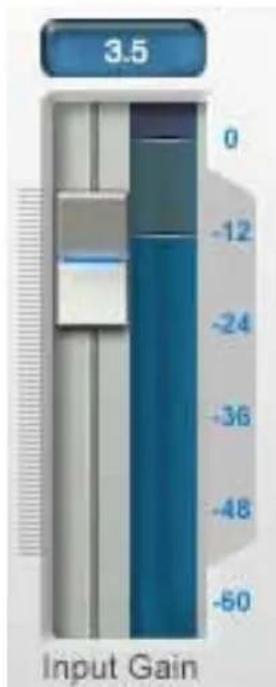
bar
| Category | Value | |---|---| | Top Bar | 3.5 | | Bottom Bar | -12 | | Middle Bar | -24 | | Bottom Segment | -36 | | Bottom Segment | -48 | | Bottom Segment | -60 |Input Section
The Input Gain slider, as is no doubt obvious, is used to set the level of the incoming audio. The exact amount of gain or attenuation is displayed numerically above the slider. In most instances, the input gain should be set at the highest level that does not cause the 0 dB area of the graphic level meter to light.
The Level Meter displays the level of the audio as it is being processed by both the Source and Modeled Mic models. Because
some models (or combinations of models) can result in increased amplitude at various frequencies, changing to a different mic model or changing a model's settings may require an adjustment of the Input Gain to avoid clipping
In practice, you should start out by setting the Input Gain at a bit under the optimum level. Once you're confident that you've found the right mic settings for your track, you should go back and fine tune the gain for maximum level without clipping.
Source Mic Section
The Source Mic section is where you specify the mic and the settings that were (or will be) used to capture the input sound. The purpose of these selections is to remove the effect of the source microphone, resulting in the signal that would have been recorded by an ideal instrumentation microphone with no proximity effect.
Source Mic Menu

text_image
Shure Beta 87A 3.5 Source MicThe Source Mic pop-up menu is used to select a specific model of mic. In some cases a mic will have a second listing with “(w)” appended to the mic’s name. This indicates that the mic we modeled was supplied with a windscreen and this is the model of the mic with the windscreen attached. If your audio was captured using the windscreen, you should select this version of the model.
Additionally, the menu offers a selection called "Bypass." When Bypass is selected, the source signal is passed unmodified to the Modeled Mic section. You should select Bypass when your source was not recorded with a microphone (e.g., guitar via direct box, direct synth input, etc.).
If your desired mic is not listed in the menu, you can try one of the following (in order of preference):
- Use a different mic that is listed — this is, of course, only an option if you've not yet recorded the audio and do, in fact, have another listed mic.
- Select another mic on the list whose characteristics are known to be similar to your mic (a similar model from the same manufacturer, for example).
- Select one of the generic mic types that matches the type of your mic, e.g., dynamic, large diaphragm condenser, etc.
- Select Bypass from the menu
It must be stressed that selecting option 2, 3 or, especially, 4, will compromise Mic Mod EFX's ability to accurately reproduce the sound of the desired modeled mic. That's not to say that you won't be able to get something that sounds great, just that it's unlikely to be an accurate simulation of whichever mic you chose in the Modeled Mic section.
In particular, if you choose Bypass as the Source Mic and any mic as the Modeled Mic, the resulting effect is equivalent to having recorded the audio with the actual physical mic (which you, of course, did) and then having played back that track through a perfect set of speakers and rerecorded it with the Modeled Mic. Again, maybe a great sounding creative effect, but not an accurate representation of the Modeled Mic.
Low-Cut Menu
If the mic you select in the Source Mic menu is equipped with a user-selectable low-cut filter, the Low-Cut pop-up menu will allow you to select from among the actual filter settings available on that mic. (If the selected mic does not have a low-cut filter, the menu will be grayed out.)
If the source mic does include a low-cut filter, select the low-cut setting that was (or will be) used when capturing your audio.

text_image
Proximity 2.4 Inches on Low Cut figure 8 Pattern
NOTE: It is important to keep in mind that the purpose of this setting is to "undo" the effect of any low-cut filter that was used to capture your audio. If you play around with this setting, you may initially think that it's working "backwards." That is, changing the menu selection from OFF to any filter setting will actually cause a bass boost in the monitored audio.
However, once you think about it, you will realize that this is the way it's supposed to work. The purpose of all the controls in the Source Mic section is to neutralize the effects of the source mic. So, when you select a low-cut filter, you're telling the Mic Mod EFX that the source mic recorded the audio with that much bass attenuation and, therefore, the model must now boost the bass an equal amount to remove the source mic's sonic coloration. (Trust us, this fried our brains a bit at first, too.)
Pattern
If the mic you select in the Source Mic menu is equipped with user-selectable pick-up patterns (i.e., omni, cardioid, hypercardioid, etc.), the Pattern pop-up menu will allow you to select from the actual pattern settings available on that mic. (If the source mic does not have selectable patterns, the menu will be grayed out.)
If the source mic does include multiple patterns, select the pattern that was (or will be) used when capturing your audio.

NOTE: The purpose of the Pattern selection is to neutralize the varying frequency characteristics that result from each of the available pattern settings, with the assumption that the audio was recorded on axis (i.e., from the front of the microphone). Since Mic Mod EFX has no way of knowing the actual placement of the signal source, it does not attempt to simulate off-axis performance.
Proximity
The Proximity knob in the Source Mic section should be used to set the average distance that separated the mic and the signal source during the recording of the audio. The purpose of this control is to allow the model to remove any Proximity Effect that may have been introduced by the source mic.

NOTE: Proximity Effect is a boost in bass frequencies resulting from placing a directional mic in close
proximity to a signal source. The amount of the effect varies from mic to mic, and is inversely proportional to the distance from the mic to the source (i.e., the smaller the distance, the greater the bass boost).
Mics operating in omnidirectional mode do not exhibit a proximity effect. Consequently, if the source mic is an omni mic, or the source mic has selectable patterns and omni is chosen, the Proximity control will be disabled.

NOTE: Like the Low-Cut control described above, the Source Mic Proximity control may initially
seem to be working backwards (i.e., setting a shorter distance will result in an audible bass attenuation). Refer to the explanation back up in the Low-Cut section to understand why this is actually how it is supposed to work.
Also note that the effect of the Proximity control is unique for each model of microphone. Mic Mod EFX does not use a generalized approximation of proximity effect. Each model reflects the specific physical properties that create the proximity effect for that individual mic.
Modeled Mic Section
Here's where the fun really starts. The MODELED MIC section is where you select the mic (and its settings) whose characteristics you want to apply to your audio.
Modeled Mic Menu

text_image
Neumann U 87 GOLD Modeled Mic -0.3The Modeled Mic pop-up menu is used to select your desired mic. In some cases a mic will have a second listing with “(w)” appended to the mic’s name. This indicates that the mic we modeled was supplied with a windscreen and this is the model of the mic with the windscreen attached. If you wish to simulate the use of the windscreen, you should select this version of the model.
Additionally, the menu offers a selection called "Bypass." When Bypass is selected, no mic model is applied. The net sonic effect of selecting Bypass here depends on the setting of the Source Mic menu:
- If the correct source mic is selected in the Source Mic menu and Bypass is selected in the Modeled Mic menu, the final output of Mic Mod EFX will be stripped of the characteristics of the source mic, resulting in the signal that would have been recorded by an ideal instrumentation microphone with no proximity effect.
- If Bypass is selected in the Source Mic menu and Bypass is selected in the Modeled Mic menu, the final output of Mic Mod EFX will be identical to the original input signal (with the exception of any added tube saturation).
Low-Cut Menu
text_image
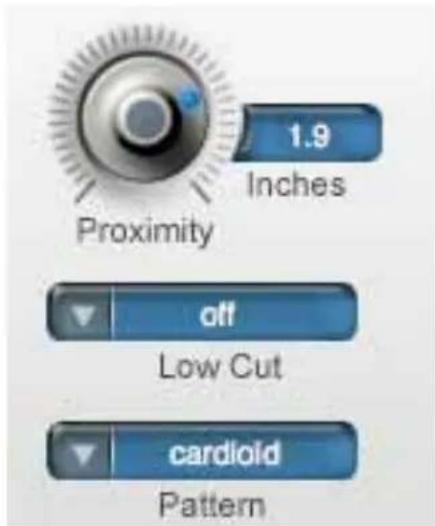
Proximity 1.9 Inches off Low Cut cardioid PatternIf the mic you select in the Modeled Mic menu is equipped with a user-selectable low-cut filter, the Low-Cut pop-up menu will allow you to select from among the filter settings available on that mic. (If the selected mic does not have a low-cut filter, the menu will be grayed out.)
If the modeled mic does include a low-cut filter, selecting a low-cut setting will reproduce the same effect that selecting that setting would have on the actual modeled mic.

NOTE: The setting labels that appear in the menu are those that appear on the physical mic. In some cases,
the label is the cut-off frequency of the low-cut filter as specified by the mic's manufacturer. However, Mic Mod EFX does not simply apply a generic low-cut filter at the stated frequency,
but instead models the actual filter performance of each modeled mic. In other words, a stated cut-off frequency is only as accurate as the filter on the actual mic.

ANOTHER NOTE: Although it's always best to let your ears be your guide, if your audio was recorded with the source mic's low-cut filter turned on, in most cases it will be best to turn on the modeled mic's low-cut filter as well. (After all, there was presumably some reason that someone chose to use that filter in the first place.)
Pattern
If the mic you select in the Modeled Mic menu is equipped with user-selectable pick-up patterns (i.e., omni, cardioid, hypercardioid, etc.), the Pattern pop-up menu will allow you to select from the actual pattern settings available on that mic. (If the modeled mic does not have selectable patterns, the menu will be grayed out.) If the modeled mic does include multiple patterns, select the pattern whose characteristics produce the effect you desire.

NOTE: The purpose of the Pattern selection is to model the varying frequency characteristics that result from each of the available pattern settings, with the assumption that the audio was recorded on axis (i.e., from the front of the microphone). Since Mic Mod EFX has no way of knowing the actual placement of the signal source, it does not attempt to simulate off-axis performance.
Proximity
The Proximity knob in the Modeled Mic section can be used to select a desired amount of proximity effect.
Using the Proximity knob to set a particular distance will result in the amount of proximity effect that would be produced by the actual modeled mic when placed at that distance from the signal source.
The effect of the Proximity control is unique for each model of microphone. Mic Mod EFX does not use a generalized approximation of proximity effect. Each model reflects the specific physical properties that create the individual proximity effect for that mic.

NOTE: A secondary effect of mic-to-source distance is the extent to which environmental ambience is picked up by a mic. For example, as a mic is moved away from the source, the proximity effect decreases, but the amount of "room tone" increases (assuming that you are not in an anechoic chamber). Mic Mod EFX does not model this effect. However, judicious use of the Proximity control in combination with some appropriately programmed reverb will allow you to create the same effect, with the additional bonus of being able to control the exact nature of the room tone.
Mics operating in omnidirectional mode do not exhibit a proximity effect.
Consequently, if the modeled mic is an omni mic, or the modeled mic has selectable patterns and omni is chosen, the Proximity control will be disabled.
Tube Saturation

text_image
Tube Saturation 6.9The Tube Saturation section is based on Antares' renowned WARM Tube Saturation Generator and is designed to model the "warmth" that is typical of a high-quality tube pre-amp.
The amount of tube saturation effect applied to your audio is controlled by the Tube Saturation Drive control in combination with the Input Gain control.
The Drive control determines the amplification factor of the modeled tube pre-amp with the numeric display indicating the amplification in dB. At 0 dB, no distortion occurs, even for full amplitude signal levels. As the Drive is increased, the amplification is increased. Any regions of the signal that increase beyond full amplitude generate distortion. (But instead of the usual ugly digital clipping, they are distorted the same way the tube pre-amp would distort the sound.)
Because the maximum drive is limited to +10 dB, using the Tube Saturation model requires the original signal to be at a level greater than -10 dB. If this is not the case, you should adjust the Input Gain control to increase the level of the sound. (Be certain that Input Gain is not increased so much as to cause the 0 dB meter area to light.) It may be necessary to go back and forth between Drive and Input Gain a few times to get exactly the effect you want.

NOTE: If your audio was recorded at an exceptionally low level, it may be that even maximum Input Gain and maximum Drive will still not result in a level high enough to generate distortion. In that case, either re-record your audio at a higher level (if possible) or use your waveform editing program to digitally increase the level (keeping in mind that this may negatively affect the signal quality).
If you want to add tube saturation distortion without otherwise affecting your sound, set both the Source Mic and Modeled Mic menus to Bypass.

text_image
-0.3 Output LevelOutput Level
The Output Level control is used to fine-tune Mic Mod EFX's output level. This control is strictly an attenuator (i.e., no gain is available). You should always start with it at 0dB (the top of its range) and then reduce level as necessary. It is particularly useful when adding large amounts of tube saturation.
Chapter 4: Realistic Expectations (or, Mic Mod EFX Meets the Space-Time Continuum)

Although Mic Mod EFX seems in many ways to be almost magic, it is, in fact, simply very clever science. And as such, it remains subject to those pesky laws of physics.
To get the maximum satisfaction out of Mic Mod EFX, it is important to have realistic expectations of exactly what it can and can't do. (Most of what it can't do relates to the physical impossibility of recovering information that wasn't in the original signal to begin with.) Here are the main issues to be aware of:
Choice of Input Microphone
Luckily for all of us, the general quality of "affordable" microphones has reached a remarkably high level. Consequently, if you stick with well-known manufacturers, most any reasonable quality mic will provide sufficient performance to allow Mic Mod EFX to do its magic. (OK, we said it wasn't magic, but we're speaking metaphorically here.)
On the other hand, you can't expect to go into a large (but unnamed) mass merchandiser of low-cost electronics gear and pick up a \$19.95 mic and expect Mic Mod EFX to make it sound like a U87. If a source mic has massive roll-off in a particular frequency range, there is no way Mic Mod EFX can produce the signal that would have been captured had the source mic had better response.
Microphone Variations
While there are obviously major differences between various models of microphones, there are also often more subtle differences between different samples of the same model of microphone. Whether due to manufacturing variances, age, or condition, there is no guarantee that the mic we modeled will be identical to your source mic or to a specific mic you want to model. In the case of some well-known classics, we have even provided multiple models of the same (but sonically differing) mic from different sources.
Microphone Technique
In getting the best possible recorded sound, mic technique and placement are at least as important as mic choice (if not more so). A good engineer can record a great track with an SM57 while a poor one can make a U47 sound like doo doo. If your audio is not well-recorded in the first place, Mic Mod EFX can to do very little to improve it. If you start with a poorly recorded track, all Mic Mod EFX will do is make it sound like a track that was poorly recorded with a great mic.
Excessive Frequency Boost
Although Mic Mod EFX's processing does not itself add noise to your signal, any noise in your original audio or noise added by intervening processes (e.g., A/D conversion, pre-Mic Mod EFX dynamics processing, etc.) will be accentuated by any large amount of frequency boost. This should only be a problem when your source mic has a substantial bass or treble roll-off and the modeled mic has a corresponding boost or, more likely, when your audio was recorded with a low-cut filter on the source mic and you do not use a low-cut on the modeled mic. In both of these cases, the models will apply substantial gain to the affected frequency ranges, raising the level of added noise along with the desired signal. If the resulting noise level is unacceptable, you should choose a different combination of mics and/or turn on the modeled mic's low-cut filter.
Polar Pattern Selection
Mic Mod EFX can't recover information that was not recorded as part of the original signal. For example, if the original audio was recorded with a highly directional pattern (hence picking up little room tone), you can't set the modeled mic to Omni and expect the room tone that would have been recorded if the original was set to Omni suddenly to appear. You can however, simulate that effect with some judicious use of reverb or an environmental simulator.
Conversely, if your source was recorded with an omni mic and it picked up some unwanted audio from the rear, you can't realistically expect to set the modeled mic to hypercardioid and have the unwanted audio disappear.
Off-Axis Response
The purpose of the Pattern selection is to model the varying frequency characteristics that result from each of the available pattern settings, with the assumption that the audio was recorded on axis (i.e., from the front of the microphone). Since Mic Mod EFX has no way of knowing the actual placement of the signal source, it does not attempt to model off-axis performance.
Chapter 5: Get Creative

Up to this point, all of the instructions in this manual have focused on how to use Mic Mod EFX for its primary purpose: making one mic sound as accurately as possible like another. But don't let that limit you. We've purposely given the controls wide ranges to allow you to move beyond what might be considered useful for strict
modeling. Try some of the following:
- Select a Source Mic that doesn't match your physical mic. In fact, try one whose characteristics are as different as possible from your physical mic.
- Select Bypass in the Source Mic menu to combine the sound of your physical mic with the sound of the modeled mic.
- Extreme Proximity settings can give strange, but interesting effects. Try wildly differing settings in the Source and Model sections.
- Dynamically change Proximity settings during a performance.
• Overdrive the Tube Saturation section for some serious gruzz.
None of the above are likely to give you the sound of any mic that exists in nature, but they can definitely give your recordings unique and striking timbres.
Chapter 6: Mic Models Appendix

Listed below are the modeled mics (both source and model) included with Mic Mod EFX, along with brief descriptions of each one.
PLEASE NOTE: All trademarks appearing below are the property of their respective owners. The following manufacturer names and model designations are used solely
to identify the microphones analyzed in the development of our digital models and do not in any way imply any association with or endorsement by any of the named manufacturers
This product is not guaranteed to produce, and will not necessarily produce, audio results that are consistent with or match audio results that could be achieved using any of the referenced microphone models.
AEA R44C Large Diaphragm Boundary - Ribbon
Replica of the classic RCA 44 ribbon mic
AKG C12A Large Diaphragm Condenser
A classic multipurpose studio mic (this one dates from the late 60s)
C 12 VR Large diaphragm tube mic
Modern day reboot of the classic C12 studio mic
C414
C414 EB
C414B/ULS Limited Edition Gold
C414B/ULS Modified by Audio Upgrades (mod1)
C414B/ULS Modified by Jim Williams (mod2)
Large Diaphragm Condenser
Multipurpose studio mic
460B/CK61-ULS Small Diaphragm Condenser
Precise, neutral recording mic
C 535 EB Small diaphragm condenser
Mulitpurpose condenser suited for both stage and studio
D112 Large Diaphragm Dynamic
Classic kick drum and bass guitar mic
D 790 Large Diaphragm Dynamic
Hand-held vocal
C1000S Small Diaphragm Condenser
With a battery power option, often used for field recording
C 3000 Large Diaphragm Condenser General purpose
C 4000 B Dual-Diaphragm Condenser Solid state version of the SolidTube, general purpose
The Tube Large Diaphragm Condenser Known for a dark, intimate sound
Solidtube Large diaphragm tube mic Solid state tube mic good for general applications
Perception 120 Large-diaphragm Cardioid Condenser General purpose studio and stage mic
Perception 220 Large-diaphragm Cardioid Condenser General purpose studio and stage mic
Alesis AM61 Large Diaphragm Condenser w/tube circuitry A rich warm sound ideal for vocals and instruments
Audio-Technica ATM11 Dynamic Drums
ATM25 Dynamic High-intensity instrument mic
ATM31 Small Diaphragm Condenser General purpose
AT813a Cardoid Condenser Vocals and general purpose
AT853Rx Electret Condenser Hanging choir mic
AT2020 Medium-diaphragm Cardioid Condenser Vocal and general purpose studio mic
AT3525 Large Diaphragm Condenser Vocals and general purpose
AT4047/SV Large Diaphragm Condenser Recreates the sound of vintage F.E.T. Condenser mics
AT4033a/SM Large Diaphragm Condenser General purpose, drum overheads
AT4050 Large Diaphragm Condenser General purpose
AT4051 Small diaphragm condenser Designed with studio and broadcast work in mind
AT4055 Large Diaphragm Condenser Live vocal mic
AT4060 Large Diaphragm Condenser Tube Circuitry Vocals and general purpose
Audix D1 Small dynamic
Used for instruments, primarily drums
D4 Dynamic
Kick drum, acoustic bass, piano, sax
OM2 Dynamic
Hand held vocal
OM3-xb Dynamic
General purpose
OM5 Dynamic
Vocals
OM6 Small dynamic
Durable stage vocal mic
CX111 Large diaphragm condenser
Good for vocal and instrument recording
SCX1 Small diaphragm condenser
Small and consistent multipurpose mic
B & K 4007 Large Diaphragm Prepolarized Condenser
Close-micing drums, percussion, brass
Behringer Ultravoice XM8500
Small dynamic
General purpose stage mic
Beyerdynamic M-500
M-500 Limited Edition Classic (Silver)
Dynamic Ribbon
Vocals, instruments
MC-834 Large Diaphragm Condenser
Vocals, piano, strings, brass, voice-overs
CK703 Small-diaphragm Condenser
General purpose
Blue Bluebird
Large-diaphragm Cardioid Condenser
General purpose studio mic
Blueberry
Large-diaphragm Cardioid Condenser
Vocals, instruments, percussion
Mouse
Large-diaphragm Cardioid Condenser
Vocals, instruments
The Bottle w/B6 Capsule
Vacuum Tube Condenser with Interchangeable Capsules
Vocals
Brauner VM1 Large Diaphragm Tube Condenser w/Class A amp Reference recording
Valvet Large diaphragm tube condenser Precise and natural studio mic
CAD Equitek E100 Condenser
Vocal, instrument, drum overheads
Equitek E200 Condenser Vocal, orchestra, acoustic guitar, kick drum
Equitek E350 Servo Condenser Vocal, piano, overhead, acoustic guitar, amps
C400S Large Diaphragm Condenser General Studio
VSM1 Single Valve Condenser Vocal, strings, guitar
95Ni Dynamic Vocal, instrument amps
Coles 4038 Large Diaphragm Boundary - Ribbon
Sax, horns, piano, guitar
Earthworks Z30x
Enhanced Cardioid Condenser Vocal, guitar, drums, general purpose
TC30K Omni Condenser Drums, guitar, bass
QTC1 Small condenser Precise mic designed for acoustic sound sources
Electro-Voice PL20 Mid Diaphragm Dynamic
Early predecessor to the RE20 Bass, drums, vocals, electric guitar
N/D357 Mid Diaphragm Dynamic Frequency expressly contoured for female vocals
N/D767A Dynamic Handheld vocal mic
N/D868 Small dynamic mic Designed for kick drum
RE15 Small dynamic mic Multipurpose dynamic mic
RE16 Small dynamic Just like the RE15, but with a blast filter
RE55 Small dynamic Multipurpose dynamic mic
Groove Tubes MD-1 Large Diaphragm Tube Condenser Studio vocal, general purpose
Langevin CR-3A Large Diaphragm Cardioid Capacitor General purpose studio mic
Lawson L47MP Large Diaphragm Tube Condenser Vocals, acoustic guitar, strings, piano, choir, orchestra, sax
Manley Labs Reference Gold Large Diaphragm Tube Condenser Ultra high quality recording
Marshall MXL 2001P Large diaphragm condenser Used for instrument recording MXL 2003 Large diaphragm condenser Used for instrument recording
MicroTech Gefell Gefell UMT 800 Large Diaphragm Condenser Close-miced vocals, horns, ensembles
Neumann U 47 Large Diaphragm Tube Condenser A classic vocal mic. Sinatra's first choice.
U 87 U 87 70th Anniversary Gold Edition Large Diaphragm Condenser Vocals, piano, acoustic bass, drums, acoustic guitar
U 89i Large diaphragm condensers Multipurpose studio mic
M 149 Large Diaphragm Tube Condenser "The best mic I have EVER used." \~Chuck Surack (Thanks Chuck!)
TLM 103 Large Diaphragm Condenser Vocals, acoustic guitar, horns, piano
TLM 193 Large Diaphragm Condenser Vocals, acoustic guitar, drum overheads, strings, sax
KM 84 Small Diaphragm Condenser Acoustic guitar, drum overheads, hi hat, strings, percussion, piano
KM 184 Small Diaphragm Condenser Acoustic guitar, drum overheads, hi hat, strings, percussion, piano
Oktava MC-012 Small Diaphragm Condenser General purpose instruments and live performance
MK-219 Large diaphragm condenser Precise and sensitive mic good for vocals and acoustic instruments
MK-319 Large Diaphragm Condenser Vocal, general purpose
RCA BK5A Uniaxial Ribbon Vocal, general purpose
Rode NT1 Large Diaphragm Condenser
Vocals, instruments
NT2 Large Diaphragm Condenser
Vocals, acoustic guitar, winds, piano
NTV Large Diaphragm Tube Condenser
Vocal, general studio
Royer R-121 Ribbon
Electric guitar, overhead drums, orchestral, choral, room micing
Sennheiser MD421 Large Diaphragm Dynamic
Drums, vocals guitar, amps
MD441 Large Diaphragm Dynamic
Designed to simulate the sound of a condenser mic for vocal, sax
E609 Large Diaphragm Dynamic
Live performance guitar amp and drum mic
E835S Large Diaphragm Dynamic
Live performance vocal
K6-ME64 Cardioid Condenser Shotgun
Film and video recording, sound reinforcement
Shure Beta 52 Large Diaphragm Dynamic
Kick drum, bass amp, acoustic bass
Beta 57A Large Diaphragm Dynamic
Drums, guitar amplifiers, brass, woodwinds, vocals
Beta 58 Small dynamic
Good for almost everything
Beta 87A Large Diaphragm Condenser
Vocals, live performance
Beta 98D/S Mini Condenser
Toms, snares, percussion
SM7A Dynamic
Vocals, bass amp
SM57 Large Diaphragm Dynamic
Guitar, guitar amp, drums
SM58 Large Diaphragm Dynamic
Vocals, general purpose
SM81 Large Diaphragm Condenser
Guitar, cymbals, strings, vocals, piano
SM98A Large Diaphragm Condenser
Drums, brass, winds
KSM32 Large Diaphragm Condenser
Vocals, acoustic guitar, winds, ensembles, and drum overheads
VP88 Large Diaphragm Condenser - Single Point Stereo
Modeled in MS (mono simulation) mode
Sony C800G Large Diaphragm Tube Condenser
Vocals: studio and post-production
C37P Tube Condenser
General purpose
C48 Large Diaphragm FET Condenser
Vocals, guitar
Soundelux U95S Medium diaphragm tube condenser
Multipurpose microphone
Tannoy Large Vintage Ribbon
Large ribbon microphone
Classic broadcast mic
Small Vintage Ribbon
Small ribbon microphone
Classic broadcast mic
Telefunken U-47 Large Diaphragm Tube Condenser
An extremely rare vintage version of the U-47 from the days when Telefunken distributed mics for Neumann. This sample was still equipped with the original tube.