AJ5305D - Docking Station PHILIPS - Free user manual and instructions
Find the device manual for free AJ5305D PHILIPS in PDF.


User questions about AJ5305D PHILIPS
0 question about this device. Answer the ones you know or ask your own.
Ask a new question about this device
Download the instructions for your Docking Station in PDF format for free! Find your manual AJ5305D - PHILIPS and take your electronic device back in hand. On this page are published all the documents necessary for the use of your device. AJ5305D by PHILIPS.
USER MANUAL AJ5305D PHILIPS
Always there to help you
Register your product and get support at
www.philips.com/welcome

text_image
Question? Contact PhilipsAJ5305D/05
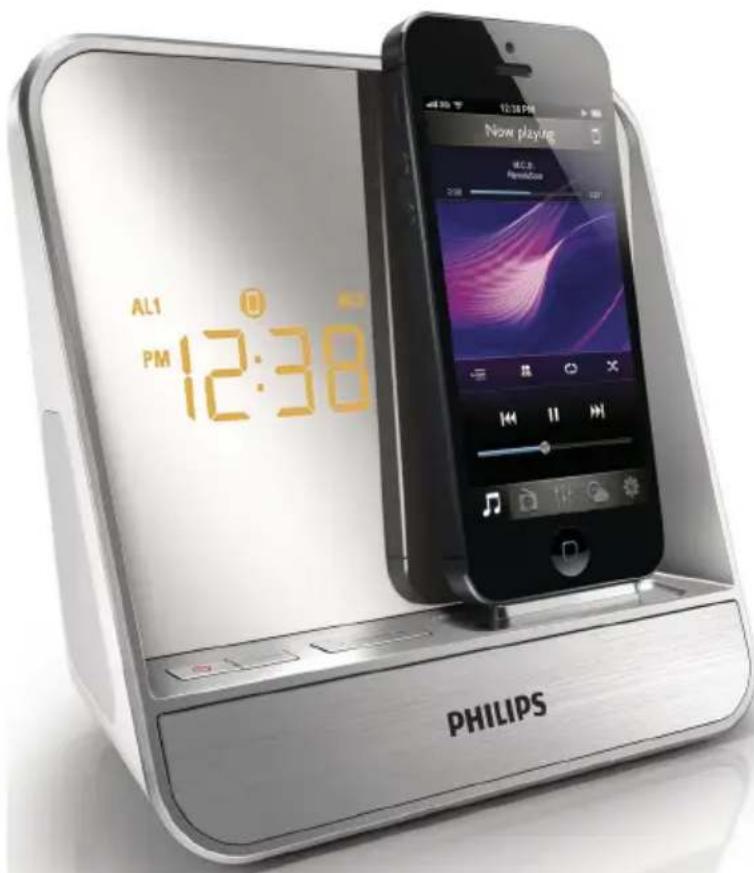
text_image
AL1 PM 12:38 PHILIPS Now playing M.C.S. Pensafe PHILIPSUser manual
PHILIPS
Content
1 Important 2
Safety 2
2 Your Docking Entertainment System 3
Introduction 3
What's in the box 3
Overview of the main unit 4
3 Get started 5
Connect power 5
Turn on 5
Set time and date 5
4 Play 6
Play from iPod/iPhone 6
Listen to radio 9
Play from an external device 10
Adjust volume 10
5 Other features 11
Set alarm timer 11
Set sleep timer 11
Adjust display brightness 11
6 Product information 12
Specifications 12
7 Troubleshooting 13
8 Notice 13
1 Important
Safety
• Heed all warnings, and follow all instructions.
- Do not block any ventilation openings. Install in accordance with the manufacturer's instructions.
- Do not install near any heat sources such as radiators, heat registers, stoves, or other devices (including amplifiers) that produce heat.
- Protect the power cord from being walked on or pinched, particularly at plugs, convenience receptacles, and the point where they exit from the clock radio.
- Only use attachments/accessories specified by the manufacturer.
- Unplug the clock radio during lightning storms or when unused for long periods of time.
- Refer all servicing to qualified service personnel. Servicing is required when the apparatus has been damaged in any way, such as power-supply cord or plug is damaged, liquid has been spilled or objects have fallen into the apparatus, the apparatus has been exposed to rain or moisture, does not operate normally, or has been dropped.
- The clock radio shall not be exposed to dripping or splashing.
- Do not place any sources of danger on the clock radio (e.g. liquid filled objects, lighted candles).
- Where the plug of the Direct Plug-in Adapter is used as the disconnect device, the disconnect device shall remain readily operable.

Warning
• Never remove the casing of this clock radio.
- Never place this clock radio on other electrical equipment.
- Keep this clock radio away from direct sunlight, naked flames or heat.
• To reduce the risk of fire or electric shock, do not expose this apparatus to rain or moisture.
- Ensure that you always have easy access to the power cord, plug or adapter to disconnect this clock radio from the power.
2 Your Docking Entertainment System
Congratulations on your purchase, and welcome to Philips! To fully benefit from the support that Philips offers, register your product at www.philips.com/welcome.
If you contact Philips, you will be asked for the model and serial number of this apparatus. The model number and serial number are on the bottom of the apparatus. Write the numbers here:
Model No. ____
Serial No. ____
Introduction
With this clock radio, you can
- listen to FM radio;
• enjoy audio from iPod/iPhone or an external device;
• set alarms to ring at different time;
• choose buzzer, radio, or audio in iPod/iPhone as your alarm source;
• experience various features brought by HomeStudio app.
What's in the box
Check and identify the contents of your package:
- Main unit
- AC adapter
- User manual
Overview of the main unit
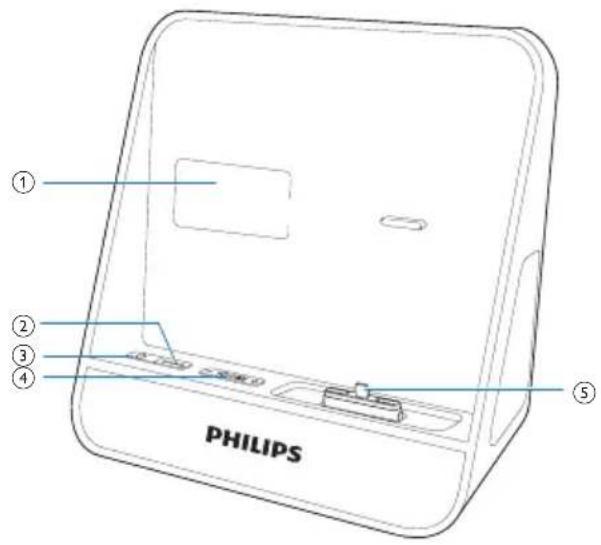
text_image
① ② ③ ④ PHILIPS ⑤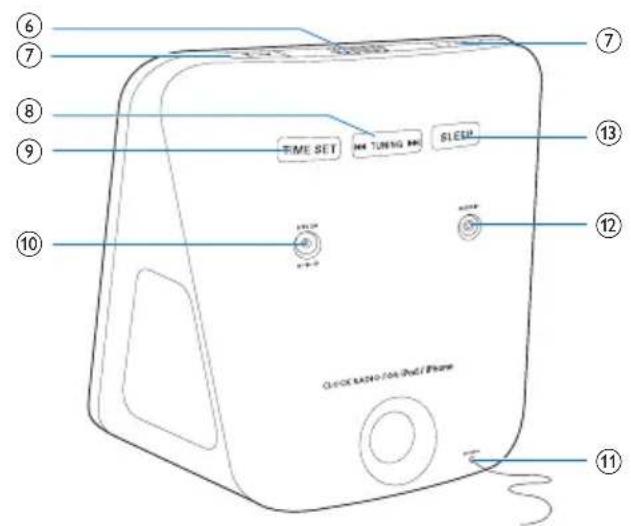
text_image
6 7 8 9 10 TIME SET M4 TUNING M4 SLEEP 13 12 11 Smartphones / 04 iPod / Phone① Display panel
② SOURCE
- Select source.
③ ①
• Turn on/off the clock radio.
④ -VOLUME +
- Adjust volume.
⑤ DOCK
- Dock for iPod/iPhone.
⑥ SNOOZE/BRIGHTNESS
- Snooze alarm.
- Adjust display brightness.
⑦ AL1/AL2
- Set alarm.
• View alarm settings.
• Activate/deactivate alarm timer.
⑧ RUNING
• Tune or scan to an FM radio station.
⑨ TIME SET
- Set the time.
⑩ DC IN
• Power supply socket.
⑪ FM ANTENNA
- Improve FM reception.
⑫ AUDIO IN
- Connect an external audio device.
⑬ SLEEP
- Set sleep timer.
3 Get started

Caution
- Use of controls or adjustments or performance of procedures other than herein may result in hazardous radiation exposure or other unsafe operation.
Always follow the instructions in this chapter in sequence.
Connect power

Caution
- Risk of product damage! Make sure that the power voltage corresponds to the voltage printed on the back or underside of the unit.
- Risk of electric shock! When you unplug the power adapter, always pull the plug from the socket. Never pull the cord.
• Before connecting the power adapter, make sure that you have completed all other connections.
• Use the supplied power adapter only.
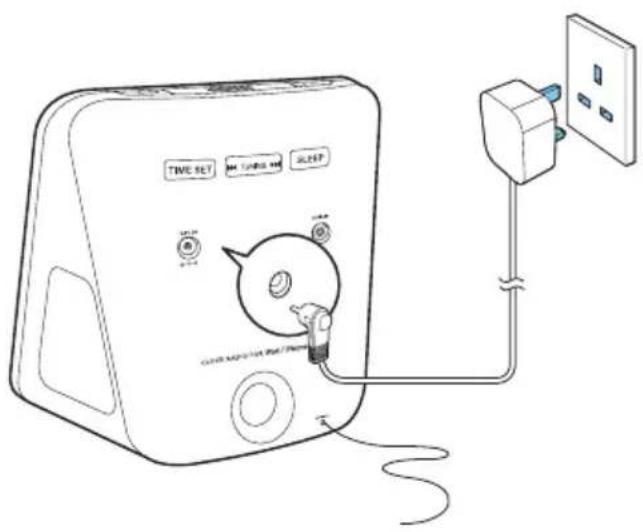
text_image
TIME SET TIME SET SLEEP CLOTH APPSIVE MODE / TIME SET CLOTH APPSIVE MODE / TIME SETTurn on
Press Φ
→ The clock radio switches to the last selected source.
Switch to standby mode
Press Ⓞto switch the clock radio to standby mode.
→ The clock (if set) is displayed.
Set time and date
1 In standby mode, press and hold TIME SET on the back of your clock radio for more than two seconds.
→ [12H] or [24H] begins to blink.
2 Press 1 repeatedly to select 12/24 hour format.
3 Press TIME SET to confirm.
→ The hour digits begin to blink.
4 Repeat steps 2-3 to set hour and minute.

Note
- When iPod/iPhone is connected, the unit synchronizes time from the iPod/iPhone automatically.

Tip
- The accuracy of the transmitted time depends on the docked iPod/iPhone that transmits the time signal.
4 Play
Play from iPod/iPhone
You can enjoy audio from iPod/iPhone through this clock radio.
Compatible iPod/iPhone
The unit supports the following iPod, iPhone models:
Made for.
• iPod touch 5th generation
• iPod nano 7th generation
- iPhone 5
Install HomeStudio App
Philips HomeStudio app brings a suite of new features to your clock radio, including FM radio programming and a multi-function alarm clock. To enjoy more features, you are recommended to install this free HomeStudio app.

Note
• Make sure that your iPod/iPhone is connected to the Internet.
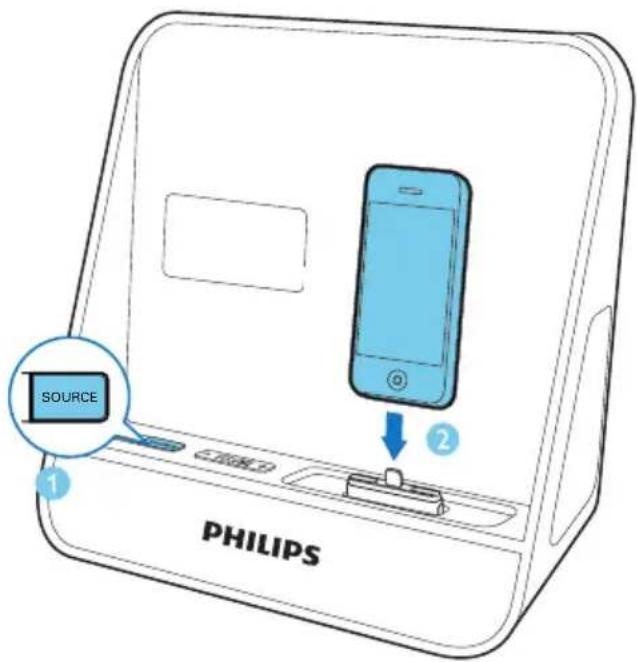
1 Press SOURCE repeatedly to select DOCK mode.
2 Insert your iPod/iPhone into the dock.
text_image
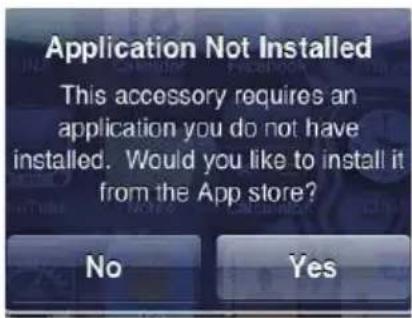
SOURCE PHILIPS3 For the first-time use, you will be asked to install the HomeStudio app on your iPod/ iPhone.
4 Tap [Yes] to accept the installation request.
5 Follow the on-screen instructions to complete the installation.
text_image
Application Not Installed This accessory requires an application you do not have installed. Would you like to install it from the App store? No YesPhilips HomeStudio app only can be installed in the following iPod, iPhone models:
- iPhone 5
• iPod touch 5th generation
Register an account
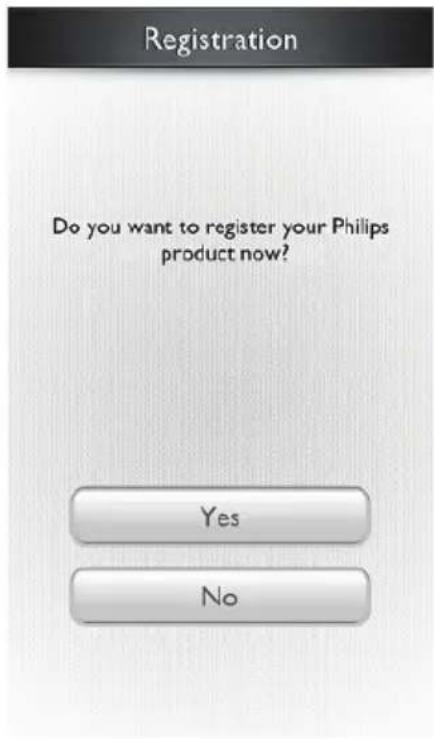
For the first-time use the HomeStudio App, you must register an account.
1 Tap HomeStudio icon on your iPod/iPhone.
text_image
Registration Do you want to register your Philips product now? Yes No2 Follow the on-screen instruction to finish the registration.
Play music in the iPod/iPhone

Note
• Make sure that you have installed the HomeStudio app on your iPod/iPhone.
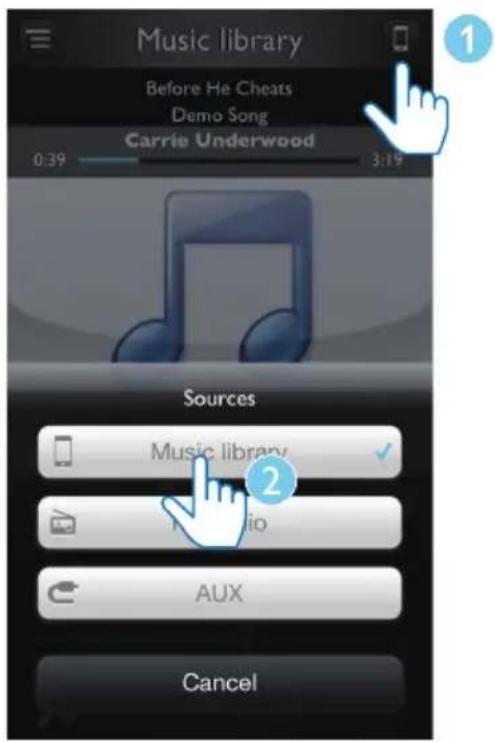
1 Tap HomeStudio icon on your iPod/iPhone.
2 Tap to select Music library source.
text_image
Music library Before He Cheats Demo Song Carrie Underwood 0:39 3:19 Sources Music library ✓ Audio AUX Cancel3 Select a track from the playlist, and then press ▶.
→ Music streams from your iPod/iPhone to the clock radio.
Use more features with "HomeStudio App"

Note
• Make sure that your iPod/iPhone is inserted into the clock radio.
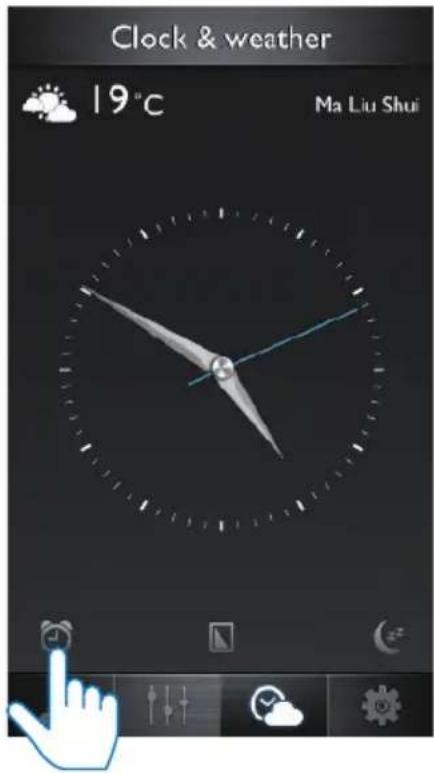
Set alarm clock:
1 Launch the HomeStudio app.
2 On the screen below, tap the
text_image
Clock & weather 19°C Ma Liu Shui3 You can choose to turn the alarm1/alarm2 on or off.
Set sleep timer:
1 Tap and then tap
2 Choose a period of time and tap Start.

text_image
Clock & west . Sleeptimer 15 mins 30 mins 60 mins StartStore FM radio stations automatically
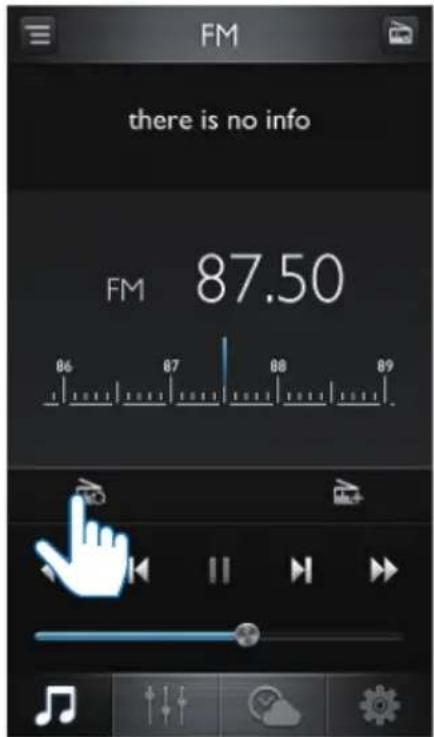
1 Tap and then tap the icon on right top the screen to select FM Radio source.
2 Tap to search the radio station with strong reception automatically.
All available stations are stored. The first stored radio station is broadcast automatically.
text_image
FM there is no info FM 87.50 86 87 88 89 AV RVStore FM radio stations manually
1 Select FM Radio source.
2 Tap ◀◀ to ▶▶▶▶▶▶▶▶▶▶▶▶▶▶▶▶▶▶▶▶▶▶▶▶▶▶▶▶▶▶▶▶▶▶▶▶▶▶▶▶▶▶▶▶▶▶▶▶▶▶▶▶▶▶▶▶▶▶▶▶▶▶▶▶▶▶▶▶▶▶▶▶▶▶▶▶▶▶▶▶▶▶▶▶▶▶▶▶▶▶▶▶▶▶▶▶▶▶▶▶▶◀
• You can also tap and drag on the frequency scale to tune to the desired frequency directly.
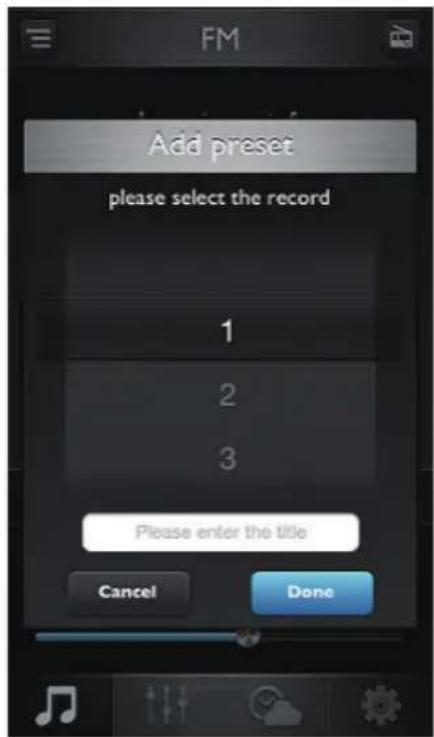
3 Tap to add the current station to a preset list.
4 Select a preset number, enter the station title, then Done.
text_image
Add preset please select the record 1 2 3 Please enter the title Cancel Done5 Repeat the above step to store more stations.
Dimmer the screen brightness
1 Tap and then tap to dimmer the screen the screen brightness.
2 Tap anywhere to restore the screen brightness.
User more features
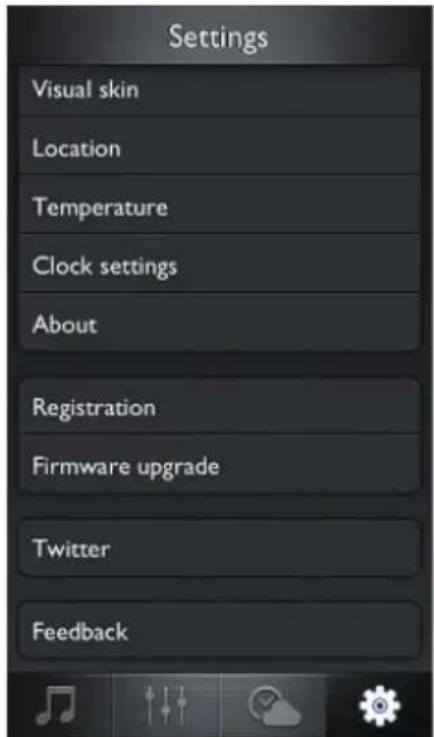
Tap*(Settings), you can:
- Set the virtual skin
• Set the location for weather report - Choose the temperature unit.
- Set the clock
• See the App information - Register an account
- Upgrade firmware.
• Share the information to Twitter. - Send feedback
text_image
Settings Visual skin Location Temperature Clock settings About Registration Firmware upgrade Twitter FeedbackCharge the iPod/iPhone
When your clock radio is connected to power, the docked iPod/iPhone begins to charge automatically.
Remove the iPod/iPhone
Pull the iPod/iPhone out of the dock.
Listen to radio

Note
- Keep the unit away from other electronic devices to avoid radio interference.
- For better reception, do not place iPod/iPhone into the dock when you listen to the radio. Fully extend and adjust the position of the FM antenna.
Tune to FM radio stations
You also can tune to radio stations from your clock radio.
1 Press SOURCE repeatedly to select FM tuner.
2 Press and hold 🖼◀on▶the back of your clock radio for more than two seconds.
→ The radio tunes to a station with strong reception automatically.
3 Repeat step 2 to tune to more stations.
To tune to a station manually:
Press ◀◀ repeatedly until you find optimal reception.
Play from an external device
You can also listen to an external audio device through this clock radio.
1 Press SOURCE to select the AUX source.
2 Connect the audio in cable (not supplied) to:
• the AUDIO IN socket (3.5mm) at the back of your clock radio.
• the headphone socket of an external device.
3 Start to play the device (see the user manual of the device).
Adjust volume
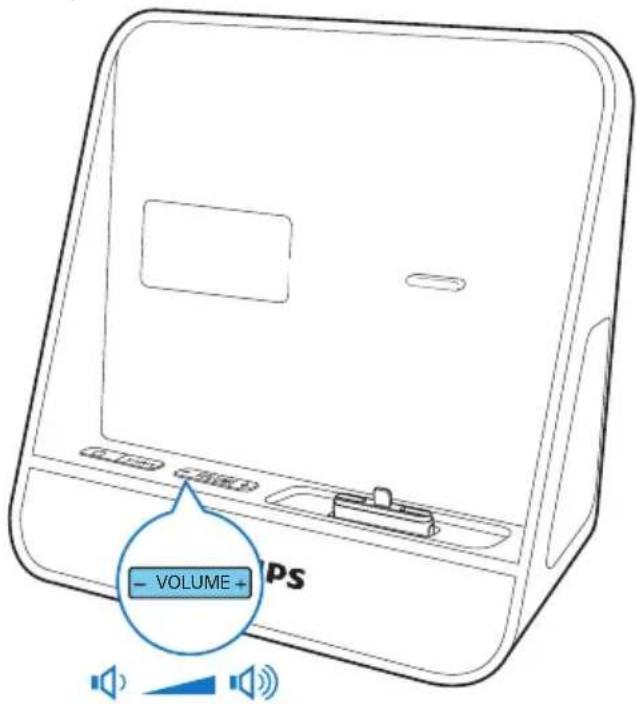
text_image
- VOLUME + PS5 Other features
Set alarm timer
Set alarm
You can set two alarms to ring at different time. Buzzer, FM radio, or your last listened audio in the iPod/iPhone can be selected as alarm sound.

Note
• Make sure that you have set the clock correctly.
1 Press and hold AL1/AL2 for more than two seconds to activate alarm setting mode.
→ The hour digits and alarm icon begin to blink.
2 Press repeatedly set the hour.
3 press AL1/AL2 to confirm.
→ The minute digits begin to blink.
4 Repeat steps 2-3 to set the minute, select an alarm source (buzzer, FM radio, or dock), and adjust volume.

Tip
- If iPod/iPhone is selected as alarm source, but no iPod/iPhone is connected, the clock radio switches to buzzer source instead.
Activate/deactivate alarm timer
1 Press AL1/AL2.
→ The alarm settings are displayed.
2 Press AL1/AL2 repeatedly to activate or deactivate the alarm timer.
→ [AL1] or [AL2] is displayed if the alarm timer is on and disappears if it is off.
• To stop the ringing alarm, press the corresponding AL1/AL2.
→ The alarm repeats ringing for the next day.
Snooze alarm
When alarm sounds, press SNOOZE.
→ The alarm snoozes and repeats ringing nine minutes later.
Set sleep timer
This clock radio can switch to standby mode automatically after a preset period.
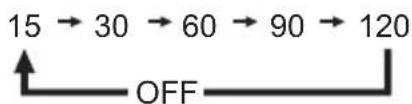
Press SLEEP repeatedly to select the sleep timer period (in minutes).
→ When the sleep timer is activated, appears.
To deactivate the sleep timer, press SLEEP repeatedly until OFF appears.
flowchart
graph LR
    A["15 → 30 → 60 → 90 → 120"] --> B["OFF"]
Adjust display brightness
Press BRIGHTNESS repeatedly to select different brightness levels.
6 Product information

Note
• Product information is subject to change without prior notice.
Specifications
Amplifier
| Rated Output Power 2 × 2 W RMS |
| Frequency Response 40-20000 Hz |
| Signal to Noise Ratio >65 dB |
| Total Harmonic Distortion <1% |
| Aux Input (MP3 link) 0.6 V RMS 10 k ohm |
Tuner (FM)
| Tuning range 87.5-108 | |
| MHz | |
| Tuning grid 50 KHz | |
| Sensitivity | |
| - Mono, 26 dB S/N Ratio | <22 dBf |
| - Stereo, 46 dB S/N Ratio | <46 dBf |
| Search Selectivity 30 dBf | |
Speakers
| Speaker Impedance | 4 ohm |
| Sensitivity | >82 dB/m/W |
General information
| AC power (power adapter) | Brand name: Philips;Model: Y12FE-059-2000G;Input: 100-240 V~, 50-60 Hz; 0.35 A;Output: 5.9 V== 2000 mA; |
| Operation Power Consumption | <10 W |
| Standby Power Consumption | <1 W |
| Dimensions: | |
| Main Unit(W x H x D) | 283 x 118 x 112 mm |
| Weight: | |
| -Main Unit | 0.654 kg |
| -With Packing | 0.812 kg |
7 Troubleshooting

Warning
• Never remove the casing of this device.
To keep the warranty valid, never try to repair the system yourself.
If you encounter problems when using this device, check the following points before requesting service. If the problem remains unsolved, go to the Philips Web page (www.philips.com/support). When you contact Philips, make sure that the device is nearby and the model number and serial number are available.
No power
- Ensure that the AC power plug of the unit is connected properly.
- Ensure that there is power at the AC outlet.
No sound
- Adjust the volume.
No response from the unit
- Disconnect and reconnect the AC power plug, then turn on the unit again.
Poor radio reception
- Increase the distance between the unit and your TV or VCR.
• Fully extend the FM antenna.
Alarm does not work
- Set the clock/alarm correctly.
Clock/alarm setting erased
• Power has been interrupted or the power plug has been disconnected.
- Reset the clock/alarm.
8 Notice

This product complies with the radio interference requirements of the European Community.
Any changes or modifications made to this device that are not expressly approved by Philips Consumer Lifestyle may void the user's authority to operate the equipment.

Your product is designed and manufactured with high quality materials and components, which can be recycled and reused.

When this crossed-out wheeled bin symbol is attached to a product it means that the product is covered by the European Directive 2002/96/EC. Please inform yourself about the local separate collection system for electrical and electronic products.
Please act according to your local rules and do not dispose of your old products with your normal household waste.
Correct disposal of your old product helps to prevent potential negative consequences for the environment and human health.
Environmental information
All unnecessary packaging has been omitted. We have tried to make the packaging easy to separate into three materials: cardboard (box), polystyrene foam (buffer) and polyethylene (bags, protective foam sheet.)
Your system consists of materials which can be recycled and reused if disassembled by
a specialized company. Please observe the local regulations regarding the disposal of packaging materials, exhausted batteries and old equipment.
Made for

iPod iPhone
"Made for iPod" and "Made for iPhone" mean that an electronic accessory has been designed to connect specifically to iPod or iPhone respectively, and has been certified by the developer to meet Apple performance standards. Apple is not responsible for the operation of this device or its compliance with safety and regulatory standards. Please note that the use of this accessory with iPod or iPhone may affect wireless performance.
iPod and iPhone are trademarks of Apple Inc., registered in the U.S. and other countries.
2013 © Koninklijke Philips Electronics N.V. All rights reserved.
Specifications are subject to change without notice. Trademarks are the property of Koninklijke Philips Electronics N.V. or their respective owners. Philips reserves the right to change products at any time without being obliged to adjust earlier supplies accordingly.

Note
- The type plate is located on the bottom of the apparatus.

text_image
PHILIPSSpecifications are subject to change without notice
All rights reserved.
AJ5305D_05_UM_V2.0
