AGL3080 - GPS device Amod - Free user manual and instructions
Find the device manual for free AGL3080 Amod in PDF.


User questions about AGL3080 Amod
0 question about this device. Answer the ones you know or ask your own.
Ask a new question about this device
Download the instructions for your GPS device in PDF format for free! Find your manual AGL3080 - Amod and take your electronic device back in hand. On this page are published all the documents necessary for the use of your device. AGL3080 by Amod.
USER MANUAL AGL3080 Amod
AMOD GPS Photo Tracker AGL3080
We Add More Fun to Photo Sharing!

natural_image
Black rectangular electronic device labeled 'AMOD' with visible ports and indicator lights (no readable text beyond branding)© Copyright
AMOD Technology Co.,
Ltd. 8F, 46, Lane 10, Jihu Road, Neihu
Taipei, Taiwan, 114, R. O. C.
INSTALL/REPLACE BATTERY 7
USING THE ACCOMPANYING AMOD PHOTO TRACKER SOFTWARE TO TAG YOUR PHOTOS ....7
INSTALLATION....7
APPENDIX - STATUS LED....21
STATUS LED IN SET UP MODE 22
APPENDIX – PREPARATIONS ...... 23
ATTACH THE HANGING STRIP 23
INSTALL BATTERY 23
TROUBLE SHOOTING....25
HARDWARE SPECIFICATION....26
PACKAGE CONTENTS 26
CERTIFICATIONS 27
TRADEMARKS AND COPYRIGHTS......27
Overview

text_image
Map Satellite Hybrid AMOD GPS Photo Tracker/ GPS Data LoggerAGL 3080 photo tracker is a GPS-based data logger designed to provide location information for digital photos (in EXIF 2.0 or later format) from all DSCs and camera phones. It can help making photo-taking more fun – show not just the great picture but also where it is taken! It is extremely easy to use – just take it along and turn it on with your photo-taking trip. When uploading the pictures to the PC, the accompanying software will do the tagging and saving of GPS location information. After that all you need to do is to click at the GPS-tagged picture and it will show its location on Google Map or other internet maps – let AGL 3080 tag your picture so you can enjoy more!
Unique Features
GPS – based on SiRF Star III chipset
Log GPS output in NMEA0183 format at one record per second rate – full rate logging for best time resolution and flexible to use
▶ Standard USB 2.0 interface / Double up as an USB Flash Disk
Works with Windows, Mac, or Linux -based machines
GPS logs can be accessed directly by application software as files, no more awkward COM port set-up procedures
Long operating time – over 15 hours with three standard AAA batteries
Large log capacity – store over 1,040,000 data records, equivalent to 2,880 hours of continuously logged GPS data
User-friendly PC-based software is provided for photo tagging (EXIF 2.0 and later format) and sharing
Tagged photos can be viewed on Google Map and other internet maps
Works with many on-line tools such as JetPhoto, GPSVisualizer, etc.
AGL3080 GPS Photo Tracker User Manual V2.2
In Case You Don't Know Yet - What is GPS?
GPS is a 24-satellite network of Navstar navigational satellites that transmit signals to users, giving them an accurate position in three dimensions along with a time stamp. While it was originally developed in the 1970s as a navigational aid for submarine-based Trident nuclear missiles, its commercial use has expanded well beyond vehicle and hiker navigation to include network timing control for accurate delivery of packet communications.
AGL3080 Operation
Power ON/OFF device
Power On
Hold the POWER ON/OFF button for one (1) second until all three LED's blink simultaneously once. Then the Green LED (GPS Status) will be on. This indicates the device has been turned on and starts to search GPS satellites.

text_image
Power ON/OFFPower ON/OFF button
When sufficient numbers of GPS satellites are found and the position can be fixed, the Green LED will begin to blink, indicating good GPS signal reception and GPS data is being logged
Now you can concentrate on and enjoy taking photos!
Power Off
To turn the power off, just hold the POWER ON/OFF button again for about three (3) seconds. All three LED's will be lit once and then off, and the device is now turned off.
Status LED's
There are three status LED's on AGL3080 - Red (Storage Full), Green (GPS Status), and Amber (Battery

text_image
GPS Status Battery Power Storage Full AMODMay 2009 V2.2
AMOD Technology
Power).
Status LED
The Green LED is the GPS Status LED. It is either constantly on or blinking. Blinking indicates good reception of satellite signal and GPS position data is being logged. Constant on indicates satellite signal reception is poor and position can not be fixed and logged.
To get a good reception of GPS signal, adjust the orientation of the AGL3080 device to ensure it is facing open sky. Normally, after adjustment, the position can be fixed very quickly and the GPS Status LED (Green) will again blink.
The Red LED is the Storage Full LED. When the storage space runs out, the Red LED will be on and no more GPS data be logged.
If this happens, turn the device off, download the logged data to the computer and clean up the storage disc. The storage disc can be cleaned either by deleting file(s) from the computer or by performing a CLEAN DISC operation when turning the AGL3080 device on. Please see instructions below about CLEAN DISC.
The Amber LED is the Battery Power LED. The Amber LED will blink when the battery power level becomes low (< 20% of full power). It is just a warning sign about battery power level is getting low. The device still functions properly.
But when the battery power level is too low for the device to function normally, the Amber LED will change from blinking to constant on, and both the GPS and data logging functions will be turned off. When this happens, please turn the device off and replace battery immediately.
Special Functions
MARK button
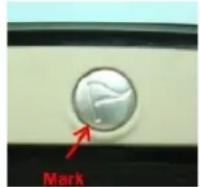
Position Mark A position can be marked using AGL3080 if the “MARK” button is firmly pressed once. When doing so, the Storage Full LED will be on and the device will insert a MARK tag to the logged GPS position data. If you press the Mark button right after taking a picture, the accompanying GPS Photo Tracker software will use this “marked position data” to tag the picture.
GPS Reset During normal operation, you can press the “MARK” button for about three to four (3 \~ 4) seconds to reset the GPS – the AGL3080 will re-start the GPS satellites searching without using satellite information already on-hand and stored internally. Because the set of GPS satellites data (the orbital and
status information) will be valid only for around two hours, they need to be updated regularly. These information are location-dependent – at two far enough locations the GPS receiver will see different set of GPS satellites, hence different satellites data. GPS receivers assume the on-hand internal satellites data is valid and will use it first in searching and tracking satellites. If wrong satellite data is used, the searching will take a long time or even fail. The GPS Reset function thus can help speed up the position fix operation if the device was used previously at place(s) far away from the current location or over some time (> two hours) ago.
Set Up Mode
AGL3080 has 6 logging modes for user to choose from if it's desired. User can configure the tracking modes in "Set Up Mode".
Entering "Set Up Mode"
At device power off status, hold both "POWER ON/OFF" button and "MARK" button simultaneously for 5 seconds. When you hold both buttons, the three LED will flash 5 times and stop at light on mode. You can release the buttons when three LED lights are all on.
Setup mode function description
Logging mode setup AGL3080 has 6 logging modes. You can change logging mode by pressing "MARK" button. For each press of the "MARK", it enters to following logging mode. Pressing "MARK" at "Mode 6" will bring you back to "Mode 1".
Logging Modes and corresponding LED status are described as below:
| LED Status Output Format Minimum | Records | Data Capacity Hours | ||
| Mode 1 | Memory Full Led ON GGA/GSA/RMC/VTG->1 secGSV -> 5 sec | 260,000 | 72 hours | |
| Mode 2 | Memory Full Led Flash | Only RMC->1 sec | 1,040,000 | 288 hours |
| Mode 3 | GPS Led ON | GGA/GSA/RMC/VTG/GSV->5 sec | 260,000 | 360 hours |
| Mode 4 | GPS Led Flash | Only RMC->5 sec | 1,040,000 | 1,440 hours |
| Mode 5 | Battery Low Led ON | GGA/GSA/RMC/VTG/GSV->10 sec | 260,000 | 720 hours |
| Mode 6 | Battery Low Led Flash | Only RMC->10 sec | 1,040,000 | 2,880 hours |
Clear Disk Function Hold "MARK" button for 5 seconds to all three LEDs start blink sequentially, then release the button to clear up the storage space.
Note:
(a) The device would power off during setup mode if you do not press any button after 1 minute.
(b) If system power is low, the battery led will be on and then device will be powered off. At this time, users have to replace new batteries.
(c) User's each change of the logging mode at the setup mode is recorded by the system. If the system is cut off power unexpectedly, the last setting value before power off is recorded. Therefore, the system power on at GPS mode, it will run at the last setting value.
Install/Replace Battery
The device requires three standard AAA size batteries to operate. NiH rechargeable batteries or alkaline batteries are recommended. [Please note that batteries are not part of the accessories included in the package.]
To install or replace battery, please:
- Flip the device so that the bottom side is up.
- Find the latch of the battery compartment cover and slide it sideways to release the cover.
- Pull the cover out to open the battery compartment. The batteries can be easily inserted, but please ensure the correct polarity.
WARNING: Wrong polarity will cause permanent damage to the device.
A Note on Battery and AGL3080's Operating Time
Batteries have wide range of capacity (in mAh) and voltage level (even though they are specified as 1.5 V). These factors will cause variation of AGL3080's operating time. Please check to ensure the quality of batteries is meeting its specifications. We recommend using 1.5 V and 900 mAh AAA batteries. NiH type battery is recommended when using AGL3080 in a low temperature environment.
Using the Accompanying AMOD Photo Tracker Software to Tag Your Photos
You can install the AMOD Photo Tracker Software by clicking the Setup button (the setup file) in the included CD-ROM. You can specify which directory to install the Photo Tracker Software. An icon (short-cut) will also be created at the Desktop for easy access to the software tool.
[First, you need to download and store the pictures from your DSC to your PC. Usually the DSC has accompanying photo management tools for photo downloading and storage.]
Installation
Plug the AGL3080 to your PC's USB port
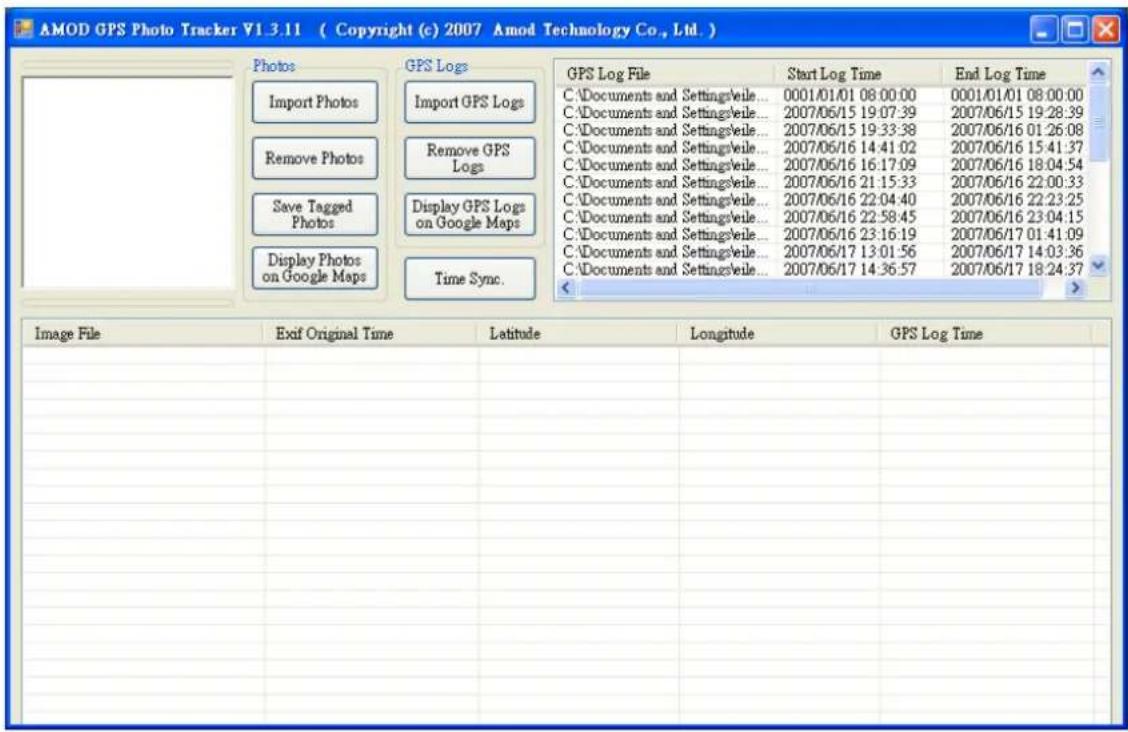
Run the GPS Photo Tracker Software, and the following will be up:
AGL3080 GPS Photo Tracker User Manual V2.2

text_image
AMOD GPS Photo Tracker V1.3.11 ( Copyright (c) 2007 Amod Technology Co., Ltd. ) Photos Import Photos Remove Photos Save Tagged Photos Display Photos on Google Maps GPS Logs Import GPS Logs Remove GPS Logs Display GPS Logs on Google Maps Time Sync. GPS Log File Start Log Time End Log Time Image File Exif Original Time Latitude Longitude GPS Log TimeImport the GPS log from AGL3080 to PC
Then you can import the GPS log by selecting the AMOD Photo Tracker Device. If you have previously imported the GPS log files, you can go to the directory to import them. Multiple log files can be selected simultaneously for import.
AGL3080 GPS Photo Tracker User Manual V2.2
text_image
AMOD GPS Photo Tracker V1.3.11 ( Copyright (c) 2007 Amod Technology Co., Ltd. ) Photos Import Photos Remove Photos Save Tagged Photos Display Photos on Google Maps GPS Logs GPS Log File C:\Documents and Settings\veile... 0001/01/01 08:00:00 C:\Documents and Settings\veile... 2007/06/15 19:07:39 C:\Documents and Settings\veile... 2007/06/15 19:33:38 C:\Documents and Settings\veile... 2007/06/16 14:41:02 C:\Documents and Settings\veile... 2007/06/16 16:17:09 C:\Documents and Settings\veile... 2007/06/16 21:15:33 C:\Documents and Settings\veile... 2007/06/16 22:04:40 C:\Documents and Settings\veile... 2007/06/16 22:58:45 C:\Documents and Settings\veile... 2007/06/16 23:16:19 C:\Documents and Settings\veile... 2007/06/17 13:01:56 C:\Documents and Settings\veile... 2007/06/17 14:36:57 Time Sync. Image File Exif Original Time Latitude Longitude GPS Log TimeImport photos
Go to the directory where DSC photos are stored. Then select photos to be tagged – multiple picture files can be selected, for import.

text_image
AMOD GPS Photo Tracker ¥1.3.11 ( Copyright (c) 2007 Amod Technology Co., Ltd. ) Photos Import Photos Remove Photos Save Tagged Photos Display Photos on Google Maps GPS Logs GPS Log File C:\Documents and Settingsveile... 0001/01/01 08:00:00 C:\Documents and Settingsveile... 2007/06/15 19:07:39 C:\Documents and Settingsveile... 2007/06/15 19:33:38 C:\Documents and Settingsveile... 2007/06/16 14:41:02 C:\Documents and Settingsveile... 2007/06/16 16:17:09 C:\Documents and Settingsveile... 2007/06/16 21:15:33 C:\Documents and Settingsveile... 2007/06/16 22:04:40 C:\Documents and Settingsveile... 2007/06/16 22:58:45 C:\Documents and Settingsveile... 2007/06/16 23:16:19 C:\Documents and Settingsveile... 2007/06/17 13:01:56 C:\Documents and Settingsveile... 2007/06/17 14:36:57 Time Sync. Image File Exif Original Time Latitude Longitude GPS Log Time DSC00556.JPG 2007/06/15 19:26:08 N 45 deg. 32 min. 58.6 sec. E 9 deg. 13 min. 26.1 sec. 2007/06/15 19:26:09 DSC00557.JPG 2007/06/15 19:27:04 N 45 deg. 32 min. 54.7 sec. E 9 deg. 12 min. 24.3 sec. 2007/06/15 19:27:04 DSC00558.JPG 2007/06/15 19:35:09 N 45 deg. 32 min. 16 sec. E 9 deg. 4 min. 47.7 sec. 2007/06/15 19:35:08 DSC00559.JPG 2007/06/15 19:35:34 N 45 deg. 32 min. 28.7 sec. E 9 deg. 4 min. 23.8 sec. 2007/06/15 19:35:33 DSC00560.JPG 2007/06/15 19:43:16 N 45 deg. 35 min. 42 sec. E 8 deg. 57 min. 53.6 sec. 2007/06/15 19:43:18 DSC00561.JPG 2007/06/15 20:05:20 N 45 deg. 37 min. 43.4 sec. E 8 deg. 42 min. 41.8 sec. 2007/06/15 20:05:18 DSC00562.JPG 2007/06/15 20:47:27 GPS Tag Not Found GPS Tag Not Found GPS Tag Not Found GPS Tag Not Found GPS Tag Not Found DSC00563.JPG 2007/06/15 20:54:07 N 45 deg. 38 min. 25.2 sec. E 8 deg. 49 min. 20.2 sec. 2007/06/15 20:54:18 DSC00566.JPG 2007/06/15 22:04:41 GPS Tag Not Found GPS Tag Not Found GPS Tag Not Found DSC00567.JPG 2007/06/15 22:11:33 N 45 deg. 28 min. 8.1 sec. E 9 deg. 10 min. 45.7 sec. 2007/06/15 22:10:58 DSC00569.JPG 2007/06/15 23:01:16 N 45 deg. 28 min. 0.7 sec. E 9 deg. 11 min. 22.2 sec. 2007/06/15 23:01:18 DSC00571.JPG 2007/06/15 23:15:14 N 45 deg. 28 min. 2.1 sec. E 9 deg. 11 min. 23.6 sec. 2007/06/15 23:15:13 DSC00572.JPG 2007/06/15 23:18:30 GPS Tag Not Found GPS Tag Not Found GPS Tag Not Found GPS Tag Not Found GPS Tag Not Found DSC00573.JPG 2007/06/15 23:19:28 GPS Tag Not Found GPS Tag Not Found GPS Tag Not Found GPS Tag Not Found DSC00575.JPG 2007/06/15 23:22:43 GPS Tag Not Found GPS Tag Not Found GPS Tag Not Found GPS Tag Not Found DSC00576.JPG 2007/06/15 23:27:22 GPS Tag Not Found GPS Tag Not Found GPS Tag Not Found GPS Tag Not Found DSC00577.JPG 2007/06/16 00:08:06 GPS Tag Not Found GPS Tag Not Found GPS Tag Not Found GPS Tag Not Found DSC00578.JPG 2007/06/16 00:08:51 GPS Tag Not Found GPS Tag Not Found GPS Tag Not Found GPS Tag Not Found DSC00579.JPG 2007/06/16 00:08:59 GPS Tag Not Found GPS Tag Not Found GPS Tag Not Found GPS Tag Not Found DSC0058O.JPG 2007/06/16 00:09:23 GPS Tag Not Found GPS Tag Not Found GPS Tag Not Found GPS Tag Not Found DSC0058I.JPG 2007/06/16 00:09:33 GPS Tag Not Found GPS Tag Not Found GPS Tag Not FoundAGL3080 GPS Photo Tracker User Manual V2.2
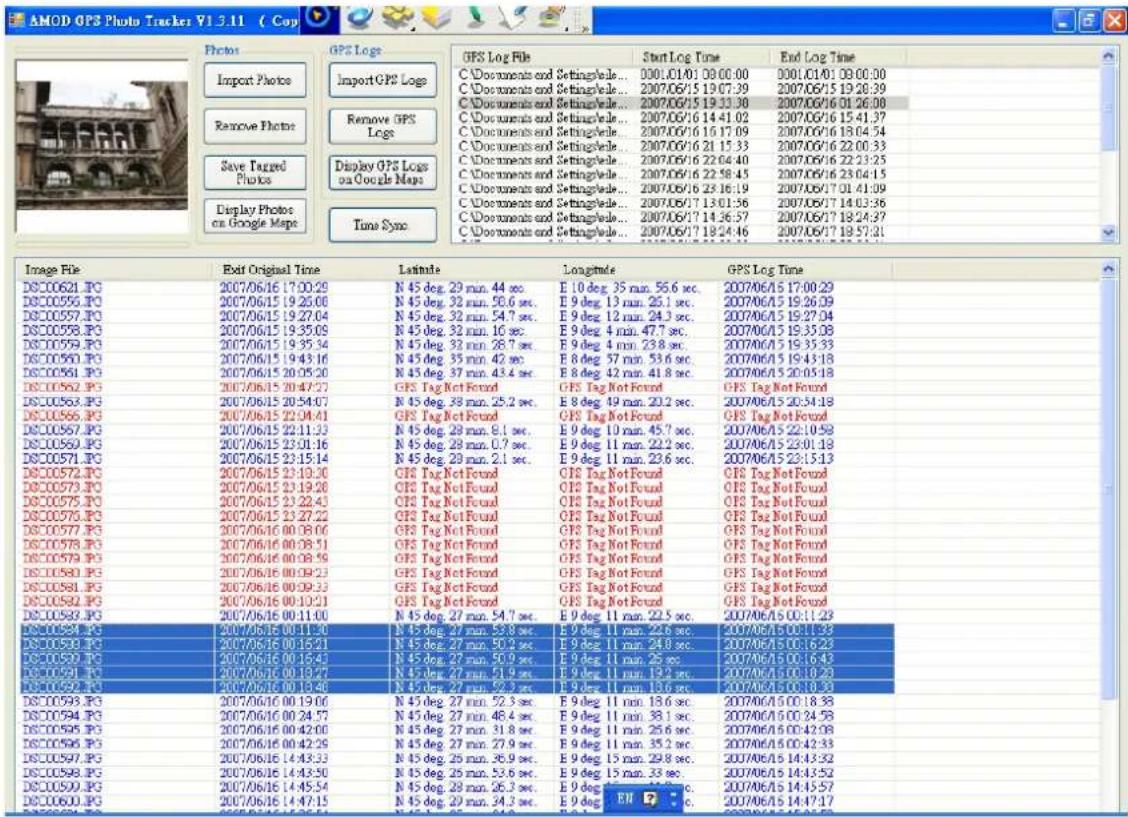
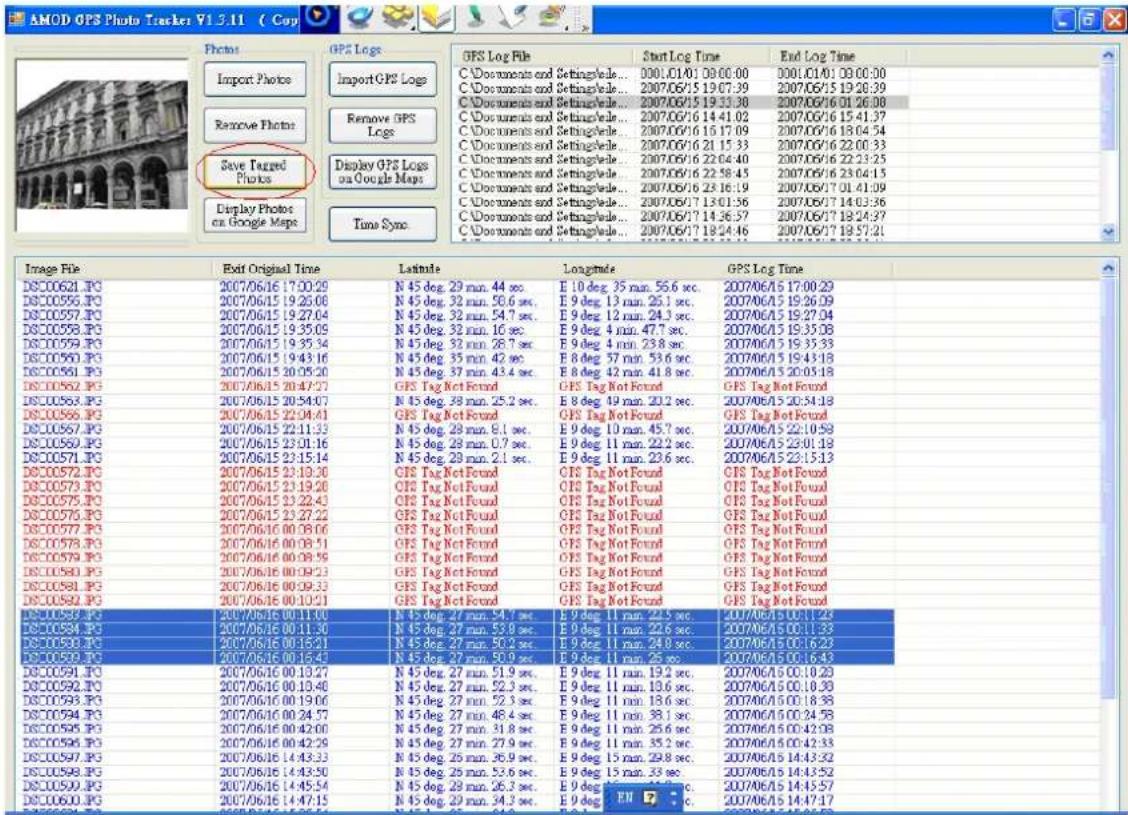
The Photo Tracker will automatically tag the selected photos with the GPS location information. When complete, the photos will be shown in blue color. Those photos unable to be tagged will be shown in red color. Those already have GPS tags will be shown in black color. Those photos that have been tagged by depressing the "Mark" button will be shown in green color. Please refer to the description about the Position Mark function in page 3 of this User Manual.
Time Sync
Because the position tagging is done by cross relating the GPS time (UTC standard time) and DSC time (DSC's internal time), to find out accurately how much off is the DSC time is critical to the position accuracy during tagging. To offset the difference between GPS time, which is accurate, and the DSC internal time, which may not be accurate and could be off, a Time Sync function is implemented. This offset operation can reduce inaccuracy in the geo-location tagging process. However, Time Sync is an optional function – if the DSC time is accurate enough that the geo-location error is not significant or critical to you, you can skip the Time Sync step altogether. Before you enter the Time Sync operation, please check and adjust the time of your computer. This is necessary because the local computer time is used as the standard time to derive the offset (the difference) between the DSC time (stored in the photo image file) and the standard time. Please make sure your local time zone and time are both correct and accurate. You can conduct the Time Sync operation by clicking the Time Sync icon to bring up the following window and check the “Enable Time Sync.” button to begin the operation.

text_image
Setting Enable Time Sync. Input DSC Time : 2007/07/27 12:15:45 DSC Time : 2007/07/27 12:15:59 PC System Time : 2007/07/27 12:16:17 Apply OK Cancel AboutThe Input DSC Time field is for you to enter the time that will be used to sync with the DSC time. There are two steps involved – adjust time zone and adjust actual time.
Adjust time zone
The pictures may be taken at places that belong to a different time zone. For these pictures, please find the time difference (in hours) and adjust the information in the Input DSC Time field. Please note this change may also involve the adjustment of the date information in the Input DSC Time field.
Adjust actual time
When the DSC time is off slightly, only the seconds and/or minutes fields need to be adjusted. Enter a time that is slightly ahead than the displayed DSC Time. When the DSC Time (which is constantly counting up) reaches this pre-selected time, click Apply so that the DSC Time field is updated (synchronized) to the DSC's system time. When this is done, just click OK to continue.
With these adjustments in the Time Sync operation, the Photo Tracker Software can derive the difference between DSC Time and PC System Time. This time difference is then used to offset any timing error that could exist between the DSC and GPS time.
When traveling to a different time zone, if your DSC time is adjusted to the local time, then the adjustment needed to compensate the time difference becomes a tedious and complicated task – you need to record each time zone. When tagging photos, they and the log files must be correlated into groups first. For each group, adjust the time separately using Time Sync. If this process is too tedious for you, when you go on a trip that crosses several time zones, please do not adjust your DSC time at all to avoid the complication/confusion this may cause.
Display Photos on Google Maps
The GPS tagged pictures can be shown on Google Map by clicking the “Display Photos on Google Maps” button.
AGL3080 GPS Photo Tracker User Manual V2.2

text_image
MapBrowser Google Maps Display Setting Photo ReSize : Catch Map C:\Documents and Settings eileen\桌面 200706 Italy Test\Italy June 14 2007 - TDSC00571.JPG 2007/06/15 23:15:14 Lat: 45 46725 Lng: 9 189889 Cinsetto Balsano Giovanni Vienna Carsco San Do MilanoSelect and Display Multiple Pictures
Multiple pictures can be displayed on the Google Map simultaneously too. This can be done if they are selected simultaneously by clicking photo files while holding the Shift key.
AGL3080 GPS Photo Tracker User Manual V2.2
text_image
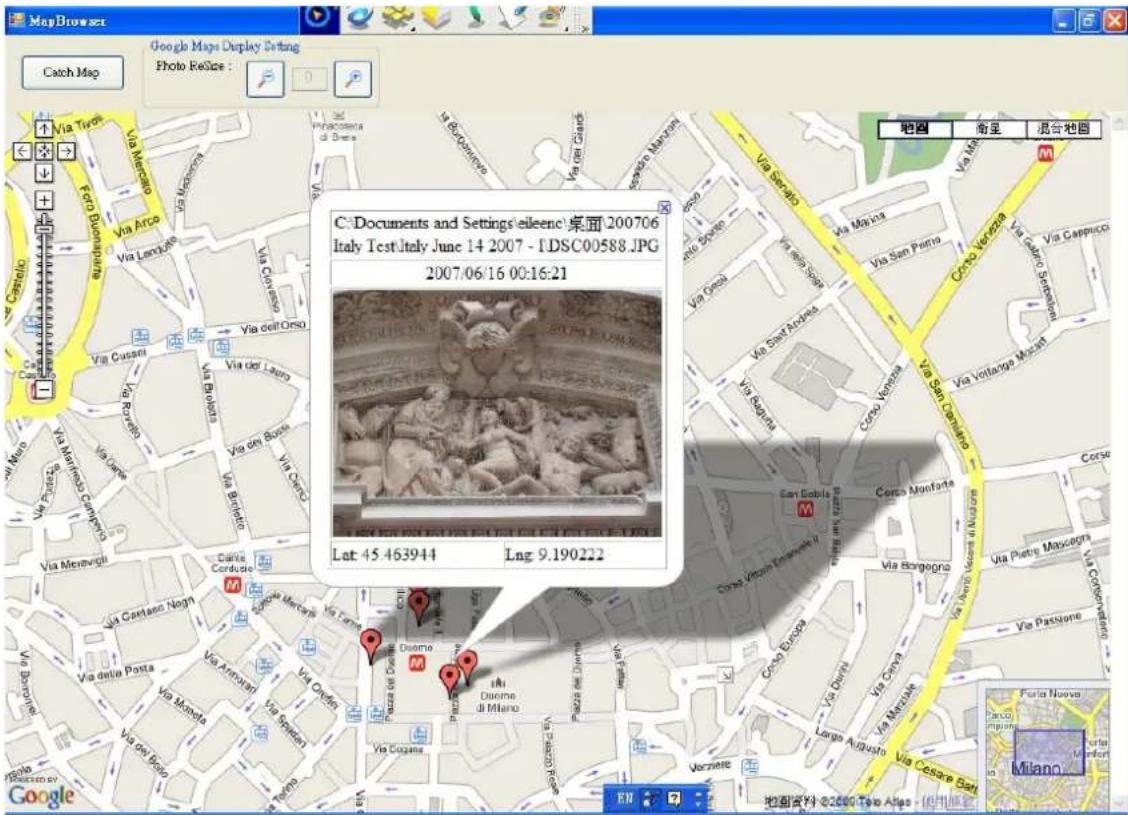
AMOD GPS Photo Tracks V1.3.11 ( Cop Photo Import Photo Remove Photo Save Tagged Photo Display Photos on Google Maps GPS Logs Import GPS Logs Remove GPS Maps Display GPS Logs on Google Maps Time Sync GPS Log File Start Log Time End Log Time C Documents and SettingsVale... 0001.01.01 08:00:00 0001.01.01 08:00:00 C Documents and SettingsVale... 2007.06/15 19:07:39 2007.06/15 19:28:39 C Documents and SettingsVale... 2007.06/15 19:33:38 2007.06/16 01:26:08 C Documents and SettingsVale... 2007.06/16 14:41:02 2007.06/16 15:41:37 C Documents and SettingsVale... 2007.06/16 16:17:09 2007.06/16 18:04:54 C Documents and SettingsVale... 2007.06/16 21:15:33 2007.06/16 22:00:33 C Documents and SettingsVale... 2007.06/16 22:04:40 2007.06/16 22:23:25 C Documents and SettingsVale... 2007.06/16 22:58:45 2007.06/16 23:04:15 C Documents and SettingsVale... 2007.06/16 23:16:19 2007.06/17 11:41:09 C Documents and SettingsVale... 2007.06/17 13:01:56 2007.06/17 14:03:56 C Documents and SettingsVale... 2007.06/17 14:36:57 2007.06/17 18:24:57 C Documents and SettingsVale... 2007.06/17 18:24:46 2007.06/17 18:57:51 Image File Exit Original Time Latitude Longitude GPS Log Time DC-00621.PG 2007/06/16 17:00:29 N 45 deg. 29 min. 44 sec. E 10 deg. 35 min. 56.6 sec. 2007/06/15 17:00:29 DC-00556.PG 2007/06/15 19:25:08 N 45 deg. 32 min. 56.6 sec. E 9 deg. 13 min. 25.1 sec. 2007/06/15 19:26:09 DC-00557.PG 2007/06/15 19:27:04 N 45 deg. 32 min. 54.7 sec. E 9 deg. 12 min. 24.3 sec. 2007/06/15 19:27:94 DC-00558.PG 2007/06/15 19:35:09 N 45 deg. 32 min. 16 sec. E 9 deg. 4 min. 47.7 sec. 2007/06/15 19:35:38 DC-00559.PG 2007/06/15 19:35:34 N 45 deg. 32 min. 28.7 sec. E 9 deg. 4 min. 23.8 sec. 2007/06/15 19:35:33 DC-00560.PG 2007/06/15 19:43:16 N 45 deg. 35 min. 42 sec. E 8 deg. 57 min. 53.6 sec. 2007/06/15 19:43:18 DC-00561.PG 2007/06/15 20:05:20 N 45 deg. 37 min. 43.4 sec. E 8 deg. 42 min. 41.8 sec. 2007/06/15 20:05:18 DC-00562.PG 2007/06/15 20:47:27 GFS Tag Not Found GFS Tag Not Found GFS Tag Not Found DC-00563.PG 2007/06/15 20:54:07 N 45 deg. 38 min. 25.2 sec. E 8 deg. 49 min. 23.2 sec. 2007/06/15 23:34:18 DC-00564.PG 2007/06/15 22:34:41 GFS Tag Not Found GFS Tag Not Found GFS Tag Not Found DC-00567.PG 2007/06/15 22:11:33 N 45 deg. 28 min. 8.1 sec. E 9 deg. 13 min. 45.7 sec. 2007/06/15 22:19:58 DC-00569.PG 2007/06/15 23:31:16 N 45 deg. 28 min. 8.7 sec. E 9 deg. 13 min. 23.8 sec. 2007/06/15 23:38:18 DC-00571.PG 2007/06/15 23:15:14 N 45 deg. 28 min. 2.1 sec. E 9 deg. 13 min. 23.8 sec. DC-00572.PG 2007/06/15 23:19:39 GFS Tag Not Found GFS Tag Not Found GFS Tag Not Found DC-00573.PG 2007/06/15 23:19:28 GFS Tag Not Found GFS Tag Not Found DC-00574.PG 2007/06/15 23:22:43 GFS Tag Not Found GFS Tag Not Found DC-00575.PG 2007/06/15 23:27:22 GFS Tag Not Found GFS Tag Not Found DC-00576.PG 2007/06/16 38:38:48 N 45 deg. N/A vs N/A vs N/A vs N/A vs N/A vs N/A vs N/A vs N/A vs N/A vs N/A vs N/A vs N/A vs N/A vs N/A vs N/A vs N/A vs N/A vs N/A vs N/A vs N/A vs N/A vs N/A vs N/A vs N/A vs N/A vs N/A vs N/A vs N/A vs N/A vs N/A vs N/A vs N/A vs N/A vs N/A vs MFGP# DC-00577.PG N/A vs N/A vs N/A vs N/A vs N/A vs N/A vs N/A vs N/A vs N/A vs N/A vs N/A vs N/A vs N/A vs N/A vs N/A vs N/A vs N/A vs N/A vs N/A vs N/A vs N/A vs N/A vs N/A vs N/A vs N/A vs N/A vs N/A vs N/A vs N/A vs N/A vs N/A vs N/A vs N/A vs N/B# DC-CC-CP-PG N/A vs N/A vs N/A vs N/A vs N/A vs N/A vs N/A vs N/A vs N/A vs N/A vs N/A vs N/A vs N/A vs N/A vs N/A vs N/A vs N/A vs N/A vs N/A vs N/A vs N/A vs N/A vs N/A vs N/B# DC-CC-CP-PG N/A vs C/C/PG N/A vs C/C/PG N/A vs C/C/PG N/A vs C/C/PG N/A vs C/C/PG N/A vs C/C/PG N/A vs C/C/PG N/A vs C/C/PG N/A vs C/C/PG N/A vs C/C/PG N/A vs C/C/PG N/A vs C/C/PG N/A vs C/C/PG N/NA / A / B / C / D / E / F / G / H / I / J / K / L / M / N / O / P / Q / R / S / T / U / V / W / X / Y / Z / A / A / B / C / D / E / F / G / H / I / J / K / L / M / O / P / Q / R / S / T / U / V / W / X / Y / Z / A / B / C / D / E / F / G / H / I / J / K / L / M / O / P / Q / R / S / T / U / V / W / X / Y / Z / A / B / C / D / E / F / G / H / I / J / K / L / M / O / P / Q / R / S / T / U / V / W / X / Y / Y / Z / A / B / C / D / E / F / G / H / I / J / K : A : A : A : A : A : A : A : A : A : A : A : A : A : A : A : A : A : A : A : A : A : A : A : A : A : A : A : A : A : A : A : A : A : A : A : A : A : A : A : A : A : A : A : A : A : A : A : A : A : A : B : A : B : B : B : B : B : B : B : B : B : B : B : B : B : B : B : B : B : B : B : B : B : B : B : B : B : B : B : B : B : B : B : B : B : B : B : B : B : B : B : B : B : B : B : B : B : B : B : B : B : B :B : DC-CC-CP-PGThen click Display on Google Map button, these pictures will be displayed on Google Map simultaneously. By clicking the push pin, each photo can be selected to show on Google Map.
AGL3080 GPS Photo Tracker User Manual V2.2
text_image
Map Browser Google Maps Display Setting Photo Resize : Catch Map C:\Documents and Settings\elleeno\桌面 200706 Italy Test Italy June 14 2007 - LDSC00588.JPG 2007/06/16 00:16:21 Lat: 45 463944 Lng: 9.190222 地图 奋呈 混合地图 Via Tiveta Via Merceano Via Arco Via Lantana Via Cunzetti Via Cusani Via del Lago Via Brutto Via Del Rio Via Monetto Via Moneta Via Monta Via Della Posta Via Ampani Via Ermati Via Ermati Via Della Posta Via Della Posta Via Della Posta Via Della Posta Via Della Posta Via Della Posta Via Della Posta Via Della Posta Via Della Posta Via Della Posta Via Della Posta Via Della Posta Via Della Posta Via Della Posta Via Della Posta Via Della Posta Via Della Posta Via Dellato Via Della Posta Via Della Posta Via Della Posta Via Della Posta Via Della Posta Via Della Posta Via Della Posta Via Della Posta Via Della Posta Via Della Posta Via Della Posta Via Della Posta Via Della Posta Via Della Posta Via Della Posta Via Della Posta Via Delliato Via Della Posta Via Della Posta Via Della Posta Via Della Posta Via Della Posta Via Della Posta Via Della Posta Via Della Posta Via Della Posta Via Della Posta Via Della Posta Via Della Posta Via Della Posta Via Della Posta Via Della Posta Via Della Posta ViaDella Posta ViaDella Posta ViaDella Posta ViaDella Posta ViaDella Posta ViaDella Posta ViaDella Posta ViaDella Posta ViaDella Posta ViaDella Posta ViaDella Posta ViaDella Posta ViaDella Posta ViaDella Posta ViaDella Posta ViaDella Posta ViaDella PostaResize and Save Displayed Photos with Google Map
To meet individual's needs, AGL3080 Photo Tracker Software provides five different sizes (relative to the Google Map as background) of the photo pictures for user to select. The photo comes up with the default size on the display window. When clicking the magnifying button or shrunk button, more sizes
AGL3080 GPS Photo Tracker User Manual V2.2

text_image
MapBrowser Google Maps Display Setting Photo ReSize : Catch Map C:\Documents and Settings\eileenc\桌面\200706 Italy Test\Italy June 14 2007 - I\DSC00584.JPG 2007/06/16 00:11:30 Lat: 45.464944 Lng: 9.189611(Enlarged)
AGL3080 GPS Photo Tracker User Manual V2.2
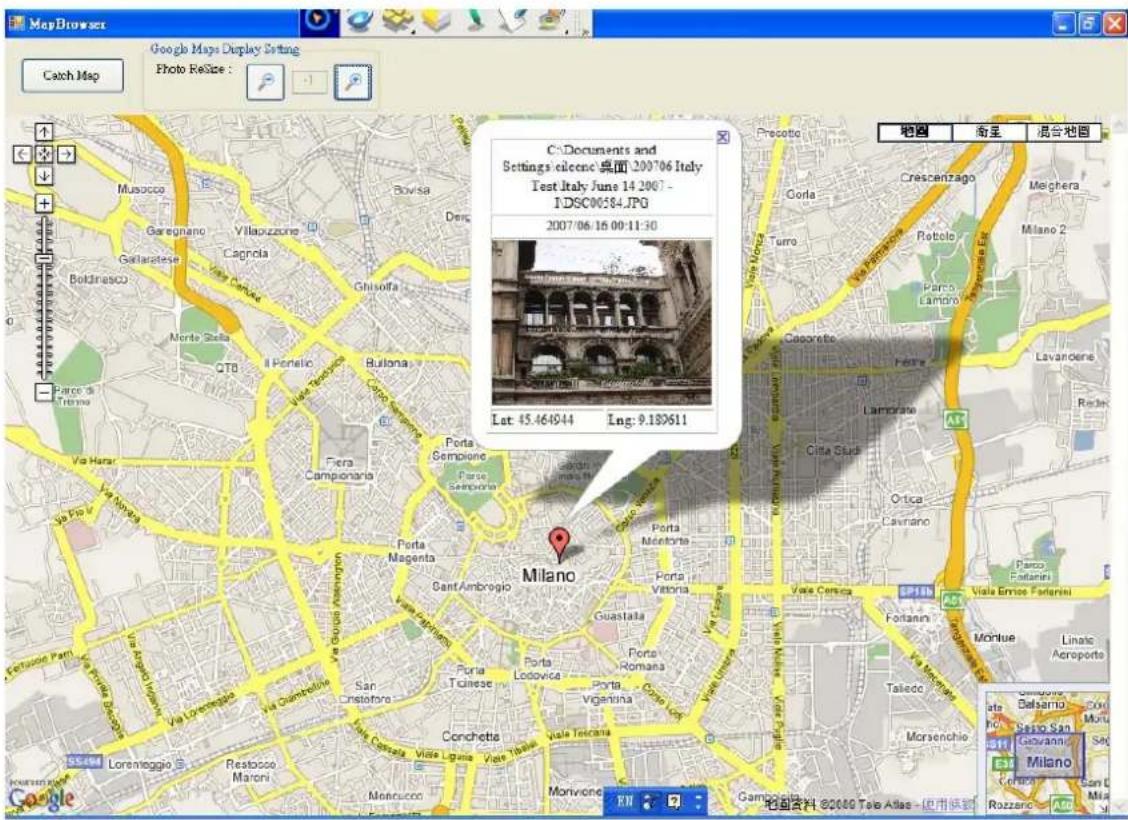
Click the Catch Map Button, the display (picture with Google Map as background) can be saved.

Finally click the Save Tagged Photos button on the main menu of the Photo Tracker Software, the geo-tag will be saved within the photo picture file for future viewing or sharing.
text_image
AMOD GPS Photo Tracker V1.5.11 (Copy) Photo Import Photo Remove Photo Save Targeted Photo Display Photo on Google Maps GPS Logs Import GPS Logs Remove GPS Maps Display GPS Logs on Google Maps GPS Log File C Documents and SettingsVale... C Documents and SettingsVale... C Documents and SettingsVale... C Documents and SettingsVale... C Documents and SettingsVale... C Documents and SettingsVale... C Documents and SettingsVale... C Documents and SettingsVale... C Documents and SettingsVale... C Documents and SettingsVale... C Documents and SettingsVale... C Documents and SettingsVale... C Documents and SettingsVale... C Documents and SettingsVale... C Documents and SettingsVale... C Document and SettingsVale... C Document and SettingsVale... C Document and SettingsVale... C Document and SettingsVale... C Document and SettingsVale... C Document and SettingsVale... C Document and SettingsVale... C Document and SettingsVale... C Document and SettingsVale... C Document and SettingsVale... C Document and SettingsVale... C Document and SettingsVale... C Document and SettingsVale... C Document and SettingsVale... C Document and SettingVale... C Document and SettingsVale... C Document and SettingsVale... C Document and SettingsVale... C Document and SettingsVale... C Document and SettingsVale... C Document and SettingsVale... C Document and SettingsVale... C Document and SettingsVale... C Document and SettingsVale... C Document and SettingsVale... C Document and SettingsVale... C Document and SettingsVale... C Document and SettingsVale... Tune Sync Start Log Time End Log Time Image File Exit Original Time Latitude Longitude GPS Log Time DC00621.PG 2007/06/16 17:00:29 N 45 deg. 29 min. 44 sec. E 10 deg. 35 min. 56.6 sec. 2007/06/16 17:00:29 DC00596.PG 2007/06/15 19:25:08 N 45 deg. 32 min. 58.6 sec. E 9 deg. 13 min. 26.1 sec. 2007/06/15 19:26:09 DC00597.PG 2007/06/15 19:27:04 N 45 deg. 32 min. 54.7 sec. E 9 deg. 12 min. 24.3 sec. 2007/06/15 19:27:04 DC00598.PG 2007/06/15 19:35:09 N 45 deg. 32 min. 16 sec. E 9 deg. 4 min. 47.7 sec. 2007/06/15 19:35:08 DC00599.PG 2007/06/15 19:35:34 N 45 deg. 32 min. 28.7 sec. E 9 deg. 4 min. 23.8 sec. 2007/06/15 19:35:33 DC00590.PG 2007/06/15 19:43:16 N 45 deg. 35 min. 42 sec. E 8 deg. 57 min. 53.6 sec. 2007/06/15 19:43:18 DC00591.PG 2007/06/15 20:05:20 N 45 deg. 37 min. 43.4 sec. E 8 deg. 42 min. 41.8 sec. 2007/06/15 20:05:18 DC00592.PG 2007/06/15 20:47:27 GFS Tag Not Found GFS Tag Not Found GFS Tag Not Found DC00593.PG 2007/06/15 20:54:07 N 45 deg. 38 min. 25.2 sec. E 8 deg. 49 min. 20.2 sec. 2007/06/15 20:54:18 DC00596.PG 2007/06/15 22:04:41 GFS Tag Not Found GFS Tag Not Found GFS Tag Not Found DC00597.PG 2007/06/15 22:11:33 N 45 deg. 28 min. 8.1 sec. E 9 deg. 10 min. 45.7 sec. 2007/06/15 22:10:58 DC00599.PG 2007/06/15 23:01:16 N 45 deg. 28 min. 0.7 sec. E 9 deg. 11 min. 22.2 sec. 2007/06/15 23:01:18 DC00571.PG 2007/06/15 23:15:14 N 45 deg. 28 min. 2.1 sec. E 9 deg. 11 min. 23.6 sec. 2007/06/15 23:15:13 DC00572.PG 2007/06/15 23:19:30 GFS Tag Not Found GFS Tag Not Found GFS Tag Not Found DC00573.PG 2007/06/15 23:19:26 GFS Tag Not Found GFS Tag Not Found DC00574.PG 2007/06/15 23:22:43 GFS Tag Not Found GFS Tag Not Found DC00575.PG 2007/06/15 23:27:22 GFS Tag Not Found GFS Tag Not Found DC00576.PG 2007/06/16 00:38:06 GFS Tag Not Found GFS Tag Not Found DC00578.PG 2007/06/16 00:38:51 GFS Tag Not Found GFS Tag Not Found DC00579.PG 2007/06/16 00:38:58 GFS Tag Not Found GFS Tag Not Found DC00580.PG 2007/06/16 00:39:23 GFS Tag Not Found GFS Tag Not Found DC00581.PG 2007/06/16 00:39:33 GFS Tag Not Found GFS Tag Not Found DC00582.PG 2007/06/16 00:10:21 GFS Tag Not Found GFS Tag Not Found DC00583.PG 2007/06/16 00:11:38 N 45 deg. 27 min. 54.7 sec. E 9 deg. 11 min. 22.3 sec. 2007/06/16 1Q:1,1,23 DC00584.PG 2007/06/16 0O:11:38 N 45 deg. 27 min. 53.8 sec. E 9 deg. 11 min. 22.6 sec. 2007/06/16 1Q:1,1,33 DC00585.PG 2007/06/16 1Q:16:21 N 45 deg. 27 min. 5O.2 sec. E 9 deg. 11 min. 24.8 sec. 2007/06/16 1Q:1,6,23 DC00589.PG 2007/06/16 1Q:16:43 N 45 deg. 27 min. S.O.9 sec. E 9 deg. 11 min. S.S sec. 2QOYOSI PCG-PC-PC-PC-PC-PC-PC-PC-PC-PC-PC-PC-PC-PC-PC-PC-PC-PC-PC-PC-PC-PC-PC-PC-PC-PC-PC-PC-PC-PC-PC-PC-PC-PC-PC-PC-PC-PC-PC-PC-PC-PC-PC-PC-PC-PC-PC-PC-PC-PC-PC-PL-C- DCOYOSI PCG-PC-PC-PC-PC-PC-PC-PC-PC-PC-PC-PC-PC-PC-PC-PC-PC-PC-PC-PC-PC-PC-PC-PC-PC-PC-PC-PC-PC-PC-PC-PC-PC-PC-PC-PC-PC-PC-PC-PC-PC-PC-PC-PC-PC-PC-PC-PL-C- DCOYCSA PCG - PC - PC - PC - PC - PC - PC - PC - PC - PC - PC - PC - PC - PC - PC - PC - PC - PC - PC - PC - PC - PC - PC - PC - PC - PC - PC - PC - PC - PC - PC - PC - PC - PC - PC - PC - PC - PC - PC - PC - PC - PC - PC - PC - PC - PC - PC - PC - PC - PC - PC - MC- DCOYCSA PCG - PC - PC - PC - PC - PC - PC - PC - PC - PC - PC - PC - PC - PC - PC - PC - PC - PC - PC - PC - PC - PC - PC - PC - PC - PC - PC - PC - PC - PC - PC - PC - PC - PC - PC - PC - PC - PC - PC - MC- DCOYCSA PCG - PC - PC - PC - PC - PC - PC - NC - DCOYCSA PCG - PC - PC - NC - DCOYCSA PCG - PC - NC - DCOYCSA PCG - PC - NC - DCOYCSA PCG - PC - NC - DCOYCSA PCG - PC - NC - DCOYCSA PCG - PC - NC - DCOYCSA PCG - PC - NC - DCOYCSA PCG - PC - NC - DCOYCSA PCG - PC - NC - DCOYCSA PCG - PC - N/A - DCOYCSA PCG - PC - NC - DCOYCSA PCG - PC - NC - DCOYCSA PCG - PC - NC - DCOYCSA PCG - PC - NC - DCOYCSA PCG - PC - NC - DCOYCSA PCG - PC - NC - DCOYCSA PCG - PC - NC - DCOYCSA PCG - PC - NC - DCOYSI PCG - PC - NC - DCOYSI PCG - PC - NC - DCOYSI PCG - PC - NC - DCOYSI PCG - PC - NC - DCOYSI PCG - PC - NC - DCOYSI PCG - PC - NC - DCOYSI PCG - PC - NC - DCOYSI PCG - PC - NC - DCOYSI PCG - PC - NC - DCOYSI IPG-P-C- DCOYSI IPG-P-C- DCOYSI IPG-P-C- DCOYSI IPG-P-C- DCOYSI IPG-P-C- DCOYSI IPG-P-C- DCOYSI IPG-P-C- DCOYSI IPG-P-C- DCOYSI IPG-P-C- DCOYSI IPG-P-C- DCOYSI IPG-I-G- DCOYSI IPG-I-G- DCOYSI IPG-I-G- DCOYSI IPG-I-G- DCOYSI IPG-I-G- DCOYSI IPG-I-G- DCOYSI IPG-I-G- DCOYSI IPG-I-G- DCOYSI IPG-I-G- DCOYSI IPG-I-G- DCOYSI IPG-I-G- DCOYSI IPG-I-G, DCOYSI IPG-I-G- DCOYSI IPG-I-G- DCOYSI IPG-I-G- DCOYSI IPG-I-G- DCOYSI IPG-I-G- DCOYSI IPG-I-G- DCOYSI IPG-I-G- DCOYSI IPG-I-G- DCOYSI IPG-I-G- DCOYSI IPG-I-G- DCOYSI IPG-I-G- DLCP-SiSIC-P-C- DLCP-SiSIC-P-C- DLCP-SiSIC-P-C- DLCP-SiSIC-P-C- DLCP-SiSIC-P-C- DLCP-SiSIC-P-C- DLCP-SiSIC-P-C- DLCP-SiSIC-P-C- DLCP-SiSIC-P-C- DLCP-SiSIC-P-C- DLCP-SiSIC-P/C- DLCP-SiSIC-P/C- DLCP-SiSIC-P/C- DLCP-SiSIC-P/C- DLCP-SiSIC-P/C- DLCP-SiSIC-P/C- DLCP-SiSIC-P/C- DLCP-SiSIC-P/C- DLCP-SiSIC-P/C- DLCP-SiSIC-P/C- DLCP-SiSIC-P/SiSIC-P/C- DLCP-SiSIC-P/C- DLCP-SiSIC-P/C- DLCP-SiSIC-P/C- DLCP-SiSIC-P/C- DLCP-SiSIC-P/C- DLCP-SiSIC-P/C- DLCP-SiSIC-P/C- DLCP-SiSIC-P/C- DLCP-SiSIC-P/C- DLCP-API-C- DLCP-API-C- DLCP-API-C- DLCP-API-C- DLCP-API-C- DLCP-API-C- DLCP-API-C- DLCP-API-C- DLCP-API-C- DLCP-API-C- DLCP-API-C- DLCP-API-C- DLCP-API-C- DLCP-API-C- DLCP-API-C- FEN C: FEN C: FEN C: FEN C: FEN C: FEN C: FEN C: FEN C: FEN C: FEN C: FEN C: FEN C: FEN C: FEN C: FEN C: FEN C: FEN C: FEN C: FEN C: FEN C: FEN C: FEN C: FEN C: FEN C: FEN C: FEN C:AGL3080 GPS Photo Tracker User Manual V2.2
Display GPS Logs on Google Maps
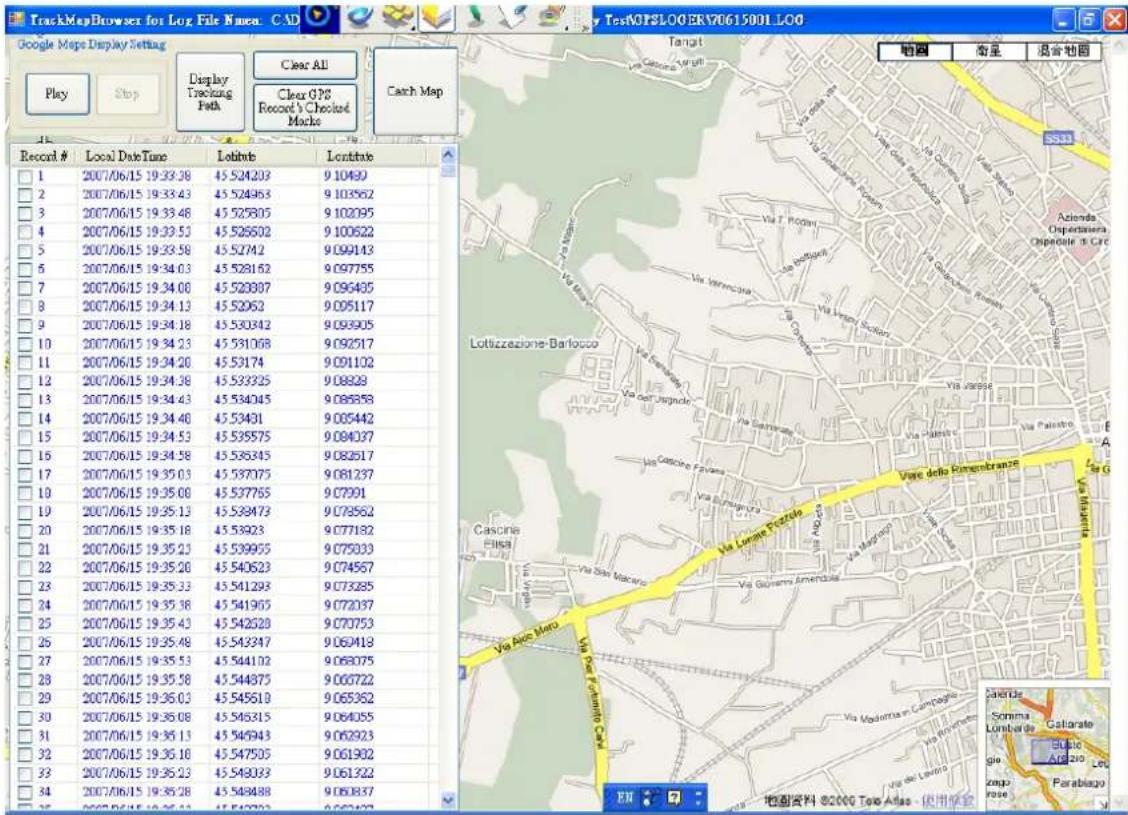
By clicking the "Display GPS Logs on Google Maps" button, it will come up another window.
text_image
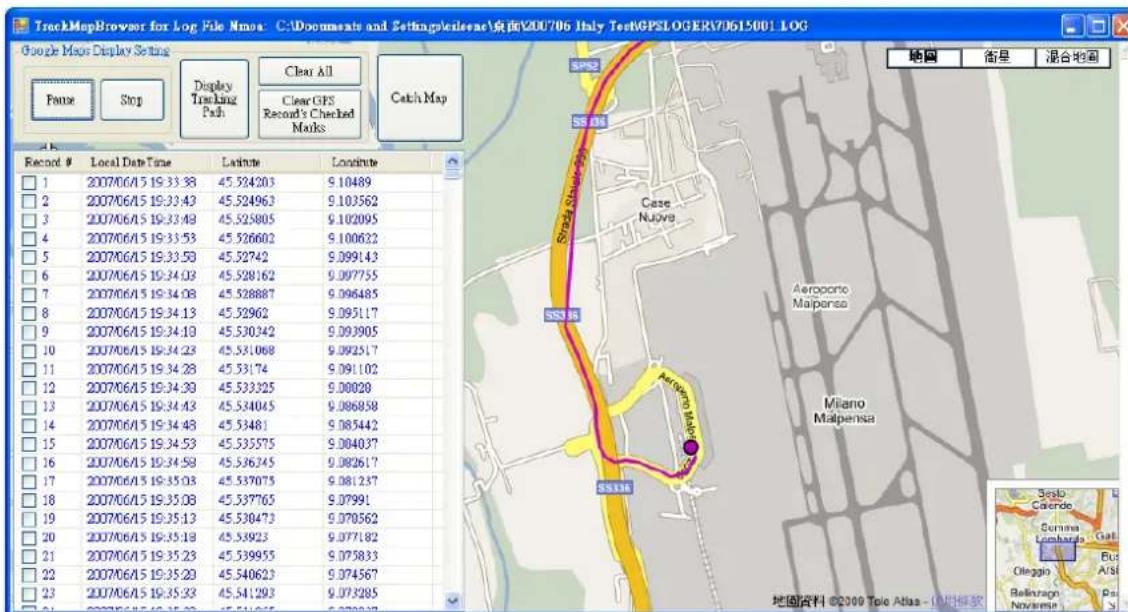
TrackMapBrowser for Log File Names. CAD Google Maps Display Setting Play Stop Display Tracking Path Clear AI Clear GPS Record's Checked Marks Canch Map Recent # Local Date/Time Lofitude Lofitude 1 2007/06/15 19:33:38 45 524203 9 10490 2 2007/06/15 19:33:43 45 524963 9 103562 3 2007/06/15 19:33:48 45 525805 9 102095 4 2007/06/15 19:33:53 45 526502 9 100522 5 2007/06/15 19:33:58 45 52742 9 099143 6 2007/06/15 19:34:03 45 528152 9 097755 7 2007/06/15 19:34:08 45 528807 9 096485 8 2007/06/15 19:34:13 45 52962 9 095117 9 2007/06/15 19:34:18 45 530342 9 093905 10 2007/06/15 19:34:23 45 531068 9 092517 11 2007/06/15 19:34:28 45 53174 9 091102 12 2007/06/15 19:34:33 45 533325 9 09838 13 2007/06/15 19:34:43 45 534045 9 098588 14 2007/06/15 19:34:48 45 53491 9 095442 15 2007/06/15 19:34:53 45 535575 9 094037 16 2007/06/15 19:34:58 45 536345 9 092617 17 2007/06/15 19:35:03 45 537075 9 091237 18 2007/06/15 19:35:08 45 537765 9 07991 19 2007/06/15 19:35:13 45 538473 9 078562 20 2007/06/15 19:35:18 45 53923 9 077182 21 2007/06/15 19:35:23 45 539955 9 075333 22 2007/06/15 19:35:28 45 540623 9 074567 23 2007/06/15 19:35:33 45 541298 9 073285 24 2007/06/15 19:35:38 45 541965 9 072037 25 2007/06/15 19:35:43 45 542628 9 070753 26 2007/06/15 19:35:48 45 543247 9 069418 27 2007/06/15 19:35:53 45 544102 9 068075 28 2007/06/15 19:35:58 45.544875-9.066722 29 2007/06/15 19:36:03 -45.545619 -9.065362 30.2007/06/15 -19:36:08 -45.546315 -9.064055 31.2007/06/15 -19:36:13 -45.546943 -9.062923 32.2007/06/15 -19:36:18 -45.54790S -9.061982 33.2007/06/15 -19:36:23 -45.54803S -9.061322 34.2007/06/15 -19:36:28 -45.54848S -9.061837 Sentima Gallarate Lombardo Galiarate Gluco Anzio Leo Zapri Farabajo EN 地图资料 ©2COP Tere Atlas - 使用保存Click the "Play" Button, there will be a pink dot starts moving to display the tracking path you have walked or drove through. You are allowed to click Pause and Stop buttons to stop or pause pink dot.
AGL3080 GPS Photo Tracker User Manual V2.2
text_image
TrackMapBrowser for Log File Names: C:\Documents and Settings\Sales\桌面\200706 Italy TechGPSL OGERY\0615001 LOG Google Maps Display Setting Famie Stop Display Tracking Path Clear All Clear GPS Record's Checked Marks Catch Map Record # Local Date Time Latitude Longitude 1 2007/06/15 19:33:38 45.524203 9.10489 2 2007/06/15 19:33:43 45.524963 9.103562 3 2007/06/15 19:33:49 45.525805 9.102095 4 2007/06/15 19:33:53 45.526602 9.100622 5 2007/06/15 19:33:58 45.52742 9.099143 6 2007/06/15 19:34:02 45.528162 9.097755 7 2007/06/15 19:34:08 45.528887 9.096485 8 2007/06/15 19:34:13 45.52962 9.095117 9 2007/06/15 19:34:19 45.530342 9.093905 10 2007/06/15 19:34:23 45.531068 9.092517 11 2007/06/15 19:34:28 45.53174 9.091102 12 2007/06/15 19:34:33 45.533325 9.08928 13 2007/06/15 19:34:43 45.534045 9.086858 14 2007/06/15 19:34:48 45.53481 9.085442 15 2007/06/15 19:34:53 45.535575 9.084037 16 2007/06/15 19:34:58 45.536745 9.082617 17 2007/06/15 19:35:03 45.537075 9.081237 18 2007/06/15 19:35:08 45.537765 9.07991 19 2007/06/15 19:35:13 45.538473 9.078562 20 2007/06/15 19:35:18 45.53923 9.077182 21 2007/06/15 19:35:23 45.539955 9.075833 22 2007/06/15 19:35:28 45.540623 9.074567 23 2007/06/15 19:35:33 45.541293 9.073285 SRSB Aeroporto Maipensa Milano Maipensa SSTIIE Sreb Calendro Sunana Lambardo Gali Oleggio A/Si Bellevago Pa Novemse S 地图资料 ©2000 Tele Atlas - 使用模板Or click the Display Tracking Path button, it will directly show up the whole tracking path on Google Map with pink highlight.

text_image
TrackMapBrowser for Log File Narea. C:\Documents and Settings\Seilenc\桌面200706 Italy TestNPSLOOERV70615001.LOG Google Maps Display Setting Play Stop Remove Tracking Path Clear All Clear GPS Record's Checked Marks Catch Map Record # Local Date Time Lebitus Lebitus 1 2007/06/15 19:33:38 45 524203 9 10490 2 2007/06/15 19:33:43 45 524363 9 103562 3 2007/06/15 19:33:48 45 525805 9 102095 4 2007/06/15 19:33:53 45 526502 9 100522 5 2007/06/15 19:33:58 45 52742 9 099143 6 2007/06/15 19:34:03 45 528162 9 097755 7 2007/06/15 19:34:08 45 528387 9 096405 8 2007/06/15 19:34:13 45 52962 9 095117 9 2007/06/15 19:34:18 45 530342 9 093905 10 2007/06/15 19:34:23 45 531068 9 092517 11 2007/06/15 19:34:28 45 53174 9 091102 12 2007/06/15 19:34:38 45 533325 9 08888 13 2007/06/15 19:34:43 45 534045 9 086858 14 2007/06/15 19:34:48 45 53491 9 085442 15 2007/06/15 19:34:53 45 535575 9 084037 16 2007/06/15 19:34:58 45 536345 9 082617 17 2007/06/15 19:35:03 45 537075 9 081237 18 2007/06/15 19:35:08 45 537765 9 07991 19 2007/06/15 19:35:13 45 538473 9 078562 20 2007/06/15 19:35:18 45 53923 9 077182 21 2007/06/15 19:35:23 45 539955 9 075333 22 2007/06/15 19:35:28 45 540623 9 074567 23 2007/06/15 19:35:33 45.541293 9.073285 24 2007/06/15 19:35:38 45.541965 9.072037 25 2007/06/15 19:35:43 45.542628 26 2007/06/15 19:35:48 45.543247 9.069418 27 2007/06/15 19:35:53 45.544102 9.068075 28 2007/06/15 19:35:58 45.544875 9.066722 29 2007/06/15 19:36:03 45.545618 9.065362 30 2007/06/15 19:36:08 45.546315 9.064055 31 2007/06/15 19:36:13 45.546943 9.062923 32 2007/06/15 19:36:18 45.547505 9.061982 33 2007/06/15 19:36:23 45.548333 9.061322 34 2007/06/15 19:36:28 45.548488 9.061887 EX EX EX EX EX EX EX EX EX EX EX EX EX EX EX EX EX EX EX EX EX EX EX EX EX EX EX EX EX EX EX EX EX EX EX EX EX EX EX EX EX EX EX EX EX EX EX EX EX EX EX EX EX EX EX EX EX EX EX EX EX EX EX EX EX EX EX EX EX EX EX EX EX EX EX EX EX EX EX EX EX EX EX EX EX EX EX EX EX EX EX EX EX EX EX EX EX EX EX EX EX ELLA Porta Volta Porta Nuova AO Fatebenefatelli e O'Harmico Milano Mirabello Via Fatebenefratelli Via Lazio Vario Porta Vomforto Via Pella Viettoria Via Pella Viettoria Via Pella Viettoria Via Pella Viettoria Via Pella Viettoria Via Pella Viettoria Via Pella Viettoria Via Pella Viettoria Via Pella Viettoria Via Pella Viettoria Via Pella Viettoria Via Pella Viettoria Via Pella Viettoria Via Pella Viettoria Via Pella Viettoria Via Pella Viettoria Via Pella Viettoria Via Pella Piemonti Giastano Giastano Giastano Giastano Giastano Giastano Giastano Giastano Giastano Giastano Giastano Giastano Giastano Giastano Giastano Giastano Giastano Giastano Giastano Giastano Giastano Giastano Giastano Giastano Giastano Giastano Giastano Giastano Giastano Giastano Giastano Giastano Giastano Giastano Giaestano Giastano Giastano Giastano Giastano Giastano Giastano Giastano Giastano Giastano Giastano Giastano Giastano Giastano Giastano Giastano Giastano Giastano Giastano Giastano Giastano Giastano Giastano Giastano Giastano Giastano Giastano Giastano Giastano Giastano Giastano Giastano Giastano Giastane Giastane Giastane Giastane Giastane Giastane Giastane Giastane Giastane Giastane Giastane Giastane Giastane Giastane Giastane Giastane Giastane Giastane Giastane Giastane Giastane Giastane Giastane Giastane Giastane Giastane Giastane Giastane Giastane Giastane Giastane Giastane Giastane GiastaneGiustato Giustato Giustato Giustato Giustato Giustato Giustato Giustato Giustato Giustato Giustato Giustato Giustato Giustato Giustato Giustato Giustato GiustatoGiustatoGiustatoGiustatoGiustatoGiustatoGiustatoGiustatoGiustatoGiustatoGiustatoGiustatoGiustatoGiustatoGiustatoGiustatoGiustatoGiustatoGiustatoGiustatoGiustatoGiustatoGiustatoGiustatoGiustatoGiustatoGiustatoGiustatoGiustatoGiustatoGiustatoGiustatoGiustatoGiustatoGiushataGiustataGiustataGiustataGiustataGiustataGiustataGiustataGiustataGiustataGiustataGiustataGiustataGiustataGiustataGiustataGiustataGiustataGiustataGiustataGiustataGiustataGiustataGiustataGiustataGiustataGiustataGiustataGiustataGiustataGiustataGiustataGiustataGiustataGiustateGiustateGiustateGiustateGiustateGiustateGiustateGiustateGiustateGiustateGiustateGiustateGiustateGiustateGiustateGiustateGiustateGiustateGiustateGiustateGiustateGiaestono Giostono Giostono Giostono Giostono Giostono Giostono Giostono Giostono Giostono Giostono Giostono Giostono Giostono Giostono Giostono Giostono Giostono Giostono Giostono Giostono Giostono Giostono Giostono Giostono Giostono Giostono Giostono Giostono Giostono Giostono giugliae giugliae giugliae giugliae giugliae giugliae giugliae giugliae giugliae giugliae giugliae giugliae giugliae giugliae giugliae giugliae giugliae giugliae giugliae giugliae giugliae giugliae giugliae giugliae giugliae giugliaa giugliae giugliae giugliae giugliae giugliae giugliae giugliae giugliae giugliae giugliae giugliae giugliae giugliae giugliae giugliae giugliae giugliae giugliae giugliae giugliae giugliae giugliae giugliae giugliae giugliao giugliae giugliae giugliae giugliae giugliae giugliae giugliae giugliae giugliae giugliae giugliae giugliae giugliae giugliae giugliae giugliae giugliae giugliae giugliae giugliae giugliae giugliae giugliae giugliae giugliacgiugliae giugliae giugliae giugliae giugliae giugliae giugliae giugliae giugliae giugliae giugliae giugliae giugliae giugliae giugliae giugliae giugliae giugliae giugliae giugliae giugliae giugliae giugliae giugliae giugliae iuiuaiaiaiaiaiaiaiaiaiaiaiaiaiaiaiaiaiaiaiaiaiaiaiaiaiaiaiaiaiaiaiaiaiaiaiaiaiaiaiaiaiaiaiaiaiaiaiaiaiaiaiaiaiaiaiaiaiaiaiaiaiaiaiaiaiaiaiaiaiaiaiaiaiaiaiaiaiaiaiaiaiaiaiaiaiaiaiaiaiaiaiaiaiaiaiaiaiaiaiaiauiuiuiuiuiuiuiuiuiuiuiuiuiuiuiuiuiuiuiuiuiuiuiuiuiuiuiuiuiuiuiuiuiuiuiuiuiuiuiuiuiuiuiuiuiuiuiuiuiuiuiuiuiuiuiuiuiuiuiuiuiuiuiuiuiuiuiuiuiuiuiuiuiuiuiuiuiuiuiuiuiuiuiuiuiuiuiuiuiuiuiuiuiuiuiuiuiuiuiuiuiuuaiaiaiaiaiaiaiaiaiaiaiaiaiaiaiaiaiaiaiaiaiaiaiaiaiaiaiaiaiaiaiaiaiaiaiaiaiaiaiaiaiaiaiaiaiaiaiaiaiaiaiaiaiaiaiaiaiaiaiaiaiaiaiaiaiaiaiaiaiaiaiaiaiaiaiaiaiaiaiaiaiaiaiaiaiaiaiaiaiaiaiaiaiaiaiaiaiaiaiaiaaio uuauauauauauauauauauauauauauauauauauauauauauauauauauauauauauauauauauauauauauauauauauauauauauauauauauauauauauauauauauauauauauauauauauauauauauauauauauauauauauauauauauauauauauauauauauauga uucu uucu uucu uucu uucu uucu uucu uucu uucu uucu uucu uucu uucu uucu uucu uucu uucu uucu uucu uucu uucu uucu uucu uucu uucu uucu uucu uucu uucu uucu uucu uucu uucu uucu UUCUUCUUCUUCUUCUUCUUCUUCUUCUUCUUCUUCUUCUUCUUCUUCUUCUUCUUCUUCUUCUUCUUCUUCUUCUUCUUCUUCUUCUUCUUCUUCUUCUUCUUCUUCUUCUUCUUCUUCUUCUUCUUCUUCUUCUUCUUCUUCUUCUUCUUC UUC UUC UUC UUC UUC UUC UUC UUC UUC UUC UUC UUC UUC UUC UUC UUC UUC UUC UUC UUC UUC UUC UUC UUC UUC UUC UUC UUC UUC UUC UUC UUC UUC UUC UUC UUC UUC UUC UUC UUC UUC UUC UUC UUC UUC UUC UUC UUC UUC UUC AUGUAUGUAUGUAUGUAUGUAUGUAUGUAUGUAUGUAUGUAUGUAUGUAUGUAUGUAUGUAUGUAUGUAUGUAUGUAUGUAUGUAUGUAUGUAUGUAUGUAUGUAUGUAUGUAUGUAUGUAUGUAUGUAUGUAUGUAUGUAUGUAUGUAUGUAUGUAUGUAUGUAUGUAUGUAUGUAUGUAUGUAUGUAUGUAUGUAUGUAUGAAUGAAUGAAUGAAUGAAUGAAUGAAUGAAUGAAUGAAUGAAUGAAUGAAUGAAUGAAUGAAUGAAUGAAUGAAUGAAUGAAUGAAUGAAUGAAUGAAUGAAUGAAUGAAUGAAUGAAUGAAUGAAUGAAUGAAUGAAUGAAUGAAUGAAUGAAUGAAUGAAUGAAUGAAUGAAUGAAUGAAUGAAUGAAUGAAUGAAUGAUGAAUGAAUGAAUGAAUGAAUGAAUGAAUGAAUGAAUGAAUGAAUGAAUGAAUGAAUGAAUGAAUGAAUGAAUGAAUGAAUGAAUGAAUGAAUGAAUGAAUGAAUGAAUGAAUGAAUGAAUGAAUGAAUGAAUGAAUGAAUGAAUGAAUGAAUGAAUGAAAGAAGAAGAAGAAGAAGAAGAAGAAGAAGAAGAAGAAGAAGAAGAAGAAGAAGAAGAAGAAGAAGAAGAAGAAGAAGAAGAAGAAGAAGAAGAAGAAGAAGAAGAAGAAGAAGAAGAAGAAGAAGAAGAAGAAGAAGAAGAAGAAGAAGAAGCAGCCTCCTCCTCCTCCTCCTCCTCCTCCTCCTCCTCCTCCTCCTCCTCCTCCTCCTCCTCCTCCTCCTCCTCCTCCTCCTCCTCCTCCTCCTCCTCCTCCTCCTCCTCCTCCTCCTCCTCCTCCTCCTCCTCCTCCTCCTCCTCCTCCTCCTCSTCCTCCTCCTCCTCCTCCTCCTCCTCCTCCTCCTCCTCCTCCTCCTCCTCCTCCTCCTCCTCCTCCTCCTCCTCCTCCTCCTCCTCCTCCTCCTCCTCCTCCTCCTCCTCCTCCTCCTCCTCCTCCTCCTCCTCCTCCTCCTCCTCCTCCHTCA TCA TCA TCA TCA TCA TCA TCA TCA TCA TCA TCA TCA TCA TCA TCA TCA TCA TCA TCA TCA TCA TCA TCA TCA TCA TCA TCA TCA TCA TCA TCA TCA TCA TCA TCA TCA TCA TCA TCA TCA TCA TCA TCA TCA TCA TCA TCA TCA TCA TCA TTCCATCCATCCATCCATCCATCCATCCATCCATCCATCCATCCATCCATCCATCCATCCATCCATCCATCCATCCATCCATCCATCCATCCATCCATCCATCCATCCATCCATCCATCCATCCATCCATCCATCCATCCATCCATCCATCCATCCATCCATCCATCCATCCATCCATCCATCCATCCATCCATCCATCCATCCATTACCATCACCATCACCATCACCATCACCATCACCATCACCATCACCATCACCATCACCATCACCATCACCATCACCATCACCATCACCATCACCATCACCATCACCATCACCATCACCATCACCATCACCATCACCATCACCATCACCATCACCATCACCATCACCATCACCATCACCATCACCATCACCATCACCATCACCATCACCATCACCATCACCATCACCATCACCATCACCATCACCATCACCATCACCATCACCATCACCATCACCATCACCATCACCATCACCATCACCATCACCATACCATCACCATCACCATCACCATCACCATCACCATCACCATCACCATCACCATCACCATCACCATCACCATCACCATCACCATCACCATCACCATCACCATCACCATCACCATCACCATCACCATCACCATCACCATCACCATCACCATCACCATCACCATCACCATCACCATCACCATCACCATCACCATCACCATCACCATCACCATCACCATCACCATCACCATCACCATCACCATCACCATCACCATCACCATCACCATCACCATCACCATCACCATCACCATCACCATCACATACATACATACATACATACATACATACATACATACATACATACATACATACATACATACATACATACATACATACATACATACATACATACATACATACATACATACATACATACATACATACATACATACATACATACATACATACATACATACATACATACATACATACATACATACATACATACATACATACATACAT ACATAACATAACATAACATAACATAACATAACATAACATAACATAACATAACATAACATAACATAACATAACATAACATAACATAACATAACATAACATAACATAACATAACATAACATAACATAACATAACATAACATAACATAACATAACATAACATAACATAACATAACATAACATAACATAACATAACATAACATAAACATAAACATAAACATAAACATAAACATAAACATAAACATAAACATAAACATAAACATAAACATAAACATAAACATAAACATAAACATAAACATAAACATAAACATAAACATAAACATAAACATAAACATAAACATAAACATAAACATAAACATAAACATAAACATAAACATAAACATAAACATAAACATAAACATAAACATAAACATAAACATAAACATAAACATAAACATAAACATAAACATAAACATAAACATAAACATAAACATAAACATAAACATAAACATAAACATAAACATA AACATAAACATAAACATAAACATAAACATAAACATAAACATAAACATAAACATAAACATAAACATAAACATAAACATAAACATAAACATAAACATAAACATAAACATAAACATAAACATAAACATAAACATAAACATAAACATAAACATAAACATAAACATAAACATAAACATAAACATAAACATAAACATAAACATAAACATAAACATAAACATAAACATAAACATAAACATAAACATAAACATAAACATAAACATAAACATAAACATAAACATAAACATA AACTA AACTA AACTA AACTA AACTA AACTA AACTA AACTA AACTA AACTA AACTA AACTA AACTA AACTA AACTA AACTA AACTA AACTA AACTA AACTA AACTA AACTA AACTA AACTA AACTA AACTA AACTA AACTA AACTA AACTA AACTA AACTA AACTA AACTA AACTA AACTA AACTA AACTA AACTA AACTA AACTA AACTA AACTA AACTA AACTA AACTA AACTA AACTA AACTA AACTA AACMAI AUSUM AUSUM AUSUM AUSUM AUSUM AUSUM AUSUM AUSUM AUSUM AUSUM AUSUM AUSUM AUSUM AUSUM AUSUM AUSUM AUSUM AUSUM AUSUM AUSUM AUSUM AUSUM AUSUM AUSUM AUSUM AUSUM AUSUM AUSUM AUSUM AUSUM AUSUM AUSUM AUSUM AUSUM BUSTAVI AUSUM BUSTAVI AUSUM BUSTAVI AUSUM BUSTAVI AUSUM BUSTAVI AUSUM BUSTAVI AUSUM BUSTAVI AUSUM BUSTAVI AUSUM BUSTAVI AUSUM BUSTAVI AUSUM BUSTAVI AUSUM BUSTAVI AUSUM BUSTAVI AUSUM BUSTAVI AUSUM BUSTAVI A USUM BUSTAVI A USUM BUSTAVI A USUM BUSTAVI A USUM BUSTAVI A USUM BUSTAVI A USUM BUSTAVI A USUM BUSTAVI A USUM BUSTAVI A USUM BUSTAVI A USUM BUSTAVI A USUM BUSTAVI A USUM BUSTAVI A USUM BUSTAVI A USUM BUSTAVI A USUMBUSTAVI AGUSTAVI AGUSTAVI AGUSTAVI AGUSTAVI AGUSTAVI AGUSTAVI AGUSTAVI AGUSTAVI AGUSTAVI AGUSTAVI AGUSTAVI AGUSTAVI AGUSTAVI AGUSTAVI AGUSTAVI AGUSTAVI AGUSTAVI AGUSTAVI AGUSTAVI AGUSTAVI AGUSTAVI AGUSTAVI AGUSTAVI AGUSTAVI AGUSTAVIAGL3080 GPS Photo Tracker User Manual V2.2
To clear some specific GPS logs, check the boxes aside the Record # first (multiple boxes are allowed), and then click Clear GPS Records Checked Marks. Those GPS logs will be cleared in the record.

text_image
TrackMapBrowser for Log File Nuea. C:\Documents and Settings\Veeerac\桌面\2007\06 Italy Test\NPSLOGERY\0615001.LOG Google Maps Display Setting Play Stop Remove Tracking Path Clear All Clear GPS Record's Checked Marks Cach Map Record # Local DateTime Lobits Lontive 1 2007/06/15 19:33:38 45.524203 9 10490 3 2007/06/15 19:33:43 45.524363 9 103562 3 2007/06/15 19:33:48 45.525805 9 102095 4 2007/06/15 19:33:53 45.526502 9 100522 5 2007/06/15 19:33:58 45.52742 9 099143 6 2007/06/15 19:34:03 45.528152 9 097755 7 2007/06/15 19:34:08 45.528887 9 096485 8 2007/06/15 19:34:13 45.52952 9 095117 9 2007/06/15 19:34:18 45.530342 9 093905 10 2007/06/15 19:34:23 45.531068 9 092517 11 2007/06/15 19:34:28 45.53174 9 091102 12 2007/06/15 19:34:33 45.532325 9 098828 13 2007/06/15 19:34:43 45.534045 9 098858 14 2007/06/15 19:34:48 45.53491 9 098542 15 2007/06/15 19:34:53 45.53575 9 098437 16 2007/06/15 19:34:58 45.536345 9 098267 17 2007/06/15 19:35:03 45.537075 9 0981237 18 2007/06/15 19:35:08 45.537765 9 097991 19 2007/06/15 19:35:13 45.538473 9 0978562 20 2007/06/15 19:35:18 45.53923 9 0977182 21 2007/06/15 19:35:23 45.539955 9 0975033 22 2007/06/15 19:35:28 45.540623 9 0974567 23 2007/06/15 19:35:33 45.541298 9 0973285 24 2007/06/15 19:35:38 45.541965 9 0972037 25 2007/06/15 19:35:43 45.542628 9 0970753 26 2007/06/15 19:35:48 45.543247 9 0969418 27 2007/06/15 19:35:53 45.544102 9 0968075 28 2007/06/15 19:35:58 45.544875 9 0967722 29 2007/06/15 19:36:03 45.545618 9 0965362 30 2007/06/15 19:36:08 45.546315 9 0964856 31 2007/06/15 19:36:13 45.546943 9 0962923 32 2007/06/15 19:36:18 45.547505 9 0961962 33 2007/06/15 19:36:23 45.548033 9 0961322 34 2007/06/15 19:36:28 45.548488 9 0961837Click the Catch Map Button, the display (picture with Google Map as background) can be saved.

When all are done, exit the AMOD Photo Tracker Software by right-clicking the top frame and select EXIT.
[NOTE: We are not responsible for any alteration or deletion of pictures during the operation. Please always save a copy of the picture file as back up if needed.]
More Tools and Applications JetPhoto In addition to the supplied AMOD GPS Photo Tracker, AGL3080 can also be used with JetPhoto, which is a photo organizing and management tool and service provided by Atomix Technologies Limited (©2004 – 2007 Atomix Technologies.) JetPhoto can be used either with Microsoft's Windows operating system or Apple's MAC operating system. JetPhoto is included in the AGL3080 CD-ROM as part of the photo organizing and management software tools package. They can also be downloaded from http://www.jetphotosoft.com/web/home/.
Other Tools
Because the logged GPS data is in the standard NMEA0183 format and saved as text files, with the true generic USB 2.0 interface, AGL3080 is very simple and easy to use directly with many GPS software tools such as GPSVisualizer (©2007 Adam Schneider, Schneider@pobox.com). The GPS tracks logged by AGL3080 can then be converted into various formats such as GPX, KML, etc. This makes AGL3080 a very powerful and handy tool, not limited only for GPS tagging of photos.
AGL3080 GPS Photo Tracker User Manual V2.2
Appendix - Status LED
General Operation
There are three LED's on the device representing Battery Power (amber), GPS Status (green), and Storage Full (red) respectively. These LED's can be Off, Blinking, or Constant On, representing the status of the device.
| Status | Color | State | Status Represented |
BatteryPower | Amber | Off | Normal operation |
| Blinking | The battery power level is low, but the device can still function normally. but GPS may take longer time to get a position fix | ||
| ConstantOn data log | The battery power level is extremely low, the GPS and functions are turnedReplace battery immediately | ||
GPS Status | Green | Off | Device is turned off |
| Blinking | The device is tracking GPS satellites and logging GPS data | ||
| ConstantOn data not | The device is in the process of acquiring satellites, GPS yet available | ||
StorageFull | Red | Off | Storage space available |
| ConstantOn | The device is out of storage space GPS data can not be loggedTurn off the device and download the logged data file(s). Perform a DISC RESET operation to clean up the disc storage during Power ON. |
Status LED in Set UP Mode
| LED Status | Output Format | Minimum Records | Data Capacity Operation Hours | |
| Mode 1 | Memory Full Led ON | GGA/GSA/RMC/VTG->1 secGSV -> 5 sec | 260,000 | 72 hours |
| Mode 2 | Memory Full Led Flash | Only RMC->1 sec | 1,040,000 | 288 hours |
| Mode 3 | GPS Led ON | GGA/GSA/RMC/VTG/GSV->5 sec | 260,000 | 360 hours |
| Mode 4 | GPS Led Flash | Only RMC->5 sec | 1,040,000 | 1,440 hours |
| Mode 5 | Battery Low Led ON | GGA/GSA/RMC/VTG/GSV->10 sec | 260,000 | 720 hours |
| Mode 6 | Battery Low Led Flash | Only RMC->10 sec | 1,040,000 | 2,880 hours |
AGL3080 GPS Photo Tracker User Manual V2.2
Appendix – Preparations
Attach the Hanging Strip
-
- Un-fasten the strip
-
- Inset the hanging strip through the side handle of the device
-
Fasten the strip and the device can be carried conveniently
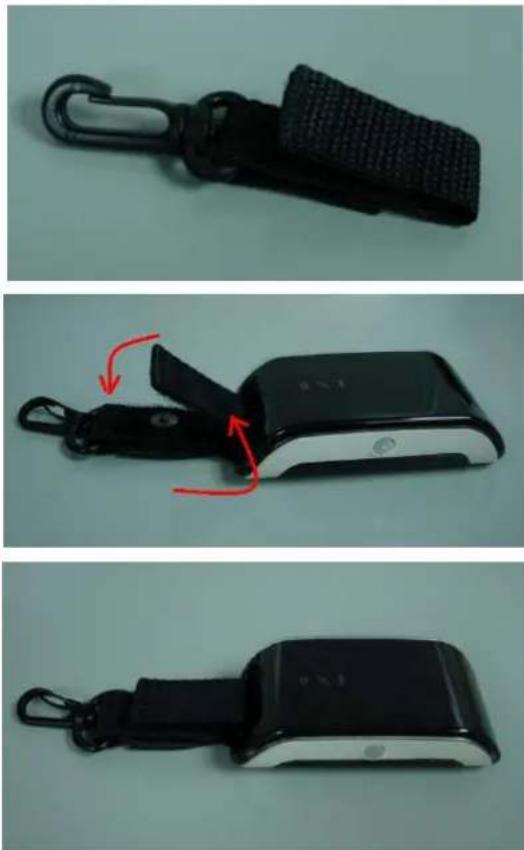
natural_image
Three-step photo sequence showing a black wrist strap device being adjusted, with red arrows indicating motion (no text or symbols)Install Battery
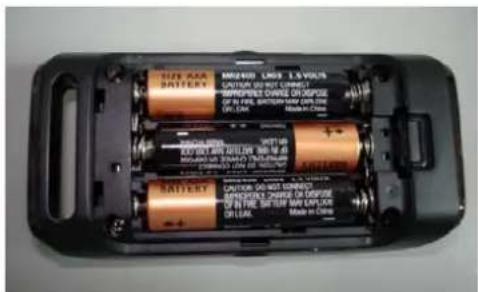
- Open the bottom cover to reveal battery compartment

text_image
① AAA ② AAA ③ AAA ④ AAAPlease note the orientation of each battery is clearly marked.
Incorrect battery placement may damage the device.
AGL3080 GPS Photo Tracker User Manual V2.2
-
- Insert Three (3) AAA Size Batteries
-
- Close the Battery Cover
text_image
BUT-10A BATTERY MOUNTED LIME 1.5 VOLTUS CUTION OR NOT CONNECT INTROPEMENT CABLE OR SWITCH OF IN RAIL SWITCH ON CAN ON: LAM Made in China SOLUTION EXTRA## AND SWITCH POTENTIAL ON AND SWITCH POTENTIAL ON AND SWITCH SALARY NOTIFIED ON SWITCH POTENTIAL ON SWITCH OR SWITCH OF IN RAIL SWITCH ON SWITCH OR SWITCH Made in ChinaEither regular or rechargeable batteries can be used.

natural_image
Interior view of a battery pack with three batteries, one fully open and one partially filled (no visible text or symbols)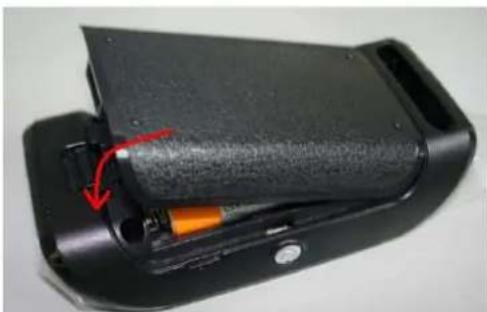
natural_image
Close-up of a black mechanical device with internal components and a red arrow indicating a specific part (no text or symbols visible)AGL3080 GPS Photo Tracker User Manual V2.2
Trouble Shooting
GPS Status LED stays on / Poor GPS signal reception
Please kindly try below two countermeasures to see if the issue will be solved.
Solution One:
Entering "Set-Up" mode: At power off status, press "Power ON" and "Mark" buttons simultaneously for 5 seconds, and then the three LED will flash 5 times and stop at light on mode. You can release the buttons when 3 LED are all on.
Clear Disk Function: Hold "Mark" button for 5 seconds to all 3 LED lights blink sequentially, then release the button to clear disk storage space.
Solution 2: Upgrade AGL3080 V2.3 firmware into AGL3080.
Missing or lost GPS log file
Battery can not be removed while the AGL3080 is still turned on and functioning. If this happened, the power to the device will be out. This power outage will cause the logged GPS data not being properly saved and thus permanently lost. Please exercise caution not to open the battery compartment to remove or change the battery while the AGL3080 is still on and functioning to avoid losing logged GPS data.
Battery operating time too short
Batteries vary a lot in quality, affecting the AGL3080's operating time. Please make sure to use quality batteries. We recommend 900 mAh batteries. When using the AGL3080 in a cold environment, please use Ni-MH batteries.
Can not turn on the AGL3080
The battery contact may be poor or the battery power level may be too low. This may happen when the AGL3080 was not used for a long time. The leakage in batteries drained the battery power. When not using the AGL3080, please take the batteries out and store them properly to maintain the battery's power level. If the batteries are too old, replace with new ones.
Hardware Specification
| GPS | |
| Chipset SiRF Star III high performance low power GPS receiver IC | |
| Frequency L1 1,575.42 MHz | |
| Channels 20 parallel tracking channels | |
| GPS Tracking Sensitivity - 158 dBm | |
| LED Indicators | |
| Power On/Off Amber | |
| GPS Fix Green | |
| Memory Full Red | |
| General | |
| Storage Capacity 128 Mbytes (1 Gbit NAND flash memory) | |
| Interface USB 2.0 full speed | |
| Battery 3 AAA standard size batteries | |
| Operating Time | >15 hours continuous operation (3 AAA 900 mAh rechargeable battery @ 25°C) |
| Operating Temperature | -20~50 °C |
| Storage Temperature | -30~80 °C |
| Humidity 95 % non-condensing | |
| Dimension | 90 mm × 45 mm × 23 mm |
| Weight ~50 g (not including battery) | |
Package Contents
Each box contains the following items:
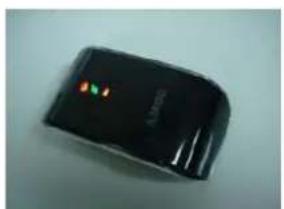
natural_image
Black electronic device with a small illuminated indicator on its side (no visible text or symbols)AGL3080 Hanging Strip & USB Cable

natural_image
Two black USB devices with coiled cables, one attached to a strap (no text or symbols visible)CD-ROM (Manual, Software Tools)

text_image
Snd Photo Tracker - AGL3666 AMODAGL3080 GPS Photo Tracker User Manual V2.2
Certifications
CE, FCC, VCCI certified, RoHS Compliant
FCC Notices This Device complies with Part 15 of the FCC rules; operation is subject to the following two conditions.
.(1) This device may not cause harmful interference and,
.(2) This device must accept any interference received.
Trademarks and Copyrights
Windows is registered trademark of Microsoft Corporation.
Mac is registered trademark of Apple Inc.
JetPhoto is registered trademark and copyrighted by Atomix Technologies Corp.
GPSVisualizer is registered and copyrighted by Adam Schneider, Schneider@pobox.com
The AGL3080 and AMOD is registered trademark of AMOD Technologies Co., Ltd.


AMOD Technology Co., Ltd. 8F, 46, Lane 10, Jihu Road, Neihu Taipei, Taiwan, 114, R.