EF 28-300mm f/3.5-5.6L IS USM - Lens CANON - Free user manual and instructions
Find the device manual for free EF 28-300mm f/3.5-5.6L IS USM CANON in PDF.


User questions about EF 28-300mm f/3.5-5.6L IS USM CANON
0 question about this device. Answer the ones you know or ask your own.
Ask a new question about this device
Download the instructions for your Lens in PDF format for free! Find your manual EF 28-300mm f/3.5-5.6L IS USM - CANON and take your electronic device back in hand. On this page are published all the documents necessary for the use of your device. EF 28-300mm f/3.5-5.6L IS USM by CANON.
USER MANUAL EF 28-300mm f/3.5-5.6L IS USM CANON
Thank you for purchasing a Canon product.
The Canon EF28-300mm f/3.5-5.6L IS USM lens is a powerful high-performance zoom lens for EOS cameras equipped with an Image Stabilizer, and covering a wide range of focal lengths from wide angle to telephoto.
- "IS" stands for Image Stabilizer.
- "USM" stands for Ultrasonic Motor.
Conventions used in this instruction

Warning to prevent lens or camera malfunction or damage.

Supplementary notes on using the lens and taking pictures.
Features
- The Image Stabilizer gives the equivalent effect of a shutter speed three stops faster*. The lens also has a second image stabilizer mode that is optimized for following shots of moving subjects.
- Aspheric and UD lens elements for truly exceptional imaging capability.
- Ultrasonic motor (USM) for quick and quiet autofocusing.
- Manual focusing is available after the subject comes into focus in autofocus mode (ONE SHOT AF).
- A truly round aperture hole results in a nicer background blur.
- Adjustable zoom ring touch lets you lock at any focal length.
- Tight seal structure ensures excellent dust-proof and drip-proof performance.
* Based on [1/focal length] second. Generally, it requires a shutter speed [1/focal length] second or faster to prevent camera shake.
ENG-1

Safety Precautions

Safety Precautions
- Do not look at the sun or a bright light source through the lens or camera. Doing so could result in loss of vision. Looking at the sun directly through the lens is especially hazardous.
- Whether it is attached to the camera or not, do not leave the lens under the sun without the lens cap attached. This is to prevent the lens from concentrating the sun's rays, which could cause a fire.
Handling Cautions
- If the lens is taken from a cold environment into a warm one, condensation may develop on the lens surface and internal parts. To prevent
condensation in this case, first put the lens into an airtight plastic bag before taking it from a cold to warm environment. Then take out the lens after it has warmed gradually. Do the same when taking the lens from a warm environment into a cold one. - Do not leave the lens in excessive heat such as in a car in direct sunlight. High temperatures can cause the lens to malfunction.
This device complies with Part 15 of the FCC Rules. Operation is subject to the following two conditions: (1) This device may not cause harmful interference, and (2) this device must accept any interference received, including interference that may cause undesired operation.
Do not make any changes or modifications to the equipment unless otherwise specified in the instructions. If such changes or modifications should be made, you could be required to stop operation of the equipment.
This equipment has been tested and found to comply with the limits for a class B digital device, pursuant to part 15 of the FCC Rules.
These limits are designed to provide reasonable protection against harmful interference in a residential installation. This equipment generates, uses and can radiate radio frequency energy and, if not installed and used in accordance with the instructions, may cause harmful interference to radio communications.
However, there is no guarantee that interference will not occur in a particular installation. If this equipment does cause harmful interference to radio or television reception, which can be determined by turning the equipment off and on, the user is encouraged to try to correct the interference by one or more of the following measures:
- Reorient or relocate the receiving antenna.
- Increase the separation between the equipment and receiver.
- Consult the dealer or an experienced radio/TV technician for help.
This Class B digital apparatus complies with Canadian ICES-003.

Precautions for using the lens with the EOS-1N RS
When shooting with this lens attached to an EOS-1N RS, use -2/3 or -1/2 step exposure compensation.
ENG-2
Nomenclature

text_image
Hood mount (→ 12) Filter mounting thread (→ 12) Canon Zoom ring (→ 6) Focusing ring (→ 5) Tripod mount (→ 11) Orientation lock knob (→ 11) Zoom touch adjustment ring (→ 6) Zoom position index (→ 6) Focus mode switch (→ 5) Focusing distance range selection switch (→ 5) Distance scale (→ 10) Rubber ring (→ 4) Contacts (→ 4) Lens mount index (→ 4) Image stabilizer mode selector switch (→ 7) Image stabilizer switch (→ 7)For detailed information, reference page numbers are provided in parentheses ( **).
ENG-3
1. Mounting and Detaching the Lens
See your camera's instructions for details on mounting and detaching the lens.
!

natural_image
Technical line drawing of a mechanical component with concentric rings and mounting holes (no text or symbols)
natural_image
Technical line drawing of a mechanical component with no visible text or symbols• After detaching the lens, place the lens with the rear end up to prevent the lens surface and electrical contacts from getting scratched.
- If the contacts get soiled, scratched, or have fingerprints on them, corrosion or faulty connections can result. The camera and lens may not operate properly.
- If the contacts get soiled or have fingerprints on them, clean them with a soft cloth.
- If you remove the lens, cover it with the dust cap. To attach it properly, align the lens mount index and the index of the dust cap as shown in the diagram, and turn clockwise. To remove it, reverse the order.
1
The lens mount has a rubber ring for enhanced water- and dust-resistance. The rubber ring may cause slight abrasions around the camera's lens mount, but this will not cause any problems. If the rubber ring becomes worn, it is replaceable by a Canon Service Center at cost.
2. Setting the Focus Mode
natural_image
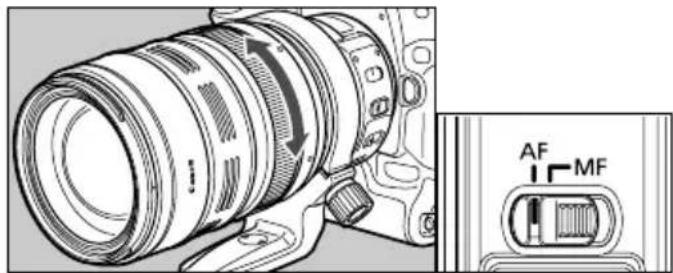
Technical line drawing of a DSLR camera with attached control panel (no text or symbols)To shoot in autofocus (AF) mode, set the focus mode switch to AF.
To use only manual focusing (MF), set the focus mode switch to MF, and focus by turning the focusing ring. The focusing ring always works, regardless of the focus mode.

After autofocusing in ONE SHOT AF mode, focus manually by pressing the shutter button halfway and turning the focusing ring. (Full-time manual focus)
3. Switching the Focusing Distance Range

text_image
0.7m-∞ 2.5m-∞ Ar MFYou can set the focusing distance range to 0.7 m/2.3 ft. to infinity or 2.5 m/8.2 ft. to infinity. By setting the suitable focusing distance range, the actual autofocusing time can be shorter.

If you autofocus outside the set focusing distance range, the lens may stop focusing at the start of the focusing range; however, this is not a malfunction. Press the shutter release button halfway again.
4. Zooming

natural_image
Technical line drawing of a DSLR camera lens with no visible text or symbolsMove the zoom ring forward or backward to zoom.

- Be sure to finish zooming before focusing. Zooming after focusing can affect the focus.
- To prevent unintended zooming when not shooting, be careful not to set the zooming touch too loose.
5. Adjusting Zooming Resistance

text_image
SMOOTH TIGHT 28You can adjust the zooming "touch" (resistance) as needed by holding the focusing ring in place and turning the adjustment ring.

Turn the adjustment ring towards the word SMOOTH to reduce the zooming touch, or towards TIGHT to increase it. To lock the zoom ring in place, turn the adjustment ring towards TIGHT until it stops.
6. Image Stabilizer Settings
You can use the image stabilizer in AF or MF mode.

text_image
STABILIZER ON OFF STABILIZER MODE 1 21 Set the STABILIZER switch to ON.
- If you are not going to use the image stabilizer function, set the switch to OFF
text_image
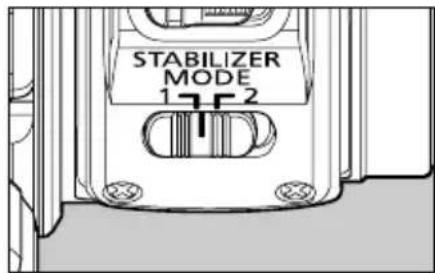
STABILIZER MODE 17-22 Select the stabilizer mode.
• MODE 1: Corrects vibrations in all directions. It is mainly effective for shooting still subjects.
- MODE 2: It compensates for vertical camera shake during following shots in a horizontal direction, and compensates for horizontal camera shake during following shots in a vertical direction.
natural_image
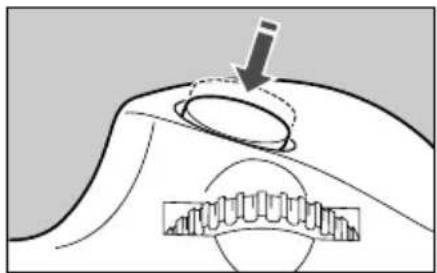
Diagram of a mechanical component with a downward arrow and internal gear-like structure (no text or symbols)3 When you press the shutter button halfway, the Image Stabilizer will start operating.
• Make sure the image in the viewfinder is stable, then press the shutter button the rest of the way down to take the picture.
7. Tips on Using the Image Stabilizer
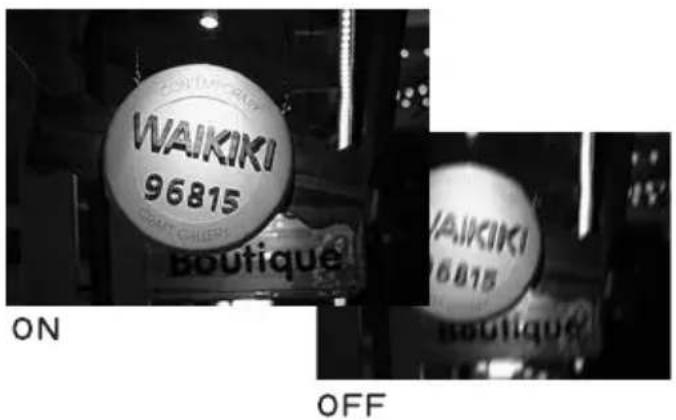
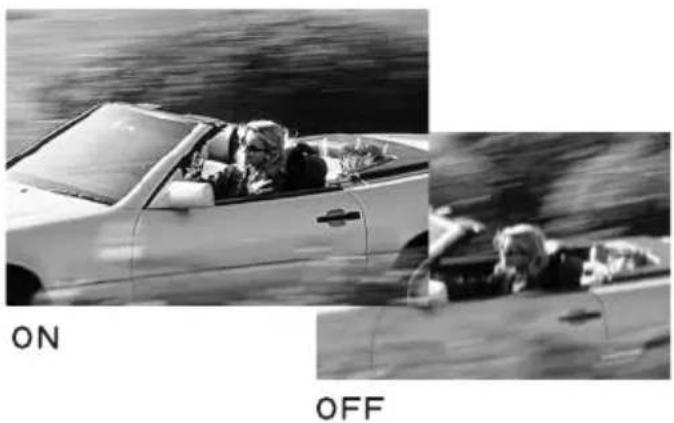
The image stabilizer in this lens is effective for hand-held shots under the following conditions.
● MODE 1 ● MODE 2
text_image
WAIKIKI 96815 BOUTIQUE ON OFF WAIKIKI 96815 BOUTIQUE- In semi-darkened areas such as indoors or outdoors at night.
- In locations where flash photography is prohibited, such as art museums and theater stages.
• In situations where your footing is uncertain. - In situations where fast shutter settings cannot be used.
natural_image
Black-and-white photo of a person driving a car with visible dynamics, including on/off states (no text or symbols)- When panning subjects in motion.
Tips on Using the Image Stabilizer

- The Image Stabilizer cannot compensate for a blurred shot caused by a subject that moved.
- Set the STABILIZER switch to when you are taking pictures using the Bulb setting (long exposures). If the STABILIZER switch is set to ON the image stabilizer function may introduce errors.
- The Image Stabilizer might not be fully effective in the following cases:
- You shoot while riding on a bumpy road.
- You move the camera dramatically for a panning shot in Mode 1.
- You shoot using techniques other than following shots in Mode 2.
- The Image Stabilizer consumes more power than normal shooting, so fewer shots can be taken if you use the function.
- The image stabilizer operates for about two seconds even when your finger is off the shutter button. Do not remove the lens while the stabilizer is in operation. This will cause a malfunction.
- With the EOS-1V/HS, 3, ELAN 7E/ELAN 7/30/33, ELAN 7NE/ELAN 7N/30V/33V, ELAN II/ELAN IIE/50/50E, REBEL 2000/300, IX, and D30, the Image Stabilizer will not work during self-timer operation.

- When you use a tripod, the Image Stabilizer should be turned off to save battery power.
- The stabilizer is equally effective for hand-held photography and photography with a monopod.
- The image stabilizer function also operates when the lens is used with an Extension Tube EF12 II or EF25 II.
- Pictures may look distorted after being taken depending on the camera, but this doesn't affect shooting.
- If you set the camera's Custom Function to change the assigned button to operate the AF, the Image Stabilizer will operate when you press the newly assigned AF button.
8. Infinity Compensation Mark

text_image
Infinity Compensation Mark 30 10 L∞ ft m Distance indexTo compensate for shifting of the infinity focus point that results from changes in temperature. The infinity position at normal temperature is the point at which the vertical line of the L mark is aligned with the distance indicator on the distance scale.

For accurate manual focusing on subjects at infinity distance, look through the viewfinder while rotating the focusing ring.
9. Infrared Index

text_image
5 30 5 10 L∞ ft m 300 100 50 35 28The infrared index corrects the focus setting when using monochrome infrared film. Focus on the subject manually, then adjust the distance setting by moving the focusing ring to the corresponding infrared index mark. The intermediate markers between 300 and 100 are 200mm and 135mm, and the marker between 100 and 50 is 70mm.

Some EOS cameras cannot use infrared film. See the instructions for your EOS camera.

- The infrared index position is based on a wavelength of 800 nm.
- The compensation amount differs depending on the focal length. Use the indicated focal length as a guide when setting the compensation amount.
- Be sure to observe the manufacturer's instructions when using infrared film.
- Use a red filter when you take the picture.
ENG-10
10. Using the Tripod Mount
Adjusting the Revolving Mount
You can loosen the orientation lock-knob on the tripod mount to allow it to rotate as needed to fit a particular camera model for switching between vertical and horizontal positions.
Detaching
Use the following procedures to remove and attach the tripod mount.
natural_image
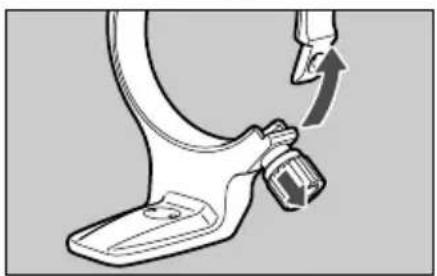
Mechanical component diagram showing a curved arm and attached bracket with a directional arrow (no text or symbols)1 Turn the locking knob counterclockwise until it becomes loose (about 3 turns), and pull the knob in the direction of the arrow to release the collar.
natural_image
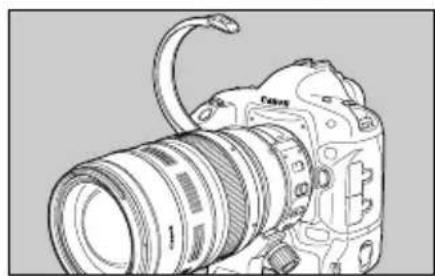
Line drawing of a DSLR camera with lens and external strap (no text or symbols)2 With the collar open, remove the tripod mount.

natural_image
Technical line drawing of a mechanical assembly with no visible text or symbols3 To install, while pulling the locking knob, bring the collar to the original position, and tighten the locking knob securely.

The tripod collar can be attached to or detached from the lens while the lens is attached to the camera.
11. Hood
natural_image
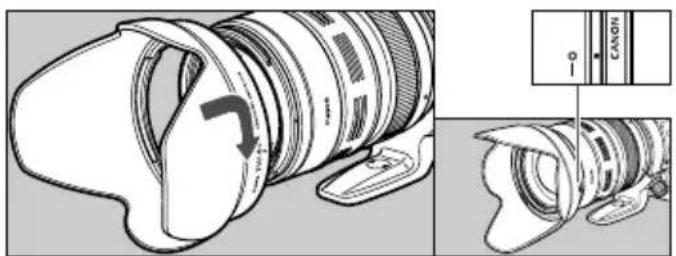
Technical illustration of a camera lens assembly showing front and side views (no text or symbols)The EW-83G hood can keep unwanted light out of the lens, and also protects the lens from rain, snow, and dust.
To attach the hood, align the hood's attachment position mark with the red dot on the front of the lens, then turn the hood as shown by the arrow until the lens' red dot is aligned with the hood's stop position mark.
The hood can be reverse-mounted on the lens for storage.

- Part of the picture may be blocked if the hood is not attached properly.
- When attaching or detaching the hood, grasp the base of the hood to turn it. To prevent deformation, do not grasp the rim of the hood to turn it.
12. Filters (Sold Separately)
You can attach filters to the filter mounting thread on the front of the lens.

- Only one filter may be attached.
- If you need a polarizing filter, use the Canon Circular Polarizing Filter (77mm).
- To adjust the polarizing filter, first remove the lens hood.
13. Extension Tubes (Sold Separately)
You can attach Extension Tube EF12 II or EF25 II for magnified shots. The shooting distance and magnification are shown below.
| Camera-to-Subject Distance (mm) | Magnification | ||||
| Near Far | Near Far | Far | |||
| EF12 II | 28mm | 265 277 | 0.50×0.43× | ||
| 300mm | 604 7594 | 0.39×0.04× | |||
| EF25 II | 28mm | incompatible | |||
| 300mm | 541 3730 | 0.50×0.09× | |||

Manual focusing is recommended for accurate focusing.
Specifications
| Focal Length/Aperture 28 – 300 mm f/3.5 – 5.6 | |
| Lens Construction 16 groups, 23 elements | |
| Minimum Aperture f/22 – 40 * | |
| Angle of View | Diagonal: 75° – 8° 15' Vertical: 46° – 4° 35' Horizontal: 65° – 6° 50' |
| Min. Focusing Distance 0.7 m/2.3 ft. | |
| Max. Magnification | 0.3 × (at 300 mm) |
| Field of View | approx. 436 × 651 – 81 × 121 mm/17.2 × 25.6 – 3.2 × 4.8 inch (at 0.7 m) |
| Filter Diameter 77 mm/2.8 inch | |
| Max. Diameter and Length | 92 × 184 mm/3.6 × 7.2 inch |
| Weight 1670 g/58.9 oz | |
| Hood | EW-83G |
| Lens Cap | E-77U |
| Case | LZ1324 |
* Applies to 1/3-stop increments. With 1/2-stop increments, it will be f/22-38.
- The lens length is measured from the mount surface to the front end of the lens. Add 21.5 mm when including the lens cap and dust cap.
- The size and weight listed are for the lens only, except as indicated.
- The EF1.4X II/EF2X II extenders cannot be used with this lens. In addition, there is no size available among 250D/500D close-up lenses.
- Aperture settings are specified on the camera. The camera automatically compensates for variations in the aperture setting when the camera is zoomed in or out.
- All data listed is measured according to Canon standards.
- Product specifications and appearance are subject to change without notice.
ENG-14
Canon
© CANON INC. 2004CT1-8515-003