DS-2CE10KF3T-LS - Security Camera Hikvision - Free user manual and instructions
Find the device manual for free DS-2CE10KF3T-LS Hikvision in PDF.


User questions about DS-2CE10KF3T-LS Hikvision
0 question about this device. Answer the ones you know or ask your own.
Ask a new question about this device
Download the instructions for your Security Camera in PDF format for free! Find your manual DS-2CE10KF3T-LS - Hikvision and take your electronic device back in hand. On this page are published all the documents necessary for the use of your device. DS-2CE10KF3T-LS by Hikvision.
USER MANUAL DS-2CE10KF3T-LS Hikvision
Thank you for purchasing our product. If there are any quesons, or requests, do not hesitate to contact the dealer.
This manual applies to the models below:
| Model |
| DS-2CE10KF3T-LS |
| DS-2CE10KF3T-LSYE |
| DS-2CE12KF3T-LS |
| DS-2CE12KF3T-LSYE |
| DS-2CE72KF3T-LS |
| DS-2CE72KF3T-LSYE |
This manual may contain several technical mistakes or prinng errors, and the content is subject to change without noce. The updates will be added to the new version of this manual. We will readily improve or update the products or procedures described in the manual.
About this Document
- This Document includes instrucons for using and managing the Product. Pictures, charts, images and all other informaon hereinaer are for descripon and explanaon only.
- The informaon contained in the Document is subject to change, without noce, due to rmware updates or other reasons. Please nd the latest version of the Document at the Hikvision website (hps://www.hikvision.com). Unless otherwise agreed, Hangzhou Hikvision Digital Technology Co., Ltd. or its aliates (hereinaer referred to as "Hikvision") makes no warranes, express or implied.
- Please use the Document with the guidance and assistance of professionals trained in supporting the Product.
About this Product
This product can only enjoy the aer-sales service support in the country or region where the purchase is made.
Acknowledgment of Intellectual Property Rights
- Hikvision owns the copyrights and/or patents related to the technology embodied in the Products described in this Document, which may include licenses obtained from third pares.
- Any part of the Document, including text, pictures, graphics, etc., belongs to Hikvision. No part of this Document may be excerpted, copied, translated, or modified in whole or in part by any means without written permission.
- and other Hikvision's trademarks and logos are the properes of Hikvision in various jurisdicons.
- Other trademarks and logos menoned are the properes of their respective owners.
LEGAL DISCLAIMER
- TO THE MAXIMUM EXTENT PERMITTED BY APPLICABLE LAW, THIS DOCUMENT AND THE PRODUCT DESCRIBED, WITH ITS HARDWARE, SOFTWARE AND FIRMWARE, ARE PROVIDED "AS IS" AND "WITH ALL FAULTS AND ERRORS". HIKVISION MAKES NO WARRANTIES, EXPRESS OR IMPLIED, INCLUDING WITHOUT LIMITATION, MERCHANTABILITY, SATISFACTORY QUALITY, OR FITNESS FOR A PARTICULAR PURPOSE. THE USE OF THE PRODUCT BY YOU IS AT YOUR OWN RISK. IN NO EVENT WILL HIKVISION BE LIABLE TO YOU FOR ANY SPECIAL, CONSEQUENTIAL, INCIDENTAL, OR INDIRECT DAMAGES, INCLUDING, AMONG OTHERS, DAMAGES FOR LOSS OF BUSINESS PROFITS, BUSINESS INTERRUPTION, OR LOSS OF DATA, CORRUPTION OF SYSTEMS, OR LOSS OF DOCUMENTATION, WHETHER BASED ON BREACH OF CONTRACT, TORT (INCLUDING NEGLIGENCE), PRODUCT LIABILITY, OR OTHERWISE, IN CONNECTION WITH THE USE OF THE PRODUCT, EVEN IF HIKVISION HAS BEEN ADVISED OF THE POSSIBILITY OF SUCH DAMAGES OR LOSS.
- YOU ACKNOWLEDGE THAT THE NATURE OF THE INTERNET PROVIDES FOR INHERENT SECURITY RISKS, AND HIKVISION SHALL NOT TAKE ANY RESPONSIBILITIES FOR ABNORMAL OPERATION, PRIVACY LEAKAGE OR OTHER DAMAGES RESULTING FROM CYBER-ATTACK, HACKER ATTACK, VIRUS INFECTION, OR OTHER INTERNET SECURITY RISKS; HOWEVER, HIKVISION WILL PROVIDE TIMELY TECHNICAL SUPPORT IF REQUIRED.
- YOU AGREE TO USE THIS PRODUCT IN COMPLIANCE WITH ALL APPLICABLE LAWS, AND YOU ARE SOLELY RESPONSIBLE FOR ENSURING THAT YOUR USE
CONFORMS TO THE APPLICABLE LAW. ESPECIALLY, YOU ARE RESPONSIBLE, FOR USING THIS PRODUCT IN A MANNER THAT DOES NOT INFRINGE ON THE RIGHTS OF THIRD PARTIES, INCLUDING WITHOUT LIMITATION, RIGHTS OF PUBLICITY, INTELLECTUAL PROPERTY RIGHTS, OR DATA PROTECTION AND OTHER PRIVACY RIGHTS. YOU SHALL NOT USE THIS PRODUCT FOR ANY PROHIBITED END-USES, INCLUDING THE DEVELOPMENT OR PRODUCTION OF WEAPONS OF MASS DESTRUCTION, THE DEVELOPMENT OR PRODUCTION OF CHEMICAL OR BIOLOGICAL WEAPONS, ANY ACTIVITIES IN THE CONTEXT RELATED TO ANY NUCLEAR EXPLOSIVE OR UNSAFE NUCLEAR FUEL-CYCLE, OR IN SUPPORT OF HUMAN RIGHTS ABUSES.
- IN THE EVENT OF ANY CONFLICTS BETWEEN THIS DOCUMENT AND THE APPLICABLE LAW, THE LATTER PREVAILS.
© Hangzhou Hikvision Digital Technology Co., Ltd. All rights reserved.
Regulatory Informaon
EU Compliance Statement

This product and - if applicable - the supplied accessories too are marked with "CE" and comply therefore with the applicable harmonized European
standards listed under the Direcve 2014/30/EU (EMCD) and Direcve 2011/65/EU (RoHS).
Note: The products with the input voltage of within 50 to 1000 VAC or 75 to 1500 VDC comply with Direcve 2014/35/EU (LVD), and the rest products comply with Direcve 2001/95/EC (GPSD). Please check the specific power supply informaon for reference.
Direcve 2012/19/EU (WEEE Direcve): Products marked with this symbol cannot be disposed of as unsorted municipal waste in the European Union. For proper recycling, return this product to your local supplier upon the purchase of equivalent
new equipment, or dispose of it at designated collecon points. For more informaon see:
www.recyclethis.info.

Direcve 2006/66/EC and its amendment 2013/56/EU (Battery Directive): This product contains a baery that cannot be disposed of as unsorted municipal waste in the European Union. See the product
documentaon for speci baery informaon. The baery is marked with this symbol, which may include leering to indicate cadmium (Cd), lead (Pb), or mercury (Hg). For proper recycling, return the baery to your supplier or to a designated collecon point. For more informaon see: www.recyclethis.info.
Industry Canada ICES-003 Compliance
This device meets the CAN ICES-3 (A)/NMB-3(A) standards requirements.
KC
This is a class A product. In a domesc environment this product may cause radio interference in which case the user may be required to take adequate measures.
Safety Instrucon
These instrucons are intended to ensure that user can use the product correctly to avoid danger or property loss.
The precauon measure is divided into “Warnings” and “Cauons”.
Warnings: Serious injury or death may occur if any of the warnings are neglected.
Cauons: Injury or equipment damage may occur if any of the cauons are neglected.
 |  |
| Warnings Follow these safeguards to prevent serious injury or death. | Cauons Follow these precautions to prevent potential injury or material damage. |

Warnings
- In the use of the product, you must be in strict compliance with the electrical safety regulations of the naon and region.
- Input voltage should meet both the SELV (Safety Extra Low Voltage) and the Limited Power Source with 12 VDC according to the IEC60950-1 and IEC62368-1 standard. Refer to technical speciaons for detailed informaon.
- The socket-outlet shall be installed near the equipment and shall be easily accessible.
- An all-pole mains switch shall be incorporated in the electrical installaon of the building.
- Do not connect mulple devices to one power adapter to avoid over-heang or a re hazard caused by overload.
- Make sure that the plug is rmly connected to the power socket.
- If smoke, odor or noise rise from the device, turn o the power at once and unplug the power cord, and then contact the service center.
- Never aempt to disassemble the camera by unprofessional personal.

Cauons
- No naked ame sources, such as lighted candles, should be placed on the equipment.
- Install the equipment according to the instrucons in this manual.
- To prevent injury, this equipment must be securely aached to the oor/wall in accordance with the installaon instrucons.
- Do not drop the camera or subject it to physical shock.
-
Do not touch senor modules with ngers.
-
Do not place the camera in extremely hot, cold (the operang temperature shall be -40°C to 60°C), dusty or damp locaons, and do not expose it to high electromagnec radiaon.
- If cleaning is necessary, use clean cloth with a bit of ethanol and wipe it gently.
- Do not aim the camera at the sun or extra bright places.
- The sensor may be burned out by a laser beam, so when any laser equipment is in using, make sure that the surface of sensor will not be exposed to the laser beam.
- Do not expose the device to high electromagned radiaon or extremely hot, cold, dusty or damp environment.
- To avoid heat accumulaon, good venlaon is required for the operang environment.
- Keep the camera away from liquid while in use for non-water-proof device.
- While in delivery, the camera shall be packed in its original packing, or packing of the same texture.
- The beam of the light at the distance of 200 mm is classified as Risk Group 1 (RG1). Possible hazardous opcal radiaon emied from this product.
- DO NOT stare at operang light source. May be harmful to the eyes.
- Wear appropriate eye protecon or turn on the supplement light only at a safe distance (0.25 m) or in the area that is not directly exposed to the light when installing or maintaining the device.

text_image
Risk Group 1 DO NOT stare at operating light source. Possible hazardous optical radiation emitted from this product. Please wear eye protection. Safe distance:0.25m1 Overview of Cables

text_image
Switch Buon 12 VDC Power Cord Video Cable Line In 24 VAC Power CordFigure 1-1 Overview of Cables
Notes:
The cables vary depending on dierent camera models.
2 Installaon
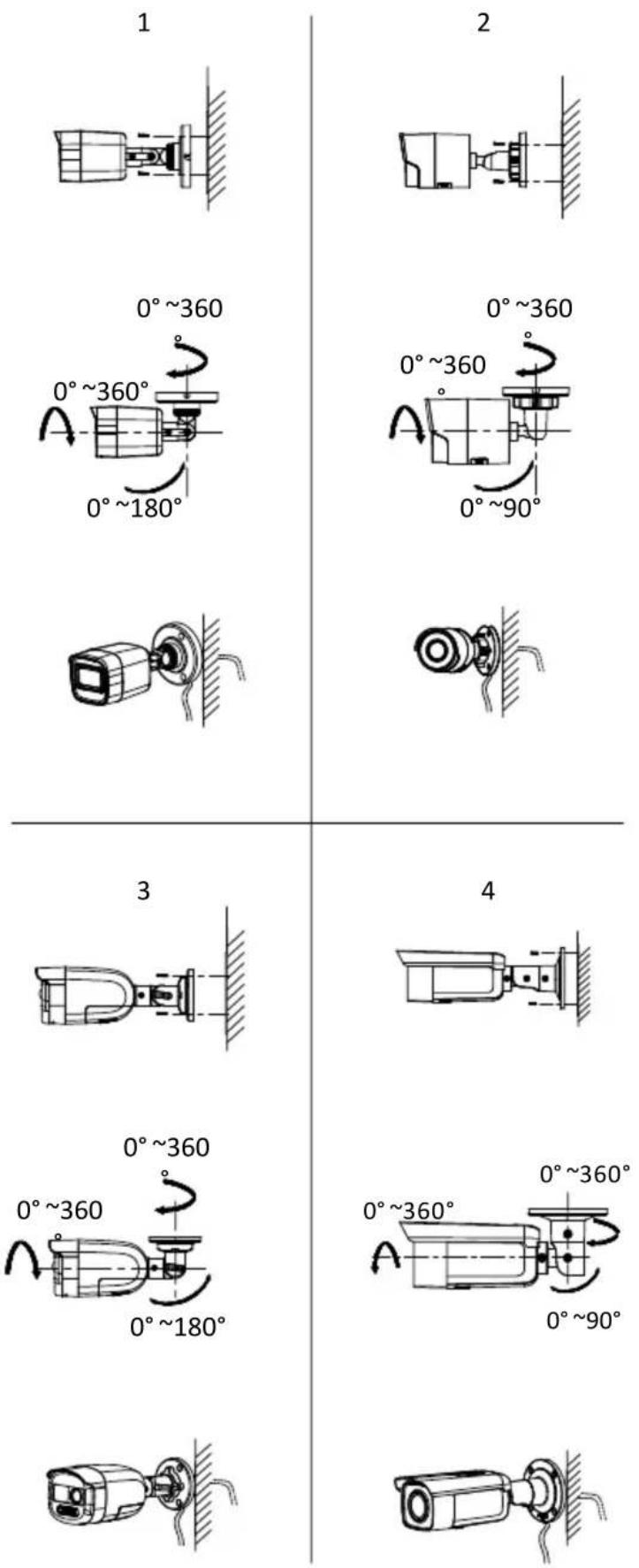
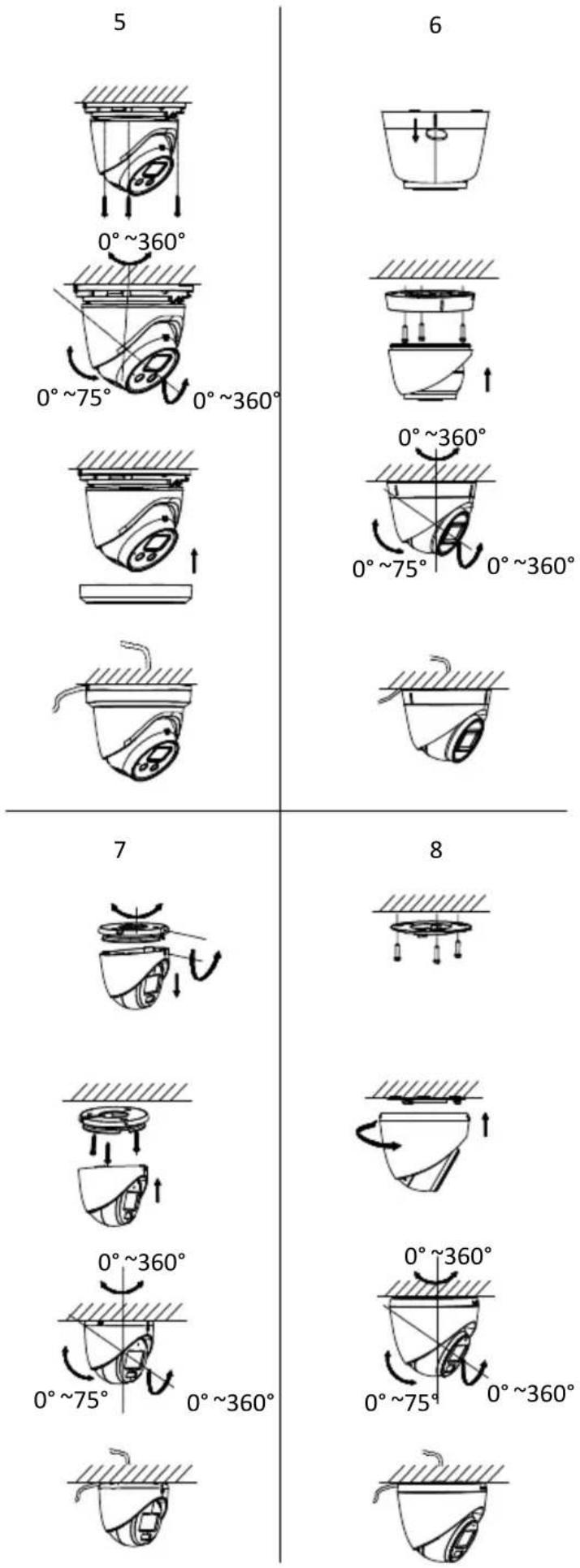
text_image
5 0°~360° 0°~75° 0°~360° 7 8 0°~360° 0°~75° 0°~360° 6 0°~360° 0°~75° 0°~360° 7 8 0°~360° 0°~75° 0°~360°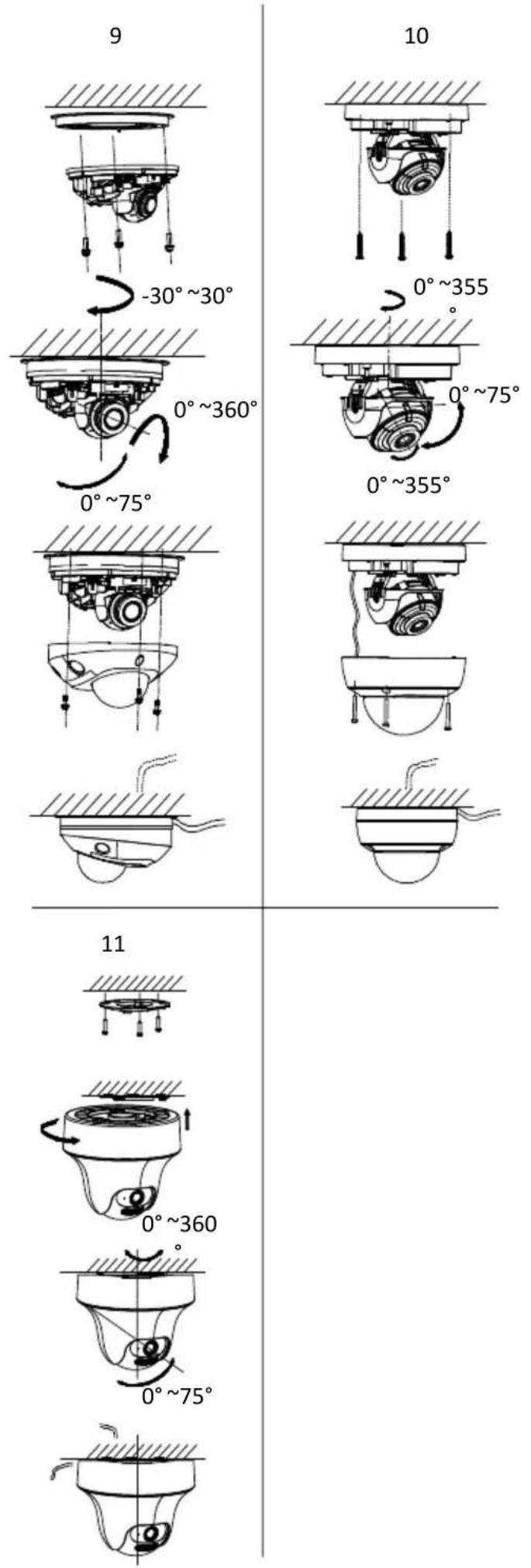
3 Waterproof Measures
If the camera is installed outdoor, you should use the waterproof tapes to waterproof the cables. Otherwise the cables might get wet or a short circuit occurs.
Note:
Waterproof tapes should be purchased separately.
Aer round and connecng the cables, use the waterproof tapes to wrap up the cables. Connected cables and spare cables both should be wrapped up as the gures below.

Figure 3-1 Waterproof Cable
4 Menu Descripon
Please follow the steps below to call the menu.
Note:
The actual display may vary with your camera model.
Steps:
- Connect the camera with the TVI DVR and the monitor, as shown in gure 3-1.

flowchart
graph LR
    A["Camera"] --> B["TVI DVR"]
    B --> C["Monitor"]
Figure 4-1 Connecon
- Power on the camera, TVI DVR, and monitor to view the image on the monitor.
- Click PTZ Control to enter the PTZ Control interface.
- Call the camera menu by clicking ☐ buon or calling preset No. 95.
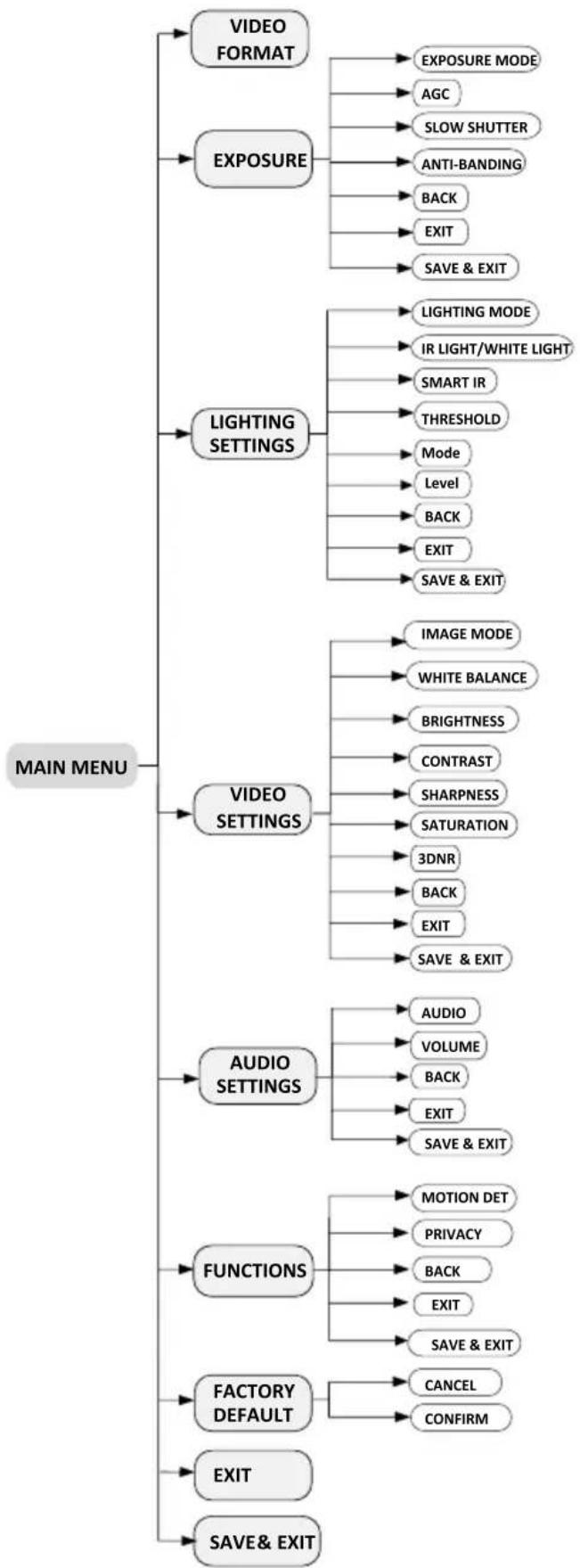
flowchart
graph TD
    A["MAIN MENU"] --> B["VIDEO FORMAT"]
    A --> C["EXPOSURE"]
    A --> D["LIGHTING SETTINGS"]
    A --> E["VIDEO SETTINGS"]
    A --> F["AUDIO SETTINGS"]
    A --> G["FUNCTIONS"]
    A --> H["FACTORY DEFAULT"]
    A --> I["EXIT"]
    A --> J["SAVE & EXIT"]

    B --> B1["EXPOSURE MODE"]
    B --> B2["AGC"]
    B --> B3["SLOW SHUTTER"]
    B --> B4["ANTI-BANDING"]
    B --> B5["BACK"]
    B --> B6["EXIT"]
    B --> B7["SAVE & EXIT"]

    C --> C1["LIGHTING MODE"]
    C --> C2["IR LIGHT/WHITE LIGHT"]
    C --> C3["SMART IR"]
    C --> C4["THRESHOLD"]
    C --> C5["Mode"]
    C --> C6["Level"]
    C --> C7["BACK"]
    C --> C8["EXIT"]
    C --> C9["SAVE & EXIT"]

    D --> D1["IMAGE MODE"]
    D --> D2["WHITE BALANCE"]
    D --> D3["BRIGHTNESS"]
    D --> D4["CONTRAST"]
    D --> D5["SHARPNESS"]
    D --> D6["SATURATION"]
    D --> D7["3DNR"]
    D --> D8["BACK"]
    D --> D9["EXIT"]
    D --> D10["SAVE & EXIT"]

    E --> E1["AUDIO"]
    E --> E2["VOLUME"]
    E --> E3["BACK"]
    E --> E4["EXIT"]
    E --> E5["SAVE & EXIT"]

    F --> F1["MOTION DET"]
    F --> F2["PRIVACY"]
    F --> F3["BACK"]
    F --> F4["EXIT"]
    F --> F5["SAVE & EXIT"]

    G --> G1["CANCEL"]
    G --> G2["CONFIRM"]
Figure 4-2 Main Menu Overview
- Click the direcon buons to control the camera.
1). Click up/down direcon buons to select menu opons.
2). Click Iris + to conrm the selecon.
3). Click le/right direcon buons to adjust the value of the selected opon.
4.1 VIDEO FORMAT
3K@25 fps, 3K@20 fps, 3K@12.5 fps, 3K@10 fps, 4 MP@25 fps, 4 MP@30 fps, 2 MP@25 fps and 2 MP@30 fps are available.
Note:
VIDEO FORMAT may vary with your camera model.
4.2 EXPOSURE
EXPOSURE MODE
You can set the EXPOSURE MODE to GLOBAL, FACE AE, BLC, HLC, WDR, or HLS.
- GLOBAL
GLOBAL refers to the normal exposure mode which adjusts lighng distribuon, variaons, and non-standard processing.
- FACE AE
By enabling Face AE, the camera adjusts the image brightness according to the face brightness, making everyone look beer in the video.
- BLC (Backlight Compensaon)
BLC (Backlight Compensaon) compensates light to the object in the front to make it clear, but this may cause over-exposure of the background where the light is strong.
• HLC (Highlight Compensaon)
HLC stands for highlight compensaon. The camera detects strong spots (over-exposure poron of image) and reduces the brightness of strong spots to improve the overall images.
● WDR (Wide Dynamic Range)
The wide dynamic range (WDR) funcon helps the camera provide clear images even under back light circumstances. When there are both very bright and very dark areas simultaneously in the eld of view, WDR balances the brightness level of the whole image and provides clear detailed images.
- HLS (Highlight Suppression)
It is the same visual eect as the solar eclipse. If the brightness of a part in the image exceeds the threshold, this part will become black. Then whole image can be clear.
AGC (Auto Gain Control)
It optimizes the clarity of the image in poor light conditions. The AGC level can be set to HIGH, MEDIUM, or LOW.
Note:
The noise will be amplied when seng the AGC level.
SLOW SHUTTER
SLOW SHUTTER increases the exposure me on a single frame, which makes a camera more sensitive to the light so it can produce images even in low lux conditions.
Note:
● X16 is not supported when VIDEO FORMAT is 3K.
- -LSYE models do not support SLOW SHUTTER.
ANTI-BANDING
ANTI-BANDING is to prevent the phenomenon of horizontal lines (banding) when photographing images in low frequency light or high brightness environments.
Note:
ANTI-BANDING is not supported when EXPOSURE MODE is FACE AE.
4.3 LIGHTING SETTINGS
LIGHTING MODE
SMART, IR and WHITE LIGHT are available.
SMART/IR
- IR LIGHT
You can turn on/o the IR LIGHT to meet the requirements of dierent circumstances.
- SMART IR
The Smart IR funcon is used to adjust the light to its most suitable intensity, and prevent the image from over exposure.
- D→ N Threshold (Day to Night Threshold)
Day to Night Threshold is used to control the sensitivity of switching the day mode to the night mode. You can set the value from 1 to 9. The larger the value is, the more sensitive the camera is.
- N→ D Threshold (Night to Day Threshold)
Night to Day Threshold is used to control the sensitivity of switching the night mode to the day mode. You can set the value from 1 to 9. The larger the value is, the more sensitive the camera is.
WHITE LIGHT
Under the WHITE LIGHT sub-menu, you can set the mode to OFF or AUTO.
- OFF
Set it to OFF to give up this funcon.
- AUTO
You can set THRESHOLD and LEVEL in this secon.
THRESHOLD
The higher the threshold is, the more sensitive the device is to dark environment.
LEVEL
You can adjust the maximum brightness of supplement light.
MODE
The funcon is to reduce frame rate in low-light environment in order to increase SNR and enhance the brightness of the image.
● MODE1: Turn on the funcon.
● MODE2: Turn o the funcon.
Note:
● MODE is not supported when VIDEO FORMAT is 3K.
- -LSYE models do not support MODE.
4.4 VIDEO SETTINGS
Move the cursor to VIDEO SETTINGS and click Iris+ to enter the submenu. IMAGE MODE, WHITE BALANCE, BRIGHTNESS, CONTRAST, SHARPNESS, SATURATION and 3DNR are adjustable.

IMAGE MODE is used to adjust the image saturation, and you can set it to STD (Standard), HIGH-SAT (High Saturation), or HIGHLIGHT (better indoor or facial details).
WHITE BALANCE
4.5 AUDIO SETTINGS
AUDIO
You can turn on or o the funcon under this sub-menu.
VOLUME
You can adjust the volume level under this sub-menu.
4.6 FUNCTIONS
MOTION DET
MOTION DET refers to moon detecon. With moon detecon feature, moon can be detected in any part of a camera's view. You can congregate full screen or a number of zones in a camera's view where moon is to be detected.
PRIVACY
This funcon allows you to block or mask certain area of a scene to protect personal privacy from being recorded or live viewed. You can turn on/o the PRIVACY to meet your needs.
4.7 FACTORY DEFAULT
Reset all the sengs to factory defaults.
4.8 EXIT
Move the cursor to EXIT and click Iris+ to exit the menu.
4.9 SAVE & EXIT
Move the cursor to SAVE & EXIT and click Iris+ to save the sengs and exit the menu.
UD38037B-A