Impact 702 U86-IB-Re - Vacuum Cleaner VAX - Free user manual and instructions
Find the device manual for free Impact 702 U86-IB-Re VAX in PDF.


User questions about Impact 702 U86-IB-Re VAX
0 question about this device. Answer the ones you know or ask your own.
Ask a new question about this device
Download the instructions for your Vacuum Cleaner in PDF format for free! Find your manual Impact 702 U86-IB-Re - VAX and take your electronic device back in hand. On this page are published all the documents necessary for the use of your device. Impact 702 U86-IB-Re by VAX.
USER MANUAL Impact 702 U86-IB-Re VAX
text_image
702 t started
Let's talk safety

Basic safety precautions
This vacuum cleaner is intended for household use only and NOT for commercial or industrial use.
- Only use the vacuum cleaner indoors on dry surfaces and keep the area your cleaning well lit.
- Keep fingers, hair and loose clothing from moving parts and openings whilst using the vacuum cleaner.
- This appliance can be used by children aged from 8 years and above and persons with reduced physical,
sensory or mental capabilities or lack of experience and knowledge if they have been given supervision or instruction concerning use of the appliance in a safe way and understand the hazards involved. Children shall not pay with the appliance. Cleaning and user maintenance shall not be made by children without supervision.
- Only Vax recommend tools should be used with this vacuum cleaner.

Don'ts
✗ Don't use this vacuum cleaner. If I has been dropped, damaged or left outdoors.
Don't run over the power cord or use vacuum cleaner if the power cord or plug is damaged. Please contact our Customer Care Line on: 0844 4128 455 (Won Fri 8.30am to 6.30pm, Sat 9.00am to 5.00pm).
✗ Don't handle the plug or use the vacuum clearer with wet hands.
Don't vacuum up any flammable or combustible materials (lighter fluid, petrol, kerosene e.c.) or use the vacuum cleaner in an area with explosive vapours or liquid.

Do's
√ Turn off all controls on the vacuum cleaner before disconnecting or connecting the power cord.
√ Always keep the power cord away from the brushes whilst using your vacuum cleaner. After use always wrap the power cord around the cord clips provided.
√ Always make sure both the pre-motor/post motor filters are in place before use.
√ Always switch off the vacuum cleaner before disconnecting or connecting the hose and accessories.
√ Keep all openings clear and free from debris as this may affect the airflow/suction.
√ Always replace the fuse in the plug with a 12amp fuse. Always protect the power cable from heated surfaces and open flames.
√ Use only CE approved 12 and extension cords, nor approved extension cords may overheat. Care should be taken to arrange the extension cord as it can be a trip hazard.
Thank you for buying this Impact 702.
Taking care of your carpets
The Impact 702 is designed to make vacuuming carpets regularly, as effective and efficient as possible and this user guide will help you get the most out of your machine. Maintaining your carpets will ensure they keep their appearance for longer. You've chosen carpets for your home for a reason and Vax will help you take good care of them.
Taking care of your Impact 702
Also inside this guide are instructions on maintaining your new machine, so that it's always ready when you are to tackle your carpets.
Taking care of you
We're here if you need us. Instead of taking me back to the shop, simply visit:
vax.co.uk/support or call:
(UK) 0844 412 8455 (ROI) 1-800 928 308
Monday-Friday 8.30am to 6.30pm, Saturday 9.00am to 5.00pm
Calls are charged at the UK local rate. Before you call we'll need you to have the following information to hand: Your Machine, Your Proof of Purchase or Warranty register on code.
Alternatively, you can write to us at:
Vax Ltd., Kingswood Road, Hampton Lovett, Droitwich, Worcestershire, WR9 0QH, UK

You're home."

Let us know what you think
@VaxUK
Contents

Let's talk safety

Getting to know your machine

Getting started

Using your machine

Taking care of your machine

Let's talk technical

What to do if it goes wrong

Getting in touch

Notes
Initial Setup for normal operation
- Use the base accessories.
a. Shortest nose
b. Extension tube set to shortest prochocable length. - Clean filters installed.
- Dust acceptable empty
- As bloods must be closed
- Variable Power set to Maximum
- Floor heads/toos set to Carpet Mode for carpet cleaning.
- Mechanical Agitation turned ON for carpet capping.
- Floor heads/tools set to hard floor mode for hard floor cleaning.
- Mechanical Agitation turned OFT for hard floor cleaning.
Impact 702
Included with your machine

3 in 1 tool

Pre-motor filter

Post-motor filter
+ Impact 702 Pet

TurboTool

Tool connector
+ Impact 702 Reach

3.2m Stretch rose
Getting to know your machine
text_image
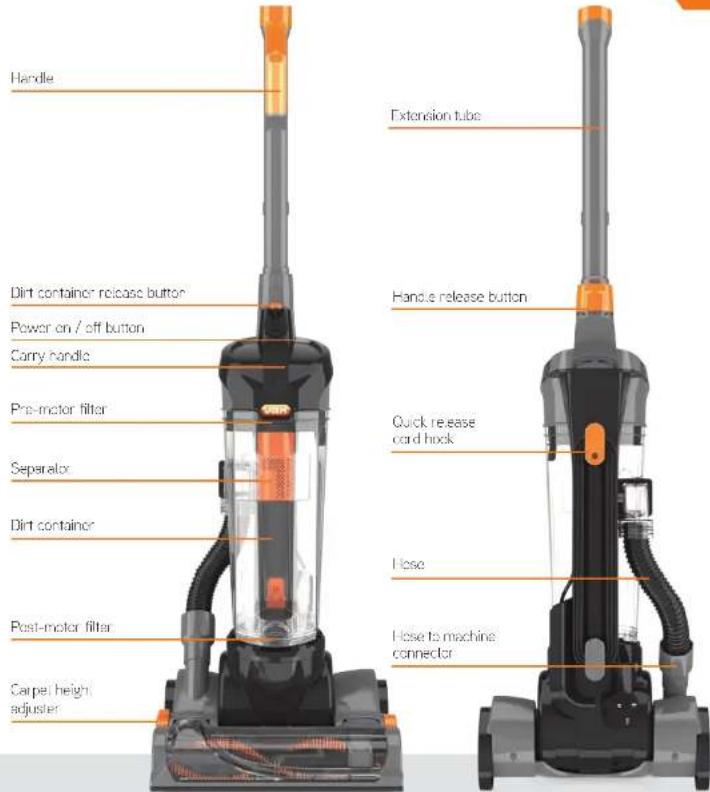
Handle Dirt container release button Power on / off button Carry handle Pre-motor filter Separalox Dirt container Post-motor filter Carpet height adjuster Extension tube Handle release button Quick release card hock Lose Lose to machine connectorTechnical Specification
Name Impact 702 Series
Voltage 220-240V-50Hz
Wangye 700W
Gord length 10m
Weight 6.5kg
Accessories & Consumables
Filter Kit (Type 960)
1-1-134233-00
Belt Kit Type 10
1-1-130669-01
Pro Clearing Kit Type 23
1-1-133326-00
Turbo Tool (selected models only)
3 in 1 Tool
1-1-129167-00
Getting started Using your machine
PLEASE READ 'LET'S TALK SAFETY' AT THE BEGINNING BEFORE USE
Assembling your upright
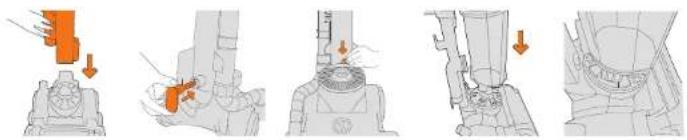
Insert the back panel into the foothead.
Insert the lower cord now take the small
hook into, he hole clip and push it down
at the bottom of the
back panel between the end of the
cord hook and the
machine, to lock the
cord holder in place.
Place the dirt container onto the machine. Ensure the dirt container labs line up with the holes in the post motor filter cover.

Ensure that the back of the d-l container connects to the inlet tube.
Place dirt containers on machine and click into place at the back pond.

Insert the short end of the hose into the tube at the back of the machine and turn to lock.
Push the hose end into the hose to machine connector.

Insert the handle into the top of the back panel until it clicks into place.

handle. Snap TurboTool into position.*
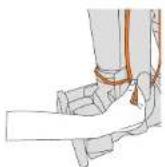
Push the hose end into the hose to machine connector Attach TurboTool clip
Before you begin cleaning
- Always switch off and unplug the vacuum cleaner before connecting or disconnecting the hose/attachments, or removing and emptying the dirt container.
- The vacuum cleaner is equipped with a thermal cut out. If for any reason the vacuum cleaner does overheat the thermostat will automatically turn the vacuum cleaner off. If this happens, switch the vacuum cleaner off and unplug from electrical socket. Remove and empty the dirt container also check the vacuum cleaner for backlogs. Allow the vacuum cleaner to cool for approximately 1 hour (if you have cleaned the filters please wait 24 hours for the filters to fully dry before putting back into the vacuum machine).
- Filters require cleaning at least every 3 months.
- If the vacuum cleaner is blocked, switch oil and unplug before removing the blockage.

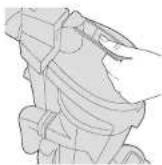
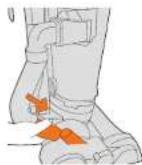
Push the quick release cord hook to one side to release the power cord.

Turn the height adjuster dial backwards for the carpet setting.

Turn the height adjuster dial forwards for the hard floor setting, the floorhood will tilt forward.
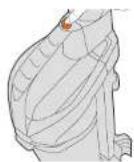
Push the on/off switch to turn machine on.

Place your foot gently on the floorhead and pull the handle backwards to recline the machine.
Using accessories
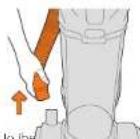
Remove nose end from the floorhead.
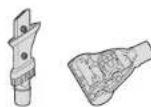
Choose an accessory.
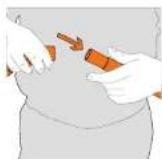
Attach accessory adapter to nose end

If required use tool connector.

Taking care of your machine Taking care of your machine
Emptying and cleaning the dirt container
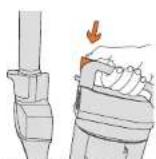
Press dirt container release button to remove the dirt container.
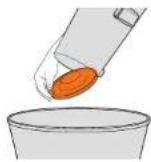
Hold the dirt container over a bin and undip the lock or the bottom of the dirt container, allowing the dirt to fall out.
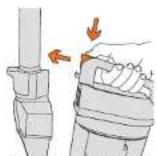
Close the base of the dirt container and click the dirt container back on to the back panel.
Cleaning the shroud
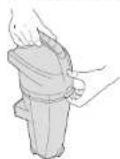
Place fingers under the catch of the bin to dirt container lid and pull to release 1.

Remove the pre-motor filter to allow access to the shroud.

I ap the shroud over the bin to release dirt.
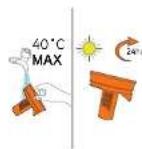
Wash the shroud under
turning water and leave
to dry. The shroud will need
to be placed back correctly.
Cleaning the pre-motor filter
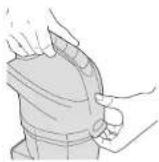
Place fingers under the catch of the dirt container lid and pull to release it.
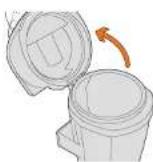
The lid will lift on a hinge.
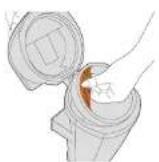
Use the lab on the filter to put, the filter out of it's housing.

Tap the filter over a bin to release dirt.
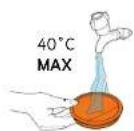
Wash the filter under running water (40 degree max).
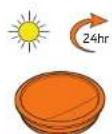
24 hours before placing back in the machine.
Cleaning the post motor filter
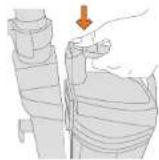
Press dirt container release button to remove the dirt container.
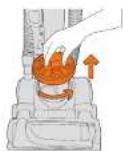
Remove the exhaust cover by turning it courier clockwise and lifting it off. To find the post-motor filter.

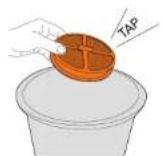
Remove the filter. I leave to fully spray the less-motor filter over a bin to release the dirt. Then replace before using your vacuum.
text_image
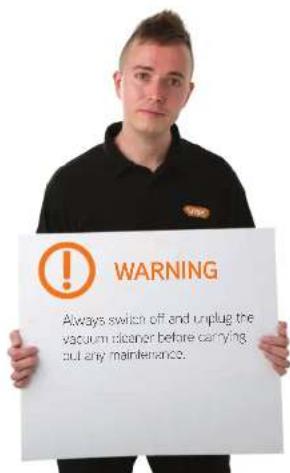
WARNING Always switch off and unplug the vacuum conditioner before carrying out any maintenance.Let's talk technical Let's talk technical
Removing debris
from the brushbar

Switch off your vacuum cleaner at the main socket. Using a pair of scissors cut any hair or debris free from around the brushbar.
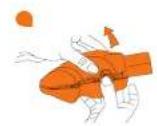
Removing blockages from the TurboTool\*



Vacuuming the stairs

Ensure that the vacuum is upright at the top or bottom of the stairs while vacuuming. Do not lean on the machine while using the hose.
*Not applicable for all modes.
Changing the belt
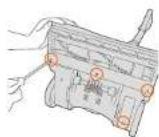


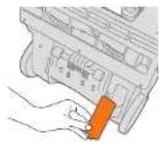
Switch off your vacuum cleaner at the main socket and unplug. Remove the / screws on the bottom of the floorhead.
Squeeze the sides of the floor plate to release it.
Remove the floor plate.
Remove the bed cover.
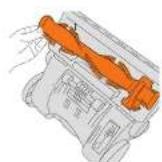
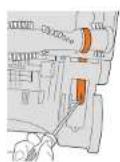

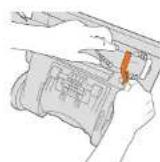
Lift the brush from the machine starting at the side without the belt on.
Unhook the belt from the motor spindle in the belt compartment. (This may be easier if you use a screwdriver to do this).
Place the new belt around the brush bar.
Feed the other side into the belt compartment.
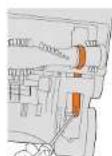

Using a screwdriver, hook the bell onto the motor spindle.
Reinsert the brushbar. One end of the brushbar has a square slot, and one end has a circular slot, ensure that it is put back into the correct position.
What to do if it goes wrong Getting in touch
Problem
Why won't the vacuum cleaner turn on?
Solution
• The plug may not be fully pushed into the electrical socket.
- Check the fuse in the plug if this needs replacing, always replace with a 13amp fuse.
- The motor thermostat may have trioped. If this has happened, unplug the vacuum cleaner. Remove and empty the dirt container and check the hose for blocages. Clean the fillers and allow the vacuum cleaner to catch for approximately 1 hour. If you have washed the fillers you will need to wait 24 hours for the fillers to fully dry before pulling them back into the vacuum cleaner).
Why won't the vacuum cleaner pick up?
- There may be a blockage in the hose. Please remove the hose from the vacuum cleaner, check and clear any blockages.
- Empty the dirt container and clean filters. Go to 'Taking care of your machine'.
- The brushbar may not be turning. Go to "My brushbar isn't turning" below.
• If the accessory/tock will not pick up, check and clear any blockages.
My brushbar isn't turning?
- The brushbar may be jammed. If this happens then the machine needs to be switched off immediately to avoid damage. To remove debris from brushbar refer to page.
- The belt might not turn if it is broken. To check the belt, go to 'Changing the belt'.
What if my vacuum cleaner is making an excessive noise?
- The vacuum cleaner is making a whistling nose, please remove the dirt container open the bottom and clean the scele. Replace the dirt container and retry.
- If there is air sucking noise from the top of the dirt container, this would indicate a blockage in the machine. Go to "Why won't the vacuum cleaner pick up" above.
There is an accessory missing?
- Check the 'This pack contains' panel on the box to make sure the part is included with your machine.
Warning: To reduce the risk of personal injury, unplug the vacuum cleaner before performing maintenance /troubleshooting checks.
It's quick and easy to register for your FREE
2 year guarantee
Online at vax.co.uk/guarantees
Please retain your original receipt for proof of purchase.
we're here if you need us
Online vax.co.uk/support
Call (UK) 0844 412 8455 (ROI) 1-800 928 308
Monday-Friday 8.30am to 6.30pm, Saturday 9.00am to 5.00pm*
Alternatively, you can write to us at
Vax Ltd., Kingswood Road, Hampton Lovett, Droitwich, Worcestershire, WR9 0QH, UK
* Calls are charged at the UK local rate. Please make a note of the serial number and model number of the vacuum cleaner before coll.rng.
Accessories
Notes
Don't forget your accessories!
Order at: www.vax.co.uk/spares-and-solutions
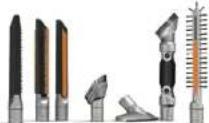
Pro cleaning kit
1-1-133326-00
At our best looks all in one kit, let makes cleaning your home quicker, easier and with even better results. We've taken care of cleaning all of the hard to reach areas such as on top of cupboards and in between blinds to the coat that coales behind and within the radiator.
Flexi Crevice Tool
1-1-131393-00
A fancy long, flexible set for getting for behind and around furniture.

TurboTool
Use the Turbello for vacuuming your stairs, upholstery and car interiors. It's great for picking up stubborn pet hair.
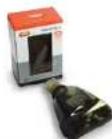
Flat Upholstery Tool
1-1-131394-00
Clears large areas of upclaretary like sofas and curtains, quickly and effectively.
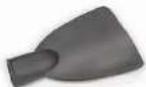
3 in 1 Tool
1-1-129167-00
3-n-1 tool includes crevice tool for awkward areas and corner, dusting brush for arches such as skirting and an upholstery tool for cleaning sofas, curtains, chair seats and car interiors.


text_image
vax®You're home."

@VaxUK
Vax Ltd., Kingswood Road, Hampton Lovett, Droitwich, Worcestershire, WR9 0QH, UK email: info@vax.co.uk website: vax.co.uk
Version 2.0

EEC Statement of Compliance: Manufacturer/EEC importer: Vax Limited, hereby on our own responsibility, declare that the U86-IBe series is manufactured in compliance with the following Directives:
Safety: 2006/95/EC Low Voltage Directive. EMC: 2004/108/EC Electromagnetic Compatibility Directive
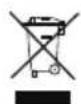
Waste electrical products should not be disposed of with household waste. Please recycle where facilities exist. Check with your Local Authority or retailer for recycling advice.