USER MANUAL PIC24FJ192GA110 Microchip
High-Performance Microcontrollers (MCU) and Digital Signal Controllers (DSC)
Note the following details of the code protection feature on Microchip devices:
• Microchip products meet the specification contained in their particular Microchip Data Sheet.
- Microchip believes that its family of products is one of the most secure families of its kind on the market today, when used in the intended manner and under normal conditions.
- There are dishonest and possibly illegal methods used to breach the code protection feature. All of these methods, to our knowledge, require using the Microchip products in a manner outside the operating specifications contained in Microchip's Data Sheets. Most likely, the person doing so is engaged in theft of intellectual property.
• Microchip is willing to work with the customer who is concerned about the integrity of their code.
- Neither Microchip nor any other semiconductor manufacturer can guarantee the security of their code. Code protection does not mean that we are guaranteeing the product as "unbreakable."
Code protection is constantly evolving. We at Microchip are committed to continuously improving the code protection features of our products. Attempts to break Microchip's code protection feature may be a violation of the Digital Millennium Copyright Act. If such acts allow unauthorized access to your software or other copyrighted work, you may have a right to sue for relief under that Act.
Information contained in this publication regarding device applications and the like is provided only for your convenience and may be superseded by updates. It is your responsibility to ensure that your application meets with your specifications. MICROCHIP MAKES NO REPRESENTATIONS OR WARRANTIES OF ANY KIND WHETHER EXPRESS OR IMPLIED, WRITTEN OR ORAL, STATUTORY OR OTHERWISE, RELATED TO THE INFORMATION, INCLUDING BUT NOT LIMITED TO ITS CONDITION, QUALITY, PERFORMANCE, MERCHANTABILITY OR FITNESS FOR PURPOSE. Microchip disclaims all liability arising from this information and its use. Use of Microchip devices in life support and/or safety applications is entirely at the buyer's risk, and the buyer agrees to defend, indemnify and hold harmless Microchip from any and all damages, claims, suits, or expenses resulting from such use. No licenses are conveyed, implicitly or otherwise, under any Microchip intellectual property rights unless otherwise stated.
Microchip received ISO/TS-16949:2009 certification for its worldwide headquarters, design and wafer fabrication facilities in Chandler and Tempe, Arizona; Gresham, Oregon and design centers in California and India. The Company's quality system processes and procedures are for its PIC® MCUs and dsPIC® DSCs, KEELOQ® code hopping devices, Serial EEPROMs, microperipherals, nonvolatile memory and analog products. In addition, Microchip's quality system for the design and manufacture of development systems is ISO 9001:2000 certified.
QUALITY MANAGEMENT SYSTEM CERTIFIED BY DNV = ISO/TS 16949=
Trademarks
The Microchip name and logo, the Microchip logo, AnyRate, AVR, AVR logo, AVR Freaks, BeaconThings, BitCloud, CryptoMemory, CryptoRF, dsPIC, FlashFlex, flexPWR, Heldo, JukeBlox, KEELOQ, KEELOQ logo, Kleer, LANCheck, LINK MD, maXStylus, maXTouch, MediaLB, megaAVR, MOST, MOST logo, MPLAB, OptoLyzer, PIC, picoPower, PICSTART, PIC32 logo, Prochip Designer, QTouch, RightTouch, SAM-BA, SpyNIC, SST, SST Logo, SuperFlash, tinyAVR, UNI/O, and XMEGA are registered trademarks of Microchip Technology Incorporated in the U.S.A. and other countries.
ClockWorks, The Embedded Control Solutions Company, EtherSynch, Hyper Speed Control, HyperLight Load, IntelliMOS, mTouch, Precision Edge, and Quiet-Wire are registered trademarks of Microchip Technology Incorporated in the U.S.A. Adjacent Key Suppression, AKS, Analog-for-the-Digital Age, Any Capacitor, AnyIn, AnyOut, BodyCom, chipKIT, chipKIT logo, CodeGuard, CryptoAuthentication, CryptoCompanion, CryptoController, dsPICDEM, dsPICDEM.net, Dynamic Average Matching, DAM, ECAN, EtherGREEN, In-Circuit Serial Programming, ICSP, Inter-Chip Connectivity, JitterBlocker, KleerNet, KleerNet logo, Mindi, MiWi, motorBench, MPASM, MPF, MPLAB Certified logo, MPLIB, MPLINK, MultiTRAK, NetDetach, Omniscient Code Generation, PICDEM, PICDEM.net, PICkit, PICtail, PureSilicon, QMatrix, RightTouch logo, REAL ICE, Ripple Blocker, SAM-ICE, Serial Quad I/O, SMART-I.S., SQI, SuperSwitcher, SuperSwitcher II, Total Endurance, TSHARC, USBCheck, VariSense, ViewSpan, WiperLock, Wireless DNA, and ZENA are trademarks of Microchip Technology Incorporated in the U.S.A. and other countries.
SQTP is a service mark of Microchip Technology Incorporated in the U.S.A.
Silicon Storage Technology is a registered trademark of Microchip Technology Inc. in other countries.
GestIC is a registered trademark of Microchip Technology Germany II GmbH & Co. KG, a subsidiary of Microchip Technology Inc., in other countries.
All other trademarks mentioned herein are property of their respective companies.
© 2005-2018, Microchip Technology Incorporated, All Rights Reserved.
ISBN: 978-1-5224-2896-1
Table of Contents
PAGE
SECTION 1. INTRODUCTION 5
Introduction 6
Manual Objective 6
Development Support 6
Style and Symbol Conventions 7
Instruction Set Symbols 8
SECTION 2. PROGRAMMER'S MODEL 9
16-Bit MCU and DSC Core Architecture Overview 10
Programmer's Model 14
Working Register Array 19
Default Working Register (WREG) 20
Software Stack Frame Pointer 20
Software Stack Pointer 20
Stack Pointer Limit Register (SPLIM) 20
Accumulator A and Accumulator B (dsPIC30F, dsPIC33F, dsPIC33E and dsPIC33C Devices) 20
Program Counter 21
TBLPAG Register 21
PSVPAG Register (PIC24F, PIC24H, dsPIC30F and dsPIC33F) 21
RCOUNT Register 21
DCOUNT Register (dsPIC30F, dsPIC33F, dsPIC33E and dsPIC33C Devices) 2
DOSTART Register (dsPIC30F, dsPIC33F, dsPIC33E and dsPIC33C Devices) 22
DOEND Register (dsPIC30F, dsPIC33F, dsPIC33E and dsPIC33C Devices) 22
STATUS Register 22
Core Control Register 25
Shadow Registers 25
DO Stack (dsPIC33E and dsPIC33C Devices) 26
SECTION 3. INSTRUCTION SET OVERVIEW 39
Introduction 40
Instruction Set Overview 40
Instruction Set Summary Tables 42
SECTION 4. INSTRUCTION SET DETAILS 53
Data Addressing Modes 54
Program Addressing Modes 63
Instruction Stalls 64
Byte Operations 66
Word Move Operations 68
Using 10-Bit Literal Operands ....71
Bit Field Insert/Extract Instructions (dsPIC33C Devices Only) 71
Software Stack Pointer and Frame Pointer 72
Conditional Branch Instructions 78
Z Status Bit 79
Assigned Working Register Usage 80
DSP Data Formats (dsPIC30F, dsPIC33F, dsPIC33E and dsPIC33C Devices) 83
Accumulator Usage (dsPIC30F, dsPIC33F, dsPIC33E and dsPIC33C Devices) 85
Accumulator Access (dsPIC30F, dsPIC33F, dsPIC33E and dsPIC33C Devices) 86
DSP MAC Instructions (dsPIC30F, dsPIC33F, dsPIC33E and dsPIC33C Devices) 86
16-Bit MCU and DSC Programmer's Reference Manual
DSP Accumulator Instructions (dsPIC30F, dsPIC33F, dsPIC33E and dsPIC33C Devices) 90
Scaling Data with the FBCL Instruction (dsPIC30F, dsPIC33F, dsPIC33E and dsPIC33C Devices) 90
Data Range Limit Instructions (dsPIC33C Devices Only) 92
Normalizing the Accumulator with the FBCL Instruction (dsPIC30F, dsPIC33F, dsPIC33E and dsPIC33C Devices) 93
Normalizing the Accumulator with the NORM Instruction (dsPIC33C Devices Only) 93
Extended Precision Arithmetic Using Mixed-Sign Multiplications (dsPIC33E and dsPIC33C Only) 94
SECTION 5. INSTRUCTION DESCRIPTIONS 95
Instruction Symbols 96
Instruction Encoding Field Descriptors Introduction 96
Instruction Description Example 101
Instruction Descriptions 102
SECTION 6. BUILT-IN FUNCTIONS 459
Introduction 460
Built-in Function List 461
SECTION 7. REFERENCE 497
Instruction Bit Map 498
Instruction Set Summary Table 501
Revision History 511
SECTION 8. INDEX 513
SECTION 9. WORLDWIDE SALES AND SERVICE 520
Section 1. Introduction
HIGHLIGHTS
This section of the manual contains the following major topics:
1.1 Introduction....6
1.2 Manual Objective 6
1.3 Development Support 6
1.4 Style and Symbol Conventions 7
1.5 Instruction Set Symbols 8
1.1 INTRODUCTION
Microchip Technology focuses on products for the embedded control market. Microchip is a leading supplier of the following devices and products:
- 8-Bit General Purpose Microcontrollers (PIC® MCUs)
• 16-Bit Digital Signal Controllers (dsPIC® DSCs)
• 16-Bit and 32-Bit Microcontrollers (MCUs)
• Specialty and Standard Nonvolatile Memory Devices
• Security Devices (K EELOQ® Security ICs)
• Application-Specific Standard Products
Information about these devices and products, with corresponding technical documentation, is available on the Microchip web site (www.microchip.com).
1.2 MANUAL OBJECTIVE
This manual is a software developer's reference for the 16-bit MCU and DSC device families. It describes the Instruction Set in detail and also provides general information to assist the development of software for the 16-bit MCU and DSC device families.
This manual does not include detailed information about the core, peripherals, system integration or device-specific information. The user should refer to the specific device family reference manual for information about the core, peripherals and system integration. For device-specific information, the user should refer to the specific device data sheets. The information that can be found in the data sheets includes:
- Device memory map
• Device pinout and packaging details
• Device electrical specifications
- List of peripherals included on the device
Code examples are given throughout this manual. These examples are valid for any device in the 16-bit MCU and DSC families.
1.3 DEVELOPMENT SUPPORT
Microchip offers a wide range of development tools that allow users to efficiently develop and debug application code. Microchip's development tools can be broken down into four categories:
- Code Generation
- Hardware/Software Debug
- Device Programmer
• Product Evaluation Boards
Information about the latest tools, product briefs and user guides can be obtained from the Microchip web site (www.microchip.com) or from your local Microchip Sales Office.
Microchip offers other reference tools to speed up the development cycle. These include:
- Application Notes
• Reference Designs
- Microchip Web Site
- Local Sales Offices with Field Application Support
• Corporate Support Line
The Microchip web site also lists other sites that may be useful references.
1.4 STYLE AND SYMBOL CONVENTIONS
Throughout this document, certain style and font format conventions are used. Table 1-1 provides a description of the conventions used in this document.
Table 1-1: Document Conventions
| Symbol or Term | Description |
| set To force a bit/register to a value of logic ‘1’. |
| clear To force a bit/register to a value of logic ‘0’. |
| Reset 1. To force a register/bit to its default state.2. A condition in which the device places itself after a device Reset occurs. Some bits will be forced to ‘0’ (such as interrupt enable bits), while others will be forced to ‘1’ (such as the I/O data direction bits). |
| 0xnnnn Designates the number ‘nnnn’ in the hexadecimal number system. These conventions are used in the code examples. For example, 0x013F or 0xA800. |
| : (colon) Used to specify a range or the concatenation of registers/bits/pins.One example is ACCAU:ACCAH:ACCAL, which is the concatenation of three registers to form the 40-bit Accumulator.Concatenation order (left-right) usually specifies a positional relationship (MSb to LSb, higher to lower). |
| < > Specifies bit locations in a particular register.One example is SR<7:5> (or IPL<2:0>), which specifies the register and associated bits or bit locations. |
| LSb, MSb Indicates the Least Significant or Most Significant bit in a field. |
| LSB, MSB Indicates the Least/Most Significant Byte in a field of bits. |
| Isw, msw Indicates the least/most significant word in a field of bits |
| Courier New Font Used for code examples, binary numbers and for Instruction mnemonics in the text. |
| Times New Roman Font, Italic Used for equations and variables. |
| Times New Roman Font, Bold Italic Used in explanatory text for items called out from a figure, equation or example. |
| Note: | A Note presents information that we want to re-emphasize, either to help you avoid a common pitfall or make you aware of operating differences between some device family members. A Note can be in a box, or when used in a table or figure, it is located at the bottom of the table or figure. |
1.5 INSTRUCTION SET SYMBOLS
The summary tables in Section 3.2 “Instruction Set Overview” and Section 7.2 “Instruction Set Summary Table”, and the instruction descriptions in Section 5.4 “Instruction Descriptions” utilize the symbols shown in Table 1-2.
Table 1-2: Symbols Used in Instruction Summary Tables and Descriptions
| Symbol(1) | Description |
| { } Optional field or operation |
| [text] The location addressed by text |
| (text) The contents of text |
| #text The literal defined by text |
| a ∈ [b, c, d] “a” must be in the set of [b, c, d] |
| Register bit field |
| {label:} Optional label name |
| Acc Accumulator | A or Accumulator B |
| AWB Accumulator | Write-Back |
| bit4 4-bit wide bit position (0:7 in Byte mode, 0:15 in Word mode) |
| Expr Absolute address, label or expression (resolved by the linker) |
| f File register address |
| lit1 1-bit literal (0:1) |
| lit4 4-bit literal (0:15) |
| lit5 5-bit literal (0:31) |
| lit8 8-bit literal (0:255) |
| lit10 10-bit literal (0:255 in Byte mode, 0:1023 in Word mode) |
| lit14 14-bit literal (0:16383) |
| lit16 16-bit literal (0:65535) |
| lit23 23-bit literal (0:8388607) |
| Slit4 Signed 4-bit literal (-8:7) |
| Slit6 Signed 6-bit literal (-32:31) (range is limited to -16:16) |
| Slit10 Signed 10-bit literal (-512:511) |
| Slit16 Signed 16-bit literal (-32768:32767) |
| TOS Top-of-Stack | |
| Wb | Base Working register |
| Wd | Destination Working register (Direct and Indirect Addressing) |
| Wdo | Destination Working register (Direct and Indirect Addressing, including Indirect Addressing with Offset) |
| Wm, Wn Working register divide pair (dividend, divisor) |
| Wm * Wm | Working register multiplier pair (same source register) |
| Wm * Wn | Working register multiplier pair (different source registers) |
| Wn | Both source and destination Working register (Direct Addressing) |
| Wnd Destination Working register (Direct Addressing) |
| Wns Source Working register (Direct Addressing) |
| WREG Default Working register (assigned to W0) |
| Ws | Source Working register (Direct and Indirect Addressing) |
| Wso | Source Working register (Direct and Indirect Addressing, including Indirect Addressing with Offset) |
| Wx | Source Addressing mode and Working register for X data bus prefetch |
| Wxd Destination Working register for X data bus prefetch |
| Wy | Source Addressing mode and Working register for Y data bus prefetch |
| Wyd Destination Working register for Y data bus prefetch |
Note 1: The range of each symbol is instruction-dependent. Refer to Section 5. "Instruction Descriptions" for the specific instruction range.
Section 2. Programmer's Model
HIGHLIGHTS
This section of the manual contains the following major topics:
2.1 16-Bit MCU and DSC Core Architecture Overview.... 10
2.2 Programmer's Model....14
2.3 Working Register Array 19
2.4 Default Working Register (WREG) 20
2.5 Software Stack Frame Pointer 20
2.6 Software Stack Pointer....20
2.7 Stack Pointer Limit Register (SPLIM)....20
2.8 Accumulator A and Accumulator B (dsPIC30F, dsPIC33F, dsPIC33E and dsPIC33C Devices)....20
2.9 Program Counter 21
2.10 TBLPAG Register 21
2.11 PSVPAG Register (PIC24F, PIC24H, dsPIC30F and dsPIC33F) 21
2.12 RCOUNT Register 21
2.13 DCOUNT Register (dsPIC30F, dsPIC33F, dsPIC33E and dsPIC33C Devices) ..... 21
2.14 DOSTART Register (dsPIC30F, dsPIC33F, dsPIC33E and dsPIC33C Devices).... 22
2.15 DOEND Register (dsPIC30F, dsPIC33F, dsPIC33E and dsPIC33C Devices).... 22
2.16 STATUS Register 22
2.17 Core Control Register 25
2.18 Shadow Registers.... 25
2.19 DO Stack (dsPIC33E and dsPIC33C Devices) 26
2.1 16-BIT MCU AND DSC CORE ARCHITECTURE OVERVIEW
This section provides an overview of the 16-bit architecture features and capabilities for the following families of devices:
• 16-Bit Microcontrollers (MCU):
- P I C 2 4 F
- P I C 2 4 H
- P I C 2 4 E
• 16-Bit Digital Signal Controllers (DSC):
- d s P I C 3 0 F
- d s P I C 3 3 F
- d s P I C 3 3 E
- d s P I C 3 3 C
2.1.1 Features Specific to 16-Bit MCU and DSC Core
The core of the 16-bit MCU and DSC devices is a 16-bit (data) modified Harvard architecture with an enhanced instruction set. The core has a 24-bit instruction word, with an 8-bit opcode field. The Program Counter (PC) is 23 bits wide and addresses up to 4M x 24 bits of user program memory space. An instruction prefetch mechanism is used to help maintain throughput and provides predictable execution. The majority of instructions execute in a single cycle.
2.1.1.1 REGISTERS
The 16-bit MCU and DSC devices have sixteen 16-bit Working registers. Each of the Working registers can act as a data, address or offset register. The 16th Working register (W15) operates as a Software Stack Pointer (SSP) for interrupts and calls.
2.1.1.2 INSTRUCTION SET
The instruction set is almost identical for the 16-bit MCU and DSC architectures. The instruction set includes many addressing modes and was designed for optimum C compiler efficiency.
2.1.1.3 DATA SPACE ADDRESSING
The data space can be addressed as 32K words or 64 Kbytes. The upper 32 Kbytes of the data space memory map can optionally be mapped into program space at any 16K program word boundary, which is a feature known as Program Space Visibility (PSV). The program to data space mapping feature lets any instruction access program space as if it were the data space, which is useful for storing data coefficients.
Note: Some devices families support Extended Data Space (EDS) Addressing. See the specific device data sheet and family reference manual for more details on this feature.
2.1.1.4 ADDRESSING MODES
The core supports Inherent (no operand), Relative, Literal, Memory Direct, Register Direct, Register Indirect and Register Offset Addressing modes. Each instruction is associated with a predefined addressing mode group, depending upon its functional requirements. As many as seven addressing modes are supported for each instruction.
For most instructions, the CPU is capable of executing a data (or program data) memory read, a Working register (data) read, a data memory write and a program (instruction) memory read per instruction cycle. As a result, 3-operand instructions can be supported, allowing A + B = C operations to be executed in a single cycle.
2.1.1.5 ARITHMETIC AND LOGIC UNIT
A high-speed, 17-bit by 17-bit multiplier is included to significantly enhance the core's arithmetic capability and throughput. The multiplier supports Signed, Unsigned, and Mixed modes, as well as 16-bit by 16-bit, or 8-bit by 8-bit integer multiplication. All multiply instructions execute in a single cycle.
The 16-bit Arithmetic Logic Unit (ALU) is enhanced with integer divide assist hardware that supports an iterative non-restoring divide algorithm. It operates in conjunction with the REPEAT instruction looping mechanism, and a selection of iterative divide instructions, to support 32-bit (or 16-bit) divided by 16-bit integer signed and unsigned division. All divide operations require 19 cycles to complete, but are interruptible at any cycle boundary.
2.1.1.6 EXCEPTION PROCESSING
The 16-bit MCU and DSC devices have a vectored exception scheme with support for up to eight sources of non-maskable traps and up to 246 interrupt sources. In both families, each interrupt source can be assigned to one of seven priority levels.
2.1.2 PIC24E, dsPIC33E and dsPIC33C Features
In addition to the information provided in Section 2.1.1 “Features Specific to 16-Bit MCU and DSC Core”, this section describes the enhancements that are available in the PIC24E, dsPIC33E and dsPIC33C families of devices.
2.1.2.1 DATA SPACE ADDRESSING
The Base Data Space address is used in conjunction with a Read or Write Page register (DSRPAG or DSWPAG) to form an Extended Data Space (EDS) address, which can also be used for PSV access. The EDS can be addressed as 8M words or 16 Mbytes. Refer to "Data Memory" (DS70595) in the "dsPIC33/PIC24 Family Reference Manual" for more details on EDS, PSV and table accesses.
Note: Some PIC24F devices also support Extended Data Space. Refer to “CPU with Extended Data Space (EDS)” (DS39732) and “Data Memory with Extended Data Space (EDS)” (DS39733) in the “dsPIC33/PIC24 Family Reference Manual” for details.
2.1.2.2 AUTOMATIC MIXED-SIGN MULTIPLICATION MODE (dsPIC33E AND dsPIC33C ONLY)
In addition to signed and unsigned DSP multiplications, dsPIC33E and dsPIC33C devices support mixed-sign (unsigned-signed and signed-unsigned) multiplications without the need to dynamically reconfigure the Multiplication mode and shift data to account for the difference in operand formats. This mode is particularly beneficial for dsPIC33C executing extended precision (32-bit and 64-bit) algorithms. Besides DSP instructions, MCU multiplication (MUL) instructions can also utilize either accumulator as a result destination, thereby enabling faster extended precision arithmetic. Refer to Section 4.11.1 "Implied DSP Operands (dsPIC30F, dsPIC33F, dsPIC33E and dsPIC33C Devices)" and Section 4.21 "Extended Precision Arithmetic Using Mixed-Sign Multiplications (dsPIC33E and dsPIC33C Only)" for more details on mixed-sign DSP multiplications.
2.1.2.3 MCU MULTIPLICATIONS WITH 16-BIT RESULT
16x16-bit MUL instructions include an option to store the product in a single 16-bit Working register rather than a pair of registers. This feature helps free up a register for other purposes, in cases where the numbers being multiplied are small in magnitude, and therefore, expected to provide a 16-bit result. See the individual MUL instruction descriptions in Section 5.4 "Instruction Descriptions" for more details.
2.1.2.4 HARDWARE STACK FOR DO LOOPS (dsPIC33E AND dsPIC33C ONLY)
The single-level DO Loop Shadow register set has been replaced by a 4-level deep DO loop hardware stack. This provides automatic DO Loop register save/restore for up to 3 levels of DO loop nesting, resulting in more efficient implementation of nested loops. Refer to Section 2.19 "DO Stack (dsPIC33E and dsPIC33C Devices)" for more details on DO loop nesting in dsPIC33E and dsPIC33C devices.
2.1.2.5 DSP CONTEXT SWITCH SUPPORT (dsPIC33E AND dsPIC33C ONLY)
In dsPIC33E and dsPIC33C devices, the DSP Overflow and Saturation Status bits are writable. This allows the state of the DSP engine to be efficiently saved and restored while switching between DSP tasks. See Section 2.16.4 "DSP ALU Status Bits (dsPIC30F, dsPIC33F, dsPIC33E and dsPIC33C Devices)" for more details on DSP Status bits. In addition, dsPIC33C devices have up to four additional sets of DSP Accumulators A and B for fast context switching. Please see the specific device data sheet for details.
2.1.2.6 EXTENDED CALL AND GOTO INSTRUCTIONS (PIC24E, dsPIC33E AND dsPIC33C ONLY)
The CALL.L Wn and GOTO.L Wn instructions extend the capabilities of the CALL Wn and GOTO Wn by enabling 32-bit addresses for computed branch/call destinations. In these enhanced instructions, the destination address is provided by a pair of Working registers, rather than a single 16-bit register. See the CALL.L and GOTO.L instruction descriptions in Section 5.4 "Instruction Descriptions" for more details.
2.1.2.7 COMPARE/BRANCH INSTRUCTIONS (PIC24E, dsPIC33E AND dsPIC33C ONLY)
PIC24E/dsPIC33E/dsPIC33C devices feature conditional Compare/Branch (CPBxx) instructions. These instructions extend the capabilities of the Compare/Skip (CPSxx) instructions by allowing branches, rather than only skipping over a single instruction. See the CPBEQ, CPBNE, CPBGT and CPBLT instruction descriptions in Section 5.4 "Instruction Descriptions" for more details on Compare/Branch instructions.
2.1.3 dsPIC30F, dsPIC33F, dsPIC33E and dsPIC33C Features
In addition to the information provided in Section 2.1.1 “Features Specific to 16-Bit MCU and DSC Core”, this section describes the DSP enhancements that are available in the dsPIC30F, dsPIC33F, dsPIC33E and dsPIC33C families of devices.
2.1.3.1 PROGRAMMING LOOP CONSTRUCTS
Overhead-free program loop constructs are supported using the DO instruction, which is interruptible.
2.1.3.2 DSP INSTRUCTION CLASS
The DSP class of instructions are seamlessly integrated into the architecture and execute from a single execution unit.
2.1.3.3 DATA SPACE ADDRESSING
The data space is split into two blocks, referred to as X and Y data memory. Each memory block has its own independent Address Generation Unit (AGU). The MCU class of instructions operates solely through the X memory AGU, which accesses the entire memory map as one linear data space. The DSP dual source class of instructions operates through the X and Y AGUs, which splits the data address space into two parts. The X and Y data space boundary is arbitrary and device-specific.
2.1.3.4 MODULO AND BIT-REVERSED ADDRESSING
Overhead-free circular buffers (Modulo Addressing) are supported in both X and Y address spaces. The Modulo Addressing removes the software boundary checking overhead for DSP algorithms. Furthermore, the X AGU Circular Addressing can be used with any of the MCU class of instructions. The X AGU also supports Bit-Reversed Addressing, to greatly simplify input or output data reordering for radix-2 FFT algorithms.
2.1.3.5 DSP ENGINE
The DSP engine features a high-speed, 17-bit by 17-bit multiplier, a 40-bit ALU, two 40-bit saturating accumulators and a 40-bit bidirectional barrel shifter. The barrel shifter is capable of shifting a 40-bit value, up to 16 bits right or up to 16 bits left, in a single cycle. The DSP instructions operate seamlessly with all other instructions and have been designed for optimal real-time performance. The MAC instruction and other associated instructions can concurrently fetch two data operands from memory while multiplying two Working registers. This requires that the data space be split for these instructions and linear for all others. This is achieved in a transparent and flexible manner through dedicating certain Working registers to each address space.
2.1.3.6 EXCEPTION PROCESSING
The dsPIC30F devices have a vectored exception scheme with support for up to eight sources of non-maskable traps and up to 54 interrupt sources. The dsPIC33F, dsPIC33E and dsPIC33C have a similar exception scheme, but support up to 118, and up to 246 interrupt sources, respectively. In all three families, each interrupt source can be assigned to one of seven priority levels.
Refer to “Interrupts” (DS70000600) of the “dsPIC33/PIC24 Family Reference Manual” for more details on exception processing.
2.2 PROGRAMMER'S MODEL
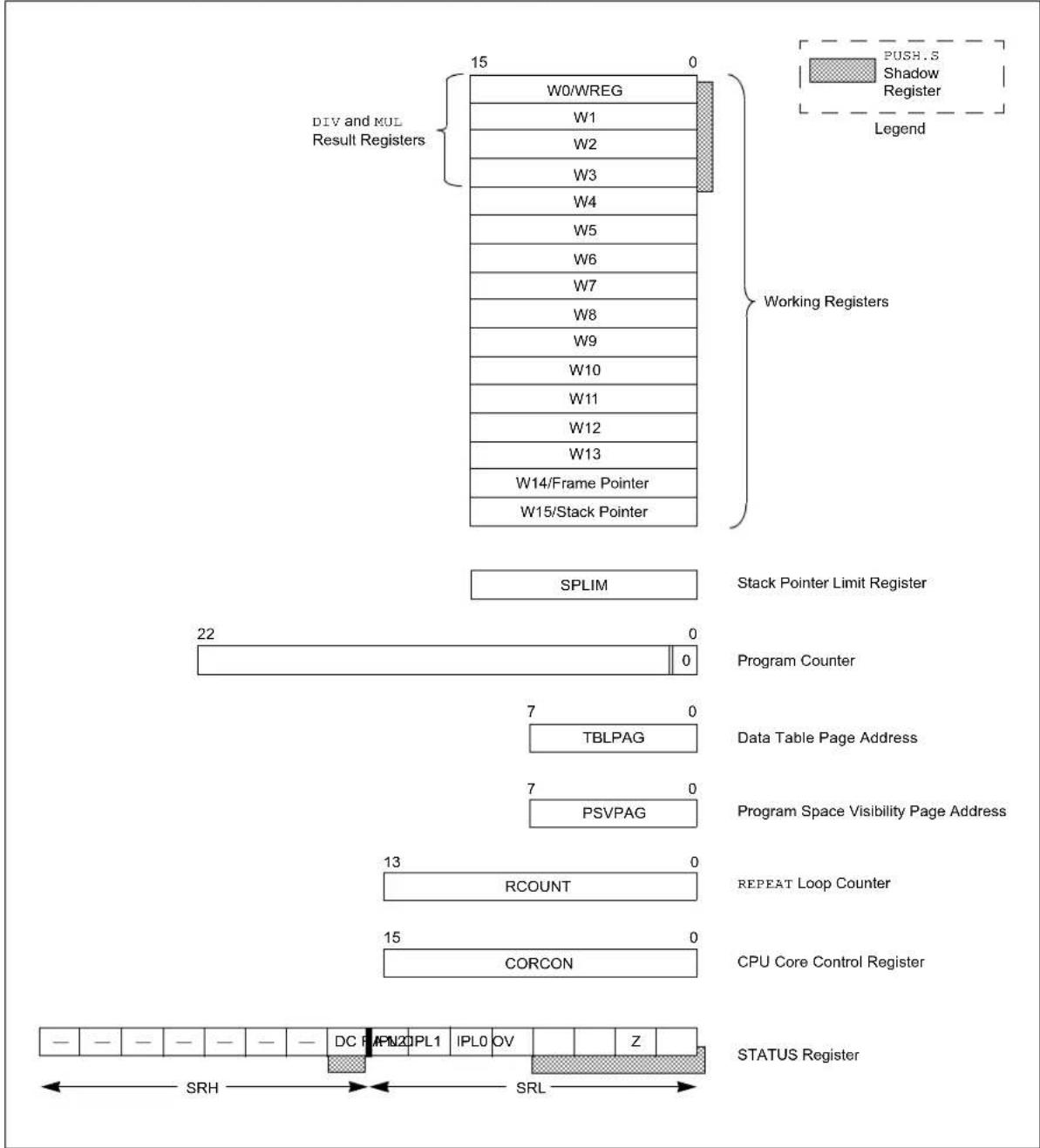
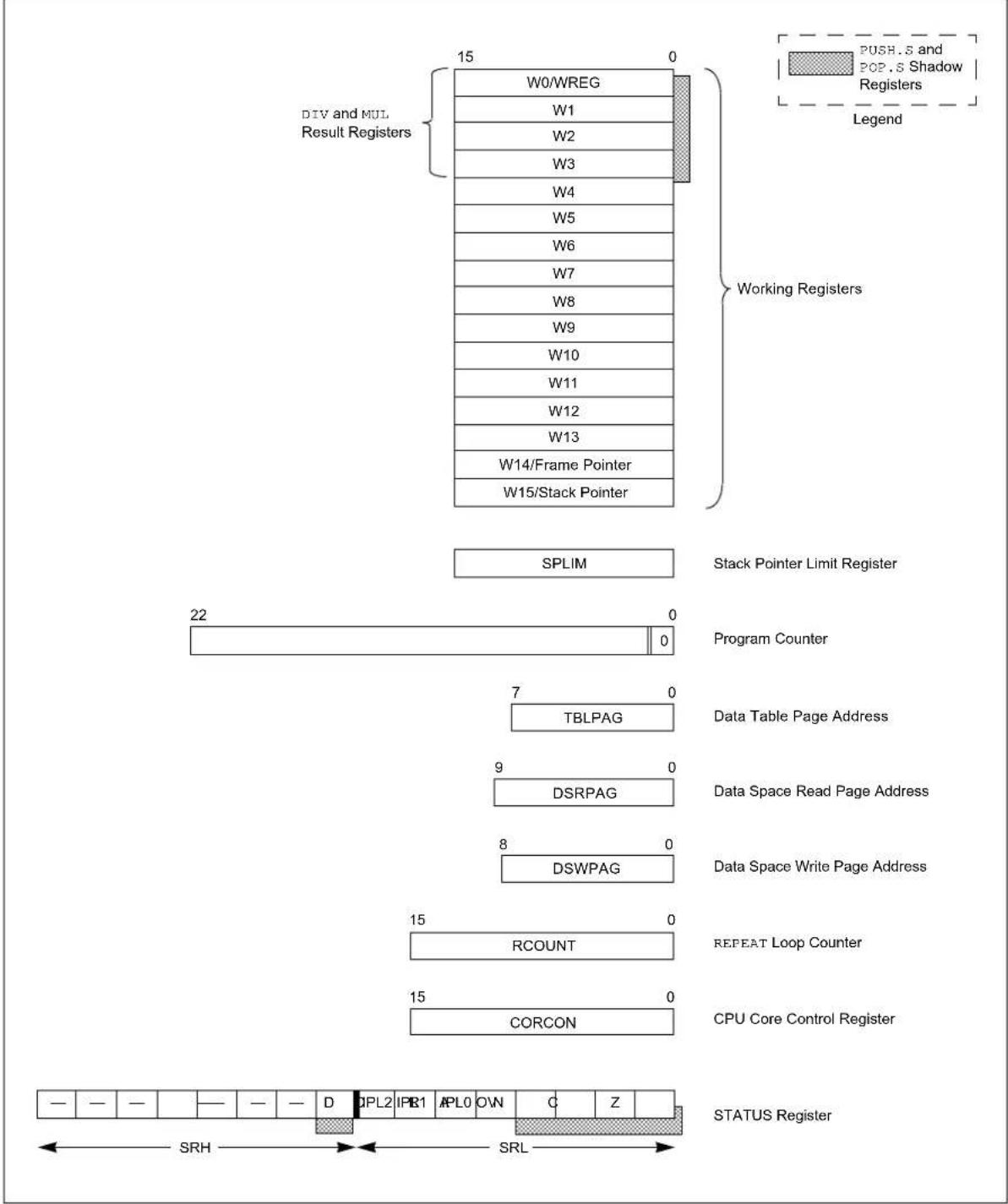
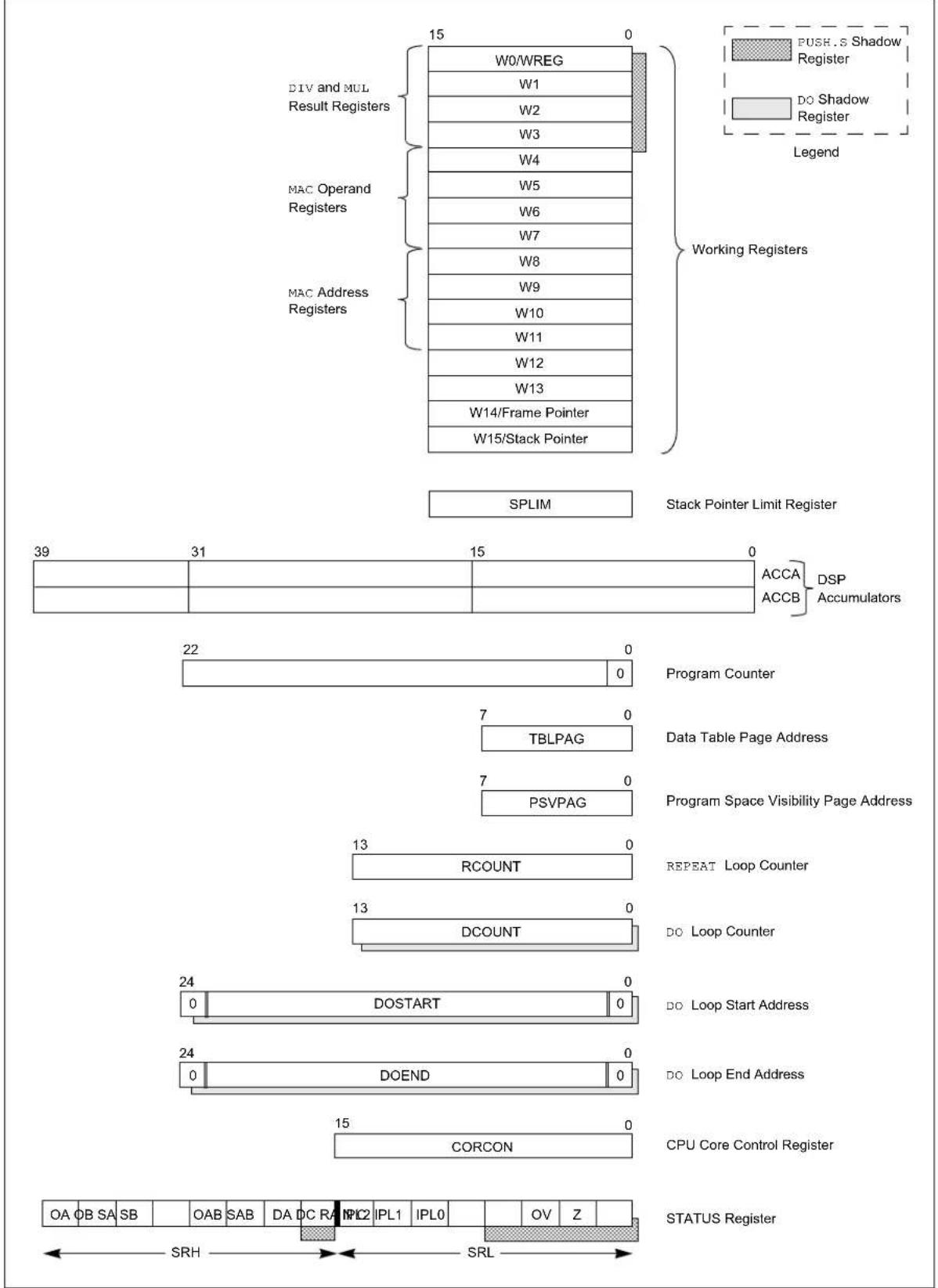
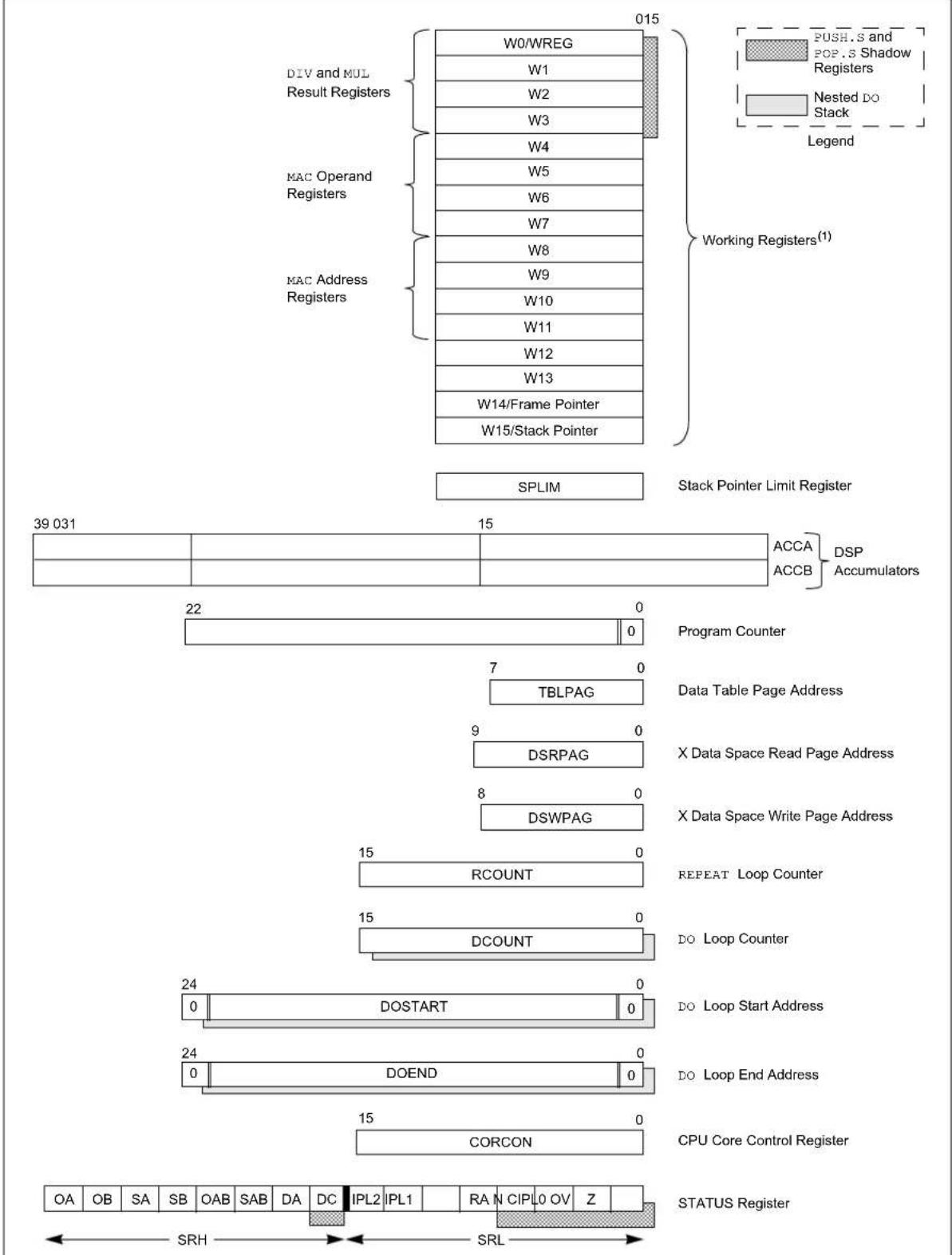
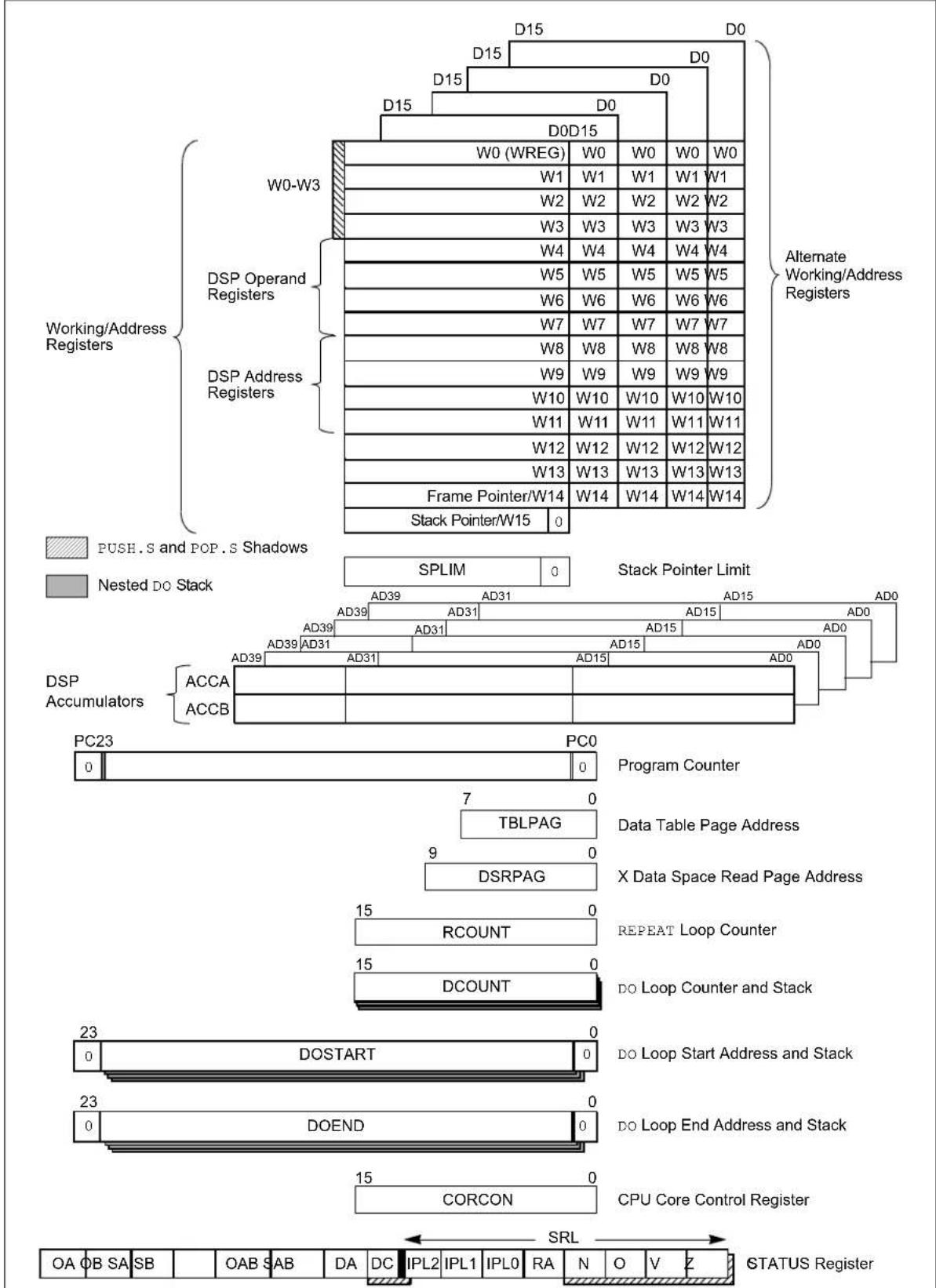
Figure 2-1 through Figure 2-5 show the programmer's model diagrams for the 16-bit MCU and DSC families of devices.
Figure 2-1: PIC24F and PIC24H Programmer's Model Diagram
text_image
DIV and KUL
Result Registers
15 0
W0/WREG
W1
W2
W3
W4
W5
W6
W7
W8
W9
W10
W11
W12
W13
W14/Frame Pointer
W15/Stack Pointer
Working Registers
SPLIM Stack Pointer Limit Register
22 0
Program Counter
7 0
TBLPAG Data Table Page Address
7 0
PSVPAG Program Space Visibility Page Address
13 0
RCOUNT REPEAT Loop Counter
15 0
CORCON CPU Core Control Register
STATUS Register
- - - - - - - - - - - - - - - - - - - - - - - - - - - - - - - - - - - - - - - - - - - - - - - - - - - - - - - - - - - - - - - - - - - - - -
SRH SRL PUSH.S Shadow Register Legend
Figure 2-2: PIC24E Programmer's Model Diagram
text_image
DIV and MUL
Result Registers
15
0
W0/WREG
W1
W2
W3
W4
W5
W6
W7
W8
W9
W10
W11
W12
W13
W14/Frame Pointer
W15/Stack Pointer
Working Registers
SPLIM
Stack Pointer Limit Register
22
0
Program Counter
7
0
TBLPAG
Data Table Page Address
9
0
DSRPAG
Data Space Read Page Address
8
0
DSWPAG
Data Space Write Page Address
15
0
REPEAT Loop Counter
15
0
CORCON
CPU Core Control Register
STATUS Register
— — — — — — — D CPL2 IPR1 APL0 OWN C Z
SRH SRL
Figure 2-3: dsPIC30F and dsPIC33F Programmer's Model Diagram
text_image
DIV and MUL
Result Registers
W0/WREG
W1
W2
W3
W4
W5
W6
W7
W8
W9
W10
W11
W12
W13
W14/Frame Pointer
W15/Stack Pointer
PUSH.S Shadow
Register
DO Shadow
Register
Legend
Working Registers
SPLIM Stack Pointer Limit Register
39 31 15 0 ACCA DSP
ACC B Accumulators
22 0 Program Counter
7 0 Data Table Page Address
7 0 Program Space Visibility Page Address
13 RCOUNT REPEAT Loop Counter
13 DCOUNT DO Loop Counter
24 0 DO Start Address
24 0 DO End Address
15 CORCON CPU Core Control Register
STATUS Register
OA OB SA SB OAB SAB DA DC RA IPL2 IPL1 IPL0 OV Z SRH SRL
Figure 2-4: dsPIC33E Programmer's Model Diagram
text_image
DIV and MUL
Result Registers
MAC Operand
Registers
MAC Address
Registers
W0/WREG
W1
W2
W3
W4
W5
W6
W7
W8
W9
W10
W11
W12
W13
W14/Frame Pointer
W15/Stack Pointer
015
Working Registers(1)
SPLIM
Stack Pointer Limit Register
39 031
15
ACCA
ACC B
DSP Accumulators
22
Program Counter
TBLPAG
Data Table Page Address
9
DSRPAG
X Data Space Read Page Address
8
DSWPAG
X Data Space Write Page Address
15
RCOUNT
REPEAT Loop Counter
15
DCOUNT
DO Loop Counter
24
DO START
DO Loop Start Address
24
DO END
DO Loop End Address
15
CORCON
CPU Core Control Register
STATUS Register
OA OB SA SB OAB SAB DA DC IPL2 IPL1 RA N CIPLO OV Z
SRH SRL
Note 1: Some dsPIC33E devices have up to four additional sets of Working registers (W0-W14) for context switching. Please see the specific device data sheet for details.
Figure 2-5: dsPIC33C Programmer's Model
flowchart
graph TD
    A["Working/Address Registers"] --> B["W0-W3"]
    A --> C["DSP Operand Registers"]
    A --> D["DSP Address Registers"]
    B --> E["W0 (WREG)"]
    C --> F["W1"]
    C --> G["W2"]
    C --> H["W3"]
    C --> I["W4"]
    C --> J["W5"]
    C --> K["W6"]
    C --> L["W7"]
    C --> M["W8"]
    C --> N["W9"]
    C --> O["W10"]
    C --> P["W11"]
    C --> Q["W12"]
    C --> R["W13"]
    C --> S["Frame Pointer/W14"]
    C --> T["Stack Pointer/W15"]

    U["DSP Accumulators"] --> V["ACCA"]
    U --> W["ACCB"]

    X["Alternate Working/Address Registers"] --> Y["SPLIM"]
    X --> Z["Stack Pointer Limit"]

    AA["Program Counter"] --> AB["Program Counter"]

    AC["Data Table Page Address"] --> AD["TBLPAG"]
    AD --> AE["X Data Space Read Page Address"]

    AF["DSRPAG"] --> AG["DSRPAG"]

    AH["REPEAT Loop Counter"] --> AI["REPEAT Loop Counter"]

    AJ["DO Loop Counter and Stack"] --> AK["DO Loop Counter and Stack"]

    AL["DO Loop Start Address and Stack"] --> AM["DO Loop Start Address and Stack"]

    AN["DO Loop End Address and Stack"] --> AO["DO Loop End Address and Stack"]

    AP["CPU Core Control Register"] --> AQ["CORCON"]

    AR["Stack Pointer/W15"] --> AS["Stack Pointer W15"]

    AT["PUSH.S and POP.S Shadows"] --> AU["0"]
    AV["Nested DO Stack"] --> AW["0"]

    AX["0"] --> AY["0"]

    AZ["0"] --> BA["0"]

    BB["0"] --> BC["0"]

    BD["0"] --> BE["0"]

    BF["0"] --> BG["0"]

    BH["0"] --> BI["0"]

    BJ["0"] --> BK["0"]

    BL["0"] --> BM["0"]

    BN["0"] --> BO["0"]

    BP["0"] --> BQ["0"]

    BQ --> BR["0"]

    BS["0"] --> BT["0"]

    BU["0"] --> BV["0"]

    BW["0"] --> BX["0"]

    BY["0"] --> BZ["0"]

    CA["0"] --> CB["0"]

    CC["0"] --> CD["0"]

    DE["0"] --> DF["0"]

    DG["0"] --> DH["0"]

    DI["0"] --> DJ["0"]

    DK["0"] --> DL["0"]

    DV["0"] --> DW["0"]

    DX["0"] --> DXB["0"]

    DXB --> DXC["0"]

    DXC --> DXD["0"]

    DXD --> DXE["0"]

    DXE --> DXF["0"]

    DXF --> DXG["0"]

    DXG --> DXH["0"]

    DXH --> DXI["0"]

    DXI --> DXJ["0"]

    DXJ --> DXK["0"]

    DXK --> DXL["0"]

    DXL --> DXM["0"]

    DXM --> DXN["0"]

    DXN --> DXO["0"]

    DXO --> DXP["0"]

    DXP --> DXQ["0"]

    DXQ --> DXR["0"]

    DXR --> DXS["0"]

    DXS --> DXT["0"]

    DXT --> DXU["0"]

    DXU --> DXV["0"]

    DXV --> DXW["0"]

    DXW --> DXX["0"]

    DXX --> DXY["0"]

    DXY --> DXZ["0"]

    DXZ --> DXR
    DXR --> DXS
    DXS --> DXT
    DXT --> DXU
    DXU --> DXV
    DXV --> DXR
    DXR --> DXS
    DXS --> DXU
    DXU --> DXV
    DXV --> DXR

    style A fill:#f9f,stroke:#333
    style B fill:#ccf,stroke:#333
    style C fill:#cfc,stroke:#333
    style D fill:#fcc,stroke:#333
    style E fill:#ffc,stroke:#333
    style F fill:#ffc,stroke:#333
    style G fill:#ffc,stroke:#333
    style H fill:#ffc,stroke:#333
    style I fill:#ffc,stroke:#333
    style J fill:#ffc,stroke:#333
    style K fill:#ffc,stroke:#333
    style L fill:#ffc,stroke:#333
    style M fill:#ffc,stroke:#333
    style N fill:#ffc,stroke:#333
    style O fill:#ffc,stroke:#333
    style P fill:#ffc,stroke:#333
    style Q fill:#ffc,stroke:#333
    style R fill:#ffc,stroke:#333
    style S fill:#ffc,stroke:#333
    style T fill:#ffc,stroke:#333
    style U fill:#fff,stroke:#333
</details>
All registers in the programmer's model are memory-mapped and can be manipulated directly by the instruction set. A description of each register is provided in Table 2-1.
Note: Unless otherwise specified, the Programmer's Model register descriptions in Table 2-1 apply to all MCU and DSC device families.
Table 2-1: Programmer's Model Register Descriptions
<table><tr><td colspan="2">Register Description</td></tr><tr><td colspan="2">CORCON CPU Core Configuration register</td></tr><tr><td colspan="2">PC 23-Bit Program Counter</td></tr><tr><td> PSVPAG^(1) </td><td>Program Space Visibility Page Address register</td></tr><tr><td> DSRPAG^(2) </td><td>Extended Data Space (EDS) Read Page register</td></tr><tr><td> DSWPAG^(2) </td><td>Extended Data Space (EDS) Write Page register</td></tr><tr><td colspan="2">RCOUNT REPEAT Loop Counter register</td></tr><tr><td colspan="2">SPLIM Stack Pointer Limit Value register</td></tr><tr><td colspan="2">SR ALU and DSP Engine STATUS Register</td></tr><tr><td>TBLPAG</td><td>Table Memory Page Address register</td></tr><tr><td>W0-W15 ^(4) </td><td>Working register array</td></tr><tr><td>ACCA, ACCB^(3,5) </td><td>40-Bit DSP Accumulators</td></tr><tr><td> DCOUNT^(3) </td><td>DO Loop Counter register</td></tr><tr><td> DOSTART^(3) </td><td>DO Loop Start Address register</td></tr><tr><td> DOEND^(3) </td><td>DO Loop End Address register</td></tr></table>
Note 1: This register is only available on PIC24F, PIC24H, dsPIC30F and dsPIC33F devices.
2: This register is only available on PIC24E, dsPIC33E and dsPIC33C devices.
3: This register is only available on dsPIC30F, dsPIC33F, dsPIC33E and dsPIC33C devices.
4: dsPIC33C devices and some dsPIC33E devices have up to four additional sets of Working registers for context switching. Please see the device data sheet for details.
5: dsPIC33C devices have up to four additional sets of accumulators for context switching. Please see the device data sheet for details.
<h1 id="23-working-register-array">2.3 WORKING REGISTER ARRAY</h1>
The 16 Working (W) registers can function as data, address or offset registers. The function of a W register is determined by the instruction that accesses it.
Byte instructions, which target the Working register array, only affect the Least Significant Byte (LSB) of the target register. Since the Working registers are memory-mapped, the Least and Most Significant Bytes can be manipulated through byte-wide data memory space accesses.
Note: dsPIC33C devices and some dsPIC33E devices have up to four additional sets of Working registers for context switching. Please see the device data sheet to find out the exact number of register contexts available on a device. The context switching can be performed quickly using the CTXTSWP instruction.
<h1 id="24-default-working-register-wreg">2.4 DEFAULT WORKING REGISTER (WREG)</h1>
The instruction set can be divided into two instruction types: Working register instructions and file register instructions. The Working register instructions use the Working register array as data values or as addresses that point to a memory location. In contrast, file register instructions operate on a specific memory address contained in the instruction opcode.
File register instructions that also utilize a Working register do not specify the Working register that is to be used for the instruction. Instead, a default Working register (WREG) is used for these file register instructions. Working register, W0, is assigned to be the WREG. The WREG assignment is not programmable.
<h1 id="25-software-stack-frame-pointer">2.5 SOFTWARE STACK FRAME POINTER</h1>
A frame is a user-defined section of memory in the stack, used by a function to allocate memory for local variables. W14 has been assigned for use as a Stack Frame Pointer with the link (LNK) and unlink (ULNK) instructions. However, if a Stack Frame Pointer and the LNK and ULNK instructions are not used, W14 can be used by any instruction in the same manner as all other W registers. On dsPIC33E, dsPIC33C and PIC24E devices, a Stack Frame Active (SFA) Status bit is used to support nested stack frames. See Section 4.8.2 "Software Stack Frame Pointer" for detailed information about the Frame Pointer.
<h1 id="26-software-stack-pointer">2.6 SOFTWARE STACK POINTER</h1>
W15 serves as a dedicated Software Stack Pointer, and will be automatically modified by function calls, exception processing and returns. However, W15 can be referenced by any instruction in the same manner as all other W registers. This simplifies reading, writing and manipulating the Stack Pointer. Refer to Section 4.8.1 "Software Stack Pointer" for detailed information about the Stack Pointer.
<h1 id="27-stack-pointer-limit-register-splim">2.7 STACK POINTER LIMIT REGISTER (SPLIM)</h1>
The SPLIM is a 16-bit register associated with the Stack Pointer. It is used to prevent the Stack Pointer from overflowing and accessing memory beyond the user allocated region of stack memory. Refer to Section 4.8.3 "Stack Pointer Overflow" for detailed information about the SPLIM.
<h1 id="28-accumulator-a-and-accumulator-b-dspic30f-dspic33f-dspic33e-and-dspic33c-devices">2.8 ACCUMULATOR A AND ACCUMULATOR B (dsPIC30F, dsPIC33F, dsPIC33E AND dsPIC33C DEVICES)</h1>
Accumulator A (ACCA) and Accumulator B (ACCB) are 40-bit wide registers, utilized by DSP instructions to perform mathematical and shifting operations. Each accumulator is composed of three memory-mapped registers:
- AccxU (bits 39-32)
- AccxH (bits 31-16)
- AccxL (bits 15-0)
In dsPIC33E devices, Accumulator A and Accumulator B can also be used as destination registers in MCU MUL.xx instructions. This helps reduce the execution time of extended precision arithmetic operations.
Refer to Figure 4-13 for details on using ACCA and ACCB.
Note: dsPIC33C devices have up to four additional sets of accumulators for context switching. Please see the device data sheet to find out the exact number of register contexts available on a device. The context switching can be performed quickly using the CTXTSWP instruction.
<h1 id="29-program-counter">2.9 PROGRAM COUNTER</h1>
The Program Counter (PC) is 23 bits wide. Instructions are addressed in the 4M x 24-bit user program memory space by PC<22:1>, where PC<0> is always set to '0' to maintain instruction word alignment and provide compatibility with Data Space Addressing. This means that during normal instruction execution, the PC increments by two.
Program memory, located at 0x800000 and above, is utilized for device configuration data, Unit ID and Device ID. This region is not available for user code execution and the PC cannot access this area. However, one may access this region of memory using table instructions. For details on accessing the configuration data, Unit ID and Device ID, refer to the specific device family reference manual.
<h1 id="210-tblpag-register">2.10 TBLPAG REGISTER</h1>
The TBLPAG register is used to hold the upper eight bits of a program memory address during table read and write operations. Table instructions are used to transfer data between program memory space and data memory space. For details on accessing program memory with the table instructions, refer to the family reference manual of the specific device.
<h1 id="211-psvpag-register-pic24f-pic24h-dspic30f-and-dspic33f">2.11 PSVPAG REGISTER (PIC24F, PIC24H, dsPIC30F AND dsPIC33F)</h1>
Program Space Visibility (PSV) allows the user to map a 32-Kbyte section of the program memory space into the upper 32 Kbytes of data address space. This feature allows transparent access of constant data through instructions that operate on data memory. The PSVPAG register selects the 32-Kbyte region of program memory space that is mapped to the data address space. For details on Program Space Visibility, refer to the specific device family reference manual.
<h1 id="212-rcount-register">2.12 RCOUNT REGISTER</h1>
The 14-bit RCOUNT register (16-bit for PIC24E, dsPIC33E and dsPIC33C devices) contains the loop counter for the REPEAT instruction. When a REPEAT instruction is executed, RCOUNT is loaded with the repeat count of the instruction, either "lit14" for the "REPEAT #lit14" instruction ("lit15" for the "REPEAT #lit15" instruction for PIC24E, dsPIC33E and dsPIC33C devices) or the 14 LSbs of the Wn register for the "REPEAT Wn" instruction (entire Wn for PIC24E, dsPIC33E and dsPIC33C devices). The REPEAT loop will be executed RCOUNT + 1 time.
Note 1: If a REPEAT loop is executing and gets interrupted, RCOUNT may be cleared by the Interrupt Service Routine (ISR) to break out of the REPEAT loop when the foreground code is re-entered.
2: Refer to the specific device family reference manual for complete details about REPEAT loops.
<h1 id="213-dcount-register-dspic30f-dspic33f-dspic33e-and-dspic33c-devices">2.13 DCOUNT REGISTER (dsPIC30F, dsPIC33F, dsPIC33E AND dsPIC33C DEVICES)</h1>
The 14-bit DCOUNT register (16-bit for dsPIC33E and dsPIC33C devices) contains the loop counter for hardware DO loops. When a DO instruction is executed, DCOUNT is loaded with the loop count of the instruction, either "lit14" for the "DO #lit14, Expr" instruction ("lit15" for the "DO #lit15, Expr" instruction for dsPIC33E devices) or the 14 LSbs of the Ws register for the "DO Ws, Expr" instruction (entire Wn for dsPIC33E devices). The DO loop will be executed DCOUNT + 1 time.
Note 1: In dsPIC30F and dsPIC33F devices, the DCOUNT register contains a shadow register. See Section 2.18 "Shadow Registers" for information on shadow registers.
2: The dsPIC33E devices have a 4-level deep, nested DO stack instead of a shadow register.
3: Refer to the specific device family reference manual for complete details about DO loops.
<h1 id="214-dostart-register-dspic30f-dspic33f-dspic33e-and-dspic33c-devices">2.14 DOSTART REGISTER (dsPIC30F, dsPIC33F, dsPIC33E AND dsPIC33C DEVICES)</h1>
The DOSTART register contains the starting address for a hardware DO loop. When a DO instruction is executed, DOSTART is loaded with the address of the instruction that follows the DO instruction. This location in memory is the start of the DO loop. When looping is activated, program execution continues with the instruction stored at the DOSTART address after the last instruction in the DO loop is executed. This mechanism allows for zero overhead looping.
Note 1: For dsPIC30F and dsPIC33F devices, DOSTART has a shadow register. See Section 2.18 "Shadow Registers" for information on shadowing.
2: The dsPIC33E and dsPIC33C devices have a 4-level deep, nested DO stack instead of a shadow register. The DOSTART register is read-only in dsPIC33E and dsPIC33C devices.
3: Refer to the specific device family reference manual for complete details about DO loops.
<h1 id="215-doend-register-dspic30f-dspic33f-dspic33e-and-dspic33c-devices">2.15 DOEND REGISTER (dsPIC30F, dsPIC33F, dsPIC33E AND dsPIC33C DEVICES)</h1>
The DOEND register contains the ending address for a hardware DO loop. When a DO instruction is executed, DOEND is loaded with the address specified by the expression in the DO instruction. This location in memory specifies the last instruction in the DO loop. When looping is activated and the instruction stored at the DOEND address is executed, program execution will continue from the DO loop start address (stored in the DOSTART register).
Note 1: For dsPIC30F and dsPIC33F devices, DOEND has a shadow register. See Section 2.18 "Shadow Registers" for information on shadow registers.
2: The dsPIC33E and dsPIC33C devices have a 4-level deep, nested DO stack instead of a shadow register.
3: Refer to the specific device family reference manual for complete details about DO loops.
<h1 id="216-status-register">2.16 STATUS REGISTER</h1>
The 16-bit STATUS Register maintains status information for the instructions which have been executed most recently. Operation Status bits exist for MCU operations, loop operations and DSP operations. Additionally, the STATUS Register contains the CPU Interrupt Priority Level bits, IPL<2:0>, which are used for interrupt processing.
Depending on the MCU and DSC family, one of the following STATUS Registers is used:
- Register 2-1 for PIC24F, PIC24H and PIC24E devices
- Register 2-2 for dsPIC30F and dsPIC33F devices
- Register 2-3 for dsPIC33E and dsPIC33C devices
<h1 id="2161-mcu-alu-status-bits">2.16.1 MCU ALU Status Bits</h1>
The MCU operation Status bits are either affected or used by the majority of instructions in the instruction set. Most of the logic, math, rotate/shift and bit instructions modify the MCU Status bits after execution, and the conditional branch instructions use the state of individual Status bits to determine the flow of program execution. All conditional branch instructions are listed in Section 4.9 "Conditional Branch Instructions".
The Carry (C), Zero (Z), Overflow (OV), Negative (N) and Digit Carry (DC) bits show the immediate status of the MCU ALU by indicating whether an operation has resulted in a Carry, Zero, Overflow, Negative result or Digit Carry. When a subtract operation is performed, the C flag is used as a Borrow flag.
The Z Status bit is useful for extended precision arithmetic. The Z Status bit functions like a normal Z flag for all instructions except those that use a carry or borrow input (ADDC, CPB, SUBB and SUBBR). See Section 4.10 "Z Status Bit" for more detailed information.
Note 1: All MCU bits are shadowed during execution of the PUSH.S instruction and they are restored on execution of the POP.S instruction.
2: All MCU bits, except the DC flag (which is not in the SRL), are stacked during exception processing (see Section 4.8.1 "Software Stack Pointer").
<h1 id="2162-repeat-loop-active-ra-status-bit">2.16.2 REPEAT Loop Active (RA) Status Bit</h1>
The REPEAT Loop Active bit (RA) is used to indicate when looping is active. The RA flag indicates that a REPEAT instruction is being executed and it is only affected by the REPEAT instructions. The RA flag is set to '1' when the instruction being repeated begins execution and it is cleared when the instruction being repeated completes execution for the last time.
Since the RA flag is also read-only, it may not be directly cleared. However, if a REPEAT or its target instruction is interrupted, the Interrupt Service Routine may clear the RA flag of the SRL, which resides on the stack. This action will disable looping once program execution returns from the Interrupt Service Routine, because the restored RA will be '0'.
<h1 id="2163-do-loop-active-da-status-bit-dspic30f-dspic33f-dspic33e-and-dspic33c-devices">2.16.3 DO Loop Active (DA) Status Bit (dsPIC30F, dsPIC33F, dsPIC33E and dsPIC33C Devices)</h1>
The DO Loop Active bit (DA) is used to indicate when looping is active. The DO instructions affect the DA flag, which indicates that a DO loop is active. The DA flag is set to '1' when the first instruction of the DO loop is executed and it is cleared when the last instruction of the loop completes final execution.
The DA flag is read-only. This means that looping is not initiated by writing a '1' to DA, nor is it terminated by writing a '0' to DA. If a DO loop must be terminated prematurely, the EDT bit (CORCON<11>) should be used.
<h1 id="2164-dsp-alu-status-bits-dspic30f-dspic33f-dspic33e-and-dspic33c-devices">2.16.4 DSP ALU Status Bits (dsPIC30F, dsPIC33F, dsPIC33E and dsPIC33C Devices)</h1>
The high byte of the STATUS Register (SRH) is used by the DSP class of instructions and it is modified when data passes through one of the adders. The SRH provides status information about overflow and saturation for both accumulators. The Saturate A, Saturate B, Overflow A and Overflow B (SA, SB, OA, OB) bits provide individual accumulator status, while the Saturate AB and Overflow AB (SAB, OAB) bits provide combined accumulator status. The SAB and OAB bits provide an efficient method for the software developer to check the register for saturation or overflow.
The OA and OB bits are used to indicate when an operation has generated an overflow into the guard bits (bits 32 through 39) of the respective accumulator. This condition can only occur when the processor is in Super Saturation mode or if saturation is disabled. It indicates that the operation has generated a number which cannot be represented with the lower 31 bits of the accumulator. The OA and OB bits are writable in dsPIC33E and dsPIC33C devices.
The SA and SB bits are used to indicate when an operation has generated an overflow out of the MSb of the respective accumulator. The SA and SB bits are active, regardless of the Saturation mode (Disabled, Normal or Super) and may be considered "sticky". Namely, once the SA or SB bit is set to '1', it can only be cleared manually by software, regardless of subsequent DSP operations. When it is required, the BCLR instruction can be used to clear the SA or SB bit.
In addition, the SA and SB bits can be set by software in dsPIC33E and dsPIC33C devices, enabling efficient context state switching.
For convenience, the OA and OB bits are logically ORed together to form the OAB flag, and the SA and SB bits are logically ORed to form the SAB flag. These cumulative Status bits provide efficient overflow and saturation checking when an algorithm is implemented. Instead of interrogating the OA and OB bits independently for arithmetic overflows, a single check of OAB can be performed. Likewise, when checking for saturation, SAB may be examined instead of checking both the SA and SB bits. Note that clearing the SAB flag will clear both the SA and SB bits.
<h1 id="2165-interrupt-priority-level-status-bits">2.16.5 Interrupt Priority Level Status Bits</h1>
The three Interrupt Priority Level (IPL) bits of the SRL (SR<7:5>) and the IPL3 bit (CORCON<3>) set the CPU's IPL, which is used for exception processing. Exceptions consist of interrupts and hardware traps. Interrupts have a user-defined priority level between 0 and 7, while traps have a fixed priority level between 8 and 15. The fourth Interrupt Priority Level bit, IPL3, is a special IPL bit that may only be read or cleared by the user. This bit is only set when a hardware trap is activated and it is cleared after the trap is serviced.
The CPU's IPL identifies the lowest level exception which may interrupt the processor. The interrupt level of a pending exception must always be greater than the CPU's IPL for the CPU to process the exception. This means that if the IPL is 0, all exceptions at Priority Level 1 and above may interrupt the processor. If the IPL is 7, only hardware traps may interrupt the processor.
When an exception is serviced, the IPL is automatically set to the priority level of the exception being serviced, which will disable all exceptions of equal and lower priority. However, since the IPL field is read/write, one may modify the lower three bits of the IPL in an Interrupt Service Routine to control which exceptions may preempt the exception processing. Since the SRL is stacked during exception processing, the original IPL is always restored after the exception is serviced. If required, one may also prevent exceptions from nesting by setting the NSTDIS bit (INTCON1<15>).
Note: For more detailed information on exception processing, refer to the family reference manual of the specific device.
<h1 id="217-core-control-register">2.17 CORE CONTROL REGISTER</h1>
For all MCU and DSC devices, the 16-bit CPU Core Control register (CORCON) is used to set the configuration of the CPU. This register provides the ability to map program space into data space.
In addition to setting CPU modes, the CORCON register contains status information about the IPL<3> Status bit, which indicates if a trap exception is being processed.
Depending on the MCU and DSC family, one of the following CORCON registers is used:
- Register 2-4 for PIC24F and PIC24H devices
- Register 2-5 for PIC24E devices
- Register 2-6 for dsPIC30F and dsPIC33F devices
- Register 2-7 for dsPIC33E and dsPIC33C devices
<h1 id="2171-dspic30f-dspic33f-dspic33e-and-dspic33c-specific-bits">2.17.1 dsPIC30F, dsPIC33F, dsPIC33E and dsPIC33C Specific Bits</h1>
In addition to setting CPU modes, the following features are available through the CORCON register:
- Sets the ACCA and ACCB saturation enable
- Sets the Data Space Write Saturation mode
- Sets the Accumulator Saturation and Rounding modes
- Sets the Multiplier mode for DSP operations
- Terminates DO loops prematurely
- Provides status information about the DO loop nesting level (DL<2:0>)
- Selects fixed or variable interrupt latency (dsPIC33E and dsPIC33C only)
<h1 id="21711-pic24e-dspic33e-and-dspic33c-specific-bits">2.17.1.1 PIC24E, dsPIC33E AND dsPIC33C SPECIFIC BITS</h1>
A Status bit (SFA) is available that indicates whether the stack frame is active.
Note: PIC24E, dsPIC33E and dsPIC33C devices do not have a PSV control bit; it has been replaced by the SFA bit.
<h1 id="218-shadow-registers">2.18 SHADOW REGISTERS</h1>
A shadow register is used as a temporary holding register and can transfer its contents to or from the associated host register when instructed. Some of the registers in the programmer's model have a shadow register, which is utilized during the execution of a DO, POP.S or PUSH.S instruction. Shadow register usage is shown in Table 2-2.
Note: The DO instruction is only available in dsPIC30F, dsPIC33F, dsPIC33E and dsPIC33C devices.
Table 2-2: Automatic Shadow Register Usage
<table><tr><td>Location DO</td><td>(1)</td><td>POP.S/PUSH.S</td></tr><tr><td> DCOUNT^(1) </td><td>Yes</td><td>—</td></tr><tr><td> DOSTART^(1) </td><td>Yes</td><td>—</td></tr><tr><td> DOEND^(1) </td><td>Yes</td><td>—</td></tr><tr><td>STATUS Register – DC, N, OV, Z and C bits</td><td>—</td><td>Yes</td></tr><tr><td>W0-W3</td><td>—</td><td>Yes</td></tr></table>
Note 1: The DO Shadow registers are only available in dsPIC30F and dsPIC33F devices.
For dsPIC30F and dsPIC33F devices, since the DCOUNT, DOSTART and DOEND registers are shadowed, the ability to nest DO loops without additional overhead is provided. Since all shadow registers are one register deep, up to one level of DO loop nesting is possible. Further nesting of DO loops is possible in software, with support provided by the DO Loop Nesting Level Status bits (DL<2:0>) in the CORCON register (CORCON<10:8>).
Note: All shadow registers are one register deep and not directly accessible. Additional shadowing may be performed in software using the software stack.
<h1 id="219-do-stack-dspic33e-and-dspic33c-devices">2.19 DO STACK (dsPIC33E AND dsPIC33C DEVICES)</h1>
The DO stack is used to preserve the following elements associated with a DO loop underway when another DO loop is encountered (i.e., a nested DO loop).
• DOSTART register value
• DOEND register value
- DCOUNT register value
Note that the DO Level Status field (DL<2:0>) also acts as a pointer to address the DO stack. After the DO instruction is executed, the DO Level Status field (DL<2:0>) points to the next free entry.
The DOSTART, DOEND, and DCOUNT registers each have an associated hardware stack that allows the DO loop hardware to support up to three levels of nesting. A conceptual representation of the DO stack is shown in Figure 2-6.
Figure 2-6: do Stack Conceptual Diagram

<details>
<summary>text_image</summary>
DCOUNTDOENDDOSTARTDL<2:0>
Empty
Level 1 Registers
Level 2 Registers
Level 3 Registers
</details>
Note 1: For DO register entries, DL<2:0> bits represent the value before the DO stack is executed.
2: For DO instruction buffer entries, DL<2:0> bits represent the value after the DO stack is executed.
3: If DL<2:0>=000, no DO loops are active (DA=0).
Register 2-1: SR: CPU STATUS Register (PIC24H, PIC24F and PIC24E Devices)
<table><tr><td colspan="8">U-0 U-0 U-0 U-0 U-0 U-0 R/W-0</td></tr><tr><td>——</td><td>——</td><td>D</td><td>C</td><td></td><td></td><td></td><td></td></tr><tr><td colspan="8">bit 15 bit 8</td></tr></table>
<table><tr><td>R/W-0</td><td>R/W-0</td><td>R/W-0</td><td>R-0</td><td>R/W-0</td><td>R/W-0</td><td>R/W-0</td><td>R/W-0</td></tr><tr><td> IPL2^(1,2) </td><td> IPL1^(1,2) </td><td> IPL0^(1,2) </td><td colspan="2">RA NOVZC</td><td></td><td></td><td></td></tr><tr><td colspan="8">bit 7 bit 0</td></tr></table>
Legend:
<table><tr><td>R = Readable bit</td><td>W = Writable bit</td><td>U = Unimplemented bit, read as '0'</td></tr><tr><td>-n = Value at POR</td><td>'1' = Bit is set</td><td>'0' = Bit is cleared x = Bit is unknown</td></tr></table>
bit 15-9 Unimplemented: Read as '0'
bit 8 DC: MCU ALU Half Carry/Borrow bit
1 = A carry-out from the 4th low-order bit (for byte-sized data) or 8th low-order bit (for word-sized data) of the result occurred
0 = No carry-out from the 4th low-order bit (for byte-sized data) or 8th low-order bit (for word-sized data) of the result occurred
bit 7-5 IPL<2:0>: CPU Interrupt Priority Level Status bits ^(1,2)
111 = CPU Interrupt Priority Level is 7 (15); user interrupts are disabled
110 = CPU Interrupt Priority Level is 6 (14)
101 = CPU Interrupt Priority Level is 5 (13)
100 = CPU Interrupt Priority Level is 4 (12)
011 = CPU Interrupt Priority Level is 3 (11)
010 = CPU Interrupt Priority Level is 2 (10)
001 = CPU Interrupt Priority Level is 1 (9)
000 = CPU Interrupt Priority Level is 0 (8)
bit 4 RA: REPEAT Loop Active bit
1 = REPEAT loop is in progress
0 = REPEAT loop is not in progress
bit 3 N: MCU ALU Negative bit
1 = Result was negative
0 = Result was non-negative (zero or positive)
bit 2 OV: MCU ALU Overflow bit
This bit is used for signed arithmetic (2's complement). It indicates an overflow of the magnitude that causes the sign bit to change state.
1 = Overflow occurred for signed arithmetic (in this arithmetic operation)
0 = No overflow occurred
bit 1 Z: MCU ALU Zero bit
1 = An operation that affects the Z bit has set it at some time in the past
0 = The most recent operation that affects the Z bit has cleared it (i.e., a non-zero result)
bit 0 C: MCU ALU Carry/Borrow bit
1 = A carry-out from the MSb occurred
0 = No carry-out from the MSb occurred
Note 1: The IPL<2:0> bits are concatenated with the IPL3 bit (CORCON<3>) to form the CPU Interrupt Priority Level. The value in parentheses indicates the IPL, if IPL3 = 1. User interrupts are disabled when IPL<3> = 1.
2: The IPL<2:0> Status bits are read-only when the NSTDIS bit (INTCON1<15>) = 1. Refer to the family reference manual of the specific device family to see the associated interrupt register.
Register 2-2: SR: CPU STATUS Register (dsPIC30F and dsPIC33F Devices)
<table><tr><td colspan="8">R-0 R-0 R/C-0 R/C-0 R-0 R/C-0 R-0 R/W-0</td></tr><tr><td colspan="2">OA OB SA</td><td>(1,2)</td><td>SB(1,2)</td><td>OAB SAB</td><td>(1,2,3)</td><td>DA(4)</td><td>DC</td></tr><tr><td colspan="8">bit 15 bit 8</td></tr></table>
<table><tr><td>R/W-0</td><td>R/W-0</td><td>R/W-0</td><td>R-0</td><td>R/W-0</td><td>R/W-0</td><td>R/W-0</td><td>R/W-0</td></tr><tr><td> IPL2^(5) </td><td> IPL1^(5) </td><td> IPL0^(5) </td><td>RA</td><td>N</td><td>OV</td><td>Z</td><td>C</td></tr><tr><td colspan="8">bit 7 bit 0</td></tr></table>
<table><tr><td>Legend:</td><td>C = Clearable bit</td><td></td><td></td></tr><tr><td>R = Readable bit</td><td>W = Writable bit</td><td>U = Unimplemented bit, read as ‘0’</td><td></td></tr><tr><td>-n = Value at POR</td><td>‘1’ = Bit is set</td><td>‘0’ = Bit is cleared</td><td>x = Bit is unknown</td></tr></table>
bit 15 OA: Accumulator A Overflow bit
1 = Accumulator A overflowed
0 = Accumulator A has not overflowed
bit 14 OB: Accumulator B Overflow bit
1 = Accumulator B overflowed
0 = Accumulator B has not overflowed
bit 13 SA: Accumulator A Saturation bit (1,2)
1 = Accumulator A is saturated or has been saturated since this bit was last cleared
0 = Accumulator A is not saturated
bit 12 SB: Accumulator B Saturation bit (1,2)
1 = Accumulator B is saturated or has been saturated at since this bit was last cleared
0 = Accumulator B is not saturated
bit 11 OAB: OA || OB Combined Accumulator Overflow bit
1 = Accumulator A or B has overflowed
0 = Neither Accumulator A nor B has overflowed
bit 10 SAB: SA || SB Combined Accumulator bit (1,2,3)
1 = Accumulator A or B is saturated or has been saturated since this bit was last cleared
0 = Neither Accumulator A nor B is saturated
bit 9 DA: DO Loop Active bit ^(4)
1 = DO loop is in progress
0 = DO loop is not in progress
bit 8 DC: MCU ALU Half Carry bit
1 = A carry-out from the MSb of the lower nibble occurred
0 = No carry-out from the MSb of the lower nibble occurred
Note 1: This bit may be read or cleared, but not set.
2: Once this bit is set, it must be cleared manually by software.
3: Clearing this bit will clear SA and SB.
4: This bit is read-only.
5: The IPL<2:0> bits are concatenated with the IPL3 bit (CORCON<3>) to form the CPU Interrupt Priority Level. The value in parentheses indicates the IPL, if IPL3 = 1.
Register 2-2: SR: CPU STATUS Register (dsPIC30F and dsPIC33F Devices) (Continued)
bit 7-5 IPL<2:0>: Interrupt Priority Level bits (5)
111 = CPU Interrupt Priority Level is 7 (15); user interrupts are disabled
110 = CPU Interrupt Priority Level is 6 (14)
101 = CPU Interrupt Priority Level is 5 (13)
100 = CPU Interrupt Priority Level is 4 (12)
011 = CPU Interrupt Priority Level is 3 (11)
010 = CPU Interrupt Priority Level is 2 (10)
001 = CPU Interrupt Priority Level is 1 (9)
000 = CPU Interrupt Priority Level is 0 (8)
bit 4 RA: REPEAT Loop Active bit
1 = REPEAT loop is in progress
0 = REPEAT loop is not in progress
bit 3 N: MCU ALU Negative bit
1 = The result of the operation was negative
0 = The result of the operation was not negative
bit 2 OV: MCU ALU Overflow bit
1 = Overflow occurred
0 = No overflow occurred
bit 1 Z: MCU ALU Zero bit
1 = The result of the operation was zero
0 = The result of the operation was not zero
bit 0 C: MCU ALU Carry/Borrow bit
1 = A carry-out from the MSb occurred
0 = No carry-out from the MSb occurred
Note 1: This bit may be read or cleared, but not set.
2: Once this bit is set, it must be cleared manually by software.
3: Clearing this bit will clear SA and SB.
4: This bit is read-only.
5: The IPL<2:0> bits are concatenated with the IPL3 bit (CORCON<3>) to form the CPU Interrupt Priority Level. The value in parentheses indicates the IPL, if IPL3 = 1.
Register 2-3: SR: CPU STATUS Register (dsPIC33E and dsPIC33C Devices)
<table><tr><td colspan="8">R/W-0 R/W-0 R/W-0 R/W-0 R/C-0 R/C-0 R-0 R/W-0</td></tr><tr><td colspan="2">OA OB SA</td><td>(3)</td><td>SB(3)</td><td>OAB SAB</td><td>DA DC</td><td></td><td></td></tr><tr><td colspan="8">bit 15 bit 8</td></tr></table>
<table><tr><td>R/W-0</td><td>R/W-0</td><td>R/W-0</td><td>R-0</td><td>R/W-0</td><td>R/W-0</td><td>R/W-0</td><td>R/W-0</td></tr><tr><td> IPL2^(1,2) </td><td> IPL1^(1,2) </td><td> IPL0^(1,2) </td><td>RA</td><td>N</td><td>OV</td><td>Z</td><td>C</td></tr><tr><td colspan="8">bit 7 bit 0</td></tr></table>
<table><tr><td>Legend:</td><td>C = Clearable bit</td><td></td><td></td></tr><tr><td>R = Readable bit</td><td>W = Writable bit</td><td>U = Unimplemented bit, read as ‘0’</td><td></td></tr><tr><td>-n = Value at POR</td><td>‘1’ = Bit is set</td><td>‘0’ = Bit is cleared</td><td>x = Bit is unknown</td></tr></table>
bit 15 OA: Accumulator A Overflow Status bit
1 = Accumulator A has overflowed
0 = Accumulator A has not overflowed
bit 14 OB: Accumulator B Overflow Status bit
1 = Accumulator B has overflowed
0 = Accumulator B has not overflowed
bit 13 SA: Accumulator A Saturation Status bit ^(3)
1 = Accumulator A is saturated or has been saturated since this bit was last cleared
0 = Accumulator A is not saturated
bit 12 SB: Accumulator B Saturation Status bit ^(3)
1 = Accumulator B is saturated or has been saturated since this bit was last cleared
0 = Accumulator B is not saturated
bit 11 OAB: OA || OB Combined Accumulator Overflow Status bit
1 = Accumulator A or B has overflowed
0 = Neither Accumulator A nor B has overflowed
bit 10 SAB: SA || SB Combined Accumulator Status bit
1 = Accumulator A or B is saturated or has been saturated since this bit was last cleared
0 = Neither Accumulator A nor B is saturated
bit 9 DA: DO Loop Active bit
1 = DO loop is in progress
0 = DO loop is not in progress
bit 8 DC: MCU ALU Half Carry/Borrow bit
1 = A carry-out from the 4th low-order bit (for byte-sized data) or 8th low-order bit (for word-sized data) of the result occurred
0 = No carry-out from the 4th low-order bit (for byte-sized data) or 8th low-order bit (for word-sized data) of the result occurred
Note 1: The IPL<2:0> bits are concatenated with the IPL3 bit (CORCON<3>) to form the CPU Interrupt Priority Level. The value in parentheses indicates the IPL, if IPL3 = 1. User interrupts are disabled when IPL3 = 1.
2: The IPL<2:0> Status bits are read-only when the NSTDIS bit (INTCON1<15>) = 1. Refer to the family reference manual of the specific device family to see the associated interrupt register.
3: A data write to SR can modify the SA or SB bits by either a data write to SA and SB or by clearing the SAB bit. To avoid a possible SA/SB bit write race condition, the SA and SB bits should not be modified using bit operations.
Register 2-3: SR: CPU STATUS Register (dsPIC33E and dsPIC33C Devices) (Continued)
bit 7-5 IPL<2:0>: CPU Interrupt Priority Level Status bits ^(1,2) 111 = CPU Interrupt Priority Level is 7 (15); user interrupts are disabled
110 = CPU Interrupt Priority Level is 6 (14)
101 = CPU Interrupt Priority Level is 5 (13)
100 = CPU Interrupt Priority Level is 4 (12)
011 = CPU Interrupt Priority Level is 3 (11)
010 = CPU Interrupt Priority Level is 2 (10)
001 = CPU Interrupt Priority Level is 1 (9)
000 = CPU Interrupt Priority Level is 0 (8)
bit 4 RA: REPEAT Loop Active bit
1 = REPEAT loop is in progress
0 = REPEAT loop is not in progress
bit 3 N: MCU ALU Negative bit
1 = Result was negative
0 = Result was non-negative (zero or positive)
bit 2 OV: MCU ALU Overflow bit
This bit is used for signed arithmetic (2's complement). It indicates an overflow of the magnitude that causes the sign bit to change state.
1 = Overflow occurred for signed arithmetic (in this arithmetic operation)
0 = No overflow occurred
bit 1 Z: MCU ALU Zero bit
1 = The result of the operation was zero
0 = The result of the operation was not zero
bit 0 C: MCU ALU Carry/Borrow bit
1 = A carry-out from the MSb of the result occurred
0 = No carry-out from the MSb of the result occurred
Note 1: The IPL<2:0> bits are concatenated with the IPL3 bit (CORCON<3>) to form the CPU Interrupt Priority Level. The value in parentheses indicates the IPL, if IPL3 = 1. User interrupts are disabled when IPL3 = 1.
2: The IPL<2:0> Status bits are read-only when the NSTDIS bit (INTCON1<15>) = 1. Refer to the family reference manual of the specific device family to see the associated interrupt register.
3: A data write to SR can modify the SA or SB bits by either a data write to SA and SB or by clearing the SAB bit. To avoid a possible SA/SB bit write race condition, the SA and SB bits should not be modified using bit operations.
Register 2-4: CORCON: Core Control Register (PIC24F and PIC24H Devices)
<table><tr><td colspan="8">U-0 U-0 U-0 U-0 U-0 U-0 U-0 U-0</td></tr><tr><td>———</td><td>————</td><td></td><td></td><td></td><td></td><td></td><td></td></tr><tr><td colspan="7">bit 15</td><td>bit 8</td></tr></table>
<table><tr><td colspan="2">U-0 U-0 U-0 U-0</td><td>R/C-0</td><td>R/W-0</td><td colspan="4">U-0 U-0</td></tr><tr><td>———</td><td colspan="2">IPL3</td><td></td><td>(1,2)</td><td>PSV — —</td><td></td><td></td></tr><tr><td colspan="8">bit 7 bit 0</td></tr></table>
<table><tr><td>Legend:</td><td>C = Clearable bit</td><td></td><td></td></tr><tr><td>R = Readable bit</td><td>W = Writable bit</td><td>U = Unimplemented bit, read as ‘0’</td><td></td></tr><tr><td>-n = Value at POR</td><td>‘1’ = Bit is set</td><td>‘0’ = Bit is cleared</td><td>x = Bit is unknown</td></tr></table>
bit 15-4 Unimplemented: Read as '0'
bit 3 IPL3: Interrupt Priority Level 3 Status bit ^(1,2)
1 = CPU Interrupt Priority Level is 8 or greater (trap exception activated)
0 = CPU Interrupt Priority Level is 7 or less (no trap exception activated)
bit 2 PSV: Program Space Visibility in Data Space Enable bit
1 = Program space is visible in data space
0 = Program space is not visible in data space
bit 1-0 Unimplemented: Read as '0'
Note 1: This bit may be read or cleared, but not set.
2: This bit is concatenated with the IPL<2:0> bits (SR<7:5>) to form the CPU Interrupt Priority Level.
Register 2-5: CORCON: Core Control Register (PIC24E Devices)
<table><tr><td colspan="8">R/W-0 U-0 U-0 U-0 U-0 U-0 U-0</td></tr><tr><td>VAR</td><td>———</td><td>———</td><td></td><td></td><td></td><td></td><td></td></tr><tr><td colspan="8">bit 15 bit 8</td></tr></table>
<table><tr><td colspan="2">U-0 U-0 U-0 U-0</td><td>R/C-0</td><td colspan="5">R-0 U-0 U-0</td></tr><tr><td>———</td><td>IPL3</td><td></td><td>(1,2)</td><td>SFA</td><td>——</td><td></td><td></td></tr><tr><td colspan="8">bit 7 bit 0</td></tr></table>
<table><tr><td>Legend:</td><td>C = Clearable bit</td><td></td><td></td></tr><tr><td>R = Readable bit</td><td>W = Writable bit</td><td>U = Unimplemented bit, read as ‘0’</td><td></td></tr><tr><td>-n = Value at POR</td><td>‘1’ = Bit is set</td><td>‘0’ = Bit is cleared</td><td>x = Bit is unknown</td></tr></table>
bit 15 VAR: Variable Exception Processing Latency Control bit
1 = Variable (bounded deterministic) exception processing latency
0 = Fixed (fully deterministic) exception processing latency
bit 14-4 Unimplemented: Read as '0'
bit 3 IPL3: CPU Interrupt Priority Level Status bit 3 ^(1,2)
1 = CPU Interrupt Priority Level is greater than 7
0 = CPU Interrupt Priority Level is 7 or less
bit 2 SFA: Stack Frame Active Status bit
1 = Stack frame is active; W14 and W15 address 0x0000 to 0xFFFF, regardless of DSRPAG and DSWPAG values
0 = Stack frame is not active; W14 and W15 address of EDS or Base Data Space
bit 1-0 Unimplemented: Read as '0'
Note 1: This bit may be read or cleared, but not set.
2: The IPL3 bit is concatenated with the IPL<2:0> bits (SR<7:5>) to form the CPU Interrupt Priority Level.
Register 2-6: CORCON: Core Control Register (dsPIC30F and dsPIC33F Devices)
<table><tr><td colspan="8">U-0 U-0 U-0 R/W-0 R(0)/W-0 R-0 R-0 R-0</td></tr><tr><td>———</td><td>U</td><td>S</td><td>E</td><td> D^(1) </td><td> DL^(2,3) </td><td> DL1^(2,3) </td><td> DL0^(3) </td></tr><tr><td colspan="8">bit 15 bit 8</td></tr></table>
<table><tr><td>R/W-0</td><td>R/W-0</td><td>R/W-1</td><td>R/W-0</td><td>R/C-0</td><td>R/W-0</td><td>R/W-0</td><td>R/W-0</td></tr><tr><td>SATA</td><td>SATB</td><td>SATDW</td><td>ACCSAT</td><td> IPL3^(4,5) </td><td>PSV RND</td><td>IF</td><td></td></tr><tr><td colspan="8">bit 7 bit 0</td></tr></table>
<table><tr><td>Legend:</td><td>C = Clearable bit</td><td></td><td></td></tr><tr><td>R = Readable bit</td><td>W = Writable bit</td><td>U = Unimplemented bit, read as ‘0’</td><td></td></tr><tr><td>-n = Value at POR</td><td>‘1’ = Bit is set</td><td>‘0’ = Bit is cleared</td><td>x = Bit is unknown</td></tr></table>
bit 15-13 Unimplemented: Read as '0'
bit 12 US: Unsigned or Signed Multiplier Mode Select bit
1 = Unsigned mode enabled for DSP multiply operations
0 = Signed mode enabled for DSP multiply operations
bit 11 EDT: Early DO Loop Termination Control bit ^(1)
1 = Terminates executing DO loop at the end of current iteration
0 = No effect
bit 10-8 DL<2:0>: DO Loop Nesting Level Status bits ^(2,3)
111 = DO looping is nested at 7 levels
110 = DO looping is nested at 6 levels
110 = DO looping is nested at 5 levels
110 = DO looping is nested at 4 levels
011 = DO looping is nested at 3 levels
010 = DO looping is nested at 2 levels
001 = DO looping is active, but not nested (just 1 level)
000 = DO looping is not active
bit 7 SATA: ACCA Saturation Enable bit
1 = Accumulator A saturation is enabled
0 = Accumulator A saturation is disabled
bit 6 SATB: ACCB Saturation Enable bit
1 = Accumulator B saturation is enabled
0 = Accumulator B saturation is disabled
bit 5 SATDW: Data Space Write from DSP Engine Saturation Enable bit
1 = Data space write saturation is enabled
0 = Data space write saturation is disabled
bit 4 ACCSAT: Accumulator Saturation Mode Select bit
1 = 9.31 saturation (super saturation)
0 = 1.31 saturation (normal saturation)
bit 3 IPL3: Interrupt Priority Level 3 Status bit ^(4,5)
1 = CPU Interrupt Priority Level is 8 or greater (trap exception is activated)
0 = CPU Interrupt Priority Level is 7 or less (no trap exception is activated)
Note 1: This bit will always read as '0'.
2: DL<2:1> bits are read-only.
3: The first two levels of DO loop nesting are handled by hardware.
4: This bit may be read or cleared, but not set.
5: This bit is concatenated with the IPL<2:0> bits (SR<7:5>) to form the CPU Interrupt Priority Level.
Register 2-6: CORCON: Core Control Register (dsPIC30F and dsPIC33F Devices) (Continued)
bit 2 PSV: Program Space Visibility in Data Space Enable bit
1 = Program space is visible in data space
0 = Program space is not visible in data space
bit 1 RND: Rounding Mode Select bit
1 = Biased (conventional) rounding is enabled
0 = Unbiased (convergent) rounding is enabled
bit 0 IF: Integer or Fractional Multiplier Mode Select bit
1 = Integer mode enabled for DSP multiply operations
0 = Fractional mode enabled for DSP multiply operations
Note 1: This bit will always read as '0'.
2: DL<2:1> bits are read-only.
3: The first two levels of DO loop nesting are handled by hardware.
4: This bit may be read or cleared, but not set.
5: This bit is concatenated with the IPL<2:0> bits (SR<7:5>) to form the CPU Interrupt Priority Level.
Register 2-7: CORCON: Core Control Register (dsPIC33E and dsPIC33C Devices)
<table><tr><td colspan="8">R/W-0 U-0 R/W-0 R/W-0 R/W-0 R-0 R-0 R-0</td></tr><tr><td>VAR</td><td>— US1</td><td>US0 EDT</td><td></td><td>(1)</td><td>DL2 DL1</td><td>DL0</td><td></td></tr><tr><td colspan="8">bit 15 bit 8</td></tr></table>
<table><tr><td>R/W-0</td><td>R/W-0</td><td>R/W-1</td><td>R/W-0</td><td>R/C-0</td><td>R-0</td><td>R/W-0</td><td>R/W-0</td></tr><tr><td>SATA</td><td>SATB</td><td>SATDW</td><td>ACCSAT</td><td> IPL3^(2,3) </td><td>SFA</td><td>RND IF</td><td></td></tr><tr><td colspan="8">bit 7 bit 0</td></tr></table>
<table><tr><td>Legend:</td><td>C = Clearable bit</td><td></td><td></td></tr><tr><td>R = Readable bit</td><td>W = Writable bit</td><td>U = Unimplemented bit, read as ‘0’</td><td></td></tr><tr><td>-n = Value at POR</td><td>‘1’ = Bit is set</td><td>‘0’ = Bit is cleared</td><td>x = Bit is unknown</td></tr></table>
bit 15 VAR: Variable Exception Processing Latency Control bit
1 = Variable (bounded deterministic) exception processing latency
0 = Fixed (fully deterministic) exception processing latency
bit 14 Unimplemented: Read as '0'
bit 13-12 US<1:0>: DSP Multiply Unsigned/Signed Control bits
11 = Reserved
10 = DSP engine multiplies are mixed-sign
01 = DSP engine multiplies are unsigned
00 = DSP engine multiplies are signed
bit 11 EDT: Early DO Loop Termination Control bit ^(1) 1 = Terminates executing DO loop at end of current loop iteration
0 = No effect
bit 10-8 DL<2:0>: DO Loop Nesting Level Status bits
111 = 7 DO loops are active
.
.
.
001 = 1 DO loop is active
000 = 0 DO loops are active
bit 7 SATA: ACCA Saturation Enable bit
1 = Accumulator A saturation is enabled
0 = Accumulator A saturation is disabled
bit 6 SATB: ACCB Saturation Enable bit
1 = Accumulator B saturation is enabled
0 = Accumulator B saturation is disabled
bit 5 SATDW: Data Space Write from DSP Engine Saturation Enable bit
1 = Data space write saturation is enabled
0 = Data space write saturation is disabled
bit 4 ACCSAT: Accumulator Saturation Mode Select bit
1 = 9.31 saturation (super saturation)
0 = 1.31 saturation (normal saturation)
bit 3 IPL3: CPU Interrupt Priority Level Status bit 3 ^(2,3) 1 = CPU Interrupt Priority Level is greater than 7
0 = CPU Interrupt Priority Level is 7 or less
Note 1: This bit always reads as '0'.
2: This bit may be read or cleared, but not set.
3: The IPL3 bit is concatenated with the IPL<2:0> bits (SR<7:5>) to form the CPU interrupt priority level.
<h1 id="register-2-7-corcon-core-control-register-dspic33e-and-dspic33c-devices-continued">Register 2-7: CORCON: Core Control Register (dsPIC33E and dsPIC33C Devices) (Continued)</h1>
bit 2 SFA: Stack Frame Active Status bit
1 = Stack frame is active; W14 and W15 address 0x0000 to 0xFFFF, regardless of DSRPAG and DSWPAG values
0 = Stack frame is not active; W14 and W15 address of EDS or Base Data Space
bit 1 RND: Rounding Mode Select bit
1 = Biased (conventional) rounding is enabled
0 = Unbiased (convergent) rounding is enabled
bit 0 IF: Integer or Fractional Multiplier Mode Select bit
1 = Integer mode is enabled for DSP multiply
0 = Fractional mode is enabled for DSP multiply
Note 1: This bit always reads as '0'.
2: This bit may be read or cleared, but not set.
3: The IPL3 bit is concatenated with the IPL<2:0> bits (SR<7:5>) to form the CPU interrupt priority level.
NOTES:
<h1 id="section-3-instruction-set-overview">Section 3. Instruction Set Overview</h1>
<h1 id="highlights-3">HIGHLIGHTS</h1>
This section of the manual contains the following major topics:
3.1 Introduction 40
3.2 Instruction Set Overview 40
3.3 Instruction Set Summary Tables 42
<h1 id="31-introduction">3.1 INTRODUCTION</h1>
The 16-bit MCU and DSC instruction set provides a broad suite of instructions that support traditional microcontroller applications and a class of instructions that support math-intensive applications. Since almost all of the functionality of the 8-bit PIC ^® MCU instruction set has been maintained, this hybrid instruction set allows an easy 16-bit migration path for users already familiar with the PIC microcontroller.
<h1 id="32-instruction-set-overview">3.2 INSTRUCTION SET OVERVIEW</h1>
Depending on the device family, the 16-bit MCU and DSC instruction set contains up to 105 instructions, which can be grouped into the functional categories shown in Table 3-1. Table 1-2 defines the symbols used in the instruction summary tables. Table 3-2 through Table 3-11 define the syntax, description, storage and execution requirements for each instruction. Storage requirements are represented in 24-bit instruction words and execution requirements are represented in instruction cycles.
Table 3-1: Instruction Groups
<table><tr><td colspan="2">Functional Group Summary Table Page Number</td><td></td></tr><tr><td>Move Instructions Table 3-2 42</td><td></td><td></td></tr><tr><td>Math Instructions Table 3-3 43</td><td></td><td></td></tr><tr><td>Logic Instructions Table 3-4 45</td><td></td><td></td></tr><tr><td>Rotate/Shift Instructions Table 3-5 46</td><td></td><td></td></tr><tr><td>Bit Instructions</td><td>Table 3-6 47</td><td></td></tr><tr><td>Compare/Skip and Compare/Branch Instructions</td><td>Table 3-7</td><td>48</td></tr><tr><td>Program Flow Instructions</td><td>Table 3-8</td><td>49</td></tr><tr><td>Shadow/Stack Instructions</td><td>Table 3-9</td><td>51</td></tr><tr><td>Control Instructions</td><td>Table 3-10</td><td>51</td></tr><tr><td>DSP Instructions ^(1) </td><td>Table 3-11</td><td>52</td></tr></table>
Note 1: DSP instructions are only available in the dsPIC30F, dsPIC33F, dsPIC33E and dsPIC33C device families.
Most instructions have several different addressing modes and execution flows, which require different instruction variants. For instance, depending on the device family, there are up to six unique ADD instructions and each instruction variant has its own instruction encoding. Instruction format descriptions and specific instruction operation are provided in Section 5. "Instruction Descriptions". Additionally, a composite alphabetized instruction set table is provided in Section 7. "Reference".
<h1 id="321-multicycle-instructions">3.2.1 Multicycle Instructions</h1>
As shown in the instruction summary tables, most instructions execute in a single cycle with the following exceptions:
Note: The DO and DIVF instructions are only available in the dsPIC30F, dsPIC33F, dsPIC33E and dsPIC33C device families.
- Instructions, DO, MOV.D, POP.D, PUSH.D, TBLRDH, TBLRDL, TBLWTH and TBLWTL, require two cycles to execute.
- Instructions, DIV.S, DIV.U and DIVE, are single-cycle instructions, which should be executed 18 consecutive times as the target of a REPEAT instruction.
- Instructions that change the Program Counter also require two cycles to execute, with the extra cycle executed as a NOP. Compare/Skip instructions, which skip over a two-word instruction, require three instruction cycles to execute, with two cycles executed as a NOP. Compare/Branch instructions (dsPIC33E/dsPIC33C/PIC24E devices only) require five instruction cycles to execute when the branch is taken.
- The RETFIE, RETLW and RETURN are a special case of an instruction that changes the Program Counter. These execute in three cycles, unless an exception is pending, and then they execute in two cycles.
Note 1: Instructions which access program memory as data, using Program Space Visibility (PSV), will incur a one or two-cycle delay for PIC24F, PIC24H, dsPIC30F and dsPIC33F devices, whereas using PSV in dsPIC33E and PIC24E devices incurs a four-cycle delay based on Flash memory access time. However, regardless of which device is being used, when the target instruction of a REPEAT loop accesses program memory as data, only the first execution of the target instruction is subject to the delay. See the specific device family reference manual for details.
2: All instructions may incur an additional delay on some device families depending on Flash memory access time. For example, PIC24E, dsPIC33E and dsPIC33C devices have a three-cycle Flash memory access time. However, instruction pipelining increases the effective instruction execution throughput. Refer to "CPU" in the "dsPIC33/PIC24 Family Reference Manual" for details on instruction timing.
3: All read and Read-Modify-Write (RMW) operations (including bit operations) on non-CPU Special Function Registers (e.g., I/O Port, Peripheral Control or STATUS Registers; interrupt flags, etc.) in PIC24E, dsPIC33E and dsPIC33C devices require two instruction cycles to execute. However, all write operations on both CPU and non-CPU Special Function Registers, and all read and Read-Modify-Write operations on CPU Special Function Registers, require one instruction cycle.
<h1 id="322-multiword-instructions">3.2.2 Multiword Instructions</h1>
As defined by Table 3-2, almost all instructions consume one instruction word (24 bits), with the exception of the CALL, DO and GOTO instructions, which are program flow Instructions listed in Table 3-8. These instructions require two words of memory because their opcodes embed large literal operands.
<h1 id="33-instruction-set-summary-tables">3.3 INSTRUCTION SET SUMMARY TABLES</h1>
Table 3-2: Move Instructions
<table><tr><td colspan="3">Assembly Syntax Description Words Cycles</td><td></td><td></td><td>Page Number</td></tr><tr><td colspan="3">EXCH Wns, Wnd Swap Wns and Wnd 1 1 254</td><td></td><td></td><td></td></tr><tr><td colspan="2">LDSLV Wns, Wnd, #lit2 (5)</td><td>Move a single instruction word from Master to Slave PRAM</td><td>1</td><td>1</td><td>279</td></tr><tr><td colspan="2">MOV f {,WREG} (1)</td><td>Move f to destination</td><td colspan="2">1 1 299</td><td></td></tr><tr><td colspan="2">MOV WREG, f</td><td>Move WREG to f</td><td>1</td><td>1</td><td>300</td></tr><tr><td colspan="2">MOV f, Wnd</td><td>Move f to Wnd</td><td>1</td><td>1(4)</td><td>301</td></tr><tr><td colspan="2">MOV Wns, f</td><td>Move Wns to f</td><td>1</td><td>1</td><td>302</td></tr><tr><td colspan="2">MOV.B #lit8, Wnd</td><td>Move 8-bit literal to Wnd</td><td>1</td><td>1</td><td>303</td></tr><tr><td colspan="2">MOV #lit16, Wnd</td><td>Move 16-bit literal to Wnd</td><td>1</td><td>1</td><td>304</td></tr><tr><td colspan="2">MOV [Ws+Slit10], Wnd</td><td>Move [Ws with offset] to Wnd</td><td>1</td><td>1(4)</td><td>305</td></tr><tr><td colspan="2">MOV Wns, [Wd+Slit10]</td><td>Move Wns to [Wd with offset]</td><td>1</td><td>1</td><td>306</td></tr><tr><td colspan="2">MOV Ws, Wd</td><td>Move Ws to Wd</td><td>1</td><td>1(4)</td><td>307</td></tr><tr><td colspan="2">MOV.D Wns, Wnd</td><td>Move double Wns to Wnd: Wnd + 1</td><td>1</td><td>2(4)</td><td>309</td></tr><tr><td colspan="2">MOV.D Ws, Wnd</td><td>Move double Ws: Ws + 1 to Wnd</td><td>1</td><td>2(4)</td><td>309</td></tr><tr><td colspan="2">MOVPAG #lit10, DSRPAG (2)</td><td>Move 10-bit literal to DSRPAG</td><td>1 1</td><td>311</td><td></td></tr><tr><td colspan="2">MOVPAG #lit9, DSWPAG (2)</td><td>Move 9-bit literal to DSWPAG</td><td>1</td><td>1</td><td>311</td></tr><tr><td colspan="2">MOVPAG #lit8, TBLPAG (2)</td><td>Move 8-bit literal to TBLPAG</td><td>1</td><td>1</td><td>311</td></tr><tr><td colspan="2">MOVPAG Wn, DSRPAG (2)</td><td>Move Wn to DSRPAG</td><td colspan="2">1 1 312</td><td></td></tr><tr><td colspan="2">SWAP Wn</td><td>Wn = byte or nibble swap Wn</td><td>1</td><td>1</td><td>439</td></tr><tr><td colspan="2">TBLRDH [Ws], Wd</td><td>Read high program word to Wd</td><td>1</td><td>2(3)</td><td>440</td></tr><tr><td colspan="2">TBLRDL [Ws], Wd</td><td>Read low program word to Wd</td><td>1</td><td>2(3)</td><td>442</td></tr><tr><td colspan="2">TBLWTH Ws, [Wd]</td><td>Write Ws to high program word</td><td>1</td><td>2(4)</td><td>444</td></tr><tr><td colspan="2">TBLWTL Ws, [Wd]</td><td>Write Ws to low program word</td><td>1</td><td>2(4)</td><td>446</td></tr><tr><td colspan="2">VFSLV Wns, Wnd, #lit2 (5)</td><td>Verify Slave processor program RAM</td><td colspan="2">1 1 450</td><td></td></tr></table>
Note 1: When the optional {, WREG} operand is specified, the destination of the instruction is WREG. When {, WREG} is not specified, the destination of the instruction is the file register f.
2: The MOVPAG instruction is only available in PIC24E, dsPIC33E and dsPIC33C devices.
3: In dsPIC33E and PIC24E devices, and in dsPIC33C Master cores, these instructions require three additional cycles – compared to dsPIC30F, dsPIC33F, PIC24F and PIC24H devices and in dsPIC33C Slave cores.
4: In dsPIC33E, dsPIC33C and PIC24E devices, read and Read-Modify-Write operations on non-CPU Special Function Registers require an additional cycle when compared to dsPIC30F, dsPIC33F, PIC24F and PIC24H devices.
5: These instructions are only available in dsPIC33C devices.
Table 3-3: Math Instructions
<table><tr><td colspan="2">Assembly Syntax Description Words Cycles</td><td></td><td></td><td>Page Number</td></tr><tr><td>ADD f {,WREG} (1)</td><td>Destination = f + WREG 1 1</td><td></td><td>(5)</td><td>102</td></tr><tr><td>ADD #lit10,Wn</td><td>Wn = lit10 + Wn 1 1 103</td><td></td><td></td><td></td></tr><tr><td>ADD Wb,#lit5,Wd</td><td>Wd = Wb + lit5 1 1 104</td><td></td><td></td><td></td></tr><tr><td>ADD Wb,Ws,Wd</td><td>Wd = Wb + Ws 1 1</td><td></td><td>(5)</td><td>105</td></tr><tr><td>ADDC f {,WREG} (1)</td><td>Destination = f + WREG + (C)</td><td>1 1</td><td>(5)</td><td>110</td></tr><tr><td>ADDC #lit10,Wn</td><td>Wn = lit10 + Wn + (C)</td><td>1 1 11</td><td></td><td></td></tr><tr><td>ADDC Wb,#lit5,Wd</td><td>Wd = Wb + lit5 + (C)</td><td>1 1 112</td><td></td><td></td></tr><tr><td>ADDC Wb,Ws,Wd</td><td>Wd = Wb + Ws + (C)</td><td>1 1</td><td>(5)</td><td>114</td></tr><tr><td>DAW.B Wn</td><td>Wn = decimal adjust Wn</td><td>1 1 225</td><td></td><td></td></tr><tr><td>DEC f {,WREG} (1)</td><td>Destination = f - 1</td><td>1 1</td><td>(5)</td><td>226</td></tr><tr><td>DEC Ws,Wd</td><td>Wd = Ws - 1</td><td>1 1</td><td>(5)</td><td>227</td></tr><tr><td>DEC2 f {,WREG} (1)</td><td>Destination = f - 2</td><td>1 1</td><td>(5)</td><td>229</td></tr><tr><td>DEC2 Ws,Wd</td><td>Wd = Ws - 2</td><td>1 1</td><td>(5)</td><td>230</td></tr><tr><td>DIV.S Wm,Wn</td><td>Signed 16/16-bit integer divide, Q → W0, R → W1 1</td><td>18/6</td><td>(2)</td><td>233</td></tr><tr><td>DIV.U Wm,Wn</td><td>Unsigned 16/16-bit integer divide, Q - W0, R → W1</td><td>1</td><td>18/6(2)</td><td>235</td></tr><tr><td>DIVF Wm,Wn</td><td>Signed 16/16-bit fractional divide, Q - W0, R → W1</td><td>1</td><td>18/6(2)</td><td>236</td></tr><tr><td>DIVF2 Wm,Wn(6)</td><td>Signed 16/16-bit fractional divide (W1:W0 preserved)</td><td>1 6 238</td><td></td><td></td></tr><tr><td>DIV2.S Wm,Wn(6)</td><td>Signed 16/16-bit fractional divide (W1:W0 preserved)</td><td>1 6 240</td><td></td><td></td></tr><tr><td>DIV2.U Wm,Wn(6)</td><td>Unsigned 16/16-bit integer divide (W1:W0 preserved)</td><td>1 6 241</td><td></td><td></td></tr><tr><td>FLIM Wb,Ws(6)</td><td>Force data (upper and lower) range limit without limit excess result</td><td>1</td><td>1</td><td>261</td></tr><tr><td>FLIM.V Wb,Ws,Wnd(6)</td><td>Force data (upper and lower) range limit with limit excess result</td><td>1</td><td>1</td><td>262</td></tr><tr><td>INC f {,WREG} (1)</td><td>Destination = f + 1</td><td>1 1</td><td>(5)</td><td>267</td></tr><tr><td>INC Ws,Wd</td><td>Wd = Ws + 1</td><td>1 1</td><td>(5)</td><td>268</td></tr><tr><td>INC2 f {,WREG} (1)</td><td>Destination = f + 2</td><td>1 1</td><td>(5)</td><td>269</td></tr><tr><td>INC2 Ws,Wd</td><td>Wd = Ws + 2</td><td>1 1</td><td>(5)</td><td>270</td></tr><tr><td>MUL f</td><td>W3:W2 = f * WREG</td><td>1 1</td><td>(5)</td><td>323</td></tr><tr><td>MUL.SS Wb,Ws,Wnd</td><td>{Wnd + 1,Wnd} = signed(Wb) * signed(Ws)</td><td>1 1</td><td>(5)</td><td>325</td></tr><tr><td>MUL.SS Wb,Ws,Acc(4)</td><td>Accumulator = signed(Wb) * signed(Ws)</td><td>1 1</td><td>(5)</td><td>327</td></tr><tr><td>MUL.SU Wb,#lit5,Wnd</td><td>{Wnd + 1, Wind} = signed(Wb) * unsigned(lit5)</td><td>1 1 328</td><td></td><td></td></tr></table>
Note 1: When the optional {, WREG} operand is specified, the destination of the instruction is WREG. When {, WREG} is not specified, the destination of the instruction is the file register f.
2: In PIC24F, PIC24H, PIC24E, dsPIC30F, dsPIC33F and dsPIC33E devices, the divide instructions must be preceded with a "REPEAT #17" instruction, such that they are executed 18 consecutive times, thus taking 18 instruction cycles. In dsPIC33C devices, the divide instructions must be preceded with a "REPEAT #5" instruction, such that they are executed six consecutive times, thus taking six instruction cycles.
3: These instructions are only available in PIC24E, dsPIC33E and dsPIC33C devices.
4: These instructions are only available in dsPIC33E and dsPIC33C devices.
5: In PIC24E, dsPIC33E and dsPIC33C devices, read and Read-Modify-Write operations on non-CPU Special Function Registers require an additional cycle when compared to PIC24F, PIC24H, dsPIC30F and dsPIC33F devices.
6: These instructions are only available in dsPIC33C devices.
Table 3-3: Math Instructions (Continued)
<table><tr><td>Assembly Syntax</td><td>Description</td><td>Words</td><td>Cycles</td><td>Page Number</td></tr><tr><td>MUL.SU Wb,Ws,Wnd</td><td>{Wnd + 1, Wind} = signed(Wb) * unsigned(Ws) 1 1</td><td></td><td>(5)</td><td>329</td></tr><tr><td>MUL.SU Wb,Ws,Acc (4)</td><td>Accumulator = signed(Wb) * unsigned(Ws) 1 1</td><td></td><td>(5)</td><td>331</td></tr><tr><td>MUL.SU Wb,#lit5,Acc (4)</td><td>Accumulator = signed(Wb) * unsigned(lit5) 1 1 332</td><td></td><td></td><td></td></tr><tr><td>MUL.US Wb,Ws,Wnd</td><td>{Wnd + 1, Wind} = unsigned(Wb) * signed(Ws) 1 1</td><td></td><td>(5)</td><td>333</td></tr><tr><td>MUL.US Wb,Ws,Acc (4)</td><td>Accumulator = unsigned(Wb) * signed(Ws) 1 1</td><td></td><td>(5)</td><td>335</td></tr><tr><td>MUL.UU Wb,#lit5,Wnd</td><td>{Wnd + 1, Wind} = unsigned(Wb) * unsigned(lit5) 1 1 336</td><td></td><td></td><td></td></tr><tr><td>MUL.UU Wb,Ws,Wnd</td><td>{Wnd + 1, Wind} = unsigned(Wb) * unsigned(Ws) 1 1</td><td></td><td>(5)</td><td>337</td></tr><tr><td>MUL.UU Wb,Ws,Acc (4)</td><td>Accumulator = unsigned(Wb) * unsigned(Ws) 1 1</td><td></td><td>(5)</td><td>339</td></tr><tr><td>MUL.UU Wb,#lit5,Acc (4)</td><td>Accumulator = unsigned(Wb) * unsigned(lit5) 1 1 340</td><td></td><td></td><td></td></tr><tr><td>MULW.SS Wb,Ws,Wnd (3)</td><td>Wnd = signed(Wb) * signed(Ws) 1 1</td><td></td><td>(5)</td><td>341</td></tr><tr><td>MULW.SU Wb,Ws,Wnd (3)</td><td>Wnd = signed(Wb) * unsigned(Ws)</td><td>1 1</td><td>(5)</td><td>343</td></tr><tr><td>MULW.SU Wb,#lit5,Wnd (3)</td><td>Wnd = signed(Wb) * unsigned(lit5)</td><td>1 1 345</td><td></td><td></td></tr><tr><td>MULW.US Wb,Ws,Wnd (3)</td><td>Wnd = unsigned(Wb) * signed(Ws)</td><td>1 1</td><td>(5)</td><td>346</td></tr><tr><td>MULW.UU Wb,Ws,Wnd (3)</td><td>Wnd = unsigned(Wb) * unsigned(Ws)</td><td>1 1</td><td>(5)</td><td>348</td></tr><tr><td>MULW.UU Wb,#lit5,Wnd (3)</td><td>Wnd = unsigned(Wb) * unsigned(lit5)</td><td>1 1 349</td><td></td><td></td></tr><tr><td>SE Ws,Wnd</td><td>Wnd = sign-extended Ws</td><td>1 1</td><td>(5)</td><td>406</td></tr><tr><td>SUB f {,WREG} (1)</td><td>Destination = f - WREG</td><td>1 1</td><td>(5)</td><td>418</td></tr><tr><td>SUB #lit10,Wn</td><td>Wn = Wn - lit10</td><td>1 1 419</td><td></td><td></td></tr><tr><td>SUB Wb,#lit5,Wd</td><td>Wd = Wb - lit5</td><td>1 1 420</td><td></td><td></td></tr><tr><td>SUB Wb,Ws,Wd</td><td>Wd = Wb - Ws</td><td>1 1</td><td>(5)</td><td>421</td></tr><tr><td>SUBB f {,WREG} (1)</td><td>Destination = f - WREG - (C)</td><td>1</td><td>1(5)</td><td>424</td></tr><tr><td>SUBB #lit10,Wn</td><td>Wn = Wn - lit10 - (C)</td><td>1</td><td>1</td><td>425</td></tr><tr><td>SUBB Wb,#lit5,Wd</td><td>Wd = Wb - lit5 - (C)</td><td>1</td><td>1</td><td>426</td></tr><tr><td>SUBB Wb,Ws,Wd</td><td>Wd = Wb - Ws - (C)</td><td>1</td><td>1(5)</td><td>428</td></tr><tr><td>SUBBR f {,WREG} (1)</td><td>Destination = WREG - f - (C)</td><td>1</td><td>1(5)</td><td>430</td></tr><tr><td>SUBBR Wb,#lit5,Wd</td><td>Wd = lit5 - Wb - (C)</td><td>1</td><td>1</td><td>431</td></tr><tr><td>SUBBR Wb,Ws,Wd</td><td>Wd = Ws - Wb - (C)</td><td>1</td><td>1(5)</td><td>433</td></tr><tr><td>SUBR f {,WREG} (1)</td><td>Destination = WREG - f</td><td>1 1</td><td>(5)</td><td>435</td></tr><tr><td>SUBR Wb,#lit5,Wd</td><td>Wd = lit5 - Wb</td><td>1 1 436</td><td></td><td></td></tr><tr><td>SUBR Wb,Ws,Wd</td><td>Wd = Ws - Wb</td><td>1 1</td><td>(5)</td><td>437</td></tr><tr><td>ZE Ws,Wnd</td><td>Wnd = zero-extended Ws</td><td>1 1</td><td>(5)</td><td>456</td></tr></table>
Note 1: When the optional {, WREG} operand is specified, the destination of the instruction is WREG. When {, WREG} is not specified, the destination of the instruction is the file register f.
2: In PIC24F, PIC24H, PIC24E, dsPIC30F, dsPIC33F and dsPIC33E devices, the divide instructions must be preceded with a "REPEAT #17" instruction, such that they are executed 18 consecutive times, thus taking 18 instruction cycles. In dsPIC33C devices, the divide instructions must be preceded with a "REPEAT #5" instruction, such that they are executed six consecutive times, thus taking six instruction cycles.
3: These instructions are only available in PIC24E, dsPIC33E and dsPIC33C devices.
4: These instructions are only available in dsPIC33E and dsPIC33C devices.
5: In PIC24E, dsPIC33E and dsPIC33C devices, read and Read-Modify-Write operations on non-CPU Special Function Registers require an additional cycle when compared to PIC24F, PIC24H, dsPIC30F and dsPIC33F devices.
6: These instructions are only available in dsPIC33C devices.
Table 3-4: Logic Instructions
<table><tr><td colspan="2">Assembly Syntax Description Words Cycles</td><td></td><td></td><td>Page Number</td></tr><tr><td>AND f {,WREG} (1)</td><td>Destination = f.AND.WREG 1 1</td><td></td><td>(2)</td><td>116</td></tr><tr><td>AND #lit10,Wn</td><td>Wn = lit10.AND.Wn</td><td>1</td><td>1</td><td>117</td></tr><tr><td>AND Wb,#lit5,Wd</td><td>Wd = Wb.AND.lit5</td><td>1</td><td>1</td><td>118</td></tr><tr><td>AND Wb,Ws,Wd</td><td>Wd = Wb.AND.Ws</td><td>1</td><td> 1^(2) </td><td>119</td></tr><tr><td>CLR f</td><td>f = 0x0000</td><td>1</td><td>1</td><td>192</td></tr><tr><td>CLR WREG</td><td>WREG = 0x0000</td><td>1</td><td>1</td><td>192</td></tr><tr><td>CLR Wd</td><td>Wd = 0x0000</td><td>1</td><td>1</td><td>193</td></tr><tr><td>COM f {,WREG} (1)</td><td>Destination = </td><td>1</td><td> 1^(2) </td><td>197</td></tr><tr><td>COM Ws,Wd Wd = Ws ————</td><td>1</td><td> 1^(2) </td><td>198</td><td></td></tr><tr><td>IOR f {,WREG} (1)</td><td>Destination = f.IOR.WREG</td><td>1 1</td><td>(2)</td><td>271</td></tr><tr><td>IOR #lit10,Wn</td><td>Wn = lit10.IOR.Wn</td><td>1</td><td>1</td><td>272</td></tr><tr><td>IOR Wb,#lit5,Wd</td><td>Wd = Wb.IOR.lit5</td><td>1</td><td>1</td><td>273</td></tr><tr><td>IOR Wb,Ws,Wd</td><td>Wd = Wb.IOR.Ws</td><td>1</td><td> 1^(2) </td><td>274</td></tr><tr><td>NEG f {,WREG} (1)</td><td>Destination = + 1 </td><td>1 1</td><td>(2)</td><td>350</td></tr><tr><td>NEG Ws,Wd Wd = Ws —+ 1</td><td>1 1</td><td>(2)</td><td>351</td><td></td></tr><tr><td>SETM f</td><td>f = 0xFFFF</td><td>1</td><td>1</td><td>408</td></tr><tr><td>SETM WREG</td><td>WREG = 0xFFFF</td><td>1</td><td>1</td><td>409</td></tr><tr><td>SETM Wd</td><td>Wd = 0xFFFF</td><td>1</td><td>1</td><td>409</td></tr><tr><td>XOR f {,WREG} (1)</td><td>Destination = f.XOR.WREG</td><td>1 1</td><td>(2)</td><td>451</td></tr><tr><td>XOR #lit10,Wn</td><td>Wn = lit10.XOR.Wn</td><td>1</td><td>1</td><td>452</td></tr><tr><td>XOR Wb,#lit5,Wd</td><td>Wd = Wb.XOR.lit5</td><td>1</td><td>1</td><td>453</td></tr><tr><td>XOR Wb,Ws,Wd Wd = Wb .XOR. Ws</td><td>1 1</td><td>(2)</td><td>454</td><td></td></tr></table>
Note 1: When the optional {, WREG} operand is specified, the destination of the instruction is WREG. When {, WREG} is not specified, the destination of the instruction is the file register f.
2: In PIC24E, dsPIC33E and dsPIC33C devices, read and Read-Modify-Write operations on non-CPU Special Function Registers require an additional cycle when compared to PIC24F, PIC24H, dsPIC30F and dsPIC33F devices.
Table 3-5: Rotate/Shift Instructions
<table><tr><td colspan="3">Assembly Syntax Description Words Cycles</td><td></td><td></td><td>Page Number</td></tr><tr><td colspan="2">ASR f {,WREG} (1)</td><td>Destination = arithmetic right shift f, LSb → C</td><td>1</td><td>(2) 1</td><td>121</td></tr><tr><td>ASR</td><td>Ws,Wd</td><td>Wd = arithmetic right shift Ws, LSb → C</td><td>1</td><td> 1^(2) </td><td>123</td></tr><tr><td>ASR</td><td>Wb,#lit4,Wnd</td><td>Wnd = arithmetic right shift Wb by lit4</td><td>1</td><td>1</td><td>125</td></tr><tr><td>ASR</td><td>Wb,Wns,Wnd</td><td>Wnd = arithmetic right shift Wb by Wns</td><td>1</td><td>1</td><td>126</td></tr><tr><td colspan="2">LSR f {,WREG} (1)</td><td>Destination = logical right shift f, LSb → C</td><td>1</td><td> 1^(2) </td><td>282</td></tr><tr><td>LSR</td><td>Ws,Wd</td><td>Wd = logical right shift Ws, LSb → C</td><td>1</td><td> 1^(2) </td><td>284</td></tr><tr><td>LSR</td><td>Wb,#lit4,Wnd</td><td>Wnd = logical right shift Wb by lit4</td><td>1</td><td>1</td><td>286</td></tr><tr><td>LSR</td><td>Wb,Wns,Wnd</td><td>Wnd = logical right shift Wb by Wns</td><td>1</td><td>1</td><td>287</td></tr><tr><td colspan="2">RLC f {,WREG} (1)</td><td>Destination = rotate left through Carry f</td><td>1 1</td><td>(2)</td><td>388</td></tr><tr><td>RLC</td><td>Ws,Wd</td><td>Wd = rotate left through Carry Ws</td><td>1</td><td> 1^(2) </td><td>389</td></tr><tr><td>RLNC</td><td>f {,WREG} (1)</td><td>Destination = rotate left (no Carry) f</td><td>1</td><td> 1^(2) </td><td>391</td></tr><tr><td>RLNC</td><td>Ws,Wd</td><td>Wd = rotate left (no Carry) Ws</td><td>1</td><td> 1^(2) </td><td>392</td></tr><tr><td colspan="2">RRC f {,WREG} (1)</td><td>Destination = rotate right through Carry f</td><td>1</td><td> 1^(2) </td><td>394</td></tr><tr><td>RRC</td><td>Ws,Wd</td><td>Wd = rotate right through Carry Ws</td><td>1</td><td> 1^(2) </td><td>396</td></tr><tr><td>RRNC</td><td>f {,WREG} (1)</td><td>Destination = rotate right (no Carry) f</td><td>1</td><td> 1^(2) </td><td>398</td></tr><tr><td>RRNC</td><td>Ws,Wd</td><td>Wd = rotate right (no Carry) Ws</td><td>1</td><td> 1^(2) </td><td>399</td></tr><tr><td>SL</td><td>f {,WREG} (1)</td><td>Destination = left shift f, MSb → C</td><td>1</td><td> 1^(2) </td><td>412</td></tr><tr><td>SL</td><td>Ws,Wd</td><td>Wd = left shift Ws, MSb → C</td><td>1</td><td> 1^(2) </td><td>414</td></tr><tr><td>SL</td><td>Wb,#lit4,Wnd</td><td>Wnd = left shift Wb by lit4</td><td>1</td><td>1</td><td>416</td></tr><tr><td>SL</td><td>Wb,Wns,Wnd</td><td>Wnd = left shift Wb by Wns</td><td>1</td><td>1</td><td>417</td></tr></table>
Note 1: When the optional {, WREG} operand is specified, the destination of the instruction is WREG. When {, WREG} is not specified, the destination of the instruction is the file register f.
2: In PIC24E, dsPIC33E and dsPIC33C devices, read and Read-Modify-Write operations on non-CPU Special Function Registers require an additional cycle when compared to PIC24F, PIC24H, dsPIC30F and dsPIC33F devices.
Table 3-6: Bit Instructions
<table><tr><td colspan="2">Assembly Syntax Description</td><td>Words Cycles</td><td></td><td>(1)</td><td>Page Number</td></tr><tr><td colspan="2">BCLR f,#bit4 Bit clear in f 1 1 127</td><td></td><td></td><td></td><td></td></tr><tr><td colspan="2">BCLR Ws,#bit4 Bit clear in Ws 1 1 128</td><td></td><td></td><td></td><td></td></tr><tr><td colspan="2">BFEXT #bit4,#wid5,Ws,Wb ^(2) </td><td>Bit field extract from Ws to Wb 2 2 130</td><td></td><td></td><td></td></tr><tr><td colspan="2">BFEXT #bit4,#wid5,f,Wb ^(2) </td><td>Bit field extract from f to Wb 2 2 131</td><td></td><td></td><td></td></tr><tr><td colspan="2">BFINS #bit4,#wid5,Wb,Ws ^(2) </td><td>Bit field insert from Wb into Ws</td><td>2 2 132</td><td></td><td></td></tr><tr><td colspan="2">BFINS #bit4,#wid5,Wb,f ^(2) </td><td>Bit field insert from Wb into f</td><td>2 2 133</td><td></td><td></td></tr><tr><td colspan="2">BFINS #bit4,#wid5,#lit8,Ws ^(2) </td><td>Bit field insert from #lit8 into Ws</td><td>2 2 134</td><td></td><td></td></tr><tr><td colspan="2">BSET f,#bit4</td><td>Bit set in f</td><td>1</td><td>1</td><td>160</td></tr><tr><td colspan="2">BSET Ws,#bit4</td><td>Bit set in Ws</td><td>1</td><td>1</td><td>161</td></tr><tr><td colspan="2">BSW Ws,Wb</td><td>Write C bit to Ws11163</td><td>1</td><td>1</td><td>163</td></tr><tr><td colspan="2">BTG f,#bit4</td><td>Bit toggle in f</td><td>1</td><td>1</td><td>165</td></tr><tr><td colspan="2">BTG Ws,#bit4</td><td>Bit toggle in Ws</td><td>1</td><td>1</td><td>166</td></tr><tr><td colspan="2">BTST f,#bit4</td><td>Bit test in f</td><td>1</td><td>1</td><td>175</td></tr><tr><td colspan="2">BTST Ws,#bit4</td><td>Bit test in Ws</td><td>1</td><td>1</td><td>176</td></tr><tr><td colspan="2">BTST Ws,Wb</td><td>Bit test in Ws</td><td>1</td><td>1</td><td>178</td></tr><tr><td colspan="2">BTSTS f,#bit4</td><td>Bit test f to Z, then set f</td><td>1</td><td>1</td><td>180</td></tr><tr><td colspan="2">BTSTS Ws,#bit4</td><td>Bit test Ws to C, then set Ws</td><td>1</td><td>1</td><td>181</td></tr><tr><td colspan="2">FBCL Ws,Wnd</td><td>Find bit change from left (MSb) side</td><td>1</td><td>1</td><td>255</td></tr><tr><td colspan="2">FF1L Ws,Wnd</td><td>Find first one from left (MSb) side</td><td>1</td><td>1</td><td>257</td></tr><tr><td colspan="2">FF1R Ws,Wnd</td><td>Find first one from right (LSb) side</td><td>1</td><td>1</td><td>259</td></tr></table>
Note 1: In dsPIC33E, dsPIC33C and PIC24E devices, read and Read-Modify-Write operations on non-CPU Special Function Registers require an additional cycle when compared to dsPIC30F, dsPIC33F, PIC24F and PIC24H devices.
2: These instructions are only available in dsPIC33C devices.
Table 3-7: Compare/Skip and Compare/Branch Instructions
<table><tr><td colspan="3">Assembly Syntax Description Words Cycles</td><td></td><td>(1)</td><td>Page Number</td></tr><tr><td colspan="3">BTSC f,#bit4 Bit test f,skip if clear 1 1 (2 or 3)</td><td></td><td>(5)</td><td>168</td></tr><tr><td colspan="3">BTSC Ws,#bit4 Bit test Ws,skip if clear 1 1 (2 or 3)</td><td></td><td>(5)</td><td>170</td></tr><tr><td colspan="3">BTSS f,#bit4 Bit test f,skip if set 1 1 (2 or 3)</td><td></td><td>(5)</td><td>172</td></tr><tr><td colspan="3">BTSS Ws,#bit4 Bit test Ws,skip if set 1 1 (2 or 3)</td><td></td><td>(5)</td><td>173</td></tr><tr><td colspan="2">CP f</td><td>Compare (f-WREG)</td><td>1</td><td> 1^(5) </td><td>200</td></tr><tr><td colspan="2">CP Wb,#lit5(2)</td><td>Compare (Wb-lit5)</td><td>1</td><td>1</td><td>201</td></tr><tr><td colspan="2">CP Wb,#lit8(3)</td><td>Compare (Wb-lit8)</td><td>1</td><td>1</td><td>202</td></tr><tr><td colspan="2">CP Wb,Ws</td><td>Compare (Wb-Ws)</td><td>1</td><td> 1^(5) </td><td>203</td></tr><tr><td colspan="2">CP0 f</td><td>Compare (f-0x0000)</td><td>1</td><td> 1^(5) </td><td>204</td></tr><tr><td colspan="2">CP0 Ws</td><td>Compare (Ws-0x0000)</td><td>1</td><td> 1^(5) </td><td>205</td></tr><tr><td colspan="2">CPB f</td><td>Compare with Borrow (f-WREG-C)</td><td>1</td><td> 1^(5) </td><td>206</td></tr><tr><td colspan="2">CPB Wb,#lit5(2)</td><td>Compare with Borrow (Wb-lit5-C)</td><td>1</td><td>1</td><td>207</td></tr><tr><td colspan="2">CPB Wb,#lit8(3)</td><td>Compare with Borrow (Wb-lit8-C)</td><td>1</td><td>1</td><td>208</td></tr><tr><td colspan="2">CPB Wb,Ws</td><td>Compare with Borrow (Wb-Ws-C)</td><td>1</td><td> 1^(5) </td><td>209</td></tr><tr><td colspan="2">CPBEQ Wb,Wn,Expr(3)</td><td>Compare Wb with Wn, branch if =</td><td>1</td><td> 1(5)^(4) </td><td>211</td></tr><tr><td colspan="2">CPBGT Wb,Wn,Expr(3)</td><td>Signed compare Wb with Wn, branch if ></td><td>1</td><td> 1(5)^(4) </td><td>212</td></tr><tr><td colspan="2">CPBLT Wb,Wn,Expr(3)</td><td>Signed compare Wb with Wn, branch if <</td><td>1</td><td> 1(5)^(4) </td><td>213</td></tr><tr><td colspan="2">CPBNE Wb,Wn,Expr(3)</td><td>Compare Wb with Wn, branch if ≠</td><td>1</td><td> 1(5)^(4) </td><td>212</td></tr><tr><td colspan="2">CPSEQ Wb,Wn(2)</td><td>Compare (Wb-Wn), skip if =</td><td>1</td><td>1 (2 or 3)</td><td>215</td></tr><tr><td colspan="2">CPSEQ Wb,Wn(3)</td><td>Compare (Wb-Wn), skip if =</td><td>1</td><td>1 (2 or 3)</td><td>216</td></tr><tr><td colspan="2">CPSGT Wb,Wn(2)</td><td>Signed compare (Wb-Wn), skip if ></td><td>1</td><td>1 (2 or 3)</td><td>217</td></tr><tr><td colspan="2">CPSGT Wb,Wn(3)</td><td>Signed compare (Wb-Wn), skip if ></td><td>1</td><td>1 (2 or 3)</td><td>218</td></tr><tr><td colspan="2">CPSLT Wb,Wn(2)</td><td>Signed compare (Wb-Wn), skip if <</td><td>1</td><td>1 (2 or 3)</td><td>219</td></tr><tr><td colspan="2">CPSLT Wb,Wn(3)</td><td>Signed compare (Wb-Wn), skip if <</td><td>1</td><td>1 (2 or 3)</td><td>220</td></tr><tr><td colspan="2">CPSNE Wb,Wn(2)</td><td>Signed compare (Wb-Wn), skip if ≠</td><td>1</td><td>1 (2 or 3)</td><td>221</td></tr><tr><td colspan="2">CPSNE Wb,Wn(3)</td><td>Signed compare (Wb-Wn), skip if ≠</td><td>1</td><td>1 (2 or 3)</td><td>222</td></tr></table>
Note 1: Conditional skip instructions execute in one cycle if the skip is not taken, two cycles if the skip is taken over a one-word instruction and three cycles if the skip is taken over a two-word instruction.
2: This instruction is only available in PIC24F, PIC24H, dsPIC30F and dsPIC33F devices.
3: This instruction is only available in PIC24E, dsPIC33E and dsPIC33C devices.
4: Compare/Branch instructions in PIC24E/dsPIC33E devices and in dsPIC33C Master cores execute in one cycle if the branch is not taken, and five cycles if the branch is taken. Compare/Branch instructions in dsPIC33C Slave cores execute in one cycle if the branch is not taken and two cycles if the branch is taken.
5: In PIC24E, dsPIC33E and dsPIC33C devices, read and Read-Modify-Write operations on non-CPU Special Function Registers require an additional cycle when compared to PIC24F, PIC24H, dsPIC30F and dsPIC33F devices.
Table 3-8: Program Flow Instructions
<table><tr><td colspan="2">Assembly Syntax Description Words Cycles</td><td></td><td></td><td>Page Number</td></tr><tr><td colspan="2">BRA Expr Branch unconditionally 1 2</td><td></td><td>(8)</td><td>136</td></tr><tr><td>BRA Wn (5)</td><td>Computed branch 1 2</td><td></td><td>(8)</td><td>137</td></tr><tr><td>BRA Wn (4)</td><td>Computed branch 1 2</td><td></td><td>(8)</td><td>138</td></tr><tr><td colspan="2">BRA C Expr Branch if Carry (no Borrow) 1 1 (2)</td><td></td><td>(1,8)</td><td>139</td></tr><tr><td colspan="2">BRA GE Expr Branch if signed greater than or equal 1 1 (2)</td><td></td><td>(1,8)</td><td>141</td></tr><tr><td>BRA GEU Expr</td><td>Branch if unsigned greater than or equal</td><td>1</td><td> 1(2)^(1,8) </td><td>142</td></tr><tr><td>BRA GT Expr</td><td>Branch if signed greater than</td><td>1</td><td> 1(2)^(1,8) </td><td>143</td></tr><tr><td>BRA GTU Expr</td><td>Branch if unsigned greater than</td><td>1</td><td> 1(2)^(1,8) </td><td>144</td></tr><tr><td>BRA LE Expr</td><td>Branch if signed less than or equal</td><td>1</td><td> 1(2)^(1,8) </td><td>145</td></tr><tr><td>BRA LEU Expr</td><td>Branch if unsigned less than or equal</td><td>1</td><td> 1(2)^(1,8) </td><td>146</td></tr><tr><td>BRA LT Expr</td><td>Branch if signed less than</td><td>1</td><td> 1(2)^(1,8) </td><td>147</td></tr><tr><td>BRA LTU Expr</td><td>Branch if unsigned less than</td><td>1</td><td> 1(2)^(1,8) </td><td>148</td></tr><tr><td>BRA N Expr</td><td>Branch if Negative</td><td>1</td><td> 1(2)^(1,8) </td><td>149</td></tr><tr><td>BRA NC Expr</td><td>Branch if not Carry (Borrow)</td><td>1</td><td> 1(2)^(1,8) </td><td>150</td></tr><tr><td>BRA NN Expr</td><td>Branch if not Negative</td><td>1</td><td> 1(2)^(1,8) </td><td>151</td></tr><tr><td>BRA NOV Expr</td><td>Branch if not Overflow</td><td>1</td><td> 1(2)^(1,8) </td><td>152</td></tr><tr><td colspan="2">BRA NZ Expr Branch if not Zero 1 1 (2)</td><td></td><td>(1,8)</td><td>153</td></tr><tr><td>BRA OA Expr (3)</td><td>Branch if Accumulator A Overflow</td><td>1 1 (2)</td><td>(1,8)</td><td>154</td></tr><tr><td>BRA OB Expr (3)</td><td>Branch if Accumulator B Overflow</td><td>1 1 (2)</td><td>(1,8)</td><td>155</td></tr><tr><td colspan="2">BRA OV Expr Branch if Overflow 1 1 (2)</td><td></td><td>(1,8)</td><td>156</td></tr><tr><td>BRA SA Expr (3)</td><td>Branch if Accumulator A Saturate</td><td>1 1 (2)</td><td>(1,8)</td><td>157</td></tr><tr><td>BRA SB Expr (3)</td><td>Branch if Accumulator B Saturate</td><td>1 1 (2)</td><td>(1,8)</td><td>158</td></tr><tr><td>BRA Z Expr</td><td>Branch if Zero</td><td>1</td><td> 1(2)^(1,8) </td><td>159</td></tr><tr><td>CALL Expr(5)</td><td>Call subroutine</td><td>2 2</td><td>(8)</td><td>183</td></tr><tr><td>CALL Expr(4)</td><td>Call subroutine</td><td>2 2</td><td>(8)</td><td>185</td></tr><tr><td>CALL Wn(5)</td><td>Call indirect subroutine</td><td>1 2</td><td>(8)</td><td>187</td></tr><tr><td>CALL Wn(4)</td><td>Call indirect subroutine</td><td>1 2</td><td>(8)</td><td>189</td></tr><tr><td>CALL.L Wn (4)</td><td>Call indirect subroutine long (long address)</td><td>1</td><td>4</td><td>191</td></tr><tr><td>DO #lit14,Expr(6)</td><td>Do code through PC + Expr, (lit14 + 1) times</td><td>2</td><td>2</td><td>242</td></tr><tr><td>DO #lit15,Expr(7)</td><td>Do code through PC + Expr, (lit15 + 1) times</td><td>2</td><td>2</td><td>244</td></tr><tr><td>DO Wn,Expr(6)</td><td>Do code through PC + Expr, (Wn + 1) times</td><td>2</td><td>2</td><td>246</td></tr><tr><td>DO Wn,Expr(7)</td><td>Do code through PC + Expr, (Wn + 1) times</td><td>2</td><td>2</td><td>248</td></tr></table>
Note 1: Conditional branch instructions execute in one cycle if the branch is not taken or two cycles if the branch is taken.
2: RETURN instructions execute in three cycles, but if an exception is pending, they execute in two cycles.
3: This instruction is only available in dsPIC30F, dsPIC33F, dsPIC33E and dsPIC33C devices.
4: This instruction is only available in PIC24E, dsPIC33E and dsPIC33C devices.
5: This instruction is only available in PIC24F, PIC24H, dsPIC30F and dsPIC33F devices.
6: This instruction is only available in dsPIC30F and dsPIC33F devices.
7: This instruction is only available in dsPIC33E and dsPIC33C devices.
8: In PIC24E and dsPIC33E devices, and in dsPIC33C Master cores, these instructions require two additional cycles (four cycles overall) when the branch is taken when compared to PIC24F, PIC24H, dsPIC30F and dsPIC33F devices, and dsPIC33C Slave cores.
9: In dsPIC33E and PIC24E devices, and in dsPIC33C Master cores, these instructions require three additional cycles when compared to dsPIC30F, dsPIC33F, PIC24F and PIC24H devices, and dsPIC33C Slave cores.
Table 3-8: Program Flow Instructions (Continued)
<table><tr><td>Assembly Syntax</td><td>Description</td><td>Words Cycles</td><td>Page Number</td></tr><tr><td>GOTO Expr Go to address 2</td><td>2</td><td></td><td>(8)</td></tr><tr><td>GOTO Wn (5)</td><td>Go to address indirectly 1 2</td><td></td><td>(8)</td></tr><tr><td>GOTO Wn (4)</td><td>Go to address indirectly 1 2</td><td></td><td>(8)</td></tr><tr><td>GOTO.L Wn (4)</td><td>Go to indirect (long address) 1 4 266</td><td></td><td></td></tr><tr><td>RCALL Expr (5)</td><td>Relative call 1 2</td><td></td><td>(8)</td></tr><tr><td>RCALL Expr (4)</td><td>Relative call 1 2</td><td></td><td>(8)</td></tr><tr><td>RCALL Wn (5)</td><td>Computed call 1 2</td><td></td><td>(8)</td></tr><tr><td>RCALL Wn (4)</td><td>Computed call 1 2</td><td></td><td>(8)</td></tr><tr><td>REPEAT #lit14 (5)</td><td>Repeat next instruction (lit14 + 1) times 1 1 375</td><td></td><td></td></tr><tr><td>REPEAT #lit15 (4)</td><td>Repeat next instruction (lit15 + 1) times 1 1 376</td><td></td><td></td></tr><tr><td>REPEAT Wn (5)</td><td>Repeat next instruction (Wn + 1) times</td><td>1 1 377</td><td></td></tr><tr><td>REPEAT Wn (4)</td><td>Repeat next instruction (Wn + 1) times</td><td>1 1 378</td><td></td></tr><tr><td> RETFIE^(5) </td><td>Return from interrupt enable</td><td>1</td><td>3 (2) ^(2,9) </td></tr><tr><td> RETFIE^(4) </td><td>Return from interrupt enable</td><td>1</td><td>3 (2) ^(2,9) </td></tr><tr><td>RETLW #lit10,Wn (5)</td><td>Return with lit10 in Wn</td><td>1</td><td>3 (2) ^(2,9) </td></tr><tr><td>RETLW #lit10,Wn (4)</td><td>Return with lit10 in Wn</td><td>1</td><td>3 (2) ^(2,9) </td></tr><tr><td> RETURN^(5) </td><td>Return from subroutine</td><td>1</td><td>3 (2) ^(2,9) </td></tr><tr><td> RETURN^(4) </td><td>Return from subroutine</td><td>1</td><td>3 (2) ^(2,9) </td></tr></table>
Note 1: Conditional branch instructions execute in one cycle if the branch is not taken or two cycles if the branch is taken.
2: RETURN instructions execute in three cycles, but if an exception is pending, they execute in two cycles.
3: This instruction is only available in dsPIC30F, dsPIC33F, dsPIC33E and dsPIC33C devices.
4: This instruction is only available in PIC24E, dsPIC33E and dsPIC33C devices.
5: This instruction is only available in PIC24F, PIC24H, dsPIC30F and dsPIC33F devices.
6: This instruction is only available in dsPIC30F and dsPIC33F devices.
7: This instruction is only available in dsPIC33E and dsPIC33C devices.
8: In PIC24E and dsPIC33E devices, and in dsPIC33C Master cores, these instructions require two additional cycles (four cycles overall) when the branch is taken when compared to PIC24F, PIC24H, dsPIC30F and dsPIC33F devices, and dsPIC33C Slave cores.
9: In dsPIC33E and PIC24E devices, and in dsPIC33C Master cores, these instructions require three additional cycles when compared to dsPIC30F, dsPIC33F, PIC24F and PIC24H devices, and dsPIC33C Slave cores.
Table 3-9: Shadow/Stack/Context Instructions
<table><tr><td colspan="2">Assembly Syntax Description Words Cycles</td><td></td><td></td><td>Page Number</td></tr><tr><td> BOOTSWP^(4) </td><td>Swap the active and inactive program Flash spaces 1 2 135</td><td></td><td></td><td></td></tr><tr><td> CTXTSWP #lit3^(2,3) </td><td>Switch CPU register context to context defined by #lit3 1 2 223</td><td></td><td></td><td></td></tr><tr><td> CTXTSWP Wn^(2,3) </td><td>Switch CPU register context to context defined by Wn 1 2 224</td><td></td><td></td><td></td></tr><tr><td> LNK #lit14^(5) </td><td>Link Frame Pointer 1 1 280</td><td></td><td></td><td></td></tr><tr><td> LNK #lit14^(6) </td><td>Link Frame Pointer 1 1 281</td><td></td><td></td><td></td></tr><tr><td>POP f</td><td>Pop TOS to f</td><td>1</td><td>1</td><td>357</td></tr><tr><td>POP Wd</td><td>Pop TOS to Wd</td><td>1</td><td>1</td><td>358</td></tr><tr><td>POP.D Wnd</td><td>Double pop from TOS to Wnd:Wnd + 1</td><td>1</td><td>2</td><td>359</td></tr><tr><td>POP.S</td><td>POP shadow registers</td><td>1</td><td>1</td><td>360</td></tr><tr><td>PUSH f</td><td>Push f to TOS</td><td>1</td><td> 1^(1) </td><td>361</td></tr><tr><td>PUSH Ws</td><td>Push Ws to TOS</td><td>1</td><td> 1^(1) </td><td>362</td></tr><tr><td>PUSH.D Wns</td><td>Push double Wns:Wns + 1 to TOS</td><td>1</td><td>2</td><td>364</td></tr><tr><td>PUSH.S</td><td>Push shadow registers</td><td>1</td><td>1</td><td>365</td></tr><tr><td> ULNK^(5) </td><td>Unlink Frame Pointer</td><td>1 1 448</td><td></td><td></td></tr><tr><td> ULNK^(6) </td><td>Unlink Frame Pointer</td><td>1 1 449</td><td></td><td></td></tr></table>
Note 1: In PIC24E, dsPIC33E and dsPIC33C devices, read and Read-Modify-Write operations on non-CPU Special Function Registers require an additional cycle when compared to PIC24F, PIC24H, dsPIC30F and dsPIC33F devices.
2: These instructions are only available in dsPIC33C and some dsPIC33E devices. Please see the specific device data sheet for details.
3: In dsPIC33C devices, these instructions also switch the accumulator context in addition to the CPU register context.
4: These instructions are only available in some PIC24F, dsPIC33E and dsPIC33C devices. Please see the specific device data sheet for details.
5: These instructions are only available in PIC24F, PIC24H, dsPIC30F and dsPIC33F devices. Please see the specific device data sheet for details.
6: These instructions are only available in PIC24E, dsPIC33E and dsPIC33C devices. Please see the specific device data sheet for details.
Table 3-10: Control Instructions
<table><tr><td>Assembly Syntax</td><td>Description</td><td>Words</td><td>Cycles</td><td>Page Number</td></tr><tr><td>CLRWDT</td><td>Clear Watchdog Timer</td><td>1</td><td>1</td><td>196</td></tr><tr><td>DISI #lit14</td><td>Disable interrupts for (lit14 + 1) instruction cycles</td><td>1</td><td>1</td><td>232</td></tr><tr><td>NOP</td><td>No operation</td><td>1</td><td>1</td><td>354</td></tr><tr><td>NOPR No operation</td><td>1 1 355</td><td></td><td></td><td></td></tr><tr><td>PWRSAV #lit1</td><td>Enter Power-Saving mode lit1</td><td>1</td><td>1</td><td>366</td></tr><tr><td>RESET</td><td>Software Device Reset</td><td>1</td><td>1</td><td>379</td></tr></table>
Table 3-11: DSP Instructions (dsPIC30F, dsPIC33F, dsPIC33E and dsPIC33C Devices)
<table><tr><td colspan="2">Assembly Syntax Description Words Cycles</td><td></td><td></td><td>Page Number</td></tr><tr><td>ADD Acc</td><td>Add accumulators 1 1 107</td><td></td><td></td><td></td></tr><tr><td>ADD Ws, #Slit4,Acc</td><td>16-bit signed add to accumulator 1 1</td><td></td><td>(1)</td><td>108</td></tr><tr><td>CLR Acc, [Wx], Wxd, [Wy], Wyd, AWB</td><td>Clear accumulator, prefetch operands 1</td><td>1</td><td>194</td><td></td></tr><tr><td>ED Wm*Wm, Acc, [Wx], [Wy], Wxd</td><td>Euclidean distance (no accumulate)</td><td>1 1 2</td><td>50</td><td></td></tr><tr><td>EDAC Wm*Wm, Acc, [Wx], [Wy], Wxd</td><td>Euclidean distance</td><td>1 1 2</td><td>52</td><td></td></tr><tr><td>LAC Ws, #Slit4,Acc</td><td>Load accumulator</td><td>1 1</td><td>(1)</td><td>276</td></tr><tr><td>LAC.D Wso, #Slit4,Acc(2)</td><td>Load accumulator double word</td><td>1 1 2</td><td>78</td><td></td></tr><tr><td>MAC Wm*Wn, Acc, [Wx], Wxd, [Wy], Wyd, AWB</td><td>Multiply and accumulate</td><td>1 1 2</td><td>88</td><td></td></tr><tr><td>MAC Wm*Wm, Acc, [Wx], Wxd, [Wy], Wyd</td><td>Square and accumulate</td><td>1 1 2</td><td>90</td><td></td></tr><tr><td>MAX Acc (2)</td><td>Force accumulator maximum data limit</td><td>1</td><td>1</td><td>292</td></tr><tr><td>MAX.V Acc, Wd(2)</td><td>Force accumulator maximum data limit and store limit excess result</td><td>1</td><td>1</td><td>293</td></tr><tr><td>MIN Acc (2)</td><td>Force accumulator minimum data limit 1</td><td>1</td><td>294</td><td></td></tr><tr><td>MIN.V Acc, Wd(2)</td><td>Force accumulator minimum data limit and store limit excess result</td><td>1</td><td>1</td><td>295</td></tr><tr><td>MINZ Acc (2)</td><td>Conditionally force accumulator minimum data limit if Z flag is set</td><td>1</td><td>1</td><td>296</td></tr><tr><td>MINZ.V Acc, Wd(2)</td><td>Conditionally force accumulator minimum data limit and store limit excess result if Z flag is set</td><td>1</td><td>1</td><td>297</td></tr><tr><td>MOVSAC Acc, [Wx], Wxd, [Wy], Wyd, AWB</td><td>Move Wx to Wxd and Wy to Wyd</td><td>1 1 3</td><td>13</td><td></td></tr><tr><td>MPY Wm*Wn, Acc, [Wx], Wxd, [Wy], Wyd</td><td>Multiply Wm by Wn to accumulator</td><td>1 1 3</td><td>15</td><td></td></tr><tr><td>MPY Wm*Wm, Acc, [Wx], Wxd, [Wy], Wyd</td><td>Square to accumulator</td><td>1 1 3</td><td>17</td><td></td></tr><tr><td>MPY.N Wm*Wn, Acc, [Wx], Wxd, [Wy], Wyd</td><td>(Multiply -Wm by Wn) to accumulator</td><td>1 1 3</td><td>19</td><td></td></tr><tr><td>MSC Wm*Wn, Acc, [Wx], Wxd, [Wy], Wyd, AWB</td><td>Multiply and subtract from accumulator</td><td>1</td><td>1</td><td>321</td></tr><tr><td>NEG Acc</td><td>Negate accumulator</td><td>1 1 3</td><td>50</td><td></td></tr><tr><td>NORM Acc, Wd (2)</td><td>Normalize accumulator</td><td>1 1 3</td><td>56</td><td></td></tr><tr><td>SAC Acc, #Slit4, Wd</td><td>Store accumulator</td><td>1 1 4</td><td>01</td><td></td></tr><tr><td>SAC.D Acc, #Slit4, Wnd(2)</td><td>Store accumulator double word</td><td>1 1 4</td><td>03</td><td></td></tr><tr><td>SAC.R Acc, #Slit4, Wd</td><td>Store rounded accumulator</td><td>1 1 4</td><td>04</td><td></td></tr><tr><td>SFTAC Acc, #Slit6</td><td>Arithmetic shift accumulator by Slit6</td><td>1 1 4</td><td>10</td><td></td></tr><tr><td>SFTAC Acc, Wb</td><td>Arithmetic shift accumulator by (Wb)</td><td>1</td><td>1</td><td>411</td></tr><tr><td>SUB Acc</td><td>Subtract accumulators</td><td>1 1 4</td><td>18</td><td></td></tr></table>
Note 1: In PIC24E, dsPIC33E and dsPIC33C devices, read and Read-Modify-Write operations on non-CPU Special Function Registers require an additional cycle when compared to PIC24F, PIC24H, dsPIC30F and dsPIC33F devices.
2: These instructions are only available in dsPIC33C devices.
<h1 id="section-4-instruction-set-details">Section 4. Instruction Set Details</h1>
<h1 id="highlights-4">HIGHLIGHTS</h1>
This section of the manual contains the following major topics:
4.1 Data Addressing Modes....54
4.2 Program Addressing Modes 63
4.3 Instruction Stalls....64
4.4 Byte Operations 66
4.5 Word Move Operations 68
4.6 Using 10-Bit Literal Operands....71
4.8 Software Stack Pointer and Frame Pointer....72
4.9 Conditional Branch Instructions 78
4.10 Z Status Bit....79
4.11 Assigned Working Register Usage 80
4.12 DSP Data Formats (dsPIC30F, dsPIC33F, dsPIC33E and dsPIC33C Devices)....83
4.13 Accumulator Usage (dsPIC30F, dsPIC33F, dsPIC33E and dsPIC33C Devices)....85
4.14 Accumulator Access (dsPIC30F, dsPIC33F, dsPIC33E and dsPIC33C Devices) ..... 86
4.15 DSP MAC Instructions (dsPIC30F, dsPIC33F, dsPIC33E and dsPIC33C Devices)...... 86
4.16 DSP Accumulator Instructions (dsPIC30F, dsPIC33F, dsPIC33E and dsPIC33C Devices).....90
4.17 Scaling Data with the FBCL Instruction (dsPIC30F, dsPIC33F, dsPIC33E and dsPIC33C Devices)....90
4.19 Normalizing the Accumulator with the FBCL Instruction (dsPIC30F, dsPIC33F, dsPIC33E and dsPIC33C Devices)....93
4.21 Extended Precision Arithmetic Using Mixed-Sign Multiplications (dsPIC33E and dsPIC33C Only) 94
<h1 id="41-data-addressing-modes">4.1 DATA ADDRESSING MODES</h1>
The 16-bit MCU and DSC devices support three native addressing modes for accessing data memory, along with several forms of Immediate Addressing. Data accesses may be performed using File Register Addressing, Register Direct or Indirect Addressing, and Immediate Addressing, allowing a fixed value to be used by the instruction.
File Register Addressing provides the ability to operate on data stored in the lower 8K of data memory (Near RAM), and also move data between the Working registers and the entire 64K data space. Register Direct Addressing is used to access the 16 memory-mapped Working registers, W0:W15. Register Indirect Addressing is used to efficiently operate on data stored in the entire 64K data space (and also Extended Data Space in the case of dsPIC33E/dsPIC33C/PIC24E and some PIC24F devices), using the contents of the Working registers as an Effective Address (EA). Immediate Addressing does not access data memory, but provides the ability to use a constant value as an instruction operand. The address range of each mode is summarized in Table 4-1.
Table 4-1: 16-Bit MCU and DSC Addressing Modes
<table><tr><td colspan="2">Addressing Mode Address Range</td></tr><tr><td>File Register 0x0000-0x1FFF</td><td>(1)</td></tr><tr><td colspan="2">Register Direct 0x0000-0x001F (Working register array, W0:W15)</td></tr><tr><td colspan="2">Register Indirect 0x0000-0xFFFF</td></tr><tr><td colspan="2">Immediate N/A (constant value)</td></tr></table>
Note 1: The address range for the File Register MOV is 0x0000-0xFFFE.
<h1 id="411-file-register-addressing">4.1.1 File Register Addressing</h1>
File Register Addressing is used by instructions which use a predetermined data address as an operand for the instruction. The majority of instructions that support File Register Addressing provide access to the lower 8 Kbytes of data memory, which is called the Near RAM. However, the MOV instruction provides access to all 64 Kbytes of memory using File Register Addressing. This allows the loading of the data from any location in data memory to any Working register and storing the contents of any Working register to any location in data memory. It should be noted that File Register Addressing supports both byte and word accesses of data memory, with the exception of the MOV instruction, which accesses all 64K of memory as words. Examples of File Register Addressing are shown in Example 4-1.
Most instructions which support File Register Addressing perform an operation on the specified file register and the default Working register, WREG (see Section 2.4 "Default Working Register (WREG)"). If only one operand is supplied in the instruction, WREG is an implied operand and the operation results are stored back to the file register. In these cases, the instruction is effectively a Read-Modify-Write instruction. However, when both the file register and the WREG register are specified in the instruction, the operation results are stored in the WREG register and the contents of the file register are unchanged. Sample instructions that show the interaction between the file register and the WREG register are shown in Example 4-2.
Note: Instructions which support File Register Addressing use 'f' as an operand in the instruction summary tables of Section 3. "Instruction Set Overview".
Example 4-1: File Register Addressing
```txt
DEC 0x1000 ; decrement data stored at 0x1000
Before Instruction:
Data Memory 0x1000 = 0x5555
After Instruction:
Data Memory 0x1000 = 0x5554
MOV 0x27FE, W0 ; move data stored at 0x27FE to W0
Before Instruction:
W0 = 0x5555
Data Memory 0x27FE = 0x1234
After Instruction:
W0 = 0x1234
Data Memory 0x27FE = 0x1234
Example 4-2: File Register Addressing and WREG
AND 0x1000 ; AND 0x1000 with WREG, store to 0x1000
Before Instruction:
    WO (WREG) = 0x332C
    Data Memory 0x1000 = 0x5555
After Instruction:
    WO (WREG) = 0x332C
    Data Memory 0x1000 = 0x1104
    AND 0x1000, WREG ; AND 0x1000 with WREG, store to WREG
Before Instruction:
    WO (WREG) = 0x332C
    Data Memory 0x1000 = 0x5555
After Instruction:
    WO (WREG) = 0x1104
    Data Memory 0x1000 = 0x5555
4.1.2 Register Direct Addressing
Register Direct Addressing is used to access the contents of the 16 Working registers (W0:W15). The Register Direct Addressing mode is fully orthogonal, which allows any Working register to be specified for any instruction that uses Register Direct Addressing, and it supports both byte and word accesses. Instructions which employ Register Direct Addressing use the contents of the specified Working register as data to execute the instruction; therefore, this addressing mode is useful only when data already resides in the Working register core. Sample instructions which utilize Register Direct Addressing are shown in Example 4-3.
Another feature of Register Direct Addressing is that it provides the ability for dynamic flow control. Since variants of the DO and REPEAT instruction support Register Direct Addressing, flexible looping constructs may be generated using these instructions.
Note: Instructions which must use Register Direct Addressing, use the symbols Wb, Wn, Wns and Wnd in the summary tables of Section 3. "Instruction Set Overview". Commonly, Register Direct Addressing may also be used when Register Indirect Addressing may be used. Instructions which use Register Indirect Addressing, use the symbols Wd and Ws in the summary tables of Section 3. "Instruction Set Overview".
Example 4-3: Register Direct Addressing
EXCH W2, W3 ; Exchange W2 and W3
Before Instruction:
W2 = 0x3499
W3 = 0x003D
After Instruction:
W2 = 0x003D
W3 = 0x3499
IOR #0x44, W0 ; Inclusive-OR 0x44 and W0
Before Instruction:
W0 = 0x9C2E
After Instruction:
W0 = 0x9C6E
SL W6, W7, W8 ; Shift left W6 by W7, and store to W8
Before Instruction:
W6 = 0x000C
W7 = 0x0008
W8 = 0x1234
After Instruction:
W6 = 0x000C
W7 = 0x0008
W8 = 0x0C00
4.1.3 Register Indirect Addressing
Register Indirect Addressing is used to access any location in data memory by treating the contents of a Working register as an Effective Address (EA) to data memory. Essentially, the contents of the Working register become a pointer to the location in data memory which is to be accessed by the instruction.
This addressing mode is powerful, because it also allows one to modify the contents of the Working register, either before or after the data access is made, by incrementing or decrementing the EA. By modifying the EA in the same cycle that an operation is being performed, Register Indirect Addressing allows for the efficient processing of data that is stored sequentially in memory. The modes of Indirect Addressing supported by the 16-bit MCU and DSC devices are shown in Table 4-2.
Table 4-2: Indirect Addressing Modes
| Indirect Mode Syntax | Function (Byte Instruction) | Function (Word Instruction) | Description |
| No Modification | [Wn] | EA = [Wn] | EA = [Wn] | The contents of Wn form the EA. |
| Pre-Increment | [++Wn] | EA = [Wn + = 1] | EA = [Wn + = 2] | Wn is pre-incremented to form the EA. |
| Pre-Decrement | [--Wn] | EA = [Wn - = 1] | EA = [Wn - = 2] | Wn is pre-decremented to form the EA. |
| Post-Increment | [Wn++] | EA = [Wn] + = 1 | EA = [Wn] + = 2 | The contents of Wn form the EA, then Wn is post-incremented. |
| Post-Decrement | [Wn--] | EA = [Wn] - = 1 | EA = [Wn] - = 2 | The contents of Wn form the EA, then Wn is post-decremented. |
| Register Offset | [Wn+Wb] | EA = [Wn + Wb] | EA = [Wn + Wb] | The sum of Wn and Wb forms the EA. Wn and Wb are not modified. |
Table 4-2 shows that four addressing modes modify the EA used in the instruction, and this allows the following updates to be made to the Working register: post-increment, post-decrement, pre-increment and pre-decrement. Since all EAs must be given as byte addresses, support is provided for Word mode instructions by scaling the EA update by two. Namely, in Word mode, pre/post-decrements subtract two from the EA stored in the Working register and pre/post-increments add two to the EA. This feature ensures that after an EA modification is made, the EA will point to the next adjacent word in memory. Example 4-4 shows how Indirect Addressing may be used to update the EA.
Table 4-2 also shows that the Register Offset mode addresses data which is offset from a base EA stored in a Working register. This mode uses the contents of a second Working register to form the EA by adding the two specified Working registers. This mode does not scale for Word mode instructions, but offers the complete offset range of 64 Kbytes. Note that neither of the Working registers used to form the EA is modified. Example 4-5 shows how Register Offset Indirect Addressing may be used to access data memory.
Note: The MOV with offset instructions (see pages 299 and 300) provides a literal addressing offset ability to be used with Indirect Addressing. In these instructions, the EA is formed by adding the contents of a Working register to a signed 10-bit literal. Example 4-6 shows how these instructions may be used to move data to and from the Working register array.
Example 4-4: Indirect Addressing with Effective Address Update
MOV.B [W0++], [W13--] ; byte move [W0] to [W13]
; post-inc W0, post-dec W13
Before Instruction:
W0 = 0x2300
W13 = 0x2708
Data Memory 0x2300 = 0x7783
Data Memory 0x2708 = 0x904E
After Instruction:
W0 = 0x2301
W13 = 0x2707
Data Memory 0x2300 = 0x7783
Data Memory 0x2708 = 0x9083
ADD W1, [--W5], (++W8] ; pre-dec W5, pre-inc W8
; add W1 to [W5], store in [W8]
Before Instruction:
W1 = 0x0800
W5 = 0x2200
W8 = 0x2400
Data Memory 0x21FE = 0x7783
Data Memory 0x2402 = 0xAACC
After Instruction:
W1 = 0x0800
W5 = 0x21FE
W8 = 0x2402
Data Memory 0x21FE = 0x7783
Data Memory 0x2402 = 0x7F83
Example 4-5: Indirect Addressing with Register Offset
MOV.B [W0+W1], [W7++] ; byte move [W0+W1] to W7, post-inc W7
Before Instruction:
W0 = 0x2300
W1 = 0x01FE
W7 = 0x1000
Data Memory 0x24FE = 0x7783
Data Memory 0x1000 = 0x11DC
After Instruction:
W0 = 0x2300
W1 = 0x01FE
W7 = 0x1001
Data Memory 0x24FE = 0x7783
Data Memory 0x1000 = 0x1183
LAC [W0+W8], A ; load ACCA with [W0+W8]
; (sign-extend and zero-backfill)
Before Instruction:
W0 = 0x2344
W8 = 0x0008
ACCA = 0x00 7877 9321
Data Memory 0x234C = 0xE290
After Instruction:
W0 = 0x2344
W8 = 0x0008
ACCA = 0xFF E290 0000
Data Memory 0x234C = 0xE290
Example 4-6: Move with Literal Offset Instructions
MOV [W0+0x20], W1 ; move [W0+0x20] to W1
Before Instruction:
W0 = 0x1200
W1 = 0x01FE
Data Memory 0x1220 = 0xFD27
After Instruction:
W0 = 0x1200
W1 = 0xFD27
Data Memory 0x1220 = 0xFD27
MOV W4, [W8-0x300] ; move W4 to [W8-0x300]
Before Instruction:
W4 = 0x3411
W8 = 0x2944
Data Memory 0x2644 = 0xCB98
After Instruction:
W4 = 0x3411
W8 = 0x2944
Data Memory 0x2644 = 0x3411
4.1.3.1 REGISTER INDIRECT ADDRESSING AND THE INSTRUCTION SET
The addressing modes presented in Table 4-2 demonstrate the Indirect Addressing mode capability of the 16-bit MCU and DSC devices. Due to operation encoding and functional considerations, not every instruction which supports Indirect Addressing supports all modes shown in Table 4-2. The majority of instructions which use Indirect Addressing support the No Modify, Pre-Increment, Pre-Decrement, Post-Increment and Post-Decrement Addressing modes. The MOV instructions, and several accumulator-based DSP instructions (dsPIC30F, dsPIC33F, dsPIC33E and dsPIC33C devices only), are also capable of using the Register Offset Addressing mode.
Note: Instructions which use Register Indirect Addressing use the operand symbols, Wd and Ws, in the summary tables of Section 3. "Instruction Set Overview".
4.1.3.2 DSP MAC INDIRECT ADDRESSING MODES (dsPIC30F, dsPIC33F, dsPIC33E AND dsPIC33C DEVICES)
A special class of Indirect Addressing modes is utilized by the DSP MAC instructions. As is described later in Section 4.15 "DSP MAC Instructions (dsPIC30F, dsPIC33F, dsPIC33E and dsPIC33C Devices)", the DSP MAC class of instructions is capable of performing two fetches from memory using Effective Addressing. Since DSP algorithms frequently demand a broader range of address updates, the addressing modes offered by the DSP MAC instructions provide greater range in the size of the Effective Address update which may be made. Table 4-3 shows that both X and Y prefetches support Post-Increment and Post-Decrement Addressing modes, with updates of two, four and six bytes. Since DSP instructions only execute in Word mode, no provisions are made for odd-sized EA updates.
Table 4-3: DSP MAC Indirect Addressing Modes
| Addressing Mode X Memory | Y Memory | |
| Indirect with No Modification EA = [Wx] EA = [Wy] | |
| Indirect with Post-Increment by two EA = [Wx] + = 2 EA = [Wy] + = 2 | |
| Indirect with Post-Increment by four | EA = [Wx] + = 4 | EA = [Wy] + = 4 |
| Indirect with Post-Increment by six | EA = [Wx] + = 6 | EA = [Wy] + = 6 |
| Indirect with Post-Decrement by two | EA = [Wx] - = 2 | EA = [Wy] - = 2 |
| Indirect with Post-Decrement by four | EA = [Wx] - = 4 | EA = [Wy] - = 4 |
| Indirect with Post-Decrement by six | EA = [Wx] - = 6 | EA = [Wy] - = 6 |
| Indirect with Register Offset | EA = [W9 + W12] | EA = [W11 + W12] |
Note: As described in Section 4.15 "DSP MAC Instructions (dsPIC30F, dsPIC33F, dsPIC33E and dsPIC33C Devices)", only W8 and W9 may be used to access X memory, and only W10 and W11 may be used to access Y memory.
4.1.3.3 MODULO AND BIT-REVERSED ADDRESSING MODES (dsPIC30F, dsPIC33F, dsPIC33E AND dsPIC33C DEVICES)
The 16-bit DSC architecture provides support for two special Register Indirect Addressing modes, which are commonly used to implement DSP algorithms. Modulo (or circular) Addressing provides an automated means to support circular data buffers in X and/or Y memory. Modulo buffers remove the need for software to perform address boundary checks, which can improve the performance of certain algorithms. Similarly, Bit-Reversed Addressing allows one to access the elements of a buffer in a nonlinear fashion. This addressing mode simplifies data re-ordering for radix-2 FFT algorithms and provides a significant reduction in FFT processing time.
Both of these addressing modes are powerful features of the dsPIC30F, dsPIC33F, dsPIC33E and dsPIC33C architectures, which can be exploited by any instruction that uses Indirect Addressing. Refer to the specific device family reference manual for details on using Modulo and Bit-Reversed Addressing.
In Immediate Addressing, the instruction encoding contains a predefined constant operand, which is used by the instruction. This addressing mode may be used independently, but it is more frequently combined with the File Register, Direct and Indirect Addressing modes. The size of the immediate operand which may be used varies with the instruction type. Constants of size 1-bit (#lit1), 4-bit (#bit4, #lit4 and #Slit4), 5-bit (#lit5), 6-bit (#Slit6), 8-bit (#lit8), 10-bit (#lit10 and #Slit10), 14-bit (#lit14) and 16-bit (#lit16) may be used. Constants may be signed or unsigned and the symbols, #Slit4, #Slit6 and #Slit10, designate a signed constant. All other immediate constants are unsigned. Table 4-4 shows the usage of each immediate operand in the instruction set.
| Note: | The 6-bit (#Slit6) operand is only available in dsPIC30F, dsPIC33F, dsPIC33E and dsPIC33C devices. |
Table 4-4: Immediate Operands in the Instruction Set
| Operand Instruction Usage |
| #lit1 PWRSAV |
| #lit3 CTXTSWP (3) |
| #bit4 BCLR, BSET, BTG, BTSC, BTSS, BTST, BTST.C, BTST.Z, BTSTS, BTSTS.C, BTSTS.Z |
| #lit4 ASR, LSR, SL |
| #Slit4 ADD, LAC, SAC, SAC.R |
| #wid4 BFEXT, BFINS (6) |
| #lit5 ADD, ADDC, AND, CP (5), CPB(5), IOR, MUL.SU, MUL.UU, SUB, SUBB, SUBBR, SUBR, XOR |
| #Slit6(1) SFTAC |
| #lit8 MOV.B, CP (4), CPB(4) |
| #lit10 ADD, ADDC, AND, CP, CPB, IOR, RETLW, SUB, SUBB, XOR |
| #Slit10 MOV |
| #lit14 DISI, DO (2), LNK, REPEAT(5) |
| #lit15 DO (3), REPEAT(4) |
| #lit16 MOV |
Note 1: This operand or instruction is only available in dsPIC30F, dsPIC33F, dsPIC33E and dsPIC33C devices.
2: This operand or instruction is only available in dsPIC30F and dsPIC33F devices.
3: This operand or instruction is only available in dsPIC33E and dsPIC33C devices.
4: This operand or instruction is only available in dsPIC33E, dsPIC33C and PIC24E devices.
5: This operand or instruction is only available in dsPIC30F, dsPIC33F, PIC24F and PIC24H devices.
6: This operand or instruction is only available in dsPIC33C devices.
The syntax for Immediate Addressing requires that the number sign (#) must immediately precede the constant operand value. The “#” symbol indicates to the assembler that the quantity is a constant. If an out-of-range constant is used with an instruction, the assembler will generate an error. Several examples of Immediate Addressing are shown in Example 4-7.
Example 4-7: Immediate Addressing
PWRSAV #1 ; Enter IDLE mode
ADD.B #0x10, W0 ; Add 0x10 to W0 (byte mode)
Before Instruction:
W0 = 0x12A9
After Instruction:
W0 = 0x12B9
    XOR W0, #1, [W1++] ; Exclusive-OR W0 and 0x1
    ; Store the result to [W1]
    ; Post-increment W1
Before Instruction:
W0 = 0xFFFF
W1 = 0x0890
Data Memory 0x0890 = 0x0032
After Instruction:
W0 = 0xFFFF
W1 = 0x0892
Data Memory 0x0890 = 0xFFFE
4.1.5 Data Addressing Mode Tree
The Data Addressing modes of the PIC24F, PIC24H and PIC24E families are summarized in Figure 4-1.
Figure 4-1: Data Addressing Mode Tree (PIC24F, PIC24H, PIC24E)

flowchart
graph TD
    A["Data Addressing Modes"] --> B["Immediate"]
    A --> C["File Register"]
    A --> D["Direct"]
    A --> E["Indirect"]
    A --> F["No Modification"]
    F --> G["Pre-Increment"]
    F --> H["Pre-Decrement"]
    F --> I["Post-Increment"]
    F --> J["Post-Decrement"]
    F --> K["Literal Offset"]
    F --> L["Register Offset"]
The Data Addressing modes of the dsPIC30F, dsPIC33F, dsPIC33E and dsPIC33C are summarized in Figure 4-2.
Figure 4-2: Data Addressing Mode Tree (dsPIC30F, dsPIC33F, dsPIC33E, dsPIC33C)

flowchart
graph TD
    A["Data Addressing Modes"] --> B["Basic"]
    A --> C["DSP MAC"]
    B --> D["Immediate"]
    B --> E["File Register"]
    B --> F["Direct"]
    B --> G["Indirect"]
    C --> H["Direct"]
    C --> I["Indirect"]
    H --> J["No Modification"]
    H --> K["Pre-Increment"]
    H --> L["Pre-Decrement"]
    H --> M["Post-Increment"]
    H --> N["Post-Decrement"]
    H --> O["Literal Offset"]
    H --> P["Register Offset"]
    I --> Q["No Modification"]
    I --> R["Post-Increment (2, 4 and 6)"]
    I --> S["Post-Decrement (2, 4 and 6)"]
    I --> T["Register Offset"]
4.2 PROGRAM ADDRESSING MODES
The 16-bit MCU and DSC devices have a 24-bit Program Counter (PC). The PC addresses the 24-bit wide program memory to fetch instructions for execution and it may be loaded in several ways. For byte compatibility with the table read and table write instructions, each instruction word consumes two locations in program memory. This means that during serial execution, the PC is loaded with PC + 2.
Several methods may be used to modify the PC in a non-sequential manner, and both absolute and relative changes may be made to the PC. The change to the PC may be from an immediate value encoded in the instruction or a dynamic value contained in a Working register. In dsPIC30F, dsPIC33F and dsPIC33E devices, when DO looping is active, the PC is loaded with the address stored in the DOSTART register after the instruction at the DOEND address is executed. For exception handling, the PC is loaded with the address of the exception handler, which is stored in the Interrupt Vector Table (IVT). When required, the software stack is used to return scope to the foreground process from where the change in program flow occurred.
Table 4-5 summarizes the instructions which modify the PC. When performing function calls, it is recommended that RCALL be used instead of CALL, since RCALL only consumes one word of program memory.
Table 4-5: Methods of Modifying Program Flow
| Condition/Instruction PC Modification Software Stack Usage | |
| Sequential Execution PC = PC + 2 None | |
| BRA Expr(1)(Branch Unconditionally) | PC = PC + 2 * Slit16 None | |
| BRA Condition, Expr(1)(Branch Conditionally) | PC = PC + 2 (condition false)PC = PC + 2 * Slit16 (condition true) | None |
| CALL Expr(1)(Call Subroutine) | PC = lit23 PC + 4 is PUSHed on the stack | (2) |
| CALL Wn(Call Subroutine Indirect) | PC = Wn PC + 2 is PUSHed on the stack | (2) |
| CALL.L Wn(5)(Call Indirect Subroutine Long) | PC = {Wn+1:Wn} PC + 2 is PUSHed on the stack | (2) |
| GOTO Expr(1)(Unconditional Jump) | PC = lit23 None | |
| GOTO Wn(Unconditional Indirect Jump) | PC = Wn None | |
| GOTO.L Wn(5)(Unconditional Indirect Long Jump) | PC = {Wn+1:Wn} None | |
| RCALL Expr(1)(Relative Call) | PC = PC + 2 * Slit16 PC + 2 is PUSHed on the stack | (2) |
| RCALL Wn(Computed Relative Call) | PC = PC + 2 * Wn | PC + 2 is PUSHed on the stack(2) |
| Exception Handling | PC = Address of the exception handler (read from vector table) | PC + 2 is PUSHed on the stack(3) |
| PC = Target REPEAT instruction(REPEAT Looping) | PC not modified (if REPEAT active) | None |
| PC = DOEND address(4)(DO Looping) | PC = DOSTART (if DO active) | None |
Note 1: For BRA, CALL and GOTO, the Expr may be a label, absolute address or expression, which is resolved by the linker to a 16-bit or 23-bit value (Slit16 or lit23). When representing an address offset value, Expr can also be indicated by using a “.” and a sign, “+” or “-”. For example, the expression, “.+2”, means an address offset of +2 (i.e., the next instruction address relative to the current position of the Program Counter). See Section 5. “Instruction Descriptions” for details.
2: After CALL or RCALL is executed, RETURN or RETLW will POP the Top-of-Stack (TOS) back into the PC.
3: After an exception is processed, RETFIE will POP the Top-of-Stack (TOS) back into the PC.
4: This condition/instruction is only available in dsPIC30F, dsPIC33F, dsPIC33E and dsPIC33C devices.
5: This condition instruction is only available in dsPIC33E, dsPIC33C and PIC24E devices.
4.3 INSTRUCTION STALLS
In order to maximize the data space EA calculation and operand fetch time, the X data space read and write accesses are partially pipelined. A consequence of this pipelining is that address register data dependencies may arise between successive read and write operations using common registers.
'Read-After-Write' (RAW) dependencies occur across instruction boundaries and are detected by the hardware. An example of a RAW dependency would be a write operation that modifies W5, followed by a read operation that uses W5 as an Address Pointer. The contents of W5 will not be valid for the read operation until the earlier write completes. This problem is resolved by stalling the instruction execution for one instruction cycle, which allows the write to complete before the next read is started.
4.3.1 RAW Dependency Detection
During the instruction predecode, the core determines if any address register dependency is imminent across an instruction boundary. The Stall detection logic compares the W register (if any) used for the destination EA of the instruction currently being executed with the W register to be used by the source EA (if any) of the prefetched instruction. When a match between the destination and source registers is identified, a set of rules is applied to decide whether or not to stall the instruction by one cycle. Table 4-6 lists various RAW conditions which cause an instruction execution Stall.
Table 4-6: Raw Dependency Rules (Detection By Hardware)
| Destination Addressing Mode Using Wn | Source Addressing Mode Using Wn | Stall Required? | Examples(2)(Wn = W2) |
| Direct Direct No Stall ADD.W W0, W1, W2 | | MOV.W W2, W3 |
| Indirect Direct No Stall ADD.W W0, W1, [W2] | | MOV.W W2, W3 |
| Indirect | Indirect | No | StallMOV.W [W2], W3 |
| Indirect Indirect with Pre/Post-Modification | No Stall ADD.W W0, W1, [W2]MOV.W [W2++, W3 |
| Indirect with Pre/Post-Modification | Direct No Stall ADD.W | W0, W1, [W2++]MOV.W W2, W3 |
| Direct | Indirect | Stall^(1) | ADD.W W0, W1, W2MOV.W [W2], W3 |
| Direct Indirect with Pre/Post-Modification | Stall^(1) | ADD.W W0, W1, W2MOV.W [W2++, W3 |
| Indirect | Indirect | Stall | ADD.W W0, W1, [W2] (2)MOV.W [W2], W3 (2) |
| Indirect Indirect with Pre/Post-Modification | Stall^(1) | ADD.W W0, W1, [W2] (2)MOV.W [W2++, W3 (2) |
| Indirect with Pre/Post-Modification | Indirect | Stall^(1) | ADD.W W0, W1, [W2++]MOV.W [W2], W3 |
| Indirect with Pre/Post-Modification | Indirect with Pre/Post-Modification | Stall^(1) | ADD.W W0, W1, [W2++]MOV.W [W2++, W3 |
Note 1: When Stalls are detected, one cycle is added to the instruction execution time.
2: For these examples, the contents of W2 = the mapped address of W2 (0x0004).
Note: When Register Indirect with Offset Addressing is used to specify the destination for an instruction, and Ws is the same register as Wd, the old value of Ws is used for Wd (i.e., the address offset is ignored).
ADD.W W0, W1, [
4.3.2 Instruction Stalls and Exceptions
In order to maintain deterministic operation, instruction Stalls are allowed to happen, even if they occur immediately prior to exception processing.
4.3.3 Instruction Stalls and Instructions that Change Program Flow
CALL and RCALL write to the stack using W15 and may, therefore, be subject to an instruction Stall if the source read of the subsequent instruction uses W15.
GOTO, RETFIE and RETURN instructions are never subject to an instruction Stall because they do not perform write operations to the Working registers.
4.3.4 Instruction Stalls and DO/REPEAT Loops
Instructions operating in a DO or REPEAT loop are subject to instruction Stalls, just like any other instruction. Stalls may occur on loop entry, loop exit and also during loop processing.
Note: DO loops are only available in dsPIC30F, dsPIC33F, dsPIC33E and dsPIC33C devices.
4.3.5 Instruction Stalls and PSV
Instructions operating in PSV address space are subject to instruction Stalls, just like any other instruction. Should a data dependency be detected in the instruction immediately following the PSV data access, the second cycle of the instruction will initiate a Stall. Should a data dependency be detected in the instruction immediately before the PSV data access, the last cycle of the previous instruction will initiate a Stall.
Note: Refer to the specific device family reference manual for more detailed information about RAW instruction Stalls.
4.4 BYTE OPERATIONS
Since the data memory is byte-addressable, most of the base instructions may operate in either Byte mode or Word mode. When these instructions operate in Byte mode, the following rules apply:
- All direct Working register references use the Least Significant Byte of the 16-bit Working register and leave the Most Significant Byte (MSB) unchanged
- All indirect Working register references use the data byte specified by the 16-bit address stored in the Working register
- All file register references use the data byte specified by the byte address
- The STATUS Register is updated to reflect the result of the byte operation
It should be noted that data addresses are always represented asbyte addresses. Additionally, the native data format is little-endian, which means that words are stored with the Least Significant Byte at the lower address and the Most Significant Byte at the adjacent, higher address (as shown in Figure 4-3). Example 4-8 shows sample byte move operations and Example 4-9 shows sample byte math operations.
Note: Instructions that operate in Byte mode must use the “.b” or “.B” instruction extension to specify a byte instruction. For example, the following two instructions are valid forms of a byte clear operation:
- CLR.b W0
- CLR.B W0
Example 4-8: Sample Byte Move Operations
MOV.B #0x30, W0 ; move the literal byte 0x30 to W0
Before Instruction:
    W0 = 0x5555
After Instruction:
    W0 = 0x5530
    MOV.B 0x1000, W0 ; move the byte at 0x1000 to W0
Before Instruction:
    W0 = 0x5555
    Data Memory 0x1000 = 0x1234
After Instruction:
    W0 = 0x5534
    Data Memory 0x1000 = 0x1234
    MOV.B W0, 0x1001 ; byte move W0 to address 0x1001
Before Instruction:
    W0 = 0x1234
    Data Memory 0x1000 = 0x5555
After Instruction:
    W0 = 0x1234
    Data Memory 0x1000 = 0x3455
    MOV.B W0, [W1++] ; byte move W0 to [W1], then post-inc W1
Before Instruction:
    W0 = 0x1234
    W1 = 0x1001
    Data Memory 0x1000 = 0x5555
After Instruction:
    W0 = 0x1234
    W1 = 0x1002
    Data Memory 0x1000 = 0x3455
Example 4-9: Sample Byte Math Operations
CLR.B [W6--] ; byte clear [W6], then post-dec W6
Before Instruction:
W6 = 0x1001
Data Memory 0x1000 = 0x5555
After Instruction:
W6 = 0x1000
Data Memory 0x1000 = 0x0055
SUB.B W0, #0x10, W1 ; byte subtract literal 0x10 from W0
; and store to W1
Before Instruction:
W0 = 0x1234
W1 = 0xFFFF
After Instruction:
W0 = 0x1234
W1 = 0xFF24
ADD.B W0, W1, [W2++] ; byte add W0 and W1, store to [W2]
; and post-inc W2
Before Instruction:
W0 = 0x1234
W1 = 0x5678
W2 = 0x1000
Data Memory 0x1000 = 0x5555
After Instruction:
W0 = 0x1234
W1 = 0x5678
W2 = 0x1001
Data Memory 0x1000 = 0x55AC
4.5 WORD MOVE OPERATIONS
Even though the data space is byte-addressable, all move operations made in Word mode must be word-aligned. This means that for all source and destination operands, the Least Significant address bit must be '0'. If a word move is made to or from an odd address, an address error exception is generated. Likewise, all double words must be word-aligned. Figure 4-3 shows how bytes and words may be aligned in data memory. Example 4-10 contains several legal word move operations.
When an exception is generated due to a misaligned access, the exception is taken after the instruction executes. If the illegal access occurs from a data read, the operation will be allowed to complete, but the Least Significant bit of the source address will be cleared to force word alignment. If the illegal access occurs during a data write, the write will be inhibited. Example 4-11 contains several illegal word move operations.
Figure 4-3: Data Alignment in Memory

Legend:
b0 - byte stored at 0x1000
b1 - byte stored at 0x1003
b3:b2 – word stored at 0x1005:1004 (b2 is LSB)
b7:b4 - double word stored at 0x1009:0x1006 (b4 is LSB)
b8 - byte stored at 0x100A
Note: Instructions that operate in Word mode are not required to use an instruction extension. However, they may be specified with an optional “.w” or “.w” extension, if desired. For example, the following instructions are valid forms of a word clear operation:
- CLR W0
- CLR.w W0
- CLR.W W0
Example 4-10: Legal Word Move Operations
MOV #0x30, W0 ; move the literal word 0x30 to W0
Before Instruction:
W0 = 0x5555
After Instruction:
W0 = 0x0030
MOV 0x1000, W0 ; move the word at 0x1000 to W0
Before Instruction:
W0 = 0x5555
Data Memory 0x1000 = 0x1234
After Instruction:
W0 = 0x1234
Data Memory 0x1000 = 0x1234
MOV [W0], [W1++] ; word move [W0] to [W1], ; then post-inc W1
Before Instruction:
W0 = 0x1234
W1 = 0x1000
Data Memory 0x1000 = 0x5555
Data Memory 0x1234 = 0xAAAA
After Instruction:
W0 = 0x1234
W1 = 0x1002
Data Memory 0x1000 = 0xAAAA
Data Memory 0x1234 = 0xAAAA
Example 4-11: Illegal Word Move Operations
MOV 0x1001, W0 ; move the word at 0x1001 to W0
Before Instruction:
W0 = 0x5555
Data Memory 0x1000 = 0x1234
Data Memory 0x1002 = 0x5678
After Instruction:
W0 = 0x1234
Data Memory 0x1000 = 0x1234
Data Memory 0x1002 = 0x5678
ADDRESS ERROR TRAP GENERATED
(source address is misaligned, so MOV is performed)
MOV W0, 0x1001 ; move W0 to the word at 0x1001
Before Instruction:
W0 = 0x1234
Data Memory 0x1000 = 0x5555
Data Memory 0x1002 = 0x6666
After Instruction:
W0 = 0x1234
Data Memory 0x1000 = 0x5555
Data Memory 0x1002 = 0x6666
ADDRESS ERROR TRAP GENERATED
(destination address is misaligned, so MOV is not performed)
MOV [W0], [W1++] ; word move [W0] to [W1], ; then post-inc W1
Before Instruction:
W0 = 0x1235
W1 = 0x1000
Data Memory 0x1000 = 0x1234
Data Memory 0x1234 = 0xAAAA
Data Memory 0x1236 = 0xBBBB
After Instruction:
W0 = 0x1235
W1 = 0x1002
Data Memory 0x1000 = 0xAAAA
Data Memory 0x1234 = 0xAAAA
Data Memory 0x1236 = 0xBBBB
ADDRESS ERROR TRAP GENERATED
(source address is misaligned, so MOV is performed)
4.6 USING 10-BIT LITERAL OPERANDS
Several instructions that support Byte and Word mode have 10-bit operands. For byte instructions, a 10-bit literal is too large to use. So when 10-bit literals are used in Byte mode, the range of the operand must be reduced to eight bits or the assembler will generate an error. Table 4-7 shows that the range of a 10-bit literal is 0:1023 in Word mode and 0:255 in Byte mode.
Instructions which employ 10-bit literals in Byte and Word mode are: ADD, ADDC, AND, IOR, RETLW, SUB, SUBB and XOR. Example 4-12 shows how positive and negative literals are used in Byte mode for the ADD instruction.
Table 4-7: 10-Bit Literal Coding
| Literal Value | Word Modekk kkkk kkkk | Byte Modekkkk kkkk |
| 0 00 000 0 0000 0000 0000 | | |
| 1 00 000 0 0001 0000 0001 | | |
| 2 00 000 0 0010 0000 0010 | | |
| 127 00 01 11 1111 0111 1111 | | |
| 128 00 10 00 0000 1000 0000 | | |
| 255 00 11 11 1111 1111 1111 | | |
| 256 01 00 00 0000 N/A | | |
| 512 10 00 00 0000 N/A | | |
| 1023 11 11 11 1111 N/A | | |
Example 4-12: Using 10-Bit Literals for Byte Operands
| ADD.B | #0x80, WO | ; add 128 (or -128) to WO |
| ADD.B | #0x380, WO | ; ERROR... Illegal syntax for byte mode |
| ADD.B | #0xFF, WO | ; add 255 (or -1) to WO |
| ADD.B | #0x3FF, WO | ; ERROR... Illegal syntax for byte mode |
| ADD.B | #0xF, WO | ; add 15 to WO |
| ADD.B | #0x7F, WO | ; add 127 to WO |
| ADD.B | #0x100, WO | ; ERROR... Illegal syntax for byte mode |
Note: Using a literal value greater than 127 in Byte mode is functionally identical to using the equivalent negative two's complement value, since the Most Significant bit of the byte is set. When operating in Byte mode, the assembler will accept either a positive or negative literal value (i.e., #-10).
The dsPIC33C family provides a set of instructions that operate on bit fields within a target word.
4.7.1 BFEXT
This instruction can extract multiple bits from a W register or data memory location into a destination W register.
4.7.2 BFINs
This instruction can insert multiple bits from a source W register, or 8-bit literal value into a W register or data memory location.
In both instructions, the location and width of the bit field within the target word are defined as literal values within the instruction.
4.8 SOFTWARE STACK POINTER AND FRAME POINTER
4.8.1 Software Stack Pointer
The 16-bit MCU and DSC devices feature a software stack which facilitates function calls and exception handling. W15 is the default Stack Pointer (SP) and after any Reset, it is initialized to 0x0800 (0x1000 for PIC24E, dsPIC33E and dsPIC33C devices). This ensures that the SP will point to valid RAM and permits stack availability for exceptions, which may occur before the SP is set by the user software. The user may reprogram the SP during initialization to any location within data space.
The SP always points to the first available free word (Top-of-Stack) and fills the software stack, working from lower addresses towards higher addresses. It pre-decrements for a stack POP (read) and post-increments for a stack PUSH (write).
The software stack is manipulated using the PUSH and POP instructions. The PUSH and POP instructions are the equivalent of a MOV instruction with W15 used as the destination pointer. For example, the contents of W0 can be PUSHed onto the Top-of-Stack (TOS) by:
PUSH WO
This syntax is equivalent to:
MOV W0, [W15++]
The contents of the TOS can be returned to W0 by:
POP WO
This syntax is equivalent to:
MOV [--W15], W0
During any CALL instruction, the PC is PUSHed onto the stack, such that when the subroutine completes execution, program flow may resume from the correct location. When the PC is PUSHed onto the stack, PC<15:0> are PUSHed onto the first available stack word, then PC<22:16> are PUSHed. When PC<22:16> are PUSHed, the Most Significant seven bits of the PC are zero-extended before the PUSH is made, as shown in Figure 4-4. During exception processing, the Most Significant seven bits of the PC are concatenated with the lower byte of the STATUS Register (SRL) and IPL<3> (CORCON<3>). This allows the primary STATUS Register contents and CPU Interrupt Priority Level to be automatically preserved during interrupts.
Note: In order to protect against misaligned stack accesses, W15<0> is always clear.
Figure 4-4: Stack Operation for CALL Instruction

text_image
0x0000
15 0
Stack Grows Towards
Higher Address
PC<15:0>
0x0 PC<22:16>
Top-of-Stack
W15 (before CALL)
W15 (after CALL)
0xFFFE
Note: For exceptions, the upper nine bits of the second PUSHed word contains the SRL and IPL<3>.
4.8.1.1 STACK POINTER EXAMPLE
Figure 4-5 through Figure 4-8 show how the software stack is modified for the code snippet shown in Example 4-13. Figure 4-5 shows the software stack before the first PUSH has executed. Note that the SP has the initialized value of 0x0800. Furthermore, the example loads 0x5A5A and 0x3636 to W0 and W1, respectively. The stack is PUSHed for the first time in Figure 4-6 and the value contained in W0 is copied to TOS. W15 is automatically updated to point to the next available stack location and the new TOS is 0x0802. In Figure 4-7, the contents of W1 are PUSHed onto the stack and the new TOS becomes 0x0804. In Figure 4-8, the stack is POPped, which copies the last PUSHed value (W1) to W3. The SP is decremented during the POP operation and at the end of the example, the final TOS is 0x0802.
Example 4-13: Stack Pointer Usage
MOV #0x5A5A, W0 ; Load W0 with 0x5A5A
MOV #0x3636, W1 ; Load W1 with 0x3636
PUSH W0 ; Push W0 to TOS (see Figure 4-5)
PUSH W1 ; Push W1 to TOS (see Figure 4-7)
POP W3 ; Pop TOS to W3 (see Figure 4-8)
Figure 4-5: Stack Pointer Before the First PUSH

text_image
0x0000
0x0800
0xFFFE
W0 = 0x5A5A
W1 = 0x3636
W15 = 0x0800
← W15 (SP)
Figure 4-6: Stack Pointer After " PUSH w0" Instruction

text_image
0x0000
0x0800 5A5A
0x0802← W15 (SP)
0xFFFE
W0 = 0x5A5A
W1 = 0x3636
W15 = 0x0802
Figure 4-7: Stack Pointer After " PUSH w1" Instruction

text_image
0x0000
0x0800 5A5A
0x0802 3636
0x0804
0xFFFE
W15 (SP)
W0 = 0x5A5A
W1 = 0x3636
W15 = 0x0804
Figure 4-8: Stack Pointer After "POP w3" Instruction

text_image
0x0000
0x0800 5A5A
0x0802
0x0804
0xFFFE
W15 (SP)
W0 = 0x5A5A
W1 = 0x3636
W3 = 0x3636
W15 = 0x0802
Note: The contents of 0x802, the new TOS, remain unchanged (0x3636).
4.8.2 Software Stack Frame Pointer
A stack frame is a user-defined section of memory residing in the software stack. It is used to allocate memory for temporary variables, which a function uses, and one stack frame may be created for each function. W14 is the default Stack Frame Pointer (FP) and it is initialized to 0x0000 on any Reset. If the Stack Frame Pointer is not used, W14 may be used like any other Working register.
The Link (LNK) and Unlink (ULNK) instructions provide stack frame functionality. The LNK instruction is used to create a stack frame. It is used during a call sequence to adjust the SP, such that the stack may be used to store temporary variables utilized by the called function. After the function completes execution, the ULNK instruction is used to remove the stack frame created by the LNK instruction. The LNK and ULNK instructions must always be used together to avoid stack overflow.
4.8.2.1 STACK FRAME POINTER EXAMPLE
Figure 4-9 through Figure 4-11 show how a stack frame is created and removed for the code snippet shown in Example 4-14. This example demonstrates how a stack frame operates and is not indicative of the code generated by the compiler. Figure 4-9 shows the stack condition at the beginning of the example, before any registers are pushed to the stack. Here, W15 points to the first free stack location (TOS) and W14 points to a portion of stack memory allocated for the routine that is currently executing.
Before calling the function, "COMPUTE", the parameters of the function (W0, W1 and W2) are PUSHed on the stack. After the "CALL COMPUTE" instruction is executed, the PC changes to the address of "COMPUTE" and the return address of the function, "TASKA", is placed on the stack (Figure 4-10). Function "COMPUTE" then uses the "LNK #4" instruction to PUSH the calling routine's Frame Pointer value onto the stack and the new Frame Pointer will be set to point to the current Stack Pointer. Then, the literal 4 is added to the Stack Pointer address in W15, which reserves memory for two words of temporary data (Figure 4-11).
Inside the function, "COMPUTE", the FP is used to access the function parameters and temporary (local) variables. [W14 + n] will access the temporary variables used by the routine and [W14 - n] is used to access the parameters. At the end of the function, the ULNK instruction is used to copy the Frame Pointer address to the Stack Pointer and then POP the calling subroutine's Frame Pointer back to the W14 register. The ULNK instruction returns the stack back to the state shown in Figure 4-10.
A RETURN instruction will return to the code that called the subroutine. The calling code is responsible for removing the parameters from the stack. The RETURN and POP instructions restore the stack to the state shown in Figure 4-9.
Example 4-14: Frame Pointer Usage
TASKA:
...
PUSH W0 ; Push parameter 1
PUSH W1 ; Push parameter 2
PUSH W2 ; Push parameter 3
CALL COMPUTE ; Call COMPUTE function
POP W2 ; Pop parameter 3
POP W1 ; Pop parameter 2
POP W0 ; Pop parameter 1
...
COMPUTE:
LNK #4 ; Stack FP, allocate 4 bytes for local variables
...
ULNK ; Free allocated memory, restore original FP
RETURN ; Return to TASKA
Figure 4-9: Stack at the Beginning of Example 4-14

text_image
0x0000
0x0800
Frame
of
TASKA
W14 (FP)
W15 (SP)
0xFFFE
Figure 4-10: Stack After "CALL COMPUTE" Executes

text_image
0x0000
0x0800
Frame
of
TASKA
Parameter 1
Parameter 2
Parameter 3
PC<15:0>(1)
0:PC<22:16>
W14 (FP)
W15 (SP)
0xFFFE
Note 1: In dsPIC33E/PIC24E devices, the SFA bit is stacked instead of PC<0>.
Figure 4-11: Stack After “LNK #4” Executes

text_image
0x0000
0x0800
Frame
of
TASKA
Parameter 1
Parameter 2
Parameter 3
PC<15:0>(1)
0:PC<22:16>
FP of TASKA
Temp Word 1
Temp Word 2
0xFFFE
W14 (FP)
W15 (SP)
Note 1: In dsPIC33E/PIC24E devices, the SFA bit is stacked instead of PC<0>.
4.8.3 Stack Pointer Overflow
There is a Stack Limit register (SPLIM) associated with the Stack Pointer that is reset to 0x0000. SPLIM is a 16-bit register, but SPLIM<0> is fixed to '0', because all stack operations must be word-aligned.
The stack overflow check will not be enabled until a word write to SPLIM occurs; after which time, it can only be disabled by a device Reset. All Effective Addresses generated using W15 as a source or destination are compared against the value in SPLIM. Should the Effective Address be greater than the contents of SPLIM, then a stack error trap is generated.
If stack overflow checking has been enabled, a stack error trap will also occur if the W15 Effective Address calculation wraps over the end of data space (0xFFFF).
Refer to the specific device family reference manual for more information on the stack error trap.
4.8.4 Stack Pointer Underflow
The stack is initialized to 0x0800 during Reset (0x1000 for PIC24E, dsPIC33E and dsPIC33C devices). A stack error trap will be initiated should the Stack Pointer address ever be less than 0x0800 (0x1000 for PIC24E, dsPIC33E and dsPIC33C devices).
Note: Locations in data space, between 0x0000 and 0x07FF (0x0FFF for PIC24E, dsPIC33E and dsPIC33C devices), are in general, reserved for core and peripheral Special Function Registers (SFRs).
4.8.5 Stack Frame Active (SFA) Control (dsPIC33E, dsPIC33C and PIC24E Devices)
W15 is never subject to paging and is therefore restricted to address range, 0x000000 to 0x00FFFF. However, the Stack Frame Pointer (W14) for any user software function is only dedicated to that function when a stack frame addressed by W14 is active (i.e., after a LNK instruction). Therefore, it is desirable to have the ability to dynamically switch W14 between use as a general purpose W register and use as a Stack Frame Pointer. The SFA Status bit (CORCON<2>) achieves this function without additional software overhead.
When the SFA bit is clear, W14 may be used with any page register. When SFA is set, W14 is not subject to paging and is locked into the same address range as W15 (0x000000 to 0x00FFFF). Operation of the SFA register lock is as follows:
- The LNK instruction sets SFA (and creates a stack frame).
- The ULNK instruction clears SFA (and deletes the stack frame).
- The CALL, CALL.L and RCALL instructions also stack the SFA bit (placing it in the LSb of the stacked PC), and clear the SFA bit after the stacking operation is complete. The called procedure is now free to either use W14 as a general purpose register or create another stack frame using the LNK instruction.
- The RETURN, RETLW and RETFIE instructions all restore the SFA bit from its previously stacked value.
The SFA bit is a read-only bit. It can only be set by execution of the LNK instruction, and cleared by the ULNK, CALL, CALL.L and RCALL instructions.
Note: In dsPIC33E, dsPIC33C and PIC24E devices, the SFA bit is stacked instead of PC<0>.
4.9 CONDITIONAL BRANCH INSTRUCTIONS
Conditional branch instructions are used to direct program flow based on the contents of the STATUS Register. These instructions are generally used in conjunction with a compare class instruction, but they may be employed effectively after any operation that modifies the STATUS Register.
The compare instructions, CP, CP0 and CPB, perform a subtract operation (minuend – subtrahend), but do not actually store the result of the subtraction. Instead, compare instructions just update the flags in the STATUS Register, such that an ensuing conditional branch instruction may change program flow by testing the contents of the updated STATUS Register. If the result of the STATUS Register test is true, the branch is taken. If the result of the STATUS Register test is false, the branch is not taken.
The conditional branch instructions supported by the dsPIC30F, dsPIC33F, dsPIC33E and dsPIC33C devices are shown in Table 4-8. This table identifies the condition in the STATUS Register which must be true for the branch to be taken. In some cases, just a single bit is tested (as in BRA C), while in other cases, a complex logic operation is performed (as in BRA GT). For dsPIC30F, dsPIC33F, dsPIC33E and dsPIC33C devices, it is worth noting that both signed and unsigned conditional tests are supported, and that support is provided for DSP algorithms with the OA, OB, SA and SB condition mnemonics.
Table 4-8: Conditional Branch Instructions
| Condition Mnemonic ^(1) | Description Status Test | |
| C Carry (not Borrow) C | |
| GE Signed Greater Than or Equal (N | && || (N&&OV) |
| GEU ^(2) | Unsigned Greater Than or Equal | C |
| GT | Signed Greater Than | (&&&&) || (&&&&) |
| GTU | Unsigned Greater Than | C&& |
| LE | Signed Less Than or Equal | Z || (&&) || (N&& ) |
| LEU | Unsigned Less Than or Equal | || Z |
| LT | Signed Less Than | (&&) || (N&& ) |
| LTU ^(3) | Unsigned Less Than | C |
| N Negative | N | |
| NC Not Carry (Borrow) | C | |
| NN Not Negative | N | |
| NOV | Not Overflow | OV |
| NZ | Not Zero | Z |
| OA ^(4) | Accumulator A Overflow OA | |
| OB ^(4) | Accumulator B Overflow OB | |
| OV Overflow | OV | |
| SA ^(4) | Accumulator A Saturate | SA |
| SB ^(4) | Accumulator B Saturate | SB |
| Z | Zero | Z |
Note 1: Instructions are of the form: BRA mnemonic, Expr.
2: GEU is identical to C and will reverse assemble to BRA C, Expr.
3: LTU is identical to NC and will reverse assemble to BRA NC, Expr.
4: This condition is only available in dsPIC30F, dsPIC33F, dsPIC33E and dsPIC33C devices.
Note: The "Compare and Skip" instructions (CPBEQ, CPBGT, CPBLT, CPBNE, CPSEQ, CPSGT, CPSLT and CPSNE) do not modify the STATUS Register.
4.10 Z STATUS BIT
The Z Status bit is a special Zero Status bit that is useful for extended precision arithmetic. The Z bit functions like a normal Z flag for all instructions, except those that use the Carry/Borrow input (ADDC, CPB, SUBB and SUBBR). For the ADDC, CPB, SUBB and SUBBR instructions, the Z bit can only be cleared and never set. If the result of one of these instructions is non-zero, the Z bit will be cleared and will remain cleared, regardless of the result of subsequent ADDC, CPB, SUBB or SUBBR operations. This allows the Z bit to be used for performing a simple zero check on the result of a series of extended precision operations.
A sequence of instructions working on multiprecision data (starting with an instruction with no Carry/Borrow input) will automatically logically AND the successive results of the zero test. All results must be zero for the Z flag to remain set at the end of the sequence of operations. If the result of the ADDC, CPB, SUBB or SUBBR instruction is non-zero, the Z bit will be cleared and remain cleared for all subsequent ADDC, CPB, SUBB or SUBBR instructions. Example 4-15 shows how the Z bit operates for a 32-bit addition. It shows how the Z bit is affected for a 32-bit addition implemented with an ADD/ADDC instruction sequence. The first example generates a zero result for only the most significant word, and the second example generates a zero result for both the least significant word and most significant word.
Example 4-15: 'Z' Status Bit Operation for 32-Bit Addition
; Add two doubles (W0:W1 and W2:W3)
; Store the result in W5:W4
ADD W0, W2, W4 ; Add LSWord and store to W4
ADDC W1, W3, W5 ; Add MSWord and store to W5
Before 32-Bit Addition (zero result for the most significant word):
w0 = 0x2342
w1 = 0xFFFF0
w2 = 0x39AA
w3 = 0x0010
w4 = 0x0000
w5 = 0x0000
SR = 0x0000
After 32-Bit Addition:
W0 = 0x2342
W1 = 0xFFFF0
W2 = 0x39AA
W3 = 0x0010
W4 = 0x5CEC
W5 = 0x0000
SR = 0x0201 (DC, C=1)
Before 32-Bit Addition (zero result for the least significant word and most significant word):
W0 = 0xB76E
W1 = 0xFB7B
W2 = 0x4892
W3 = 0x0484
W4 = 0x0000
W5 = 0x0000
SR = 0x0000
After 32-Bit Addition:
W0 = 0xB76E
W1 = 0xFB7B
W2 = 0x4892
W3 = 0x0485
W4 = 0x0000
W5 = 0x0000
SR = 0x0103 (DC, Z, C=1)
4.11 ASSIGNED WORKING REGISTER USAGE
The 16 Working registers of the 16-bit MCU and DSC devices provide a large register set for efficient code generation and algorithm implementation. In an effort to maintain an instruction set that provides advanced capability, a stable run-time environment and backwards compatibility with earlier Microchip processor cores, some Working registers have a preassigned usage. Table 4-9 summarizes these Working register assignments. For the dsPIC30F, dsPIC33F, dsPIC33E and dsPIC33C, additional details are provided in subsections, Section 4.11.1 "Implied DSP Operands (dsPIC30F, dsPIC33F, dsPIC33E and dsPIC33C Devices)" through Section 4.11.3 "PIC® Microcontroller Compatibility".
Table 4-9: Special Working Register Assignments
| Register Special Assignment |
| W0 Default WREG, Divide Quotient for DIV instructions |
| W1 Divide Remainder for DIV instructions |
| W2 “MUL f” Product least significant word |
| W3 “MUL f” Product most significant word |
| W4 MAC Operand | (1) |
| W5 MAC Operand | (1) |
| W6 MAC Operand | (1) |
| W7 MAC Operand | (1) |
| W8 MAC Prefetch Address (X Memory) | (1) |
| W9 MAC Prefetch Address (X Memory) | (1) |
| W10 MAC Prefetch Address (Y Memory) | (1) |
| W11 MAC Prefetch Address (Y Memory) | (1) |
| W12 MAC Prefetch Offset | (1) |
| W13 MAC Write-Back Destination | (1) |
| W14 Frame Pointer | |
| W15 Stack Pointer | |
Note 1: This assignment is only applicable in dsPIC30F, dsPIC33F, dsPIC33E and dsPIC33C devices.
4.11.1 Implied DSP Operands (dsPIC30F, dsPIC33F, dsPIC33E and dsPIC33C Devices)
To assist instruction encoding and maintain uniformity among the DSP class of instructions, some Working registers have preassigned functionality. For all DSP instructions which have prefetch ability, the following ten register assignments must be adhered to:
• W4-W7 are used for arithmetic operands
- W8-W11 are used for prefetch addresses (pointers)
- W12 is used for the prefetch register offset index
- W13 is used for the accumulator write-back destination
These restrictions only apply to the DSP MAC class of instructions, which utilize Working registers and have prefetch ability (described in Section 4.16 "DSP Accumulator Instructions (dsPIC30F, dsPIC33F, dsPIC33E and dsPIC33C Devices)). These instructions are CLR, ED, EDAC, MAC, MOVSAC, MPY, MPY.N and MSC.
In dsPIC33E devices, mixed-sign DSP multiplication operations are supported without the need to dynamically modify the US<1:0> bits. In this mode (US<1:0> = 10), each input operand is treated as unsigned or signed, based on which register is being used for that operand. W4 and W6 are always unsigned operands, whereas W5 and W7 are always signed operands. This feature can be used to efficiently execute extended precision DSP multiplications.
The DSP accumulator class of instructions (described in Section 4.16 "DSP Accumulator Instructions (dsPIC30F, dsPIC33F, dsPIC33E and dsPIC33C Devices)") is not required to follow the Working register assignments in Table 4-9 and may freely use any Working register when required.
4.11.2 Implied Frame and Stack Pointer
To accommodate software stack usage, W14 is the implied Frame Pointer (used by the LNK and ULNK instructions) and W15 is the implied Stack Pointer (used by the CALL, LNK, POP, PUSH, RCALL, RETFIE, RETLW, RETURN, TRAP and ULNK instructions). Even though W14 and W15 have this implied usage, they may still be used as generic operands in any instruction with the exceptions outlined in Section 4.11.1 "Implied DSP Operands (dsPIC30F, dsPIC33F, dsPIC33E and dsPIC33C Devices)". If W14 and W15 must be used for other purposes (it is strongly advised that they remain reserved for the Frame and Stack Pointers), extreme care must be taken such that the run-time environment is not corrupted.
4.11.3 PIC ^® Microcontroller Compatibility
4.11.3.1 DEFAULT WORKING REGISTER (WREG)
To ease the migration path for users of the Microchip 8-bit PIC MCU families, the 16-bit MCU and DSC devices have matched the functionality of the PIC MCU instruction sets as closely as possible. One major difference between the 16-bit MCU and DSC, and the 8-bit PIC MCU processors is the number of Working registers provided. The 8-bit PIC MCU families only provide one 8-bit Working register, while the 16-bit MCU and DSC families provide sixteen, 16-bit Working registers. To accommodate for the one Working register of the 8-bit PIC MCU, the 16-bit MCU and DSC device instruction set has designated one Working register to be the default Working register for all legacy file register instructions. The default Working register is set to W0 and it is used by all instructions which use File Register Addressing.
Additionally, the syntax used by the 16-bit MCU and DSC device assembler to specify the default Working register is similar to that used by the 8-bit PIC MCU assembler. As shown in the detailed instruction descriptions in Section 5. "Instruction Descriptions", "WREG" must be used to specify the default Working register. Example 4-16 shows several instructions that use WREG.
Example 4-16: Using the Default Working Register, WREG
ADD RAM100 ; add RAM100 and WREG, store in RAM100
ASR RAM100, WREG ; shift RAM100 right, store in WREG
CLR.B WREG ; clear the WREG LS Byte
DEC RAM100, WREG ; decrement RAM100, store in WREG
MOV WREG, RAM100 ; move WREG to RAM100
SETM WREG ; set all bits in the WREG
XOR RAM100 ; XOR RAM100 and WREG, store in RAM100
4.11.3.2 PRODH:PRODL REGISTER PAIR
Another significant difference between the Microchip 8-bit PIC MCU and 16-bit MCU and DSC architectures is the multiplier. Some PIC MCU families support an 8-bit x 8-bit multiplier, which places the multiply product in the PRODH:PRODL register pair. The 16-bit MCU and DSC devices have a 17-bit x 17-bit multiplier, which may place the result into any two successive Working registers (starting with an even register) or an accumulator.
Despite this architectural difference, the 16-bit MCU and DSC devices still support the legacy file register multiply instruction (MULWF) with the "MUL{.B} f" instruction (described on page 323). Supporting the legacy MULWF instruction has been accomplished by mapping the PRODH:PRODL registers to the Working register pair W3:W2. This means that when "MUL{.B} f" is executed in Word mode, the multiply generates a 32-bit product which is stored in W3:W2, where W3 has the most significant word of the product and W2 has the least significant word of the product. When "MUL{.B} f" is executed in Byte mode, the 16-bit product is stored in W2 and W3 is unaffected. Examples of this instruction are shown in Example 4-17.
Example 4-17: Unsigned f and WREG Multiply (Legacy MULWF Instruction)
MUL.B 0x100 ; (0x100)*WREG (byte mode), store to W2
Before Instruction:
W0 (WREG) = 0x7705
W2 = 0x1235
W3 = 0x1000
Data Memory 0x0100 = 0x1255
After Instruction:
W0 (WREG) = 0x7705
W2 = 0x01A9
W3 = 0x1000
Data Memory 0x0100 = 0x1255
MUL 0x100 ; (0x100)*WREG (word mode), store to W3:W2
Before Instruction:
W0 (WREG) = 0x7705
W2 = 0x1235
W3 = 0x1000
Data Memory 0x0100 = 0x1255
After Instruction:
W0 (WREG) = 0x7705
W2 = 0xDEA9
W3 = 0x0885
Data Memory 0x0100 = 0x1255
4.11.3.3 MOVING DATA WITH WREG
The "MOV{.B} f {,WREG}" instruction (described on page 299) and "MOV{.B} WREG, f" instruction (described on page 300) allow for byte or word data to be moved between file register memory and the WREG (Working register, W0). These instructions provide equivalent functionality to the legacy Microchip PIC MCU MOVF and MOVWF instructions.
The "MOV{.B} f {,WREG}" and "MOV{.B} WREG, f" instructions are the only MOV instructions which support moves of byte data to and from file register memory. Example 4-18 shows several MOV instruction examples using the WREG.
Note: When moving word data between file register memory and the Working register array, the "MOV Wns, f" and "MOV f, Wnd" instructions allow any Working register (W0:W15) to be used as the source or destination register, not just WREG.
Example 4-18: Moving Data with WREG
MOV.B 0x1001, WREG ; move the byte stored at location 0x1001 to WO
MOV 0x1000, WREG ; move the word stored at location 0x1000 to WO
MOV.B WREG, TBLPAG ; move the byte stored at WO to the TBLPAG register
MOV WREG, 0x804 ; move the word stored at WO to location 0x804
4.12.1 Integer and Fractional Data
The dsPIC30F, dsPIC33F, dsPIC33E and dsPIC33C devices support both integer and fractional data types. Integer data is inherently represented as a signed two's complement value, where the Most Significant bit is defined as a sign bit. Generally speaking, the range of an N-bit two's complement integer is -2^N-1 to 2^N-1-1 . For a 16-bit integer, the data range is -32768 (0x8000) to 32767 (0x7FFF), including '0'. For a 32-bit integer, the data range is -2,147,483,648 (0x8000 0000) to 2,147,483,647 (0x7FFF FFFF).
Fractional data is represented as a two's complement number, where the Most Significant bit is defined as a sign bit and the radix point is implied to lie just after the sign bit. This format is commonly referred to as 1.15 (or Q15) format, where 1 is the number of bits used to represent the integer portion of the number and 15 is the number of bits used to represent the fractional portion. The range of an N-bit two's complement fraction with this implied radix point is -1.0 to (1 - 2^1-N) . For a 16-bit fraction, the 1.15 data range is -1.0 (0x8000) to 0.999969482 (0x7FFF), including 0.0 and it has a precision of 3.05176 × 10^5 . In Normal Saturation mode, the 32-bit accumulators use a 1.31 format, which enhances the precision to 4.6566 × 10^10 .
The dynamic range of the accumulators can be expanded by using the eight bits of the Upper Accumulator register (ACCxU) as guard bits. Guard bits are used if the value stored in the accumulator overflows beyond the 32^nd bit and they are useful for implementing DSP algorithms. This mode is enabled when the ACCSAT bit (CORCON<4>) is set to '1' and it expands the accumulators to 40 bits. The guard bits are also used when the accumulator saturation is disabled. The accumulators then support an integer range of -5.498 × 10^11 (0x80 0000 0000) to 5.498 × 10^11 (0x7F FFFF FFFF). In Fractional mode, the guard bits of the accumulator do not modify the location of the radix point and the 40-bit accumulators use a 9.31 fractional format. Note that all fractional operation results are stored in the 40-bit accumulator, justified with a 1.31 radix point. As in Integer mode, the guard bits merely increase the dynamic range of the accumulator. 9.31 fractions have a range of -256.0 (0x80 0000 0000) to (256.0 - 4.65661x10(0x7F FFFF FFFF). Table 4-10 identifies the range and precision of integers and fractions on the dsPIC30F/33F/33E/33C devices for 16-bit, 32-bit and 40-bit registers.
It should be noted that, with the exception of DSP multiplies, the ALU operates identically on integer and fractional data. Namely, an addition of two integers will yield the same result (binary number) as the addition of two fractional numbers. The only difference is how the result is interpreted by the user. However, multiplies performed by DSP operations are different. In these instructions, data format selection is made by the IF bit (CORCON<0>) and it must be set accordingly ('0' for Fractional mode, '1' for Integer mode). This is required because of the implied radix point used by dsPIC30F/33F/33E/33C fractional numbers. In Integer mode, multiplying two 16-bit integers produces a 32-bit integer result. However, multiplying two 1.15 values generates a 2.30 result. Since the dsPIC30F, dsPIC33F, dsPIC33E and dsPIC33C devices use a 1.31 format for the accumulators, a DSP multiply in Fractional mode also includes a left shift of one bit to keep the radix point properly aligned. This feature reduces the resolution of the DSP multiplier to 2^-30 , but has no other effect on the computation (e.g., 0.5 × 0.5 = 0.25 ).
Table 4-10: dsPIC30F/33F/33E/33CData Ranges
| Register Size | Integer Range Fraction Range | Range Fraction Resolution | |
| 16-bit -32768 to 32 | 2767-1.0 to (1.0 | -2-15) | 3.052 × 10^-5 |
| 32-bit -2,147,483,648 to 2,147,483,647 | -1.0 to (1.0 - 2^-31) | 4.657 × 10^-10 |
| 40-bit | -549,755,813,888 to 549,755,813,887 | -256.0 to (256.0 - 2^-31) | 4.657 × 10^-10 |
4.12.2 Integer and Fractional Data Representation
Having a working knowledge of how integer and fractional data is represented on the dsPIC30F, dsPIC33F, dsPIC33E and dsPIC33C is fundamental to working with the devices. Both integer and fractional data treat the Most Significant bit as a sign bit, and the binary exponent decreases by one as the bit position advances toward the Least Significant bit. The binary exponent for an N-bit integer starts at (N-1) for the Most Significant bit and ends at '0' for the Least Significant bit. For an N-bit fraction, the binary exponent starts at '0' for the Most Significant bit and ends at (1-N) for the Least Significant bit (as shown in Figure 4-12 for a positive value and in Figure 4-13 for a negative value).
Conversion between integer and fractional representations can be performed using simple division and multiplication. To go from an N-bit integer to a fraction, divide the integer value by 2^N-1 . Similarly, to convert an N-bit fraction to an integer, multiply the fractional value by 2^N-1 .
Figure 4-12: Different Representations of 0x4001

text_image
Integer:
0 1 0 0 0 0 0 0 0 0 0 0 0 0 0 0 1
-2^15 2^14 2^13 2^12......
0x4001 = 2^14 + 2^0 = 16384 + 1 = 16385
1.15 Fractional:
0 1 0 0 0 0 0 0 0 0 0 0 0 0 0 1
-2^0 . 2^-1 2^-2 2^-3......
Implied Radix Point
0x4001 = 2^-1 + 2^-15 = 0.5 + .000030518 = 0.500030518
Figure 4-13: Different Representations of 0xC002

text_image
Integer:
1 1 0 0 0 0 0 0 0 0 0 0 0 0 1 0
-2^15 2^14 2^13 2^12......
0xC002 = -2^15 + 2^14 + 2^1 = -32768 + 16384 + 2 = -16382
1.15 Fractional:
1 1 0 0 0 0 0 0 0 0 0 0 0 1 0
-2^0 . 2^-1 2^-2 2^-3......
Implied Radix Point
0xC002 = -2^0 + 2^-1 + 2^-14 = -1.0 + 0.5 + 0.000061035 = -0.499938965
4.13 ACCUMULATOR USAGE (dsPIC30F, dsPIC33F, dsPIC33E AND dsPIC33C DEVICES)
Accumulators A and B are utilized by DSP instructions to perform mathematical and shifting operations. Since the accumulators are 40 bits wide, and the X and Y data paths are only 16 bits, the method to load and store the accumulators must be understood.
Item A in Figure 4-14 shows that each 40-bit accumulator (ACCA and ACCB) consists of an 8-bit upper register (ACCxU), a 16-bit high register (ACCxH) and a 16-bit low register (ACCxL). To address the bus alignment requirement and provide the ability for 1.31 math, ACCxH is used as a destination register for loading the accumulator (with the LAC instruction), and also as a source register for storing the accumulator (with the SAC.R instruction). This is represented by Item B in Figure 4-14, where the upper and lower portions of the accumulator are shaded. In reality, during accumulator loads, ACCxL is zero backfilled and ACCxU is sign-extended to represent the sign of the value loaded in ACCxH.
Note: dsPIC33C devices provide double-word LAC.D and SAC.D instructions, which allow both ACCxH and ACCxL to be loaded or stored in a single instruction.
When normal (31-bit) saturation is enabled, DSP operations (such as ADD, MAC, MSC, etc.) solely utilize ACCxH:ACCxL (Item C in Figure 4-14) and ACCxU is only used to maintain the sign of the value stored in ACCxH:ACCxL. For instance, when an MPY instruction is executed, the result is stored in ACCxH:ACCxL and the sign of the result is extended through ACCxU.
When super saturation is enabled, or when saturation is disabled, all registers of the accumulator may be used (Item D in Figure 4-14) and the results of DSP operations are stored in ACCxU:ACCxH:ACCxL. The benefit of ACCxU is that it increases the dynamic range of the accumulator, as described in Section 4.12.1 "Integer and Fractional Data". Refer to Table 4-10 to see the range of values which may be stored in the accumulator when in Normal and Super Saturation modes.
Figure 4-14: Accumulator Alignment and Usage

text_image
A) ACCxU ACCxH ACCxL
31.30
015163239
Implied Radix Point (between bits 31 and 30)
B)
C)
D)
A) 40-bit accumulator consists of ACCxU:ACCxH:ACCxL
B) Load and store operations
C) Operations in Normal Saturation mode
D) Operations in Super Saturation mode or with saturation disabled
4.14 ACCUMULATOR ACCESS (dsPIC30F, dsPIC33F, dsPIC33E AND dsPIC33C DEVICES)
The six registers of Accumulator A and Accumulator B are memory-mapped like any other Special Function Register. This feature allows them to be accessed with File Register or Indirect Addressing, using any instruction which supports such addressing. However, it is recommended that the DSP instructions, LAC, SAC and SAC.R, be used to load and store the accumulators, since they provide sign-extension, shifting and rounding capabilities. LAC, SAC and SAC.R instruction details are provided in Section 5. "Instruction Descriptions".
Note 1: For convenience, ACCAU and ACCBU are sign-extended to 16 bits. This provides the flexibility to access these registers using either Byte or Word mode (when File Register or Indirect Addressing is used).
2: The OA, OB, SA or SB bit cannot be set by writing overflowed values to the memory-mapped accumulators using MOV instructions, as these Status bits are only affected by DSP operations.
3: dsPIC33C devices provide double-word LAC.D and SAC.D instructions, which allow both ACCxH and ACCxL to be loaded or stored in a single instruction.
4.15 DSP MAC INSTRUCTIONS (dsPIC30F, dsPIC33F, dsPIC33E AND dsPIC33C DEVICES)
The DSP Multiply and Accumulate (MAC) operations are a special suite of instructions which provide the most efficient use of the dsPIC30F, dsPIC33F, dsPIC33E and dsPIC33C architectures. The DSP MAC instructions, shown in Table 4-11, utilize both the X and Y data paths of the CPU core, which enables these instructions to perform the following operations all in one cycle:
- Two reads from data memory using prefetch Working registers (MAC Prefetches)
- Two updates to prefetch Working registers (MAC Prefetch Register Updates)
• One mathematical operation with an accumulator (MAC Operations)
In addition, four of the ten DSP MAC instructions are also capable of performing an operation with one accumulator, while storing out the rounded contents of the alternate accumulator. This feature is called accumulator Write-Back (WB) and it provides flexibility for the software developer. For instance, the Accumulator WB may be used to run two algorithms concurrently, or efficiently process complex numbers, among other things.
Table 4-11: DSP MAC Instructions
| Instruction Description Accumulator WB? | |
| CLR Clear Accumulator Yes | |
| ED Euclidean Distance (no accumulate) | No | |
| EDAC | Euclidean Distance | No |
| MAC Multiply and Accumulate | Yes | |
| MAC Square and Accumulate | No | |
| MOVSAC | Move from X and Y Bus | Yes |
| MPY Multiply to Accumulator | No | |
| MPY Square to Accumulator | No | |
| MPY.N | Negative Multiply to Accumulator | No |
| MSC Multiply and Subtract | Yes | |
4.15.1 MAC Prefetches
Prefetches (or data reads) are made using the Effective Address stored in the Working register. The two prefetches from data memory must be specified using the Working register assignments shown in Table 4-9. One read must occur from the X data bus using W8 or W9, and one read must occur from the Y data bus using W10 or W11. The allowed destination registers for both prefetches are W4-W7.
As shown in Table 4-3, one special addressing mode exists for the MAC class of instructions. This mode is the Register Offset Addressing mode and utilizes W12. In this mode, the prefetch is made using the Effective Address of the specified Working register, plus the 16-bit signed value stored in W12. Register Offset Addressing may only be used in the X space with W9 and in the Y space with W11.
4.15.2 MAC Prefetch Register Updates
After the MAC prefetches are made, the Effective Address stored in each prefetch Working register may be modified. This feature enables efficient single-cycle processing for data stored sequentially in X and Y memory. Since all DSP instructions execute in Word mode, only even numbered updates may be made to the Effective Address stored in the Working register. Allowable address modifications to each prefetch register are -6, -4, -2, 0 (no update), +2, +4 and +6. This means that Effective Address updates may be made up to three words in either direction.
When the Register Offset Addressing mode is used, no update is made to the base prefetch register (W9 or W11) or the offset register (W12).
4.15.3 MAC Operations
The mathematical operations performed by the MAC class of DSP instructions center around multiplying the contents of two Working registers and either adding or storing the result to either Accumulator A or Accumulator B. This is the operation of the MAC, MPY, MPY.N and MSC instructions. Table 4-9 shows that W4-W7 must be used for data source operands in the MAC class of instructions. W4-W7 may be combined in any fashion, and when the same Working register is specified for both operands, a square or square and accumulate operation is performed.
For the ED and EDAC instructions, the same multiplicand operand must be specified by the instruction, because this is the definition of the euclidean distance operation. Another unique feature about this instruction is that the values prefetched from X and Y memory are not actually stored in W4-W7. Instead, only the difference of the prefetched data words is stored in W4-W7.
The two remaining MAC class instructions, CLR and MOVSAC, are useful for initiating or completing a series of MAC or EDAC instructions and do not use the multiplier. CLR has the ability to clear Accumulator A or B, prefetch two values from data memory and store the contents of the other accumulator. Similarly, MOVSAC has the ability to prefetch two values from data memory and store the contents of either accumulator.
4.15.4 MAC Write-Back
The Write-Back ability of the MAC class of DSP instructions facilitates efficient processing of algorithms. This feature allows one mathematical operation to be performed with one accumulator and the rounded contents of the other accumulator to be stored in the same cycle. As indicated in Table 4-9, register W13 is assigned for performing the Write-Back and two addressing modes are supported: Direct and Indirect with Post-Increment.
The CLR, MOVSAC and MSC instructions support accumulator Write-Back, while the ED, EDAC, MPY and MPY.N instructions do not support accumulator Write-Back. The MAC instruction, which multiplies two Working registers which are not the same, also supports accumulator Write-Back. However, the square and accumulate MAC instruction does not support accumulator Write-Back (see Table 4-11).
4.15.5 MAC Syntax
The syntax of the MAC class of instructions can have several formats, which depend on the instruction type and the operation it is performing, with respect to prefetches and accumulator Write-Back. With the exception of the CLR and MOVSAC instructions, all MAC class instructions must specify a target accumulator along with two multiplicands, as shown in Example 4-19.
Example 4-19: Base MAC Syntax

text_image
; MAC with no prefetch
MAC W4*W5, A
; MAC with no prefetch
MAC W7*W7, B
Multiply W7*W7, Accumulate to ACCB
If a prefetch is used in the instruction, the assembler is capable of discriminating between the X or Y data prefetch based on the register used for the Effective Address. [W8] or [W9] specifies the X prefetch and [W10] or [W11] specifies the Y prefetch. Brackets around the Working register are required in the syntax and they designate that Indirect Addressing is used to perform the prefetch. When address modification is used, it must be specified using a minus-equals or plus-equals "C"-like syntax (i.e., "[W8] -= 2" or "[W8] += 6"). When Register Offset Addressing is used for the prefetch, W12 is placed inside the brackets ([W9 + W12] for X prefetches and [W11 + W12] for Y prefetches). Each prefetch operation must also specify a prefetch destination register (W4-W7). In the instruction syntax, the destination register appears before the prefetch register. Legal forms of prefetch are shown in Example 4-20.
Example 4-20: MAC Prefetch Syntax

flowchart
graph TD
    A["; MAC with X only prefetch<br>MAC W5*W6, A, [W8"]+=2, W5] --> B["ACCA=ACCA+W5*W6"]
    B --> C["X ([W8"]+=2) → W5]
    D["; MAC with Y only prefetch<br>MAC W5*W5, B, [W11+W12"], W5] --> E["ACCB=ACCB+W5*W5"]
    E --> F["Y ([W11+W12"]) → W5]
    G["; MAC with X/Y prefetch<br>MAC W6*W7, B, [W9"], W6, [W10]+=4, W7] --> H["ACCB=ACCB+W6*W7"]
    H --> I["X ([W9"]) → W6]
    I --> J["Y ([W10"]+=4) → W7]
If an accumulator Write-Back is used in the instruction, it is specified last. The Write-Back must use the W13 register, and allowable forms for the Write-Back are "W13" for Direct Addressing and "[W13] += 2" for Indirect Addressing with Post-Increment. By definition, the accumulator not used in the mathematical operation is stored, so the Write-Back accumulator is not specified in the instruction. Legal forms of accumulator Write-Back (WB) are shown in Example 4-21.
Example 4-21: MAC Accumulator WB Syntax

flowchart
graph TD
    A["CLR A, W13"] --> B["0 → ACCA"]
    B --> C["ACCB → W13"]
    D["MAC with indirect WB of ACCB"] --> E["MAC W4*W5, A [W13"] += 2]
    E --> F["ACCA=ACCA+W4*W5"]
    F --> G["ACCB → [W13"] += 2]
    H["MAC with Y prefetch, direct WB of ACCA"] --> I["MAC W4*W5, B, [W10"] += 2, W4, W13]
    I --> J["ACCB=ACCB+W4*W5"]
    J --> K["Y ([W10"] += 2) → W4]
    K --> L["ACCA → W13"]
Putting it all together, an MSC instruction which performs two prefetches and a Write-Back is shown in Example 4-22.
Example 4-22: MSC Instruction with Two Prefetches and Accumulator Write-Back

flowchart
graph TD
    A["MSC w6*W7, B, [W8"] += 2, W6, [W10] -= 6, W7["W13"] += 2] --> B["ACCB=ACCB-W6*W7"]
    A --> C["X ([W8"] += 2) → W6]
    A --> D["Y ([W10"] -= 6) → W7]
    A --> E["ACCA→[W13"] += 2]
4.16 DSP ACCUMULATOR INSTRUCTIONS (dsPIC30F, dsPIC33F, dsPIC33E AND dsPIC33C DEVICES)
The DSP accumulator instructions do not have prefetch or accumulator WB ability, but they do provide the ability to add, negate, shift, load and store the contents of either 40-bit accumulator. In addition, the ADD and SUB instructions allow the two accumulators to be added or subtracted from each other. DSP accumulator instructions are shown in Table 4-12 and instruction details are provided in Section 5. "Instruction Descriptions".
Table 4-12: DSP Accumulator Instructions
| Instruction Description Accumulator WB? | |
| ADD Add Accumulators No | |
| ADD 16-Bit Signed Accumulator Add No | |
| LAC Load Accumulator | No | |
| LAC.D | Load Accumulator Double Word | No |
| NEG Negate Accumulator | No | |
| SAC | Store Accumulator | No |
| SAC.D | Store Accumulator Double Word | No |
| SAC.R | Store Rounded Accumulator | No |
| SFTAC | Arithmetic Shift Accumulator by Literal | No |
| SFTAC | Arithmetic Shift Accumulator by (Wn) | No |
| SUB Subtract Accumulators | No | |
4.17 SCALING DATA WITH THE FBCL INSTRUCTION (dsPIC30F, dsPIC33F, dsPIC33E AND dsPIC33C DEVICES)
To minimize quantization errors that are associated with data processing using DSP instructions, it is important to utilize the complete numerical result of the operations. This may require scaling data up to avoid underflow (i.e., when processing data from a 12-bit ADC) or scaling data down to avoid overflow (i.e., when sending data to a 10-bit DAC). The scaling, which must be performed to minimize quantization error, depends on the dynamic range of the input data which is operated on and the required dynamic range of the output data. At times, these conditions may be known beforehand and fixed scaling may be employed. In other cases, scaling conditions may not be fixed or known and then dynamic scaling must be used to process data.
The FBCL instruction (Find First Bit Change Left) can efficiently be used to perform dynamic scaling, because it determines the exponent of a value. A fixed point or integer value's exponent represents the amount which the value may be shifted before overflowing. This information is valuable, because it may be used to bring the data value to "full scale", meaning that its numeric representation utilizes all the bits of the register it is stored in.
The FBCL instruction determines the exponent of a word by detecting the first bit change, starting from the value's sign bit and working towards the LSB. Since the dsPIC DSC device's barrel shifter uses negative values to specify a left shift, the FBCL instruction returns the negated exponent of a value. If the value is being scaled up, this allows the ensuing shift to be performed immediately with the value returned by FBCL. Additionally, since the FBCL instruction only operates on signed quantities, FBCL produces results in the range of -15:0. When the FBCL instruction returns 0, it indicates that the value is already at full scale. When the instruction returns -15, it indicates that the value cannot be scaled (as is the case with 0x0 and 0xFFFF). Table 4-13 shows word data with various dynamic ranges, their exponents and the value after scaling each data to maximize the dynamic range. Example 4-23 shows how the FBCL instruction may be used for block processing.
Table 4-13: Scaling Examples
| Word Value Exponent | Full-Scale Value(Word Value << Exponent) |
| 0x0001 14 0x4000 | |
| 0x0002 13 0x4000 | |
| 0x0004 12 0x4000 | |
| 0x0100 6 0x4000 | |
| 0x01FF 6 0x7FC0 | |
| 0x0806 3 0x4030 | |
| 0x2007 1 0x400E | |
| 0x4800 0 0x4800 | |
| 0x7000 0 0x7000 | |
| 0x8000 0 0x8000 | |
| 0x900A 0 0x900A | |
| 0xE001 2 0x8004 | |
| 0xFF07 7 0x8380 | |
Note: For the word values, 0x0000 and 0xFFFF, the FBCL instruction returns -15.
As a practical example, assume that block processing is performed on a sequence of data with very low dynamic range stored in 1.15 fractional format. To minimize quantization errors, the data may be scaled up to prevent any quantization loss which may occur as it is processed. The FBCL instruction can be executed on the sample with the largest magnitude to determine the optimal scaling value for processing the data. Note that scaling the data up is performed by left shifting the data. This is demonstrated with the code snippet below.
Example 4-23: Scaling with FBCL
; assume W0 contains the largest absolute value of the data block
; assume W4 points to the beginning of the data block
; assume the block of data contains BLOCK_SIZE words

; determine the exponent to use for scaling
FBCL W0, W2    ; store exponent in W2

; scale the entire data block before processing
DO    #(BLOCK_SIZE-1), SCALE
LAC    [W4], A    ; move the next data sample to ACCA
SFTAC    A, W2    ; shift ACCA by W2 bits
SCALE:
SAC    A, [W4++]    ; store scaled input (overwrite original)

; now process the data
; (processing block goes here)
4.18 DATA RANGE LIMIT INSTRUCTIONS (dsPIC33C DEVICES ONLY)
The dsPIC33C family provides special instructions that automatically limit the data in a W register or an accumulator to lie within a user-specified numerical range. These include the FLIM, MAX, MIN and MINZ instructions.
4.18.1 FLIM/FLIM.V
The FLIM instruction simultaneously compares a maximum and a minimum data limit value with the specified W register (or data pointed to by the W register), and clamps the target data to the user-specified limit if the limit is exceeded. SR Status bits are set accordingly for subsequent signed branching. In the FLIM.V instruction, an additional W register is specified, in which the limit test result (known as "limit excess") value is loaded.
4.18.2 MAX/MAX.V
The MAX instruction compares a maximum data limit value (stored in a W register or the other accumulator) with the target accumulator and clamps the target accumulator to the user-specified limit if this upper limit is exceeded. SR Status bits are set accordingly for subsequent signed branching. In the MAX .V instruction, an additional W register (or W register in Indirect Addressing mode) is specified, in which the limit excess value is loaded.
4.18.3 MIN/MIN.V/MINZ
The MIN instruction compares a minimum data limit value (stored in a W register or the other accumulator) with the target accumulator and clamps the target accumulator to the user-specified limit if the data is smaller than this minimum limit. SR Status bits are set accordingly for subsequent signed branching. In the MIN.V instruction, an additional W register (or W register in Indirect Addressing mode) is specified, in which the limit excess value is loaded. The MINZ instruction is simply a conditional version of the MIN instruction, which is executed only when Z = 1.
4.19 NORMALIZING THE ACCUMULATOR WITH THE FBCL INSTRUCTION (dsPIC30F, dsPIC33F, dsPIC33E AND dsPIC33C DEVICES)
The process of scaling a quantized value for its maximum dynamic range is known as normalization (the data in the third column in Table 4-13 contains normalized data). Accumulator normalization is a technique used to ensure that the accumulator is properly aligned before storing data from the accumulator and the FBCL instruction facilitates this function.
The two 40-bit accumulators each have eight guard bits from the ACCxU register, which expands the dynamic range of the accumulators from 1.31 to 9.31 when operating in Super Saturation mode (see Section 4.12.1 "Integer and Fractional Data"). However, even in Super Saturation mode, the Store Rounded Accumulator (SAC.R) instruction only stores 16-bit data (in 1.15 format) from ACCxH, as described in Section Figure 4-13: "Different Representations of 0xC002". Under certain conditions, this may pose a problem.
Proper data alignment for storing the contents of the accumulator may be achieved by scaling the accumulator down if ACCxU is in use or scaling the accumulator up if all of the ACCxH bits are not being used. To perform such scaling, the FBCL instruction must operate on the ACCxU byte and it must operate on the ACCxH word. If a shift is required, the ALU's 40-bit shifter is employed using the SFTAC instruction to perform the scaling. Example 4-24 contains a code snippet for accumulator normalization.
Note: dsPIC33C devices provide a special NORM (normalize accumulator) instruction, which allows an accumulator to be normalized in a single instruction, eliminating the need to use the FBCL and SFTAC instructions for this purpose.
Example 4-24: Normalizing with FBCL
; assume an operation in ACCA has just completed (SR intact)
; assume the processor is in super saturation mode
; assume ACCAH is defined to be the address of ACCAH (0x24)

MOV #ACCAH, W5 ; W5 points to ACCAH
BRA OA, FBCL_GUARD ; if overflow we right shift
FBCL_HI:
FBCL [W5], W0 ; extract exponent for left shift
BRA SHIFT_ACC ; branch to the shift
FBCL_GUARD:
FBCL[++W5], W0 ; extract exponent for right shift
ADD.B W0, #15, W0 ; adjust the sign for right shift
SHIFT_ACC:
SFTAC A, W0 ; shift ACCA to normalize
4.20 NORMALIZING THE ACCUMULATOR WITH THE NORM INSTRUCTION (dsPIC33C DEVICES ONLY)
The NORM instruction automatically normalizes the target accumulator to obtain the largest fractional value possible without overflow. The target accumulator must contain signed fractional data for the instruction result to be valid. It will shift the target accumulator right or left by as many bits as required to normalize the data, keeping the sign consistent. The shift value is stored in a destination address. The N Status bit reflects the direction of the accumulator shift.
If the accumulator cannot be normalized, the accumulator contents will not be affected.
4.21 EXTENDED PRECISION ARITHMETIC USING MIXED-SIGN MULTIPLICATIONS (dsPIC33E AND dsPIC33C ONLY)
Many DSP algorithms utilize extended precision arithmetic operations (operations with 32-bit or 64-bit operands and results) to enhance the resolution and accuracy of computations. These can be implemented using 16-bit signed or unsigned multiplications; however, this would require some additional processing and shifting of the data to obtain the correct results. To enable such extended precision algorithms to be computed faster, dsPIC33E devices support an optional implicit Mixed-Sign Multiplication mode, which is selected by setting US<1:0>(CORCON<13:12>) = 10.
In this mode, mixed-sign (unsigned x signed and signed x unsigned) multiplications can be performed without the need to dynamically reconfigure the US<1:0> bits and shift data to account for the difference in operand formats. Moreover, signed x signed and unsigned x unsigned multiplications can also be performed without changing the multiplication mode. Each input operand is implicitly treated as an unsigned number if the Working register being used to specify the operand is either W4 or W6. Similarly, an operand is treated as a signed number if the register used is either W5 or W7. The DSP engine selects the type of multiplication to be performed based on the operand registers used, thereby eliminating the need for the user software to modify the US<1:0> bits.
The execution time reductions provided by the implicit mixed-sign multiplication feature is illustrated in the following code example, where the instruction cycle count for performing a 32-bit multiplication is reduced from seven cycles to four cycles when the Mixed-Sign Multiplication mode is enabled.
Example 4-25: 32-Bit Signed Multiplication Using Implicit Mixed-Sign Mode
Case A: Mixed-Sign Multiplication Mode Not Enabled
MUL.SU W5, W6, W0 ; Word1 (signed) x Word2 (unsigned)
MUL.US W4, W7, W2 ; Word0 (unsigned) x Word3 (signed)
CLR B ; Clear Accumulator B
ADD W1, B
ADD W3, B
SFTAC B, #15 ; Shift right by 15 bits to align for Q31 format
MAC W5*W7, B ; Word1 (signed) x Word 3 (signed)
Case B: Mixed-Sign Multiplication Mode Enabled
MPY W5*W6, B ; Word1 (signed) x Word2 (unsigned)
MAC W4*W7, B ; Word0 (unsigned) x Word3 (signed)
SFTAC B, #15 ; Shift right by 15 bits to align for Q31 format
MAC W5*W7, B ; Word1 (signed) x Word 3 (signed)
Besides DSP instructions, MCU Multiplication (MUL) instructions can also utilize Accumulator A or Accumulator B as a result destination, which enables faster extended precision arithmetic, even when not using DSP multiplication instructions such as MPY or MAC.
Section 5. Instruction Descriptions
HIGHLIGHTS
This section of the manual contains the following major topics:
5.1 Instruction Symbols....96
5.2 Instruction Encoding Field Descriptors Introduction.... 96
5.3 Instruction Description Example 101
5.4 Instruction Descriptions....102
5.1 INSTRUCTION SYMBOLS
All the symbols used in Section 5.4 "Instruction Descriptions" are listed in Table 1-2.
5.2 INSTRUCTION ENCODING FIELD DESCRIPTORS INTRODUCTION
All instruction encoding field descriptors used in Section 5.4 “Instruction Descriptions” are shown in Table 5-2 through Table 5-15.
Table 5-1: Instruction Encoding Field Descriptors
| Field Description | |
| A^(1) | Accumulator selection bit: 0 = ACCA; 1 = ACCB |
| aa^(1) | Accumulator Write-Back mode (see Table5-13) |
| B | Byte mode selection bit: 0 = word operation; 1 = byte operation |
| bbbb | 4-bit bit position select: 0000 = LSB; 1111 = MSB |
| D | Destination address bit: 0 = result stored in WREG; 1 = result stored in file register |
| dddd | Wd Destination register select: 0000 = W0; 1111 = W15 |
| f ffff ffff ffff 13-bit register file address (0x0000 to 0x1FFF) |
| fff ffff ffff ffff 15-bit register file word address – implied 0 LSB (0x0000 to 0xFFFE) |
| ffff ffff ffff ffff 16-bit register file byte address (0x0000 to 0xFFFF) |
| ggg | Register Offset Addressing mode for Ws Source register (see Table 5-5) |
| hhh | Register Offset Addressing mode for Wd Destination register (see Table 5-6) |
| iiii^(1) | Prefetch X operation (see Table5-7) |
| jjjj^(1) | Prefetch Y operation (see Table5-9) |
| k 1-bit literal field, constant data or expression |
| kkkk 4-bit literal field, constant data or expression |
| kk kkkk 6-bit literal field, constant data or expression |
| kkkk kkkk 8-bit literal field, constant data or expression |
| kk kkkk kkkk 10-bit literal field, constant data or expression |
| kk kkkk kkkk kkkk 14-bit literal field, constant data or expression |
| kkkk kkkk kkkk kkkk 16-bit literal field, constant data or expression |
| mm | Multiplier source select with same Working registers (see Table 5-11) |
| mmm | Multiplier source select with different Working registers (see Table 5-12) |
| nnnn nnnn nnnn nnn0 | 23-bit program address for CALL and GOTO instructions |
| nnnn nnnn nnnn nnnn 16-bit program offset field for relative branch/call instructions |
| ppp | Addressing mode for Ws Source register (see Table 5-2) |
| qqq | Addressing mode for Wd Destination register (see Table 5-3) |
| rrrrr Barrel shift count |
| ssss | Ws Source register select: 0000 = W0; 1111 = W15 |
| ttttt Dividend select, most significant word |
| vvvv Dividend select, least significant word |
| W Double-Word mode selection bit:0 = word operation;1 = double-word operation |
| www | Wb Base register select: 0000 = W0; 1111 = W15 |
| xx^(1) | Prefetch X destination (see Table5-8) |
| xxxx xxxx xxxx xxxx 16-bit unused field (don't care) |
| yy^(1) | Prefetch Y destination (see Table5-10) |
| z | Bit test destination: 0 = C flag bit; 1 = Z flag bit |
Note 1: This field is only available in dsPIC30F, dsPIC33F, dsPIC33E and dsPIC33C devices.
Table 5-2: Addressing Modes for Ws Source Register
| ppp | Addressing Mode Source Operand |
| 000 Register Direct Ws | |
| 001 Indirect [Ws] | |
| 010 Indirect with Post-Decrement [Ws--] | |
| 011 Indirect with Post-Increment [Ws++] | |
| 100 Indirect with Pre-Decrement [--Ws] | |
| 101 Indirect with Pre-Increment (++Ws] | |
| 11x Unused |
Table 5-3: Addressing Modes for Wd Destination Register
| qqq | Addressing Mode Destination Operand |
| 000 Register Direct Wd | |
| 001 Indirect [Wd] | |
| 010 Indirect with Post-Decrement [Wd--] | |
| 011 Indirect with Post-Increment [Wd++] | |
| 100 Indirect with Pre-Decrement [--Wd] | |
| 101 Indirect with Pre-Increment (++Wd] | |
| 11x Unused (an attempt to use this addressing mode will force a RESET instruction) |
Table 5-4: Destination Addressing Modes for MCU Multiplications
| dddd | Destination |
| 0000 | W1:W0 |
| 0001 | W0 |
| 0010 | W3:W2 |
| 0011 | W2 |
| 0100 | W5:W4 |
| 0101 | W4 |
| 0110 | W7:W6 |
| 0111 | W6 |
| 1000 | W9:W8 |
| 1001 | W8 |
| 1010 | W11:W10 |
| 1011 | W10 |
| 1100 | W13:W12 |
| 1101 | W12 |
| 1110 | ACCA<39:0> |
| 1111 | ACCB<39:0> |
Table 5-5: Offset Addressing Modes for Ws Source Register (with Register Offset)
| ggg | Addressing Mode Source Operand |
| 000 Register Direct Ws | |
| 001 Indirect [Ws] | |
| 010 Indirect with Post-Decrement [Ws--] | |
| 011 Indirect with Post-Increment [Ws++] | |
| 100 Indirect with Pre-Decrement [--Ws] | |
| 101 Indirect with Pre-Increment (++Ws] | |
| 11x Indirect with Register Offset [Ws+Wb] | |
Table 5-6: Offset Addressing Modes for Wd Destination Register (with Register Offset)
| hhh | Addressing Mode | Source Operand |
| 000 Register Direct | Wd | |
| 001 Indirect | [Wd] | |
| 010 Indirect with Post-Decrement | [Wd--] | |
| 011 Indirect with Post-Increment | [Wd++] | |
| 100 Indirect with Pre-Decrement | [--Wd] | |
| 101 Indirect with Pre-Increment | [++Wd] | |
| 11x Indirect with Register Offset | [Wd+Wb] | |
Table 5-7: X Data Space Prefetch Operation (dsPIC30F, dsPIC33F, dsPIC33E, dsPIC33C)
| iii | Operation |
| 0000 | Wxd = [W8] |
| 0001 | Wxd = [W8], W8 = W8 + 2 |
| 0010 | Wxd = [W8], W8 = W8 + 4 |
| 0011 | Wxd = [W8], W8 = W8 + 6 |
| 0100 | No Prefetch for X Data Space |
| 0101 | Wxd = [W8], W8 = W8 - 6 |
| 0110 | Wxd = [W8], W8 = W8 - 4 |
| 0111 | Wxd = [W8], W8 = W8 - 2 |
| 1000 | Wxd = [W9] |
| 1001 | Wxd = [W9], W9 = W9 + 2 |
| 1010 | Wxd = [W9], W9 = W9 + 4 |
| 1011 | Wxd = [W9], W9 = W9 + 6 |
| 1100 | Wxd = [W9 + W12] |
| 1101 | Wxd = [W9], W9 = W9 - 6 |
| 1110 | Wxd = [W9], W9 = W9 - 4 |
| 1111 | Wxd = [W9], W9 = W9 - 2 |
Table 5-8: X Data Space Prefetch Destination (dsPIC30F, dsPIC33F, dsPIC33E, dsPIC33C)
Table 5-9: Y Data Space Prefetch Operation (dsPIC30F, dsPIC33F, dsPIC33E, dsPIC33C)
| jjjj | Operation |
| 0000 Wyd = [W10] |
| 0001 Wyd = [W10], W10 = W10 + 2 |
| 0010 Wyd = [W10], W10 = W10 + 4 |
| 0011 Wyd = [W10], W10 = W10 + 6 |
| 0100 No Prefetch for Y Data Space |
| 0101 Wyd = [W10], W10 = W10 - 6 |
| 0110 Wyd = [W10], W10 = W10 - 4 |
| 0111 Wyd = [W10], W10 = W10 - 2 |
| 1000 Wyd = [W11] |
| 1001 Wyd = [W11], W11 = W11 + 2 |
| 1010 Wyd = [W11], W11 = W11 + 4 |
| 1011 Wyd = [W11], W11 = W11 + 6 |
| 1100 Wyd = [W11 + W12] |
Table 5-10: Y Data Space Prefetch Destination (dsPIC30F, dsPIC33F, dsPIC33E, dsPIC33C)
| yy | Wyd |
| 00 W4 | |
| 01 W5 | |
| 10 W6 | |
| 11 W7 | |
Table 5-11: MAC or MPY Source Operands – Same Working Register (dsPIC30F, dsPIC33F, dsPIC33E, dsPIC33C)
| mm | Multiplicands |
| 00 W4 * W4 | |
| 01 W5 * W5 | |
| 10 W6 * W6 | |
| 11 W7 * W7 | |
Table 5-12: MAC or MPY Source Operands – Different Working Register (dsPIC30F, dsPIC33F, dsPIC33E, dsPIC33C)
| mmm | Multiplicands |
| 000 W4 * W5 |
| 001 W4 * W6 |
| 010 W4 * W7 |
| 011 Invalid |
| 100 W5 * W6 |
| 101 W5 * W7 |
| 110 W6 * W7 |
| 111 Invalid |
Table 5-13: MAC Accumulator Write-Back Selection (dsPIC30F, dsPIC33F, dsPIC33E and dsPIC33C)
| aa | Write-Back Selection |
| 00 W13 = Other Accumulator (Direct Addressing) |
| 01 [W13] += 2 = Other Accumulator (Indirect Addressing with Post-Increment) |
| 10 No Write-Back |
| 11 Invalid |
Table 5-14: MOVPA G Destination Selection (dsPIC33E, dsPIC33C and PIC24E)
| PP | Target Page Register |
| 00 DSRPAG |
| 01 DSWPAG |
| 10 TBLPAG |
| 11 Invalid (results in Illegal Opcode Reset) – do not use |
Table 5-15: Accumulator Selection (dsPIC30F, dsPIC33F, dsPIC33E and dsPIC33C)
| A | Target Accumulator |
| 0 Accumulator A |
| 1 Accumulator B |
5.3 INSTRUCTION DESCRIPTION EXAMPLE
The example description below is for the fictitious instruction, FOO. The following example instruction was created to demonstrate how the table fields (syntax, operands, operation, etc.) are used to describe the instructions presented in Section 5.4 "Instruction Descriptions".
FOO
The Header field summarizes what the instruction does
| Implemented in: PIC24F PIC24H PIC24E dsPIC30F dsPIC33F dsPIC33E dsPIC33C | | |
| | | X | X | X | X |
Cells marked with an 'X' indicate the instruction is implemented for that device family.
Syntax: The Syntax field consists of an optional label, the instruction mnemonic, any optional extensions which exist for the instruction and the operands for the instruction. Most instructions support more than one operand variant to support the various addressing modes. In these circumstances, all possible instruction operands are listed beneath each other and are enclosed in braces.
Operands: The Operands field describes the set of values which each of the operands may take. Operands may be accumulator registers, file registers, literal constants (signed or unsigned) or Working registers.
Operation: The Operation field summarizes the operation performed by the instruction.
Status Affected: The Status Affected field describes which bits of the STATUS Register are affected by the instruction. Status bits are listed by bit position in descending order.
Encoding: The Encoding field shows how the instruction is bit encoded. Individual bit fields are explained in the Description field and complete encoding details are provided in Table 5.2.
Description: The Description field describes in detail the operation performed by the instruction. A key for the encoding bits is also provided.
Words: The Words field contains the number of program words that are used to store the instruction in memory.
Cycles: The Cycles field contains the number of instruction cycles that are required to execute the instruction.
Examples: The Examples field contains examples that demonstrate how the instruction operates. "Before" and "After" register snapshots are provided, which allow the user to clearly understand what operation the instruction performs.
5.4 INSTRUCTION DESCRIPTIONS
ADD
Add f to WREG
| Implemented in: PIC24F PIC24 | H PIC24E ds | PIC30F dsP | IC33F dsPIC | 33E dsPIC3 | 3C | | |
| X | X | | X | X | | X |
X
Syntax: {label:} ADD{.B} f {,WREG}
Operands: f [0 8191]
Operation: (f) + (WREG) → destination designated by D
Status Affected: DC, N, OV, Z, C
| Encoding: | 1011 | 0100 | 0BDF | ffff | ffff | ffff |
Description: Add the contents of the default Working register WREG to the contents of the file register and place the result in the destination register. The optional WREG operand determines the destination register. If WREG is specified, the result is stored in WREG. If WREG is not specified, the result is stored in the file register.
The 'B' bit selects byte or word operation ('0' for word, '1' for byte).
The 'D' bit selects the destination ('0' for WREG, '1' for file register).
The 'f' bits select the address of the file register.
Note 1: The extension .B in the instruction denotes a byte operation rather than a word operation. You may use a .W extension to denote a word operation, but it is not required.
2: The WREG is set to Working register, W0.
Words: 1
Cycles: 1(1)
Note 1: In dsPIC33E, dsPIC33C and PIC24E devices, the listed cycle count does not apply to read and Read-Modify-Write operations on non-CPU Special Function Registers. For more details, see Note 3 in Section 3.2.1 "Multicycle Instructions".
Example 1: ADD.B RAM100 ; Add WREG to RAM100 (Byte mode)

text_image
Before
Instruction
WREG CC80
RAM100 FFC0
SR 0000
After
Instruction
WREG CC80
RAM100 FF40
SR 0005 (OV, C = 1)
Example 2: ADD RAM200, WREG ; Add RAM200 to WREG (Word mode)

text_image
Before
Instruction
WREG CC80
RAM200 FFC0
SR 0000
After
Instruction
WREG CC40
RAM200 FFC0
SR 0001 (C = 1)
ADD
Add Literal to Wn
| Implemented in: PIC24F PIC24H PIC24E dsPIC30F dsPIC33F dsPIC33E dsPIC33C | | | |
| X | X | | X | X | | X |
X
Syntax: {label:} ADD{.B} #lit10, Wn
Operands: lit10 ∈ [0 ... 255] for byte operation
lit10 ∈ [0 ... 1023] for word operation
Wn ∈ [W0 ... W15]
Operation: lit10 + (Wn) → Wn
Status Affected: DC, N, OV, Z, C
| Encoding: | 1011 | 0000 | 0Bkk | kkkk | kkkk | dddd |
Description: Add the 10-bit unsigned literal operand to the contents of the Working register Wn and place the result back into the Working register Wn.
The 'B' bit selects byte or word operation ('0' for word, '1' for byte).
The 'k' bits specify the literal operand.
The 'd' bits select the address of the Working register.
Note 1: The extension .B in the instruction denotes a byte operation rather than a word operation. You may use a .W extension to denote a word operation, but it is not required.
2: For byte operations, the literal must be specified as an unsigned value [0:255]. See Section 4.6 "Using 10-Bit Literal Operands" for information on using 10-bit literal operands in Byte mode.
Words: 1
Cycles: 1
Example 1: ADD.B #0xFF, W7 ; Add -1 to W7 (Byte mode)
Before
Instruction
After
Instruction
Example 2: ADD #0xFF, W1 ; Add 255 to W1 (Word mode)
Before
Instruction
After
Instruction
ADD
Add Wb to Short Literal
| Implemented in: PIC24F PIC2 | 4H PIC24E | dsPIC30F ds | PIC33F dsP | IC33E dsPIC | 33C | | |
| X | X | X | X | X | X | X |
Syntax: {label:} ADD{.B} Wb, #lit5, Wd
[Wd]
[Wd++]
[Wd--]
[++Wd]
[--Wd]
Operands: Wb ∈ [W0 ... W15]
lit5 ∈ [0 ... 31]
Wd ∈ [W0 ... W15]
Operation: (Wb) + lit5 → Wd
Status Affected: DC, N, OV, Z, C
| Encoding: | 0100 | 0www | wBqq | qddd | d11k | kkkk |
Description: Add the contents of the base register Wb to the 5-bit unsigned sh
place the result in the destination register Wd. Register Direct Addressing must be used for Wb. Either Register Direct or Indirect Addressing may be used for Wd.
The 'w' bits select the address of the base register.
The 'B' bit selects byte or word operation ('0' for word, '1' for byte).
The 'q' bits select the destination addressing mode.
The 'd' bits select the destination register.
The 'k' bits provide the literal operand, a five-bit integer number.
Note: The extension .B in the instruction denotes a byte operation rather than a word operation. You may use a .w extension to denote a word operation, but it is not required.
Words: 1
Cycles: 1
| Example 1: | ADD.B | W0, #0x1F, W7 | ; Add W0 and 31 (Byte mode) |
; Store the result in W7
Before
| Instruction |
| W0 | 2290 |
| W7 | 12C0 |
| SR | 0000 |
After
| Instruction |
| W0 | 2290 |
| W7 | 12AF |
| SR | 0008 (N = 1) |
| Example 2: | ADD | W3, #0x6, [--W4] | ; Add W3 and 6 (Word mode) |
; Store the result in [--W4]
Before
| Instruction |
| W3 | 6006 |
| W4 | 1000 |
| Data 0FFE | DDEE |
| Data 1000 | DDEE |
| SR | 0000 |
After
| Instruction |
| W3 | 6006 |
| W4 | 0FFE |
| Data 0FFE | 600C |
| Data 1000 | DDEE |
| SR | 0000 |
ADD
Add Wb to Ws
| Implemented in: PIC24F PIC24H | PIC24E ds | PIC30F dsP | IC33F dsPIC | 33E dsPIC3 | 3C | | |
| X | X | | X | X | | X |
Syntax: {label:} ADD{.B} Wb, Ws, Wd
[Ws], [Wd]
[Ws++, [Wd++]
[Ws--], [Wd--]
[++Ws], [++Wd]
[--Ws], [--Wd]
Operands: Wb ∈ [W0 ... W15]
Ws ∈ [W0 ... W15]
Wd ∈ [W0 ... W15]
Operation: (Wb) + (Ws) Wd
Status Affected: DC, N, OV, Z, C
Encoding: 0100 0www wBqq qddd dppp ssss
Description: Add the contents of the source register Ws and the contents of the base register Wb, and place the result in the destination register Wd. Register Direct Addressing must be used for Wb. Either Register Direct or Indirect Addressing may be used for Ws and Wd.
The 'w' bits select the address of the base register.
The 'B' bit selects byte or word operation ('0' for word, '1' for byte).
The 'q' bits select the destination addressing mode.
The 'd' bits select the destination register.
The 'p' bits select the source addressing mode.
The 's' bits select the source register.
Note: The extension .B in the instruction denotes a byte operation rather than a word operation. You may use a .W extension to denote a word operation, but it is not required.
Words: 1
Cycles: 1 ^(1)
Note 1: In dsPIC33E, dsPIC33C and PIC24E devices, the listed cycle count does not apply to read and Read-Modify-Write operations on non-CPU Special Function Registers. For more details, see Note 3 in Section 3.2.1 "Multicycle Instructions".
| Example 1: | ADD.B | W5, W6, W7 | ; Add W5 to W6, store result in W7; (Byte mode) |
Before
Instruction
After
Instruction
Example 2: ADD W5, W6, W7 ; Add W5 to W6, store result in W7 ; (Word mode)
| Before Instruction | | After Instruction |
| W5 | AB00 W5 | AB00 | |
| W6 | 0030 W6 | 0030 | |
| W7 | FFFF W7 | AB30 | |
| SR | 0000 SR | 0008 (N = 1) | |
ADD
Add Accumulators
| Implemented in: PIC24F PIC24 | H PIC24E ds | sPIC30F dsP | IC33F dsPIC | 33E dsPIC3 | 3C | | |
| | | X | X | X | X |
Syntax: {label:} ADD Acc
Operands: Acc [A, B]
Operation: If (Acc = A):
$$
\begin{array}{l} \overline {{(\mathrm{ACCA}) + (\mathrm{ACCB}) \rightarrow \mathrm{ACCA}}} \\ \text { Else: } \\ (\mathrm{ACCA}) + (\mathrm{ACCB}) \rightarrow \mathrm{ACCB} \\ \end{array}
$$
Status Affected: OA, OB, OAB, SA, SB, SAB
Encoding:
Description:
Add the contents of Accumulator A to the contents of Accumulator B and place the result in the selected accumulator. This instruction performs a 40-bit addition.
The 'A' bit specifies the destination accumulator.
Words: 1
Cycles: 1
Example 1:
ADD
A
; Add ACCB to ACCA
Before
Instruction
| ACCA | 00 0022 3300 |
| ACCB | 00 1833 4558 |
| SR | 0000 |
After
Instruction
| ACCA 00 | 1855 7858 |
| ACCB 00 | 1833 4558 |
| SR | 0000 |
Example 2:
ADD
B
; Add ACCA to ACCB
; Assume Super Saturation mode enabled
; (ACCSAT = 1, SATA = 1, SATB = 1)
Before
Instruction
| ACCA | 00 E111 2222 |
| ACCB | 00 7654 3210 |
| SR | 0000 |
After
Instruction
| ACCA | 00 E111 2222 |
| ACCB | 01 5765 5432 |
| SR | 4800 (OB, OAB = 1) |
ADD
16-Bit Signed Add to Accumulator
| Implemented in: PIC24F PIC24H PIC24E dsPIC30F dsPIC33F dsPIC33E dsPIC33C | | |
| | | X | X | X | X |
Syntax: {label:} ADD Ws, {#Slit4,} Acc
[Ws],
[Ws++]
[Ws--],
[--Ws],
[++Ws],
[Ws+Wb],
Operands: Ws ∈ [W0 ... W15]
Wb ∈ [W0 ... W15]
Slit4 ∈ [-8 ... +7]
Acc ∈ [A,B]
Operation: Shift _Slit4 (Extend(Ws)) + (Acc) → Acc
Status Affected: OA, OB, OAB, SA, SB, SAB
| Encoding: | 1100 | 1001 | Awww | wrrr | rggg | ssss |
Description: Add a 16-bit value specified by the source Working register to the most significant word of the selected accumulator. The source operand may specify the direct contents of a Working register or an Effective Address. The value specified is added to the most significant word of the accumulator by sign-extending and zero backfilling the source operand prior to the operation. The value added to the accumulator may also be shifted by a 4-bit signed literal before the addition is made.
The 'A' bit specifies the destination accumulator.
The 'w' bits specify the offset register Wb.
The 'r' bits encode the optional shift.
The 'g' bits select the source addressing mode.
The 's' bits specify the source register Ws.
Note: Positive values of operand Slit4 represent an arithmetic shift right and negative values of operand Slit4 represent an arithmetic shift left. The contents of the source register are not affected by Slit4.
Words: 1
Cycles: 1^(1)
Note 1: In dsPIC33E, dsPIC33C and PIC24E devices, the listed cycle count does not apply to read and Read-Modify-Write operations on non-CPU Special Function Registers. For more details, see Note 3 in Section 3.2.1 “Multicycle Instructions”.
Example 1: ADD W0, #2, A ; Add W0 right-shifted by 2 to ACCA
Before
Instruction
| W0 | 8000 |
| ACCA | 00 7000 0000 |
| SR | 0000 |
After
Instruction
| W0 | 8000 |
| ACCA | 00 5000 0000 |
| SR | 0000 |
Example 2: ADD [W5++, A ; Add the effective value of W5 to ACCA ; Post-increment W5

text_image
Before
Instruction
W5 2000 W5 2002
ACCA 00 0067 2345 AC CA 00 5067 2345
Data 2000 5000 Data 2000 5000
SR 0000 SR 0000
After
Instruction
ADDC
Add f to WREG with Carry
| Implemented in: PIC24F PIC24H | PIC24E ds | PIC30F dsP | IC33F dsPIC | C33E dsPIC | 33C | | |
| X | X | X | X | X | X | X |
Syntax: {label:} ADDC{.B} f {,WREG}
Operands: f [0 8191]
Operation: (f) + (WREG) + (C) → destination designated by D
Status Affected: DC, N, OV, Z, C
Encoding:
Description:
Add the contents of the default Working register WREG, the contents of the file register and the Carry bit, and place the result in the destination register. The optional WREG operand determines the destination register. If WREG is specified, the result is stored in WREG. If WREG is not specified, the result is stored in the file register.
The 'B' bit selects byte or word operation ('0' for word, '1' for byte).
The 'D' bit selects the destination ('0' for WREG, '1' for file register).
The 'f' bits select the address of the file register.
Note 1: The extension .B in the instruction denotes a byte operation rather than a word operation. You may use a .W extension to denote a word operation, but it is not required.
2: The WREG is set to Working register W0.
3: The Z flag is "sticky" for ADDC, CPB, SUBB and SUBBR. These instructions can only clear Z.
1
Words: 1
Cycles: 1(1)
Note 1: In dsPIC33E, dsPIC33C and PIC24E devices, the listed cycle count does not apply to read and Read-Modify-Write operations on non-CPU Special Function Registers. For more details, see Note 3 in Section 3.2.1 "Multicycle Instructions".
Example 1:
ADDC.B RAM100
; Add WREG and C bit to RAM100
; (Byte mode)
Before
Instruction
| WREG | CC60 | WREG | CC60 |
| RAM100 | 8006 | RAM100 | 8067 |
| SR | 0001 | (C = 1) | SR |
Example 2:
ADDC RAM200, WREG
; Add RAM200 and C bit to the WREG
; (Word mode)
Before
Instruction
| WREG | 5600 | WREG | 8A01 |
| RAM200 | 3400 | RAM200 | 3400 |
| SR | 0001 | (C = 1) | SR |
ADDC
Add Literal to Wn with Carry
| Implemented in: PIC24F PIC24H | PIC24E ds | PIC30F dsPIC | C33F dsPIC | 33E dsPIC33C | | | |
| X | X | X | X | X | X | X |
Syntax: {label:} ADDC{.B} #lit10, Wn
Operands: lit10 ∈ [0 ... 255] for byte operation
lit10 ∈ [0 ... 1023] for word operation
Wn ∈ [W0 ... W15]
Operation: lit10 + (Wn) + (C) → Wn
Status Affected: DC, N, OV, Z, C
| Encoding: | 1011 | 0000 | 1Bkk | kkkk | kkkk | dddd |
Description: Add the 10-bit unsigned literal operand, the contents of the Working register Wn and the Carry bit, and place the result back into the Working register Wn.
The 'B' bit selects byte or word operation ('0' for word, '1' for byte).
The 'k' bits specify the literal operand.
The 'd' bits select the address of the Working register.
Note 1: The extension .B in the instruction denotes a byte operation rather than a word operation. You may use a .W extension to denote a word operation, but it is not required.
2: For byte operations, the literal must be specified as an unsigned value [0:255]. See Section 4.6 "Using 10-Bit Literal Operands" for information on using 10-bit literal operands in Byte mode.
3: The Z flag is "sticky" for ADDC, CPB, SUBB and SUBBR. These instructions can only clear Z.
Words: 1
Cycles: 1
Example 1: ADDC.B #0xFF, W7 ; Add -1 and C bit to W7 (Byte mode)
| Before Instruction | After Instruction |
| W7 | 12C0 | W7 | 12BF |
| SR | 0000 (C = 0) | SR | 0009 (N, C = 1) |
Example 2: ADDC #0xFF, W1 ; Add 255 and C bit to W1 (Word mode)
| Before Instruction | After Instruction |
| W1 | 12C0 | W1 | 13C0 |
| SR | 0001 | (C = 1) | SR |
ADDC
Add Wb to Short Literal with Carry
| Implemented in: PIC24F PIC24H PIC24E dsPIC30F dsPIC33F dsPIC33E dsPIC33C |
| X | X | X | X | X | X |
Syntax: {label:} ADDC{.B} Wb, #lit5, Wd
[Wd]
[Wd++]
[Wd--]
[++Wd]
[--Wd]
Operands: Wb ∈ [W0 ... W15]
lit5 ∈ [0 ... 31]
Wd ∈ [W0 ... W15]
Operation: (Wb) + lit5 + (C) → Wd
Status Affected: DC, N, OV, Z, C
Encoding: 0100 lwww wBqq qddd d11k kkkk
Description: Add the contents of the base register Wb, the 5-bit unsigned short literal operand and the Carry bit, and place the result in the destination register Wd. Register Direct Addressing must be used for Wb. Register Direct or Indirect Addressing may be used for Wd.
The 'w' bits select the address of the base register.
The 'B' bit selects byte or word operation ('0' for word, '1' for byte).
The 'q' bits select the destination addressing mode.
The 'd' bits select the destination register.
The 'k' bits provide the literal operand, a five-bit integer number.
Note 1: The extension .B in the instruction denotes a byte operation rather than a word operation. You may use a .w extension to denote a word operation, but it is not required.
2: The Z flag is "sticky" for ADDC, CPB, SUBB and SUBBR. These instructions can only clear Z.
Words: 1
Cycles: 1
Example 1: ADDC.B W0, #0x1F, [W7] ; Add W0, 31 and C bit (Byte mode) ; Store the result in [W7]
| Before Instruction | After Instruction |
| W0 | CC80 | W0 | CC80 |
| W7 | 12C0 | W7 | 12C0 |
| Data 12C0 | B000 | Data 12C0 | B09F |
| SR | 0000 (C = 0) | SR | 0008 (N = 1) |
Example 2: ADDC W3, #0x6, [--W4]; Add W3, 6 and C bit (Word mode); Store the result in [--W4]
| Before Instruction | After Instruction |
| W3 | 6006 W3 6006 |
| W4 | 1000 W4 0FFE |
| Data 0FFE | DDEE Data 0FFE 600D |
| Data 1000 | DDEE Data 1000 | DDEE |
| SR | 0001 (C = 1) 0000 | SR |
ADDC
Add Wb to Ws with Carry
| Implemented in: PIC24F PIC2 | 4H PIC24E | dsPIC30F ds | PIC33F dsPIC33E dsPIC33C | | |
| X | X | | X | X | X | X |
Syntax: {label:} ADDC{.B} Wb, Ws, Wd
[Ws], [Wd]
[Ws++, [Wd++]
[Ws--], [Wd--]
[++Ws], [++Wd]
[--Ws], [--Wd]
Operands: Wb ∈ [W0 ... W15]
Ws ∈ [W0 ... W15]
Wd ∈ [W0 ... W15]
Operation: (Wb) + (Ws) + (C) → Wd
Status Affected: DC, N, OV, Z, C
| Encoding: | 0100 | lwww | wBqq | qddd | dppp | ssss |
Description: Add the contents of the source register Ws, the contents of the base register Wb and the Carry bit, and place the result in the destination register Wd. Register Direct Addressing must be used for Wb. Either Register Direct or Indirect Addressing may be used for Ws and Wd.
The 'w' bits select the address of the base register.
The 'B' bit selects byte or word operation ('0' for word, '1' for byte).
The 'q' bits select the destination addressing mode.
The 'd' bits select the destination register.
The 'p' bits select the source addressing mode.
The 's' bits select the source register.
Note 1: The extension .B in the instruction denotes a byte operation rather than a word operation. You may use a .w extension to denote a word operation, but it is not required.
2: The Z flag is "sticky" for ADDC, CPB, SUBB and SUBBR. These instructions can only clear Z.
Words: 1
Cycles: 1 ^(1)
Note 1: In dsPIC33E, dsPIC33C and PIC24E devices, the listed cycle count does not apply to read and Read-Modify-Write operations on non-CPU Special Function Registers. For more details, see Note 3 in Section 3.2.1 “Multicycle Instructions”.
Example 1: ADDC.B W0, [W1++], [W2++] ; Add W0, [W1] and C bit (Byte mode)
; Store the result in [W2]
; Post-increment W1, W2

text_image
Before
Instruction
W0 CC20 W0 CC20
W1 0800 W1 0801
W2 1000 W2 1001
Data 0800 AB25 Data 0800 AB25
Data 1000 FFFF Data 1000 FF46
SR 0001 (C = 1) S
After
Instruction
R 0 0 0 0
Example 2: ADDC W3, [W2++, [W1++] ; Add W3, [W2] and C bit (Word mode)
; Store the result in [W1]
; Post-increment W1, W2

AND
AND f and WREG
| Implemented in: PIC24F PIC24H | PIC24E ds | PIC30F dsP | IC33F dsPIC | 33E dsPIC3 | 3C | | |
| X | X | | X | X | | X |
Syntax: {label:} AND{.B} f {,WREG}
Operands: f [0 8191]
Operation: (f).AND.(WREG) → destination designated by D
Status Affected:
N, Z
| Encoding: | 1011 | 0110 | 0BDF | ffff | ffff | ffff |
Description:
Compute the logical AND operation of the contents of the default Working register WREG and the contents of the file register, and place the result in the destination register. The optional WREG operand determines the destination register. If WREG is specified, the result is stored in WREG. If WREG is not specified, the result is stored in the file register.
The 'B' bit selects byte or word operation ('0' for word, '1' for byte).
The 'D' bit selects the destination register ('0' for WREG, '1' for file register).
The 'f' bits select the address of the file register.
Note 1: The extension .B in the instruction denotes a byte operation rather than a word operation. You may use a .W extension to denote a word operation, but it is not required.
2: The WREG is set to Working register W0.
Words: 1
Cycles: 1(1)
Note 1: In dsPIC33E, dsPIC33C and PIC24E devices, the listed cycle count does not apply to read and Read-Modify-Write operations on non-CPU Special Function Registers. For more details, see Note 3 in Section 3.2.1 "Multicycle Instructions".
Example 1: AND.B RAM100 ; AND WREG to RAM100 (Byte mode)
| Before Instruction |
| WREG | CC80 |
| RAM100 | FFC0 |
| SR | 0000 |
| After Instruction |
| WREG | CC80 |
| RAM100 | FF80 |
| SR | 0008 (N = 1) |
Example 2: AND RAM200, WREG ; AND RAM200 to WREG (Word mode)
| Before Instruction |
| WREG | CC80 |
| RAM200 | 12C0 |
| SR | 0000 |
| After Instruction |
| WREG | 0080 |
| RAM200 | 12C0 |
| SR | 0000 |
AND
AND Literal and Wn
| Implemented in: PIC24F PIC24H PIC24E dsPIC30F dsPIC33F dsPIC33E dsPIC33C | | |
| X | X | | X | X | X | X |
Syntax: {label:} AND{.B} #lit10, Wn
Operands: lit10 ∈ [0 ... 255] for byte operation
lit10 ∈ [0 ... 1023] for word operation
Wn ∈ [W0 ... W15]
Operation: lit10.AND.(Wn) → Wn
Status Affected: N, Z
| Encoding: | 1011 | 0010 | OBkk | kkkk | kkkk | dddd |
Description: Compute the logical AND operation of the 10-bit literal operand and the contents of the Working register Wn, and place the result back into the Working register Wn. Register Direct Addressing must be used for Wn.
The 'B' bit selects byte or word operation ('0' for word, '1' for byte).
The 'k' bits specify the literal operand.
The 'd' bits select the address of the Working register.
Note 1: The extension .B in the instruction denotes a byte operation rather than a word operation. You may use a .W extension to denote a word operation, but it is not required.
2: For byte operations, the literal must be specified as an unsigned value [0:255]. See Section 4.6 "Using 10-Bit Literal Operands" for information on using 10-bit literal operands in Byte mode.
Words: 1
Cycles: 1
Example 1: AND.B #0x83, W7 ; AND 0x83 to W7 (Byte mode)
Before
Instruction
After
Instruction
Example 2: AND #0x333, W1 ; AND 0x333 to W1 (Word mode)
Before
Instruction
After
Instruction
AND
AND Wb and Short Literal
| Implemented in: PIC24F PIC24H | PIC24E ds | PIC30F dsP | C33F dsPIC | 33E dsPIC33C | | |
| X | X | | X | X | X |
Syntax: {label:} AND{.B} Wb, #lit5, Wd
[Wd]
[Wd++]
[Wd--]
[++Wd]
[--Wd]
Operands: Wb ∈ [W0 ... W15]
lit5 ∈ [0 ... 31]
Wd ∈ [W0 ... W15]
Operation: (Wb).AND.lit5 → Wd
Status Affected: N, Z
Encoding: 0110 0www wBqq qddd d11k kkkk
Description: Compute the logical AND operation of the contents of the base register Wb and the 5-bit literal, and place the result in the destination register Wd. Register Direct Addressing must be used for Wb. Either Register Direct or Indirect Addressing may be used for Wd.
The 'w' bits select the address of the base register.
The 'B' bit selects byte or word operation ('0' for word, '1' for byte).
The 'q' bits select the destination addressing mode.
The 'd' bits select the destination register.
The 'k' bits provide the literal operand, a five-bit integer number.
Note: The extension .B in the instruction denotes a byte operation rather than a word operation. You may use a .w extension to denote a word operation, but it is not required.
Words: 1
Cycles: 1
Example 1: AND.B W0,#0x3,[W1++] ; AND W0 and 0x3 (Byte mode)
; Store to [W1]
; Post-increment W1
Before
Instruction
| W0 | 23A5 |
| W1 | 2211 |
| Data 2210 | 9999 |
| SR | 0000 |
After
Instruction
| W0 | 23A5 |
| W1 | 2212 |
| Data 2210 | 0199 |
| SR | 0000 |
Example 2: AND W0, #0x1F, W1 ; AND W0 and 0x1F (Word mode)
; Store to W1
Before
Instruction
After
Instruction
AND
AND Wb and Ws
| Implemented in: PIC24F PIC24 | H PIC24E ds | sPIC30F dsP | IC33F dsPIC | 33E dsPIC3 | 3C | | |
| X | X | | X | X | X | X |
Syntax: {label:} AND{.B} Wb, Ws, Wd
[Ws], [Wd]
[Ws++], [Wd++]
[Ws--], [Wd--]
[++Ws], [++Wd]
[--Ws], [--Wd]
Operands: Wb ∈ [W0 ... W15]
Ws ∈ [W0 ... W15]
Wd ∈ [W0 ... W15]
Operation: (Wb).AND.(Ws) → Wd
Status Affected: N, Z
| Encoding: | 0110 | 0www | wBqq | qddd | dppp | ssss |
Description:
Compute the logical AND operation of the contents of the source register Ws and the contents of the base register Wb, and place the result in the destination register Wd. Register Direct Addressing must be used for Wb. Either Register Direct or Indirect Addressing may be used for Ws and Wd.
The 'w' bits select the address of the base register.
The 'B' bit selects byte or word operation ('0' for word, '1' for byte).
The ‘q’ bits select the destination addressing mode.
The 'd' bits select the destination register.
The 'p' bits select the source addressing mode.
The 's' bits select the source register.
Note: The extension .B in the instruction denotes a byte operation rather than a word operation. You may use a .w extension to denote a word operation, but it is not required.
Words: 1
Cycles: 1^(1)
Note 1: In dsPIC33E, dsPIC33C and PIC24E devices, the listed cycle count does not apply to read and Read-Modify-Write operations on non-CPU Special Function Registers. For more details, see Note 3 in Section 3.2.1 "Multicycle Instructions".
| Example 1: | AND.B | W0, W1 [W2++] ; AND W0 and W1, and; store to [W2] (Byte mode); Post-increment W2 |
Before
Instruction
| W0 | AA55 |
| W1 | 2211 |
| W2 | 1001 |
| Data 1000 | FFFF |
| SR | 0000 |
After
Instruction
| W0 | AA55 |
| W1 22 | 11 |
| W2 | 1002 |
| Data 1000 | 11FF |
| SR | 0000 |
Example 2:
AND W0, [W1++], W2; AND W0 and [W1], and
; store to W2 (Word mode)
; Post-increment W1
Before
Instruction
W0 AA55 W0 AA55
W1 1000 W1 1002
W2 55AA W2 2214
Data 1000 2634 Data 1000 2634
SR 0000 SR 0000
After
Instruction

ASR
Arithmetic Shift Right f
| Implemented in: PIC24F PIC24H PIC24E dsPIC30F dsPIC33F dsPIC33E dsPIC33C |
| X | X | | X | X | X |
Syntax: {label:} ASR{.B} f {,WREG}
Operands: f [0 8191]
Operation: For Byte Operation:
$$
(f < 7 >) \rightarrow \text {Dest} < 7 >
$$
$$
(f < 7 >) \rightarrow \text {Dest} < 6 >
$$
$$
(f < 6: 1 >) \rightarrow \text {Dest} < 5: 0 >
$$
$$
(f < 0 >) \rightarrow C
$$
For Word Operation:
$$
(f < 1 5 >) \rightarrow \text {Dest} < 1 5 >
$$
$$
(f < 1 5 >) \rightarrow \text {Dest} < 1 4 >
$$
$$
(f < 1 4: 1 >) \rightarrow \text {Dest} < 1 3: 0 >
$$
$$
(f < 0 >) \rightarrow C
$$

Status Affected: N, Z, C
Encoding:
Description:
Shift the contents of the file register one bit to the right and place the result in the destination register. The Least Significant bit of the file register is shifted into the Carry bit of the STATUS Register. After the shift is performed, the result is sign-extended. The optional WREG operand determines the destination register. If WREG is specified, the result is stored in WREG. If WREG is not specified, the result is stored in the file register.
The 'B' bit selects byte or word operation ('0' for word, '1' for byte).
The 'D' bit selects the destination register ('0' for WREG, '1' for file register).
The 'f' bits select the address of the file register.
Note 1: The extension .B in the instruction denotes a byte operation rather than a word operation. You may use a .W extension to denote a word operation, but it is not required.
2: The WREG is set to Working register W0.
Words: 1
Cycles: 1(1)
Note 1: In dsPIC33E, dsPIC33C and PIC24E devices, the listed cycle count does not apply to read and Read-Modify-Write operations on non-CPU Special Function Registers. For more details, see Note 3 in Section 3.2.1 "Multicycle Instructions".
| Example 1: | ASR.B RAM400, WREG | ; ASR RAM400 and store to WREG |
| | ; (Byte mode) |
Before
Instruction
After
Instruction
| WREG | 0611 |
| RAM400 | 0823 |
| SR | 0001 (C = 1) |
Example 2: ASR RAM200 ; ASR RAM200 (Word mode)
| Before Instruction | After Instruction |
| RAM200 | 8009 RAM M200 C004 | |
| SR | 0000 SR 0009 (N, C = 1) | |
ASR
Arithmetic Shift Right Ws
| Implemented in: PIC24F PIC2 | 4H PIC24E | dsPIC30F ds | PIC33F dsPIC | C33E dsPIC3 | 3C | | |
| X | X | | X | X | | X |
Syntax: {label:} ASR{.B} Ws, Wd
$$
[ \mathrm{Ws} ], \quad [ \mathrm{Wd} ]
$$
$$
[ \mathrm{Ws} + + ], [ \mathrm{Wd} + + ]
$$
$$
[ \mathrm{Ws} - - ], \quad [ \mathrm{Wd} - - ]
$$
$$
[ + + \mathrm{Ws} ], \quad [ + + \mathrm{Wd} ]
$$
$$
[ -- W s ], \qquad [ -- W d ]
$$
Operands: Ws ∈ [W0 ... W15]
$$
\mathrm{Wd} \in [ \mathrm{W0} \dots \mathrm{W15} ]
$$
Operation: For Byte Operation:
$$
(W s < 7 >) \rightarrow W d < 7 >
$$
$$
(W s < 7 >) \rightarrow W d < 6 >
$$
$$
(W s < 6: 1 >) \rightarrow W d < 5: 0 >
$$
$$
(W s < 0 >) \rightarrow C
$$
For Word Operation:
$$
(W s < 1 5 >) \rightarrow W d < 1 5 >
$$
$$
(W s < 1 5 >) \rightarrow W d < 1 4 >
$$
$$
(W s < 1 4: 1 >) \rightarrow W d < 1 3: 0 >
$$
$$
(W s < 0 >) \rightarrow C
$$

Status Affected: N, Z, C
Encoding:
Description:
Shift the contents of the source register Ws one bit to the right and place the result in the destination register Wd. The Least Significant bit of Ws is shifted into the Carry bit of the STATUS Register. After the shift is performed, the result is sign-extended. Either Register Direct or Indirect Addressing may be used for Ws and Wd.
The 'B' bit selects byte or word operation ('0' for word, '1' for byte).
The 'q' bits select the destination addressing mode.
The 'd' bits select the destination register.
The 'p' bits select the source addressing mode.
The 's' bits select the source register.
Note: The extension .B in the instruction denotes a byte operation rather than a word operation. You may use a .W extension to denote a word operation, but it is not required.
Words: 1
Cycles: _1^(1)
Note 1: In dsPIC33E, dsPIC33C and PIC24E devices, the listed cycle count does not apply to read and Read-Modify-Write operations on non-CPU Special Function Registers. For more details, see Note 3 in Section 3.2.1 "Multicycle Instructions".
Example 1: ASR.B [W0++, [W1++] ; ASR [W0] and store to [W1] (Byte mode) ; Post-increment W0 and W1
| Before Instruction |
| W0 | 0600 W0 0601 |
| W1 | 0801 W1 0802 |
| Data 600 | 2366 Data 600 2366 |
| Data 800 | FFC0 Data 800 33C0 |
| SR | 0000 SR 0000 |
Example 2: ASR W12, W13; ASR W12 and store to W13 (Word mode)
| Before Instruction |
| W12 | AB01 |
| W13 | 0322 |
| SR | 0000 |
| After Instruction |
| W12 | AB01 |
| W13 | D580 |
| SR 0009 (N, C = 1) |
ASR
Arithmetic Shift Right by Short Literal
| Implemented in: PIC24F PIC24H PIC24E dsPIC30F dsPIC33F dsPIC33E dsPIC38C |
| X | X | | X | X | X |
Syntax: {label:} ASR Wb, #lit4, Wnd
Operands: Wb ∈ [W0 ... W15]
$$
\operatorname{lit} 4 \in [ 0 \dots 1 5 ]
$$
$$
\text { Wnd } \in [ \text { W0 } \dots \text { W15 } ]
$$
Operation: lit4<3:0> → Shift\_Val
$$
\mathrm{Wb} < 1 5 > \rightarrow \text { Wnd } < 1 5: 1 5 - \text { Shift\_Val } + 1 >
$$
$$
\mathrm {Wb < 15:Shift\_ {V} al > \rightarrow Wnd < 15 - Shift\_ {V} al:0 > }
$$
Status Affected: N, Z
| Encoding: | 1101 | 1110 | lwww | wddd | d100 | kkkk |
Description: Arithmetic shift right the contents of the source register Wb by the 4-bit unsigned literal and store the result in the destination register Wnd. After the shift is performed, the result is sign-extended. Direct Addressing must be used for Wb and Wnd.
The 'w' bits select the address of the base register.
The 'd' bits select the destination register.
The 'k' bits provide the literal operand.
Note: This instruction operates in Word mode only.
Words: 1
Cycles: 1
Example 1: ASR W0, #0x4, W1 ; ASR W0 by 4 and store to W1
Before
Instruction
After
Instruction
Example 2: ASR W0, #0x6, W1 ; ASR W0 by 6 and store to W1
Before
Instruction
After
Instruction
| W0 | 80FF |
| W1 | FE03 |
| SR | 0008 (N = 1) |
Example 3: ASR W0, #0xF, W1 ; ASR W0 by 15 and store to W1
Before
Instruction
After
Instruction
| W0 | 70FF |
| W1 | 0000 |
| SR | 0002 (Z = 1) |
ASR
Arithmetic Shift Right by Wns
| Implemented in: PIC24F PIC24H PIC24E | dsPIC30F ds | PIC33F ds | PIC33E ds | PIC33C | | |
| X | X | | X | X | | X |
Syntax: {label:} ASR Wb, Wns, Wnd
Operands: Wb ∈ [W0 ... W15]
Wns ∈ [W0 ...W15]
Wnd ∈ [W0 ... W15]
Operation: Wns<3:0> → Shift\_Val
Wb<15> → Wnd<15:15-Shift\_Val + 1>
Wb<15:Shift\_Val> → Wnd<15-Shift\_Val:0>
Status Affected: N, Z
| Encoding: | 1101 | 1110 | 1www | wddd | d000 | ssss |
Description: Arithmetic shift right the contents of the source register Wb by the 4 Least Significant bits of Wns (up to 15 positions) and store the result in the destination register Wnd. After the shift is performed, the result is sign-extended. Direct Addressing must be used for Wb, Wns and Wnd.
The 'w' bits select the address of the base register.
The 'd' bits select the destination register.
The 's' bits select the source register.
Note 1: This instruction operates in Word mode only.
2: If Wns is greater than 15, Wnd = 0x0 if Wb is positive and Wnd = 0xFFFF if Wb is negative.
Words: 1
Cycles: 1
Example 1: ASR W0, W5, W6 ; ASR W0 by W5 and store to W6
Before
| Instruction |
| W0 | 80FF |
| W5 | 0004 |
| W6 | 2633 |
| SR | 0000 |
After
| Instruction |
| W0 | 80FF |
| W5 | 0004 |
| W6 | F80F |
| SR | 0000 |
Example 2: ASR W0, W5, W6 ; ASR W0 by W5 and store to W6
Before
| Instruction |
| W0 | 6688 |
| W5 | 000A |
| W6 | FF00 |
| SR | 0000 |
After
| Instruction |
| W0 | 6688 |
| W5 | 000A |
| W6 | 0019 |
| SR | 0000 |
Example 3: ASR W11, W12, W13 ; ASR W11 by W12 and store to W13
Before
| Instruction |
| W11 | 8765 |
| W12 | 88E4 |
| W13 | A5A5 |
| SR | 0000 |
After
| Instruction |
| W11 | 8765 |
| W12 | 88E4 |
| W13 | F876 |
| SR | 0008 (N = 1) |
BCLR
Bit Clear in f
| Implemented in: PIC24F PIC24H PIC24E dsPIC30F dsPIC33F dsPIC33E dsPIC33C | | |
| X | X | | X | X | X | X |
Syntax: {label:} BCLR{.B} f, #bit4
Operands: f ∈ [0 ... 8191] for byte operation
f ∈ [0 ... 8190] (even only) for word operation
bit4 ∈ [0 ... 7] for byte operation
bit4 ∈ [0 ... 15] for byte operation
Operation: 0 → f
Status Affected: None
| Encoding: | 1010 | 1001 | bbb f | ffff | ffff | ffffb |
Description: Clear the bit in the file register f specified by 'bit4'. Bit numbering begins with the Least Significant bit (bit 0) and advances to the Most Significant bit (bit 7 for byte operations, bit 15 for word operations).
The 'b' bits select value bit 4 of the bit position to be cleared.
The 'f' bits select the address of the file register.
Note 1: The extension .B in the instruction denotes a byte operation rather than a word operation. You may use a .W extension to denote a word operation, but it is not required.
2: When this instruction operates in Word mode, the file register address must be word-aligned.
3: When this instruction operates in Byte mode, 'bit4' must be between 0 and 7.
Note 1: In dsPIC33E, dsPIC33C and PIC24E devices, the listed cycle count does not apply to read and Read-Modify-Write operations on non-CPU Special Function Registers. For more details, see Note 3 in Section 3.2.1 "Multicycle Instructions".
| Example 1: | BCLR.B 0x800, #0x7 | ; Clear bit 7 in 0x800 |

text_image
Before
Instruction
Data 0800 66EF
SR 0000
After
Instruction
Data 0800 666F
SR 0000
| Example 2: | BCLR | 0x400, #0x9 | ; Clear bit 9 in 0x400 |

text_image
Before
Instruction
Data 0400 AA55
SR 0000
After
Instruction
Data 0400 A855
SR 0000
X
BCLR
Bit Clear in Ws
| Implemented in: PIC24F PIC24H | PIC24E ds | PIC30F dsPIC33F dsPIC33E dsPIC33C | | |
| X | X | X | X | X | X | X |
Syntax: {label:} BCLR{.B} Ws, #bit4
[Ws],
[Ws++],
[Ws--],
[++Ws],
[--Ws],
Operands: Ws ∈ [W0 ... W15]
bit4 ∈ [0 ... 7] for byte operation
bit4 ∈ [0 ... 15] for word operation
Operation: 0 → Ws
Status Affected: None
Encoding:
Description:
Clear the bit in register Ws specified by 'bit4'. Bit numbering begins with the Least Significant bit (bit 0) and advances to the Most Significant bit (bit 7 for byte operations, bit 15 for word operations). Register Direct or Indirect Addressing may be used for Ws.
The 'b' bits select value bit4 of the bit position to be cleared.
The 'B' bit selects byte or word operation ('0' for word, '1' for byte).
The 's' bits select the source/destination register.
The 'p' bits select the source addressing mode.
Note 1: The extension .B in the instruction denotes a byte operation rather than a word operation. You may use a .w extension to denote a word operation, but it is not required.
2: When this instruction operates in Word mode, the source register address must be word-aligned.
3: When this instruction operates in Byte mode, 'bit4' must be between 0 and 7.
4: In dsPIC33E, dsPIC33C and PIC24E devices, this instruction uses the DSRPAG register for Indirect Addressing generation in Extended Data Space (EDS).
Words: 1
Cycles: 1(1)
Note 1: In dsPIC33E, dsPIC33C and PIC24E devices, the listed cycle count does not apply to read and Read-Modify-Write operations on non-CPU Special Function Registers. For more details, see Note 3 in Section 3.2.1 “Multicycle Instructions”.
Example 1: BCLR.B W2, #0x2 ; Clear bit 3 in W2


Example 2: BCLR [W0++, #0x0 ; Clear bit 0 in [W0] ; Post-increment W0

text_image
Before
Instruction
W0 2300 W0 2302
Data 2300 5607 Data 2300 5606
SR 0000
After
Instruction
SR 0000
BFEXT
Bit Field Extract from Ws into Wnd
| Implemented in: PIC24F PIC2 | 4H PIC24E | dsPIC30F ds | PIC33F dsPIC | C33E dsPIC33C | | |
| | | | | X |
Syntax: {label:} BFEXT #bit4, #wid5, Ws, Wnd
[Ws],
[Ws++]
[Ws--],
[++Ws],
[--Ws],
Operands: bit4 ∈ [0 ... 15]; wid5 ∈ [1 ... 16];
Ws ∈ [W0 ... W15]; Wnd ∈ [W0 ... W15]
Operation: See text
Status Affected: None
| Encoding: | 1st word | 0000 | 1010 | 1000 | www | MMMM | LLLL |
| 2nd word | 0000 | 0000 | 0000 | 0000 | 0ppp | ssss |
Description: A bit field is extracted (copied) from (Ws) and written into Wnd. The bit field data loaded into Wnd starts at Wnd<0>, and all MSbs within Wnd that are beyond the defined bit field width, will be cleared.
The bit location within Ws of the LSb of the bit field to be extracted is defined by operand bit4. The width of the bit field may be up to 16 bits and is defined by operand wid5.
The 'w' bits select the address of the bit field destination register.
The 's' bits select the address of the data source register.
The 'p' bits select the source addressing mode.
The 'LLLL' bits define the bit field LSb position within the target word.
The ‘MMMM’ bits define the bit field MSb position within the target word.
Words: 2
Cycles: 2
BFEXT
Bit Field Extract from f into Wnd
| Implemented in: PIC24F PIC2 | 4H PIC24E | dsPIC30F ds | PIC33F dsPIC | C33E dsPIC3 | 3C | | |
| | | | | | X |
Syntax: {label:} BFEXT #bit4, #wid5, f, Wnd
Operands: bit4 ∈ [0 ... 15]; wid5 ∈ [1 ... 16]; Wnd ∈ [W0 ... W15]; f ∈ [0 ... 65534]
Operation: See text
Status Affected: None
| Encoding: | 1st word | 0000 | 1010 | 1010 | www | MMMM | LLLL |
| 2nd word | 0000 | 0000 | ffff | ffff | ffff | fff0 |
Description: A bit field is extracted (copied) from the file register address and written into Wnd. The bit field data loaded into Wnd starts at Wnd<0> and all MSbs within Wnd, that are beyond the defined bit field width, will be cleared.
The bit location within Ws of the LSb of the bit field to be extracted is defined by operand bit4. The width of the bit field may be up to 16 bits and is defined by operand wid5.
The 'w' bits select the address of the bit field destination register. The 'f' bits select the (word) address of the source file register. The 'LLLL' bits define the bit field LSb position within the target word. The 'MMMM' bits define the bit field MSb position within the target word.
Words: 2
Cycles: 2
BFINS
Bit Field Insert from Wb into Wd
| Implemented in: PIC24F PIC2 | 4H PIC24E | dsPIC30F ds | PIC33F dsPIC | C33E dsPIC33C | | |
| | | | | X |
Syntax: {label:} BFINs #bit4 #wid5, Wns, Wd
[Wd]
[Wd++]
[Wd--]
[++Wd]
[--Wd]
Operands: bit4 ∈ [0 ... 15]; wid5 ∈ [1 ... 16];
Wns ∈ [W0 ... W15]; Wd ∈ [W0 ... W15]
Operation: See text
Status Affected: None
| Encoding: | 1st word | 0000 | 1010 | 0000 | www | MMMM | LLLL |
| 2nd word | 0000 | 0000 | 0000 | 0000 | 0ppp | dddd |
Description: A bit field is read from (Wb) and inserted (copied) into Wd. The bit field data sourced from Wns starts at Wns<0>. All MSbs within Wns, that are beyond the defined bit field width, are ignored and may be set to any value.
The bit location within Wd of the LSb of the bit field to be inserted is defined by operand bit4. The width of the bit field may be up to 16 bits and is defined by operand wid5. The insert operation overwrites the existing bits within the insert range (i.e., it does not shift the existing bits to accommodate the inserted bits).
The 'w' bits select the address of the bit field source register.
The 'd' bits select the address of the data destination register.
The 'p' bits select Source Addressing Mode 1.
The 'LLLL' bits define the bit field LSb position within the target word.
The 'MMMM' bits define the bit field MSb position within the target word.
Words: 2
Cycles: 2
BFINS
Bit Field Insert from Wns into f
| Implemented in: PIC24F PIC2 | 4H PIC24E | dsPIC30F ds | PIC33F dsPI | C33E dsPIC3 | 3C | | |
| | | | | | X |
Syntax: {label:} BFINs #bit4, #wid5, Wns, f
Operands:
bit4 ∈ [0 ... 15]; wid5 ∈ [1 ... 16];
Wns ∈ [W0 ... W15]; f ∈ [0 ... 65534]
Operation: See text
Status Affected:
None
| Encoding: | 1st word | 0000 | 1010 | 0010 | www | MMMM | LLLL |
| 2nd word | 0000 | 0000 | ffff | ffff | ffff | fff0 |
Description:
A bit field is read from (Wns) and inserted (copied) into the file register address. The bit field data sourced from Wns starts at Wns<0>. All MSbs within Wns, that are beyond the defined bit field width, are ignored and may be set to any value.
The bit location within f of the LSb of the bit field to be inserted is defined by operand bit4. The width of the bit field may be up to 16 bits and is defined by operand wid5. The insert operation overwrites the existing bits within the insert range (i.e., it does not shift the existing bits to accommodate the inserted bits).
The 'f' bits select the (word) address of the destination file register. The 'LLLL' bits define the bit field LSb position within the target word. The 'MMMM' bits define the bit field MSb position within the target word.
Words: 2
Cycles: 2
BFINS
Bit Field Insert Literal into Ws
| Implemented in: PIC24F PIC2 | 4H PIC24E | dsPIC30F ds | PIC33F dsPIC | C33E dsPIC33C | | |
| | | | | X |
Syntax: {label:} BFINS #bit4, #wid5, #lit8, Ws
[Ws]
[Ws++]
[Ws--]
[++Ws]
[--Ws]
Operands: bit4 ∈ [0 ... 15]; wid5 ∈ [1 ... 16]; lit8 ∈ [0 ... 255]; Ws ∈ [W0 ... W15]
Operation: See text
Status Affected: None
| Encoding: | 1st word | 0000 | 1010 | 0100 | 0000 | MMMM | LLLL |
| 2nd word | 0000 | 0000 | kkkk | kkkk | 0ppp | ssss |
Description: A bit field literal value is inserted (copied) into Ws. The bit field data sourced from the literal starts at the LSb of the literal. All MSbs within the literal value, that are beyond the defined bit field width, are ignored and may be set to any value.
The bit location within Ws of the LSb of the bit field to be inserted is defined by operand bit4. The width of the bit field may be up to 16 bits and is defined by operand wid5.
The 'k' bits contain the bit field source value.
The 's' bits select the address of the source/destination register.
The 'p' bits select Source Addressing Mode 1.
The 'LLLL' bits define the bit field LSb position within the target word.
The 'MMMM' bits define the bit field MSb position within the target word.
Words: 2
Cycles: 2
BOOTSWP ^(1)
Swap Active and Inactive Flash Address Panel
| Implemented in: PIC24F PIC24H PIC24E dsPIC30F ds PIC33F dsPIC33E dsPIC33C | | | |
| X | | | | | X | X |
Syntax: {label:} BOOTSWP
Operands: None
Operation: If
(Dual Boot Operating mode and the BOOTSWP instruction are enabled (via device-specific Configuration bits))
Then
(P2ACTIV (NVMCON<10>) → P2ACTIV
1 → SFTSWP (NVMCON<11>))
Else
Execute as NOP
Status Affected:
None
Encoding:
Description:
If the BOOTSWP instruction is enabled (via device-specific Configuration bit) and the device is operating in a Dual Boot mode, and the NVMKEY software interlock sequence has been satisfied, the BOOTSWP instruction will:
1. Toggle the state of the P2ACTIV (NVMCON<10>) status bit, which will swap the Active and Inactive Flash address space within the program space address map.
2. Set SFTSWP (NVMCON<11>), indicating a successful panel swap.
Words: 1
Cycles: 2
Note 1: This instruction is present only in some devices of the device families listed above. Please see the specific device data sheet to ensure that this instruction is supported on a specific device.
BRA
Branch Unconditionally
| Implemented in: PIC24F PIC24H PIC24E dsPIC30F dsPIC33F dsPIC33E dsPIC33C | | |
| X | X | | X | X | X | X |
X
Syntax: {label:} BRA Expr
Operands: Expr may be a label, absolute address or expression.
Expr is resolved by the linker to a Slit16, where Slit16 ∈ [-32768 ... +32767].
Operation: (PC + 2) + 2 \* Slit16 → PC
NOP → Instruction Register
Status Affected: None
| Encoding: | 0011 | 0111 | nnnn | nnnn | nnnn | nnnn |
Description: The program will branch unconditionally, relative to the next PC. The offset of the branch is the two's complement number, '2 \* Slit16', which supports branches of up to 32K instructions, forward or backward. The Slit16 value is resolved by the linker from the supplied label, absolute address or expression. After the branch is taken, the new address will be (PC + 2) + 2* Slit16, since the PC will have incremented to fetch the next instruction.
The 'n' bits are a signed literal that specifies the number of program words offset from (PC + 2).
Words: 1
Cycles: 2 (PIC24F, PIC24H, dsPIC30F, dsPIC33F)
4 (PIC24E, dsPIC33E, dsPIC33C)
| Example 1: | 002000 HERE: | BRA THERE | ; Branch to THERE |
| 002002 | . . . | |
| 002004 | . . . | |
| 002006 | . . . | |
| 002008 | . . . | |
| 00200A THERE: | . . . | |
| 00200C | . . . | |
| Before Instruction |
| PC | 00 2000 |
| SR | 0000 |
| After Instruction |
| PC | 00 200A |
| SR | 0000 |
| Example 2: | 002000 HERE: | BRA THERE+0x2 | ; Branch to THERE+0x2 |
| 002002 | . . . | |
| 002004 | . . . | |
| 002006 | . . . | |
| 002008 | . . . | |
| 00200A THERE: | . . . | |
| 00200C | . . . | |
| Before Instruction |
| PC | 00 2000 |
| SR | 0000 |
| After Instruction |
| PC | 00 200C |
| SR | 0000 |
| Example 3: | 002000 HERE: | BRA 0x1366 | ; Branch to 0x1366 |
| 002002 | . . . | |
| 002004 | . . . | |
| Before Instruction |
| PC | 00 2000 |
| SR | 0000 |
| After Instruction |
| PC | 00 1366 |
| SR | 0000 |
BRA
Computed Branch
| Implemented in: PIC24F PIC24H PIC24E dsPIC30F dsP | C33F dsPIC | 33E dsPIC33C | | |
| X | X | X | X | |
Syntax: {label:} BRA Wn
Operands: Wn ∈ [W0 ... W15]
Operation: (PC + 2) + (2 \* Wn) → PC
NOP → Instruction Register
Status Affected: None
Encoding:
Description:
The program branches unconditionally, relative to the next PC. The offset of the branch is the sign-extended 17-bit value (2 \* Wn), which supports branches up to 32K instructions, forward or backward. After this instruction executes, the new PC will be (PC + 2) + 2 \* Wn, since the PC will have incremented to fetch the next instruction.
The 's' bits select the source register.
Words: 1
Cycles: 2
| Example 1: | 002000 HERE: | BRA W7 | ; Branch forward (2 + 2 * W7) |
| 002002 | . . . | |
| ... | . . . | |
| ... | . . . | |
| 002108 | . . . | |
| 00210A TABLE7: | . . . | |
| 00210C | . . . | |
Before
Instruction
After
Instruction
BRA
Computed Branch
| Implemented in: PIC24F PIC24H | PIC24E ds | PIC30F dsP | C33F dsPIC | 33E dsPIC33C | | |
| | X | | | X |
Syntax: {label:} BRA Wn
Operands: Wn ∈ [W0 ... W15]
Operation: (PC + 2) + (2 \* Wn) → PC
NOP → Instruction Register
Status Affected: None
Encoding:
Description:
The program branches unconditionally, relative to the next PC. The offset of the branch is the sign-extended 17-bit value (2 \* Wn), which supports branches up to 32K instructions, forward or backward. After this instruction executes, the new PC will be (PC + 2) + 2 \* Wn, since the PC will have incremented to fetch the next instruction.
The 's' bits select the source register.
Words: 1
Cycles: 4
| Example 1: | 002000 HERE: | BRA W7 | ; Branch forward (2 + 2 * W7) |
| 002002 | . . . | |
| ... | . . . | |
| ... | . . . | |
| 002108 | . . . | |
| 00210A TABLE7: | . . . | |
| 00210C | . . . | |
Before
Instruction
After
Instruction
BRA C
Branch if Carry
| Implemented in: PIC24F PIC | 24H PIC24E | dsPIC30F ds | PIC33F dsPIC | 33E dsPIC3 | 3C | | |
| X | X | | X | X | X | X |
Syntax: {label:} BRA C, Expr
Operands: Expr may be a label, absolute address or expression.
Expr is resolved by the linker to a Slit16, where Slit16 ∈ [-32768 ... +32767].
Operation: Condition = C
If (Condition)
(PC + 2) + 2 \* Slit16 → PC
NOP → Instruction Register
Status Affected: None
| Encoding: | 0011 | 0001 | nnnn | nnnn | nnnn | nnnn |
Description: If the Carry flag bit is '1', then the program will branch relative to the next PC. The offset of the branch is the two's complement number, '2 \* Slit16', which supports branches up to 32K instructions, forward or backward. The Slit16 value is resolved by the linker from the supplied label, absolute address or expression.
If the branch is taken, the new address will be (PC + 2) + 2 × Slit16 , since the PC will have incremented to fetch the next instruction. The instruction then becomes a two-cycle instruction, with a NOP executed in the second cycle.
The 'n' bits are a 16-bit signed literal that specify the offset from (PC + 2) in instruction words.
Words: 1
Cycles: 1 (2 if branch taken) – PIC24F, PIC24H, dsPIC30F, dsPIC33C
1 (4 if branch taken) – PIC24E, dsPIC33E, dsPIC33C
| Example 1: | 002000 HERE: | BRA C, CARRY | ; If C is set, branch to CARRY |
| 002002 NO_C: | ... | ; Otherwise... continue |
| 002004 | ... | |
| 002006 | GOTO THERE | |
| 002008 CARRY: | ... | |
| 00200A | ... | |
| 00200C THERE: | ... | |
| 00200E | ... | |
| Before Instruction |
| PC | 00 2000 |
| SR | 0001 (C = 1) |
| After Instruction |
| PC | 00 2008 |
| SR | 0001 (C = 1) |
| Example 2: | 002000 HERE: | BRA C, CARRY | ; If C is set, branch to CARRY |
| 002002 NO_C: | ... | ; Otherwise... continue |
| 002004 | ... | |
| 002006 | GOTO THERE | |
| 002008 CARRY: | ... | |
| 00200A | ... | |
| 00200C THERE: | ... | |
| 00200E | ... | |
| Before Instruction |
| PC | 00 2000 |
| SR | 0000 |
| After Instruction |
| PC | 00 2002 |
| SR | 0000 |
| Example 3: | 006230 HERE: BRA C, CARRY ; If C is set, branch to CARRY |
| 006232 NO_C: . . . ; Otherwise... continue |
| 006234 . . . |
| 006236 GOTO THERE |
| 006238 CARRY: . . . |
| 00623A . . . |
| 00623C THERE: . . . |
| 00623E . . . |
| BeforeInstruction |
| PC | 00 6230 PC 00 6238 |
| SR | 0001 (C = 1) |
| After Instruction |
| SR | 0001 (C = 1) |
| Example 4: | 006230 START: . . . |
| 006232 . . . |
| 006234 CARRY: . . . |
| 006236 . . . |
| 006238 . . . |
| 00623A . . . |
| 00623C HERE: BRA C, CARRY |
| 00623E . . . |
| ; If C is set, branch to CARRY |
| ; Otherwise... continue |
| BeforeInstruction |
| PC | 00 623C PC 00 6234 |
| SR | 0001 (C = 1) |
| After Instruction |
| SR | 0001 (C = 1) |
BRA GE
Branch if Signed Greater Than or Equal
| Implemented in: PIC24F PIC24H PIC24E dsPIC30F dsPIC33F dsPIC33E dsPIC33C | | | |
| X | X | | X | X | | X |
X
Syntax: {label:} BRA GE, Expr
Operands: Expr may be a label, absolute address or expression.
Expr is resolved by the linker to a Slit16, where
Slit16 ∈ [-32768 ... +32767].
Operation: Condition = (N&&OV)||(!N&&!OV)
If (Condition)
(PC + 2) + 2 \* Slit16 → PC
NOP → Instruction Register
Status Affected: None
| Encoding: | 0011 | 1101 | nnnn | nnnn | nnnn | nnnn |
Description: If the logical expression, (N&&OV)||(!N&&!OV), is true, then the program will branch relative to the next PC. The offset of the branch is the two's complement number, '2 \* Slit16', which supports branches up to 32K instructions, forward or backward. The Slit16 value is resolved by the linker from the supplied label, absolute address or expression.
If the branch is taken, the new address will be (PC + 2) + 2 × Slit16 , since the PC will have incremented to fetch the next instruction. The instruction then becomes a two-cycle instruction, with a NOP executed in the second cycle.
The 'n' bits are a 16-bit signed literal that specify the offset from (PC + 2) in instruction words.
Note: The assembler will convert the specified label into the offset to be used.
Words: 1
Cycles: 1 (2 if branch taken) – PIC24F, PIC24H, dsPIC30F, dsPIC33F
1 (4 if branch taken) - PIC24E, dsPIC33E, dsPIC33C
| Example 1: | 007600 LOOP: | . . . | |
| 007602 | . . . | |
| 007604 | . . . | |
| 007606 | . . . | |
| 007608 HERE: | BRA GE, LOOP | ; If GE, branch to LOOP |
| 00760A NO_GE: | . . . | ; Otherwise... continue |
Before
Instruction
After
| Instruction |
| PC 00 | 7600 |
| SR | 0000 |
Example 2: 007600 LOOP: . . .
007602 . . .
007604 . . .
007606 . . .
007608 HERE: BRA GE, LOOP ; If GE, branch to LOOP
00760A NO\_GE: . . . ; Otherwise... continue
Before
Instruction
After
Instruction
BRA GEU
Branch if Unsigned Greater Than or Equal
| Implemented in: PIC24F PIC24H | PIC24E dsP | IC30F dsPIC | C33F dsPIC | 33E dsPIC33C | | |
| X | X | | X | X | |
Syntax: {label:} BRA GEU, Expr
Operands: Expr may be a label, absolute address or expression.
Expr is resolved by the linker to a Slit16 offset that supports an offset range of [-32768 ... +32767] program words.
Operation: Condition = C
If (Condition)
(PC + 2) + 2^*Slit16 PC
NOP → Instruction Register
Status Affected: None
Encoding:
Description:
If the Carry flag is '1', then the program will branch relative to the next PC. The offset of the branch is the two's complement number, '2 \* Slit16', which supports branches up to 32K instructions, forward or backward. The Slit16 value is resolved by the linker from the supplied label, absolute address or expression.
If the branch is taken, the new address will be (PC + 2) + 2 × Slit16 , since the PC will have incremented to fetch the next instruction. The instruction then becomes a two-cycle instruction, with a NOP executed in the second cycle.
The 'n' bits are a 16-bit signed literal that specify the offset from (PC + 2) in instruction words.
Note: This instruction is identical to the BRA C, Expr (Branch if Carry) instruction and has the same encoding. It will reverse assemble as BRA C, Slit16.
Words: 1
Cycles: 1 (2 if branch taken) – PIC24F, PIC24H, dsPIC30F, dsPIC33F
1 (4 if branch taken) - PIC24E, dsPIC33E, dsPIC33C
| Example 1: | 002000 HERE: | BRA GEU, BYPASS | ; If C is set, branch |
| 002002 NO_GEU: | ... | ; to BYPASS |
| 002004 | ... | ; Otherwise... continue |
| 002006 | ... | |
| 002008 | ... | |
| 00200A | GOTO THERE | |
| 00200C BYPASS: | ... | |
| 00200E | ... | |
Before
| Instruction |
| PC 00 2000 | |
| SR 0001 (C = 1) | |
BRA GT
Branch if Signed Greater Than
| Implemented in: PIC24F PIC24H PIC24E dsPIC30F dsPIC33F dsPIC33E dsPIC33C | |
| X | X | | X | X | |
Syntax: {label:}
BRA GT, Expr
Operands:
Expr may be a label, absolute address or expression.
Expr is resolved by the linker to a Slit16, where
Slit16 ∈ [-32768 ... +32767].
Operation:
Condition = (!Z&&N&&OV)||(!Z&&!N&&!OV)
If (Condition)
(PC + 2) + 2 \* Slit16 → PC
NOP → Instruction Register
Status Affected:
None
Encoding:
Description:
If the logical expression, (!Z&&N&&OV)||(!Z&&!N&&!OV), is true, then the program will branch relative to the next PC. The offset of the branch is the two's complement number, '2 \* Slit16', which supports branches up to 32K instructions, forward or backward. The Slit16 value is resolved by the linker from the supplied label, absolute address or expression.
If the branch is taken, the new address will be (PC + 2) + 2 × Slit16 , since the PC will have incremented to fetch the next instruction. The instruction then becomes a two-cycle instruction, with a NOP executed in the second cycle.
The 'n' bits are a 16-bit signed literal that specify the offset from (PC + 2) in instruction words.
Words:
1
Cycles:
1 (2 if branch taken) - PIC24F, PIC24H, dsPIC30F, dsPIC33F
1 (4 if branch taken) - PIC24E, dsPIC33E, dsPIC33C
| Example 1: | 002000 HERE: | BRA GT, BYPASS | ; If GT, branch to BYPASS |
| 002002 NO_GT: | . . . | ; Otherwise... continue |
| 002004 | . . . | |
| 002006 | . . . | |
| 002008 | . . . | |
| 00200A | GOTO THERE | |
| 00200C BYPASS: | . . . | |
| 00200E | . . . | |
| Before Instruction |
| PC | 00 2000 |
| SR | 0001 (C = 1) |
| AfterInstruction |
| PC | 00 200C |
| SR | 0001(C = 1) |
BRA GTU
Branch if Unsigned Greater Than
| Implemented in: PIC24F PIC24H | PIC24E ds | PIC30F dsP | IC33F dsPIC | 33E dsPIC3 | 3C | | |
| X | X | | X | X | | X |
Syntax: {label:} BRA GTU, Expr
Operands: Expr may be a label, absolute address or expression.
Expr is resolved by the linker to a Slit16, where
Slit16 ∈ [-32768 ... +32767].
Operation: Condition = (C&&!Z)
If (Condition)
(PC + 2) + 2 \* Slit16 → PC
NOP → Instruction Register
Status Affected: None
Encoding:
None
Description:
If the logical expression, (C&&!Z), is true, then the program will branch relative to the next PC. The offset of the branch is the two's complement number, '2 \* Slit16', which supports branches up to 32K instructions, forward or backward. The Slit16 value is resolved by the linker from the supplied label, absolute address or expression.
If the branch is taken, the new address will be (PC + 2) + 2 × Slit16 , since the PC will have incremented to fetch the next instruction. The instruction then becomes a two-cycle instruction, with a NOP executed in the second cycle.
The 'n' bits are a signed literal that specifies the number of instructions offset from (PC + 2) .
Words: 1
Cycles: 1 (2 if branch taken) – PIC24F, PIC24H, dsPIC30F, dsPIC33F
1 (4 if branch taken) - PIC24E, dsPIC33E, dsPIC33C
| Example 1: | 002000 HERE: | BRA GTU, BYPASS | ; If GTU, branch to BYPASS |
| 002002 NO_GTU: | . . . | ; Otherwise... continue |
| 002004 | . . . | |
| 002006 | . . . | |
| 002008 | . . . | |
| 00200A | GOTO THERE | |
| 00200C BYPASS: | . . . | |
| 00200E | . . . | |
| Before Instruction | After Instruction |
| PC | 00 2000 | PC | 00 200C |
| SR | 0001 (C = 1) | SR | 0001 (C = 1) |
BRA LE
Branch if Signed Less Than or Equal
| Implemented in: PIC24F PIC24 | H PIC24E | dsPIC30F ds | PIC33F dsPIC | C33E dsPIC33C | | |
| X | X | | X | X | |
X
Syntax: {label:} BRA LE,
Expr
Operands:
Expr may be a label, absolute address or expression.
Expr is resolved by the linker to a Slit16, where
Slit16 ∈ [-32768 ... +32767].
Operation:
Condition = Z||(N&&!OV)||(!N&&OV)
If (Condition)
(PC + 2) + 2 \* Slit16 → PC
NOP → Instruction Register
Status Affected:
None
Encoding:
Description:
If the logical expression, Z||(N&&!OV)||(!N&&OV), is true, then the program will branch relative to the next PC. The offset of the branch is the two's complement number, '2 \* Slit16', which supports branches up to 32K instructions, forward or backward. The Slit16 value is resolved by the linker from the supplied label, absolute address or expression.
If the branch is taken, the new address will be (PC + 2) + 2 × Slit16 , since the PC will have incremented to fetch the next instruction. The instruction then becomes a two-cycle instruction, with a NOP executed in the second cycle.
The 'n' bits are a signed literal that specifies the number of instructions offset from (PC + 2) .
Words: 1
Cycles: 1 (2 if branch taken) – PIC24F, PIC24H, dsPIC30F, dsPIC33F
1 (4 if branch taken) – PIC24E, dsPIC33E, dsPIC33C
| Example 1: | 002000 HERE: | BRA LE, BYPASS | ; If LE, branch to BYPASS |
| 002002 NO_LE: | ... | ; Otherwise... continue |
| 002004 | ... | |
| 002006 | ... | |
| 002008 | ... | |
| 00200A | GOTO THERE | |
| 00200C BYPASS: | ... | |
| 00200E | ... | |
| Before Instruction |
| PC | 00 2000 |
| SR | 0001 (C = 1) |
| After Instruction |
| PC | 00 2002 |
| SR | 0001 (C = 1) |
BRA LEU
Branch if Unsigned Less Than or Equal
| Implemented in: PIC24F PIC24H | PIC24E ds | PIC30F dsP | IC33F dsPIC | 33E dsPIC3 | 3C | | |
| X | X | | X | X | | X |
X X
Syntax: {label:} BRA LEU, Expr
Operands: Expr may be a label, absolute address or expression. Expr is resolved by the linker to a Slit16, where Slit16 ∈ [-32768 ... +32767].
Operation: Condition = !C||Z
If (Condition)
(PC + 2) + 2 \* Slit16 → PC
NOP → Instruction Register
Status Affected: None
| Encoding: | 0011 | 0110 | nnnn | nnnn | nnnn | nnnn |
Description: If the logical expression, !C||Z, is true, then the program will branch relative to the next PC. The offset of the branch is the two's complement number, '2 \* Slit16', which supports branches up to 32K instructions, forward or backward. The Slit16 value is resolved by the linker from the supplied label, absolute address or expression.
If the branch is taken, the new address will be (PC + 2) + 2 × Slit16 , since the PC will have incremented to fetch the next instruction. The instruction then becomes a two-cycle instruction, with a NOP executed in the second cycle.
The 'n' bits are a signed literal that specifies the number of instructions offset from (PC + 2) .
Words: 1
Cycles: 1 (2 if branch taken) – PIC24F, PIC24H, dsPIC30F, dsPIC33F
1 (4 if branch taken) – PIC24E, dsPIC33E, dsPIC33C
| Example 1: | 002000 HERE: BRA LEU, BYPASS ; If LEU, branch to BYPASS |
| 002002 NO_LEU: . . . ; Otherwise... continue |
| 002004 . . . |
| 002006 . . . |
| 002008 . . . |
| 00200A GOTO THERE |
| 00200C BYPASS: . . . |
| 00200E . . . |
| Before Instruction | After Instruction |
| PC | 00 2000 | PC | 00 200C |
| SR | 0001 | (C = 1) | SR |
BRA LT
Branch if Signed Less Than
| Implemented in: PIC24F PIC24H | PIC24E ds | PIC30F dsP | IC33F dsPIC | 33E dsPIC3 | 3C | | |
| X | X | | X | X | | X |
X
Syntax: {label:} BRA LT, Expr
Operands: Expr may be a label, absolute address or expression.
Expr is resolved by the linker to a Slit16, where
Slit16 ∈ [-32768 ... +32767].
Operation: Condition = (N&&!OV)||(!N&&OV)
If (Condition)
(PC + 2) + 2 \* Slit16 → PC
NOP → Instruction Register
Status Affected: None
Encoding: 0011 0101 nnnn nnnn nnnn nnnn
Description: If the logical expression, (N&&!OV)||(!N&&OV), is true, then the program will branch relative to the next PC. The offset of the branch is the two's complement number, '2 \* Slit16', which supports branches up to 32K instructions, forward or backward. The Slit16 value is resolved by the linker from the supplied label, absolute address or expression.
If the branch is taken, the new address will be (PC + 2) + 2 × Slit16 , since the PC will have incremented to fetch the next instruction. The instruction then becomes a two-cycle instruction, with a NOP executed in the second cycle.
The 'n' bits are a signed literal that specifies the number of instructions offset from (PC + 2) .
Words: 1
Cycles: 1 (2 if branch taken) – PIC24F, PIC24H, dsPIC30F, dsPIC33F
1 (4 if branch taken) - PIC24E, dsPIC33E, dsPIC33C
| Example 1: | 002000 HERE: | BRA LT, BYPASS | ; If LT, branch to BYPASS |
| 002002 NO_LT: | ... | ; Otherwise... continue |
| 002004 | ... | |
| 002006 | ... | |
| 002008 | ... | |
| 00200A | GOTO THERE | |
| 00200C BYPASS: | ... | |
| 00200E | ... | |
| Before Instruction | After Instruction |
| PC | 00 2000 | PC | 00 2002 |
| SR | 0001 (C = 1) | SR | 0001 (C = 1) |
BRA LTU
Branch if Unsigned Less Than
| Implemented in: PIC24F PIC24H | PIC24E ds | PIC30F dsP | C33F dsPIC | 33E dsPIC3 | 3C | | |
| X | X | | X | X | | X |
Syntax: {label:} BRA LTU,
Expr
Operands:
Expr may be a label, absolute address or expression.
Expr is resolved by the linker to a Slit16, where
Slit16 ∈ [-32768 ... +32767].
Operation:
Condition = !C
If (Condition)
(PC + 2) + 2^* Slit16 PC
NOP → Instruction Register
Status Affected:
None
Encoding:
Description:
If the Carry flag is '0', then the program will branch relative to the next PC. The offset of the branch is the two's complement number, '2 \* Slit16', which supports branches up to 32K instructions, forward or backward. The Slit16 value is resolved by the linker from the supplied label, absolute address or expression.
If the branch is taken, the new address will be (PC + 2) + 2 × Slit16 , since the PC will have incremented to fetch the next instruction. The instruction then becomes a two-cycle instruction, with a NOP executed in the second cycle.
The 'n' bits are a signed literal that specifies the number of instructions offset from (PC + 2) .
Note : This instruction is identical to the BRA NC, Expr (Branch if Not Carry) instruction and has the same encoding. It will reverse assemble as BRA NC, Slit16.
Words:
1
Cycles:
1 (2 if branch taken) – PIC24F, PIC24H, dsPIC30F, dsPIC33F
1 (4 if branch taken) - PIC24E, dsPIC33E, dsPIC33C
| Example 1: | 002000 HERE: BRA LTU, BYPASS ; If LTU, branch to BYPASS |
| 002002 NO_LTU: . . . ; Otherwise... continue |
| 002004 . . . |
| 002006 . . . |
| 002008 . . . |
| 00200A GOTO THERE |
| 00200C BYPASS: . . . |
| 00200E . . . |
| Before Instruction |
| PC | 00 2000 |
| SR | 0001 (C = 1) |
| After Instruction |
| PC | 00 2002 |
| SR | 0001 (C = 1) |
BRA N
Branch if Negative
| Implemented in: PIC24F PIC24H PIC24E dsPIC30F dsPIC33F dsPIC33E dsPIC33C | | | |
| X | X | | X | X | | X |
X
Syntax: {label:} BRA N,
Expr
Operands:
Expr may be a label, absolute address or expression. Expr is resolved by the linker to a Slit16, where Slit16 ∈ [-32768 ... +32767].
Operation:
Condition = N
If (Condition)
(PC + 2) + 2 \* Slit16 → PC
NOP → Instruction Register.
Status Affected:
None
Encoding:
Description:
If the Negative flag is '1', then the program will branch relative to the next PC. The offset of the branch is the two's complement number, '2 \* Slit16', which supports branches up to 32K instructions, forward or backward. The Slit16 value is resolved by the linker from the supplied label, absolute address or expression.
If the branch is taken, the new address will be (PC + 2) + 2 × Slit16 , since the PC will have incremented to fetch the next instruction. The instruction then becomes a two-cycle instruction, with a NOP executed in the second cycle.
The 'n' bits are a signed literal that specifies the number of instructions offset from (PC + 2) .
Words:
1
Cycles:
1 (2 if branch taken) – PIC24F, PIC24H, dsPIC30F, dsPIC33F
1 (4 if branch taken) – PIC24E, dsPIC33E, dsPIC33C
| Example 1: | 002000 HERE: | BRA N, BYPASS | ; If N, branch to BYPASS |
| 002002 NO_N: | ... | ; Otherwise... continue |
| 002004 | ... | |
| 002006 | ... | |
| 002008 | ... | |
| 00200A | GOTO THERE | |
| 00200C BYPASS: | ... | |
| 00200E | ... | |
Before
Instruction
After
Instruction
BRA NC
Branch if Not Carry
| Implemented in: PIC24F PIC24H PIC24E dsPIC30F dsPIC33F dsPIC33E dsPIC33C | |
| X | X | | X | X | |
Syntax: {label:} BRA NC, Expr
Operands: Expr may be a label, absolute address or expression.
Expr is resolved by the linker to a Slit16, where
Slit16 ∈ [-32768 ... +32767].
Operation: Condition = !C
If (Condition)
(PC + 2) + 2^*Slit16 PC
NOP → Instruction Register
Status Affected:
None
Encoding:
Description:
If the Carry flag is '0', then the program will branch relative to the next PC. The offset of the branch is the two's complement number, '2 \* Slit16', which supports branches up to 32K instructions, forward or backward. The Slit16 value is resolved by the linker from the supplied label, absolute address or expression.
If the branch is taken, the new address will be (PC + 2) + 2 × Slit16 , since the PC will have incremented to fetch the next instruction. The instruction then becomes a two-cycle instruction, with a NOP executed in the second cycle.
The 'n' bits are a signed literal that specifies the number of instructions offset from (PC + 2) .
Words: 1
Cycles: 1 (2 if branch taken) – PIC24F, PIC24H, dsPIC30F, dsPIC33F
1 (4 if branch taken) - PIC24E, dsPIC33E, dsPIC33C
| Example 1: | 002000 HERE: | BRA NC, BYPASS | ; If NC, branch to BYPASS |
| 002002 NO_NC: | . . . | ; Otherwise... continue |
| 002004 | . . . | |
| 002006 | . . . | |
| 002008 | . . . | |
| 00200A | GOTO THERE | |
| 00200C BYPASS: | . . . | |
| 00200E | . . . | |
Before
Instruction
| PC | 00 2000 | | PC | 00 2002 | |
| SR | 0001 | (C = 1) | SR | 0001 | (C = 1) |
BRA NN
Branch if Not Negative
| Implemented in: PIC24F PIC24H | PIC24E ds | PIC30F dsP | IC33F dsPIC | 33E dsPIC3 | 3C | | |
| X | X | | X | X | | X |
Syntax: {label:} BRA NN,
Expr
Operands:
Expr may be a label, absolute address or expression.
Expr is resolved by the linker to a Slit16, where
Slit16 ∈ [-32768 ... +32767].
Operation:
Condition = !N
If (Condition)
(PC + 2) + 2^*Slit16 PC
NOP → Instruction Register
Status Affected:
None
Encoding:
Description:
If the Negative flag is '0', then the program will branch relative to the next PC. The offset of the branch is the two's complement number, '2 \* Slit16', which supports branches up to 32K instructions, forward or backward. The Slit16 value is resolved by the linker from the supplied label, absolute address or expression.
If the branch is taken, the new address will be (PC + 2) + 2 × Slit16 , since the PC will have incremented to fetch the next instruction. The instruction then becomes a two-cycle instruction, with a NOP executed in the second cycle.
The 'n' bits are a signed literal that specifies the number of instructions offset from (PC + 2) .
Words:
1
Cycles:
1 (2 if branch taken) - PIC24F, PIC24H, dsPIC30F, dsPIC33F
1 (4 if branch taken) - PIC24E, dsPIC33E, dsPIC33C
| Example 1: | 002000 HERE: | BRA NN, BYPASS | ; If NN, branch to BYPASS |
| 002002 NO_NN: | ... | ; Otherwise... continue |
| 002004 | ... | |
| 002006 | ... | |
| 002008 | ... | |
| 00200A | GOTO THERE | |
| 00200C BYPASS: | ... | |
| 00200E | ... | |
Before
Instruction
After
BRA NOV
Branch if Not Overflow
| Implemented in: PIC24F PIC2 | 4H PIC24E | dsPIC30F ds | PIC33F dsP | IC33E dsPIC | 33C | | |
| X | X | | X | X | | X |
Syntax: {label:} BRA NOV, Expr
Operands: Expr may be a label, absolute address or expression. Expr is resolved by the linker to a Slit16, where Slit16 ∈ [-32768 ... +32767].
Operation: Condition = !OV
If (Condition)
(PC + 2) + 2 \* Slit16 → PC
NOP → Instruction Register
Status Affected: None
| Encoding: | 0011 | 1000 | nnnn | nnnn | nnnn | nnnn |
Description: If the Overflow flag is '0', then the program will branch relative to the next PC. The offset of the branch is the two's complement number, '2 \* Slit16', which supports branches up to 32K instructions, forward or backward. The Slit16 value is resolved by the linker from the supplied label, absolute address or expression.
If the branch is taken, the new address will be (PC + 2) + 2 × Slit16 , since the PC will have incremented to fetch the next instruction. The instruction then becomes a two-cycle instruction, with a NOP executed in the second cycle.
The 'n' bits are a signed literal that specifies the number of instructions offset from (PC + 2) .
Words: 1
Cycles: 1 (2 if branch taken) – PIC24F, PIC24H, dsPIC30F, dsPIC33F
1 (4 if branch taken) – PIC24E, dsPIC33E, dsPIC33C
| Example 1: | 002000 HERE: | BRA NOV, BYPASS | ; If NOV, branch to BYPASS |
| 002002 NO_NOV: | . . . | ; Otherwise... continue |
| 002004 | . . . | |
| 002006 | . . . | |
| 002008 | . . . | |
| 00200A | GOTO THERE | |
| 00200C BYPASS: | . . . | |
| 00200E | . . . | |
| Before Instruction |
| PC | 00 2000 |
| SR | 0008 (N = 1) |
| After Instruction |
| PC | 00 200C |
| SR | 0008 (N = 1) |
BRA NZ
Branch if Not Zero
| Implemented in: PIC24F PIC24H | PIC24E ds | PIC30F dsP | IC33F dsPIC | 33E dsPIC3 | 3C | | |
| X | X | | X | X | | X |
X
Syntax: {label:} BRA NZ, Expr
Operands: Expr may be a label, absolute address or expression. Expr is resolved by the linker to a Slit16, where Slit16 ∈ [-32768 ... +32767].
Operation: Condition = !Z
If (Condition)
(PC + 2) + 2 \* Slit16 → PC
NOP → Instruction Register
Status Affected: None
| Encoding: | 0011 | 1010 | nnnn | nnnn | nnnn | nnnn |
Description: If the Z flag is '0', then the program will branch relative to the next PC. The offset of the branch is the two's complement number, '2 \* Slit16', which supports branches up to 32K instructions, forward or backward. The Slit16 value is resolved by the linker from the supplied label, absolute address or expression.
If the branch is taken, the new address will be (PC + 2) + 2 × Slit16 , since the PC will have incremented to fetch the next instruction. The instruction then becomes a two-cycle instruction, with a NOP executed in the second cycle.
The 'n' bits are a signed literal that specifies the number of instructions offset from (PC + 2) .
Words: 1
Cycles: 1 (2 if branch taken) – PIC24F, PIC24H, dsPIC30F, dsPIC33F
1 (4 if branch taken) – PIC24E, dsPIC33E, dsPIC33C
| Example 1: | 002000 HERE: | BRA NZ, BYPASS | ; If NZ, branch to BYPASS |
| 002002 NO_NZ: | . . . | ; Otherwise... continue |
| 002004 | . . . | |
| 002006 | . . . | |
| 002008 | . . . | |
| 00200A | GOTO THERE | |
| 00200C BYPASS: | . . . | |
| 00200E | . . . | |
Before
Instruction
After
Instruction
BRA OA
Branch if Overflow Accumulator A
| Implemented in: PIC24F PIC24H | PIC24E ds | PIC30F dsP | IC33F dsPIC | 33E dsPIC3 | 3C | | |
| | | X | X | X | X |
Syntax: {label:} BRA OA, Expr
Operands: Expr may be a label, absolute address or expression.
Expr is resolved by the linker to a Slit16, where
Slit16 ∈ [-32768 ... +32767].
Operation:
Condition = OA
If (Condition)
(PC + 2) + 2^* Slit16 PC
NOP → Instruction Register
Status Affected:
None
Encoding:
Description:
If the Overflow Accumulator A flag is '1', then the program will branch relative to the next PC. The offset of the branch is the two's complement number, '2 \* Slit16', which supports branches up to 32K instructions, forward or backward. The Slit16 value is resolved by the linker from the supplied label, absolute address or expression.
If the branch is taken, the new address will be (PC + 2) + 2 × Slit16 , since the PC will have incremented to fetch the next instruction. The instruction then becomes a two-cycle instruction, with a NOP executed in the second cycle.
The 'n' bits are a signed literal that specifies the number of instructions offset from (PC + 2) .
Note: The assembler will convert the specified label into the offset to be used.
Words:
1
Cycles:
1 (2 if branch taken) - dsPIC30F, dsPIC33F
1 (4 if branch taken) - dsPIC33E, dsPIC33C
| Example 1: | 002000 HERE: | BRA OA, BYPASS | ; If OA, branch to BYPASS |
| 002002 NO_OA: | ... | ; Otherwise... continue |
| 002004 | ... | |
| 002006 | ... | |
| 002008 | ... | |
| 00200A | GOTO THERE | |
| 00200C BYPASS: | ... | |
| 00200E | ... | |
| Before Instruction | | After Instruction |
| PC | 00 2000 | PC | 00 200C |
| SR | 8800 | (OA, OAB = 1) | SR |
BRA OB
Branch if Overflow Accumulator B
| Implemented in: PIC24F PIC24H | PIC24E ds | PIC30F dsP | IC33F dsPIC | 33E dsPIC3 | 3C | | |
| | | X | X | X | X |
Syntax: {label:} BRA OB, Expr
Operands: Expr may be a label, absolute address or expression.
Expr is resolved by the linker to a Slit16, where
Slit16 ∈ [-32768 ... +32767].
Operation: Condition = OB
If (Condition)
(PC + 2) + 2^*Slit16 PC
NOP → Instruction Register
Status Affected:
None
Encoding:
Description:
If the Overflow Accumulator B flag is '1', then the program will branch relative to the next PC. The offset of the branch is the two's complement number, '2 \* Slit16', which supports branches up to 32K instructions, forward or backward. The Slit16 value is resolved by the linker from the supplied label, absolute address or expression.
If the branch is taken, the new address will be (PC + 2) + 2 × Slit16 , since the PC will have incremented to fetch the next instruction. The instruction then becomes a two-cycle instruction, with a NOP executed in the second cycle.
The 'n' bits are a signed literal that specifies the number of instructions offset from (PC + 2) .
Words:
1
Cycles:
1 (2 if branch taken) - dsPIC30F, dsPIC33F
1 (4 if branch taken) - dsPIC33E, dsPIC33C
| Example 1: | 002000 HERE: | BRA OB, BYPASS | ; If OB, branch to BYPASS |
| 002002 NO_OB: | ... | ; Otherwise... continue |
| 002004 | ... | |
| 002006 | ... | |
| 002008 | ... | |
| 00200A | GOTO THERE | |
| 00200C BYPASS: | ... | |
| 00200E | ... | |
Before
Instruction
| PC | 00 2000 | PC | 00 2002 |
| SR | 8800 | (OA, OAB = 1) | SR |
BRA OV
Branch if Overflow
| Implemented in: PIC24F PIC24 | H PIC24E ds | sPIC30F dsP | IC33F dsPIC | c33E dsPIC3 | 3C | | |
| X | X | X | X | X | X | X |
Syntax: {label:} BRA OV,
Expr
Operands:
Expr may be a label, absolute address or expression.
Expr is resolved by the linker to a Slit16, where
Slit16 ∈ [-32768 ... +32767].
Operation:
Condition = OV
If (Condition)
(PC + 2) + 2^* Slit16 PC
NOP → Instruction Register
Status Affected:
None
Encoding:
Description:
If the Overflow flag is '1', then the program will branch relative to the next PC. The offset of the branch is the two's complement number, '2 \* Slit16', which supports branches up to 32K instructions, forward or backward. The Slit16 value is resolved by the linker from the supplied label, absolute address or expression.
If the branch is taken, the new address will be (PC + 2) + 2 × Slit16 , since the PC will have incremented to fetch the next instruction. The instruction then becomes a two-cycle instruction, with a NOP executed in the second cycle.
The 'n' bits are a signed literal that specifies the number of instructions offset from (PC + 2) .
Words:
1
Cycles:
1 (2 if branch taken) - PIC24F, PIC24H, dsPIC30F, dsPIC33F
1 (4 if branch taken) - PIC24E, dsPIC33E, dsPIC33C
| Example 1: | 002000 HERE: | BRA OV, BYPASS | ; If OV, branch to BYPASS |
| 002002 NO_OV | ... | ; Otherwise... continue |
| 002004 | ... | |
| 002006 | ... | |
| 002008 | ... | |
| 00200A | GOTO THERE | |
| 00200C BYPASS: | ... | |
| 00200E | ... | |
Before
Instruction
After
Instruction
BRA SA
Branch if Saturation Accumulator A
| Implemented in: PIC24F PIC24H PIC24E dsPIC30F dsPIC33F dsPIC33E dsPIC33C | | |
| | | X | X | X | X |
Syntax: {label:} BRA SA, Expr
Operands: Expr may be a label, absolute address or expression.
Expr is resolved by the linker to a Slit16, where
Slit16 ∈ [-32768 ... +32767].
Operation: Condition = SA
If (Condition)
(PC + 2) + 2^*Slit16 PC
NOP → Instruction Register
Status Affected:
None
Encoding:
Description:
If the Saturation Accumulator A flag is '1', then the program will branch relative to the next PC. The offset of the branch is the two's complement number, '2 \* Slit16', which supports branches up to 32K instructions, forward or backward. The Slit16 value is resolved by the linker from the supplied label, absolute address or expression.
If the branch is taken, the new address will be (PC + 2) + 2 × Slit16 , since the PC will have incremented to fetch the next instruction. The instruction then becomes a two-cycle instruction, with a NOP executed in the second cycle.
The 'n' bits are a signed literal that specifies the number of instructions offset from (PC + 2) .
Words:
1
Cycles:
1 (2 if branch taken) - dsPIC30F, dsPIC33F
1 (4 if branch taken) - dsPIC33E, dsPIC33C
| Example 1: | 002000 HERE: | BRA SA, BYPASS | ; If SA, branch to BYPASS |
| 002002 NO_SA: | ... | ; Otherwise... continue |
| 002004 | ... | |
| 002006 | ... | |
| 002008 | ... | |
| 00200A | GOTO THERE | |
| 00200C BYPASS: | ... | |
| 00200E | ... | |
Before
Instruction
| PC | 00 2000 | PC | 00 200C |
| SR | 2400 | (SA, SAB = 1) | SR |
After
Instruction
BRA SB
Branch if Saturation Accumulator B
| Implemented in: PIC24F PIC24H | PIC24E ds | PIC30F dsP | IC33F dsPIC | 33E dsPIC3 | 3C | | |
| | | X | X | X | X |
Syntax: {label:} BRA SB, Expr
Operands: Expr may be a label, absolute address or expression.
Expr is resolved by the linker to a Slit16, where
Slit16 ∈ [-32768 ... +32767].
Operation: Condition = SB
if (Condition)
(PC + 2) + 2 \* Slit16 → PC
NOP → Instruction Register
Status Affected:
None
Encoding:
Description:
If the Saturation Accumulator B flag is '1', then the program will branch relative to the next PC. The offset of the branch is the two's complement number, '2 \* Slit16', which supports branches up to 32K instructions, forward or backward. The Slit16 value is resolved by the linker from the supplied label, absolute address or expression.
If the branch is taken, the new address will be (PC + 2) + 2 × Slit16 , since the PC will have incremented to fetch the next instruction. The instruction then becomes a two-cycle instruction, with a NOP executed in the second cycle.
The 'n' bits are a signed literal that specifies the number of instructions offset from (PC + 2) .
Words:
1
Cycles:
1 (2 if branch taken) - dsPIC30F, dsPIC33F
1 (4 if branch taken) - dsPIC33E, dsPIC33C
| Example 1: | 002000 HERE: | BRA SB, BYPASS | ; If SB, branch to BYPASS |
| 002002 NO_SB: | . . . | ; Otherwise... continue |
| 002004 | . . . | |
| 002006 | . . . | |
| 002008 | . . . | |
| 00200A | GOTO THERE | |
| 00200C BYPASS: | . . . | |
| 00200E | . . . | |
Before
Instruction
After
Instruction
BRA Z
Branch if Zero
| Implemented in: PIC24F PIC24H PIC24E dsPIC30F dsPIC33F dsPIC33E dsPIC33C | | |
| X | X | | X | X | |
X
Syntax: {label:} BRA Z,
Expr
Operands:
Expr may be a label, absolute address or expression.
Expr is resolved by the linker to a Slit16, where
Slit16 ∈ [-32768 ... +32767].
Operation:
Condition = Z
if (Condition)
(PC + 2) + 2^*Slit16 PC
NOP → Instruction Register
Status Affected:
None
Encoding:
Description:
If the Zero flag is '1', then the program will branch relative to the next PC. The offset of the branch is the two's complement number, '2 \* Slit16', which supports branches up to 32K instructions, forward or backward. The Slit16 value is resolved by the linker from the supplied label, absolute address or expression.
If the branch is taken, the new address will be (PC + 2) + 2 × Slit16 , since the PC will have incremented to fetch the next instruction. The instruction then becomes a two-cycle instruction, with a NOP executed in the second cycle.
The 'n' bits are a signed literal that specifies the number of instructions offset from (PC + 2).
Words:
1
Cycles:
1 (2 if branch taken) – PIC24F, PIC24H, dsPIC30F, dsPIC33F
1 (4 if branch taken) - PIC24E, dsPIC33E, dsPIC33C
| Example 1: | 002000 HERE: | BRA Z, BYPASS | ; If Z, branch to BYPASS |
| 002002 NO_Z: | ... | ; Otherwise... continue |
| 002004 | ... | |
| 002006 | ... | |
| 002008 | ... | |
| 00200A | GOTO THERE | |
| 00200C BYPASS: | ... | |
| 00200E | ... | |
Before
Instruction
After
Instruction
BSET
Bit Set in f
| Implemented in: PIC24F PIC24H | PIC24E ds | PIC30F dsP | IC33F dsPIC | 33E dsPIC3 | 3C | | |
| X | X | | X | X | | X |
X X
Syntax: {label:} BSET{.B} f, #bit4
Operands:
f [0 8191] for byte operation
f [0 8190] (even only) for word operation
bit4 ∈ [0 ... 7] for byte operation
bit4 ∈ [0 ... 15] for word operation
Operation:
1 → f
Status Affected:
None
Encoding:
| 1010 | 1000 | bbbf | ffff | ffff | ffffb |
Description:
Set the bit in the file register 'f' specified by 'bit4'. Bit numbering begins with the Least Significant bit (bit 0) and advances to the Most Significant bit (bit 7 for byte operations, bit 15 for word operations).
The 'b' bits select value bit4 of the bit position to be set.
The 'f' bits select the address of the file register.
Note 1: The extension .B in the instruction denotes a byte operation rather than a word operation. You may use a .w extension to denote a word operation, but it is not required.
2: When this instruction operates in Word mode, the file register address must be word-aligned.
3: When this instruction operates in Byte mode, 'bit4' must be between 0 and 7.
Words:
1
Cycles:
1(1)
Note 1: In dsPIC33E, dsPIC33C and PIC24E devices, the listed cycle count does not apply to read and Read-Modify-Write operations on non-CPU Special Function Registers. For more details, see Note 3 in Section 3.2.1 “Multicycle Instructions”.
Example 1: BSET.B 0x601, #0x3 ; Set bit 3 in 0x601

text_image
Before
Instruction
Data 0600 F234
SR 0000
After
Instruction
Data 0600 FA34
SR 0000
Example 2:
BSET 0x444, #0xF
; Set bit 15 in 0x444

text_image
Before
Instruction
Data 0444 5604
SR 0000
After
Instruction
Data 0444 D604
SR 0000
BSET
Bit Set in Ws
| Implemented in: PIC24F PIC24H PIC24E dsPIC30F dsPIC33F dsPIC33E dsPIC33C |
| X | X | X | X | X | X |
Syntax: {label:} BSET{.B} Ws, #bit4
[Ws],
[Ws++]
[Ws--],
[++Ws],
[--Ws],
Operands: Ws ∈ [W0 ... W15]
bit4 ∈ [0 ... 7] for byte operation
bit4 ∈ [0 ... 15] for word operation
Operation: 1 → Ws
Status Affected: None
Encoding:
Description:
Set the bit in register Ws specified by 'bit4'. Bit numbering begins with the Least Significant bit (bit 0) and advances to the Most Significant bit (bit 7 for byte operations, bit 15 for word operations). Register Direct or Indirect Addressing may be used for Ws.
The 'b' bits select value bit4 of the bit position to be cleared.
The 'B' bit selects byte or word operation ('0' for word, '1' for byte).
The 'p' bits select the source addressing mode.
The 's' bits select the source/destination register.
Note 1: The extension .B in the instruction denotes a byte operation rather than a word operation. You may use a .W extension to denote a word operation, but it is not required.
2: When this instruction operates in Word mode, the source register address must be word-aligned.
3: When this instruction operates in Byte mode, 'bit4' must be between 0 and 7.
4: In dsPIC33E, dsPIC33C and PIC24E devices, this instruction uses the DSRPAG register for indirect address generation in Extended Data Space.
Words: 1
Cycles: 1^(1)
Note 1: In dsPIC33E, dsPIC33C and PIC24E devices, the listed cycle count does not apply to read and Read-Modify-Write operations on non-CPU Special Function Registers. For more details, see Note 3 in Section 3.2.1 "Multicycle Instructions".
Example 1: BSET.B W3, #0x7 ; Set bit 7 in W3
Before
Instruction
W3 0026 W3 00A6
SR 0000 SR 0000
After
Instruction

Example 2: BSET [W4++, #0x0 ; Set bit 0 in [W4]
; Post-increment W4
Before
Instruction
W4 6700 W4 6702
Data 6700 1734 Data 6700 1735
SR 0000
After
Instruction

BSW
Bit Write in Ws
| Implemented in: PIC24F PIC24 | H PIC24E dsPIC30F dsPIC33F dsPIC33E dsPIC33C | | |
| X | X | | X | X | X | X |
Syntax: {label:} BSW.C Ws, Wb
BSW.Z [Ws],
[Ws++],
[Ws--],
[++Ws],
[--Ws],
Operands: Ws ∈ [W0 ... W15]
Wb ∈ [W0 ... W15]
Operation: For ".c" Operation:
C → Ws<(Wb)>
For “.z” Operation (default):
Ws<(Wb)>
Status Affected: None
Encoding:
Description:
The (Wb) bit in register Ws is written with the value of the C or Zflag from the STATUS Register. Bit numbering begins with the Least Significant bit (bit 0) and advances to the Most Significant bit (bit 15) of the Working register. Only the four Least Significant bits of Wb are used to determine the destination bit number. Register Direct Addressing must be used for Wb, and either Register Direct or Indirect Addressing may be used for Ws.
The 'Z' bit selects the C or Z flag as source.
The 'w' bits select the address of the bit select register.
The 'p' bits select the source addressing mode.
The 's' bits select the source register.
Note: This instruction only operates in Word mode. If no extension is provided, the “.z” operation is assumed.
Words: 1
Cycles: 1^(1)
Note 1: In dsPIC33E, dsPIC33C and PIC24E devices, the listed cycle count does not apply to read and Read-Modify-Write operations on non-CPU Special Function Registers. For more details, see Note 3 in Section 3.2.1 “Multicycle Instructions”.
| Example 1: | BSW.C W2, W3 | ; Set bit W3 in W2 to the value |
| | ; of the C bit |
Before
Instruction
| W2 | F234 | | W2 | 7234 | |
| W3 | 111F | | W3 | 111F | |
| SR | 0002 | (Z = 1, C = 0) | SR | 0002 | (Z = 1, C = 0) |
Example 2: BSW.Z W2, W3 ; Set bit W3 in W2 to the complement ; of the Z bit

other
| | Before Instruction | After Instruction |
| ------ | ------------------ | ----------------- |
| W2 | E235 W2 | |
| W3 | 0550 W3 | |
| SR | 0002 | |
Example 3: BSW.C [++W0], W6; Set bit W6 in [W0++] to the value; of the C bit

other
| Category | Before Instruction | After Instruction |
| -------- | ------------------ | ----------------- |
| W0 | 1000 | |
| W6 | 34A3 | |
| Data 1002| 2380 | |
| SR | 0001 | |
Example 4: BSW.Z [W1--], W5 ; Set bit W5 in [W1] to the
; complement of the Z bit
; Post-decrement W1

other
| | Before Instruction | After Instruction |
|--------|---------------------|--------------------|
| W1 | 1000 | 0 |
| W5 | 888B | B |
| Data | C4DD | CCDD |
| SR | 0001 | 0001 |
BTG
Bit Toggle in f
| Implemented in: PIC24F PIC24H | PIC24E ds | PIC30F dsP | C33F dsPIC | 33E dsPIC3 | 3C | | |
| X | X | | X | X | | X |
X
Syntax: {label:} BTG{.B} f, #bit4
Operands: f ∈ [0 ... 8191] for byte operation
f ∈ [0 ... 8190] (even only) for word operation
bit4 ∈ [0 ... 7] for byte operation
bit4 ∈ [0 ... 15] for word operation
Operation: (f)(f)
Status Affected: None
| Encoding: | 1010 | 1010 | bbb | ffff | ffff | ffffb |
Description: Bit 'bit4' in file register 'f' is toggled (complemented). For the bit4 operand, bit numbering begins with the Least Significant bit (bit 0) and advances to the Most Significant bit (bit 7 for byte operation, bit 15 for word operation) of the byte.
The 'b' bits select value bit4, the bit position to toggle.
The 'f' bits select the address of the file register.
Note 1: The extension .B in the instruction denotes a byte operation rather than a word operation. You may use a .W extension to denote a word operation, but it is not required.
2: When this instruction operates in Word mode, the file register address must be word-aligned.
3: When this instruction operates in Byte mode, 'bit4' must be between 0 and 7.
Words: 1
Cycles: 1 ^(1)
Note 1: In dsPIC33E, dsPIC33C and PIC24E devices, the listed cycle count does not apply to read and Read-Modify-Write operations on non-CPU Special Function Registers. For more details, see Note 3 in Section 3.2.1 “Multicycle Instructions”.
Example 1: BTG.B 0x1001, #0x4 ; Toggle bit 4 in 0x1001

text_image
Before
Instruction
Data 1000 F234
SR 0000
After
Instruction
Data 1000 E234
SR 0000
Example 2: BTG 0x1660, #0x8 ; Toggle bit 8 in RAM660

text_image
Before
Instruction
After
Instruction
Data 1660 5606
SR 0000
Data 1660 5706
SR 0000
BTG
Bit Toggle in Ws
| Implemented in: PIC24F PIC24H PIC24E | dsPIC30F ds | PIC33F ds | C33E ds | PIC33C | | |
| X | X | | X | X | | X |
Syntax: {label:} BTG{.B} Ws, #bit4
[Ws],
[Ws++],
[Ws--],
[++Ws],
[--Ws],
Operands: Ws ∈ [W0 ... W15]
bit4 ∈ [0 ... 7] for byte operation
bit4 ∈ [0 ... 15] for word operation
Operation: (Ws) Ws
Status Affected: None
| Encoding: | 1010 | 0010 | bbbb | 0B00 | 0ppp | ssss |
Description: Bit 'bit4' in register Ws is toggled (complemented). For the bit4 operand, bit numbering begins with the Least Significant bit (bit 0) and advances to the Most Significant bit (bit 7 for byte operations, bit 15 for word operations). Register Direct or Indirect Addressing may be used for Ws.
The 'b' bits select value bit4, the bit position to test.
The 'B' bit selects byte or word operation ('0' for word, '1' for byte).
The 's' bits select the source/destination register.
The 'p' bits select the source addressing mode.
Note 1: The extension .B in the instruction denotes a byte operation rather than a word operation. You may use a .W extension to denote a word operation, but it is not required.
2: When this instruction operates in Word mode, the source register address must be word-aligned.
3: When this instruction operates in Byte mode, 'bit4' must be between 0 and 7.
4: In dsPIC33E, dsPIC33C and PIC24E devices, this instruction uses the DSRPAG register for indirect address generation in Extended Data Space.
Words: 1
Cycles: 1(1)
Note 1: In dsPIC33E, dsPIC33C and PIC24E devices, the listed cycle count does not apply to read and Read-Modify-Write operations on non-CPU Special Function Registers. For more details, see Note 3 in Section 3.2.1 "Multicycle Instructions".
Example 1: BTG W2, #0x0 ; Toggle bit 0 in W2
Before
Instruction
W2 F234 W2 F235
SR 0000 SR 0000
After
Instruction

Example 2: BTG [W0++, #0x0 ; Toggle bit 0 in [W0]
; Post-increment W0
Before
Instruction
W0 2300 W0 2302
Data 2300 5606 Data 2300 5607
SR0000 SR0000
After
Instruction

BTSC
Bit Test f, Skip if Clear
| Implemented in: PIC24F PIC24H | PIC24E ds | PIC30F dsP | IC33F dsPIC | IC33E dsPIC3 | 3C | | |
| X | X | | X | X | | X |
X X
Syntax: {label:} BTSC{.B} f, #bit4
Operands:
f [0 8191] for byte operation
f [0 8190] (even only) for word operation
bit4 ∈ [0 ... 7] for byte operation
bit4 ∈ [0 ... 15] for word operation
Operation:
Test (f), skip if clear
Status Affected:
None
Encoding:
Description:
Bit 'bit4' in the file register is tested. If the tested bit is '0', the next instruction (fetched during the current instruction execution) is discarded and on the next cycle, a NOP is executed instead. If the tested bit is '1', the next instruction is executed as normal. In either case, the contents of the file register are not changed. For the bit4 operand, bit numbering begins with the Least Significant bit (bit 0) and advances to the Most Significant bit (bit 7 for byte operations, bit 15 for word operations).
The 'b' bits select value bit4, the bit position to test.
The 'f' bits select the address of the file register.
Note 1: The extension .B in the instruction denotes a byte operation rather than a word operation. You may use a .W extension to denote a word operation, but it is not required.
2: When this instruction operates in Word mode, the file register address must be word-aligned.
3: When this instruction operates in Byte mode, 'bit4' must be between 0 and 7.
Words:
1
Cycles:
1 (2 or 3) ^(1)
Note 1: In dsPIC33E, dsPIC33C and PIC24E devices, the listed cycle count does not apply to read and Read-Modify-Write operations on non-CPU Special Function Registers. For more details, see Note 3 in Section 3.2.1 “Multicycle Instructions”.
| Example 1: | 002000 HERE: BTSC.B 0x1201, #2 ; If bit 2 of 0x1201 is 0,002002 GOTO BYPASS ; skip the GOTO002004 . . .002006 . . .002008 BYPASS: . . .00200A . . . |
| BeforeInstruction |
| PC | 00 | 2000 |
| Data 1200 | 264F |
| SR | 0000 |
| After Instruction |
| PC | 00 2002 |
| 264F |
| SR | 0000 |
| Example 2: | 002000 HERE: BTSC 0x804, #14 ; If bit 14 of 0x804 is 0,002002 GOTO BYPASS ; skip the GOTO002004 . . .002006 . . .002008 BYPASS: . . .00200A . . . |
Before
Instruction
| PC | 00 2000 PC | 00 2006 |
| Data 0804 | 2647 Data | 0804 2647 |
| SR | 0000 SR 0000 | |
After
Instruction
BTSC
Bit Test Ws, Skip if Clear
| Implemented in: PIC24F PIC24H | PIC24E ds | PIC30F dsP | IC33F dsPIC | 33E dsPIC3 | 3C | | |
| X | X | | X | X | | X |
Syntax: {label:} BTSC Ws, #bit4
[Ws],
[Ws++]
[Ws--],
[++Ws],
[--Ws],
Operands: Ws ∈ [W0 ... W15]
bit4 ∈ [0 ... 15]
Operation: Test (Ws), skip if clear
Status Affected: None
| Encoding: | 1010 | 0111 | bbbb | 0000 | 0ppp | ssss |
Description:
Bit 'bit4' in Ws is tested. If the tested bit is '0', the next instruction (fetched during the current instruction execution) is discarded and on the next cycle, a NOP is executed instead. If the tested bit is '1', the next instruction is executed as normal. In either case, the contents of Ws are not changed. For the bit4 operand, bit numbering begins with the Least Significant bit (bit 0) and advances to the Most Significant bit (bit 15) of the word. Either Register Direct or Indirect Addressing may be used for Ws.
The 'b' bits select value bit4, the bit position to test.
The 'p' bits select the source addressing mode.
The 's' bits select the source register.
Note: This instruction operates in Word mode only.
Words: 1
Cycles: 1 (2 or 3 if the next instruction is skipped) ^(1)
Note 1: In dsPIC33E, dsPIC33C and PIC24E devices, the listed cycle count does not apply to read and Read-Modify-Write operations on non-CPU Special Function Registers. For more details, see Note 3 in Section 3.2.1 "Multicycle Instructions".
| Example 1: | 002000 HERE: | BTSC | WO, #0x0 | ; If bit 0 of WO is 0, |
| 002002 | GOTO | BYPASS | ; skip the GOTO |
| 002004 | ... | | |
| 002006 | ... | | |
| 002008 BYPASS: | ... | | |
| 00200A | ... | | |
| Before Instruction |
| PC | 00 2000 |
| W0 | 264F |
| SR | 0000 |
| After Instruction |
| PC | 00 2002 |
| W0 | 264F |
| SR | 0000 |
| Example 2: | 002000 HERE: BTSC W6, #0xF ; If bit 15 of W6 is 0,002002 GOTO BYPASS ; skip the GOTO002004 . . .002006 . . .002008 BYPASS: . . .00200A . . . |
| Before Instruction |
| PC | 00 2000 PC | 00 2006 |
| W6 | 264F W6 | 264F |
| SR | 0000 SR | 0000 |
| Example 3: | 003400 HERE: BTSC [W6++, #0xC | ; If bit 12 of [W6] is 0, |
| 003402 GOTO BYPASS | ; skip the GOTO |
| 003404 . . . | ; Post-increment W6 |
| 003406 . . . | |
| 003408 BYPASS: . . . | |
| 00340A . . . | |
| Before Instruction |
| PC | 00 3400 PC 00 3402 |
| W6 | 1800 |
| Data 1800 | 1000 |
| SR | 0000 |
| After Instruction |
| W6 | 1802 |
| Data 1800 | 1000 |
| SR | 0000 |
BTSS
Bit Test f, Skip if Set
| Implemented in: PIC24F PIC24H PIC24E dsPIC30F dsPIC33F dsPIC33E dsPIC33C | | | |
| X | X | | X | X | | X |
Syntax: {label:} BTSS{.B} f, #bit4
Operands: f [0 8191] for byte operation
f [0 8190] (even only) for word operation
bit4 ∈ [0 ... 7] for byte operation
bit4 ∈ [0 ... 15] for word operation
Operation: Test (f), skip if set
Status Affected: None
| Encoding: | 1010 | 1110 | bbbF | ffff | ffff | ffffb |
Description: Bit 'bit4' in file register 'f' is tested. If the tested bit is '1', the next instruction (fetched during the current instruction execution) is discarded and on the next cycle, a NOP is executed instead. If the tested bit is '0', the next instruction is executed as normal. In either case, the contents of the file register are not changed. For the bit4 operand, bit numbering begins with the Least Significant bit (bit 0) and advances to the Most Significant bit (bit 7 for byte operation, bit 15 for word operation).
The 'b' bits select value bit4, the bit position to test.
The 'f' bits select the address of the file register.
Note 1: The extension .B in the instruction denotes a byte operation rather than a word operation. You may use a .w extension to denote a word operation, but it is not required.
2: When this instruction operates in Word mode, the file register address must be word-aligned.
3: When this instruction operates in Byte mode, 'bit4' must be between 0 and 7.
Words: 1
Cycles: 1 (2 or 3 if the next instruction is skipped) ^(1)
Note 1: In dsPIC33E, dsPIC33C and PIC24E devices, the listed cycle count does not apply to read and Read-Modify-Write operations on non-CPU Special Function Registers. For more details, see Note 3 in Section 3.2.1 "Multicycle Instructions".
| Example 1: | 007100 HERE: | BTSS.B | 0x1401, #0x1 | ; If bit 1 of 0x1401 is 1, |
| 007102 | CLR | WREG | ; don't clear WREG |
| 007104 | ... | | |
| Before Instruction | | After Instruction |
| PC | 00 7100 | PC | 00 7104 |
| Data 1400 | 0280 | Data 1400 | 0280 |
| SR | 0000 | SR | 0000 |
| Example 2: | 007100 HERE: | BTSS | 0x890, #0x9 | ; If bit 9 of 0x890 is 1, |
| 007102 | GOTO | BYPASS | ; skip the GOTO |
| 007104 | ... | | |
| 007106 BYPASS: | ... | | |
| Before Instruction | | After Instruction |
| PC | 00 7100 | PC | 00 7102 |
| Data 0890 | 00FE | Data 0890 | 00FE |
| SR | 0000 | SR | 0000 |
BTSS
Bit Test Ws, Skip if Set
| Implemented in: PIC24F PIC24H | PIC24E ds | PIC30F dsP | IC33F dsPIC | 33E dsPIC3 | 3C | | |
| X | X | | X | X | | X |
X
Syntax: {label:} BTSS Ws, #bit4
[Ws],
[Ws++]
[Ws--],
[++Ws],
[--Ws],
Operands: Ws ∈ [W0 ... W15]
bit4 ∈ [0 ... 15]
Operation: Test (Ws), skip if set.
Status Affected: None
| Encoding: | 1010 | 0110 | bbbb | 0000 | 0ppp | ssss |
Description:
Bit 'bit4' in Ws is tested. If the tested bit is '1', the next instruction (fetched during the current instruction execution) is discarded and on the next cycle, a NOP is executed instead. If the tested bit is '0', the next instruction is executed as normal. In either case, the contents of Ws are not changed. For the bit4 operand, bit numbering begins with the Least Significant bit (bit 0) and advances to the Most Significant bit (bit 15) of the word. Either Register Direct or Indirect Addressing may be used for Ws.
The 'b' bits select the value bit4, the bit position to test.
The 's' bits select the source register.
The 'p' bits select the source addressing mode.
Note: This instruction operates in Word mode only.
Words: 1
Cycles: 1 (2 or 3 if the next instruction is skipped) ^(1)
Note 1: In dsPIC33E, dsPIC33C and PIC24E devices, the listed cycle count does not apply to read and Read-Modify-Write operations on non-CPU Special Function Registers. For more details, see Note 3 in Section 3.2.1 "Multicycle Instructions".
| Example 1: | 002000 HERE: | BTSS | WO, #0x0 | ; If bit 0 of WO is 1, |
| 002002 | GOTO | BYPASS | ; skip the GOTO |
| 002004 | ... | | |
| 002006 | ... | | |
| 002008 BYPASS: | ... | | |
| 00200A | ... | | |


| Example 2: | 002000 HERE: BTSS W6, #0xF ; If bit 15 of W6 is 1,002002 GOTO BYPASS ; skip the GOTO002004 . . .002006 . . .002008 BYPASS: . . .00200A . . . |
| Before Instruction |
| PC | 00 2000 PC 00 2002 |
| W6 | 264F W6 264F |
| SR | 0000 SR 0000 |
| Example 3: | 003400 HERE: BTSS [W6++, 0xC ; If bit 12 of [W6] is 1,003402 GOTO BYPASS ; skip the GOTO003404 . . . ; Post-increment W6003406 . . .003408 BYPASS: . . .00340A . . . |
| Before Instruction | After Instruction |
| PC | 00 | 3400 | PC | 00 | 3406 |
| W6 | 1800 | W6 | 1802 | | |
| Data 1800 | 1000 | Data 1800 | 1000 |
| SR | 0000 | SR | 0000 |
BTST
Bit Test in f
| Implemented in: PIC24F PIC24H | PIC24E ds | PIC30F dsP | IC33F dsPIC | 33E dsPIC3 | 3C | | |
| X | X | | X | X | | X |
X
Syntax: {label:} BTST{.B} f, #bit4
Operands: f [0 8191] for byte operation f [0 8190] (even only) for word operation
bit4 [0 7] for byte operation
bit4 [0 15] for word operation
Operation: (f) Z
Status Affected: Z
| Encoding: | 1010 | 1011 | bbb f | ffff | ffff | ffffb |
Description: Bit 'bit4' in file register 'f' is tested and the complement of the tested bit is stored to the Z flag in the STATUS Register. The contents of the file register are not changed. For the bit4 operand, bit numbering begins with the Least Significant bit (bit 0) and advances to the Most Significant bit (bit 7 for byte operation, bit 15 for word operation).
The 'b' bits select value bit4, the bit position to be tested. The 'f' bits select the address of the file register.
Note 1: The extension .B in the instruction denotes a byte operation rather than a word operation. You may use a .W extension to denote a word operation, but it is not required.
2: When this instruction operates in Word mode, the file register address must be word-aligned.
3: When this instruction operates in Byte mode, 'bit4' must be between 0 and 7.
Words: 1
Cycles: 1^(1)
Note 1: In dsPIC33E, dsPIC33C and PIC24E devices, the listed cycle count does not apply to read and Read-Modify-Write operations on non-CPU Special Function Registers. For more details, see Note 3 in Section 3.2.1 “Multicycle Instructions”.
Example 1: BTST.B 0x1201, #0x3 ; Set Z = complement of ; bit 3 in 0x1201

text_image
Before
Instruction
Data 1200 F7FF
SR 0000
After
Instruction
Data 1200 F7FF
SR 0002 (Z = 1)
Example 2: BTST 0x1302, #0x7 ; Set Z = complement of ; bit 7 in 0x1302

text_image
Before
Instruction
Data 1302 F7FF Data 1302 F7FF
SR 0002 (Z = 1) SR 0000
BTST
Bit Test in Ws
| Implemented in: PIC24F PIC24H PIC24E dsPIC30F dsPIC33F dsPIC33E dsPIC33C | | | |
| X | X | | X | X | | X |
Syntax: {label:} BTST.C Ws, #bit4
BTST.Z [Ws],
[Ws++],
[Ws--],
[++Ws],
[--Ws],
Operands: Ws ∈ [W0 ... W15]
bit4 ∈ [0 ... 15]
Operation: For ".c" Operation:
(WS) → C
For “.z” Operation (default):
(Ws) → Z
Status Affected: Z or C
Encoding: 1010 0011 bbbb z000 0ppp ssss
Description: Bit 'bit4' in register Ws is tested. If the ".Z" option of the instruction is specified, the complement of the tested bit is stored to the Zero flag in the STATUS Register. If the ".C" option of the instruction is specified, the value of the tested bit is stored to the Carry flag in the STATUS Register. In either case, the contents of Ws are not changed.
For the bit4 operand, bit numbering begins with the Least Significant bit (bit 0) and advances to the Most Significant bit (bit 15) of the word. Either Register Direct or Indirect Addressing may be used for Ws.
The 'b' bits select value bit4, the bit position to test.
The 'Z' bit selects the C or Z flag as destination.
The 'p' bits select the source addressing mode.
The 's' bits select the source register.
Note: This instruction only operates in Word mode. If no extension is provided, the “.2” operation is assumed.
Words: 1
Cycles: 1^(1)
Note 1: In dsPIC33E, dsPIC33C and PIC24E devices, the listed cycle count does not apply to read and Read-Modify-Write operations on non-CPU Special Function Registers. For more details, see Note 3 in Section 3.2.1 "Multicycle Instructions".
Example 1: BTST.C [W0++, #0x3 ; Set C = bit 3 in [W0] ; Post-increment W0

text_image
Before
Instruction
W0 1200 W0 1202
Data 1200 FFF7 Data 1200 FFF7
SR 0001 (C = 1) S
After
Instruction
R 0 0 0 0
Example 2: BTST.Z W0, #0x7 ; Set Z = complement of bit 7 in W0

text_image
Before
Instruction
W0 F234 W0 F234
SR 0000 SR 0002 (Z = 1)
After
Instruction
BTST
Bit Test in Ws
| Implemented in: PIC24F PIC24H | PIC24E ds | PIC30F dsP | IC33F dsPIC | 33E dsPIC3 | 3C | | |
| X | X | | X | X | | X |
Syntax: {label:} BTST.C Ws, Wb
BTST.Z [Ws],
[Ws++]
[Ws--],
[++Ws],
[--Ws],
Operands: Ws ∈ [W0 ... W15]
Wb ∈ [W0 ... W15]
Operation: For “.c” Operation:
(Ws) < (Wb) > C
For “.z” Operation (default):
(Ws) < (Wb) > Z
Status Affected: Z or C
| Encoding: | 1010 | 0101 | Zwww | w000 | 0ppp | ssss |
Description:
The (Wb) bit in register Ws is tested. If the “.c” option of the instruction is specified, the value of the tested bit is stored to the Carry flag in the STATUS Register. If the “.z” option of the instruction is specified, the complement of the tested bit is stored to the Zero flag in the STATUS Register. In either case, the contents of Ws are not changed.
Only the four Least Significant bits of Wb are used to determine the bit number. Bit numbering begins with the Least Significant bit (bit 0) and advances to the Most Significant bit (bit 15) of the Working register. Register Direct or Indirect Addressing may be used for Ws.
The 'Z' bit selects the C or Z flag as destination.
The 'w' bits select the address of the bit select register.
The 'p' bits select the source addressing mode.
The 's' bits select the source register.
Note: This instruction only operates in Word mode. If no extension is provided, the “.z” operation is assumed.
Words: 1
Cycles: 1(1)
Note 1: In dsPIC33E, dsPIC33C and PIC24E devices, the listed cycle count does not apply to read and Read-Modify-Write operations on non-CPU Special Function Registers. For more details, see Note 3 in Section 3.2.1 "Multicycle Instructions".
Example 1: BTST.C W2, W3 ; Set C = bit W3 of W2
| Before Instruction | | After Instruction |
| W2 | F234 W2 | F234 | |
| W3 | 2368 W3 | 2368 | |
| SR | 0001 (C = 1) | SR 0000 | |
Example 2: BTST.Z [W0++, W1 ; Set Z = complement of
; bit W1 in [W0],
; Post-increment W0
| Before Instruction | After Instruction |
| W0 | 1200 W0 | 1202 |
| W1 | CCC0 W1 | CCC0 |
| Data 1200 | 6243 | Data 1200 6243 |
| SR | 0002 | (Z = 1) SR |
BTSTS
Bit Test/Set in f
| Implemented in: PIC24F PIC24H | PIC24E ds | PIC30F dsP | C33F dsPIC | 33E dsPIC3 | 3C | | |
| X | X | | X | X | | X |
Syntax: {label:} BTSTS{.B} f, #bit4
Operands: f [0 8191] for byte operation
f [0 8190] (even only) for word operation
bit4 ∈ [0 ... 7] for byte operation
bit4 ∈ [0 ... 15] for word operation
Operation: (f)< bit4> → Z
1 → (f)
Status Affected: Z
Encoding:
Description: Bit 'bit4' in file register 'f' is tested and the complement of the tested bit is stored to the Zero flag in the STATUS Register. The tested bit is then set to '1' in the file register. For the bit4 operand, bit numbering begins with the Least Significant bit (bit 0) and advances to the Most Significant bit (bit 7 for byte operations, bit 15 for word operations).
The 'b' bits select value bit4, the bit position to test/set.
The 'f' bits select the address of the file register.
Words: 1
1
Cycles: 1^(1)
1(1)
Note 1: In dsPIC33E, dsPIC33C and PIC24E devices, the listed cycle count does not apply to read and Read-Modify-Write operations on non-CPU Special Function Registers. For more details, see Note 3 in Section 3.2.1 “Multicycle Instructions”.
Example 1: BTSTS.B 0x1201, #0x3 ; Set Z = complement of bit 3 in 0x1201, ; then set bit 3 of 0x1201 = 1

text_image
Before
Instruction
Data 1200 F7FF
SR 0000
After
Instruction
Data 1200 FFFF
SR 0002 (Z = 1)
Example 2: BTSTS 0x808, #15 ; Set Z = complement of bit 15 in 0x808, then set bit 15 of 0x808 = 1

text_image
Before
Instruction
RAM300 8050
SR 0002 (Z = 1)
After
Instruction
RAM300 8050
SR 0000
BTSTS
Bit Test/Set in Ws
| Implemented in: PIC24F PIC24H PIC24E dsPIC30F dsPIC33F dsPIC33E dsPIC33C | | |
|
|
X
| Syntax: | {label:} | BTSTS.C | Ws, | #bit4 | |
| | | | BTSTS.Z | [Ws], |
| | | | | [Ws++], |
| | | | | [Ws--], |
| | | | | [++Ws], |
| | | | | [--Ws], |
| Operands: | Ws ∈ [W0 ... W15] |
| bit4 ∈ [0 ... 15] |
| Operation: | For “.C” Operation:(Ws)<bit4> → C1 → Ws<bit4> |
For “.z” Operation (default):
| (Ws) < bit4> Z |
| 1 Ws < bit4> |
| Encoding: | 1010 | 0100 | bbbb | Z000 | 0ppp | ssss |
| Description: | Bit 'bit4' in register Ws is tested. If the “.z” option of the instruction is specified, the complement of the tested bit is stored to the Zero flag in the STATUS Register. If the “.c” option of the instruction is specified, the value of the tested bit is stored to the Carry flag in the STATUS Register. In both cases, the tested bit in Ws is set to '1'. |
The 'b' bits select the value bit4, the bit position to test/set.
The 'Z' bit selects the C or Z flag as destination.
The 'p' bits select the source addressing mode.
The 's' bits select the source register.
Note 1: This instruction only operates in Word mode. If no extension is provided, the “.z” operation is assumed.
2: If Ws is used as a pointer, it must not contain the address of the CPU STATUS Register (SR).
3: In dsPIC33E, dsPIC33C and PIC24E devices, this instruction uses the DSRPAG register for indirect address generation in Extended Data Space.
Words: 1
Cycles: 1^(1)
Note 1: In dsPIC33E, dsPIC33C and PIC24E devices, the listed cycle count does not apply to read and Read-Modify-Write operations on non-CPU Special Function Registers. For more details, see Note 3 in Section 3.2.1 "Multicycle Instructions".
Example 1: BTSTS.C [W0++, #0x3 ; Set C = bit 3 in [W0] ; Set bit 3 in [W0] = 1 ; Post-increment W0

text_image
Before
Instruction
W0 1200 W0 1202
Data 1200 FFFF7 Data 1200 FFFF
SR 0001 (C = 1) SR 0000
After
Instruction
Example 2: BTSTS.Z W0, #0x7 ; Set Z = complement of bit 7 ; in W0, and set bit 7 in W0 = 1

text_image
Before
Instruction
W0 F234 W0 F2BC
SR 0000 SR 0002 (Z = 1)
After
Instruction
CALL
Call Subroutine
| Implemented in: PIC24F PIC24 | H PIC24E | dsPIC30F ds | PIC33F dsP | IC33E dsPIC | 33C | | |
| X | X | | X | X | | |
Syntax: {label:} CALL Expr
Operands: Expr may be a label or expression (but not a literal).
Expr is resolved by the linker to a lit23, where lit23 ∈ [0 ... 8388606].
Operation: (PC) + 4 → PC
$$
(P C < 1 5: 0 >) \rightarrow (T O S)
$$
$$
(W 1 5) + 2 \rightarrow W 1 5
$$
$$
(P C < 2 3: 1 6 >) \rightarrow (T O S)
$$
$$
(W 1 5) + 2 \rightarrow W 1 5
$$
$$
\mathrm{lit} 2 3 \rightarrow \mathrm{PC}
$$
$$
\mathrm{NOP} \rightarrow \text { Instruction Register }
$$
Status Affected: None
| Encoding: | 1st word | 0000 | 0010 | nnnn | nnnn | nnnn | nnn0 |
| 2nd word | 0000 | 0000 | 0000 | 0000 | 0nnn | nnnn |
Description: Direct subroutine call over the entire 4-Mbyte instruction program memory range. Before the CALL is made, the 24-bit return address (PC + 4) is PUSHed onto the stack. After the return address is stacked, the 23-bit value, 'lit23', is loaded into the PC.
The 'n' bits form the target address.
Note: The linker will resolve the specified expression into the lit23 to be used.
Words: 2
Cycles: 2
| Example 1: | 026000 | CALL | _FIR | ; Call _FIR subroutine |
| 026004 | MOV | W0, W1 | |
| . | ... | | |
| . | ... | | |
| 026844 _FIR: | MOV | #0x400, W2 | ; _FIR subroutine start |
| 026846 | ... | | |
| Before Instruction | | After Instruction |
| PC | 02 6000 | PC | 02 6844 |
| W15 | A268 W15 | A26C | |
| Data A268 | FFFF | Data A268 | 6004 |
| Data A26A | FFFF | Data A26A | 0002 |
| SR | 0000 | SR | 0000 |
| Example 2: | 072000 | CALL | _G66 | ; call routine _G66 |
| 072004 | MOV | W0, W1 | |
| ... | | | |
| 077A28 _G66: | INC | W6, [W7++] | ; routine start |
| 077A2A ... | | | |
| 077A2C | | | |
Before
Instruction
| PC | 07 2000 PC | 07 7A28 |
| W15 | 9004 W15 | 9008 |
| Data 9004 | FFFF Data | 9004 2004 |
| Data 9006 | FFFF Data | 9006 0007 |
| SR | 0000 SR | 0000 |
After
Instruction
CALL
Call Subroutine
| Implemented in: PIC24F PIC24 | H PIC24E | dsPIC30F ds | PIC33F dsPI | C33E dsPIC | 33C | | |
| | X | | | X | X |
Syntax: {label:} CALL Expr
Operands: Expr may be a label or expression (but not a literal). Expr is resolved by the linker to a lit23, where lit23 ∈ [0 ... 8388606].
Operation: (PC) + 4 → PC
(PC<15:1>) → TOS<15:1>, SFA Status bit → TOS<0>
(W15) + 2 → W15
(PC<23:16>) → TOS
(W15) + 2 → W15
0 → SFA Status bit
lit23 → PC
NOP → Instruction Register
Status Affected: SFA
| Encoding: | 1st word | 0000 | 0010 | nnnn | nnnn | nnnn | nnnn0 |
| 2nd word | 0000 | 0000 | 0000 | 0000 | 0nnn | nnnn |
Description: Direct subroutine call over the entire 4-Mbyte instruction program memory range. Before the CALL is made, the 24-bit return address (PC + 4) is PUSHed onto the stack. After the return address is stacked, the 23-bit value, 'lit23', is loaded into the PC.
The 'n' bits form the target address.
Note: The linker will resolve the specified expression into the lit23 to be used.
Words: 2
Cycles: 4
| Example 1: | 026000 | CALL | _FIR | ; Call _FIR subroutine |
| 026004 | MOV | W0, W1 | |
| . | ... | | |
| . | ... | | |
| 026844 _FIR: | MOV | #0x400, W2 | ; _FIR subroutine start |
| 026846 | ... | | |
| Before Instruction | | After Instruction |
| PC | 02 6000 | PC | 02 6844 |
| W15 | A268 | W15 | A26C |
| Data A268 | FFFF | Data A268 | 6004 |
| Data A26A | FFFF | Data A26A | 0002 |
| SR | 0000 | SR | 0000 |
| Example 2: | 072000 | CALL | _G66 | ; call routine _G66 |
| 072004 | MOV | W0, W1 | |
| ... | | | |
| 077A28 _G66: | INC | W6, [W7++] | ; routine start |
| 077A2A ... | | | |
| 077A2C | | | |
Before
Instruction
| PC | 07 2000 PC | 07 7A28 |
| W15 | 9004 W15 | 9008 |
| Data 9004 | FFFF Data | 9004 2004 |
| Data 9006 | FFFF Data | 9006 0007 |
| SR | 0000 SR | 0000 |
After
Instruction
CALL
Call Indirect Subroutine
| Implemented in: PIC24F PIC24H | PIC24E ds | PIC30F dsPI | IC33F dsPIC | 33E dsPIC3 | 3C | | |
| X | X | | X | | X | |
Syntax: {label:} CALL Wn
Operands: Wn ∈ [W0 ... W15]
Operation: (PC) + 2 → PC
$$
(P C < 1 5: 0 >) \rightarrow T O S
$$
$$
(W 1 5) + 2 \rightarrow W 1 5
$$
$$
(P C < 2 3: 1 6 >) \rightarrow T O S
$$
$$
(W 1 5) + 2 \rightarrow W 1 5
$$
$$
0 \rightarrow \mathrm{PC} < 2 2: 1 6 >
$$
$$
(W n < 1 5: 1 >) \rightarrow P C < 1 5: 1 >
$$
$$
\mathrm{NOP} \rightarrow \text { Instruction Register }
$$
Status Affected: None
| Encoding: | 0000 | 0001 | 0000 | 0000 | 0000 | ssss |
Description: Indirect subroutine call over the first 32K instructions of program memory. Before the CALL is made, the 24-bit return address (PC + 2) is PUSHed onto the stack. After the return address is stacked, Wn<15:1> is loaded into PC<15:1> and PC<22:16> is cleared. Since PC<0> is always '0', Wn<0> is ignored.
The 's' bits select the source register.
Words: 1
Cycles: 2
| Example 1: | 001002 | CALL W0 | ; Call BOOT subroutine indirectly |
| 001004 | ... | ; using W0 |
| . | ... | |
| 001600 _BOOT: | MOV #0x400, W2 | ; _BOOT starts here |
| 001602 | MOV #0x300, W6 | |
| . | ... | |
Before
Instruction
| PC | 00 1002 |
| W0 | 1600 |
| W15 | 6F00 |
| Data 6F00 | FFFF |
| Data 6F02 | FFFF |
| SR | 0000 |
After
Instruction
| PC | 00 1600 |
| W0 | 1600 |
| W15 | 6F04 |
| Data 6F00 | 1004 |
| Data 6F02 | 0000 |
| SR | 0000 |
| Example 2: | 004200 | CALL W7 | ; Call TEST subroutine indirectly |
| 004202 ... | | ; using W7 |
| ... | | |
| 005500 _TEST: | INC W1, W2 | ; _TEST starts here |
| 005502 | DEC W1, W3 | ; |
| ... | | |
| Before Instruction | After Instruction |
| PC | 00 4200 PC | 00 5500 | | |
| W7 | 5500 W7 | 5500 | | |
| W15 | 6F00 W15 | 6F04 | | |
| Data 6F00 | FFFF Data | 6F00 | 4202 | |
| Data 6F02 | FFFF Data | 6F02 | 0000 | |
| SR | 0000 | SR | 0000 | |
CALL
Call Indirect Subroutine
| Implemented in: PIC24F PIC24H | PIC24E ds | PIC30F dsP | IC33F dsPIC | 33E dsPIC3 | 3C | | |
| | X | | | X | X |
Syntax: {label:} CALL Wn
Operands: Wn ∈ [W0 ... W15]
Operation: (PC) + 2 → PC
(PC<15:1>) → TOS, SFA Status bit → TOS<0>
(W15) + 2 → W15
(PC<23:16>) → TOS
(W15) + 2 → W15
0 → SFA Status bit
0 → PC<22:16>
(Wn<15:1>) → PC<15:1>
NOP → Instruction Register
Status Affected: SFA
Encoding: 0000 0001 0000 0000 0000 ssss
Description: Indirect subroutine call over the first 32K instructions of program memory. Before the CALL is made, the 24-bit return address (PC + 2) is PUSHed onto the stack. After the return address is stacked, Wn<15:1> is loaded into PC<15:1> and PC<22:16> is cleared. Since PC<0> is always '0', Wn<0> is ignored.
The 's' bits select the source register.
Words: 1
Cycles: 4
| Example 1: | 001002 | CALL W0 | ; Call BOOT subroutine indirectly |
| 001004 | ... | ; using W0 |
| . | ... | |
| 001600 _BOOT: | MOV #0x400, W2 | ; _BOOT starts here |
| 001602 | MOV #0x300, W6 | |
| . | ... | |
| Before Instruction | | After Instruction |
| PC | 00 1002 | PC | 00 1600 |
| W0 | 1600 | W0 | 1600 |
| W15 | 6F00 | W15 | 6F04 |
| Data 6F00 | FFFF | Data 6F00 | 1004 |
| Data 6F02 | FFFF | Data 6F02 | 0000 |
| SR | 0000 | SR | 0000 |
16-Bit MCU and DSC Programmer's Reference Manual
| Example 2: | 004200 | CALL W7 | ; Call TEST subroutine indirectly |
| 004202 ... | | ; using W7 |
| ... | | |
| 005500 _TEST: | INC W1, W2 | ; _TEST starts here |
| 005502 | DEC W1, W3 | ; |
| ... | | |
| Before Instruction |
| PC | 00 4200 PC | 00 5500 |
| W7 | 5500 W7 5500 | |
| W15 | 6F00 W15 6F04 | |
| Data 6F00 | FFFF Data 6F00 | 4202 |
| Data 6F02 | FFFF Data 6F02 | 0000 |
| SR | 0000 SR | 0000 |
CALL.L
Call Indirect Subroutine Long
| Implemented in: PIC24F PIC24 | H PIC24E | dsPIC30F ds | PIC33F dsP | C33E dsPIC | 33C | | |
| | X | | | X | X |
Syntax: {label:} CALL.L Wn
Operands: Wn ∈ [W0, W2, W4, W6, W8, W10, W12]
Operation: (PC) + 2 → PC
(PC<15:1>) → TOS<15:1>, SFA Status bit → TOS<0>
(W15) + 2 → W15
(PC<23:16>) → TOS
(W15) + 2 → W15
0 → SFA Status bit
PC<23> → PC<23> (see text); (Wn+1)<6:0> → PC<22:16>; (Wn) →
PC<15:0>
NOP → Instruction Register
Status Affected: SFA
Encoding: 0000 0001 1www w000 0000 ssss
Description: Indirect subroutine call to any user program memory address. First, the return address (PC+2) and the state of the Stack Frame Active bit (SFA) are pushed onto the system stack, after which, the SFA bit is cleared.
Then, the Least Significant 7 bits of (Wn+1) are loaded in PC<22:16> and the 16-bit value (Wn) is loaded into PC<15:0>.
PC<23> is not modified by this instruction.
The contents of (Wn+1)<15:7> are ignored.
The value of Wn<0> is also ignored and PC<0> is always set to '0'.
The 's' bits specify the address of the Wn source register.
The 'w' bits specify the address of the Wn+1 source register.
Words: 1
Cycles: 4
| Example 1: | 026000 | CALL.L W4 | ; Call _FIR subroutine |
| 026004 | MOV W0, W1 | |
| . | ... | |
| . | ... | |
| 026844 _FIR: | MOV #0x400, W2 | ; _FIR subroutine start |
| 026846 | ... | |
| Before Instruction | | After Instruction |
| PC | 02 6000 | PC | 02 6844 |
| W4 | 6844 | W4 | 6844 |
| W5 | 0002 | W5 | 0002 |
| W15 | A268 | A26C | |
| Data A268 | FFFF | Data A268 | 6004 |
| Data A26A | FFFF | Data A26A | 0002 |
| SR | 0000 | SR | 0000 |
CLR
Clear f or WREG
| Implemented in: PIC24F PIC24H | PIC24E ds | PIC30F dsP | IC33F dsPIC | 33E dsPIC3 | 3C | | |
| X | X | | X | X | | X |
Syntax: {label:} CLR{.B} f
WREG
Operands: f [0 8191]
Operation: 0 → destination designated by D
Status Affected: None
Encoding:
Description:
Clear the contents of a file register or the default Working register WREG. If WREG is specified, the WREG is cleared. Otherwise, the specified file register 'f' is cleared.
The 'B' bit selects byte or word operation ('0' for word, '1' for byte).
The 'D' bit selects the destination register ('0' for WREG, '1' for file register).
The 'f' bits select the address of the file register.
Note 1: The extension .B in the instruction denotes a byte operation rather than a word operation. You may use a .W extension to denote a word operation, but it is not required.
2: The WREG is set to Working register W0.
Words: 1
Cycles: 1
Example 1: CLR.B RAM200 ; Clear RAM200 (Byte mode)
| Before Instruction | After Instruction |
| RAM200 | 8009 | RAM200 | 8000 |
| SR | 0000 | SR | 0000 |
Example 2: CLR WREG ; Clear WREG (Word mode)
| Before Instruction | After Instruction |
| WREG | 0600 | WREG |
| SR | 0000 | SR |
CLR
Clear Wd
| Implemented in: PIC24F PIC24H PIC24E dsPIC30F dsPIC33F dsPIC33E dsPIC33C | | |
| X | X | | X | X | |
X
Syntax: {label:} CLR{.B} Wd
[Wd]
[Wd++]
[Wd--]
[++Wd]
[--Wd]
Operands: Wd ∈ [W0 ... W15]
Operation: 0 → Wd
Status Affected:
None
| Encoding: | 1110 | 1011 | 0Bqq | qddd | d000 | 0000 |
Description:
Clear the contents of register Wd. Either Register Direct or Indirect Addressing may be used for Wd.
The 'B' bit select byte or word operation ('0' for word, '1' for byte).
The 'q' bits select the destination addressing mode.
The 'd' bits select the destination register.
Note: The extension .B in the instruction denotes a byte operation rather than a word operation. You may use a .W extension to denote a word operation, but it is not required.
Words: 1
Cycles: 1
Example 1: CLR.B W2 ; Clear W2 (Byte mode)
Before
After
Example 2: CLR [W0++] ; Clear [W0]
; Post-increment W0
Before
Instruction
| W0 | 2300 |
| Data 2300 | 5607 |
| SR | 0000 |
After
Instruction
| W0 | 2302 |
| Data 2300 | 0000 |
| SR | 0000 |
CLR
Clear Accumulator, Prefetch Operands
| Implemented in: PIC24F | PIC24H PIC24E dsPIC30F | dsPIC33F dsPIC33E dsPIC33C | | |
| | | X | X | X |
| Syntax: | {label:} | CLR Acc | {, [Wx], Wxd} | {, [Wy], Wyd} | {, AWB} | |
| | {, [Wx] + = kx, Wxd} | {, [Wy] + = ky, Wyd} | | |
| | {, [Wx] - = kx, Wxd} | {, [Wy] - = ky, Wyd} | | |
| | {, [W9 + W12], Wxd} | {, [W11 + W12], Wyd} | | |
| Operands: | Acc ∈ [A,B]Wx ∈ [W8, W9]; kx ∈ [-6, -4, -2, 2, 4, 6]; Wxd ∈ [W4 ... W7]Wy ∈ [W10, W11]; ky ∈ [-6, -4, -2, 2, 4, 6]; Wyd ∈ [W4 ... W7]AWB ∈ [W13, [W13] + = 2] |
| Operation: | 0 → Acc(A or B)([Wx]) → Wxd; (Wx) +/- kx → Wx([Wy]) → Wyd; (Wy) +/- ky → Wy(Acc(B or A)) rounded → AWB |
| Status Affected: | OA, OB, SA, SB |
| Encoding: | 1100 | 0011 | A0xx | yyii | iijj | jjaa |
| Description: | Clear all 40 bits of the specified accumulator. Optionally prefetch operands in preparation for a MAC type instruction and optionally store the non-specified accumulator results. This instruction clears the respective overflow and saturate flags (either OA, SA or OB, SB).Operands, Wx, Wxd, Wy and Wyd, specify optional prefetch operations, which support Indirect and Register Offset Addressing, as described in Section 4.15.1 “MAC Prefetches”.Operand AWB specifies the optional register direct or indirect store of the convergently rounded contents of the “other” accumulator, as described in Section 4.15.4 “MAC Write-Back”.The ‘A’ bit selects the other accumulator used for Write-Back.The ‘x’ bits select the prefetch Wxd destination.The ‘y’ bits select the prefetch Wyd destination.The ‘i’ bits select the Wx prefetch operation.The ‘j’ bits select the Wy prefetch operation.The ‘a’ bits select the accumulator Write-Back destination. |
| Words: | 1 |
| Cycles: | 1 |
Example 1: CLR A, [W8] += 2, W4, W13 ; Clear ACCA
; Load W4 with [W8], post-inc W8
; Store ACCB to W13
| Before Instruction | After Instruction |
| W4 | F001 W4 | 1221 | |
| W8 | 2000 W8 | 2002 | |
| W13 | C623 W13 | 5420 | |
| ACCA | 00 0067 2345 | ACCA 00 0000 0000 | |
| ACCB | 00 5420 3BDD | ACCB 00 5420 3BDD | |
| Data 2000 | 1221 Data 2000 | 1221 | |
| SR | 0000 SR 0000 | | |
Example 2: CLR B, [W8] += 2, W6, [W10] += 2, W7, [W13] += 2 ; Clear ACCB
; Load W6 with [W8]
; Load W7 with [W10]
; Save ACCA to [W13]
; Post-inc W8, W10, W13
| Before Instruction | After Instruction |
| W6 | F001 | W6 | 1221 |
| W7 | C783 | W7 | FF80 |
| W8 | 2000 | W8 | 2002 |
| W10 | 3000 | W10 | 3002 |
| W13 | 4000 | W13 | 4002 |
| ACCA | 00 0067 2345 | ACCA | 00 0067 2345 |
| ACCB | 00 5420 ABDD | ACCB | 00 0000 0000 |
| Data 2000 | 1221 | Data 2000 | 1221 |
| Data 3000 | FF80 | Data 3000 | FF80 |
| Data 4000 | FFC3 | Data 4000 | 0067 |
| SR | 0000 | SR | 0000 |
CLRWDT
Clear Watchdog Timer
| Implemented in: PIC24F PIC24H | PIC24E ds | PIC30F dsP | C33F dsPIC | 33E dsPIC3 | 3C | | |
| X | X | | X | X | | X |
Syntax: {label:} CLRWDT
Operands: None
| Operation: | 0 → WDT Count register |
| 0 → WDT Prescaler A count |
| 0 → WDT Prescaler B count |
Status Affected: None
| Encoding: | 1111 | 1110 | 0110 | 0000 | 0000 | 0000 |
Description: Clear the contents of the Watchdog Timer Count register and the Prescaler Count registers. The Watchdog Prescaler A and Prescaler B settings, set by Configuration fuses in the FWDT, are not changed.
Words: 1
Cycles: 1
Example 1: CLRWDT ; Clear Watchdog Timer
COM
Complement f
| Implemented in: PIC24F PIC24H PIC24E dsPIC30F dsPIC33F dsPIC33E dsPIC33C | | | |
| X | X | | X | X | | X |
X
Syntax: {label:} COM{.B} f {,WREG}
Operands: f [0 8191]
Operation: (f) destination designated by D
Status Affected: N, Z
| Encoding: | 1110 | 1110 | 1BDF | ffff | ffff | ffff |
Description:
Compute the 1's complement of the contents of the file register and place the result in the destination register. The optional WREG operand determines the destination register. If WREG is specified, the result is stored in WREG. If WREG is not specified, the result is stored in the file register.
The 'B' bit selects byte or word operation ('0' for word, '1' for byte).
The 'D' bit selects the destination register ('0' for WREG, '1' for file register).
The 'f' bits select the address of the file register.
Note 1: The extension .B in the instruction denotes a byte operation rather than a word operation. You may use a .W extension to denote a word operation, but it is not required.
2: The WREG is set to Working register W0.
Words: 1
Cycles: 1^(1)
Note 1: In dsPIC33E, dsPIC33C and PIC24E devices, the listed cycle count does not apply to read and Read-Modify-Write operations on non-CPU Special Function Registers. For more details, see Note 3 in Section 3.2.1 "Multicycle Instructions".
Example 1: COM.b RAM200 ; COM RAM200 (Byte mode)

text_image
Before
Instruction
RAM200 80FF
SR 0000
After
Instruction
RAM200 8000
SR 0002 (Z)
Example 2: COM RAM400, WREG ; COM RAM400 and store to WREG ; (Word mode)

Complement Ws
| Implemented in: PIC24F PIC24 | H PIC24E dsPIC30F dsPIC33F dsPIC33E dsPIC33C | | |
| X | X | | X | X | | X |
Syntax: {label:} COM{.B} Ws, Wd
$$
[ \mathrm{Ws} ], \quad [ \mathrm{Wd} ]
$$
$$
[ W s + + ], \quad [ W d + + ]
$$
$$
[ \mathrm{Ws} - ], \quad [ \mathrm{Wd} - ]
$$
$$
[ + + \mathrm{Ws} ], [ + + \mathrm{Wd} ]
$$
$$
[ - - W s ], \quad [ - - W d ]
$$
Operands: Ws ∈ [W0 ... W15]
$$
\mathrm{Wd} \in [ \mathrm{W0} \dots \mathrm{W15} ]
$$
Operation: (Ws) Wd
Status Affected: N, Z
Encoding: 1110 1010 1Bqq qddd dppp ssss
Description: Compute the 1's complement of the contents of the source register Ws and place the result in the destination register Wd. Either Register Direct or Indirect Addressing may be used for both Ws and Wd.
The 'B' bit selects byte or word operation ('0' for word, '1' for byte).
The 'q' bits select the destination addressing mode.
The 'd' bits select the destination register.
The 'p' bits select the source addressing mode.
The 's' bits select the source register.
Note: The extension .B in the instruction denotes a byte operation rather than a word operation. You may use a .W extension to denote a word operation, but it is not required.
Words: 1
Cycles: 1 ^(1)
Note 1: In dsPIC33E, dsPIC33C and PIC24E devices, the listed cycle count does not apply to read and Read-Modify-Write operations on non-CPU Special Function Registers. For more details, see Note 3 in Section 3.2.1 "Multicycle Instructions".
| Example 1: | COM.B [W0++, [W1++] | ; COM [W0] and store to [W1] (Byte mode) |
| | ; Post-increment W0, W1 |
| Before Instruction | After Instruction |
| W0 | 2301 | W0 | 2302 |
| W1 | 2400 | W1 | 2401 |
| Data 2300 | 5607 | Data 2300 | 5607 |
| Data 2400 | ABCD | Data 2400 | ABA9 |
| SR | 0000 | SR | 0008 (N = 1) |
Example 2: COM W0, [W1++] ; COM W0 and store to [W1] (Word mode) ; Post-increment W1
Before
Instruction
W0 D004 W0 D004
W1 1000 W1 1002
Data 1000 ABA9 Data 1000 2FFB
SR 0000 SR 0000
After
Instruction

CP
Compare f with WREG, Set Status Flags
| Implemented in: PIC24F PIC24H | PIC24E ds | PIC30F dsP | IC33F dsPIC | 33E dsPIC3 | 3C | | |
| X | X | | X | X | | X |
Syntax: {label:} CP{.B} f
Operands: f [0 8191]
Operation: (f) - (WREG)
Status Affected: DC, N, OV, Z, C
| Encoding: | 1110 | 0011 | 0B0f | ffff | ffff | ffff |
Description: Compute (f) – (WREG) and update the STATUS Register. This instruction is equivalent to the SUBWF instruction, but the result of the subtraction is not stored.
The 'B' bit selects byte or word operation ('0' for word, '1' for byte). The 'f' bits select the address of the file register.
Note 1: The extension .B in the instruction denotes a byte operation rather than a word operation. You may use a .W extension to denote a word operation, but it is not required.
2: The WREG is set to Working register W0.
Words: 1
Cycles: 1(1)
Note 1: In dsPIC33E, dsPIC33C and PIC24E devices, the listed cycle count does not apply to read and Read-Modify-Write operations on non-CPU Special Function Registers. For more details, see Note 3 in Section 3.2.1 "Multicycle Instructions".
| Example 1: | CP.B | RAM400 | ; Compare RAM400 with WREG (Byte mode) |
| Before Instruction |
| WREG | 8823 |
| RAM400 | 0823 |
| SR | 0000 |
| After Instruction |
| WREG | 8823 |
| RAM400 | 0823 |
| SR | 0003 (C = 1) |
| Example 2: | CP | 0x1200 | ; Compare (0x1200) with WREG (Word mode) |
| Before Instruction |
| WREG | 2377 |
| Data 1200 | 2277 |
| SR | 0000 |
| After Instruction |
| WREG | 2377 |
| Data 1200 | 2277 |
| SR | 0008 (N = 1) |
CP
Compare Wb with lit5, Set Status Flags
| Implemented in: PIC24F PIC24H PIC24E dsPIC30F dsPIC33F dsPIC33E dsPIC33C | | |
| X | X | | X | | X |
Syntax: {label:} CP{.B} Wb, #lit5
Operands: Wb ∈ [W0 ... W15]
lit5 ∈ [0 ... 31]
Operation: (Wb) - lit5
Status Affected: DC, N, OV, Z, C
| Encoding: | 1110 | 0001 | 0www | wB00 | 011k | kkkk |
Description: Compute (Wb) – lit5 and update the STATUS Register. This instruction is equivalent to the SUB instruction, but the result of the subtraction is not stored. Register Direct Addressing must be used for Wb.
The 'w' bits select the address of the Wb Base register.
The 'B' bit selects byte or word operation ('0' for word, '1' for byte).
The 'k' bits provide the literal operand, a five-bit integer number.
Note: The extension .B in the instruction denotes a byte operation rather than a word operation. You may use a .w extension to denote a word operation, but it is not required.
Words: 1
Cycles: 1
Example 1: CP.B W4, #0x12 ; Compare W4 with 0x12 (Byte mode)


Example 2: CP W4, #0x12 ; Compare W4 with 0x12 (Word mode)


CP
Compare Wb with lit8, Set Status Flags
| Implemented in: PIC24F PIC24 | H PIC24E ds | sPIC30F dsP | IC33F dsPIC | c33E dsPIC3 | 3C | | |
| | X | | | X | X |
Syntax: {label:} CP{.B} Wb, #lit8
Operands: Wb ∈ [W0 ... W15]
lit8 ∈ [0 ... 255]
Operation: (Wb) - lit8
Status Affected:
DC, N, OV, Z, C
Encoding:
Description:
Compute (Wb) – lit8 and update the STATUS Register. This instruction is equivalent to the SUB instruction, but the result of the subtraction is not stored. Register Direct Addressing must be used for Wb.
The 'w' bits select the address of the Wb Base register.
The 'B' bit selects byte or word operation ('0' for word, '1' for byte).
The 'k' bits provide the literal operand, a five-bit integer number.
Note: The extension .B in the instruction denotes a byte operation rather than a word operation. You may use a .W extension to denote a word operation, but it is not required.
Words: 1
Cycles: 1
Example 1: CP.B W4, #0x12 ; Compare W4 with 0x12 (Byte mode)
Before
Instruction
After
Instruction
Example 2: CP W4, #0x12 ; Compare W4 with 0x12 (Word mode)
Before
Instruction
After
Instruction
CP
Compare Wb with Ws, Set Status Flags
| Implemented in: PIC24F PIC24H PIC24E | dsPIC30F ds | PIC33F dsP | C33E dsPIC | 33C | | |
| X | X | | X | X | | X |
X
Syntax: {label:} CP{.B} Wb, Ws
[Ws]
[Ws++]
[Ws--]
[++Ws]
[--Ws]
Operands: Wb ∈ [W0 ... W15]
Ws ∈ [W0 ... W15]
Operation: (Wb) - (Ws)
Status Affected: DC, N, OV, Z, C
| Encoding: | 1110 | 0001 | 0www | wB00 | 0ppp | ssss |
Description: Compute (Wb) – (Ws) and update the STATUS Register. This instruction is equivalent to the SUB instruction, but the result of the subtraction is not stored. Register Direct Addressing must be used for Wb. Register Direct or Indirect Addressing may be used for Ws.
The 'w' bits select the address of the Wb source register.
The 'B' bit selects byte or word operation ('0' for word, '1' for byte).
The 'p' bits select the source addressing mode.
The 's' bits select the address of the Ws source register.
Note: The extension .B in the instruction denotes a byte operation rather than a word operation. You may use a .w extension to denote a word operation, but it is not required.
Words: 1
Cycles: 1 ^(1)
Note 1: In dsPIC33E, dsPIC33C and PIC24E devices, the listed cycle count does not apply to read and Read-Modify-Write operations on non-CPU Special Function Registers. For more details, see Note 3 in Section 3.2.1 "Multicycle Instructions".
| Example 1: | CP.B W0, [W1++] | ; Compare [W1] with W0 (Byte mode) |
| | ; Post-increment W1 |
| Before Instruction |
| W0 | ABA9 |
| W1 | 2000 |
| Data 2000 | D004 |
| SR | 0000 |
| After Instruction |
| W0 | ABA9 |
| W1 | 2001 |
| Data 2000 | D004 |
| SR | 0009 (N, C = 1) |
| Example 2: | CP | W5, W6 | ; Compare W6 with W5 (Word mode) |
| Before Instruction |
| W5 | 2334 |
| W6 | 8001 |
| SR | 0000 |
| After Instruction |
| W5 | 2334 |
| W6 | 8001 |
| SR | 000C (N, OV = 1) |
CP0
Compare f with 0x0, Set Status Flags
| Implemented in: PIC24F PIC24 | H PIC24E dsPIC30F dsPIC33F dsPIC33E dsPIC33C | | |
| X | X | | X | X | | X |
Syntax: {label:} CP0{.B} f
Operands: f [0 8191]
Operation: (f) - 0x0
Status Affected: DC, N, OV, Z, C
Encoding:
Description:
Compute (f) - 0x0 and update the STATUS Register. The result of the subtraction is not stored.
The 'B' bit selects byte or word operation ('0' for word, '1' for byte).
The 'f' bits select the address of the file register.
Note: The extension .B in the instruction denotes a byte operation rather than a word operation. You may use a .W extension to denote a word operation, but it is not required.
Words: 1
Cycles: 1^(1)
Note 1: In dsPIC33E, dsPIC33C and PIC24E devices, the listed cycle count does not apply to read and Read-Modify-Write operations on non-CPU Special Function Registers. For more details, see Note 3 in Section 3.2.1 "Multicycle Instructions".
Example 1: CP0.B RAM100 ; Compare RAM100 with 0x0 (Byte mode)


text_image
After
Instruction
RAM100 44C3
SR 0009 (N, C = 1)
Example 2: CP0 0x1FFE ; Compare (0x1FFE) with 0x0 (Word mode)


text_image
After
Instruction
Data 1FFE 0001
SR 0001 (C = 1)
CP0
Compare Ws with 0x0, Set Status Flags
| Implemented in: PIC24F PIC24H PIC24E dsPIC30F dsPIC33F dsPIC33E dsPIC33C | |
| X | X | | X | X | | X |
X
Syntax: {label:} CP0{.B} Ws
[Ws]
[Ws++]
[Ws--]
[++Ws]
[--Ws]
Operands: Ws ∈ [W0 ... W15]
Operation: (Ws) - 0x0000
Status Affected: DC, N, OV, Z, C
Encoding:
Description:
Compute (Ws) - 0x0000 and update the STATUS Register. The result of the subtraction is not stored. Register Direct or Indirect Addressing may be used for Ws.
The 'B' bit selects byte or word operation ('0' for word, '1' for byte). The 'p' bits select the source addressing mode.
The 's' bits select the address of the Ws source register.
Note: The extension .B in the instruction denotes a byte operation rather than a word operation. You may use a .w extension to denote a word operation, but it is not required.
Words: 1
Cycles: 1^(1)
Note 1: In dsPIC33E, dsPIC33C and PIC24E devices, the listed cycle count does not apply to read and Read-Modify-Write operations on non-CPU Special Function Registers. For more details, see Note 3 in Section 3.2.1 “Multicycle Instructions”.
| Example 1: | CP0.B [W4--] | ; Compare [W4] with 0 (Byte mode) |
| | ; Post-decrement W4 |
| Before Instruction |
| W4 | 1001 |
| Data 1000 | 0034 |
| SR | 0000 |
| AfterInstruction |
| W4 | 1000 |
| Data 1000 | 0034 |
| SR | 0001 (C = 1) |
| Example 2: | CPO | [--W5] | ; Compare [--W5] with 0 (Word mode) |
| Before Instruction |
| W5 | 2400 |
| Data 23FE | 9000 |
| SR | 0000 |
| After Instruction |
| W5 | 23FE |
| Data 23FE | 9000 |
| SR | 0009 (N, C = 1) |
CPB
Compare f with WREG Using Borrow, Set Status Flags
| Implemented in: PIC24F PIC24H | PIC24E ds | PIC30F dsP | IC33F dsPIC | 33E dsPIC3 | 3C | | |
| X | X | | X | X | | X |
Syntax: {label:} CPB{.B} f
Operands: f [0 8191]
Operation: (f) - (WREG) - (C)
Status Affected:
Encoding:
DC, N, OV, Z, C
Description:
Compute (f) - (WREG) - (C) and update the STATUS Register. This instruction is equivalent to the SUBB instruction, but the result of the subtraction is not stored.
The 'B' bit selects byte or word operation ('0' for word, '1' for byte). The 'f' bits select the address of the file register.
Note 1: The extension .B in the instruction denotes a byte operation rather than a word operation. You may use a .w extension to denote a word operation, but it is not required.
2: The WREG is set to Working register W0.
3: The Z flag is "sticky" for ADDC, CPB, SUBB and SUBBR. These instructions can only clear Z.
Words: 1
Cycles: 1(1)
Note 1: In dsPIC33E, dsPIC33C and PIC24E devices, the listed cycle count does not apply to read and Read-Modify-Write operations on non-CPU Special Function Registers. For more details, see Note 3 in Section 3.2.1 "Multicycle Instructions".
Example 1: CPB.B RAM400 ; Compare RAM400 with WREG using C (Byte mode)
| Before Instruction |
| WREG | 8823 |
| RAM400 | 0823 |
| SR | 0000 |
| After Instruction |
| WREG | 8823 |
| RAM400 | 0823 |
| SR | 0008 (N = 1) |
Example 2: CPB 0x1200 ; Compare (0x1200) with WREG using C (Word mode)
| Before Instruction | After Instruction |
| WREG | 2377 | | WREG | 2377 |
| Data 1200 | 2377 | | Data 1200 | 2377 |
| SR | 0001 | (C = 1) | SR | 0001 |
CPB
Compare Wb with lit5 Using Borrow, Set Status Flags
| Implemented in: PIC24F PIC24 | 4H PIC24E | dsPIC30F ds | PIC33F dsPIC | C33E dsPIC33C | | |
| X | X | | X | | X |
Syntax: {label:} CPB{.B} Wb, #lit5
Operands: Wb ∈ [W0 ... W15]
$$
\operatorname{lit} 5 \in [ 0 \dots 3 1 ]
$$
Operation: (Wb) - lit5 - (C
Status Affected: DC, N, OV, Z, C
Encoding:
Description:
Compute (Wb) - lit5 - (C) and update the STATUS Register. This instruction is equivalent to the SUBB instruction, but the result of the subtraction is not stored.
Register Direct Addressing must be used for Wb.
The 'w' bits select the address of the Wb source register.
The 'B' bit selects byte or word operation ('0' for word, '1' for byte).
The 'k' bits provide the literal operand, a five-bit integer number.
Note 1: The extension .B in the instruction denotes a byte operation rather than a word operation. You may use a .W extension to denote a word operation, but it is not required.
2: The Z flag is "sticky" for ADDC, CPB, SUBB and SUBBR. These instructions can only clear Z.
Words: 1
Cycles: 1
Example 1: CPB.B W4, #0x12 ; Compare W4 with 0x12 using C (Byte mode)
Before
Instruction

After
Instruction

Example 2: CPB.B W4, #0x12 ; Compare W4 with 0x12 using C (Byte mode)
Before
Instruction

After
Instruction

Example 3: CPB W12, #0x1F ; Compare W12 with 0x1F using C (Word mode)
Before
Instruction

After
Instruction

Example 4: CPB W12, #0x1F ; Compare W12 with 0x1F using C (Word mode)
Before
Instruction

After
Instruction

CPB
Compare Wb with lit8 Using Borrow, Set Status Flags
| Implemented in: PIC24F PIC24 | H PIC24E | dsPIC30F dsP | IC33F dsPIC | C33E dsPIC3 | 3C | | |
| | X | | | X | X |
Syntax: {label:} CPB{.B} Wb, #lit8
Operands: Wb ∈ [W0 ... W15]
$$
\operatorname{lit} 8 \in [ 0 \dots 2 5 5 ]
$$
Operation: (Wb) - lit8 - (C
Status Affected: DC, N, OV, Z, C
Encoding:
Description:
Compute (Wb) - lit8 - (C) and update the STATUS Register. This instruction is equivalent to the SUBB instruction, but the result of the subtraction is not stored.
Register Direct Addressing must be used for Wb.
The 'w' bits select the address of the Wb register.
The 'B' bit selects byte or word operation ('0' for word, '1' for byte).
The 'k' bits provide the literal operand, a five-bit integer number.
Note 1: The extension .B in the instruction denotes a byte operation rather than a word operation. You may use a .W extension to denote a word operation, but it is not required.
2: The Z flag is "sticky" for ADDC, CPB, SUBB and SUBBR. These instructions can only clear Z.
Words: 1
Cycles: 1
Example 1: CPB.B W4, #0x12 ; Compare W4 with 0x12 using C (Byte mode)
Before
Instruction
After
Instruction
Example 2: CPB.B W4, #0x12 ; Compare W4 with 0x12 using C (Byte mode)
Before
Instruction
After
Instruction
Example 3: CPB W12, #0x1F ; Compare W12 with 0x1F using C (Word mode)
Before
Instruction
After
Instruction
Example 4: CPB W12, #0x1F ; Compare W12 with 0x1F using C (Word mode)
Before
Instruction
After
Instruction
CPB
Compare Ws with Wb Using Borrow, Set Status Flags
| Implemented in: PIC24F PIC24H PIC24E dsPIC30F ds PIC33F ds PIC33E ds PIC33C | | |
| X | X | | X | X | |
Syntax: {label:} CPB{.B} Wb, Ws
[Ws]
[Ws++]
[Ws--]
[++Ws]
[--Ws]
Operands: Wb ∈ [W0 ... W15]
Ws ∈ [W0 ... W15]
Operation: (Wb) - (Ws) - (C)
Status Affected: DC, N, OV, Z, C
| Encoding: | 1110 | 0001 | lwww | wB00 | 0ppp | ssss |
Description: Compute (Wb) - (Ws) - (C) and update the STATUS Register. This instruction is equivalent to the SUBB instruction, but the result of the subtraction is not stored.
Register Direct Addressing must be used for Wb. Register Direct or Indirect Addressing may be used for Ws.
The 'w' bits select the address of the Wb source register.
The 'B' bit selects byte or word operation ('0' for word, '1' for byte).
The 'p' bits select the source addressing mode.
The 's' bits select the address of the Ws source register.
Note 1: The extension .B in the instruction denotes a byte operation rather than a word operation. You may use a .W extension to denote a word operation, but it is not required.
Words: 1
2: The Z flag is "sticky" for ADDC, CPB, SUBB and SUBBR. These instructions can only clear Z.
Cycles: 1(1)
Note 1: In dsPIC33E, dsPIC33C and PIC24E devices, the listed cycle count does not apply to read and Read-Modify-Write operations on non-CPU Special Function Registers. For more details, see Note 3 in Section 3.2.1 “Multicycle Instructions”.
Example 1: CPB.B W0, [Wl++] ; Compare [Wl] with W0 using (Byte mode); Post-increment Wl
| Before Instruction | After Instruction |
| W0 | ABA9 | W0 | ABA9 |
| W1 | 1000 | W1 | 1001 |
| Data 1000 | D0A9 | Data 1000 | D0A9 |
| SR | 0002 | (Z = 1) | SR |
Example 2: CPB.B W0, [W1++]; Compare [W1] with W0 using C ^- (Byte mode); Post-increment W1

text_image
Before
Instruction
W0 ABA9 W0 ABA9
W1 1000 W1 1001
Data 1000 D0A9 Data 1000 D0A9
SR 0001 (C = 1)
After
Instruction
SR 0001 (C = 1)
Example 3: CPB W4, W5 ; Compare W5 with W4 using C (Word mode)

text_image
Before
Instruction
W4 4000 W4 4000
W5 3000 W5 3000
SR 0001 (C = 1)
After
Instruction
SR 0001 (C = 1)
CPBEQ
Compare Wb with Wn, Branch if Equal (Wb = Wn)
| Implemented in: PIC24F PIC24 | 4H PIC24E | dsPIC30F dsP | PIC33F dsPIC | C33E dsPIC3 | 3C | | |
| | X | | | X | X |
Syntax: {label:} CPBEQ{.B} Wb, Wn, Expr
Operands: Wb ∈ [W0 ... W15]
$$
\mathrm{Wn} \in [ \mathrm{W0} \dots \mathrm{W15} ]
$$
Operation: (Wb) - (Wn)
If (Wb) = (Wn), [(PC+2) + 2 * Expr] PC and NOP → Instruction Register None
Status Affected:
Encoding:
Description:
Compare the contents of Wb with the contents of Wn by performing the subtraction, (Wb) - (Wn), but do not store the result. If (Wb) = (Wn), the next instruction (fetched during the current instruction execution) is discarded, the PC is recalculated based on the 6-bit signed offset specified by Expr, and on the next cycle, a NOP is executed instead. If (Wb) ≠ (Wn), the next instruction is executed as normal (branch is not taken).
The 'w' bits select the address of the Wb source register.
The 'B' bit selects byte or word operation ('0' for word, '1' for byte).
The 's' bits select the address of the Wn source register.
The 'n' bits select the offset of the branch destination.
Note: The extension .B in the instruction denotes a byte operation rather than a word operation. You may use a .W extension to denote a word operation, but it is not required.
Words: 1
Cycles: 1 (5 if branch taken)
| Example 1: | 002000 HERE: CPBEQ.B W0, W1, BYPASS ; If W0 = W1 (Byte mode) |
| 002002 ADD W2, W3, W4 ; Perform branch to BYPASS |
| 002004 ... |
| 002006 ... |
| 002008 BYPASS: ... |
| 00200A ... |
Before
Instruction
| PC | 00 2000 |
| W0 | 1000 |
| W1 | 1000 |
| SR | 0000 |
After
Instruction
| PC | 00 2008 |
| W0 | 1000 |
| W1 | 1000 |
| SR | 0002 (Z = 1) |
CPBGT
Signed Compare Wb with Wn, Branch if Greater Than (Wb > Wn)
| Implemented in: PIC24F PIC24H | PIC24E ds | PIC30F ds | PIC33F ds | PIC33C | 3E ds | PIC33C | | |
| | X | | | | X | X |
Syntax: {label:} CPBGT{.B} Wb, Wn, Expr
Operands: Wb ∈ [W0 ... W15]
$$
\mathrm{Wn} \in [ \mathrm{W0} \dots \mathrm{W15} ]
$$
Operation: (Wb) - (Wn)
$$
\text { If } (W b) = (W n), [ (P C + 2) + 2 * \text { Expr } ] \rightarrow P C \text { and } N O P \rightarrow I n s t r u c t i o n R e g i s t e r
$$
Status Affected:
None
Encoding:
Description:
Compare the contents of Wb with the contents of Wn by performing the subtraction, (Wb) - (Wn), but do not store the result. If (Wb) = (Wn), the next instruction (fetched during the current instruction execution) is discarded, the PC is recalculated based on the 6-bit signed offset specified by Expr, and on the next cycle, a NOP is executed instead. If (Wb) ≠ (Wn), the next instruction is executed as normal (branch is not taken).
The 'w' bits select the address of the Wb source register.
The 'B' bit selects byte or word operation ('0' for word, '1' for byte).
The 's' bits select the address of the Wn source register.
The 'n' bits select the offset of the branch destination.
Note: The extension .B in the instruction denotes a byte operation rather than a word operation. You may use a .W extension to denote a word operation, but it is not required.
Words: 1
Cycles: 1 (5 if branch taken)
| Example 1: | 002000 HERE: | CPBGT.B W0, W1, BYPASS ; If W0 > W1 (Byte mode), |
| 002002 | ADD W2, W3, W4 ; Perform branch to BYPASS |
| 002004 | ... |
| 002006 | ... |
| 002008 BYPASS | ... |
| 00200A | ... |
Before
Instruction
| PC | 00 2000 |
| W0 | 30FF |
| W1 | 26FE |
| SR | 0000 |
After
Instruction
| PC | 00 2008 |
| W0 | 00FF |
| W1 | 26FE |
| SR | 0000 (N, C = 0) |
CPBLT
Signed Compare Wb with Wn, Branch if Less Than (Wb < Wn)
| Implemented in: PIC24F PIC2 | 4H PIC24E | dsPIC30F ds | PIC33F dsP | IC33E dsPIC | 33C | | |
| | X | | | X | X |
Syntax: {label:} CPBLT{.B} Wb, Wn, Expr
Operands: Wb ∈ [W0 ... W15]
$$
\mathrm{Wn} \in [ \mathrm{W0} \dots \mathrm{W15} ]
$$
Operation: (Wb) - (Wn)
If (Wb) = (Wn), [(PC+2) + 2 * Expr] PC and NOP → Instruction Register
Status Affected: None
| Encoding: | 1110 | 0110 | 1www | wBnn | nnnn | ssss |
Description:
Compare the contents of Wb with the contents of Wn by performing the subtraction, (Wb) - (Wn), but do not store the result. If (Wb) = (Wn), the next instruction (fetched during the current instruction execution) is discarded, the PC is recalculated based on the 6-bit signed offset specified by Expr, and on the next cycle, a NOP is executed instead. If (Wb) ≠ (Wn), the next instruction is executed as normal (branch is not taken).
The 'w' bits select the address of the Wb source register.
The 'B' bit selects byte or word operation ('0' for word, '1' for byte).
The 's' bits select the address of the Wn source register.
The 'n' bits select the offset of the branch destination.
Note: The extension .B in the instruction denotes a byte operation rather than a word operation. You may use a .W extension to denote a word operation, but it is not required.
Words: 1
Cycles: 1 (5 if branch taken)
| Example 1: | 002000 HERE: | CPBLT.B | W8, W9, BYPASS | ; If W8 < W9 (Byte mode), |
| 002002 | ADD | W2, W3, W4 | ; Perform branch to BYPASS |
| 002004 | ... | | |
| 002006 | ... | | |
| 002008 BYPASS: | ... | | |
| 00200A | ... | | |
Before
Instruction
| PC | 00 2000 |
| W8 | 00FF |
| W9 | 26FE |
| SR | 0000 |
After
Instruction
| PC | 00 2008 |
| W8 | 00FF |
| W9 | 26FE |
| SR | 0008 (N = 1) |
CPBNE
Compare Wb with Wn, Branch if Not Equal (Wb ≠ Wn)
| Implemented in: PIC24F PIC24H PIC24E | dsPIC30F ds | PIC33F dsPIC33E | dsPIC33C | | |
| | X | | | X |
Syntax: {label:} CPBNE{.B} Wb, Wn, Expr
Operands: Wb ∈ [W0 ... W15]
$$
\mathrm{Wn} \in [ \mathrm{W0} \dots \mathrm{W15} ]
$$
Operation: (Wb) - (Wn)
If (Wb) = (Wn), [(PC+2) + 2 \* Expr] → PC and NOP → Instruction Register
Status Affected:
None
Encoding:
Description:
Compare the contents of Wb with the contents of Wn by performing the subtraction, (Wb) - (Wn), but do not store the result. If (Wb) = (Wn), the next instruction (fetched during the current instruction execution) is discarded, the PC is recalculated based on the 6-bit signed offset specified by Expr, and on the next cycle, a NOP is executed instead. If (Wb) ≠ (Wn), the next instruction is executed as normal (branch is not taken).
The 'w' bits select the address of the Wb source register.
The 'B' bit selects byte or word operation ('0' for word, '1' for byte).
The 's' bits select the address of the Wn source register.
The 'n' bits select the offset of the branch destination.
Note: The extension .B in the instruction denotes a byte operation rather than a word operation. You may use a .W extension to denote a word operation, but it is not required.
Words: 1
Cycles: 1 (5 if branch taken)
| Example 1: | 002000 HERE: | CPBNE.B | W2, W3, BYPASS | ; If W2 != W3 (Byte mode), |
| 002002 | ADD | W2, W3, W4 | ; Perform branch to BYPASS |
| 002004 | ... | | |
| 002006 | ... | | |
| 002008 BYPASS: | ... | | |
| 00200A | ... | | |
| Before Instruction |
| PC | 00 2000 |
| W2 | 00FF |
| W3 | 26FE |
| SR | 0000 |
| After Instruction |
| PC | 00 200A |
| W2 | 00FF |
| W3 | 26FE |
| SR | 0001 (C = 1) |
CPSEQ
Compare Wb with Wn, Skip if Equal (Wb = Wn)
| Implemented in: PIC24F PIC24 | 4H PIC24E | dsPIC30F ds | PIC33F dsPI | C33E dsPIC | 33C | | |
| X | X | | X | X | | |
Syntax: {label:} CPSEQ{.B} Wb, Wn
Operands: Wb ∈ [W0 ... W15]
$$
\mathrm{Wn} \in [ \mathrm{W0} \dots \mathrm{W15} ]
$$
Operation: (Wb) - (Wn)
$$
\text { Skip if } (W b) = (W n)
$$
Status Affected: None
Encoding:
Description:
Compare the contents of Wb with the contents of Wn by performing the subtraction, (Wb) - (Wn), but do not store the result. If (Wb) = (Wn), the next instruction (fetched during the current instruction execution) is discarded, and on the next cycle, a NOP is executed instead. If (Wb) ≠ (Wn), the next instruction is executed as normal.
The 'w' bits select the address of the Wb source register.
The 'B' bit selects byte or word operation ('0' for word, '1' for byte).
The 's' bits select the address of the Wn source register.
Note: The extension .B in the instruction denotes a byte operation rather than a word operation. You may use a .w extension to denote a word operation, but it is not required.
Words: 1
Cycles: 1 (2 or 3 if skip taken)
| Example 1: | 002000 HERE: CPSEQ.B W0, W1 ; If W0 = W1 (Byte mode),002002 GOTO BYPASS ; skip the GOTO002004 ...002006 ...002008 BYPASS: ...00200A ... |
| Before Instruction |
| PC | 00 2000 |
| W0 | 1001 |
| W1 | 1000 |
| SR | 0000 |
| After Instruction |
| PC | 00 2002 |
| W0 | 1001 |
| W1 | 1000 |
| SR | 0000 |
| Example 2: | 018000 HERE: | CPSEQ | W4, W8 ; If W4 = W8 (Word mode), |
| 018002 | CALL | _FIR ; skip the subroutine call |
| 018006 | ... | |
| 018008 | ... | |
| Before Instruction |
| PC | 01 8000 |
| W4 | 3344 |
| W8 | 3344 |
| SR | 0002 (Z = 1) |
| After Instruction |
| PC | 01 8006 |
| W4 | 3344 |
| W8 | 3344 |
| SR | 0002 (Z = 1) |
CPSEQ
Compare Wb with Wn, Skip if Equal (Wb = Wn)
| Implemented in: PIC24F PIC24 | H PIC24E | dsPIC30F ds | PIC33F dsPIC | C33E dsPIC33C | | |
| | X | | | X |
Syntax: {label:} CPSEQ{.B} Wb, Wn
Operands: Wb ∈ [W0 ... W15] Wn ∈ [W0 ... W15]
Operation: (Wb) - (Wn) Skip if (Wb) = (Wn)
Status Affected: None
Encoding: 1110 0111 1www wB00 0001 ssss
Description: Compare the contents of Wb with the contents of Wn by performing the subtraction, (Wb) - (Wn), but do not store the result. If (Wb) = (Wn), the next instruction (fetched during the current instruction execution) is discarded, and on the next cycle, a NOP is executed instead. If (Wb) ≠ (Wn), the next instruction is executed as normal.
The 'w' bits select the address of the Wb source register.
The 'B' bit selects byte or word operation ('0' for word, '1' for byte).
The 's' bits select the address of the Wn source register.
Note: The extension .B in the instruction denotes a byte operation rather than a word operation. You may use a .W extension to denote a word operation, but it is not required.
Words: 1
Cycles: 1 (2 or 3 if skip taken)
| Example 1: | 002000 HERE: CPSEQ.B WO, W1 ; If WO = W1 (Byte mode),002002 GOTO BYPASS ; skip the GOTO002004 ...002006 ...002008 BYPASS: ...00200A ... |
| Before Instruction |
| PC | 00 2000 |
| W0 | 1001 |
| W1 | 1000 |
| SR | 0000 |
| After Instruction |
| PC | 00 2002 |
| W0 | 1001 |
| W1 | 1000 |
| SR | 0000 |
| Example 2: | 018000 HERE: | CPSEQ | W4, W8 | ; If W4 = W8 (Word mode), |
| 018002 | CALL | _FIR ; skip the subroutine call |
| 018006 | ... | | |
| 018008 | ... | | |
| Before Instruction |
| PC | 01 8000 |
| W4 | 3344 |
| W8 | 3344 |
| SR | 0002 (Z = 1) |
| After Instruction |
| PC | 01 8006 |
| W4 | 3344 |
| W8 | 3344 |
| SR | 0002 (Z = 1) |
CPSGT
Signed Compare Wb with Wn, Skip if Greater Than (Wb > Wn)
| Implemented in: PIC24F PIC24H PIC24E dsPIC30F dsPIC33F dsPIC33E dsPIC33C | | |
| X | X | | X | X | |
Syntax: {label:} CPSGT{.B} Wb, Wn
Operands: Wb ∈ [W0 ... W15]
$$
\mathrm{Wn} \in [ \mathrm{W0} \dots \mathrm{W15} ]
$$
Operation: (Wb) - (Wn)
$$
\text { Skip if } (W b) > (W n)
$$
Status Affected:
None
Encoding:
Description:
Compare the contents of Wb with the contents of Wn by performing the subtraction, (Wb) - (Wn), but do not store the result. If (Wb) > (Wn), the next instruction (fetched during the current instruction execution) is discarded, and on the next cycle, a NOP is executed instead. Otherwise, the next instruction is executed as normal.
The 'w' bits select the address of the Wb source register.
The 'B' bit selects byte or word operation ('0' for word, '1' for byte).
The 's' bits select the address of the Wn source register.
Note: The extension .B in the instruction denotes a byte operation rather than a word operation. You may use a .w extension to denote a word operation, but it is not required.
Words: 1
Cycles: 1 (2 or 3 if skip taken)
| Example 1: | 002000 | HERE: | CPSGT.B | W0, W1 | ; If W0 > W1 (Byte mode), |
| 002002 | | GOTO | BYPASS | ; skip the GOTO |
| 002006 | | ... | | |
| 002008 | | ... | | |
| 00200A | BYPASS | ... | | |
| 00200C | | ... | | |
Before
| Instruction |
| PC | 00 2000 |
| W0 | 00FF |
| W1 | 26FE |
| SR | 0009 (N, C = 1) |
After
| Instruction |
| PC | 00 2006 |
| W0 | 00FF |
| W1 | 26FE |
| SR | 0009(N, C = 1) |
| Example 2: | 018000 HERE: | CPSGT | W4, W5 | ; If W4 > W5 (Word mode), |
| 018002 | CALL | _FIR | ; skip the subroutine call |
| 018006 | ... | | |
| 018008 | ... | | |
Before
| Instruction |
| PC | 01 8000 |
| W4 | 2600 |
| W5 | 2600 |
| SR | 0004 (OV = 1) |
After
| Instruction |
| PC 01 8002 | |
| W4 | 2600 |
| W5 | 2600 |
| SR | 0004 (OV = 1) |
CPSGT
Signed Compare Wb with Wn, Skip if Greater Than (Wb > Wn)
| Implemented in: PIC24F PIC24 | H PIC24E ds | sPIC30F dsPIC | C33F dsPIC | 33E dsPIC33C | | | |
| | X | | | X | X |
Syntax: {label:} CPSGT{.B} Wb, Wn
Operands: Wb ∈ [W0 ... W15]
$$
\mathrm{Wn} \in [ \mathrm{W0} \dots \mathrm{W15} ]
$$
Operation: (Wb) - (Wn)
Skip if (Wb) > (Wn)
Status Affected:
None
| Encoding: | 1110 | 0110 | 0www | wB00 | 0001 | ssss |
Description:
Compare the contents of Wb with the contents of Wn by performing the subtraction, (Wb) – (Wn), but do not store the result. If (Wb) > (Wn), the next instruction (fetched during the current instruction execution) is discarded, and on the next cycle, a NOP is executed instead. Otherwise, the next instruction is executed as normal.
The 'w' bits select the address of the Wb source register.
The 'B' bit selects byte or word operation ('0' for word, '1' for byte).
The 's' bits select the address of the Wn source register.
Note: The extension .B in the instruction denotes a byte operation rather than a word operation. You may use a .w extension to denote a word operation, but it is not required.
Words: 1
Cycles: 1 (2 or 3 if skip taken)
| Example 1: | 002000 HERE: | CPSGT.B | W0, W1 | ; If W0 > W1 (Byte mode), |
| 002002 | GOTO | BYPASS | ; skip the GOTO |
| 002006 | ... | | |
| 002008 | ... | | |
| 00200A BYPASS | ... | | |
| 00200C | ... | | |
Before
| Instruction | | Instruction |
| PC | 00 2000 | | PC 00 2006 |
| W0 | 00FF | | W0 00FF |
| W1 | 26FE | W1 | 26FE |
| SR | 0009 | (N, C = 1) | SR 0009 (N, C = 1) |
| Example 2: | 018000 HERE: | CPSGT | W4, W5 | ; If W4 > W5 (Word mode), |
| 018002 | CALL | _FIR | ; skip the subroutine call |
| 018006 | ... | | |
| 018008 | ... | | |
Before
| Instruction | Instruction |
| PC | 01 8000 | | PC | 01 8002 |
| W4 | 2600 | | W4 2600 | |
| W5 | 2600 | | W5 2600 | |
| SR | 0004 | (OV = 1) | SR | 0004 |
CPSLT
Signed Compare Wb with Wn, Skip if Less Than (Wb < Wn)
| Implemented in: PIC24F PIC24 | H PIC24E | dsPIC30F dsP | IC33F dsPIC | C33E dsPIC3 | 3C | | |
| X | X | | X | | X | |
Syntax: {label:} CPSLT{.B} Wb, Wn
Operands: Wb ∈ [W0 ... W15]
Wn ∈ [W0 ... W15]
Operation: (Wb) - (Wn)
Skip if (Wb) < (Wn)
Status Affected: None
| Encoding: | 1110 | 0110 | 1www | wB00 | 0000 | ssss |
Description:
Compare the contents of Wb with the contents of Wn by performing the subtraction, (Wb) - (Wn), but do not store the result. If (Wb) < (Wn), the next instruction (fetched during the current instruction execution) is discarded, and on the next cycle, a NOP is executed instead. Otherwise, the next instruction is executed as normal.
The 'w' bits select the address of the Wb source register.
The 'B' bit selects byte or word operation ('0' for word, '1' for byte).
The 's' bits select the address of the Wn source register.
Note: The extension .B in the instruction denotes a byte operation rather than a word operation. You may use a .w extension to denote a word operation, but it is not required.
Words: 1
Cycles: 1 (2 or 3 if skip taken)
| Example 1: | 002000 HERE: CPSLT.B W8, W9 ; If W8 < W9 (Byte mode), |
| 002002 GOTO BYPASS ; skip the GOTO |
| 002006 ... |
| 002008 ... |
| 00200A BYPASS: ... |
| 00200C ... |
| Before Instruction | After Instruction |
| PC | 00 2000 | PC | 00 2002 |
| W8 | 00FF | W8 | 00FF |
| W9 | 26FE | W9 | 26FE |
| SR | 0008 (N = 1) | SR | 0008 (N = 1) |
| Example 2: | 018000 HERE: | CPSLT W3, W6 ; If W3 < W6 (Word mode), |
| 018002 | CALL _FIR ; skip the subroutine call |
| 018006 | ... |
| 018008 | ... |
| Before Instruction |
| PC | 01 8000 |
| W3 | 2600 |
| W6 | 3000 |
| SR | 0000 |
| After Instruction |
| PC | 01 8006 |
| W3 | 2600 |
| W6 | 3000 |
| SR | 0000 |
CPSLT
Signed Compare Wb with Wn, Skip if Less Than (Wb < Wn)
| Implemented in: PIC24F PIC24H PIC24E dsPIC30F dsPIC33F dsPIC33E dsPIC33C | | |
| | X | | | X | X |
Syntax: {label:} CPSLT{.B} Wb, Wn
Operands: Wb ∈ [W0 ... W15]
$$
\mathrm{Wn} \in [ \mathrm{W0} \dots \mathrm{W15} ]
$$
Operation: (Wb) - (Wn)
$$
\text { Skip if } (W b) < (W n)
$$
Status Affected:
None
Encoding:
Description:
Compare the contents of Wb with the contents of Wn by performing the subtraction, (Wb) - (Wn), but do not store the result. If (Wb) < (Wn), the next instruction (fetched during the current instruction execution) is discarded, and on the next cycle, a NOP is executed instead. Otherwise, the next instruction is executed as normal.
The 'w' bits select the address of the Wb source register.
The 'B' bit selects byte or word operation ('0' for word, '1' for byte).
The 's' bits select the address of the Wn source register.
Note: The extension .B in the instruction denotes a byte operation rather than a word operation. You may use a .w extension to denote a word operation, but it is not required.
Words: 1
Cycles: 1 (2 or 3 if skip taken)
| Example 1: | 002000 HERE: | CPSLT.B W8, W9 ; If W8 < W9 (Byte mode), |
| 002002 | GOTO BYPASS ; skip the GOTO |
| 002006 | ... |
| 002008 | ... |
| 00200A BYPASS: | ... |
| 00200C | ... |
| BeforeInstruction |
| PC | 00 2000 |
| W8 | 00FF |
| W9 | 26FE |
| SR | 0008 (N = 1) |
| After Instruction |
| PC | 00 2002 |
| W8 | 00FF |
| W9 | 26FE |
| SR | 0008 (N = 1) |
| Example 2: | 018000 HERE: | CPSLT | W3, W6 ; If W3 < W6 (Word mode), |
| 018002 | CALL _FIR | ; skip the subroutine call |
| 018006 | ... | |
| 018008 | ... | |
| Before Instruction |
| PC | 01 8000 |
| W3 | 2600 |
| W6 | 3000 |
| SR | 0000 |
| After Instruction |
| PC | 01 8006 |
| W3 | 2600 |
| W6 | 3000 |
| SR | 0000 |
CPSNE
Signed Compare Wb with Wn, Skip if Not Equal (Wb ≠ Wn)
| Implemented in: PIC24F PIC24H PIC24E | dsPIC30F ds | PIC33F dsPIC33E dsPIC33C | | |
| X | X | | X | X | |
Syntax: {label:} CPSNE{.B} Wb, Wn
Operands: Wb ∈ [W0 ... W15]
$$
\mathrm{Wn} \in [ \mathrm{W0} \dots \mathrm{W15} ]
$$
Operation: (Wb) - (Wn)
$$
\text { Skip if } (W b) \neq (W n)
$$
Status Affected: None
Encoding:
Description:
Compare the contents of Wb with the contents of Wn by performing the subtraction, (Wb) - (Wn), but do not store the result. If (Wb) ≠ (Wn), the next instruction (fetched during the current instruction execution) is discarded, and on the next cycle, a NOP is executed instead. Otherwise, the next instruction is executed as normal.
The 'w' bits select the address of the Wb source register.
The 'B' bit selects byte or word operation ('0' for word, '1' for byte).
The 's' bits select the address of the Wn source register.
Note: The extension .B in the instruction denotes a byte operation rather than a word operation. You may use a .W extension to denote a word operation, but it is not required.
Words: 1
Cycles: 1 (2 or 3 if skip taken)
| Example 1: | 002000 HERE: PSNE.B W2, W3 ; If W2 != W3 (Byte mode), |
| 002002 GOTO BYPASS ; skip the GOTO |
| 002006 ... |
| 002008 ... |
| 00200A BYPASS: ... |
| 00200C ... |
| Before Instruction |
| PC | 00 2000 |
| W2 | 00FF |
| W3 | 26FE |
| SR | 0001 (C = 1) |
| After Instruction |
| PC | 00 2006 |
| W2 | 00FF |
| W3 | 26FE |
| SR | 0001 (C = 1) |
| Example 2: | 018000 HERE: | CPSNE WO, W8 | ; If WO != W8 (Word mode), |
| 018002 | CALL _FIR | ; skip the subroutine call |
| 018006 | ... | |
| 018008 | ... | |
| Before Instruction |
| PC | 01 8000 |
| W0 | 3000 |
| W8 | 3000 |
| SR | 0000 |
| After Instruction |
| PC | 01 8002 |
| W0 | 3000 |
| W8 | 3000 |
| SR | 0000 |
CPSNE
Signed Compare Wb with Wn, Skip if Not Equal (Wb ≠ Wn)
| Implemented in: PIC24F PIC24H PIC24E | dsPIC30F ds | PIC33F dsPIC33E dsPIC33C | | |
| X | | | X | X |
Syntax: {label:} CPSNE{.B} Wb, Wn
Operands: Wb ∈ [W0 ... W15]
$$
\mathrm{Wn} \in [ \mathrm{W0} \dots \mathrm{W15} ]
$$
Operation: (Wb) - (Wn)
$$
\text { Skip if } (W b) \neq (W n)
$$
Status Affected:
None
Encoding:
Description:
Compare the contents of Wb with the contents of Wn by performing the subtraction, (Wb) - (Wn), but do not store the result. If (Wb) ≠ (Wn), the next instruction (fetched during the current instruction execution) is discarded, and on the next cycle, a NOP is executed instead. Otherwise, the next instruction is executed as normal.
The 'w' bits select the address of the Wb source register.
The 'B' bit selects byte or word operation ('0' for word, '1' for byte).
The 's' bits select the address of the Wn source register.
Note: The extension .B in the instruction denotes a byte operation rather than a word operation. You may use a .w extension to denote a word operation, but it is not required.
Words: 1
Cycles: 1 (2 or 3 if skip taken)
| Example 1: | 002000 HERE: CPSNE.B W2, W3 ; If W2 != W3 (Byte mode), |
| 002002 | GOTO | BYPASS ; skip the GOTO |
| 002006 | ... | |
| 002008 | ... | |
| 00200A BYPASS: ... |
| 00200C | ... | |
| Before Instruction |
| PC | 00 2000 |
| W2 | 00FF |
| W3 | 26FE |
| SR | 0001 (C = 1) |
| After Instruction |
| PC | 00 2006 |
| W2 | 00FF |
| W3 | 26FE |
| SR | 0001 (C = 1) |
| Example 2: | 018000 HERE: | CPSNE | W0, W8 | ; If W0 != W8 (Word mode), |
| 018002 | CALL | _FIR | ; skip the subroutine call |
| 018006 | ... | | |
| 018008 | ... | | |
| Before Instruction |
| PC | 01 8000 |
| W0 | 3000 |
| W8 | 3000 |
| SR | 0000 |
| After Instruction |
| PC | 01 8002 |
| W0 | 3000 |
| W8 | 3000 |
| SR | 0000 |
CTXTSWP ^(1)
CPU Register Context Swap Literal
| Implemented in: PIC24F PIC2 | 4H PIC24E | dsPIC30F ds | PIC33F dsPI | C33E dsPIC3 | 3C | | |
| | | | | X | X |
Syntax: {label:} CTXTSWP #lit3
Operands: lit3 ∈ [0 ... 4]
Operation: If context defined by lit3 is valid,
Then
Switch CPU register context to context defined by lit3
Else
Execute as 2-cycle NOP
Status Affected: None
Encoding:
Description:
This instruction will force a CPU register context switch (W0 through W14, and Accumulators A and B) from the current context to the target context defined by the value defined by #lit3. If the specified context is not implemented on the device, this instruction will execute as a 2-cycle NOP.
A successful context switch will update the current context identifier and the manual context identifier (held in CCTXI<2:0> (CTXTSTAT<10:8>) and MCTXI<2:0> (CTXTSTAT<2:0>), respectively) to reflect the new active CPU register context.
Words: 1
Cycles: 2
Note 1: This instruction is present only in some devices of the device families. Please see the specific device data sheet to ensure that this instruction is supported on a specific device.
CTXTSWP ^(1)
CPU Register Context Swap Wn
| Implemented in: PIC24F PIC24H PIC24E dsPIC30F ds PIC33F ds PIC33E ds PIC33C | | |
| | | | | X | X |
Syntax: {label:} CTXTSWP Wn
Operands: Wn ∈ [W0 ... W15]
Operation: If context defined by the contents of Wn<2:0> is valid,
Then
Switch CPU register context to context defined by the contents of Wn<2:0>se
Execute as 2-cycle NOP
Status Affected: None
Encoding:
Description:
This instruction will force a CPU register context switch (W0 through W14, and Accumulators A and B) from the current context to the target context defined by the value in the three Least Significant bits of Wn. If the specified context is not implemented on the device, this instruction will execute as a 2-cycle NOP.
A successful context switch will update the current context identifier and the manual context identifier (held in CCTXI<2:0> (CTXTSTAT<10:8>) and MCTXI<2:0> (CTXTSTAT<2:0>), respectively) to reflect the new active CPU register context.
Words: 1
Cycles: 2
Note 1: This instruction is present only in some devices of the device families. Please see the specific device data sheet to ensure that this instruction is supported on a specific device.
DAW.B
Decimal Adjust Wn
| Implemented in: PIC24F PIC24H PIC24E dsPIC30F dsPIC33F dsPIC33E dsPIC33C | |
| X | X | | X | X | | X |
X
Syntax: {label:} DAW.B Wn
Operands: Wn ∈ [W0 ... W15]
Operation: If (Wn<3:0>>9) or (DC = 1)
$$
(W n < 3: 0 >) + 6 \rightarrow W n < 3: 0 >
$$
Else
$$
(W n < 3: 0 >) \rightarrow W n < 3: 0 >
$$
$$
\text { If } (W n < 7: 4 > > 9) \text { or } (C = 1)
$$
$$
(W n < 7: 4 >) + 6 \rightarrow W n < 7: 4 >
$$
Else
$$
(W n < 7: 4 >) \rightarrow W n < 7: 4 >
$$
Status Affected: C
Encoding:
Description:
Adjust the Least Significant Byte in Wn to produce a Binary Coded Decimal (BCD) result. The Most Significant Byte of Wn is not changed and the Carry flag is used to indicate any decimal rollover. Register Direct Addressing must be used for Wn.
The 's' bits select the source/destination register.
Note 1: This instruction is used to correct the data format after two packed BCD bytes have been added.
2: This instruction operates in Byte mode only and the .B extension must be included with the opcode.
Words: 1
Cycles: 1
Example 1: DAW.B W0 ; Decimal adjust W0
Before
Instruction
After
Instruction
Example 2: DAW.B W3 ; Decimal adjust W3
Before
Instruction
After
Instruction
DEC
Decrement f
| Implemented in: PIC24F PIC24H PIC24E dsPIC30F dsPIC33F dsPIC33E dsPIC33C | | | |
| X | X | | X | X | | X |
Syntax: {label:} DEC{.B} f {,WREG}
Operands: f [0 8191]
Operation: (f) - 1 → destination designated by D
Status Affected: DC, N, OV, Z, C
Encoding: 1110 1101 0BDF ffff ffff ffff
Description: Subtract one from the contents of the file register and place the result in the destination register. The optional WREG operand determines the destination register. If WREG is specified, the result is stored in WREG. If WREG is not specified, the result is stored in the file register.
The 'B' bit selects byte or word operation ('0' for word, '1' for byte).
The 'D' bit selects the destination register ('0' for WREG, '1' for file register).
The 'f' bits select the address of the file register.
Note 1: The extension .B in the instruction denotes a byte operation rather than a word operation. You may use a .w extension to denote a word operation, but it is not required.
2: The WREG is set to Working register W0.
Words: 1
Cycles: 1^(1)
Note 1: In dsPIC33E, dsPIC33C and PIC24E devices, the listed cycle count does not apply to read and Read-Modify-Write operations on non-CPU Special Function Registers. For more details, see Note 3 in Section 3.2.1 "Multicycle Instructions".
Example 1: DEC.B 0x200 ; Decrement (0x200) (Byte mode)


text_image
After
Instruction
Data 200 □ 80FE
SR □ 0009 (N, C = 1)
Example 2: DEC RAM400, WREG ; Decrement RAM400 and store to WREG ; (Word mode)


DEC
Decrement Ws
| Implemented in: PIC24F PIC24 | 4H PIC24E | dsPIC30F dsPIC33F dsPIC33E dsPIC33C | | |
| X | X | | X | X | | X |
X
Syntax: {label:} DEC{.B} Ws, Wd
[Ws], [Wd]
[Ws++, [Wd++]
[Ws--], [Wd--]
[++Ws], [++Wd]
[--Ws], [--Wd]
Operands: Ws ∈ [W0 ... W15]
Wd ∈ [W0 ... W15]
Operation: (Ws) - 1 → Wd
Status Affected: DC, N, OV, Z, C
| Encoding: | 1110 | 1001 | 0Bqq | qddd | dppp | ssss |
Description: Subtract one from the contents of the source register Ws and place the result in the destination register Wd. Either Register Direct or Indirect Addressing may be used by Ws and Wd.
The 'B' bit selects byte or word operation ('0' for word, '1' for byte).
The 'q' bits select the destination addressing mode.
The 'd' bits select the destination register.
The 'p' bits select the source addressing mode.
The 's' bits select the source register.
Note: The extension .B in the instruction denotes a byte operation rather than a word operation. You may use a .W extension to denote a word operation, but it is not required.
Words: 1
Cycles: 1 ^(1)
Note 1: In dsPIC33E, dsPIC33C and PIC24E devices, the listed cycle count does not apply to read and Read-Modify-Write operations on non-CPU Special Function Registers. For more details, see Note 3 in Section 3.2.1 "Multicycle Instructions".
| Example 1: | DEC.B [W7++, [W8++] ; DEC [W7] and store to [W8] (Byte mode) ; Post-increment W7, W8 |
| Before Instruction | | After Instruction |
| W7 | 2301 | W7 | 2302 |
| W8 | 2400 | W8 | 2401 |
| Data 2300 | 5607 | Data 2300 | 5607 |
| Data 2400 | ABCD | Data 2400 | AB55 |
| SR | 0000 | SR | 0000 |
Example 2: DEC W5, [W6++] ; Decrement W5 and store to [W6] (Word mode) ; Post-increment W6
| Before Instruction | After Instruction |
| W5 | D004 | W5 | D004 | |
| W6 | 2000 | W6 | 2002 | |
| Data 2000 | ABA9 | Data 2000 | D003 | |
| SR | 0000 | SR | 0009 (N, C = 1) | |
DEC2
Decrement f by 2
| Implemented in: PIC24F PIC24 | 4H PIC24E | dsPIC30F ds | PIC33F dsPIC | C33E dsPIC33C | | |
| X | X | | X | X | | X |
X
Syntax: {label:} DEC2{.B} f {,WREG}
Operands: f [0 8191]
Operation: (f) - 2 → destination designated by D
Status Affected: DC, N, OV, Z, C
Encoding: 1110 1101 lBDf ffff ffff ffff
Description: Subtract two from the contents of the file register and place the result in the destination register. The optional WREG operand determines the destination register. If WREG is specified, the result is stored in WREG. If WREG is not specified, the result is stored in the file register.
The 'B' bit selects byte or word operation ('0' for word, '1' for byte).
The 'D' bit selects the destination register ('0' for WREG, '1' for file register).
The 'f' bits select the address of the file register.
Note: The extension .B in the instruction denotes a byte operation rather than a word operation. You may use a .w extension to denote a word operation, but it is not required.
Words: 1
Cycles: 1^(1)
Note 1: In dsPIC33E, dsPIC33C and PIC24E devices, the listed cycle count does not apply to read and Read-Modify-Write operations on non-CPU Special Function Registers. For more details, see Note 3 in Section 3.2.1 “Multicycle Instructions”.
Example 1: DEC2.B 0x200 ; Decrement (0x200) by 2 (Byte mode)


text_image
After
Instruction
Data 200 80FD
SR 0009 (N, C = 1)
Example 2: DEC2 RAM400, WREG ; Decrement RAM400 by 2 and ; store to WREG (Word mode)


DEC2
Decrement Ws by 2
| Implemented in: PIC24F PIC24H PIC24E dsPIC30F dsPIC33F dsPIC33E dsPIC33C | |
| X | X | | X | X | |
Syntax: {label:} DEC2{.B} Ws, Wd
[Ws], [Wd]
[Ws++], [Wd++]
[Ws--], [Wd--]
[++Ws], [++Wd]
[--Ws], [--Wd]
Operands: Ws ∈ [W0 ... W15]
Wd ∈ [W0 ... W15]
Operation: (Ws) - 2 → Wd
Status Affected: DC, N, OV, Z, C
| Encoding: | 1110 | 1001 | 1Bqq | qddd | dppp | ssss |
Description: Subtract two from the contents of the source register Ws and place the result in the destination register Wd. Either Register Direct or Indirect Addressing may be used by Ws and Wd.
The 'B' bit selects byte or word operation ('0' for word, '1' for byte).
The 'q' bits select the destination addressing mode.
The 'd' bits select the destination register.
The 'p' bits select the source addressing mode.
The 's' bits select the source register.
Note: The extension .B in the instruction denotes a byte operation rather than a word operation. You may use a .W extension to denote a word operation, but it is not required.
Words: 1
Cycles: 1(1)
Note 1: In dsPIC33E, dsPIC33C and PIC24E devices, the listed cycle count does not apply to read and Read-Modify-Write operations on non-CPU Special Function Registers. For more details, see Note 3 in Section 3.2.1 "Multicycle Instructions".
Example 1: DEC2.B [W7--], [W8--] ; DEC [W7] by 2, store to [W8] (Byte mode) ; Post-decrement W7, W8
| Before Instruction | After Instruction |
| W7 | 2301 | W7 | 2300 |
| W8 | 2400 | W8 | 23FF |
| Data 2300 | 0107 | Data 2300 | 0107 |
| Data 2400 | ABCD | Data 2400 | ABFF |
| SR | 0000 | SR | 0008 (N = 1) |
Example 2: DEC2 W5, [W6++] ; DEC W5 by 2, store to [W6] (Word mode) ; Post-increment W6

text_image
Before
Instruction
W5 D004 W5 D004
W6 1000 W6 1002
Data 1000 ABA9 Data 1000 D002
SR 0000 SR 0009 (N, C = 1)
After
Instruction
DISI
Disable Interrupts Temporarily
| Implemented in: PIC24F PIC24H | PIC24E ds | PIC30F dsP | IC33F dsPIC | 33E dsPIC3 | 3C | | |
| X | X | | X | X | | X |
Syntax: {label:} DISI #lit14
Operands: lit14 ∈ [0 ... 16383]
Operation: lit14 → DISICNT
1 → DISI
Disable interrupts for (lit14 + 1) cycles
Status Affected:
None
Encoding:
Description:
Disable interrupts of Priority 0 through Priority 6 for (lit14 + 1) instruction cycles. Priority 0 through Priority 6 interrupts are disabled, starting in the cycle that DISI executes, and remain disabled for the next (lit 14) cycles. The lit14 value is written to the DISICNT register and the DISI flag (INTCON2<14>) is set to '1'. This instruction can be used before executing time-critical code to limit the effects of interrupts.
Note 1: This instruction does not prevent Priority 7 interrupts and traps from running. See the specific device family reference manual for details.
2: This instruction does not prevent any interrupts when the device is in Sleep mode.
Words: 1
Cycles: 1
| Example 1: | 002000 | HERE: | DISI | #100 | ; Disable interrupts for 101 cycles |
| 002002 | | | | ; next 100 cycles protected by DISI |
| 002004 | | ... | | |
| Before Instruction |
| PC | 00 2000 |
| DISICNT | 0000 |
| INTCON2 | 0000 |
| SR | 0000 |
| After Instruction |
| PC | 00 2002 |
| DISICNT | 0100 |
| INTCON2 | 4000 |
| SR | 0000 |
DIV.S
Signed Integer Divide
| Implemented in: PIC24F | PIC24H PIC2 | 4E dsPIC30F | dsPIC33F ds | PIC33E dsPIC33C | | |
| X | X | | X | X | |
| Syntax: | {label:} | DIV.S{W} | Wm, Wn | |
| | | DIV.SD | Wm, Wn |
| Operands: | Wm ∈ [W0 ... W15] for word operation |
| Wm ∈ [W0, W2, W4 ... W14] for double operation |
| Wn ∈ [W2 ... W15] |
| Operation: | For Word Operation (default): |
| Wm → W0 |
| If (Wm<15> = 1): |
| 0xFFFF → W1 |
| Else: |
| 0x0 → W1 |
| W1:W0/Wn → W0 |
| Remainder → W1 |
| For Double Operation (DIV.SD): |
| Wm + 1:Wm → W1:W0 |
| W1:W0/Wn → W0 |
| Remainder → W1 |
| Status Affected: | N, OV, Z, C |
| Encoding: | 1101 | 1000 | 0ttt | tvvv | vW00 | ssss |
Description: Iterative, signed integer divide, where the dividend is stored in Wm (for a 16-bit by 16-bit divide) or Wm + 1:Wm (for a 32-bit by 16-bit divide) and the divisor is stored in Wn. In the default word operation, Wm is first copied to W0 and sign-extended through W1 to perform the operation. In the double operation, Wm + 1:Wm is first copied to W1:W0. The 16-bit quotient of the divide operation is stored in W0 and the 16-bit remainder is stored in W1.
This instruction must be executed 18 times using the REPEAT instruction (with an iteration count of 17) to generate the correct quotient and remainder. The N flag will be set if the remainder is negative and cleared otherwise. The OV flag will be set if the divide operation resulted in an overflow and cleared otherwise. The Z flag will be set if the remainder is '0' and cleared otherwise. The C flag is used to implement the divide algorithm and its final value should not be used.
The 't' bits select the most significant word of the dividend for the double operation. These bits are clear for the word operation. The 'v' bits select the least significant word of the dividend. The 'W' bit selects the dividend size ('0' for 16-bit, '1' for 32-bit).
Note 1: The 's' bits select the Divisor register. The extension .D in the instruction denotes a double-word (32-bit) dividend rather than a word dividend. You may use a .W extension to denote a word operation, but it is not required.
2: Unexpected results will occur if the quotient can not be represented in 16 bits. When this occurs for the double operation (DIV.SD), the OV Status bit will be set and the quotient and remainder should not be used. For the word operation (DIV.S), only one type of overflow may occur (0x8000/0xFFFF = +32768 or 0x00008000), which allows the OV Status bit to interpret the result.
3: Dividing by zero will initiate an arithmetic error trap during the first cycle of execution.
4: This instruction is interruptible on each instruction cycle boundary.
Words: 1
Cycles: 18 (plus 1 for REPEAT execution) for PIC24F, PIC24H, PIC24E, dsPIC30F, dsPIC33F, dsPIC33E
6 (plus 1 for REPEAT execution) for dsPIC33C
Example 1:
| REPEAT #17 | ; Execute DIV.S 18 times |
| DIV.S W3, W4 | ; Divide W3 by W4 |
| ; Store quotient to W0, remainder to W1 |
Before
Instruction
| W0 | 5555 W0 | 013B |
| W1 | 1234 W1 | 0003 |
| W3 | 3000 W3 | 3000 |
| W4 | 0027 W4 | 0027 |
| SR | 0000 SR | 0000 |
After
Instruction
Example 2:
| REPEAT #17 ; Execute DIV.SD 18 times |
| DIV.SD W0, W12 ; Divide W1:W0 by W12 |
|
Before
Instruction
| W0 | 2500 W0 | FA6B |
| W1 | -F42 W1 | EF00 |
| W12 | 2200 W12 | 2200 |
| SR | 0000 SR | 0008 (N = 1) |
After
Instruction
DIV.U
Unsigned Integer Divide
| Implemented in: PIC24F PIC24H | PIC24E ds | PIC30F dsP | IC33F dsPIC | 33E dsPIC3 | 3C | | |
| X | X | | X | X | | X |
X
Syntax: {label:} DIV.U{W} Wm, Wn
DIV.UD Wm, Wn
Operands: Wm ∈ [W0 ... W15] for word operation
Wm ∈ [W0, W2, W4 ... W14] for double operation
Wn ∈ [W2 ... W15]
Operation: For Word Operation (default):
Wm → W0
0x0 → W1
W1:W0/Wn → W0
Remainder → W1
For Double Operation (DIV.UD):
Wm + 1:Wm → W1:W0
W1:W0/Wns → W0
Remainder → W1
Status Affected: N, OV, Z, C
Encoding:
Description:
Iterative, unsigned integer divide, where the dividend is stored in Wm (for a 16-bit by 16-bit divide) or Wm + 1:Wm (for a 32-bit by 16-bit divide) and the divisor is stored in Wn. In the word operation, Wm is first copied to W0 and W1 is cleared to perform the divide. In the double operation, Wm + 1:Wm is first copied to W1:W0. The 16-bit quotient of the divide operation is stored in W0 and the 16-bit remainder is stored in W1.
This instruction must be executed 18 times using the REPEAT instruction (with an iteration count of 17) to generate the correct quotient and remainder. The N flag will always be cleared. The OV flag will be set if the divide operation resulted in an overflow and cleared otherwise. The Z flag will be set if the remainder is '0' and cleared otherwise. The C flag is used to implement the divide algorithm and its final value should not be used.
The 't' bits select the most significant word of the dividend for the double operation. These bits are clear for the word operation.
The 'v' bits select the least significant word of the dividend.
The 'W' bit selects the dividend size ('0' for 16-bit, '1' for 32-bit).
The 's' bits select the Divisor register.
Note 1: The extension .D in the instruction denotes a double-word (32-bit) dividend rather than a word dividend. You may use a .W extension to denote a word operation, but it is not required.
2: Unexpected results will occur if the quotient can not be represented in 16 bits. This may only occur for the double operation (DIV.UD). When an overflow occurs, the OV Status bit will be set, and the quotient and remainder should not be used.
3: Dividing by zero will initiate an arithmetic error trap during the first cycle of execution.
4: This instruction is interruptible on each instruction cycle boundary.
Words: 1
Cycles: 18 (plus 1 for REPEAT execution) for PIC24F, PIC24H, PIC24E, dsPIC30F, dsPIC33F, dsPIC33E
6 (plus 1 for REPEAT execution) for dsPIC33C
DIVF
Fractional Divide
| Implemented in: PIC24F PIC24H | PIC24E ds | PIC30F dsP | IC33F dsPIC | 33E dsPIC3 | 3C | | |
| | | X | X | X | X |
Syntax: {label:} DIVF Wm, Wn
Operands: Wm ∈ [W0 ... W15]
$$
\mathrm{Wn} \in [ \mathrm{W2} \dots \mathrm{W15} ]
$$
Operation: 0x0 → W0
$$
\mathrm{Wm} \rightarrow \mathrm{W1}
$$
$$
\mathrm{W} 1: \mathrm{W} 0 / \mathrm{Wn} \rightarrow \mathrm{W} 0
$$
$$
\text { Remainder } \rightarrow W 1
$$
Status Affected:
N, OV, Z, C
Encoding:
Description:
Iterative, signed fractional 16-bit by 16-bit divide, where the dividend is stored in Wm and the divisor is stored in Wn. To perform the operation, W0 is first cleared and Wm is copied to W1. The 16-bit quotient of the divide operation is stored in W0 and the 16-bit remainder is stored in W1. The sign of the remainder will be the same as the sign of the dividend.
This instruction must be executed 18 times using the REPEAT instruction (with an iteration count of 17) to generate the correct quotient and remainder. The N flag will be set if the remainder is negative and cleared otherwise. The OV flag will be set if the divide operation resulted in an overflow and cleared otherwise. The Z flag will be set if the remainder is '0' and cleared otherwise. The C flag is used to implement the divide algorithm and its final value should not be used.
The 't' bits select the Dividend register.
The 's' bits select the Divisor register.
Note 1: For the fractional divide to be effective, Wm must be less than Wn. If Wm is greater than or equal to Wn, unexpected results will occur because the fractional result will be greater than or equal to 1.0. When this occurs, the OV Status bit will be set, and the quotient and remainder should not be used.
2: Dividing by zero will initiate an arithmetic error trap during the first cycle of execution.
3: This instruction is interruptible on each instruction cycle boundary.
Words: 1
Cycles: 18 (plus 1 for REPEAT execution) for dsPIC30F, dsPIC33F, dsPIC33E
6 (plus 1 for REPEAT execution) for dsPIC33C
| Example 1: | REPEAT #17 ; Execute DIVF 18 timesDIVF W8, W9 ; Divide W8 by W9; Store quotient to W0, remainder to W1 |
| Before Instruction | After Instruction |
| W0 8000 W0 2000 | |
| W1 1234 W1 0000 | |
| W8 1000 W8 1000 | |
| W9 4000 W9 4000 | |
| SR 0000 SR 0002 (Z = 1) | |
| Example 2: | REPEAT #17 ; Execute DIVF 18 timesDIVF W8, W9 ; Divide W8 by W9; Store quotient to W0, remainder to W1 |
| Before Instruction | After Instruction |
| W0 8000 W0 F000 | |
| W1 1234 W1 0000 | |
| W8 1000 W8 1000 | |
| W9 8000 W9 8000 | |
| SR 0000 SR 0002 (Z = 1) | |
| Example 3: | REPEAT #17 ; Execute DIVF 18 timesDIVF W0, W1 ; Divide W0 by W1; Store quotient to W0, remainder to W1 |
| Before Instruction | After Instruction |
| W0 8002 W0 7FFE | |
| W1 8001 W1 8002 | |
| SR 0000 SR 0008 (N = 1) | |
DIVF2
Signed Fractional Divide, 16/16 (W1:W0 Preserved)
| Implemented in: PIC24F P | IC24H PIC2 | 4E dsPIC30F | dsPIC33F ds | PIC33E dsPIC33C | | |
| | | | | X |
Syntax: {label:} DIVF2 Wm, Wn
Operands: Wn ∈ [W2 ... W15]; Wm ∈ [W2 ... W15]
Operation: Wm = Dividend, Wn = Divisor:
0x0000 → W(m-1)
Wm:W(m-1)/Wn → W(m-1); Remainder → Wm
Status Affected: C, N, OV, Z
| Encoding: | 1101 | 1001 | Ottt | t000 | 0010 | ssss |
Description: Iterative, signed fractional 16-bit by 16-bit divide, producing a 16-bit quotient and a 16-bit remainder. The sign of the remainder will be the same as that of the dividend.
This instruction must be executed 6 times to generate the correct quotient and remainder. This may only be achieved by executing a REPEAT with an iteration count of 5 (i.e., 5+1 iterations in all) and the DIVF instruction as its target.
The N flag will be set if the remainder is negative and cleared otherwise. The OV flag will be set if the divide operation resulted in an overflow and cleared otherwise. The Z flag will be set if the remainder is '0' and cleared otherwise. The C flag is used to implement the divide algorithm and its final value should not be used.
The 's' bits select the address of the source (divisor) register. The 't' bits select the address of the source (dividend) register.
Note 1: For the fractional divide to be effective, Wm must be less than Wn. If Wm is greater than or equal to Wn, unexpected results will occur because the fractional result will be greater than or equal to 1.0. When this occurs, the OV Status bit will be set, and the quotient and remainder should not be used.
2: Dividing by zero will initiate an arithmetic error trap during the first cycle of execution.
3: This instruction is interruptible on each instruction cycle boundary.
Words: 1
Cycles: 6 (plus 1 for REPEAT instruction execution)
| Example 1: | REPEAT #17 | ; Execute DIV.U 18 times |
| DIV.U W2, W4 | ; Divide W2 by W4 |
| | ; Store quotient to W0, remainder to W1 |
| Before Instruction |
| W0 | 5555 |
| W1 | 1234 |
| W2 | 8000 |
| W4 | 0200 |
| SR | 0000 |
| After Instruction |
| W0 | 0040 |
| W1 | 0000 |
| W2 | 8000 |
| W4 | 0200 |
| SR | 0002 (Z = 1) |
Example 2:
| REPEAT #17 | ; Execute DIV.UD 18 times |
| DIV.UD W10, W12 | ; Divide W11:W10 by W12 |
| ; Store quotient to W0, remainder to W1 |
Before
Instruction
| W0 | 5555 W0 | 01F2 |
| W1 | 1234 W1 | 0100 |
| W10 | 2500 W1 | 0 2500 |
| W11 | 0042 W1 | 1 0042 |
| W12 | 2200 W1 | 2 2200 |
| SR | 0000 SR | 0000 |
After
Instruction
DIV2.S
Signed Integer Divide (W1:W0 Preserved)
| Implemented in: PIC24F PIC24H PIC24E dsPIC30F ds PIC33F ds PIC33E ds PIC33C | | |
| | | | | | X |
Syntax: {label:} DIV2.S{W} Wm, Wn
DIV2.SD Wm, Wn
Operands: Wm ∈ [W0 ... W15] for word operation
Wm ∈ [W0, W2, W4 ... W14] for double operation
Wn ∈ [W2 ... W15]
Operation: For Word Operation (default):
W(m+1):Wm/Wn → Wm; Remainder → W(m+1)
For Double Operation (DIV2.SD):
W(m+1):Wm/Wn → Wm; Remainder → W(m+1)
Status Affected: C, N, OV, Z
Encoding:
Description:
Iterative, signed integer 32-bit by 16-bit divide to a 16-bit quotient and a 16-bit remainder. The sign of the remainder will be the same as that of the dividend. Wm must be an even number and holds the least significant word of the dividend. The most significant word of the dividend is held in W(m+1).
This instruction must be executed 6 times to generate the correct quotient and remainder. This may only be achieved by executing a REPEAT with an iteration count of 5 (i.e., 5+1 iterations in all) and the DIV2.S instruction as its target.
The N flag will be set if the remainder is negative and cleared otherwise. The OV flag will be set if the divide operation resulted in an overflow and cleared otherwise. The Z flag will be set if the remainder is '0' and cleared otherwise. The C flag is used to implement the divide algorithm and its final value should not be used.
The 's' bits select the address of the source (divisor) register.
The 't' bits select the address of the source (dividend, most significant word) register.
The 'v' bits select the address of the source (dividend, least significant word) register.
Note 1: The extension .D in the instruction denotes a double-word (32-bit) dividend rather than a word dividend. You may use a .W extension to denote a word operation, but it is not required.
2: Unexpected results will occur if the quotient can not be represented in 16 bits. When this occurs for the double operation (DIV2.SD), the OV Status bit will be set, and the quotient and remainder should not be used. For the word operation (DIV2.S), only one type of overflow may occur (0x8000/0xFFFF = +32768 or 0x00008000), which allows the OV Status bit to interpret the result.
3: Dividing by zero will initiate an arithmetic error trap during the first cycle of execution.
4: This instruction is interruptible on each instruction cycle boundary.
Words: 1
Cycles: 6 (plus 1 for REPEAT instruction execution)
DIV2.U
Unsigned Integer Divide (W1:W0 Preserved)
| Implemented in: PIC24F PIC24H PIC24E dsPIC30F ds PIC33F ds PIC33E ds PIC33C | | |
| | | | | | X |
Syntax: {label:} DIV2.U{W} Wm, Wn
DIV2.UD Wm, Wn
Operands: Wm ∈ [W0 ... W15] for word operation
Wm ∈ [W0, W2, W4 ... W14] for double operation
Wn ∈ [W2 ... W15]
Operation: W(m+1):Wm = Dividend, Wn = Divisor:
W(m+1):Wm/Wn → Wm; Remainder → W(m+1)
For Word Operation (default):
0 W(m + 1)
W(m+1):Wm/Wn → Wm; Remainder → W(m+1)
For Double Operation (DIV2.SD):
W(m+1):Wm/Wn → Wm; Remainder → W(m+1)
Status Affected: C, N, OV, Z
| Encoding: | 1101 | 1000 | 1ttt | tvvv | v110 | ssss |
Description: Iterative, unsigned integer 16-bit by 16-bit or 32-bit by 16-bit divide, producing a 16-bit quotient and a 16-bit remainder. Wm must be an even number and holds the least significant word of the dividend. The most significant word of the dividend is held in W(m+1).
This instruction must be executed 6 times to generate the correct quotient and remainder. This may only be achieved by executing a REPEAT with an iteration count of 5 (i.e., 5+1 iterations in all) and the DIV.UD instruction as its target.
The N flag is always cleared. The OV flag will be set if the divide operation resulted in an overflow and cleared otherwise. The Z flag will be set if the remainder is '0' and cleared otherwise. The C flag is used to implement the divide algorithm and its final value should not be used.
The 's' bits select the address of the source (divisor) register.
The 't' bits select the address of the source (dividend, most significant word) register.
Note 1: The extension .D in the instruction denotes a double-word (32-bit) dividend rather than a word dividend. You may use a .W extension to denote a word operation, but it is not required.
2: Unexpected results will occur if the quotient can not be represented in 16 bits. This may only occur for the double operation (DIV2.UD). When an overflow occurs, the OV Status bit will be set, and the quotient and remainder should not be used.
3: Dividing by zero will initiate an arithmetic error trap during the first cycle of execution.
4: This instruction is interruptible on each instruction cycle boundary.
Words: 1
Cycles: 6 (plus 1 for REPEAT instruction execution)
DO
Initialize Hardware Loop Literal
| Implemented in: PIC24F PIC2 | 4H PIC24E | dsPIC30F ds | PIC33F dsPIC | C33E dsPIC3 | 3C | | |
| | | X | X | | |
Syntax: {label:} DO #lit14, Expr
Operands: lit14 ∈ [0 ... 16383]
Expr may be an absolute address, label or expression.
Expr is resolved by the linker to a Slit16, where Slit16 ∈ [-32768 ... +32767].
Operation: PUSH DO shadows (DCOUNT, DOEND, DOSTART)
(lit14) → DCOUNT
(PC) + 4 → PC
(PC) → DOSTART
(PC) + (2 \* Slit16) → DOEND
Increment DL<2:0> (CORCON<10:8>)
Status Affected: DA
Encoding:
DA
| 0000 | 1000 | 00kk | kkkk | kkkk | kkkk |
| 0000 | 0000 | nnnn | nnnn | nnnn | nnnn |
Description: Initiate a no overhead hardware DO loop, which is executed (lit14 + 1) times. The DO loop begins at the address following the DO instruction and ends at the address 2 \* Slit16 instruction words away. The 14-bit count value (lit14) supports a maximum loop count value of 16384 and the 16-bit offset value (Slit16) supports offsets of 32K instruction words in both directions.
When this instruction executes, DCOUNT, DOSTART and DOEND are first PUSHed into their respective shadow registers, and then updated with the new DO loop parameters specified by the instruction. The DO level count, DL<2:0>
(CORCON<8:10>), is then incremented. After the DO loop completes execution, the PUSHed DCOUNT, DOSTART and DOEND registers are restored, and DL<2:0> are decremented.
The 'k' bits specify the loop count.
The 'n' bits are a signed literal that specifies the number of instructions that are offset from the PC to the last instruction executed in the loop.
Special Features, Restrictions:
The following features and restrictions apply to the DO instruction.
1. Using a loop count of 0 will result in the loop being executed one time.
2. Using a loop size of -2, -1 or 0 is invalid. Unexpected results may occur if these offsets are used.
3. The very last two instructions of the DO loop cannot be:
- an instruction which changes program control flow
• a DO or REPEAT instruction
Unexpected results may occur if any of these instructions are used.
4. If a hard trap occurs in the second to last instruction or third to last instruction of a DO loop, the loop will not function properly. The hard trap includes exceptions of Priority Level 13 through Level 15, inclusive.
Note 1: The DO instruction is interruptible and supports 1 level of hardware nesting. Nesting up to an additional 5 levels may be provided in software by the user. See the specific device family reference manual for details.
2: The linker will convert the specified expression into the offset to be used.
Words: 2
Cycles: 2
Example 1: 002000 LOOP6: DO #5, END6 ; Initiate DO loop (6 reps)
002004 ADD W1, W2, W3 ; First instruction in loop
002006 ...
002008 ...
00200A END6: SUB W2, W3, W4 ; Last instruction in loop
00200C ...

text_image
Before
Instruction
PC 00 2000 PC 00 2004
DCOUNT 0000 DCOUNT 0005
DOSTART FF FFFF
DOEND FF FFFF
CORCON 0000
SR 0001 (C = 1)

text_image
After
Instruction
DOSTART 00 2004
DOEND 00 200A
CORCON 0100 (DL = 1)
SR 0201 (DA, C = 1)
| Example 2: | 01C000 LOOP12: | DO #0x160, END12 | ; Init DO loop (353 reps) |
| 01C004 | DEC W1, W2 | ; First instruction in loop |
| 01C006 ... | | |
| 01C008 ... | | |
| 01C00A ... | | |
| 01C00C ... | | |
| 01C00E | CALL _FIR88 | ; Call the FIR88 subroutine |
| 01C012 | NOP | |
| 01C014 END12: NOP | | ; Last instruction in loop |
| | ; (Required NOP filler) |

DO
Initialize Hardware Loop Literal
| Implemented in: PIC24F PIC2 | 4H PIC24E | dsPIC30F ds | PIC33F dsPIC | C33E dsPIC3 | 3C | | |
| | | | | X | X |
Syntax: {label:} DO #lit15, Expr
Operands: lit15 ∈ [0 ... 32767]
Expr may be an absolute address, label or expression.
Expr is resolved by the linker to a Slit16, where Slit16 ∈ [-32768 ... +32767].
Operation: PUSH DO shadows (DCOUNT, DOEND, DOSTART)
(lit15) → DCOUNT
(PC) + 4 → PC
(PC) → DOSTART
(PC) + (2 \* Slit16) → DOEND
Increment DL<2:0> (CORCON<10:8>)
Status Affected: DA
Encoding:
| 0000 | 1000 | 0kkk | kkkk | kkkk | kkkk |
| 0000 | 0000 | nnnn | nnnn | nnnn | nnnn |
Description: Initiate a no overhead hardware DO loop, which is executed (lit15 + 1) times. The DO loop begins at the address following the DO instruction and ends at the address 2 \* Slit16 instruction words away. The 15-bit count value (lit15) supports a maximum loop count value of 32768 and the 16-bit offset value (Slit16) supports offsets of 32K instruction words in both directions.
When this instruction executes, DCOUNT, DOSTART and DOEND are first PUSHed into their respective shadow registers, and then updated with the new DO loop parameters specified by the instruction. The DO level count, DL<2:0> bits (CORCON<8:10>), is then incremented. After the DO loop completes execution, the PUSHed DCOUNT, DOSTART and DOEND registers are restored and DL<2:0> are decremented.
The 'k' bits specify the loop count.
The 'n' bits are a signed literal that specifies the number of instructions that are offset from the PC to the last instruction executed in the loop.
Special Features, Restrictions:
The following features and restrictions apply to the DO instruction.
1. Using a loop count of 0 will result in the loop being executed one time.
2. Using a loop size of -2, -1 or 0 is invalid. Unexpected results may occur if these offsets are used.
3. The very last two instructions of the DO loop cannot be:
- an instruction which changes program control flow
• a DO or REPEAT instruction
Unexpected results may occur if any of these instructions are used.
4. If a hard trap occurs in the second to last instruction or third to last instruction of a DO loop, the loop will not function properly. The hard trap includes exceptions of Priority Level 13 through Level 15, inclusive.
5. The first and last instructions of the DO loop should not be a PSV read, table read or table write.
Note 1: The DO instruction is interruptible and supports 1 level of hardware nesting. Nesting up to an additional 5 levels may be provided in software by the user. See the specific device family reference manual for details.
2: The linker will convert the specified expression into the offset to be used.
Words: 2
Cycles: 2
Example 1: 002000 LOOP6: DO #5, END6 ; Initiate DO loop (6 reps)
002004 ADD W1, W2, W3 ; First instruction in loop
002006 ...
002008 ...
00200A END6: SUB W2, W3, W4 ; Last instruction in loop
00200C ...

text_image
Before
Instruction
PC 00 2000 PC 00 2004
DCOUNT 0000 DCOUNT 0005
DOSTART FF FFFF
DOEND FF FFFF
CORCON 0000
SR 0001 (C = 1)
After
Instruction
DOSTART 00 2004
DOEND 00 200A
CORCON 0100
SR 0201 (DL = 1)
(DA, C = 1)
Example 2: 01C000 LOOP12: DO #0x160, END12 ; Init DO loop (353 reps)
01C004 DEC W1, W2 ; First instruction in loop
01C006 ...
01C008 ...
01C00A ...
01C00C ...
01C00E CALL \_FIR88 ; Call the FIR88 subroutine
01C012 NOP
01C014 END12: NOP ; Last instruction in loop
; (Required NOP filler)

other
| Category | Before Instruction | After Instruction |
| :--- | :--- | :--- |
| PC | 01 C000 | 01 C004 |
| DCOUNT | 0000 DCOUNT 0160 | |
| DOSTART | FF FFFF | DOSTART 01 C004 |
| DOEND | FF FFFF | DOEND 01 C014 |
| CORCON | 0000 | CORCON 0100 (DL = 1) |
| SR | 0008 (N = 1) | SR 0208 (DA, N = 1) |
DO
Initialize Hardware Loop Wn
| Implemented in: PIC24F PIC24H PIC24E | dsPIC30F ds | PIC33F dsPIC33E | dsPIC33C | | |
| | | X | X | |
Syntax: {label:} DO Wn, Expr
Operands: Wn ∈ [W0 ... W15]
Expr may be an absolute address, label or expression.
Expr is resolved by the linker to a Slit16, where Slit16 ∈ [-32768 ... +32767].
Operation: PUSH Shadows (DCOUNT, DOEND, DOSTART)
(Wn<13:0>) → DCOUNT
(PC) + 4 → PC
(PC) → DOSTART
(PC) + (2 \* Slit16) → DOEND
Increment DL<2:0> (CORCON<10:8>)
Status Affected: DA
| 0000 | 1000 | 1000 | 0000 | 0000 | ssss |
| 0000 | 0000 | nnnn | nnnn | nnnn | nnnn |
Encoding:
Description:
Initiate a no overhead hardware DO loop, which is executed (Wn + 1) times. The DO loop begins at the address following the DO instruction and ends at the address 2 \* Slit16 instruction words away. The lower 14 bits of Wn support a maximum count value of 16384 and the 16-bit offset value (Slit16) supports offsets of 32K instruction words in both directions.
When this instruction executes, DCOUNT, DOSTART and DOEND are first PUSHed into their respective shadow registers, and then updated with the new DO loop parameters specified by the instruction. The DO level count, DL<2:0> (CORCON<8:10>), is then incremented. After the DO loop completes execution, the PUSHed DCOUNT, DOSTART and DOEND registers are restored, and DL<2:0> are decremented.
The 's' bits specify the register Wn that contains the loop count.
The 'n' bits are a signed literal that specifies the number of instructions that are offset from (PC + 4) , which is the last instruction executed in the loop.
Special Features, Restrictions:
The following features and restrictions apply to the DO instruction.
1. Using a loop count of 0 will result in the loop being executed one time.
2. Using an offset of -2, -1 or 0 is invalid. Unexpected results may occur if these offsets are used.
3. The very last two instructions of the DO loop cannot be:
- an instruction which changes program control flow
• a DO or REPEAT instruction
Unexpected results may occur if these last instructions are used.
Note 1: The DO instruction is interruptible and supports 1 level of nesting. Nesting up to an additional 5 levels may be provided in software by the user. See the specific device family reference manual for details.
2: The linker will convert the specified expression into the offset to be used.
Words: 2
Cycles: 2
| Example 1: | 002000 LOOP6: | DO | W0, END6 | ; Initiate DO loop (W0 reps) |
| 002004 | ADD | W1, W2, W3 | ; First instruction in loop |
| 002006 | ... | | |
| 002008 | ... | | |
| 00200A | ... | | |
| 00200C | REPEAT #6 | | |
| 00200E | SUB | W2, W3, W4 | |
| 002010 END6: | NOP | | ; Last instruction in loop |
| | | ; (Required NOP filler) |
| Before Instruction | After Instruction |
| PC | 00 2000 PC 00 2004 | |
| W0 | 0012 W0 0012 | |
| DCOUNT | 0000 DCOUNT 0012 | |
| DOSTART | FF FFFF DOSTART 00 2004 | |
| DOEND | FF FFFF DOEND 00 2010 | |
| CORCON | 0000 | CORCON 0100 (DL = 1) |
| SR | 0000 | SR 0080 (DA = 1) |
| Example 2: | 002000 LOOPA: | DO | W7, ENDA | ; Initiate DO loop (W7 reps) |
| 002004 | SWAP | WO | ; First instruction in loop |
| 002006 | ... | | |
| 002008 | ... | | |
| 00200A | ... | | |
| 002010 ENDA: | MOV | W1, [W2++] | ; Last instruction in loop |
| Before Instruction | After Instruction |
| PC | 00 2000 PC | 00 2004 | | |
| W7 | E00F | W7 | E00F | |
| DCOUNT | 0000 DCOUNT | 200F | |
| DOSTART | FF FFFF DOSTART 00 2004 | |
| DOEND | FF FFFF DOEND 00 2010 | |
| CORCON | 0000 | CORCON 0100 (DL = 1) |
| SR | 0000 SR 0080 (DA = 1) | |
DO
Initialize Hardware Loop Wn
| Implemented in: PIC24F PIC24H PIC24E dsPIC30F ds PIC33F dsPIC33E dsPIC33C | | |
| | | | | X | X |
Syntax: {label:} DO Wn, Expr
Operands: Wn ∈ [W0 ... W15]
Expr may be an absolute address, label or expression.
Expr is resolved by the linker to a Slit16, where Slit16 ∈ [-32768 ... +32767].
Operation: PUSH Shadows (DCOUNT, DOEND, DOSTART)
(Wn) → DCOUNT
(PC) + 4 → PC
(PC) → DOSTART
(PC) + (2 \* Slit16) → DOEND
Increment DL<2:0> (CORCON<10:8>)
Status Affected: DA
| 0000 | 1000 | 1000 | 0000 | 0000 | ssss |
| 0000 | 0000 | nnnn | nnnn | nnnn | nnnn |
Encoding:
Description:
Initiate a no overhead hardware DO loop, which is executed (Wn + 1) times. The DO loop begins at the address following the DO instruction and ends at the address 2 \* Slit16 instruction words away. The 16 bits of Wn support a maximum count value of 65536 and the 16-bit offset value (Slit16) supports offsets of 32K instruction words in both directions.
When this instruction executes, DCOUNT, DOSTART and DOEND are first PUSHed into their respective shadow registers, and then updated with the new DO loop parameters specified by the instruction. The DO level count, DL<2:0> (CORCON<8:10>), is then incremented. After the DO loop completes execution, the PUSHed DCOUNT, DOSTART and DOEND registers are restored, and DL<2:0> are decremented.
The 's' bits specify the register Wn that contains the loop count.
The 'n' bits are a signed literal that specifies the number of instructions that are offset from (PC + 4) , which is the last instruction executed in the loop.
Special Features, Restrictions:
The following features and restrictions apply to the DO instruction.
1. Using a loop count of 0 will result in the loop being executed one time.
2. Using an offset of -2, -1 or 0 is invalid. Unexpected results may occur if these offsets are used.
3. The very last two instructions of the DO loop cannot be:
- an instruction which changes program control flow
• a DO or REPEAT instruction
Unexpected results may occur if these last instructions are used.
4. The first and last instructions of the DO loop should not be a PSV read, table read or table write.
Note 1: The DO instruction is interruptible and supports 1 level of nesting. Nesting up to an additional 5 levels may be provided in software by the user. See the specific device family reference manual for details.
2: The linker will convert the specified expression into the offset to be used.
Words: 2
Cycles: 2
| Example 1: | 002000 LOOP6: | DO | W0, END6 | ; Initiate DO loop (W0 reps) |
| 002004 | ADD | W1, W2, W3 | ; First instruction in loop |
| 002006 | ... | | |
| 002008 | ... | | |
| 00200A | ... | | |
| 00200C | REPEAT #6 | | |
| 00200E | SUB | W2, W3, W4 | |
| 002010 END6: | NOP | | ; Last instruction in loop |
| | | ; (Required NOP filler) |
| Before Instruction | After Instruction |
| PC | 00 2000 PC 00 2004 | |
| W0 | 0012 W0 0012 | |
| DCOUNT | 0000 DCOUNT 0012 | |
| DOSTART | FF FFFF DOSTART 00 2004 | |
| DOEND | FF FFFF DOEND 00 2010 | |
| CORCON | 0000 | CORCON 0100 (DL = 1) |
| SR | 0000 | SR 0080 (DA = 1) |
| Example 2: | 002000 LOOPA: | DO | W7, ENDA | ; Initiate DO loop (W7 reps) |
| 002004 | SWAP | WO | ; First instruction in loop |
| 002006 | ... | | |
| 002008 | ... | | |
| 00200A | ... | | |
| 002010 ENDA: | MOV | W1, [W2++] | ; Last instruction in loop |
| Before Instruction | After Instruction |
| PC | 00 2000 PC | 00 2004 | | |
| W7 | E00F | W7 | E00F | |
| DCOUNT | 0000 DCOUNT | 200F | |
| DOSTART | FF FFFF DOSTART 00 2004 | |
| DOEND | FF FFFF DOEND 00 2010 | |
| CORCON | 0000 | CORCON 0100 (DL = 1) |
| SR | 0000 SR 0080 (DA = 1) | |
ED
Euclidean Distance (No Accumulate)
| Implemented in: PIC24F PIC24H | PIC24E ds | PIC30F ds | PIC33F ds | PIC33E dsP | IC33C | | |
| | | X | X | | X |
| Syntax: | {label:} | ED | Wm * Wm, | Acc, | [Wx], | [Wy], | Wxd |
| | | | | [Wx] += kx, [Wy] += ky, |
| | | | | [Wx] -= kx, [Wy] -= ky, |
| | | | | [W9 + W12], | [W11 + W12], |
| Operands: | Acc ∈ [A,B] |
| Wm * Wm ∈ [W4 * W4, W5 * W5, W6 * W6, W7 * W7] |
| Wx ∈ [W8, W9]; kx ∈ [-6, -4, -2, 2, 4, 6] |
| Wy ∈ [W10, W11]; ky ∈ [-6, -4, -2, 2, 4, 6] |
| Wxd ∈ [W4 ... W7] |
| Operation: | (Wm) ^* (Wm) Acc(A or B) ([Wx] - [Wy]) Wxd (Wx) + kx Wx (Wy) + ky Wy |
| Status Affected: | OA, OB, OAB, SA, SB, SAB |
| Encoding: | 1111 | 00mm | A1xx | 00ii | iijj | jj11 |
| Description: | Compute the square of Wm, and compute the difference of the prefetch values specified by [Wx] and [Wy]. The results of Wm * Wm are sign-extended to 40 bits and stored in the specified accumulator. The results of [Wx] – [Wy] are stored in Wxd, which may be the same as Wm. |
| Operands, Wx, Wxd and Wyd, specify the prefetch operations which support Indirect and Register Offset Addressing, as described in Section 4.15.1 “MAC Prefetches”. |
| The ‘m’ bits select the operand register Wm for the square. |
| The ‘A’ bit selects the accumulator for the result. |
| The ‘x’ bits select the prefetch difference Wxd destination. |
| The ‘i’ bits select the Wx prefetch operation. |
| The ‘j’ bits select the Wy prefetch operation. |
| Example 1: ED W4*W4, A, [W8]+=2, [W10]==2, W4 ; Square W4 to ACCA; [W8]-[W10] to W4; Post-increment W8; Post-decrement W10 |
| Before Instruction |
| W4 | 009A |
| W8 | 1100 |
| W10 | 2300 |
| ACCA 00 3D0A 0000 |
| Data 1100 | 007F |
| Data 2300 | 0028 |
| SR | 0000 |
| After Instruction |
| W4 | 0057 |
| W8 | 1102 |
| W10 | 22FE |
| ACCA 00 | 0000 5CA4 |
| Data 1100 | 007F |
| Data 2300 | 0028 |
| SR | 0000 |
X
Example 2: ED W5\*W5, B, [W9]+=2, [W11+W12], W5; Square W5 to ACCB
; [W9]-[W11+W12] to W5
; Post-increment W9
| Before Instruction | | After Instruction |
| W5 | 43C2 W5 | 3F3F | | |
| W9 | 1200 W9 | 1202 | | |
| W11 | 2500 W11 | 2500 | | |
| W12 | 0008 W12 | 0008 | | |
| ACCB | 00 28E3 F14C ACCB 00 11EF 1F04 | |
| Data 1200 | | 6A7C | Data 1200 | 6A7C |
| Data 2508 | | 2B3D | Data 2508 | 2B3D |
| SR | 0000 | SR 0000 | |
EDAC
Euclidean Distance
| Implemented in: PIC24F PIC24 | H PIC24E dsPIC30F ds | PIC33F dsP | C33E dsP | C33C | | |
| | X | X | | X |
Syntax: {label:} EDAC Wm \* Wm, Acc, [Wx], [Wy], Wxd
$$
[ W x ] + = k x, \quad [ W y ] + = k y,
$$
$$
[ W x ] - = k x, \quad [ W y ] - = k y,
$$
$$
[ W 9 + W 1 2 ], [ W 1 1 + W 1 2 ],
$$
| Operands: | Acc ∈ [A,B]Wm * Wm ∈ [W4 * W4, W5 * W5, W6 * W6, W7 * W7]Wx ∈ [W8, W9]; kx ∈ [-6, -4, -2, 2, 4, 6]Wy ∈ [W10, W11]; ky ∈ [-6, -4, -2, 2, 4, 6]Wxd ∈ [W4 ... W7] |
| Operation: | (Acc(A or B)) + (Wm) * (Wm) → Acc(A or B)[[Wx] - [Wy]) → Wxd(Wx) + kx → Wx(Wy) + ky → Wy |
Status Affected: OA, OB, OAB, SA, SB, SAB
| Encoding: | 1111 | 00mm | A1xx | 00ii | iijj | jj10 |
| Description: | Compute the square of Wm, and also the difference of the prefetch values specified by [Wx] and [Wy]. The results of Wm * Wm are sign-extended to 40 bits and added to the specified accumulator. The results of [Wx] – [Wy] are stored in Wxd, which may be the same as Wm.Operands, Wx, Wxd and Wyd, specify the prefetch operations which support Indirect and Register Offset Addressing, as described in Section 4.15.1 “MAC Prefetches”.The ‘m’ bits select the operand register Wm for the square.The ‘A’ bit selects the accumulator for the result.The ‘x’ bits select the prefetch difference Wxd destination.The ‘i’ bits select the Wx prefetch operation.The ‘j’ bits select the Wy prefetch operation. |
Words: 1
Cycles: 1
Example 1: EDAC W4\*W4, A, [W8] += 2, [w10] -= 2, W4; Square W4 and
; add to ACCA
; [W8] - [W10] to W4
; Post-increment W8
; Post-decrement W10
Before
Instruction
| W4 | 009A W4 0057 | |
| W8 | 1100 W8 1102 | |
| W10 | 2300 W10 22FE | |
| ACCA | 00 3D0A 3D0A ACCA 00 3D0A 99AE | |
| Data 1100 | 007F Data 1100 | 007F |
| Data 2300 | 0028 Data 2300 | 0028 |
| SR | 0000 SR | 0000 |
After
Instruction
Example 2: EDAC W5\*W5, B, [w9] += 2, [W11+W12], W5; Square W5 and
; add to ACCB
; [W9] - [W11+W12] to W5
; Post-increment W9
Before
Instruction
| W5 | 43C2 | W5 | 3F3F |
| W9 | 1200 | W9 | 1202 |
| W11 | 2500 | W11 2500 | |
| W12 | 0008 | W12 | 0008 |
| ACCB | 00 28E3 F14C | ACCB 00 3AD8 | 1050 |
| Data 1200 | 6A7C | Data 1200 | 6A7C |
| Data 2508 | 2B3D | Data 2508 | 2B3D |
| SR | 0000 | SR | 0000 |
After
Instruction
EXCH
Exchange Wns and Wnd
| Implemented in: PIC24F PIC24H PIC24E dsPIC30F dsPIC33F dsPIC33E dsPIC33C | | | |
| X | X | | X | X | | X |
Syntax: {label:} EXCH Wns, Wnd
Operands: Wns ∈ [W0 ... W15]
Wnd ∈ [W0 ... W15]
Operation: (Wns) ↔ (Wnd)
Status Affected: None
| Encoding: | 1111 | 1101 0000 | 0ddd d000 | ssss | |
Description: Exchange the word contents of two Working registers. Register Direct Addressing must be used for Wns and Wnd.
The 'd' bits select the address of the first register.
The 's' bits select the address of the second register.
Note: This instruction only executes in Word mode.
Words: 1
Cycles: 1
Example 1: EXCH W1, W9 ; Exchange the contents of W1 and W9
Before
Instruction
After
Instruction
Example 2: EXCH W4, W5 ; Exchange the contents of W4 and W5
Before
Instruction
After
Instruction
FBCL
Find First Bit Change from Left
| Implemented in: PIC24F PIC24 | 4H PIC24E | dsPIC30F ds | PIC33F dsPIC | C33E dsPIC33C | | |
| X | X | X | X | X | X |
Syntax: {label:} FBCL Ws, Wnd
[Ws],
[Ws++]
[Ws--],
[++Ws],
[--Ws],
Operands: Ws ∈ [W0 ... W15]
Wnd ∈ [W0 ... W15]
Operation: Max\_Shift = 15
Sign = (Ws) & 0x8000
Temp = (Ws) << 1
Shift = 0
While ((Shift < Max\_Shift) && (Temp & 0x8000) == Sign))
Temp = Temp << 1
Shift = Shift + 1
-Shift → (Wnd)
Status Affected:
C
Encoding:
Description:
Find the first occurrence of a one (for a positive value) or zero (for a negative value), starting from the Most Significant bit after the sign bit of Ws and working towards the Least Significant bit of the word operand. The bit number result is sign-extended to 16 bits and placed in Wnd.
The next Most Significant bit after the sign bit is allocated bit number 0 and the Least Significant bit is allocated bit number -14. This bit ordering allows for the immediate use of Wd with the SFTAC instruction for scaling values up. If a bit change is not found, a result of -15 is returned and the C flag is set. When a bit change is found, the C flag is cleared.
The 'd' bits select the destination register.
The 'p' bits select the source addressing mode.
The 's' bits select the source register.
Note: This instruction operates in Word mode only.
Words: 1
Cycles: 1^(1)
Note 1: In dsPIC33E, dsPIC33C and PIC24E devices, the listed cycle count does not apply to read and Read-Modify-Write operations on non-CPU Special Function Registers. For more details, see Note 3 in Section 3.2.1 "Multicycle Instructions".
Example 1: FBCL W1, W9; Find 1st bit change from left in W1; and store result to W9
Before
Instruction

After
Instruction

Example 2: FBCL W1, W9 ; Find 1st bit change from left in W1 ; and store result to W9
Before
Instruction

After
Instruction

Example 3: FBCL [W1++, W9 ; Find 1st bit change from left in [W1]
; and store result to W9
; Post-increment W1
Before
Instruction

After
Instruction

FF1L
Find First One from Left
| Implemented in: PIC24F PIC24H | PIC24E ds | PIC30F dsP | IC33F dsPIC | 33E dsPIC3 | 3C | | |
| X | X | | X | X | | X |
X
Syntax: {label:} FF1L Ws, Wnd
[Ws],
[Ws++]
[Ws--],
[++Ws],
[--Ws],
Operands: Ws ∈ [W0 ... W15]
Wnd ∈ [W0 ... W15]
Operation: Max\_Shift = 17
Temp = (Ws)
Shift = 1
While ((Shift < Max\_Shift) && !(Temp & 0x8000))
Temp = Temp << 1
Shift = Shift + 1
If (Shift == Max\_Shift)
0 → (Wnd)
Else
Shift → (Wnd)
Status Affected: C
| Encoding: | 1100 | 1111 | 1000 | 0ddd | dppp | ssss |
Description: Finds the first occurrence of a one starting from the Most Significant bit of Ws and working towards the Least Significant bit of the word operand. The bit number result is zero-extended to 16 bits and placed in Wnd.
Bit numbering begins with the Most Significant bit (allocated number 1) and advances to the Least Significant bit (allocated number 16). A result of zero indicates a '1' was not found and the C flag will be set. If a '1' is found, the C flag is cleared.
The 'd' bits select the destination register.
The 'p' bits select the source addressing mode.
The 's' bits select the source register.
Note: This instruction operates in Word mode only.
Words: 1
Cycles: 1^(1)
Note 1: In dsPIC33E, dsPIC33C and PIC24E devices, the listed cycle count does not apply to read and Read-Modify-Write operations on non-CPU Special Function Registers. For more details, see Note 3 in Section 3.2.1 "Multicycle Instructions".
Example 1: FF1L W2, W5 ; Find the 1st one from the left in W2; and store result to W5
Before
Instruction
W2 000A W2 000A
W5 BBBBB W5 000D
SR 0000 SR 0000
After
Instruction

Example 2: FF1L [W2++, W5 ; Find the 1st one from the left in [W2]
; and store the result to W5
; Post-increment W2
Before
Instruction
W2 2000 W2 2002
W5 BBBB W5 0000
Data 2000 0000 Data 2000 0000
SR 0000 SR 0001 (C = 1)
After
Instruction

FF1R
Find First One from Right
| Implemented in: PIC24F PIC24H PIC24E dsPIC30F dsPIC33F dsPIC33E dsPIC33C | | |
|
|
X
Syntax: {label:} FF1R Ws, Wnd
[Ws],
[Ws++]
[Ws--],
[++Ws],
[--Ws],
Operands: Ws ∈ [W0 ... W15]
Wnd ∈ [W0 ... W15]
Operation: Max\_Shift = 17
Temp = (Ws)
Shift = 1
While ((Shift < Max\_Shift) && !(Temp & 0x1))
Temp = Temp >> 1
Shift = Shift + 1
If (Shift == Max\_Shift)
0 → (Wnd)
Else
Shift → (Wnd)
Status Affected: C
| Encoding: | 1100 | 1111 0000 | 0ddd dppp | ssss | |
Description: Finds the first occurrence of a one starting from the Least Significant bit of Ws and working towards the Most Significant bit of the word operand. The bit number result is zero-extended to 16 bits and placed in Wnd.
Bit numbering begins with the Least Significant bit (allocated number 1) and advances to the Most Significant bit (allocated number 16). A result of zero indicates a '1' was not found and the C flag will be set. If a '1' is found, the C flag is cleared.
The 'd' bits select the destination register.
The 'p' bits select the source addressing mode.
The 's' bits select the source register.
Note: This instruction operates in Word mode only.
Words: 1
Cycles: 1^(1)
Note 1: In dsPIC33E, dsPIC33C and PIC24E devices, the listed cycle count does not apply to read and Read-Modify-Write operations on non-CPU Special Function Registers. For more details, see Note 3 in Section 3.2.1 "Multicycle Instructions".
Example 1: FF1R W1, W9 ; Find the 1st one from the right in W1 ; and store the result to W9
Before
Instruction
W1 000A W1 000A
W9 BBBBB W9 0002
SR 0000 SR 0000
After
Instruction

Example 2: FF1R [W1++], W9 ; Find the 1st one from the right in [W1]
; and store the result to W9
; Post-increment W1
Before
Instruction
W1 2000 W1 2002
W9 BBBBB W9 0010
Data 2000 8000 Data 2000 8000
SR 0000 SR 0000
After
Instruction

FLIM
Force (Signed) Data Range Limit
| Implemented in: PIC24F PIC | 24H PIC24E | dsPIC30F | dsPIC33F | dsPIC33E | dsPIC33C | | |
| | | | | | X |
Syntax: {label:} FLIM Wb, Ws,
[Ws],
[Ws++]
[Ws--],
[++Ws],
[--Ws],
Operands: Ws ∈ [W0 ... W15];
Wb ∈ [W0, W2, W4, W6, W8, W10, W12, W14];
Operation: If (Ws) > (Wb)
Then
(Wb) → (Ws);
0 Z;0 N;0 OV;
If (Ws) < (Wb+1)
Then
(Wb+1) → Ws;
0 Z;1 N;0 OV;
Else
1 Z; 0 N; 0 OV;
N, Z, OV
Encoding: 1110 0100 0www w000 0ppp ssss
Description: Simultaneously compare a 16-bit signed data value in Ws to a maximum signed limit value held in Wb and a minimum signed limit value held in W(b+1).
If Ws is greater than Wb, set Ws to the limit value held in Wb. The Z, N and OV Status bits are set such that a subsequent BRA GT instruction will take a branch.
If Ws is less than W(b + 1) , set Ws to the limit value held in W(b + 1) . The Z, N and OV Status bits are set such that a subsequent BRA LT instruction will take a branch.
If Ws is less than or equal to the maximum limit in Wb, and greater than or equal to the minimum limit in W(b+1), Ws is not modified (i.e., data is within range and limits are not applied). The Z Status bit is set such that a subsequent BRA Z instruction will take a branch.
The OV Status bit is always cleared by this instruction.
The 's' bits select the address of the source (data value) register.
The 'w' bits select the address of the base (data limit) register.
The 'p' bits select the source addressing mode.
Note 1: Although the instruction assumes signed values for all operands, both upper and lower limit values may be of the same sign.
2: The Status bits are set based upon the value loaded into Wnd.
3: If the operand is greater than the maximum limit value in Wb, the CPU will write back the Wb value, regardless of whether the operand is less than the minimum value held in W(b+1) or not.
Words: 1
Cycles: 1
FLIM.V
Force (Signed) Data Range Limit with Limit Excess Result
| Implemented in: P | IC24F PIC24H | PIC24E dsPIC | C30F dsPIC33 | F dsPIC33E ds | sPIC33C | | |
| | | | | | X |
| Syntax: | {label:} | FLIM.V | Wb, | Ws, | Wnd |
| | | | | [Ws], |
| | | | | [Ws++], |
| | | | | [Ws--], |
| | | | | [++Ws], |
| | | | | [--Ws], |
Operands: Ws ∈ [W0 ... W15];
Wb ∈ [W0, W2, W4, W6, W8, W10, W12, W14];
Wnd ∈ [W0 ... W15]
Operation: If (Ws) > (Wb)
Then
(0x0001 → Wnd OR (Ws-Wb) → Wnd;
(Wb) → (Ws);
0 → Z; 0 → N; 0 → OV;)
If (Ws) < (Wb+1)
Then
(0xFFFF → Wnd OR (Ws-W(b+1)) → Wnd;
W(b+1) → Ws;
0 → Z; 1 → N; 0 → OV;)
Else
(0 → Wnd;
1 → Z; 0 → N; 0 → OV;)
N, Z, OV
| Encoding: | 1110 | 0101 | xwww | wddd | dppp | ssss |
Description: Simultaneously compare a 16-bit signed data value in Ws to a maximum signed limit value held in Wb and a minimum signed limit value held in W(b+1). Write the limit excess value into Wnd.
If Ws is greater than Wb, either write the (signed) value by which the limit is exceeded to Wnd (FLIM.V, where instruction bit x = 1) or set Wnd to +1 (FLIM, where instruction bit x = 0). In both cases, set Ws to the limit value held in Wb. Whenever Ws is greater than Wb, Wnd will always be a positive value. The Z, N and OV Status bits are set such that a subsequent BRA GT instruction will take a branch.
If Ws is less than W(b+1) , either write the (signed) value by which the limit is exceeded to Wnd (FLIM.V, where instruction bit x = 1) or set Wnd to -1 (FLIM, where instruction bit x = 0). In both cases, set Ws to the limit value held in W(b+1) . Whenever Ws is less than W(b+1) , Wnd will always be a negative value. The Z, N and OV Status bits are set such that a subsequent BRA LT instruction will take a branch.
If Ws is less than or equal to the maximum limit in Wb, and greater than or equal to the minimum limit in W(b+1), Ws is not modified (i.e., data is within range and limits are not applied). Wnd is cleared and the Z Status bit is set such that a subsequent BRA z instruction will take a branch.
The OV Status bit is always cleared by this instruction.
The 's' bits select the address of the source (data value) register.
The 'w' bits select the address of the base (data limit) register.
The 'd' bits select the address of the destination (limit test result) register.
The 'p' bits select the source addressing mode.
The 'x' bit defines the presence and result format for Wnd.
Note 1: Although the instruction assumes signed values for all operands, both upper and lower limit values may be of the same sign.
2: The Status bits are set based upon the value loaded into Wnd.
3: If the operand is greater than the maximum limit value in Wb, the CPU will write back the Wb value, regardless of whether the operand is less than the minimum value held in W(b+1) or not.
GOTO
Unconditional Jump
| Implemented in: PIC24F PIC24H PIC24E dsPIC30F dsPIC33F dsPIC33E dsPIC33C | | | |
| X | X | | X | X | | X |
X
Syntax: {label:} GOTO Expr
Operands: Expr may be label or expression (but not a literal). Expr is resolved by the linker to a lit23, where lit23 ∈ [0 ... 8388606].
Operation: lit23 → PC
NOP → Instruction Register
Status Affected: None
| Encoding: | 1st word | 0000 | 0100 | nnnn | nnnn | nnnn | nnn0 |
| 2nd word | 0000 | 0000 | 0000 | 0000 | 0nnn | nnnn |
Description: Unconditional jump to anywhere within the 4M instruction word program memory range. The PC is loaded with the 23-bit literal specified in the instruction. Since the PC must always reside on an even address boundary, lit23<0> is ignored.
The 'n' bits form the target address.
Note: The linker will resolve the specified expression into the lit23 to be used.
Words: 2
Cycles: 2 (PIC24F, PIC24H, dsPIC30F, dsPIC33F)
4 (PIC24E, dsPIC33E, dsPIC33C)
| Example 1: | 026000 | GOTO | _THERE | ; Jump to _THERE |
| 026004 | MOV | W0, W1 | |
| . | ... | | |
| . | ... | | |
| 027844 _THERE: | MOV | #0x400, W2 | ; Code execution |
| 027846 | ... | | ; resumes here |
| Before Instruction | | After Instruction |
| PC | 02 6000 | | PC 02 7844 |
| SR | 0000 | | SR 0000 |
| Example 2: | 000100 _code: ... | ; start of code |
| . | ... | | |
| 026000 | GOTO _code+2 | ; Jump to _code+2 |
| 026004 | ... | | |
| Before Instruction |
| PC | 02 6000 |
| SR | 0000 |
| After Instruction |
| PC | 00 0102 |
| SR | 0000 |
GOTO
Unconditional Indirect Jump
| Implemented in: PIC24F PIC24 | H PIC24E | dsPIC30F dsP | IC33F dsPIC | C33E dsPIC3 | 3C | | |
| X | X | | X | | X | |
Syntax: {label:} GOTO Wn
Operands: Wn ∈ [W0 ... W15]
Operation: 0 → PC<22:16>
$$
\begin{array}{l} (W n < 1 5: 1 >) \rightarrow P C < 1 5: 1 > \\ 0 \rightarrow \mathrm{PC} < 0 > \\ \mathrm{NOP} \rightarrow \text { Instruction Register } \\ \end{array}
$$
Status Affected: None
Encoding:
Description:
Unconditional indirect jump within the first 32K words of program memory. Zero is loaded into PC<22:16> and the value specified in (Wn) is loaded into PC<15:1>. Since the PC must always reside on an even address boundary, Wn<0> is ignored.
The 's' bits select the source register.
Words: 1
Cycles: 2
| Example 1: | 006000 | GOTO | W4 | ; Jump unconditionally |
| 006002 | MOV | W0, W1 | ; to 16-bit value in W4 |
| . | ... | | |
| . | ... | | |
| 007844 _THERE: | MOV | #0x400, W2 | ; Code execution |
| 007846 | ... | | ; resumes here |
| Before Instruction |
| W4 | 7844 |
| PC | 00 6000 |
| SR | 0000 |
| After Instruction |
| W4 | 7844 |
| PC | 00 7844 |
| SR | 0000 |
GOTO
Unconditional Indirect Jump
| Implemented in: PIC24F PIC24H PIC24E dsPIC30F ds PIC33F ds PIC33E dsPIC33C | | |
| | X | | | X | X |
Syntax: {label:} GOTO Wn
Operands: Wn ∈ [W0 ... W15]
Operation: 0 → PC<22:16>
$$
\begin{array}{l} (W n < 1 5: 1 >) \rightarrow P C < 1 5: 1 > \\ 0 \rightarrow \mathrm{PC} < 0 > \\ \mathrm{NOP} \rightarrow \text { Instruction Register } \\ \end{array}
$$
Status Affected: None
Encoding:
Description:
Unconditional indirect jump within the first 32K words of program memory. Zero is loaded into PC<22:16> and the value specified in (Wn) is loaded into PC<15:1>. Since the PC must always reside on an even address boundary, Wn<0> is ignored.
The 's' bits select the source register.
Words: 1
Cycles: 4
| Example 1: | 006000 | GOTO | W4 | ; Jump unconditionally |
| 006002 | MOV | W0, W1 | ; to 16-bit value in W4 |
| . | ... | | |
| . | ... | | |
| 007844 _THERE: | MOV | #0x400, W2 | ; Code execution |
| 007846 | ... | | ; resumes here |
Before
Instruction
After
Instruction
GOTO.L
Unconditional Indirect Jump Long
| Implemented in: PIC24F PIC24 | H PIC24E dsPIC30F ds | PIC33F dsP | C33E dsPIC | 33C | | |
| X | | | X | X |
Syntax: {label:} GOTO.L Wn
Operands: Wn ∈ [W0, W2, W4, W6, W8, W10, W12]
Operation: PC<23> → PC<23> (see text); (Wn+1)<6:0> → PC<22:16>; (Wn) → PC<15:0>
Status Affected: None
Encoding:
Description:
Unconditional indirect jump to any user program memory address.
The Least Significant 7 bits of (Wn+1) are loaded in PC<22:16> and the 16-bit value (Wn) is loaded into PC<15:0>.
PC<23> is not modified by this instruction.
The contents of (Wn+1)<15:7> are ignored.
The value of Wn<0> is also ignored and PC<0> is always set to '0'.
GOTO is a two-cycle instruction.
The 's' bits select the address of the Wn source register.
The 'w' bits specify the address of the Wn+1 source register.
Words: 1
Cycles: 4
| Example 1: | 026000 | GOTO.L | W4 | ; Call _FIR subroutine |
| 026004 | MOV | W0, W1 | |
| . | ... | | |
| . | ... | | |
| 026844 _FIR: | MOV | #0x400, W2 | ; _FIR subroutine start |
| 026846 | ... | | |
| Before Instruction | | After Instruction |
| PC | 02 6000 | PC | 02 6844 |
| W4 | 6844 | W4 | 6844 |
| W5 | 0002 | W5 | 0002 |
| W15 | A268 | W15 | A26C |
| Data A268 | FFFF | Data A268 | 6004 |
| Data A26A | FFFF | Data A26A | 0002 |
| SR | 0000 | SR | 0000 |
INC
Increment f
| Implemented in: PIC24F PIC24H PIC24E dsPIC30F dsPIC33F dsPIC33E dsPIC33C | | |
| X | X | | X | X | |
X
Syntax: {label:} INC{.B} f {,WREG}
Operands: f [0 8191]
Operation: (f) + 1 → destination designated by D
Status Affected: DC, N, OV, Z, C
Encoding: 1110 1100 0BDF ffff ffff ffff
Description: Add one to the contents of the file register and place the result in the destination register. The optional WREG operand determines the destination register. If WREG is specified, the result is stored in WREG. If WREG is not specified, the result is stored in the file register.
The 'B' bit selects byte or word operation ('0' for word, '1' for byte).
The 'D' bit selects the destination register ('0' for WREG, '1' for file register).
The 'f' bits select the address of the file register.
Note 1: The extension .B in the instruction denotes a byte operation rather than a word operation. You may use a .w extension to denote a word operation, but it is not required.
2: The WREG is set to Working register W0.
Words: 1
Cycles: 1^(1)
Note 1: In dsPIC33E, dsPIC33C and PIC24E devices, the listed cycle count does not apply to read and Read-Modify-Write operations on non-CPU Special Function Registers. For more details, see Note 3 in Section 3.2.1 "Multicycle Instructions".
Example 1: INC.B 0x1000 ; Increment 0x1000 (Byte mode)


text_image
After
Instruction
Data 1000 □ 8F00
SR □ 0101 (DC, C = 1)
Example 2: INC 0x1000, WREG ; Increment 0x1000 and store to WREG ; (Word mode)


text_image
After
Instruction
WREG 9000
Data 1000 8FFF
SR 0108 (DC, N = 1)
INC
Increment Ws
| Implemented in: PIC24F PIC24H PIC24E dsPIC30F dsPIC33F dsPIC33E dsPIC33C | | | |
| X | X | | X | X | | X |
Syntax: {label:} INC{.B} Ws, Wd
[Ws], [Wd]
[Ws++], [Wd++]
[Ws--], [Wd--]
[++Ws], [++Wd]
[--Ws], [--Wd]
Operands: Ws ∈ [W0 ... W15]
Wd ∈ [W0 ... W15]
Operation: (Ws) + 1 → Wd
Status Affected: DC, N, OV, Z, C
Encoding: 1110 1000 0Bqq qddd dppp ssss
Description: Add one to the contents of the source register Ws and place the result in the destination register Wd. Register Direct or Indirect Addressing may be used for Ws and Wd.
The 'B' bit selects byte or word operation ('0' for word, '1' for byte).
The 'q' bits select the destination addressing mode.
The 'd' bits select the destination register.
The 'p' bits select the source addressing mode.
The 's' bits select the source register.
Note: The extension .B in the instruction denotes a byte operation rather than a word operation. You may use a .W extension to denote a word operation, but it is not required.
Words: 1
Cycles: 1(1)
Note 1: In dsPIC33E, dsPIC33C and PIC24E devices, the listed cycle count does not apply to read and Read-Modify-Write operations on non-CPU Special Function Registers. For more details, see Note 3 in Section 3.2.1 "Multicycle Instructions".
| Example 1: | INC.B W1, [++W2] | ; Pre-increment W2 |
| | ; Increment W1 and store to W2 |
| | ; (Byte mode) |
| Before Instruction | After Instruction |
| W1 | FF7F | W1 | FF7F |
| W2 | 2000 | W2 | 2001 |
| Data 2000 | ABCD | Data 2000 | 80CD |
| SR | 0000 | SR | 010C (DC, N, OV = 1) |
| Example 2: | INC | W1, W2 | ; Increment W1 and store to W2; (Word mode) |
| Before Instruction | After Instruction |
| W1 | FF7F | W1 | FF7F |
| W2 | 2000 | W2 | FF80 |
| SR | 0000 | SR | 0108 (DC, N = 1) |
INC2
Increment f by 2
| Implemented in: PIC24F PIC24H PIC24E dsPIC30F dsPIC33F dsPIC33E dsPIC33C | | |
| X | X | | X | X | | X |
X
Syntax: {label:} INC2{.B} f {,WREG}
Operands: f [0 8191]
Operation: (f) + 2 → destination designated by D
Status Affected: DC, N, OV, Z, C
| Encoding: | 1110 | 1100 | 1BDf | ffff | ffff | ffff |
Description: Add two to the contents of the file register and place the result in the destination register. The optional WREG operand determines the destination register. If WREG is specified, the result is stored in WREG. If WREG is not specified, the result is stored in the file register.
The 'B' bit selects byte or word operation ('0' for word, '1' for byte).
The 'D' bit selects the destination register ('0' for WREG, '1' for file register).
The 'f' bits select the address of the file register.
Note: The extension .B in the instruction denotes a byte operation rather than a word operation. You may use a .w extension to denote a word operation, but it is not required.
Words: 1
Cycles: 1^(1)
Note 1: In dsPIC33E, dsPIC33C and PIC24E devices, the listed cycle count does not apply to read and Read-Modify-Write operations on non-CPU Special Function Registers. For more details, see Note 3 in Section 3.2.1 “Multicycle Instructions”.
Example 1: INC2.B 0x1000 ; Increment 0x1000 by 2 ; (Byte mode)


text_image
After
Instruction
Data 1000 □ 8F01
SR □ 0101 (DC, C = 1)
Example 2: INC2 0x1000, WREG ; Increment 0x1000 by 2 and store to WREG ; (Word mode)


text_image
After
Instruction
WREG 9001
Data 1000 8FFF
SR 0108 (DC, N = 1)
INC2
Increment Ws by 2
| Implemented in: PIC24F PIC24H PIC24E dsPIC30F ds PIC33F ds PIC33E ds PIC33C | |
| X | X | | X | X | |
Syntax: {label:} INC2{.B} Ws, Wd
[Ws], [Wd]
[Ws++, [Wd++]
[Ws--], [Wd--]
[++Ws], [++Wd]
[--Ws], [--Wd]
Operands: Ws ∈ [W0 ... W15]
Wd ∈ [W0 ... W15]
Operation: (Ws) + 2 → Wd
Status Affected: DC, N, OV, Z, C
| Encoding: | 1110 | 1000 | 1Bqq | qddd | dppp | ssss |
Description: Add two to the contents of the source register Ws and place the result in the destination register Wd. Register Direct or Indirect Addressing may be used for Ws and Wd.
The 'B' bit selects byte or word operation ('0' for word, '1' for byte).
The 'q' bits select the destination addressing mode.
The 'd' bits select the destination register.
The 'p' bits select the source addressing mode.
The 's' bits select the source register.
Note: The extension .B in the instruction denotes a byte operation rather than a word operation. You may use a .W extension to denote a word operation, but it is not required.
Words: 1
Cycles: 1(1)
Note 1: In dsPIC33E, dsPIC33C and PIC24E devices, the listed cycle count does not apply to read and Read-Modify-Write operations on non-CPU Special Function Registers. For more details, see Note 3 in Section 3.2.1 “Multicycle Instructions”.
| Example 1: | INC2.B W1, [++W2] | ; Pre-increment W2 |
| | ; Increment by 2 and store to W1 |
| | ; (Byte mode) |
| Before Instruction | After Instruction |
| W1 | FF7F | W1 | FF7F |
| W2 | 2000 | W2 | 2001 |
| Data 2000 | ABCD | Data 2000 | 81CD |
| SR | 0000 | SR | 010C (DC, N, OV = 1) |
| Example 2: | INC2 | W1, W2 | ; Increment W1 by 2 and store to W2; (word mode) |
| Before Instruction | After Instruction |
| W1 | FF7F | W1 | FF7F |
| W2 | 2000 | W2 | FF81 |
| SR | 0000 | SR | 0108 (DC, N = 1) |
IOR
Inclusive OR f and WREG
| Implemented in: PIC24F PIC24H PIC24E dsPIC30F dsPIC33F dsPIC33E dsPIC33C | | |
|
|
X
Syntax: {label:} IOR{.B} f {,WREG}
Operands: f [0 8191]
Operation: (f).IOR.(WREG) → destination designated by D
Status Affected: N, Z
| Encoding: | 1011 | 0111 | 0BDF | ffff | ffff | ffff |
Description:
Compute the logical inclusive OR operation of the contents of the Working register WREG and the contents of the file register, and place the result in the destination register. The optional WREG operand determines the destination register. If WREG is specified, the result is stored in WREG. If WREG is not specified, the result is stored in the file register.
The 'B' bit selects byte or word operation ('0' for word, '1' for byte).
The 'D' bit selects the destination register ('0' for WREG, '1' for file register).
The 'f' bits select the address of the file register.
Note 1: The extension .B in the instruction denotes a byte operation rather than a word operation. You may use a .w extension to denote a word operation, but it is not required.
2: The WREG is set to Working register W0.
Words: 1
Cycles: 1^(1)
Note 1: In dsPIC33E, dsPIC33C and PIC24E devices, the listed cycle count does not apply to read and Read-Modify-Write operations on non-CPU Special Function Registers. For more details, see Note 3 in Section 3.2.1 "Multicycle Instructions".
| Example 1: | IOR.B 0x1000 | ;IOR WREG to (0x1000) (Byte mode); (Byte mode) |
| Before Instruction | | After Instruction |
| WREG | 1234 | WREG 12 | 34 |
| Data 1000 | FF00 | Data 1000 | FF34 |
| SR | 0000 | SR 0000 |
| Example 2: | IOR | 0x1000, WREG | ; IOR (0x1000) to WREG |
| | | ; (Word mode) |
| Before Instruction | | After Instruction |
| WREG | 1234 | WREG | 1FBF |
| Data 1000 | 0FAB | Data 1000 | 0FAB |
| SR | 0008 (N = 1) | SR 0000 | |
IOR
Inclusive OR Literal and Wn
| Implemented in: PIC24F PIC24 | H PIC24E | dsPIC30F | dsPIC33F | dsPIC33E | dsPIC33C | | |
| X | X | | X | X | | X |
Syntax: {label:} IOR{.B} #lit10, Wn
Operands: lit10 ∈ [0 ... 255] for byte operation
lit10 ∈ [0 ... 1023] for word operation
Wn ∈ [W0 ... W15]
Operation: lit10.IOR.(Wn) → Wn
Status Affected: N, Z
| Encoding: | 1011 | 0011 | 0Bkk | kkkk | kkkk | dddd |
Description: Compute the logical inclusive OR operation of the 10-bit literal operand and the contents of the Working register Wn, and place the result back into the Working register Wn.
The 'B' bit selects byte or word operation ('0' for word, '1' for byte).
The 'k' bits specify the literal operand.
The 'd' bits select the address of the Working register.
Note 1: The extension .B in the instruction denotes a byte operation rather than a word operation. You may use a .W extension to denote a word operation, but it is not required.
2: For byte operations, the literal must be specified as an unsigned value [0:255]. See Section 4.6 "Using 10-Bit Literal Operands" for information on using 10-bit literal operands in Byte mode.
Words: 1
Cycles: 1
Example 1: IOR.B #0xAA, W9 ; IOR 0xAA to W9
; (Byte mode)
Before
Instruction
After
Instruction
Example 2: IOR #0x2AA, W4 ; IOR 0x2AA to W4
; (Word mode)
Before
Instruction
After
Instruction
IOR
Inclusive OR Wb and Short Literal
| Implemented in: PIC24F PIC24 | H PIC24E | dsPIC30F dsP | IC33F dsPIC | C33E dsPIC3 | 3C | | |
| X | X | | X | X | | X |
Syntax: {label:} IOR{.B} Wb, #lit5, Wd
[Wd]
[Wd++]
[Wd--]
[++Wd]
[--Wd]
Operands: Wb ∈ [W0 ... W15]
lit5 ∈ [0 ... 31]
Wd ∈ [W0 ... W15]
Operation: (Wb).IOR.lit5 → Wd
Status Affected: N, Z
| Encoding: | 0111 | 0www | wBqq | qddd | d11k | kkkk |
Description: Compute the logical inclusive OR operation of the contents of the base register Wb and the 5-bit literal operand, and place the result in the destination register Wd.
Register Direct Addressing must be used for Wb. Either Register Direct or Indirect Addressing may be used for Wd.
The 'w' bits select the address of the base register.
The 'B' bit selects byte or word operation ('0' for word, '1' for byte).
The 'q' bits select the destination addressing mode.
The 'd' bits select the destination register.
The 'k' bits provide the literal operand, a five-bit integer number.
Note: The extension .B in the instruction denotes a byte operation rather than a word operation. You may use a .w extension to denote a word operation, but it is not required.
Words: 1
Cycles: 1
Example 1: IOR.B W1, #0x5, [W9++] ; IOR W1 and 0x5 (Byte mode)
; Store to [W9]
; Post-increment W9
| Before Instruction |
| W1 | AAAA |
| W9 | 2000 |
| Data 2000 | 0000 |
| SR | 0000 |
| After Instruction |
| W1 | AAAA |
| W9 | 2001 |
| Data 2000 | 00AF |
| SR | 0008 (N = 1) |
Example 2: IOR W1, #0x0, W9 ; IOR W1 with 0x0 (Word mode)
; Store to W9
Before
Instruction
After
Instruction
| W1 | 0000 |
| W9 | 0000 |
| SR | 0002 (Z = 1) |
IOR
Inclusive OR Wb and Ws
| Implemented in: PIC24F PIC24H PIC24E dsPIC30F dsPIC33F dsPIC33E dsPIC33C | | |
| X | X | X | X | X | X | X |
Syntax: {label:} IOR{.B} Wb, Ws, Wd
[Ws], [Wd]
[Ws++], [Wd++]
[Ws--], [Wd--]
[++Ws], [++Wd]
[--Ws], [--Wd]
Operands: Wb ∈ [W0 ... W15]
Ws ∈ [W0 ... W15]
Wd ∈ [W0 ... W15]
Operation: (Wb).IOR.(Ws) → Wd
Status Affected: N, Z
| Encoding: | 0111 | 0www | wBqq | qddd | dppp | ssss |
Description: Compute the logical inclusive OR operation of the contents of the source register Ws and the contents of the base register Wb, and place the result in the destination register Wd. Register Direct Addressing must be used for Wb. Either Register Direct or Indirect Addressing may be used for Ws and Wd.
The 'w' bits select the address of the base register.
The 'B' bit selects byte or word operation ('0' for word, '1' for byte).
The 'q' bits select the destination addressing mode.
The 'd' bits select the destination register.
The 'p' bits select the source addressing mode.
The 's' bits select the source register.
Note: The extension .B in the instruction denotes a byte operation rather than a word operation. You may use a .w extension to denote a word operation, but it is not required.
Words: 1
Cycles: 1^(1)
Note 1: In dsPIC33E, dsPIC33C and PIC24E devices, the listed cycle count does not apply to read and Read-Modify-Write operations on non-CPU Special Function Registers. For more details, see Note 3 in Section 3.2.1 "Multicycle Instructions".
Example 1: IOR.B W1, [W5++], [W9++] ; IOR W1 and [W5] (Byte mode)
; Store result to [W9]
; Post-increment W5 and W9
Before
Instruction
| W1 | AAAA W1 | AAAA |
| W5 | 2000 W5 | 2001 |
| W9 | 2400 W9 | 2401 |
| Data 2000 | 1155 Data | 2000 1155 |
| Data 2400 | 0000 Data | 2400 00FF |
| SR | 0000 SR | 0008 (N = 1) |
After
Example 2: IOR W1, W5, W9 ; IOR W1 and W5 (Word mode)
; Store the result to W9
Before
Instruction
After
| Instruction |
| W1 | AAAA |
| W5 | 5555 |
| W9 | FFFF |
| SR | 0008 (N = 1) |
LAC
Load Accumulator
| Implemented in: PIC24F P | IC24H PIC24E dsPIC30F | dsPIC33F ds | PIC33E dsPIC33C | | |
| | X | X | X | X |
| Syntax:{label:} | LAC | Ws, | {#Slit4,}Acc[Ws],[Ws++],[Ws--],[--Ws],[++Ws],[Ws+Wb], | | | |
| Operands: | Ws ∈ [W0 ... W15]Wb ∈ [W0 ... W15]Slit4 ∈ [-8 ... +7]Acc ∈ [A,B] |
| Operation: | ShiftSlit4(Extend(Ws)) → Acc(A or B) |
| Status Affected: | OA, OB, OAB, SA, SB, SAB |
| Encoding: | 1100 | 1010 | Awww | wrrr | rggg | ssss |
| Description: | Read the contents of the source register. Optionally perform a signed 4-bit shift and store the result in the specified accumulator. The shift range is -8:7, where a negative operand indicates an arithmetic left shift and a positive operand indicates an arithmetic right shift. The data stored in the source register is assumed to be 1.15 fractional data, and is automatically sign-extended (through bit 39) and zero-backfilled (bits<15:0>) prior to shifting.The ‘A’ bit specifies the destination accumulator.The ‘w’ bits specify the offset register Wb.The ‘r’ bits encode the accumulator preshift.The ‘g’ bits select the source addressing mode.The ‘s’ bits specify the source register Ws.Note: If the operation moves more than sign-extension data into the Accumulator Upper register (ACCxU), or causes a saturation, the appropriate overflow and saturation bits will be set. |
| Words: | 1 |
| Cycles: | _1^(1) |
Note 1: In dsPIC33E, dsPIC33C and PIC24E devices, the listed cycle count does not apply to read and Read-Modify-Write operations on non-CPU Special Function Registers. For more details, see Note 3 in Section 3.2.1 “Multicycle Instructions”.
| Example 1: | LAC [W4++], #-3, B | ; Load ACCB with [W4] << 3 |
| | ; Contents of [W4] do not change |
| | ; Post increment W4 |
| | ; Assume saturation disabled |
| | ; (SATB = 0) |

text_image
Before
Instruction
W4 2000 W4 2002
ACCB 00 5125 ABCD AC CB FF 9108 0000
Data 2000 1221 Data 2000 1221
SR 0000 SR 4800 (OB, OAB = 1)

| Example 2: | LAC [--W2], #7, A | ; Pre-decrement W2 |
| | ; Load ACCA with [W2] >> 7 |
| | ; Contents of [W2] do not change |
| | ; Assume saturation disabled |
| | ; (SATA = 0) |

text_image
Before
Instruction
W2 4002 W2 4000
ACCA 00 5125 ABCD ACCA FF FF22 1000
Data 4000 9108 Data 4000 9108
Data 4002 1221 Data 4002 1221
SR 0000 SR 0000

text_image
After
Instruction
LAC.D
Load Accumulator Double
| Implemented in: PIC24F PIC2 | 4H PIC24E | dsPIC30F ds | PIC33F dsPIC | C33E dsPIC33C | | |
| | | | | X |
| Syntax: | {label:} | LAC.D | Ws, | [, | #Slit4], | Acc |
| | | | | [Ws], | |
| | | | | [Ws++] | |
| | | | | [Ws--] | |
| | | | | [--Ws], | |
| | | | | [++Ws] | |
Operands: Register Direct: Wns ∈ [W0, W2, W4, W6, W8, W10, W12, W14];
Register Indirect: Wns ∈ [W0 ... W15];
Slit4 ∈ [-8 ... +7] Acc ∈ [A,B]
Operation: ShiftSlit4(Extend(Ws)) → ACC (A,B)
Status Affected: OA, SA or OB, SB
| Encoding: | 1101 | 1011 | A000 | 0rrr | rppp | ssss |
Description: Read the contents of the source register. Optionally perform a signed 4-bit shift and store the result in the specified accumulator. The shift range is -8:7, where a negative operand indicates an arithmetic left shift and a positive operand indicates an arithmetic right shift. The data stored in the source register is assumed to be 1.31 fractional data, and is automatically sign-extended (through bit 39) and zero-backfilled (bits<15:0>) prior to shifting.
The 'A' bit specifies the destination accumulator.
The 's' bits specify the source register Wns.
The 'p' bits select the source addressing mode.
The 'r' bits encode the optional operand Slit4, which determines the amount of the accumulator preshift; if the operand Slit4 is absent, a '0' is encoded.
See Table 5-7 for modifier addressing information.
Words: 1
Note 1: Unlike the LAC instruction, the LAC.D instruction does not support Indirect with Register Offset Addressing mode.
2: Positive values of operand Slit4 represent arithmetic shift right. Negative values of operand Slit4 represent shift left.
3: The LAC.D instruction cannot be executed within a REPEAT loop.
Cycles: 2^(1)
Note 1: In dsPIC33E, dsPIC33C and PIC24E devices, the listed cycle count does not apply to read and Read-Modify-Write operations on non-CPU Special Function Registers. For more details, see Note 3 in Section 3.2.1 "Multicycle Instructions".
LDSLV
Load Slave Processor Program RAM
| Implemented in: PIC24F PIC2 | 4H PIC24E | dsPIC30F ds | PIC33F dsPIC | C33E dsPIC3 | 3C | | |
| | | | | | X |
| Syntax: | {label:} | LDSLV | [Wns] | [Wnd++] | #lit2 |
| | | | | [Wns++] |
Operands: Wns ∈ [W0 ... W15];
$$
\text { Wnd } \in [ \text { W0 } \dots \text { W15 } ];
$$
$$
\operatorname{lit} 2 \in [ 0 \dots 3 ]
$$
Operation: Master (EAs) → Slave EAd
Status Affected: None
Encoding:
Description:
This instruction moves a single instruction word from the target Slave PRAM image (held in the Master program space Flash) into the Slave PRAM. The source address must be located within PSV address space (i.e., DSRPAG ≥ 0x200). The destination address uses DSWPAG and the destination EA to create a 24-bit Slave PS PRAM write address.
Starting with an aligned double instruction word destination address (see note), move the contents of the source Effective Address (in Master program space) to the destination Effective Address (in the Slave PRAM address space).
If the (single instruction word) destination address is even, capture the data in the Slave PRAM wrapper. If the (single instruction word) destination address is odd, the ECC parity bits are calculated from the current and captured source data (48-bits), then stored together with the data into the PRAM double instruction word destination Effective Address.
The target Slave processor is selected by the value defined by lit2.
The instruction may be regarded as a PSV operation, and hence, may be executed within a REPEAT loop to accelerate data processing.
The 's' bits select the address of the source register.
The 'd' bits select the address of the destination register.
The 'k' bits select the target Slave processor.
The 'p' bit selects the destination addressing mode (see note).
Note 1: This instruction supports a subset of addressing modes. The Source Addressing mode bit field is constrained to 2 options and the Destination Addressing mode bit field is not required.
2: An aligned double instruction word destination address is an even address that addresses the least significant word of a double instruction word.
3: This instruction only supports Word mode.
Words: 1
Cycles: 1
LNK
Allocate Stack Frame
| Implemented in: PIC24F PIC2 | 4H PIC24E | dsPIC30F ds | PIC33F dsP | IC33E dsPIC | 33C | | |
| X | X | | X | | X | |
Syntax: {label:} LNK #lit14
Operands: lit14 ∈ [0 ... 16382]
Operation: (W14) → (TOS)
(W15) + 2 → W15
(W15) → W14
(W15) + lit14 → W15
Status Affected: None
Encoding:
Description:
This instruction allocates a stack frame of size lit14 bytes for a subroutine calling sequence. The stack frame is allocated by PUSHing the contents of the Frame Pointer (W14) onto the stack, storing the updated Stack Pointer (W15) to the Frame Pointer and then incrementing the Stack Pointer by the unsigned 14-bit literal operand. This instruction supports a maximum stack frame of 16382 bytes.
The 'k' bits specify the size of the stack frame.
Note: Since the Stack Pointer can only reside on a word boundary, lit14 must be even.
Words: 1
Cycles: 1
Example 1: LNK #0xA0 ; Allocate a stack frame of 160 bytes
| Before Instruction |
| W14 | 2000 |
| W15 | 2000 |
| Data 2000 | 0000 |
| SR | 0000 |
| After Instruction |
| W14 | 2002 |
| W15 | 20A2 |
| Data 2000 | 2000 |
| SR | 0000 |
LNK
Allocate Stack Frame
| Implemented in: PIC24F PIC24 | H PIC24E | dsPIC30F dsP | IC33F dsPIC | C33E dsPIC3 | 3C | | |
| | X | | | X | X |
Syntax: {label:} LNK #lit14
Operands: lit14 ∈ [0 ... 16382]
Operation: (W14) → (TOS)
(W15) + 2 → W15
(W15) → W14
1 → SFA Status bit
(W15) + lit14 → W15
Status Affected: SFA
Encoding:
Description:
This instruction allocates a stack frame of size lit14 bytes for a subroutine calling sequence. The stack frame is allocated by PUSHing the contents of the Frame Pointer (W14) onto the stack, storing the updated Stack Pointer (W15) to the Frame Pointer and then incrementing the Stack Pointer by the unsigned 14-bit literal operand. This instruction supports a maximum stack frame of 16382 bytes.
The 'k' bits specify the size of the stack frame.
Note: Since the Stack Pointer can only reside on a word boundary, lit14 must be even.
Words: 1
Cycles: 1
Example 1: LNK #0xA0 ; Allocate a stack frame of 160 bytes
| Before Instruction | | After Instruction |
| W14 | 2000 | W14 | 2002 |
| W15 | 2000 | W15 | 20A2 |
| Data 2000 | 0000 | Data 2000 | 2000 |
| SR | 0000 | SR | 0000 |
| CORCON | 0000 | CORCON | 0004 |
LSR
Logical Shift Right f
| Implemented in: PIC24F PIC24H PIC24E dsPIC30F ds PIC33F ds PIC33E ds PIC33C | | |
| X | X | | X | X | | X |
Syntax: {label:} LSR{.B} f {,WREG}
Operands: f [0 8191]
Operation: For Byte Operation:
0 → Dest<7>
(f<7:1>) → Dest<6:0>
(f<0>) → C
For Word Operation:
0 → Dest<15>
(f<15:1>) → Dest<14:0>
(f<0>) → C

Status Affected:
N, Z, C
Encoding:
Description:
Shift the contents of the file register one bit to the right and place the result in the destination register. The Least Significant bit of the file register is shifted into the Carry bit of the STATUS Register. Zero is shifted into the Most Significant bit of the destination register.
The optional WREG operand determines the destination register. If WREG is specified, the result is stored in WREG. If WREG is not specified, the result is stored in the file register.
The 'B' bit selects byte or word operation ('0' for word, '1' for byte).
The 'D' bit selects the destination register ('0' for WREG, '1' for file register).
The 'f' bits select the address of the file register.
Note 1: The extension .B in the instruction denotes a byte operation rather than a word operation. You may use a .W extension to denote a word operation, but it is not required.
2: The WREG is set to Working register W0.
Words:
1
Cycles:
1(1)
Note 1: In dsPIC33E, dsPIC33C and PIC24E devices, the listed cycle count does not apply to read and Read-Modify-Write operations on non-CPU Special Function Registers. For more details, see Note 3 in Section 3.2.1 "Multicycle Instructions".
Example 1: LSR.B 0x600 ; Logically shift right (0x600) by one ; (Byte mode)
Before
Instruction
Data 600 55FF Data 600 557F
SR 0000 SR 0001 (C = 1)
After
Instruction

Example 2: LSR 0x600, WREG ; Logically shift right (0x600) by one
; Store to WREG
; (Word mode)
Before
Instruction
Data 600 55FF Data 600 55FF
WREG 0000 WREG 2AFF
SR 0000 SR 0001 (C = 1)
After
Instruction

LSR
Logical Shift Right Ws
| Implemented in: PIC24F PIC24H | PIC24E ds | PIC30F dsP | IC33F dsPIC | 33E dsPIC3 | 3C | | |
| X | X | | X | X | | X |
Syntax: {label:} LSR{.B} Ws, Wd
[Ws], [Wd]
[Ws++], [Wd++]
[Ws--], [Wd--]
[++Ws], [++Wd]
[--Ws], [--Wd]
Operands: Ws ∈ [W0 ... W15]
Wd ∈ [W0 ... W15]
Operation: For Byte Operation:
0 → Wd<7>
(Ws<7:1>) Wd<6:0>
(Ws<0>) C
For Word Operation:
0 → Wd<15>
(Ws<15:1>) Wd<14:0>
(Ws<0>) C

Status Affected: N, Z, C
| Encoding: | 1101 | 0001 | 0Bqq | qddd | dppp | ssss |
Description: Shift the contents of the source register Ws one bit to the right and place the result in the destination register Wd. The Least Significant bit of Ws is shifted into the Carry bit of the STATUS Register. Zero is shifted into the Most Significant bit of Wd. Either Register Direct or Indirect Addressing may be used for Ws and Wd.
The 'B' bit selects byte or word operation ('0' for word, '1' for byte).
The 'q' bits select the destination addressing mode.
The 'd' bits select the destination register.
The 'p' bits select the source addressing mode.
The 's' bits select the source register.
Note: The extension .B in the instruction denotes a byte operation rather than a word operation. You may use a .W extension to denote a word operation, but it is not required.
Words: 1
Cycles: 1^(1)
Note 1: In dsPIC33E, dsPIC33C and PIC24E devices, the listed cycle count does not apply to read and Read-Modify-Write operations on non-CPU Special Function Registers. For more details, see Note 3 in Section 3.2.1 "Multicycle Instructions".
Example 1: LSR.B W0, W1 ; LSR W0 (Byte mode) ; Store result to W1
| Before |
| Instruction |
| W0 | FF03 W0 | FF03 |
| W1 | 2378 W1 | 2301 |
| SR | 0000 SR | 0001 (C = 1) |
Example 2: LSR W0, W1 ; LSR W0 (Word mode) ; Store the result to W1
| Before Instruction |
| W0 | 8000 W0 8000 |
| W1 | 2378 W1 4000 |
| SR | 0000 SR 0000 |
LSR
Logical Shift Right by Short Literal
| Implemented in: PIC24F PIC24H | PIC24E ds | PIC30F dsP | C33F dsPIC | 33E dsPIC3 | 3C | | |
| X | X | | X | X | | X |
Syntax: {label:} LSR Wb, #lit4, Wnd
Operands: Wb ∈ [W0 ... W15]
lit4 ∈ [0 ... 15]
Wnd ∈ [W0 ... W15]
Operation: lit4<3:0> → Shift\_Val
0 → Wnd<15:15-Shift\_Val + 1>
Wb<15:Shift\_Val> → Wnd<15-Shift\_Val:0>
Status Affected: N, Z
Encoding: 1101 1110 0www wddd d100 kkkk
Description: Logical shift right the contents of the source register Wb by the 4-bit unsigned literal and store the result in the destination register Wnd. Direct Addressing must be used for Wb and Wnd.
The 'w' bits select the address of the base register.
The 'd' bits select the destination register.
The 'k' bits provide the literal operand.
Note: This instruction operates in Word mode only.
Words: 1
Cycles: 1
Example 1: LSR W4, #14, W5 ; LSR W4 by 14 ; Store result to W5
| Before Instruction |
| W4 | C800 |
| W5 | 1200 |
| SR | 0000 |
| After Instruction |
| W4 | C800 |
| W5 | 0003 |
| SR | 0000 |
Example 2: LSR W4, #1, W5 ; LSR W4 by 1 ; Store result to W5
| Before Instruction | | After Instruction |
| W4 | 0505 | W4 | 0505 |
| W5 | F000 | W5 | 0282 |
| SR | 0000 | SR | 0000 |
LSR
Logical Shift Right by Wns
| Implemented in: PIC24F PIC24H | PIC24E ds | PIC30F dsP | C33F dsPIC | 33E dsPIC3 | 3C | | |
| X | X | | X | X | | X |
X
Syntax: {label:} LSR Wb, Wns, Wnd
Operands: Wb ∈ [W0 ... W15]
Wns ∈ [W0 ... W15]
Wnd ∈ [W0 ... W15]
Operation: Wns<4:0> → Shift\_Val
0 → Wnd<15:15-Shift\_Val + 1>
Wb<15:Shift\_Val> → Wnd<15 - Shift\_Val:0>
Status Affected: N, Z
Encoding: 1101 1110 0www wddd d000 ssss
Description: Logical shift right the contents of the source register Wb by the 5 Least Significant bits of Wns (only up to 15 positions) and store the result in the destination register Wnd. Direct Addressing must be used for Wb and Wnd.
The 'w' bits select the address of the base register.
The 'd' bits select the destination register.
The 's' bits select the source register.
Note 1: This instruction operates in Word mode only.
2: If Wns is greater than 15, Wnd will be loaded with 0x0.
Words: 1
Cycles: 1
Example 1: LSR W0, W1, W2 ; LSR W0 by W1 ; Store result to W2
| Before Instruction |
| W0 | C00C |
| W1 | 0001 |
| W2 | 2390 |
| SR | 0000 |
| After Instruction |
| W0 C00C | |
| W1 | 0001 |
| W2 | 6006 |
| SR | 0000 |
Example 2: LSR W5, W4, W3 ; LSR W5 by W4 ; Store result to W3
| Before Instruction |
| W3 | DD43 |
| W4 | 000C |
| W5 | 0800 |
| SR | 0000 |
| After Instruction |
| W3 | 0000 |
| W4 | 000C |
| W5 | 0800 |
| SR | 0002 (Z = 1) |
Before
MAC
Multiply and Accumulate
| Implemented in: PIC24F | PIC24H PIC2 | 4E dsPIC30F | dsPIC33F dsP | IC33E dsPIC33C | | |
| | | X | X | X | X |
Syntax: {label:} MAC Wm\*Wn, Acc {,[Wx], Wxd} {,[Wy], Wyd} {,AWB}
$$
\{, [ W x ] + = k x, W x d \} \{, [ W y ] + = k y, W y d \}
$$
$$
\{, [ W x ] - = k x, W x d \} \{, [ W y ] - = k y, W y d \}
$$
$$
\{, [ W 9 + W 1 2 ], W x d \} \{, [ W 1 1 + W 1 2 ], W y d \}
$$
Operands: Wm \* Wn ∈ [W4 \* W5, W4 \* W6, W4 \* W7, W5 \* W6, W5 \* W7, W6 \* W7]
Acc ∈ [A,B]
Wx ∈ [W8, W9]; kx ∈ [-6, -4, -2, 2, 4, 6]; Wxd ∈ [W4 ... W7]
Wy ∈ [W10, W11]; ky ∈ [-6, -4, -2, 2, 4, 6]; Wyd ∈ [W4 ... W7]
AWB ∈ [W13, [W13] += 2]
Operation: (Acc(A or B)) + (Wm) \* (Wn) → Acc(A or B)
([Wx]) Wxd; (Wx) + kx Wx
([Wy]) Wyd;(Wy)+ky Wy
(Acc(B or A)) rounded → AWB
Status Affected: OA, OB, OAB, SA, SB, SAB
| Encoding: | 1100 | 0mmm | A0xx | yyii | iijj | jjaa |
Description: Multiply the contents of two Working registers. Optionally prefetch operands in preparation for another MAC type instruction and optionally store the unspecified accumulator results. The 32-bit result of the signed multiply is sign-extended to 40 bits and added to the specified accumulator.
Operands, Wx, Wxd, Wy and Wyd, specify optional prefetch operations, which support Indirect and Register Offset Addressing, as described in Section 4.14.1 "MAC Prefetches". Operand AWB specifies the optional store of the "other" accumulator, as described in Section 4.15.4 "MAC Write-Back".
The 'm' bits select the operand registers Wm and Wn for the multiply.
The 'A' bit selects the accumulator for the result.
The 'x' bits select the prefetch Wxd destination.
The 'y' bits select the prefetch Wyd destination.
The 'i' bits select the Wx prefetch operation.
The 'j' bits select the Wy prefetch operation.
The 'a' bits select the accumulator Write-Back destination.
Note 1: The IF bit (CORCON<0>) determines if the multiply is fractional or an integer.
2: The US<1:0> bits (CORCON<13:12> in dsPIC33E/dsPIC33C, CORCON<12> in dsPIC30F/dsPIC33F) determine if the multiply is unsigned, signed or mixed-sign. Only dsPIC33E/dsPIC33C devices support mixed-sign multiplication.
Words: 1
Cycles: 1
Example 1: MAC W4\*W5, A, [W8] += 6, W4, [W10] += 2, W5
; Multiply W4\*W5 and add to ACCA
; Fetch [W8] to W4, Post-increment W8 by 6
; Fetch [W10] to W5, Post-increment W10 by 2
; CORCON = 0x00C0 (fractional multiply, normal saturation)
| Before Instruction |
| W4 | A022 W4 2567 | |
| W5 | B900 W5 909C | |
| W8 | 0A00 W8 0A06 | |
| W10 | 1800 W10 1802 | |
| ACCA | 00 1200 0000 ACCA 00 472D 2400 | |
| Data 0A00 | 2567 Data 0A00 2567 | |
| Data 1800 | 909C Data 1800 909C | |
| CORCON | 00C0 CORCON 00C0 | |
| SR | 0000 SR 0000 | |
Example 2: MAC W4\*W5, A, [W8]-=2, W4, [W10]+=2, W5, W13
; Multiply W4\*W5 and add to ACCA
; Fetch [W8] to W4, Post-decrement W8 by 2
; Fetch [W10] to W5, Post-increment W10 by 2
; Write Back ACCB to W13
; CORCON = 0x00D0 (fractional multiply, super saturation)
| Before Instruction |
| W4 | 1000 |
| W5 | 3000 |
| W8 | 0A00 |
| W10 | 1800 |
| W13 | 2000 |
| ACCA | 23 5000 2000 |
| ACCB | 00 0000 8F4C |
| Data 0A00 | 5BBE |
| Data 1800 | C967 |
| CORCON | 00D0 |
| SR | 0000 |
| After Instruction |
| W4 | 5BBE |
| W5 | C967 |
| 09FE |
| W10 | 1802 |
| W13 | 0001 |
| ACCA | 23 5600 2000 |
| ACCB | 00 0000 1F4C |
| Data 0A00 | 5BBE |
| Data 1800 | C967 |
| CORCON | 00D0 |
| SR | 8800 (OA, OAB = 1) |
MAC
Square and Accumulate
| Implemented in: PIC24F PIC24H PIC24E dsPIC30F dsPIC33F dsPIC33E dsPIC33C |
| | | X | X | X | X |
Syntax: {label:} MAC
Wm \* Wm, Acc {,[Wx], Wxd} {,[Wy], Wyd}
$$
\{, [ W x ] + = k x, W x d \} \{, [ W y ] + = k y, W y d \}
$$
$$
\{, [ W x ] - = k x, W x d \} \quad \{, [ W y ] - = k y, W y d \}
$$
$$
\{, [ W 9 + W 1 2 ], W x d \} \quad \{, [ W 1 1 + W 1 2 ], W y d \}
$$
Operands:
Wm \* Wm ∈ [W4 \* W4, W5 \* W5, W6 \* W6, W7 \* W7]
Acc ∈ [A,B]
Wx ∈ [W8, W9]; kx ∈ [-6, -4, -2, 2, 4, 6]; Wxd ∈ [W4 ... W7]
Wy ∈ [W10, W11]; ky ∈ [-6, -4, -2, 2, 4, 6]; Wyd ∈ [W4 ... W7]
Operation:
(Acc(A or B)) + (Wm) \* (Wm) → Acc(A or B)
([Wx]) → Wxd; (Wx) + kx → Wx
([Wy]) → Wyd; (Wy) + ky → Wy
Status Affected:
OA, OB, OAB, SA, SB, SAB
Encoding:
Description:
Square the contents of a Working register. Optionally prefetch operands in preparation for another MAC type instruction. The 32-bit result of the signed multiply is sign-extended to 40 bits and added to the specified accumulator.
Operands, Wx, Wxd, Wy and Wyd, specify optional prefetch operations, which support Indirect and Register Offset Addressing, as described in Section 4.14.1 "MAC Prefetches".
The 'm' bits select the operand register Wm for the square.
The 'A' bit selects the accumulator for the result.
The 'x' bits select the prefetch Wxd destination.
The 'y' bits select the prefetch Wyd destination.
The 'i' bits select the Wx prefetch operation.
The 'j' bits select the Wy prefetch operation.
Note 1: The IF bit (CORCON<0>) determines if the multiply is fractional or an integer.
2: The US<1:0> bits (CORCON<13:12> in dsPIC33E/dsPIC33C, CORCON<12> in dsPIC30F/dsPIC33F) determine if the multiply is unsigned, signed or mixed-sign. Only dsPIC33E/dsPIC33C devices support mixed-sign multiplication.
Words: 1
Cycles: 1
Example 1: MAC W4\*W4, B, [W9+W12], W4, [W10]-=2, W5
; Square W4 and add to ACCB
; Fetch [W9+W12] to W4
; Fetch [W10] to W5, Post-decrement W10 by 2
; CORCON = 0x00C0 (fractional multiply, normal saturation)
Before
Instruction
| W4 | A022 W4 A230 |
| W5 | B200 W5 650B |
| W9 | 0C00 W9 0C00 |
| W10 | 1900 W10 18FE |
| W12 | 0020 W12 0020 |
| ACCB | 00 2000 0000 ACCB 00 67CD 0908 |
| Data 0C20 | A230 Data 0C20 A230 |
| Data 1900 | 650B Data 1900 650B |
| CORCON | 00C0 CORCON 00C0 |
| SR | 0000 SR 0000 |
After
Instruction
Example 2: MAC W7\*W7, A, [W11] == 2, W7
; Square W7 and add to ACCA
; Fetch [W11] to W7, Post-decrement W11 by 2
; CORCON = 0x00D0 (fractional multiply, super saturation)
Before
Instruction
| W7 | 76AE | W7 23FF |
| W11 | | 2000 | |
| ACCA | FE 9834 4500 | A |
| Data 2000 | 23FF | Data | 2000 23FF |
| CORCON | | 00D0 | CORCON |
| SR | | 0000 | |
After
Instruction
| F | |
| W11 | 1FFE |
| ACCA | FF 063E 0188 |
| F | |
| 00D0 |
| SR | 8800 (OA, OAB = 1) |
MAX
Accumulator Force Maximum Data Range Limit
| Implemented in: PIC24F PIC24H PIC24E dsPIC30F dsPIC33F dsP C33E dsPIC 33C | |
| | | | | | X |
Syntax: {label:} MAX
Acc
Operands: Acc ∈ [A,B]
Operation: If (MAX A) Then
If ACCA - ACCB > 0 Then
(ACCB → ACCA;
0 Z;0 N;0 OV;)
Else
(1 → Z; 0 → N; 0 → OV;)
If (MAX B) Then
If ACCB - ACCA > 0 Then
(ACCA → ACCB;
0 Z;0 N;0 OV;)
Else
(1 → Z; 0 → N; 0 → OV;)
Status Affected: N, OV, Z
Encoding:
1100 1110
A00x
x000
0000 0000
Description:
The target accumulator (defined in the instruction) is clamped to the maximum limit value previously loaded into the other accumulator (sign-extended 32-bit value). The comparison examines the full 40-bit value of the target accumulator, and will therefore, clamp an overflowed accumulator.
If the target accumulator is greater than the limit accumulator, load the target accumulator with the contents of the limit accumulator. The Z and N Status bits are set such that a subsequent BRA GT instruction will take a branch. In addition, Z is set such that a subsequent MIN instruction will execute as a NOP if the limit is exceeded. If the limit is not exceeded (Z = 1), the MIN instruction will execute as normal.
If the target accumulator is not greater than the limit accumulator, the target accumulator is unaffected. The Z Status bit is set such that a subsequent BRA z instruction will take a branch.
The OV Status bit is always cleared by this instruction.
The 'A' bit specifies the destination accumulator.
The 'x' bits define the presence and result format for Wd.
Note: OA and SA or OB and SB Status bits are not modified by this instruction. Execute SFTAC , #0 after MAX operation to update DSP status to reflect contents of AccX.
Words: 1
Cycles: 1
MAX.V
Accumulator Force Maximum Data Range Limit with Limit Excess Result
| Implemented in: PIC24F P | C24H PIC24 | dsPIC30F | dsPIC33F dsP | C33E dsPIC33C | | | |
| | | | | | X |
| Syntax: {label:} MAX.V | Acc | Wd[Wd][Wd++]Wd--][++Wd] [--Wd] |
| Operands: Wd ∈ [W0 ... W15]A ∈ [A,B] |
| Operation: If (MAX A) ThenIf ACCA – ACCB > 0 Then(0x0001 → Wd or ACCA – ACCB → Wd (see text);ACCB → ACCA;0 → Z; 0 → N; 0 → OV;)Else(0 → Wd;1 → Z; 0 → N; 0 → OV;)If (MAX B) ThenIf ACCB – ACCA > 0 Then(0x0001 → Wd or ACCB – ACCA → Wd (see text);ACCA → ACCB;1 → Z; 0 → N; 0 → OV;)Else(0 → Wd;1 → Z; 0 → N; 0 → OV;) |
| Status Affected: N, OV, Z |
| Encoding: | 1100 1110 | A00x | x000 | 0qqq dddd | |
| Description: | The target accumulator (defined in the instruction) is clamped to the maximum limit value previously loaded into the other accumulator. The comparison examines the full 40-bit value of the target accumulator, and will therefore, clamp an overflowed accumulator.If the target accumulator is greater than the limit accumulator, load the target accumulator with the contents of the limit accumulator. For MAX (instruction bit field xx = 2'b10), set Wd to +1. For MAX.V (instruction bit field xx = 2'b11), write the (signed) value by which the limit is exceeded to Wd. This is sourced from the Least Significant 16 bits of the 40-bit result. If the limit is exceeded by a value greater than that which can be represented by a signed 16-bit number, saturate the Wd write to the maximum positive value (i.e., set Wd to 0x7FFF).The Z and N Status bits are set such that a subsequent BRA GT instruction will take a branch if the limit is exceeded. In addition, Z is set such that a subsequent MIN{ .V} instruction will execute as a NOP if the limit is exceeded. If the limit is not exceeded (Z = 1), the MIN{ .V} instruction will execute as normal.If the target accumulator is not greater than the limit accumulator, the target accumulator is unaffected and Wd is cleared. The Z Status bit is set such that a subsequent BRA Z instruction will take a branch.The OV Status bit is always cleared by this instruction.The ‘A’ bit specifies the destination accumulator.The ‘d’ bits select the address of the destination register.The ‘q’ bits select the destination addressing mode.The ‘x’ bits define the presence and result format for Wd.Note: OA and SA or OB and SB Status bits are not modified by this instruction. Execute SFTAC <AccX>, #0 after MAX.V operation to update DSP status to reflect contents of AccX. |
| Words: | 1 |
| Cycles: | 1 |
MIN
Accumulator Force Minimum Data Range Limit (Unconditional Execution)
| Implemented in: PIC24F PIC24H PIC24E dsPIC30F dsPIC33F dsP C33E dsPIC 33C | |
| | | | | | X |
Syntax: {label:} MIN
Acc
Operands: A ∈ [A,B]
Operation: If (MIN A) Then
If ACCA - ACCB < 0 Then
(ACCB → ACCA;
0 Z;1 N;0 OV;)
Else
(1 → Z; 0 → N; 0 → OV;)
If (MIN B) Then
If ACCB - ACCA < 0 Then
(ACCA → ACCB;
0 Z;1 N;0 OV;)
Else
(1 → Z; 0 → N; 0 → OV;)
Status Affected: N, OV, Z
Encoding:
Description:
The target accumulator (defined in the instruction) is clamped to the minimum limit value previously loaded into the other accumulator. The comparison examines the full 40-bit value of the target accumulator, and will therefore, clamp an overflowed accumulator.
If the target accumulator is greater than the limit accumulator, load the target accumulator with the contents of the limit accumulator. The Z and N Status bits are set such that a subsequent BRA LT instruction will take a branch.
If the target accumulator is not less than the limit accumulator, the target accumulator is unaffected. The Z Status bit is set (Z = 1) such that a subsequent BRA z instruction will take a branch.
The OV Status bit is always cleared by this instruction.
The 'A' bit specifies the destination accumulator.
The 'x' bits define the presence and result format for Wd.
Note: OA and SA or OB and SB Status bits are not modified by this instruction. Execute SFTAC , #0 after MIN execution to update DSP status to reflect contents of AccX.
Words: 1
Cycles: 1
MIN.V
Accumulator Force Minimum Data Range Limit with Limit Excess Result (Unconditional Execution)
| Implemented in: PIC24F PIC24H PIC24E dsPIC30F dsPIC33F dsP C33E dsPIC 33C | | |
| | | | | | X |
Syntax: {label:} MIN.V
Acc
Wd
[Wd]
[Wd++]
[Wd--]
[++Wd]
[--Wd]
Operands: Wd ∈ [W0 ... W15]
A ∈ [A,B]
Operation: If (MIN A) Then
If ACCA - ACCB < 0 Then
(0xFFFF → Wd or ACCA - ACCB → Wd (see text);
ACCB → ACCA;
0 Z;1 N;0 OV;)
Else
(0 → Wd;
1 Z;0 N;0 OV;)
If (MIN B) Then
If ACCB - ACCA < 0 Then
(0xFFFF → Wd or ACCB - ACCA → Wd (see text);
ACCA → ACCB;
0 Z;1 N;0 OV;)
Else
(0 → Wd;
1 Z;0 N;0 OV;)
Status Affected: N, OV, Z
Encoding:
Description:
1100 1110
A01x
x000
0qqq dddd
The target accumulator (defined in the instruction) is clamped to the minimum limit value previously loaded into the other accumulator. The comparison examines the full 40-bit value of the target accumulator.
If the target accumulator is greater than the limit accumulator, load the target accumulator with the contents of the limit accumulator. For MIN (instruction bit field xx = 2'b10), set Wd to -1. For MIN.V (instruction bit field xx = 2'b11), write the (signed) value by which the limit is exceeded to Wd. This is sourced from the Least Significant 16 bits of the 40-bit result. If the limit is exceeded by a value greater than that which can be represented by a signed 16-bit number, saturate the Wd write to the maximum negative value (i.e., set Wd to 0x8000).
The Z and N Status bits are set such that a subsequent BRA LT instruction will take a branch if the limit is exceeded.
If the target accumulator is not less than the limit accumulator, the target accumulator is unaffected and Wd is cleared. The Z Status bit is set such that a subsequent BRA Z instruction will take a branch.
The OV Status bit is always cleared by this instruction.
The 'A' bit specifies the destination accumulator.
The 'd' bits select the address of the destination register.
The 'q' bits select the destination addressing mode.
The 'x' bits define the presence and result format for Wd.
Note: OA and SA or OB and SB Status bits are not modified by this instruction. Execute SFTAC , #0 after MIN.V execution to update DSP status to reflect contents of AccX.
Words: 1
Cycles: 1
MINZ
Accumulator Force Minimum Data Range Limit (Conditional Execution)
| Implemented in: PIC24F PIC24H PIC24E dsPIC30F dsPIC33F dsPIC33E dsPIC33C | | |
| | | | | | X |
Syntax: {label:} MINZ
Acc
Operands: Acc ∈ [A,B]
Operation:
If (Z = 0) execute as NOP
Else
If (MINZ A) Then
If ACCA - ACCB < 0 Then
ACCB → ACCA;
0 Z;1 N;0 OV;)
Else
1 → Z; 0 → N; 0 → OV;)
If (MINZ B) Then
If ACCB - ACCA < 0 Then
ACCA → ACCB;
0 Z;1 N;0 OV;)
Else
(0 Wd;
1 Z;0 N;0 OV;)
Status Affected: N, OV, Z
Encoding:
1100 1110
A01x
x100
0000 0000
Description:
If MINZ is executed when Z = 1 (see note), the target accumulator (defined in the instruction) is clamped to the minimum limit value previously loaded into the other accumulator. If MINZ is executed when Z = 0, the instruction is skipped (executed as a NOP).
The comparison examines the full 40-bit value of the target accumulator, and will therefore, clamp an overflowed accumulator.
If the target accumulator is less than the limit accumulator, load the target accumulator with the contents of the limit accumulator. The Z and N Status bits are set such that a subsequent BRA LT instruction will take a branch.
If the target accumulator is not less than the limit accumulator, the target accumulator is unaffected. The Z Status bit is set (Z = 1) such that a subsequent BRA Z instruction will take a branch.
The OV Status bit is always cleared by this instruction.
The 'A' bit specifies the destination accumulator.
The 'x' bits define the presence and result format for Wd.
Note 1: Execution of the accumulator maximum clamp instruction (MAX) is expected to be immediately followed by execution of the conditionally executed accumulator minimum clamp instruction (MINZ). If MAX resulted in a clamp condition (Z = 0), MINZ will be skipped. Use the unconditionally executed MIN instruction if it is required to be executed in isolation.
2: OA and SA or OB and SB Status bits are not modified by this instruction. Execute SFTAC , #0 after MINZ execution to update DSP status to reflect the contents of AccX.
Words: 1
Cycles: 1
MINZ.V
Accumulator Force Minimum Data Range Limit with Limit Excess Result (Conditional Execution)
| Implemented in: PIC24F PIC24H PIC24E dsPIC30F dsPIC33F dsP C33E dsPIC33C | | |
| | | | | | X |
Syntax: {label:} MINZ.V
Acc
Wd
[Wd]
[Wd++]
[Wd--]
[++Wd]
[--Wd]
Operands: Wd ∈ [W0 ... W15]
A ∈ [A,B]
Operation:
If (Z = 0) execute as a NOP
Else
If (MINZ A) Then
If (ACCA - ACCB < 0 Then
(0xFFFF → Wd or ACCA - ACCB → Wd (see text);
ACCB → ACCA;
0 Z;1 N;0 OV;)
Else
(0 → Wd;
1 Z;0 N;0 OV;)
If (MINZ B) Then
If ACCB - ACCA < 0 Then
(0xFFFF → Wd or ACCB - ACCA → Wd (see text);
ACCA → ACCB;
0 Z;1 N;0 OV;)
Else
(0 → Wd;
1 Z;0 N;0 OV;)
Status Affected: N, OV, Z
Encoding:
| 1100 11 | 10 | A01x | x100 | 0qqq dddd | |
MINZ.V
Accumulator Force Minimum Data Range Limit with Limit Excess Result (Conditional Execution)
Description:
If MINZ is executed when Z = 1 (see note), the target accumulator (defined in the instruction) is clamped to the minimum limit value previously loaded into the other accumulator. If MINZ is executed when Z = 0, the instruction is skipped (executed as a NOP).
The comparison examines the full 40-bit value of the target accumulator, and will therefore, clamp an overflowed accumulator.
If the target accumulator is less than the limit accumulator, load the target accumulator with the contents of the limit accumulator. For MINZ (instruction bit field xx = 2'b10), set Wd to -1. For MINZ.V (instruction bit field xx = 2'b11), write the (signed) value by which the limit is exceeded to Wd. This is sourced from the Least Significant 16 bits of the 40-bit result. If the limit is exceeded by a value greater than that which can be represented by a signed 16-bit number, saturate the Wd write to the maximum negative value (i.e., set Wd to 0x8000).
The Z and N Status bits are set such that a subsequent BRA LT instruction will take a branch if the limit is exceeded.
If the target accumulator is not less than the limit accumulator, the target accumulator is unaffected and Wd is cleared. The Z Status bit is set such that a subsequent BRA Z instruction will take a branch.
The OV Status bit is always cleared by this instruction.
The 'A' bit specifies the destination accumulator.
The 'd' bits select the address of the destination register.
The 'q' bits select the destination addressing mode.
The 'x' bits define the presence and result format for Wd.
Note 1: Execution of the MINZ.V instruction is intended to immediately follow execution of a MAX instruction. If MAX resulted in a clamp condition (Z = 0), the MINZ.V instruction will be skipped.
2: OA and SA or OB and SB Status bits are not modified by this instruction. Execute SFTAC , #0 after MINZ.V execution to update DSP status to reflect the contents of AccX.
Words: 1
Cycles: 1
MOV
Move f to Destination
| Implemented in: PIC24F PIC24H PIC24E dsPIC30F | dsPIC33F dsPIC33E dsPIC33C | | |
| X | X | X | X | X | X | X |
Syntax: {label:} MOV{.B} f {,WREG}
Operands: f [0 8191]
Operation: (f) → destination designated by D
Status Affected: N, Z
Encoding:
Description:
| 1011 11 | 11 1BDf ffff ffff ffff | | |
Move the contents of the specified file register to the destination register. The optional WREG operand determines the destination register. If WREG is specified, the result is stored in WREG. If WREG is not specified, the result is stored back to the file register and the only effect is to modify the STATUS Register.
The 'B' bit selects byte or word operation ('0' for word, '1' for byte).
The 'D' bit selects the destination register ('0' for WREG, '1' for file register).
The 'f' bits select the address of the file register.
Note 1: The extension .B in the instruction denotes a byte operation rather than a word operation. You may use a .W extension to denote a word operation, but it is not required.
2: The WREG is set to Working register W0.
3: When moving word data from file register memory, the "MOV f to Wnd" (page 301) instruction allows any Working register (W0:W15) to be the destination register.
Words: 1
Cycles: 1^(1)
Note 1: In dsPIC33E, dsPIC33C and PIC24E devices, the listed cycle count does not apply to read and Read-Modify-Write operations on non-CPU Special Function Registers. For more details, see Note 3 in Section 3.2.1 "Multicycle Instructions".
Example 1: MOV.B TMRO, WREG ; move (TMRO) to WREG (Byte mode)

text_image
Before
Instruction
WREG (W0) 9080 WREG (W0) 9055
TMR0 2355 TMR0 2355
SR 0000 SR 0000
Example 2: MOV 0x800 ; update SR based on (0x800) (Word mode)

text_image
Before
Instruction
Data 0800 B29F
SR 0000
After
Instruction
Data 0800 B29F
SR 0008 (N = 1)
MOV
Move WREG to f
| Implemented in: PIC24F PIC24H PIC24E dsPIC30F dsPIC33F dsPIC33E dsPIC33C | | | |
| X | X | | X | X | | X |
Syntax: {label:} MOV{.B} WREG, f
Operands: f [0 8191]
Operation: (WREG) → f
Status Affected: None
| Encoding: | 1011 | 0111 | 1B1f | ffff | ffff | ffff |
Description: Move the contents of the default Working register WREG into the specified file register.
The 'B' bit selects byte or word operation ('0' for word, '1' for byte).
The 'f' bits select the address of the file register.
Note 1: The extension .B in the instruction denotes a byte move rather than a word move. You may use a .w extension to denote a word move, but it is not required.
2: The WREG is set to Working register W0.
3: When moving word data from the Working register array to file register memory, the "MOV Wns to f" (page 302) instruction allows any Working register (W0:W15) to be the source register.
Words: 1
Cycles: 1
Example 1: MOV.B WREG, 0x801 ; move WREG to 0x801 (Byte mode)

bar_stacked
| Category | Before Instruction | After Instruction |
| ------------------ | ------------------ | ----------------- |
| WREG (W0) | 98F3 | - |
| Data 0800 | 4509 | F309 |
| SR | 0000 | 0008 |
Example 2: MOV WREG, DISICNT ; move WREG to DISICNT

text_image
Before
Instruction
WREG (W0) 00A0
DISICNT 0000
SR 0000
After
Instruction
WREG (W0) 00A0
DISICNT 00A0
SR 0000
MOV
Move f to Wnd
| Implemented in: PIC24F PIC24H PIC24E dsPIC30F dsPIC33F dsPIC33E dsPIC33C | | |
| X | X | | X | X | |
X
Syntax: {label:} MOV f,
Wnd
Operands:
f ∈ [0 ... 65534]
Wnd ∈ [W0 ... W15]
Operation:
(f) → Wnd
Status Affected:
None
Encoding:
Description:
Move the word contents of the specified file register to Wnd. The file register may reside anywhere in the 32K words of data memory, but must be word-aligned. Register Direct Addressing must be used for Wnd.
The 'f' bits select the address of the file register.
The 'd' bits select the destination register.
Note 1: This instruction operates on word operands only.
2: Since the file register address must be word-aligned, only the upper 15 bits of the file register address are encoded (bit 0 is assumed to be '0').
3: To move a byte of data from file register memory, the "MOV f to Destination" instruction (page 299) may be used.
Words: 1
Cycles: 1(1)
Note 1: In dsPIC33E, dsPIC33C and PIC24E devices, the listed cycle count does not apply to read and Read-Modify-Write operations on non-CPU Special Function Registers. For more details, see Note 3 in Section 3.2.1 “Multi-Cycle Instructions”.
Example 1: MOV CORCON, W12 ; move CORCON to W12

text_image
Before
Instruction
W12 78FA
CORCON 00F0
SR 0000
After
Instruction
W12 00F0
CORCON 00F0
SR 0000
Example 2: MOV 0x27FE, W3 ; move (0x27FE) to W3

text_image
Before
Instruction
W3 0035
Data 27FE ABCD
SR 0000
After
Instruction
W3 ABCD
Data 27FE ABCD
SR 0000
MOV
Move Wns to f
| Implemented in: PIC24F | PIC24H PIC2 | 4E dsPIC30F | dsPIC33F ds | PIC33E ds | C33C | | |
| X | X | | X | X | | X |
Syntax: {label:} MOV Wns, f
Operands: f ∈ [0 ... 65534]
Wns ∈ [W0 ... W15]
Operation: (Wns) → f
Status Affected: None
| Encoding: | 1000 | 1fff | ffff | ffff | ffff | ssss |
Description: Move the word contents of the Working register Wns to the specified file register. The file register may reside anywhere in the 32K words of data memory, but must be word-aligned. Register Direct Addressing must be used for Wn.
The 'f' bits select the address of the file register. The 's' bits select the source register.
Note 1: This instruction operates on word operands only.
2: Since the file register address must be word-aligned, only the upper 15 bits of the file register address are encoded (bit 0 is assumed to be '0').
3: To move a byte of data to file register memory, the "MOV WREG to f" instruction (page 300) may be used.
Words: 1
Cycles: 1
Example 1: MOV W4, XMDOSRT ; move W4 to XMODSRT
| Before Instruction | | After Instruction |
| W4 | 1200 | | 1200 |
| XMODSRT | 1340 | | 1200 |
| SR | 0000 | | 0000 |
Example 2: MOV W8, 0x1222 ; move W8 to data address 0x1222
| Before Instruction | | After Instruction |
| W8 | F200 | W8 | F200 |
| Data 1222 | FD88 | Data 1222 | F200 |
| SR | 0000 | SR | 0000 |
MOV.B
Move 8-Bit Literal to Wnd
| Implemented in: PIC24F | PIC24H PIC | 24E dsPIC30F | dsPIC33F | dsPIC33E dsP | IC33C | | |
| X | X | | X | X | | X |
X
Syntax: {label:} MOV.B #lit8, Wnd
Operands: lit8 ∈ [0 ... 255]
Wnd ∈ [W0 ... W15]
Operation: lit8 → Wnd
Status Affected: None
| Encoding: | 1011 | 0011 | 1100 | kkkk | kkkk | dddd |
Description: The unsigned 8-bit literal 'k' is loaded into the lower byte of Wnd. The upper byte of Wnd is not changed. Register Direct Addressing must be used for Wnd.
The 'k' bits specify the value of the literal.
The 'd' bits select the address of the Working register.
Note: This instruction operates in Byte mode and the .B extension must be provided.
Words: 1
Cycles: 1
Example 1: MOV.B #0x17, w5 ; load w5 with #0x17 (Byte mode)
Before
Instruction
After
Instruction
Example 2: MOV.B #0xFE, W9 ; load W9 with #0xFE (Byte mode)
Before
Instruction
After
Instruction
MOV
Move 16-Bit Literal to Wnd
| Implemented in: PIC24F | PIC24H PIC2 | 4E dsPIC30F | dsPIC33F ds | PIC33E dsPIC33C | | |
| X | X | | X | X | |
Syntax: {label:} MOV #lit16, Wnd
Operands: lit16 ∈ [-32768 ... 65535]
$$
\text { Wnd } \in [ \text { W0 } \dots \text { W15 } ]
$$
Operation: lit16 → Wnd
Status Affected: None
| Encoding: | 0010 | kkkk | kkkk | kkkk | kkkk | dddd |
Description: The 16-bit literal 'k' is loaded into Wnd. Register Direct Addressing must be used for Wnd.
The 'k' bits specify the value of the literal.
The 'd' bits select the address of the Working register.
Note 1: This instruction operates only in Word mode.
2: The literal may be specified as a signed value [-32768:32767] or unsigned value [0:65535].
Words: 1
Cycles: 1
Example 1: MOV #0x4231, W13 ; load W13 with #0x4231


Example 2: MOV #0x4, W2 ; load W2 with #0x4


Example 3: MOV #-1000, W8 ; load W8 with #-1000


MOV
Move [Ws with Offset] to Wnd
| Implemented in: PIC24F | PIC24H | PIC24 | 4E dsPIC30F | dsPIC33F dsP | IC33E dsPIC | 33C | | |
| X | X | X | X | X | X | X |
Syntax: {label:} MOV{.B} [Ws + Slit10], Wnd
Operands: Ws ∈ [W0 ... W15]
Slit10 ∈ [-512 ... 511] for byte operation
Slit10 ∈ [-1024 ... 1022] (even only) for word operation
Wnd ∈ [W0 ... W15]
Operation: [Ws + Slit10] → Wnd
Status Affected: None
| Encoding: | 1001 | 0kkk | kBkk | kddd | dkkk | ssss |
Description: The contents of [Ws + Slit10] are loaded into Wnd. In Word mode, the range of Slit10 is increased to [-1024 ... 1022] and Slit10 must be even to maintain word address alignment. Register Indirect Addressing must be used for the source and Direct Addressing must be used for Wnd.
The 'k' bits specify the value of the literal.
The 'B' bit selects byte or word operation ('0' for word, '1' for byte).
The 'd' bits select the destination register.
The 's' bits select the source register.
Note 1: The extension .B in the instruction denotes a byte move rather than a word move. You may use a .W extension to denote a word move, but it is not required.
2: In Byte mode, the range of Slit10 is not reduced as specified in Section 4.6 "Using 10-bit Literal Operands", since the literal represents an address offset from Ws.
Words: 1
Cycles: 1^(1)
Note 1: In dsPIC33E, dsPIC33C and PIC24E devices, the listed cycle count does not apply to read and Read-Modify-Write operations on non-CPU Special Function Registers. For more details, see Note 3 in Section 3.2.1 “Multi-Cycle Instructions”.
| Example 1: | MOV.B | [W8+0x13], W10 ; load W10 with [W8+0x13] ; (Byte mode) |
| Before Instruction | | After Instruction |
| W8 | 1008 | W8 | 1008 |
| W10 | 4009 | W10 | 4033 |
| Data 101A | 3312 | Data 101A | 3312 |
| SR | 0000 | SR | 0000 |
| Example 2: | MOV | [W4+0x3E8], W2 ; load W2 with [W4+0x3E8] ; (Word mode) |
| Before Instruction | | After Instruction |
| W2 | 9088 | W2 | 5634 |
| W4 | 0800 | W4 | 0800 |
| Data 0BE8 | 5634 | Data 0BE8 | 5634 |
| SR | 0000 | SR | 0000 |
MOV
Move Wns to [Wd with Offset]
| Implemented in: PIC24F | PIC24H PIC2 | 4E dsPIC30F | dsPIC33F | dsPIC33E | dsPIC33C | | |
| X | X | | X | | X | |
X X
Syntax: {label:} MOV{.B} Wns, [Wd + Slit10]
Operands: Wns ∈ [W0 ... W15]
Slit10 ∈ [-512 ... 511] in Byte mode
Slit10 ∈ [-1024 ... 1022] (even only) in Word mode
Wd ∈ [W0 ... W15]
Operation: (Wns) → [Wd + Slit10]
Status Affected: None
| Encoding: | 1001 | 1kkk | kBkk | kddd | dkkk | ssss |
Description: The contents of Wns are stored to [Wd + Slit10] . In Word mode, the range of Slit10 is increased to [-1024 1022] and Slit10 must be even to maintain word address alignment. Register Direct Addressing must be used for Wns and Indirect Addressing must be used for the destination.
The 'k' bits specify the value of the literal.
The 'B' bit selects byte or word operation ('0' for word, '1' for byte).
The 'd' bits select the destination register.
The 's' bits select the source register.
Note 1: The extension .B in the instruction denotes a byte move rather than a word move. You may use a .w extension to denote a word move, but it is not required.
2: In Byte mode, the range of Slit10 is not reduced as specified in Section 4.6 "Using 10-bit Literal Operands", since the literal represents an address offset from Wd.
Words: 1
Cycles: 1
| Example 1: | MOV.B W0, [W1+0x7] | ; store W0 to [W1+0x7] |
| | ; (Byte mode) |
| Before Instruction | After Instruction |
| W0 | 9015 | W0 | 9015 |
| W1 | 1800 | W1 | 1800 |
| Data 1806 | 2345 | Data 1806 | 1545 |
| SR | 0000 | SR | 0000 |
| Example 2: | MOV | W11, [W1-0x400] | ; store W11 to [W1-0x400] |
| | | ; (Word mode) |
| Before Instruction | | After Instruction |
| W1 | 1000 | W1 | 1000 |
| W11 | 8813 | W11 | 8813 |
| Data 0C00 | FFEA | Data 0C00 | 8813 |
| SR | 0000 | SR | 0000 |
MOV
Move Ws to Wd
| Implemented in: PIC24F P | IC24H PIC24E dsPIC30F | dsPIC33F ds | PIC33E dsPIC33C | | |
| X | X | | X | X |
Syntax: {label:} MOV{.B} Ws, Wd
[Ws], [Wd]
[Ws++, [Wd++]
[Ws--], [Wd--]
[--Ws], [--Wd]
[++Ws], [++Wd]
[Ws + Wb], [Wd + Wb]
Operands: Ws ∈ [W0 ... W15]
Wb ∈ [W0 ... W15]
Wd ∈ [W0 ... W15]
Operation: (Ws) → Wd
Status Affected: None
| Encoding: | 0111 | 1www | wBhh | hddd | dggg | ssss |
Description: Move the contents of the source register into the destination register. Either Register Direct or Indirect Addressing may be used for Ws and Wd.
The 'w' bits define the offset register Wb.
The 'B' bit selects byte or word operation ('0' for word, '1' for byte).
The 'h' bits select the destination addressing mode.
The 'd' bits select the destination register.
The 'g' bits select the source addressing mode.
The 's' bits select the source register.
Note 1: The extension .B in the instruction denotes a byte move rather than a word move. You may use a .w extension to denote a word move, but it is not required.
2: When Register Offset Addressing mode is used for both the source and destination, the offset must be the same because the 'w' encoding bits are shared by Ws and Wd.
3: The instruction, "PUSH Ws", translates to "MOV Ws, [W15++]".
4: The instruction, "POP Wd", translates to "MOV [--W15], Wd".
Words: 1
Cycles: 1^(1)
Note 1: In dsPIC33E, dsPIC33C and PIC24E devices, the listed cycle count does not apply to read and Read-Modify-Write operations on non-CPU Special Function Registers. For more details, see Note 3 in Section 3.2.1 "Multi-Cycle Instructions".
Example 1: MOV.B [W0--], W4 ; Move [W0] to W4 (Byte mode) ; Post-decrement W0
| Before Instruction | After Instruction |
| W0 | 0A01 | W0 | 0A00 | | | | | | | | | | | |
| W4 | 2976 | W4 | 2989 | | | | | | | | | | | |
| Data 0A00 | 8988 Data 0A00 8988 |
| SR | 0000 | SR | 0000 | | | | | | | | | | | |
Example 2: MOV [W6++, [W2+W3] ; Move [W6] to [W2+W3] (Word mode) ; Post-increment W6
| Before Instruction | | | |
| W2 | 0800 | W2 | 0800 | | | | | | | | | | | | | | | | | | | | | | | | | | | | | | | | | | | | | | | | | | | | | | | | | | | | | | | | | | | | | | | | | | | | | | | | | | | | | | | | | | | | | | | | | | | | | | | | | | | | |
| W3 | 0040 | W3 | 0040 | | | | | | | | | | | | | | | | | | | | | | | | | | | | | | | | | | | | | | | | | | | | | | | | | | | | | | | | | | | | | | | | | | | | | | | | | | | | | | | | | | | | | | | | | | | | | | | | | | | | |
MOV.D
Double-Word Move from Source to Wnd
| Implemented in: PIC24F P | IC24H PIC2 | 4E dsPIC30F | dsPIC33F ds | PIC33E dsPIC33C | | |
| X | X | | X | X | |
| Syntax: | {label:} | MOV.D | Wns, | Wnd |
| | | | [Ws], |
| | | | [Ws++], |
| | | | [Ws--], |
| | | | [++Ws], |
| | | | [--Ws], |
| Operands: | Wns ∈ [W0, W2, W4 ... W14] |
| Ws ∈ [W0 ... W15] |
| Wnd ∈ [W0, W2, W4 ... W14] |
| Operation: | For Direct Addressing of Source: |
| Wns → Wnd |
| Wns + 1 → Wnd + 1 |
| For Indirect Addressing of Source |
| See Description |
| Encoding: | 1011 | 1110 | 0000 | 0ddd | 0ppp | ssss |
Description: Move the double word specified by the source to a destination Working register pair (Wnd:Wnd + 1). If Register Direct Addressing is used for the source, the contents of two successive Working registers (Wns:Wns + 1) are moved to Wnd:Wnd + 1. If Indirect Addressing is used for the source, Ws specifies the Effective Address for the least significant word of the double word. Any pre/post-increment or pre/post-decrement will adjust Ws by 4 bytes to accommodate for the double word.
The 'd' bits select the destination register.
The 'p' bits select the source addressing mode.
The 's' bits select the address of the first source register.
Note 1: This instruction only operates on double words. See Figure 4-3 for information on how double words are aligned in memory.
2: Wnd must be an even numbered Working register.
3: The instruction, "POP.D Wind", translates to "MOV.D [--W15], Wnd".
Words: 1
Cycles: 2^(1)
Note 1: In dsPIC33E, dsPIC33C and PIC24E devices, the listed cycle count does not apply to read and Read-Modify-Write operations on non-CPU Special Function Registers. For more details, see Note 3 in Section 3.2.1 "Multi-Cycle Instructions".
Example 1: MOV.D W2, W6 ; Move W2 to W6 (Double mode)
Before
Instruction
| W2 | 12FB W2 | 12FB |
| W3 | 9877 W3 | 9877 |
| W6 | 9833 W6 | 12FB |
| W7 | FCC6 W7 | 9877 |
| SR | 0000 SR | 0000 |
After
Instruction
Example 2: MOV.D [W7--], W4; Move [W7] to W4 (Double mode)
; Post-decrement W7
Before
Instruction
W4 B012 W4 A319
W5 FD89 W5 9927
W7 0900 W7 08FC
Data 0900 A319 Data 0900 A319
Data 0902 9927 Data 0902 9927
SR 0000
After
Instruction
MOVPAG
Move Literal to Page Register
| Implemented in: PIC24F PIC24H PIC24E dsPIC30F dsPIC33F dsPIC33E dsPIC33C | | |
| | X | | | X | X |
Syntax: {label:}
MOVPAG
#lit10,
DSRPAG
#lit9,
DSWPAG
#lit8,
TBLPAG
Operands:
lit10 ∈ [0 ... 1023], lit9 ∈ [0 ... 511], lit8 ∈ [0 ... 255]
Operation:
lit10 → DSRPAG or lit9 → DSWPAG or lit8 → TBLPAG
Status Affected:
None
Encoding:
Description:
The appropriate number of bits from the unsigned literal 'k' is loaded into the DSRPAG, DSWPAG or TBLPAG register. The assembler restricts the literal to a 9-bit unsigned value when the destination is DSWPAG and an 8-bit unsigned value when the destination is TBLPAG.
The 'P' bits select the destination register.
The 'k' bits specify the value of the literal.
Note: This instruction operates in Word mode only.
Words: 1
Cycles: 1
Example 1: MOVPAG #0x02, DSRPAG
| Before Instruction | After Instruction |
| DSRPAG 0000 | DSRPAG 0002 |
MOVPAG
Move Wn to Page Register
| Implemented in: PIC24F PIC24H PIC24E dsPIC30F dsPIC33F dsPIC33E dsPIC33C | | |
| | X | | | X | X |
Syntax: {label:} MOVPAG Wn, DSRPAG
DSWPAG
TBLPAG
Operands: Wn ∈ [W0 ... W15]
Operation: Wn<9:0> → DSRPAG or Wn<8:0> → DSWPAG or Wn<7:0> → TBLPAG
Status Affected: None
| Encoding: | 1111 | 1110 | 1101 | PP00 | 0000 | ssss |
Description: The appropriate number of bits from the register Ws is loaded into the DSRPAG, DSWPAG or TBLPAG register. The assembler restricts the literal to a 9-bit unsigned value when the destination is DSWPAG and an 8-bit unsigned value when the destination is TBLPAG.
The 'P' bits select the destination register.
The 's' bits specify the source register.
Note: This instruction operates in word mode only.
Words: 1
Cycles: 1
Example 1: MOVPAG W2, DSRPAG
| Before Instruction | | After Instruction |
| DSRPAG | 0000 | DSRPAG | 0002 |
| W2 | 0002 | W2 | 0002 |
MOVSAC
Prefetch Operands and Store Accumulator
| Implemented in: PIC24F P | IC24H PIC24E dsPIC30F | dsPIC33F ds | PIC33E dsP | IC33C | | |
| | X | X | X | X |
Syntax: {label:} MOVSAC Acc {,[Wx], Wxd} {,[Wy], Wyd} {,AWB}
$$
\{, [ W x ] + = k x, W x d \} \{, [ W y ] + = k y, W y d \}
$$
$$
\{, [ W x ] - = k x, W x d \} \quad \{, [ W y ] - = k y, W y d \}
$$
$$
\{, [ W 9 + W 1 2 ], W x d \} \quad \{, [ W 1 1 + W 1 2 ], W y d \}
$$
Operands: Acc ∈ [A,B]
$$
\mathrm{Wx} \in [ \mathrm{W8}, \mathrm{W9} ]; \mathrm{kx} \in [ - 6, - 4, - 2, 2, 4, 6 ]; \mathrm{Wxd} \in [ \mathrm{W4} \dots \mathrm{W7} ]
$$
$$
\mathrm{Wy} \in [ \mathrm{W10}, \mathrm{W11} ]; \mathrm{ky} \in [ - 6, - 4, - 2, 2, 4, 6 ]; \mathrm{Wyd} \in [ \mathrm{W4} \dots \mathrm{W7} ]
$$
$$
\mathrm{AWB} \in [ \mathrm{W13}, [ \mathrm{W13} ] + = 2 ]
$$
Operation: ([Wx]) → Wxd; (Wx) + kx → Wx
$$
([ W y ]) \rightarrow W y d; (W y) + k y \rightarrow W y
$$
$$
(\text { Acc } (B \text { or } A)) \text { rounded } \rightarrow \text { AWB }
$$
Status Affected: None
Encoding:
Description:
Optionally prefetch operands in preparation for another MAC type instruction and optionally store the unspecified accumulator results. Even though an accumulator operation is not performed in this instruction, an accumulator must be specified to designate which accumulator to Write-Back.
Operands, Wx, Wxd, Wy and Wyd, specify optional prefetch operations, which support Indirect and Register Offset Addressing, as described in Section 4.15.1 "MAC Prefetches". Operand AWB specifies the optional store of the "other" accumulator, as described in Section 4.15.4 "MAC Write-Back".
The 'A' bit selects the other accumulator used for Write-Back.
The 'x' bits select the prefetch Wxd destination.
The 'y' bits select the prefetch Wyd destination.
The 'i' bits select the Wx prefetch operation.
The 'j' bits select the Wy prefetch operation.
The 'a' bits select the accumulator Write-Back destination.
Words: 1
Cycles: 1
Example 1: MOVSAC B, [W9], W6, [W11] += 4, W7, W13
; Fetch [W9] to W6
; Fetch [W11] to W7, Post-increment W11 by 4
; Store ACCA to W13
Before
Instruction
| W6 | A022 W6 7811 |
| W7 | B200 W7 B2AF |
| W9 | 0800 W9 0800 |
| W11 | 1900 W11 1904 |
| W13 | 0020 W13 3290 |
| ACCA | 00 3290 5968 ACCA 00 3290 5968 |
| Data 0800 | 7811 Data 0800 7811 |
| Data 1900 | B2AF Data 1900 B2AF |
| SR | 0000 SR 0000 |
After
Instruction
Example 2: MOVSAC A, [W9] == 2, W4, [W11+W12], W6, [W13] += 2
; Fetch [W9] to W4, Post-decrement W9 by 2
; Fetch [W11+W12] to W6
; Store ACCB to [W13], Post-increment W13 by 2
Before
Instruction
| W4 | 76AE | W4 BB00 | |
| W6 | 2000 | W6 | 52CE |
| W9 | 1200 | W9 | 11FE |
| W11 | 2000 | W11 | 2000 |
| W12 | 0024 | W12 | 0024 |
| W13 | 2300 | W13 | 2302 |
| ACCB | 00 9834 4500 | ACCB | 00 9834 4500 |
| Data 1200 | BB00 Data | 1200 BB00 | |
| Data 2024 | 52CE | Data 2024 | 52CE |
| Data 2300 | 23FF | Data 2300 | 9834 |
| SR | 0000 | SR | 0000 |
After
Instruction
MPY
Multiply Wm by Wn to Accumulator
| Implemented in: PIC24F | PIC24H PIC2 | 4E dsPIC30F | dsPIC33F | dsPIC33E | dsPIC33C | | |
| | | X | X | X | X |
Syntax: {label:} MPY Wm \* Wn, Acc {,[Wx], Wxd} {,[Wy], Wyd}
$$
\{, [ W x ] + = k x, W x d \} \{, [ W y ] + = k y, W y d \}
$$
$$
\{, [ W x ] - = k x, W x d \} \{, [ W y ] - = k y, W y d \}
$$
$$
\{, [ W 9 + W 1 2 ], W x d \} \quad \{, [ W 1 1 + W 1 2 ], W y d \}
$$
Operands: Wm \* Wn ∈ [W4 \* W5, W4 \* W6, W4 \* W7, W5 \* W6, W5 \* W7, W6 \* W7]
$$
\mathrm{Acc} \in [ \mathrm{A}, \mathrm{B} ]
$$
$$
\mathrm{Wx} \in [ \mathrm{W8}, \mathrm{W9} ]; \mathrm{kx} \in [ - 6, - 4, - 2, 2, 4, 6 ]; \mathrm{Wxd} \in [ \mathrm{W4} \dots \mathrm{W7} ]
$$
$$
\mathrm{Wy} \in [ \mathrm{W10}, \mathrm{W11} ]; \mathrm{ky} \in [ - 6, - 4, - 2, 2, 4, 6 ]; \mathrm{Wyd} \in [ \mathrm{W4} \dots \mathrm{W7} ]
$$
$$
\mathrm{AWB} \in [ \mathrm{W13} ], [ \mathrm{W13} ] + = 2
$$
Operation: (Wm) \* (Wn) → Acc(A or B)
$$
([ W x ]) \rightarrow W x d; (W x) + k x \rightarrow W x
$$
$$
([ W y ]) \rightarrow W y d; (W y) + k y \rightarrow W y
$$
Status Affected: OA, OB, OAB, SA, SB, SAB
| Encoding: | 1100 | 0mmm | A0xx | yyii | iijj | jj11 |
Description: Multiply the contents of two Working registers and optionally prefetch operands in preparation for another MAC type instruction. The 32-bit result of the signed multiply is sign-extended to 40 bits and stored to the specified accumulator.
Operands, Wx, Wxd, Wy and Wyd, specify optional prefetch operations which support Indirect and Register Offset Addressing, as described in Section 4.15.1 "MAC Prefetches".
The 'm' bits select the operand registers, Wm and Wn, for the multiply.
The 'A' bit selects the accumulator for the result.
The 'x' bits select the prefetch Wxd destination.
The 'y' bits select the prefetch Wyd destination.
The 'i' bits select the Wx prefetch operation.
The 'j' bits select the Wy prefetch operation.
Note 1: The IF bit (CORCON<0>) determines if the multiply is fractional or an integer.
2: The US<1:0> bits (CORCON<13:12> in dsPIC33E/dsPIC33C, CORCON<12> in dsPIC30F/dsPIC33F) determine if the multiply is unsigned, signed or mixed-sign. Only dsPIC33E/dsPIC33C devices support mixed-sign multiplication.
Words: 1
Cycles: 1
| Example 1: | MPY W4*W5, A, [W8]+=2, W6, [W10]==2, W7; Multiply W4*W5 and store to ACCA; Fetch [W8] to W6, Post-increment W8 by 2; Fetch [W10] to W7, Post-decrement W10 by 2; CORCON = 0x0000 (fractional multiply, no saturation) |
| Before Instruction | After Instruction |
| W4 | C000 W4 | C000 | | |
| W5 | 9000 W5 | 9000 | | |
| W6 | 0800 W6 | 671F | | |
| W7 | B200 W7 | E3DC | | |
| W8 | 1780 W8 | 1782 | | |
| W10 | 2400 W10 | 23FE | | |
| ACCA | FF F780 | 2087 ACCA | 00 3800 0000 | |
| Data 1780 | | 671F | Data 1780 | 671F |
| Data 2400 | E3DC | Data 2400 | E3DC | |
| CORCON | 0000 | CORCON | 0000 | |
| SR | 0000 | | SR 0000 | |
| Example 2: | MPY W6*W7, B, [W8]+=2, W4, [W10]==2, W5; Multiply W6*W7 and store to ACCB; Fetch [W8] to W4, Post-increment W8 by 2; Fetch [W10] to W5, Post-decrement W10 by 2; CORCON = 0x0000 (fractional multiply, no saturation) |
| Before Instruction | After Instruction |
| W4 | C000 | W6 | 8FDC |
| W5 | 9000 | W5 | 0078 |
| W6 | 671F | 671F |
| W7 | E3DC | W7 | E3DC |
| W8 | 1782 | W8 | 1784 |
| W10 | 23FE | W10 | 23FC |
| ACCB | 00 9834 4500 | ACCB | FF E954 3748 |
| Data 1782 | 8FDC Data 1782 8FDC | |
| Data 23FE | 0078 Data 23FE 0078 | |
| CORCON | 0000 | CORCON | 0000 |
| SR | 0000 | SR | 0000 |
MPY
Square to Accumulator
| Implemented in: PIC24F PIC24H PIC24E dsPIC30F dsPIC33F dsPIC33E dsPIC33C |
| | | X | X | X | X |
Syntax: {label:} MPY Wm \* Wm, Acc {,[Wx], Wxd} {,[Wy], Wyd}
$$
\{, [ W x ] + = k x, W x d \} \quad \{, [ W y ] + = k y, W y d \}
$$
$$
\{, [ W x ] - = k x, W x d \} \quad \{, [ W y ] - = k y, W y d \}
$$
$$
\{, [ W 9 + W 1 2 ], W x d \} \quad \{, [ W 1 1 + W 1 2 ], W y d \}
$$
Operands: Wm \* Wm ∈ [W4 \* W4, W5 \* W5, W6 \* W6, W7 \* W7]
$$
\mathsf {A c c} \in [ \mathsf {A}, \mathsf {B} ]
$$
$$
\mathrm{Wx} \in [ \mathrm{W8}, \mathrm{W9} ]; \mathrm{kx} \in [ - 6, - 4, - 2, 2, 4, 6 ]; \mathrm{Wxd} \in [ \mathrm{W4} \dots \mathrm{W7} ]
$$
$$
\mathrm{Wy} \in [ \mathrm{W10}, \mathrm{W11} ]; \mathrm{ky} \in [ - 6, - 4, - 2, 2, 4, 6 ]; \mathrm{Wyd} \in [ \mathrm{W4} \dots \mathrm{W7} ]
$$
Operation: (Wm) \* (Wm) → Acc(A or B)
$$
([ W x ]) \rightarrow W x d; (W x) + k x \rightarrow W x
$$
$$
([ W y ]) \rightarrow W y d; (W y) + k y \rightarrow W y
$$
Status Affected: OA, OB, OAB, SA, SB, SAB
| Encoding: | 1111 | 00mm | A0xx | yyii | iijj | jj01 |
Description: Square the contents of a Working register and optionally prefetch operands in preparation for another MAC type instruction. The 32-bit result of the signed multiply is sign-extended to 40 bits and stored in the specified accumulator.
Operands, Wx, Wxd, Wy and Wyd, specify optional prefetch operations, which support Indirect and Register Offset Addressing, as described in Section 4.15.1 "MAC Prefetches".
The 'm' bits select the operand register Wm for the square.
The 'A' bit selects the accumulator for the result.
The 'x' bits select the prefetch Wxd destination.
The 'y' bits select the prefetch Wyd destination.
The 'i' bits select the Wx prefetch operation.
The 'j' bits select the Wy prefetch operation.
Note 1: The IF bit (CORCON<0>) determines if the multiply is fractional or an integer.
2: The US<1:0> bits (CORCON<13:12> in dsPIC33E/dsPIC33C, CORCON<12> in dsPIC30F/dsPIC33F) determine if the multiply is unsigned, signed or mixed-sign. Only dsPIC33E/dsPIC33C devices support mixed-sign multiplication.
Words: 1
Cycles: 1
Example 1: MPY W6\*W6, A, [W9]+=2, W6
; Square W6 and store to ACCA
; Fetch [W9] to W6, Post-increment W9 by 2
; CORCON = 0x0000 (fractional multiply, no saturation)

text_image
Before
Instruction
W6 6500 W6 B865
W9 0900 W9 0902
ACCA 00 7C80 0908 ACCA 00 4FB2 0000
Data 0900 B865 Data 0900 B865
CORCON 0000 CORCON 0000
SR 0000 SR 0000
After
Instruction
Example 2: MPY W4\*W4, B, [W9+W12], W4, [W10]+=2, W5
; Square W4 and store to ACCB
; Fetch [W9+W12] to W4
; Fetch [W10] to W5, Post-increment W10 by 2
; CORCON = 0x0000 (fractional multiply, no saturation)

MPY.N
Multiply -Wm by Wn to Accumulator
| Implemented in: PIC24F | PIC24H PIC24E dsPIC30F dsPIC33F dsPIC33E dsPIC33C | | |
| | | X | X | X |
| Syntax: {label:} MPY.N Wm * Wn, Acc {,[Wx], Wxd} | {,[Wy], Wyd} |
| {,[Wx] += kx, Wxd} {,[Wy] += ky, Wyd} |
| {,[Wx] -= kx, Wxd} {,[Wy] -= ky, Wyd} |
| {,[W9 + W12], Wxd} {,[W11 + W12], Wyd} |
Operands: Wm \* Wn ∈ [W4 \* W5; W4 \* W6; W4 \* W7; W5 \* W6; W5 \* W7; W6 \* W7] Acc ∈ [A,B]
Wx ∈ [W8, W9]; kx ∈ [-6, -4, -2, 2, 4, 6]; Wxd ∈ [W4 ... W7]
Wy ∈ [W10, W11]; ky ∈ [-6, -4, -2, 2, 4, 6]; Wyd ∈ [W4 ... W7]
Operation: -(Wm)^*(Wn) Acc(A or B) ([Wx]) Wxd;(Wx)+kx Wx ([Wy]) Wyd;(Wy)+ky Wy
Status Affected: OA, OB, OAB
Encoding: 1100 0mmm A1xx yyii iijj jj11
Description: Multiply the contents of a Working register by the negative of the contents of another Working register. Optionally prefetch operands in preparation for another MAC type instruction and optionally store the unspecified accumulator results. The 32-bit result of the signed multiply is sign-extended to 40 bits and stored to the specified accumulator.
The 'm' bits select the operand registers, Wm and Wn, for the multiply.
The 'A' bit selects the accumulator for the result.
The 'x' bits select the prefetch Wxd destination.
The 'y' bits select the prefetch Wyd destination.
The 'i' bits select the Wx prefetch operation.
The 'j' bits select the Wy prefetch operation.
Note 1: The IF bit (CORCON<0>) determines if the multiply is fractional or an integer.
2: The US<1:0> bits (CORCON<13:12> in dsPIC33E/dsPIC33C, CORCON<12> in dsPIC30F/dsPIC33F) determine if the multiply is unsigned, signed or mixed-sign. Only dsPIC33E/dsPIC33C devices support mixed-sign multiplication.
Words: 1
Cycles: 1
| Example 1: | MPY.N W4*W5, A, [W8]+=2, W4, [W10]+=2, W5; Multiply W4*W5, negate the result and store to ACCA; Fetch [W8] to W4, Post-increment W8 by 2; Fetch [W10] to W5, Post-increment W10 by 2; CORCON = 0x0001 (integer multiply, no saturation) |
| Before Instruction | After Instruction |
| W4 | 3023 W4 | 0054 | |
| W5 | 1290 W5 | 660A | |
| W8 | 0B00 W8 | 0B02 | |
| W10 | 2000 W10 | 2002 | |
| ACCA | 00 0000 | 2387 ACCA | FF FC82 7650 |
| Data 0B00 | 0054 Data | 0B00 | 0054 |
| Data 2000 | 660A Data | 2000 | 660A |
| CORCON | 0001 CORCON | 0001 |
| SR | 0000 | SR 0000 |
| Example 2: | MPY.N W4*W5, A, [W8]+=2, W4, [W10]+=2, W5; Multiply W4*W5, negate the result and store to ACCA; Fetch [W8] to W4, Post-increment W8 by 2; Fetch [W10] to W5, Post-increment W10 by 2; CORCON = 0x0000 (fractional multiply, no saturation) |
| Before Instruction | After Instruction |
| W4 | 3023 W4 | 0054 | |
| W5 | 1290 W5 | 660A | |
| W8 | 0B00 W8 | 0B02 | |
| W10 | 2000 W10 | 2002 | |
| ACCA | 00 0000 | 2387 ACCA | FF F904 ECA0 |
| Data 0B00 | 0054 Data | 0B00 | 0054 |
| Data 2000 | 660A Data | 2000 | 660A |
| CORCON | 0000 CORCON | 0000 |
| SR | 0000 | SR 0000 |
MSC
Multiply and Subtract from Accumulator
| Implemented in: PIC24F PIC24H PIC24E dsPIC30F dsPIC33F dsPIC33E dsPIC33C | | |
| | | X | X | X | X |
Syntax: {label:} MSC Wm \* Wn, Acc {,[Wx], Wxd} {,[Wy], Wyd} {,AWB}
$$
\{, [ W x ] + = k x, W x d \} \{, [ W y ] + = k y, W y d \}
$$
$$
\{, [ W x ] - = k x, W x d \} \{, [ W y ] - = k y, W y d \}
$$
$$
\{, [ W 9 + W 1 2 ], W x d \} \{, [ W 1 1 + W 1 2 ], W y d \}
$$
Operands: Wm \* Wn ∈ [W4 \* W5, W4 \* W6, W4 \* W7, W5 \* W6, W5 \* W7, W6 \* W7]
Acc [A,B]
Wx ∈ [W8, W9]; kx ∈ [-6, -4, -2, 2, 4, 6]; Wxd ∈ [W4 ... W7]
Wy ∈ [W10, W11]; ky ∈ [-6, -4, -2, 2, 4, 6]; Wyd ∈ [W4 ... W7]
AWB ∈ [W13, [W13] += 2]
Operation: (Acc(A or B)) - (Wm) \* (Wn) → Acc(A or B)
([Wx]) Wxd; (Wx) + kx Wx
([Wy]) Wyd;(Wy)+ky Wy
(Acc(B or A)) rounded → AWB
Status Affected: OA, OB, OAB, SA, SB, SAB
| Encoding: | 1100 | 0mmm | A1xx | yyii | iijj | jjaa |
Description: Multiply the contents of two Working registers. Optionally prefetch operands in preparation for another MAC type instruction and optionally store the unspecified accumulator results. The 32-bit result of the signed multiply is sign-extended to 40 bits and subtracted from the specified accumulator.
Operands, Wx, Wxd, Wy and Wyd, specify optional prefetch operations, which support Indirect and Register Offset Addressing as described in Section 4.15.1 "MAC Prefetches". Operand AWB specifies the optional store of the "other" accumulator as described in Section 4.15.4 "MAC Write-Back".
The 'm' bits select the operand registers, Wm and Wn, for the multiply.
The 'A' bit selects the accumulator for the result.
The 'x' bits select the prefetch Wxd destination.
The 'y' bits select the prefetch Wyd destination.
The 'i' bits select the Wx prefetch operation.
The 'j' bits select the Wy prefetch operation.
The 'a' bits select the accumulator Write-Back destination.
Note: The IF bit (CORCON<0>) determines if the multiply is fractional or an integer.
Words: 1
Cycles: 1
Example 1: MSC W6\*W7, A, [W8]-=4, W6, [W10]-=4, W7
; Multiply W6\*W7 and subtract the result from ACCA
; Fetch [W8] to W6, Post-decrement W8 by 4
; Fetch [W10] to W7, Post-decrement W10 by 4
; CORCON = 0x0001 (integer multiply, no saturation)
| Before Instruction | | After Instruction |
| W6 | 9051 W6 | D309 | | |
| W7 | 7230 W7 | 100B | | |
| W8 | 0C00 W8 | 0BFC | | |
| W10 | 1C00 W10 | 1BFC | | |
| ACCA | 00 0567 | 8000 | ACCA 00 3738 | 5ED0 |
| Data 0C00 | D309 Data | 0C00 | D309 | |
| Data 1C00 | | 100B | Data 1C00 | 100B |
| CORCON | 0001 | CORCON | 0001 | |
| SR | 0000 | | SR 0000 | |
Example 2: MSC W4\*W5, B, [W11+W12], W5, W13
; Multiply W4\*W5 and subtract the result from ACCB
; Fetch [W11+W12] to W5
; Write Back ACCA to W13
; CORCON = 0x0000 (fractional multiply, no saturation)
| Before Instruction | After Instruction |
| W4 | 0500 W4 | 0500 | | |
| W5 | 2000 W5 | 3579 | | |
| W11 | 1800 | | W11 | 1800 |
| W12 | 0800 W12 | 0800 | | |
| W13 | 6233 W13 | 3738 | | |
| ACCA | 00 3738 5ED0 | ACCA | 00 3738 5ED0 | |
| ACCB | 00 1000 0000 | ACCB | 00 0EC0 0000 | |
| Data 2000 | 3579 | Data | 2000 3579 | |
| CORCON | 0000 | CORCON | 0000 | |
| SR | 0000 | | SR 0000 | |
MUL
Integer Unsigned Multiply f and WREG
| Implemented in: PIC24F PIC24H PIC24E dsPIC30F dsPIC33F dsPIC33E dsPIC33C | | | |
| X | X | | X | X | | X |
X
Syntax: {label:} MUL{.B} f
Operands: f [0 8191]
Operation: For Byte Operation:
$$
(W R E G) < 7: 0 > ^ {*} (f) < 7: 0 > \rightarrow W 2
$$
For Word Operation:
$$
(\text { WREG }) ^ {*} (f) \rightarrow \text { W2:W3 }
$$
Status Affected: None
Encoding:
Description:
Multiply the default Working register WREG with the specified file register and place the result in the W2:W3 register pair. Both operands and the result are interpreted as unsigned integers. If this instruction is executed in Byte mode, the 16-bit result is stored in W2. In Word mode, the most significant word of the 32-bit result is stored in W3 and the least significant word of the 32-bit result is stored in W2.
The 'B' bit selects byte or word operation ('0' for word, '1' for byte).
The 'f' bits select the address of the file register.
Note 1: The extension .B in the instruction denotes a byte operation rather than a word operation. You may use a .w extension to denote a word operation, but it is not required.
2: The WREG is set to Working register W0.
3: The IF bit (CORCON<0>) has no effect on this operation.
4: This is the only instruction which provides for an 8-bit multiply.
Words: 1
Cycles: 1^(1)
Note 1: In dsPIC33E, dsPIC33C and PIC24E devices, the listed cycle count does not apply to read and Read-Modify-Write operations on non-CPU Special Function Registers. For more details, see Note 3 in Section 3.2.1 "Multi-Cycle Instructions".
Example 1: MUL.B 0x800 ; Multiply (0x800)\*WREG (Byte mode)
| Before Instruction | | After Instruction |
| WREG (W0) | 9823 | WREG (W0) | 9823 |
| W2 | FFFF | W2 | 13B0 |
| W3 | FFFF | W3 | FFFF |
| Data 0800 | 2690 | Data 0800 | 2690 |
| SR | 0000 | SR | 0000 |
Example 2: MUL TMR1 ; Multiply (TMR1)\*WREG (Word mode)
| Before Instruction | After Instruction |
| WREG (W0) | F001 | WREG (W0) | F001 | | |
| W2 | 0000 | W2 | C287 | | |
| W3 | 0000 | W3 | 2F5E | | |
| TMR1 | 3287 | TMR1 | 3287 | | |
| SR | 0000 | SR | 0000 | | |
MUL.SS
Integer 16x16-Bit Signed Multiply
| Implemented in: PIC24F PIC24H PIC24E dsPIC30F dsPIC33F dsPIC33E dsPIC33C | | | |
| X | X | | X | X | | X |
Syntax: {label:} MUL.SS Wb, Ws, Wnd
[Ws],
[Ws++]
[Ws--],
[++Ws],
[--Ws],
Operands: Wb ∈ [W0 ... W15]
Ws ∈ [W0 ... W15]
Wnd ∈ [W0, W2, W4 ... W12]
Operation: signed (Wb) \* signed (Ws) → Wnd:Wnd + 1
Status Affected: None
| Encoding: | 1011 | 1001 | lwww | wddd | dppp | ssss |
Description: Multiply the contents of Wb with the contents of Ws and store the 32-bit result in two successive Working registers. The least significant word of the result is stored in Wnd (which must be an even numbered Working register) and the most significant word of the result is stored in Wnd + 1. Both source operands and the result Wnd are interpreted as two's complement signed integers. Register Direct Addressing must be used for Wb and Wnd. Register Direct or Register Indirect Addressing may be used for Ws.
The 'w' bits select the address of the base register.
The 'd' bits select the address of the lower destination register.
The 'p' bits select the source addressing mode.
The 's' bits select the source register.
Note 1: This instruction operates in Word mode only.
2: Since the product of the multiplication is 32 bits, Wnd must be an even Working register. See Figure 4-2 for information on how double words are aligned in memory.
3: Wnd may not be W14, since W15<0> is fixed to zero.
4: The IF bit and the US<1:0> bits in the CORCON register have no effect on this operation.
Words: 1
Cycles: 1^(1)
Note 1: In dsPIC33E, dsPIC33C and PIC24E devices, the listed cycle count does not apply to read and Read-Modify-Write operations on non-CPU Special Function Registers. For more details, see Note 3 in Section 3.2.1 "Multi-Cycle Instructions".
| Example 1: | MUL.SS W0, W1, W12 | ; Multiply W0*W1 |
| | ; Store the result to W12:W13 |
Before
Instruction
| W0 | 9823 |
| W1 | 67DC |
| W12 | FFFF |
| W13 | FFFF |
| SR | 0000 |
After
Instruction
| W0 | 9823 |
| W1 | 67DC |
| W12 | D314 |
| W13 | D5DC |
| SR | 0000 |
Example 2: MUL.SS W2, [--W4], W0 ; Pre-decrement W4
; Multiply W2\*[W4]
; Store the result to W0:W1
Before
Instruction
W0 FFFF W0 28F8
W1 FFFF W1 0000
W2 0045 W2 0045
W4 27FE W4 27FC
Data 27FC 0098 Data 27FC 0098
SR 0000 SR 0000
After
Instruction

MUL.SS
Integer 16x16-Bit Signed Multiply with Accumulator Destination
| Implemented in: PIC24F PIC24H PIC24E dsPIC30F dsPIC33F dsPIC33E dsPIC33C | | |
| | | | | X | X |
Syntax: {label:} MUL.SS Wb, Ws, Acc
[Ws],
[Ws++]
[Ws--],
[++Ws],
[--Ws],
Operands: Wb ∈ [W0 ... W15]
Ws ∈ [W0 ... W15]
Acc ∈ [A, B]
Operation: signed (Wb) \* signed (Ws) → Acc(A or B)
Status Affected: None
Encoding:
Description:
Performs a 16-bit x 16-bit signed multiply with a 32-bit result, which is stored in one of the DSP engine accumulators: ACCA or ACCB. The 32-bit result is sign-extended to bit 39 prior to being loaded into the target accumulator.
The source operands are treated as integer or fractional values depending upon the operating mode of the DSP engine (as defined by the IF bit in CORCON<0>). Both source operands are treated as signed values.
The 'w' bits select the address of the base register.
The 'p' bits select Source Addressing Mode 2.
The 'A' bit selects the destination accumulator for the product.
Note 1: This instruction operates in Word mode only.
2: The state of the Multiplier mode bits (US<1:0> in CORCON) has no effect upon the operation of this instruction.
Words: 1
Cycles: 1^(1)
Note 1: In dsPIC33E, dsPIC33C and PIC24E devices, the listed cycle count does not apply to read and Read-Modify-Write operations on non-CPU Special Function Registers. For more details, see Note 3 in Section 3.2.1 “Multi-Cycle Instructions”.
Example 1: MUL.SS W0, W1, A
Before
Instruction
| W0 | 9823 |
| W1 | 67DC |
| ACCA | 00 0000 0000 |
| SR | 0000 |
After
Instruction
| W0 | 9823 |
| W1 | 67DC |
| ACCA | FF D5DC D314 |
| SR | 0000 |
MUL.SU
Integer 16x16-Bit Signed-Unsigned Short Literal Multiply
| Implemented in: PIC24F P | C24H PIC24E dsPIC30F dsPIC33F ds | PIC33E dsPIC33C | | |
| X | X | | X | X | | X |
Syntax: {label:} MUL.SU Wb, #lit5, Wnd
Operands: Wb ∈ [W0 ... W15]
lit5 ∈ [0 ... 31]
Wnd ∈ [W0, W2, W4 ... W12]
Operation: signed (Wb) \* unsigned lit5 → Wnd:Wnd + 1
Status Affected: None
| Encoding: | 1011 | 1001 | 0www | wddd | d11k | kkkk |
Description: Multiply the contents of Wb with the 5-bit literal and store the 32-bit result in two successive Working registers. The least significant word of the result is stored in Wnd (which must be an even numbered Working register) and the most significant word of the result is stored in Wnd + 1. The Wb operand and the result Wnd are interpreted as a two's complement signed integer. The literal is interpreted as an unsigned integer. Register Direct Addressing must be used for Wb and Wnd.
The 'w' bits select the address of the base register.
The 'd' bits select the address of the lower destination register.
The 'k' bits define a 5-bit unsigned integer literal.
Note 1: This instruction operates in Word mode only.
2: Since the product of the multiplication is 32 bits, Wnd must be an even numbered Working register. See Figure 4-3 for information on how double words are aligned in memory.
3: Wnd may not be W14, since W15<0> is fixed to zero.
4: The IF bit and the US<1:0> bits in the CORCON register have no effect on this operation.
Words: 1
Cycles: 1
Example 1: MUL.SU W0, #0x1F, W2 ; Multiply W0 by literal 0x1F
; Store the result to W2:W3
Before
Instruction
After
Instruction
| W0 C000 |
| W2 | 4000 |
| W3 | FFF8 |
| SR | 0000 |
Example 2: MUL.SU W2, #0x10, W0 ; Multiply W2 by literal 0x10
; Store the result to W0:W1
Before
Instruction
After
Instruction
MUL.SU
Integer 16x16-Bit Signed-Unsigned Multiply
| Implemented in: PIC24F PIC24H PIC24E dsPIC30F dsPIC33F dsPIC33E dsPIC33C | | | |
| X | X | | X | X | | X |
X
| Syntax: | {label:} | MUL.SU | Wb, | Ws, | Wnd |
| | | | | [Ws], |
| | | | | [Ws++], |
| | | | | [Ws--], |
| | | | | [++Ws], |
| | | | | [--Ws], |
| Operands: | Wb ∈ [W0 ... W15] |
| Ws ∈ [W0 ... W15] |
| Wnd ∈ [W0, W2, W4 ... W12] |
| Operation: | signed (Wb) * unsigned (Ws) → Wnd:Wnd + 1 |
| Status Affected: | None |
| Encoding: | 1011 | 1001 | 0www | wddd | dppp | ssss |
| Description: | Multiply the contents of Wb with the contents of Ws and store the 32-bit result in two successive Working registers. The least significant word of the result is stored in Wnd (which must be an even numbered Working register) and the most significant word of the result is stored in Wnd + 1. The Wb operand and the result Wnd are interpreted as a two's complement signed integer. The Ws operand is interpreted as an unsigned integer. Register Direct Addressing must be used for Wb and Wnd. Register Direct or Register Indirect Addressing may be used for Ws. |
| The ‘w’ bits select the address of the base register. |
| The ‘d’ bits select the address of the lower destination register. |
| The ‘p’ bits select the source addressing mode. |
| The ‘s’ bits select the source register. |
| Note 1: This instruction operates in Word mode only. |
| 2: Since the product of the multiplication is 32 bits, Wnd must be an even Working register. See Figure 4-3 for information on how double words are aligned in memory. |
| 3: Wnd may not be W14, since W15<0> is fixed to zero. |
| 4: The IF bit and the US<1:0> bits in the CORCON register have no effect on this operation. |
Note 1: In dsPIC33E, dsPIC33C and PIC24E devices, the listed cycle count does not apply to read and Read-Modify-Write operations on non-CPU Special Function Registers. For more details, see Note 3 in Section 3.2.1 "Multi-Cycle Instructions".
Example 1: MUL.SU W8, [W9], W0 ; Multiply W8\*[W9] ; Store the result to W0:W1
| Before Instruction |
| W0 | 68DC W0 | 0000 |
| W1 | AA40 W1 | F100 |
| W8 | F000 W8 | F000 |
| W9 | 178C W9 | 178C |
| Data 178C | F000 Data 178C F000 |
| SR | 0000 SR | 0000 |
Example 2: MUL.SU W2, [++W3], W4 ; Pre-Increment W3
; Multiply W2\*[W3]
; Store the result to W4:W5
| Before Instruction | After Instruction |
| W2 | 0040 W2 | 0040 | |
| W3 | 0280 W3 | 0282 | |
| W4 | 1819 W4 | 1A00 | |
| W5 | 2021 W5 | 0000 | |
| Data 0282 | 0068 | Data 0282 | 0068 |
| SR | 0000 SR | 0000 | |
MUL.SU
Integer 16x16-Bit Signed-Unsigned Multiply with Accumulator Destination
| Implemented in: PIC24F PIC24H PIC24E dsPIC30F dsPIC33F dsPIC33E dsPIC33C | | |
| | | | | X | X |
Syntax: {label:} MUL.SU Wb, Ws, Acc
[Ws],
[Ws++]
[Ws--],
[++Ws],
[--Ws],
Operands: Wb ∈ [W0 ... W15]
Ws ∈ [W0 ... W15]
Acc ∈ [A, B]
Operation: signed (Wb) \* unsigned (Ws) → Acc(A or B)
Status Affected: None
Encoding:
Description:
Performs a 16-bit x 16-bit signed multiply with a 32-bit result, which is stored in one of the DSP engine accumulators: ACCA or ACCB. The 32-bit result is sign-extended to bit 39 prior to being loaded into the target accumulator.
The source operands are treated as integer or fractional values depending upon the operating mode of the DSP engine (as defined by the IF bit in CORCON<0>). The first source operand is interpreted as a two's complement signed value and the second source operand is interpreted as an unsigned value.
The 'w' bits select the address of the base register.
The 'p' bits select Source Addressing Mode 2.
The 'A' bit selects the destination accumulator for the product.
Note 1: This instruction operates in Word mode only.
2: The state of the Multiplier mode bits (US<1:0> in CORCON) has no effect upon the operation of this instruction.
Words: 1
Cycles: 1^(1)
Note 1: In dsPIC33E, dsPIC33C and PIC24E devices, the listed cycle count does not apply to read and Read-Modify-Write operations on non-CPU Special Function Registers. For more details, see Note 3 in Section 3.2.1 "Multi-Cycle Instructions".
Example 1: MUL.SU W8, W9, A
Before
Instruction
| W8 | F000 |
| W9 | F000 |
| ACCA | 00 0000 0000 |
| SR | 0000 |
After
Instruction
| W8 | F000 |
| W9 | F000 |
| ACCA | FF F100 0000 |
| SR | 0000 |
MUL.SU
Integer 16x16-Bit Signed-Unsigned Short Literal Multiply with Accumulator Destination
| Implemented in: PIC24F PIC24H PIC24E dsPIC30F dsPIC33F dsPIC33E dsPIC33C | | |
| | | | | X | X |
Syntax: {label:} MUL.SU Wb, #lit5, Acc
Operands: Wb ∈ [W0 ... W15]
$$
\operatorname{lit} 5 \in [ 0 \dots 3 1 ]
$$
$$
\mathrm{Acc} \in [ \mathrm{A}, \mathrm{B} ]
$$
Operation: signed (Wb) \* unsigned (lit5) → Acc(A or B)
Status Affected: None
Encoding:
Description:
Performs a 16-bit x 16-bit signed multiply with a 32-bit result, which is stored in one of the DSP engine accumulators: ACCA or ACCB. The 32-bit result is sign-extended to bit 39 prior to being loaded into the target accumulator.
The source operands are treated as integer or fractional values depending upon the operating mode of the DSP engine (as defined by the IF bit in CORCON<0>). The first source operand is interpreted as a two's complement signed value and the second source operand is interpreted as an unsigned value.
The 'w' bits select the address of the base register.
The 'k' bits select the 5-bit literal value.
The 'A' bit selects the destination accumulator for the product.
Note 1: This instruction operates in Word mode only.
2: The state of the Multiplier mode bits (US<1:0> in CORCON) has no effect upon the operation of this instruction.
Words: 1
Cycles: 1
Example 1: MUL.SU W8, #0x02, A
Before
Instruction
| W8 | 0042 |
| ACCA | 00 0000 0000 |
| SR | 0000 |
After
Instruction
| W8 | 0042 |
| ACCA | 00 0000 0084 |
| SR | 0000 |
MUL.US
Integer 16x16-Bit Unsigned-Signed Multiply
| Implemented in: PIC24F PIC24H PIC24E dsPIC30F dsPIC33F dsPIC33E dsPIC33C | | | |
| X | X | | X | X | | X |
| Syntax: | {label:} | MUL.US | Wb, | Ws, | Wnd |
| | | | | [Ws], |
| | | | | [Ws++], |
| | | | | [Ws--], |
| | | | | [++Ws], |
| | | | | [--Ws], |
| Operands: | Wb ∈ [W0 ... W15] |
| Ws ∈ [W0 ... W15] |
| Wnd ∈ [W0, W2, W4 ... W12] |
| Operation: | unsigned (Wb) * signed (Ws) → Wnd:Wnd + 1 |
| Status Affected: | None |
| Encoding: | 1011 | 1000 | 1www | wddd | dppp | ssss |
| Description: | Multiply the contents of Wb with the contents of Ws and store the 32-bit result in two successive Working registers. The least significant word of the result is stored in Wnd (which must be an even numbered Working register) and the most significant word of the result is stored in Wnd + 1. The Wb operand is interpreted as an unsigned integer. The Ws operand and the result Wnd are interpreted as a two's complement signed integer. Register Direct Addressing must be used for Wb and Wnd. Register Direct or Register Indirect Addressing may be used for Ws. |
| The ‘w’ bits select the address of the base register. |
| The ‘d’ bits select the address of the lower destination register. |
| The ‘p’ bits select the source addressing mode. |
| The ‘s’ bits select the source register. |
| Note 1: This instruction operates in Word mode only. |
| 2: Since the product of the multiplication is 32 bits, Wnd must be an even numbered Working register. See Figure 4-3 for information on how double words are aligned in memory. |
| 3: Wnd may not be W14, since W15<0> is fixed to zero. |
| 4: The IF bit and the US<1:0> bits in the CORCON register have no effect on this operation. |
Note 1: In dsPIC33E, dsPIC33C and PIC24E devices, the listed cycle count does not apply to read and Read-Modify-Write operations on non-CPU Special Function Registers. For more details, see Note 3 in Section 3.2.1 "Multi-Cycle Instructions".
Example 1: MUL.US W0, [W1], W2 ; Multiply W0\*[W1] (unsigned-signed) ; Store the result to W2:W3
| Before Instruction |
| W0 | C000 W0 | C000 |
| W1 | 2300 W1 | 2300 |
| W2 | 00DA W2 | 0000 |
| W3 | CC25 W3 | F400 |
| Data 2300 | F000 Data | 2300 F000 |
| SR | 0000 SR | 0000 |
Example 2: MUL.US W6, [W5++], W10 ; Mult. W6\*[W5] (unsigned-signed) ; Store the result to W10:W11 ; Post-Increment W5
| Before Instruction | After Instruction |
| W5 | 0C00 W5 0C02 | |
| W6 | FFFF W6 FFFF | |
| W10 | 0908 W10 8001 | |
| W11 | 6EEB | W11 7FFE |
| Data 0C00 | 7FFF Data 0C00 7FFF | |
| SR | 0000 SR 0000 | |
MUL.US
Integer 16x16-Bit Unsigned-Signed Multiply with Accumulator Destination
| Implemented in: PIC24F PIC24H PIC24E dsPIC30F dsPIC33F dsPIC33E dsPIC33C | | |
| | | | | X | X |
Syntax: {label:} MUL.US Wb, Ws, Acc
[Ws],
[Ws++]
[Ws--],
[++Ws],
[--Ws],
Operands: Wb ∈ [W0 ... W15]
Ws ∈ [W0 ... W15]
Acc [A,B]
Operation: unsigned (Wb) \* signed (Ws) → Acc(A or B)
Status Affected: None
Encoding:
Description:
Performs a 16-bit x 16-bit signed multiply with a 32-bit result, which is stored in one of the DSP engine accumulators: ACCA or ACCB. The 32-bit result is sign-extended to bit 39 prior to being loaded into the target accumulator.
The source operands are treated as integer or fractional values depending upon the operating mode of the DSP engine (as defined by the IF bit in CORCON<0>). The first source operand is interpreted as an unsigned value and the second source operand is interpreted as a two's complement signed value.
The 'w' bits select the address of the base register.
The 'p' bits select Source Addressing Mode 2.
The ‘A’ bit selects the destination accumulator for the product.
Note 1: This instruction operates in Word mode only.
2: The state of the Multiplier mode bits (US<1:0> in CORCON) has no effect upon the operation of this instruction.
Words: 1
Cycles: 1(1)
Note 1: In dsPIC33E, dsPIC33C and PIC24E devices, the listed cycle count does not apply to read and Read-Modify-Write operations on non-CPU Special Function Registers. For more details, see Note 3 in Section 3.2.1 "Multi-Cycle Instructions".
Example 1: MUL.US W0, W1, B
Before
Instruction
| W0 | C000 |
| W1 | F000 |
| ACCB | 00 0000 0000 |
| SR | 0000 |
After
Instruction
| W0 | 0000 |
| W1 | F000 |
| ACCB | FF F400 0000 |
| SR | 0000 |
MUL.UU
Integer 16x16-Bit Unsigned Short Literal Multiply
| Implemented in: PIC24F PIC | 24H PIC24E dsPIC30F dsPIC33F dsPIC33E dsPIC33C | | |
| X | X | | X | X | | X |
Syntax: {label:} MUL.UU Wb, #lit5, Wnd
Operands: Wb ∈ [W0 ... W15]
lit5 ∈ [0 ... 31]
Wnd ∈ [W0, W2, W4 ... W12]
Operation: unsigned (Wb) \* unsigned lit5 → Wnd:Wnd + 1
Status Affected: None
| Encoding: | 1011 | 1000 | 0www | wddd | dllk | kkkk |
Description: Multiply the contents of Wb with the 5-bit literal and store the 32-bit result in two successive Working registers. The least significant word of the result is stored in Wnd (which must be an even numbered Working register) and the most significant word of the result is stored in Wnd + 1. Both operands and the result are interpreted as unsigned integers. Register Direct Addressing must be used for Wb and Wnd.
The 'w' bits select the address of the base register.
The 'd' bits select the address of the lower destination register.
The 'k' bits define a 5-bit unsigned integer literal.
Note 1: This instruction operates in Word mode only.
2: Since the product of the multiplication is 32 bits, Wnd must be an even Working register. See Figure 4-3 for information on how double words are aligned in memory.
3: Wnd may not be W14, since W15<0> is fixed to zero.
4: The IF bit and the US<1:0> bits in the CORCON register have no effect on this operation.
Words: 1
Cycles: 1
| Example 1: | MUL.UU W0, #0xF, W12 ; Multiply W0 by literal 0xF; Store the result to W12:W13 |
Before
Instruction
| W0 | 2323 |
| W12 | 4512 |
| W13 | 7821 |
| SR | 0000 |
After
Instruction
| W0 | 2323 |
| W12 | 0F0D |
| W13 | 0002 |
| SR | 0000 |
| Example 2: | MUL.UU W7, #0x1F, W0 ; Multiply W7 by literal 0x1F; Store the result to W0:W1 |
Before
Instruction
After
Instruction
MUL.UU
Integer 16x16-Bit Unsigned Multiply
| Implemented in: PIC24F PIC24H PIC24E dsPIC30F dsPIC33F dsPIC33E dsPIC33C | | | |
| X | X | | X | X | | X |
| Syntax: | {label:} | MUL.UU | Wb, | Ws, | Wnd |
| | | | | [Ws], |
| | | | | [Ws++], |
| | | | | [Ws--], |
| | | | | [++Ws], |
| | | | | [--Ws], |
| Operands: | Wb ∈ [W0 ... W15] |
| Ws ∈ [W0 ... W15] |
| Wnd ∈ [W0, W2, W4 ... W12] |
| Operation: | unsigned (Wb) * unsigned (Ws) → Wnd:Wnd + 1 |
| Status Affected: | None |
| Encoding: | 1011 | 1000 | 0www | wddd | dppp | ssss |
| Description: | Multiply the contents of Wb with the contents of Ws and store the 32-bit result in two successive Working registers. The least significant word of the result is stored in Wnd (which must be an even numbered Working register) and the most significant word of the result is stored in Wnd + 1. Both source operands and the result are interpreted as unsigned integers. Register Direct Addressing must be used for Wb and Wnd. Register Direct or Indirect Addressing may be used for Ws.The ‘w’ bits select the address of the base register.The ‘d’ bits select the address of the lower destination register.The ‘p’ bits select the source addressing mode.The ‘s’ bits select the source register. |
Note 1: This instruction operates in Word mode only.
2: Since the product of the multiplication is 32 bits, Wnd must be an even numbered Working register. See Figure 4-3 for information on how double words are aligned in memory.
3: Wnd may not be W14, since W15<0> is fixed to zero.
4: The IF bit and the US<1:0> bits in the CORCON register have no effect on this operation.
Note 1: In dsPIC33E, dsPIC33C and PIC24E devices, the listed cycle count does not apply to read and Read-Modify-Write operations on non-CPU Special Function Registers. For more details, see Note 3 in Section 3.2.1 "Multi-Cycle Instructions".
Example 1: MUL.UU W4, W0, W2 ; Multiply W4\*W0 (unsigned-unsigned) ; Store the result to W2:W3
Before
| Instruction |
| W0 | FFFF W0 | FFFF |
| W2 | 2300 W2 | 0001 |
| W3 | 00DA W3 | FFFE |
| W4 | FFFF W4 | FFFF |
| SR | 0000 SR | 0000 |
After
Example 2: MUL.UU W0, [W1++, W4 ; Mult. W0\*[W1] (unsigned-unsigned)
; Store the result to W4:W5
; Post-Increment W1
Before
| Instruction |
| W0 | 1024 W0 | 1024 |
| W1 | 2300 W1 | 2302 |
| W4 | 9654 W4 | 6D34 |
| W5 | BDBC W5 | 0D80 |
| Data 2300 | D625 Data | 2300 D625 |
| SR | 0000 SR | 0000 |
After
MUL.UU
Integer 16x16-Bit Unsigned Multiply with Accumulator Destination
| Implemented in: PIC24F PIC24H PIC24E dsPIC30F dsPIC33F dsPIC33E dsPIC33C | | |
| | | | | X | X |
Syntax: {label:} MUL.UU Wb, Ws, Acc
[Ws],
[Ws++]
[Ws--],
[++Ws],
[--Ws],
Operands: Wb ∈ [W0 ... W15]
Ws ∈ [W0 ... W15]
Acc ∈ [A, B]
Operation: unsigned (Wb) \* unsigned (Ws) → Acc(A or B)
Status Affected: None
Encoding:
Description:
Performs a 16-bit x 16-bit unsigned multiply with a 32-bit result, which is stored in one of the DSP engine accumulators: ACCA or ACCB. The 32-bit result is zero-extended to bit 39 prior to being loaded into the target accumulator.
The source operands are treated as integer or fractional values depending upon the operating mode of the DSP engine (as defined by the IF bit in CORCON<0>). Both source operands are treated as unsigned values.
The 'w' bits select the address of the base register.
The 'p' bits select Source Addressing Mode 2.
The 'A' bit selects the destination accumulator for the product.
Note 1: This instruction operates in Word mode only.
2: The state of the Multiplier mode bits (US<1:0> in CORCON) has no effect upon the operation of this instruction.
Words: 1
Cycles: 1(1)
Note 1: In dsPIC33E, dsPIC33C and PIC24E devices, the listed cycle count does not apply to read and Read-Modify-Write operations on non-CPU Special Function Registers. For more details, see Note 3 in Section 3.2.1 "Multi-Cycle Instructions".
Example 1: MUL.UU W4, W0, B
Before
Instruction
| W0 | FFFFFF |
| W4 | FFFFFF |
| ACCB | 00 0000 0000 |
| SR | 0000 |
After
Instruction
| W0 | FFFFFF |
| W4 | FFFFFF |
| ACCB | FF FFFE 0001 |
| SR | 0000 |
MUL.UU
Integer 16x16-Bit Unsigned Short Literal Multiply with Accumulator Destination
| Implemented in: PIC24F PIC24H PIC24E dsPIC30F dsPIC33F dsPIC33E dsPIC33C | | |
| | | | | X | X |
Syntax: {label:} MUL.UU Wb, #lit5, Acc
Operands: Wb ∈ [W0 ... W15]
$$
\operatorname{lit} 5 \in [ 0 \dots 3 1 ]
$$
$$
\mathrm{Acc} \in [ \mathrm{A}, \mathrm{B} ]
$$
Operation: unsigned (Wb) \* unsigned (lit5) → Acc(A or B)
Status Affected: None
| Encoding: | 1011 | 1000 | 0www | w111 | A11k | kkkk |
Description: Performs a 16-bit x 16-bit signed multiply with a 32-bit result, which is stored in one of the DSP engine accumulators: ACCA or ACCB. The 32-bit result is zero-extended to bit 39 prior to being loaded into the target accumulator.
The source operands are treated as integer or fractional values depending upon the operating mode of the DSP engine (as defined by the IF bit in CORCON<0>). Both source operands are treated as unsigned values.
The 'w' bits select the address of the base register.
The 'k' bits select the 5-bit literal.
The 'A' bit selects the destination accumulator for the product.
Note 1: This instruction operates in Word mode only.
2: The state of the Multiplier mode bits (US<1:0> in CORCON) has no effect upon the operation of this instruction.
Words: 1
Cycles: 1
Example 1: MUL.UU W8, #0x02, A
Before
Instruction
| W8 | 0042 |
| ACCA | 00 0000 0000 |
| SR | 0000 |
After
Instruction
| W8 | 0042 |
| ACCA | 00 0000 0084 |
| SR | 0000 |
MULW.SS
Integer 16x16-Bit Signed Multiply with 16-Bit Result
| Implemented in: PIC24F PIC24H PIC24E dsPIC30F dsPIC33F dsPIC33E dsPIC33C | | |
| | X | | | X | X |
| Syntax: | {label:} | MULW.SS | Wb, | Ws, | Wnd |
| | | | | [Ws], |
| | | | | [Ws++], |
| | | | | [Ws--], |
| | | | | [++Ws], |
| | | | | [--Ws], |
| Operands: | Wb ∈ [W0 ... W15] |
| Ws ∈ [W0 ... W15] |
| Wnd ∈ [W0, W2, W4 ... W12] |
| Operation: | signed (Wb) * signed (Ws) → Wnd |
| Encoding: | 1011 | 1001 | lwww | wddd | dppp | ssss |
| Description: | Multiply the contents of Wb with the contents of Ws and store the result in a Working register, which must be an even numbered Working register. Both source operands and the result Wnd are interpreted as two's complement signed integers. Register Direct Addressing must be used for Wb and Wnd. Register Direct or Register Indirect Addressing may be used for Ws. |
| The ‘w’ bits select the address of the base register. |
| The ‘d’ bits select the address of the lower destination register. |
| The ‘p’ bits select the source addressing mode. |
| The ‘s’ bits select the source register. |
| Note 1: This instruction operates in Word mode only. |
| 2: Wnd must be an even numbered Working register. |
| 3: Wnd may not be W14, since W15<0> is fixed to zero. |
| 4: The IF bit and the US<1:0> bits in the CORCON register have no effect on this operation. |
Note 1: In dsPIC33E, dsPIC33C and PIC24E devices, the listed cycle count does not apply to read and Read-Modify-Write operations on non-CPU Special Function Registers. For more details, see Note 3 in Section 3.2.1 "Multi-Cycle Instructions".
Example 1: MULW.SS W0, W1, W12 ; Multiply W0\*W1
; Store the result to W12
| Before Instruction |
| W0 | 9823 W0 | 9823 |
| W1 | 67DC W1 | 67DC |
| W12 | FFFF W1 | D314 |
| SR | 0000 SR | 0000 |
Example 2: MULW.SS W2, [--W4], W0 ; Pre-decrement W4 ; Multiply W2\*[W4] ; Store the result to W0
| Before Instruction | After Instruction |
| W0 | FFFF W0 | 28F8 |
| W2 | 0045 | W2 0045 |
| W4 | 27FE | W4 27FC |
| Data 27FC | 0098 | Data 27FC |
| SR | 0000 SR | 0000 |
MULW.SU
Integer 16x16-Bit Signed-Unsigned Multiply with 16-Bit Result
| Implemented in: PIC24F PIC24H PIC24E dsPIC30F dsPIC33F dsPIC33E dsPIC33C | | |
| | | X | | | X | X |
| Syntax: {label:} MULW.SU Wb, Ws, Wnd [Ws], [Ws++], [Ws--], [++Ws], [--Ws], |
| Operands: Wb ∈ [W0 ... W15] Ws ∈ [W0 ... W15] Wnd ∈ [W0, W2, W4 ... W12] |
| Operation: signed (Wb) * unsigned (Ws) → Wnd |
| Status Affected: None |
| Encoding: 1011 1001 0www wddd dppp ssss |
| Description: Multiply the contents of Wb with the contents of Ws and store the result in a Working register, which must be an even numbered Working register. The Wb operand and the result Wnd are interpreted as a two's complement signed integer. The Ws operand is interpreted as an unsigned integer. Register Direct Addressing must be used for Wb and Wnd. Register Direct or Register Indirect Addressing may be used for Ws.The 'w' bits select the address of the base register.The 'd' bits select the address of the lower destination register.The 'p' bits select the source addressing mode.The 's' bits select the source register.Note 1: This instruction operates in Word mode only.2: Wnd must be an even numbered Working register.3: Wnd may not be W14, since W15<0> is fixed to zero.4: The IF bit and the US<1:0> bits in the CORCON register have no effect on this operation. |
| Words: 1 |
| Cycles: 1(1) |
Note 1: In dsPIC33E, dsPIC33C and PIC24E devices, the listed cycle count does not apply to read and Read-Modify-Write operations on non-CPU Special Function Registers. For more details, see Note 3 in Section 3.2.1 “Multi-Cycle Instructions”.
Example 1: MULW.SU W8, [W9], W0 ; Multiply W8\*[W9] ; Store the result to W0
| Before Instruction | After Instruction |
| W0 | 68DC W0 | 0000 | | | | |
| W8 | F000 W8 | F000 | | | | |
| W9 | 178C W9 | 178C | | | | |
| Data 178C | F000 Data 178C F000 | |
| SR | 0000 SR | 0000 | | | | |
Example 2: MULW.SU W2, [++W3], W4 ; Pre-Increment W3
; Multiply W2\*[W3]
; Store the result to W4
| Before Instruction | After Instruction |
| W2 | 0040 W2 | 0040 | |
| W3 | 0280 W3 | 0282 | |
| W4 | 1819 W4 | 1A00 | |
| Data 0282 | 0068 | Data 0282 | 0068 |
| SR | 0000 SR | 0000 | |
MULW.SU
Integer 16x16-Bit Signed-Unsigned Short Literal Multiply with 16-Bit Result
| Implemented in: PIC24F PIC24H PIC24E dsPIC30F dsPIC33F dsPIC33E dsPIC33C | | |
| | X | | | X | X |
Syntax: {label:} MULW.SU Wb, #lit5, Wnd
Operands: Wb ∈ [W0 ... W15]
lit5 ∈ [0 ... 31]
Wnd ∈ [W0, W2, W4 ... W12]
Operation: signed (Wb) \* unsigned (lit5) → Wnd
Status Affected: None
| Encoding: | 1011 | 1001 | 0www | wddd | d11k | kkkk |
Description: Multiply the contents of Wb with a 5-bit literal value and store the result in a Working register, which must be an even numbered Working register. The Wb operand and the result Wnd are interpreted as a two's complement signed integer. Register Direct Addressing must be used for Wb and Wnd.
The 'w' bits select the address of the base register.
The 'd' bits select the address of the lower destination register.
The 'k' bits select the 5-bit literal value.
Note 1: This instruction operates in Word mode only.
2: Wind must be an even numbered Working register.
3: Wnd may not be W14, since W15<0> is fixed to zero.
4: The IF bit and the US<1:0> bits in the CORCON register have no effect on this operation.
Words: 1
Cycles: 1
| Example 1: | MULW.SU W8, #0x04, W0 | ; Multiply W8 * #0x04 |
| | ; Store the result to W0 |
| Before Instruction | After Instruction |
| W0 | 68DC | W0 | 4000 |
| W8 | 1000 | W8 | 1000 |
| SR | 0000 | SR | 0000 |
MULW.US
Integer 16x16-Bit Unsigned-Signed Multiply with 16-Bit Result
| Implemented in: PIC24F PIC24H PIC24E dsPIC30F dsPIC33F dsPIC33E dsPIC33C | | |
| | | X | | | X | X |
| Syntax:{label:} | MULW.US | Wb, | Ws, | Wnd[Ws],[Ws++],[Ws--],[++Ws],[-Ws], |
| Operands: | Wb ∈ [W0 ... W15]Ws ∈ [W0 ... W15]Wnd ∈ [W0, W2, W4 ... W12] |
| Operation: | unsigned (Wb) * signed (Ws) → Wnd |
| Status Affected: | None |
| Encoding: | 1011 | 1000 | 1www | wddd | dppp | ssss |
| Description: | Multiply the contents of Wb with the contents of Ws and store the result in a Working register, which must be an even numbered Working register. The Wb operand is interpreted as an unsigned integer. The Ws operand and the result Wnd are interpreted as a two's complement signed integer. Register Direct Addressing must be used for Wb and Wnd. Register Direct or Register Indirect Addressing may be used for Ws.The 'w' bits select the address of the base register.The 'd' bits select the address of the lower destination register.The 'p' bits select the source addressing mode.The 's' bits select the source register.Note 1: This instruction operates in Word mode only.2: Wnd must be an even numbered Working register.3: Wnd may not be W14, since W15<0> is fixed to zero.4: The IF bit and the US<1:0> bits in the CORCON register have no effect on this operation. |
| Words: | 1 |
| Cycles: | _1^(1) |
Note 1: In dsPIC33E, dsPIC33C and PIC24E devices, the listed cycle count does not apply to read and Read-Modify-Write operations on non-CPU Special Function Registers. For more details, see Note 3 in Section 3.2.1 “Multi-Cycle Instructions”.
Example 1: MULW.US W0, [W1], W2 ; Multiply W0\*[W1] (unsigned-signed) ; Store the result to W2
| Before Instruction |
| W0 | C000 W0 | C000 |
| W1 | 2300 W1 | 2300 |
| W2 | 00DA W2 | 0000 |
| Data 2300 | F000 Data | 2300 F000 |
| SR | 0000 SR | 0000 |
Example 2: MULW.US W6, [W5++, W10 ; Mult. W6\*[W5] (unsigned-signed)
; Store the result to W10
; Post-Increment W5
| Before Instruction | After Instruction |
| W5 | 0C00 | W5 | 0C02 | | |
| W6 | FFFF | W6 | FFFF | | |
| W10 | 0908 | | | W10 | 8001 |
| Data 0C00 | 7FFF | | Data 0C00 | 7FFF | |
| SR | 0000 | SR | 0000 | | |
MULW.UU
Integer 16x16-Bit Unsigned Multiply with 16-Bit Result
| Implemented in: PIC24F PIC24H PIC24E dsPIC30F dsPIC33F dsPIC33E dsPIC33C | | |
| | X | | | X | X | |
| Syntax: {label:} MULW.UU Wb, Ws, Wnd [Ws], [Ws++], [Ws--], [++Ws], [--Ws], |
| Operands: Wb ∈ [W0 ... W15] Ws ∈ [W0 ... W15] Wnd ∈ [W0, W2, W4 ... W12] |
| Operation: unsigned (Wb) * unsigned (Ws) → Wnd |
| Status Affected: None |
| Encoding: 1011 | 1000 | 0www | wddd | dppp | ssss |
| Description: Multiply the contents of Wb with the contents of Ws and store the result in a Working register, which must be an even numbered Working register. Both source operands and the result are interpreted as unsigned integers. Register Direct Addressing must be used for Wb and Wnd. Register Direct or Indirect Addressing may be used for Ws.The ‘w’ bits select the address of the base register.The ‘d’ bits select the address of the lower destination register.The ‘p’ bits select the source addressing mode.The ‘s’ bits select the source register.Note 1: This instruction operates in Word mode only.2: Wnd must be an even numbered Working register.3: Wnd may not be W14, since W15<0> is fixed to zero.4: The IF bit and the US<1:0> bits in the CORCON register have no effect on this operation. |
| Words: 1 |
| Cycles: 1(1) |
Note 1: In dsPIC33E, dsPIC33C and PIC24E devices, the listed cycle count does not apply to read and Read-Modify-Write operations on non-CPU Special Function Registers. For more details, see Note 3 in Section 3.2.1 “Multi-Cycle Instructions”.
| Example 1: | MULW.UU W4, W0, W2 ; Multiply W4*W0 (unsigned-unsigned) ; Store the result to W2 |
| Before Instruction | | | After Instruction |
| W0 | FFFF | | W0 | FFFF |
| W2 | 2300 | | W2 | 0001 |
| W4 | FFFF | | W4 | FFFF |
| SR | 0000 | | SR | 0000 |
MULW.UU
Integer 16x16-Bit Unsigned Short Literal Multiply with 16-Bit Result
| Implemented in: PIC24F PIC24H PIC24 | E dsPIC30F | dsPIC33F ds | PIC33E dsPIC33C | | |
| | X | | X | X |
Syntax: {label:} MULW.UU Wb, #lit5, Wnd
Operands: Wb ∈ [W0 ... W15]
lit5 ∈ [0 ... 31]
Wnd ∈ [W0, W2, W4 ... W12]
Operation: unsigned (Wb) \* unsigned → Wnd
Status Affected: None
| Encoding: | 1011 | 1000 | 0www | wddd | d11k | kkkk |
Description: Multiply the contents of Wb with a 5-bit literal value and store the result in a Working register, which must be an even numbered Working register. Both source operands and the result are interpreted as unsigned integers. Register Direct Addressing must be used for Wb and Wnd.
The 'w' bits select the address of the base register.
The 'd' bits select the address of the lower destination register.
The 'k' bits select the 5-bit literal value.
Note 1: This instruction operates in Word mode only.
2: Wind must be an even numbered Working register.
3: Wnd may not be W14, since W15<0> is fixed to zero.
4: The IF bit and the US<1:0> bits in the CORCON register have no effect on this operation.
Words: 1
Cycles: 1
| Example 1: | MULW.UU W4, #0x04, W2 | ; Multiply W4*W0 (unsigned-unsigned) |
| | ; Store the result to W2 |
Before
| Instruction |
| W2 | 2300 |
| W4 | 1000 |
| SR | 0000 |
After
| Instruction |
| W2 | 4000 |
| W4 | 1000 |
| SR | 0000 |
NEG
Negate f
| Implemented in: PIC24F PIC24H | PIC24E ds | PIC30F dsP | C33F dsPIC | 33E dsPIC3 | 3C | | |
| X | X | | X | X | | X |
Syntax: {label:} NEG{.B} f {,WREG}
Operands: f [0 8191]
Operation: (f) + 1 destination designated by D
Status Affected: DC, N, OV, Z, C
| Encoding: | 1110 | 1110 | OBDf | ffff | ffff | ffff |
Description:
Compute the two's complement of the contents of the file register and place the result in the destination register. The optional WREG operand determines the destination register. If WREG is specified, the result is stored in WREG. If WREG is not specified, the result is stored in the file register.
The 'B' bit selects byte or word operation ('0' for word, '1' for byte).
The 'D' bit selects the destination register ('0' for WREG, '1' for file register).
The 'f' bits select the address of the file register.
Note 1: The extension .B in the instruction denotes a byte operation rather than a word operation. You may use a .w extension to denote a word operation, but it is not required.
2: The WREG is set to Working register W0.
Words: 1
Cycles: 1^(1)
Note 1: In dsPIC33E, dsPIC33C and PIC24E devices, the listed cycle count does not apply to read and Read-Modify-Write operations on non-CPU Special Function Registers. For more details, see Note 3 in Section 3.2.1 "Multicycle Instructions".
| Example 1: | NEG.B 0x880, WREG | ; Negate (0x880) (Byte mode) |
| | ; Store result to WREG |
| Before Instruction | After Instruction |
| WREG (W0) | 9080 | 90AB |
| Data 0880 | 2355 | 2355 |
| SR | 0000 | 0008(N = 1) |
| Example 2: | NEG | 0x1200 | ; Negate (0x1200) (Word mode) |
| Before Instruction | | After Instruction |
| Data 1200 | 8923 | Data 1200 | 76DD |
| SR | 0000 | SR | 0000 |
NEG
Negate Ws
| Implemented in: PIC24F PIC24H | PIC24E ds | PIC30F dsPI | C33F dsPIC | 33E dsPIC3 | 3C | | |
| X | X | | X | X | | X |
Syntax: {label:} NEG{.B} Ws, Wd
[Ws], [Wd]
[Ws++, [Wd++]
[Ws--], [Wd--]
[++Ws], [++Wd]
[--Ws], [--Wd]
Operands: Ws ∈ [W0 ... W15]
Wd ∈ [W0 ... W15]
Operation: (Ws)+1 Wd
Status Affected: DC, N, OV, Z, C
Encoding: 1110 1010 0Bqq qddd dppp ssss
Description: Compute the two's complement of the contents of the source register Ws and place the result in the destination register Wd. Either Register Direct or Indirect Addressing may be used for both Ws and Wd.
The 'B' bit selects byte or word operation ('0' for word, '1' for byte).
The 'q' bits select the destination addressing mode.
The 'd' bits select the destination register.
The 'p' bits select the source addressing mode.
The 's' bits select the source register.
Note: The extension .B in the instruction denotes a byte operation rather than a word operation. You may use a .w extension to denote a word operation, but it is not required.
Words: 1
Cycles: 1^(1)
Note 1: In dsPIC33E, dsPIC33C and PIC24E devices, the listed cycle count does not apply to read and Read-Modify-Write operations on non-CPU Special Function Registers. For more details, see Note 3 in Section 3.2.1 "Multicycle Instructions".
Example 1: NEG.B W3, [W4++] ; Negate W3 and store to [W4] (Byte mode) ; Post-increment W4

text_image
Before
Instruction
W3 7839 W3 7839
W4 1005 W4 1006
Data 1004 2355 Data 1004 C755
SR 0000 SR 0008 (N = 1)
After
Instruction
Example 2: NEG [W2++], [--W4] ; Pre-decrement W4 (Word mode) ; Negate [W2] and store to [W4] ; Post-increment W2

text_image
Before
Instruction
W2 0900 W2 0902
W4 1002 W4 1000
Data 0900 870F Data 0900 870F
Data 1000 5105 Data 1000 78F1
SR 0000 SR 0000
After
Instruction
NEG
Negate Accumulator
| Implemented in: PIC24F PIC24H | PIC24E ds | PIC30F dsPIC | C33F dsPIC | 33E dsPIC3 | 3C | | |
| | | X | X | X | X |
Syntax: {label:} NEG Acc
Operands: Acc ∈ [A,B]
Operation: If (Acc = A):
$$
\overline {{- \mathrm{ACCA} \rightarrow \mathrm{ACCA}}}
$$
$$
\begin{array}{c}\underline {{\text { Else: }}}\\- \text { ACCB } \rightarrow \text { ACCB }\end{array}
$$
Status Affected: OA, OB, OAB, SA, SB, SAB
| Encoding: | 1100 | 1011 | A001 | 0000 | 0000 | 0000 |
Description: Compute the two's complement of the contents of the specified accumulator. Regardless of the Saturation mode, this instruction operates on all 40 bits of the accumulator.
The 'A' bit specifies the selected accumulator.
Words: 1
Cycles: 1
| Example 1: | NEG A | ; Negate ACCA |
| | ; Store result to ACCA |
| | ; CORCON = 0x0000 (no saturation) |
| Before Instruction |
| ACCA | 00 3290 59C8 |
| CORCON | 0000 |
| SR | 0000 |
| After Instruction |
| ACCA FF | CD6F A638 |
| CORCON | 0000 |
| SR | 0000 |
| Example 2: | NEG B | ; Negate ACCB |
| | ; Store result to ACCB |
| | ; CORCON = 0x00C0 (normal saturation) |
| Before Instruction |
| ACCB | FF F230 10DC |
| CORCON | 00C0 |
| SR | 0000 |
| After Instruction |
| ACCB | 00 0DCF EF24 |
| CORCON | 00C0 |
| SR | 0000 |
NOP
No Operation
| Implemented in: PIC24F PIC24H | PIC24E ds | PIC30F ds | C33F ds | PIC33E ds | PIC33C | | |
| X | X | | X | X | | X |
X X
Syntax: {label:} NOP
Operands: None
Operation: No Operation
Status Affected: None
Encoding:
Description:
No Operation is performed.
The 'x' bits can take any value.
Words: 1
Cycles: 1
Example 1: NOP ; execute no operation
| Before Instruction | | After Instruction |
| PC | 00 1092 | PC | 00 1094 |
| SR | 0000 | SR | 0000 |
Example 2: NOP ; execute no operation
| Before Instruction | | After Instruction |
| PC | 00 08AE | PC | 00 08B0 |
| SR | 0000 | SR | 0000 |
NOPR
No Operation
| Implemented in: PIC24F PIC24H | PIC24E ds | PIC30F dsPIC | C33F dsPIC | 33E dsPIC3 | 3C | | |
| X | X | | X | X | | X |
×
Syntax: {label:} NOPR
Operands: None
Operation: No Operation
Status Affected: None
Encoding:
Description:
No Operation is performed.
The 'x' bits can take any value.
Words: 1
Cycles: 1
Example 1: NOPR ; execute no operation
| Before Instruction |
| PC | 00 2430 |
| SR | 0000 |
| After Instruction |
| PC | 00 2432 |
| SR | 0000 |
Example 2: NOPR ; execute no operation
| Before Instruction |
| PC | 00 1466 |
| SR | 0000 |
| After Instruction |
| PC | 00 1468 |
| SR | 0000 |
NORM
Normalize Accumulator
| Implemented in: PIC24F PIC2 | 4H PIC24E | dsPIC30F ds | PIC33F dsPIC | C33E dsPIC33C | | |
| | | | | X |
Syntax: {label:} NORM Acc, Wd
[Wd]
[Wd++]
[Wd--]
[++Wd]
[--Wd]
Operands: Wnd ∈ [W0 ... W15]
Acc ∈ [A,B]
Operation: Refer to text.
Status Affected: OA, SA or OB, SB, N, Z
Encoding:
Description:
Normalize the contents of the target accumulator. If the accumulator contains an overflowed value, the contents of the accumulator are shifted right by the minimum number of bits required to remove the overflow. If the accumulator does not contain an overflowed value, the contents of the accumulator are shifted left by the minimum number of bits required to produce the largest fractional data value without an overflow.
If it is not possible to normalize the target accumulator (i.e., it is already normalized, or it is all '0's or all '1's), Wd is cleared, the Z bit is set and the N bit is cleared. The target accumulator is unaffected.
If it is possible to normalize the target accumulator, the exponent (shift value) required to normalize the target accumulator is written into Wd. A positive result indicates that a right shift of the accumulator was required for normalization. A negative result indicates that a left shift of the accumulator was required for normalization. The N bit is set to reflect the sign of the result and the Z bit is cleared.
The 'A' bit specifies the destination accumulator.
The 'd' bits select the address of the destination register.
The 'q' bits select Destination Address Mode 2.
Note 1: OA and SA or OB and SB Status bits are set based on the content of the target accumulator. Consequently, as the NORM instruction removes any overflow, OA or OB will always be cleared.
2: The SA/SB bits will remain set if they were already set prior to execution of the NORM instruction, but these bits can never be affected by this instruction.
Words: 1
Cycles: 1
POP
Pop TOS to f
| Implemented in: PIC24F PIC24H | PIC24E ds | PIC30F dsPIC | C33F dsPIC | 33E dsPIC33C | | |
| X | X | | X | X | | X |
X
Syntax: {label:} POP f
Operands: f [0 65534]
Operation: (W15) - 2 → W15
(TOS) → f
Status Affected: None
| Encoding: | 1111 | 1001 | ffff | ffff | ffff | fff0 |
Description: The Stack Pointer (W15) is pre-decremented by 2 and the Top-of-Stack (TOS) word is written to the specified file register, which may reside anywhere in the lower 32K words of data memory.
The 'f' bits select the address of the file register.
Note 1: This instruction operates in Word mode only.
2: The file register address must be word-aligned.
Words: 1
Cycles: 1
Example 1: POP 0x1230 ; Pop TOS to 0x1230
Before
Instruction
| W15 | 1006 |
| Data 1004 | A401 |
| Data 1230 | 2355 |
| SR | 0000 |
After
Instruction
| W15 | 1004 |
| Data 1004 | A401 |
| Data 1230 | A401 |
| SR | 0000 |
Example 2: POP 0x880 ; Pop TOS to 0x880
Before
Instruction
| W15 | 2000 |
| Data 0880 | E3E1 |
| Data 1FFE | A090 |
| SR | 0000 |
After
Instruction
| W15 | 1FFE |
| Data 0880 | A090 |
| Data 1FFE | A090 |
| SR | 0000 |
POP
Pop TOS to Wd
| Implemented in: PIC24F PIC24H | PIC24E ds | PIC30F dsPI | C33F dsPIC | 33E dsPIC3 | 3C | | |
| X | X | | X | X | | X |
Syntax: {label:} POP Wd
[Wd]
[Wd++]
[Wd--]
[--Wd]
[++Wd]
[Wd+Wb]
Operands: Wd ∈ [W0 ... W15]
Wb ∈ [W0 ... W15]
Operation: (W15) - 2 → W15
(TOS) → Wd
Status Affected:
None
Encoding:
Description:
The Stack Pointer (W15) is pre-decremented by 2 and the Top-of-Stack (TOS) word is written to Wd. Either Register Direct or Indirect Addressing may be used for Wd.
The 'w' bits define the offset register Wb.
The 'h' bits select the destination addressing mode.
The 'd' bits select the destination register.
Note 1: This instruction operates in Word mode only.
2: This instruction is a specific version of the "MOV Ws, Wd" instruction, (MOV [--W15], Wd); it reverse assembles as MOV.
Words: 1
Cycles: 1
Example 1: POP W4 ; Pop TOS to W4
Before
Instruction
| W4 | EDA8 |
| W15 | 1008 |
| Data 1006 | C45A |
| SR | 0000 |
After
Instruction
| W4 | C45A |
| W15 | 1006 |
| Data 1006 | C45A |
| SR | 0000 |
Example 2: POP [++W10] ; Pre-increment W10
; Pop TOS to [W10]
Before
| Instruction |
| W10 | 0E02 |
| W15 | 1766 |
| Data 0E04 | E3E1 |
| Data 1764 | C7B5 |
| SR | 0000 |
After
Instruction
| W10 | 0E04 |
| W15 | 1764 |
| Data 0E04 | C7B5 |
| Data 1764 | C7B5 |
| SR | 0000 |
POP.D
Double Pop TOS to Wnd:Wnd+1
| Implemented in: PIC24F PIC24H | PIC24E ds | PIC30F dsP | IC33F dsPIC | 33E dsPIC3 | 3C | | |
| X | X | | X | X | | X |
X
Syntax: {label:} POP.D Wnd
Operands: Wnd ∈ [W0, W2, W4, ... W14]
Operation: (W15) - 2 → W15
$$
(T O S) \rightarrow W n d + 1
$$
$$
(W 1 5) - 2 \rightarrow W 1 5
$$
$$
(T O S) \rightarrow W n d
$$
Status Affected: None
Encoding:
Description:
A double word is POPped from the Top-of-Stack (TOS) and stored to Wnd:Wnd + 1. The most significant word is stored to Wnd + 1 and the least significant word is stored to Wnd. Since a double word is POPped, the Stack Pointer (W15) gets decremented by 4.
The 'd' bits select the address of the destination register pair.
Note 1: This instruction operates on double words. See Figure 4-3 for information on how double words are aligned in memory.
2: Wind must be an even numbered Working register.
3: This instruction is a specific version of the "MOV.D Ws, Wnd" instruction, (MOV.D [--W15], Wnd); it reverse assembles as MOV.D.
Words: 1
Cycles: 2
Example 1: POP.D W6 ; Double pop TOS to W6
| Before Instruction | | After Instruction |
| W6 | 07BB | W6 | 3210 |
| W7 | 89AE | W7 | 7654 |
| W15 | 0850 | W15 | 084C |
| Data 084C | 3210 | Data 084C | 3210 |
| Data 084E | 7654 | Data 084E | 7654 |
| SR | 0000 | SR | 0000 |
Example 2: POP.D W0 ; Double pop TOS to W0
| Before Instruction | After Instruction |
| W0 | 673E | W0 | 791C |
| W1 | DD23 | W1 | D400 |
| W15 | 0BBC | W15 | 0BB8 |
| Data 0BB8 | 791C | Data 0BB8 | 791C |
| Data 0BBA | D400 | Data 0BBA | D400 |
| SR | 0000 | SR | 0000 |
POP.S
Pop Shadow Registers
| Implemented in: PIC24F PIC24H | PIC24E ds | PIC30F dsPIC | C33F dsPIC | 33E dsPIC33C | | |
| X | X | | X | X | |
X X
Syntax: {label:} POP.S
Operands: None
Operation: POP shadow registers.
Status Affected:
Encoding:
Description:
DC, N, OV, Z, C
The values in the shadow registers are copied into their respective primary registers. The following registers are affected: W0-W3, and the C, Z, OV, N and DC STATUS Register flags.
Note 1: The shadow registers are not directly accessible. They may only be accessed with PUSH.S and POP.S.
2: The shadow registers are only one-level deep.
Words: 1
Cycles: 1
Example 1: POP.S ; Pop the shadow registers ; (See PUSH.S Example 1 for contents of shadows)
| Before Instruction |
| W0 | 07BB |
| W1 | 03FD |
| W2 | 9610 |
| W3 | 7249 |
| SR | 00E0 (IPL = 7) |
| After Instruction |
| W0 | 0000 |
| W1 | 1000 |
| W2 | 2000 |
| W3 | 3000 |
| SR | 00E1 (IPL = 7, C = 1) |
Note: After instruction execution, the contents of shadow registers are NOT modified.
PUSH
Push f to TOS
| Implemented in: PIC24F PIC24H | PIC24E ds | PIC30F dsPIC | C33F dsPIC | 33E dsPIC38C | | |
| X | X | | X | X | | X |
X
Syntax: {label:} PUSH f
Operands: f [0 65534]
Operation: (f) → (TOS)
(W15) + 2 → W15
Status Affected: None
| Encoding: | 1111 | 1000 | ffff | ffff | ffff | fff0 |
Description: The contents of the specified file register are written to the Top-of-Stack (TOS) location and then the Stack Pointer (W15) is incremented by 2.
The file register may reside anywhere in the lower 32K words of data memory.
The 'f' bits select the address of the file register.
Note 1: This instruction operates in Word mode only.
2: The file register address must be word-aligned.
Words: 1
Cycles: 1^(1)
Note 1: In dsPIC33E, dsPIC33C and PIC24E devices, the listed cycle count does not apply to read and Read-Modify-Write operations on non-CPU Special Function Registers. For more details, see Note 3 in Section 3.2.1 "Multicycle Instructions".
Example 1: PUSH 0x2004 ; Push (0x2004) to TOS
| Before Instruction |
| W15 | 0B00 |
| Data 0B00 | 791C |
| Data 2004 | D400 |
| SR | 0000 |
| After Instruction |
| W15 | 0B02 |
| Data 0B00 | D400 |
| Data 2004 | D400 |
| SR | 0000 |
Example 2: PUSH 0xC0E ; Push (0xC0E) to TOS
| Before Instruction |
| W15 | 0920 |
| Data 0920 | 0000 |
| Data 0C0E | 67AA |
| SR | 0000 |
| After Instruction |
| W15 | 0922 |
| Data 0920 | 67AA |
| Data 2004 | 67AA |
| SR | 0000 |
PUSH
Push Ws to TOS
| Implemented in: PIC24F PIC24H | PIC24E ds | PIC30F dsP | IC33F dsPIC | C33E dsPIC | 33C | | |
| X | X | X | X | X | X | X |
Syntax: {label:} PUSH Ws
[Ws]
[Ws++]
[Ws--]
[--Ws]
[++Ws]
[Ws+Wb]
Operands: Ws ∈ [W0 ... W15] Wb ∈ [W0 ... W15]
Operation: (Ws) → (TOS)
(W15) + 2 → W15
Status Affected: None
Encoding:
Description:
The contents of Ws are written to the Top-of-Stack (TOS) location and then the Stack Pointer (W15) is incremented by 2.
The 'w' bits define the offset register Wb.
The 'g' bits select the source addressing mode.
The 's' bits select the source register.
Note 1: This instruction operates in Word mode only.
2: This instruction is a specific version of the "MOV Ws, Wd" instruction, (MOV Ws, [W15++]); it reverse assembles as MOV.
Words: 1
Cycles: 1^(1)
Note 1: In dsPIC33E, dsPIC33C and PIC24E devices, the listed cycle count does not apply to read and Read-Modify-Write operations on non-CPU Special Function Registers. For more details, see Note 3 in Section 3.2.1 "Multicycle Instructions".
Example 1: PUSH W2 ; Push W2 to TOS
Before
Instruction
W2 6889 W2 6889
W15 1566 W15 1568
Data 1566 0000 Data 1566 6889
SR 0000 SR 0000
After
Instruction

Example 2: PUSH [W5+W10] ; Push [W5+W10] to TOS
Before
Instruction
W5 1200 W5 1200
W10 0044 W10 0044
W15 0806 W15 0808
Data 0806 216F Data 0806 B20A
Data 1244 B20A Data 1244 B20A
SR 0000 SR 0000
After
Instruction

PUSH.D
Double Push Wns:Wns+1 to TOS
| Implemented in: PIC24F PIC24H | PIC24E ds | PIC30F dsPIC | C33F dsPIC | 33E dsPIC33C | | |
| X | X | | X | X | |
Syntax: {label:} PUSH.D Wns
Operands: Wns ∈ [W0, W2, W4 ... W14]
Operation: (Wns) → (TOS)
(W15) + 2 → W15
(Wns + 1) → (TOS)
(W15) + 2 → W15
Status Affected: None
Encoding:
A double word (Wns:Wns + 1) is PUSHed to the Top-of-Stack (TOS). The least significant word (Wns) is PUSHed to the TOS first and the most significant word (Wns + 1) is PUSHed to the TOS last. Since a double word is PUSHed, the Stack Pointer (W15) gets incremented by 4.
Description:
The 's' bits select the address of the source register pair.
Note 1: This instruction operates on double words. See Figure 4-3 for information on how double words are aligned in memory.
2: Wns must be an even numbered Working register.
3: This instruction is a specific version of the "MOV.D Wns, Wd" instruction, (MOV.D Wns, [W15++]); it reverse assembles as MOV.D.
Words: 1
Cycles: 2
Example 1: PUSH.D W6 ; Push W6:W7 to TOS
| Before Instruction | After Instruction |
| W6 | C451 | W6 | C451 |
| W7 | 3380 | W7 | 3380 |
| W15 | 1240 | W15 | 1244 |
| Data 1240 | B004 | Data 1240 | C451 |
| Data 1242 | 0891 | Data 1242 | 3380 |
| SR | 0000 | SR | 0000 |
Example 2: PUSH.D W10 ; Push W10:W11 to TOS
| Before Instruction | | After Instruction |
| W10 | 80D3 | W10 | 80D3 |
| W11 | 4550 | W11 | 4550 |
| W15 | 0C08 | W15 | 0C0C |
| Data 0C08 | 79B5 | Data 0C08 | 80D3 |
| Data 0C0A | 008E | Data 0C0A | 4550 |
| SR | 0000 | SR | 0000 |
PUSH.S
Push Shadow Registers
| Implemented in: PIC24F PIC24H | PIC24E ds | PIC30F ds | C33F ds | PIC33E ds | PIC33C | | |
| X | X | | X | X | | X |
×
Syntax: {label:} PUSH.S
Operands: None
Operation: Push shadow registers.
Status Affected: None
Encoding:
Description:
The contents of the primary registers are copied into their respective shadow registers. The following registers are shadowed: W0-W3, and the C, Z, OV, N and DC STATUS Register flags.
Note 1: The shadow registers are not directly accessible. They may only be accessed with PUSH.S and POP.S.
2: The shadow registers are only one-level deep.
Words: 1
Cycles: 1
Example 1: PUSH.S ; Push primary registers into shadow registers
| Before Instruction | After Instruction |
| W0 | 0000 | | |
| W1 | 1000 | W0 | 0000 |
| W2 | 2000 | W1 | 1000 |
| W3 | 3000 | W2 | 2000 |
| SR | 0001 | W3 | 3000 |
| | SR | 0001 |
Note: After an instruction execution, the contents of the shadow registers are updated.
PWRSAV
Enter Power-Saving Mode
| Implemented in: PIC24F PIC24H | PIC24E ds | PIC30F dsPI | C33F dsPIC | 33E dsPIC3 | 3C | | |
| X | X | | X | X | | X |
Syntax: {label:} PWRSAV #lit1
Operands: lit1 ∈ [0,1]
| Operation: | 0 → WDT Count register |
| 0 → WDT Prescaler A count |
| 0 → WDT Prescaler B count |
| 0 → WDTO (RCON<4>) |
| 0 → SLEEP (RCON<3>) |
| 0 → IDLE (RCON<2>) |
If (lit1 = 0):
Enter Sleep mode
Else:
Enter Idle mode
Status Affected:
Encoding:
Description:
None
Place the processor into the specified power-saving mode. If lit1 = 0, Sleep mode is entered. In Sleep mode, the clock to the CPU and peripherals is shut down. If an on-chip oscillator is being used, it is also shut down. If lit1 = 1, Idle mode is entered. In Idle mode, the clock to the CPU shuts down, but the clock source remains active and the peripherals continue to operate.
This instruction resets the Watchdog Timer Count register and the Prescaler Count registers. In addition, the WDTO, SLEEP and IDLE flags of the Reset System and Control register (RCON) are reset.
Note 1: The processor will exit from Idle or Sleep through an interrupt, processor Reset or Watchdog Timer time-out. See the specific device data sheet for details.
2: If awakened from Idle mode, the IDLE bit (RCON<2>) is set to '1' and the clock source is applied to the CPU.
3: If awakened from Sleep mode, the SLEEP bit (RCON<3>) is set to '1' and the clock source is started.
4: If awakened from a Watchdog Timer time-out, the WDTO bit (RCON<4>) is set to '1'.
Words: 1
Cycles: 1
Example 1: PWRSAV #0 ; Enter SLEEP mode
Before
Instruction
$$
\mathrm{SR} \boxed {0 0 4 0} (\mathrm{IPL} = 2)
$$
After
Instruction
$$
\mathrm{SR} \boxed {0 0 4 0} (\mathrm{IPL} = 2)
$$
Example 2: PWRSAV #1 ; Enter IDLE mode
Before
Instruction
$$
\mathrm{SR} \boxed {0 0 2 0} (\mathrm{IPL} = 1)
$$
After
Instruction
$$
\mathrm{SR} \boxed {0 0 2 0} (\mathrm{IPL} = 1)
$$
RCALL
Relative Call
| Implemented in: PIC24F PIC2 | 4H PIC24E | dsPIC30F ds | PIC33F dsPI | C33E dsPIC3 | 3C | | |
| X | X | | X | | X | |
Syntax: {label:} RCALL Expr
Operands: Expr may be an absolute address, label or expression.
Expr is resolved by the linker to a Slit16, where Slit16 ∈ [-32768 ... 32767].
Operation: (PC) + 2 → PC
$$
(\mathrm{PC} < 1 5: 0 >) \rightarrow (\mathrm{TOS})
$$
$$
(W 1 5) + 2 \rightarrow W 1 5
$$
$$
(P C < 2 2: 1 6 >) \rightarrow (T O S)
$$
$$
(W 1 5) + 2 \rightarrow W 1 5
$$
$$
(P C) + (2 * S l i t 1 6) \rightarrow P C
$$
$$
\mathrm{NOP} \rightarrow \text { Instruction Register }
$$
Status Affected: None
Encoding:
Description:
Relative subroutine call with a range of 32K program words forward or backward from the current PC. Before the call is made, the return address (PC + 2) is PUSHed onto the stack. After the return address is stacked, the sign-extended 17-bit value (2 \* Slit16) is added to the contents of the PC and the result is stored in the PC.
The 'n' bits are a signed literal that specifies the size of the relative call (in program words) from (PC + 2) .
Note: When possible, this instruction should be used instead of CALL, since it only consumes one word of program memory.
Words: 1
Cycles: 2
| Example 1: | 012004 RCALL _Task1 | ; Call _Task1 |
| 012006 ADD W0, W1, W2 | |
| . . . . | |
| . . . . | |
| 012458 _Task1: SUB W0, W2, W3 | ; _Task1 subroutine |
| 01245A ... | |

text_image
Before
Instruction
PC 01 2004 PC 01 2458
W15 0810 W15 0814
Data 0810 FFFF Data 0810 2006
Data 0812 FFFF Data 0812 0001
SR 0000 SR 0000

| Example 2: | 00620E RCALL _Init | ; Call _Init |
| 006210 MOV W0, [W4++] | |
| . . . . | |
| . . . . | |
| 007000 _Init: CLR W2 | ; _Init subroutine |
| 007002 ... | |

text_image
Before
Instruction
PC 00 620E PC 00 7000
W15 0C50 W15 0C54
Data 0C50 FFFF Data 0C50 6210
Data 0C52 FFFF Data 0C52 0000
SR 0000 SR 0000
RCALL
Relative Call
| Implemented in: PIC24F PIC24 | 4H PIC24E | dsPIC30F ds | PIC33F dsPIC | C33E dsPIC3 | 3C | | |
| | X | | | X | X |
Syntax: {label:} RCALL Expr
Operands: Expr may be an absolute address, label or expression.
Expr is resolved by the linker to a Slit16, where Slit16 ∈ [-32768 ... 32767].
Operation: (PC) + 2 → PC
(PC<15:1>) → TOS<15:1>, SFA Status bit → TOS<0>
(W15) + 2 → W15
(PC<22:16>) → (TOS)
(W15) + 2 → W15
0 → SFA Status bit
(PC) + (2 \* Slit16) → PC
NOP → Instruction Register
Status Affected: SFA
Encoding:
Description:
Relative subroutine call with a range of 32K program words forward or backward from the current PC. Before the call is made, the return address (PC + 2) is PUSHed onto the stack. After the return address is stacked, the sign-extended 17-bit value (2 \* Slit16) is added to the contents of the PC and the result is stored in the PC.
The 'n' bits are a signed literal that specifies the size of the relative call (in program words) from (PC + 2) .
Note: When possible, this instruction should be used instead of CALL, since it only consumes one word of program memory.
Words: 1
Cycles: 4
| Example 1: | 012004 RCALL _Task1 | ; Call _Task1 |
| 012006 ADD W0, W1, W2 | |
| . . . . | |
| . . . . | |
| 012458 _Task1: SUB W0, W2, W3 | ; _Task1 subroutine |
| 01245A ... | |

text_image
Before
Instruction
PC 01 2004 PC 01 2458
W15 0810 W15 0814
Data 0810 FFFF Data 0810 2006
Data 0812 FFFF Data 0812 0001
SR 0000 SR 0000

| Example 2: | 00620E CALL _Init ; Call _Init |
| 006210 MOV W0, [W4++] |
| . . . . |
| . . . . |
| 007000 _Init: CLR W2 ; _Init subroutine |
| 007002 ... |

text_image
Before
Instruction
PC 00 620E PC 00 7000
W15 0C50 W15 0C54
Data 0C50 FFFF Data 0C50 6210
Data 0C52 FFFF Data 0C52 0000
SR 0000 SR 0000
RCALL
Computed Relative Call
| Implemented in: PIC24F PIC24H | PIC24E ds | PIC30F dsP | IC33F dsPIC | 33E dsPIC3 | 3C | | |
| X | X | | X | | X | |
Syntax: {label:} RCALL Wn
Operands: Wn ∈ [W0 ... W15]
Operation: (PC) + 2 → PC
(PC<15:0>) → (TOS)
(W15) + 2 → W15
(PC<22:16>) → (TOS)
(W15) + 2 → W15
(PC) + (2 \* (Wn)) → PC
NOP → Instruction Register
Status Affected: None
Encoding:
Description:
Computed, relative subroutine call specified by the Working register Wn. The range of the call is 32K program words forward or backward from the current PC. Before the call is made, the return address (PC + 2) is PUSHed onto the stack. After the return address is stacked, the sign-extended 17-bit value (2 \* (Wn)) is added to the contents of the PC and the result is stored in the PC. Register Direct Addressing must be used for Wn.
The 's' bits select the source register.
Words: 1
Cycles: 2
| Example 1: | 00FF8C EX1: | INC | W2, W3 | ; Destination of RCALL |
| 00FF8E | ... | | |
| . | ... | | |
| . | ... | | |
| 010008 | | | |
| 01000A | RCALL | W6 | ; RCALL with W6 |
| 01000C | MOVE | W4, [W10] | |
| Before Instruction | After Instruction |
| PC | 01 000A | PC | 00 FF8C |
| W6 | FFC0 | W6 | FFC0 |
| W15 | 1004 | W15 | 1008 |
| Data 1004 | 98FF | Data 1004 | 000C |
| Data 1006 | 2310 | Data 1006 | 0001 |
| SR | 0000 | SR | 0000 |
Example 2: 000302 RCALL W2
000304 FF1L W0, W1
. . . .
. . . .
000450 EX2: CLR W2
000452 ...
; RCALL with W2
; Destination of RCALL
Before
Instruction

text_image
PC 00 0302 PC 00 0450
W2 00A6 W2 00A6
W15 1004
Data 1004 32BB
Data 1006 901A
SR 0000 SR
After
Instruction
W15
Data 1004
Data 1006
0000
1008
0304
0000
RCALL
Computed Relative Call
| Implemented in: PIC24F PIC24H | PIC24E ds | PIC30F dsP | IC33F dsPIC | 33E dsPIC3 | 3C | | |
| | X | | | X | X |
Syntax: {label:} RCALL Wn
Operands: Wn ∈ [W0 ... W15]
Operation: (PC) + 2 → PC
(PC<15:1>) → TOS<15:1>, SFA Status bit → TOS<0>
(W15) + 2 → W15
(PC<22:16>)→(TOS)
(W15) + 2 → W15
0 → SFA Status bit
(PC) + (2 \* (Wn)) → PC
NOP → Instruction Register
Status Affected: SFA
Encoding:
Description:
Computed, relative subroutine call specified by the Working register Wn. The range of the call is 32K program words forward or backward from the current PC. Before the call is made, the return address (PC + 2) is PUSHed onto the stack. After the return address is stacked, the sign-extended 17-bit value (2 \* (Wn)) is added to the contents of the PC and the result is stored in the PC. Register Direct Addressing must be used for Wn.
The 's' bits select the source register.
Words: 1
Cycles: 4
| Example 1: | 00FF8C | EX1: | INC | W2, W3 | ; Destination of RCALL |
| 00FF8E | | ... | | |
| . | | ... | | |
| . | | ... | | |
| 010008 | | | | |
| 01000A | | RCALL | W6 | ; RCALL with W6 |
| 01000C | | MOVE | W4, [W10] | |
| Before Instruction | After Instruction |
| PC | 01 000A | PC | 00 FF8C |
| W6 | FFC0 | W6 | FFC0 |
| W15 | 1004 | W15 | 1008 |
| Data 1004 | 98FF | Data 1004 | 000C |
| Data 1006 | 2310 | Data 1006 | 0001 |
| SR | 0000 | SR | 0000 |
| Example 2: | 000302 RCALL W2 | ; RCALL with W2 |
| 000304 FF1L W0, W1 | |
| . . . . | |
| . . . . | |
| 000450 EX2: CLR W2 | ; Destination of RCALL |
| 000452 ... | |

other
| Category | Before Instruction | After Instruction |
| :--- | :--- | :--- |
| PC | 00 0302 PC | 00 0450 |
| W2 | 00A6 W2 | 00A6 |
| W15 | 1004 W15 | 1008 |
| Data 1004 | 32BB | Data 1004 |
| Data 1006 | 901A | Data 1006 |
| SR | 0000 SR | 0000 |
After Instruction
REPEAT
Repeat Next Instruction 'lit14+1' Times
| Implemented in: PIC24F PIC24H | PIC24E ds | PIC30F dsPIC | C33F dsPIC | 33E dsPIC38C | | |
| X | X | | X | | X |
Syntax: {label:} REPEAT #lit14
Operands: lit14 ∈ [0 ... 16383]
Operation: (lit14) → RCOUNT
$$
(\mathrm{PC}) + 2 \rightarrow \mathrm{PC}
$$
Enable code looping.
Status Affected: RA
| Encoding: | 0000 | 1001 | 00kk | kkkk | kkkk | kkkk |
Description:
Repeat the instruction immediately following the REPEAT instruction (lit14 + 1) times. The repeated instruction (or target instruction) is held in the Instruction Register (IR) for all iterations and is only fetched once.
When this instruction executes, the RCOUNT register is loaded with the repeat count value specified in the instruction. RCOUNT is decremented with each execution of the target instruction. When RCOUNT equals zero, the target instruction is executed one more time and then normal instruction execution continues with the instruction following the target instruction.
The 'k' bits are an unsigned literal that specifies the loop count.
Special Features, Restrictions:
1. When the repeat literal is '0', REPEAT has the effect of a NOP and the RA bit is not set.
2. The target REPEAT instruction cannot be:
\- An instruction that changes program flow
• A DO, DISI, LNK, MOV.D, PWRSAV, REPEAT or UNLK instruction
• A 2-word instruction
Unexpected results may occur if these target instructions are used.
Note: The REPEAT and target instruction are interruptible.
Words: 1
Cycles: 1
| Example 1: | 000452 REPEAT | #9 | ; Execute ADD 10 times |
| 000454 ADD | [W0++], W1, [W2++] | ; Vector update |

text_image
Before
Instruction
PC 00 0452
RCOUNT 0000
SR 0000

text_image
After
Instruction
PC 00 0454
RCOUNT 0009
SR 0010 (RA = 1)
| Example 2: | 00089E REPEAT | #0x3FF | ; Execute CLR 1024 times |
| 0008A0 CLR | [W6++] | ; Clear the scratch space |

text_image
Before
Instruction
PC 00 089E
RCOUNT 0000
SR 0000

text_image
After
Instruction
PC 00 08A0
RCOUNT 03FF
SR 0010 (RA = 1)
REPEAT
Repeat Next Instruction 'lit15+1' Times
| Implemented in: PIC24F PIC24H | PIC24E ds | PIC30F dsPIC | C33F dsPIC | 33E dsPIC38C | | |
| | X | | | X |
Syntax: {label:} REPEAT #lit15
Operands: lit15 ∈ [0 ... 32767]
Operation: (lit15) → RCOUNT
(PC) + 2 → PC
Enable code looping.
Status Affected:
RA
Encoding:
Description:
Repeat the instruction immediately following the REPEAT instruction (lit15 + 1) times. The repeated instruction (or target instruction) is held in the Instruction Register for all iterations and is only fetched once.
When this instruction executes, the RCOUNT register is loaded with the repeat count value specified in the instruction. RCOUNT is decremented with each execution of the target instruction. When RCOUNT equals zero, the target instruction is executed one more time and then normal instruction execution continues with the instruction following the target instruction.
The 'k' bits are an unsigned literal that specifies the loop count.
Special Features, Restrictions:
1. When the repeat literal is '0', REPEAT has the effect of a NOP and the RA bit is not set.
2. The target REPEAT instruction cannot be:
\- An instruction that changes program flow
• A DISI, LNK, MOV.D, PWRSAV, REPEAT or UNLK instruction
• A 2-word instruction
Unexpected results may occur if these target instructions are used.
Note: The REPEAT and target instruction are interruptible.
Words: 1
Cycles: 1
| Example 1: | 000452 | REPEAT | #9 | ; Execute ADD 10 times |
| 000454 | ADD | [W0++, W1, [W2++] | ; Vector update |
| Before Instruction | | After Instruction |
| PC | 00 0452 | | PC 00 0454 |
| RCOUNT | 0000 | | RCOUNT 0009 |
| SR | 0000 | | SR 0010 (RA = 1) |
| Example 2: | 00089E | REPEAT | #0x3FF | ; Execute CLR 1024 times |
| 0008A0 | CLR | [W6++] | ; Clear the scratch space |
| BeforeInstruction | | AfterInstruction |
| PC | 00 089E | | PC 00 08A0 |
| RCOUNT | 0000 | | RCOUNT 03FF |
| SR | 0000 | | SR 0010 (RA = 1) |
REPEAT
Repeat Next Instruction Wn+1 Times
| Implemented in: PIC24F PIC24H | PIC24E ds | PIC30F dsPI | C33F dsPIC | 33E dsPIC3 | 3C | | |
| X | X | | X | | X | |
Syntax: {label:} REPEAT Wn
Operands: Wn ∈ [W0 ... W15]
Operation: (Wn<13:0>) → RCOUNT
(PC) + 2 → PC
Enable code looping.
Status Affected: RA
| Encoding: | 0000 | 1001 | 1000 | 0000 | 0000 | ssss |
Description:
Repeat the instruction immediately following the REPEAT instruction (Wn<13:0>) times. The instruction to be repeated (or target instruction) is held in the Instruction Register for all iterations and is only fetched once.
When this instruction executes, the RCOUNT register is loaded with the lower 14 bits of Wn. RCOUNT is decremented with each execution of the target instruction. When RCOUNT equals zero, the target instruction is executed one more time and then normal instruction execution continues with the instruction following the target instruction.
The 's' bits specify the Wn register that contains the repeat count.
Special Features, Restrictions:
1. When (Wn) = 0, REPEAT has the effect of a NOP and the RA bit is not set.
2. The target REPEAT instruction cannot be:
\- An instruction that changes program flow
\- A DO, DISI, LNK, MOV.D, PWRSAV, REPEAT or ULNK instruction
• A 2-word instruction
Unexpected results may occur if these target instructions are used.
Note: The REPEAT and target instruction are interruptible.
Words: 1
Cycles: 1
| Example 1: | 000A26 REPEAT W4 ; Execute COM (W4+1) times |
| 000A28 COM [W0++, [W2++] ; Vector complement |
| Before Instruction |
| PC | 00 0A26 |
| W4 | 0023 |
| RCOUNT | 0000 |
| SR | 0000 |
| After Instruction |
| PC | 00 0A28 |
| W4 | 0023 |
| RCOUNT | 0023 |
| SR | 0010 (RA = 1) |
| Example 2: | 00089E REPEAT W10 ; Execute TBLRD (W10+1) times |
| 0008A0 TBLRDL [W2++], [W3++] ; Decrement (0x840) |
| Before Instruction |
| PC | 00 089E |
| W10 | 00FF |
| RCOUNT | 0000 |
| SR | 0000 |
| After Instruction |
| PC | 00 08A0 |
| W10 | 00FF |
| RCOUNT | 00FF |
| SR | 0010 (RA = 1) |
REPEAT
Repeat Next Instruction Wn+1 Times
| Implemented in: PIC24F PIC24H | PIC24E ds | PIC30F dsPI | C33F dsPIC | 33E dsPIC3 | 3C | | |
| | X | | | X | X |
Syntax: {label:} REPEAT Wn
Operands: Wn ∈ [W0 ... W15]
Operation: (Wn) → RCOUNT
(PC) + 2 → PC
Enable code looping.
Status Affected:
RA
Encoding:
Description:
Repeat the instruction immediately following the REPEAT instruction (Wn) times. The instruction to be repeated (or target instruction) is held in the Instruction Register for all iterations and is only fetched once.
When this instruction executes, the RCOUNT register is loaded with Wn. RCOUNT is decremented with each execution of the target instruction. When RCOUNT equals zero, the target instruction is executed one more time and then normal instruction execution continues with the instruction following the target instruction.
The 's' bits specify the Wn register that contains the repeat count.
Special Features, Restrictions:
1. When (Wn) = 0, REPEAT has the effect of a NOP and the RA bit is not set.
2. The target REPEAT instruction cannot be:
- An instruction that changes program flow
- A DO, DISI, LNK, MOV.D, PWRSAV, REPEAT or ULNK instruction
• A 2-word instruction
Unexpected results may occur if these target instructions are used.
Note: The REPEAT and target instruction are interruptible.
Words: 1
Cycles: 1
| Example 1: | 000A26 REPEAT W4 ; Execute COM (W4+1) times |
| 000A28 COM [W0++, [W2++] ; Vector complement |
| Before Instruction |
| PC | 00 0A26 |
| W4 | 0023 |
| RCOUNT | 0000 |
| SR | 0000 |
| After Instruction |
| PC | 00 0A28 |
| W4 | 0023 |
| RCOUNT | 0023 |
| SR | 0010 (RA = 1) |
| Example 2: | 00089E | REPEAT W10 | ; Execute TBLRD (W10+1) times |
| 0008A0 | TBLRDL [W2++], [W3++] | ; Decrement (0x840) |
| Before Instruction |
| PC | 00 089E |
| W10 | 00FF |
| RCOUNT | 0000 |
| SR | 0000 |
| After Instruction |
| PC | 00 08A0 |
| W10 | 00FF |
| RCOUNT | 00FF |
| SR | 0010 (RA = 1) |
RESET
Reset
| Implemented in: PIC24F PIC24H | PIC24E ds | PIC30F dsP | IC33F dsPIC | 33E dsPIC3 | 3C | | |
| X | X | | X | X | | X |
X
Syntax: {label:} RESET
Operands: None
Operation: Force all registers that are affected by a MCLR
$$
1 \rightarrow \text { SWR } (\text { RCON } < 6 >)
$$
$$
0 \rightarrow \mathrm{PC}
$$
Reset to their Reset condition.
Status Affected: OA, OB, OAB, SA, SB, SAB, DA, DC, IPL<2:0>, RA, N, OV, Z, C, SFA
Encoding:
Description:
This instruction provides a way to execute a software Reset. All core and peripheral registers will take their power-on value. The PC will be set to '0', the location of the RESET GOTO instruction. The SWR bit (RCON<6>) will be set to '1' to indicate that the RESET instruction was executed.
Note: Refer to the specific device family reference manual for the power-on value of all registers.
Words: 1
Cycles: 1
| Before Instruction | After Instruction |
| PC | 00 202A | PC | 00 0000 |
| W0 | 8901 | W0 | 0000 |
| W1 | 08BB | W1 | 0000 |
| W2 | B87A | W2 | 0000 |
| W3 | 872F | W3 | 0000 |
| W4 | C98A | W4 | 0000 |
| W5 | AAD4 | W5 | 0000 |
| W6 | 981E | W6 | 0000 |
| W7 | 1809 | W7 | 0000 |
| W8 | C341 | W8 | 0000 |
| W9 | 90F4 | W9 | 0000 |
| W10 | F409 | W10 | 0000 |
| W11 | 1700 | W11 | 0000 |
| W12 | 1008 | W12 | 0000 |
| W13 | 6556 | W13 | 0000 |
| W14 | 231D | W14 | 0000 |
| W15 | 1704 | W15 | 0800 |
| SPLIM | 1800 | SPLIM | 0000 |
| TBLPAG | 007F | TBLPAG | 0000 |
| PSVPAG | 0001 | PSVPAG | 0000 |
| CORCON | 00F0 | CORCON | 0020 (SATDW = 1) |
| RCON | 0000 | RCON | 0040 (SWR = 1) |
| SR | 0021 (IPL, C = 1) | SR | 0000 |
RETFIE
Return from Interrupt
| Implemented in: PIC24F PIC24H | PIC24E ds | PIC30F dsPIC | C33F dsPIC | 33E dsPIC3 | 3C | | |
| X | X | | X | | X | |
Syntax: {label:} RETFIE
Operands: None
Operation: (W15) - 2 → W15
$$
(T O S < 1 5: 8 >) \rightarrow (S R < 7: 0 >)
$$
$$
(T O S < 7 >) \rightarrow (I P L 3, C O R C O N < 3 >)
$$
$$
(T O S < 6: 0 >) \rightarrow (P C < 2 2: 1 6 >)
$$
$$
(W 1 5) - 2 \rightarrow W 1 5
$$
$$
(T O S < 1 5: 0 >) \rightarrow (P C < 1 5: 0 >)
$$
$$
\mathrm{NOP} \rightarrow \text { Instruction Register }
$$
Status Affected: IPL<3:0>, RA, N, OV, Z, C
Encoding:
Description:
Return from Interrupt Service Routine. The stack is POPped, which loads the low byte of the STATUS Register, IPL<3> (CORCON<3>) and the Most Significant Byte of the PC. The stack is POPped again, which loads the lower 16 bits of the PC.
Note 1: Restoring IPL<3> and the low byte of the STATUS Register restores the Interrupt Priority Level to the level before the execution was processed.
2: Before RETFIE is executed, the appropriate interrupt flag must be cleared in software to avoid recursive interrupts.
Words: 1
Cycles: 3 (2 if exception pending)
Example 1: 000A26 RETFIE ; Return from ISR
| Before Instruction |
| PC | 00 0A26 |
| W15 | 0834 |
| Data 0830 | 0230 |
| Data 0832 | 8101 |
| CORCON | 0001 |
| SR | 0000 |
| After Instruction |
| PC | 01 0230 |
| W15 | 0830 |
| Data 0830 | 0230 |
| Data 0832 | 8101 |
| CORCON | 0001 |
| SR | 0081 (IPL = 4, C = 1) |
Example 2: 008050 RETFIE ; Return from ISR
| Before Instruction |
| PC | 00 8050 |
| W15 | 0926 |
| Data 0922 | 7008 |
| Data 0924 | 0300 |
| CORCON | 0000 |
| SR | 0000 |
| After Instruction |
| PC | 00 7008 |
| W15 | 0922 |
| Data 0922 | 7008 |
| Data 0924 | 0300 |
| CORCON | 0000 |
| SR | 0003 (Z, C = 1) |
RETFIE
Return from Interrupt
| Implemented in: PIC24F PIC24H | PIC24E ds | PIC30F dsPI | C33F dsPIC | 33E dsPIC3 | 3C | | |
| | X | | | X | X |
Syntax: {label:} RETFIE
Operands: None
Operation: (W15) - 2 → W15
$$
(T O S < 1 5: 8 >) \rightarrow (S R < 7: 0 >)
$$
$$
(T O S < 7 >) \rightarrow (I P L 3, C O R C O N < 3 >)
$$
$$
(T O S < 6: 0 >) \rightarrow (P C < 2 2: 1 6 >)
$$
$$
(W 1 5) - 2 \rightarrow W 1 5
$$
$$
(T O S < 1 5: 1 >) \rightarrow (P C < 1 5: 1 >)
$$
$$
\mathrm{TOS} < 0 > \rightarrow \text { SFA Status bit }
$$
$$
\mathrm{NOP} \rightarrow \text { Instruction Register }
$$
Status Affected: IPL<3:0>, RA, N, OV, Z, C, SFA
Encoding:
Description:
Return from Interrupt Service Routine. The stack is POPped, which loads the low byte of the STATUS Register, IPL<3> (CORCON<3>) and the Most Significant Byte of the PC. The stack is POPped again, which loads the lower 16 bits of the PC.
Note 1: Restoring IPL<3> and the low byte of the STATUS Register restores the Interrupt Priority Level to the level before the execution was processed.
2: Before RETFIE is executed, the appropriate interrupt flag must be cleared in software to avoid recursive interrupts.
Words: 1
Cycles: 6 (5 if exception pending)
Example 1: 000A26 RETFIE ; Return from ISR
| Before Instruction | After Instruction |
| PC | 00 0A26 | PC | 01 0230 |
| W15 | 0834 | W15 | 0830 |
| Data 0830 | 0230 | Data 0830 | 0230 |
| Data 0832 | 8101 | Data 0832 | 8101 |
| CORCON | 0001 | CORCON | 0001 |
| SR | 0000 | SR | 0081 (IPL = 4, C = 1) |
Example 2: 008050 RETFIE ; Return from ISR
| Before Instruction | After Instruction |
| PC | 00 8050 | PC | 00 7008 |
| W15 | 0926 | W15 | 0922 |
| Data 0922 | 7008 | Data 0922 | 7008 |
| Data 0924 | 0300 | Data 0924 | 0300 |
| CORCON | 0000 | CORCON | 0000 |
| SR | 0000 | SR | 0003 (Z, C = 1) |
RETLW
Return with Literal in Wn
| Implemented in: PIC24F PIC24H | PIC24E ds | PIC30F dsP | C33F dsPIC | 33E dsPIC3 | 3C | | |
| X | X | | X | | X | |
Syntax: {label:} RETLW{.B} #lit10, Wn
Operands: lit10 ∈ [0 ... 255] for byte operation
lit10 ∈ [0 ... 1023] for word operation
Wn ∈ [W0 ... W15]
Operation: (W15) - 2 → W15
TOS<15:8> → SR<7:0>
TOS<7:0> → IPL<3>: PC<22:16>
(W15) - 2 → W15
(TOS) → (PC<15:0>)
lit10 → Wn
NOP → Instruction Register
Status Affected: None
Encoding: 0000 0101 0Bkk kkkk kkkk dddd
Description: Return from subroutine with the specified, unsigned 10-bit literal stored in Wn. The software stack is POPped twice to restore the PC and the signed literal is stored in Wn. Since two POPs are made, the Stack Pointer (W15) is decremented by 4.
The 'B' bit selects byte or word operation ('0' for word, '1' for byte).
The 'k' bits specify the value of the literal.
The 'd' bits select the destination register.
Note 1: The extension .B in the instruction denotes a byte operation rather than a word operation. You may use a .W extension to denote a word operation, but it is not required.
2: For byte operations, the literal must be specified as an unsigned value [0:255]. See Section 4.6 "Using 10-Bit Literal Operands" for information on using 10-bit literal operands in Byte mode.
Words: 1
Cycles: 3 (2 if exception pending)
Example 1: 000440 RETLW.B #0xA, WO ; Return with 0xA in WO
| Before Instruction | | After Instruction |
| PC | 00 0440 | PC | 00 7006 |
| W0 | 9846 | W0 | 980A |
| W15 | 1988 | W15 | 1984 |
| Data 1984 | 7006 | Data 1984 | 7006 |
| Data 1986 | 0000 | Data 1986 | 0000 |
| SR | 0000 | SR | 0000 |
Example 2: 00050A RETLW #0x230, W2 ; Return with 0x230 in W2
| Before Instruction | After Instruction |
| PC | 00 | 050A | PC | 01 | 7008 |
| W2 | 0993 | W2 | 02 | 30 | |
| W15 | 1200 | W15 | 11 | FC | |
| Data 11FC | 7008 | Data 11FC | 7008 | | |
| Data 11FE | 0001 | | | Data 11FE | 0001 |
| SR | 0000 | | | SR | 0000 |
RETLW
Return with Literal in Wn
| Implemented in: PIC24F PIC24H | PIC24E ds | PIC30F dsPI | C33F dsPIC | 33E dsPIC3 | 3C | | |
| | X | | | X | X |
Syntax: {label:} RETLW{.B} #lit10, Wn
Operands: lit10 ∈ [0 ... 255] for byte operation
lit10 ∈ [0 ... 1023] for word operation
Wn ∈ [W0 ... W15]
Operation: (W15) - 2 → W15
TOS<15:8> → SR<7:0>
TOS<7:0> → IPL<3>: PC<22:16>
(W15) - 2 → W15
(TOS<15:1>) → (PC<15:1>)
TOS<0> → SFA Status bit
lit10 → Wn
NOP → Instruction Register
Status Affected:
SFA
Encoding:
Description:
Return from subroutine with the specified, unsigned 10-bit literal stored in Wn. The software stack is POPped twice to restore the PC and the signed literal is stored in Wn. Since two POPs are made, the Stack Pointer (W15) is decremented by 4.
The 'B' bit selects byte or word operation ('0' for word, '1' for byte).
The 'k' bits specify the value of the literal.
The 'd' bits select the destination register.
Note 1: The extension .B in the instruction denotes a byte operation rather than a word operation. You may use a .W extension to denote a word operation, but it is not required.
2: For byte operations, the literal must be specified as an unsigned value [0:255]. See Section 4.6 "Using 10-Bit Literal Operands" for information on using 10-bit literal operands in Byte mode.
Words: 1
Cycles: 6 (5 if exception pending)
Example 1: 000440 RETLW.B #0xA, WO ; Return with 0xA in WO
| Before Instruction | | After Instruction |
| PC | 00 0440 | PC | 00 7006 |
| W0 | 9846 | W0 | 980A |
| W15 | 1988 | W15 | 1984 |
| Data 1984 | 7006 | Data 1984 | 7006 |
| Data 1986 | 0000 | Data 1986 | 0000 |
| SR | 0000 | SR | 0000 |
Example 2: 00050A RETLW #0x230, W2 ; Return with 0x230 in W2
| Before Instruction | After Instruction |
| PC | 00 | 050A | PC | 01 | 7008 |
| W2 | 0993 | W2 | 02 | 30 | |
| W15 | 1200 | W15 | 11 | FC | |
| Data 11FC | 7008 | Data 11 | FC | 7008 | |
| Data 11FE | 0001 | Data 11FE | 0001 |
| SR | 0000 | SR | 0000 |
RETURN
Return
| Implemented in: PIC24F PIC24H | PIC24E ds | PIC30F dsPIC | C33F dsPIC | 33E dsPIC38C | | |
| X | X | | X | | X |
Syntax: {label:} RETURN
Operands: None
Operation: (W15) - 2 → W15
(TOS) → (PC<22:16>)
(W15) - 2 → W15
(TOS) → (PC<15:0>)
NOP → Instruction Register
Status Affected: None
Encoding:
Description:
Return from subroutine. The software stack is POPped twice to restore the PC. Since two POPs are made, the Stack Pointer (W15) is decremented by 4.
Words:
1
Cycles:
3 (2 if exception pending)
Example 1: 001A06 RETURN ; Return from subroutine

text_image
Before
Instruction
PC 00 1A06
W15 1248
Data 1244 0004
Data 1246 0001
SR 0000

text_image
After
Instruction
PC 01 0004
W15 1244
Data 1244 0004
Data 1246 0001
SR 0000
Example 2: 005404 RETURN ; Return from subroutine

text_image
Before
Instruction
PC 00 5404
W15 090A
Data 0906 0966
Data 0908 0000
SR 0000

other
| Category | After Instruction |
|---|---|
| PC | 00 0966 |
| W15 | 0906 |
| Data 0906 | 0966 |
| Data 0908 | 0000 |
| SR | 0000 |
RETURN
Return
| Implemented in: PIC24F PIC24H | PIC24E ds | PIC30F dsP | IC33F dsPIC | 33E dsPIC3 | 3C | | |
| | X | | | X | X |
Syntax: {label:} RETURN
Operands: None
Operation: (W15) - 2 → W15
$$
\begin{array}{l} (T O S) \rightarrow (P C < 2 2: 1 6 >) \\ (W 1 5) - 2 \rightarrow W 1 5 \\ (T O S < 1 5: 1) \rightarrow (P C < 1 5: 1 >) \\ \mathrm{TOS} < 0 > \rightarrow \text { SFA Status bit } \\ \mathrm{NOP} \rightarrow \text { Instruction Register } \\ \end{array}
$$
Status Affected: SFA
Encoding:
Description:
Return from subroutine. The software stack is POPped twice to restore the PC. Since two POPs are made, the Stack Pointer (W15) is decremented by 4.
Words:
1
Cycles:
6 (5 if exception pending)
Example 1: 001A06 RETURN ; Return from subroutine

other
| Category | Before Instruction |
| :--- | :--- |
| PC | 00 1A06 |
| W15 | 1248 |
| Data 1244 | 0004 |
| Data 1246 | 0001 |
| SR | 0000 |

other
| Category | Value |
|---|---|
| PC | 01 0004 |
| W15 | 1244 |
| Data 1244 | 0004 |
| Data 1246 | 0001 |
| SR | 0000 |
Example 2: 005404 RETURN ; Return from subroutine

other
| Category | Before Instruction |
|---|---|
| PC | 00 5404 |
| W15 | 090A |
| Data 0906 | 0966 |
| Data 0908 | 0000 |
| SR | 0000 |

other
| Category | After Instruction |
|---|---|
| PC | 00 0966 |
| W15 | 0906 |
| Data 0906 | 0966 |
| Data 0908 | 0000 |
| SR | 0000 |
RLC
Rotate Left f through Carry
| Implemented in: PIC24F PIC24H | PIC24E ds | PIC30F dsPI | C33F dsPIC | 33E dsPIC3 | 3C | | |
| X | X | | X | X | | X |
Syntax: {label:} RLC{.B} f {,WREG}
Operands: f [0 8191]
Operation: For Byte Operation:
$$
(C) \rightarrow D e s t < 0 >
$$
$$
(f < 6: 0 >) \rightarrow \text {Dest} < 7: 1 >
$$
$$
(f < 7 >) \rightarrow C
$$
For Word Operation:
$$
(C) \rightarrow D e s t < 0 >
$$
$$
(f < 1 4: 0 >) \rightarrow \text { Dest } < 1 5: 1 >
$$
$$
(f < 1 5 >) \rightarrow C
$$

Status Affected:
Encoding:
Description:
N, Z, C
Rotate the contents of the file register f, one bit to the left through the Carry flag, and place the result in the destination register. The Carry flag of the STATUS Register is shifted into the Least Significant bit of the destination and it is then overwritten with the Most Significant bit of Ws.
The optional WREG operand determines the destination register. If WREG is specified, the result is stored in WREG. If WREG is not specified, the result is stored in the file register.
The 'B' bit selects byte or word operation ('0' for word, '1' for byte).
The 'D' bit selects the destination register ('0' for f, '1' for WREG).
The 'f' bits select the address of the file register.
Note 1: The extension .B in the instruction denotes a byte operation rather than a word operation. You may use a .w extension to denote a word operation, but it is not required.
2: The WREG is set to Working register W0.
Words: 1
Cycles: 1
Example 1: RLC.B 0x1233 ; Rotate Left w/ C (0x1233) (Byte mode)
| Before Instruction | After Instruction |
| Data 1232 | E807 | Data 1232 | D007 |
| SR | 0000 | SR | 0009 |
Example 2: RLC 0x820, WREG ; Rotate Left w/ C (0x820) (Word mode) ; Store result in WREG
| Before Instruction | | After Instruction |
| WREG (W0) | 5601 | WREG (W0) | 42DD |
| Data 0820 | 216E | Data 0820 | 216E |
| SR | 0001 | (C = 1) | SR |
RLC
Rotate Left Ws through Carry
| Implemented in: PIC24F PIC24H | PIC24E ds | PIC30F dsPIC | C33F dsPIC | 33E dsPIC38C | | |
| X | X | | X | X | | X |
X
Syntax: {label:} RLC{.B} Ws, Wd
[Ws], [Wd]
[Ws++, [Wd++]
[Ws--], [Wd--]
[++Ws], [++Wd]
[--Ws], [--Wd]
Operands: Ws ∈ [W0 ... W15]
Wd ∈ [W0 ... W15]
Operation: For Byte Operation:
(C) → Wd<0>
(Ws<6:0>) Wd<7:1>
(Ws<7>) C
For Word Operation:
(C) → Wd<0>
(Ws<14:0>) Wd<15:1>
(Ws<15>) C

Status Affected: N, Z, C
Encoding:
Description:
Rotate the contents of the source register Ws, one bit to the left through the Carry flag, and place the result in the destination register Wd. The Carry flag of the STATUS Register is shifted into the Least Significant bit of Wd and it is then overwritten with the Most Significant bit of Ws. Either Register Direct or Indirect Addressing may be used for Ws and Wd.
The 'B' bit selects byte or word operation ('0' for word, '1' for byte).
The 'q' bits select the destination addressing mode.
The 'd' bits select the destination register.
The 'p' bits select the source addressing mode.
The 's' bits select the source register.
Note: The extension .B in the instruction denotes a byte operation rather than a word operation. You may use a .w extension to denote a word operation, but it is not required.
Words: 1
Cycles: 1
Example 1: RLC.B W0, W3 ; Rotate Left w/C (W0) (Byte mode) ; Store the result in W3


Example 2: RLC [W2++, [W8] ; Rotate Left w/C [W2] (Word mode) ; Post-increment W2 ; Store result in [W8]

text_image
Before
Instruction
W2 2008 W2 200A
W8 094E W8 094E
Data 094E 3689 Data 094E 8082
Data 2008 C041 Data 2008 C041
SR 0001 (C = 1) SR 0009 (N, C = 1)
RLNC
Rotate Left f without Carry
| Implemented in: PIC24F PIC24H | PIC24E ds | PIC30F dsPIC | C33F dsPIC | 33E dsPIC38C | | |
| X | X | | X | X | | X |
Syntax: {label:} RLNC{.B} f {,WREG}
Operands: f [0 8191]
Operation: For Byte Operation:
(f<6:0>) → Dest<7:1>
(f<7>) → Dest<0>
For Word Operation:
(f<14:0>) → Dest<15:1>
(f<15>) → Dest<0>

Status Affected: N, Z
Encoding: 1101 0110 0BDF ffff ffff ffff
Description: Rotate the contents of the file register f, one bit to the left, and place the result in the destination register. The Most Significant bit of f is stored in the Least Significant bit of the destination and the Carry flag is not affected.
The optional WREG operand determines the destination register. If WREG is specified, the result is stored in WREG. If WREG is not specified, the result is stored in the file register.
The 'B' bit selects byte or word operation ('0' for word, '1' for byte).
The 'D' bit selects the destination register ('0' for WREG, '1' for file register).
The 'f' bits select the address of the file register.
Note 1: The extension .B in the instruction denotes a byte operation rather than a word operation. You may use a .W extension to denote a word operation, but it is not required.
2: The WREG is set to Working register W0.
Words: 1
Cycles: 1^(1)
Note 1: In dsPIC33E, dsPIC33C and PIC24E devices, the listed cycle count does not apply to read and Read-Modify-Write operations on non-CPU Special Function Registers. For more details, see Note 3 in Section 3.2.1 "Multicycle Instructions".
Example 1: RLNC.B 0x1233 ; Rotate Left (0x1233) (Byte mode)

text_image
Before
Instruction
Data 1232 E807
SR 0000
After
Instruction
Data 1233 D107
SR 0008 (N = 1)
Example 2: RLNC 0x820, WREG ; Rotate Left (0x820) (Word mode) ; Store result in WREG

other
| Data | Before Instruction | After Instruction |
| :--- | :--- | :--- |
| WREG (W0) | 5601 | 42DC |
| Data 0820 | 216E | 216E |
| SR | 0001 | 0000 (C = 0) |
RLNC
Rotate Left Ws without Carry
| Implemented in: PIC24F PIC24H | PIC24E ds | PIC30F dsPI | C33F dsPIC | 33E dsPIC3 | 3C | | |
| X | X | | X | X | | X |
Syntax: {label:} RLNC{.B} Ws, Wd
[Ws], [Wd]
[Ws++, [Wd++]
[Ws--], [Wd--]
[++Ws], [++Wd]
[--Ws], [--Wd]
Operands: Ws ∈ [W0 ... W15]
Wd ∈ [W0 ... W15]
Operation: For Byte Operation:
(Ws<6:0>) Wd<7:1>
(Ws<7>) Wd<0>
For Word Operation:
(Ws<14:0>) Wd<15:1>
(Ws<15>) Wd<0>

Status Affected: N, Z
Encoding:
Description:
Rotate the contents of the source register Ws, one bit to the left, and place the result in the destination register Wd. The Most Significant bit of Ws is stored in the Least Significant bit of Wd and the Carry flag is not affected. Either Register Direct or Indirect Addressing may be used for Ws and Wd.
The 'B' bit selects byte or word operation ('0' for byte, '1' for word).
The 'q' bits select the destination addressing mode.
The 'd' bits select the destination register.
The 'p' bits select the source addressing mode.
The 's' bits select the source register.
Note: The extension .B in the instruction denotes a byte operation rather than a word operation. You may use a .W extension to denote a word operation, but it is not required.
Words: 1
Cycles: 1^(1)
Note 1: In dsPIC33E, dsPIC33C and PIC24E devices, the listed cycle count does not apply to read and Read-Modify-Write operations on non-CPU Special Function Registers. For more details, see Note 3 in Section 3.2.1 “Multicycle Instructions”.
Example 1: RLNC.B W0, W3 ; Rotate Left (W0) (Byte mode) ; Store the result in W3
| Before Instruction |
| W0 | 9976 W0 | 9976 |
| W3 | 5879 W3 | 58EC |
| SR | 0001 | (C = 1) |
| After Instruction |
| |
| |
| SR | 0009 (N, C = 1) |
Example 2: RLNC [W2++, [W8] ; Rotate Left [W2] (Word mode) ; Post-increment W2 ; Store result in [W8]
| Before Instruction | After Instruction |
| W2 | 2008 | W2 | 200A | | | | | | |
| W8 | 094E | W8 | 094E | | | | | | |
| Data 094E | 3689 | Data 094E | 8083 | | | | | |
| Data 2008 | C041 | Data 2008 | C041 | | | | |
| SR | 0001 | (C = 1) | SR | 0009 | (N, C = 1) |
RRC
Rotate Right f through Carry
| Implemented in: PIC24F PIC24H | PIC24E ds | PIC30F dsPIC | C33F dsPIC | 33E dsPIC33C | | |
| X | X | | X | X | |
Syntax: {label:} RRC{.B} f {,WREG}
Operands: f [0 8191]
Operation: For Byte Operation:
$$
(C) \rightarrow \text { Dest } < 7 >
$$
$$
(f < 7: 1 >) \rightarrow \text { Dest } < 6: 0 >
$$
$$
(f < 0 >) \rightarrow C
$$
For Word Operation:
$$
(C) \rightarrow D e s t < 1 5 >
$$
$$
(f < 1 5: 1 >) \rightarrow \text { Dest } < 1 4: 0 >
$$
$$
(f < 0 >) \rightarrow C
$$

Status Affected:
N, Z, C
Encoding:
Description:
Rotate the contents of the file register f, one bit to the right through the Carry flag, and place the result in the destination register. The Carry flag of the STATUS Register is shifted into the Most Significant bit of the destination and it is then overwritten with the Least Significant bit of Ws.
The optional WREG operand determines the destination register. If WREG is specified, the result is stored in WREG. If WREG is not specified, the result is stored in the file register.
The 'B' bit selects byte or word operation ('0' for byte, '1' for word).
The 'D' bit selects the destination register ('0' for WREG, '1' for file register).
The 'f' bits select the address of the file register.
Note 1: The extension .B in the instruction denotes a byte operation rather than a word operation. You may use a .W extension to denote a word operation, but it is not required.
2: The WREG is set to Working register W0.
Words: 1
Cycles: 1 ^(1)
Note 1: In dsPIC33E, dsPIC33C and PIC24E devices, the listed cycle count does not apply to read and Read-Modify-Write operations on non-CPU Special Function Registers. For more details, see Note 3 in Section 3.2.1 "Multicycle Instructions".
Example 1: RRC.B 0x1233 ; Rotate Right w/C (0x1233) (Byte mode)
Before
Instruction
Data 1232 E807 Data 1232 7407
SR 0000 SR 0000
After
Instruction

Example 2: RRC 0x820, WREG ; Rotate Right w/C (0x820) (Word mode)
; Store result in WREG
Before
Instruction
WREG (W0) 5601 WREG (W0) 90B7
Data 0820 216E Data 0820 216E
SR 0001 (C = 1) SR 0008 (N = 1)
After
Instruction

RRC
Rotate Right Ws through Carry
| Implemented in: PIC24F PIC24H | PIC24E ds | PIC30F dsP | IC33F dsPIC | IC33E dsPIC | 33C | | |
| X | X | | X | X | | X |
Syntax: {label:} RRC{.B} Ws, Wd
[Ws], [Wd]
[Ws++], [Wd++]
[Ws--], [Wd--]
[++Ws], [++Wd]
[--Ws], [--Wd]
Operands: Ws ∈ [W0 ... W15]
Wd ∈ [W0 ... W15]
Operation: For Byte Operation:
(C) → Wd<7>
(Ws<7:1>) Wd<6:0>
(Ws<0>) C
For Word Operation:
(C) → Wd<15>
(Ws<15:1>) Wd<14:0>
(Ws<0>) C

Status Affected: N, Z, C
Encoding:
Description:
Rotate the contents of the source register Ws, one bit to the right through the Carry flag, and place the result in the destination register Wd. The Carry flag of the STATUS Register is shifted into the Most Significant bit of Wd and it is then overwritten with the Least Significant bit of Ws. Either Register Direct or Indirect Addressing may be used for Ws and Wd.
The 'B' bit selects byte or word operation ('0' for word, '1' for byte).
The 'q' bits select the destination addressing mode.
The 'd' bits select the destination register.
The 'p' bits select the source addressing mode.
The 's' bits select the source register.
Note: The extension .B in the instruction denotes a byte operation rather than a word operation. You may use a .W extension to denote a word operation, but it is not required.
Words: 1
Cycles: 1^(1)
Note 1: In dsPIC33E, dsPIC33C and PIC24E devices, the listed cycle count does not apply to read and Read-Modify-Write operations on non-CPU Special Function Registers. For more details, see Note 3 in Section 3.2.1 "Multicycle Instructions".
Example 1: RRC.B W0, W3 ; Rotate Right w/ C (W0) (Byte mode) ; Store the result in W3
| Before Instruction |
| W0 | 9976 W0 | 9976 |
| W3 | 5879 W3 | 58BB |
| SR | 0001 | (C = 1) |
| After Instruction |
| |
| |
| SR | 0008 (N = 1) |
Example 2: RRC [W2++, [W8] ; Rotate Right w/ C [W2] (Word mode) ; Post-increment W2 ; Store result in [W8]
| Before Instruction | After Instruction |
| W2 | 2008 | W2 | 200A | | | | | | |
| W8 | 094E | W8 | 094E | | | | | | |
| Data 094E | 3689 | Data 094E | E020 | | | | | | |
| Data 2008 | C041 | Data 2008 | C041 |
| SR | 0001 | (C = 1) | SR | 0009 | (N, C = 1) |
RRNC
Rotate Right f without Carry
| Implemented in: PIC24F PIC24H | PIC24E ds | PIC30F dsPIC | C33F dsPIC | 33E dsPIC33C | | |
| X | X | | X | X | | X |
X
Syntax: {label:} RRNC{.B} f {,WREG}
Operands: f [0 8191]
| Operation: | For Byte Operation:(f<7:1>) → Dest<6:0>(f<0>) → Dest<7> |
| For Word Operation:(f<15:1>) → Dest<14:0>(f<0>) → Dest<15> |

Status Affected: N, Z
| Encoding: | 1101 | 0111 | 0BDf | ffff | ffff | ffff |
Description: Rotate the contents of the file register f, one bit to the right, and place the result in the destination register. The Least Significant bit of f is stored in the Most Significant bit of the destination and the Carry flag is not affected.
The optional WREG operand determines the destination register. If WREG is specified, the result is stored in WREG. If WREG is not specified, the result is stored in the file register.
The 'B' bit selects byte or word operation ('0' for word, '1' for byte).
The 'D' bit selects the destination register ('0' for WREG, '1' for file register).
The 'f' bits select the address of the file register.
Note 1: The extension .B in the instruction denotes a byte operation rather than a word operation. You may use a .W extension to denote a word operation, but it is not required.
2: The WREG is set to Working register W0.
Words: 1
Cycles: 1^(1)
Note 1: In dsPIC33E, dsPIC33C and PIC24E devices, the listed cycle count does not apply to read and Read-Modify-Write operations on non-CPU Special Function Registers. For more details, see Note 3 in Section 3.2.1 “Multicycle Instructions”.
Example 1: RRNC.B 0x1233 ; Rotate Right (0x1233) (Byte mode)
| Before Instruction | After Instruction |
| Data 1232 | E807 | 7407 |
| SR | 0000 | 0000 |
Example 2: RRNC 0x820, WREG ; Rotate Right (0x820) (Word mode) ; Store result in WREG
| Before Instruction | After Instruction |
| WREG (W0) | 5601 | WREG (W0) | 10B7 |
| Data 0820 | 216E | Data 0820 | 216E |
| SR | 0001 | (C = 1) | SR | 0001 |
RRNC
Rotate Right Ws without Carry
| Implemented in: PIC24F PIC24H | PIC24E ds | PIC30F dsPIC | C33F dsPIC | 33E dsPIC33C | | |
| X | X | | X | X | | X |
X
Syntax: {label:} RRNC{.B} Ws, Wd
[Ws], [Wd]
[Ws++], [Wd++]
[Ws--], [Wd--]
[++Ws], [++Wd]
[--Ws], [--Wd]
Operands: Ws ∈ [W0 ... W15]
Wd ∈ [W0 ... W15]
Operation: For Byte Operation:
(Ws<7:1>) Wd<6:0>
(Ws<0>) Wd<7>
For Word Operation:
(Ws<15:1>) Wd<14:0>
(Ws<0>) Wd<15>

Status Affected: N, Z
| Encoding: | 1101 | 0011 | 0Bqq | qddd | dppp | ssss |
Description: Rotate the contents of the source register Ws, one bit to the right, and place the result in the destination register Wd. The Least Significant bit of Ws is stored in the Most Significant bit of Wd and the Carry flag is not affected. Either Register Direct or Indirect Addressing may be used for Ws and Wd.
The 'B' bit selects byte or word operation ('0' for word, '1' for byte).
The 'q' bits select the destination addressing mode.
The 'd' bits select the destination register.
The 'p' bits select the source addressing mode.
The 's' bits select the source register.
Note: The extension .B in the instruction denotes a byte operation rather than a word operation. You may use a .W extension to denote a word operation, but it is not required.
Words: 1
Cycles: 1^(1)
Note 1: In dsPIC33E, dsPIC33C and PIC24E devices, the listed cycle count does not apply to read and Read-Modify-Write operations on non-CPU Special Function Registers. For more details, see Note 3 in Section 3.2.1 "Multicycle Instructions".
Example 1: RRNC.B W0, W3 ; Rotate Right (W0) (Byte mode) ; Store the result in W3
Before
Instruction

After
Instruction

Example 2: RRNC [W2++], [W8]; Rotate Right [W2] (Word mode)
; Post-increment W2
; Store result in [W8]
Before
Instruction
W2 2008 W2 200A
W8 094E W8 094E
Data 094E 3689 Data 094E E020
Data 2008 C041 Data 2008 C041
SR 0000 SR 0008 (N = 1)
After
Instruction

SAC
Store Accumulator
| Implemented in: PIC24F PIC24H | PIC24E ds | PIC30F dsPIC | C33F dsPIC | 33E dsPIC3 | 3C | | |
| | | X | X | X | X |
Syntax: {label:} SAC Acc, {#Slit4,} Wd
[Wd]
[Wd++]
[Wd--]
[--Wd]
[++Wd]
[Wd + Wb]
Operands: Acc ∈ [A,B]
Slit4 ∈ [-8 ... +7]
Wb, Wd ∈ [W0 ... W15]
Operation: Shift _Slit4 (Acc) (optional)
(Acc[31:16]) → Wd
Status Affected: None
| Encoding: | 1100 | 1100 | Awww | wrrr | rhhh | dddd |
Description:
Perform an optional, signed 4-bit shift of the specified accumulator, then store the shifted contents of ACCxH (Acc[31:16]) to Wd. The shift range is -8:7, where a negative operand indicates an arithmetic left shift and a positive operand indicates an arithmetic right shift. Either Register Direct or Indirect Addressing may be used for Wd.
The 'A' bit specifies the source accumulator.
The 'w' bits specify the offset register Wb.
The 'r' bits encode the optional accumulator preshift.
The 'h' bits select the destination addressing mode.
The 'd' bits specify the destination register Wd.
Note 1: This instruction does not modify the contents of Acc.
2: This instruction stores the truncated contents of Acc. The instruction, SAC.R, may be used to store the rounded accumulator contents.
3: If data write saturation is enabled (SATDW (CORCON<5>) = 1), the value stored to Wd is subject to saturation after the optional shift is performed.
Words: 1
Cycles: 1
Example 1: SAC A, #4, W5
; Right shift ACCA by 4
; Store result to W5
; CORCON = 0x0010 (SATDW = 1)

text_image
Before
Instruction
W5 B900 W5 0120
ACCA 00 120F FF00 ACCA 00 120F FF00
CORCON 0010 CORCON 0010
SR 0000 SR 0000
After
Instruction
Example 2: SAC B, #-4, [W5++]
; Left shift ACCB by 4
; Store result to [W5], Post-increment W5
; CORCON = 0x0010 (SATDW = 1)

text_image
Before
Instruction
W5 2000 W5 2002
ACCB FF C891 8F4C AC CB FF C891 1F4C
Data 2000 5BBE Data 2000 8000
CORCON 0010 CORCON 0010
SR 0000 SR 0000
SAC.D
Store Accumulator Double
| Implemented in: PIC24F PIC2 | 4H PIC24E | dsPIC30F ds | PIC33F dsPIC | C33E dsPIC3 | 3C | | |
| | | | | | X |
Syntax: {label:} SAC.D Acc, [, #Slit4], Wnd
[Wnd]
[Wnd++]
[Wnd--]
[--Wnd]
[++Wnd]
Operands: Register Direct: Wnd ∈ [W0, W2, W4, W6, W8, W10, W12, W14];
Register Indirect: Wnd ∈ [W0 ... W15];
Acc [A,B]
Slit4 ∈ [-8 ... +7]
Operation: ShiftSlit4(Acc) (optional); (Acc[31:0]) → Wnd
Status Affected: None
| Encoding: | 1101 | 1100 | A0qq | qrrr | r000 | dddd |
Description: Optionally shift accumulator, then store accumulator, Acc<31:0>, to the destination Effective Address.
The 'A' bit specifies the source accumulator.
The 'd' bits specify the destination register Wnd.
The 'q' bits select the destination addressing mode.
The 'r' bits encode the optional operand Slit4, which determines the amount of the accumulator preshift; if the operand Slit4 is absent, a '0' is encoded.
Note 1: Unlike SAC and SAC.R instructions, the SAC.D instruction does not support Indirect with Register Offset Addressing mode.
2: Positive values of operand Slit4 represent arithmetic shift right. Negative values of operand Slit4 represent shift left.
3: The SAC.D instruction cannot be executed within a REPEAT loop.
Words: 1
Cycles: 2
SAC.R
Store Rounded Accumulator
| Implemented in: PIC24F PIC24H | PIC24E ds | PIC30F dsPI | C33F dsPIC | 33E dsPIC3 | 3C | | |
| | | X | X | X | X |
Syntax: {label:} SAC.R Acc, {#Slit4,} Wd
[Wd]
[Wd++]
[Wd--]
[--Wd]
[++Wd]
[Wd + Wb]
Operands: Acc ∈ [A,B]
Slit4 ∈ [-8 ... +7]
Wb ∈ [W0 ... W15]
Wd ∈ [W0 ... W15]
Operation: Shift _Slit4 (Acc) (optional)
Round(Acc)
(Acc[31:16]) → Wd
Status Affected: None
| Encoding: | 1100 | 1101 | Awww | wrrr | rhhh | dddd |
Description: Perform an optional, signed 4-bit shift of the specified accumulator, then store the rounded contents of ACCxH (Acc[31:16]) to Wd. The shift range is -8:7, where a negative operand indicates an arithmetic left shift and a positive operand indicates an arithmetic right shift. The Rounding mode (Conventional or Convergent) is set by the RND bit (CORCON<1>). Either Register Direct or Indirect Addressing may be used for Wd.
The 'A' bit specifies the source accumulator.
The 'w' bits specify the offset register Wb.
The 'r' bits encode the optional accumulator preshift.
The 'h' bits select the destination addressing mode.
The 'd' bits specify the destination register Wd.
Note 1: This instruction does not modify the contents of the Acc.
2: This instruction stores the rounded contents of Acc. The instruction, SAC, may be used to store the truncated accumulator contents.
3: If data write saturation is enabled (SATDW (CORCON<5>) = 1), the value stored to Wd is subject to saturation after the optional shift is performed.
Words: 1
Cycles: 1
Example 1: SAC.R A, #4, W5
; Right shift ACCA by 4
; Store rounded result to W5
; CORCON = 0x0010 (SATDW = 1)

text_image
Before
Instruction
W5 B900 W5 0121
ACCA 00 120F FF00 ACCA 00 120F FF00
CORCON 0010 CORCON 0010
SR 0000 SR 0000
After
Instruction
Example 2: SAC.R B, #-4, [W5++]
; Left shift ACCB by 4
; Store rounded result to [W5], Post-increment W5
; CORCON = 0x0010 (SATDW = 1)

text_image
Before
Instruction
W5 2000 W5 2002
ACCB FF F891 8F4C AC CB FF F891 8F4C
Data 2000 5BBE Data 2000 8919
CORCON 0010 COR CON 0010
SR 0000 SR 0000
SE
Sign-Extend Ws
| Implemented in: PIC24F PIC24H | PIC24E ds | PIC30F dsPI | C33F dsPIC | 33E dsPIC3 | 3C | | |
| X | X | | X | X | | X |
Syntax: {label:} SE Ws, Wnd
[Ws],
[Ws++],
[Ws--],
[++Ws],
[--Ws],
Operands: Ws ∈ [W0 ... W15]
Wnd ∈ [W0 ... W15]
Operation: Ws<7:0> → Wnd<7:0>
If (Ws<7>=1):
0xFF → Wnd<15:8>
Else:
0 → Wnd<15:8>
Status Affected: N, Z, C
| Encoding: | 1111 | 1011 | 0000 | 0ddd | dppp | ssss |
Description: Sign-extend the byte in Ws and store the 16-bit result in Wnd. Either Register Direct or Indirect Addressing may be used for Ws and Register Direct Addressing must be used for Wnd. The C flag is set to the complement of the N flag.
The 'd' bits select the destination register.
The 'p' bits select the source addressing mode.
The 's' bits select the source register.
Note 1: This operation converts a byte to a word and it uses no .B or .W extension.
2: The source Ws is addressed as a byte operand, so any address modification is by '1'.
Words: 1
Cycles: 1^(1)
Note 1: In dsPIC33E, dsPIC33C and PIC24E devices, the listed cycle count does not apply to read and Read-Modify-Write operations on non-CPU Special Function Registers. For more details, see Note 3 in Section 3.2.1 "Multicycle Instructions".
Example 1: SE W3, W4 ; Sign-extend W3 and store to W4

text_image
Before
Instruction
W3 7839 W3 7839
W4 1005 W4 0039
SR 0000 SR 0001 (C = 1)
After
Instruction
Example 2: SE [W2++], W12 ; Sign-extend [W2] and store to W12 ; Post-increment W2

text_image
Before
Instruction
W2 0900 W2 0901
W12 1002 W12 FF8F
Data 0900 008F Data 0900 008F
SR 0000 SR 0008 (N = 1)
After
Instruction
SETM
Set f or WREG
| Implemented in: PIC24F PIC24H | PIC24E ds | PIC30F dsPIC | C33F dsPIC | 33E dsPIC3 | 3C | | |
| X | X | | X | X | | X |
Syntax: {label:} SETM{.B} f
WREG
Operands: f [0 8191]
Operation: For Byte Operation \_\_\_\_ :
0xFF → destination designated by D
For Word Operation:
0xFFFF → destination designated by D
Status Affected: None
Encoding:
Description:
All the bits of the specified register are set to '1'. If WREG is specified, the bits of WREG are set. Otherwise, the bits of the specified file register are set.
The 'B' bit selects byte or word operation ('0' for word, '1' for byte).
The 'D' bit selects the destination register ('0' for WREG, '1' for file register).
The 'f' bits select the address of the file register.
Note 1: The extension .B in the instruction denotes a byte operation rather than a word operation. You may use a .w extension to denote a word operation, but it is not required.
2: The WREG is set to Working register W0.
Words: 1
Cycles: 1
Example 1: SETM.B 0x891 ; Set 0x891 (Byte mode)
| Before Instruction | | After Instruction |
| Data 0890 | 2739 | Data 0890 | FF39 |
| SR | 0000 | SR | 0000 |
Example 2: SETM WREG ; Set WREG (Word mode)
| Before Instruction | | After Instruction |
| WREG (W0) | 0900 | WREG (W0) | FFFF |
| SR | 0000 | SR | 0000 |
SETM
Set Ws
| Implemented in: PIC24F PIC24H | PIC24E ds | PIC30F dsPIC | C33F dsPIC | 33E dsPIC3 | 38C | | |
| X | X | | X | X | | X |
X
Syntax: {label:} SETM{.B} Wd
[Wd]
[Wd++]
[Wd--]
[++Wd]
[--Wd]
Operands: Wd ∈ [W0 ... W15]
Operation: For Byte Operation:
0xFF → Wd for byte operation
For Word Operation:
0xFFFF → Wd for word operation
Status Affected: None
| Encoding: | 1110 | 1011 | 1Bqq | qddd | d000 | 0000 |
Description: All the bits of the specified register are set to '1'. Either Register Direct or Indirect Addressing may be used for Wd.
The 'B' bit selects byte or word operation ('0' for word, '1' for byte).
The 'q' bits select the destination addressing mode.
The 'd' bits select the destination register.
Note: The extension .B in the instruction denotes a byte operation rather than a word operation. You may use a .W extension to denote a word operation, but it is not required.
Words: 1
Cycles: 1
Example 1: SETM.B W13 ; Set W13 (Byte mode)
Before
Instruction
After
Instruction
Example 2: SETM [--W6] ; Pre-decrement W6 (Word mode)
; Set [W6]
Before
Instruction
| W6 | 1250 |
| Data 124E | 3CD9 |
| SR | 0000 |
After
Instruction
| W6 | 124E |
| Data 124E | FFFF |
| SR | 0000 |
SFTAC
Arithmetic Shift Accumulator by Slit6
| Implemented in: PIC24F PIC24H | PIC24E ds | PIC30F dsP | IC33F dsPIC | 33E dsPIC3 | 3C | | |
| | | X | X | X | X |
Syntax: {label:} SFTAC Acc, #Slit6
Operands: Acc ∈ [A,B]
$$
\text { S l i t } 6 \in [ - 1 6 \dots 1 6 ]
$$
Operation: Shift _k (Acc) → Acc
Status Affected: OA, OB, OAB, SA, SB, SAB
| Encoding: | 1100 | 1000 | A000 | 0000 | 01kk | kkkk |
Description: Arithmetic shift the 40-bit contents of the specified accumulation, literal and store the result back into the accumulator. The negative operand indicates a left shift and a positive output. Any bits which are shifted out of the accumulator are left-shifted.
The 'A' bit selects the accumulator for the result.
The 'k' bits determine the number of bits to be shifted.
Note 1: If saturation is enabled for the target accumulator (SATA, CORCON<7> or SATB, CORCON<6>), the value stored to the accumulator is subject to saturation.
2: If the shift amount is greater than 16 or less than -16, no modification will be made to the accumulator and an arithmetic trap will occur.
Words: 1
Cycles: 1
| Example 1: | SFTAC A, #12 |
| ; Arithmetic right shift ACCA by 12 |
| ; Store result to ACCA |
| ; CORCON = 0x0080 (SATA = 1) |
| Before Instruction |
| ACCA | 00 120F FF00 |
| CORCON | 0080 |
| SR | 0000 |
| After Instruction |
| ACCA | 00 0001 20FF |
| CORCON | 0080 |
| SR | 0000 |
| Example 2: | SFTAC B, #-10 |
| ; Arithmetic left shift ACCB by 10 |
| ; Store result to ACCB |
| ; CORCON = 0x0040 (SATB = 1) |
| Before Instruction |
| ACCB | FF FFF1 8F4C |
| CORCON | 0040 |
| SR | 0000 |
| After Instruction |
| ACCB | FF C63D 3000 |
| CORCON | 0040 |
| SR | 0000 |
SFTAC
Arithmetic Shift Accumulator by Wb
| Implemented in: PIC24F PIC24H | PIC24E ds | PIC30F dsPIC | C33F dsPIC | 33E dsPIC3 | 3C | | |
| | | X | X | X | X |
Syntax: {label:} SFTAC Acc, Wb
Operands: Acc ∈ [A,B]
$$
\mathrm{Wb} \in [ \mathrm{W0} \dots \mathrm{W15} ]
$$
Operation: Shift _(Wb) (Acc) → Acc
Status Affected: OA, OB, OAB, SA, SB, SAB
| Encoding: | 1100 | 1000 | A000 | 0000 | 0000 | ssss |
Description:
Arithmetic shift the 40-bit contents of the specified accumulator and store the result back into the accumulator. The Least Significant 6 bits of Wb are used to specify the shift amount. The shift range is -16:16, where a negative value indicates a left shift and a positive value indicates a right shift. Any bits which are shifted out of the accumulator are lost.
The 'A' bit selects the accumulator for the source/destination.
The 's' bits select the address of the Shift Count register.
Note 1: If saturation is enabled for the target accumulator (SATA, CORCON<7> or SATB, CORCON<6>), the value stored to the accumulator is subject to saturation.
2: If the shift amount is greater than 16 or less than -16, no modification will be made to the accumulator and an arithmetic trap will occur.
Words: 1
Cycles: 1
| Example 1: | SFTAC A, W0; Arithmetic shift ACCA by (W0); Store result to ACCA; CORCON = 0x0000 (saturation disabled) |
| Before Instruction |
| W0 | FFFC |
| ACCA | 00 320F AB09 |
| CORCON | 0000 |
| SR | 0000 |
| After Instruction |
| W0 | FFFC |
| ACCA | 03 20FA B090 |
| CORCON | 0000 |
| SR | 8800 (OA, OAB = 1) |
| Example 2: | SFTAC B, W12 |
| ; Arithmetic shift ACCB by (W12) |
| ; Store result to ACCB |
| ; CORCON = 0x0040 (SATB = 1) |
| Before Instruction |
| W12 | 000F |
| ACCB | FF FFF1 8F4C |
| CORCON | 0040 |
| SR | 0000 |
| After Instruction |
| W12 | 000F |
| ACCB | FF FFFF FFE3 |
| CORCON | 0040 |
| SR | 0000 |
SL
Shift Left f
| Implemented in: PIC24F PIC24H | PIC24E ds | PIC30F dsPIC | C33F dsPIC | 33E dsPIC33C | | |
| X | X | | X | X | | X |
Syntax: {label:} SL{.B} f {,WREG}
Operands: f [0 8191]
Operation: For Byte Operation:
$$
\begin{array}{l} (f < 7 >) \rightarrow (C) \\ (f < 6: 0 >) \rightarrow \text { Dest } < 7: 1 > \\ 0 \rightarrow \text { Dest } < 0 > \\ \end{array}
$$
For Word Operation:
$$
(f < 1 5 >) \rightarrow (C)
$$
$$
(f < 1 4: 0 >) \rightarrow \text { Dest } < 1 5: 1 >
$$
$$
0 \rightarrow \text { Dest } < 0 >
$$

Status Affected:
N, Z, C
Encoding:
Description:
Shift the contents of the file register, one bit to the left, and place the result in the destination register. The Most Significant bit of the file register is shifted into the Carry bit of the STATUS Register and '0' is shifted into the Least Significant bit of the destination register.
The optional WREG operand determines the destination register. If WREG is specified, the result is stored in WREG. If WREG is not specified, the result is stored in the file register.
The 'B' bit selects byte or word operation ('0' for word, '1' for byte).
The 'D' bit selects the destination register ('0' for WREG, '1' for file register).
The 'f' bits select the address of the file register.
Note 1: The extension .B in the instruction denotes a byte operation rather than a word operation. You may use a .W extension to denote a word operation, but it is not required.
2: The WREG is set to Working register W0.
Words: 1
Cycles: 1 ^(1)
Note 1: In dsPIC33E, dsPIC33C and PIC24E devices, the listed cycle count does not apply to read and Read-Modify-Write operations on non-CPU Special Function Registers. For more details, see Note 3 in Section 3.2.1 "Multicycle Instructions".
Example 1: SL.B 0x909 ; Shift left (0x909) (Byte mode)
Before
Instruction
| Data 0908 | 9439 Data 0908 0839 |
| SR | 0000 SR 0001 (C = 1) |
After
Instruction

Example 2: SL 0x1650, WREG ; Shift left (0x1650) (Word mode)
; Store result in WREG
Before
Instruction
| WREG (W0) | 0900 | WREG (W0) 80CA |
| Data 1650 | 4065 | Data 1650 4065 |
| SR | 0000 | SR 0008 (N = 1) |
After
Instruction

SL
Shift Left Ws
| Implemented in: PIC24F PIC24H | PIC24E ds | PIC30F dsPIC | C33F dsPIC | 33E dsPIC33C | | |
| X | X | | X | X | | X |
Syntax: {label:} SL{.B} Ws, Wd
[Ws], [Wd]
[Ws++, [Wd++]
[Ws--], [Wd--]
[++Ws], [++Wd]
[--Ws], [--Wd]
Operands: Ws ∈ [W0 ... W15]
Wd ∈ [W0 ... W15]
Operation: For Byte Operation:
(Ws<7>) C
(Ws<6:0>) Wd<7:1>
0 → Wd<0>
For Word Operation:
(Ws<15>) C
(Ws<14:0>) Wd<15:1>
0 → Wd<0>

Status Affected: N, Z, C
Encoding:
Description:
Shift the contents of the source register Ws, one bit to the left, and place the result in the destination register Wd. The Most Significant bit of Ws is shifted into the Carry bit of the STATUS Register and '0' is shifted into the Least Significant bit of Wd. Either Register Direct or Indirect Addressing may be used for Ws and Wd.
The 'B' bit selects byte or word operation ('0' for word, '1' for byte).
The 'q' bits select the destination addressing mode.
The 'd' bits select the destination register.
The 'p' bits select the source addressing mode.
The 's' bits select the source register.
Note: The extension .B in the instruction denotes a byte operation rather than a word operation. You may use a .W extension to denote a word operation, but it is not required.
Words: 1
Cycles: 1 ^(1)
Note 1: In dsPIC33E, dsPIC33C and PIC24E devices, the listed cycle count does not apply to read and Read-Modify-Write operations on non-CPU Special Function Registers. For more details, see Note 3 in Section 3.2.1 "Multicycle Instructions".
Example 1: SL.B W3, W4 ; Shift left W3 (Byte mode) ; Store result to W4
| Before Instruction |
| W3 | 78A9 W3 | 78A9 |
| W4 | 1005 W4 | 1052 |
| SR | 0000 SR | 0001 (C = 1) |
Example 2: SL [W2++, [W12] ; Shift left [W2] (Word mode) ; Store result to [W12] ; Post-increment W2
| Before Instruction | After Instruction |
| W2 | 0900 | W2 | 0902 | |
| W12 | 1002 | W12 | 1002 | |
| Data 0900 | 800F | Data 0900 | 800F | |
| Data 1002 | 6722 | Data 1002 | 001E | |
| SR | 0000 | SR | 0001 (C = 1) | |
SL
Shift Left by Short Literal
| Implemented in: PIC24F PIC24H | PIC24E ds | PIC30F dsPIC | C33F dsPIC | 33E dsPIC3 | 3C | | |
| X | X | | X | X | | X |
Syntax: {label:} SL Wb, #lit4, Wnd
Operands: Wb ∈ [W0 ... W15]
$$
\operatorname{lit} 4 \in [ 0 \dots 1 5 ]
$$
$$
\text { Wnd } \in [ \text { W0 } \dots \text { W15 } ]
$$
Operation: lit4<3:0> → Shift\_Val
$$
\text { Wnd } < 1 5: \text { Shift\_Val } > = \text { Wb } < 1 5 - \text { Shift\_Val }: 0 >
$$
$$
\text { Wd } < \text { Shift\_Val } - 1: 0 > = 0
$$
Status Affected: N, Z
Encoding: 1101 1101 0www wddd d100 kkkk
Description: Shift left the contents of the source register Wb by the 4-bit unsigned literal and store the result in the destination register Wnd. Any bits shifted out of the source register are lost. Direct Addressing must be used for Wb and Wnd.
The 'w' bits select the address of the base register.
The 'd' bits select the destination register.
The 'k' bits provide the literal operand, a five-bit integer number.
Note: This instruction operates in Word mode only.
Words: 1
Cycles: 1
Example 1: SL W2, #4, W2 ; Shift left W2 by 4 ; Store result to W2
Before
Instruction
After
Instruction
Example 2: SL W3, #12, W8 ; Shift left W3 by 12
; Store result to W8
Before
Instruction
After
Instruction
SL
Shift Left by Wns
| Implemented in: PIC24F PIC24H | PIC24E ds | PIC30F ds | C33F ds | PIC33E ds | PIC33C | | |
| X | X | | X | X | | X |
X
Syntax: {label:} SL Wb, Wns, Wnd
Operands: Wb ∈ [W0 ... W15]
$$
W n s \in [ W 0 \dots W 1 5 ]
$$
$$
\text { Wnd } \in [ \text { W0 } \dots \text { W15 } ]
$$
Operation: Wns<4:0> → Shift\_Val
$$
\text { Wnd } < 1 5: \text { Shift\_Val } > = \text { Wb } < 1 5 - \text { Shift\_Val }: 0 >
$$
$$
\text { Wd } < \text { Shift\_Val } - 1: 0 > = 0
$$
Status Affected: N, Z
| Encoding: | 1101 | 1101 | 0www | wddd | d000 | ssss |
Description: Shift left the contents of the source register Wb by the 5 Least Significant bits of Wns (only up to 15 positions) and store the result in the destination register Wnd. Any bits shifted out of the source register are lost. Register Direct Addressing must be used for Wb, Wns and Wnd.
The 'w' bits select the address of the base register.
The 'd' bits select the destination register.
The 's' bits select the source register.
Note 1: This instruction operates in Word mode only.
2: If Wns is greater than 15, Wnd will be loaded with 0x0.
Words: 1
Cycles: 1
| Example 1: | SL | W0, W1, W2 | ; Shift left W0 by W1<0:4> |
| | | ; Store result to W2 |
Before
Instruction
After
Instruction
| Example 2: | SL | W4, W5, W6 | ; Shift left W4 by W5<0:4> |
| | | ; Store result to W6 |
Before
Instruction
After
Instruction
SUB
Subtract WREG from f
| Implemented in: PIC24F PIC24H | PIC24E ds | PIC30F dsP | C33F ds | PIC33E ds | PIC33C | | |
| X | X | X | X | X | X | X |
Syntax: {label:} SUB{.B} f {,WREG}
Operands: f [0 8191]
Operation: (f) - (WREG) → destination designated by D
Status Affected: DC, N, OV, Z, C
Encoding: 1011 0101 0BDf ffff ffff ffff
Description:
Subtract the contents of the default Working register WREG from the contents of the specified file register and place the result in the destination register. The optional WREG operand determines the destination register. If WREG is specified, the result is stored in WREG. If WREG is not specified, the result is stored in the file register.
The 'B' bit selects byte or word operation ('0' for word, '1' for byte).
The 'D' bit selects the destination register ('0' for WREG, '1' for file register).
The 'f' bits select the address of the file register.
Note 1: The extension .B in the instruction denotes a byte operation rather than a word operation. You may use a .w extension to denote a word operation, but it is not required.
2: The WREG is set to Working register W0.
Words: 1
Cycles: 1^(1)
Note 1: In dsPIC33E, dsPIC33C and PIC24E devices, the listed cycle count does not apply to read and Read-Modify-Write operations on non-CPU Special Function Registers. For more details, see Note 3 in Section 3.2.1 “Multicycle Instructions”.
Example 1: SUB.B 0x1FFF ; Sub. WREG from (0x1FFF) (Byte mode) ; Store result to 0x1FFF
| Before Instruction | | After Instruction |
| WREG (W0) | 7804 | | 7804 |
| Data 1FFE | 9439 | | 9039 |
| SR | 0000 | | 0001 (C = 1) |
Example 2: SUB 0xA04, WREG ; Sub. WREG from (0xA04) (Word mode) ; Store result to WREG
| Before Instruction | After Instruction |
| WREG (W0) | 6234 | E2EF |
| Data 0A04 | 4523 | 4523 |
| SR | 0000 | 0008 (N = 1) |
SUB
Subtract Literal from Wn
| Implemented in: PIC24F PIC24H | PIC24E ds | PIC30F dsPIC | C33F dsPIC | 33E dsPIC38C | | |
| X | X | | X | X | | X |
X
Syntax: {label:} SUB{.B} #lit10, Wn
Operands: lit10 ∈ [0 ... 255] for byte operation
lit10 ∈ [0 ... 1023] for word operation
Wn ∈ [W0 ... W15]
Operation: (Wn) - lit10 → Wn
Status Affected: DC, N, OV, Z, C
Encoding: 1011 0001 0Bkk kkkk kkkk dddd
Description: Subtract the 10-bit unsigned literal operand from the contents of the Working register Wn and store the result back in the Working register Wn. Register Direct Addressing must be used for Wn.
The 'B' bit selects byte or word operation.
The 'k' bits specify the literal operand.
The 'd' bits select the address of the Working register.
Note 1: The extension .B in the instruction denotes a byte operation rather than a word operation. You may use a .w extension to denote a word operation, but it is not required.
2: For byte operations, the literal must be specified as an unsigned value [0:255]. See Section 4.6 "Using 10-Bit Literal Operands" for information on using 10-bit literal operands in Byte mode.
Words: 1
Cycles: 1
Example 1: SUB.B #0x23, W0 ; Sub. 0x23 from W0 (Byte mode)
; Store result to W0
Before
Instruction
After
Instruction
Example 2: SUB #0x108, W4 ; Sub. 0x108 from W4 (Word mode)
; Store result to W4
Before
Instruction
After
Instruction
SUB
Subtract Short Literal from Wb
| Implemented in: PIC24F PIC24H | PIC24E ds | PIC30F dsPI | C33F dsPIC | 33E dsPIC3 | 3C | | |
| X | X | | X | X | | X |
Syntax: {label:} SUB{.B} Wb, #lit5, Wd
[Wd]
[Wd++]
[Wd--]
[++Wd]
[-Wd]
Operands: Wb ∈ [W0 ... W15]
lit5 ∈ [0 ... 31]
Wd ∈ [W0 ... W15]
Operation: (Wb) - lit5 → Wd
Status Affected: DC, N, OV, Z, C
| Encoding: | 0101 | 0www | wBqq | qddd | d11k | kkkk |
Description: Subtract the 5-bit unsigned literal operand from the contents of the base register Wb and place the result in the destination register Wd. Register Direct Addressing must be used for Wb. Register Direct or Indirect Addressing must be used for Wd.
The 'w' bits select the address of the base register.
The 'B' bit selects byte or word operation ('0' for word, '1' for byte).
The 'q' bits select the destination addressing mode.
The 'd' bits select the destination register.
The 'k' bits provide the literal operand, a five-bit integer number.
Note: The extension .B in the instruction denotes a byte operation rather than a word operation. You may use a .W extension to denote a word operation, but it is not required.
Words: 1
Cycles: 1
| Example 1: | SUB.B | W4, #0x10, W5 | ; Sub. 0x10 from W4 (Byte mode) |
| | | ; Store result to W5 |
Before
Instruction
After
Instruction
| W4 | 1782 |
| W5 | 7872 |
| SR | 0005 (OV, C = 1) |
Example 2: SUB W0, #0x8, [W2++] ; Sub. 0x8 from W0 (Word mode)
; Store result to [W2]
; Post-increment W2
Before
Instruction
| W0 | F230 |
| W2 | 2004 |
| Data 2004 | A557 |
| SR | 0000 |
After
Instruction
| W0 | F230 |
| W2 | 2006 |
| Data 2004 | F228 |
| SR | 0009 (N, C = 1) |
SUB
Subtract Ws from Wb
| Implemented in: PIC24F PIC24H | PIC24E ds | PIC30F dsPIC | C33F dsPIC | 33E dsPIC3 | 3C | | |
| X | X | | X | X | | X |
Syntax: {label:} SUB{.B} Wb, Ws, Wd
[Ws], [Wd]
[Ws++], [Wd++]
[Ws--], [Wd--]
[++Ws], [++Wd]
[--Ws], [--Wd]
Operands: Wb ∈ [W0 ... W15]
Ws ∈ [W0 ... W15]
Wd ∈ [W0 ... W15]
Operation: (Wb) - (Ws) → Wd
Status Affected: DC, N, OV, Z, C
Encoding: 0101 0www wBqq qddd dppp ssss
Description:
Subtract the contents of the source register Ws from the contents of the base register Wb and place the result in the destination register Wd. Register Direct Addressing must be used for Wb. Either Register Direct or Indirect Addressing may be used for Ws and Wd.
The 'w' bits select the address of the base register.
The 'B' bit selects byte or word operation ('0' for word, '1' for byte).
The 'q' bits select the destination addressing mode.
The 'd' bits select the destination register.
The 'p' bits select the source addressing mode.
The 's' bits select the source register.
Note: The extension .B in the instruction denotes a byte operation rather than a word operation. You may use a .W extension to denote a word operation, but it is not required.
Words: 1
Cycles: 1^(1)
Note 1: In dsPIC33E, dsPIC33C and PIC24E devices, the listed cycle count does not apply to read and Read-Modify-Write operations on non-CPU Special Function Registers. For more details, see Note 3 in Section 3.2.1 "Multicycle Instructions".
Example 1: SUB.B W0, W1, W0 ; Sub. W1 from W0 (Byte mode)
; Store result to W0
Before

text_image
Instruction
W0 1732 W0 17EE
W1 7844 W1 7844
SR 0000 SR 0108 (DC, N = 1)
Example 2: SUB W7, [W8++, [W9++] ; Sub. [W8] from W7 (Word mode)
; Store result to [W9]
; Post-increment W8
; Post-increment W9
Before

text_image
Instruction
W7 2450 W7 2450
W8 1808 W$ 180A
W9 2020 W9 2022
808 92E4 Data 1808 92E4
2020 A557 Data 2020 916C
SR 0000 SR 010C (DC, N, OV = 1)
SUB
Subtract Accumulators
| Implemented in: PIC24F PIC24H | PIC24E ds | PIC30F dsPIC | C33F dsPIC | 33E dsPIC33C | | |
| | | X | X | X | X |
Syntax: {label:} SUB Acc
Operands: Acc [A, B]
Operation: If (Acc = A):
$$
\overline {{\mathrm{ACCA} - \mathrm{ACCB}}} \rightarrow \mathrm{ACCA}
$$
Else:
$$
\mathrm{ACCB} - \mathrm{ACCA} \rightarrow \mathrm{ACCB}
$$
Status Affected: OA, OB, OAB, SA, SB, SAB
| Encoding: | 1100 | 1011 | A011 | 0000 | 0000 | 0000 |
Description: Subtract the contents of the unspecified accumulator from the contents of Acc and store the result back into Acc. This instruction performs a 40-bit subtraction.
The 'A' bit specifies the destination accumulator.
Words: 1
Cycles: 1
| Example 1: | SUB A | ; Subtract ACCB from ACCA |
| | ; Store the result to ACCA |
| | ; CORCON = 0x0000 (no saturation) |
| Before Instruction | | After Instruction |
| ACCA | 76 120F 098A | ACCA | 52 1EFC 4D73 |
| ACCB | 23 F312 BC17 | ACCB | 23 F312 BC17 |
| CORCON | 0000 | CORCON | 0000 |
| SR | 0000 | SR | 1100 (OA, OB = 1) |
| Example 2: | SUB B | ; Subtract ACCA from ACCB |
| | ; Store the result to ACCB |
| | ; CORCON = 0x0040 (SATB = 1) |
| Before Instruction | | After Instruction |
| ACCA | FF 9022 2EE1 | ACCA | FF 9022 2EE1 |
| ACCB | 00 2456 8F4C | ACCB | 00 7FFF FFFF |
| CORCON | 0040 | CORCON | 0040 |
| SR | 0000 | SR | 1400 (SB, SAB = 1) |
SUBB
Subtract WREG and Carry Bit from f
| Implemented in: PIC24F PIC24H | PIC24E ds | PIC30F dsP | IC33F dsPIC | IC33E dsPIC | 33C | | |
| X | X | X | X | X | X | X |
Syntax: {label:} SUBB{.B} f {,WREG}
Operands: f [0 8191]
Operation: (f) - (WREG) - (C) → destination designated by D
Status Affected: DC, N, OV, Z, C
Encoding:
Description:
Subtract the contents of the default Working register WREG and the Borrow flag (Carry flag inverse, ) from the contents of the specified file register, and place the result in the destination register. The optional WREG operand determines the destination register. If WREG is specified, the result is stored in WREG. If WREG is not specified, the result is stored in the file register
The 'B' bit selects byte or word operation ('0' for word, '1' for byte).
The 'D' bit selects the destination register ('0' for WREG, '1' for file register).
The 'f' bits select the address of the file register.
Note 1: The extension .B in the instruction denotes a byte operation rather than a word operation. You may use a .w extension to denote a word operation, but it is not required.
2: The WREG is set to Working register W0.
3: The Z flag is "sticky" for ADDC, CPB, SUBB and SUBBR. These instructions can only clear Z.
Words: 1
Cycles: 1^(1)
Note 1: In dsPIC33E, dsPIC33C and PIC24E devices, the listed cycle count does not apply to read and Read-Modify-Write operations on non-CPU Special Function Registers. For more details, see Note 3 in Section 3.2.1 "Multicycle Instructions".
Example 1: SUBB.B 0x1FFF ; Sub. WREG and C from (0x1FFF) (Byte mode) ; Store result to 0x1FFF
| Before Instruction | After Instruction |
| WREG (W0) | 7804 | 7804 |
| Data 1FFE | 9439 | 8F39 |
| SR | 0000 | 0011 (DC, C = 1) |
Example 2: SUBB 0xA04, WREG ; Sub. WREG and C from (0xA04) (Word mode); Store result to WREG
| Before Instruction | After Instruction |
| WREG (W0) | 6234 | WREG (W0) |
| Data 0A04 | 6235 | Data 0A04 |
| SR | 0000 | SR |
SUBB
Subtract Wn from Literal with Borrow
| Implemented in: PIC24F PIC24H | PIC24E ds | PIC30F dsPIC | C33F dsPIC | 33E dsPIC33C | | |
| X | X | | X | X | | X |
X
Syntax: {label:} SUBB{.B} #lit10, Wn
Operands: lit10 ∈ [0 ... 255] for byte operation
lit10 ∈ [0 ... 1023] for word operation
Wn ∈ [W0 ... W15]
Operation: (Wn) - lit10 - (C) → Wn
Status Affected: DC, N, OV, Z, C
| Encoding: | 1011 | 0001 | 1Bkk | kkkk | kkkk | dddd |
Description: Subtract the unsigned 10-bit literal operand and the Borrow flag (Carry flag inverse, ) from the contents of the Working register Wn, and store the result back in the Working register Wn. Register Direct Addressing must be used for Wn.
The 'B' bit selects byte or word operation ('0' for word, '1' for byte).
The 'k' bits specify the literal operand.
The 'd' bits select the address of the Working register.
Note 1: The extension .B in the instruction denotes a byte operation rather than a word operation. You may use a .w extension to denote a word operation, but it is not required.
2: For byte operations, the literal must be specified as an unsigned value [0:255]. See Section 4.6 "Using 10-Bit Literal Operands" for information on using 10-bit literal operands in Byte mode.
3: The Z flag is "sticky" for ADDC, CPB, SUBB and SUBBR. These instructions can only clear Z.
Words: 1
Cycles: 1
Example 1: SUBB.B #0x23, W0 ; Sub. 0x23 and from W0 (Byte mode); Store result to W0


Example 2: SUBB #0x108, W4 ; Sub. 0x108 and from W4 (Word mode); Store result to W4


SUBB
Subtract Short Literal from Wb with Borrow
| Implemented in: PIC24F PIC24H | PIC24E ds | PIC30F dsPI | C33F dsPIC | 33E dsPIC3 | 3C | | |
| X | X | | X | X | | X |
Syntax: {label:} SUBB{.B} Wb, #lit5, Wd
[Wd]
[Wd++]
[Wd--]
[++Wd]
[--Wd]
Operands: Wb ∈ [W0 ... W15]
lit5 ∈ [0 ... 31]
Wd ∈ [W0 ... W15]
Operation: (Wb) - lit5 - (C) → Wd
Status Affected: DC, N, OV, Z, C
| Encoding: | 0101 | lwww | wBqq | qddd | d11k | kkkk |
Description: Subtract the 5-bit unsigned literal operand and the Borrow flag (Carry flag inverse, ) from the contents of the base register Wb, and place the result in the destination register Wd. Register Direct Addressing must be used for Wb. Either Register Direct or Indirect Addressing may be used for Wd.
The 'w' bits select the address of the base register.
The 'B' bit selects byte or word operation ('0' for word, '1' for byte).
The 'q' bits select the destination addressing mode.
The 'd' bits select the destination register.
The 'k' bits provide the literal operand, a five-bit integer number.
Note 1: The extension .B in the instruction denotes a byte operation rather than a word operation. You may use a .w extension to denote a word operation, but it is not required.
2: The Z flag is "sticky" for ADDC, CPB, SUBB and SUBBR. These instructions can only clear Z.
Words: 1
Cycles: 1
Example 1: SUBB.B W4, #0x10, W5 ; Sub. 0x10 and C from W4 (Byte mode) ; Store result to W5

text_image
Before
Instruction
W4 1782 W4 1782
W5 7804 W5 7871
SR 0000 SR 0005 (OV, C = 1)
After
Instruction
Example 2: SUBB W0, #0x8, [W2++] ; Sub. 0x8 and C from W0 (Word mode) ; Store result to [W2] ; Post-increment W2

bar_stacked
| Category | Before Instruction | After Instruction |
| ------------ | ------------------ | ----------------- |
| W0 | 0009 | |
| W2 | 2004 | |
| Data 2004 | A557 | 0000 |
| SR | 0002 | 0103 |
SUBB
Subtract Ws from Wb with Borrow
| Implemented in: PIC24F PIC24H | PIC24E ds | PIC30F ds | C33F ds | PIC33E ds | PIC33C | | |
| X | X | | X | X | | X |
Syntax: {label:} SUBB{.B} Wb, Ws, Wd
[Ws], [Wd]
[Ws++], [Wd++]
[Ws--], [Wd--]
[++Ws], [++Wd]
[--Ws], [--Wd]
Operands: Wb ∈ [W0 ... W15]
Ws ∈ [W0 ... W15]
Wd ∈ [W0 ... W15]
Operation: (Wb) - (Ws) - (C) → Wd
Status Affected: DC, N, OV, Z, C
Encoding: 0101 lwww wBqq qddd dppp ssss
Description: Subtract the contents of the source register Ws and the Borrow flag (Carry flag inverse, ) from the contents of the base register Wb, and place the result in the destination register Wd. Register Direct Addressing must be used for Wb. Register Direct or Indirect Addressing may be used for Ws and Wd.
The 'w' bits select the address of the base register.
The 'B' bit selects byte or word operation ('0' for word, '1' for byte).
The 'q' bits select the destination addressing mode.
The 'd' bits select the destination register.
The 'p' bits select the source addressing mode.
The 's' bits select the source register.
Note 1: The extension .B in the instruction denotes a byte operation rather than a word operation. You may use a .W extension to denote a word operation, but it is not required.
2: The Z flag is "sticky" for ADDC, CPB, SUBB and SUBBR. These instructions can only clear Z.
Words: 1
Cycles: 1^(1)
Note 1: In dsPIC33E, dsPIC33C and PIC24E devices, the listed cycle count does not apply to read and Read-Modify-Write operations on non-CPU Special Function Registers. For more details, see Note 3 in Section 3.2.1 "Multicycle Instructions".
Example 1: SUBB.B W0, W1, W0 ; Sub. W1 and C from W0 (Byte mode)
; Store result to W0
Before
Instruction
| W0 | 1732 W0 | 17ED | |
| W1 | 7844 W1 | 7844 | |
| SR | 0000 SR | 0108 (DC, N = 1) | |
Example 2: SUBB W7, [W8++, [W9++] ; Sub. [W8] and C from W7 (Word mode)
; Store result to [W9]
; Post-increment W8
; Post-increment W9
Before
Instruction
| W7 | 2450 W7 2450 | |
| W8 | 1808 W8 180A | |
| W9 | 2022 W9 2024 | |
| 808 | 92E4 Data 1808 92E4 | |
| 022 | A557 Data 2022 916B | |
| SR | 0000 SR 010C (DC, N, OV = 1) |
After
Instruction
SUBBR
Subtract f from WREG with Borrow
| Implemented in: PIC24F PIC24H | PIC24E ds | PIC30F dsP | IC33F dsPIC | IC33E dsPIC | 33C | | |
| X | X | X | X | X | X | X |
Syntax: {label:} SUBBR{.B} f {,WREG}
Operands: f [0 8191]
Operation: (WREG) - (f) - (C) → destination designated by D
Status Affected: DC, N, OV, Z, C
Encoding:
Description:
Subtract the contents of the specified file register f and the Borrow flag (Carry flag inverse, ) from the contents of WREG, and place the result in the destination register. The optional WREG operand determines the destination register. If WREG is specified, the result is stored in WREG. If WREG is not specified, the result is stored in the file register.
The 'B' bit selects byte or word operation ('0' for word, '1' for byte).
The 'D' bit selects the destination register ('0' for WREG, '1' for file register).
The 'f' bits select the address of the file register.
Note 1: The extension .B in the instruction denotes a byte operation rather than a word operation. You may use a .w extension to denote a word operation, but it is not required.
2: The WREG is set to Working register W0.
3: The Z flag is "sticky" for ADDC, CPB, SUBB and SUBBR. These instructions can only clear Z.
Words: 1
Cycles: 1^(1)
Note 1: In dsPIC33E, dsPIC33C and PIC24E devices, the listed cycle count does not apply to read and Read-Modify-Write operations on non-CPU Special Function Registers. For more details, see Note 3 in Section 3.2.1 "Multicycle Instructions".
Example 1: SUBBR.B 0x803 ; Sub. (0x803) and from WREG (Byte mode); Store result to 0x803
| Before Instruction | After Instruction |
| WREG (W0) | 7804 | WREG (W0) | 7804 |
| Data 0802 | 9439 | Data 0802 | 6F39 |
| SR | 0002 | (Z = 1) | SR | 0000 |
Example 2: SUBBR 0xA04, WREG ; Sub. (0xA04) and from WREG (Word mode); Store result to WREG
| Before Instruction | | After Instruction |
| WREG (W0) | 6234 | WREG (W0) | FFFE |
| Data 0A04 | 6235 | Data 0A04 | 6235 |
| SR | 0000 | SR | 0008 (N = 1) |
SUBBR
Subtract Wb from Short Literal with Borrow
| Implemented in: PIC24F PIC24H | PIC24E ds | PIC30F dsPIC | C33F dsPIC | 33E dsPIC3 | 3C | | |
| X | X | | X | X | | X |
Syntax: {label:} SUBBR{.B} Wb, #lit5, Wd
[Wd]
[Wd++]
[Wd--]
[++Wd]
[--Wd]
Operands: Wb ∈ [W0 ... W15]
lit5 ∈ [0 ... 31]
Wd ∈ [W0 ... W15]
Operation: lit5 - (Wb) - (C) → Wd
Status Affected: DC, N, OV, Z, C
| Encoding: | 0001 | lwww | wBqq | qddd | d11k | kkkk |
Description:
Subtract the contents of the base register Wb and the Borrow flag (Carry flag inverse, ) from the 5-bit unsigned literal, and place the result in the destination register Wd. Register Direct Addressing must be used for Wb. Register Direct or Indirect Addressing must be used for Wd.
The 'w' bits select the address of the base register.
The 'B' bit selects byte or word operation ('0' for word, '1' for byte).
The 'q' bits select the destination addressing mode.
The 'd' bits select the destination register.
The 'k' bits provide the literal operand, a five-bit integer number.
Note 1: The extension .B in the instruction denotes a byte operation rather than a word operation. You may use a .W extension to denote a word operation, but it is not required.
2: The Z flag is "sticky" for ADDC, CPB, SUBB and SUBBR. These instructions can only clear Z.
Words: 1
Cycles: 1
Example 1: SUBBR.B W0, #0x10, W1 ; Sub. W0 and C from 0x10 (Byte mode) ; Store result to W1

text_image
Before
Instruction
W0 F310 W0 F310
W1 786A W1 7800
SR 0003 (Z, C = 1)

text_image
After
Instruction
SR 0103 (DC, Z, C = 1)
Example 2: SUBBR W0, #0x8, [W2++] ; Sub. W0 and C from 0x8 (Word mode) ; Store result to [W2] ; Post-increment W2

text_image
Before
Instruction
W0 0009 W0 0009
W2 2004 W2 2006
Data 2004 A557 Data 2004 FFFE
SR 0020 (Z = 1) SR 0108 (DC, N = 1)
After
Instruction
SUBBR
Subtract Wb from Ws with Borrow
| Implemented in: PIC24F PIC24H | PIC24E ds | PIC30F dsPIC | C33F dsPIC | 33E dsPIC33C | | |
| X | X | | X | X | | X |
Syntax: {label:} SUBBR{.B} Wb, Ws, Wd
[Ws], [Wd]
[Ws++], [Wd++]
[Ws--], [Wd--]
[++Ws], [++Wd]
[--Ws], [--Wd]
Operands: Wb ∈ [W0 ... W15]
Ws ∈ [W0 ... W15]
Wd ∈ [W0 ... W15]
Operation: (Ws) - (Wb) - (C) → Wd
Status Affected: DC, N, OV, Z, C
Encoding: 0001 lwww wBqq qddd dppp ssss
Description:
Subtract the contents of the base register Wb and the Borrow flag (Carry flag inverse, ) from the contents of the source register Ws, and place the result in the destination register Wd. Register Direct Addressing must be used for Wb. Register Direct or Indirect Addressing may be used for Ws and Wd.
The 'w' bits select the address of the base register.
The 'B' bit selects byte or word operation ('0' for word, '1' for byte).
The 'q' bits select the destination addressing mode.
The 'd' bits select the destination register.
The 'p' bits select the source addressing mode.
The 's' bits select the source register.
Note 1: The extension .B in the instruction denotes a byte operation rather than a word operation. You may use a .W extension to denote a word operation, but it is not required.
2: The Z flag is "sticky" for ADDC, CPB, SUBB and SUBBR. These instructions can only clear Z.
Words: 1
Cycles: 1^(1)
Note 1: In dsPIC33E, dsPIC33C and PIC24E devices, the listed cycle count does not apply to read and Read-Modify-Write operations on non-CPU Special Function Registers. For more details, see Note 3 in Section 3.2.1 “Multicycle Instructions”.
Example 1: SUBBR.B W0, W1, W0; Sub. W0 and C from W1 (Byte mode)
; Store result to W0
Before
| Instruction |
| W0 | 1732 W0 | 1711 |
| W1 | 7844 W1 | 7844 |
| SR | 0000 SR | 0001 (C = 1) |
Example 2: SUBBR W7, [W8++, [W9++] ; Sub. W7 and C from [W8] (Word mode)
; Store result to [W9]
; Post-increment W8
; Post-increment W9
Before
| Instruction | Instruction |
| W7 | 2450 W7 | 2450 | |
| W8 | 1808 W8 | 180A | |
| W9 | 2022 W9 | 2024 | |
| 808 | 92E4 Data | 1808 92E4 | |
| 022 | A557 Data | 2022 6E93 | |
| SR | 0000 SR | 0005 (OV, C = 1) | |
SUBR
Subtract f from WREG
| Implemented in: PIC24F PIC24H | PIC24E ds | PIC30F dsP | IC33F dsPIC | IC33E dsPIC | 33C | | |
| X | X | X | X | X | X | X |
Syntax: {label:} SUBR{.B} f {,WREG}
Operands: f [0 8191]
Operation: (WREG) - (f) → destination designated by D
Status Affected: DC, N, OV, Z, C
Encoding:
Description:
Subtract the contents of the specified file register from the contents of the default Working register WREG and place the result in the destination register. The optional WREG operand determines the destination register. If WREG is specified, the result is stored in WREG. If WREG is not specified, the result is stored in the file register
The 'B' bit selects byte or word operation ('0' for word, '1' for byte).
The 'D' bit selects the destination register ('0' for WREG, '1' for file register).
The 'f' bits select the address of the file register.
Note 1: The extension .B in the instruction denotes a byte operation rather than a word operation. You may use a .w extension to denote a word operation, but it is not required.
2: The WREG is set to Working register W0.
Words: 1
Cycles: 1^(1)
Note 1: In dsPIC33E, dsPIC33C and PIC24E devices, the listed cycle count does not apply to read and Read-Modify-Write operations on non-CPU Special Function Registers. For more details, see Note 3 in Section 3.2.1 "Multicycle Instructions".
| Example 1: | SUBR.B 0x1FFF | ; Sub. (0x1FFF) from WREG (Byte mode) |
| | ; Store result to 0x1FFF |
| Before Instruction |
| WREG (W0) | 7804 |
| Data 1FFE | 9439 |
| SR | 0000 |
| After Instruction |
| WREG (W0) | 7804 |
| Data 1FFE | 7039 |
| SR | 0000 |
| Example 2: | SUBR 0xA04, WREG ; Sub. (0xA04) from WREG (Word mode) ; Store result to WREG |
| Before Instruction |
| WREG (W0) | 6234 |
| Data 0A04 | 6235 |
| SR | 0000 |
| After Instruction |
| WREG (W0) | FFFF |
| Data 0A04 | 6235 |
| SR | 0008 (N = 1) |
SUBR
Subtract Wb from Short Literal
| Implemented in: PIC24F PIC24H | PIC24E dsP | PIC30F dsPIC | C33F dsPIC | 33E dsPIC33C | | |
| X | X | | X | X | |
Syntax: {label:} SUBR{.B} Wb, #lit5, Wd
[Wd]
[Wd++]
[Wd--]
[++Wd]
[--Wd]
Operands: Wb ∈ [W0 ... W15]
lit5 ∈ [0 ... 31]
Wd ∈ [W0 ... W15]
Operation: lit5 - (Wb) → Wd
Status Affected: DC, N, OV, Z, C
Encoding: 0001 0www wBqq qddd d11k kkkk
Description: Subtract the contents of the base register Wb from the unsigned 5-bit literal operand and place the result in the destination register Wd. Register Direct Addressing must be used for Wb. Either Register Direct or Indirect Addressing may be used for Wd.
The 'w' bits select the address of the base register.
The 'B' bit selects byte or word operation ('0' for word, '1' for byte).
The 'q' bits select the destination addressing mode.
The 'd' bits select the destination register.
The 'k' bits provide the literal operand, a five-bit integer number.
Note: The extension .B in the instruction denotes a byte operation rather than a word operation. You may use a .W extension to denote a word operation, but it is not required.
Words: 1
Cycles: 1
| Example 1: | SUBR.B W0, #0x10, W1 | ; Sub. W0 from 0x10 (Byte mode) |
| | ; Store result to W1 |
Before
| Instruction |
| W0 | F310 |
| W1 | 786A |
| SR | 0000 |
After
| Instruction |
| W0 | F310 |
| W1 | 7800 |
| SR | 0103(DC, Z, C = 1) |
Example 2: SUBR W0, #0x8, [W2++] ; Sub. W0 from 0x8 (Word mode)
; Store result to [W2]
; Post-increment W2
| Before Instruction | After Instruction |
| W0 | 0009 | W0 | 0009 |
| W2 | 2004 | W2 | 2006 |
| Data 2004 | A557 | Data 2004 | FFFF |
| SR | 0000 | SR | 0108(DC, N = 1) |
SUBR
Subtract Wb from Ws
| Implemented in: PIC24F PIC24H | PIC24E ds | PIC30F dsPIC | C33F dsPIC | 33E dsPIC38C | | |
| X | X | | X | X | | X |
Syntax: {label:} SUBR{.B} Wb, Ws, Wd
[Ws], [Wd]
[Ws++], [Wd++]
[Ws--], [Wd--]
[++Ws], [++Wd]
[--Ws], [--Wd]
Operands: Wb ∈ [W0 ... W15]
Ws ∈ [W0 ... W15]
Wd ∈ [W0 ... W15]
Operation: (Ws) - (Wb) → Wd
Status Affected: DC, N, OV, Z, C
Encoding: 0001 0www wBqq qddd dppp ssss
Description:
Subtract the contents of the base register Wb from the contents of the source register Ws and place the result in the destination register Wd. Register Direct Addressing must be used for Wb. Either Register Direct or Indirect Addressing may be used for Ws and Wd.
The 'w' bits select the address of the base register.
The 'B' bit selects byte or word operation ('0' for word, '1' for byte).
The 'q' bits select the destination addressing mode.
The 'd' bits select the destination register.
The 'p' bits select the source addressing mode.
The 's' bits select the source register.
Note: The extension .B in the instruction denotes a byte operation rather than a word operation. You may use a .W extension to denote a word operation, but it is not required.
Words: 1
Cycles: 1^(1)
Note 1: In dsPIC33E, dsPIC33C and PIC24E devices, the listed cycle count does not apply to read and Read-Modify-Write operations on non-CPU Special Function Registers. For more details, see Note 3 in Section 3.2.1 "Multicycle Instructions".
Example 1: SUBR.B W0, W1, W0 ; Sub. W0 from W1 (Byte mode) ; Store result to W0
Before
Instruction
| W0 | 1732 W0 | 1712 |
| W1 | 7844 W1 | 7844 |
| SR | 0000 SR | 0001 (C = 1) |
After
Instruction
Example 2: SUBR W7, [W8++], [W9++] ; Sub. W7 from [W8] (Word mode)
; Store result to [W9]
; Post-increment W8
; Post-increment W9
Before
Instruction
| W7 | 2450 W7 | 2450 |
| W8 | 1808 W8 | 180A |
| W9 | 2022 W9 | 2024 |
| 808 | 92E4 Data | 1808 92E4 |
| 022 | A557 Data | 2022 6E94 |
| SR | 0000 SR | 0005 (OV, C |
After
Instruction
SWAP
Byte or Nibble Swap Wn
| Implemented in: PIC24F PIC24H | PIC24E ds | PIC30F dsP | IC33F dsPIC | C33E dsPIC | 33C | | |
| X | X | X | X | X | X | X |
Syntax: {label:} SWAP{.B} Wn
Operands: Wn ∈ [W0 ... W15]
Operation: For Byte Operation:
$$
(W n) < 7: 4 > \leftrightarrow (W n) < 3: 0 >
$$
For Word Operation:
$$
(W n) < 1 5: 8 > \leftrightarrow (W n) < 7: 0 >
$$
Status Affected: None
Encoding: 1111 1101 1B00 0000 0000 ssss
Description:
Swap the contents of the Working register Wn. In Word mode, the two bytes of Wn are swapped. In Byte mode, the two nibbles of the Least Significant Byte of Wn are swapped and the Most Significant Byte of Wn is unchanged. Register Direct Addressing must be used for Wn.
The 'B' bit selects byte or word operation ('0' for word, '1' for byte). The 's' bits select the address of the Working register.
Note: The extension .B in the instruction denotes a byte operation rather than a word operation. You may use a .w extension to denote a word operation, but it is not required.
Words: 1
Cycles: 1
Example 1: SWAP.B W0 ; Nibble swap (W0)
Before
Instruction
After
Instruction
Example 2: SWAP W0 ; Byte swap (W0)
Before
Instruction
After
Instruction
TBLRDH
Table Read High
| Implemented in: PIC24F PIC24H PIC24E dsPIC30F dsPIC33F dsPIC33E dsPIC33C | | |
| X | X | X | X | X | X | X |
Syntax: {label:} TBLRDH{.B} [Ws], Wd
[Ws++, [Wd]
[Ws--], [Wd++]
[++Ws], [Wd--]
[--Ws], [++Wd]
[--Wd]
Operands: Ws ∈ [W0 ... W15]
Wd ∈ [W0 ... W15]
Operation: For Byte Operation:
If (LSB(Ws) = 1):
0 → Wd
Else:
Program Mem [(TBLPAG),(Ws)] <23:16> → Wd
For Word Operation:
Program Mem [(TBLPAG),(Ws)] <23:16> → Wd <7:0>
0 → Wd <15:8>
Status Affected: None
Encoding:
Description:
Read the contents of the most significant word of program memory and store it to the destination register Wd. The target word address of program memory is formed by concatenating the 8-bit Table Pointer register, TBLPAG<7:0>, with the Effective Address specified by Ws. Indirect Addressing must be used for Ws and either Register Direct or Indirect Addressing may be used for Wd.
In Word mode, zero is stored to the Most Significant Byte of the destination register (due to non-existent program memory), and the third program memory byte (PM<23:16>) at the specified program memory address, is stored to the Least Significant Byte of the destination register.
In Byte mode, the source address depends on the contents of Ws. If Ws is not word-aligned, zero is stored to the destination register (due to non-existent program memory). If Ws is word-aligned, the third program memory byte (PM<23:16>), at the specified program memory address, is stored to the destination register.
The 'B' bit selects byte or word operation ('0' for word, '1' for byte).
The 'q' bits select the destination addressing mode.
The 'd' bits select the destination register.
The 'p' bits select the source addressing mode.
The 's' bits select the source register.
Note: The extension .B in the instruction denotes a byte move rather than a word move. You may use a .W extension to denote a word move, but it is not required.
Words: 1
Cycles: 2 (PIC24F, PIC24H, dsPIC30F, dsPIC33F)
5 (PIC24E, dsPIC33E, dsPIC33C)
Example 1: TBLRDH.B [W0], [W1++] ; Read PM (TBLPAG:[W0]) (Byte mode)
; Store to [W1]
; Post-increment W1
Before
| Instruction |
| W0 | 0812 W0 | 0812 |
| W1 | 0F71 W1 | 0F72 |
| F70 | 0944 Data | 0F70 B |
Program 01 0812 EF 2042 Program 01 0812 EF 2042
After
Instruction
Example 2: TBLRDH [W6++, W8 ; Read PM (TBLPAG:[W6]) (Word mode)
; Store to W8
; Post-increment W6
Before
Instruction
Program 00 3406 29 2E40 Program 00 3406
TBLPAG 0000 TBLPAG
SR 0000 SR
After
Instruction
29 2E40
0000
TBLRDL
Table Read Low
| Implemented in: PIC24F PIC | 24H PIC24E dsPIC30F ds | PIC33F ds | PIC33E dsP | IC33C | | |
| X | X | X | X | X | X |
Syntax: {label:} TBLRDL{.B} [Ws], Wd
$$
[ \mathrm{Ws} + + ], [ \mathrm{Wd} ]
$$
$$
[ \mathrm{Ws} - - ], \quad [ \mathrm{Wd} + + ]
$$
$$
[ + + \mathrm{Ws} ], [ \mathrm{Wd} - - ]
$$
$$
[ - - W s ], \quad [ + + W d ]
$$
$$
[ - - W d ]
$$
Operands: Ws ∈ [W0 ... W15]
$$
\mathrm{Wd} \in [ \mathrm{W0} \dots \mathrm{W15} ]
$$
Operation: For Byte Operation:
$$
\underline {{\text { If } (\text { LSB } (W s) = 1)}}:
$$
$$
\text { Program Mem } \left[ (\text { TBLPAG }), (\text { Ws }) \right] < 1 5: 8 > \rightarrow \text { Wd }
$$
$$
\underline {{\text { Else: }}}
$$
$$
\text { Program Mem } [ (\text { TBLPAG }), (\text { Ws }) ] < 7: 0 > \rightarrow \text { Wd }
$$
For Word Operation:
$$
\text { Program Mem } [ (\text { TBLPAG }), (\text { Ws }) ] < 1 5: 0 > \rightarrow \text { Wd }
$$
Status Affected: None
Encoding:
Description: Read the contents of the least significant word of program memory and store it to the destination register Wd. The target word address of program memory is formed by concatenating the 8-bit Table Pointer register, TBLPAG<7:0>, with the Effective Address specified by Ws. Indirect Addressing must be used for Ws and either Register Direct or Indirect Addressing may be used for Wd.
In Word mode, the lower 2 bytes of program memory are stored to the destination register. In Byte mode, the source address depends on the contents of Ws. If Ws is not word-aligned, the second byte of the program memory word (PM<15:7>) is stored to the destination register. If Ws is word-aligned, the first byte of the program memory word (PM<7:0>) is stored to the destination register.
The 'B' bit selects byte or word operation ('0' for word mode, '1' for byte).
The 'q' bits select the destination addressing mode.
The 'd' bits select the destination register.
The 'p' bits select the source addressing mode.
The 's' bits select the source register.
Note: The extension .B in the instruction denotes a byte move rather than a word move. You may use a .W extension to denote a word move, but it is not required.
Words: 1
Cycles: 2 (PIC24F, PIC24H, dsPIC30F, dsPIC33F)
5 (PIC24E, dsPIC33E, dsPIC33C)
Example 1: TBLRDL.B [W0++, W1 ; Read PM (TBLPAG:[W0]) (Byte mode)
; Store to W1
; Post-increment W0
Before
| Instruction |
| W0 | 0813 W0 | 0814 |
| W1 | 0F71 W1 | 0F20 |
| F70 | 0944 Data 0F | 70 B |
| 812 | EF 2042 Program |
| PAG | 0001 TBLPAG |
| SR | 0000 |
After
Example 2: TBLRDL [W6], [W8++] ; Read PM (TBLPAG:[W6]) (Word mode)
; Store to W8
; Post-increment W8
Before
| Instruction |
| W6 | 3406 W6 | 3406 |
| W8 | 1202 W8 | 1204 |
| 202 | 658B | Data 1202 2E40 |
| 406 | 29 2E40 | Program 00 3406 |
| PAG | 0000 TBLPAG | 0000 |
| SR | 0000 | SR |
After
TBLWTH
Table Write High
| Implemented in: PIC24F | PIC24H PIC24E dsPIC30F | dsPIC33F dsPIC33E dsPIC33C | | |
| X | X | | X | X | X | X |
| Syntax: | {label:} | TBLWTH{.B} | Ws, [Wd][Ws], [Wd++] [Ws++], [Wd--] [Ws--], [++Wd] [++Ws], [--Wd] [--Ws], |
| Operands: | Ws ∈ [W0 ... W15]Wd ∈ [W0 ... W15] |
| Operation: | For Byte Operation:If (LSB(Wd) = 1):NOPElse:(Ws) → Program Mem [(TBLPAG),(Wd)]<23:16>For Word Operation:(Ws)<7:0> → Program Mem [(TBLPAG),(Wd)] <23:16> |
| Status Affected: | None |
| Encoding: | 1011 | 1011 | 1Bqq | qddd | dppp | ssss |
| Description: | Store the contents of the working source register Ws to the most significant word of program memory. The destination word address of program memory is formed by concatenating the 8-bit Table Pointer register, TBLPAG<7:0>, with the Effective Address specified by Wd. Either Direct or Indirect Addressing may be used for Ws and Indirect Addressing must be used for Wd.Since program memory is 24 bits wide, this instruction can only write to the upper byte of program memory (PM<23:16>). This may be performed using a Wd that is word-aligned in Byte mode or Word mode. If Byte mode is used with a Wd that is not word-aligned, no operation is performed.The ‘B’ bit selects byte or word operation (‘0’ for word, ‘1’ for byte).The ‘q’ bits select the destination addressing mode.The ‘d’ bits select the destination register.The ‘p’ bits select the source addressing mode.The ‘s’ bits select the source register.Note: The extension .B in the instruction denotes a byte move rather than a word move.You may use a .W extension to denote a word move, but it is not required. |
| Words: | 1 |
| Cycles: | 2(1) |
Note 1: In dsPIC33E, dsPIC33C and PIC24E devices, the listed cycle count does not apply to read and Read-Modify-Write operations on non-CPU Special Function Registers. For more details, see Note 3 in Section 3.2.1 "Multicycle Instructions".
Example 1: TBLWTH.B [W0++, [W1] ; Write [W0]... (Byte mode)
; to PM Latch High (TBLPAG:[W1])
; Post-increment W0

other
| Category | Before Instruction | After Instruction |
| :--- | :--- | :--- |
| W0 | 0812 W0 0814 | |
| W1 | 0F70 W1 0F70 | |
| Data 0812 | 0944 Data 0812 EF44 | |
| Program 01 0F70 | EF 2042 Program 01 0F70 44 2042 | |
| TBLPAG | 0001 TBLPAG 0001 | |
| SR | 0000 SR | 0000 |
Note: Only the program latch is written to. The contents of program memory are not updated until the Flash memory is programmed using the procedure described in the specific device family reference manual.
Example 2: TBLWTH W6, [W8++] ; Write W6... (Word mode) ; to PM Latch High (TBLPAG:[W8]) ; Post-increment W8

other
| | Before Instruction | After Instruction |
| :--- | :--- | :--- |
| W6 | 0026 W6 0026 | |
| W8 | 0870 W8 0872 | |
| Program 00 0870 | 22 3551 | Program 00 0870 26 3551 |
| TBLPAG | 0000 TBLPAG | 0000 |
| SR | 0000 | SR 0000 |
Note: Only the program latch is written to. The contents of program memory are not updated until the Flash memory is programmed using the procedure described in the specific device family reference manual.
TBLWTL
Table Write Low
| Implemented in: PIC24F | PIC24H | PIC24 | 4E dsPIC30F | dsPIC33F ds | PIC33E dsPIC33C | | |
| X | X | | X | X | X | X |
| Syntax: | {label:} | TBLWTL{.B} | Ws, | [Wd] | |
| | | | [Ws], | [Wd++] |
| | | | [Ws++], | [Wd--] |
| | | | [Ws--], | [++Wd] |
| | | | [++Ws], | [--Wd] |
| | | | [--Ws], | |
Operands: Ws ∈ [W0 ... W15]
Wd ∈ [W0 ... W15]
Operation: For Byte Operation:
If (LSB(Wd) = 1):
(Ws) → Program Mem [(TBLPAG),(Wd)] <15:8>
Else:
(Ws) → Program Mem [(TBLPAG),(Wd)] <7:0>
For Word Operation:
(Ws) → Program Mem [(TBLPAG),(Wd)] <15:0>
Status Affected: None
Encoding: 1011 1011 0Bqq qddd dppp ssss
Description: Store the contents of the working source register Ws to the least significant word of program memory. The destination word address of program memory is formed by concatenating the 8-bit Table Pointer register, TBLPAG<7:0>, with the Effective Address specified by Wd. Either Direct or Indirect Addressing may be used for Ws and Indirect Addressing must be used for Wd.
In Word mode, Ws is stored to the lower 2 bytes of program memory. In Byte mode, the Least Significant bit of Wd determines the destination byte. If Wd is not word-aligned, Ws is stored to the second byte of program memory (PM<15:8>). If Wd is word-aligned, Ws is stored to the first byte of program memory (PM<7:0>).
The 'B' bit selects byte or word operation ('0' for word, '1' for byte).
The 'q' bits select the destination addressing mode.
The 'd' bits select the destination register.
The 'p' bits select the source addressing mode.
The 's' bits select the source register.
Note: The extension .B in the instruction denotes a byte move rather than a word move. You may use a .W extension to denote a word move, but it is not required.
Words: 1
Cycles: 2^(1)
Note 1: In dsPIC33E, dsPIC33C and PIC24E devices, the listed cycle count does not apply to read and Read-Modify-Write operations on non-CPU Special Function Registers. For more details, see Note 3 in Section 3.2.1 “Multicycle Instructions”.
Example 1: TBLWTL.B W0, [W1++] ; Write W0... (Byte mode)
; to PM Latch Low (TBLPAG:[W1])
; Post-increment W1

other
| | Before Instruction | After Instruction |
| :--- | :--- | :--- |
| W0 | 6628 W0 6628 | |
| W1 | 1225 W1 1226 | |
| Program 00 1224 | 78 0080 Program 01 1224 78 2880 | |
| TBLPAG | 0000 TBLPAG 0000 | |
| SR | 0000 SR 0000 | |
Note: Only the program latch is written to. The contents of program memory are not updated until the Flash memory is programmed using the procedure described in the specific device family reference manual.
Example 2: TBLWTL [W6], [W8] ; Write [W6]... (Word mode) ; to PM Latch Low (TBLPAG:[W8]) ; Post-increment W8

other
| Category | Before Instruction | After Instruction |
|---|---|---|
| W6 | 1600 W6 | 1600 |
| W8 | 7208 W8 | 7208 |
| Data 1600 | 0130 Data | 1600 0130 |
| Program 01 7208 | 09 0002 Program | 01 7208 09 0130 |
| TBLPAG | 0001 TBLPAG | 0001 |
| SR | 0000 SR | 0000 |
Note: Only the program latch is written to. The contents of program memory are not updated until the Flash memory is programmed using the procedure described in the specific device family reference manual.
ULNK
Deallocate Stack Frame
| Implemented in: PIC24F PIC24H PIC24E dsPIC30F dsPIC33F dsPIC33E dsPIC33C | | |
| X | X | | X | | X |
Syntax: {label:} ULNK
Operands: None
Operation: W14 → W15
$$
(W 1 5) - 2 \rightarrow W 1 5
$$
$$
(T O S) \rightarrow W 1 4
$$
Status Affected: None
Encoding:
Description:
This instruction deallocates a stack frame for a subroutine calling sequence. The stack frame is deallocated by setting the Stack Pointer (W15) equal to the Frame Pointer (W14) and then POPping the stack to reset the Frame Pointer (W14).
Words: 1
Cycles: 1
Example 1: ULNK ; Unlink the stack frame
| Before Instruction | | After Instruction |
| W14 | 2002 | W14 | 2000 |
| W15 | 20A2 | W15 | 2000 |
| Data 2000 | 2000 | Data 2000 | 2000 |
| SR | 0000 | SR | 0000 |
Example 2: ULNK ; Unlink the stack frame
| Before Instruction | | After Instruction |
| W14 | 0802 | W14 | 0800 |
| W15 | 0812 | W15 | 0800 |
| Data 0800 | 0800 | Data 0800 | 0800 |
| SR | 0000 | SR | 0000 |
ULNK
Deallocate Stack Frame
| Implemented in: PIC24F PIC2 | 4H PIC24E | dsPIC30F ds | PIC33F dsP | C33E dsPIC | 33C | | |
| | X | | | X | X |
Syntax: {label:} ULNK
Operands: None
Operation: W14 → W15
$$
(W 1 5) - 2 \rightarrow W 1 5
$$
$$
(T O S) \rightarrow W 1 4
$$
$$
0 \rightarrow \text { S F A b i t }
$$
Status Affected: SFA
Encoding:
| 1111 1010 1000 | 0000 0000 | 0000 | |
Description:
This instruction deallocates a stack frame for a subroutine calling sequence. The stack frame is deallocated by setting the Stack Pointer (W15) equal to the Frame Pointer (W14) and then POPping the stack to reset the Frame Pointer (W14).
Words: 1
Cycles: 1
Example 1: ULNK ; Unlink the stack frame
| Before Instruction | After Instruction |
| W14 | 2002 | W14 | 2000 |
| W15 | 20A2 | W15 | 2000 |
| Data 2000 | 2000 | Data 2000 | 2000 |
| SR | 0000 | SR | 0000 |
Example 2: ULNK ; Unlink the stack frame
| Before Instruction | | After Instruction |
| W14 | 0802 | W14 | 0800 |
| W15 | 0812 | W15 | 0800 |
| Data 0800 | 0800 | Data 0800 | 0800 |
| SR | 0000 | SR | 0000 |
VFSLV
Verify Slave Processor Program RAM
| Implemented in: PIC24F PIC2 | 4H PIC24E | dsPIC30F ds | PIC33F dsP | IC33E dsPIC | 33C | | |
| | | | | | X |
Syntax: {label:} VFSLV [Wns], [Wnd++,] #lit2
[Wns++]
Operands: Wns ∈ [W0 ... W15];
Wnd ∈ [W0 ... W15];
lit2 ∈ [0 ... 3];
Operation: If Master (EAs) != Slave EAd
Master VERFERR (MSIxSTAT<11>) = 1
Status Affected:
None
Encoding:
Description:
This instruction reads a single instruction word from the target Slave PRAM image (held in the Master program space Flash) and compares it to the value in the Slave PRAM at the destination address. The source address must be located within PSV address space (i.e., DSRPAG ≥ 0x200). The destination address uses DSWPAG and the destination EA to create a 24-bit Slave program space PRAM write address.
Starting with an aligned double instruction word (destination address, see Note 1), the contents of the source Effective Address (in Master program space) are compared with the destination Effective Address (in the Slave PRAM address space) in order to verify the PRAM contents.
If the (single instruction word) destination address is even, the data is captured in the Slave PRAM wrapper. If the (single instruction word) destination address is odd, the ECC parity bits are calculated from the current and captured source data (48 bits), and compared. If the data and ECC parity are not the same, the VERFERR (MSIxSTAT<11>) status bit is set.
The target Slave processor is selected by the value defined by lit2.
The instruction may be regarded as a PSV operation, and therefore, may be executed within a REPEAT loop to accelerate data processing.
The 's' bits select the address of the source register.
The 'd' bits select the address of the destination register.
The 'k' bits select the target Slave processor.
The 'p' bit selects the destination addressing mode (see Note 1).
Note 1: This instruction supports a subset of addressing modes. The source addressing mode bit field is constrained to 2 options and the destination addressing mode bit field is not required.
2: An aligned double instruction word destination address is an even address that addresses the least significant word of a double instruction word.
3: This instruction only supports Word mode.
Words: 1
Cycles: 1
XOR
Exclusive OR f and WREG
| Implemented in: PIC24F PIC24H PIC24E | dsPIC30F ds | PIC33F dsP | IC33E dsPIC | 33C | | |
| X | X | | X | X | |
X
Syntax: {label:} XOR{.B} f {,WREG}
Operands: f [0 8191]
Operation: (f).XOR.(WREG) → destination designated by D
Status Affected: N, Z
| Encoding: | 1011 | 0110 | 1BDf | ffff | ffff | ffff |
Description:
Compute the logical exclusive OR operation of the contents of the default Working register WREG and the contents of the specified file register, and place the result in the destination register. The optional WREG operand determines the destination register. If WREG is specified, the result is stored in WREG. If WREG is not specified, the result is stored in the file register.
The 'B' bit selects byte or word operation ('0' for word, '1' for byte).
The 'D' bit selects the destination register ('0' for WREG, '1' for file register).
The 'f' bits select the address of the file register.
Note 1: The extension .B in the instruction denotes a byte operation rather than a word operation. You may use a .w extension to denote a word operation, but it is not required.
2: The WREG is set to working register W0.
Words: 1
Cycles: 1 ^(1)
Note 1: In dsPIC33E, dsPIC33C and PIC24E devices, the listed cycle count does not apply to read and Read-Modify-Write operations on non-CPU Special Function Registers. For more details, see Note 3 in Section 3.2.1 "Multi-Cycle Instructions".
| Example 1: XOR.B 0x1FFF ; XOR (0x1FFF) and WREG (Byte mode) ; Store result to 0x1FFF |
| Before Instruction | After Instruction |
| WREG (W0) | 7804 | WREG (W0) | 7804 | |
| Data 1FFE | 9439 | Data 1FFE | 9039 | |
| SR | 0000 | SR | 0008 | (N = 1) |
| Example 2: | XOR | 0xA04, WREG ; XOR (0xA04) and WREG (Word mode) ; Store result to WREG |
| Before Instruction | After Instruction |
| WREG (W0) | 6234 | C267 |
| Data 0A04 | A053 | A053 |
| SR | 0000 | 0008(N=1) |
XOR
Exclusive OR Literal and Wn
| Implemented in: PIC24F PIC24H PIC24E dsPIC30F dsPIC33F dsPIC33E dsPIC33C | | | |
| X | X | | X | X | | X |
Syntax: {label:} XOR{.B} #lit10, Wn
Operands: lit10 ∈ [0 ... 255] for byte operation
lit10 ∈ [0 ... 1023] for word operation
Wn ∈ [W0 ... W15]
Operation: lit10.XOR.(Wn) → Wn
Status Affected: N, Z
Encoding: 1011 0010 1Bkk kkkk kkkk dddd
Description: Compute the logical exclusive OR operation of the unsigned 10-bit literal operand and the contents of the Working register Wn, and store the result back in the Working register Wn. Register Direct Addressing must be used for Wn.
The 'B' bit selects byte or word operation ('0' for word, '1' for byte).
The 'k' bits specify the literal operand.
The 'd' bits select the address of the Working register.
Note 1: The extension .B in the instruction denotes a byte operation rather than a word operation. You may use a .w extension to denote a word operation, but it is not required.
2: For byte operations, the literal must be specified as an unsigned value [0:255]. See Section 4.6 "Using 10-bit Literal Operands" for information on using 10-bit literal operands in Byte mode.
Words: 1
Cycles: 1
Example 1: XOR.B #0x23, W0 ; XOR 0x23 and W0 (Byte mode) ; Store result to W0

text_image
Before
Instruction
W0 7804 W0 7827
SR 0000
After
Instruction
SR 0000
Example 2: XOR #0x108, W4 ; XOR 0x108 and W4 (Word mode) ; Store result to W4

text_image
Before
Instruction
W4 6134 W4 603C
SR 0000
After
Instruction
SR 0000
XOR
Exclusive OR Wb and Short Literal
| Implemented in: PIC24F PIC24H PIC24E dsPIC30F dsPIC33F dsPIC33E dsPIC33C | | | |
| X | X | | X | X | | X |
Syntax: {label:} XOR{.B} Wb, #lit5, Wd
[Wd]
[Wd++]
[Wd--]
[++Wd]
[--Wd]
Operands: Wb ∈ [W0 ... W15]
lit5 ∈ [0 ... 31]
Wd ∈ [W0 ... W15]
Operation: (Wb).XOR.lit5 → Wd
Status Affected: N, Z
Encoding: 0110 1www wBqq qddd d11k kkkk
Description: Compute the logical exclusive OR operation of the contents of the base register Wb and the unsigned 5-bit literal operand, and place the result in the destination register Wd.
Register Direct Addressing must be used for Wb. Either Register Direct or Indirect Addressing may be used for Wd.
The 'w' bits select the address of the base register.
The 'B' bit selects byte or word operation ('0' for word, '1' for byte).
The 'q' bits select the destination addressing mode.
The 'd' bits select the destination register.
The 'k' bits provide the literal operand, a 5-bit integer number.
Note: The extension .B in the instruction denotes a byte operation rather than a word operation. You may use a .W extension to denote a word operation, but it is not required.
Words: 1
Cycles: 1
Example 1: XOR.B W4, #0x14, W5 ; XOR W4 and 0x14 (Byte mode)
; Store result to W5
Before
Instruction
After
Instruction
Example 2: XOR W2, #0x1F, [W8++] ; XOR W2 by 0x1F (Word mode)
; Store result to [W8]
; Post-increment W8
Before
Instruction
| W2 | 8505 |
| W8 | 1004 |
| Data 1004 | 6628 |
| SR | 0000 |
After
Instruction
| W2 | 8505 |
| W8 | 1006 |
| Data 1004 | 851A |
| SR | 0008 (N = 1) |
XOR
Exclusive OR Wb and Ws
| Implemented in: PIC24F P | C24H PIC24E dsPIC30F dsPIC33F dsPIC33E dsPIC33C | | |
| X | X | | X | X | |
Syntax: {label:} XOR{.B} Wb, Ws, Wd
[Ws], [Wd]
[Ws++], [Wd++]
[Ws--], [Wd--]
[++Ws], [++Wd]
[--Ws], [--Wd]
Operands: Wb ∈ [W0 ... W15]
Ws ∈ [W0 ... W15]
Wd ∈ [W0 ... W15]
Operation: (Wb).XOR.(Ws) → Wd
Status Affected: N, Z
| Encoding: | 0110 | lwww | wBqq | qddd | dppp | ssss |
Description: Compute the logical exclusive OR operation of the contents of the source register Ws and the contents of the base register Wb, and place the result in the destination register Wd. Register Direct Addressing must be used for Wb. Either Register Direct or Indirect Addressing may be used for Ws and Wd.
The 'w' bits select the address of the base register.
The 'B' bit selects byte or word operation ('0' for word, '1' for byte).
The 'q' bits select the destination addressing mode.
The 'd' bits select the destination register.
The 'p' bits select the source addressing mode.
The 's' bits select the source register.
Note: The extension .B in the instruction denotes a byte operation rather than a word operation. You may use a .W extension to denote a word operation, but it is not required.
Words: 1
Cycles: 1(1)
Note 1: In dsPIC33E, dsPIC33C and PIC24E devices, the listed cycle count does not apply to read and Read-Modify-Write operations on non-CPU Special Function Registers. For more details, see Note 3 in Section 3.2.1 "Multi-Cycle Instructions".
Example 1: XOR.B W1, [W5++], [W9++]; XOR W1 and [W5] (Byte mode)
; Store result to [W9]
; Post-increment W5 and W9
Before
| Instruction |
| W1 | AAAA W1 | AAAA |
| W5 | 2000 W5 | 2001 |
| W9 | 2600 W9 | 2601 |
| Data 2000 | 115A Data | 2000 115A |
| Data 2600 | 0000 Data | 2600 00F0 |
| SR | 0000 SR | 0008 (N = 1) |
After
Example 2: XOR W1, W5, W9; XOR W1 and W5 (Word mode)
; Store the result to W9
Before
| Instruction |
| W1 | FEDC W1 | FEDC |
| W5 | 1234 W5 | 1234 |
| W9 | A34D W9 | ECE8 |
| SR | 0000 SR | 0008 (N = 1) |
After
ZE
Zero-Extend Ws
| Implemented in: PIC24F PIC24H PIC24E dsPIC30F dsPIC33F dsPIC33E dsPIC33C | | | |
| X | X | | X | X | | X |
Syntax: {label:} ZE Ws, Wnd
[Ws],
[Ws++]
[Ws--],
[++Ws],
[--Ws],
Operands: Ws ∈ [W0 ... W15]
Wnd ∈ [W0 ... W15]
Operation: Ws<7:0> → Wnd<7:0>
0 → Wnd<15:8>
Status Affected: N, Z, C
| Encoding: | 1111 | 1011 | 1000 | 0ddd | dppp | ssss |
Description: Zero-extend the Least Significant Byte in source Working register Ws to a 16-bit value and store the result in the destination Working register Wnd. Either Register Direct or Indirect Addressing may be used for Ws and Register Direct Addressing must be used for Wnd. The N flag is cleared and the C flag is set because the zero-extended word is always positive.
The 'd' bits select the destination register.
The 'p' bits select the source addressing mode.
The 's' bits select the source register.
Note 1: This operation converts a byte to a word and it uses no .B or .W extension.
2: The source Ws is addressed as a byte operand, so any address modification is by one.
Words: 1
Cycles: 1^(1)
Note 1: In dsPIC33E, dsPIC33C and PIC24E devices, the listed cycle count does not apply to read and Read-Modify-Write operations on non-CPU Special Function Registers. For more details, see Note 3 in Section 3.2.1 "Multi-Cycle Instructions".
Example 1: ZE W3, W4 ; zero-extend W3
; Store result to W4
Before
Instruction
| W3 | 7839 W3 | 7839 |
| W4 | 1005 W4 | 0039 |
| SR | 0000 SR | 0001 (C = 1) |
After
Instruction
Example 2: ZE [W2++], W12 ; Zero-extend [W2]
; Store to W12
; Post-increment W2
Before
Instruction
| W2 | 0900 W2 | 0901 |
| W12 | 1002 W12 | 008F |
| Data 0900 | 268F Data 0900 | 268F |
| SR | 0000 SR | 0001 (C = 1) |
After
Instruction
NOTES:
Section 6. Built-in Functions
HIGHLIGHTS
This section of the manual contains the following major topics:
6.1 Introduction 460
6.2 Built-in Function List....461
6.1 INTRODUCTION
This section describes the built-in functions that are specific to the MPLAB ^® C Compiler for PIC24 MCUs and dsPIC ^® DSCs (formerly MPLAB C30).
Built-in functions give the C programmer access to assembler operators or machine instructions that are currently only accessible using in-line assembly, but are sufficiently useful that they are applicable to a broad range of applications. Built-in functions are coded in C source files syntactically like function calls, but they are compiled to assembly code that directly implements the function and does not involve function calls or library routines.
There are a number of reasons why providing built-in functions is preferable to requiring programmers to use in-line assembly. They include the following:
1. Providing built-in functions for specific purposes simplifies coding.
2. Certain optimizations are disabled when in-line assembly is used. This is not the case for built-in functions.
3. For machine instructions that use dedicated registers, coding in-line assembly while avoiding register allocation errors can require considerable care. The built-in functions make this process simpler as you do not need to be concerned with the particular register requirements for each individual machine instruction.
The built-in functions are listed below followed by their individual detailed descriptions.
- \_\_builtin\_addab
- \_builtin\_add
- \_\_builtin\_btg
- \_\_builtin\_clr
- \_builtin\_clr\_prefetch
• \_builtin\_divf
• \_builtin\_divmodsd
- \_builtin\_divmodud
• builtin\_divsd
• builtin\_divud
- \_builtin\_dmaoffset
- \_builtin\_ed
- \_builtin\_edac
- builtin\_edsoffset
- \_\_builtin\_edspage
• \_builtin\_fbcl
• builtin lac
- \_builtin\_mac
- \_builtin\_modsd
- \_builtin\_modud
- \_builtin\_movsac
- \_\_builtin\_mpy
- \_builtin\_mpyn
- \_builtin\_msc
• builtin mulss
- \_builtin\_mulsu
• \_builtin\_mulus
• \_builtin\_muluu
- \_builtin\_nop
- \_\_builtin\_psvpage
• builtin\_psvoffset
• builtin\_readsfr
• \_\_builtin\_return\_address
- \_builtin\_sac
- \_builtin\_sacr
• builtin\_sftac
- \_builtin\_subab
- \_builtin\_tbladdress
- builtin tblpage
- \_builtin\_tbloffset
• \_builtin\_tblrdh
• \_builtin\_tblrdl
• \_builtin\_tblwth
• \_builtin\_tblwtl
This section describes only the built-in functions related to the CPU operations. The compiler provides additional built-in functions for operations, such as writing to Flash program memory and changing the oscillator settings. Refer to the "MPLAB® C Compiler for PIC24 MCUs and dsPIC® DSCs User's Guide" (DS51284) for a complete list of compiler built-in functions.
6.2 BUILT-IN FUNCTION LIST
This section describes the programmer interface to the compiler built-in functions. Since the functions are "built-in", there are no header files associated with them. Similarly, there are no command-line switches associated with the built-in functions – they are always available. The built-in function names are chosen such that they belong to the compiler's namespace (they all have the prefix: \_\_builtin\_), so they will not conflict with function or variable names in the programmer's namespace.
\_builtin\_addab
Description:
Adds Accumulators A and B with the result written back to the specified accumulator. For example:
register int result asm("A");
register int B asm("A");

result = __builtin_addab(result, B);
will generate:
add A
Prototype:
int \_builtin\_addab(int Accum\_a, int Accum\_b);
Argument:
Accum\_aFirst accumulator to add.
Accum\_bSecond accumulator to add.
Return Value:
Returns the addition result to an accumulator.
Assembler Operator/Machine Instruction:
add
Error Messages:
An error message appears if the result is not an Accumulator register.
\_builtin\_add
Description:
Adds value to the accumulator specified by result with a shift specified by literal shift. For example:
register int result asm("A");
int value;
result = __builtin_add(result, value, 0);
If value is held in w0, the following will be generated:
add w0, #0, A
Prototype:
int __builtin_add(int Accum, int value, const int shift);
Argument:
AccumAccumulator to add.
valueInteger number to add to accumulator value.
shiftAmount to shift resultant accumulator value.
Return Value:
Returns the shifted addition result to an accumulator.
Assembler Operator/Machine Instruction:
add
Error Messages:
An error message appears if:
• The result is not an Accumulator register
- Argument 0 is not an accumulator
• The shift value is not a literal within range
\_builtin\_btg
Description:
This function will generate a btg machine instruction. Some examples include:
int i;    /* near by default */
int l    __attribute__(far);

struct foo {
    int bit1:1;
} barbits;

int    bar;

void some_bittoggles() {
    register int j asm("w9");
    int k;

    k = i;

    __builtin_btg(&i,1);
    __builtin_btg(&j,3);
    __builtin_btg(&k,4);
    __builtin_btg(&l,11);

    return j+k;
}
Note that taking the address of a variable in a register will produce a warning by the compiler and cause the register to be saved onto the stack (so that its address may be taken); this form is not recommended. This caution only applies to variables explicitly placed in registers by the programmer.
Prototype:
void \_\_builtin\_btg(unsigned int \*, unsigned int 0xn);
Argument:
\*A pointer to the data item for which a bit should be toggled.
0x\_nA literal value in the range of 0 to 15.
Return Value:
Returns a btg machine instruction.
Assembler Operator/Machine Instruction:
btg
Error Messages:
An error message appears if the parameter values are not within range.
\_builtin\_clr
Description:
Clears the specified accumulator. For example:
register int result asm("A");
result = __builtin_clr();
will generate:
clr A
Prototype:
int __builtin_clr(void);
Argument:
None.
Return Value:
Returns the cleared value result to an accumulator.
Assembler Operator/Machine Instruction:
clr
Error Messages:
An error message appears if the result is not an Accumulator register.
builtin\_clr\_prefetch
Description:
Clears an accumulator and prefetch data ready for a future MAC operation.
xptr may be null to signify no X prefetch to be performed; in which case, the values of xincr and xval are ignored, but required.
yptr may be null to signify no Y prefetch to be performed; in which case, the values of yincr and yval are ignored, but required.
xval and yval nominate the address of a C variable where the prefetched value will be stored.
xincr and yincr may be the literal values: -6, -4, -2, 0, 2, 4, 6 or an integer value.
If AWB is non-null, the other accumulator will be written back into the referenced variable.
For example:
register int result asm("A");
register int B asm("B");
int x_memory_buffer[256]
__attribute__((space(xmemory)));
int y_memory_buffer[256]
__attribute__((space(ymemory)));
int *xmemory;
int *ymemory;
int awb;
int xVal, yVal;

xmemory = x_memory_buffer;
ymemory = y_memory_buffer;
result = __builtin_clr(&xmemory, &xVal, 2, &ymemory, &yVal, 2, &awb, B);
May generate:
clr A, [w8] += 2, w4, [w10] += 2, w5, w13
The compiler may need to spill w13 to ensure that it is available for the Write-Back. It may be recommended to users that the register be claimed for this purpose.
After this instruction:
• Result will be cleared
- xVal will contain x\_memory\_buffer[0]
- yVal will contain y\_memory\_buffer[0]
- xmemory and ymemory will be incremented by 2, ready for the next MAC operation
Prototype:
int __builtin_clr_prefetch(
int **xptr, int *xval, int xincr,
int **yptr, int *yval, int yincr, int *AWB,
int AWB_accum);
\_builtin\_clr\_prefetch (Continued)
Argument:
xptrInteger Pointer to X prefetch.
xvalInteger value of X prefetch.
xincrInteger increment value of X prefetch.
yptrInteger Pointer to Y prefetch.
yvalInteger value of Y prefetch.
yincrInteger increment value of Y prefetch.
AWBAccumulator Write-Back location.
AWB\_accumAccumulator to Write-Back.
Note: The arguments, xptr and yptr, must point to the arrays located in the X data memory and Y data memory, respectively.
Return Value:
Returns the cleared value result to an accumulator.
Assembler Operator/Machine Instruction:
clr
Error Messages:
An error message appears if:
• The result is not an Accumulator register
- xval is a null value but xptr is not null
- yval is a null value but yptr is not null
- AWB\_accum is not an accumulator and AWB is not null
\_builtin\_divf
Description:
Computes the quotient: num / den. A math error exception occurs if den is zero. Function arguments are unsigned, as is the function result.
Prototype:
unsigned int \_\_builtin\_divf(unsigned int num, unsigned int den);
Argument:
numNumerator.
denDenominator.
Return Value:
Returns the unsigned integer value of the quotient: num / den.
Assembler Operator/Machine Instruction:
div.f
\_builtin\_divmodsd
Description:
Issues the 16-bit architecture's native signed divide support. Notably, if the quotient does not fit into a 16-bit result, the results (including remainder) are unexpected. This form of the built-in function will capture both the quotient and remainder.
Prototype:
signed int \_\_builtin\_divmodsd(
signed long dividend, signed int divisor,
signed int \*remainder);
Argument:
dividendNumber to be divided.
divisorNumber to divide by.
remainderPointer to remainder.
Return Value:
Quotient and remainder.
Assembler Operator/Machine Instruction:
divmodsd
Error Messages:
None.
\_builtin\_divmodud
Description:
Issues the 16-bit architecture's native unsigned divide support. Notably, if the quotient does not fit into a 16-bit result, the results (including remainder) are unexpected. This form of the built-in function will capture both the quotient and remainder.
Prototype:
unsigned int __builtin_divmodud(
unsigned long dividend, unsigned int divisor,
unsigned int *remainder);
Argument:
dividendNumber to be divided.
divisorNumber to divide by.
remainderPointer to remainder.
Return Value:
Quotient and remainder.
Assembler Operator/Machine Instruction:
divmodud
Error Messages:
None.
\_builtin\_divsd
Description:
Computes the quotient: num / den. A math error exception occurs if den is zero. Function arguments are signed, as is the function result. The command-line option, -Wconversions, can be used to detect unexpected sign conversions.
Prototype:
int \_\_builtin\_divsd(const long num, const int den);
Argument:
numNumerator.
denDenominator.
Return Value:
Returns the signed integer value of the quotient: num / den.
Assembler Operator/Machine Instruction:
div.sd
\_builtin\_divud
Description:
Computes the quotient: num / den. A math error exception occurs if den is zero. Function arguments are unsigned, as is the function result. The command-line option, -Wconversions, can be used to detect unexpected sign conversions.
Prototype:
unsigned int \_\_builtin\_divud(const unsigned long num, const unsigned int den);
Argument:
numNumerator.
denDenominator.
Return Value:
Returns the unsigned integer value of the quotient: num / den.
Assembler Operator/Machine Instruction:
div.ud
\_builtin\_dmaoffset
Description:
Obtains the offset of a symbol within DMA memory.
For example:
unsigned int result;
char buffer[256] \_\_attribute\_\_\_\_((space(dma)));
result = \_\_builtin\_dmaoffset(&buffer);
May generate:
mov #dmaoffset(buffer), w0
Prototype:
unsigned int \_\_builtin\_dmaoffset(const void \*p);
Argument:
^* pPointer to DMA address value.
Return Value:
Returns the offset to a variable located in DMA memory.
Assembler Operator/Machine Instruction:
dmaoffset
Error Messages:
An error message appears if the parameter is not the address of a global symbol.
\_builtin\_ed
Description:
Squares sqr, returning it as the result. Also prefetches data for future square operation by computing \*\*xptr - \*\*yptr and storing the result in \*distance.
xincr and yincr may be the literal values: -6, -4, -2, 0, 2, 4, 6 or an integer value.
For example:
register int result asm("A");
int *xmemory, *ymemory;
int distance;
result = __builtin_ed(distance,
    &xmemory, 2,
    &ymemory, 2,
    &distance);
May generate:
ed w4*w4, A, [w8] += 2, [w10] += 2, w4
Prototype:
int __builtin_ed(int sqr, int **xptr, int xincr, int **yptr, int yincr, int *distance);
Argument:
sqlInteger squared value.
xptrInteger Pointer to pointer to X prefetch.
xincrInteger increment value of X prefetch.
yptrInteger Pointer to pointer to Y prefetch.
yincrInteger increment value of Y prefetch.
distanceInteger Pointer to distance.
Note: The arguments, xptr and yptr, must point to the arrays located in the X data memory and Y data memory, respectively.
Return Value:
Returns the squared result to an accumulator.
Assembler Operator/Machine Instruction:
ed
Error Messages:
An error message appears if:
- The result is not an Accumulator register
- xptr is null
- yptr is null
- distance is null
\_builtin\_edac
Description:
Squares sqr and sums with the nominated Accumulator register, returning it as the result. Also prefetches data for future square operation by computing \*\*xptr - \*\*yptr and storing the result in \*distance.
xincr and yincr may be the literal values: -6, -4, -2, 0, 2, 4, 6 or an integer value.
For example:
register int result asm("A");
int *xmemory, *ymemory;
int distance;

result = __builtin_ed(result, distance,
    &xmemory, 2,
    &ymemory, 2,
    &distance);
May generate:
edac w4*w4, A, [w8] += 2, [W10] += 2, w4
Prototype:
int __builtin_edac(int Accum, int sqr,
int **xptr, int xincr, int **yptr, int yincr,
int *distance);
Argument:
AccumAccumulator to sum.
sqlInteger squared value.
xptrInteger Pointer to pointer to X prefetch.
xincrInteger increment value of X prefetch.
yptrInteger Pointer to pointer to Y prefetch.
yincrInteger increment value of Y prefetch.
distanceInteger Pointer to distance.
Note: The arguments, xptr and yptr, must point to the arrays located in the X data memory and Y data memory, respectively.
Return Value:
Returns the squared result to specified accumulator.
Assembler Operator/Machine Instruction:
edac
Error Messages:
An error message appears if:
• The result is not an Accumulator register
• Accum is not an Accumulator register
- xptr is null
- yptr is null
- distance is null
\_builtin\_edsoffset
Description:
Returns the EDS page offset of the object whose address is given as a parameter. The argument p must be the address of an object in Extended Data Space; otherwise, an error message is produced and the compilation fails. See the space attribute in Section 2.3.1 "Specifying Attributes of Variables" of the "MPLAB® C Compiler for PIC24 MCUs and dsPIC® DSCs User's Guide" (DS51284).
Prototype:
unsigned int \_\_builtin\_edsoffset(int \*p);
Argument:
pObject address.
Return Value:
Returns the EDS page number of the object whose address is given as a parameter
Assembler Operator/Machine Instruction:
edsoffset
\_builtin\_edspage
Description:
Returns the EDS page number of the object whose address is given as a parameter. The argument p must be the address of an object in Extended Data Space; otherwise, an error message is produced and the compilation fails. See the space attribute in Section 2.3.1 "Specifying Attributes of Variables" of the "MPLAB® C Compiler for PIC24 MCUs and dsPIC® DSCs User's Guide" (DS51284).
Prototype:
unsigned int \_\_builtin\_edspage(int \*p);
Argument:
pObject address.
Return Value:
Returns the EDS page number of the object whose address is given as a parameter.
Assembler Operator/Machine Instruction:
edspage
\_builtin\_fbcl
Description:
Finds the first bit change from left in value. This is useful for dynamic scaling of fixed-point data.
For example:
int result, value;
result = __builtin_fbcl(value);
May generate:
fbcl w4, w5
Prototype:
int __builtin_fbcl(int value);
Argument:
valueInteger number of first bit change.
Return Value:
Returns the shifted addition result to an accumulator.
Assembler Operator/Machine Instruction:
fbcl
Error Messages:
An error message appears if the result is not an Accumulator register.
\_builtin\_lac
Description:
Shifts value by shift (a literal between -8 and 7) and returns the value to be stored into the Accumulator register. For example:
register int result asm("A");
int value;
result = __builtin_lac(value, 3);
May generate:
lac w4, #3, A
Prototype:
int __builtin_lac(int value, int shift);
Argument:
valueInteger number to be shifted.
shiftLiteral amount to shift.
Return Value:
Returns the shifted addition result to an accumulator.
Assembler Operator/Machine Instruction:
lac
Error Messages:
An error message appears if:
• The result is not an Accumulator register
- The shift value is not a literal within range
\_builtin\_mac
Description:
Computes a x b and sums with accumulator; also, prefetches data ready for a future MAC operation.
xptr may be null to signify no X prefetch to be performed; in which case, the values of xincr and xval are ignored, but required.
yptr may be null to signify no Y prefetch to be performed; in which case, the values of yincr and yval are ignored, but required.
xval and yval nominate the address of a C variable where the prefetched value will be stored.
xincr and yincr may be the literal values: -6, -4, -2, 0, 2, 4, 6 or an integer value.
If AWB is non-null, the other accumulator will be written back into the referenced variable.
For example:
register int result asm("A");
register int B asm("B");
int *xmemory;
int *ymemory;
int xVal, yVal;

result = __builtin_mac(result, xVal, yVal,
    &xmemory, &xVal, 2,
    &ymemory, &yVal, 2, 0, B);
May generate:
mac w4*w5, A, [w8] += 2, w4, [w10] += 2, w5
Prototype:
int __builtin_mac(int Accum, int a, int b, int **xptr, int *xval, int xincr, int **yptr, int *yval, int yincr, int *AWB, int AWB_accum);
Argument:
AccumAccumulator to sum.
aInteger multiplicand.
bInteger multiplier.
xptrInteger Pointer to pointer to X prefetch.
xvalInteger Pointer to value of X prefetch.
xincrInteger increment value of X prefetch.
yptrInteger Pointer to pointer to Y prefetch.
yvalInteger Pointer to value of Y prefetch.
yincrInteger increment value of Y prefetch.
AWBAccumulator Write-Back location.
AWB_accumAccumulator to Write-Back.
Note: The arguments, xptr and yptr, must point to the arrays located in the X data memory and Y data memory, respectively.
Return Value:
Returns the cleared value result to an accumulator.
Assembler Operator/Machine Instruction:
mac
\_builtin\_mac (Continued)
Error Messages:
An error message appears if:
• The result is not an Accumulator register
• Accum is not an Accumulator register
- xval is a null value but xptr is not null
- yval is a null value but yptr is not null
\- AWB\_accum is not an Accumulator register and AWB is not null
\_builtin\_modsd
Description:
Issues the 16-bit architecture's native signed divide support. Notably, if the quotient does not fit into a 16-bit result, the results (including remainder) are unexpected. This form of the built-in function will capture only the remainder.
Prototype:
signed int \_\_builtin\_modsd(signed long dividend, signed int divisor);
Argument:
dividendNumber to be divided.
divisorNumber to divide by.
Return Value:
Remainder.
Assembler Operator/Machine Instruction:
modsd
Error Messages:
None.
\_builtin\_modud
Description:
Issues the 16-bit architecture's native unsigned divide support. Notably, if the quotient does not fit into a 16-bit result, the results (including remainder) are unexpected. This form of the built-in function will capture only the remainder.
Prototype:
unsigned int \_\_builtin\_modud(unsigned long dividend, unsigned int divisor);
Argument:
dividendNumber to be divided.
divisorNumber to divide by.
Return Value:
Remainder.
Assembler Operator/Machine Instruction:
modud
Error Messages:
None.
\_builtin\_movac
Description:
Computes nothing, but prefetches data ready for a future MAC operation.
xptr may be null to signify no X prefetch to be performed; in which case, the values of xincr and xval are ignored, but required.
yptr may be null to signify no Y prefetch to be performed; in which case, the values of yincr and yval are ignored, but required.
xval and yval nominate the address of a C variable where the prefetched value will be stored.
xincr and yincr may be the literal values: -6, -4, -2, 0, 2, 4, 6 or an integer value.
If AWB is not null, the other accumulator will be written back into the referenced variable.
For example:
register int result asm("A");
int *xmemory;
int *ymemory;
int xVal, yVal;
result = __builtin_movsac(&xmemory, &xVal, 2, &ymemory, &yVal, 2, 0, 0);
May generate:
movsac A, [w8] += 2, w4, [w10] += 2, w5
Prototype:
int __builtin_movsac(
int **xptr, int *xval, int xincr,
int **yptr, int *yval, int yincr, int *AWB
int AWB_accum);
Argument:
xptrInteger Pointer to pointer to X prefetch.
xvalInteger Pointer to value of X prefetch.
xincrInteger increment value of X prefetch.
yptrInteger Pointer to pointer to Y prefetch.
yvalInteger Pointer to value of Y prefetch.
yincrInteger increment value of Y prefetch.
AWBAccumulator Write-Back location.
AWB_accumAccumulator to Write-Back.
Note: The arguments, xptr and yptr, must point to the arrays located in the X data memory and Y data memory, respectively.
Return Value:
Returns prefetch data.
Assembler Operator/Machine Instruction:
movsac
Error Messages:
An error message appears if:
• The result is not an Accumulator register
- xval is a null value but xptr is not null
- yval is a null value but yptr is not null
- AWB\_accum is not an Accumulator register and AWB is not null
\_builtin\_mpy
Description:
Computes a x b; also, prefetches data ready for a future MAC operation.
xptr may be null to signify no X prefetch to be performed; in which case, the values of xincr and xval are ignored, but required.
yptr may be null to signify no Y prefetch to be performed; in which case, the values of yincr and yval are ignored, but required.
xval and yval nominate the address of a C variable where the prefetched value will be stored.
xincr and yincr may be the literal values: -6, -4, -2, 0, 2, 4, 6 or an integer value.
For example:
register int result asm("A");
int *xmemory;
int *ymemory;
int xVal, yVal;
result = __builtin_mpy(xVal, yVal,
    &xmemory, &xVal, 2,
    &ymemory, &yVal, 2);
May generate:
mac w4*w5, A, [w8] += 2, w4, [w10] += 2, w5
Prototype:
int __builtin_mpy(int a, int b,
int **xptr, int *xval, int xincr,
int **yptr, int *yval, int yincr);
Argument:
alnteger multiplicand.
bInteger multiplier.
xptrInteger Pointer to pointer to X prefetch.
xvalInteger Pointer to value of X prefetch.
xincrInteger increment value of X prefetch.
yptrInteger Pointer to pointer to Y prefetch.
yvalInteger Pointer to value of Y prefetch.
yincrInteger increment value of Y prefetch.
AWBInteger Pointer to accumulator selection.
Note: The arguments, xptr and yptr, must point to the arrays located in the X data memory and Y data memory, respectively.
Return Value:
Returns the cleared value result to an accumulator.
Assembler Operator/Machine Instruction:
mpy
Error Messages:
An error message appears if:
• The result is not an Accumulator register
- xval is a null value but xptr is not null
- yval is a null value but yptr is not null
\_builtin\_mpyn
Description:
Computes -a x b; also, prefetches data ready for a future MAC operation.
xptr may be null to signify no X prefetch to be performed; in which case, the values of xincr and xval are ignored, but required.
yptr may be null to signify no Y prefetch to be performed; in which case, the values of yincr and yval are ignored, but required.
xval and yval nominate the address of a C variable where the prefetched value will be stored.
xincr and yincr may be the literal values: -6, -4, -2, 0, 2, 4, 6 or an integer value.
For example:
register int result asm("A");
int *xmemory;
int *ymemory;
int xVal, yVal;
result = __builtin_mpy(xVal, yVal,
    &xmemory, &xVal, 2,
    &ymemory, &yVal, 2);
May generate:
mac w4*w5, A, [w8] += 2, w4, [w10] += 2, w5
Prototype:
int __builtin_mpyn(int a, int b,
int **xptr, int *xval, int xincr,
int **yptr, int *yval, int yincr);
Argument:
alnteger multiplicand.
bInteger multiplier.
xptrInteger Pointer to pointer to X prefetch.
xvalInteger Pointer to value of X prefetch.
xincrInteger increment value of X prefetch.
yptrInteger Pointer to pointer to Y prefetch.
yvalInteger Pointer to value of Y prefetch.
yincrInteger increment value of Y prefetch.
AWBInteger Pointer to accumulator selection.
Note: The arguments, xptr and yptr, must point to the arrays located in the X data memory and Y data memory, respectively.
Return Value:
Returns the cleared value result to an accumulator.
Assembler Operator/Machine Instruction:
mpyn
Error Messages:
An error message appears if:
• The result is not an Accumulator register
- xval is a null value but xptr is not null
- yval is a null value but yptr is not null
\_builtin\_msc
Description:
Computes a x b and subtracts from accumulator; also, prefetches data ready for a future MAC operation.
xptr may be null to signify no X prefetch to be performed; in which case, the values of xincr and xval are ignored, but required.
yptr may be null to signify no Y prefetch to be performed; in which case, the values of yincr and yval are ignored, but required.
xval and yval nominate the address of a C variable where the prefetched value will be stored.
xincr and yincr may be the literal values: -6, -4, -2, 0, 2, 4, 6 or an integer value.
If AWB is non-null, the other accumulator will be written back into the referenced variable.
For example:
register int result asm("A");
int *xmemory;
int *ymemory;
int xVal, yVal;

result = __builtin_msc(result, xVal, yVal,
    &xmemory, &xVal, 2,
    &ymemory, &yVal, 2, 0, 0);
May generate:
msc w4*w5, A, [w8]+=2, w4, [w10]+=2, w5
Prototype:
int __builtin_msc(int Accum, int a, int b,
int **xptr, int *xval, int xincr,
int **yptr, int *yval, int yincr, int *AWB,
int AWB_accum);
Argument:
AccumAccumulator to sum.
alnteger multiplicand.
blnteger multiplier.
xptrInteger Pointer to pointer to X prefetch.
xvalInteger Pointer to value of X prefetch.
xincrInteger increment value of X prefetch.
yptrInteger Pointer to pointer to Y prefetch.
yvalInteger Pointer to value of Y prefetch.
yincrInteger increment value of Y prefetch.
AWBAccumulator Write-Back location.
AWB_accumAccumulator to Write-Back.
Note: The arguments, xptr and yptr, must point to the arrays located in the X data memory and Y data memory, respectively.
Return Value:
Returns the cleared value result to an accumulator.
Assembler Operator/Machine Instruction:
msc
\_builtin\_msc (Continued)
Error Messages:
An error message appears if:
• The result is not an Accumulator register
• Accum is not an Accumulator register
- xval is a null value but xptr is not null
- yval is a null value but yptr is not null
\- AWB\_accum is not an Accumulator register and AWB is not null
\_builtin\_mulss
Description:
Computes the product p0 × p1 . Function arguments are signed integers and the function result is a signed long integer. The command-line option, -Wconversions, can be used to detect unexpected sign conversions.
Prototype:
signed long \_\_builtin\_mulss(const signed int p0, const signed int p1);
Argument:
p0Multiplicand.
p1Multiplier.
Return Value:
Returns the signed long integer value of the product p0 × p1 .
Assembler Operator/Machine Instruction:
mul.ss
\_builtin\_mulsu
Description:
Computes the product p0 × p1 . Function arguments are integers with mixed signs and the function result is a signed long integer. The command-line option, -Wconversions, can be used to detect unexpected sign conversions. This function supports the full range of addressing modes of the instruction, including Immediate mode for operand p1 .
Prototype:
signed long \_\_builtin\_mulsu(const signed int p0, const unsigned int p1);
Argument:
p0Multiplicand.
p1Multiplier.
Return Value:
Returns the signed long integer value of the product p0 × p1 .
Assembler Operator/Machine Instruction:
mul.su
\_builtin\_mulus
Description:
Computes the product p0 × p1 . Function arguments are integers with mixed signs and the function result is a signed long integer. The command-line option, -Wconversions, can be used to detect unexpected sign conversions. This function supports the full range of addressing modes of the instruction.
Prototype:
signed long \_\_builtin\_mulus(const unsigned int p0, const signed int p1);
Argument:
p0Multiplicand.
p1Multiplier.
Return Value:
Returns the signed long integer value of the product p0 × p1 .
Assembler Operator/Machine Instruction:
mul.us
\_builtin\_muluu
Description:
Computes the product p0 × p1 . Function arguments are unsigned integers and the function result is an unsigned long integer. The command-line option, -Wconversions, can be used to detect unexpected sign conversions. This function supports the full range of addressing modes of the instruction, including Immediate mode for operand p1 .
Prototype:
unsigned long \_\_builtin\_muluu(const unsigned int p0, const unsigned int p1);
Argument:
p0Multiplicand.
p1Multiplier.
Return Value:
Returns the signed long integer value of the product p0 × p1 .
Assembler Operator/Machine Instruction:
mul.uu
\_builtin\_nop
Description:
Generates a NOP instruction.
Prototype:
void \_\_builtin\_nop(void);
Argument:
None.
Return Value:
Returns a no operation (NOP).
Assembler Operator/Machine Instruction:
NOP
\_builtin\_psvoffset
Description:
Returns the PSV page offset of the object whose address is given as a parameter. The argument p must be the address of an object in an EE data, PSV or executable memory space; otherwise, an error message is produced and the compilation fails. See the space attribute in Section 2.3.1 "Specifying Attributes of Variables" of the "MPLAB® C Compiler for PIC24 MCUs and dsPIC® DSCs User's Guide" (DS51284).
Prototype:
unsigned int \_\_builtin\_psvoffset(const void \*p);
Argument:
pObject address.
Return Value:
Returns the PSV page number offset of the object whose address is given as a parameter.
Assembler Operator/Machine Instruction:
psvoffset
Error Messages:
The following error message is produced when this function is used incorrectly:
"Argument to \_\_builtin\_psvoffset() is not the address of an object in code, PSV or EE data section".
The argument must be an explicit object address.
For example, if obj is an object in an executable or read-only section, the following syntax is valid:
unsigned page = \_\_builtin\_psvoffset(&obj);
\_builtin\_psvpage
Description:
Returns the PSV page number of the object whose address is given as a parameter. The argument p must be the address of an object in an EE data, PSV or executable memory space; otherwise, an error message is produced and the compilation fails. See the space attribute in Section 2.3.1 “Specifying Attributes of Variables” of the “MPLAB® C Compiler for PIC24 MCUs and dsPIO® DSCs User's Guide” (DS51284).
Prototype:
unsigned int \_\_builtin\_psvpage(const void \*p);
Argument:
pObject address.
Return Value:
Returns the PSV page number of the object whose address is given as a parameter.
Assembler Operator/Machine Instruction:
psvpage
Error Messages:
The following error message is produced when this function is used incorrectly:
"Argument to \_\_builtin\_psvpage() is not the address of an object in code, PSV or EE data section".
The argument must be an explicit object address.
For example, if obj is an object in an executable or read-only section, the following syntax is valid:
unsigned page = \_\_builtin\_psvpage(&obj);
\_builtin\_readsfr
Description:
Reads the SFR.
Prototype:
unsigned int \_\_builtin\_readsfr(const void \*p);
Argument:
pObject address.
Return Value:
Returns the SFR.
Assembler Operator/Machine Instruction:
readsfr
\_builtin\_return\_address
Description:
Returns the return address of the current function or of one of its callers. For the level argument, a value of 0 yields the return address of the current function, a value of 1 yields the return address of the caller of the current function, and so forth. When level exceeds the current stack depth, 0 will be returned. This function should only be used with a non-zero argument for debugging purposes.
Prototype:
int \_\_builtin\_return\_address (const int level);
Argument:
levelNumber of frames to scan up the call stack.
Return Value:
Returns the return address of the current function or of one of its callers.
Assembler Operator/Machine Instruction:
return\_address
\_builtin\_sac
Description:
Shifts value by shift (a literal between -8 and 7) and returns the value.
For example:
register int value asm("A");
int result;
result = \_\_builtin\_sac(value, 3);
May generate:
sac A, #3, w0
Prototype:
int \_\_builtin\_sac(int value, int shift);
Argument:
valueInteger number to be shifted.
shiftLiteral amount to shift.
Return Value:
Returns the shifted result to an accumulator.
Assembler Operator/Machine Instruction:
sac
Error Messages:
An error message appears if:
• The result is not an Accumulator register
• The shift value is not a literal within range
\_builtin\_sacr
Description:
Shifts value by shift (a literal between -8 and 7) and returns the value, which is rounded using the Rounding mode determined by the RND (CORCON<1>) control bit.
For example:
register int value asm("A");
int result;
result = __builtin_sac(value, 3);
May generate:
sac.r A, #3, w0
Prototype:
int __builtin_sacr(int value, int shift);
Argument:
valueInteger number to be shifted.
shiftLiteral amount to shift.
Return Value:
Returns the shifted result to the CORCON register.
Assembler Operator/Machine Instruction:
sacr
Error Messages:
An error message appears if:
• The result is not an Accumulator register
- The shift value is not a literal within range
\_builtin\_sftac
Description:
Shifts accumulator by shift. The valid shift range is -16 to 16.
For example:
register int result asm("A");
int i;
result = __builtin_sftac(result, i);
May generate:
sftac A, w0
Prototype:
int __builtin_sftac(int Accum, int shift);
Argument:
AccumAccumulator to shift.
shiftAmount to shift.
Return Value:
Returns the shifted result to an accumulator.
Assembler Operator/Machine Instruction:
sftac
Error Messages:
An error message appears if:
• The result is not an Accumulator register
- Accum is not an Accumulator register
• The shift value is not a literal within range
\_builtin\_subab
Description:
Subtracts Accumulators A and B with the result written back to the specified accumulator. For example:
register int result asm("A");
register int B asm("B");
result = __builtin_subab(result, B);
Will generate:
sub A
Prototype:
int __builtin_subab(int Accum_a, int Accum_b);
Argument:
Accum\_a Accumulator from which to subtract.
Accum\_b Accumulator to subtract.
Return Value:
Returns the subtraction result to an accumulator.
Assembler Operator/Machine Instruction:
sub
Error Messages:
An error message appears if the result is not an Accumulator register.
\_builtin\_tbladdress
Description:
Returns a value that represents the address of an object in program memory. The argument p must be the address of an object in an EE data, PSV or executable memory space; otherwise, an error message is produced and the compilation fails. See the space attribute in Section 2.3.1 "Specifying Attributes of Variables" of the "MPLAB® C Compiler for PIC24 MCUs and dsPIC® DSCs User's Guide" (DS51284).
Prototype:
unsigned long __builtin_tblpage(const void *p);
Argument:
pObject address.
Return Value:
Returns an unsigned long value that represents the address of an object in program memory.
Assembler Operator/Machine Instruction:
tbladdress
Error Messages:
The following error message is produced when this function is used incorrectly:
"Argument to \_\_builtin\_tbladdress() is not the address of an object in code, PSV or EE data section".
The argument must be an explicit object address.
For example, if obj is an object in an executable or read-only section, the following syntax is valid: unsigned long page = \_\_builtin\_tbladdress(&obj);
\_builtin\_tbloffset
Description:
Returns the table page offset of the object whose address is given as a parameter. The argument p must be the address of an object in an EE data, PSV or executable memory space; otherwise, an error message is produced and the compilation fails. See the space attribute in Section 2.3.1 "Specifying Attributes of Variables" of the "MPLAB® C Compiler for PIC24 MCUs and dsPIC® DSCs User's Guide" (DS51284).
Prototype:
unsigned int \_\_builtin\_tboffset(const void \*p);
Argument:
pObject address.
Return Value:
Returns the table page number offset of the object whose address is given as a parameter.
Assembler Operator/Machine Instruction:
tbloffset
Error Messages:
The following error message is produced when this function is used incorrectly:
"Argument to \_\_builtin\_tbloffset() is not the address of an object in code, PSV or EE data section".
The argument must be an explicit object address.
For example, if obj is an object in an executable or read-only section, the following syntax is valid:
unsigned page = \_\_builtin\_tboffset(&obj);
\_builtin\_tblpage
Description:
Returns the table page number of the object whose address is given as a parameter. The argument p must be the address of an object in an EE data, PSV or executable memory space; otherwise, an error message is produced and the compilation fails. See the space attribute in Section 2.3.1 “Specifying Attributes of Variables” of the “MPLAB® C Compiler for PIC24 MCUs and dsPIO® DSCs User's Guide” (DS51284).
Prototype:
unsigned int \_\_builtin\_tblpage(const void \*p);
Argument:
pObject address.
Return Value:
Returns the table page number of the object whose address is given as a parameter.
Assembler Operator/Machine Instruction:
tblpage
Error Messages:
The following error message is produced when this function is used incorrectly:
"Argument to \_\_builtin\_tblpage() is not the address of an object in code, PSV or EE data section".
The argument must be an explicit object address.
For example, if obj is an object in an executable or read-only section, the following syntax is valid:
unsigned page = \_\_builtin\_tblpage(&obj);
\_builtin\_tblrdh
Description:
Issues the TBLRDH.W instruction to read a word from Flash or EE data memory. You must set up the TBLPAG to point to the appropriate page. To do this, you may make use of: \_\_builtin\_tbloffset() and \_\_builtin\_tblpage().
Please refer to the specific device data sheet or the appropriate family reference manual for complete details regarding reading and writing program Flash.
Prototype:
unsigned int \_\_builtin\_tblrdh(unsigned int offset);
Argument:
offsetDesired memory offset.
Return Value:
None.
Assembler Operator/Machine Instruction:
tblrdh
Error Messages:
None.
\_builtin\_tblrdl
Description:
Issues the TBLRDL.W instruction to read a word from Flash or EE data memory. You must set up the TBLPAG to point to the appropriate page. To do this, you may make use of:
\_\_builtin\_tboffset() and\_\_builtin\_tblpage().
Please refer to the specific device data sheet or the appropriate family reference manual for complete details regarding reading and writing program Flash.
Prototype:
unsigned int \_\_builtin\_tblrdl(unsigned int offset);
Argument:
offsetDesired memory offset.
Return Value:
None.
Assembler Operator/Machine Instruction:
tblrdl
Error Messages:
None.
\_builtin\_tblwth
Description:
Issues the TBLWTH.W instruction to write a word to Flash or EE data memory. You must set up the TBLPAG to point to the appropriate page. To do this, you may make use of:
\_builtin\_tboffset() and \_\_builtin\_tblpage().
Please refer to the specific device data sheet or the appropriate family reference manual for complete details regarding reading and writing program Flash.
Prototype:
void \_\_builtin\_tblwth(unsigned int offset
unsigned int data);
Argument:
offsetDesired memory offset.
dataData to be written.
Return Value:
None.
Assembler Operator/Machine Instruction:
tblwth
Error Messages:
None.
\_builtin\_tblwt1
Description:
Issues the TBLRDL.W instruction to write a word to Flash or EE data memory. You must set up the TBLPAG to point to the appropriate page. To do this, you may make use of:
\_\_builtin\_tbloffset() and \_\_builtin\_tblpage().
Please refer to the specific device data sheet or the appropriate family reference manual for complete details regarding reading and writing program Flash.
Prototype:
void \_\_builtin\_tblwtl(unsigned int offset unsigned int data);
Argument:
offsetDesired memory offset.
dataData to be written.
Return Value:
None.
Assembler Operator/Machine Instruction:
tblwt1
Error Messages:
None.
Example 6-1: Additional In-Line Functions
#include "p33fxxxx.h"

volatile long Result_mpy1616;
volatile long Result_addab;
volatile long Result_subab;
volatile long Result_mpy3216;
volatile long Result_div3216;

register int Accu_A asm("A");
register int Accu_B asm("B");

inline static long mpy_32_16 (long, int);

inline static long mpy_32_16 (long x, int y)
{
    long result;
    int templ, temp2;
    temp1 = (x>>1)&0x7FFF;
    temp2 = x>>16;
    Accu_A = __builtin_mpy (temp1, y, 0,0,0,0,0,0);
    Accu_A = __builtin_sftac (15);
    Accu_A = __builtin_mac (temp2, y, 0,0,0,0,0,0,0);
    asm("mov _ACCAL,%0\n\t"
    "mov _ACCAH,%d0" : "=r"(result) : "w"(Accu_A));
    return result;
}

int main (void)
{
    // Variable declarations
    int Input1;
    int Input2;
    int Input3;
    int Input4;
    long Input5;
    int Input6;
    long Input7;
    int Input8;

    // Enable 32-bit saturation, signed and fractional modes for both ACCA and ACCB
    CORCON = 0x00C0;

    // Example of 16*16-bit fractional multiplication using ACCA
    Input1 = 32767;
    Input2 = 32767;
    Accu_A = __builtin_mpy (Input1, Input2, 0,0,0,0,0,0);
    asm("mov _ACCAL,%0\n\t"
    "mov _ACCAH,%d0" : "=r"(Result_mpy1616) : "w"(Accu_A));

    // Example of 16*16-bit fractional multiplication using ACCB
    Input3 = 16384;
    Input4 = 16384;
    Accu_B = __builtin_mpy (Input3, Input4, 0,0,0,0,0,0);
    asm("mov _ACCBL,%0\n\t"
    "mov _ACCBH,%d0" : "=r"(Result_mpy1616) : "w"(Accu_B));

    // Example of 32-bit addition using ACCA (ACCA = ACCA + ACCB)
    Accu_A = __builtin_addab();
    asm("mov _ACCAL,%0\n\t"
    "mov _ACCAH,%d0" : "=r"(Result_addab) : "w"(Accu_A));

    // Example of 32-bit subtraction using ACCB (ACCB = ACCB - ACCA)
    Accu_B = __builtin_subab();
    asm("mov _ACCBL,%0\n\t"
    "mov _ACCBH,%d0" : "=r"(Result_subab) : "w"(Accu_B));

    // Example of 32*16-bit fractional multiplication using ACCA
    Input5 = 0x7FFFFFFF;
    Input6 = 32767;
    Result_mpy3216 = mpy_32_16 (Input5, Input6);

    while(1);
}
Example 6-2: Divide\_32\_by\_16
#include <p33Fxxxx.h>
#include "divide.h"

_FOSCSEL(FNOSC_FRC);
_FOSC(FCKSM_CSDCMD & OSCIOFNC_OFF & POSCMD_NONE);
_FWDT(FWDTEN_OFF);

unsigned int divide_(long a, int b) {
    union convert {
    unsigned long 1;
    unsigned int i[2];
    } c;

    int sign;
    unsigned int result;

    c.l = a;
    sign = c.i[1] ^ b;

    if (a < 0) a = (-a);
    if (b < 0) b = -b;
    result = __builtin_divud(a,b);
    result >>= 1;
    if (sign < 0) result = -result;
    return result;
}

int main(void)
{
    unsigned long dividend;
    unsigned int divisor;
    unsigned int quotient;

    dividend = 0x3FFFFFFF;
    divisor = 0x7FFF;

    quotient = divide_(long)dividend, (int)divisor);
    while(1);
}
NOTES:
Section 7. Reference
HIGHLIGHTS
This section of the manual contains the following major topics:
7.1 Instruction Bit Map 498
7.2 Instruction Set Summary Table 501
7.3 Revision History 511
7.1 INSTRUCTION BIT MAP
Instruction encoding for the 16-bit MCU and DSC family devices is summarized in Table 7-1. This table contains the encoding for the MSB of each instruction. The first column in the table represents bits<23:20> of the opcode and the first row of the table represents bits 19:16 of the opcode. The first byte of the opcode is formed by taking the first column bit value and appending the first row bit value. For instance, the MSB of the PUSH instruction (last row, ninth column) is encoded with '11111000b' (0xF8).
Note: The complete opcode for each instruction may be determined by the instruction descriptions in Section 5. "Instruction Descriptions", using Table5-1 through Table5-15.
Table 7-1: Instruction Encoding
| Opcode<19:16> | | | |
| 0000 | 0001 | 0010 | 0011 | 01 | 00 | 0101 | 0110 | 0111 | 1000 | 10 | 01 | 1010 | 1011 | 1100 | 1101 | 1110 | 11 | 11 | | |
| Opcode<23:20> | 0000 | NOP | BRA | CALL | LDSLV(4)VFSLV(4) | GOTO | RETLW | RETFIERETURN | RCALL | DO(1) | REPEAT | BFEXT(4)BFINS(4) | — | BRA(1)(OA) | BRA(1)(OB) | BRA(1)(SA) | BRA(1)(SB) |
| 0001 | SUBR | SUBBR |
| 0010 | MOV |
| 0011 | BRA(OV) | BRA(C) | BRA(Z) | BRA(N) | BRA(LE) | BRA(LE) | BRA(LT) | BRA(LEU) | BRA | BRA(NOV) | BRA(NC) | BRA(NZ) | BRA(NN) | BRA(GT) | BRA(GE) | BRA(GTU) | — |
| 0100 | ADD | ADDC |
| 0101 | SUB | SUBB |
| 0110 | AND | XOR |
| 0111 | IOR | MOV |
| 1000 | MOV |
| 1001 | MOV |
| 1010 | BSET | BCLR | BTG | BTST | BTSTS | BTST | BTSS | BTSC | BSET | BCLR | BTG | BTST | BTSTS | BSW | BTSS | BTSC |
| 1011 | ADDADDC | SUBSUBB | ANDXOR | IORMOV | ADDADDC | SUBSUBB | ANDXOR | IORMOV | MUL.USMUL.UU | MUL.SSMUL.SU | TBLRDHTBLRDL | TBLWTHTBLWTL | MUL | SUBSUBB | MOV.D | MOV |
| 1100 | MAC(1)MPY(1)MPYN(1)MSC(1) | CLRAC(1) | MAC(1)MPY(1)MPYN(1)MSC(1) | MOVSAC(1) | SFTAC(1) | ADD(1) | LAC(1)LAC.D(4) | ADD(1)NEG(1)SUB(1) | SAC(1)SAC.D(4) | SAC.R(1) | MAX(4)MAX.V(4)MIN(4)MIN.V(4)MINZ(4)MINZ.V(4)NORM(4) | FF1LFF1R | |
| 1101 | SL | ASRLSR | RLCRLNC | RRCRRNC | SL | ASRLSR | RLCRLNC | RRCRRNC | DIV.SDIV.UDIV2.S(4)DIV2.U(4) | DIVF(1)DIVF2(4) | — | — | — | SL | ASRLSR | FBCL |
Note 1: This instruction is only available in dsPIC30F, dsPIC33F, dsPIC33E and dsPIC33C family devices.
2: This instruction is only available in PIC24E and dsPIC33E family devices.
3: This instruction is only available in dsPIC33C and some dsPIC33E family devices.
4: This instruction is only available in dsPIC33C family devices.
5: This instruction is only available in some dsPIC33C, dsPIC33E and PIC24F family devices.
Table 7-1: Instruction Encoding (Continued)
| Opcode<19:16> | |
| 0000 | 0001 | 0010 | 0011 | 0100 | 0101 | 0110 | 0111 | 1000 | 1001 | 1010 | 1011 | 1100 | 1101 | 1110 | 1111 | |
| Opcode<23:20> | 1110 | CPU CP | CPB | CPU CP | CPB | FLIM^(4) FLIM.V(4) | CPBGT(2)CPBLT(2)CPSGTCPSLT | CPBEQ(2)CPBNE(2)CPSEQCPSNE | INCINC2 | DECDEC2 | COMNEG | CLRSETM | INCINC2 | DECDEC2 | COMNEG | CLRSETM | |
| 1111 | ED | (1)EDAC(1)MAC(1)MPY(1) | ——— | P | U | S | H | P | OULNK | SE PZE | DISIDAW | EXCHSWAP | BOOTSWP(5)KCLRWDTCTXTSWP(3)MOVPAG(2)PWRSAVPOP.SPUSH.SRESET | NOPR |
Note 1: This instruction is only available in dsPIC30F, dsPIC33F, dsPIC33E and dsPIC33C family devices.
2: This instruction is only available in PIC24E and dsPIC33E family devices.
3: This instruction is only available in dsPIC33C and some dsPIC33E family devices.
4: This instruction is only available in dsPIC33C family devices.
5: This instruction is only available in some dsPIC33C, dsPIC33E and PIC24F family devices.
7.2 INSTRUCTION SET SUMMARY TABLE
The complete 16-bit MCU and DSC device instruction set is summarized in Table 7-2. This table contains an alphabetized listing of the instruction set. It includes instruction assembly syntax, description, size (in 24-bit words), execution time (in instruction cycles), affected Status bits and the page number in which the detailed description can be found. Table 1-2 identifies the symbols that are used in the Instruction Set Summary Table.
Note: The instruction cycle counts listed here are for PIC24F, PIC24H, dsPIC30F and dsPIC33F devices. Some instructions require additional cycles in PIC24E and dsPIC33E devices. Refer to Section 3.3 "Instruction Set Summary Tables" and Section 5.4 "Instruction Descriptions" for details.
Table 7-2: Instruction Set Summary Table
| Assembly Syntax Mnemonic, Operands | Description Words Cycles OA | | | (2) | OB(2) | SA(1,2) | SB(1,2) | OAB(2) | SAB(1,2) | DC N | OV Z | C | | | Page Number |
| ADD | f {,XREG} | Destination = f + WREG | 1 | 1 | — | — | — | — | — | — | | | | | | 102 |
| ADD | #Lit10,Wn | Wn = lit10 + Wn | 1 | 1 | — | — | — | — | — | — | | | | | | 103 |
| ADD | Wb,#Lit5,Wd | Wd = Wb + lit5 | 1 | 1 | — | — | — | — | — | — | | | | | | 105 |
| ADD | Wb,Ws,Wd | Wd = Wb + Ws | 1 | 1 | — | — | — | — | — | — | | | | | | 105 |
| ADD | Acc(2) | Add Accumulators | 1 | 1 | | | | | | | — | — | — | — | — | 107 |
| ADD | Ws,#Lit4,Acc | 16-Bit Signed Add to Accumulator | 1 | 1 | | | | | | | — | — | — | — | — | 108 |
| ADDC | f {,XREG} | Destination = f + WREG + (C) | 1 | 1 | — | — | — | — | — | — | | | | | | 110 |
| ADDC | #Lit10,Wn | Wn = lit10 + Wn + (C) | 1 | 1 | — | — | — | — | — | — | | | | | | 111 |
| ADDC | Wb,#Lit5,Wd | Wd = Wb + lit5 + (C) | 1 | 1 | — | — | — | — | — | — | | | | | | 112 |
| ADDC | Wb,Ws,Wd | Wd = Wb + Ws + (C) | 1 | 1 | — | — | — | — | — | — | | | | | | 114 |
| AND | f {,XREG} | Destination = f.AND.WREG | 1 | 1 | — | — | — | — | — | — | — | | — | | — | 116 |
| AND | #Lit10,Wn | Wn = lit10.AND.Wn | 1 | 1 | — | — | — | — | — | — | — | | — | | — | 117 |
| AND | Wb,#Lit5,Wd | Wd = Wb.AND.It5 | 1 | 1 | — | — | — | — | — | — | — | | — | | — | 118 |
| AND | Wb,Ws,Wd | Wd = Wb.AND.Ws | 1 | 1 | — | — | — | — | — | — | — | | — | | — | 119 |
| ASR | f {,XREG} | Destination = Arithmetic Right Shift f,LSb→C | 1 | 1 | — | — | — | — | — | — | — | | — | | | 121 |
| ASR | Ws,Wd | Wd = Arithmetic Right Shift Ws,LSb→C | 1 | 1 | — | — | — | — | — | — | — | | — | | | 123 |
| ASR | Wb,#Lit4,And | Wnd = Arithmetic Right Shift Wb by lit4,LSb→C | 1 | 1 | — | — | — | — | — | — | — | | — | | — | 125 |
| ASR | Wb,Wns,Wnd | Wnd = Arithmetic Right Shift Wb by Wns,LSb→C | 1 | 1 | — | — | — | — | — | — | — | | — | | — | 126 |
| BCLR | f,#Lit4 | Bit Clear f | 1 | 1 | — | — | — | — | — | — | — | — | — | — | — | 127 |
Legend: ♂ set or cleared; 0 may be cleared, but never set; ↑ may be set, but never cleared; 1' always set; '0' always cleared; — unchanged
Note 1: SA, SB and SAB are only modified if the corresponding saturation is enabled, otherwise unchanged.
2: This instruction/operand is only available in dsPIC30F, dsPIC33F, dsPIC33E and dsPIC33C devices.
3: This instruction/operand is only available in PIC24E, dsPIC33E and dsPIC33C devices.
4: This instruction/operand is only available in dsPIC33E and dsPIC33C devices.
5: This instruction/operand is only available in PIC24F, PIC24H, dsPIC30F and dsPIC33F devices.
6: This instruction/operand is only available in dsPIC30F and dsPIC33F devices.
7: These instructions are only available in dsPIC33C devices.
8: These instructions are only available in all dsPIC33C devices and some dsPIC33E devices (see device data sheet for details).
9: These instructions are only available in all dsPIC33C devices, and some PIC24F and dsPIC33E devices (see device data sheet for details).
Reference
↓
Table 7-2: Instruction Set Summary Table (Continued)
| Assembly Syntax Mnemonic, Operands | Description | Words | Cycles | OA (2) | OB(2) | SA(1,2) | SB(1,2) | OAB(2) | SAB(1,2) | DC | N | OV | Z | C | Page Number |
| BCLR Ws,#bit4 | B | i | t | C | I | e | a | r | W | s | 1 | 1 | — | — | — | — | — | — | — | — | — | 128 |
| BFEXT #bit4,#wid5,Ws,Wb (7) | B | i | t | F | i | e | l | d | E | x | t | r | a | c | t | f | r | o | m | W | s | t |
| BFEXT #bit4,#wid5,f,Wb (7) | B | i | t | F | i | e | l | d | E | x | t | r | a | c | t | f | r | o | m | f | t | o |
| BFINS #bit4,#wid5,Ws,Ws (7) | B | i | t | F | i | e | l | d | l | n | s | e | r | t | f | r | o | m | W | b | i | n |
| BFINS #bit4,#wid5,Wb,f (7) | B | i | t | F | i | e | l | d | l | n | s | e | r | t | f | r | o | m | W | b | i | n |
| BFINS #bit4,#wid5,#lit8,Ws (7) | Bit Field Insert from #bit8 into Ws | 2 | 2 | — | — | — | — | — | — | — | — | — | — | — | — |
| DCOTGXP (9) | Swap Active and Inactive Program Flash Spaces | 1 | 2 | — | — | — | — | — | — | — | — | — | — | — | — |
| BRA Expr | Branch Unconditionally | 1 | 2 | — | — | — | — | — | — | — | — | — | — | — | — |
| BRA Ws (3) | Computed Branch | 1 | 2 | — | — | — | — | — | — | — | — | — | — | — | — |
| BRA Wb (3) | Computed Branch | 1 | 2 | — | — | — | — | — | — | — | — | — | — | — | — |
| ERA C Expr | Branch if Carry | 1 | 1 (2) | — | — | — | — | — | — | — | — | — | — | — | — |
| ERA GE Expr | Branch if Signed Greater Than or Equal | 1 | 1 (2) | — | — | — | — | — | — | — | — | — | — | — | — |
| BRA GEU Expr | Branch if Unsigned Greater Than or Equal | 1 | 1 (2) | — | — | — | — | — | — | — | — | — | — | — | — |
| BRA ST Expr | Branch if Signed Greater Than | 1 | 1 (2) | — | — | — | — | — | — | — | — | — | — | — | — |
| BRA STU Expr | Branch if Unsigned Greater Than | 1 | 1 (2) | — | — | — | — | — | — | — | — | — | — | — | — |
| BRA LE Expr | Branch if Signed Less Than or Equal | 1 | 1 (2) | — | — | — | — | — | — | — | — | — | — | — | — |
| BRA LEU Expr | Branch if Unsigned Less Than or Equal | 1 | 1 (2) | — | — | — | — | — | — | — | — | — | — | — | — |
| BRA LT Expr | Branch if Signed Less Than | 1 | 1 (2) | — | — | — | — | — | — | — | — | — | — | — | — |
| BRA LTU Expr | Branch if Unsigned Less Than | 1 | 1 (2) | — | — | — | — | — | — | — | — | — | — | — | — |
| BRA N Expr | Branch if Negative | 1 | 1 (2) | — | — | — | — | — | — | — | — | — | — | — | — |
| BRA NC Expr | Branch if Not Carry | 1 | 1 (2) | — | — | — | — | — | — | — | — | — | — | — | — |
| BRA NN Expr | Branch if Not Negative | 1 | 1 (2) | — | — | — | — | — | — | — | — | — | — | — | — |
| BRA NOV Expr | Branch if Not Overflow | 1 | 1 (2) | — | — | — | — | — | — | — | — | — | — | — | — |
| BRA NZ Expr | Branch if Not Zero | 1 | 1 (2) | — | — | — | — | — | — | — | — | — | — | — | — |
| BRA OA Expr (2) | Branch if Accumulator A Overflow | 1 | 1 (2) | — | — | — | — | — | — | — | — | — | — | — | — |
| BRA OB Expr (2) | Branch if Accumulator B Overflow | 1 | 1 (2) | — | — | — | — | — | — | — | — | — | — | — | — |
| BRA OV Expr | Branch if Overflow | 1 | 1 (2) | — | — | — | — | — | — | — | — | — | — | — | — |
| BRA SA Expr (2) | Branch if Accumulator A Saturation | 1 | 1 (2) | — | — | — | — | — | — | — | — | — | — | — | — |
| BRA SB Expr (2) | Branch if Accumulator B Saturation | 1 | 1 (2) | — | — | — | — | — | — | — | — | — | — | — | — |
| BRA Z Expr | Branch if Zero | 1 | 1 (2) | — | — | — | — | — | — | — | — | — | — | — | — |
| RSST f,#bit4 | B i t S e t i n f | | | | | | 1 | 1 | — | — | | — | — | — | — |
Legend: ♂ set or cleared; ♦ may be cleared, but never set; ♦ may be set, but never cleared; 1' always set; 0' always cleared; — unchanged
Note 1: SA, SB and SAB are only modified if the corresponding saturation is enabled, otherwise unchanged.
2: This instruction/operand is only available in dsPIC30F, dsPIC33F, dsPIC33E and dsPIC33C devices.
3: This instruction/operand is only available in PIC24E, dsPIC33E and dsPIC33C devices.
4: This instruction/operand is only available in dsPIC33E and dsPIC33C devices.
5: This instruction/operand is only available in PIC24F, PIC24H, dsPIC30F and dsPIC33F devices.
6: This instruction/operand is only available in dsPIC30F and dsPIC33F devices.
7: These instructions are only available in dsPIC33C devices.
8: These instructions are only available in all dsPIC33C devices and some dsPIC33E devices (see device data sheet for details).
9: These instructions are only available in all dsPIC33C devices, and some PIC24F and dsPIC33E devices (see device data sheet for details).
Table 7-2: Instruction Set Summary Table (Continued)
| Assembly Syntax Mnemonic, Operands | Description | Words | Cycles | OA^(2) | OB^(2) | SA^(1,2) | SB^(1,2) | OAB^(2) | SAB^(1,2) | DC | N | OV | Z | C | Page Number | |
| DSET Ws,#bit4 | B | i | t | S | e | t | i | n | W | s | 1 | 1 | — | — | — | — | — | — | — | — | — | 16 | |
| DSN Ws,Nb | B | i | t | W | r | i | t | e | i | n | W | s | < | W | b | > | 1 | 1 | — | — | — | — | — |
| RTG f,#bit4 | Bit Toggle in f | 1 | 1 | — | — | — | — | — | — | — | — | — | — | — | 165 | |
| RTG Ws,#bit4 | Bit Toggle in Ws | 1 | 1 | — | — | — | — | — | — | — | — | — | — | — | 166 | |
| ETSC f,#bit4 | Bit Test f, Skip if Clear | 1 | 1(2 or 3) | — | | — | — | | — | — | | — | | — | — | |
| ETSC Ws,#bit4 | Bit Test Ws, Skip if Clear | 1 | 1(2 or 3) | — | | — | — | | — | — | | — | | — | — | |
| MTSS f,#bit4 | Bit Test f, Skip if Set | 1 | 1(2 or 3) | — | | — | — | | — | — | | — | | — | — | |
| RTSS Ws,#bit4 | Bit Test Ws, Skip if Set | 1 | 1(2 or 3) | — | | — | — | | — | — | | — | | — | — | |
| BTST f,#bit4 | B | i | t | Te | s | t | i | n | I | | | | | 1 | 1 | — | — | — | — | -8 | — | 475 | |
| BTST Ws,#bit4 | B | i | t | Te | s | t | i | n | W | s | | | | | 1 | 1 | — | — | — | — | 8 | 176 | |
| DTST Ws,Nb | B | i | t | Te | s | t | i | n | W | s | | | | | 1 | 1 | — | — | — | 3 | — | 178 | |
| DTSTS t,#bit4 | Bit Test/Set in f | 1 | 1 | — | — | — | — | — | — | — | — | — | 3 | — | 180 | |
| BTSTS Ws,#bit4 | B | i | t | Te | s | t | / | S | e | t | i n | W | s | | | | 1 | 1 | — | — | 8 | 184 | |
| CALL Expr (5) | C | a | l | l | S | u | b | r | o | u | t i n | e | | | | | 2 | 2 | — | — | — | — | |
| CALL Expr (3) | C | a | l | l | S | u | b | r | o | u | t i n | e | | | | | 2 | 2 | — | — | — | — | |
| CALL Kn (5) | C | a | l | l | l | n | d | i | r | e | p t | S | u | b r o | u | t i n | e | | | | | 1 | |
| CALL Kn (3) | C | a | l | l | l | n | d | i | r | e | p t | S | u | b r o | u | t i n | e | | | | | 1 | |
| CALL.1 Np(5) | Call Indirect Subroutine Long (long address) | 1 | 4 | — | — | — | — | — | — | — | — | — | — | — | 191 | |
| CLR f,NRSG | C | l | e | a | r | f | o | r | W | R | E | G | | | | 1 | 1 | — | — | — | — | — | |
| CLR Ws | C | l | e | a | r | W | d | | | | | | 1 | 1 | — | — | — | — | — | — | — | — | |
| CLR Acc,[Wx],Nxd,[Ny],Kyd,AWE (2) | Clear Accumulator | 1 | 1 | 0 | 0 | 0 | | 0 | 0 | 0— | — | — | — | — | 19 | |
| CLRMDT | C | l | e | a | r | W | a | t | c | h | d o g | T | i m e r | | | | | 1 | 1 | — | |
| COM f{,NRAKS} | Destination =f | 1 | 1 | — | — | — | — | — | — | — | 0 | — | 3 | — | 197 | |
| COM Ws,Nd | Wd = Ws | 1 | 1 | — | — | — | — | — | — | — | 0 | — | 3 | — | 198 | |
| CP f | Compare (f-WREG) | 1 | 1 | — | — | — | — | — | — | 0 | 0 | 0 | 0 | 3 | 200 | |
| CP Nb,‡:135(5) | Compare (Wb - lit5) | 1 | 1 | — | — | — | — | — | — | 0 | 0 | 0 | 0 | 3 | 201 | |
| CP Nb,‡:135(3) | Compare (Wb - lit8) | 1 | 1 | — | — | — | — | — | — | 0 | 0 | 0 | 0 | 3 | 202 | |
Legend: ♂ set or cleared; ♀ may be cleared, but never set; ↑ may be set, but never cleared; '1' always set; '0' always cleared; — unchanged
Note 1: SA, SB and SAB are only modified if the corresponding saturation is enabled, otherwise unchanged.
2: This instruction/operand is only available in dsPIC30F, dsPIC33F, dsPIC33E and dsPIC33C devices.
3: This instruction/operand is only available in PIC24F, dsPIC33F and dsPIC33C devices.
4: This instruction operand is only available in dsPIC33E and dsPIC33C devices.
5: This instruction/operand is only available in PIC24F, PIC24H, dsPIC30F and dsPIC33F devices.
6: This instruction/operand is only available in dsPIC30F and dsPIC33F devices.
7: These instructions are only available in dsPIC33C devices.
8: These instructions are only available in all dsPIC33C devices and some dsPIC33E devices (see device data sheet for details).
9: These instructions are only available in all dsPIC33C devices, and some PIC24F and dsPIC33E devices (see device data sheet for details).

Table 7-2: Instruction Set Summary Table (Continued)
| Assembly Syntax Mnemonic, Operands | Description | Words | Cycles | OA^(2) | OB^(2) | SA^(1,2) | SB^(1,2) | OAB^(2) | SAB^(1,2) | DC | N | OV | Z C | | Page Number |
| CP Wb, Ws | Compare (Wb - Ws) 1 1 — — — — — | | | | | | | | | 3 | 6 | 0 | 3 | 6 | 203 |
| CP0 f | Compare (f - 0x0) 1 1 — — — — — | | | | | | | | | 1 | 6 | 0 | 3 | 1 | 204 |
| CP0 Ws | Compare (Ws - 0x0) 1 1 — — — — — | | | | | | | | | 1 | 6 | 0 | 3 | 1 | 205 |
| CPB f | Compare with Borrow (f - WREG - ) | 1 | 1 | — | — | — | — | — | — | 3 | 6 | 0 | 3 | 6 | 206 |
| CPB Wb, #llt5 (5) | Compare with Borrow (Wb - lit5 - ) | 1 | 1 | — | — | — | — | — | — | 3 | 6 | 0 | 3 | 6 | 207 |
| CPB Wb, #llt8 (3) | Compare with Borrow (Wb - lit8 - ) | 1 | 1 | — | — | — | — | — | — | 3 | 6 | 0 | 3 | 6 | 208 |
| CPB Wb, Ns | Compare with Borrow (Wb - Ws - ) | 1 | 1 | — | — | — | — | — | — | 3 | 6 | 0 | 3 | 6 | 209 |
| CPSEQ Wb, Wn, Expr(3) | Compare Wb with Wn, Branch if = | 1 | 1 (5) | — | — | — | — | — | — | — | — | — | — | — | 211 |
| CPSGT Wb, Wn, Expr(3) | Signed Compare Wb with Wn, Branch if > | 1 | 1 (5) | — | — | — | — | — | — | — | — | — | — | — | 212 |
| CPSLT Wb, Wn, Expr(3) | Signed Compare Wb with Wn, Branch if < | 1 | 1 (5) | — | — | — | — | — | — | — | — | — | — | — | 213 |
| CPSNE Wb, Wn, Expr(3) | Compare Wb with Wn, Branch if≠ | 1 | 1 (5) | — | — | — | — | — | — | — | — | — | — | — | 214 |
| CPSEQ Wb, Wn(5) | Compare (Wb with Wn), Skip if = | 1 1(2 or 3) | — | — | — | — | — | — | — | — | — | — | — | — | 215 |
| CPSEQ Wb, Wn(3) | Compare (Wb with Wn), Skip if = | 1 1(2 or 3) | — | — | — | — | — | — | — | — | — | — | — | — | 216 |
| CPSGT Wb, Wn(5) | Signed Compare (Wb with Wn), Skip if > | 1 1(2 or 3) | — | — | — | — | — | — | — | — | — | — | — | — | 217 |
| CPSGT Wb, Wn(3) | Signed Compare (Wb with Wn), Skip if > | 1 1(2 or 3) | — | — | — | — | — | — | — | — | — | — | — | — | 218 |
| CPSLT Wb, Wn(5) | Signed Compare (Wb with Wn), Skip if < | 1 1(2 or 3) | — | — | — | — | — | — | — | — | — | — | — | — | 219 |
| CPSLT Wb, Wn(3) | Signed Compare (Wb with Wn), Skip if < | 1 1(2 or 3) | — | — | — | — | — | — | — | — | — | — | — | — | 220 |
| CPSNE Wb, Wn(5) | Signed Compare (Wb with Wn), Skip if ≠ | 1 | 1(2 or 3) | — | — | — | — | — | — | — | — | — | — | — | 221 |
| CPSNE Wb, Wn(3) | Signed Compare (Wb with Wn), Skip if = | 1 | 1(2 or 3) | — | — | — | — | — | — | — | — | — | — | — | 222 |
| CTXTGKP #llt5(8) | CPU Register Context Swap Literal | 1 | 2 | — | — | — | — | — | — | — | — | — | — | — | 223 |
| CTXTEWP Wc(6) | CPU Register Context Swap Wn | 1 | 2 | — | — | — | — | — | — | — | — | — | — | — | 224 |
| DAN.B Wn | Wn = Decimal Adjust Wn | 1 | 1 | — | — | — | — | — | — | — | — | — | — | 6 | 225 |
| DEC f ( ,WREG ) | Destination = f - 1 1 1 — — — — — | | | | | | | | | 3 | 6 | 0 | 3 | 6 | 226 |
| DEC Ws, Nd | Wd = Ws - 1 | 1 1— — — — — — | | | | | | | | 3 | 6 | 0 | 3 | 6 | 227 |
Legend: set or cleared; may be cleared, but never set; may be set, but never cleared; '1' always set; '0' always cleared; — unchanged
Note 1: SA, SB and SAB are only modified if the corresponding saturation is enabled, otherwise unchanged.
2: This instruction/operand is only available in dsPIC30F, dsPIC33F, dsPIC33E and dsPIC33C devices.
3. This instruction/operand is only available in PIC24E, dsPIC33E and dsPIC33C devices
4: This instruction/operand is only available in dsPIC33E and dsPIC33C devices.
5: This instruction/operand is only available in PIC24F, PIC24H, dsPIC30F and dsPIC33F devices.
6: This instruction/operand is only available in dsPIC30F and dsPIC33F devices.
7: These instructions are only available in dsPIC33C devices.
8: These instructions are only available in all dsPIC33C devices and some dsPIC33E devices (see device data sheet for details).
9: These instructions are only available in all dsPIC33C devices, and some PIC24F and dsPIC33E devices (see device data sheet for details).
Table 7-2: Instruction Set Summary Table (Continued)
| Assembly Syntax Mnemonic, Operands | Description | Words | Cycles | OA^(2) | OB^(2) | SA^(1,2) | SB^(1,2) | OAB^(2) | SAB^(1,2) | DC | N | OV | Z | C | Page Number |
| DEC2 f {,WREG} | Destination = f - 2 1 1 — — — — — | | | | | | | | | 0 | 0 | 0 | 0 | 0 | 229 |
| DEC2 Ws,Wd | Wd = Ws - 2 1 1 — — — — — | | | | | | | | | 0 | 0 | 0 | 0 | 0 | 230 |
| DIS1 #lit14 | Disable Interrupts for lit14 Instruction Cycles | 1 | 1 | — | — | — | — | — | — | — | — | — | — | — | 232 |
| DIV.S Wm,Wn | Signed 16/16-Bit Integer Divide | 1 | 18 | — | — | — | — | — | — | — | 0 | 0 | 0 | 0 | 233 |
| DIV.U Wm,Wn | Unsigned 16/16-Bit Integer Divide | 1 | 18 | — | — | — | — | — | — | — | 0 | 0 | 0 | 0 | 235 |
| DIVF Wm,Wn (2) | Signed 16/16-Bit Fractional Divide | 1 | 18 | — | — | — | — | — | — | — | 0 | 0 | 0 | 0 | 236 |
| DIVF2 Wm,Wn(7) | Signed 16/16-Bit Fractional Divide (W1:W0 preserved) | 1 | 6 | — | — | — | — | — | — | — | 0 | 0 | 0 | 0 | 238 |
| DIVZ.G Wm,Wn(7) | Signed 16/16-Bit Integer Divide (W1:W0 preserved) | 1 | 6 | — | — | — | — | — | — | — | 0 | 0 | 0 | 0 | 240 |
| DIVZ.U Wm,Wn(7) | Unsigned 16/16-Bit Integer Divide (W1:W0 preserved) | 1 6 — — — — — | | | — | | | | | | 0 | 0 | 0 | 0 | 241 |
| DO #lit14,Expr(6) | Do Code to PC + Expr, (lit14 + 1) Times | 2 | 2 | — | — | — | — | — | — | — | — | — | — | — | 242 |
| DO #lit15,Expr(4) | Do Code to PC + Expr, (lit15 + 1) Times | 2 | 2 | — | — | — | — | — | — | — | — | — | — | — | 244 |
| DO Wn,Expr(6) | Do Code to PC + Expr, (Wn + 1) Times | 2 | 2 | — | — | — | — | — | — | — | — | — | — | — | 246 |
| DO Wn,Expr(4) | Do Code to PC + Expr, (Wn + 1) Times | 2 | 2 | — | — | — | — | — | — | — | — | — | — | — | 248 |
| ED Wm*Wn,Acc, [Wx], [Ky], Kxd(2) | Euclidean Distance (no accumulate) | 1 1 | | 0 | 0 | 0 | 0 | 0 | 0 | — | — | — | — | — | 250 |
| EDAC Wm*Wm,Acc, [Wx], [Wy], Wxd (2) | Euclidean Distance | 1 1 | | 0 | 0 | 0 | 0 | 0 | 0 | — | — | — | — | — | 252 |
| EXCE Wns,Wnd | Swap Wns and Wnd | 1 | 1 | — | — | — | — | — | — | — | — | — | — | — | 254 |
| FDCL Ws,Wnd | Find First Bit Change from Left (MSb) Side | 1 | 1 | — | — | — | — | — | — | — | — | — | — | 0 | 255 |
| FTIL Ws,Wnd | Find First One from Left (MSb) Side | 1 | 1 | — | — | — | — | — | — | — | — | — | — | 0 | 257 |
| FF1R Ws,Wnd | Find First One from Right (LSb) Side | 1 | 1 | — | — | — | — | — | — | — | — | — | — | 0 | 259 |
| FLIM Wb,Ws (7) | Force (signed) Data Range Limit | 1 | 1 | — | — | — | — | — | — | — | 0 | 0 | 0 | — | 251 |
| FLIM.V Nb,Ws,Wnd(7) | Force (signed) Data Range Limit with Limit Excess Result | 1 | 1 | — | — | — | — | — | — | — | 0 | 0 | 0 | — | 252 |
| GCTO Expr | Unconditional Jump | 2 | 2 | — | — | — | — | — | — | — | — | — | — | — | 263 |
| GCTO Kn (5) | Unconditional Indirect Jump | 1 | 2 | — | — | — | — | — | — | — | — | — | — | — | 264 |
| GCTO Wn (3) | Unconditional Indirect Jump | 1 | 2 | — | — | — | — | — | — | — | — | — | — | — | 265 |
| GCTO.L Wn(3) | Unconditional Indirect Jump Long | 1 | 4 | — | — | — | — | — | — | — | — | — | — | — | 266 |
| TNC f {,WREG} | Destination = f + 1 | 1 1 — — — — — | | | | | | | | 0 | 0 | 0 | 0 | 0 | 267 |
| TNC Ws,Wnd | Wd = Ws + 1 1 1 — — — — — | | | | | | | | | 0 | 0 | 0 | 0 | 0 | 268 |
| INC2 f {,WREG} | Destination = f + 2 | 1 1 — — — — — | | | | | | | | 0 | 0 | 0 | 0 | 0 | 269 |
| INC2 Ws,Wnd | Wd = Ws + 2 1 1 — — — — — | | | | | | | | | 0 | 0 | 0 | 0 | 0 | 270 |
| ICR f {,WREG} | Destination = f.IOR.WREG | 1 | 1 | — | — | — | — | — | — | — | 0 | — | 0 | — | 271 |
Legend: ♂ set or cleared; ↓ may be cleared, but never set; ↑ may be set, but never cleared; '1' always set; '0' always cleared; — unchanged
Note 1: SA, SB and SAB are only modified if the corresponding saturation is enabled, otherwise unchanged.
2: This instruction/operand is only available in dsPIC30F, dsPIC33F, dsPIC33E and dsPIC33C devices.
3: This instruction/operand is only available in PIC24E, dsPIC33E and dsPIC33C devices.
4: This instruction/operand is only available in dsPIC33E and dsPIC33C devices.
5: This instruction/operand is only available in PIC24F, PIC24H, dsPIC30F and dsPIC33F devices.
6: This instruction/operand is only available in dsPIC30F and dsPIC33F devices.
7: These instructions are only available in dsPIC33C devices.
8: These instructions are only available in all dsPIC33C devices and some dsPIC33E devices (see device data sheet for details).
9: These instructions are only available in all dsPIC33C devices, and some PIC24F and dsPIC33E devices (see device data sheet for details).

Table 7-2: Instruction Set Summary Table (Continued)
| Assembly Syntax Mnemonic, Operands | Description | Words | Cycles | OA^(2) | OB^(2) | SA^(1,2) | SB^(1,2) | OAB^(2) | SAB^(1,2) | DC | N | OV | Z C | | Page Number |
| IOR flit10, Wn | Wn = lit10 .IOR. Wn 1 1 — — — — — — | | | | | | | | | | ∅ | — | ∅ | — | 272 |
| IOR Wb, flit5, Wnd | Wd = Wb .IOR. flit5 1 1 — — — — — — | | | | | | | | | | ∅ | — | ∅ | — | 273 |
| IOR Wb, Ws, Wd | Wd = Wb .IOR. Ws | 1 1 — — — — — | | | | | | | | | ∅ | — | ∅ | — | 274 |
| IAC Ws, (#slit4,), Acc (2) | Load Accumulator | 1 1 | | ∅ | ∅ | ∅ | ∅ | ∅ | ∅ | — | — | — | — | — | 276 |
| IAC.D Ws, [, #slit4], Acc(7) | Load Accumulator Double Word | 1 2 | | ∅ | ∅ | ∅ | ∅ | ∅ | ∅ | — | — | — | — | — | 278 |
| LOSLV [Wns], [Wnd++, flit2(7) | Move Single Instruction Word from Master to Slave PRAM | 1 | 2 | — | — | — | — | — | — | — | — | — | — | — | 279 |
| LNX flit14 (5) | Link Frame Pointer | 1 | 1 | — | — | — | — | — | — | — | — | — | — | — | 280 |
| LNX flit14 (3) | Link Frame Pointer | 1 | 1 | — | — | — | — | — | — | — | — | — | — | — | 281 |
| LSR f ( ,WREG) | Destination = Logical Right Shift f, MSb → C | 1 | 1 | — | — | — | — | — | — | — | ∅ | — | ∅ | ∅ | 282 |
| LSR Ws, Wd | Wd = Logical Right Shift Ws, MSb → C | 1 | 1 | — | — | — | — | — | — | — | ∅ | — | ∅ | ∅ | 284 |
| LSR Wb, flit4,Wnd | Wnd = Logical Right Shift Wb by liM, MSb → C | 1 | 1 | — | — | — | — | — | — | — | ∅ | — | ∅ | — | 286 |
| LSR Wb, Wns, Wnd | Wnd = Logical Right Shift Wb by Wns, MSb → C | 1 | 1 | — | — | — | — | — | — | — | ∅ | — | ∅ | — | 287 |
| MAC Wm*Nw, Acc, [Wx], Nxd, [Wy], Wyd, Acc(2) | Multiply and Accumulate | 1 1 | | ∅ | ∅ | ∅ | ∅ | ∅ | ∅ | — | — | — | — | — | 288 |
| MAC Wm*Nw, Acc, [Wx], Nxd, [Wy], Wyd (2) | Square and Accumulate | 1 1 | | ∅ | ∅ | ∅ | ∅ | ∅ | ∅ | — | — | — | — | — | 290 |
| MAX Acc (7) | Force Accumulator Maximum Data Range Limit | 1 | 1 | — | — | — | — | — | — | ∅ | ∅ | ∅ | ∅ | ∅ | 292 |
| MAX.V Acc, Wd(7) | Force Accumulator Maximum Data Range Limit and Store Limit Excess Result | 1 | 1 | — | — | — | — | — | — | ∅ | ∅ | ∅ | ∅ | ∅ | 293 |
| MIN Acc (7) | Force Accumulator Minimum Data Range Limit | 1 1 — — — — | | | | | | | | ∅ | ∅ | ∅ | ∅ | ∅ | 294 |
| MIN.V Acc, Wd(7) | Force Accumulator Minimum Data Range Limit and Store Limit Excess Result | 1 | 1 | — | — | — | — | — | — | ∅ | ∅ | ∅ | ∅ | ∅ | 295 |
| MTNZ Acc (7) | Conditionally Force Accumulator Minimum Data Range Limit if Z Flag is Set | 1 | 1 | — | — | — | — | — | — | ∅ | ∅ | ∅ | ∅ | ∅ | 296 |
| MTNZ.V Acc, Wd(7) | Conditionally Force Accumulator Minimum Data Range Limit and Store Limit Excess Result if Z Flag is Set | 1 | 1 | — | — | — | — | — | — | ∅ | ∅ | ∅ | ∅ | ∅ | 297 |
| MCV f ( ,WREG) | Move f to Destination | 1 1 — — — — | | | | | | | | | ∅ | — | ∅ | — | 299 |
| MCV WRREG, f | Move WREG to f | 1 | 1 | — | — | — | — | — | — | — | — | — | — | — | 300 |
| MCV f, And | Move f to Wnd | 1 | 1 | — | — | — | — | — | — | — | — | — | — | — | 301 |
| MCV Wns, f | Move Wns to f | 1 | 1 | — | — | — | — | — | — | — | — | — | — | — | 302 |
| MCV.B flit8,Wnd | Move 8-Bit Unsigned Literal to Wnd | 1 | 1 | — | — | — | — | — | — | — | — | — | — | — | 303 |
| MCV #lt15, Wnd | Move 16-Bit Literal to Wnd | 1 | 1 | — | — | — | — | — | — | — | — | — | — | — | 304 |
Legend: ♂ set or cleared; ♂ may be cleared, but never set; ♂ may be set, but never cleared; '1' always set; '0' always cleared; — unchanged
Note 1: SA, SB and SAB are only modified if the corresponding saturation is enabled, otherwise unchanged.
2: This instruction/operand is only available in dsPIC30F, dsPIC33F, dsPIC33E and dsPIC33C devices.
3: This instruction/operand is only available in PIC24E, dsPIC33E and dsPIC33C devices.
4: This instruction/operand is only available in dsPIC33E and dsPIC33C devices.
5: This instruction/operand is only available in PIC24F, PIC24H, dsPIC30F and dsPIC33F devices.
6: This instruction/operand is only available in dsPIC30F and dsPIC33F devices.
7: These instructions are only available in dsPIC33C devices.
8: These instructions are only available in all dsPIC33C devices and some dsPIC33E devices (see device data sheet for details).
9: These instructions are only available in all dsPIC33C devices, and some PIC24F and dsPIC33E devices (see device data sheet for details).
Table 7-2: Instruction Set Summary Table (Continued)
| Assembly Syntax Mnemonic, Operands | Description | Words | Cycles | OA^(2) | OB^(2) | SA^(1,2) | SB^(1,2) | OAB^(2) | SAB^(1,2) | DC | N | OV | Z | C | Page Number | | |
| MCV [Ws-Slit10], Wnd | M o v e [ W s + | S I | i | t | 1 | 0 | ] | t | o | W | n | d | 1 | 1 | — | — | — |
| MCV Wns, [Ws-Slit10] | M o v e W n s t | o [ | W | d | + | S | i | t | 1 | 0 | ] | 1 | 1 | — | — | — | — |
| MCV Ws, Nd | M o v e W s t o | W d | 1 | 1 | — | — | — | — | — | — | — | — | — | — | — | — | — |
| MCV.D Wns, Wnd | M o v e D o u b | I e | W | n | s | ; | W | n | s | + 1 | t | o | W | n | d | | |
| MCVDAC #Lit10, DSRPAG(3) | Move 10-Bit Literal to DSRPAG | 1 | 1 | — | — | — | — | — | — | — | — | — | — | — | — | 311 | |
| MCVDAC Ws, DSRPAG(3) | Move Wn to DSRPAG | 1 | 1 | — | — | — | — | — | — | — | — | — | — | — | — | 312 | |
| MCVSAC Acc, [Nx], Kxd, [Wy], Wyd, AMB(2) | Move [Wx] to Wxd and [Wy] to Wyd | 1 | 1 | — | — | — | — | — | — | — | — | — | — | — | — | 313 | |
| MPY Wm*Nm, Acc, [Wx], Kxd, [Wy], Wyd (2) | Multiply Wm by Wn to Accumulator | 1 | 1 | 0 | 0 | 0 | 0 | 0 | 0 | 0 | 0 | — | — | — | — | 315 | |
| MPY Wm*Nm, Acc, [Wx], Kxd, [Wy], Wyd (2) | Square to Accumulator | 1 | 1 | 0 | 0 | 0 | 0 | 0 | 0 | 0 | 0 | — | — | — | — | 317 | |
| MPY.N Wm*Nm, Acc, [Xx], Kxd, [Wy], Wyd (2) | -(Multiply Wn by Wm) to Accumulator | 1 | 1 | 0 | 0 | — | — | — | 0 | — | — | — | — | — | — | — | |
| MSC Wm*Nm, Acc, [Wx], Kxd, [Wy], Wyd, AMB(2) | Multiply and Subtract from Accumulator | 1 | 1 | 0 | 0 | 0 | 0 | 0 | 0 | 0 | 0 | — | — | — | — | 321 | |
| MJL f | W 3 : W 2 = f * | W R E G | | | | | | | 1 | 1 | — | — | — | — | — | — | |
| MJL.SS Nb, Ws, Wnd | {Wnd + 1,Wnd} = Signed(Wb) * Signed(Ws) | 1 | 1 | — | — | — | — | — | — | — | — | — | — | — | — | 325 | |
| MJL.SS Nb, Ws, Acc(4) | Accumulator = Signed(Wb) * Signed(Ws) | 1 | 1 | — | — | — | — | — | — | — | — | — | — | — | — | 327 | |
| MJL.SU Nb, #Lit5, Wnd | {Wnd + 1,Wnd} = Signed(Wb) * Unsigned(lit5) | 1 | 1 | — | — | — | — | — | — | — | — | — | — | — | — | 328 | |
| MJL.SU Nb, Ws, Wnd | {Wnd + 1,Wnd} = Signed(Wb) * Unsigned(Ws) | 1 | 1 | — | — | — | — | — | — | — | — | — | — | — | — | 329 | |
| MJL.SU Nb, Ws, Acc(4) | Accumulator = Signed(Wb) * Unsigned(Ws) | 1 | 1 | — | — | — | — | — | — | — | — | — | — | — | — | 331 | |
| MJL.SU Nb, #Lit5, Acc(4) | Accumulator = Signed(Wb) * Unsigned(lit5) | 1 | 1 | — | — | — | — | — | — | — | — | — | — | — | — | 332 | |
| MJL.US Nb, Ws, Wnd | {Wnd + 1,Wnd} = Unsigned(Wb) * Signed(Ws) | 1 | 1 | — | — | — | — | — | — | — | — | — | — | — | — | 333 | |
| MJL.US Nb, Ws, Acc(4) | Accumulator = Unsigned(Wb) * Signed(Ws) | 1 | 1 | — | — | — | — | — | — | — | — | — | — | — | — | 335 | |
| MJL.UU Nb, #Lit5, Knd | {Wnd + 1,Wnd} = Unsigned(Wb) * Unsigned(lit5) | 1 | 1 | — | — | — | — | — | — | — | — | — | — | — | — | 336 | |
| MJL.UU Nb, Ws, Wnd | {Wnd + 1,Wnd} = Unsigned(Wb) * Unsigned(Ws) | 1 | 1 | — | — | — | — | — | — | — | — | — | — | — | — | 337 | |
| MJL.UU Nb, Ws, Acc(4) | Accumulator = Unsigned(Wb) * Unsigned(Ws) | 1 | 1 | — | — | — | — | — | — | — | — | — | — | — | — | 339 | |
| MJL.UU Nb, #Lit5, Acc(4) | Accumulator = Unsigned(Wb) * Unsigned(lit5) | 1 | 1 | — | — | — | — | — | — | — | — | — | — | — | — | 340 | |
| MJL.W.Ss Nb, Ws, Wnd(2) | W n d = S i g n e d (W b ) * S i g n e d (W s ) | | | | | | | | | | | | | | | | |
| MJL.W.SU Nb, Ws, Wnd(2) | Wnd = Signed(Wb) * Unsigned(Ws) | 1 | 1 | — | — | — | — | — | — | — | — | — | — | — | — | 343 | |
| MJL.W.SU Nb, #Lit5, Wnd(3) | Wnd = Signed(Wb) * Unsigned(lit5) | 1 | 1 | — | — | — | — | — | — | — | — | — | — | — | — | 345 | |
| MJL.W.Su Nb, Ws, Wnd(2) | Wnd = Unsigned(Wb) * Signed(Ws) | 1 | 1 | — | — | — | — | — | — | — | — | — | — | — | — | 346 | |
| MJL.W.UU Nb, Ws, Wnd(2) | W n d = U n s i g n e d (W b ) * U n s i g n e d (W s ) | | | | | | | | | | | | | | | | |
| MJL.W.UU Nb, #Lit5, Wnd(3) | Wnd = Unsigned(Wb) * Unsigned(lit5) | 1 | 1 | — | — | — | — | — | — | — | — | — | — | — | — | 349 | |
Legend: ♂ set or cleared; ↓ may be cleared, but never set; ↑ may be set, but never cleared; '1' always set; '0' always cleared; — unchanged
Note 1: SA, SB and SAB are only modified if the corresponding saturation is enabled, otherwise unchanged.
2: This instruction/operand is only available in dsPIC30F, dsPIC33F, dsPIC33E and dsPIC33C devices.
3: This instruction/operand is only available in PIC24E, dsPIC33E and dsPIC33C devices.
4: This instruction/operand is only available in dsPIC33E and dsPIC33C devices.
5: This instruction/operand is only available in PIC24F, PIC24H, dsPIC30F and dsPIC33F devices.
6: This instruction/operand is only available in dsPIC30F and dsPIC33F devices.
7: These instructions are only available in dsPIC33C devices.
8: These instructions are only available in all dsPIC33C devices and some dsPIC33E devices (see device data sheet for details).
9: These instructions are only available in all dsPIC33C devices, and some PIC24F and dsPIC33E devices (see device data sheet for details)


Table 7-2: Instruction Set Summary Table (Continued)
| Assembly Syntax Mnemonic, Operands | Description | Words | Cycles | OA^(2) | OB^(2) | SA^(1,2) | SB^(1,2) | OAB^(2) | SAB^(1,2) | DC | N | OV | Z C | | Page Number |
| NEG f (WREG) | Destination = + 1 1 1 — — — — — | | | | | | | | | 0 | 0 | 0 | 0 | 0 | 350 |
| NEG Ws,Wd | Wd = + 1 1 1 — — — — — | | | | | | | | | 0 | 0 | 0 | 0 | 0 | 351 |
| NEG Acc (2) | Negate Accumulator 1 1 | | | 0 | 0 | 0 | | 0 | | 0 | 0 | — | — | — | 353 |
| POP | No Operation | 1 | 1 | — | — | — | — | — | — | — | — | — | — | — | 354 |
| NOPR | No Operation | 1 | 1 | — | — | — | — | — | — | — | — | — | — | — | 355 |
| NCRM Acc,Wd (7) | Normalize Accumulator | 1 1 | | 0 | 0 | 0 | 0 | 0 | — | — | — | — | — | — | 356 |
| POP f | POP TOS to f | 1 | 1 | — | — | — | — | — | — | — | — | — | — | — | 357 |
| POP WG | POP TOS to Wd | 1 | 1 | — | — | — | — | — | — | — | — | — | — | — | 358 |
| POP.D Wnd | POP Double from TOS to Wnd:Wnd + 1 | 1 | 2 | — | — | — | — | — | — | — | — | — | — | — | 359 |
| POP.S | POP Shadow Registers | 1 1 — — — — | | — | | | | | | 0 | 0 | 0 | 0 | 0 | 360 |
| PUSH f | PUSH f to TOS | 1 | 1 | — | — | — | — | — | — | — | — | — | — | — | 361 |
| PUSH Ws | PUSH Ws to TOS | 1 | 1 | — | — | — | — | — | — | — | — | — | — | — | 362 |
| PUSH.D Wns | PUSH Double Wns:Wns + 1 to TOS | 1 | 2 | — | — | — | — | — | — | — | — | — | — | — | 364 |
| PUSH.S | PUSH Shadow Registers | 1 | 1 | — | — | — | — | — | — | — | — | — | — | — | 365 |
| PNREAV #liti | Enter Power-Saving Mode | 1 | 1 | — | — | — | — | — | — | — | — | — | — | — | 366 |
| RCALL Expr(5) | Relative Call | 1 | 2 | — | — | — | — | — | — | — | — | — | — | — | 367 |
| RCALL Expr(3) | Relative Call | 1 | 2 | — | — | — | — | — | — | — | — | — | — | — | 369 |
| RCALL Wn(5) | Computed Relative Call | 1 | 2 | — | — | — | — | — | — | — | — | — | — | — | 371 |
| RCALL Wn(3) | Computed Relative Call | 1 | 2 | — | — | — | — | — | — | — | — | — | — | — | 373 |
| REPEAT #liti1(5) | Repeat Next Instruction (lit14 + 1) Times | 1 | 1 | — | — | — | — | — | — | — | — | — | — | — | 375 |
| REPEAT #liti5(3) | Repeat Next Instruction (lit15 + 1) Times | 1 | 1 | — | — | — | — | — | — | — | — | — | — | — | 376 |
| REPEAT Wn(5) | Repeat Next Instruction (Wn + 1) Times | 1 | 1 | — | — | — | — | — | — | — | — | — | — | — | 377 |
| REPEAT Wn(3) | Repeat Next Instruction (Wn + 1) Times | 1 | 1 | — | — | — | — | — | — | — | — | — | — | — | 378 |
| RESET | Software Device Reset | 1 | 1 | — | — | — | — | — | — | — | — | — | — | — | 379 |
| RETFIE(5) | Return from Interrupt Enable | 1 | 3 (2) | — | — | — | — | — | — | 0 | 0 | 0 | 0 | 0 | 380 |
| RETFIE(3) | Return from Interrupt Enable | 1 | 3 (2) | — | — | — | — | — | — | 0 | 0 | 0 | 0 | 0 | 381 |
| RETLW #liti0,Wn(5) | Return with lit10 in Wn | 1 | 3 (2) | — | — | — | — | — | — | — | — | — | — | — | 382 |
| RETLW #liti0,Wn(3) | Return with lit10 in Wn | 1 | 3 (2) | — | — | — | — | — | — | — | — | — | — | — | 384 |
| RETURN(5) | Return from Subroutine | 1 | 3 (2) | — | — | — | — | — | — | — | — | — | — | — | 386 |
| RETURN(3) | Return from Subroutine | 1 | 3 (2) | — | — | — | — | — | — | — | — | — | — | — | 387 |
Legend: ♂ set or cleared; ♀ may be cleared, but never set; ↑ may be set, but never cleared; 1' always set; ∅ always cleared; — unchanged
Note 1: SA, SB and SAB are only modified if the corresponding saturation is enabled, otherwise unchanged.
2: This instruction/operand is only available in dsPIC30F, dsPIC33F, dsPIC33E and dsPIC33C devices.
3: This instruction/operand is only available in PIC24E, dsPIC33E and dsPIC33C devices.
4: This instruction/operand is only available in dsPIC33E and dsPIC33C devices.
5: This instruction/operand is only available in PIC24F, PIC24H, dsPIC30F and dsPIC33F devices.
6: This instruction/operand is only available in dsPIC30F and dsPIC33F devices.
7: These instructions are only available in dsPIC33C devices.
8: These instructions are only available in all dsPIC33C devices and some dsPIC33E devices (see device data sheet for details).
9: These instructions are only available in all dsPIC33C devices, and some PIC24F and dsPIC33E devices (see device data sheet for details).
Table 7-2: Instruction Set Summary Table (Continued)
| Assembly Syntax Mnemonic, Operands | Description Words Cycles OA | | | (2) | OB^(2) | SA^(1,2) | SB^(1,2) | OAB^(2) | SAB^(1,2) | DC | N | OV | ZC | | Page Number |
| RLC f {,WREG} | Destination = Rotate Left through Carry f 1 1 —— —— —— —— —— —— —— —— —— —— —— —— —— —— —— —— —— —— —— —— —— —— —— —— —— —— —— —— —— —— —— —— —— —— —— —— —— —— —— —— —— —— —— —— —— —— —— —— —— —— — | —— — | | | | | | | | | 0 | — | 3 | 8 | 388 |
| RLC Ms,Nd | Wd = Rotate Left through Carry Ws 1 1 —— —— —— —— —— —— —— —— —— —— —— —— —— —— —— —— —— —— —— —— —— —— —— —— —— —— —— —— —— —— —— —— —— —— —— —— —— —— —— —— —— —— —— —— —— —— —— — | —— — | | —— — | | | | | | | 0 | — | 3 | 8 | 389 |
| RINC f {,WREG} | Destination = Rotate Left (no Carry) f 1 1 —— —— —— —— —— —— —— —— —— —— —— —— —— —— —— —— —— —— —— —— —— —— —— —— —— —— —— —— —— —— —— —— —— —— —— —— —— —— —— —— —— —— —— —— —— —— —— | —— — | | | | | | | | | 0 | — | 3 | —391 | |
| RINC Ms,Nd | Wd = Rotate Left (no Carry) Ws 1 1 —— —— —— —— —— —— —— —— —— —— —— —— —— —— —— —— —— —— —— —— —— —— —— —— —— —— —— —— —— —— —— —— —— —— —— —— —— —— —— —— —— —— —— —— —— —— — | —— — | | | | —— | | | | | 0 | — | 3 | 8 | 392 |
| RRC f {,WREG} | Destination = Rotate Right through Carry f 1 1 —— —— —— —— —— —— —— —— —— —— —— —— —— —— —— —— —— —— —— —— —— —— —— —— —— —— —— —— —— —— —— —— —— —— —— —— —— —— —— —— —— —— —— —— —— —— | —— — | | | | | —— | | | | 0 | — | 3 | 8 | 394 |
| RRC Ms,Nd | Wd = Rotate Right through Carry Ws | 1 1 —— —— —— —— —— —— —— —— —— —— —— —— —— —— —— —— —— —— —— —— —— —— —— —— —— —— —— —— —— —— —— —— —— —— —— —— —— —— —— —— —— —— —— —— —— —— —— —— | 1 1 —— —— —— —— —— —— —— —— —— —— —— —— —— —— —— —— —— —— —— —— —— —— —— —— —— —— —— —— —— —— —— —— —— —— —— —— —— —— —— —— —— —— —— —— —— —— —— — | 1 1 —— —— —— —— —— —— —— —— —— —— —— —— —— —— —— —— —— —— —— —— —— —— —— —— —— —— —— —— —— —— —— —— —— —— —— —— —— —— —— —— —— —— —— —— —— —— —— — | | | | | | | 0 | — | 3 | 8 | 396 |
| RRNC f {,WREG} | Destination = Rotate Right (no Carry) f | 1 1 —— —— —— —— —— —— —— —— —— —— —— —— —— —— —— —— —— —— —— —— —— —— —— —— —— —— —— —— —— —— —— —— —— —— —— —— —— —— —— —— —— —— —— —— —— —— —— —- | 1 1 —— —— —— —— —— —— —— —— —— —— —— —— —— —— —— —— —— —— —— —— —— —— —— —— —— —— —— —— —— —— —— —— —— —— —— —— —— —— —— —— —— —— —— —— —— —— —— —! | 1 1 —— —— —— —— —— —— —— —— —— —— —— —— —— —— —— —— —— —— —— —— —— —— —— —— —— —— —— —— —— —— —— —— —— —— —— —— —— —— —— —— —— —— —— —— —— —— —— —● | —— | —— | —— | —— | —— | —— | —— | —— | —— | —— | —— |
| SAC Acc,#Slit4,Wd (2) | Store Accumulator | 1 | 1 | — | — | — | — | — | — | — | — | — | — | — | 401 |
| SAC.D Acc,#Slit4,Wnd(7) | Store Accumulator Double Word | 1 | 1 | — | — | — | — | — | — | — | — | — | — | — | 403 |
| SAC.R Acc,#Slit4,Wnd(2) | Store Rounded Accumulator | 1 | 1 | — | — | — | — | — | — | — | — | — | — | — | 404 |
| SE Ms,Wnd | Wd = Sign-Extended Ws | 1 1 —— —— —— —— —— —— —— —— —— —— —— —— —— —— —— —— —— —— —— —— —— —— —— —— —— —— —— —— —— —— —— —— —— —— —— —— —— —— —— —— —— —— —— —— —— —— — | 1 1 | —— | —— | —— | —— | —— | —— | —— | 0 | — | 3 | 8 | 406 |
| SETM f | f = 0xFFFF | 1 | 1 | — | — | — | — | — | — | — | — | — | — | — | 408 |
| SETM Wd | Wd = 0xFFFF | 1 | 1 | — | — | — | — | — | — | — | — | — | — | — | 409 |
| SPTAC Acc,#Slit6(2) | Arithmetic Shift Accumulator by Slit6 1 1 | | | | 0 | 0 | 0 | 0 | 0 | 0 | — | — | — | — | 410 |
| SPTAC Acc,Wd(2) | Arithmetic Shift Accumulator by (Wb) | 1 1 | | | 0 | 0 | 0 | 0 | 0 | 0 | — | — | — | — | 411 |
| SL f {,WREG} | Destination = Arithmetic Left Shift f | 1 1 —— —— —— —— —— —— —— —— —— —— —— —— —— —— —— —— —— —— —— —— —— —— —— —— —— —— —— —— —— —— —— —— —— —— —— —— —— —— —— —— —— —— —— —— —— —— —— | | | | | | | | | | | | | |
| SL Ws,Wd | Wd = Arithmetic Left Shift Ws | 1 1 —— —— —— —— —— —— —— —— —— —— —— —— —— —— —— —— —— —— —— —— —— —— —— —— —— —— —— —— —— —— —— —— —— —— —— —— —— —— —— —— —— —— —— —— —— —— — | | | | | | | | | | | | | |
| SL Wb,#llit4,Wnd | Wnd = Left Shift Wb by lit4 | 1 1 —— —— —— —— —— —— —— —— —— —— —— —— —— —— —— —— —— —— —— —— —— —— —— —— —— —— —— —— —— —— —— —— —— —— —— —— —— —— —— —— —— —— —— —— —— —— —— — | | | | | | | | | | | | | |
| SL Wb,Wns,Wnd | Wnd = Left Shift Wb by Wns | 1 1 —— —— —— —— —— —— —— —— —— —— —— —— —— —— —— —— —— —— —— —— —— —— —— —— —— —— —— —— —— —— —— —— —— —— —— —— —— —— —— —— —— —— —— —— —— —— —— —> | | | | | | | | | | | | | |
| SUB f {,WREG} | Destination = f - WREG | 1 1 —— —— —— —— —— —— —— —— —— —— —— —— —— —— —— —— —— —— —— —— —— —— —— —— —— —— —— —— —— —— —— —— —— —— —— —— —> | | | | | | | | | | | | | |
| SUB #lit10,Wn | Wn = Wn - lit10 | 1 | 1 | — | — | — | — | — | — | 0 | 0 | 0 | 0 | 0 | 419 |
| GUB Wb,#lit5,Wd | Wd = Wb - lit5 | 1 1 —— —— —— —— —— —— —— —— —— —— —— —— —— —— —— —— —— —— —— —— —> | | | | | | | | | | | | | |
| GUB Wb,Ws,Wd | Wd = Wb - Ws | 1 1 —— —— —— —— —— —— —— —— —— —> | | | | | | | | | | | | | |
| SUB Acc (2) | Subtract Accumulators | 1 1 | | | 0 | 0 | 0 | 0 | 0 | 0 | — | — | — | — | 423 |
| GUB f {,WREG} | Destination = f - WREG - (C) | 1 | 1 | — | — | — | — | — | — | 0 | 0 | 0 | 0 | 0 | 424 |
| GUB #lit10,Wn | Wn = Wn - lit10 - (C) | 1 | 1 | — | — | — | — | — | — | 0 | 0 | 0 | 0 | 0 | 425 |
| GUB Wb,#lit5,Wd | Wd = Wb - lit5 - (C) | 1 | 1 | — | — | — | — | — | — | 0 | 0 | 0 | 0 | 0 | 426 |
| GUB Wb,Ws,Wd | Wd = Wb - Ws - (C) | 1 | 1 | — | — | — | — | — | — | 0 | 0 | 0 | 0 | 0 | 428 |
| SUBSR f {,WREG} | Destination = WREG - f - (C) | 1 | 1 | — | — | — | — | — | — | 0 | 0 | 0 | 0 | 0 | 430 |
Legend: ♂ set or cleared; ↓ may be cleared, but never set; ↑ may be set, but never cleared; '1' always set; '0' always cleared; — unchanged
Note 1: SA, SB and SAB are only modified if the corresponding saturation is enabled, otherwise unchanged.
2: This instruction/operand is only available in dsPIC30F, dsPIC33F, dsPIC33E and dsPIC33C devices.
3: This instruction/operand is only available in PIC24E, dsPIC33E and dsPIC33C devices
4: This instruction/operand is only available in dsPIC33E and dsPIC33C devices.
5: This instruction/operand is only available in PIC24F, PIC24H, dsPIC30F and dsPIC33F devices.
6: This instruction/operand is only available in dsPIC30F and dsPIC33F devices.
7: These instructions are only available in dsPIC33C devices.
8: These instructions are only available in all dsPIC33C devices and some dsPIC33E devices (see device data sheet for details).
9: These instructions are only available in all dsPIC33C devices, and some PIC24F and dsPIC33E devices (see device data sheet for details).

Table 7-2: Instruction Set Summary Table (Continued)
| Assembly Syntax Mnemonic, Operands | Description | Words | Cycles | OA^(2) | OB^(2) | SA^(1,2) | SB^(1,2) | OAB^(2) | SAB^(1,2) | DC | N | OV | Z | C | Page Number |
| SUBR Nb,flitb,Ws | Wd = lit5 - Wb - (C) | 1 | | | | | 1 | | | 0 | 0- | 0 | 3 | 0 | 431 |
| SUBR Nb,Ws,Wd | Wd = Ws - Wb - (C) | 1 | | | | | 1 | | | 3 | 6- | 0 | 3 | 8 | 433 |
| SUBR f [ ,WRSG] | Destination = WREG -f | 1 | 1 | — | — | — | — | — | — | 0 | 0 | 0 | 3 | 0 | 435 |
| SUBR Nb,flitb,Wd | Wd = lit5 - Wb | 1 | 1 | — | — | — | — | — | — | 0 | 0 | 0 | 3 | 0 | 436 |
| SUBR Nb,Ws,Wd | Wd = Ws - Wb | 1 | 1 | — | — | — | — | — | — | 0 | 0 | 0 | 3 | 0 | 437 |
| SNAP Wn | Wn = Byte or Nibble Swap Wn | 1 | 1 | — | — | — | — | — | — | — | — | — | — | — | 439 |
| TBLRDH [Ws],Wd | Read High Program Word to Wd | 1 | 2 | — | — | — | — | — | — | — | — | — | — | — | 440 |
| TBLRDU [Ws],Wd | Read Low Program Word to Wd | 1 | 2 | — | — | — | — | — | — | — | — | — | — | — | 442 |
| TBLWH Ws,[Xd] | Write Ws to High Program Word | 1 | 2 | — | — | — | — | — | — | — | — | — | — | — | 444 |
| TBLWTL Ws,[Wd] | Write Ws to Low Program Word | 1 | 2 | — | — | — | — | — | — | — | — | — | — | — | 446 |
| ULNK(5) | Deallocate Stack Frame | 1 | 1 | — | — | — | — | — | — | — | — | — | — | — | 448 |
| UTNK(3) | Deallocate Stack Frame | 1 | 1 | — | — | — | — | — | — | — | — | — | — | — | 449 |
| VPSLV Kns,Knd,flit2(7) | Verify Slave Processor Program RAM | 1 | 1 | — | — | — | — | — | — | — | — | — | — | — | 450 |
| XCR f [ ,WREG] | Destination = f .XOR. WREG | 1 | 1 | — | — | — | — | — | — | — | 0 | — | 3 | — | 451 |
| XCR #lit10,Wn | Wn = lit10 .XOR. Wn | 1 | 1 | — | — | — | — | — | — | — | 0 | — | 3 | — | 452 |
| XCR Nb,flit5,Wd | Wd = Wb .XOR. lit5 | 1 | 1 | — | — | — | — | — | — | — | 0 | — | 3 | — | 453 |
| XCR Nb,Ws,Wd | Wd = Wb .XOR. Ws | 1 | 1 | — | — | — | — | — | — | — | 0 | — | 3 | — | 454 |
| ZK Ws,Knd | Wnd = Zero-Extended Ws | 1 | 1 | — | — | — | — | — | — | — | 0 | — | 3 | 1 | 456 |
Legend: 0 set or cleared; 0 may be cleared, but never set; 1 may be set, but never cleared; '1' always set; '0' always cleared; — unchanged
Note 1: SA, SB and SAB are only modified if the corresponding saturation is enabled, otherwise unchanged.
2: This instruction/operand is only available in dsPIC30F, dsPIC33F, dsPIC33E and dsPIC33C devices.
3: This instruction/operand is only available in PIC24E, dsPIC33E and dsPIC33C devices.
4: This instruction/operand is only available in dsPIC33E and dsPIC33C devices.
5: This instruction/operand is only available in PIC24F, PIC24H, dsPIC30F and dsPIC33F devices.
6: This instruction/operand is only available in dsPIC30F and dsPIC33F devices.
7: These instructions are only available in dsPIC33C devices.
8: These instructions are only available in all dsPIC33C devices and some dsPIC33E devices (see device data sheet for details).
9: These instructions are only available in all dsPIC33C devices, and some PIC24F and dsPIC33E devices (see device data sheet for details).
7.3 REVISION HISTORY
Revision A (May 2005)
This is the initial release of this document.
Revision B (September 2005)
This revision incorporates all known errata at the time of this document update.
Revision C (February 2008)
This revision includes the following corrections and updates:
\- Instruction Updates:
- Updated BRA Instruction (see "BRA")
- Updated DIVF Instruction (see "DIVF")
- Updated DO Instruction (see "DO")
- Updated SUB instruction (see "SUB")
Revision D (November 2009)
This revision includes the following corrections and updates:
- Document renamed from dsPIC30F/33F Programmer's Reference Manual to 16-bit MCU and DSC Programmer's Reference Manual
- Document has been completely redesigned to accommodate all current 16-bit families: dsPIC30F, dsPIC33F, PIC24F and PIC24H
Revision E (June 2010)
This revision includes the following corrections and updates:
• Information specific to dsPIC33E and PIC24E devices has been added throughout the document
Revision F (July 2011)
This revision includes the following corrections and updates:
- Added a new section "Built-in Functions"
- Added and updated the cross-references throughout the document
- Updated the bit characteristics from U to U-0 in Register 2-4 and Register 2-6
- Added a note throughout the document specifying the requirement of an additional cycle for read and read-modify-write operations on non-CPU special function registers in dsPIC33E and PIC24E devices
- Updates to formatting and minor text changes were incorporated throughout the document
Revision G (April 2018)
This revision includes the following corrections and updates:
• Information specific to dsPIC33C devices has been added throughout the document
- Updates to formatting and minor text changes were incorporated throughout the document
NOTES:
INDEX
Symbols
\_\_builtin\_add.... 462
builtin addab.... 461
builtin btg.... 463
\_\_builtin\_clr 464
\_\_builtin\_clr\_prefetch 465
\_\_builtin\_divf 467
\_\_builtin\_divmodsd 467
\_\_builtin\_divmodud 468
builtin divsd 468
\_builtin\_divud 469
\_builtin dmaoffset 469
\_builtin\_ed....470
\_\_builtin\_edac 471
\_\_builtin\_edsoffset 472
\_\_builtin\_edspage 472
\_builtin\_fbcl 473
builtin lac 473
\_builtin\_mac 474
\_builtin\_modsd 476
\_\_builtin\_modud.... 476
\_\_builtin\_movsac 477
\_\_builtin\_mpy 478
\_\_builtin\_mpyn 479
\_\_builtin\_msc 480
\_builtin\_mulss 482
\_builtin\_mulsu 482
\_builtin\_mulus 483
\_builtin\_muluu 483
\_\_builtin\_nop.... 484
\_\_builtin\_psvoffset 484
\_\_builtin\_psvpage 485
builtin readsfr.... 485
\_builtin\_return\_address.... 486
\_builtin\_sac 486
\_builtin\_sacr 487
builtin sftac 488
\_\_builtin\_subab 489
\_\_builtin\_tbladdress 489
\_builtin\_tbloffset 490
\_builtin tblpage 491
\_builtin\_tblrdh.... 491
\_\_builtin\_tblrdl.... 492
\_\_builtin\_tblwth 492
\_\_builtin\_tblwtl.... 493
A
Accumulator A, Accumulator B 20
Accumulator Access 86
Accumulator Selection 100
Accumulator Usage 85
Addressing Modes for Wd Destination Register 97
Addressing Modes for Ws Source Register 97
Architecture Overview....10
Assigned Working Register Usage 80
B
Bit Field Insert/Extract Instructions 71
Block Diagrams
DO Stack Conceptual 26
dsPIC30F/dsPIC33F Programmer's Model 16
dsPIC33C Programmer's Model 18
dsPIC33E Programmer's Model 17
PIC24E Programmer's Model 15
PIC24F/PIC24H Programmer's Model.... 14
Built-In Functions
builtin add 462
\_builtin\_addab 461
\_builtin\_btg 463
\_\_builtin\_clr 464
\_\_builtin\_clr\_prefetch.... 465
\_\_builtin\_divf.... 467
\_\_builtin\_divmodsd 467
\_\_builtin\_divmodud.... 468
\_\_builtin\_divsd.... 468
\_\_builtin\_divud.... 469
\_\_builtin\_dmaoffset 469
\_builtin\_ed 470
\_\_builtin\_edac 471
\_\_builtin\_edsoffset.... 472
\_\_builtin\_edspage 472
\_\_builtin\_fbcl.... 473
\_builtin\_lac....473
\_\_builtin\_mac 474
\_\_builtin\_modsd 476
\_\_builtin\_modud 476
\_\_builtin\_movsac 477
\_\_builtin\_mpy 478
\_\_builtin\_mpyn 479
\_builtin\_msc 480
\_builtin\_mulss.... 482
\_\_builtin\_mulsu.... 482
\_\_builtin\_mulus.... 483
\_\_builtin\_muluu 483
\_\_builtin\_nop 484
\_builtin\_psvoffset.... 484
\_builtin\_psvpage.... 485
\_builtin\_readsfr 485
\_\_builtin\_return\_address 486
\_\_builtin\_sac.... 486
\_\_builtin\_sacr 487
\_\_builtin\_sftac.... 488
\_\_builtin\_subab 489
\_\_builtin\_tbladdress.... 489
\_\_builtin\_tbloffset.... 490
\_\_builtin\_tblpage 491
\_\_builtin\_tblrdh 491
\_\_builtin\_tblrdl 492
\_\_builtin\_tblwth.... 492
\_\_builtin\_tblwtl 493
Byte Operations 66
C
Code Examples
'Z' Status Bit Operation for 32-Bit Addition ...... 79
32-Bit Signed Multiplication Using Implicit Mixed-Sign Mode....94
Additional In-Line Functions.... 494
Base MAC Syntax.... 88
Divide 32 by 16 495
File Register Addressing....55
File Register Addressing and WREG.... 55
Frame Pointer Usage....75
Illegal Word Move Operations.... 70
Immediate Addressing 61
Indirect Addressing with Effective Address Update 57
Indirect Addressing with Register Offset....58
Legal Word Move Operations 69
MAC Accumulator WB Syntax 89
MAC Prefetch Syntax.... 88
Move with Literal Offset Instructions ....58
Moving Data with WREG 82
MSC Instruction with Two Prefetches and Accumulator Write-Back 89
Normalizing with FBCL 93
Register Direct Addressing ....56
Sample Byte Math Operations 67
Sample Byte Move Operations 66
Scaling with FBCL....91
Stack Pointer Usage 73
Unsigned f and WREG Multiply (Legacy MULWF Instruction) 82
Using 10-Bit Literals for Byte Operands....71
Using the Default Working Register, WREG.... 81
Conditional Branch Instructions 78
Core Control Register 25
D
Data Addressing Mode Tree 61
Data Addressing Modes.... 54
Data Range Limit Instructions 92
FLIM/FLIM.V 92
MAX/MAX.V 92
MIN/MIN.V/MINZ 92
DCOUNT Register 21
Default Working Register (WREG).... 20, 81
Destination Addressing Modes for MCU Multiplications 97
Development Support 6
DO Stack....26
DOEND Register....22
DOSTART Register.... 22
DSP Accumulator Instructions 90
DSP Data Formats....83
DSP MAC Indirect Addressing Modes 59
DSP MAC Instructions 86
E
Extended Precision Arithmetic using Mixed-Sign Multiplications 94
F
File Register Addressing ....54
|
Immediate Addressing....60
Operands in the Instruction Set 60
Implied DSP Operands 80
Implied Frame and Stack Pointer 81
Instruction Bit Map 498
Instruction Description Example 101
Instruction Descriptions 102
ADD (16-Bit Signed Add to Accumulator).... 108
ADD (Add Accumulators).... 107
ADD (Add f to WREG) 102
ADD (Add Literal to Wn) 103
ADD (Add Wb to Short Literal).... 104
ADD (Add Wb to Ws).... 105
ADDC (Add f to WREG with Carry) 110
ADDC (Add Literal to Wn with Carry) 111
ADDC (Add Wb to Short Literal with Carry).... 112
ADDC (Add Wb to Ws with Carry).... 114
AND (AND f and WREG).... 116
AND (AND Literal and Wn).... 117
AND (AND Wb and Short Literal) 118
AND (AND Wb and Ws).... 119
ASR (Arithmetic Shift Right by Short Literal) ...... 125
ASR (Arithmetic Shift Right by Wns) 126
ASR (Arithmetic Shift Right f) 121
ASR (Arithmetic Shift Right Ws) 123
BCLR (Bit Clear in f) 127
BCLR (Bit Clear in Ws).... 128
BFEXT (Bit Field Extract from f into Wnd) 131
BFEXT (Bit Field Extract from Ws into Wnd).... 130
BFINS (Bit Field Insert from Wb into Wd) 132
BFINS (Bit Field Insert from Wns into f).... 133
BFINS (Bit Field Insert Literal into Ws).... 134
BOOTSWP (Swap Active and Inactive Flash Address Panel) 135
BRA (Branch Unconditionally) 136
BRA (Computed Branch).... 137, 138
BRA C (Branch if Carry) 139
BRA GE (Branch if Signed Greater Than or Equal) 141
BRA GEU (Branch if Unsigned Greater Than or Equal) 142
BRA GT (Branch if Signed Greater Than) 143
BRA GTU (Branch if Unsigned Greater Than)...... 144
BRA LE (Branch if Signed Less Than or Equal)..... 145
BRA LEU (Branch if Unsigned Less Than or Equal) 146
BRA LT (Branch if Signed Less Than).... 147
BRA LTU (Branch if Unsigned Less Than).... 148
BRA N (Branch if Negative) 149
BRA NC (Branch if Not Carry) 150
BRA NN (Branch if Not Negative).... 151
BRA NOV (Branch if Not Overflow) 152
BRA NZ (Branch if Not Zero).... 153
BRA OA (Branch if Overflow Accumulator A) 154
BRA OB (Branch if Overflow Accumulator B) ..... 155
BRA OV (Branch if Overflow) 156
BRA SA (Branch if Saturation Accumulator A) ..... 157
BRA SB (Branch if Saturation Accumulator B) ..... 158
BRA Z (Branch if Zero) 159
BSET (Bit Set in f).... 160
BSET (Bit Set in Ws) 161
BSW (Bit Write in Ws).... 163
BTG (Bit Toggle in f) 165
BTG (Bit Toggle in Ws) 166
BTSC (Bit Test f, Skip if Clear) 168
BTSC (Bit Test Ws, Skip if Clear) 170
BTSS (Bit Test f, Skip if Set).... 172
BTSS (Bit Test Ws, Skip if Set).... 173
BTST (Bit Test in f) 175
BTST (Bit Test in Ws) 176, 178
BTSTS (Bit Test/Set in f).... 180
BTSTS (Bit Test/Set in Ws) 181
CALL (Call Indirect Subroutine) 187, 189
CALL (Call Subroutine) 183, 185
CALL.L (Call Indirect Subroutine Long) 191
CLR (Clear Accumulator, Prefetch Operands)...... 194
CLR (Clear f or WREG) 192
CLR (Clear Wd) 193
CLRWDT (Clear Watchdog Timer) 196
COM (Complement f).... 197
COM (Complement Ws).... 198
CP (Compare f with WREG, Set Status Flags)..... 200
CP (Compare Wb with lit5, Set Status Flags) ...... 201
CP (Compare Wb with lit8, Set Status Flags) ...... 202
CP (Compare Wb with Ws, Set Status Flags) ...... 203
CP0 (Compare f with 0x0, Set Status Flags) ...... 204
CP0 (Compare Ws with 0x0, Set Status Flags) ..... 205
CPB (Compare f with WREG Using Borrow, Set Status Flags) 206
CPB (Compare Wb with lit5 Using Borrow, Set Status Flags) 207
CPB (Compare Wb with lit8 Using Borrow, Set Status Flags) 208
CPB (Compare Ws with Wb Using Borrow, Set Status Flags) 209
CPBEQ (Compare Wb with Wn,
Branch if Equal) 211
CPBGT (Signed Compare Wb with Wn, Branch if Greater Than) 212
CPBLT (Signed Compare Wb with Wn, Branch if Less Than) 213
CPBNE (Compare Wb with Wn,
Branch if Not Equal).... 214
CPSEQ (Compare Wb with Wn,
Skip if Equal).... 215, 216
CPSGT (Signed Compare Wb with Wn,
Skip if Greater Than) 217
CPSGT (Signed Compare Wb with Wn, Skip if Greater Than) 218
CPSLT (Signed Compare Wb with Wn, Skip if Less Than) 219, 220
CPSNE (Signed Compare Wb with Wn,
Skip if Not Equal) 221, 222
CTXTSWP (CPU Register Context Swap Literal).... 223
CTXTSWP (CPU Register Context Swap Wn) ...... 224
DAW.B (Decimal Adjust Wn) 225
DEC (Decrement f) 226
DEC (Decrement Ws) 227
DEC2 (Decrement f by 2).... 229
DEC2 (Decrement Ws by 2) 230
DISI (Disable Interrupts Temporarily) 232
DIV.S (Signed Integer Divide)...... 233
DIV.U (Unsigned Integer Divide).... 235
DIV2.S (Signed Integer Divide).... 240
DIV2.U (Unsigned Integer Divide).... 241
DIVF (Fractional Divide).... 236
DIVF2 (Signed Fractional Divide, 16/16) ...... 238
DO (Initialize Hardware Loop Literal).... 242, 244
DO (Initialize Hardware Loop Wn).... 246, 248
ED (Euclidean Distance.... 250
ED (Euclidean Distance, No Accumulate) 250
EDAC (Euclidean Distance) 252
EXCH (Exchange Wns and Wnd) 254
FBCL (Find First Bit Change from Left) 255
FF1L (Find First One from Left).... 257
FF1R (Find First One from Right).... 259
FLIM (Force (Signed) Data Range Limit) 261
FLIM.V (Force (Signed) Data Range Limit with Limit Excess Result).... 262
GOTO (Unconditional Indirect Jump) 264, 265
GOTO (Unconditional Jump) 263
GOTO.L (Unconditional Indirect Jump Long) ...... 266
INC (Increment f) 267
INC (Increment Ws) 268
INC2 (Increment f by 2) 269
INC2 (Increment Ws by 2) 270
IOR (Inclusive OR f and WREG) 271
IOR (Inclusive OR Literal and Wn) 272
IOR (Inclusive OR Wb and Short Literal).... 273
IOR (Inclusive OR Wb and Ws).... 274
LAC (Load Accumulator) 276
LAC.D (Load Accumulator Double) 278
LDSLV (Load Slave Processor Program RAM)..... 279
LNK (Allocate Stack Frame) 280, 281
LSR (Logical Shift Right by Short Literal) 286
LSR (Logical Shift Right by Wns) 287
LSR (Logical Shift Right f) 282
LSR (Logical Shift Right Ws) 284
MAC (Multiply and Accumulate) 288
MAC (Square and Accumulate).... 290
MAX (Accumulator Force Maximum Data Range Limit).... 292
MAX.V (Accumulator Force Maximum Data Range Limit with Limit Excess Result) 293
MIN (Accumulator Force Minimum Data Range Limit).... 294
MIN.V (Accumulator Force Minimum Data Range Limit with Limit Excess Result) 295
MINZ (Accumulator Force Minimum Data Range Limit).... 296
MINZ.V (Accumulator Force Minimum Data Range Limit with Limit Excess Result) 297
MOV (Move 16-Bit Literal to Wnd).... 304
MOV (Move f to Destination) 299
MOV (Move f to Wnd).... 301
MOV (Move Wns to f) 302
MOV (Move WREG to f) 300
MOV (Move Ws to Wd).... 307
MOV.B (Move 8-Bit Literal to Wnd) 303
MOV.D (Double-Word Move from Source to Wnd).... 309
MOVPAG (Move Literal to Page Register) 311
MOVPAG (Move Wn to Page Register) 312
MOVSAC (Prefetch Operands and Store Accumulator).... 313
MPY (Multiply Wm by Wn to Accumulator).... 315
MPY (Square to Accumulator).... 317
MPY.N (Multiply -Wm by Wn to Accumulator).... 319
MSC (Multiply and Subtract from Accumulator) ..... 321
MUL (Integer Unsigned Multiply f and WREG)...... 323
MUL.SS (Integer 16x16-Bit Signed Multiply with Accumulator Destination) 327
MUL.SS (Integer 16x16-Bit Signed Multiply) ...... 325
MUL.SU (Integer 16x16-Bit Signed-Unsigned Multiply with Accumulator Destination).... 331
MUL.SU (Integer 16x16-Bit
Signed-Unsigned Multiply) 329
MUL.SU (Integer 16x16-Bit Signed-Unsigned Short Literal Multiply with Accumulator Destination)..... 332
MUL.SU (Integer 16x16-Bit
Signed-Unsigned Short Literal Multiply).... 328
MUL.US (Integer 16x16-Bit Unsigned-Signed Multiply with Accumulator Destination) 335
MUL.US (Integer 16x16-Bit
Unsigned-Signed Multiply) .... 333
MUL.UU (Integer 16x16-Bit Unsigned Multiply with Accumulator Destination) 339
MUL.UU (Integer 16x16-Bit Unsigned Multiply) ...... 337
MUL.UU (Integer 16x16-Bit Unsigned Short Literal Multiply with Accumulator Destination) ...... 340
MUL.UU (Integer 16x16-Bit Unsigned Short Literal Multiply) 336
MULW.SS (Integer 16x16-Bit Signed Multiply with 16-Bit Result).... 341
MULW.SU (Integer 16x16-Bit Signed-Unsigned Multiply with 16-Bit Result)....343
MULW.SU (Integer 16x16-Bit Signed-Unsigned Short Literal Multiply with 16-Bit Result) 345
MULW.US (Integer 16x16-Bit Unsigned-Signed Multiply with 16-Bit Result)....346
MULW.UU (Integer 16x16-Bit Unsigned
Multiply with 16-Bit Result)....348
MULW.UU (Integer 16x16-Bit Unsigned Short Literal Multiply with 16-Bit Result)....349
NEG (Negate Accumulator) 353
NEG (Negate f) 350
NEG (Negate Ws) 351
NOP (No Operation) 354
NOPR (No Operation)....355
NORM (Normalize Accumulator) 356
POP (Pop TOS to f) 357
POP (Pop TOS to Wd).... 358
POP.D (Double Pop TOS to Wnd/Wnd+1) 359
POP.S (Pop Shadow Registers) 360
PUSH (Push f to TOS) 361
PUSH (Push Ws to TOS) 362
PUSH.D (Double Push Wns/Wns+1 to TOS)...... 364
PUSH.S (Push Shadow Registers)....365
PWRSAV (Enter Power-Saving Mode) 366
RCALL (Computed Relative Call) 371, 373
RCALL (Relative Call).... 367, 369
REPEAT (Repeat Next Instruction
'lit14+1' Times)....375
REPEAT (Repeat Next Instruction
'lit15+1' Times)....376
REPEAT (Repeat Next Instruction
Wn+1 Times) 377, 378
RESET (Reset) 379
RETFIE (Return from Interrupt) 380, 381
RETLW (Return with Literal in Wn) 382, 384
RETURN (Return).... 386, 387
RLC (Rotate Left f through Carry).... 388
RLC (Rotate Left Ws through Carry).... 389
RLNC (Rotate Left f without Carry) 391
RLNC (Rotate Left Ws without Carry).... 392
RRC (Rotate Right f through Carry).... 394
RRC (Rotate Right Ws through Carry).... 396
RRNC (Rotate Right f without Carry) 398
RRNC (Rotate Right Ws without Carry).... 399
SAC (Store Accumulator).... 401
SAC.D (Store Accumulator Double).... 403
SAC.R (Store Rounded Accumulator) 404
SE (Sign-Extend Ws) 406
SETM (Set f or WREG).... 408
SETM (Set Ws)....409
SFTAC (Arithmetic Shift Accumulator by Slit6)...... 410
SFTAC (Arithmetic Shift Accumulator by Wb) ...... 411
SL (Shift Left by Short Literal)...... 416
SL (Shift Left by Wns).... 417
SL (Shift Left f)...... 412
SL (Shift Left Ws)...... 414
SUB (Subtract Accumulators).... 423
SUB (Subtract Literal from Wn) 419
SUB (Subtract Short Literal from Wb)...... 420
SUB (Subtract WREG from f) 418
SUB (Subtract Ws from Wb).... 421
SUBB (Subtract Short Literal from Wb with Borrow) 426
SUBB (Subtract Wn from Literal with Borrow) ...... 425
SUBB (Subtract WREG and Carry Bit from f)...... 424
SUBB (Subtract Ws from Wb with Borrow)...... 428
SUBBR (Subtract f from WREG with Borrow) ..... 430
SUBBR (Subtract Wb from Short Literal with Borrow) 431
SUBBR (Subtract Wb from Ws with Borrow) 433
SUBR (Subtract f from WREG).... 435
SUBR (Subtract Wb from Short Literal).... 436
SUBR (Subtract Wb from Ws) 437
SWAP (Byte or Nibble Swap Wn).... 439
TBLRDH (Table Read High) 440
TBLRDL (Table Read Low) 442
TBLWTH (Table Write High)...... 444
TBLWTL (Table Write Low) 446
ULNK (Deallocate Stack Frame) 448, 449
VFSLV (Verify Slave Processor Program RAM)..... 450
XOR (Exclusive OR f and WREG)...... 451
XOR (Exclusive OR Literal and Wn)...... 452
XOR (Exclusive OR Wb and Short Literal) 453
XOR (Exclusive OR Wb and Ws) 454
ZE (Zero-Extend Ws) 456
Instruction Encoding 499
Instruction Encoding Field Descriptors Introduction ..... 96
Instruction Set Overview.... 40
Bit Instructions 47
Compare/Skip and Compare/Branch Instructions ..... 48
Control Instructions.... 51
DSP Instructions.... 52
Instruction Groups 40
Logic Instructions.... 45
Math Instructions 43
Move Instructions.... 42
Program Flow Instructions.... 49
Rotate/Shift Instructions.... 46
Shadow/Stack/Context Instructions.... 51
Instruction Set Summary Table 501
Instruction Set Symbols....8
(text) 8
[text]....8
{ }....8
{label:} 8
#text....8
8
Acc....8
AWB 8
bit4 8
Expr 8
f....8
lit1
lit10 8
lit14 8
lit16 8
lit23 8
lit4 8
lit5 8
lit8 8
Slit10 8
Slit16 8
Slit4....8
Slit6....8
TOS....8
Wb....8
Wd....8
Wdb....8
Wm \* Wm....8
Wm \* Wn 8
Wm, Wn 8
Wn....8
Wnd....8
Wns....8
WREG 8
Ws....8
Wsb 8
Wx....8
Wxd....8
Wy....8
Wyd....8
Instruction Stalls.... 64
DO/REPEAT Loops 65
Exceptions 65
Instructions that Change Program Flow.... 65
PSV....65
RAW Dependency Detection 64
Instruction Symbols.... 96
Integer and Fractional Data 83
Representation...... 84
M
MAC
Operations 87
Prefetch Register Updates.... 87
Prefetches....87
Syntax 88
Write-Back 87
MAC Accumulator Write-Back Selection.... 100
MAC or MPY Source Operands
(Different Working Register) 99
MAC or MPY Source Operands
(Same Working Register).... 99
Manual Objective 6
Modulo and Bit-Reversed Addressing Modes.... 59
MOVPAG Destination Selection 100
Multicycle Instructions.... 41
Multiword Instructions 41
N
Normalizing the Accumulator with the
FBCL Instruction 93
Normalizing the Accumulator with the
NORM Instruction 93
0
Offset Addressing Modes for Wd Destination Register
(with Register Offset) 98
Offset Addressing Modes for Ws Source Register
(with Register Offset) 98
P
PIC Microcontroller Compatibility....81
PRODH
PRODL Register Pair 81
Program Addressing Modes 63
Methods of Modifying Flow.... 63
Program Counter (PC).... 21
Programmer's Model 14
Register Descriptions 19
PSVPAG Register....21
R
RCOUNT Register....21
Register Direct Addressing 55
Register Indirect Addressing.... 56
and the Instruction Set.... 59
Modes....56
Registers
CORCON (Core Control - dsPIC30F, dsPIC33F)..... 34
CORCON (Core Control - dsPIC33E, dsPIC33C) ..... 36
CORCON (Core Control - PIC24E) 33
CORCON (Core Control - PIC24F, PIC24H).... 32
SR (CPU STATUS - dsPIC30F, dsPIC33F) 28
SR (CPU STATUS - dsPIC33E, dsPIC33C).... 30
SR (CPU STATUS - PIC24H, PIC24F, PIC24E) ..... 27
Revision History.... 511
S
Scaling Data with the FBCL Instruction 90
Scaling Examples 91
Shadow Registers.... 25
Automatic Usage 25
Software Stack Frame Pointer.... 20,74
Example....75
Overflow 76
Underflow 77
Software Stack Pointer 72
Example....73
Software Stack Pointer (SSP).... 20
Stack Frame Active (SFA) Control.... 77
Stack Pointer Limit Register (SPLIM) 20
STATUS Register 22
DO Loop Active (DA) Status Bit.... 23
DSP ALU Status Bits.... 23
Interrupt Priority Level Bits 24
MCU ALU Status Bits 22
REPEAT Loop Active (RA) Status Bit.... 23
Style and Symbol Conventions....7
Document Conventions 7
T
TBLPAG Register 21
to Wnd) 305
U
Using 10-Bit Literal Operands....71
10-Bit Literal Coding 71
16-Bit MCU and DSC Programmer's Reference Manual
W
Instruction Descriptions
MOV (Move Wns to....306
Word Move Operations 68
Data Alignment in Memory....68
Working Register Array.... 19
Instruction Descriptions
MOV (Move.... 305
x
X Data Space Prefetch Operation 98
Y
Y Data Space Prefetch Destination 99
Y Data Space Prefetch Operation 99
Z
Z Status Bit 79
NOTES:
Worldwide Sales and Service
AMERICAS
Corporate Office
2355 West Chandler Blvd.
Chandler, AZ 85224-6199
Tel: 480-792-7200
Fax: 480-792-7277
Technical Support:
http://www.microchip.com/
support
Web Address:
www.microchip.com
Atlanta
Duluth, GA
Tel: 678-957-9614
Fax: 678-957-1455
Austin, TX
Tel: 512-257-3370
Boston
Westborough, MA
Tel: 774-760-0087
Fax: 774-760-0088
Chicago
Itasca, IL
Tel: 630-285-0071
Fax: 630-285-0075
Dallas
Addison, TX
Tel: 972-818-7423
Fax: 972-818-2924
Detroit
Novi, MI
Tel: 248-848-4000
Houston, TX
Tel: 281-894-5983
Indianapolis
Noblesville, IN
Tel: 317-773-8323
Fax: 317-773-5453
Tel: 317-536-2380
Los Angeles
Mission Viejo, CA
Tel: 949-462-9523
Fax: 949-462-9608
Tel: 951-273-7800
Raleigh, NC
Tel: 919-844-7510
New York, NY
Tel: 631-435-6000
San Jose, CA
Tel: 408-735-9110
Tel: 408-436-4270
Canada - Toronto
Tel: 905-695-1980
Fax: 905-695-2078
ASIA/PACIFIC
Australia - Sydney
Tel: 61-2-9868-6733
China - Beijing
Tel: 86-10-8569-7000
China - Chengdu
Tel: 86-28-8665-5511
China - Chongqing
Tel: 86-23-8980-9588
China - Dongguan
Tel: 86-769-8702-9880
China - Guangzhou
Tel: 86-20-8755-8029
China - Hangzhou
Tel: 86-571-8792-8115
China - Hong Kong SAR
Tel: 852-2943-5100
China - Nanjing
Tel: 86-25-8473-2460
China - Qingdao
Tel: 86-532-8502-7355
China - Shanghai
Tel: 86-21-3326-8000
China - Shenyang
Tel: 86-24-2334-2829
China - Shenzhen
Tel: 86-755-8864-2200
China - Suzhou
Tel: 86-186-6233-1526
China - Wuhan
Tel: 86-27-5980-5300
China - Xian
Tel: 86-29-8833-7252
China - Xiamen
Tel: 86-592-2388138
China - Zhuhai
Tel: 86-756-3210040
ASIA/PACIFIC
India - Bangalore
Tel: 91-80-3090-4444
India - New Delhi
Tel: 91-11-4160-8631
India - Pune
Tel: 91-20-4121-0141
Japan - Osaka
Tel: 81-6-6152-7160
Japan - Tokyo
Tel: 81-3-6880-3770
Korea - Daegu
Tel: 82-53-744-4301
Korea - Seoul
Tel: 82-2-554-7200
Malaysia - Kuala Lumpur
Tel: 60-3-7651-7906
Malaysia - Penang
Tel: 60-4-227-8870
Philippines - Manila
Tel: 63-2-634-9065
Singapore
Tel: 65-6334-8870
Taiwan - Hsin Chu
Tel: 886-3-577-8366
Taiwan - Kaohsiung
Tel: 886-7-213-7830
Taiwan - Taipei
Tel: 886-2-2508-8600
Thailand - Bangkok
Tel: 66-2-694-1351
Vietnam - Ho Chi Minh
Tel: 84-28-5448-2100
EUROPE
Austria - Wels
Tel: 43-7242-2244-39
Fax: 43-7242-2244-393
Denmark - Copenhagen
Tel: 45-4450-2828
Fax: 45-4485-2829
Finland - Espoo
Tel: 358-9-4520-820
France - Paris
Tel: 33-1-69-53-63-20
Fax: 33-1-69-30-90-79
Germany - Garching
Tel: 49-8931-9700
Germany - Haan
Tel: 49-2129-3766400
Germany - Heilbronn
Tel: 49-7131-67-3636
Germany - Karlsruhe
Tel: 49-721-625370
Germany - Munich
Tel: 49-89-627-144-0
Fax: 49-89-627-144-44
Germany - Rosenheim
Tel: 49-8031-354-560
Israel - Ra'anana
Tel: 972-9-744-7705
Italy - Milan
Tel: 39-0331-742611
Fax: 39-0331-466781
Italy - Padova
Tel: 39-049-7625286
Netherlands - Drunen
Tel: 31-416-690399
Fax: 31-416-690340
Norway - Trondheim
Tel: 47-7289-7561
Poland - Warsaw
Tel: 48-22-3325737
Romania - Bucharest
Tel: 40-21-407-87-50
Spain - Madrid
Tel: 34-91-708-08-90
Fax: 34-91-708-08-91
Sweden - Gothenberg
Tel: 46-31-704-60-40
Sweden - Stockholm
Tel: 46-8-5090-4654
UK - Wokingham
Tel: 44-118-921-5800
Fax: 44-118-921-5820

