Outback-Mate600 - Generator Solaaron - Free user manual and instructions
Find the device manual for free Outback-Mate600 Solaaron in PDF.


User questions about Outback-Mate600 Solaaron
0 question about this device. Answer the ones you know or ask your own.
Ask a new question about this device
Download the instructions for your Generator in PDF format for free! Find your manual Outback-Mate600 - Solaaron and take your electronic device back in hand. On this page are published all the documents necessary for the use of your device. Outback-Mate600 by Solaaron.
USER MANUAL Outback-Mate600 Solaaron
natural_image
Front view of a black electronic device with control panel, buttons, and display screen (no visible text or symbols)Outback-Mate600 LI Solar Powered Generator
Before using this unit please read ALL instructions and information in this user manual.
CONTENTS
ABOUT THE PORTABLE POWER SUPPLY SYSTEM.... 2
SYMBOLS AND TERMS.... 3
SAFETY INSTRUCTIONS 4
GETTING STARTED 5
UNIT OVERVIEW 6
INTERFACE 6
WARRANTY INFORMATION.... 15
PLEASE read this entire manual before attempting to use this product.

WARNING
- Avoid dangerous conditions. Do not charge this item in rain, snow or other damp environments. Do not use this item or charger in the presence of explosives (gaseous fumes, dust or flammable materials) because sparks may be generated when charging or discharging this item, possibly causing fire.
- Charge in a well-ventilated area. Do not allow smoking or open flames near a charging battery. Vented gases may explode. Caution when charging outdoors; surface of generator may get very hot. Handle with care.
- Do not burn this item. This item may explode, causing personal injury or damage. Toxic fumes and materials are created when batteries are burned.
- Do not crush, drop or damage this item. Do not use this item if it has received a sharp blow or has been dropped, run over or damaged in any way (ie., pierced with a nail, hit with a car, etc.).
- Do not disassemble. There are no serviceable parts. Disassembly increases the risk of electric shock, fire and exposure to battery chemicals that may cause personal injury or damage.
- Battery chemicals cause serious burns. Never allow battery chemicals into contact with skin, eyes or mouth. If this item leaks battery chemicals, use rubber or neoprene gloves to dispose of the leaked chemicals. If skin is exposed to battery fluids, wash with soap and water and rinse with vinegar. If eyes are exposed to battery chemicals, immediately flush with water for 20 minutes and seek medical attention. Remove and dispose of contaminated clothing. Do not inhale vented fumes or smoke. Please contact the manufacturer immediately for instructions on returning or disposing of the defective unit.
- Do not short-circuit. This item will short-circuit if a metal object makes contact with the AC or DC output ports. Do not place this item near anything that may cause a short circuit, such as coins, keys or nails. A short-circuited battery may cause fire and personal injury.
- Never charge or jump-start a frozen battery.
- Store this item in a cool, dry place. Do not store this unit for more than 10 days in an environment where temperatures may exceed 120^ (49 °C), such as direct sunlight, a vehicle or a metal building during the summer. Doing so may cause damage to the unit.
- This product is not intended for commercial applications.
Before using this unit, please read ALL instructions and information in this user manual.
ABOUT THE OUTBACK-MATE600 LI
. This quiet, portable Solaaron device is all about practicality and endurance, lasting for 3,000+ life cycles.
Safety:
No emissions — none. Unlike fossil fuel powered generators and lead-acid batteries, the OBM600 LI System has no carbon footprint, emits no greenhouse gases and causes no damage to the environment when operating. It's even safe enough to use indoors.
Quiet:
The protected lithium core produces wattage without the loud, continuous sound made by other gas or diesel generator engines.
Renewable:
Powered and replenished by natural resources such as the sun, wind and water, as well as mechanical devices. Unit retains charge for one year.
Portable:
The Portable Power Supply System is a relatively small device measuring just over a cubic foot and weighing only 7.2kg. That's small enough to carry or store just about anywhere. Most generators surpass this weight by more than double yet offer less power.
Affordable:
No other generator offers the same quiet power output and device versatility for the same value.
SYMBOLS AND TERMS
Important Symbols
The following symbols are used in this guide:

WARNING
Warnings are conditions and practices that could result in personal injury.

CAUTION
Cautions are conditions and practices that could result in damage to the unit or other equipment.
Important Terms
The following terms are helpful for you to know and are used in this guide:
| Term | Definition |
| A | Ampere or amp |
| Ah | Amp-hour |
| AC | Alternating current |
| DC | Direct current |
| Hz | Hertz |
| kW | Kilowatt; one thousand watts |
| kWh | Kilowatt-hour |
| LED | Light-emitting diode |
| mA | Milliampere; one-thousandth of an ampere |
| PV | Photovoltaic |
| VAC | Volts AC |
| VDC | Volts DC |
| W | Watts |
| Wh | Watt-hour |
Additional Information
You can find additional information about this product at www.solaaron.com.
SAFETY INSTRUCTIONS

WARNING
This section provides important safety and operating instructions. Any improper use of the system can result in serious injury and possibly death in extreme situations.

CAUTION
Check with manufacturer of medical devices before powering any life-support systems or other medical equipment to ensure they are compatible with the power supplied by the Outback-Mate600 LI System.

CAUTION
Check with tool and/or equipment manufacturer before powering any of their products to ensure they are compatible with the power supplied by the Outback-Mate600 LI.
- Before using your unit, read ALL instructions and information in this user manual.
- To prevent overheating, provide a minimum of 6 inches of clearance on all sides of the unit. Take special care not to cover or obstruct the cooling fan or exhaust vents located on each side.
- When using this unit outdoors, maintain the 6-inch clearance, but shelter the System to prevent rain, snow, dust, dirt, loose debris and other particles from entering the System. Such particles present a fire hazard.
- You may simultaneously connect up to 2 DC loads and up to 1 AC loads within the parameters enforced by the limits on page 13.
- To reduce the risk of electrical shock while cleaning the unit, disconnect all inputs and power off the system. SWITCHING OFF ALL POWER DISCHARGE PORTS WILL NOT ELIMINATE RISK. TURN OFF MAIN POWER SWITCH.
- Inspect all power cords and connectors before attempting to connect them to your system. If cords are frayed, burnt, or otherwise damaged, DO NOT connect the cord to your system. Using damaged cords or connectors increases the risk of fire and electrical shock.
- DO NOT use if your unit has been dropped or damaged in any way. If unit is damaged, contact us for next steps (information on page 2).
- DO NOT attempt to disassemble the system. There are NO serviceable parts in the unit, and opening the system can expose the user to internal components that could cause severe injury or death. Opening the system is very dangerous and WILL VOID THE WARRANTY.
- Repairs should be done ONLY by a qualified repair technician.
GETTING STARTED
Thank you for your purchase of the Solaaron OBM600 LI Portable Power Supply System. The 600-watt pure sine wave AC inverter output in this unit makes it compatible for use with many of today's high-tech electronic devices. It also allows appliance motors to operate more efficiently and at cooler temperatures.
Be sure to carefully read this user manual. Even though your OBM600 LI System has many advanced, built-in safety features, it is still important to take some time to become familiar with the Safety Instructions on page 7 of this guide before operation.
If you still have any questions, please contact our support team. See Contact Information on page 2.
UNIT OVERVIEW
You should have received the following items with your power supply system:
- Unit
- Adapter with AC cord
- User manual
INTERFACE
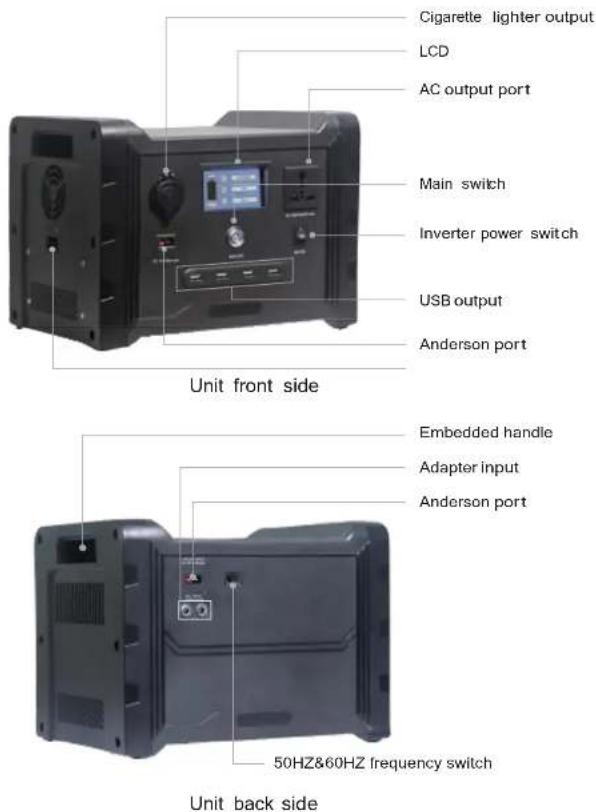
text_image
Cigarette lighter output LCD AC output port Main switch Inverter power switch USB output Anderson port Unit front side Embedded handle Adapter input Anderson port 50HZ&60HZ frequency switch Unit back sideInterface description
- No external battery
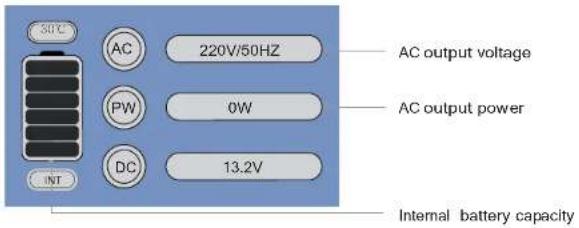
text_image
50°C AC 220V/50HZ PW 0W DC 13.2V INT AC output voltage AC output power Internal battery capacity- Turn on the DC switch

text_image
50°C AC 220V/50HZ PW 0W INT DC 13.2V Battery voltage- Connect an external battery

text_image
External battery capacity 220V/50HZ AC P W 0W DC 13.2V External battery capacity internal battery capacityDC Charging 1

natural_image
Exterior view of a black electronic device with two circular buttons and a magnified inset showing 'DC INPUT Interface' (no readable text or symbols on the device itself)
WARNING
Check adapter and cord for damage prior to use. Never use a damaged or frayed cord; electrical shock can occur if cord is damaged or frayed. If damaged, replace with a new one before proceeding with AC usage (request replacements via Contact Information on page 2). Improper charging may result in serious injury and or death.
-
Charging your unit:
-
Plug the provided adapter into the back of the unit (see photo); then plug the cable into an AC wall outlet.
- While unit is charging, a flashing lightning bolt will appear in the top left-hand corner of the LCD screen on the front of the unit.
- Once the unit is fully charged, the lightning bolt will stop flashing; all 6 bars of the battery indicator will be full.
- Wait 10–15 minutes for the cells to settle. If you notice the battery indicator drop down to 5 bars, reset the unit to the off position and then restart the unit. This will turn the charger back on so it can fill up the balanced cells.
-
When your unit is fully charged, turn off the unit. Then remove plug from wall and back of system.
-
Never leave your unit unattended while it is charging.
- Never let your unit charge via AC for more than five hours at a time. Charging more than five hours may damage the unit.
- Never store your unit in a charging state.
- If the unit is plugged into an AC outlet at the same time it is being used to power an AC device, the unit will continue to function as normal and charge during use. However, you must still stop charging the system after five hours.
- Tip: For a shorter charge time, charge via 2 adapters and DC simultaneously.
- DO NOT leave your system unattended while charging through the AC port.
DC Charging 2
natural_image
Exterior view of a black industrial electronic device with a close-up inset showing its internal components (no visible text or symbols)
WARNING
Never use a damaged or frayed DC cord; electrical shock can occur if DC cord is damaged or frayed. If DC cord is damaged, replace with a new cord before proceeding with DC usage (request replacements via Contact Information on page 2).
Charging your unit:
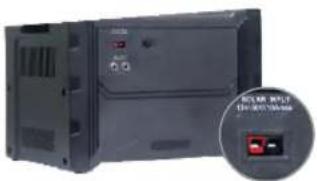
- Plug the provided Anderson extension cable into the back of the battery box (see photo); then plug the cable into the output of your charging source (for example, solar panel, hand crank, windmill, etc.).
- While unit is charging, a flashing lightning bolt will appear in the top left-hand corner of the LCD screen on the front of the unit.
- Once the unit is fully charged, the lightning bolt will stop flashing. All 6 bars of the battery indicator will be full.
- Once the unit is fully charged, wait 10–15 minutes for the cells to settle. If you notice the battery indicator drop down to 5 bars, reset the unit by pressing power key and then back power on the unit. This will turn the charger back on so that it can fill up the balanced cells.
- Once the unit is fully charged, power off the unit and disconnect the cables. Attention: This unit will accept ONLY 12-volt DC sources. If any other VDC is used, the unit will be damaged.
AC Usage Outlets
natural_image
Front view of a gray industrial control panel with indicator lights and buttons, plus an inset showing a plug socket (no visible text or symbols)9

WARNING
Never use a damaged or frayed AC cord; electrical shock can occur if AC cord is damaged or frayed. If AC cord is damaged, replace with a new cord before proceeding with AC usage (request replacements via Contact Information onpage 2).
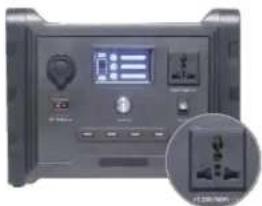
- To use your AC outlets, plug in the devices you want to run. Then turn on the inverter by switching the main AC power switch (see photo) to the ON position. Once on, the outlets will work like normal AC wall outlets in your home.
- In order to protect the inverter and battery, any sustained discharge over 600w will cause the unit to shut down. It can subsequently be reset.
- The watt meter, found on the bottom row of the LCD display, shows the amount of energy being used by the inverter. Please note this energy output is an estimation, and actual output may vary from displayed values.
- Because the watt meter measures inverter output, it will show wattage only for loads plugged into the AC output ports. This meter will never display energy output from DC ports.
- The watt meter cannot detect loads accurately under 25 watts and will display 0 watts for loads under 10 watts.
DC Usage Outlets
natural_image
Front view of a black electronic device with control panel and display (no visible text or symbols)
WARNING
Never use a damaged or frayed DC cord; electrical shock can occur if DC cord is damaged or frayed. If DC cord is damaged, replace with a new cord before proceeding with DC usage (request replacements via Contact Information on page 2).
How you use the DC
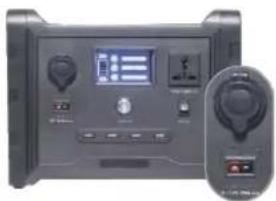
Anderson Powerpole outlets (see photo) depends on the amperage of your chosen load. For loads between 0 and 15 amps, you will need an Anderson Powerpole extension cord. First, plug the extension cord into the desired device. Then, plug the other end of the extension cord
into the Anderson Powerpole outlets on the back of the system (plug black into black and red into red). Do not use an Anderson Powerpole extension cable for loads greater than 15 amps. For loads greater than 15 amps but less than the 20-amp max, plug the device directly into the Anderson Powerpole outlets.
To use the DC cigarette outlet (see photo), simply plug in any 12-volt device that is rated for a maximum of 10 amps and operate as normal.
Please check with the device manufacturer for proper power requirements and compatibility.
DC USB Outlets
natural_image
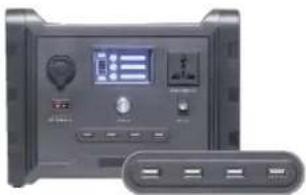
Front view of a black electronic device with control panel and display (no visible text or symbols)To use your USB outlets, first plug the device you want to use into the appropriate outlets—2.1A for cell phones (see photo) and 2.1A for tablets.
Connect with extension battery
text_image
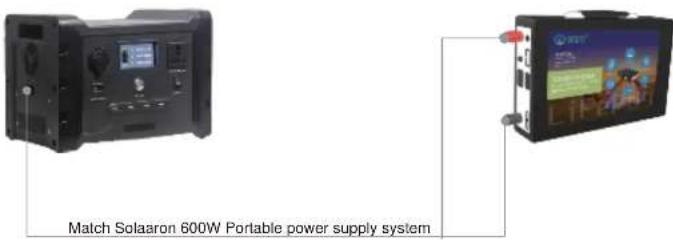
Match Solaaron 600W Portable power supply systemThe portable power supply system contains a new external pack expansion port.
You can now buy an external battery pack (or your own battery) to use with your system. Whenever connected, it functions as if you had two internal batteries. Use a 12V battery.
Outputs will drain the external pack first. Once the external pack is empty, it will immediately switch to using the internal battery.
When charging, your unit will charge its internal battery only.
TECHNICAL SPECIFICATIONS
Dimensions: 29.5 L*22.5 W*22 H (cm)
Weight: 7.2kg
Operating Temperatures: 23°F–111°F (-5°C–45°C)
Operating Conditions:
- Keep out of rainy, damp, or snowy conditions.
- When charging outside with a solar panel, use the panel to shade the unit for better charging efficiency.
- Do not store in a hot vehicle for extended periods of time (i.e. anything over 5 hours).
Battery:
Lithium Iron Phosphate (LFP)
25Ah (320Wh) capacity
12.8V capacity
Rated for 2,500+ charge and discharge cycles
Minimum charge time: 2.5 hours
Charge retention: 1 year (85%)
Integrated inverter: 230V AC pure sine wave; 600W continuous output, slow-start feature protects the inverter from over-current draw
Maximum of 10A @ 12V charging current from AC or DC circuitry
Maximum AC current pulled from AC source (e.g. a wall outlet): 4A @ 230V AC
Maximum combined charge from AC and DC circuitry: 15A @ 12V DC
Max DC output current: 20A
Prismatic cell geometry
Unit Body:
Plastic case
Cooled by back-mounted fan
LCD Display:
6-bar battery-shaped gauge
- Always on so you always know when your battery is charged
- Displays wattage used while the AC switch is on for easy run time calculations. Will remain at zero when AC switch is in OFF position
Power Controls:
Power button on front panel
AC power ON/OFF switch on front of unit
Input Ports:
AC: 110–240V, 50–60Hz
DC: Anderson Powerpole connector ports; 1 set, total of 10A limit using 12V input
Output Ports:
AC: 110V–120V, 50Hz–60Hz; 1 outlet total current limit of 600W, including a slow-start feature that protects the inverter from over-current draw
DC: 4 USB outlets, 3.1A max (2 @ 1A and 2 @ 2.1A)
DC: Anderson Powerpole connectors; 1 set with a total shared current limit of 20A @ 12VDC (240W max output)
DC: 12V cigarette lighter adapter capable of 10A (120W) max output
MANUFACTURER WARRANTY INFORMATION
0 to 365 days from the date of delivery:
What is covered?
Defects in materials or workmanship.
What is not covered?
Damage or defect caused willfully or through negligence.
Damage caused through excessive wear and tear.
Cosmetic blemishes, scratches, or dents acquired through the course of regular use.
Damage caused by use of the unit with unsafe, unregulated or inappropriate products, devices, power sources or power consumption.
Damage resulting from use of the product for anything other than what it is intended for. This warranty does not cover damage caused when the unit is used as a footstool, wheel chock, doorstep or flotation device (it does not float, is not waterproof and may cause bodily injury or death if used as a flotation device).
Any return not previously authorized by our team. Unauthorized return shipments will be rejected or restocked without notification to the sending party.
Upgrade to a newer model. All damaged units will be replaced with a unit of the same model that was originally purchased.
Additional Terms:
Damage caused willfully or by negligence will void the warranty at any point in the 365-day period. Willful or negligent damage is determined upon receipt and inspection of the unit. All refunds/returns will be processed after inspection for willful or negligent damage.
Any unit that has been altered or repaired by an unauthorized service is voided of any warranty.
All products must be returned with all included attachments and accessories unless otherwise directed when obtaining an RMA number. The customer will be billed/charged for any missing attachments or accessories.
If proof of purchase, purchase order, receipt or record of purchase is not available upon request, we will not be responsible for any warranty service.
Any returned unit must be packaged safely and labeled clearly. Any damage caused by poor packaging when returning the unit is the responsibility of the customer and may void the warranty.
At our discretion, units will be repaired or replaced.
Follow Us...
Facebook.com/Solaaron
Twitter.com/SolaaronEnergy
Instagram.com/SolaaronEnergy