the Temp Adjust LSG842 - Toaster BREVILLE - Free user manual and instructions
Find the device manual for free the Temp Adjust LSG842 BREVILLE in PDF.


User questions about the Temp Adjust LSG842 BREVILLE
0 question about this device. Answer the ones you know or ask your own.
Ask a new question about this device
Download the instructions for your Toaster in PDF format for free! Find your manual the Temp Adjust LSG842 - BREVILLE and take your electronic device back in hand. On this page are published all the documents necessary for the use of your device. the Temp Adjust LSG842 by BREVILLE.
USER MANUAL the Temp Adjust LSG842 BREVILLE
natural_image
Top-down view of a black industrial fan or electrical switch device with no visible text or symbols on the body (pure branding)Breville®

Contents
2 Breville Recommends Safety First
6 Components
7 Functions
8 Hints & Tips
9 Care, Cleaning & Storage
BREVILLE RECOMMENDS SAFETY FIRST
At Breville we are very safety conscious. We design and manufacture consumer products with the safety of you, our valued customer, foremost in mind. In addition, we ask that you exercise a degree of care when using any electrical appliance and adhere to the following precautions.
IMPORTANT SAFEGUARDS
READ ALL INSTRUCTIONS BEFORE USE AND SAVE FOR FUTURE REFERENCE
- Carefully read all instructions before operating and save for future reference.
- Remove and safely discard any packaging material or promotional labels before using the sandwich press for the first time.
• To eliminate a choking hazard for young children, remove and safely discard the protective cover fitted to the power plug of this sandwich press.
• Always ensure the sandwich press is properly assembled before use. Follow the instructions provided in this book. - Do not place the sandwich press near the edge of a bench or table during operation.
- Ensure the surface is level, clean and free of water, etc.
- Do not use on a sink drain board.
• Always operate the sandwich press on a stable and heat resistant surface. Do not use on a cloth-covered surface, near curtains or other flammable materials.
- Keep the sandwich press clear of walls, curtains and other heat or steam sensitive materials.
- Do not place the sandwich press on or near a hot gas or electric burner, or where it could touch a heated oven. Use the sandwich press well away from walls.
- Provide adequate space above and on all sides for air circulation around the sandwich press.
- Do not place the sandwich press on any surface that may be affected by heat.
The use of a heat resistant mat is recommended on these surfaces.
- The sandwich press is not intended to be operated by means of an external timer or separate remote control system.
- Do not touch hot surfaces. Use the handle to lift and open the top plate.
• Always remove the sandwich from the sandwich press with a heat proof plastic spatula. Never use your hands.
- Do not use sharp objects or utensils inside the sandwich press as they scratch or damage the interior surface of the hot cooking plate.
- Do not leave the sandwich press unattended when in use.
- When operating the sandwich press, ensure the power cord is kept away from any heat source including the surface of the sandwich press. Ensure the power cord does not become trapped between the upper and lower hot plates of the sandwich press during use and storage.
- Do not place anything on top of the sandwich press when the lid is closed, when in use and when stored.
• Always switch the sandwich press off at the power outlet, then unplug and allow to cool if it is not in use, before cleaning, before attempting to move and when storing.
- Do not use chemicals, steel wool, metal scouring pad, or abrasive cleaners to clean the sandwich press as these can damage the housing or the coating of the cooking plates.
- Keep the exterior housing and the non-stick cooking plates clean. Follow the cleaning instructions provided in this book.

WARNING
Hot surfaces do not touch.

WARNING
This appliance is marked with a hot surface symbol, the lid and outer surface will be hot when the appliance is operating and for some time after use.
IMPORTANT SAFEGUARDS FOR ALL ELECTRICAL APPLIANCES
- Fully unwind the power cord before use.
- Connect only to 230V or 240V power outlet.
- Do not let the power cord hang over the edge of a bench or table, touch hot surfaces or become knotted.
- To protect against electric shock, do not immerse the power cord, power plug or appliance in water or any other liquid, unless it is recommended in the cleaning instructions.
- The appliance is not intended for use by persons (including children) with reduced physical, sensory or mental capabilities, or lack of experience and knowledge, unless they have been given supervision or instruction concerning use of the appliance, by a person responsible for their safety.
• Children should be supervised to ensure that they do not play with the appliance.
- It is recommended to inspect the appliance regularly. Do not use the appliance if the power supply cord, plug, connector or appliance becomes damaged in anyway.
- Return the entire appliance to the nearest authorised Breville Service Centre for examination and/or repair.
- Any maintenance other than cleaning should be performed at an authorised Breville Service Centre.
- This appliance is for household use only.
- Do not use this appliance for other than its intended use. Do not use in moving vehicles or boats. Do not use outdoors. Misuse may cause injury.
- The installation of a residual current device (safety switch) is recommended to provide additional safety protection when using electrical appliances. It is advisable that a safety switch with a rated residual operating current not exceeding 30mA be installed in the electrical circuit supplying the appliance.
• See your electrician for professional advice. -
During electrical storms, the appliance should be disconnected from the power source at the wall socket to prevent any electrical surges that may arise during the storm and which may inadvertently cause damage to the appliance and its electronic componentry.
• Always turn the appliance to the OFF position, switch off at the power outlet and unplug at the power outlet when the appliance is not in use. -
Before cleaning, always turn the appliance to the OFF position, switch off at the power outlet, unplug at the power outlet and remove the power cord, if detachable, from the appliance and allow all parts to cool.
- Do not place this appliance on or near a heat source, such as hot plate, oven or heaters.
- Position the appliance at a minimum distance of 20cm away from walls, curtains and other heat or steam sensitive materials and provide adequate space above and on all sides for air circulation.

WARNING
Do not immerse the appliance, power cord or plug in water or any other liquid.

WARNING
Fully unwind the power cord from the cord storage facility before use.
FOR HOUSEHOLD USE ONLY SAVE THESE INSTRUCTIONS

Components
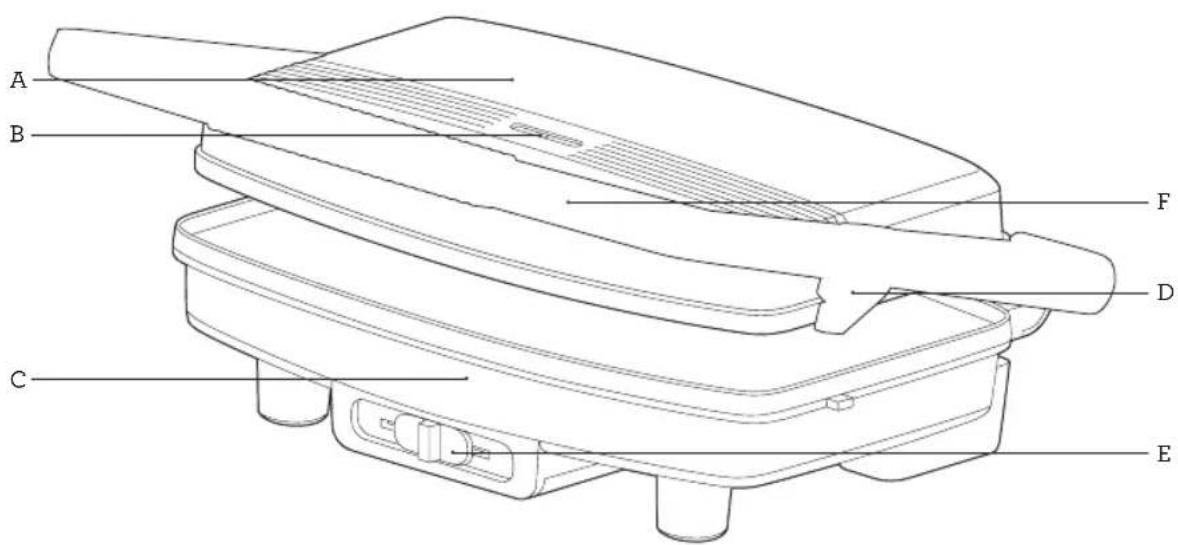
text_image
A B C D E FA. 2000W cooking elements
B. 'Power' & 'Ready' indicator lights
C. PFOA-free non-stick coating for quick and easy cleaning
D. Locking storage clip
E. Temperature adjust slider
F. Cool-touch handle
Not Shown
• Cord storage integrated into base
• Non-slip feet for stability.

Functions
BEFORE FIRST USE
Remove and safely discard any promotional labels and wipe the cooking plates with a damp cloth, then dry thoroughly. Season the plates before use as per the instructions in the Care, Cleaning & Storage section of this book.
- Slide the handle locking clip on the sandwich press from locked to unlock and insert the power plug into a 230/240V power outlet and turn the power on.
- The 'POWER' light will illuminate red and start pre-heating. While pre-heating, prepare the sandwiches by buttering the bread and preparing the filling.
- Once the sandwich press has finished preheating, the 'READY' light will illuminate green and is ready to use.
- For a sandwich, place the buttered bread on the bottom heating plate with the butter side down. Place the filling onto the bread, then cover with another slice of bread, butter side up. The sandwich press can fit two sandwiches to be toasted at one time.

NOTE
For Pitas or wraps, add the filling and fold the flaps together before placing in the sandwich press.
- Carefully close the lid, then set your required heat level by using the temperature adjust slider. Slide to select heat level between low to high heat.
- When the sandwich is cooked, remove using a plastic heat resistant or wooden spatula. Never use metal tongs or a knife as these can cause damage to the non-stick coating.
- To maintain heat if cooking in batches, keep the lid closed until you are ready to toast the next sandwich.

NOTE
The green 'READY' light will continue to cycle on and off to indicate the sandwich press is maintaining the correct temperature.

NOTE
Do not use metal utensils as they will scratch the non-stick cooking surface.

NOTE
When using the sandwich press for the first time you may notice a fine smoke haze. This is caused by the initial heating of some of the components. There is no need for concern.

WARNING
Steam will be ejected from between the cooking plates when the lid is closed. Be careful not to make contact with the steam as it may cause burns.

WARNING
The temperature of accessible surfaces may be high when the sandwich press is operating.

Hints & Tips
BREAD
The sandwich maker is designed for super and regular sized bread. Most types of bread can be used; white, wholemeal, wholegrain, raisin loaf and so on. When using raisin bread, brioche or other sweet breads which contain high sugar content be aware that they may brown faster. Pitas and wraps are also perfect for toasting.
FILLINGS
Be careful when biting into sandwiches containing fillings such as cheese and tomato or jam as they retain heat and can burn if eaten too quickly. If using fruit filling, use canned or pre-cooked fruit as fresh fruit may give off excessive juices when heated. One quarter cup of filling for each sandwich is sufficient. Do not overfill your sandwiches.
BUTTER OR MARGARINE
For better results, we recommend to butter the outside of the bread i.e. place filling between the unbuttered sides of bread. If you are on a low fat diet or kilojoule counting, the outside of the bread may be left unbuttered, noting you may get a lighter toasting result. For extra flavour use herb or garlic butter for spreading on bread.
REHEATING
If the sandwich is not being eaten immediately, place it on a paper napkin to absorb condensation. To keep for longer, place on a rack in an oven-proof dish to keep warm in a low oven, about 100^ C. The sandwich should keep hot for up to 20 minutes this way, but will then begin to dry out.

Care, Cleaning & Storage
Before cleaning, ensure the power is switched off and then remove the power plug from the power outlet.
Allow your sandwich press to mostly cool before cleaning however, the sandwich press is easier to clean when still slightly warm.
Always clean your sandwich press after each use to prevent a build-up of baked-on foods. Wipe cooking plates with a soft, damp cloth to remove food residue.

WARNING
Do not immerse any part of the Breville Sandwich press or the power cord in water or any other liquid.
PFOA-FREE NON-STICK COATING
Cooking on a non-stick surface minimises the need for oil as food does not stick and cleaning is easier. Any discolouration that may occur will only detract from the appearance of the sandwich press and will not affect the cooking performance. When cleaning the non-stick coating, do not use metal (or other abrasive) scourers. Wash with warm soapy water and dry thoroughly. Remove stubborn residue using a damp cloth.
SEASON THE PLATES
Season the plates occasionally to prevent sticking and to make cleaning easier. To season, brush the cooking plates with a little vegetable oil and rub off the excess with absorbent paper. Do this after preheating the unit.

NOTE
The cooking plates and hinges are coated with a non-stick surface; do not use abrasive cleansers or scourers.
STORAGE
To store your sandwich press:
- Ensure the power is off and then unplug power cord from the power outlet.
- Allow the sandwich press to cool and clean as per instructions. Close the lid and slide the locking clip from unlocked to locked so the lid will not open.
- Wrap the power cord in the storage area on the base of the sandwich press.
- Store on a flat, dry level surface. Do not place anything on top of the sandwich press or the cooking plates. The sandwich press can be stored on its side for space saving.

WARNING
Allow the unit to cool down before attempting to move the unit.

Notes

Notes
Breville Customer Service Centre
Australian Customers
Phone: 1300 139 798
Fax: (02) 9700 1342
Web: www.breville.com
New Zealand Customers
Phone: 0800 273 845
Fax: 0800 288 513
Web: www.breville.com
Breville®
Master Every Moment™
Breville, the Breville logo, Master Every Moment and the Temp Adjust
are registered trademarks of Breville Pty. Ltd. A.B.N. 98 000 092 928.
Copyright Breville Pty. Ltd. 2019.
Due to continued product improvement, the products illustrated/photographed in this booklet may vary slightly from the actual product.
LSG842 ANZ B22