AccuSteam EGF2401A2450-T1 - Grill AccuTemp - Free user manual and instructions
Find the device manual for free AccuSteam EGF2401A2450-T1 AccuTemp in PDF.


User questions about AccuSteam EGF2401A2450-T1 AccuTemp
0 question about this device. Answer the ones you know or ask your own.
Ask a new question about this device
Download the instructions for your Grill in PDF format for free! Find your manual AccuSteam EGF2401A2450-T1 - AccuTemp and take your electronic device back in hand. On this page are published all the documents necessary for the use of your device. AccuSteam EGF2401A2450-T1 by AccuTemp.
USER MANUAL AccuSteam EGF2401A2450-T1 AccuTemp
| Serial Number: | |
| Model: |

INSTALLATION/OPERATORS MANUAL ACCU-STEAM ELECTRIC G2 GRIDDLE
MODELS
EGF24A
EGF36A
EGF48A
EGF24B
EGF36B
EGF48B
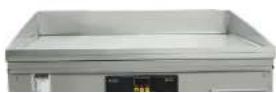

TABLE OF CONTENTS
| DESCRIPTION PAGE | |
| Table of Contents / Document History 1 | |
| Safety Warnings 2-5 | |
| General Info 6-7 | |
| Start up Form 8-10 | |
| Installation 11-13 | |
| Operation 14-24 | |
| Planned Maintenance 25 | |
| Service & Troubleshooting 26-27 | |
| Warranty Information 28-30 |
DOCUMENT HISTORY
| Current Revision | Date | Prior Revision | Date | Revision |
| MP5018-2002 | 02/03/2020 | MP5018-1912 | 12/16/2019 | Added stand installation instructions |
1. WARNING SYMBOL DEFINITIONS
SYMBOL DEFINITIONS
Symbols are used to attract your attention to possible dangers. They are only effective if the operator uses proper accident prevention measures. Some of the symbols are boxed text; while others maybe just picture icons. Please give this information the respect they deserve for safe operation.
Symbol Icons
Below are definitions of the symbol icons used in this manual.

DANGER
Indicates an imminently hazardous situation; which, if unchanged, will result in death or serious injury.

CAUTION
Indicates a potentially hazardous situation; which, if unchanged, will result in minor or moderate injury.

NOTE
Advises the reader of information or instructions, vital to the operation or maintenance of the equipment.
1.1 IMPORTANT FOR YOUR SAFETY
The safety instructions listed below on this page should be posted in a prominent location as a reminder of safe practices as well as recommended actions to follow in the event of an equipment or facility utility issue.
WARNING
In the event of a power failure, do not attempt to operate this appliance.
WARNING
Improper installation, adjustment, alteration, service or maintenance can cause property damage, injury or death. Read the installation, operating, and maintenance instructions thoroughly before installing or servicing this equipment.
WARNING
Only qualified service technicians/electricians should install this appliance to ensure that all electrical and safety requirements are met and that all wiring is installed in accordance with all national, state and local electrical codes.
1.2 WARNING & CAUTION NOTES
IMPORTANT: Read the following safety installation to avoid personal injury or death and to avoid damage to the equipment or property
I=mproper installation, adjustment, alteration, service or maintenance can cause property damage, injury or death. Read the installation, operating and maintenance instructions thoroughly before installing or servicing the equipment.
Intended for other than household use.
Plug the appliance into a properly grounded electrical outlet of the correct voltage, size and plug configuration. If they do not match, contact a qualified electrician to determine the proper voltage and size and install the proper electrical outlet.
Do not connect to a circuit operating more than 150V to ground.
To avoid any personal injury or damage to the unit do not pull the appliance by the power cord.
To prevent any injury. discontinue any use
parts. To avoid injury or damage to the commercial appliance use only Authorized AccuTemp Service Agents and Genuine Replacement Parts when service is required.
Genuine AccuTemp Replacement Parts are specified to operate safely in the environments in which they are used. Some aftermarket parts or generic replacements parts do not have the same specifications to operate safely in AccuTemp equipment. It is imperative that to use Genuine AccuTemp Replacement Parts to avoid injury or damage to the commercial appliance.
Always disconnect from power source before cleaning or servicing.
Any in-the-field modification that bypass the built-in safety features will result in personal injury or death.
This appliance must be properly grounded, in accordance with all National, State or local electrical codes.
⚠️ Temperatures in and around the appliance are very hot and can cause severe burns.
To avoid damage to the cooking surface of this appliance do not use abrasive cleaners such as a griddle stone or brick.
To avoid personal injury or damage to the appliance do not use a water jet to clean the unit.
To avoid damage to the appliance do not leave a chlorine sanitizer in contact with the stainless steel longer than 10 minutes.
To avoid severe burns slowly remove the grease tray to avoid spilling the contents. It is recommended to let it cool before removing.
To avoid damage to the appliance do not leave a chlorine sanitizer in contact with the stainless steel longer than 10 minutes.
2. General Information
2.1 Unit Specifications
| Accu-Steam Griddle Specifications (replace **** with voltage & phase, i.e. 2083) | ||||||
| Model # | EG****A2450-T16G****B2450-T16GF****C0850-T16GF****B0850-T16GF****A0850-T16GF****B0850-T16F | |||||
| KW Input | 9.6 kW 9.6 kW 14.25 kW 14.25 kW 14.25 kW 14.25 kW | |||||
| 208/3 Amp Load | 27A / 9.6 kW 27A / 9.6 kW 40A / 14.25 kW 40A / 14.25 kW 40A / 14.25 kW | |||||
| 240/1 Amp Load | 40A 40A n/a n/a n/a n/a | |||||
| 240/3 Amp Load | 24A / 9.6 kW 24A / 9.6 kW 34A / 14.25 kW 34A / 14.25 kW 34A / 14.25 kW | |||||
| 440/3 Amp Load | 14A / 11 kW 14A / 11 kW | 21A / 16 kW 21A / 16 kW | 21A / 16 kW 21A / 16 kW | |||
| 480/3 Amp Load | 16A / 13kW 16A / 13kW | 23A / 19kW 23A / 19kW | 23A / 19kW 23A / 19kW | |||
| Unit Width (A) | 24.25 [616] | 24.25 [616] | 38.25 [921] | 38.25 [921] | 48.25 [1226] | 48.25 [1226] |
| Unit Depth (D) | 34.7 [881] | 28.7 [/729] | 34.7 [881] | 28.7 [/729] | 34.7 [881] | 28.7 [/729] |
| Cooking Surface Width (B) | 23.9 [607] | 23.9 [607] | 35.9 [912] | 35.9 [912] | 47.9 [1217] | 47.9 [1217] |
| Cooking Surface Depth (C) | 30 [762] | 24 [610] | 30 [762] | 24 [610] | 30 [762] | 24 [610] |
| Depth to Rear Leg (E) | 8.5 [216] | 2.5 [64] | 8.5 [216] | 2.5 [64] | 8.5 [216] | 2.5 [64] |
| Center right to left (F) | 20 [508] | 20 [508] | 32 [813] | 32 [813] | 44 [1117] | 44 [1117] |
| Effective Cooking Area | 717 sq. in. | 574 sq. in. | 1077 sq. in. | 862 sq. in. | 1437 sq. in. | 1150 sq. in. |
| Grease Pan Capacity | 5 qt | 5 qt | 6 1/2 qt | 6 1/2 qt | 6 1/2 qt | 6 1/2 qt |
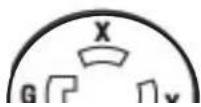
| NEMA Plng (208/240) | 15-50P | 15-50P | 15-50P | 15-50P | 15-50P | 15-50P |
| NEMA Plng (440/480) | L16-20P | L16-20P | L16-30P | L16-30P | L16-30P | L16-30P |
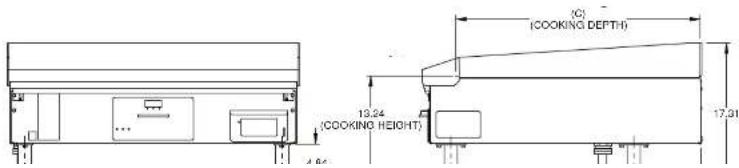
text_image
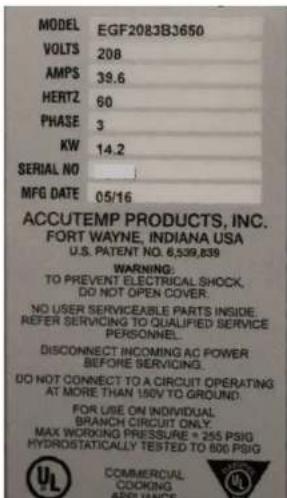
(C) (COOKING DEPTH) 13.24 (COOKING HEIGHT) 17.312.2 EQUIPMENT DATA PLATE
Model: AABCCCDEFFGG
Example: EG F 120 1 A 48 50
A is the base model E = electric
B is the model configuration
CCC is the supply Voltage
D is the number of phases: 1 or 3
E is the depth
F is the width
G is the special configuration
text_image
MODEL EGF2083BJ3650 VOLTS 208 AMPS 39.6 HERTZ 60 PHASE 3 KW 14.2 SERIAL NO MFG DATE 05/16 ACCUTEMP PRODUCTS, INC. FORT WAYNE, INDIANA USA U.S. PATENT NO. 6,539,839 WARNING: TO PREVENT ELECTRICAL SHOCK, DO NOT OPEN COVER. NO USER SERVICEABLE PARTS INSIDE, REFER SERVICING TO QUALIFIED SERVICE PERSONNEL. DISCONNECT INCOMING AO POWER BEFORE SERVICING. DO NOT CONNECT TO A CIRCUIT OPERATING AT MORE THAN 150V TO GROUND. FOR USE ON INDIVIDUAL: BRANCH CIRCUIT ONLY. MAX WORKING PRESSURE = 255 PSIG HYDROSTATICALLY TESTED TO 806 PSIG Commercial COOKING APPLIANCEFig 2.C

text_image
STOPTo register this AccuTemp product for warranty complete the following items:
- Complete the Installation/Operational Checklist and Warranty Registration Form on the following two pages.
- Mail, fax or scan and e-mail the form to AccuTemp Products, Inc to the contacts listed for each type on the form.
- OR use the following link and upload a copy of the Installation/Operational Checklist and Warranty Registration Form online: https://www.accutemp.net/warranty-registration/
If you have any questions about warranty registration please contact our technical service group. They are available 7 days a week from 7:00 am to 7:00 PM EST.

ACCU-STEAM Electric Griddle Start-Up Form

SERIAL NUMBER:
MODEL NUMBER:
| Location Name: | Date: | ||
| Street Address: | Service Company: | ||
| Street Address: | |||
| State/ Zip Code: | State/ Zip Code: | ||
| Building Name/#: | Service Phone #: | ||
| Contact Name: | Technicians Name: | ||
| Phone: | Technicians Email: | ||
| Email: | Additional Info: |
- AccuTemp Products, Inc. is not responsible for the installation and/or modifications to the electrical supply source.
- It is recommended that the wall receptacle be placed as low as State and Local codes allow. Placement in high heat zones will cause service issues that will not be covered under the product warranty.
THIS START-UP FORM MUST BE COMPLETELY FILLED OUT, EMAILED, FAXED OR MAILED OR EMAILED TO THE ACCUTEMP TECHNICAL & CUSTOMER SUPPORT DEPARTMENT, BEFORE THE WARRANTY IS ACTIVATED.
YES NO
| 1. Is the griddle level? (Tick Box) | ||
| 2. Is the wall receptacle positioned in a low heat zone? Note: It is recommended that the wall receptacle be placed as low as State & Local codes allow. Placement in high heat-zones will cause service issues that will not be covered under the product warranty. (Tick Box) | ||
| 8. Is the correct NEMA Plug and Receptacle being used on the supply power cord?(Tick Box) |
| Type of NEMA Plug Tick One | |
| 15-50P (208/240V) | |
| L16-20P (440/480 24" MDL) | |
| L16-30P (440/480 36" & 48" MDL) |
Temperature Verification
| 1. What is the customers normal operating temperature for the Griddle? °F | ||
| 2. Using a weighted contact temperature probe with digital thermometer, does the surface temperature match the set temperature on the griddle controller? (Circle Y/N) | Y | N |
| 3. Does the griddle heat light cycle ON/OFF once the surface temperature has met the set temperature? (Circle Y/N) | Y | N |
4. Bring the griddle to 350°F and allow it to cycle twice. Take 9 temperatures across the surface of the unit in grid form and record (the temperatures should be consistent to ±10°F): | ||
| 5. Does the unit operate correctly for 15 minutes after unit has reached temperature? (Circle Y/N) | Y | N |
I accept this Start-up form as complete and accurate:
3. INSTALLATION
TABLE TOP/STAND MODEL
3.1 INSTALLATION NOTICE
Only qualified service technicians/electricians should perform the installation to ensure that all electrical and safety requirements are met and that all wiring installations are performed in accordance with all national, state and local codes.
TOOLS REQUIRED:
| Spirit Level |
| Phillips Screw Driver |
| Small Blade Straight Screw Driver |
| Digital Clamp Ammeter |
| Multimeter |
| Weighted Temperature Probe |
| Digital Temperature Meter |
3.4 LOCATION AND PLACEMENT
The ACCU-STEAM™ electric appliance has been designed to be placed on a commercial kitchen counter-top, an AccuTemp griddle stand or directly onto any flat, non combustible level surface that will support the appliance weight.
The operating temperature ranges from 200^-400^ ( 93^-204^ ). Since these temperatures can also be found on surfaces around the perimeter of this commercial appliance, care should be given not to install next to or against, objects or surfaces with a low melting or flash point.
3.2 UNPACKING
This appliance was carefully inspected before shipment from the factory. The transportation company assumes full responsibility for safe delivery to the customer until customer acceptance of the package. Careful inspection of the packaging and the appliance should be completed before acceptance from the transportation company.
3.3 GRIDDLE LIFTING
Steamers are heavy enough to require additional manpower or powered assistance
3.5 CLEARANCES
| Location | Combustible Construction | Non-Combustible Construction |
| Back | 2 Inches 0 inches | |
| Right Side | 1 Inch 0 inches | |
| Left Side | 1 inch 0 inches | |
| SUITABLE FOR ALL INSTALLATION ON COMBUSTIBLE FLOORS | ||
3.6 LEVELING
The appliance must be installed in a level condition. An out-of-level condition may cause uneven temperatures and in a severe out of level condition damage to the appliance can occur. Use a spirit level resting on the appliance cooking surface to ensure it is level front-to-back and left-to-right.
3.7 TABLE TOP
Install the (4) rubber foot tips provided with your appliance onto the four foot adjusters of each of the commercial appliance legs. This will keep the griddle from sliding on the counter-top under normal use. Once the rubber foot tips have been installed, adjust the four foot adjusters up or down as needed to level the griddle side to side and front to back
AccuTemp STAND
If mounted to an AccuTemp griddle stand with casters, ensure that the floor surface is level and place the two locking casters to the "on" position and follow the leveling instructions to verify the appliance is level.
3.8 STAND INSTALLATION
Improper installation, adjustment, alteration, maintenance or service can cause death or injury or property damage. Read the installation instructions completely before installing, maintaining or servicing this accessory.
Use of any replacement parts other than those supplied by AccuTemp Products may cause bodily injury, damage to property, and damage to the equipment. Use of non OEM parts will void all active warranties.
Do not touch this accessory while running as the outside will be hot and can cause a burn injury. Always wait until the accessory is cool before servicing.
Griddles that mount to the this accessory are heavy enough to require additional people or powered assistance when installing. Failure to do so can cause injury or death.
Operation of this accessory in an out of level condition could cause poor performance of the griddle that is mounted to it.
TOOLS REQUIRED:
- Carefully remove the packing material of the stand.
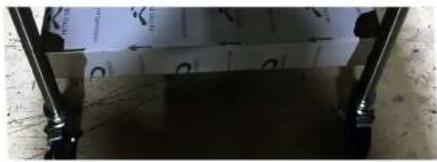
- Locate the stand in an area where there is room to work around if the stand model has casters lock the front casters to the on position (Fig 3.B).
natural_image
Close-up of a mechanical component with metal brackets and a transparent sheet, no visible text or symbolsFig 3.B
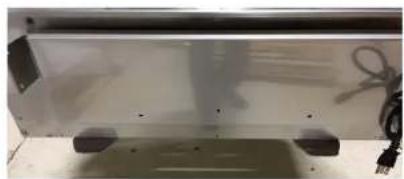
- Using the lifting device make sure that the plate or forks extend the width of the griddle bottom to avoid damaging the griddle (Fig 3.C).
natural_image
Exterior view of a modern office building (no signage)Fig 3.C
-
Raise the lifting device enough to gain access to the four shipping legs (Fig 3.D).
-
Remove the two fasteners that attach each of the four legs to the griddle and retain the fasteners for later use (Fig 3.E).

natural_image
Close-up of hands operating a mechanical assembly with blue storage bins and yellow components (no visible text or symbols)Fig 3.E
- Raise the lifting device so that the griddle clears the mounting tabs of the stand (Fig 3.F). Align the holes in the four mounting tabs of the stand to the threaded holes of the griddle.

text_image
STANDARD COMPUTABLE ANOTHERABLE CONSTRUCTION UNIT 10000 25000 30000 40000 50000 CONSTANS FOR INSTALLATION FOR CONTINUING CAPS. 1.0 2.0 3.0 4.0 5.0 6.0 7.0 8.0 9.0 10.0 11.0 12.0Cin 2 C
- Tighten each fastener to 75 inch pounds (Fig 3.H).

natural_image
Close-up of hands adjusting a metal mechanical component with a tool (no visible text or symbols)Fig 3.H
- Stands with adjustable feet: Level the griddle using the adjustable feet from front to back and side to side by using a 1" open end wrench or adjustable wrench and turn each foot clockwise to raise and counter clockwise to lower (Fig 3.1).

natural_image
Close-up of a metallic mechanical joint or bracket with a curved handle, resting on a textured surface (no text or symbols visible)Fig 3.1
3.9 ELECTRICAL CONNECTIONS
When this appliance is installed with casters it must be installed with the casters supplied. A connector complying with either ANSI Z21.69 - CSA 6.9. It must also be installed with restraining means to the connector as specified in the appliance manufacturer's instructions.
This commercial appliance must be properly grounded in accordance of all current National, state and local codes. Never remove the ground prong of the plug.
3.9.1 ELECTRICAL SUPPLY
The electrical voltage requirement is listed on the data plate that is located on the lower left side panel.
All AccuTemp Accu-Steam Electric Griddles are supplied with a power cord and plug that must be connected to the specified receptacle.
Make sure the voltage is within 10% of the voltage listed on the griddle data plate
⚠️ Connection to any other voltage not identified on the data plate will cause damage to the components and is not
Under no circumstances shall the plugs grounding prong be cut or bent to fit a receptacle other than the one specified.
Do not use any adapters.
⚠️ Any in-field modification made that bypass the safety features of this appliance will result in serious injury or death.
Any in-field modifications made without written authorization from AccuTemp Products, Inc. will void all written and oral warranties.
The ACCU-STEAM™ griddle has been designed, manufactured and tested to meet or exceed the demanding standards of safety set forth by ANSI/NFPA 70. To ensure that this high level of safety is maintained in your installation, it is important that you read and understand the following information before attempting to plug in your griddle.
3.9.2 ELECTRICAL REQUIREMENTS
Electrical requirements are listed on the data plate located on the front right of the control panel. All standard AccuTemp griddles are supplied with a 6ft (1.83m) cord and the appropriate UL listed plug that must be connected to the correct voltage specified on the units data tag. Depending on the rating listed on the data plate. Make sure that the voltage at your supply receptacle
3.9.3 GROUNDING INSTRUCTIONS
Grounding provides a path for electric current to reduce the risk of shock. This product is equipped with a power cord having a grounding conductor and a grounding plug. The plug must be plugged into a grounded receptacle that is installed and grounded in accordance with local codes, or in the absence of local codes, with the National Electric Code, NFPA 70, or the Canadian Electrical Code, CSA22.2, as applicable.

NEMA 6-50R
240V Single Phase

4. OPERATION
RISKS RESULTING FROM CONTACT WITH VERY HOT OBJECT:
HOT
Hot areas may form during the cooking process, especially on the cookware, grills and the inner side of the door. Use protective gloves whenever handling hot objects. During the cooking process, do not handle cookware containing liquids or liquid foodstuffs located above eye level. Danger of burns.
Be sure all operators read, understand and follow the information contained in this manual including caution warnings, operating instructions and safety instructions.
⚠️ Never use wet or damp gloves as moisture can conduct heat quickly.
Keep the floor in front of the equipment clean and dry. If spills occur, clean immediately to avoid potential injuries.
Do not use abrasive (or steel) materials, such as wire brushes, metal scouring pads to clean the griddle surface
The ACCU-STEAM G2™ griddle is constructed and uses technology like no other griddle in the world. The stainless steel cooking surface is heated by steam. The griddle steam chamber requires no additional liquid or maintenance. A temperature sensor to sense temperature and an over-temperature safety shutdown system are part of the griddle assembly. At temperatures below 212°F (100°C), the chamber is actually in a vacuum, similar to that of a canning jar. At temperatures above 212°F (100°C), the chamber operates under pressure. The temperature sensor senses the temperature of the steam and reports this data to the temperature control electronics, which energizes the heating system. This system maintains the griddle cooking surface temperatures to within ± 5°F (2.7°C) over the entire cooking surface and provides a near instant temperature recovery, even in the same spot on the griddle, when turning food in place.

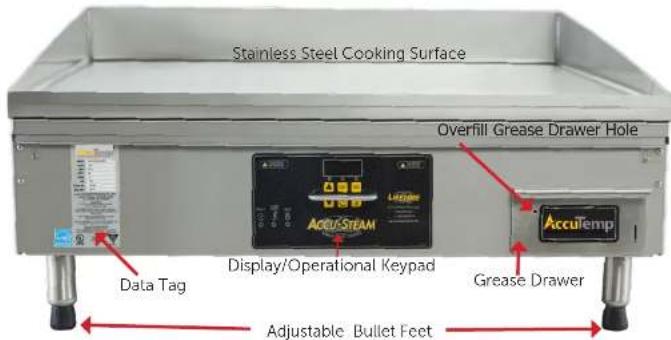
4.2 VISUAL IDENTIFICATION
text_image
Stainless Steel Cooking Surface Overfill Grease Drawer Hole Data Tag Display/Operational Keypad Grease Drawer AccuTemp Adjustable Bullet FeetFig 4.B

4.2 CONTROL OVERVIEW
The appliance digital temperature control is easy to operate and requires little customer interface.
OPERATOR DISPLAY AND KEYPAD

text_image
200F OPERATOR DISPLAY LED 1 LED 3 LED 2 PROGRAM KEY PRESET TEMP 1 PRESET TEMP 2 PRESET TEMP 1 KEY PRESET TEMP 2 KEY PROGRAM KEY ON/OFF KEY ASTERISK KEY Fig 4.DThis appliance has a digital control temperature board that has two modes of operation.
- Operational Mode
- Manager Mode
Operational mode is the most used mode and the appliance operates as the keyboard

Down Arrow Key - This key when pressed decrease the set cooking temperature.
Unless in the Loc mode. Press and hold key for approximately three seconds to initialize the temperature adjust mode.
Press the ON/OFF switch and the griddle will start to pre-heat and LED 1 will blink. Any time the appliance is turned on it will operate and heat to the default set temperature or the last regulated Non-Preset temperature (Factory default is 350^ ).
The display will show the current temperature until the set temperature is met, then LED 1 will go solid (FIG 4.D). The display will go to a "rdY" display or show the set temperature depending on the programming when the appliance was initially installed and setup. (Factory default is "rdY")
PRESETS
Press the ON/OFF switch (Fig 4.D) and the griddle will start to pre-heat and LED 1 will blink.
Press and hold any PRESET KEY or PRESET TEMP 2 for three seconds or until the LED 2 or LED 3 blinks.
The selected preset LED will blink and the display will show the current temperature and increase or decrease depending on the
4.2.2 MANAGER MODE PROGRAMMING
Prior to using the commercial appliance a few operational items need to be determined.
- Default set temperature
- Preset 1 set temperature
- Preset 2 set temperature
- Operator lockout of set temperatures or "on the fly" temperature set
Default Set Temperature - is the temperature that the commercial appliance will heat up to when turned on.
Preset 1 Set Temperature - is an alternative set temperature that the commercial appliance will heat up to when activated from the keypad.
Preset 2 Set Temperature - is an alternative set temperature that the commercial appliance will heat up to when activated from the keypad.
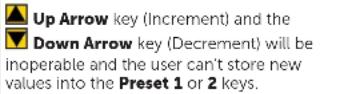
Set Temperature Lockout - If turned on in the manager mode will lock in the set temperatures that were last saved in memory. If not set to active (Loc), the set temperatures can be set lower or higher than the last saved value.
To change the preset temps, attend the following steps:
- Power the unit on the display will show the
Managers mode is used to setup initial operational parameters for the appliance prior to the first time of production use.
Manager's mode
- Entering Managers mode, press and hold the DOWN arrow key and the ASTERISK key together for about eight seconds, to initiate the programming mode. When the mode is accessed, all three LED lights will blink synchronously.
- Once in managers mode, the display will show the DEFAULT COOK TEMP, (see Fig 4.E, P#1)
- To cycle between programs, use UP arrow key and DOWN Arrow key. For example, to reach Program #2, Ready Mode Display, the UP arrow would be pushed once, cycling from Program #1 Default Cook Temperature to Program #2.
- To adjust the selected program, use PRESET 2 key or ASTERISK key to adjust the Program Settings (Fig 4.E & 4.F).
- When all changes are completed Exit the Managers mode and save the new parameters by pressing the PRESET 2 key
| Mode | P# | LED1 | LED2 | LED3 | Program | description | Default Display | Min Setting | Max Setting | |
| 0 | B | B | B | Unit of Measure | (°F) | 0/00 | 0/00 = F | 0/01 = C | ||
| 1 | B | B | B | Default Cook Temperature | 350F175C | 350F175C | 200F90C | 400F205C | ||
| 2 B | B | B | Ready Mode | Display (see table below for further detail) | 0 | 2/00 | 0 | 3 | ||
Fig 4.E This chart illustrates the programming logic and program level indication
| P#2 Value | Default Display | Display when there is a UP, PRESET TEMP 1 or momentary PRESET TEMP 2 key press | Display when there is an ASTERISK key press |
| 0/00 | rdY | Set Point Temperature | Set Point Temperature |
4.2.3 CONTROL REFERENCE GUIDE
| MODE LED Indicators DISPLAY NOTES | |||
| Off All LED's are off | when powered down. | Off when powered down. When powered On, the controller would FLASH at a 1 Hz rate the current set temperature for 5 seconds. After this period the controller would go to Warm Up / Cool Down Mode. | To turn unit on: depress theOn/Offkey.To turn off the unit, disable outputs, save the current set point temperature (see details in "Other Features") and turn off the display: press and hold theOn/Offkey for approximately five seconds. |
| Warm Up / Cool Down | Blinking LED above the selected temperature key (LED 1, 2 or 3). If default condition then LED 1. If Preset 2 is selected then LED 3 If Preset 1 then LED 2 | Actual temperature when no keys depressed, or set temperature of the Preset/Manual key when key▲UP arrow key PRESET 1 key or PRESET 2 key is momentarily pressed. | Upon power-on or whenever another temperature setting is made, the unit will enter this mode and will exit this mode only when the actual temperature has regulated. |
| Ready Mode LED above the selected key will be ON | Default display and alternate display options will be determined according to Program #2 value as shown in Fig 4.E & 4.F | Once has regulated, the indicator LED above the selected key will go to solid ON. For details on display operation, please refer to Program #2 value as shown in Fig 4.E & 4.F | |
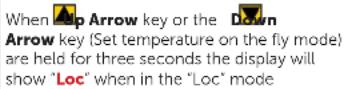
| Set Temperature (On the fly) | All indicator LEDs blinking | Set Point Value when user Lock Mode is OFF, or "Loc" when User Lock Out Mode is ON | If the User Lock Out Mode is OFF, the set temperature can be adjusted. To set the temperature, press either the▲P arrow key or theDOWN arrow keyand hold for approximately 3 seconds. The controller will load and display Default Cook Temp and enter set temperature mode. Press the▲P arrow keyto increment or theDOWN arrow keyto decrement from the current |
| Set Preset Temperature | All indicator LEDs blinking. Then the selected preset key will blink for 3 -5 seconds. | Set Point Value Use the same process to change the temperature as detailed in Set Temperature (On the fly), to adjust the Set Temperature. Once the correct temperature is displayed, and before the five second time out, press and hold the PRESET TEMP 1 key or the PRESET TEMP 2 key to save the displayed value to the desired preset key and to exit this mode. Press the On/Off key to exit without saving.Default Values:PRESET TEMP 1 = 375°FPRESET TEMP 2 = 400°F | |
| Display Temperature Mode | Current Temperature function LED on | Actual temperature |  |
| User Lockout Mode | All LEDS on solid | "Loc"or "ULoc" |  |
 | |||
 | |||
4.3 COOKING
4.3.1 CLEAN AFTER INSTALLATION
It is recommended that you clean your ACCU-STEAM™ griddle thoroughly before using it for the first time. To clean the appliance cooking surface, just simply wash it down with a solution of mild soap and water, then rinse thoroughly with clean water and wipe dry with a clean towel.
⚠️ Please use caution as temperatures on and around the griddle cooking surface could cause severe burns.
4.3.2 SEASONING
Once the cooking surface has been cleaned, turn the appliance on via the digital control key pad and set the temperature to 200°F. (93°C), and allow the griddle cooking surface to heat for 10 minutes. Using a high temperature oil, such as Pan and Grill Shortening™, Whirl™ or equivalent, pour enough to cover the entire appliance cooking surface. Do not use standard vegetable oil to season the griddle cooking surface. It may cause food to stick and result in improperly cooked food. Work this seasoning oil into the griddle surface with a regular heavy-duty scrub pad for about 5 minutes, making sure that you scrub the seasoning oil over the entire appliance cooking surface. After the 400°F (204°C). The appliance will be preheated when the selected set temperature is displayed and the corresponding LED goes solid. Please use caution as temperatures on and around the griddle cooking surface could cause severe burns.
4.3.3 COOKING
Begin cooking only after the appliance has been preheated to the desired temperature. Please note these facts:
- You can cook all the way to the edges of the cooking surface because the temperature does not vary across the entire cooking surface.
- You can turn the product to the same spot because the cooking surface has near instant heat recovery.
- It will always cook the same, regardless of product load or surface coverage.
Accurate Cooking Temperatures
Because of the inaccurate surface temperatures and long recovery times common with other griddles cooking surfaces. It is doubtful you were cooking at the set temperature or the temperature you wanted. Adjust the temperature on the Accu-Steam™ griddle and it will not change or vary by the location on the griddle surface. There are no hot or cold zones.
4.3.4 SURFACE TEMPERATURES
The digital temperature control and temperature sensor are more accurate than any other device to measure the cooking surface temperature in this appliance. Any other digital device may show a difference. The important use of the external temperature measuring device is to ascertain that the temperatures are within ±5^ F across the entire cooking surface of the appliance.
Due to the construction material of the cooking surface an infrared temperature probe can't be used.
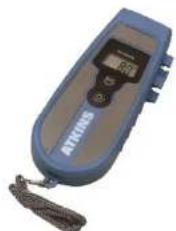
The proper measurement tools to use is a calibrated weighted temperature probe and digital temperature meter set (Fig 4.G).
A number of factors can cause surface temperature reading differences such as:
• Air movement across the appliance cooking surface can lower the temperature reading as much as 10^ F from the set temperature.
• Proper calibration of the temperature measuring device.
• How long after the heat light turned off before temperature measurement was completed.
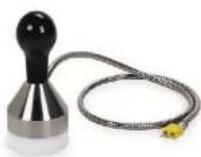
Weighted Temperature Probe
natural_image
Blue and gray electronic device with a digital display and tassel (no visible text or symbols)Digital Temperature Reading Device
Fig 4.G

Assure the cooking surface is clean
4.3.5 CHECKING SURFACE TEMPERATURES
- Verify griddle is level front to back and side to side before attempting this procedure.
- With the griddle plugged in, set the temperature to 300^ F.
- Place the weighted temperature probe in the center in the first 1/3rd of the griddle cooking surface on a small amount of high temperature cooking oil. Make sure that the probe is between the griddle weld stud dimples to assure a proper reading.
- Allow the griddle to heat to the initial temperature setting.
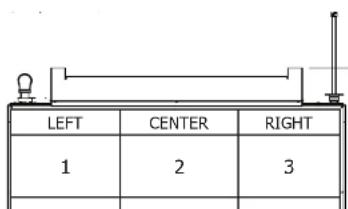
- Place weighted temperature probe and record 9 temperatures according to the chart below (Fig 4.H).
- Temperatures shall be within ±5^ F of each other across the entire surface.
text_image
LEFT CENTER RIGHT 1 2 34.3.6 GREASE TRAY
The grease tray is located on the front right side of the appliance and has a gripping handle on the front and the inside middle to assist in safely managing the hot contents. Models used for maritime have a locking style and this lock must be released before sliding the tray out. Use caution when emptying the grease tray as contents in this tray could cause severe burns. The grease tray should be checked periodically and emptied as necessary to prevent an overflow or dangerous condition. To assist in indicating an overfill condition a hole located on the front of the tray will allow grease to escape when overfilled.

⚠️ Allow the grease tray contents to cool below 140°F before removing.
Be careful not to spill the contents of the grease tray as it can cause a slipping condition which could cause a personal injury
The grease tray contents could cause severe burns. Slowly remove the grease tray from the appliance to avoid spilling the contents.
4.4 CLEANING
Always disconnect from power source before cleaning or servicing.
If the cooking surface of the appliance has standing grease and the griddle is at a high temperature using water or ice can cause the grease to splatter and cause skin burns.
The grease tray contents could cause severe burns. Slowly remove the grease tray from the griddle to avoid spilling the contents.
Do not use a water-jet to clean this appliance as it can harm the electronic components.
Do not use a stone or brick to clean griddle cooking surface. Only use a fabric scrub pad.
4.4.1 DAILY CLEANING
Cleaning the cooking surface during the work shift can be performed with a sharp scraper. When heavy cleaning at the end of a shift or periodically through the day is needed, the following is recommended:
- Empty the grease tray as often as needed and always prior to end of shift cleaning.
• After the non-cooking surfaces are cool to the touch. Empty the grease tray and wash with a mixture of dish detergent and clean water and dry with a clean dry cloth.
- Clean the non-cooking surfaces with a damp cloth and dry with a clean dry cloth. Use a high quality stainless steel cleaner on a clean cloth to reduce grease buildup. Follow the manufacturers instructions located on the cleaner.
- It is recommended that a high quality stainless steel polish be used on the non-cooking surfaces as the last step in keeping surfaces in new like condition and lengthen the usable life of this commercial appliance. Follow the manufacturers instructions located on the polish.
Step 1
Scrape off Heavy Deposits
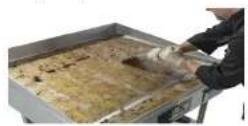
Step 2
Cool griddle to 220°F and apply water or ice. Use a long handled
5. PLANNED MAINTENANCE CHECKLIST
It is recommended that you contact your AccuTemp authorized service provider to setup a planned maintenance program to keep your appliance operating in the most efficient manner. AccuTemp recommends a minimum of a yearly schedule.
| PM TASK DESCRIPTION | Daily Biannual Yearly | ||
| Verify that the appliance is level and properly located under the hood. | X | X | |
| Verify that the temperature controller is working properly and that there are no rips in the label. | X X X | ||
| Check that the splash shield at the top of the control panel is under the rail provided. If not water and or grease can migrate into control panel. | X | X | |
| Inspect the control compartment for foreign particulate and any loose wiring or connections. | X | X | |
| Check that the power supply cord is not frayed, outer covering is not degraded or any bare cooper is visible. Replace if required. | X X X | ||
| Verify amp draw to listed amp requirements on the data tag of the appliance. | X | X | |
| If on an AccuTemp Stand verify mounting fasteners are in place and tight. If not correct. If the stand has casters check that the wheels are intact and that they are mounted correctly. If grease covered clean with a mild detergent and clean water. Dry completely. Apply a food grade silicone to the locking mechanism. | X X X | ||
| Complete a 9 point temperature test to check for even temperature across the surface of the cooking surface. | X | X | |
| Check for grease buildup in the grease drawer container and clean it with a damp towel saturated with a mild detergent and | X X X | ||
6. SERVICE & TROUBLESHOOTING
Always disconnect from power source before cleaning or servicing.
⚠️ Any in-field modification that bypass the built in safety features of this appliance will result in death or serious injury.
⚠ Use of any replacement parts other than those supplied by AccuTemp can cause injury to the operator or damage the appliance and voids all warranties.
There are no user-serviceable parts. To prevent electrical shock do not open the access panel covers.
Service should be completed by AccuTemp authorized service groups. Service completed by unauthorized groups will void all factory warranties.
AccuTemp Technical Service must be contacted for all warranty service requests. If not the warranty claim maybe denied.
6.1 APPLIANCE WILL NOT TURN ON
• Make sure the appliance is plugged in.
6.3 UNEVEN OR INACCURATE SURFACE TEMPERATURES
- Verify the appliance is level front to back and side to side.
- Verify the surface temperature with an accurate digital surface probe thermometer.
- Use of an infrared or mechanical thermometer will not give an accurate reading of the appliance cooking surface temperatures.
- Contact AccuTemp Technical Service for additional instructions.
6.4 UNIT WILL NOT TURN OFF
• This symptom, which is extremely rare, indicates a serious control malfunction.
- Turn off the appliance electrical supply at the source and contact AccuTemp Technical Service for additional instructions.
- Make sure to hold the On/Off Key for a minimum of 3 seconds until the display turns off.
6.5 PRESET TEMPERATURES ARE NOT WORKING
- Check the preset temperature by pressing each key momentarily to display the Preset Temp. If the Preset Temp settings are correct and the appliance will not regulate
6.6 ERROR CODE DISPLAYED
E001 Displayed
Open Temperature Sensor or defective temperature input on Temperature Control Board.
E002
Shorted Temperature Sensor or defective input on the Temperature Control Board.
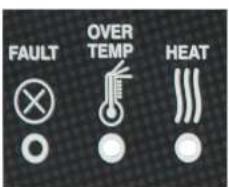
6.8 OVER-TEMP LIGHT ILLUMINATED
When this error is lit an over-temp condition was sensed and will turn off the appliance
To correct, turn the appliance off and wait one minute and turn the appliance back on.
If problem persists - call AccuTemp Service
text_image
FAULT OVER TEMP HEATFig 6.A
Over-Temp Light
(Heat light will also be illuminated in normal)
AccuTemp Products, Inc. Technical Service Technician is available: Monday thru Sunday, 7:00am to 7:00pm EST.
| Toll Free 800 480-0415 |
| Office 260 469-3040 |
| Fax 260 469-3045 |
| Email -Service service@AccuTemp.net |
| Email-Parts parts@AccuTemp.net |
| Web Site www.AccuTemp.net |
WARRANTY SERVICE PROCEDURE
- Contact the AccuTemp Technical Service group for all warranty service requests.
- Be prepared to supply the serial number, address, location phone and contact for the location.
- Be prepared to complete a few simple tasks to help evaluate the problem.
- If the problem requires service at the location the AccuTemp Technical Service group will dispatch the nearest authorized service agent.

