HYNK1142 - Alarme voiture American International - Free user manual and instructions
Find the device manual for free HYNK1142 American International in PDF.


User questions about HYNK1142 American International
0 question about this device. Answer the ones you know or ask your own.
Ask a new question about this device
Download the instructions for your Alarme voiture in PDF format for free! Find your manual HYNK1142 - American International and take your electronic device back in hand. On this page are published all the documents necessary for the use of your device. HYNK1142 by American International.
USER MANUAL HYNK1142 American International
natural_image
Technical line drawings of three different electronic components or enclosures, shown from top, front, and side views (no text or symbols present)VEHICLE APPLICATIONS
Hyundai
2007-10 ELANTRA (radio delete vehicles only)
HYN-K1T42 Mounting Kit
DASH DISASSEMBLY INSTRUCTIONS
- Set the parking brake.
-
Using a panel removal tool, carefully unfasten and pull forward the trim bezel from around the radio.
-
Pull the radio trim bezel forward, disconnect all attached harnesses and remove radio trim bezel.
-
Remove the (4) Phillips screws securing the factory pocket and black out plate/bracket assembly to the sub-dash.
-
Pull the pocket and bracket assembly forward, disconnect all attached harnesses and antenna lead and remove pocket and bracket assembly.
KIT ASSEMBLY INSTRUCTIONS
Single ISO Mount Applications
- This kit is an (ISO) mounting kit only.
- The mounting sleeve of your new audio/video components and trim ring cannot be used when ISO mounting an aftermarket radio. Your audio/video component must have a removeable trim ring.
- It is advisable to assemble the kit and new radio or audio/video component on a work bench, or flat surface when assembling so you can get the radio component(s) to be straight when tightening the mounting screws.
- Start by loosely attaching the new radio component between the mounting brackets using the screws supplied with the kit or new radio.
- FOR SINGLE ISO INSTALLATION ONLY: Insert the pocket under the radio and lock into the slots provided on the mounting brackets. See Fig. A on page 2.
- Slide the audio/video component forward or back for desired look and tighten the screws on the side brackets.
- Install and wire the assembled radio component in the dash and secure to the sub-dash using the factory screws that were removed when removing the factory radio.
- You may need to move the new audio/video component forward or back for a better look, or to allow the face of the new component to operate without interference.
- Attach a rear support bracket to the rear of the new radio and adjust as necessary to support the weight of the radio.
Double ISO Mount Applications / Double DIN Mount Applications
- This kit is an (ISO) mounting kit only.
- The mounting sleeve of your new audio/video components and trim ring cannot be used when ISO mounting an aftermarket radio. Your audio/video components must have a removable trim ring.
- It is advisable to assemble the kit and new radio or audio/video component(s) on a work bench, or flat surface when assembling so you can get the radio component(s) to be straight when tightening the mounting screws.
- Start by loosely attaching the new radio component(s) between the mounting brackets using the screws supplied with the kit or new radio.
- Slide the audio/video component(s) forward or back for desired look and tighten the screws on the side brackets.
- Install and wire the assembled radio component in the dash and secure to the sub-dash using the factory screws that were removed when removing the factory radio.
- You may need to move the new audio/video component(s) forward or back for a better look, or to allow the face of the new component(s) to operate without interference.
- Attach a rear support bracket to the rear of the new radio and adjust as necessary to support the weight of the radio.
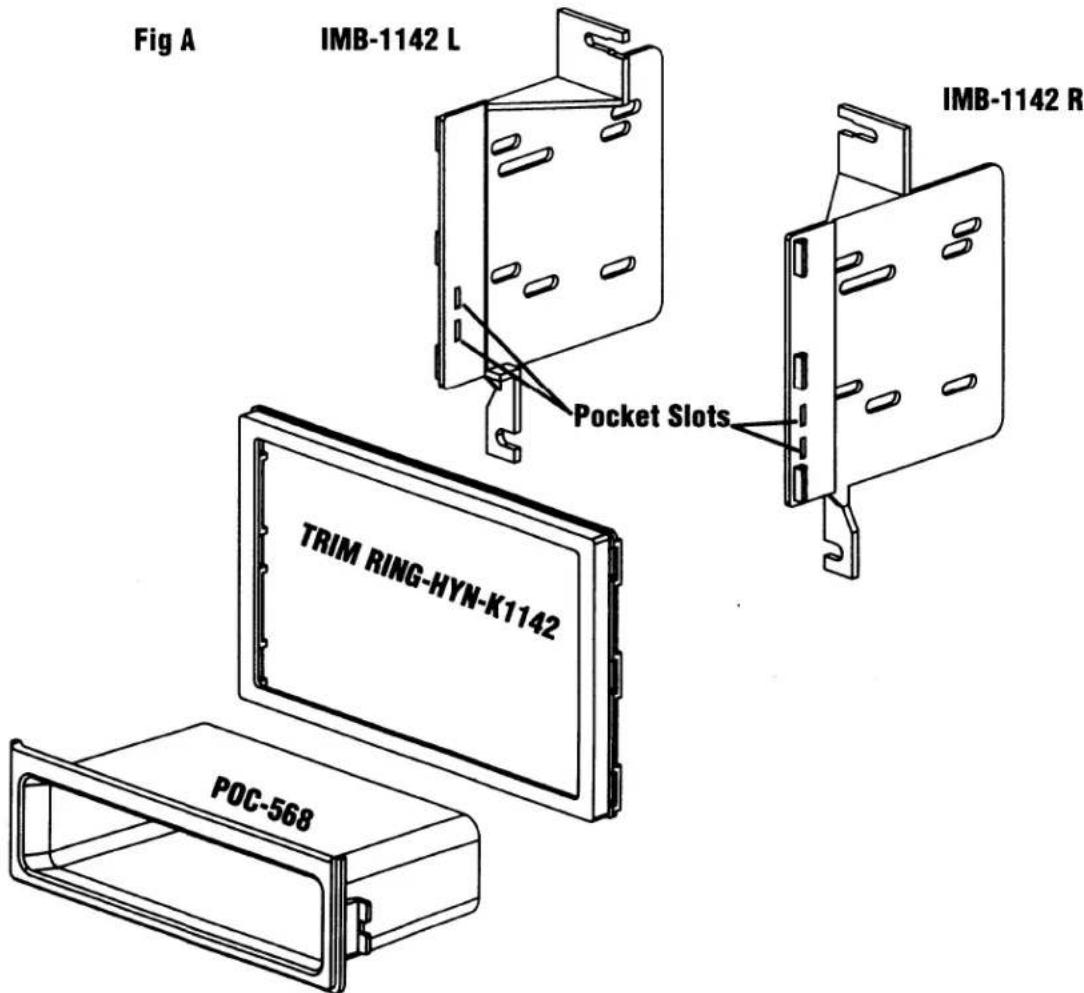
text_image
Fig A IMB-1142 L Pocket Slots IMB-1142 R TRIM RING-HYN-K1142 POC-568For information about other American International automotive accessories visit our website at:
http://www.americaninternational.net

American International
Automotive Products Division
1040 Avenida Acaso • Camarillo, CA 93012, U.S.A.
USA Sales (800) 336-6500
Canada Sales (888) 922-3006 • USA Fax (805) 388-7950
CUSTOMER HELP LINE
USA 800-323-4329 • Canada 800-245-8777