CrownSound KL3CRN-BT - Headphones ZLine - Free user manual and instructions
Find the device manual for free CrownSound KL3CRN-BT ZLine in PDF.


| Product Type | Wireless Bluetooth Headphones |
| Brand | ZLine |
| Model | CrownSound KL3CRN-BT |
| Connectivity | Bluetooth 5.0 |
| Wireless Range | Up to 10 meters (33 feet) |
| Battery Type | Lithium-ion, rechargeable |
| Battery Life | Up to 20 hours of playback |
| Charging Time | Approximately 2 hours |
| Charging Port | Micro USB |
| Driver Size | 40 mm |
| Frequency Response | 20 Hz - 20 kHz |
| Impedance | 32 ohms |
| Sensitivity | 105 dB ± 3 dB |
| Noise Cancellation | Passive noise isolation |
| Microphone | Built-in omnidirectional microphone |
| Controls | Multifunction buttons for volume, calls, and music |
| Headband Design | Adjustable padded headband |
| Ear Cup Type | Over-ear, cushioned |
| Foldable | Yes, collapsible for portability |
| Weight | Approximately 200 g (7 oz) |
| Included Accessories | Micro USB charging cable, 3.5 mm audio cable, user manual |
| Compatibility | Smartphones, tablets, laptops with Bluetooth |
| Cleaning Instructions | Wipe with a soft dry cloth; do not use liquids |
| Storage Temperature | -10°C to 45°C (14°F to 113°F) |
| Safety Note | Avoid exposure to moisture; do not disassemble |
Frequently Asked Questions - CrownSound KL3CRN-BT ZLine
User questions about CrownSound KL3CRN-BT ZLine
0 question about this device. Answer the ones you know or ask your own.
Ask a new question about this device
Download the instructions for your Headphones in PDF format for free! Find your manual CrownSound KL3CRN-BT - ZLine and take your electronic device back in hand. On this page are published all the documents necessary for the use of your device. CrownSound KL3CRN-BT by ZLine.
USER MANUAL CrownSound KL3CRN-BT ZLine
natural_image
Exterior view of a white architectural column with ventilation grilles and a blue 'Installation Guide and User Manual' label (no other text or symbols)Installation Guide and User Manual
ATTAINABLE LUXURY®
Luxury should never be left desired - it's meant to be attainable."
- Andrew Zuro, Founder
⚠ WARNING: This product can expose you to chemicals including nickel, which is known to the State of California to cause cancer. For more information, go to www.P65Warnings.ca.gov.

text_image
ZZLINE
Integrated with industry-defining technology, the ZLINE Bluetooth Crown Moldings transform the seamless, elegant ceiling transition into a Bluetooth sound system, creating the perfect entertainment area for you and your guests.
ZLINE is fueled by a passion for innovation; A relentless pursuit of bringing the highest end luxury designs and professional features into everyone's homes. Because we continually strive to improve our products, we may change specifications and designs without prior notice.
TABLE OF CONTENTS
IMPORTANT SAFETY INSTRUCTIONS 1
WARRANTY 1
WALL CROWNSOUND® INSTALLATION 2
ISLAND CROWNSOUND® INSTALLATION 8
TROUBLESHOOTING & FAQ
SAFETY INSTRUCTIONS & WARRANTY
IMPORTANT SAFETY INSTRUCTIONS
- All electrical wiring must be properly installed, insulated, and grounded.
- Use this unit only in the manner intended by the manufacturer. If you have any questions, contact the vendor.
WARRANTY
- Bluetooth crown moldings carry a one year parts warranty.
- Replacement speakers are available from ZLINE. Call 1-614-777-5004.
WALL CROWNSOUND® INSTALLATION
ELECTRIC POWER RATING
Frequency: 110V/50 Hz
Power: 10W

text_image
Watch NowInstallation Tutorial Video
- Attach crown molding bracket to ceiling using hardware provided. Figure 1

natural_image
Technical line drawing of a laboratory apparatus with a conical tube and support structure (no text or symbols)Figure 1
- Attach ducting and electrical connections. Plug the speakers into an outlet behind the chimney. When the connection is successful, a chime will sound. Figure 2

text_image
Figure 2WALL CROWNSOUND® INSTALLATION
- Extend the chimney up to the transformer. Slide the crown molding onto the crown bracket and secure into place. The crown should cover the gap. Ensure that it installs properly and is level. Figure 3

natural_image
3D technical illustration of a mechanical device with a conical base and top component (no text or symbols)Figure 3
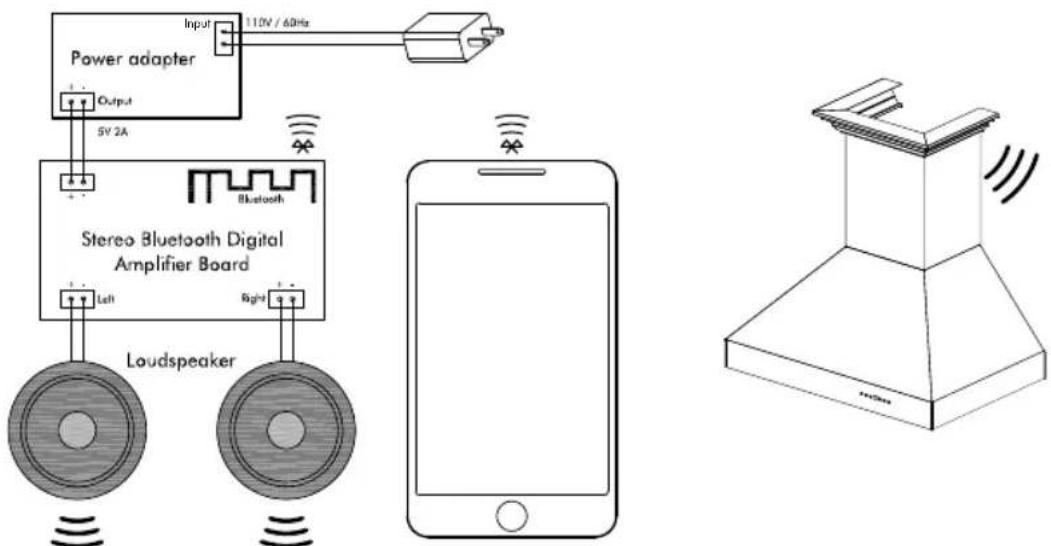
- Open the phone's Bluetooth settings and find "ZLINE Audio." When the connection is successful, a chime will sound. Figure 4
text_image
Power adapter Input 110V / 60Hz Output 5V 2A Bluetooth Stereo Bluetooth Digital Amplifier Board Left Right LoudspeakerFigure 4
Bluetooth crown moldings carry a one year parts warranty. Replacement speakers are available from ZLINE. Call 1-614-777-5004.
ISLAND CROWNSOUND® INSTALLATION
ELECTRIC POWER RATING
Frequency: 110V/50 Hz
Power: 10W

text_image
Watch NowInstallation Tutorial Video
- Attach crown molding bracket to ceiling using hardware provided. Figure 1

text_image
Screw: A/C/D Screw: EFigure 1
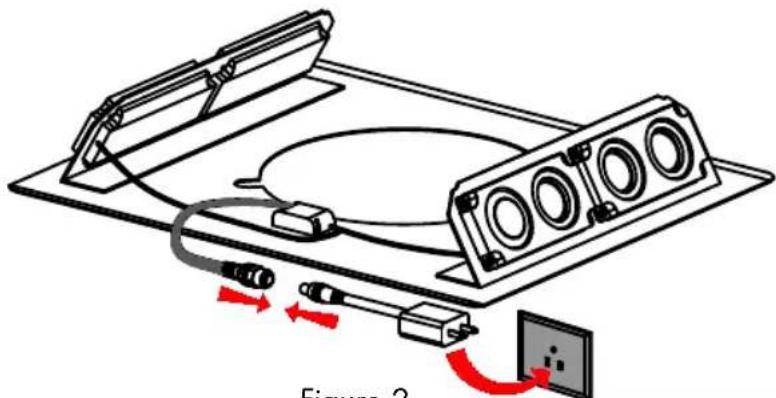
- Attach ducting and electrical connections. Plug the speakers into an outlet behind the chimney. When the connection is successful, a chime will sound.
Figure 2
natural_image
Diagram of a device with connectors and wiring, labeled Figure 2 (no text or symbols on diagram itself)Figure 2
ISLAND CROWNSOUND® INSTALLATION
- Extend the chimney up to the transformer. Slide the crown molding onto the crown bracket and secure into place. The crown should cover the gap. Ensure that it installs properly and is level. Figure 3

natural_image
Technical line drawing of a mechanical assembly with mounting base and side supports (no text or symbols)Figure 3
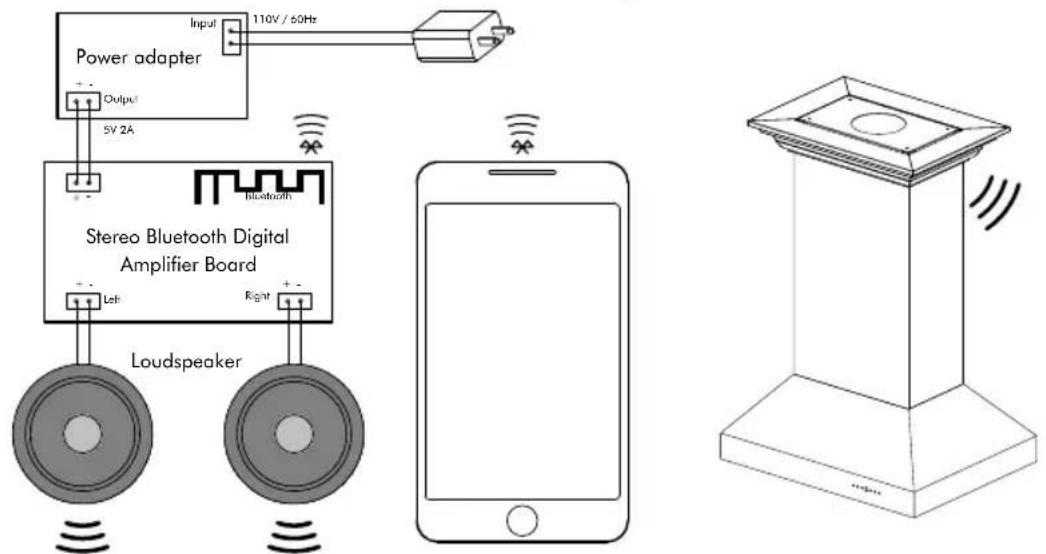
- Open the phone's Bluetooth settings and find "ZLINE Audio." When the connection is successful, a chime will sound. Figure 4
text_image
Power adapter Input 110V / 50Hz Output 5V 2A Stereo Bluetooth Digital Amplifier Board Left Right LoudspeakerFigure 4
Bluetooth crown moldings carry a one year parts warranty. Replacement speakers are available from ZLINE. Call 1-614-777-5004.
TROUBLESHOOTING & FAQ
How many devices can the Bluetooth speakers sync to at a time?
Only 1 device can sync at a time.
What is the decibel rating of the Bluetooth speakers?
Up to 100 decibels.
What is the range of the speakers? What's the maximum distance for the connection to work?
Up to 50 feet. If the connection is weak, move closer to the speakers or remove obstacles that are between the device and the speakers.
"ZLINE Audio" won't appear in the Bluetooth settings.
Check if the electrical connections are secure. A chime will sound if the connection is successful. If "ZLINE Audio" still will not appear, call ZLINE at 1-614-5004 for a replacement.

natural_image
Mountainous landscape with green slopes and forested slopes overlooking a large body of water under a partly cloudy sky (no text or symbols visible)2.0.1 tion Guide and User Manual