PJSI900 - Fridge GPX - Free user manual and instructions
Find the device manual for free PJSI900 GPX in PDF.


User questions about PJSI900 GPX
0 question about this device. Answer the ones you know or ask your own.
Ask a new question about this device
Download the instructions for your Fridge in PDF format for free! Find your manual PJSI900 - GPX and take your electronic device back in hand. On this page are published all the documents necessary for the use of your device. PJSI900 by GPX.
USER MANUAL PJSI900 GPX
natural_image
Empty projector screen mounted on a tripod stand (no text or symbols visible)Indoor Projector Screen
User's Guide for Model PJSI900 v2349-01
For the most up-to-date version of this User's Guide, go to www.gpx.com
Features
- 90" diagonal screen
- Wide scree 16:9 aspect ratio
- PVC screen material
- Steel tube frame
Includes
- Screen & Frame
Positioning the Screen
It is advised that you position the screen in an areas free from direct light. Too much excess light will blur the image from the projector.
Only place the screen on a level surface. If mounting to a wall, it is advised to mark out the area before installation (mounting hardware not included).
Do not fold or bend the screen.
Clean with a dry towel. Do not use chemical agents or solvents, as they may damage the screen material.
text_image
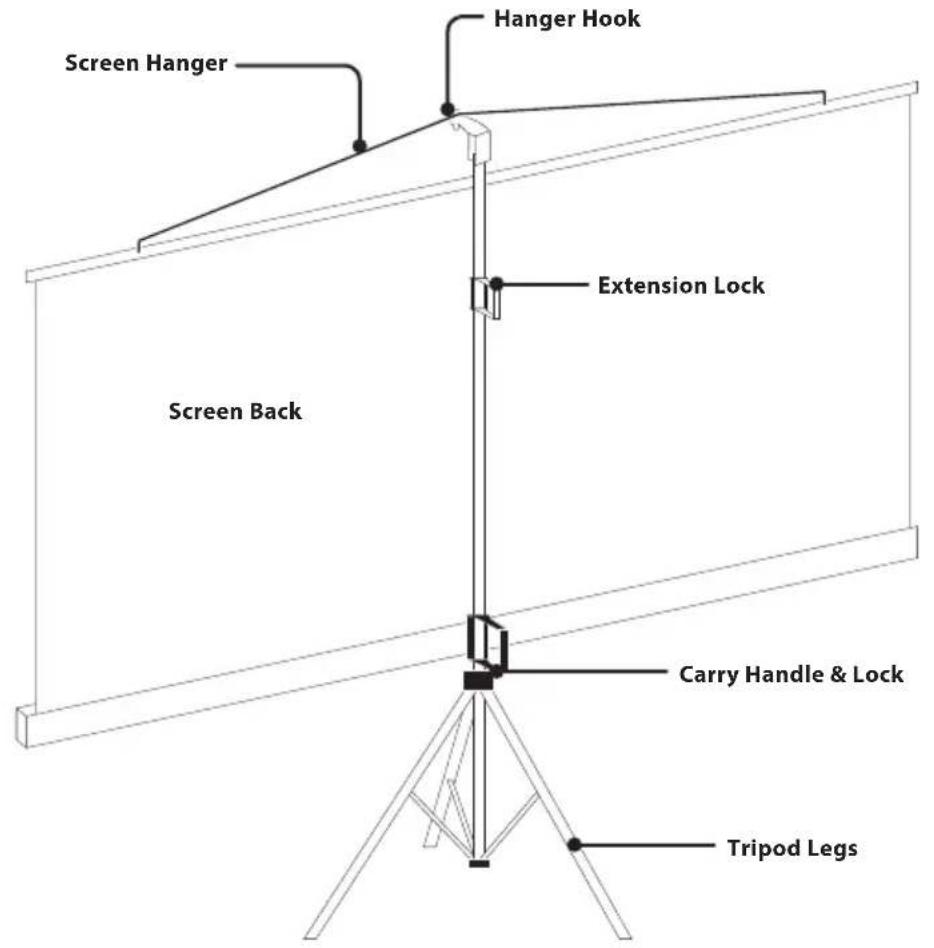
Screen Hanger Hanger Hook Extension Lock Screen Back Carry Handle & Lock Tripod Legss
natural_image
Pure mechanical assembly diagram without any text, numbers, or symbolsStowed Position
NOTE: Disassembly is the reverse of setup.
natural_image
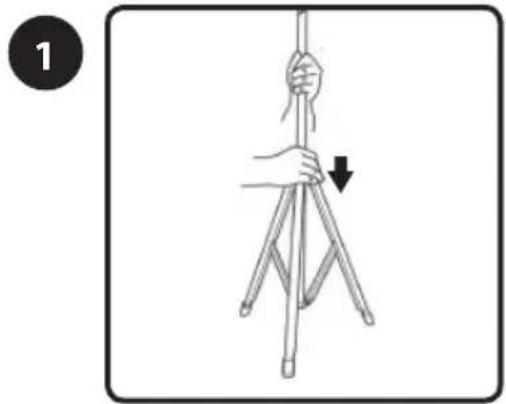
Illustration of a hand holding a tripod with a downward arrow indicating motion (no text or symbols)Place the screen in an upright position on the ground and fully extend the legs by pushing downward on the tripod joint.
text_image
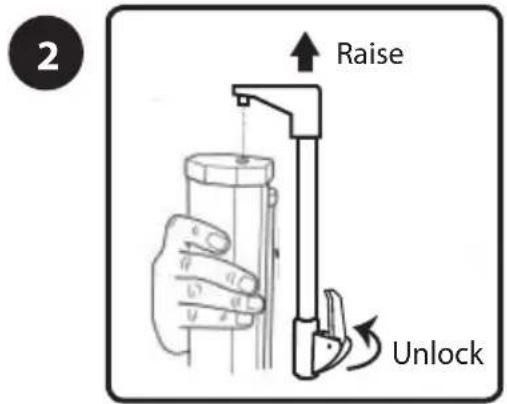
2 Raise UnlockFirst, unlock the vertical extension shaft and raise it upwards so that it clears the catch at the end of the screen housing.

natural_image
Illustration of hands holding a tool with curved arrows indicating rotational motion (no text or symbols)Rotate the screen housing 90°. Disengage the lock on the carry handle and lower the screen housing to the desired height, then re-engage the lock.

text_image
4 Lock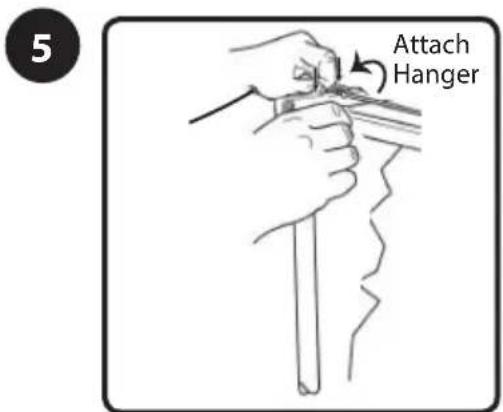
text_image
5 Attach HangerExtend the screen upwards and attach the hanger to the hook on the top of the shaft.

text_image
6 Raise LockYou can further adjust the height by adjusting the vertical extension shaft. Be sure to engage the lock once the desired height is reached.
Safety Instructions & Warnings
Important Safety Instructions
- Follow all installation instructions. Failing to do so, may lead to serious consequences.
- Screens must be installed in accordance with the instructions.
- Ensure that the screen is mounted securely.
- Operate within specified temperature and humidity range.
- Do not operate screen before it is installed on wall.
- If mounting on a wall, it is recommended to have the unit installed by a professional. The end user assumes all responsibility for any loss, incidental, or consequential damages.

Do not attempt to disassemble any part; this could lead to injury hazard.

This product is extremely flammable. Keep away from fire, heat, and the like.
Additional Warnings and Precautions
- Do not look directly into the projector light.
- Use in well ventilated area with ambient temperature between 41°F\~104°C (5°C\~40°C).
- Do not block any ventilation openings on a projector.
Cleaning the screen
If you want to get the most use of the projector screen, you must clean it on a regular basis. It is important that you clean the screen the right way. To preserve the screen condition, stow when not in use.
- Avoid touching the screen with your hands.
- Avoid exposure to dust, dirt, and the like.
- Avoid contact with sharp or abrasive objects.
Matte and Fibre Glass Fabrics
- With a soft clean rag, slightly dust off your projector screen. It is recommended to follow this process every one to three days.
Glass Bead Fabric
• We recommend that you use a dry cloth to clean the screen.
- NOTE: IT IS STRONGLY RECOMMENDED NOT TO USE ANY DETERGENTS, ABRASIVES OR SOLVENTS AS MANY OF THESE CHEMICAL SOLUTIONS CAN FADE YOUR SCREEN.
Customer Support
Contact Information
Website: www.gpx.com
Email Support: prodinfo@dpiinc.com
Email Parts: partsinfo@dpiinc.com
Phone Support: 1-888-999-4215
Warranty
For Warranty Information and the most up-to-date version of this User's Guide, go to: www.gpx.com
International Support
To download this User's Guide in English, Spanish, and French, or to get answers to frequently asked questions, visit the support section at: www.gpx.com

text_image
Made GreenProtect for Today Sustain for Tomorrow
Copyright © 2019 Digital Products International (DPI, Inc.) All other trademarks appearing herein are the property of their respective owners. Specifications are subject to change without notice.