JPM397A - Stroller Black Box - Free user manual and instructions
Find the device manual for free JPM397A Black Box in PDF.


User questions about JPM397A Black Box
0 question about this device. Answer the ones you know or ask your own.
Ask a new question about this device
Download the instructions for your Stroller in PDF format for free! Find your manual JPM397A - Black Box and take your electronic device back in hand. On this page are published all the documents necessary for the use of your device. JPM397A by Black Box.
USER MANUAL JPM397A Black Box
natural_image
3D rendering of a black box device with visible internal components and mounting holes (no text or symbols)TABLE OF CONTENTS
NEED HELP?
LEAVE THE TECH TO US
LIVE 24/7
TECHNICAL
SUPPORT
1.87 7.8 7 7.2269
-
SPECIFICATIONS....3
-
OVERVIEW....4
2.1 Description....4
2.2 What's Included....4
2.3 Part Numbers ...... 4
- PRE-INSTALLATION....5
3.1 STEP 1: Enclosure Mounting ....5
STEP 1A: Optional Mounting Solutions 6
3.2 STEP 2: Bulk Fiber Cable Entry 8
- INSTALLATION 10
4.1 STEP 1: Mounting the Enclosure to the DIN Rail....10
4.2 STEP 2: Cabling and Securing the Bulk Fiber to the Enclosure ....10
4.3 STEP 3: Terminating the Fiber Cable....11
CHAPTER 1: SPECIFICATIONS
NEED HELP?
LEAVE THE TECH TO US
LIVE 24/7
TECHNICAL
SUPPORT
1.87 7.877.2269
TABLE 1. JPM398A SPECIFICATIONS
| SPECIFICATION DESCRIPTION |
| Dimensions 2.01" H x 5.31" W x 5.51" D (5.1 x 13.5 x 14 cm) |
| Weight 1.15 lb. (0.52 kg) |
| Metal Thickness 18-gauge (1.0 mm) |
| Color Black |
| Cable Grommet Range 4.0 mm to 8.0 mm |
| Fiber Adapter Ports One |
TABLE 2. JPM397A SPECIFICATIONS
| SPECIFICATION DESCRIPTION |
| Dimensions 3.93" H x 5.31" W x 5.51" D (10.0 x 13.5 x 14 cm) |
| Weight 2.0 lb. (0.907 kg) |
| Metal Thickness 18-gauge (1.0 mm) |
| Color Black |
| Cable Grommet Range 4.0 mm to 8.0 mm |
| Fiber Adapter Ports Two |
2.1 DESCRIPTION
This inexpensive and very flexible DIN Rail Fiber Enclosure is an excellent choice when you need to run fiber terminations out on an open external wall or in an open manufacturing floor environment. The DIN Rail Fiber Enclosure is small and made of steel. It supports either one or two LGX fiber adapter panels with a side door that uses thumbscrews for easy access inside of the enclosure. There are also many DIN rail mounting options around the enclosure, along with three bulk fiber points of entry, when combined make this enclosure extremely flexible.
2.2 WHAT'S INCLUDED
Your package should include the following items for either the 1 or 2 port DIN Rail Fiber enclosure. If anything is missing or damaged, contact Black Box Technical Support at 877-877-2269 or info @blackbox.com.
(1) DIN Rail Fiber Enclosure
◆ (4) 1" x ½" stick-on cable organizers
(5) 4-inch cable ties
(10) 3-inch cable ties
♦ (1) "L"-shaped rackmount bracket
The pre-installation steps can be used for both the 1 and 2 ports DIN Rail enclosures. For illustration, we are only showing the 1 port DIN Rail enclosure.
3.1 STEP 1: ENCLOSURE MOUNTING
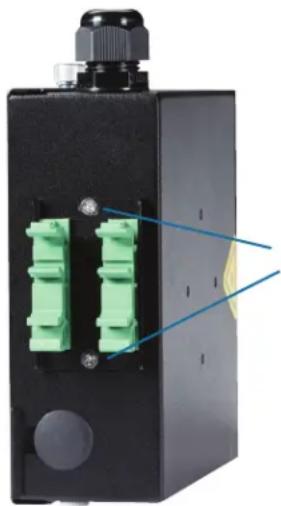
First, determine where you wish to mount the enclosure. The DIN Rail Fiber Enclosures have several possible DIN rail mounting options that the user can select. From the factory, the DIN rail bracket is located on the rear of the enclosure (see photo).
natural_image
Close-up of a black electronic device with two green connectors and a blue annotation line pointing to a yellow highlight (no text or symbols on the device itself)(2) screws on the DIN rail mounting plate
FIGURE 3-1. DIN RAIL BRACKET ON THE ENCLOSURE
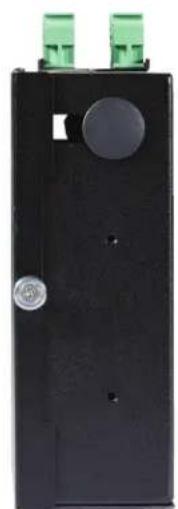
But, to mount the DIN Rail Fiber Enclosure in alternate locations, remove the screws on the DIN Rail mount plate and relocate it to the new location. The alternate other mounting locations are on the top and bottom of the enclosure near the thumbscrews of the door plate and the back side of the enclosure.
CHAPTER 3: PRE-INSTALLATION
NEED HELP? LEAVE THE TECH TO US
LIVE 24/7 TECHNICAL SUPPORT
1.87 7.877.2269
natural_image
Black rectangular electronic device with a circular button and two green connectors on top (no visible text or symbols)Top and bottom mounting locations

natural_image
Black electronic device with green connectors and a yellow warning triangle (no visible text or symbols)Back side
mounting locations
FIGURE 3-2. TOP AND BOTTOM AND BACK SIDE MOUNTING LOCATIONS
STEP 1A: OPTIONAL MOUNTING SOLUTIONS
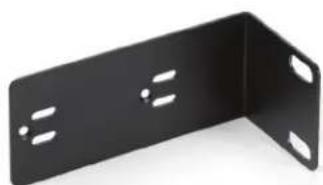
The DIN Rail Fiber Enclosure has several other optional mounting solutions. There is an optional Magnetic Bracket (sold separately, part number ACC-MAGBRKT) and an "L" shaped Adapter bracket (included with the DIN Rail Enclosure) that can be used for the other non-DIN rail mounting installations. (See Photo below) These optional mounting solutions are supported on either the one or two port Din Rail Fiber Enclosure.

natural_image
Black mechanical component with four mounting holes and a central hole (no text or symbols visible)part number ACC-MAGBRKT
natural_image
Black metal L-shaped bracket with four recessed slots (no text or symbols visible)included
FIGURE 3-3. OPTIONAL MAGNETIC BRACKET AND "L"-SHAPED BRACKET
CHAPTER 3: PRE-INSTALLATION
To use either one of these optional mounting solutions on your DIN Rail Fiber Enclosure, remove the green DIN Rail bracket from the fiber enclosure. Choose either the magnetic bracket or the "L" shaped bracket for your application.
The Magnetic Bracket can be installed at the following locations on the DIN Rail Fiber Enclosure. Four screws must be used to property mount the magnetic bracket to the enclosure.
- One Port Enclosure – Only on the side for flush mounting
- Two Port Enclosure – On the side for flush mounting and the rear side opposite the fiber ports
NOTE: The magnet bracket adapter uses four high-power rare earth magnets with a rubber coated base. These four magnets together have tremendous holding power and should be used on metal surfaces where you may want to mount your DIN Rail Fiber Enclosure.
CAUTION: Always use care when handling. Follow the precautions listed below.
◆ Always wear safety goggles when handling large magnets.
- Always wear gloves when handling magnets to prevent pinching.
- Children should NEVER be allowed to play with Neodymium magnets.
WARNING: Keep magnets at least 7.9 inches (20 cm) away from devices such as sensitive electronic and storage devices, mechanical watches, heart pacemakers, CRT monitors and televisions, credit cards, diskettes and other magnetically stored media such as video tapes. These devices are all affected by powerful magnets.

natural_image
Black rectangular electronic device with black buttons and a yellow warning symbol on top (no text or labels visible)FIGURE 3-4. APPLICATION #1, MAGNETIC BRACKET
The "L" Shaped Adapter Bracket can be installed at the following locations on the DIN Rail Fiber Enclosure. Two screws are used for to correctly mount the "L" Shaped bracket to the enclosure. It has oversized cup head holes to allow the user some flexibility in mounting to a wide range of relay racks or cabinets.
- One Port Enclosure – On the side for flush mounting and the rear side opposite the fiber ports
- Two Port Enclosure – On all sides of the enclosure in various locations
CHAPTER 3: PRE-INSTALLATION
NEED HELP? LEAVE THE TECH TO US
LIVE 24/7 TECHNICAL SUPPORT
1.87 7.877.2269
NOTE: The "L" Shaped Adapter Bracket will not install on the top or bottom of the one-port enclosure.

natural_image
Black electronic device with green and cyan connectors, no visible text or symbolsFIGURE 3-5. APPLICATION #2, L-SHAPED BRACKET
3.2 STEP 2: BULK FIBER CABLE ENTRY
There are several points of entry where the incoming bulk fiber cable can enter the enclosure. From the factory, the point of entry is located at the bottom of the enclosure and the other access points are plugged. The bulk fiber cable is secured by a small angled bracket with a hand-tighten grommet and Kevlar ^® clamp. If an alternate bulk fiber point of entry is desired, you can relocate the angled bracket to another available position.

text_image
Bulk fiber entry Bulk fiber entry Grommet nut Kevlar® clampFIGURE 3-6. BULK FIBER CABLE ENTRY LOCATIONS
CHAPTER 3: PRE-INSTALLATION
NEED HELP? LEAVE THE TECH TO US
LIVE 24/7 TECHNICAL SUPPORT
1.87 7.877.2269
To change the fiber point of entry:
- Loosen the grommet nut and remove the angled bracket.
- Find the new entry point and remove the plug cap and re-install the angled bracket.
- Be sure to secure the angled bracket and re-install the plug cap in the previous location.
NOTE: Make sure that you do steps 1 and 2 first. This will make your installation easier.
CHAPTER 4: INSTALL ATION
Now that you have made a DIN rail mounting and bulk fiber point of entry selection, you can begin to complete your installation.
Completing the installation will require mounting the enclosure to the DIN rail, cabling and securing the bulk fiber cable to the enclosure, and making the fiber terminations.
4.1 STEP 1: MOUNTING THE ENCLOSURE TO THE DIN RAIL
- Find a DIN rail bracket that is firmly secured to a wall.
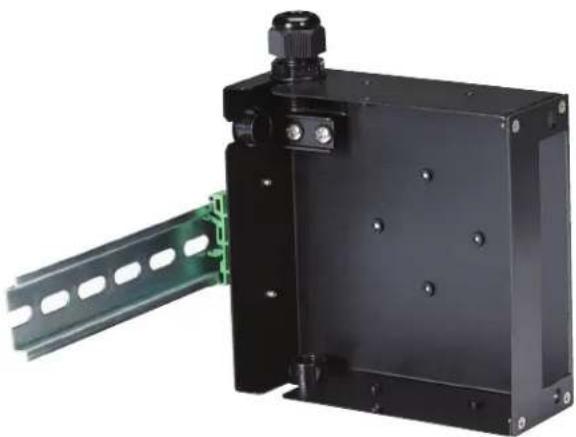
- Snap in the enclosure to the DIN rail on the wall until you hear a click (see photo).
- Check that both green DIN rail brackets are locked and that the enclosure is firmly mounted.
natural_image
Black industrial electronic device with green circuit board and mounting bracket (no visible text or symbols)FIGURE 4-1. ENCLOSURE MOUNTING ON A DIN RAIL
4.2 STEP 2: CABLING AND SECURING THE BULK FIBER TO THE ENCLOSURE
Now that the enclosure is firmly mounted to the wall, you can finish the installation.
- Remove the two screws on the Kevlar clamp and remove the large grommet nut outside the enclosure.
NOTE: Do this first (before you run bulk fiber cable in the enclosure). - Put the large grommet nut through the bulk fiber cable and feed the fiber cable end through the grommet on the enclosure.
- Re-attach the large grommet nut to the grommet to firmly secure the fiber while you complete the installation. Make sure you feed enough fiber cable through the enclosure so you can terminate the fiber connectors.
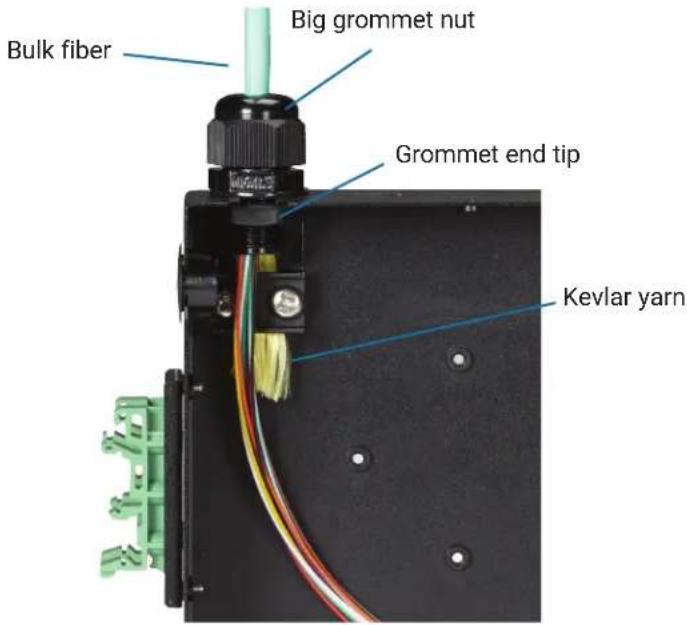
- Next, strip the cable jacket back close to the tip of the grommet end. Trim back the Kevlar yarn so just enough is available to firmly secure the Kevlar yarn to the clamp.
- Attach the Kevlar yarn to the base and re-secure the 2 screws and tighten. This will hold the bulk fiber cable in the enclosure and will not put any stress on the fiber connection inside the enclosure.
- Repeat for any other bulk fiber cable points of entry.
CHAPTER 4: INSTALL ATION
NEED HELP? LEAVE THE TECH TO US
LIVE 24/7 TECHNICAL SUPPORT
1.87 7.877.2269
text_image
Bulk fiber Big grommet nut Grommet end tip Kevlar yarnFIGURE 4-2. SECURING THE FIBER TO THE ENCLOSURE
4.3 STEP 3: TERMINATING THE FIBER CABLE
Before you begin terminating the individual fiber strands, mount your fiber adapter panel to the front of the enclosure. The DIN Rail Fiber Enclosure accepts only LGX style fiber adapter panels.
- Install your LGX fiber adapter panel.
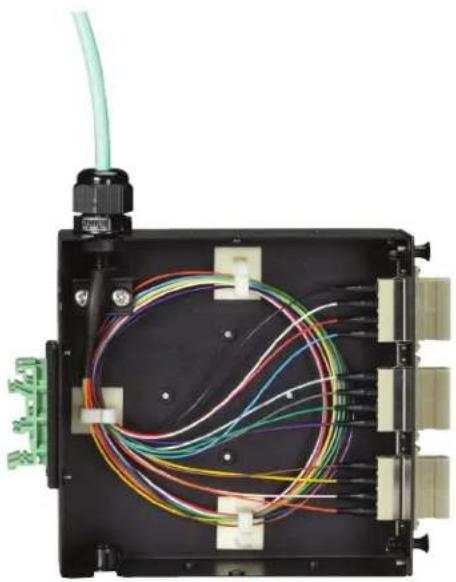
- Begin to individually terminate each fiber strand. Make sure that you provide enough slack inside the enclosure. This is usually done by providing a service loop.
- Install and use the stick-on cable management organizers inside the enclosure to keep the fiber neat and manageable.
- Terminate each fiber strand one at a time, dress the excess fiber with the stick-on cable organizers, and connect them to the inside of the fiber adapter panel.
CHAPTER 4: INSTALL ATION
NEED HELP?
LEAVE THE TECH TO US
LIVE 24/7
TECHNICAL
SUPPORT
1.87 7.877.2269
natural_image
Interior view of an electronic device with multiple colored wires and connectors (no visible text or symbols)FIGURE 4-3. FIBER CABLE TERMINATED
NOTES
NEED HELP?
LEAVE THE TECH TO US
LIVE 24/7
TECHNICAL
SUPPORT
1.87 7.877.2269
NOTES
NEED HELP?
LEAVE THE TECH TO US
LIVE 24/7
TECHNICAL
SUPPORT
1.87 7.877.2269
NOTES
NEED HELP?
LEAVE THE TECH TO US
LIVE 24/7
TECHNICAL
SUPPORT
1.87 7.877.2269
NEED HELP?
LEAVE THE TECH TO US
LIVE 24/7
TECHNICAL
SUPPORT
1.87 7.87 7.2269