SmartGrill SMART36F - Barbecue LYNX - Free user manual and instructions
Find the device manual for free SmartGrill SMART36F LYNX in PDF.


User questions about SmartGrill SMART36F LYNX
0 question about this device. Answer the ones you know or ask your own.
Ask a new question about this device
Download the instructions for your Barbecue in PDF format for free! Find your manual SmartGrill SMART36F - LYNX and take your electronic device back in hand. On this page are published all the documents necessary for the use of your device. SmartGrill SMART36F by LYNX.
USER MANUAL SmartGrill SMART36F LYNX
natural_image
White icon of a fork with Wi-Fi signal symbol above it, representing fast food or wireless connectivity (no text or symbols)LYNX®
SMARTGRILL USER MANUAL

WARNING
READ THIS MANUAL CAREFULLY and completely before using your grill to reduce the risk of:
- Fire
- Burn hazard, personal injury or property damage
- Ruined steaks or other unpleasant cooking experiences
- Unapproved installation or servicing.
THIS PRODUCT IS DESIGNED FOR OUTDOOR USE ONLY. Improper installation, adjustment, alteration, service or maintenance can cause property damage, injury or death.
Read this manual thoroughly before installation, use, or servicing of this product.

DANGER
IF YOU SMELL GAS:
- Shut off all gas supply lines to the grill.
- Extinguish any open flames.
- Carefully open the lid. Remember, it may be extremely hot!
- If odor continues, keep everyone away from the grill and immediately call your gas supplier or your fire department.

WARNING
- DO NOT store or use gasoline or other flammable vapors and liquids in the vicinity of this or any other appliance.
- A liquid propane cylinder not connected for use shall not be stored in the vicinity of this or any other appliance.

WARNING! CALIFORNIA PROPOSITION 65
- The burning of gas cooking fuel generates some by-products which are on the list of substances which are known by the State of California to cause cancer or reproductive harm.
- California law requires businesses to warn customers of potential exposure to such substances. To minimize exposure to the substances, always operate this unit according to the use and care instructions found in this manual. Be certain to provide adequate ventilation when cooking.
- California Proposition 65 lists "Silica, crystalline" which is used in one of the components of the IR burner, as an agent known to the state of California to cause cancer.

AVERTISSMENT
S'IL Y A UNE ODEUR DE GAZ:
- SmartGrill by Lynx ^TM serial number/PIN*
Serial number: ____ PIN: ____
*Located on the top of your PC case.
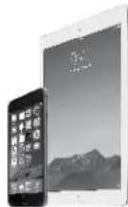
iPhone 5 or greater or iPad version 2.0 or greater
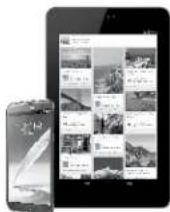
Android 4.4 or greater
STEP #2—SETUP YOUR SMARTGRILL
- If not already done, locate the 6 wire connections inside the grill and attach them to the SmartGrill computer case. Each cable is labeled to coincide with the port on the SmartGrill computer. Please be sure to connect the cables as per labeling on cable and computer.
- Locate the antenna in the white box inside the grill and screw into the back of the SmartGrill computer case.
- Plug the power cable from the SmartGrill into a 110v GFIC electrical outlet.
- Wait 20-60 seconds for the SmartGrill to complete boot up and say "SmartGrill, ready".
STEP #3—DOWNLOAD AND SETUP THE SMARTGRILL APP ON YOUR PHONE OR TABLET AND CREATE YOUR ACCOUNT
- Go to iTunes or Google Play and download "SmartGrill by Lynx" and install
- Open the SmartGrill App and click Create Account then enter your grill serial number and PIN then click Continue.
- Enter your email address, password and your registration information and click
Create Account. You will get a confirmation email.
- Open the confirmation email and follow instructions to activate your account.
- Now login to the SmartGrill app by entering your email and password.
STEP #4—SETUP Wi-Fi CONNECTIVITY
A. On your Phone or Tablet, verify that you have at least 60% wireless signal at your SmartGrill.

B. On your SmartGrill, press the power button and wait about 30 seconds for the SmartGrill to say "Please setup your Wi-Fi connection," then "SmartGrill, at your service".

natural_image
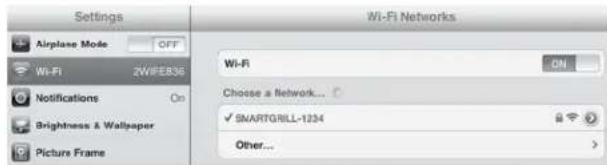
Close-up of a hand pressing a button on a metallic surface (no text or symbols visible)C. On your phone or tablet, switch to your Wi-Fi settings and locate the wireless network called SmartGrill xxxx (xxxx is the last four digits of your serial number) and connect to it. The password is lynxgrill.
text_image
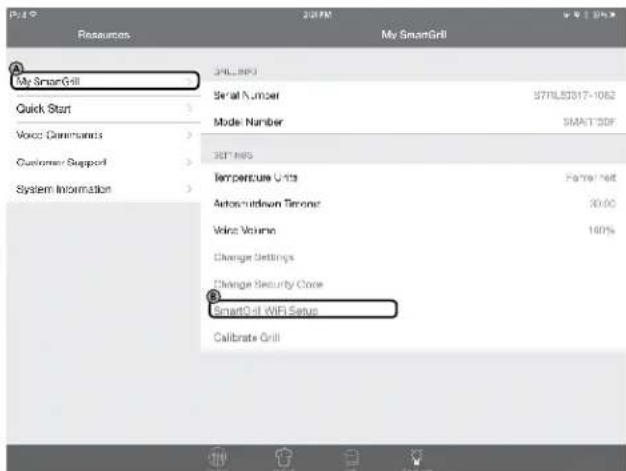
Settings Airplane Mode OFF Wi-Fi 2WFE836 Notifications On Brightness & Wallpaper Picture Frame Wi-Fi Networks Wi-Fi ON Choose a Network... ✓ SMARTGRILL-1234 Other...D. Now go back to your SmartGrill App and go to the Resources icon, then

My Smart Grill Ⓐ SmartGrill Wi-Fi Setup Ⓑ
Resources
Wait 10-20 seconds for the wi-fi setup menu.
text_image
My Smart Grill Quick Start Voice Communications Customer Support System Information 34L_MPS Serial Number STRAWLS317-1062 Mode Number SMART 3DF 34T MPS Temperature Units Fo/H: Net Autosuitdown Timone 30.00 Voice Volume 100% Change Settings Change Security Cone SmartQ-8 WiFi Setup Calibrate Grill*For the most current version of the Quick Start Guide, please refer to your app or our website at www.lynxgrills.com.
QUICK START POWER CONNECTIVITY & WI-FI SET UP PROCESS...(continued)
E. Click on the SSID and enter the password for your home network (information in STEP #1—REQUIREMENTS) then select DONE. After 20-60 seconds, your SmartGrill will say "SmartGrill is connected to the internet" and your wireless configuration is complete. Now just power the SmartGrill off, then back on. SmartGrill will say "SmartGrill is connected to the internet" followed by "SmartGrill at your service." On the SmartGrill app click on the Grill icon and now your SmartGrill is connected and ready to grill.
STEP #5—SETUP YOUR SMARTGRILL
- Turn your lights on by saying, "SmartGrill Lights". To turn the lights off, say "SmartGrill, Lights" and the lights will now turn off.
- To try out a recipe, go back to your SmartGrill App and go to the Recipe icon.
- Select a recipe from the recipe list and click Cook Now to send the recipe to your SmartGrill. Follow the voice commands (how many burners, place food on grill, turn food over, remove food from grill). Please note that it could take several minutes for your SmartGrill to preheat and give you the command to place food on grill.
STEP #6—CALIBRATING YOUR SMARTGRILL
Before your first grilling session, use your SmartGrill app to calibrate your SmartGrill by Lynx™. This will set a minimum flame level which is affected by ambient temperature, altitude, wind conditions and more. Calibration is required for optimum performance of your SmartGrill. The calibration process will take 15-20 minutes.
To perform a calibration, please close the hood of the grill, then:
- By Voice Command: "SmartGrill, begin calibration."
- By App:
Go to Resources
Select My SmartGrill
Select Calibrate Grill
Select Automatic Calibration
SmartGrill will automatically shutdown when calibration is complete. It will say "Calibration complete" or send you the same message on your app. If the calibration fails, SmartGrill will say "Calibration failed" or send you the same message on your app.
Need more help? Please refer to your detailed instruction manual or call our customer support team at 888-289-5969 and choose the SmartGrill option #5.

WARNING
- Never use dented, rusty or damaged propane cylinders. Never store additional or empty propane cylinders in the grill cabinet or in the vicinity of this or any other appliance. Do not store propane cylinders indoors or on their sides.
- Children should never be left alone or unattended in an area where a grill is located. Place your grill well away from areas where children play. Do not store items that may interest children in or around the grill, in the cart, or in the masonry enclosure.
- Never move the grill when hot. When in use, portions of the grill are hot enough to cause severe burns.
- Always maintain the required clearances from combustibles as detailed. The grill is designed for outdoor use only. Never use in a garage, building, shed, breezeway, or other enclosed area. Do not use this grill under any unprotected combustible construction.
- Gas grills are not designed or certified for and are not to be installed in or on recreational vehicles, portable trailers, boats or any other moving installation.
- Always have an ABC Fire Extinguisher accessible — never attempt to extinguish a grease fire with water or other liquids.
- Storing your grill: Store your grill in a well-ventilated area. If stored indoors, detach and leave L.P. cylinder outdoors in a well-ventilated area away from heat and away from where children may tamper with it.
- Keep any electrical supply cord and the fuel supply hose away from any heated surfaces. Electrical cords should be placed away from walkways to avoid tripping hazard.
- Do not repair or replace any part of the grill unless specifically recommended in this manual. Other service should be performed by a qualified technician.
- If the grill is installed by a professional installer or technician, be sure that he/she shows you where your gas supply shut-off is located. All gas lines must have a shut-off that is readily and easily accessible. If you smell gas, check for gas leaks immediately. Check only with a soap and water solution. (See INDEX: "Leak Testing" for further details.) Never check for gas leaks with an open flame.
- Inspect the liquid propane gas supply hose prior to each use of the grill. If there is evidence of excessive abrasion or wear, or if the hose is cut, it must be replaced before using the grill.
- Never remove the grounding prong from the plug or use this product with an ungrounded, 2-prong adapter.
- Keep your grill area clear and free of combustible materials, gasoline and other flammable vapors and liquids.
- Never block the flow of combustion and ventilation air.
THIS MANUAL MUST REMAIN WITH THE PRODUCT OWNER FOR FUTURE REFERENCE.
This product complies with ANSI standard Z21.58/CSA 1.6 latest edition and has been tested and approved by Intertek.

To obtain replacement parts or service contact:
Lynx Grills
7300 Flores Street
Downey, CA 90242
888-289-5969
www.lynxgrills.com
TABLE OF CONTENTS
QUICK START POWER CONNECTIVITY & Wi-Fi SETUP 3
A MESSAGE FROM LYNX 7
USE & CARE GUIDELINES 7
SMARTGRILL BY LYNX™ MODELS 7
IMPORTANT SAFETY PRECAUTIONS 8
GRILLING IN WINDY CONDITIONS 9
BEFORE YOU START 10
If Shipment Arrives Damaged 10
Important Notes 10
UNPACKING & ASSEMBLY 10
SPECIFICATIONS & INSTALLATION 12
Clearance to Combustibles 11
GAS CONNECTIONS 15
Natural Gas 15
Liquid Propane 16
ELECTRICAL CONNECTIONS 18
FINAL CHECKS 19
Leak Testing 19
GETTING STARTED 20
Meet Your SmartGrill by Lynx™ 20
Plugging In Your SmartGrill by Lynx™ 20
Turning On Your SmartGrill by LynxTM 20
Connecting Your SmartGrill by Lynx™ to Your Wireless Network 21
Downloading Your SmartGrill by Lynx™ App for iOS Devices 21
Downloading Your SmartGrill by Lynx™ App for Android Devices 21
SMARTGRILL BY LYNX™ SAFETY SYSTEMS 22
Security Code Lock 22
PRE-GRILL CHECKLIST 22
How to Light Your SmartGrill by Lynx ^TM 23
BASIC OPERATIONS 23
Listen Mode 23
Manual Mode 24
Timed Cook 24
Recipe Mode 24
Meal Mode 24
Party Mode 25
VOICE COMMANDS 25
USING YOUR SMARTGRILL BY LYNXTM RECIPE DATABASE 26
OBTAINING SERVICE FROM LYNX 34
SMARTGRILL BY LYNXTM LIMITED WARRANTY 35
MODEL-SPECIFIC BTU OUTPUTS & MAX. RUNS FOR APPLIANCES 38
INDEX 39
A MESSAGE FROM LYNX
Thank you for your purchase of a SmartGrill by Lynx™. You've just entered the future of grilling, a world of amateur and professional chefs who are taking the world of outdoor cooking to new levels through technology.
Your SmartGrill by Lynx™ has been designed to the same exacting standards and meticulous attention to detail every Lynx product enjoys. Beyond that though, you're about to enjoy a high-performance stainless steel grill that incorporates patented MyChef™ technology, an interactive, innovative and chef-friendly system designed to elevate your cooking to new heights.
To get the maximum performance out of your grill, we recommend carefully reading through this entire manual before your first cookout. It contains important information on how to properly set up your SmartGrill by Lynx™ and utilize the MyChef™ technology along with important safety tips and hints and tricks that will enhance your grilling experience. Keep it handy for easy reference and should your Lynx SmartGrill by Lynx™ change ownership, please make sure the new owner receives this manual. With proper use and care, your Lynx SmartGrill by Lynx™ will provide years of trouble-free service.
Thank you again for joining the community of Lynx chefs. We love hearing about your experiences with our products. Please check us out on the Web and social media to let us know how you and your SmartGrill by Lynx™ are doing.
Web: http://www.lynxgrills.com/
Facebook: https://www.facebook.com/LynxProfessionalGrills
Twitter: @LynxGrills
We wish you many years of happy grilling!
LYNX GRILLS
natural_image
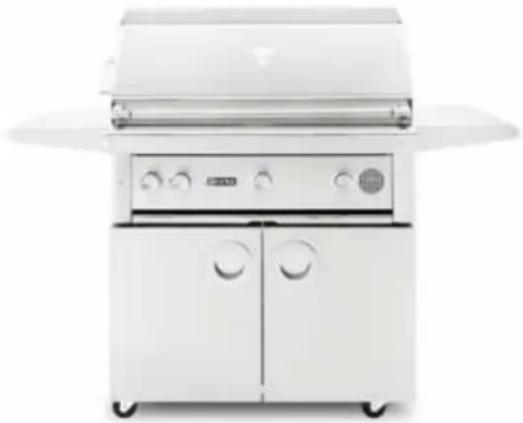
Exterior view of a white outdoor dog restaurant with open doors and control panels (no visible text or symbols)USE & CARE GUIDELINES
This use & care manual covers the Lynx grill models listed below. Some features and options will vary based upon the model that you purchased.
SMARTGRILL BY LYNX™ MODELS
BUILT-IN FREESTANDING
| SMART30 SMART30F |
| SMART36 SMART36F |
| SMART42 SMART42F |

WARNING
- Do not open the central electronics container as there are no user-serviceable parts inside, and doing so will void all warranties. All other services should be performed by a qualified technician.
- All gas lines must have a gas shut-off valve that is readily and easily accessible. Be sure you know where the shut-off is located. If you smell gas, check for gas leaks immediately. Check only with a soap and water solution. Never check for gas leaks with an open flame. (See INDEX: "Leak Testing" for further details)

WARNING
- The outdoor cooking gas appliance and its individual shutoff valve must be disconnected from the gas supply piping system during any pressure testing of that system at test pressures in excess of 0.5 psi (3.5 kPa).
- The outdoor cooking gas appliance must be isolated from the gas supply piping system by closing its individual manual shutoff valve during any pressure testing of the gas supply piping system at test pressures equal to or less than 1/2 psi (3.5 kPa).

STATE OF MASSACHUSETTS
- Massachusetts requires all gas be installed using a plumber or gas fitter carrying the appropriate Massachusetts license.
- All permanently-installed natural gas or propane installations require a "T" handle type manual gas valve be installed in the gas supply line to this appliance.
- This does not apply to portable propane installations using a 20 pound cylinder.
IMPORTANT SAFETY PRECAUTIONS
PLEASE REVIEW THESE IMPORTANT SAFETY PRECAUTIONS BEFORE YOU USE YOUR GRILL.
- NEVER LEAVE THE GRILL UNATTENDED WHILE COOKING.
- Ensure all tie-down wires have been removed from the burners.
- Always use caution when operating the grill in a windy area. (See INDEX: "Grilling in Windy Conditions" for further details.)
- Avoid wearing loose-fitting garments or long sleeves while grilling. They could ignite.
- Never touch the grill racks, hood or immediate
surrounding metal surfaces with your bare hands while grilling.
- Use an insulated glove or mitt when opening and operating the grill. Always open the grill lid slowly to allow heat and smoke to escape before fully opening.
- The grill hood must be fully opened while lighting the grill. Releasing fuel into a closed grill before lighting will not make it light sooner or more efficiently. It will only risk explosion and personal injury or death. Never lean over a hot grill surface or look directly into the grill when attempting to light.
IMPORTANT SAFETY PRECAUTIONS...(continued)
-
Do not heat unopened food containers as pressure build-up will cause the container to explode.
-
Do not use aluminum foil to line grill racks or drip pans. This will alter the airflow or trap excessive heat in the control area and can melt control knobs and ignition modules. Such damage is specifically excluded from your warranty.
-
Never use charcoal or any other solid fuel in the grill.
-
Cooking excessively fatty meats and oils will cause flare ups. Internal fires or damage caused by doing so or by the grill being left unattended while cooking are not covered under the terms and conditions of our warranty.
-
Never grill without the drip pan in place. Always ensure the drip pan is pushed all the way to the back of the grill. Hot grease can leak downward and produce a fire or explosion.
-
Grease is extremely flammable. Let hot grease cool down before attempting to handle or dispose of it. The drip tray and bottom of the firebox should be cleaned of grease on a regular basis.
-
Do not use the grill unless a leak check has been performed on all gas connections. (See INDEX: "Leak Test Procedure" for further details.)
-
Never operate the grill while under the influence of alcohol or drugs.
-
Do not lean on side shelves and never place a load weighing more than 25 pounds on a side shelf.
-
If any burner does not light or goes out during operation, turn off all gas control knobs, open the hood and wait five (5) minutes before attempting to re-light.
-
Portable LP cylinders: Always shut off the main valve on the LP cylinder after each use.
-
Spiders and insects like to nest in the burners, venturis, valves and orifices of a grill, disrupting the gas flow. This very dangerous condition can cause a fire behind the control panel, damaging the grill and risking personal injury. If your grill has been unused for a long time, inspect and clean the burners, venturis, valves and orifices. (See INDEX: "Cleaning your Lynx Grill" for further details.)
GRILLING IN WINDY CONDITIONS
Outdoor grills create more heat than interior kitchen ranges. That's how they sear and grill steaks and other foods.
These high-performance burners require a constant, steady supply of fresh air to mix with the fuel. Your Lynx grill pulls air in through the front and vents hot gases out through the rear.

text_image
FRESH AIR INAir enters through the front of the grill.
Using your grill in windy conditions may disrupt the front-to-back air flow. If, while grilling with all burners on high and the hood closed, you notice that the temperature gauge fails to rise ... be careful. If wind has kept hot gases from exiting the rear of the grill the control panel and knobs may have become extremely hot.

natural_image
Mechanical component with multiple blades and mounting holes, no visible text or symbolsWind hitting the back of the grill can disrupt proper exhaust.
Your Lynx grill features an exclusive, patent-pending Heat Stabilizer that will deflect wind and, in most cases, prevent this situation.
But there are a few things you can do to further prevent the possibility of improper heat buildup:
- On breezy days, be careful not to leave the front hood down for more than 15 minutes when the burners are on high. (Never leave the grill unattended when in operation)
- If you suspect the grill is overheating, using an oven mitt, open the front hood. Then adjust the burner control knob to a lower setting.
• Install your grill with a wind break behind it.
- Orient the grill so prevailing winds are not blowing into the rear of the grill.
Please Note: Any damage caused from use in windy conditions, such as melted knobs or igniter wires, or control panel discoloration from heat buildup, is excluded from warranty coverage.

WARNING
- Never install this product into a combustible enclosure without an insulated jacket. Doing so could result in fire, property damage and personal injury.
- Never locate the grill under an unprotected roof or overhang, in a building, garage, shed or other such enclosed area.
- Never locate the grill under unprotected combustible construction.
- Installation must conform with local codes or, in the absence of local codes, with either the National Fuel Gas Code, AN-SIZ223.1/NFPA 54, Natural gas and Propane Installation Code, CSA B149.1, or Propane Storage and Handling Code, B149.2, in Canada.
IF SHIPMENT ARRIVES DAMAGED
VISIBLE LOSS OR DAMAGE
Be certain any visible damage to the carton is noted on freight bill or express receipt and signed by the person making delivery.
FILE CLAIM FOR DAMAGES IMMEDIATELY, regardless of extent of damage.
CONCEALED LOSS OR DAMAGE
If damage is unnoticed until the grill is unpacked, notify the transportation company or carrier immediately and file a "concealed damage" claim with them. This should be done within (15) days of the date delivery is made to you. Be sure to hold on to the container for inspection. We cannot assume responsibility for damage or loss incurred in transit. (See Page 32: "Obtaining Service from Lynx" for further details.)
Shipping receipts should be signed "not inspected for concealed damage" if you did not open and inspect the product before the delivery driver leaves.
DAMAGE TO ELECTRONICS CONTAINMENT BOX
Should your electronics containment box be damaged during shipment, please contact Lynx Customer Care immediately. Under no circumstances should you open
the electronics containment box. There are no user serviceable parts inside and doing so will void all warranties.
UNPACKING & ASSEMBLY
The grill arrives nearly ready to use and requires only minor assembly.
By carefully following the uncrating and unpacking steps, you'll be up and grilling on your Lynx SmartGrill by Lynx™ in no time!
Shipping weight on smaller units is app. 300 pounds and larger units may weigh over 500 pounds.

WARNING: EXCESSIVE WEIGHT HAZARD!
Use two or more people to move or install this unit. Failure to follow this instruction can result in back or other personal injuries as well as potential damage to your SmartGrill by Lynx™.
CRATE & CARTON
- IMPORTANT! Do not remove staples around the top of the carton. These staples hold a wooden pallet in place inside the carton that protects the unit from damage. Removing these staples may cause the pallet to fall on top of the grill and damage the internal mechanisms that power the SmartGrill by Lynx™ 's computer core.
How to Remove the Carton
- Cut the main strap holding the grill to the pallet.
- Remove the staples at the bottom of the carton.
- Lift off the carton.
- With assistance, remove the grill from the pallet and place into desired location.

natural_image
Close-up of a wooden frame with a black tool inserted into a square opening, showing no text or symbols.Grill will not slide directly off pallet.
The wheels sit down in the gaps of the shipping crate so that the grill can sit safely and solidly on the crate during shipping. The grill cannot be slid directly off of the pallet.
BEFORE YOU START...(continued)
natural_image
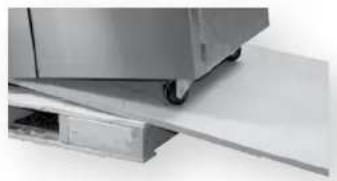
Close-up of a stainless steel kitchen appliance with wheels and a flat surface (no visible text or symbols)One way to safely move the grill off of the pallet is by lifting one end of the grill high enough to place a ramp under the wheel and then lift the other end while rolling the grill off of the pallet.
INTERIOR PACKING
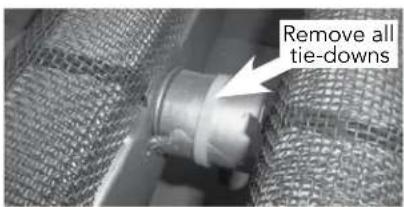
Lynx uses sturdy tie-down cables and straps to ensure your grill arrives at your home in the same condition that it left our factory. BE SURE YOU HAVE REMOVED ALL TIE DOWNS BEFORE USING YOUR GRILL.
Make sure you remember to remove the tie-downs on the burners.
- Remove any loose items from the packaging, firebox, and drip tray.
- Ensure that all burners are properly seated on the burner valve orifice and sitting level with the crossbar firmly locked in front of the back bracket.
text_image
Remove all tie-downsBUILT-IN INSTALLATIONS
The SmartGrill by Lynx™ built-in grill is designed for easy installation into masonry enclosures.
NOTE: Lynx built-in SmartGrills are intended either for installation in a built-in enclosure constructed of non-combustible material or for an installation to a built-in enclosure constructed of combustible material when installed with a Lynx Insulating Jacket (LIJ)
For non-combustible applications, the grill drops into the opening shown in the cutout detail drawing (See Page 12: "Gas Connections") and hangs from its counter-top trim. A deck is not required to support it from the bottom.
When using the insulated jacket in a combustible enclosure, the jacket must be supported from the bottom by a ledge
on each side or a full deck beneath the jacket.
Pay special attention to the provisions shown for gas-line hookup.
The enclosure should have ventilation holes to prevent gas build-up in the event of a leak. The deck ledges and counter should be flat and level. (refer to ANSI z21.58 Standard for Outdoor Cooking Gas Appliances, Section 1.7 Enclosures For Self-Contained LP-Gas Supply Systems). Keep the ventilation openings of the cylinder enclosure free and clear from debris.
This grill requires that a 120-volt, 60 hertz, 15 amp GFI-certified outlet be installed by a qualified electrician.
CLEARANCE TO NON-COMBUSTIBLE MATERIALS
Non-combustible materials may make direct contact with the edges of the firebox body up to the top surface of the firebox. Below the counter top surface the non-combustibles should not encroach on the cutout dimensions defined in this manual for both fit, access to service and airflow.
Above the counter top a minimum clearance of 6" is needed on the left side of the grill for the motor and skewer if you have a rotisserie model grill. At least 6" of clearance on the right side is recommended as well.
A 3 inch clearance is required immediately behind the grill to allow the front hood to open. The grill exhausts combustion products and cooking greases to the back of the unit. Never locate the grill where this residue will be difficult to clean.
Any non-combustible overhead surfaces must be at least 6 feet above the counter top surface. A vent hood may be closer to the counter top surface than 6 feet.
CLEARANCE TO COMBUSTIBLE MATERIALS
Minimum clearance from the sides and back of the grill to adjacent combustible construction below the counter top surface is 12" from the sides and back.
Minimum clearance from sides and back of grill to adjacent combustible construction extending above the counter top surface is 18" from the sides and back.
Do not use this appliance under unprotected overhead combustible surfaces.
If the grill is to be placed into a combustible enclosure, an approved insulated jacket is necessary and is available only from Lynx or your Lynx dealer. Lynx insulated jackets have been designed and tested specifically for your Grill.
OVERHEAD PROTECTION AND EXHAUST REMOVAL
If the grill is installed under any combustible construction the cooking area over the grill must be covered with an outdoor approved exhaust hood. The hood must provide 3 to 6 inches of overhang on all exposed sides. The bottom of the hood should be positioned at least 36 inches above the counter top surface. The exhaust hood shall provide no less than 1200 CFM for proper exhaust ventilation and it must be provided with a dedicated GFCI protected branch circuit.
REAR HOOD CLEARANCE
A 3 inch clearance is required behind the grill to provide unobstructed opening of the hood.
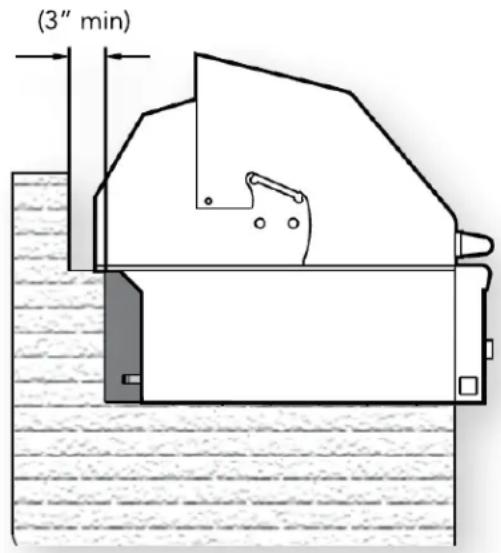
text_image
(3" min)The grill exhausts combustion products and cooking greases to the back. Never locate the grill where this exhaust will be difficult to clean.
SPECIFICATIONS AND INSTALLATION
The guides, measurements and dimensions detailed below are designed to assist you with planning your outdoor kitchen.
NOTE: Due to continuing product innovation, specifications are subject to change without notice.
IMPORTANT: Please reference the Care & Use/Installation manual for details on gas plumbing requirements, electrical specifications and the proper installation of your Lynx outdoor kitchen equipment. This manual can be downloaded from the Lynx Web site at www.lynxgrills.com.
IMPORTANT INSTALLATION NOTES
HOW LONG IS YOUR RUN?
Keep all gas supply lines as short as possible. Gas lines lose pressure over distance and with each elbow and tee that is added. This drop in pressure affects the grill's performance. (See INDEX: "Gas Supply Line Runs" for further details.)
Proper levelling during installation is critical to the smooth operation of your SmartGrill by Lynx™. A grill that is out of level will cause erratic burner combustion and inefficient, uneven heating. A carpenter's spirit level should be used to level the grill both front-to-back and side-to-side.
If the floor is uneven or has a pronounced slope, re-leveling may be required each time you move a freestanding SmartGrill by Lynx™.
CUTOUT SPECIFICATIONS
The guides, measurements and dimensions detailed below are designated to assist you with planning your outdoor kitchen.
NOTE: Due to continuing product innovation, specifications are subject to change without notice.
IMPORTANT: Please reference the Care & Use / Installation manual for details on gas plumbing requirements, electrical specifications and the proper installation of your Lynx outdoor kitchen equipment. This manual can be downloaded from the Lynx website at www.lynxgrills.com
GRILLS
| MODEL A B C | |
| L27 26.00 10.88 22.00 | |
| L30SMART | 29.00 10.88 24.50 |
| L36SMART | 35.00 10.13 22.00 |
| L42, L42SMART | 41.00 10.88 24.50 |
| L54 53.00 10.88 24.50 | |
| LPZA 29.00 5.25 24.50 | |
COMPLEMENTARY PRODUCTS
| ACCESS DOORS | |
| MODEL A B | |
| LDR24L, LDR24R | 19.25 19.00 |
| LDR30T 28.25 19.00 | |
| LDR36T 31.63 19.00 | |
| LDR42T 37.63 19.00 | |
SIDE BURNERS
| MODEL | A B C |
| LSB1-3 | 12.13 10.63 12.50 |
| LSB2-2 | 12.13 10.63 24.50 |
| LSB2PC-1 | 24.25 10.63 24.50 |
| LPB | 19.00 10.63 22.00 |
UTILITY DRAWERS
| MODEL | A | B C | |
| LUDE | 12.13 | 19.25 | 24.00 |
| LUDXL 17.25 | 18.57 24.25 | ||
| LDW16 14.59 | 19.00 | 24.50 | |
| LDW19 17.50 | 19.00 | 24.50 | |
| LMD | 21.75 | 5.63 23.38 | |
WARMING DRAWERS
| MODEL | A B C | |
| L30WD-1 | 28.50 10.00 | 20.50 |
| L42CC-1 | 40.25 19.38 | 24.50 |
COCKTAIL PRO
| MODEL A B C | ||
| CS30-1 | 29.00 | 10.63 22.75 |
WITH INSULATED JACKET INSTALLED
| MODEL | A | B C | |
| LIJ27 | 33.00 | 11.63 | 24.00 |
| LIJ30 | 36.00 | 11.63 | 26.50 |
| LIJ36 | 42.00 | 11.63 | 24.00 |
| LIJ42 | 48.00 | 11.63 | 26.50 |
| LIJ54 | 60.00 | 11.63 | 26.50 |
STORAGE SYSTEMS
| MODEL | A B C | |
| LSA30 | 28.25 | 19.00 24.50 |
| LSA36 | 34.25 | 19.00 24.50 |
TRASH CENTERS
| MODEL | A | B C |
| L18TC | 16.00 24.00 | 13.00 |
| L20TR | 16.81 24.00 | 24.75 |
| LTA530 | 28.25 19.00 | 20.00 |
SINKS AND DROP IN COOLER
| MODEL | A B C | |
| LSK18 | 17.00 | 10.50 22.00 |
| LSK24 | 23.00 | 10.50 22.00 |
| LSK30 | 29.00 | 10.50 22.00 |
| LDC18 | 18.25 | 13.00 18.25 |

text_image
3" CLEARANCE 1/2" NPT gas connectionCOUNTER TOP NOTCH DETAIL
Not required when using a Lynx Insulated Jacket
Only required if island counter top overhangs the face of the island
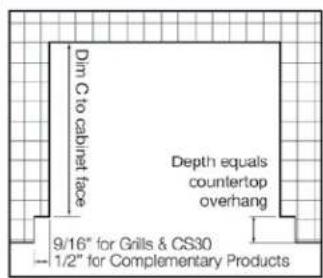
text_image
Din C to cabinet face Depth equals countertop overhang 9/16" for Grills & CS30 — 1/2" for Complementary Products
text_image
A 5" C 4.5" 3" Insulated Jacket BSPECIFICATIONS & INSTALLATION
OUTDOOR REFRIGERATORS
MODEL A B C D
| L24REF | 24.25 | 33.00 | 26.00 | 32.00 |
| L24BF | 24.25 | 34.50 | 26.00 | 34.25 |
| L24DWR | 24.25 | 34.50 | 26.00 | 34.25 |
| L15ICE | 15.25 | 34.50 | 26.00 | 33.50 |
| L15WINE | 15.25 | 35.50 | 26.00 | 34.375 |
ICE MACHINE
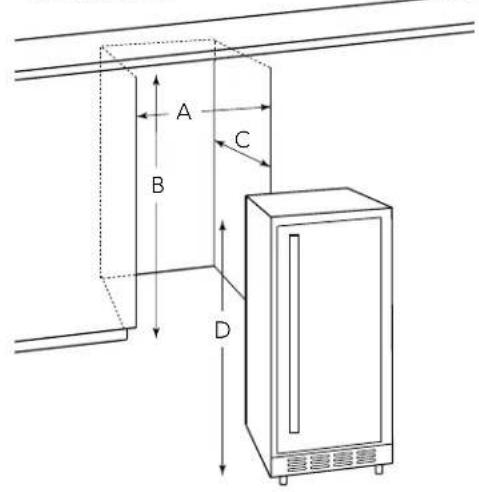
text_image
A B C D
text_image
A B C D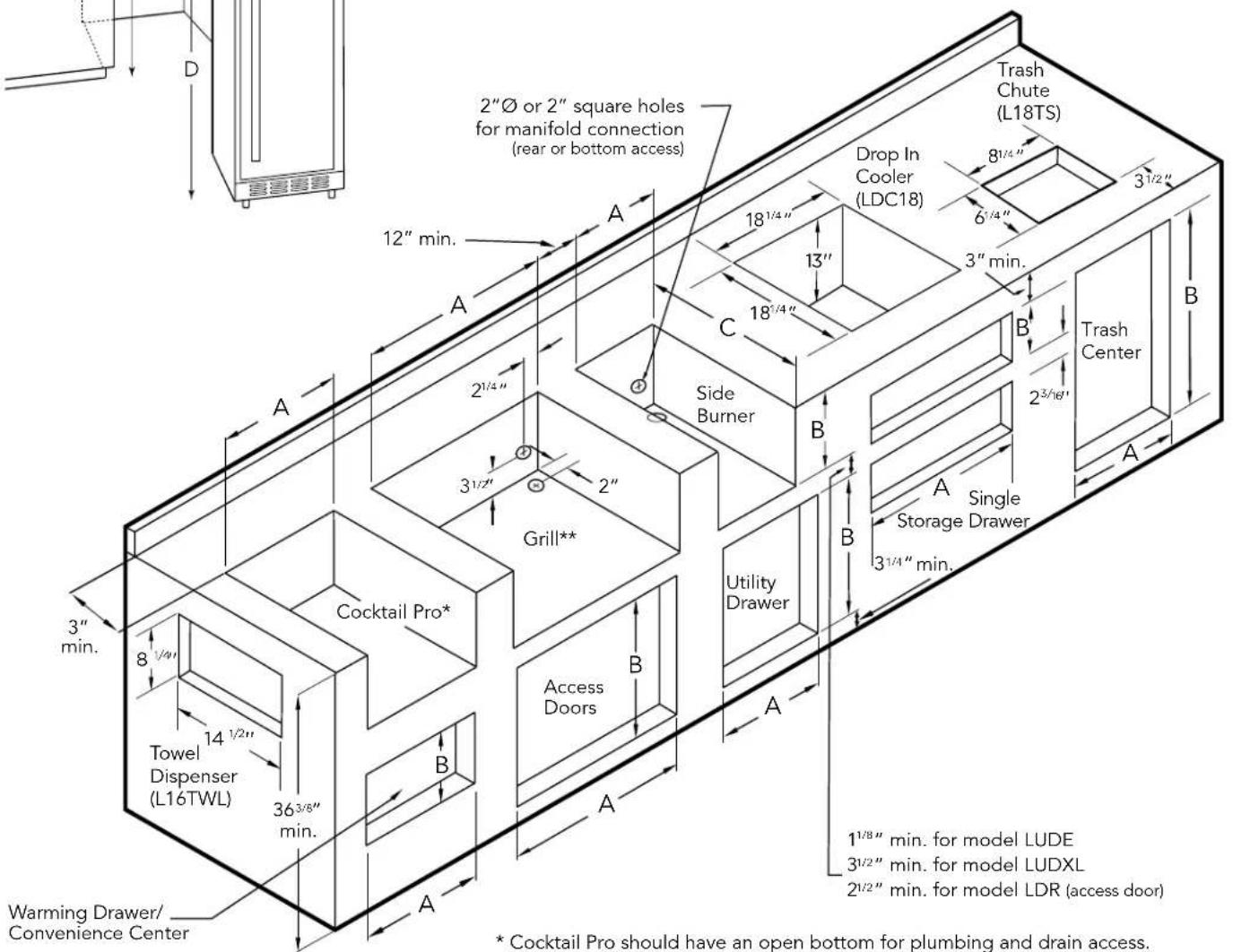
text_image
2"Ø or 2" square holes for manifold connection (rear or bottom access) 12" min. A 18¹/⁴" 13" 18¹/⁴" Side Burner C B B 3½" 2" Grill** Cocktail Pro* Towel Dispenser (L16TWL) 36³/⁸" min. Access Doors B Utility Drawer 3½" min. A A A 18¹/⁴" 13" 18¹/⁴" 3½" 2³/¹⁶" Drop In Cooler (LDC18) 8¹/⁴" 6¹/⁴" 3" min. Trash Chute (L18TS) Trash Center Single Storage Drawer 3¹/⁴" min. 1½" min. for model LUDE 3¹/²" min. for model LUDXL 2¹/²" min. for model LDR (access door) Warming Drawer/ Convenience Center * Cocktail Pro should have an open bottom for plumbing and drain access.* Cocktail Pro should have an open bottom for plumbing and drain access. ** 1" square hole must be located at rear of grill cutout. 120V GFI outlet must be located within 6' of the 1" hole.

WARNING
NEVER CONNECT A GAS LINE DIRECTLY TO THE SMARTGRILL BY LYNXTM. A PRESSURE REGULATOR MUST BE INSTALLED ON ALL GAS EQUIPMENT. ALL LOCAL CODES REQUIRE IT AND LYNX GRILLS SUPPLIES THE CORRECT REGULATOR FOR USE WITH YOUR GRILL. REMOVING OR FAILING TO INSTALL THE PRESSURE REGULATOR CAN RESULT IN FIRE AND SERIOUS PERSONAL INJURY AND WILL VOID THE WARRANTY.
The SmartGrill by Lynx™ is factory set to use either liquid propane or natural gas. It is critical that the gas you use matches that for which the grill was set up. You can verify this by checking the rating plate.

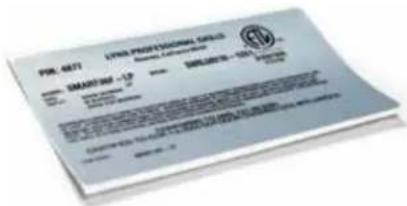
The rating plate lists serial numbers, model numbers and gas type and is located in one or more of the following places:
- Attached to the underside of the drip tray
- On the back of the Care & Use manual
- On the PC case
Ensure that the gas supplied meets with the minimum pressure requirements. Do not operate the grill with any gas other than that for which the grill has been set. Water Column Requirements
| Fuel WC Max Inlet WC Min Under | Full Load |
| Nat Gas 7 in 4 in | |
| LP 14 in 11 in |
Both the regulator and the manifold orifices have been tuned for the type of gas specified on the rating plate.
GAS CONVERSION KITS
Gas conversion kits are available from Lynx grills to allow the SmartGrill by Lynx™ to operate on either natural gas or liquid propane gas. These kits should be installed by a qualified technician.
The kits come with complete installation instructions. These instructions should be read completely and fully.
All installation and all installation parts must conform to local codes with the National Electrical Code, ANSI Z223.1/NFPA 70 latest edition and the National Fuel Gas Code, ANSI Z223.1/NFPA 54 in the U.S. and CGA-B149.1/.2 in Canada.
Canadian installations must conform to CGA-B149.1/.2 natural gas/propane installation code. (Canada)
NATURAL GAS
Lynx Grills recommends that only qualified professionals perform the required plumbing on this product.
To ensure satisfactory performance, the gas supply line must be sized to accommodate the total BTU requirements of all the gas-fired equipment that will be connected to that line.
In no case should pipe less than 3/4" inside diameter or 1" outside diameter ever be used to connect this product.
- Calculate the total BTU output of all equipment and refer to "INDEX: Gas Supply Line Runs" for allowable run distances for 34 inch pipe. Failure to meet these minimum requirements may reduce performance of the grill and any other appliances running on that supply line.
- Always keep supply line runs as short as possible. (See INDEX: "BTU Output" for specific model outputs)
- A gas shut-off valve must be installed in an easily accessible location by a qualified plumber.
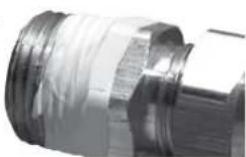
- Keep threading compound off of the first two pipe threads to avoid having any small pieces of compound break loose and clog a burner valve or orifice. Do not use threading compound on any flare fittings.
For built-in installations, it is recommended that any flexible pipe used be kept as short as possible. (See INDEX: "Gas Connections" for typical permanent hook up.)
Keep last two threads clean
For freestanding units using natural gas or hard piped LP gas, Lynx strongly recommends using a quick disconnect kit.
This Quick Disconnect Kit (part #LQD) is available from Lynx or your dealer.
LIQUID PROPANE GAS
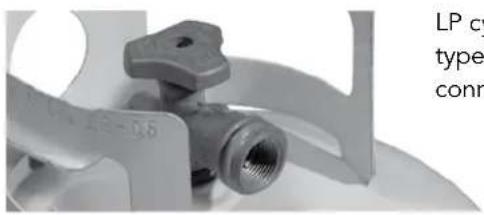
Grills set up for liquid propane gas come equipped with a liquid propane hose/ regulator assembly for connection to a standard 20 lb. Liquid propane cylinder (Type 1). All fittings necessary to attach the assembly to the grill are included.
natural_image
Close-up of a wind turbine blade assembly with threaded inlet (no visible text or symbols)LP cylinder with type 1 valve connection
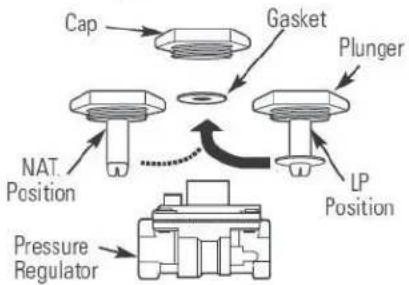
Permanently plumbed liquid propane connections, such as those in line with a bulk cylinder, require a 4/11 regulator. (Lynx P/N 30781)
When using the 4/11 regulator, you must ensure that it is set for the proper fuel type. This is done by removing the regulator cap and gasket and looking at the bottom of the plunger to see what fuel type is visible. This is the regulator fuel setting. NAT is for natural gas and LP is for propane gas. The LP setting can be further identified by the large diameter disk on the bottom of the plunger. To change from one gas to the other, simply push the plunger to the side to snap it out of the cap, turn the plunger so it reads the desired gas type on the bottom, and push the plunger until it snaps back into place in the cap and then replace the cap into the regulator.
flowchart
graph TD
    A["Cap"] --> B["Gasket"]
    B --> C["Plunger"]
    C --> D["NAT Position"]
    D --> E["Pressure Regulator"]
    E --> F["LP Position"]
    F --> G["End"]
NEVER CONNECT AN UNREGULATED GAS LINE TO THE GRILL.
Liquid Propane Cylinder Requirements
The LP cylinder must be constructed and marked in accordance with the specifications for LP gas cylinders of the U.S. Department of Transportation (DOT) and designed for use with a Type 1 system only.
Cylinders of free standing grills must be secured using the provided cylinder retention system to avoid accidental movement. Make sure the hose between the grill and the

WARNING
Do not change the regulator/hose assembly or use any other assembly than the one supplied with your Lynx SmartGrill by Lynx™.
Do not attempt to use a 5LP-A equipped regulator/hose assembly with a standard 510 POL cylinder/valve assembly.
Do not store a spare LP-gas cylinder under or near this appliance.
Never fill the cylinder beyond 80 percent full.
If the information above is not followed exactly, a fire causing death or serious injury may occur.
propane bottle does not touch the back or bottom of the firebox.
When exchanging your cylinder for a refill, exchange only for a Type 1 20lb cylinder with an over-fill protection device.
Never use a cylinder with a damaged valve.
A dented or rusty LP cylinder may be hazardous and should be avoided. If in doubt, have it checked by your liquid propane supplier.
Always check for leaks after every liquid propane cylinder change. (See INDEX: "Leak Test" for further details.)
Always shut off the liquid propane gas supply at the

text_image
Cylinder Retention Devicecylinder when the SmartGrill is not in use.
Cylinders must be stored outdoors in a well-ventilated area out of the reach of children. If your
grill is stored indoors, the liquid propane cylinder must be stored outside.
Liquid Propane Connections
Make sure the liquid propane cylinder valve is completely closed. It is possible for the valve to be opened without releasing gas, but as soon as you start connecting the regulator, gas can flow from the connection.
Insert the regulator inlet into the cylinder valve and turn the black coupler clockwise until the coupler is hand tight. Do not over-tighten this connection.
To disconnect the coupler, first make sure the main cylinder valve is turned off. Grasp the coupler and turn counterclockwise. The inlet will then disengage.
GAS CONNECTIONS ...continued
Always leak test the connection after refilling or exchanging liquid propane cylinders. (See INDEX: "Leak Test" for further details.)
TO CONNECT A BUILT-IN SIDE BURNER
- Shut off the gas supply at the main valve.
- Disconnect all plumbing (if already attached) from the grill and the gas supply valve.
- Remove all the fittings from the grill manifold.
• Install the side burner into the counter top cutout. - Connect the gas supply to the grill and side burner as shown in the two diagrams on this page.
- Turn the gas supply on and leak test all connections. (See INDEX: "Leak Test" for further details.)
NOTE: The side burner will function manually only and is not connected to the SmartGrill by Lynx™ Wi-Fi.
FOR INSTALLING A SIDE BURNER ONTO A FREESTANDING SMARTGRILL
- Shut off the gas supply at the main valve.
- Disconnect all plumbing (if already attached) from the grill and the gas supply valve.
- Remove all the fittings from the grill manifold.
• Install the side burner onto the cart according to the directions supplied with the cart mounting kit. - Connect the gas supply to the grill and the side burner as shown in the diagrams on this page for your gas type.
- Turn the gas supply on and leak test all connections. (See INDEX: "Leak Test" for further details.)
NOTE: The side burner will function manually only and is not connected to the SmartGrill by Lynx™ Wi-Fi.

text_image
LP Gas High pressure flexible hose & regulator existing on grill 1/2" FIP x 3/8" MIP Flare Elbow or 1/2" FIP or 1/2" FIP x 3/8" MIP Flare Fitting Use regulator here for hard-plumbed L.P. hook-up (Lynx P/N 30781) TOP1 Approx. 20° from horizontal Flex Hose REAR VIEW 1/2" Close Nipple 1/2" Tee 1/2" Close Nipple Union (Coupler) 1/2" Male-Female Street Elbow 1/2" MIP Fitting 1/2" O.D.Stainless Steel Flexible Hose Side Burner Manifold 1/2" FIP Fitting 1/2" Male-Female Street Elbow Side Burner or Grill Extender GRILL TOP VIEW
text_image
Natural Gas N.G. Outlet Shuf-Off Valve 1/2" Min Inter Connecting Pipe Work Regulator TOP Approx. 30" from Horizontal Flex Hose REAR VIEW 1/2" Close Nipple 1/2" Tee 1/2" Close Nipple 1/2" Union (Coupler) 1/2" Male-Female Street: Elbow 1/2" MIP Fitting 1/2" O.D. Stainless Steel Flexible Hose 1/2" F/P Fitting Side Burner Manifold BBQ Manifold Side Burner
WARNING: ELECTRICAL GROUNDING
- Product installation must meet local electrical codes, or in the absence of local codes, the latest edition of the National Electrical Code ANSI/NFPA No. 70 or the Canadian Electrical Code CSA C22.1.
- Use only a Ground Fault Interrupter (GFI) protected circuit with this outdoor cooking gas appliance.
- Do not use this outdoor cooking appliance if it has been submerged underwater without a thorough inspection by a qualified technician.
- This grill is equipped with a three-prong (grounded) electric plug for your protection against shock hazard and must be plugged directly into a properly grounded three-prong outlet. Never cut or remove the grounding prong from this plug.
- Use only extension cords with a three-prong grounding plug, rated for the power of the equipment and approved for outdoor use with a "W-A" marking.
- To protect against electric shock, do not immerse any part of the power cord, an extension cord, or any plugs in water or other liquid.
- Unplug the product before thorough cleaning. Allow it to cool before putting on or taking off parts.
- Do not let the cord hang over the edge of a table or touch hot surfaces.
- Do not use an outdoor cooking gas appliance for purposes other than intended.
- Do not operate any outdoor cooking gas appliance with a damaged cord, plug, or after the appliance malfunctions or has been damaged in any manner. Contact Lynx for repair.
CONNECTION TO AC POWER
Installation requires an outdoor 120VAC 15A GFI (Ground Fault Interrupter) electrical outlet adjacent to the SmartGrill by Lynx™.
The GFI outlet features an internal break that reduces shock hazard. This type of outlet should be installed by a qualified electrician either inside the island enclosure for built-in units, or near the location where a free standing unit will be used.
If the electrical system fails to operate, a connection may have come loose in shipping or the GFI may have tripped requiring a re-set. See the Troubleshooting section for more details.
A side burner or power burner can be connected to your SmartGrill with the wiring connection in the back of each unit. Ask your dealer or call Lynx at 888-289-5969 for more information.
LEAK TESTING

DANGER!
To prevent fire or explosion hazard, DO NOT smoke or allow any potential source of ignition (sparks, electrical arcing, etc) in the area while performing a leak test. Leak tests should be conducted outdoors only. Never conduct a leak test using fire or flame.
Leak Test Procedure:
- Create a soapy solution of 1 part soap and 3 parts water.
- Confirm that all control dials are in the off position.
- Turn on the fuel supply. For natural gas, turn the valve handle 1/4 turn to align with the gas flow.
- For L.P., turn the cylinder valve dial counter clockwise one full rotation.
- Apply the soap solution generously by paint brush or squirt bottle on all connections and fittings.
- If bubbles appear to "grow" on any of the connections, you have a gas leak. IMMEDIATELY turn off the gas supply.
Fixing a Gas Leak:
- Shut off the gas supply
- Turn all grill controls to the "ON" position to purge the grill of any gas build-up, then turn the controls back "OFF".
- Wash off the soapy solution with cold water and dry.
- Tighten the loose joint, or replace the faulty part with manufacturer-recommended replacement parts.
- DO NOT attempt to repair the L.P. cylinder valve if it is damaged. The only way to safely resolve a damaged cylinder is to REPLACE IT.
- Repeat the leak test to ensure that no leaks are present.
FINAL CHECK
Finally, check all the burners for proper operation. Make sure the control knobs turn freely and completely through their full range.
IMPORTANT:
Make sure you know where the main gas supply shut-off valve is located.
Finally, for safety and for proper use and care, you must have this manual. Please keep it somewhere safe for future reference.
For technical support and customer service, call:
Lynx Customer Care Department
7300 Flores Street
Downey, CA 90242
Ph.: 562-299-6900
Toll Free: 888-289-5969
Fax: 562-299-6978
GETTING STARTED
MEET YOUR SMARTGRILL BY LYNXTM
Congratulations on your purchase of a SmartGrill by Lynx™! You've joined a select group of cooking enthusiasts boldly paving the way toward a bright new grilling future.
The pages that follow will help you get the most out of your SmartGrill by Lynx™. Before that though, it's important to understand that the SmartGrill by Lynx™ has several basic requirements.
THINGS TO KNOW ABOUT SMARTGRILL
- The SmartGrill requires gas and electricity to operate.
- The SmartGrill is powered by a PC. When turning the grill on, there will be a wait time while the grill boots up. Any time the grill is loading or booting, the knob LEDs will oscillate back and forth letting you know the grill is busy.
- SmartGrill uses patented variable infrared burners. Doing an active cooking process, you will see the burners brighten and dim as the MyChef operating system regulates the cooking temperature. Do not be concerned, this is absolutely the intended function of SmartGrill.
- The SmartGrill requires either a WiFi internet connection or a wired internet connection. To unlock the potential and power of your SmartGrill, we strongly recommend connecting your SmartGrill to your home internet connection.
PLUGGING IN YOUR SMARTGRILL BY LYNXTM
Your SmartGrill by Lynx™ comes with a power cord designed to fit into a 120 volt AC 15 amp GFI (Ground Fault Interrupter) electrical outlet.
This power cord must be plugged in prior to any attempt to utilize the SmartGrill by Lynx™.
Each time you plug in your SmartGrill, wait 20-60 seconds to hear your SmartGrill say, "SmartGrill Ready."
TURNING ON YOUR SMARTGRILL BY LYNXTM
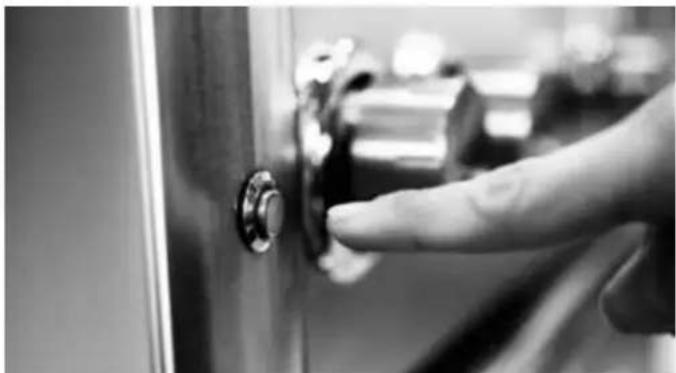
Your SmartGrill by Lynx™ is activated by pressing the round POWER ON/OFF switch located on the left hand side of the grill.
natural_image
Close-up of a finger pressing a button on a door panel (no visible text or symbols)CONNECTING YOUR SMARTGRILL BY LYNX™ TO YOUR WIRELESS NETWORK
The first time you turn on your SmartGrill by Lynx™, the SmartGrill by Lynx™'s voice modulator will say "Please setup your Wi-Fi connection" followed by "SmartGrill, at your service."
Before you can connect your SmartGrill by Lynx™ to your wireless network, you must first download the SmartGrill by Lynx™ app to a compatible iOS or Android Device.
Be sure your SmartGrill by Lynx™ is plugged in and turned on before attempting to connect it to your wireless network.
In order to connect your SmartGrill by Lynx™ to your wireless network:
- Activate your iOS or Android phone or tablet
- Click on the "Settings" app
- In Settings, click on "Wi-Fi"
- You will see "SmartGrill" in the selections under "Choose a Network."
- Tap "SmartGrill" to connect to the SmartGrill by Lynx™ Wi-fi spot
GETTING STARTED ...continued
- Shut down the Settings app
- Activate the SmartGrill by Lynx™ app
If this is the first time you've activated your SmartGrill by Lynx™ app, you will be asked to input the serial number then the PIN number for the CPU.
- The PIN and serial numbers assigned to each CPU and can be found on the PC case.
- Open the SmartGrill App and click Create Account then enter your grill serial number and PIN then click Continue.
- Enter your email address, password and your registration information and click Create Account. You will get a confirmation email.
- Open the confirmation email and follow instructions to activate your account.
text_image
PWR. 6872 LYNN PROFESSIONAL GROUPS Signature: SMARST 00 - 13 Date: 2024-05-29 Contact Number: 1331-2024-05-29 Email: yjy@yjw.com- Once the app has been connected to the SmartGrill by Lynx™, the app will open up the "Grill Status" page. Click the light bulb labeled "Support" at the bottom of the screen.
- Click "Wi-Fi" settings
- You will see a list of networks available for your SmartGrill by Lynx™. Choose your home network.
- Depending on your security settings, you may need to enter your home network's password to allow the SmartGrill by Lynx™ access.
- Once the SmartGrill by Lynx™ has successfully accessed your home network, you will receive a "Success" message.
After you have successfully connected the SmartGrill by Lynx™ to your home network, you may have to return to your device's "Settings" app and reconnect with your home network.
DOWNLOADING YOUR SMARTGRILL BY LYNXTM APP FOR IOS DEVICES
- Click the "App Store" icon on your iPhone or iPad
- Ensure that your have iOS 7.0 or above (check Settings>General>About>Version to see what version of iOS you're running.)
- In the Search box, type in "SmartGrill by Lynx" to find the app.
- Click to download and follow the guided instructions.
DOWNLOADING YOUR SMARTGRILL BY LYNXTM APP FOR ANDROID DEVICES
- Click the "Google Play" icon on your Android phone or device. (This is typically under the Settings tab.)
- Ensure that you have Android 2.1 or above. (Check Settings>About Phone and look for "Android Version" or "Firmware Version.")
- In the Search box, type in "SmartGrill by Lynx" to find the app.
- Click to Download and follow the guided instructions.
SMARTGRILL BY LYNX™ SAFETY SYSTEMS
Your SmartGrill by Lynx ^™ is designed with a number of safety systems that ensure that the grill can be operated in a safe and secure manner.
TURNING OFF YOUR SMARTGRILL BY LYNXTM
Your SmartGrill by Lynx ^TM can be shut down by any of the following methods.
- Your SmartGrill by Lynx™ can be deactivated by pressing the POWER ON/OFF switch located on the left hand side of the grill.
- Your SmartGrill by Lynx™ can be shut off by saying "SmartGrill shut down."
- Your SmartGrill by Lynx™ can be shut off by clicking on the red "Off" switch in the SmartGrill by Lynx™ app. Note that you will be asked to confirm this command.

natural_image
Close-up of a hand pressing down on a door key (no visible text or symbols)AUTO SHUTDOWN SYSTEM
Your SmartGrill by Lynx™ is equipped with an auto shutdown safety system that will shut off the grill if the grill has not:
- Received any verbal commands for 30 minutes.
- Received any commands via the SmartGrill by Lynx™ app in 30 minutes
- Had the temperature adjusted by one of the manual knobs for the last 30 minutes.
Note that the auto shutdown system is disengaged while the SmartGrill by Lynx ^™ is working through a step in Recipe Cook or counting down in Timed Cook. It can also be disabled with the verbal command "SmartGrill disable shutdown."
If you need cooking time longer than 30 minutes, you can change the auto shutdown timer on your app.
- Click on the Resources Icon
- Select My SmartGrill
- Select Auto Shutdown
- Change the amount of time for auto shutdown
- Select Set Time
PRE-GRILL CHECKLIST
BEFORE YOUR FIRST USE
There are a few must-check safety precautions to consider before you use your grill. Please be sure that:
- All packing materials and tie-downs have been removed from the burners. (See INDEX: "Unpacking & Assembly" for further details.)
- You have plugged in the electric cord. (See INDEX: "Electric Requirements" for further details.)
- A qualified plumber has performed a leak test on all the fittings that supply fuel to your grill.
- You have downloaded and set up the SmartGrill by Lynx™ App. (See INDEX: "Downloading Your SmartGrill by Lynx™ App for iOS and Android devices.")
- You have connected your SmartGrill by Lynx™ to your home's wireless network. (See INDEX: "Connecting Your SmartGrill by Lynx™ to a Wireless Network.")
CALIBRATING YOUR SMARTGRILL BY LYNXTM
Before your first grilling session, use your SmartGrill app or voice command to calibrate your SmartGrill by Lynx™. This will set a minimum flame level which is affected by ambient temperature, altitude, wind conditions and more. Calibration is required for optimum performance of your SmartGrill. The calibration process will take 15-20 minutes.
To perform a calibration, please close the hood of the grill, then:
By Voice Command: "SmartGrill, begin calibration."
By App:
Go to Resources
Select My SmartGrill
Select Calibrate Grill
Select Automatic Calibration
PRE-GRILL CHECKLIST ...continued
SmartGrill will automatically shutdown when calibration is complete. It will say "Calibration complete" or send you the same message on your app. If the calibration fails, SmartGrill will say "Calibration failed" or send you the same message on your app.
AT EACH NEW SEASON
At the start of each new grilling season you should remove the grilling racks and check the burners, venturis, orifices, and valves for obstructions.
Spiders and insects often nest in these areas of the grill and can disrupt airflow, causing damage to the grill and personal injury.
Also, check all hoses, wires, and fitting for damage, abrasion, wear and tear.
CHECKLIST BEFORE EACH USE (FOR YOUR SAFETY)
- Do you smell gas? If yes, shut everything off and call the gas company or a qualified plumber to check for leaks. If not, please continue.
- Is your cooking area free and clear of any combustibles besides your food that might ignite? If not, please clear the area before starting the lighting process. If yes, please continue.
- If you are using a portable propane cylinder, is it connected and leak tested? If not, check the connection before continuing. If yes, please continue.
- Are all burners properly seated in the grill with the venturi of the burner over the orifice and the center crossbar in the bracket? If not, seat the burners properly before continuing. If yes, please continue.
- Is the wind blowing just lightly and not blowing on the back of the grill? If not, wait until the wind subsides or turn your free standing grill so the wind goes into the front of the grill. If yes, please continue with the lighting process.
- Before each use, complete the checklist above
- Remove the grill cover.
- Make sure all burners are in the OFF position.
- Press the ON/OFF button. The blue LED lights that surround the knobs will indicate that the grill is energized. After 5-20 seconds SmartGrill will say "SmartGrill at your service."
- Select which mode of operation you would like to use from below;
- Manual Cook: Turn the knob that corresponds to the burner you wish to light by turning the knob clockwise 2 full revolutions. SmartGrill will say, "SmartGrill in manual cook mode."
- Timed Cook: Select an amount of time to cook, and a temperature.
- To select an amount of time to cook, use the voice command: "SmartGrill, Use
- Recipe Cook: Select the recipe you wish to use in the app and send it to the grill. The SmartGrill by Lynx™'s MyChef technology will handle the lighting and all temperature controls based on the recipe. See SmartGrill Recipe Mode on page 23 for details.
- Meal Mode: Meal mode is a revolutionary and completely intuitive method of setting up your entire meal from grilled appetizers to desserts. Simply use the SmartGrill app to set your courses, recipes per each course, and the SmartGrill will ensure each meal item is completed at the same time.
- Party Mode: Party mode allows you to continually cook foods on all your SmartGrill burners, perfect for when you are hosting a party and need a constant stream of goodies coming off your grill!
BASIC OPERATIONS
MANUAL MODE
During Manual Cook, temperature is controlled by the knobs on the front panel of the SmartGrill by Lynx™. Manual Cook operates just like a traditional grill where you control the temperature and time to cook your meal.
Spin the knob of the burner you wish to use two full rotations clockwise to light the burner. Spin the knob two full rotations counter-clockwise to turn the burner off. (This will not turn the grill power off.)
Note that turning the knobs will ALWAYS cancel Timed Cook, Recipe Mode, Meal Mode, and Party Mode and put the grill into Manual Cook.
TIMED COOK
Timed Cook allows you to grill without a recipe by utilizing the SmartGrill's MyChef™ technology to select a cooking time, burner, and temperature.
To enter Timed Cook mode:
- Open the SmartGrill App
- Select the My Grill icon
- Select a burner
- Select Timed Cook
- Set the time
- Set the temperature
- Set a reminder time
- Select "Cook Now"
To cancel a Timed Cook:
From the app select the burner then select Cancel Recipe.
RECIPE MODE
- Once the cooking process begins, it can be controlled through the use of verbal commands or via the SmartGrill by Lynx™ app.
- Pre-heating and temperature control is automatically controlled by MyChef™.
- Start your SmartGrill by Lynx™ App
-
Click on "Recipe" tab
-
"Lynx" features all recipes created by our executive chef specifically for the SmartGrill by Lynx™
- "My Recipes" includes all user-created SmartGrill recipes
- "Community" contains all the recipes shared by other
SmartGrill users
- Select the recipe you wish to use
- Click "Cook Now"
- Choose the number of burners you wish to use and modify cooking time if needed.
- Click on "Cook Now" to start the cooking process.
- The cooking process can be completed or aborted via a verbal or text command from the cook. (See Page 24: "Voice Commands" for more information.)
MEAL MODE
Meal mode is a revolutionary and completely intuitive method of setting up your entire meal from grilled appetizers to desserts. Simply use the SmartGrill app to set your courses, recipes per each course, and the SmartGrill will ensure each meal item is completed at the same time. To enter Meal Mode do the following:
- Open the SmartGrill App
- Select the My Chef icon
- Select Meal Mode
- Select Create Meal
- Enter a name for your meal such as "Sunday Dinner" or "Mom's favorite dinner"
- Select the meal name that you just created
- Select the menu and select Add Course
- You can change the name of the course or just accept the default course number and click OK
- Select the Course name you just created and select the Add
- Now choose a recipe
- If you would like to add another recipe to this course select Add again. Do this for as many recipes as you would like to add to this course.
- On your device click your back button to get to the Course's menu.
- You may now repeat the above steps to add additional courses or recipes to your courses.
If you would like to get a shopping list for your meal you can click on the Shopping List icon and choose Print. Follow the prompts for your device to Print and/or email the shopping list.
To cook your meal select Cook Now and follow the prompts from the grill.
BASIC OPERATIONS ...continued
PARTY MODE
Party mode allows you to continually cook foods on all your SmartGrill burners, perfect for when you are hosting a party and need a constant stream of goodies coming off your grill! To enter Party Mode:
- Select My Chef
-
Select Party Mode
-
Select Add Recipe to List
- Select your recipes and add as many as you would like to the list
- Select Start Cooking
VOICE COMMANDS
BASIC COMMANDS
Your SmartGrill by Lynx™ can be completely controlled by using a series of pre-set voice commands. The SmartGrill will not respond to any voice commands if it is not in Listen Mode (see Listen Mode instructions page 23). What follows are the most important voice commands you will need to control your grill:
Command: "SmartGrill, shut down."
Function: This command will cancel any current recipes, shut down all the burners and turn the grill off.
Command: "SmartGrill, Lights"
Function: This command will turn halogen lights over the cooking surface on or off.
Command: "SmartGrill, Update"
Function: This command will give you an audible status report on all of the SmartGrill by Lynx™'s burners.
Command: "SmartGrill, continue cooking."
Function: Resets auto shutdown timer back to 30 minutes.
Command: "SmartGrill, Disable Shutdown."
Function: Once you use this command, you will have to use either a voice command, the SmartGrill by Lynx™ app, or the ON/OFF button on the front panel of the SmartGrill by Lynx™ in order to shut the grill off.
Command: "SmartGrill, Begin Calibration"
Function: Begins a calibration routine meant to capture the lowest gas value for each burner that can safely maintain flame. The process also burns all burners at high for 5 minutes to burn off factory oils (on your first use) or excess food particles after grilling. Cannot be used during a recipe.
Command: "SmartGrill, Network Status"
Function: Provides an audible notification indicating if the grill is currently connected to the server or not.
Command: "SmartGrill, Can You Repeat That"
Function: Repeats the audible notification last spoken by the grill.
COOKING COMMANDS
Command: "SmartGrill, Cook
Function: This starts a Recipe using one of the recipes included in the Lynx recipe database that can be seen using the SmartGrill by Lynx™ app. The SmartGrill by Lynx™ will make sure that burners are available for use, then ask you how many burners you would like to use.
Command: "SmartGrill, Update
Function: This command will give you an update on the status of a specific recipe.
Command: "SmartGrill, Rotisserie
Function: This starts a Recipe using single rotisserie and one of recipes included in the Lynx recipe database that can be seen using the SmartGrill by Lynx™ app. The SmartGrill by Lynx™ will make sure that the rotisserie is available for use, and then ask you for the cooking time. The rotisserie motor must be attached and plugged in to the grill. The rotisserie motor must be started manually.
Command: "SmartGrill, Use <1 burner, 2 burners, 3 burners>"
Function: When asked by the SmartGrill by Lynx™ which burner to use, this command is how to answer.
Command: "SmartGrill, Same as Last Time."
Function: When asked by the SmartGrill by Lynx™ how much time you wish to cook for, this command will default either to the amount of time specified in the recipe or to the
VOICE COMMANDS ...continued
adjusted time the user specified the last time the recipe was used.
Command: "SmartGrill, Add 30 seconds."
Function: Adds 30 seconds to the amount of time specified in the recipe or to the adjusted time you specified the last time the recipe was used. See the Time Phrases list page 27.
Command: "SmartGrill, Subtract 30 seconds."
Function: SmartGrill will subtract 30 seconds to the amount of time specified in the recipe, or to the adjusted time you specified the last time the recipe was used. See the Time Phrases list on page 27.
Command: "SmartGrill,
Function: When asked to transition the food on the grill for a recipe, this command is how you let the SmartGrill by Lynx™ know that it's been accomplished. If, for example, the SmartGrill by Lynx™ asks you to "Flip Steaks," You would respond "SmartGrill, steaks flipped."
Command: "SmartGrill,
Function: You can also choose to transition food by referencing the burner, rather than recipe. For example, if you have food on burners 1 and 2 that need to be flipped, simply say "SmartGrill, burner 1 flipped." Alternatively, you can also say, "SmartGrill, burner 2 flipped." Transition either burner will work, so long as they are cooking the same recipe.
Command: "SmartGrill, Previous Step"
Function: Commands SmartGrill to repeat the last voice prompt it gave. Helpful if you are doing a multi-step recipe.
Command: "SmartGrill, Thank You."
Function: When the recipe has completed cooking, this command lets the SmartGrill by Lynx™ know that cooking has been completed and that it can shut down the burners.
Note that this command does not shut off the grill.
USING YOUR SMARTGRILL BY LYNX™ RECIPE DATABASE
Your SmartGrill by Lynx™ recipe database is accessed via your SmartGrill by Lynx™ App by clicking on the "Recipes" tab at the bottom of the screen. Recipes available to cook are listed on the left hand side under three categories: "Lynx," "My recipes," and "Community."
Lynx Recipes
Lynx recipes are recipes that have been specially formulated for the SmartGrill by Lynx™ by Lynx's own executive chefs. The Lynx database of recipes numbered 400 when the unit first shipped, however this database will be automatically updated with new recipes at regular intervals.
Your SmartGrill by Lynx™ is ready to start grilling the following recipes by voice command even if you are not connected to a smart device.
Ahi Tuna - 2 Inch - Seared
Bratwurst, Large
Chicken - Half Split - Medium
Chicken - Whole - Medium
Chicken Kebabs - Medium
Chicken Wings - Large
Corn On The Cob
Filet Mignon - 2 Inch - Medium Rare
Halibut Steak - Large
Hamburger - 1/2 Inch - Medium
Hot Dog - Medium
New York Strip - 2 Inch - Medium Rare
Pork Chops - 2 Inch
Prime Rib Roast
Rib Eye Steak - 1 Inch - Medium
Rib Eye Steak - 2 Inch - Medium Rare
Salmon - 2 Inch - Medium
Scallops - Medium
Swordfish Steak - Large
T-Bone Steak - 2 Inch - Medium
Top Sirloin - 2 Inch - Medium Rare
For example, to start one of these recipes, use the command "SmartGrill, Cook Hot Dog, Medium". You must use the exact title of the recipe for the SmartGrill's word recognition. Continue to follow the voice prompts or use your app to complete the cooking process.
After you send a recipe from the app to the SmartGrill, you can use voice commands to complete the recipe, and use it again in the future.
Your SmartGrill by Lynx™ can hold thousands of recipes. You can start a recipe with a voice command for up to 100
USING YOUR SMARTGRILL BY LYNX™ RECIPE DATABASE ...continued
recipes at a time. Your 101st recipe will replace the least used recipe, and will continue to cycle, allowing you to access 100 different recipes by voice command at any time. You can always send a new recipe to the SmartGrill, and grill using either voice commands or the app or both to complete the recipe.
My Recipes
The "My Recipes" tab is where you can store your own recipes that will then be followed by the SmartGrill by Lynx™. To create your own recipe:
- Click on the "+" sign to bring up the "New Recipe" Screen
- Click on the "Recipe Name" field to input a name for your recipe.
- Click on "Grill" or "Rotisserie" to choose between grilling and using the rotisserie. Note the rotisserie motor must be attached, plugged in, and started manually.
- Click on Food Type to choose the type of food your recipe will use.
- Click on the "Share on Community" switch so that it shows green if you wish to share your recipe with the Lynx SmartGrill by Lynx™ community.
• The Ingredients and Directions tabs are text screens
where you can put down ingredients and the recipe directions, respectively.
- Click on the "Add Step" to input the recipe's step name, the action you will need to take in the recipe, the temperature for the grill and the amount of cooking time the step will take. Click "Done" when you've completed entering the step.
• Note that you may enter as many steps as you wish.
When you've completed entering the recipe information, add a last step to "Remove Food". Then click on "Done" to save it to your database.
Community
This tab contains a selection of recipes created and uploaded in "My Recipe" by the community of SmartGrill by Lynx™ users.
When you have selected the recipe you wish to use, click "Cook Now". Then:
- Choose the number of burners you wish to use on the "Send to grill" screen.
- Click on "Send to Grill."
- Follow the verbal and command prompts to carry out the recipe.
USING YOUR SMARTGRILL BY LYNX™ RECIPE DATABASE
SIMULTANEOUS MANUAL AND AUTOMATIC CONTROL
When beginning a Recipe Cook or Timed Cook, your SmartGrill by Lynx™ will automatically default to using burner number 1. This can be changed through the use of verbal commands (See INDEX: "Voice Commands"). During this cooking process, the other burners can be used in manual mode by turning their corresponding dials to the desired temperature.
DIRECT HEATING
Direct heat cooking occurs when food is placed directly over the heat source. This form of heat is known as "radiant" heat because the heat radiates directly from the source to the food.
Direct heat is a must when you want to sear the outside of your food to seal in flavor. Lynx ProSear™2 Burners provide the heat necessary to sear foods and seal in flavor.
INDIRECT HEATING
It is possible to turn on burners 1 and 3 and place the food over burner 2. This type of cooking is called "indirect heating" and can only be achieved under manual control. All recipes in Timed Cook, Recipe Cook, Meal Mode, and Party Mode must be done via direct heating.
CANCELLATION COMMANDS
Command: "SmartGrill, Cancel
Function: This command will cancel the selected recipe. The SmartGrill by Lynx™ will then ask if you wish to shut down the burners or continue cooking in Manual mode.
Note that this command does not shut off the grill.
Command: "SmartGrill, Override
Function: This command will cancel the ongoing recipe and leave the burners on for manual usage.
Command: "SmartGrill, Turn off burners."
ADVANCED OPERATIONS
Function: After you cancel a recipe, this command will shut down the grill's burners. Note that this command does not shut off the grill. To shut off the grill, press the button on the left front, give the voice command "SmartGrill, shutdown" or use the app and click on shutdown.
Command: "SmartGrill, Cook Manually."
Function: After you cancel a recipe, this command will move the SmartGrill by Lynx™ into Manual cooking mode.
TIME PHRASE LIST
Main Burner recipe options:
"thirty seconds"
"one minute"
"two minutes"
"one minute, thirty seconds"
"two minutes"
"two minutes, thirty seconds"
"three minutes"
Rotisserie recipe options
"fifteen minutes"
"thirty minutes"
"forty five minutes"
"one hour"
LISTEN MODE
Listen Mode turns SmartGrill's listening and speaking ability on and off. You may want to turn off Listen Mode during a gathering around the grill when many people are talking. The SmartGrill may pick up a voice that it interprets as a
command. It may say "Please repeat that" or a command not within your menu.
You must use the app to turn off Listen Mode:
- Press the SmartGrill menu icon. At the bottom of the menu are "Grill Controls."
- Press the "Listen Mode" icon. When an X shows next to the speaker, your Listen Mode is off. At this point, the grill will respond only to the app. It will not respond to voice commands.

text_image
SmartGrill Grill Connected Recipes MyChef Grill Resources Grill Controls Hoodlight Listen Mode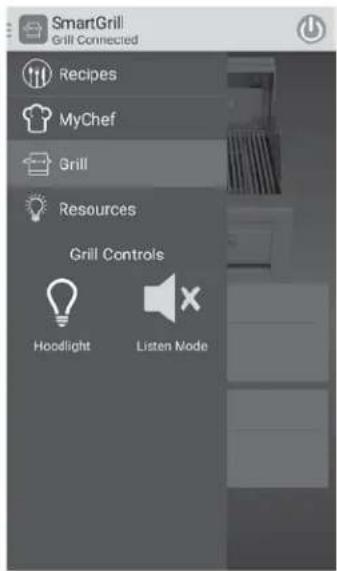
text_image
SmartGrill Grill Connected Recipes MyChef Grill Resources Grill Controls Hoodlight Listen ModeBe sure to turn your Listen Mode back on at the end of your grilling session. If you do not turn it back on, the next time you start SmartGrill, it will not respond to your voice commands.
To turn Listen Mode back on:
- Press the SmartGrill menu icon.
- At the bottom of the menu under "Grill Controls", press the "Listen Mode" icon. The X should disappear, and your SmartGrill will be able to listen.
CLEANING YOUR SMARTGRILL BY LYNX™
STAINLESS STEEL
Lynx products are known for their attractive appearance. We achieve this by selecting only the finest grades of stainless steel and applying exacting workmanship.
In order to maintain this attractive appearance over the life of the grill, it is important to take the following steps:
- After each use, wipe down the exterior of the grill to remove grease and splatters.
- Be sure to follow the cleaning instructions for keeping the cooking surface clean and ready for use.
- Use a commercially available Stainless Steel cleaner to clean and polish the exterior surfaces.
Doing these things on a regular basis minimizes the amount of effort required.
Part of the appeal of your Lynx SmartGrill by Lynx™ is the fine grain finish. When removing stubborn stains:
CLEANING YOUR SMARTGRILL BY LYNX™ ...continued
- Do not use metallic abrasives and always rub in the direction of the grain.
natural_image
Close-up of a medical or laboratory instrument with concentric wave patterns, no visible text or symbols- Some household cleaning products are not suitable for stainless steel and high heat; be sure to read the label before using on your SmartGrill by Lynx™.
• Always use the mildest cleaning solution first, scrubbing in the direction of the grain. Specks of grease may gather in the grain of the stainless steel and bake onto the surface, giving the appearance of rust.
To remove these baked on foods, use a fine to medium grit non-metallic abrasive pad (Scotch Brite is good) in conjunction with a stainless steel cleaner.
- Solutions used for cleaning concrete and masonry can be very corrosive and will attack stainless steel. Ensure your Lynx products are well protected before you allow the use of such chemicals near your grill.
SPECIAL NOTE FOR LOCATIONS NEAR POOLS AND COASTAL AREAS:
The 304 stainless steel material used in the construction of a Lynx SmartGrill by Lynx™ is highly rust resistant, however chlorine in the air from swimming pools or salt in the sea air may cause surface rust to appear and even create some pitting if left on the product.
Here are a few tips to avoid this:
- Regularly wipe down the exterior surfaces with a damp cloth (Micro fiber cloths such as Ecloth perform very well.)
- Allow the surfaces to dry before installing the cover. Do not cover a damp grill.
- In extreme environments, apply a rust inhibitor which leaves a microscopic protective layer on the grill. Products that provide a layer of vapor corrosion inhibitors (VpCl™) protect the surface very well.
- For seasonal storage use the product referred to above, ensure the grill is dry and then cover and secure the cover to minimize the amount of damp air getting to the surfaces.
THE LYNX LIMITED LIFETIME WARRANTY PROVIDES PROTECTION AGAINST RUST THROUGH OF PARTS THAT RENDER THE PRODUCT INOPERATIVE. IT DOES NOT COVER OCCASIONAL SURFACE RUST OR STAINING DUE TO ENVIRONMENTAL CONDITIONS.
After your first use, certain areas of the grill may discolor from the intense heat given off by the burners – this is normal and cannot be cleaned off.
For light and heavy food stains there are many different stainless steel cleaners available.
DRIP TRAY
The drip tray should be cleaned after each use. After the grill is completely cool, remove the drip tray by pulling it forward and up, lifting it out.
It can be wiped down with a paper towel.

WARNING
DO NOT ALLOW EXCESS GREASE OR LIQUIDS TO ACCUMULATE IN THE DRIP TRAY AS THIS MAY CREATE A FIRE HAZARD.
NEVER USE GRILL WITHOUT DRIP TRAY PROPERLY INSTALLED.
PROSEAR2 BURNERS
With the hood up, turn all burners on high for 5 minutes.
Do not touch the ceramic surfaces, and do not use water or cleaner on the ceramic surface. Do not poke anything into the holes in the ceramic.
Every three to six months, remove the burners and inspect the venturi (inlet) and orifice to ensure they are free of obstructions.
Food debris on the inside of the burners can be gently shaken out.
While the burners are removed, remove the grease and debris off the bottom of the firebox.
When re-installing the ProSear™2 burners, be sure to correctly position the burners.
CLEANING YOUR SMARTGRILL BY LYNX™ ...continued

WARNING: BURNER PLACEMENT
PROPER PLACEMENT OF EACH BURNER IS CRITICAL AFTER CLEANING. THE VENTURI MUST BE CENTERED OVER THE BRASS ORIFICE, RESTING LEVEL WITHOUT ANY ROCKING, AND THE CROSS BAR MUST BE SEATED IN THE CENTER BRACKET.
FAILURE TO MEET THESE CONDITIONS MAY CAUSE A VERY DANGEROUS CONDITION THAT CAN CAUSE PERSONAL INJURY AND DAMAGE PROPERTY.
TROUBLESHOOTING YOUR SMARTGRILL BY LYNX™
SMELL OF GAS WHILE COOKING
If you smell gas while the grill is operating, immediately turn off all burners and shut off the main fuel supply.
- Perform a leak test. (See INDEX: "Leak Test procedure" for further details)
- Check for blockages.
BEFORE YOU CALL FOR SERVICE
Please check a few things before calling for service:
• Is there fuel supplied to the grill?
• Is the main shut off valve open?
- Are you using the correct type of fuel (Liquid propane or natural gas)
- Is your propane cylinder empty? Have you recently refilled the propane cylinder? If so, is the connection tight?
- Have you opened the valve on the propane cylinder?
• Is the grill plugged in to a live electric circuit?
- Has the GFI outlet tripped requiring a reset?
PROBLEMS WITH WIRELESS CONNECTIVITY
First, go to the location of your grill with your iOS or Android device. How strong is your signal at that location? For optimum performance, you will need a 60% signal. If not, please check with your Wi-Fi installer to boost the strength.
Is your SmartGrill within 100 feet of your router? If not, you may need to boost signal strength.
Do you have an N version router? The SmartGrill by Lynx™ will perform better with an N router.
Do you have the correct operating system on your smart device?
iPhone 5, 5C, 6, or newer, iPad version 2.0 or newer or Android 4.4 operating system or newer
To find your operating system on your smart device:
iPhone and iPad: Go to Settings /General/ About/ Phone to find your model number
Android: Go to Settings, About Phone, Android version
Then, make sure that your wireless network is connected properly and is broadcasting at least a 60% signal to reach your grill. After that, proceed through the wireless connection sequence:
- Activate your iOS or Android device
- Click on the "Settings" app
- In Settings, click on "Wi-Fi"
- You will see "SmartGrill by Lynx™" in the selections under "Choose a Network."
- Tap SmartGrill by Lynx™ to connect to the SmartGrill by Lynx™ Wi-fi spot
- Shut down the Settings app
- Activate the SmartGrill by Lynx™ app.
If this is the first time you've activated your SmartGrill by Lynx™ app, you will be asked to input a PIN number and the serial number for the Grill.
TROUBLESHOOTING ...continued
- The four digit PIN can be located on the rating plate. This is your personal number that insures that no version of the SmartGrill by Lynx™ app save yours is able to control your SmartGrill by Lynx™.
- Input the SmartGrill by Lynx™'s Serial Number. This serial number can be found on the last page of this Care & Use manual or on the underside of the SmartGrill by Lynx™'s drip tray. (See INDEX: "Downloading and installing your SmartGrill by Lynx™ App".)
- Once the app has been connected to the SmartGrill by Lynx™, the app will open up the "Grill Status" page. Click the light bulb labeled "Support" at the bottom of the screen.
- Click "Wi-Fi" settings
- You will see a list of networks available for your SmartGrill by Lynx™ Choose your home network.
- Depending on your security settings, you may need to enter your home network's password to allow the SmartGrill by Lynx™ to access it.
- Once the SmartGrill by Lynx™ has successfully accessed your home network, you will receive a "Success" message.
Once you have successfully connected the SmartGrill by Lynx™ to your home network, you may have to return to your device's "Settings" app and reconnect with your home network.
FACTORY RESET
If needed, the Wi-Fi setting in your grill can be reset. Press the power button to turn the grill off. Then press and hold the Power button in the OFF position for 15 seconds.
If a factory reset is done, you will have to setup your Wi-Fi connection again. Please refer to the Quick Start Guide for setup procedure.
GRILL WON'T LIGHT
First, confirm that the grill is getting electricity by checking the lights that surround the dials on the front panel of your SmartGrill by Lynx™.
Check the Igniters
Your Lynx SmartGrill by Lynx™ uses an electric ignition system that does not spark. Instead the igniters will glow constantly when a control knob is turned on. If one of your igniters is not working, SmartGrill will say or send you a text of "Igniter Failure".
- Ensure that all burners are set to OFF
- Remove a cooking grate so you can clearly see the igniter.
- Turn the burner knob ON (two full rotations clockwise) and wait approximately one minute for the igniter to glow.
- Check all igniters. If they do not glow, call Lynx for service at 888-289-5969.
Check the Burners
If your burner fails to ignite, SmartGrill will text or say "Burner
Be careful! If the burner fails to ignite, wait five minutes before attempting to ignite other burners!
Check to make sure your gas line is connected and the shut off valve is turned on. Re-check fuel connections for leaks and ensure the supply is of the correct type and is of adequate pressure. (See INDEX: "Leak Test Procedure" for further details.)
If you know you are getting gas, wait for any gas to dissipate and remove the burner and check for gas blockages.
Replace any damaged supply lines.
- Check the regulator.
Make sure that the regulator and hose assembly is the one designed for and supplied with your Lynx grill and that it is correctly set up for the type of fuel you are using. (See INDEX: "Regulator Conversion" for further details.)
The hose and regulator provided by Lynx Grills must be used if your grill is set up for use with a liquid propane gas cylinder.
Check that there is no physical pressure being applied to the regulator attached to the back of the grill. The regulator contains a flexible diaphragm and should not be allowed to touch the grill body or its surroundings.
- Check for obstructions.
Ensure that the burners and the drip tray are clean and free from obstructions.
Liquid Propane Units:
TROUBLESHOOTING ...continued
• Is the cylinder almost empty?
Almost empty cylinders may not have sufficient pressure to run the burners at high heat.
- Have the line pressure checked by a qualified technician.
- Flow limiting device.
Improper lighting procedure may have activated the liquid propane cylinder's flow control device, reducing heat output.
To reset the flow control:
- Shut off all burner controls and close the liquid propane cylinder valve.
- Open one gas valve to relieve any pressure in the LP hose, then close the gas valve
- Wait 30 seconds and, very slowly, reopen the cylinder valve.
Wait a few seconds and relight a burner.
Bulk Liquid Propane cylinder users:
Bulk liquid propane cylinder lines must be properly regulated.
Ensure that you are using a 4/11 appliance regulator supplied by Lynx and converted to liquid propane gas. Also, ensure that you do not have more than one regulator in line.
Natural Gas Units:
• Supply line
Ensure that the supply line is at least 34 " inside diameter or 1" outside diameter.
- Check Line pressure
Natural gas inlet pressure should be at least 5" W.C. and manifold pressure not less than 4" W.C. under full load (with all burners on).
- Check burners for blockages.
LOW OR INSUFFICIENT HEAT
Proper levelling during installation is critical. A grill that is out of level will cause erratic burner combustion and inefficient, uneven heating. A carpenter's spirit level should be used to level the grill both front-to-back and side-to-side.
If the low heat problem persists:
- Check the gas supply line sizing requirements.
- Check the gas supply line for kinks or damage.
- Check the thermostatic control for proper operation.
LIGHTS WON'T LIGHT
- For the blue LED lights and white halogen lights
- Check power
Ensure that the grill is connected to a live AC power source.
SMARTGRILL SELF-DIAGNOSIS
Your SmartGrill by Lynx™ technology includes self-diagnosis of some issues and will let you know either with an audible statement of the issue, or send you a text message displayed in your app. "Burner
Audible: "Burner
Text: "Igniter failed to start."
Indicates the igniter has a problem. Check to see if gas is turned on. Wait 5 minutes for the gas to dissipate, then try lighting it again. Call Lynx at 888-289-5969.
Audible: "Burner
Text: "Burner
Indicates the burner is not lit. Check to see if gas is turned on. Wait 5 minutes for the gas to dissipate, then try lighting it again. If it still does not light, call Lynx at 888-289-5969.
Audible: "Burner
Text: "Burner
The burner was set a little too cool. Wait 5 minutes for the gas to dissipate, then light it again. Leave it on high for a little longer to heat up before adjusting it down to your target temperature.
Audible: "Burner
Text: "Burner
Check to see if gas is turned on. Wait 5 minutes for the gas to dissipate, then try lighting it again. If it still does not light, call Lynx at 888-289-5969.
Audible: "Burner
Text: "Burner
TROUBLESHOOTING ...continued
Check to see if the gas is turned on. Wait 5 minutes for the gas to dissipate, then try lighting it again. Check If it still does not light, call Lynx at 888-289-5969.
Audible: "Burner
Text: "Burner
Check grill to see if someone else is using the grill manually. If not, shut down that burner and watch to see if it lights unexpectedly again. If so, call Lynx at 888-289-5969.
Audible: "Burner
Text: "Burner
Check area around grill for breeze or wind (see INDEX "Grilling in Windy Conditions"; confirm your gas is on, and if you have a propane bottle, that it has enough gas in it.
Audible: "Error encountered. Please unplug and re-plug SmartGrill power cable."
Text: "Error encountered. Please unplug and re-plug SmartGrill power cable."
Unplug and re-plug your power cable. Wait 20-60 seconds to hear "SmartGrill is ready," then press the power button. If the SmartGrill still does not function, call Lynx at 888-289-5969.
Audible: "Ambient temperature too high."
Text: "Ambient temperature too high."
The temperature around the PC or the circuit board in the grill head is too hot. Turn the grill off and allow it to cool. Try the grill again after it has cooled off.
Audible: "Burner
Text: "Burner
Indicates that a knob is missing or not connecting to the grill correctly. The grill will turn that burner off until the knob is fixed. Replace any knob that has been removed or fallen off. If the problem persists, call Lynx at 888-289-5969.
Audible: "Burner
Text: "Burner
Indicates gas is not flowing through the valve. Check to be sure the gas is turned on, and there is enough gas in your propane bottle. The grill will turn this burner off until the valve is fixed. Call Lynx at 888-289-5969.
Audible: "Burner
Text: "Burner
Shutdown the burner with the problem and call Lynx at 888-289-5969.
NETWORK TROUBLESHOOTING
If you do not have at least a 60% signal on your smart device while standing at your grill, your grill will not perform optimally. Here are some suggestions for improving your network:
Position your wireless router, modem router, or access point in a central location. The best place for a Wi-Fi router is in the center of your home.
- The distance between your router and your SmartGrill should not exceed 50 ft.
- Verify that there are no obstacles between your SmartGrill and the router.
- Appliances, metal objects, cordless phones, stone walls, fireplaces, etc. decrease Wi-Fi strength.
- Check the cable that connects the modem to the router to make sure it is in good condition. If not, replace the cable.
- Replace your router antenna with a Hi-Gain wireless antenna. They boost the signal strength and aim the signal in one direction.
- Reduce wireless interferences by using devices that communicate via the 5.0 GHz frequency instead of the more common 2.4 GHz frequency (same frequency as baby monitors, garage door openers, cordless phones, microwave ovens).
- Connect your SmartGrill to your router using a CAT 5E or better cable and then try to setup a wired network connection.
Add a wireless repeater
A wireless repeater is a device that extends your wireless network's range without requiring you to add any wiring. Place the repeater halfway between your wireless router and your SmartGrill to get an instant boost in your wireless strength.
Add an extended antenna
Sometimes when a SmartGrill is built-in to an island, the antenna cannot pickup a strong enough signal to run the SmartGrill. If this is the issue, please call Lynx to request an antenna extension at 888-289-5969 option 5.
For additional troubleshooting of wireless connections, contact your local Wi-Fi installation expert.
OBTAINING SERVICE FROM LYNX
Before calling Lynx Customer Care, please make sure you have the following information:
- Model number
- Date of purchase
• Proof of purchase by the original owner - Serial number for grill (located on the rating plate in this Care and Use Manual and on the bottom of the drip tray)
- Serial number for the CPU (located on the rating plate on the front of the CPU case).
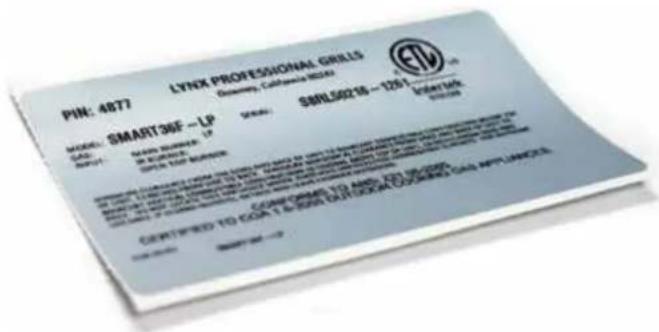
text_image
PH: 4877 LYNX PROFESSIONAL GRILLS Diversity, California MG260 SBNL50215 - 1251 MODEL: SMART36F-LP CODE: SBNL50215-1251 MATERIAL NAME: SMART36F-LP ITEMS: SBNL50215-1251 DESCRIPTION: CERTIFIED TO EQA T & OAK OUTDOCK COOKING CAN APPLIANCEFor Warranty Service or a referral for an authorized service agent near you, contact Lynx Customer Care at:
(888) 289-5969
Agents are available Mon-Fri from 6AM to 4:30 PM, and Saturday from 8AM to 1PM Pacific Time.
www.lynxgrills.com
Your satisfaction is of the utmost importance to us. If a problem cannot be solved to your satisfaction, please call, write, fax or email us:
Lynx Professional Grills
7300 Flores Street
Downey, CA 90242
Service: (888) 289-5969
Tel: (562) 299-6900
Fax: (562) 299-6978
service@lynxgrills.com
Contact Lynx for replacement parts. Parts are shipped F.O.B. Downey, CA.
THE LYNX STORY
Lynx began with a vision.
A small group of manufacturing engineers with over a century of collective experience had a dream. They dared to take their extensive commercial manufacturing know how and create a line of outdoor cooking products that offer commercial elegance and performance to the consumer
market.
natural_image
Man examining a perforated metal component (no visible text or symbols)Lynx has taken the quality, workmanship, service and innovation of the commercial market and incorporated it into the Lynx Professional grills line of consumer and commercial products. The combination of creative design, superior materials and exceptional craftsmanship elevates Lynx products to a class of their own.
Lynx original commercial products are used every day in restaurants, hotels, and theme parks across the USA:
LYNX SATISFIED CUSTOMERS
• TGI Fridays
- Applebee's
- Houston's
- Red Lobster
- Hard Rock Café
• Wolfgang Puck's
- Cheesecake Factory
- Red Robin
- Planet Hollywood
- Hilton
• Hyatt
• Four Seasons Marriott
• Le Meridian
- Sheraton
• Conrad International
• Bellagio
- New York New York
- MGM Grand
- Treasure Island
- Mirage
- Paris
- Excalibur
- Mandalay Bay
- Riviera
- Desert Inn
- Hard Rock Hotel
- Disney World
SMARTGRILL BY LYNX™ LIMITED WARRANTY
I. Limited Lifetime Warranty
The stainless steel grill body, cooking grates, ProSear™ burner and rotisserie infrared burner are warranted to be free from defects in material and workmanship when subjected to normal domestic use and service for the lifetime of the original purchaser. This warranty excludes surface corrosion, scratches, and discoloration which may occur during normal use. This warranty is limited to the replacement of the defective parts, with the owner paying all other cost including labor, shipping and handling.
II. Limited Five-Year Warranty
The following grill parts are warranted to be free from defects in material and workmanship, when subjected to normal domestic use and service, for a period of five (5) years from the original date of purchase; warming racks, spit rods, manifolds and gas valves. This warranty is limited to the replacement of the defective parts, with the owner paying all other costs including labor, shipping, and handling.
III. Limited two-Year Warranty
All other grill components, including the computer (CPU), are warranted to be free from defects in material and workmanship, when subjected to normal domestic use and service, for a period of two (2) years from the original date of purchase. This warranty is limited to the replacement of the defective parts, with the owner paying all other costs including labor, shipping and handling.
IV. Limited One-Year Warranty
For a period of one (1) year from the original date of purchase, Lynx will replace or repair parts found to be defective at no cost to the original purchaser. This includes the cost of shipping replacement parts and, where necessary, service labor at prevailing local rates by a Lynx authorized service person. Service will be provided during normal business hours and must be authorized in advance by Lynx.
V. Limitations & Exclusions
1) This Warranty shall apply to products purchased and located in the United States and Canada. Products must be purchased in the country where service is requested.
2) Warranty applies only to the original purchaser and may not be transferred.
3) Warranty is in lieu of all other warranties expressed or implied and all other obligations or liabilities related to the sale or use of its grill products.
4) Warranty shall not apply and Lynx is not responsible for damage resulting from misuse, abuse, alteration of or tampering with the appliance or computer box, accident,
hostile environment, flare-up fires, improper installation, or installation not in accordance with the instructions contained in this manual, or the local codes.
5) Lynx shall not be liable for incidental, consequential, special or contingent damages resulting from its breach of this written warranty or any implied warranty.
6) Some states do not allow limitations on how long an implied warranty lasts, or the exclusions of or limitations on consequential damages. This warranty gives you specific legal rights and you may have other rights which vary from state to state.
7) No one has the authority to add to or vary Lynx's warranty, or to create for Lynx any other obligation or liability in connection with the sale or use of its products.
8) Limited to the replacement of defective parts with the owner paying all other costs including labor.
VI. What is not covered: Lynx shall not be responsible for and shall not pay for the following
1) Installation or start-up, damages or problems caused by improper installation or use;
2) Service by an unauthorized service provider;
3) Damage or repair due to service by an unauthorized service provider or use of unauthorized parts;
4) Warranty does not apply to products installed in any commercial or non-residential application. Examples of excluded applications include, but are not limited to day care centers, schools, bed and breakfast centers, churches, private clubs, fire stations, club houses, common areas in multi-family dwellings, restaurants, hotels, nursing homes, food service locations and institutional food service locations.
5) To correct normal adjustments or settings, due to improper installation, commissioning or local gas supply properties.
6) Shipping and handling costs, export duties, installation, removal, or re-installation cost.
7) Display models are sold "as is". If you have purchased a display model, please be advised that it is sold "as is" and that it is subject to the following warranty exclusions: any exterior or cosmetic damage is nonwarrantable; any missing components will be replaced at consumers expense; major handling damage to manifold, valve and ignition system will be serviced at consumer's expense; all other warranty's (standard warranty) will remain in effect.
8) The cost of a service call to diagnose trouble.
30 INCH, ELECTRICAL DIAGRAM, SMART GRILL

flowchart
graph TD
    A["IGNITER-1"] --> B["IGNITER-2"]
    B --> C["VALVE-1"]
    B --> D["VALVE-2"]
    B --> E["VALVE-4*"]
    C --> F["MICROPHONE"]
    D --> G["ROTISserie"]
    E --> H["HALOGEN"]
    E --> I["SPEAKER"]
    E --> J["MASTER SWITCH"]
    K["TC-1 (BURNER)"] --> L["TC-2 (BURNER)"]
    L --> M["TC-4* (BURNER)"]
    N["TC-C1 (GRATE)"] --> O["TC-C2 (GRATE)"]
    P["GRATES"] --> Q["TC-C2 (GRATE)"]
    R["VALV/IGN"] --> S["PWR/GND"]
    T["AUD/SYS"] --> U["TC(IGTR)"]
    V["TC(COOK)"] --> W["KNOB"]
    X["KNOB 4KNO2 3KNOB 2KNOB 1"] --> Y["KNOB 4KNO2 3KNOB 2KNOB 1"]
COMPUTER INTERFACE PANEL
*NOTE: IGNITER 4, VALVE 4, THERMALCOUPLE 4, AND KNOB 4 ARE ALL FOR THE ROTISSERIE.
36 INCH AND 42 INCH, ELECTRICAL DIAGRAM, SMART GRILL
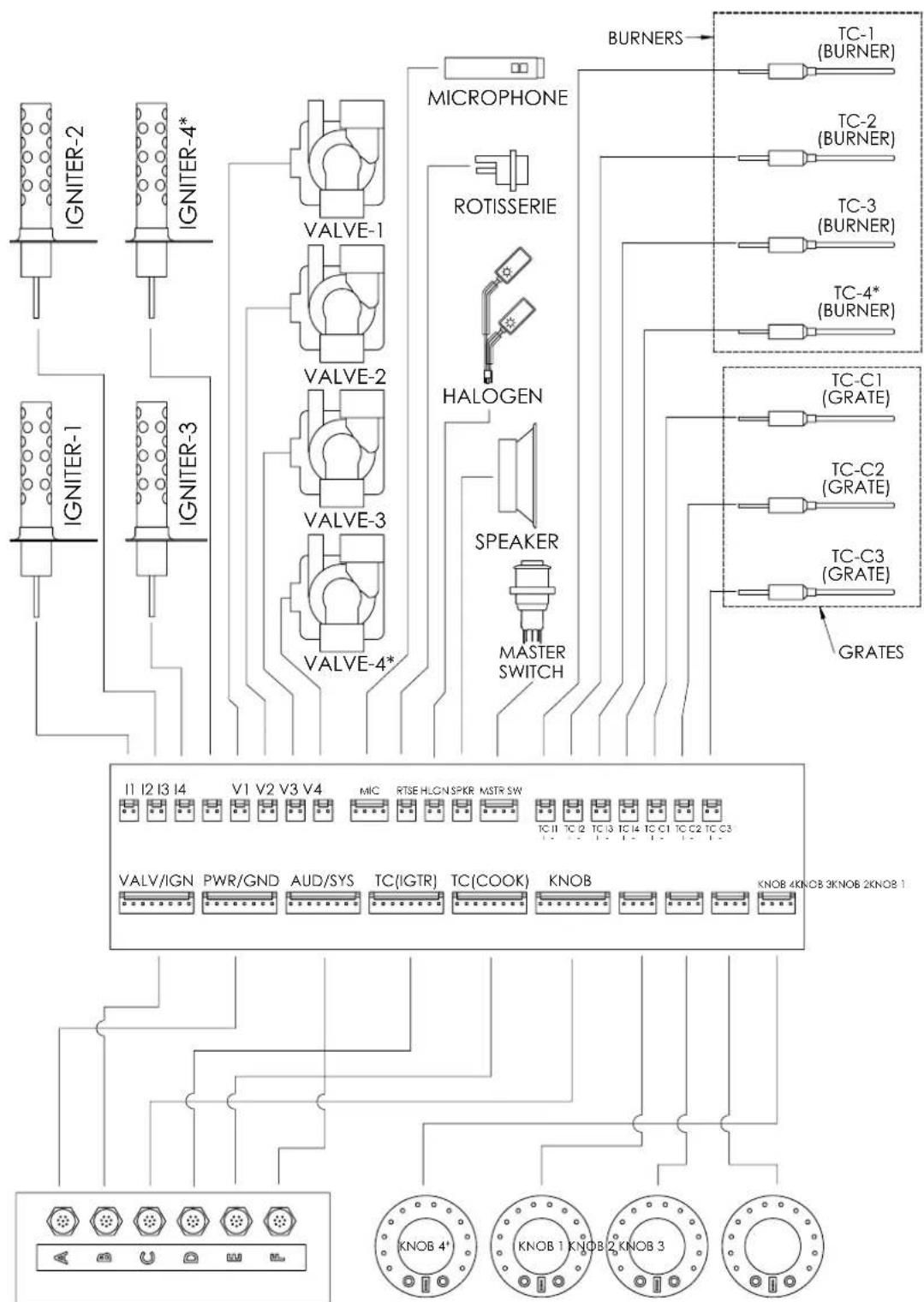
flowchart
graph TD
    A["IGNITER-1"] --> B["VALVE-1"]
    C["IGNITER-2"] --> D["VALVE-2"]
    E["IGNITER-3"] --> F["VALVE-3"]
    G["IGNITER-4*"] --> H["VALVE-4*"]
    I["MICROPHONE"] --> J["ROTISSERIE"]
    K["ROTISSERIE"] --> L["HALOGEN"]
    M["SPEAKER"] --> N["MASTER SWITCH"]
    O["BURNERS"] --> P["TC-1 (BURNER)"]
    Q["TC-2 (BURNER)"] --> R["TC-3 (BURNER)"]
    S["TC-3 (BURNER)"] --> T["TC-4* (BURNER)"]
    U["TC-C1 (GRATE)"] --> V["TC-C2 (GRATE)"]
    W["TC-C2 (GRATE)"] --> X["TC-C3 (GRATE)"]
    Y["TC-C3 (GRATE)"] --> Z["GRATES"]

    subgraph Power Supply
        I1["I2 I3 I4"] & V1["V2 V3 V4"] & MIC & RTSE & HLCN & SPKR & MSTR & SW & TC II & TC I2 & TC I3 & TC I4 & TC C1 & TC C2 & TC C3 & TC C3
        VALV/IGN & PWR/GND & AUD/SYS & TC(IGTR) & TC(COOK) & KNOB & KNOB 4KNOB 3KNOB 2KNOB 1
    end

    style A fill:#f9f,stroke:#333
    style C fill:#f9f,stroke:#333
    style E fill:#f9f,stroke:#333
    style G fill:#f9f,stroke:#333
    style I fill:#f9f,stroke:#333
    style Q fill:#f9f,stroke:#333
    style U fill:#f9f,stroke:#333
    style W fill:#f9f,stroke:#333
    style X fill:#f9f,stroke:#333
    style Y fill:#f9f,stroke:#333
    style Z fill:#f9f,stroke:#333
COMPUTER INTERFACE PANEL
*NOTE: IGNITER 4, VALVE 4, THERMALCOUPLE 4, AND KNOB 4 ARE ALL FOR THE ROTISSERIE.
EXPLODED PARTS DIAGRAMS

text_image
DETAIL A 63 48 50 DETAIL B 67 58 53 B 65 49 38 29 34 20 31 18 32 14 66 19 57 51 62 D 37 69 59 12 69 A 39 62 36 64 REFERENCE IR PANEL ASSY BILL 45 33 64 35 DETAIL D DETAIL CEXPLODED PARTS DIAGRAMS
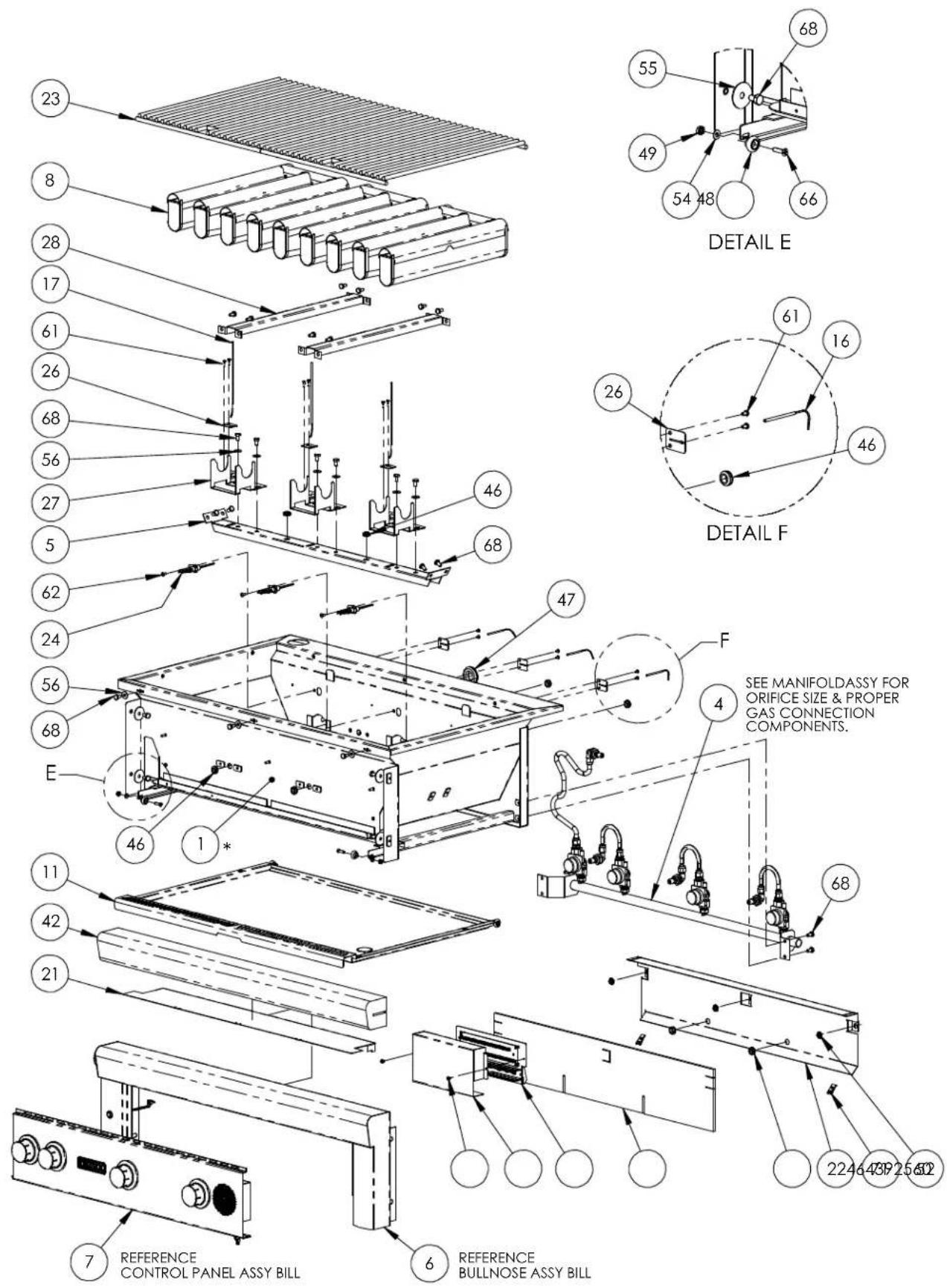
text_image
23 8 28 17 61 26 68 56 27 5 62 24 56 68 E 46 1* 11 42 21 7 REFERENCE CONTROL PANEL ASSY BILL 6 REFERENCE BULLNOSE ASSY BILL DETAIL E 55 49 54 48 66 68 DETAIL F 61 16 26 46 47 F SEE MANIFOLDASSY FOR ORIFICE SIZE & PROPER GAS CONNECTION COMPONENTS. 68 2246 43P 25 602| 30" 36" 42" 30" 36" 42" | ||||||||||
| 170302 FIREBOX, 30" SG, WELDMENT 1 24 33052 IGNITER, HOT SURFACE (SHORT) | 3 | 4 | 4 | |||||||
| 70303 FREBOX, 36" SG, WELDMENT 1 25 35292 COVER, BREAKOUT BOARD | 1 | 1 | 1 | |||||||
| 70304 FREBOX, 42" SG, WELDMENT 1 26 35369 TC RETAINER CLIP | 4 | 6 | 6 | |||||||
| 270357 FRONT HOOD, 30", SG, WLDMT 1 27 35100 BRACKET, HOLDER, BURNER, SG | 2 | 3 | 3 | |||||||
| 70358 FRONT HOOD, 36", SG, WLDMT | 1 28 31692 STIFFENER, FIREBOX, 30/42 | 1 | 2 | |||||||
| 70359 FRONT HOOD, 42", SG, WLDMT | 1 | 35371 STIFFENER, FIREBOX, 36 | 2 | |||||||
| 3 | 80269 REAR HOOD, WELD ASSY, 30" | 1 | 29 31736 END CAP, HOOD HANDLE, W/INSUL | 2 | 2 | 2 | ||||
| 80270 REAR HOOD, WELD ASSY, 36" | 1 30 33136 IR IGNITER COVER | 1 | 1 | 1 | ||||||
| 80271 REAR HOOD, WELD ASSY, 42" | 1 31 31563 FOR K, ROTISSERIE | 2 | 2 | 2 | ||||||
| 480922 MAN FOLD, 30, SG, ASSY 1 32 33416 ROTIS POWER CORD | 1 | 1 | 1 | |||||||
| 80923 MANIFOLD, 36, SG, ASSY | 1 33 80440 ROTIS JACK WIRE HARNESS | 1 | 1 | 1 | ||||||
| 80924 MANIFOLD, 42, SG, ASSY | 1 | 34 32522 HOOD HANDLE, 30" PRO | 1 | |||||||
| 5 | 70331 BRACE, BURNER, 30" SG, WLDMT | 1 | 32523 HOOD HANDLE, 36" PRO | 1 | ||||||
| 70332 BRACE, BURNER, 36" SG, WLDMT | 1 | 32524 HOOD HANDLE, 42" PRO | 1 | |||||||
| 70333 BRACE, BURNER, 42" SG, WLDMT | 1 35 33389 HOOD STOP, W/ROTIS | 1 | 1 | 1 | ||||||
| 680927 BULLNOSE, 30, SG, ASSY 1 36 32448 HOOD STOP | 1 | 1 | 1 | |||||||
| 80928 BULLNOSE, 36, SG, ASSY | 1 37 10158 WOOD CHIP TRAY, LARGE | 1 | 1 | 1 | ||||||
| 80929 BULLNOSE, 42, SG, ASSY | 1 38 31874 EXTENSI ON SPRING W/HOOKS | 2 | 2 | |||||||
| 7 | 80919 PANEL, CONTROL, 30", ASSY | 1 | 31780 EXTENSION SPRING W/HOOKS | 2 | ||||||
| 80920 PANEL, CONTROL, 36", ASSY | 1 39 30417 COVER, R ACCESS | 1 | 1 | 1 | ||||||
| 80921 PANEL, CONTROL, 42", ASSY | 1 | 40 33033 FRONT RETAINING BRACKET, RACK | 2 | 2 | 2 | |||||
| 8 | 33415 BURNER, PS2, 30, 42, 54 | 2 | 3 | 41 33597 BRACKET, RETAIN, WARMING RACK, LH | 1 | 1 | 1 | |||
| 33478 BURNER, IR MAIN, PROSEAR2 | 3 42 20021 INSULATION | 1 | 1 | 1 | ||||||
| 9 | 80951 BREAKOUT BOARD, 30, ASSY | 1 | 43 35410 INSULATION, DIE-CUT, 30" | 1 | ||||||
| 80952 BREAKOUT BOARD, 36/42, ASSY | 1 | 1 | 35411 INSULATION, DIE-CUT, 36" | 1 | ||||||
| 10 | 70365 IR IGNITER BRACKET WLDMT | 1 | 35412 INSULATION, DIE-CUT, 42" | 1 | ||||||
| 11 | 80966 DRIP PAN, SMART GRILL, 30" ASSY | 1 | 44 32477 BUMPER, 1/2" DIA, RUBBER, PRESS IN | 2 | 2 | 2 | ||||
| 80967 DRIP PAN, SMART GRILL, 36" ASSY | 45 32470 BUMPER, 3/4, RUBBER, PRESS IN | 2 | 2 | 2 | ||||||
| 80968 DRIP PAN, SMART GRILL, 42" ASSY | 1 46 35310 GROMMET, RBR, 3/8 ID, HI-TEMP | 6 | 8 | 8 | ||||||
| 12 | 32156 REAR HOOD LINER, 30" | 1 | 47 33984 GROMMET, RBR, 11.D. X 1 3/8 O.D. | 1 | 1 | 1 | ||||
| 32441 REAR HOOD LINER, 36" | 1 48 20055 WHEEL, BALL BERING, SS | 6 | 6 | 6 | ||||||
| 32442 REAR HOOD LINER, 42" | 1 | 49 14024 NUT, #8-32, LOCK TOOTH WASHER, STEEL | 7 | 7 | 7 | |||||
| 13 | 80446 SINGLE LIGHT ASSEMBLY | 1 50 31805 NUT, #8-32, ACORN, SS | 4 | 4 | 4 | |||||
| 80447 DUAL LIGHT ASSEMBLY | 1 | 1 | 51 32196 NUT, #10-24, ACORN, SS | 2 | 2 | 2 | ||||
| 14 | 80971 ROTISS MOTOR ASSEMBLY | 1 | 1 | 1 | 52 14023 NUT, #10-40, SPEED, STEEL | 3 | 3 | 3 | ||
| 15 | 80273 INFRARED PANEL ASSY 30" | 1 | 53 L14009 NUT, 1/4-20, HEX, SS | 2 | 2 | 2 | ||||
| 80274 INFRARED PANEL ASSY 36" | 1 54 32987 WASHER, #10, FLT, SS | 2 | 2 | 2 | ||||||
| 80275 INFRARED PANEL ASSY 40" | 1 | 55 31317 WASHER, 1/4, FLAT, SS, 1-1/4 O.D. | 4 | 4 | 4 | |||||
| 16 | 35302 THERMOCOUPLE, BURNER, 2" | 3 | 4 | 4 | 56 14044 WASHER, 1/4, FLT, SS, 11/16 O.D. | 7 | 9 | 9 | ||
| 17 | 35026 THERMOCOUPLE, GRATES, 6" | 2 | 3 | 3 | 57 32939 SPACER, #10 NOM, 5/16 OD X 9/32, SS | 2 | 2 | 2 | ||
| 18 | 32128 SPIT ROD, 30" | 1 58 34510 HOOD SPACER, UNI VERSAL | 2 | 2 | 58 32939 SPACER, #10 NOM, 5/16 OD X 9/32, SS | 2 | 2 | 2 | ||
| 32129 SPIT ROD, 36" | 1 59 30617 SCREW, #6-32 X 1/4, FIP, STEEL | 2 | 2 | 2 | ||||||
| 32130 SPIT ROD, 42" | 1 | 60 34035 SCREW, #6-32 X 1/4, THP, SS | 11 | 13 | 13 | |||||
| 19 | 32940 BRACKET, MOUNT, ROTIS MOTOR | 1 | 61 14018 SCREW, #6-32 X 1/4, PHP, SS | 4 | 6 | 6 | ||||
| 20 | 32109 WARMING RACK, 30" PRO | 1 | 62 14014 SCREW, #8-32 X 1/2, THP, SS | 8 | 9 | 9 | ||||
| 32110 WARMING RACK, 36" PRO | 1 63 31804 SCREW, #8-32 X 5/8, FHP, STEEL | 4 | 4 | 4 | ||||||
| 32111 WARMING RACK, 42" PRO | 1 64 32469 SCREW, #8-32 X 1, THP, SS | 4 | 4 | 4 | ||||||
| 21 | 35359 HEAT SHIELD, BULLNOSE, 30 | 1 | 65 31782 SCREW, SHLDR, #8-32 X 3/16, SLTD, SS | 4 | 4 | 4 | ||||
| 35360 HEAT SHIELD, BULLNOSE, 36 | 1 66 4099 SCREW, #10-24 X 3/4, FHP, SS | 4 | 4 | 4 | ||||||
| 35361 HEAT SHIELD, BULLNOSE, 42 | 1 67 14018 SCREW, 1/4-20 X 1, BHS, STEEL | 2 | 2 | 2 | ||||||
| 22 | 35356 HEAT SHIELD, FIREBOX, FRONT, 30 | 1 | 68 14030 SCREW, 1/4-20 X 1/2, HHD, SS | 23 | 29 | 29 | ||||
| 35357 HEAT SHIELD, FIREBOX, FRONT, 36 | 1 | 69 14012 SCREW, 1/4-20 X 3/8, THP, STEEL | 11 | 11 | 11 | |||||
| 35358 HEAT SHIELD, FIREBOX, FRONT, 42 | 70 31930 SCREW, 1/4-20 X 3/8, HHD, SS | 4 | 4 | 4 | ||||||
| 23 | 30018 GRATE PROFESSIONAL, 30/42/54 | 2 | 2 | 71 35424 CLIP, PANEL, #10 | AR | AR | AR | |||
| 17020 GRATE PROFESSIONAL, 16-1/2 X 18 1/2 | 2 | |||||||||
| 30019 GREAT PROFESSIONAL, 42/54 | ||||||||||
* ITEM IS NOT FIELD REPLACABLE
EXPLODED PARTS DIAGRAMS AND PARTS LIST

text_image
Technical diagram of a mechanical assembly with numbered components and directional arrows indicating flow or movement.| CONTROL PANEL ASSEMBLY | |||||
| ITEM | P/N DESCRI | PTION GRILL SIZE | |||
| 30" 36" 42" | |||||
| 1 | 70308 | PANEL, CONTROL, 36", WLDMT | 1 | ||
| 70309 | PANEL, CONTROL, 36", WLDMT | 1 | |||
| 70310 | PANEL, CONTROL, 36", WLDMT | 1 | |||
| 2 | 80925 | KNOB, ILLUMINATED, SG, ASSY | 3 | 4 | 4 |
| 3 | L11074 | LYNX LOGO | 1 | 1 | 1 |
| 4 | 35062 | SPEAKER, 3.3", 8ohm | 1 | 1 | 1 |
| 5 | 35367 | COVER, SPEAKER | 1 | 1 | 1 |
| 6 | 35262 | HARNESS, WIRE, SPEAKER PERIPHERAL | 1 | 1 | 1 |
| 7 | 35365 | MTG BRACKET, FERRITE, SG | 3 | 4 | 4 |
| 8 | 35349 | FERRITE, CLAMP ON,, .138" I.D. | 3 | 4 | 4 |
| 9 | 35390 | CORD GRIP, SNAP-IN, .13-.19 CABLE | 1 | 1 | 1 |
| 10 | 34035 | SCREW, #6-32 X 1/4, THP, SS | 18 | 22 | 22 |
| 11 | 31062 | NUT, 1/8, SPEED, STEEL, SELF THREADING | 2 | 2 | 2 |
| 12 | 20021 | INSULATI ON | 1 | 1 | 1 |

text_image
72 5 4 6 8 3 1| * ILLUMINATED KNOB ASSEMBLY | |||||
| ITEM | P/N DESC | RIPTION | |||
| 1 | 35034 | BEZEL, KNOB, ILLUMINATED | 1 | ||
| 2 | 80964 | KNOB, BONDED, ASSY | 1 | ||
| 3 | 35060 | PCB, KNOB | 1 | ||
| 4 | 35037 | KNOB, SHAFT | 1 | ||
| 5 | 33018 | CLIP, KNOB | 2 | ||
| 6 | 35067 | SPRING, WAVE, DISC | 1 | ||
| 7 | 35068 | C-CLIP, RETAINER | 1 | ||
| 8 | 35389 | SCREW, #4-40 X 5/16, SHC, SS | 2 | ||
EXPLODED PARTS DIAGRAMS AND PARTS LIST

text_image
BULLNOSE WELDMENT 3 ALL SIZES 1 2 4| BULLNOSE ASSEMBLY | ||||
| NO. | P/N | DESCRIPTI ON QTY . | ||
| 1 | 80926 | MI CROPHONE DIAL ASSY 1 | ||
| 2 | 80953 | SWITCH, PUSH-BUTTON, ASSY 1 | ||
| 3 | 35064 | RTN RING, EXT, 3/8" SHAFT 1 | ||
| 4 | 35141 | SPRING, WAVE, DISC, 1 | ||
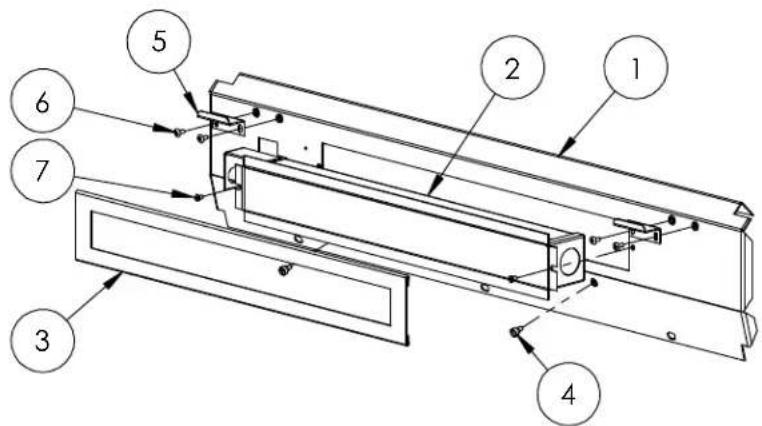
text_image
Technical diagram of a mechanical assembly with numbered components for identification| INFRARED PANEL ASSEMBLY | |||||
| ITEM | P/N | DE | SCRIPTI ON | GRILL SI ZE | |
| 30" | 36" | ||||
| 1 | 80843 | IR PANEL WELDMENT, L30 | 1 | ||
| 80842 | IR PANEL WELDMENT, L36 | 1 | |||
| 80841 | IR PANEL WELDMENT, L42 | 1 | |||
| 2 | 32989 | IR BURNER, MEDIUM 1 1 | |||
| 32990 | IR BURNER, LARGE | 1 | |||
| 3 | 32992 | COVER TRIM, IR BURNER, MEDIUM | 1 | ||
| 32993 | COVER TRIM, IR BURNER, LARGE | 1 | |||
| 4 | 32222 | SCREW, SHLDR, #10-32 X 1/4, SLTD, SS | 2 | ||
| 5 | 32133 | REAR RETAINING BRACKET, WR | 2 | ||
| 6 | 14014 | SCREW, #8-32 X 1/2, THP, SS | 4 | ||
| 7 | 32644 | SCREW, #8-32 X 5/16, FHP, SS | 2 | ||
EXPLODED PARTS DIAGRAMS AND PARTS LIST

text_image
Technical diagram of a mechanical or fluid system with numbered components and piping connections| MANIFOLD ASSEMBLY | |||||
| ITEM | P/N DESCRIPTION GRILL SIZE | ||||
| 30" 36" 42" | |||||
| 1 | 70311 MAN | FOLD, 30" SG, WLDMT 1 | |||
| 70312 MAN | FOLD, 36" SG, WLDMT 1 | ||||
| 70313 MAN | FOLD, 42" SG, WLDMT | ||||
| 2 | 35065 VALVE | E, ELEC, MODULATING 3 | 4 | 4 | |
| 3 | 35147 | FTNG, NIP, REDUC, 3/8 X 1/8 NFTP | 3 | 4 | 4 |
| 4 | 35146 FTNG | FLA RED, ST RAIGHT ADAP 3 | 4 | 4 | |
| 5 | 35222 | FLEX HOSE, 1/4" X 7", SS, 45 DEG. FTF | 2 | 3 | 3 |
| 6 | 795 FTNG | ELBOW 90 DEG. 1/4" TUBE, BRASS 3 4 | 4 | ||
| 7 | 35296 | FLEX HOSE, 1/4" X 20", SS, 45 DEG. FTF | 1 | 1 | 1 |
| NATURAL GAS (NG) | |||||
| 8 | 30781 REGULATOR, 4/11 | 1 | 1 | ||
| 11 | 13010 | ELBOW, PIPE, FEM X MALE, 1/2 NPT, 90 | 1 | 1 | 1 |
| 12 | 13013 ORIF | CE, #41 2 | 3 | 3 | |
| 13 | 13016 ORIF | CE, #50 1 | 1 | 1 | |
| LIQUID PROPANE (LP) | |||||
| 9 | 13026 LP REGULATOR W/36" HOSE | 1 | 1 | ||
| 10 | 13054 ELBOW, 3/8" FLARE TO 1/2" FIP | 1 | 1 | ||
| 12 | 13018 ORIF | CE, #52 2 | 3 | 3 | |
| 13 | 13021 ORIF | CE, #57 1 | 1 | 1 | |
MODEL-SPECIFIC BTU OUTPUTS & MAX. RUNS FOR APPLIANCES
| MODEL-SPECIFIC BTU OUTPUTS | |||
| MODEL ROTISSERIE PROSEARTM 2 TOTAL INPUT | |||
| SMART30(F) 1 @ 14,000 | 2 @ 23,000 60,000 Btu/Hr | ||
| SMART36(F) 1 @ 14,000 | 3 @ 23,000 83,000 Btu/Hr | ||
| SMART42(F) 1 @ 16,000 | 3 @ 23,000 85,000 Btu/Hr | ||
| MAXIMUM RUNS FOR ALL APPLIANCES ON SUPPLY LINE | |
| Run Length 3/4" Pipe (in feet) | Max BTU for all Appliances on line |
| 10 360,000 | |
| 20 245,000 | |
| 30 198,000 | |
| 40 169,000 | |
| 50 150,000 | |
| 60 135,000 | |
| 70 123,000 | |
| 80 115,000 | |
NOTE: IF A 1/2 INCH LINE IS USED WITH NATURAL GAS IT SHOULD BE NO LONGER THAN 12 FEET.
INDEX
#
4/11 Regulator 16
B
Before Each Use 23
Before You Start 10
BTU Outputs, Model Specific 38
Burner Placement 30
C
Checklist Before Each Use 23
Calibrating Your SmartGrill....4, 22
Cleaning Your SmartGrill 29
Clearance to Combustibles 11
Contacting LYNX 33
Cut-out Dim., Built-in Grills 13
D
Damage: Concealed....10
Visible....10
Direct Heat Cooking 28
Drip Tray 29
Downloading Your SmartGrill by Lynx™ App......21
E
Electrical Connections 18
Exploded Parts View 38
F
Factory Reset....31
Final Checks 19
G
Gas Connections 15
Gas Requirements 15
Gas Supply Line Runs 38
Grilling in Windy Conditions 9
|
Indirect Heat Cooking 28
Important Safety Precautions 8
L
Leak Test Procedure 19
Lighting Your Grill 23
LP Cylinder Requirements.... 16
LP Gas 16
M
Maximum Runs for all appliances on supply line.... 38
Message from Lynx.... 7
N
Natural Gas 15
O
Obtaining Service from LYNX.... 34
P
Parts List 41
Parts View, Exploded 38
Pre-Grill Checklist 22
Purging the Gas Line
(See Calibrating Your SmartGrill) 4, 22
R
Recipe Database 26
Regulator Conversion 16
Rotisserie, Using the 26, 27
S
Security Code Lock....22
Service, contacting LYNX 34
Side Burner Connections 17
T
Technical Assistance 34
Troubleshooting 30
U
Unpacking 10
V
Voice Commands 25
W
Warranty 35
Windy Conditions, Grilling in 9
Wiring Diagrams.... 36
natural_image
Group photo of people in uniform gathered in front of a modern office building under a blue sky (no visible text or signage)MOM FRIENDLY. DAD READY.™
The best outdoor kitchen products come from:
Lynx Grills, Inc.
7300 Flores Street
Downey, CA 90242
For more information please call,
1-888-289-5969 or visit www.lynxgrills.com
P/N 35014 01/2015 ©Lynx Grills
text_image
Lynx®
Voted "Most Coveted Product" by the Consumer Electronics Association staff at the 2014 Consumer Electronics Show