Kontour KRA227SXRH - Fridge Chief - Free user manual and instructions
Find the device manual for free Kontour KRA227SXRH Chief in PDF.


User questions about Kontour KRA227SXRH Chief
0 question about this device. Answer the ones you know or ask your own.
Ask a new question about this device
Download the instructions for your Fridge in PDF format for free! Find your manual Kontour KRA227SXRH - Chief and take your electronic device back in hand. On this page are published all the documents necessary for the use of your device. Kontour KRA227SXRH by Chief.
USER MANUAL Kontour KRA227SXRH Chief
INSTALLATION INSTRUCTIONS
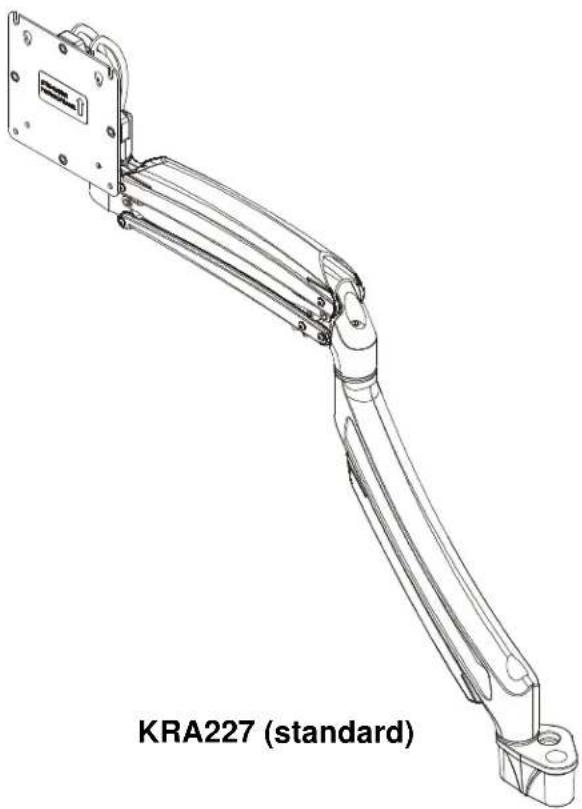
natural_image
Technical line drawing of a KRA227 robotic arm (standard) with no visible text or symbols on the diagram itself.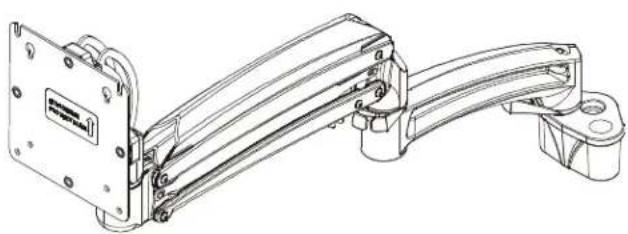
natural_image
Technical line drawing of a mechanical assembly with mounting bracket and housing (no text or symbols)KRA227xRH (reduced height)
K1D/K1P/K1S/K1W Dual Monitor Accessory
DISCLAIMER
Milestone AV Technologies and its affiliated corporations and subsidiaries (collectively "Milestone"), intend to make this manual accurate and complete. However, Milestone makes no claim that the information contained herein covers all details, conditions or variations, nor does it provide for every possible contingency in connection with the installation or use of this product. The information contained in this document is subject to change without notice or obligation of any kind. Milestone makes no representation of warranty, expressed or implied, regarding the information contained herein. Milestone assumes no responsibility for accuracy, completeness or sufficiency of the information contained in this document.
Chief® is a registered trademark of Milestone AV Technologies. All rights reserved.
DEFINITIONS
MOUNTING SYSTEM: A MOUNTING SYSTEM is the primary Chief product to which an accessory and/or component is attached.
ACCESSORY: AN ACCESSORY is the secondary Chief product which is attached to a primary Chief product, and may have a component attached or setting on it.
COMPONENT: A COMPONENT is an audiovisual item designed to be attached or resting on an accessory or mounting system such as a video camera, CPU, screen, display, projector, etc.

WARNING: A WARNING alerts you to the possibility of serious injury or death if you do not follow the instructions.

CAUTION: A CAUTION alerts you to the possibility of damage or destruction of equipment if you do not follow the corresponding instructions.

IMPORTANT SAFETY INSTRUCTIONS

WARNING: Failure to read, thoroughly understand, and follow all instructions can result in serious personal injury, damage to equipment, or voiding of factory warranty! It is the installer's responsibility to make sure all mounting systems/accessories are properly assembled and installed using the instructions provided.

WARNING: Exceeding the weight capacity can result in serious personal injury or damage to equipment! It is the installer's responsibility to make sure the combined weight of all components located on the KRA227 does not exceed 25 lbs (11.3 kg). In addition, when the KRA227 accessory is attached to a K1 Series mount, the listed weight capacity of that assembly becomes the weight capacity listed in Table 1.
Table 1: Weight Capacity
| MODEL(Original K1 Series mount) | Max Weight for EACH Display | Max Weight Capacity of Mounting System with KRA227 Attached |
| K1D120 | 25 lbs(11.34 kg) | 50 lbs(22.7 kg) |
| K1P120 | 25 lbs(11.34 kg) | 50 lbs(22.7 kg) |
| K1S120 | 25 lbs(11.34 kg) | 50 lbs(22.7 kg) |
| K1W120 | 25 lbs(11.34 kg) | 50 lbs(22.7 kg) |

WARNING: Use this accessory only for its intended use as described in these instructions. Do not use attachments not recommended by the manufacturer.

WARNING: Never operate this accessory if it is damaged. Return the accessory to a service center for examination and repair.

WARNING: Do not use this product outdoors.
IMPORTANT ! : The KRA227 accessory is designed to be mounted to a K1D120, K1P120, K1S120, and K1W120 Series mount.
--SAVE THESE INSTRUCTIONS--
DIMENSIONS
KRA227 (standard)

KRA227xRH (reduced height)

DIMENSIONS: INCHES [MILLIMETERS]
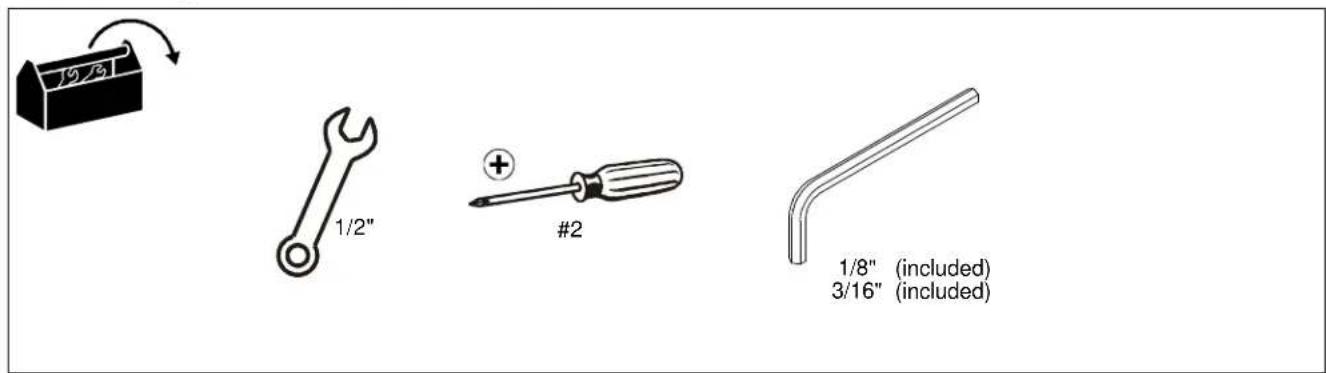
TOOLS REQUIRED FOR INSTALLATION
text_image
1/9/8" 1/2" #2 1/8" (included) 3/16" (included)PARTS

text_image
Display Mounting Hardware A (1) [Single monitor arm] (standard shown) B (4) M4 x 10mm C (4) M4 x 20mm D (4) M10 x M5.3 x M10 E (1) [Plastic washer] F (1) [Pivot point spacer] G (4)* [Stainless steel washer] H (1) #10-32 x 3/8" J (2) 5/16-18" x 3 1/8" K (1) [Pivot pin] L (1) 5/16" M (1) 1/2" N (1) M4 x 4mm P (1) 1/8" Q (1) 3/16" *2 of 4 are extra in case washers in existing arm are lost or damagedASSEMBLY AND INSTALLATION
- Carefully remove display from existing mount, following instructions included with mount.
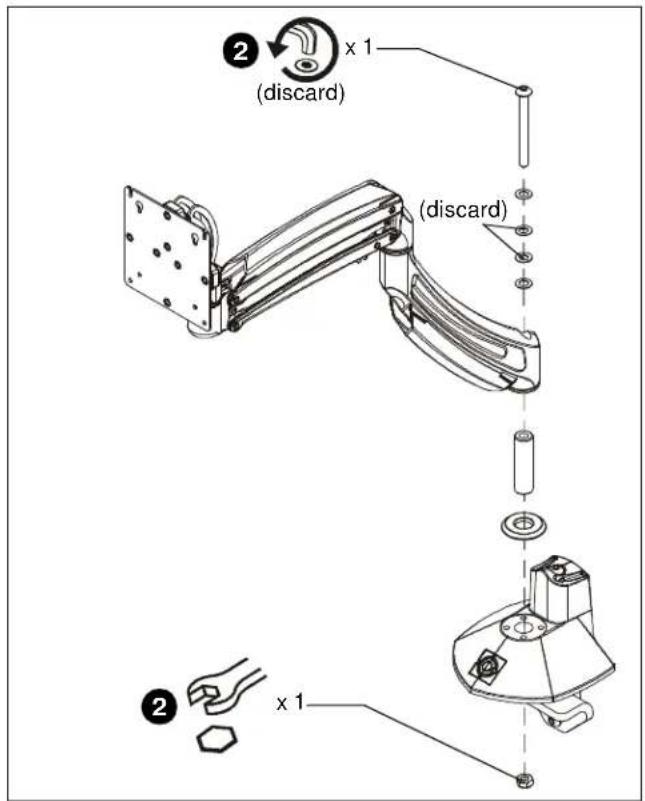
- Loosen lock nut and 3" button head cap screw located in arm to remove arm from mount. SAVE ALL HARDWARE AND MOUNT ARM EXCEPT 3" SCREW AND PLASTIC SPACERS! (See Figure 1)
text_image
(discard) (x 1) (discard) (x 1)Figure 1
- Attach single monitor arm assembly (A) to original mount base using one 5/16-18 x 3 1/8" button head cap screw (J), steel washers from existing mount, 1/2" spacer (M) and pivot pin, pivot pin spacer and 5/16" lock nut all from existing mount. (See Figure 2)
NOTE: If two steel washers removed in Step 2 are lost or damaged, replace with the extra two washers (G).
- Reattach original mount arm (removed in Step 2) using one 5/16-18 x 3 1/8" button head cap screw (J), one plastic washer (E), two stainless steel washers (G), one pivot pin (K), one pivot point spacer (F), and one 5/16" lock nut (L). (See Figure 3)

text_image
(A) (M) Steel washers or (G) x 2 x 1 ③ (J)Figure 2

text_image
(J) x 1 (G) x 2 (E) (A) (K) (F) (L) x 1Figure 3
DISPLAY INSTALLATION
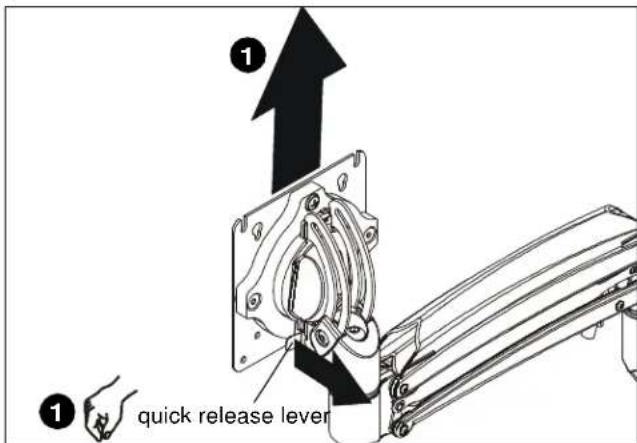
- Remove quick release faceplate from KRA227 by pulling quick release lever and sliding faceplate off. (See Figure 4)
text_image
① ① quick release leverFigure 4
- Carefully place display face down on protective surface.
- Connect faceplate to display.
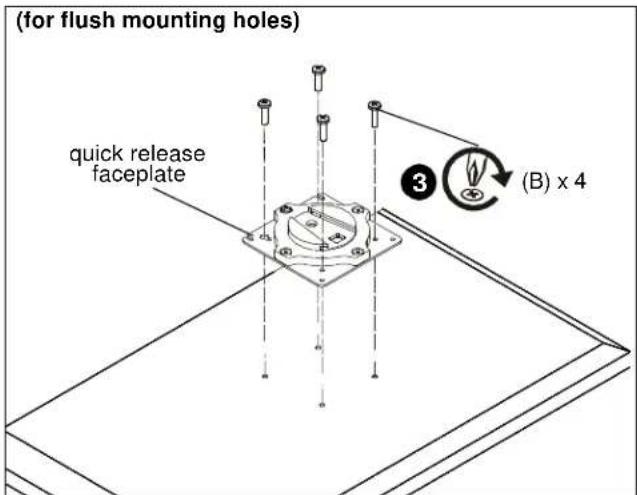
For flush mounting hole installation:
- Using Phillips screwdriver, carefully install four M4x10mm screws (B) through corresponding holes on faceplate and into the mounting holes on the display. (See Figure 5)
text_image
(for flush mounting holes) quick release faceplate 3 (B) x 4Figure 5
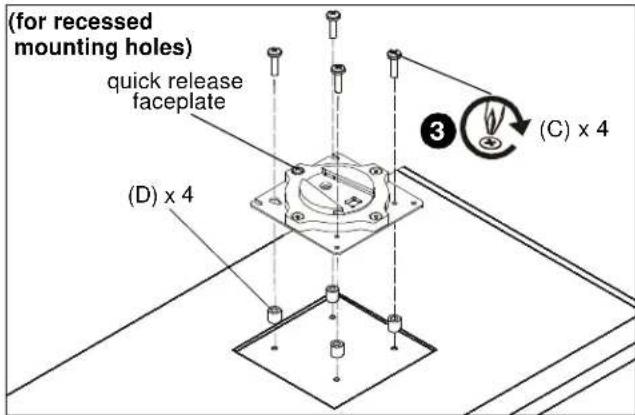
For recessed mounting hole installation:
- Place four spacers (D) on top of mounting holes on back of display. (See Figure 6)
- Using Phillips screwdriver, carefully install four M4x20mm screws (C) through corresponding holes on faceplate, spacers (D) and into the mounting holes on the display. (See Figure 6)
text_image
(for recessed mounting holes) quick release faceplate (D) x 4 ③ (C) x 4Figure 6
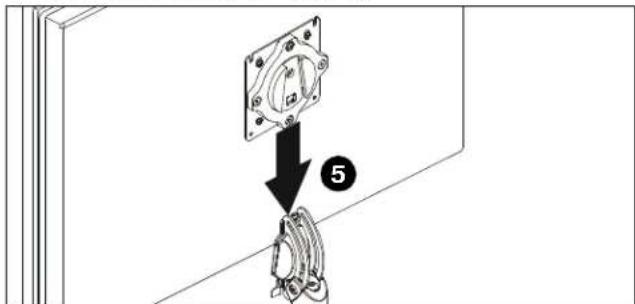
- Position display with faceplate attached above KRA227. (See Figure 7)
- Slide faceplate onto KRA227 head until quick release tab clicks into place. (See Figure 7)
text_image
Technical diagram showing a mechanical assembly with labeled component 5 and directional arrowFigure 7
Rotational Adjustment
NOTE: (Optional) Rotational adjustment may be locked by installing rotational locking screw (H) into back of faceplate. (See Figure 8)

text_image
rotational adjustment screw OPT (H)Figure 8
- The monitor may be adjusted 90 degrees in either direction in order to provide a portrait view of the monitor. (See Figure 17)
- Use 3/16" hex key (Q) to adjust rotational adjustment screw to adjust rotational tension. (See Figure 8)
- Refer to Adjustments and Cable Management information in the original mount installation instructions for further information.
Display Removal Security Screw
NOTE: In order to prevent display from being easily removed from mount using the quick release lever, install M4x4mm security screw (N) into lower hole on back of faceplate. (See Figure 9)

text_image
OPT (N)Figure 9
Installation Instructions