BPH P72R-12 - Drill PowerPlus - Free user manual and instructions
Find the device manual for free BPH P72R-12 PowerPlus in PDF.


User questions about BPH P72R-12 PowerPlus
0 question about this device. Answer the ones you know or ask your own.
Ask a new question about this device
Download the instructions for your Drill in PDF format for free! Find your manual BPH P72R-12 - PowerPlus and take your electronic device back in hand. On this page are published all the documents necessary for the use of your device. BPH P72R-12 by PowerPlus.
USER MANUAL BPH P72R-12 PowerPlus
User Manual Battery Pack
1. Important Safety Warnings
Please comply with all warnings and operating instructions in this instruction strictly. Read carefully the following instructions before installing the unit. Do not operate this unit before reading through all safety information and operating instructions carefully.
- Do not try to assemble or repair the unit yourself, contact your local supplier, seek for help of qualified technician
- To eliminate any overheating of the battery box, keep all ventilation openings free from obstruction and do not place any foreign objects on top of the battery bank. Keep the battery box 20 cm away from the wall.
- Make sure the battery box is installed within the proper environment as specified. (0-40°C and 30-90% non-condensing humidity)
- Do not install the battery box under direct sunlight. Your warranty will be void if the batteries fail due to overheating.
- This battery box is not designed for use in dusty, corrosive and salty environment.
- The warranty for this battery bank will be void if water or other liquid is spilled or poured directly onto the battery box. Similarly we do not warrant any damage to the battery box if foreign objects are deliberately or accidentally inserted into the battery box enclosure.
- The battery will discharge naturally if the system is unused for a period of time.
- It should be recharged every 2-3 months if unused. If this is not done, then the warranty will be null and void. During normal operation, the batteries will be automatically remained in charged condition.
- Servicing of batteries should be performed or supervised by trained personnel with knowledge of batteries and the required precautions.
- When replacing batteries, it is necessary to replace ALL batteries with the same quantity, type & capacity.
- CAUTION – Do not dispose of battery or batteries in a fire. The battery may explode.
- CAUTION – Do not open or mutilate the batteries. The electrolyte from the batteries is toxic and harmful to the skin and eyes.
- CAUTION – Risk of Electric Shock – Hazardous voltage may exist between battery terminals and ground. Test before touching with bare hands.
- CAUTION – A battery can present a risk of electrical shock and high short circuit current. The following precaution should be observed when working on batteries:
- Remove watches, rings, or other metal objects.
- Use tools with insulated handles.
- Wear rubber gloves and boots.
- Do not lay tools or metal parts on top of batteries.
- Disconnect charging source prior to connecting or disconnecting battery terminals.
- Do not plug or unplug the battery connector if UPS works in DC (discharging) mode.
Installation and Setup
NOTE: Before installation, please inspect the unit. Be sure that nothing inside the package is damaged. Please keep the original package in a safe place for future use
Storage & Maintenance
The unit contains no user-serviceable parts. If the battery service life (3\~5 years at 25°C ambient temperature) has been exceeded, the batteries must be replaced. In this case, please contact your dealer.
Be sure to deliver the spent battery to a recycling facility or ship it to your dealer in the replacement battery packing material.
Storage
Before storing, charge the unit 4 hours. Store the unit covered and upright in a cool, dry location. During storage, recharge the battery in accordance with the following table:
| Storage Temperature Recharge Frequency Charging Duration | |
| -25°C - 40°C Every 3 months 1-2 hours | |
| 40°C - 45°C Every 2 months 1-2 hours | |
How to install batteries in VFI 1000-3000 RT LCD
IMPORTANT SAFETY INSTRUCTIONS
WARNING:
- The equipment should be installed by service personnel;
- When installing the batteries, use the same number and type of batteries showed in the battery label;
- Do not open or mutilate the battery or batteries, released electrolyte is harmful to the skin or eyes
- A battery can present a risk of electric shock and high short circuit current. The following precaution should be observed when working on battery.
(a) Remove watches, rings or other metal objects
(b) Use tools with insulted handles
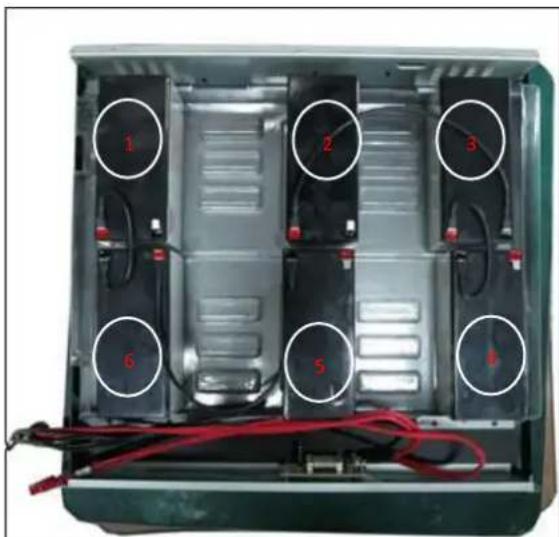
Battery Wiring of PowerWalker VFI 1000 RT LCD Battery Pack 1. Please assemble 6pcs batteries into the Battery Case's and connect batteries with wires as below;

text_image
1 2 3 4 5 6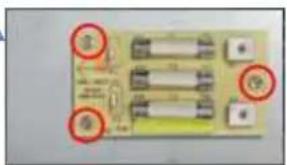
natural_image
Close-up of a circuit board with multiple components and red-circled annotations (no readable text or symbols)REMARK: FUSE 15A 250V 3PCS
BATTERY YUASA 12V 7.2AH 6PCS
natural_image
Interior view of a device casing with six labeled components and red cables (no readable text or symbols)Please connect BAT1+ and BAT6- with black wiring
Please connect BAT6+ and BAT5- with black wiring
Please connect BAT2+ and BAT3- with black wiring
Please connect BAT3+ and BAT4- with black wiring
natural_image
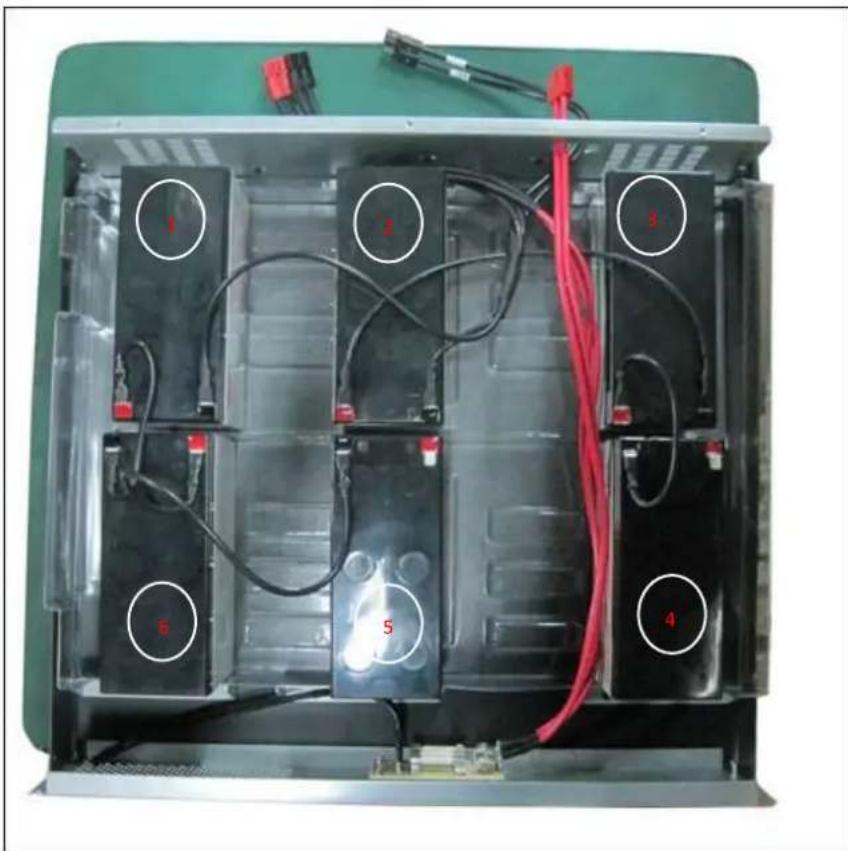
Interior view of an electronic battery pack with visible circuitry and wiring (no text or symbols)Please connect BAT5+ and FUSE with black wiring
Please connect BAT4+ and FUSE with black wiring
Please connect BAT1-, BAT2- and output with long black wiring
- Please fix batteries into the battery case's connect as below

text_image
corrugated additional match the partAnderson connector: 600V/45A
Battery Wiring of PowerWalker VFI 2000 RT Battery Pack
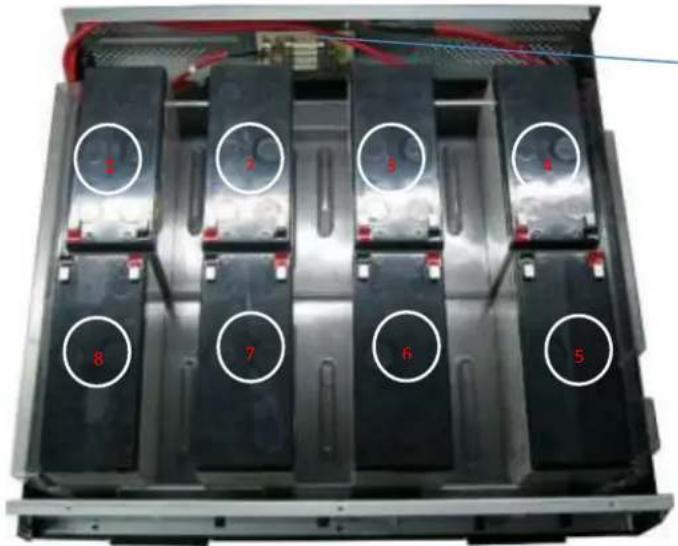
- Please assemble 8pcs batteries into the Battery Case's and connect batteries with wires as below;
natural_image
Interior view of an electronic battery pack with eight numbered compartments (labeled 1–8), no visible text or symbols on the cells or casing.
natural_image
Close-up of a circuit board with three components and red circular annotations (no readable text or symbols)REMARK: FUSE 15A 250V 3PCS
BATTERY YUASA 12V 7.2AH 8PCS

text_image
1 2 3 4 5 6 7 8Please connect BAT7+and BAT8- with black wiring Please connect BAT8+ and BAT1- with black wiring Please connect BAT1+ and BAT2- with black wiring Please connect BAT3- and BAT4+with black wiring Please connect BAT4- and BAT5+with black wiring Please connect BAT5- and BAT6+with black wiring Please connect BAT7-, BAT6- and output with long black wiring

text_image
2 3Please connect BAT2+ and FUSE with red wiring
Please connect BAT3+ and FUSE with red wiring
- Please fix batteries into the battery case's connect as below
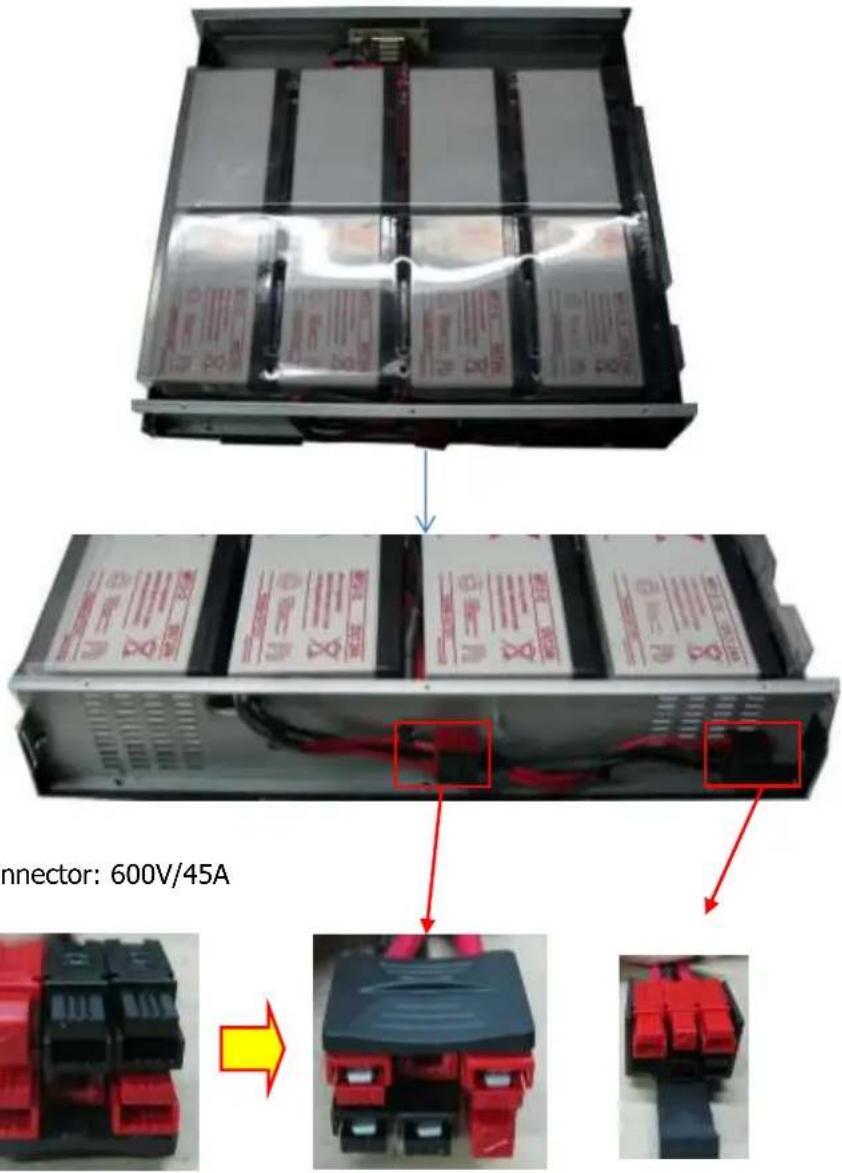
text_image
Connector: 600V/45AAnderson connector: 600V/45A

natural_image
Close-up of red and black electrical connectors (no visible text or symbols)

natural_image
Close-up of a black and red electronic device with four ports (no visible text or symbols)
Battery Wiring of PowerWalker VFI 3000 RT LCD Battery Pack 1. Please assemble 12pcs batteries into the Battery Case's and connect batteries with wires as below;
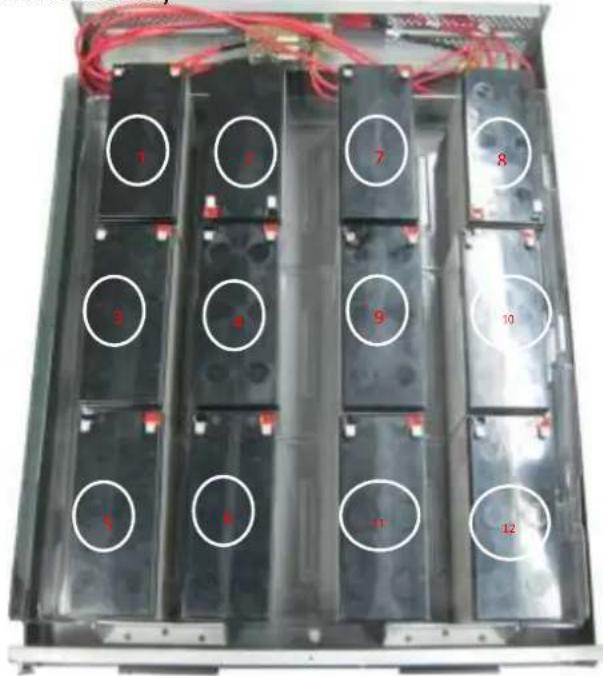
text_image
1 2 7 8 3 4 9 10 1 6 -1 12REMARK: FUSE 15A 250V 3PCS
BATTERY YUASA 12V 7.2AH 12PCS
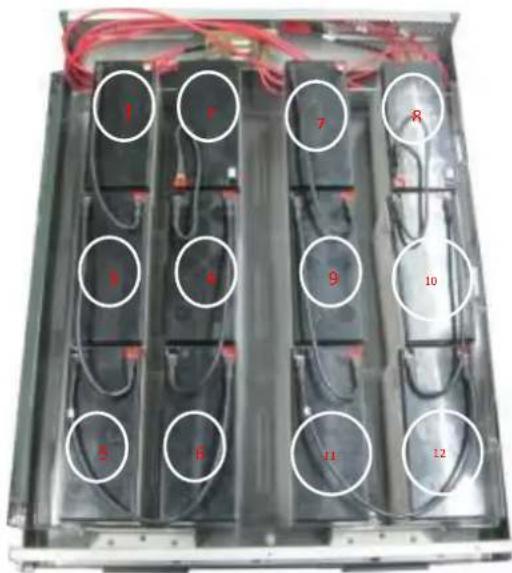
text_image
1 7 7 R 8 4 9 10 8 B 11 12Please connect BAT1-and BAT3+ with black wiring Please connect BAT3-and BAT5+ with black wiring Please connect BAT5- and BAT6+ with black wiring Please connect BAT6- and BAT4+with black wiring Please connect BAT4- and BAT2+with black wiring Please connect BAT7-and BAT9+ with black wiring
Please connect BAT9-and BAT11+ with black wiring Please connect BAT11- and BAT12+ with black wiring Please connect BAT12- and BAT10+ with black wiring Please connect BAT10- and BAT8+ with black wiring

natural_image
Interior view of an electronic device showing black modules with red and black wires, no visible text or symbolsPlease connect BAT1+ and FUSE with red wiring Please connect BAT7+ and FUSE with red wiring Please connect BAT2-, BAT8- and output with long black wiring 2. Please fix batteries into the battery case's connect as below
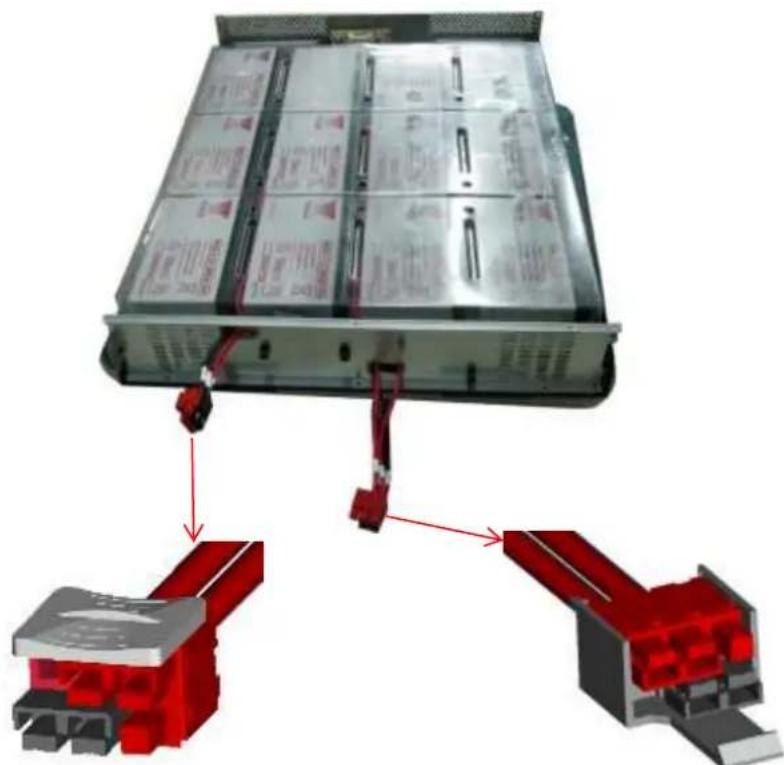
natural_image
3D diagram of a battery pack assembly with red connectors and internal components (no text or symbols)Anderson connector: 600V/45A