MegaVideo D4S-AV1115-3312 - Security Camera Arecont Vision - Free user manual and instructions
Find the device manual for free MegaVideo D4S-AV1115-3312 Arecont Vision in PDF.


| Product Type | Security Camera |
| Brand | Arecont Vision |
| Model | MegaVideo D4S-AV1115-3312 |
| Resolution | 4 Megapixel (2592 x 1520) |
| Image Sensor | 1/2.8" Progressive Scan CMOS |
| Lens | 3.3-12mm varifocal, F1.4 |
| Video Compression | H.264, MJPEG |
| Frame Rate | Up to 30 fps at 4MP |
| Day/Night | Yes, with IR cut filter and built-in IR LEDs (up to 30m) |
| Power Supply | PoE (802.3af) or 12V DC |
| Power Consumption | 12W max |
| Dimensions (W x H x D) | 70mm x 65mm x 150mm |
| Weight | 0.5 kg (1.1 lb) |
| Ingress Protection | IP67 (dust-tight and waterproof) |
| Operating Temperature | -40°C to 50°C (-40°F to 122°F) |
| Storage Temperature | -40°C to 60°C (-40°F to 140°F) |
| Main Features | Wide Dynamic Range (WDR), motion detection, privacy masking, digital zoom, ONVIF compliant |
| Network Interface | 10/100 Base-T Ethernet |
| Protocol Support | TCP/IP, DHCP, HTTP, NTP, FTP, SMTP, etc. |
| Mounting | Wall or ceiling mount, bracket included |
| Included Accessories | Mounting kit, lens adjustment tool, screw pack, quick start guide |
Frequently Asked Questions - MegaVideo D4S-AV1115-3312 Arecont Vision
User questions about MegaVideo D4S-AV1115-3312 Arecont Vision
0 question about this device. Answer the ones you know or ask your own.
Ask a new question about this device
Download the instructions for your Security Camera in PDF format for free! Find your manual MegaVideo D4S-AV1115-3312 - Arecont Vision and take your electronic device back in hand. On this page are published all the documents necessary for the use of your device. MegaVideo D4S-AV1115-3312 by Arecont Vision.
USER MANUAL MegaVideo D4S-AV1115-3312 Arecont Vision
natural_image
Close-up of two Arécont Vision security cameras with reflective lenses, mounted on a curved surface (no text or symbols visible)D4S/D4F Series
Installation Manual

Arecont Vision
megapixel technology... beyond imagination
D4S/D4F Indoor Dome Installation Manual
Inside the box:
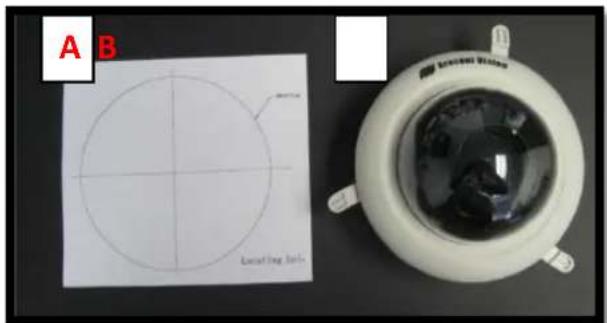
A. Mounting template
B. Arecont Vision D4S (Image 1-1) or D4F (Image 1-2)
C. Pack of three (3) wood screws and three (3) dry wall anchors (D4S only)
Not included but needed:
• #0 Phillips head screwdriver
• #1 Phillips head screwdriver

text_image
A B C Lambling scaleImage 1-1 D4S Indoor Dome
text_image
A B Lacing Units Uncoated WindowImage 1-2 D4F Indoor Dome
Mounting the Camera:
- Remove camera and hardware from the box.
- Use the Mounting template, prepare the mounting provisions for camera installation.
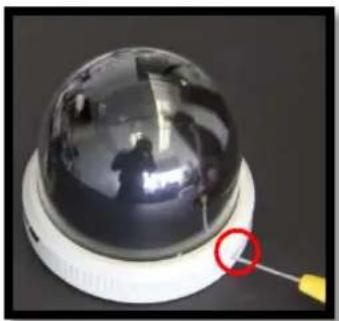
- Use #0 Philips head screwdriver to loosen the set screw to release the dome cover (Image 2-1 and 2-2). NOTE: Do not remove screw from the dome cover.
natural_image
Close-up of a spherical security camera with a highlighted cable (no text or symbols visible)Image 2-1 D4S

natural_image
Top-down view of a white spherical device with a reflective dome and three legs, featuring a red circle highlighting a small yellow object (no text or symbols visible)Image 2-2 D4F
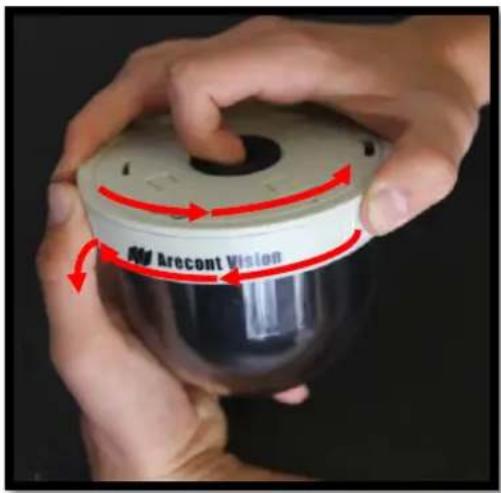
- Remove D4S or D4F dome cover by rotating counterclockwise as show in Image 3-1 and 3-2.
text_image
Aer Cont VisionImage 3-1 D4S

natural_image
Close-up of a hand holding a spherical object with a red arrow indicating rotation (no text or symbols on the object itself)Image 3-2 D4F
- Run Ethernet cable through the hole on the bottom of D4S or D4F and plug it into the RJ45 port on AV's H.264 compact MegaVideo® camera. (Image 4-1 and 4-2)

natural_image
Close-up of a black plastic component with a white band and red circle highlighting a specific area (no text or symbols visible)Image 4-1 D4S

natural_image
Close-up of a mechanical component with a red circle highlighting a specific part, no visible text or symbols.Image 4-2 D4F
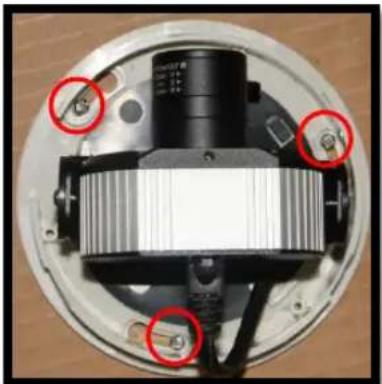
6.1 For D4S models, align the mounting holes in the dome with the prepared holes on the mounting surface. Attach D4S to the mounting surface with the wood screws or any optional hardware suitable for the mounting surface. (Image 5)
natural_image
Close-up of a mechanical component with red circles highlighting specific parts (no visible text or symbols)Image 5
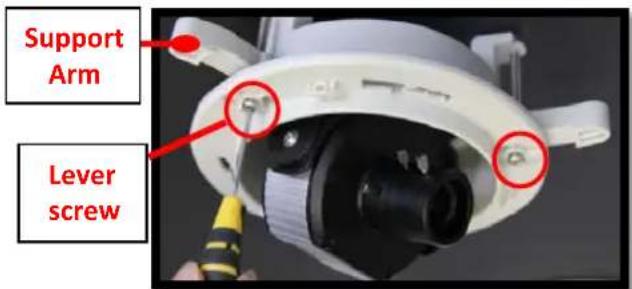
6.2 For D4F models, insert D4F into the prepared hole in the ceiling or wall then tighten the three "lever screws" by rotating clockwise until the D4F is firmly installed, as shown in Image 6. The "Support Arm" will ride down the screw to compress to the mounting surface. NOTE: Do not over-torque the lever screws.
text_image
Support Arm Lever screwImage 6
Adjusting the Tilt and Pan:
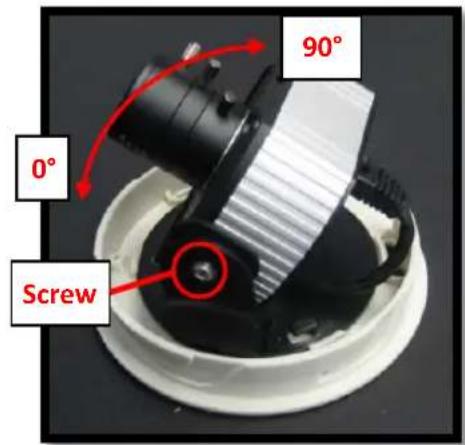
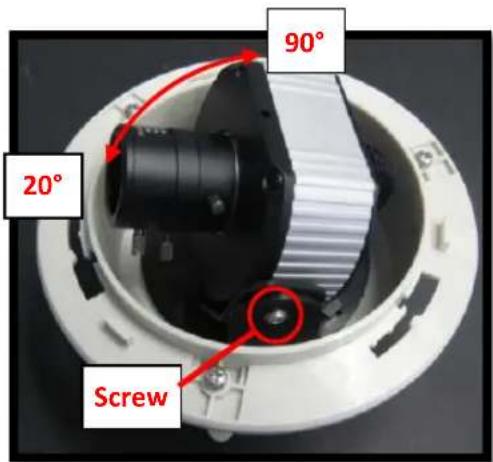
- To adjust the tilt, use a #1 Phillips screwdriver to loosen the screw on the side of the plastic U bracket 1/4 turn (Image 7-1 and 7-2). CAUTION: Do not remove the screw!
text_image
90° 0° ScrewImage 7-1 D4S
text_image
90° 20° ScrewImage 7-2 D4F
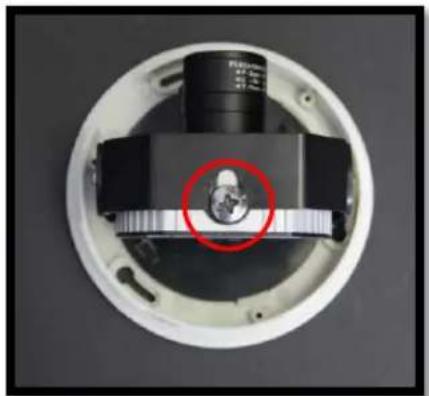
- Adjust lens tilt as required and tighten the screw. CAUTION: Please attach camera at the end of the slot of U bracket to avoid interference between bubble and lens. (Image 8)
natural_image
Close-up of a circular electronic device with a central component and a red circle highlighting a feature (no visible text or symbols)Image 8
NOTE: Push cable to make camera tilt easier, if getting caught on housing plastic. (Image9-1 and 9-2)
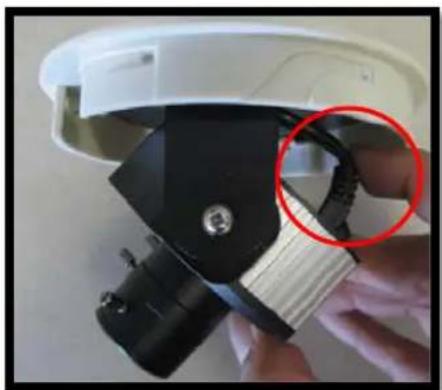
natural_image
Close-up of a white smart glasses headset with black and white components, no visible text or symbolsImage 9-1 D4S
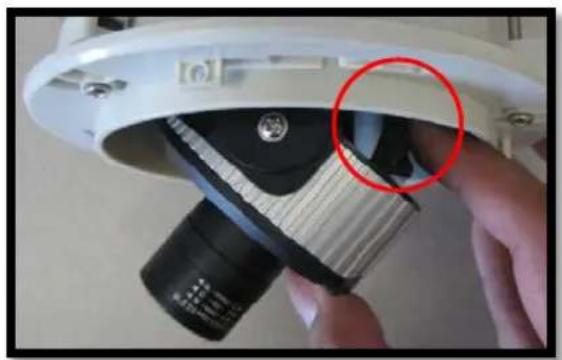
natural_image
Close-up of a hand holding a white electronic device with a black lens and a red circle highlighting the lens area (no text or symbols visible)Image 9-2 D4F
- To adjust the pan, hold and turn the U bracket as shown in Image 10.
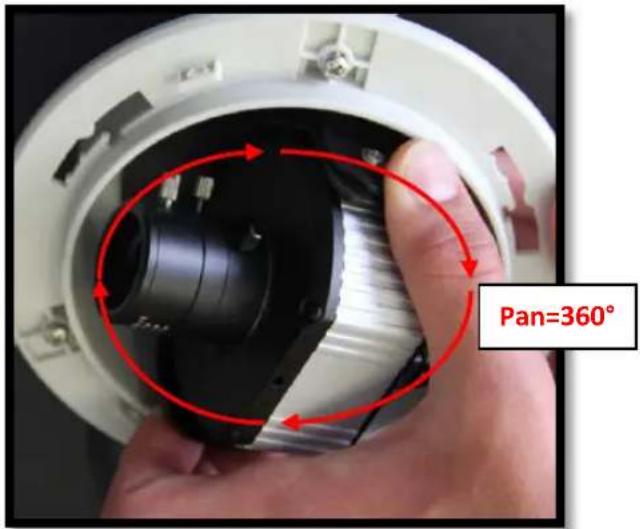
text_image
Pan=360°Image 10
Adjusting the Focus:
- To focus the lens, loosen the three set screws as shown in Image 11 and adjust each as needed. A adjusts the zoom, B adjusts the iris, C adjusts the focus.
Note: Adjust zoom first then focus!
Note: For more information on proper focusing technique, please watch the "Focusing Arecont Vision Megapixel Cameras" Best Practices Training Video at www.youtube.com/ArecontVision.
-
Secure the dome cover to the camera.
-
Tighten the set screw on the dome cover.
-
Rotate bubble to align camera with slot in camera shield.
-
Remove the protective film from the camera dome. NOTE: be cautious not to scratch the vandal dome cover.

text_image
A B CImage 11
Leading
the way in
Megapixel
video
Arecont Vision
425 E. Colorado Street, 7th Floor
Glendale, CA 91205
support@arecontvision.com
www.arecontvision.com
+1.818.937.0700
877.CAMERA.8

Arecont Vision
megapixel technology...
beyond imagination