U1631D - Unknown Fredenstein - Free user manual and instructions
Find the device manual for free U1631D Fredenstein in PDF.


User questions about U1631D Fredenstein
0 question about this device. Answer the ones you know or ask your own.
Ask a new question about this device
Download the instructions for your Unknown in PDF format for free! Find your manual U1631D - Fredenstein and take your electronic device back in hand. On this page are published all the documents necessary for the use of your device. U1631D by Fredenstein.
USER MANUAL U1631D Fredenstein
natural_image
Black silhouette of a human ear with a letter 'F' on the sole (no text or symbols beyond the letter)Fredenstein
Professional Audio
U1631D 16 Channel Peak Meter with DANTE
Operating Manual
Fredenstein U1631D 16 Channel Dante Meter
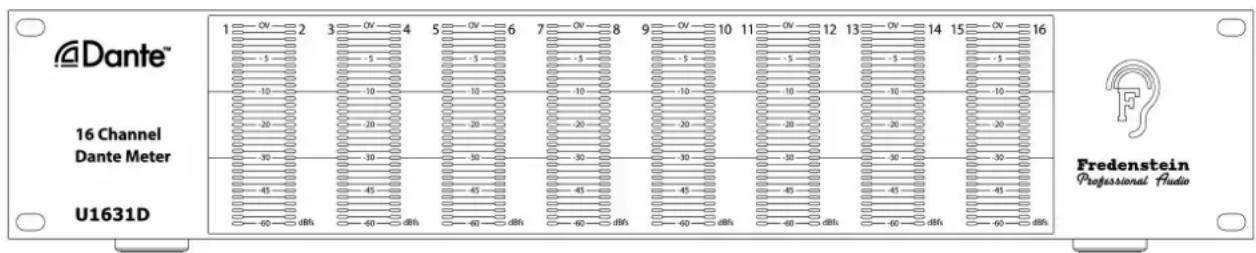
The Fredenstein U1631D is a 16 channel peak meter calibrated in dBfs (dB of digital full scale). Each of the 16 bar graphs consists of 31 LEDs. The resolutions is from 0 dB to -10 dB in 1 dB steps, from -10 dB to -30dB in 2 dB steps, and from -30 dB to -60 dB in 3 dB steps. The “OVER” LED (0dBfs) is red, from -1 dBfs to -10dBfs LEDs are yellow and below -10 dBfs green. All the bar graphs are non-multiplexed for flicker-free operation with an extremely high update rate of 10 kHz to avoid any delays in the visualization.
Two standard Ethernet connectors (RJ45) on the back-panel provide the DANTE* connectivity, automatically switching between 100 M or 1 G depending on your networking equipment.
Installation:
Electrical Safety Warnings:
Do not open the enclosure, hazardous voltages are present inside!
There are no user serviceable parts inside.
If you need to replace the mains fuse, make sure the replacement has the same rating (2AT 250V, slow blow).
Front View:
text_image
Dante™ 16 Channel Dante Meter U1631D Fredenstein Professional AudioFredenstein U1631D 16 Channel Dante Meter
Operation:
Prerequisites:
To use the U1631D, you must have a computer which has the Dante Controller application for windows or macOS from Audinate installed. Please visit audinate.com and select Products->Dante Controller, a free download. Make sure you are selecting the right version for your operating system. If you want to use your computer(DAW etc) as a source for the U1631D, you also need to download the Dante Virtual Sound Card driver from audinate.com, which is not free. The virtual sound card allows you to either use ASIO or DTS.
Routing:
Connect an Ethernet cable from your switch to the primary RJ45 connector. For more detailed information, please visit audinate.com. Make sure your computer is on the same network. Then start the Dante Controller application. The Dante controller will automatically discover the U1631D and you can route the signals freely. The inputs of the U1631 are labeled M1 to M16 in the Dante Controller app.
Rear View:

text_image
Fredenstein Professional Audio by ORION Communication MADE IN TAIWAN S/N: Dante™ Primary Secondary CAUTION RISK OF ELECTRIC SHOCK DO NOT OPEN ! 90~240V AC 50/60Hz FUSE: 2.0ATFredenstein U1631D 16 Channel Dante Meter
Specifications:
Sample Rate: 44.1, 48, 88.2, 96, 176.4 and 192 kHz
Resolution: 16 to 24 bit (autodetect)
Input Voltage: 90V - 240V AC
Power Consumption: max 25W
Dimension (WxHxD): 482mm x 88mm x 128mm 19 inch, 2U
Weight: 1.8 kg(NW) 2.25 kg(GW) 4 lbs(NW) 5 lbs(GW)
* Dante is a registered trademark of Audinate Pty Ltd
Contact Info:
Fredenstein Professional Audio
by Orion Communication
7F-1, No. 582, Ruei Guang Rd.
Neihu District
Taipei 114
Taiwan
Phone : +886-2-2657-2618
Email: info@fredenstein.com
Web : www.fredenstein.com