Kaliber Gaming GHG700 - Audio Equipment IOGEAR - Free user manual and instructions
Find the device manual for free Kaliber Gaming GHG700 IOGEAR in PDF.


User questions about Kaliber Gaming GHG700 IOGEAR
0 question about this device. Answer the ones you know or ask your own.
Ask a new question about this device
Download the instructions for your Audio Equipment in PDF format for free! Find your manual Kaliber Gaming GHG700 - IOGEAR and take your electronic device back in hand. On this page are published all the documents necessary for the use of your device. Kaliber Gaming GHG700 by IOGEAR.
USER MANUAL Kaliber Gaming GHG700 IOGEAR
1 x Micro USB Charging Cable
1 x Warranty Card
1 x Carry Bag
System Requirements
• Devices with 3.5mm stereo jacks
- PS4, Xbox One™ (requires Xbox One Stereo Headset Adapter- not included)
Warnings
Please read the following information before using the headset. Additional warnings may be present on the product or packaging.
• Continuous exposure to high volume level and noise can potentially cause hearing damage
- Before using your headset, it is recommended that you adjust headset volume to the lowest, then increase the volume gradually to a moderate and comfortable level
• High levels of volume may result in hearing loss, avoid using the headset at high volume continuously
- If you experience ringing or muffled speech in your ear, then stop using the headset and consult your doctor immediately
- Your ears will adapt to loud volume levels over time and this will damage your hearing even if you don't feel any discomfort
- Maintaining the volume at an adequate level is important while using the headset
Dolby Pro Logic IIx Virtual Surround
The GHG700 Saga Edition Gaming Headset features a built-in Dolby Pro Logic IIx Virtual Surround processor to take your music, movie or gaming experience to the next level! If you have ever listened to a multichannel home theater system you know how much greater the experience becomes when you unleash the depth of a surround system. The GHG700 Saga Edition Gaming Headset takes stereo audio and creates a virtual multichannel experience that can be enjoyed from almost any audio source.
Gaming/Movie Mode
The Gaming/Movie mode enhances spatial depth and improves surround envelopment for a much more realistic experience.
Music Mode
The Music Mode improves directionality of musical recordings by pulling vocals out into the front, while opening up the sound stage for a more lifelike sound.
Normal Mode
The Normal Mode bypasses the EQ settings for listening to audiobooks or for when a plain, uncolored sound experience is desired.
Overview
- Ergonomically designed headband
- Adjustment setting to fit any head shape
- Power On / Off
- Dolby Pro Logic IIx Surround amplifier On / Off
- Dolby EQ Mode
- Gaming / Movie Mode

- Normal Mode

- Music Mode

-
Volume Up / Down
-
Microphone On / Off
-
Charging input (micro USB)
-
3.5mm stereo plug

text_image
1 2 3 4 5 6 7 8 9 3dband head shapeStorage GHG700 Vor Edition Gaming Headset
-
Keep the headset as flat as possible by turning the ear cups 90° as illustrated
-
Keep the headset as compact as possible by turning the ear cups inward as illustrated
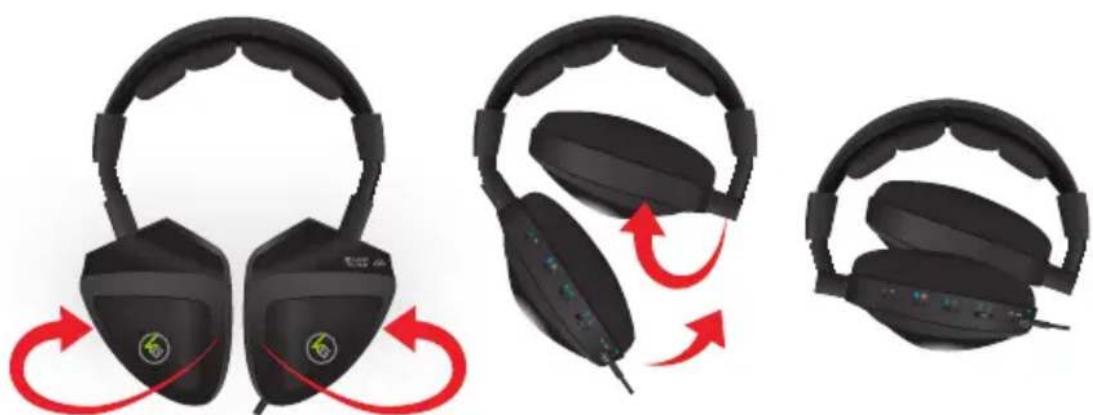
natural_image
Three black headsets with red scroll arrows indicating head rotation, showing different head state changes (no text or symbols present)Internal Battery
The GHG700's internal battery is designed to power the built-in audio amplifier for up to 8 hours of continuous use while gaming, watching movies, listening to music and other audio content. In the event the battery runs out while in use, the GHG700 features a Passive Mode so you can continue listening, but without the benefit of the internal amplifier and Dolby Surround until you recharge your headset.
Passive Mode
When the GHG700 runs out of battery power you can continue listening in Passive Mode which completely bypasses the internal amplifier.
Charging the Battery
- Plug in the micro USB end of the included cable to the micro USB port on the GHG700
- Plug in the USB end of the included cable to a power source with an available USB port
- The LED will turn on while charging around 4 hours+ for full charge
- The LED will turn off after full charging
- Fully charged battery lasts +/- 6-7 hours, depending on usage

text_image
Diagram showing a plug-in socket connected to a device with labeled pins and a red arrow pointing to component 3.- Insert the 3.5mm plug
- Choose your listening mode:
With Dolby Pro Logic Ilx surround
a. Set Power switch in On position
b. Set Dolby switch in On position
c. Set listening mode switch to desired sound setting
Without Dolby Pro Logic Ilx surround
a. Set Power switch in Off position
b. Set Dolby switch in Off position
Set Microphone switch to On position if in-game communication is needed


natural_image
Illustration of a laptop computer with a blue abstract background (no text or symbols)
Laptop PCSmartphoneDesktop

natural_image
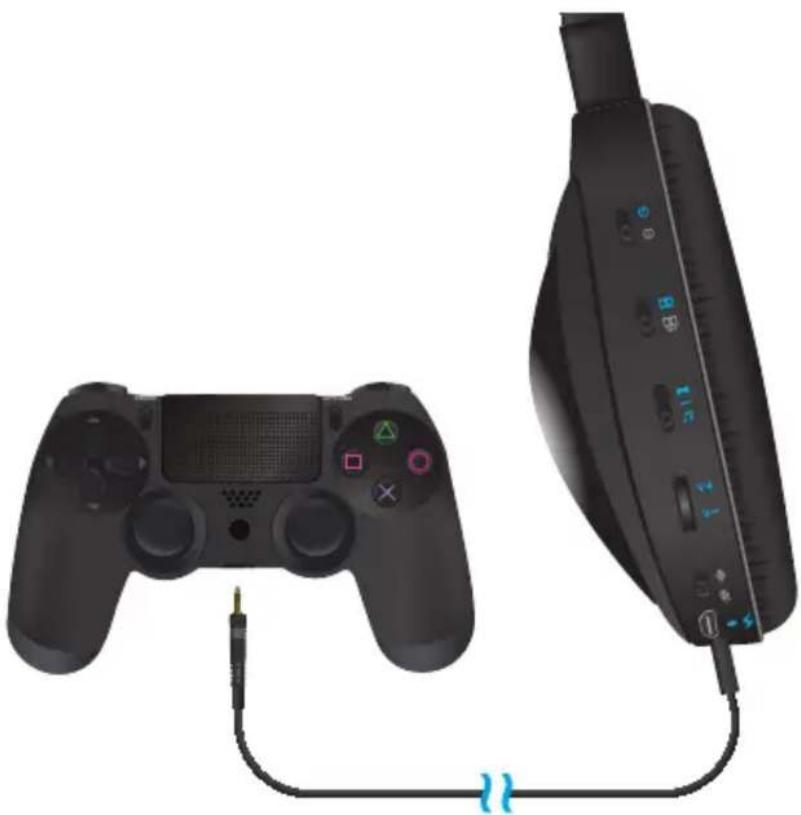
Close-up of a black electronic device with attached cable and ports (no visible text or symbols)- Insert the 3.5mm connector into the headset jack on the PS4 controller
- Choose your listening mode:
With Dolby Pro Logic Ilx surround
a. Set Power switch in On position
b. Set Dolby switch in On position
c. Set listening mode switch to desired sound setting (Gaming Mode is recommended)
Without Dolby Pro Logic Ilx surround
a. Set Power switch in Off position
b. Set Dolby switch in Off position
Set Microphone switch to On position if in-game communication is needed
natural_image
Two black gaming controllers connected by a cable, one with a small plug and the other a handheld device (no visible text or symbols)Note: Full compatibility requires the PS4 to have System Update 1.50 installed
Installation - Xbox One™
- Connect the Xbox One Stereo Headset Adapter (not included) to the Xbox One controller
- Insert the 3.5mm connector into the headset jack on the Xbox One Stereo Headset Adapter
- Choose your listening mode:
With Dolby Pro Logic IIx surround
a. Set Power switch in On position
b. Set Dolby switch in On position
c. Set listening mode switch to desired sound setting (Gaming Mode is recommended)
Without Dolby Pro Logic IIx surround
a. Set Power switch in Off position
b. Set Dolby switch in Off position
Set Microphone switch to On position if in-game communication is needed

natural_image
Two black gaming controllers connected by a cable, one with labeled buttons (X, Y, B, A) and the other with ports (no text or symbols on the devices themselves)Compliance Information
FCC Statement
This equipment has been tested and found to comply with the limits for a Class B digital device, pursuant to Part 15 of the FCC Rules. These limits are designed to provide reasonable protection against harmful interference in a residential installation. This product generates, uses, and can radiate radio frequency energy and, if not installed and used as directed, it may cause harmful interference to radio communications.
CE Compliance
This device has been tested and found to comply with the following European Union directives: Electromagnetic Capability (2004/108/EC).
Declaration of Conformity and related documents can be downloaded directly from our website: http://www.iogear.com/product/GHG700/certifications
Manufactured under license from Dolby Laboratories. Dolby and the double-D symbol are trademarks of Dolby Laboratories.
Limited Warranty
WE'RE HERE TO HELP YOU! NEED ASSISTANCE SETTING UP THIS PRODUCT?
Make sure you:
- Visit www.iogear.com for more product information
- Visit www.iogear.com/support for live help and product support
Warranty Information
This product carries a 1 Year Limited Warranty. For the terms and conditions of this warranty, please go to http://www.iogear.com/support/warranty
Register online at http://www.iogear.com/register
Important Product Information Product Model____ Serial Number____
Contact
iogear.custhelp.com support@iogear.com www.iogear.com 19641 Da Vinci, Foothill Ranch, CA 92610