NTV-KIT589 - Dash cam NAV-TV - Free user manual and instructions
Find the device manual for free NTV-KIT589 NAV-TV in PDF.


User questions about NTV-KIT589 NAV-TV
0 question about this device. Answer the ones you know or ask your own.
Ask a new question about this device
Download the instructions for your Dash cam in PDF format for free! Find your manual NTV-KIT589 - NAV-TV and take your electronic device back in hand. On this page are published all the documents necessary for the use of your device. NTV-KIT589 by NAV-TV.
USER MANUAL NTV-KIT589 NAV-TV
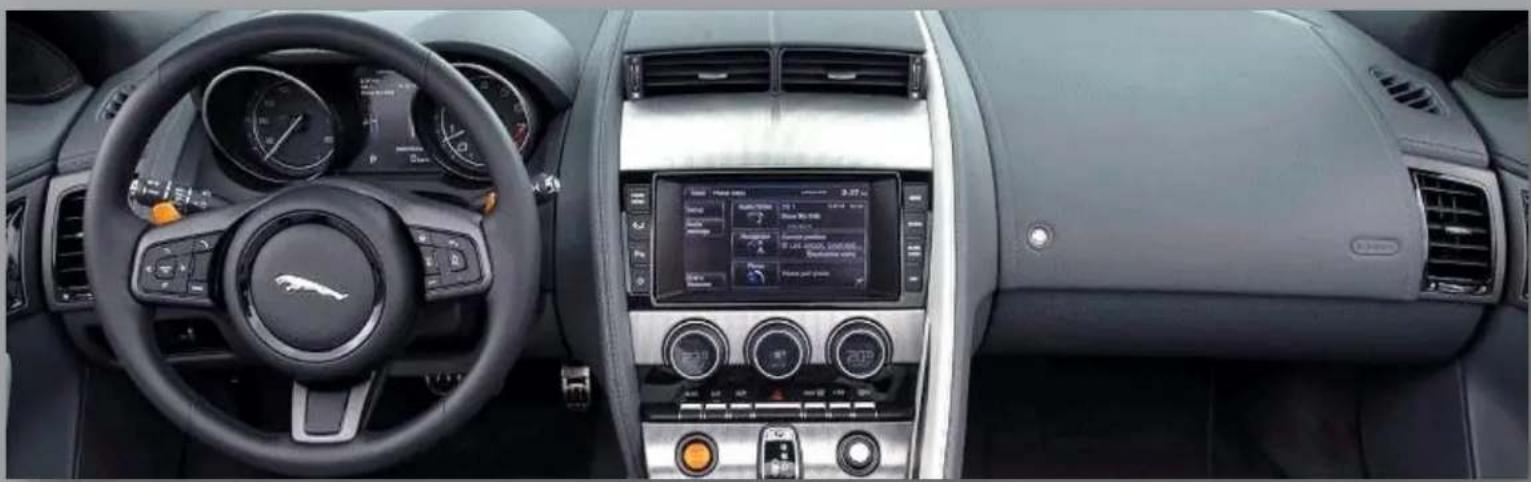
Dual Camera interface for select '14+ Jaguar vehicles
NTV-KIT589
natural_image
Interior view of a modern car dashboard with steering wheel, dashboard display, and control panel (no visible text or symbols)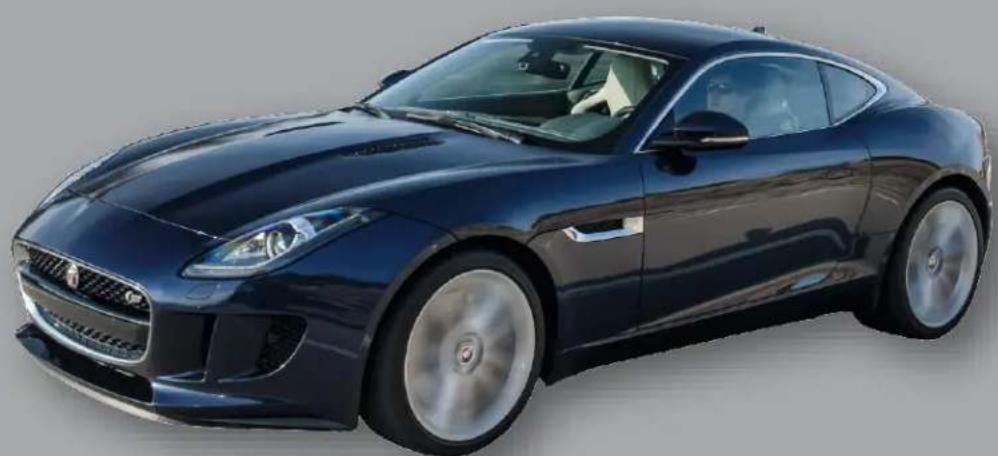
natural_image
Exterior view of a dark blue sports car with silver alloy wheels and sleek design (no visible text or symbols)BHM
07/07/15
NTV-DOC207
Overview
Jaguar F-TYPE CAM interfaces 2 cameras (front & rear) and enables video and navigaon control in moon (if equipped). Forcing either camera to display is acvated via the factory touch screen or oponal wired inputs. This interface is currently only compatible with the 2014+ F-Type.
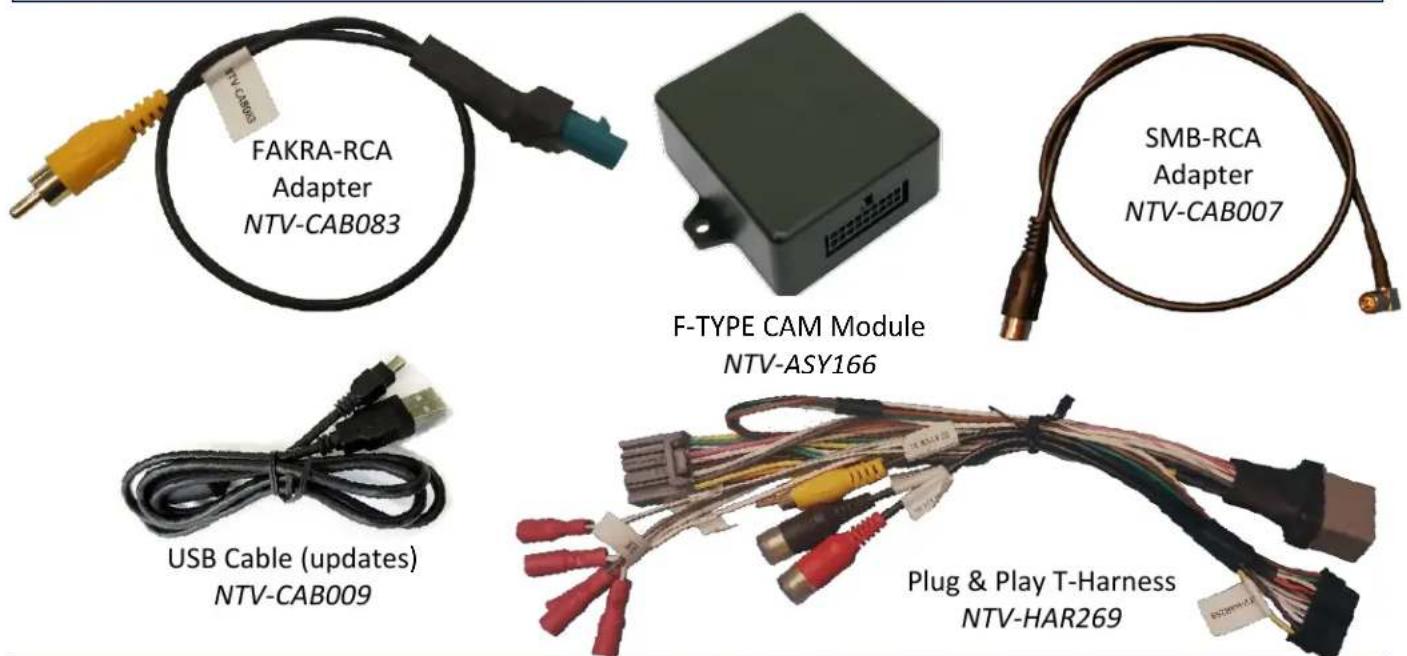
Kit Contents
text_image
FAKRA-RCA Adapter NTV-CAB083 F-TYPE CAM Module NTV-ASY166 SMB-RCA Adapter NTV-CAB007 USB Cable (updates) NTV-CAB009 Plug & Play T-Harness NTV-HAR269F-TYPE CAM Pinouts
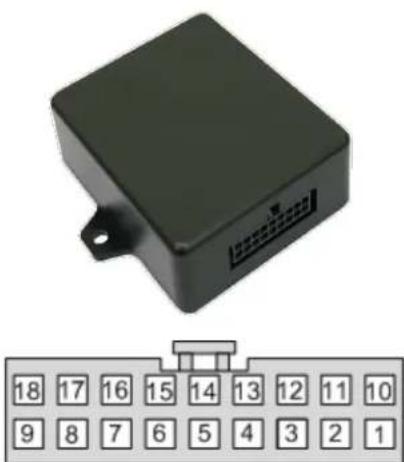
| PIN # | Descripon | Color |
| 1 | 12v (+) constant input | Yellow |
| 2 | Input 1 (+): force rear camera | Red |
| 3 | Input 2 (+): force front camera | Blue |
| 6 | VIDEO OUT RCA | Yellow |
| 7 | RCA Shield | Black |
| 8 | CAN HI (Radio Side) | White/Green |
| 9 | CAN HI (Car Side) | White/Brown |
| 10 | Ground (-) | Black |
| 11 | Output 1 ACC (+) | White/Red |
| 12 | Output 2 REVERSE (+) | White/Blue |
| 15 | Front RCA Video IN | Red |
| 16 | Rear RCA Video IN | White |
| 17 | CAN LO (Radio Side) | Green |
| 18 | CAN LO (Car Side) | Brown |
natural_image
Black rectangular electronic device with connector pinout and a row of numbered buttons below (no readable text or symbols)Wire side
Agreement: End user agrees to use this product in compliance with all State and Federal laws. NAV-TV Corp. would not be held liable for misuse of its product. If you do not agree, please discontinue use immediately and return product to place of purchase. This product is intended for off-road use and passenger entertainment only.
Dash Removal (F-Type)
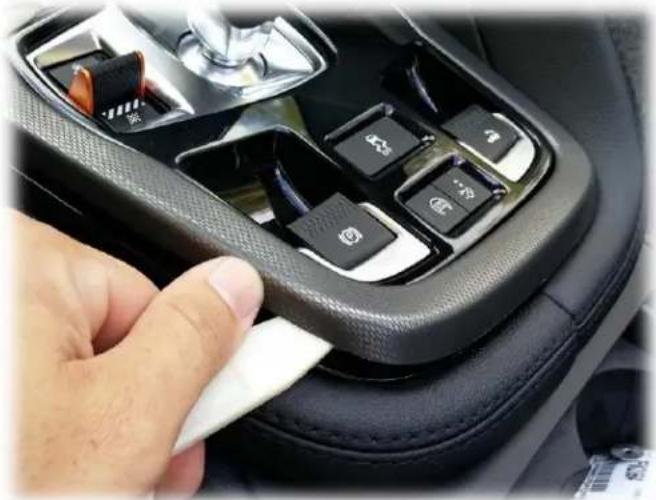
- Using a plasc tool, pry up the plasc trim surrounding the shier. It is secured with clips only.
natural_image
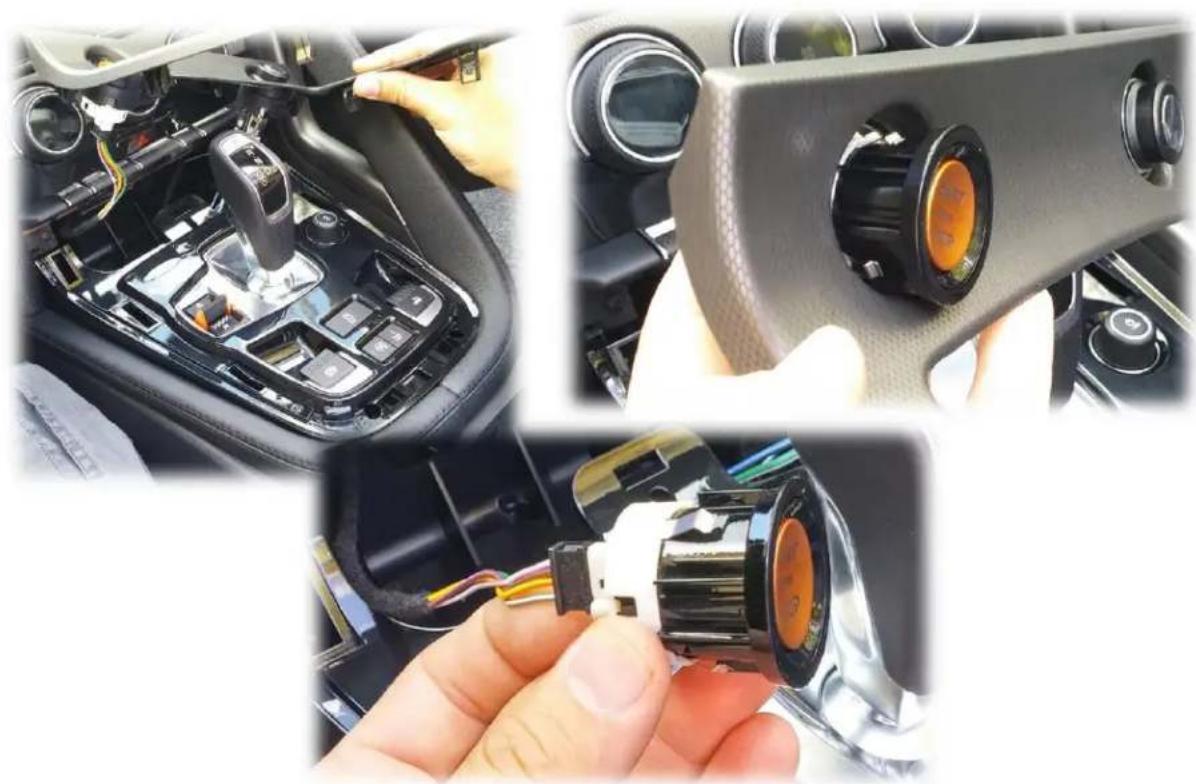
Close-up of a car gear shift lever with black buttons and a finger pointing to the side (no visible text or symbols)- Disconnect the cigaree lighter plug and the push buon ignition switch plug. It helps to remove the push buon ignition switch and reconnect it to the plug (for tesng).
natural_image
Close-up of car interior components including dashboard, steering wheel, and battery pack (no visible text or symbols)Agreement: End user agrees to use this product in compliance with all State and Federal laws. NAV-TV Corp. would not be held liable for misuse of its product. If you do not agree, please discontinue use immediately and return product to place of purchase. This product is intended for off-road use and passenger entertainment only.
- Remove (2x) Torx t20 screws securing the boom half of the climate control.
- On top of the dash, in front of the motorized vents, remove the beauty panel secure by clips with a plasc tool.
- Remove (2x) Torx t20 screws securing the screen bezel:
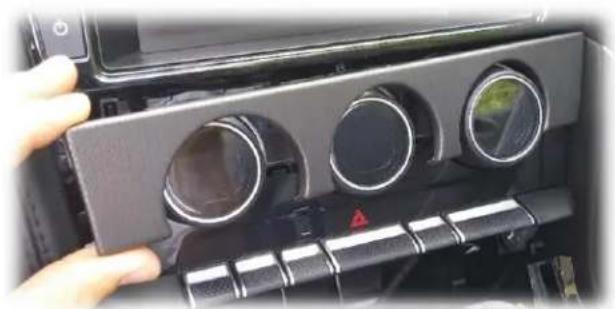
- Using a plasc tool and hook tool, carefully pull the trim surrounding the climate knobs towards you. This panel must be pulled straight forwards.

natural_image
Interior view of a car dashboard with visible camera and sensor points (no text or symbols)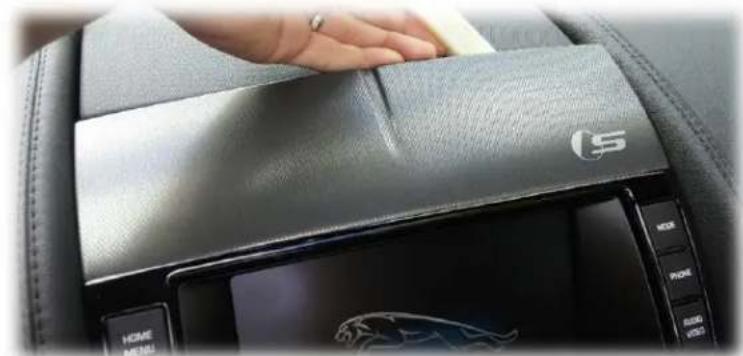
natural_image
Interior view of a car dashboard with a hand pressing down on the back panel (no visible text or symbols)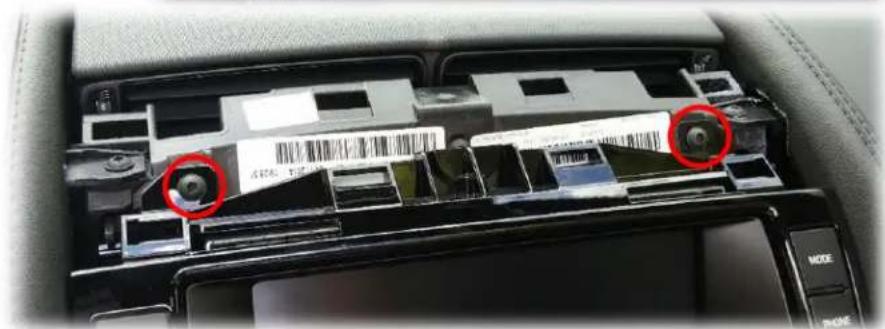
natural_image
Interior view of a car showing a mounted electronic device with red circles highlighting two components (no visible text or symbols)
natural_image
Close-up of a hand using a screwdriver to adjust the left-side door panel of a car (no visible text or symbols)Agreement: End user agrees to use this product in compliance with all State and Federal laws. NAV-TV Corp. would not be held liable for misuse of its product. If you do not agree, please discontinue use immediately and return product to place of purchase. This product is intended for off-road use and passenger entertainment only.
-
Remove (2x) Torx t20 screws beneath this panel (not shown).
-
Both the climate control and screen surround should now be free, remove these and disconnect all associated harnesses.
-
Remove (4x) Torx t20 screws securing the screen. Disconnect all associated harnesses and set the screen aside in a safe place.
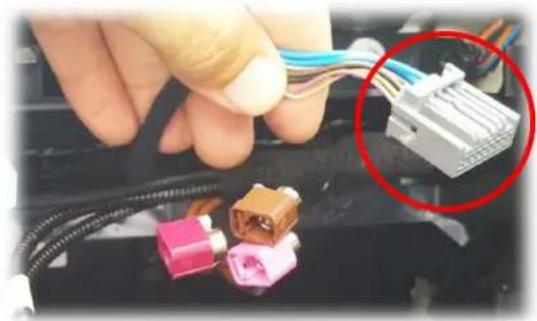
The connectors being used for this Install are shown here (rear of screen):
natural_image
Close-up of a car dashboard with three circular gauges and a handle, hand adjusting the panel (no visible text or symbols)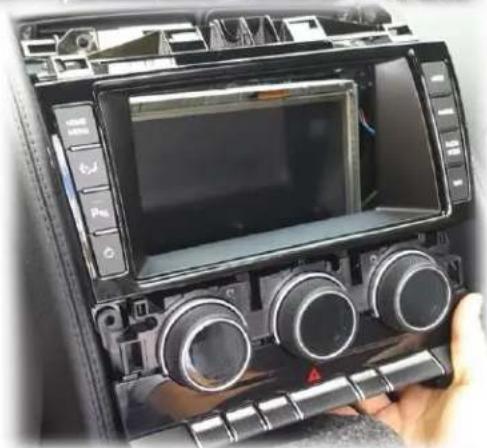
natural_image
Close-up of a car dashboard with multiple rotary knobs and a digital screen (no visible text or symbols)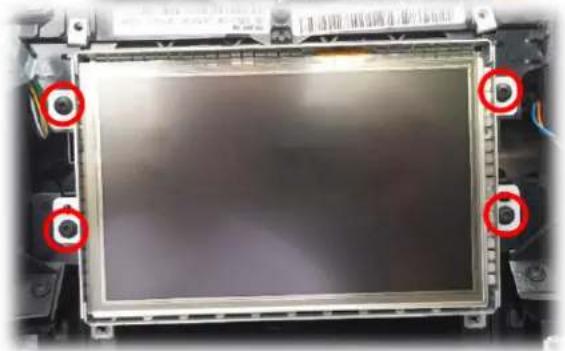
natural_image
Close-up of a computer monitor frame with red circular markers highlighting the front panel (no visible text or symbols)
text_image
Internal view of a computer interface showing ports, connectors, and a highlighted connector with red annotation.Agreement: End user agrees to use this product in compliance with all State and Federal laws. NAV-TV Corp. would not be held liable for misuse of its product. If you do not agree, please discontinue use immediately and return product to place of purchase. This product is intended for off-road use and passenger entertainment only.
Module Installaon
- With the screen removed, locate the main 16-pin connector that powers the screen. Connect this plug to the female side of the provided Plug & Play T-Harness.
natural_image
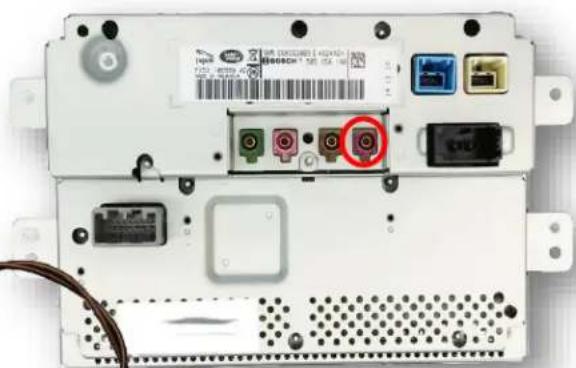
Close-up of a hand holding a connector with colored wires and connectors, highlighting one connection (no text or symbols visible)- Connect the provided SMB-RCA Adapter to the screen at the port (typically purple) closest to the M.O.S.T Fiber Opc connector.
Note: if there is already a connector here, disconnect it and use the provided SMB Adapter instead.
natural_image
Back view of a computer chassis showing ports, connectors, and a cable (no readable text or symbols)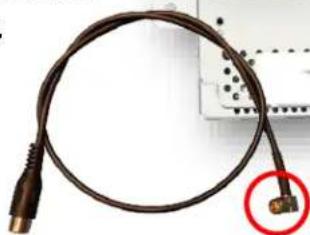
natural_image
Coiled black cable with a connector, shown with a red circle highlighting a connector (no text or symbols visible)-
Connect the male end of the provided Plug & Play T-Harness back to the monitor at the 16-pin port.
-
Aer installing your camera(s), run the signal and power through the car to the radio opening.
-
If only installing a single camera, connect the signal RCA directly to the SMB-RCA Adapter. When complete, skip to step 7.

natural_image
Coiled black cable with a red circle highlighting a connector detail (no text or symbols)Note: if vehicle possess an OEM reverse camera and you're adding a front camera only, use the
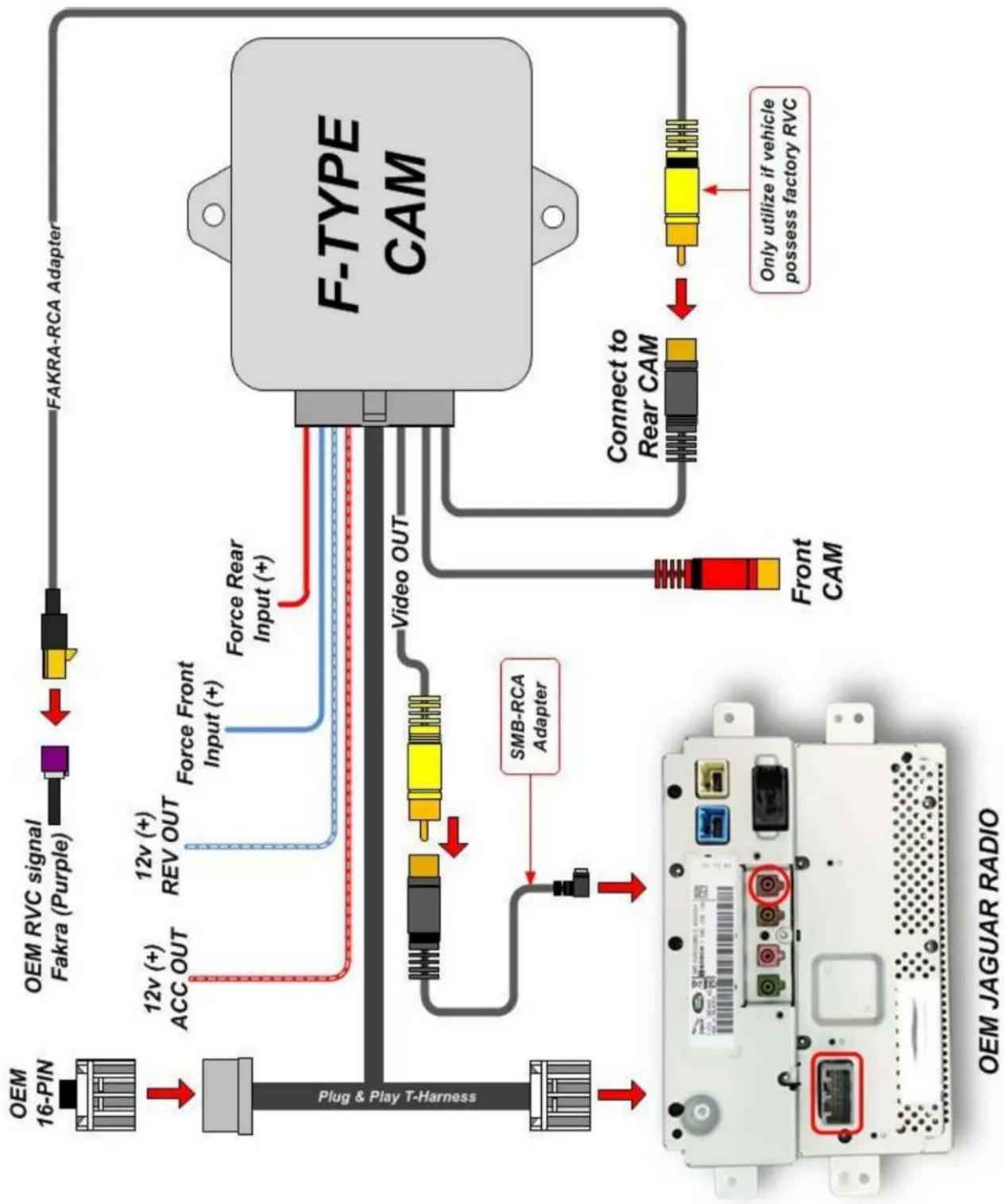
provided Fakra-RCA adapter to retain this camera image. See diagram on page 8.

natural_image
Coiled blue electrical cable with two connectors (no text or symbols visible)Agreement: End user agrees to use this product in compliance with all State and Federal laws. NAV-TV Corp. would not be held liable for misuse of its product. If you do not agree, please discontinue use immediately and return product to place of purchase. This product is intended for off-road use and passenger entertainment only.
- Oponal: If installing 2 cameras:
a. Connect the only male RCA from the provided Plug & Play T-Harness to the free end of the SMB-RCA Adapter (from step 2).
b. Connect the signal from the rear camera to the Black RCA located on the Plug & Play T-Harness.
c. Connect the signal from the front camera to the Red RCA located on the Plug & Play T-Harness.
- Connect your camera(s) to power. From the F-TYPE module, Output 1 provides 12v (+) accessory. If using this output for 2 cameras, trigger a relay with this wire instead (output only provides 12v @ 1 amp!).
Note: using an ACC wire to power the camera is required if the user desires forced camera acvaon.
-
Connect the F-TYPE CAM module to the 18-pin connector located on the Plug & Play T-Harness.
-
Reconnect all remaining connectors to the screen and test for proper operaon.
Installaon Diagram
flowchart
graph TD
    A["OEM 16-PIN"] --> B["Plug & Play T-Harness"]
    C["FAKRA-RCA Adapter"] --> D["F-TYPE CAM"]
    E["OEM RVC signal Fakra (Purple)"] --> F["Force Front Input (+)"]
    G["12v (+) REV OUT"] --> H["Video OUT"]
    I["12v (+) ACC OUT"] --> H
    J["SMB-RCA Adapter"] --> H
    K["Front CAM"] --> L["Connect to Rear CAM"]
    M["Only utilize if vehicle possess factory RVC"] --> N["Output"]
    O[" plug & Play T-Harness"] --> P["Final Display"]
Agreement: End user agrees to use this product in compliance with all State and Federal laws. NAV-TV Corp. would not be held liable for misuse of its product. If you do not agree, please discontinue use immediately and return product to place of purchase. This product is intended for off-road use and passenger entertainment only.
F-TYPE CAM Operaon
Reverse Camera will automatically display whenever the vehicle is placed in reverse.
Video & Nav Control in Moon is always enabled, no user interacon is required. Video's will playback in any gear from the DVD player (if equipped) and the USB port.
Force Rear Camera can be acvated by sending 12v (+) to INPUT 1 through a toggle switch (not included), or using the touch screen (detailed below).
Force Front Camera can be acvated by sending 12v (+) to INPUT 2 through a toggle switch (not included), or using the touch screen (detailed below).
Forcing cameras via OEM touchscreen:

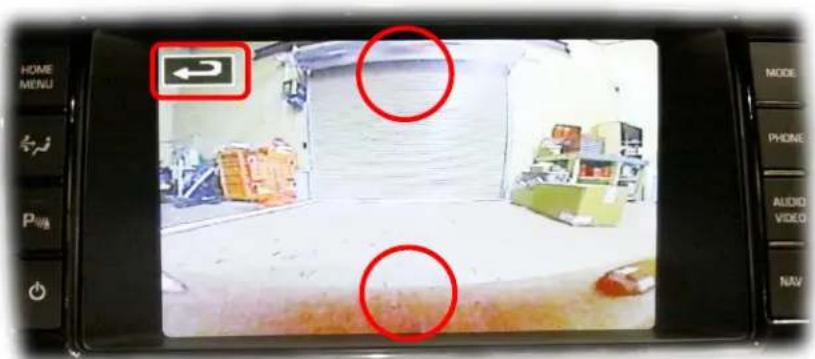
Once in Forced Camera Mode, press the top-middle of the screen to view front camera, or the boom-middle of the screen for rear camera. This acon will ip between both cameras.
To clear, touch where the clear buon is normally (when navigang menus)
text_image
HOME MENU P MODE PHONE AUDIO VIDEO NAVAgreement: End user agrees to use this product in compliance with all State and Federal laws. NAV-TV Corp. would not be held liable for misuse of its product. If you do not agree, please discontinue use immediately and return product to place of purchase. This product is intended for off-road use and passenger entertainment only.
Agreement: End user agrees to use this product in compliance with all State and Federal laws. NAV-TV Corp. would not be held liable for misuse of its product. If you do not agree, please discontinue use immediately and return product to place of purchase. This product is intended for off-road use and passenger entertainment only.
NAV-TV
INTERFACING THE FUTURE

text_image
MADE IN U.S.A. PRODUCT
text_image
REGISTERED COMPANY ISO 9001 SGSAgreement: End user agrees to use this product in compliance with all State and Federal laws. NAV-TV Corp. would not be held liable for misuse of its product. If you do not agree, please discontinue use immediately and return product to place of purchase. This product is intended for off-road use and passenger entertainment only.