NVR-TAB101DUAL S5 (8GB) - Tablet NEVIR - Free user manual and instructions
Find the device manual for free NVR-TAB101DUAL S5 (8GB) NEVIR in PDF.


| Product Type | Tablet |
| Brand | Nevir |
| Model | NVR-TAB101DUAL S5 (8GB) |
| Screen Size | 10.1 inches |
| Display Resolution | 1280 x 800 pixels |
| Processor | Quad-core 1.3 GHz |
| RAM | 1 GB |
| Internal Storage | 8 GB |
| Operating System | Android 10 (Go Edition) |
| Battery Capacity | 5000 mAh |
| Rear Camera | 5 MP |
| Front Camera | 2 MP |
| Wi-Fi | 802.11 b/g/n |
| Bluetooth | 4.2 |
| GPS | Yes |
| Cellular | 3G/4G (Dual SIM) |
| Dimensions | 240 x 160 x 10 mm |
| Weight | 480 g |
| Color | Gold / Silver / Gray |
| Charging Port | Micro USB 2.0 |
| SIM Card Type | Micro-SIM |
| Card Slot | MicroSD up to 128 GB |
| Speakers | Built-in stereo |
| Sensors | Accelerometer, Light sensor |
| Warranty | 1 year |
Frequently Asked Questions - NVR-TAB101DUAL S5 (8GB) NEVIR
User questions about NVR-TAB101DUAL S5 (8GB) NEVIR
0 question about this device. Answer the ones you know or ask your own.
Ask a new question about this device
Download the instructions for your Tablet in PDF format for free! Find your manual NVR-TAB101DUAL S5 (8GB) - NEVIR and take your electronic device back in hand. On this page are published all the documents necessary for the use of your device. NVR-TAB101DUAL S5 (8GB) by NEVIR.
USER MANUAL NVR-TAB101DUAL S5 (8GB) NEVIR
natural_image
Close-up of a lion's face showing its open mouth and teeth, enclosed in a tablet frame (no text or symbols visible)natural_image
Green-themed computer desktop with application icons (no readable text or symbols)
text_image
Charging, 98% 15:17 MON, MAY 6
text_image
Screenshot of a mobile device home screen showing status bar, navigation icons, and playback controls
1. Redeslnalámbricas&networks
text_image
Settings WIRELESS & NETWORKS Wi-Fi 5% Data usage More... Device: Sound Display Storage inet-2.4G Connectint Connectify-tianfei Secured with WPA-2 inet-fac3 Secured with WPA-WPAC2 (WPS available) fsum Secured with WPA-J ChinaNet-chUV Secured with WPA-WPAC2 (WPS available) D-OK Secured with WPA-WPAC2 (WPS available)text_image
Settings WIRELESS & NETWORKS Wi-Fi Data usage More... device Sound Display Storage Data usage cycle: Apr 8 - May 6 Apr 25 - May 6, about 25.70MB used. Dictionary Provider 31 GB/MB
text_image
Settings WIRELESS & NETWORKS Wi-Fi Data usage More_ DEVICE Sound Display Storage Brightness Wallpaper Auto-rotate screen Sleep After 1 minute of productivity Daydream Font size LargeConfigure cada ajuste como desee.
text_image
Settings Data usage More... DEVICE Sound Display Storage Battery Apps INTERNAL STORAGE Total space 0.95GB Available 763MB Apps (app data & media content) 148MB Cached data 9.08MB STANDARDtext_image
Settings More... DEVICE Sound Display Storage Battery Apps PERSONAL Location access 97% - Charging (USB) 11s on battery Cell standby 84% Tablet idle 12% Wi-Fi 5%text_image
Settings Display Storage Battery Apps PERSONAL Location access Security Language & input Backup & reset Adobe Flash Player 11.1 version 11.1.15.47 Uninstall Show notifications STORAGE Total 4.56MB App 4.56MB USB storage app 0.00B Data 0.00B SD card 0.00Btext_image
Settings ON SD CARD RUNNING ALL Settings 1 process and 0 services 18MB 豌豆荚 16MB 2 processes and 2 services 13.54 Google Services 6.5MB 1 process and 1 service 13.51 Google Play Store 4.3MB 1 process and 1 service 12.44 165MB used 142MB free Sound Display Storage Battery Apps PERSONAL Location access SecurityEn uso
text_image
Settings Display Storage Battery Apps PERSONAL Location access Security Language & input Backup & reset Language English (United States) Spell checker Personal dictionary KEYBOARD & INPUT METHODS Default English (US) - Android keyboard (AOSP) Android keyboard (AOSP) English (US)


text_image
Settings Apps PERSONAL Location access Security Language & input Backup & reset ACCOUNTS + Add account SYSTEM BACKUP & RESTORE Back up my data Back up app data, Wi-Fi passwords, and other settings to Google servers Backup account Backing up to debug-only private cache Automatic restore When reinstalling an app, restore backed up settings and data PERSONAL DATA Factory data reset Erases all data on tablet SYSTEM UPGRADECE


14.FechayHora
Fijarfecha, horayformato
15.Accesibilidad
text_image
Screenshot of a mobile device home screen showing app icons and status bar with time, battery, and address.


text_image
USB mass storage USB connected You've connected to your computer via USB. Touch the button below if you want to copy files between your computer and your Android's SD card. Turn on USB storagenatural_image
Green-tinted digital interface with application icons at bottom (no readable text or symbols)
text_image
APPS WIDGETS SHOP Adobe Reader Altiko Browser Calculator Calendar Camera Chrome Clock DDR Tester Documents Downloads Email File Manager Flash Player Gmail Google Hi-Q MP3 Rc Latitude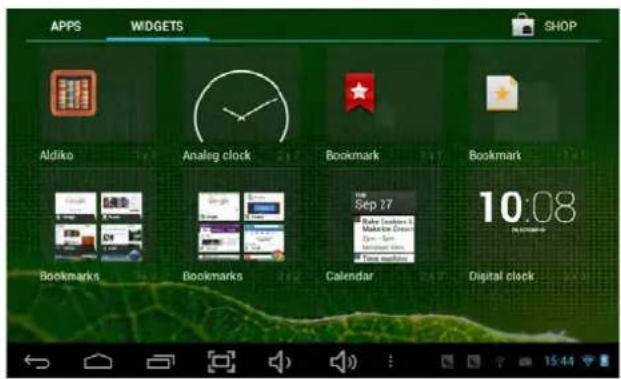
text_image
APPS WIDGETS SHOP Aldiko Analog clock Bookmark Bookmark Bookmarks Bookmarks Calendar Digital clock 10:08
AccesosDirectos
natural_image
Close-up of a lion's face showing its open mouth and tongue, with no visible text or symbols.USERMANUAL

Thismanualcontainsimportantsafetyprecautionsandinformationofcorrectuse. Pleasebesuretoreadthismanualcarefullybeforeusesoastoavoidanyaccidents.
Do not place the product in hot, wet or dusty environment, especially in summer, do not leave the product inside acar with all windows closed.
Avoiddropping, impacting or shaking the product violently, otherwise it may cause damage or malfunctions. Select a proper volume to avoid ear problem when using earphones.
Do not cross the road or drive vehicles, using headphones to avoid traffic accidents.
Besuretousetheprovidedchargersandaccessoriesinthepackage.
Besuretochargetheproductwhenthefollowingsituationstakeplace,
-Thebatteryiconshowslowerorempty.
- System automatically shut down and it turns off soon after restart.
-Operationkeysdonotrespondproperly.
-Thedeviceshowson@toprightcorner.

- WARNING: The excessive sound pressure from earphones and headphones can cause hearingloss.
Caution: Danger of explosion if battery is incorrectly replaced, replaced only with the same or equivalent type (Lithium battery)
• To prevent possible hearing damage, do not listen at high volume levels of long periods.


text_image
CAUTION RISK OF ELECTRIC SHOCK! DO NOT OPEN! ATTENTION RISQUE DE CHOC ELECTRIQUE! NE PAS OUVRIR!
The symbol indicates that dangerous voltages constituting a risk of electric shock are present within this unit.

The symbol indicates that there are important operating and maintenance instructions in the literature accompanying this unit.

CAUTION:
When the apparatus was in electrostatic circumstance, it may be malfunction and need to reset by user.
The USB memory stick should be plug in the unit directly. USB extension cable should not be used to avoid failing of data transferring and interference caused.
CE


1.PowerOn/Off
Long press power button to turn on/off the device. It may take a minute to boot the device. Short press power button to turn on/off the screen.(Standby mode. Refer to 3. below)
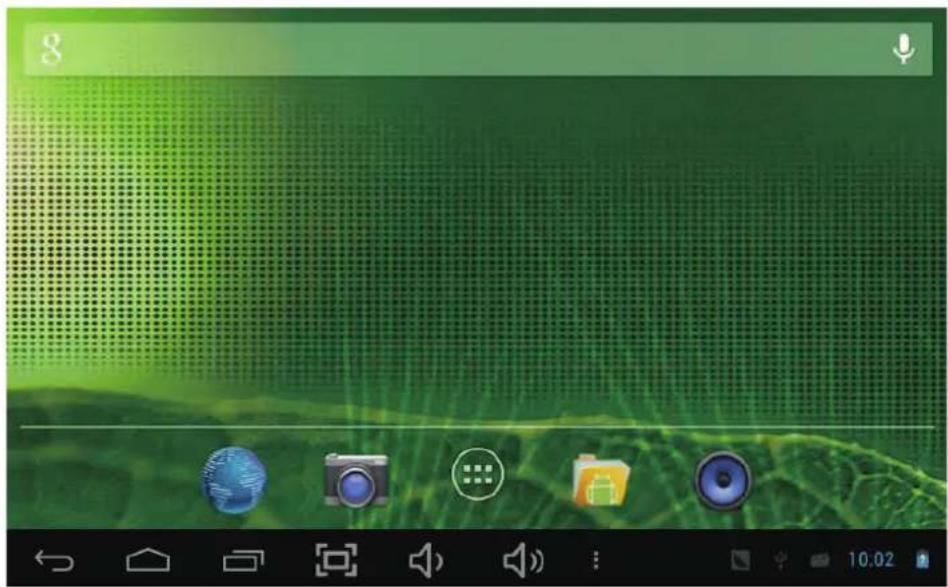
2. Desktop
Afterturningonthedevice,desktopdisplayswithshortcuticonsandarrowpanelattherightside
text_image
8 10:02
3. Standbymode (Screenoffmode)/Unlockthescreen
Short press the power button to turn on/off the screen (standby mode on/off). After standby mode o, slide the lock icon in order to unlock the screen.
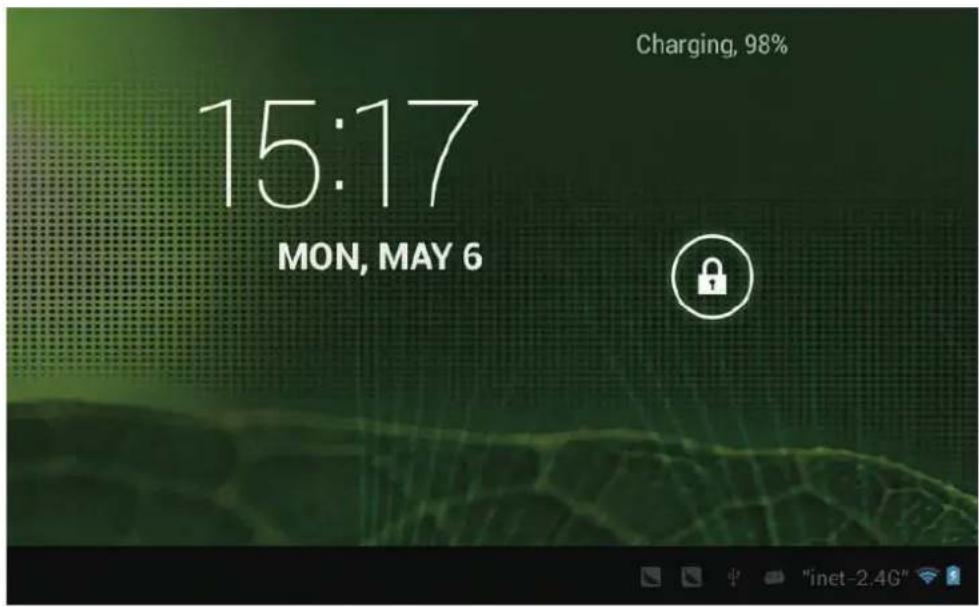
text_image
Charging, 98% 15:17 MON, MAY 6
4. System settings
Onthedesktop, pressmenubutton and selectsystemsettings.
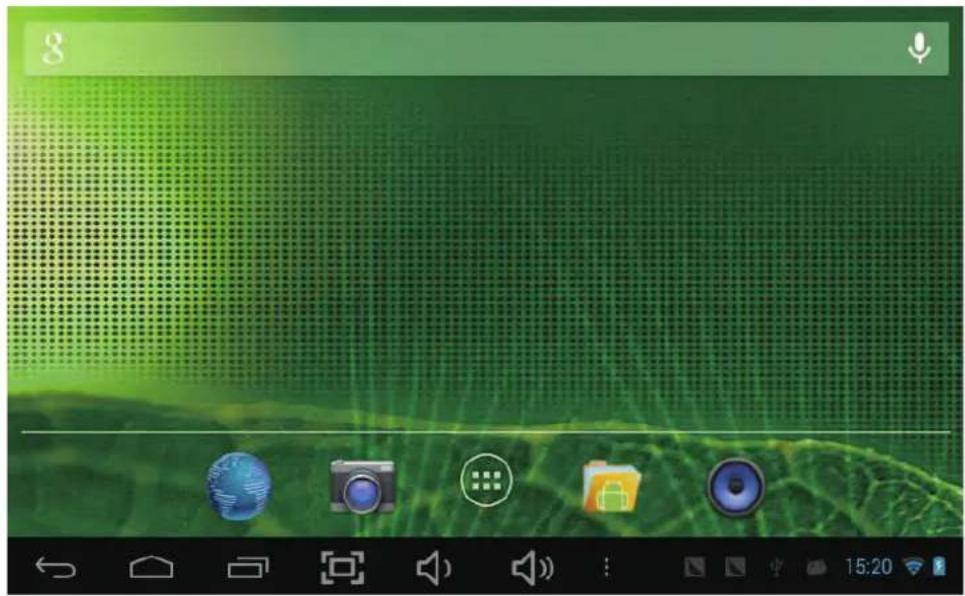
text_image
Screenshot of a mobile device home screen with icons for camera, folder, speaker, and music.
PressSystemSettings
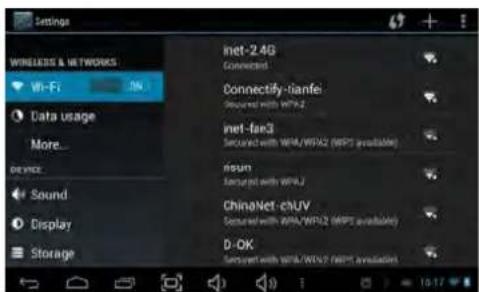
1.Wireless&networks

text_image
Settings WIRELESS & NETWORKS Wi-Fi ON Data usage More... DEVICE Sound Display Storage inet-2.4G Connected Connectify-tianfei Secured with WPA2 inet-fae3 Secured with WPA/WPA2 (WPS available) risun Secured with WPA2 ChinaNet-chUV Secured with WPA/WPA2 (WPS available) D-OK Secured with WPA/WPA2 (WPS available)Wi-Fi – Press Wi-Fi to turn on/off Setupeachsettingasyoulike.Wi-Fisettings-PressWi-Fi settings,thenthedevice
willautomaticallysearchtheavailableWi-Fisignals.Selectthenetwork youwanttoconnectwith.

2. Data usage 3. More...
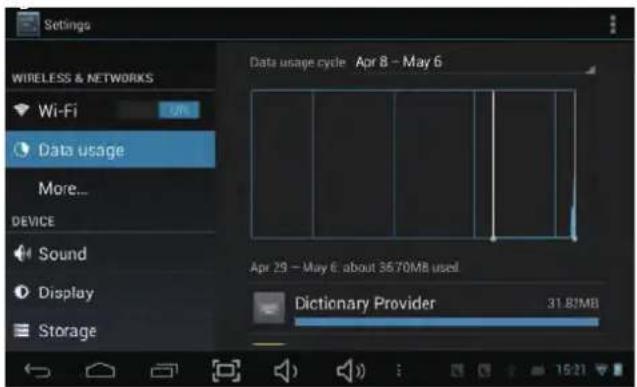
text_image
Settings WIRELESS & NETWORKS Wi-Fi Data usage More... DEVICE Sound Display Storage Data usage cycle Apr 8 - May 6 Apr 29 - May 6 about 3670MB used. Dictionary Provider 31.82MBSlidemobiledataswitchtoselectopenorclose theflowusage.
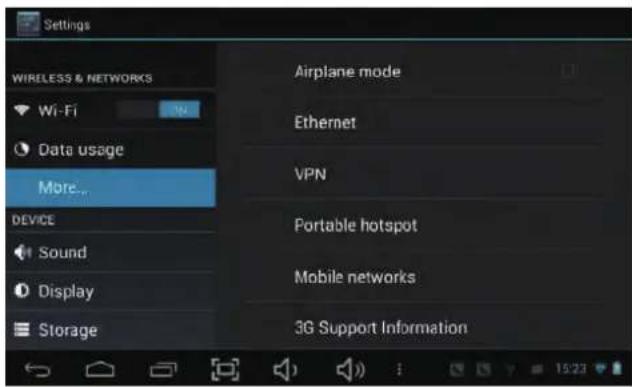
text_image
Settings WIRELESS & NETWORKS Wi-Fi Data usage More... Device Sound Display Storage Airplane mode Ethernet VPN Portable hotspot Mobile networks 3G Support InformationFormoreinformationonmobiledataand Bluetoothoptions, Flightmode, Bluetoothsharing, 3Gsupportinformation

4.Sound

text_image
Settings WIRELESS & NETWORKS Wi-Fi Data usage More... DEVICE Sound Display Storage Volumes SYSTEM Default notification sound Pixie Dust Touch sounds Screen lock sound
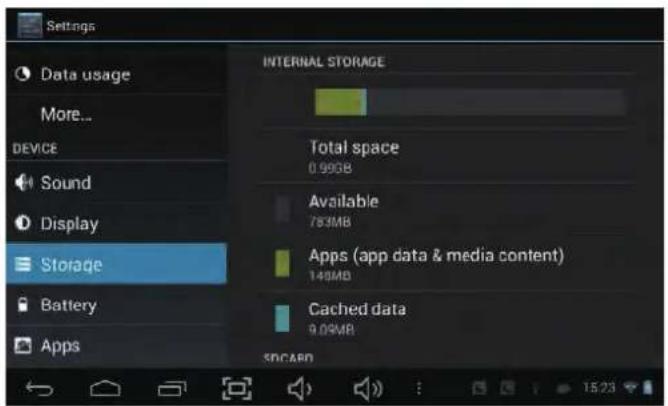
5. Display6.Storage

text_image
Settings WIRELESS & NETWORKS Wi-Fi Data usage More... DEVICE Sound Display Storage Brightness Wallpaper Auto-rotate screen Sleep After 1 minute of inactivity Daydream Font size LargeSetupeachsettingasyoulike.
text_image
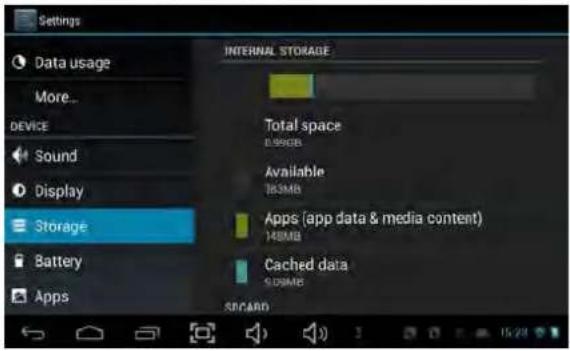
Settings Data usage More... DEVICE Sound Display Storage Battery Apps INTERNAL STORAGE Total space 0.99GB Available 783MB Apps (app data & media content) 140MB Cached data 9.09MB SDCARDCheckdevicememoryandmicroSDcardstatus. UnmountSDcard-UnmounttheSDcardfor saferemoval.

7.Battery8Apps
Check battery usage status.
Manage downloaded or running applications.

text_image
Settings More... DEVICE Sound Display Storage Battery Apps PERSONAL Location access 97% - Charging (USB) 11s on battery Cell standby 84% Tablet idle 12% Wi-Fi 5%
text_image
Settings DEVICE Sound Display Storage Battery Apps PERSONAL Location access Security DOWNLOADED ON SD CARD Adobe Flash Player 11.1 4.56MB Adobe Reader 7.27MB Aldiko 6.61MB Chrome 21.41MB Internal storage 792MB free 217MB usedDownloaded
Allinstalledapplicationarelisting.


text_image
Settings Display Storage Battery Apps PERSONAL Location access Security Language & input Backup & reset Adobe Flash Player 11.1 version 11.1.115.47 Uninstall Show notifications STORAGE Total 4.56MB App 4.56MB USB storage app 0.00B Data 0.00B SD card 0.00B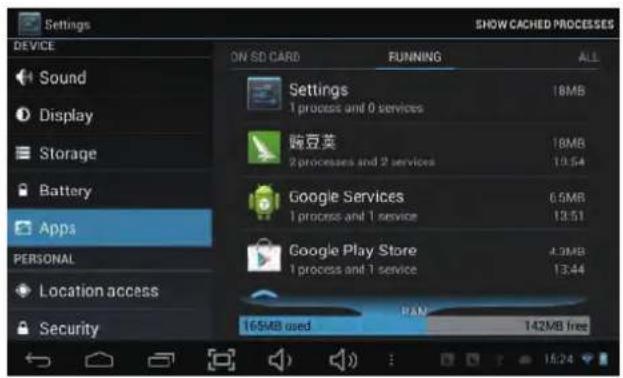
text_image
SHOW CACHED PROCESSES ON SD CARD RUNNING ALL Settings 1 process and 0 services 18MB 豌豆荚 2 processes and 2 services 18MB Google Services 1 process and 1 service 6.5MB Google Play Store 1 process and 1 service 4.3MB 13:51 13:44 165MB used PAN 142MB free Sound Display Storage Battery Apps PERSONAL Location access SecurityKeeppressinganapplicationtomanage.Runningservices
Press Uninstall to uninstall the selected application. View and control currently running services.


9.Account&sync
Create your account. After connecting Wi-Fi network, the e-mailing system synchronizes your accountwiththedevice.Emailsaerautomaticallydownloadedintothedevice.
10. Locationservices
Google's locationservice-LetappsusedatafromsourcessuchasWiFiandmobilenetworks todetermineyourapproximatelocation

11.Security
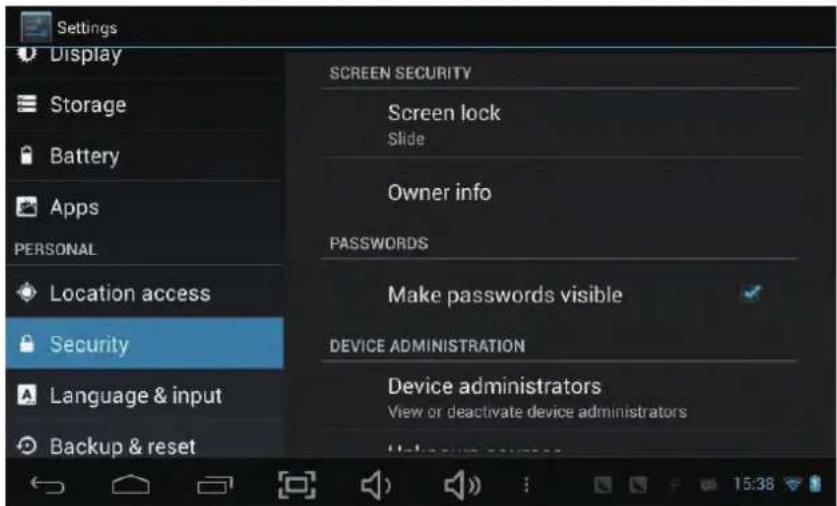
Screenlock—Protectyourdevicefromunauthorizedusebycreatingapersonalscreen unlockpattern.Makepasswordsvisible—Showpasswordasyoutype.
Unknown sources - If you want to allow installation of non-Market
Applications, PressUnknownsourcesandpressesOK.
text_image
Settings Display Storage Battery Apps PERSONAL Location access Security Language & input Backup & reset SCREEN SECURITY Screen lock Slide Owner info PASSWORDS Make passwords visible DEVICE ADMINISTRATION Device administrators View or deactivate device administrators 15:38InstallfromSDcard—InstallencryptedcertificatesfromSDcard.

12.Language&input
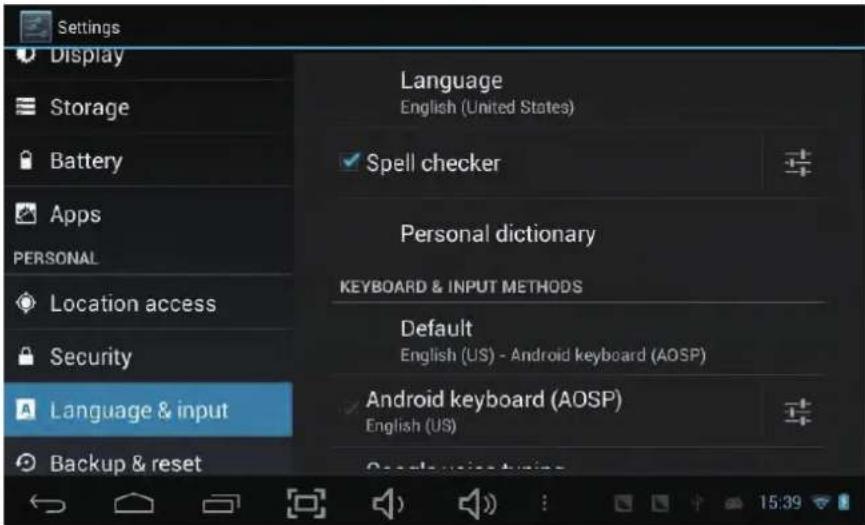
Language—Chooseyourpreferablelanguage.
Keyboard & input method – Change keyboard & keyboard settings.
OnLanguage&inputsettings,ifyouneedotherlanguagesbesidesEnglishonkeyboard, press the relevant keyboard and enter the chosen Keyboard settings, select Keyboards, pressthelanguageyouneed.
text_image
Settings Display Storage Battery Apps PERSONAL Location access Security Language & input Backup & reset Language English (United States) Spell checker Personal dictionary KEYBOARD & INPUT METHODS Default English (US) - Android keyboard (AOSP) Android keyboard (AOSP) English (US)
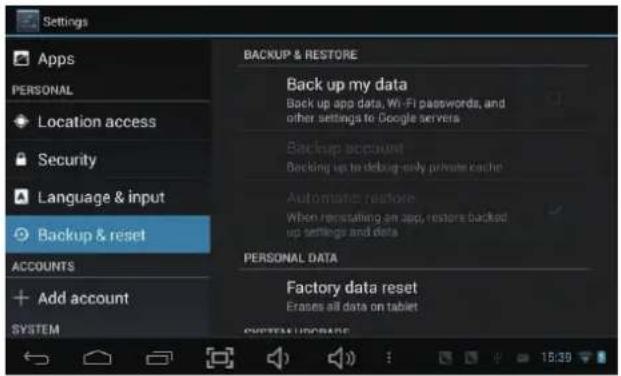
13.Backup&Reset
14. Date & time
Setdate&timeandformat
15. Accessibility
Setdate&timeandformat
16.Developeroptions
Setoptionsforapplicationdevelopment
17.Abouttablet
Seestatus,legalinformation,ETC
text_image
Settings Apps PERSONAL Location access Security Language & input Backup & reset ACCOUNTS Add account SYSTEM BACKUP & RESTORE Back up my data Back up app data, Wi-Fi passwords, and other settings to Google servers Backup account Backing up to debug-only private cache Automatic restore When remristating an app, restore backed up settings and data PERSONAL DATA Factory data reset Erases all data on tablet SYSTEM UPDATE
text_image
Settings Security Language & input Backup & reset ACCOUNTS Add account SYSTEM Date & time Accessibility Developer options SERVICES TalkBack Off SYSTEM Magnification gestures Off Large text Auto-rotate screen Speak passwords
Howtoconnect/ disconnect the device with/ from the computer
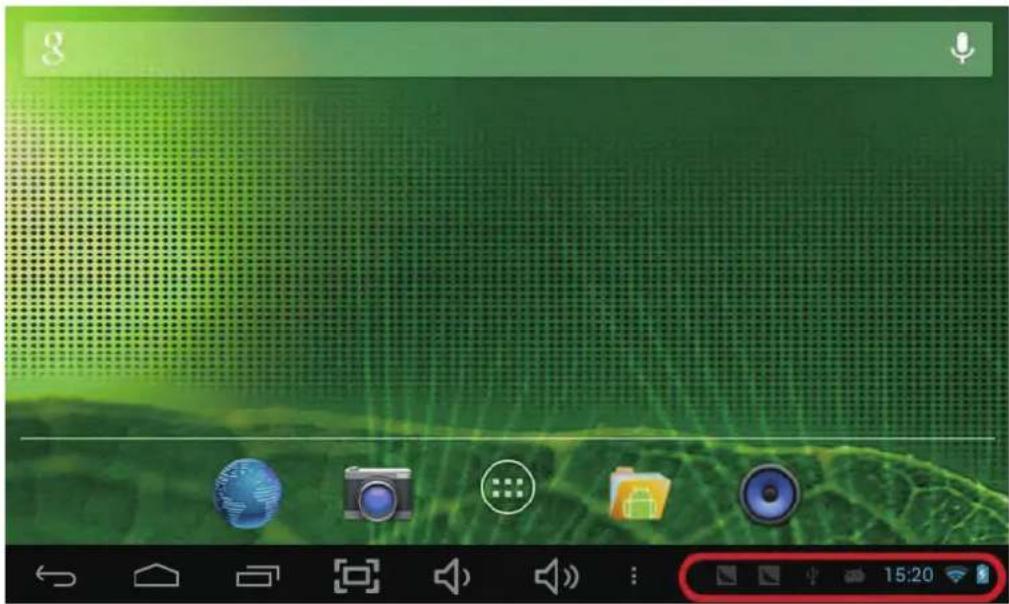
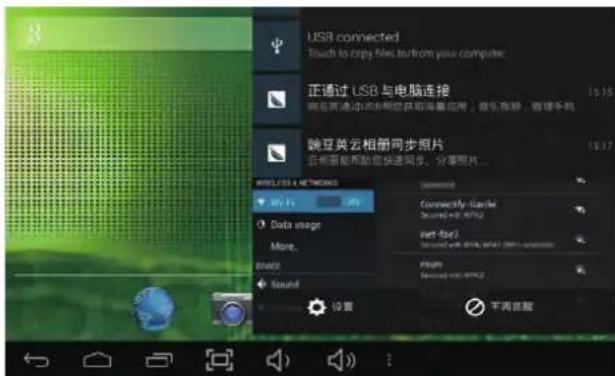
Onmaindesktop,connectthedevicewiththePC, touchrightsideofthestatusbaronthebottomofdesktop
text_image
g 15:20
text_image
USB connected Touch to copy files to/from you computer 正通过 USB 与电脑连接 端互英云相册同步照片 云视频帮助您快速同步、分享照片... WWW.FID & NETWORKS Wi-Fi Data usage More... BRIME Sound Connectify icons Connected BY: 9732 net-fi Connected by: 9732 (100%) Filet Connected by: 9732 设置 不再连接Press"USBconnected",select"TurnonUSBstorage". The device is recognized at Explorer of the computer. Now you can use it as an external storage.

text_image
USB mass storage USB connected You've connected to your computer via USB. Touch the button below if you want to copy files between your computer and your Android's SD card. Turn on USB storageAfterfinishingyourwork, Press "TurnonUSBstorage" tounmountit.

HowtoinstallApplications(.apkfile)intothe device
Method1.
- Connect the device with internet. See above [1.Wireless & networks] in order to connect internet.
- Search the applications you want to install in the different application's markets available
- Follow the instruction on the screen for installation.
Method2.
- With your computer, search application file(.apk) that you want to install into the device.
- Download the file(.apk) into your computer.
- Connect the device with your computer.
Seeabove[Howtoconnect/disconnectthedevicewith/fromthecomputer.] - Copy and paste .apk file into the device and disconnect it from your computer.
5.Run"Filebrowser"andnd.apklethatwascopiedintothedevice. - Press the file to install and follow the instruction on the screen.

Howtomakedesktopicons
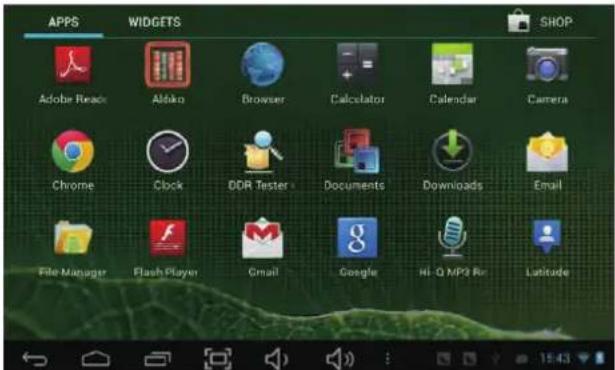
Presstheupperrightsideiconofdesktop, thepop-updisplays.

text_image
Screenshot of a mobile device home screen showing status bar, navigation icons, and playback controls
text_image
APPS WIDGETS SHOP Adobe Reader Aldarko Browser Calculator Calendar Camera Chrome Clock DDR Tester Documents Downloads Email File Manager Flash Player Gmail Google Hi-Q MP3 Rx LatitudeShortcuts
LongpressyourdesiredAPKiconand putitonthedesktop.

text_image
APPS WIDGETS SHOP Addike Analog clock Bookmark Bookmark Bookmarks Bookmarks Calendar Digital clock 10:08Widgets
PressWidgetsandpressyourdesirediconto putitonthedesktop.
Wallpaper
Longpressthedesktop, pressWallpapers and selectoneofcategoriesofwallpaper.
SelectoneyoudesireandpressSetwallpaper.

Specification
| OS Android 4.2 | |
| CPU | A20 Dual Core Cortex A7@ 1.0Ghz |
| Memory | DDR3 1GB |
| Storage | 8GB |
| Display | 10.1" |
| Resolution | 1024*600 |
| Touch Panel | 5 Points Capacitive Touch Screen(G+G) |
| WIFI | 802.11 b/g/n |
| USB | 1XUSB2.0 |
| TF Card | Up to 32GB |
| Camera | Front 0.3 Mega Pixel;Back 2.0 Mega Pixel |
| Earphone | Support 3.5mm headphone jack |
| Power adapter | 5V 3A |
| Battery | 3.7V 4000MAH |
| Speaker | 8 OHM,1W |
Specifications are subject to change without notice.