DS-GTC-515-3 - Docking Station Havis - Free user manual and instructions
Find the device manual for free DS-GTC-515-3 Havis in PDF.


User questions about DS-GTC-515-3 Havis
0 question about this device. Answer the ones you know or ask your own.
Ask a new question about this device
Download the instructions for your Docking Station in PDF format for free! Find your manual DS-GTC-515-3 - Havis and take your electronic device back in hand. On this page are published all the documents necessary for the use of your device. DS-GTC-515-3 by Havis.
USER MANUAL DS-GTC-515-3 Havis
Havis Docking Station
For Getac RX10 Rugged Tablet
DS-GTC-510 Series
DS-GTC-511
DS-GTC-513
DS-GTC-516
DS-GTC-511-3
DS-GTC-513-3
DS-GTC-516-3
DS-GTC-512
DS-GTC-515
DS-GTC-512-3
DS-GTC-515-3

natural_image
3D rendered mechanical component with orange vertical bar and HAVIS branding (no readable text or symbols beyond branding)Havis is pleased to provide this Owner's Manual to aid in the proper installation and use of the DS-GTC-510 Series Docking Station for Getac RX10 Rugged Tablets.
For questions regarding the set-up of your DS-GTC-510 Series Docking Station, please contact Havis at 1-800-524-9900 or visit www.havis.com for additional product support and information.
This Owner's Manual applies to the following Part Numbers:
DS-GTC-511
DS-GTC-512
DS-GTC-513
DS-GTC-515
DS-GTC-516
DS-GTC-511-3
DS-GTC-512-3
DS-GTC-513-3
DS-GTC-515-3
DS-GTC-516-3
WARNING
- NEVER STOW OR MOUNT THE DOCKING STATION DIRECTLY IN A VEHICLE AIRBAG DEPLOYMENT ZONE.
• DO NOT USE COMPUTER WHILE DRIVING.
CAUTION
- READ ALL INSTRUCTIONS THOROUGHLY BEFORE BEGINNING INSTALLATION.
- DO NOT STORE, INSTALL, OR OPERATE THE DOCKING STATION WHERE WATER, MOISTURE, STEAM, DUST, ETC. ARE PRESENT
- DO NOT DOCK OR UNDOCK YOUR COMPUTER UNLESS IT IS POWERED OFF. DOCKING OR UNDOCKING WITH YOUR COMPUTER IN ON, STANDBY, HIBERNATION, OR SLEEP MODES CAN CAUSE PERMANENT DAMAGE.
- FOR THE DS-GTC-511, DS-GTC-511-3, DS-GTC-512, DS-GTC-512-3, DS-GTC-515, DS-GTC-515-3, DS-GTC-516, & DS-GTC-516-3 DOCKING STATIONS: DO NOT CONNECT DIRECTLY TO VEHICLE VOLTAGE SOURCE: This product requires a certified, automotive grade, Getac approved 95W power source rated for a continuous, regulated 19VDC output (Havis Part Number LPS-116 or equivalent). Failure to comply with this requirement will cause product damage that is NOT repairable and is NOT covered under warranty.
- FOR THE DS-GTC-513 & DS-GTC-513-3 DOCKING STATIONS: DO NOT CONNECT DIRECTLY TO VEHICLE VOLTAGE SOURCE: The Getac RX10 tablet requires a certified, Getac approved power source rated for a continuous, regulated 19VDC output. Failure to comply with this requirement will cause product damage that is NOT repairable and is NOT covered under warranty.
- DS-GTC-515. DS-GTC-515-3, DS-GTC-516, & DS-GTC-516-3 ARE EQUIPPED WITH A +5V RS232 SERIAL PORT (PIN #9). BE CERTAIN TO VERIFY THAT YOUR PERIPHERAL DEVICE IS COMPATIBLE WITH A POWERED RS232 PORT.
NOTICE
- FOR DOCKING STATION MODELS EQUIPPED WITH A BUNDLED POWER SUPPLY (DS-GTC-512, DS-GTC-512-3, DS-GTC-516, DS-GTC-516-3) REFER TO THE SUPPLIED LIND POWER SUPPLY REFERENCE GUIDE.
- WHEN NOTEBOOK IS DOCKED, THE BATTERY WILL ONLY CHARGE BETWEEN 0°C to 50°C (32°F to 122°F). PLEASE REFER TO GETAC RX10 OWNER'S MANUAL FOR MORE INFORMATION.
Table of Contents
Specifications 4
Parts Included 5
Port Replication Capability 6
Antenna Identification....6
Installation 7
Cable Management 8
Operation - Docking 9
Operation - Undoing 10
Precautions
- Do not place metal objects or containers of liquid on top of the Docking Station.
- If a malfunction occurs, immediately unplug the Power Supply and remove the laptop.
- Use only the specified Power Supply (Part # LPS-116) with this Docking Station.
- Do not connect cables into ports other than what they are specified for.
- Do not leave the Docking Station in a high temperature environment (greater than 85^ C, 185^ F ) for an extended period of time.
| Power Supply Input 19V DC-In | |
| Dimensions 11.4” (28.9 cm) H x | 10.1” (25.6 cm) W x 3.9” (9.9 cm) D |
| Weight 2.6 lbs (1.2 kg) | |
| Operating Environment -20°C to | 55°C (-4°F to 131°F) |
| Storage Environment -40°C to 71°C (-40°F to 160°F) | |
EC DECLARATION OF CONFORMITY in accordance with EN 50498
Manufacturers Name: Havis, Inc.
Manufacturers Address: 75 Jacksonville Road, Warminster, PA 18974 USA
Declares under our sole responsibility that the product:
Product name: Havis Docking Station For Getac RX10 Rugged Tablet
Model: DS-GTC-51X, where 'X' may be any alphanumeric character and which describes product options.
May be followed by any alphanumeric characters which describe product options.
Product Options: This declaration covers all options of the above product which bear the CE Marking.
Is in conformity with the following standards or other normative documents:
Automotive EMC Directive EN 50498:2010, Electromagnetic compatibility (EMC) -
2004/108/EC: Product family standard for aftermarket electronic equipment in vehicles
Directive 2011/65/EU Restriction of the use of certain hazardous substances (RoHS)
Supplementary Information:
The product herewith complies with the requirements of the Automotive EMC Directive 2004/108/EC, Annex I, 6.5, 6.6, 6.8, and 6.9. This product requires the use of a recommended e-Marked automotive power supply when used within vehicles.
Plymouth twp, MI, USA January 29, 2016
Bruce Jonik, Director of Engineering, Havis, Inc.
FCC 47CFR, Part 15 compliance: This is an FCC Class B device. Any changes or modifications to the model DS-GTC-51X not expressly approved by Havis, Inc. could void the user's authority to operate this equipment.
Docking Station

text_image
Barrel Lock Latch Hook Locator Pins Docking Connector Alignment Guides RF Antenna to Tablet Interface HAVIS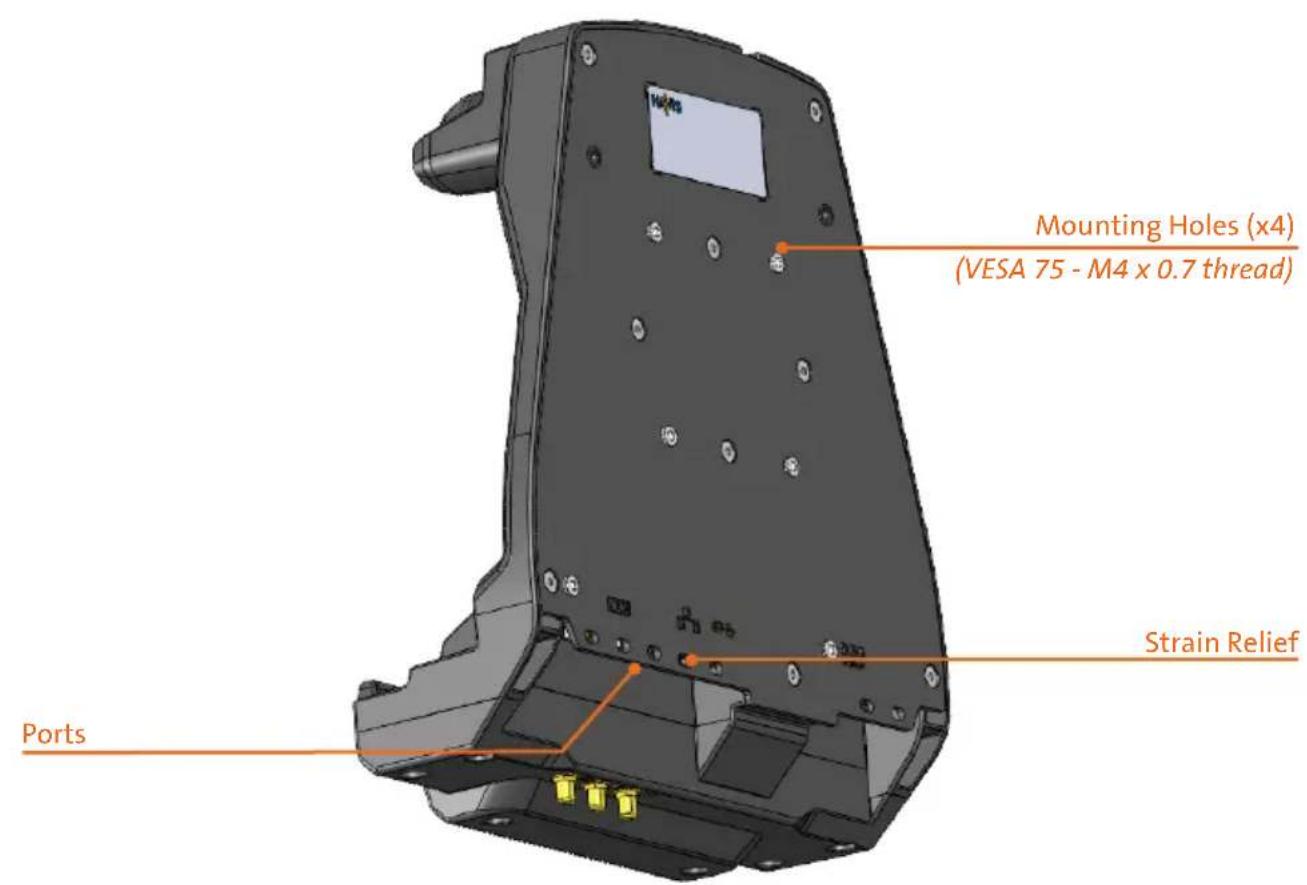
text_image
Mounting Holes (x4) (VESA 75 - M4 x 0.7 thread) Strain Relief PortsHardware Kit (HWK-0026)
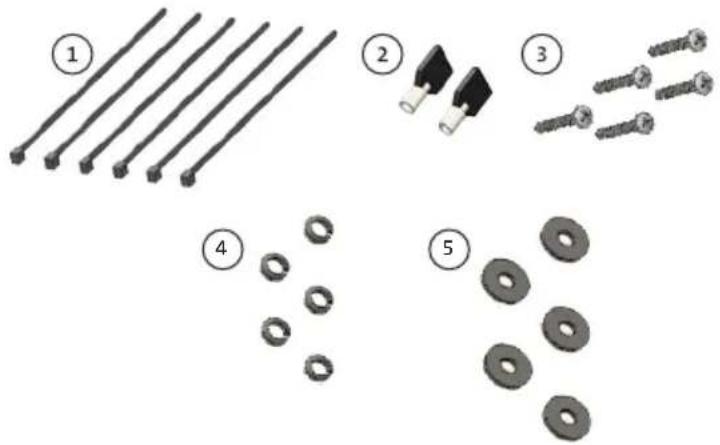
This Hardware Kit includes:
- Zip Ties (6)
- Keys (2)
- M4 x 0.7 x 25mm long Pan Head Screws (5)
- Split Lock Washers, M4 (5)
- Washers, M4 (5)
Tools required for installation:
- #2 Phillips
(For M4 Pan Head Screws)
natural_image
Illustration of five different types of mechanical components: rods, screw, washers, and washers (no text or symbols present)Port Replication Capability
text_image
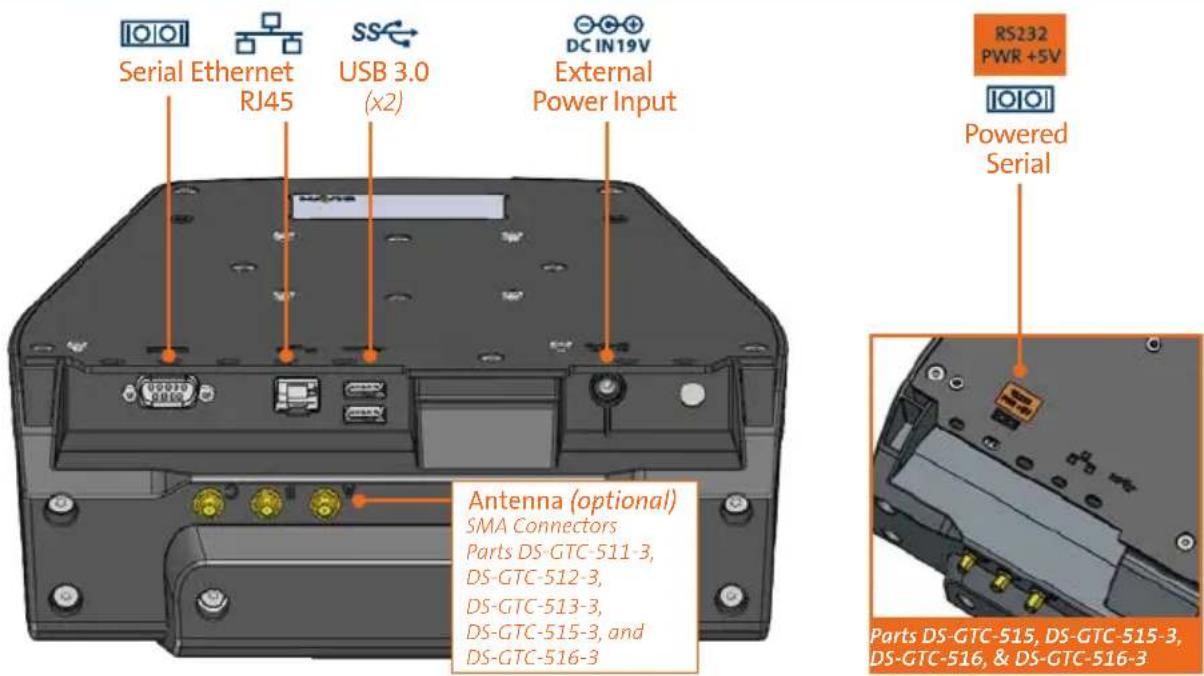
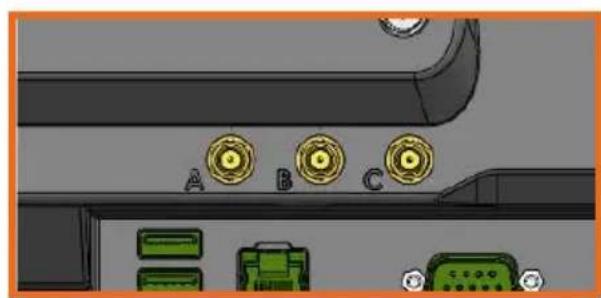
Serial Ethernet RJ45 SS USB 3.0 (x2) External Power Input Antenna (optional) SMA Connectors Parts DS-GTC-511-3, DS-GTC-512-3, DS-GTC-513-3, DS-GTC-515-3, and DS-GTC-516-3 RS232 PWR +5V Powered Serial Parts DS-GTC-515, DS-GTC-515-3, DS-GTC-516, & DS-GTC-516-3Antenna Identification (DS-GTC-511-3, DS-GTC-512-3, DS-GTC-513-3, DS-GTC-515-3, DS-GTC-516-3)


natural_image
Close-up of a computer keyboard interface with labeled buttons (A, B, C) and green connectors at the bottom (no readable text or symbols beyond labels)Tablet InterfaceAntenna Connectors (SMA

text_image
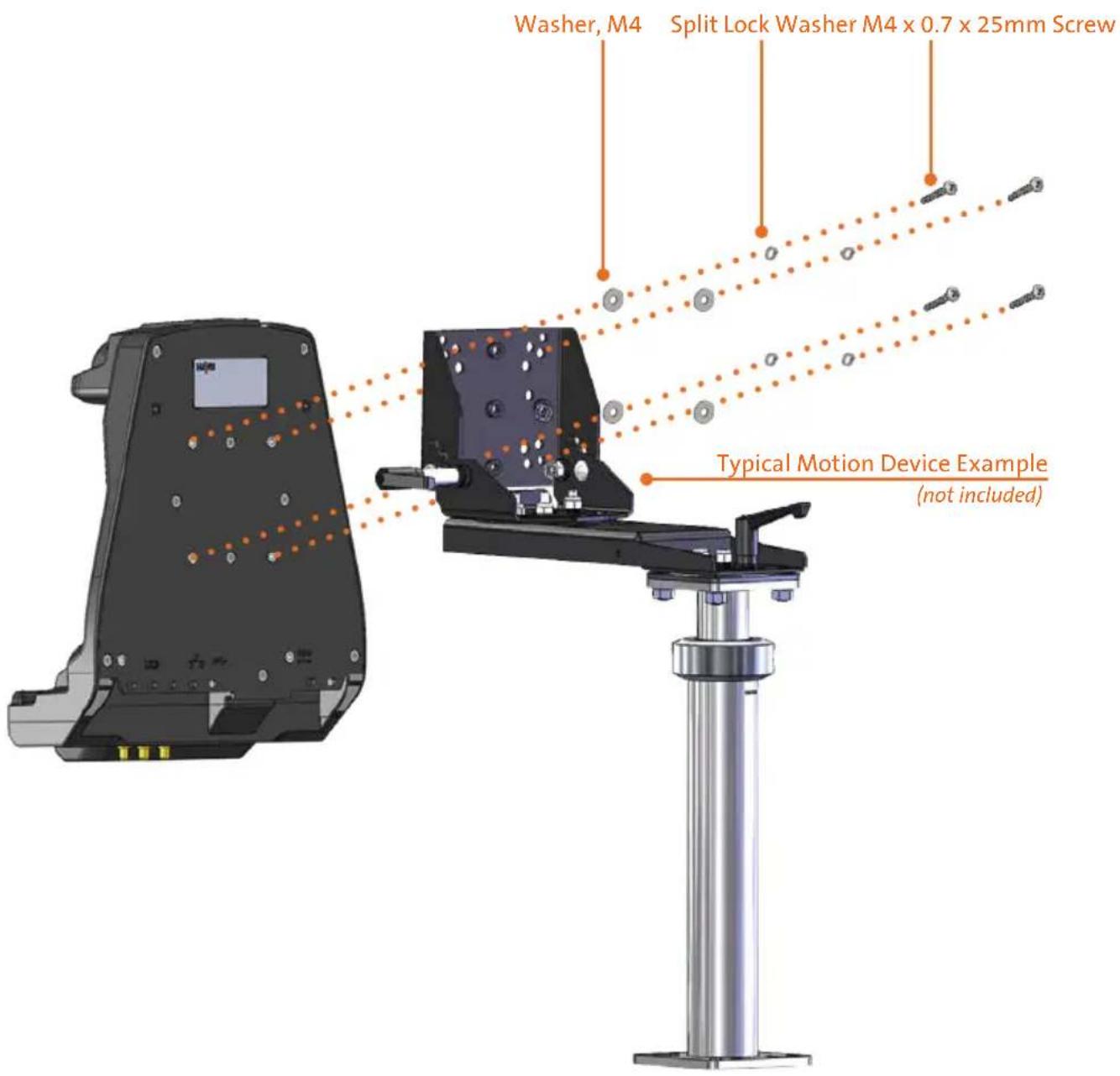
A B C1) Install the Docking Station to the Motion Device using four (4) M4 x 0.7 x 25mm long Pan Head Screws (Hardware Kit Item 3), four (4) Split Lock Washers, M4 (Hardware Kit Item 4), and four (4) Washers, M4 (Hardware Kit Item 5). Torque screws to 20 in-lbs (2.3Nm) ± 10%.
text_image
Washer, M4 Split Lock Washer M4 x 0.7 x 25mm Screw Typical Motion Device Example (not included)1) Tip the Docking Station to a position that is comfortable to work with.
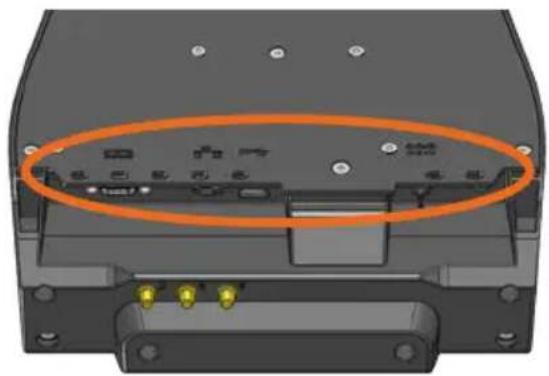
2) Install all cables that are necessary for computing needs.
3) Use Zip Ties (Hardware Kit Item 1) and the Strain Relief Points on the bottom of the Docking Station to secure cables and reduce risk of accidental disconnects.
text_image
Diagram of an electronic device rear panel with labeled ports and connectors, highlighting a highlighted orange oval section.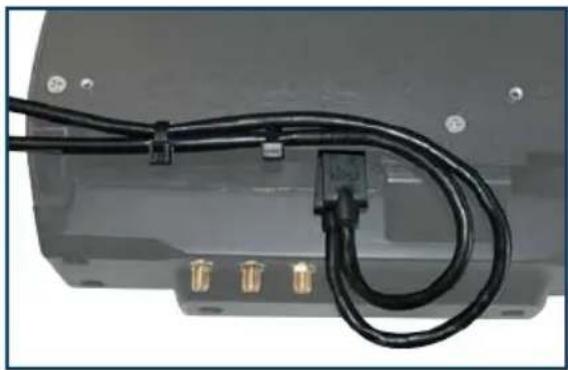
natural_image
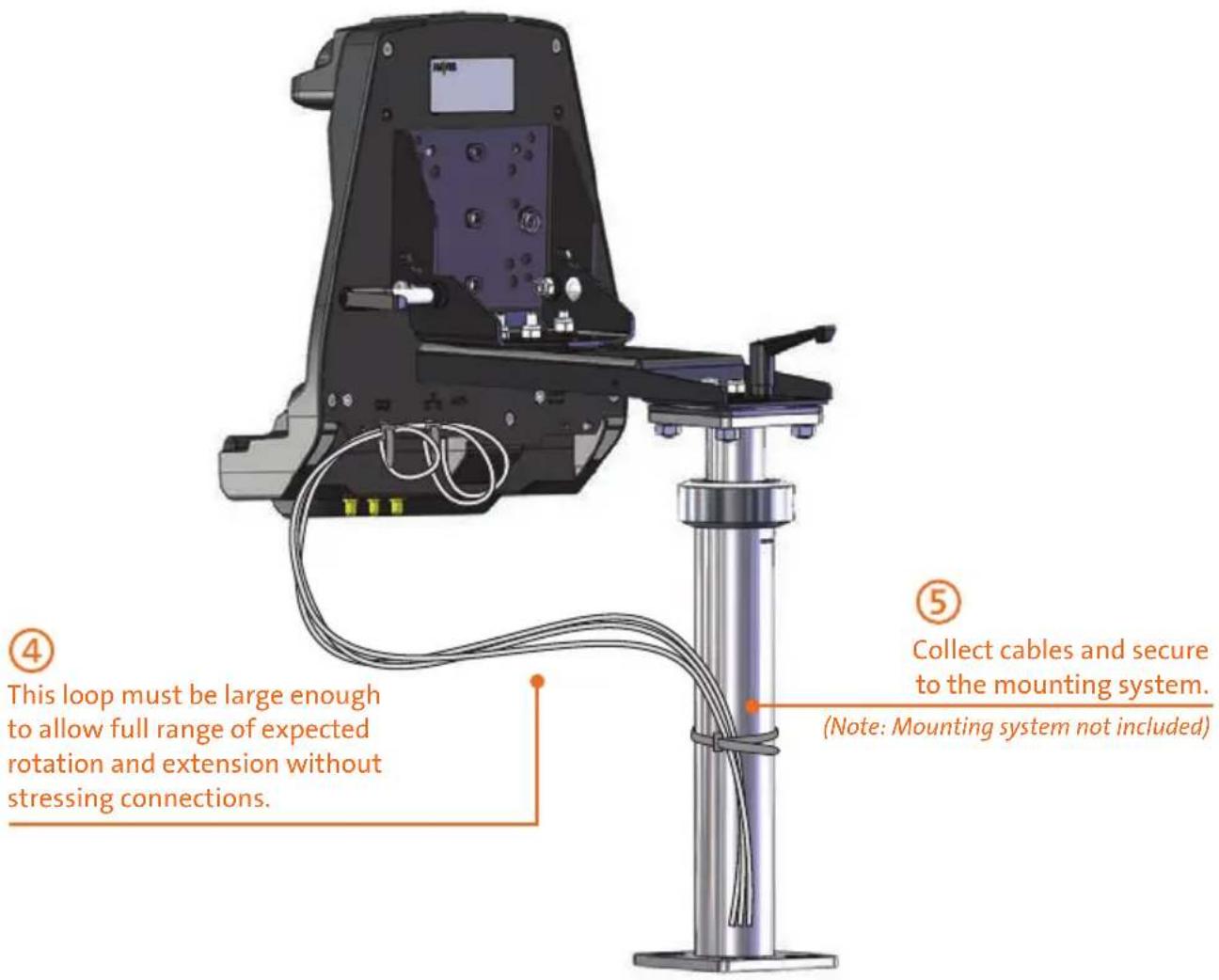
Close-up of a black cable with gold connectors attached to a gray electronic device (no visible text or symbols)4) Create a service loop with cables to ensure that no tension is on the connectors and to enable intended motion.
5) Tie off cables onto a stationary part of the mounting system.
text_image
④ This loop must be large enough to allow full range of expected rotation and extension without stressing connections. ⑤ Collect cables and secure to the mounting system. (Note: Mounting system not included)CAUTION
DO NOT FORCE TABLET ONTO DOCKING STATION. IF THERE IS RESISTANCE, CHECK ALIGNMENT OF TABLET ON DOCKING STATION.
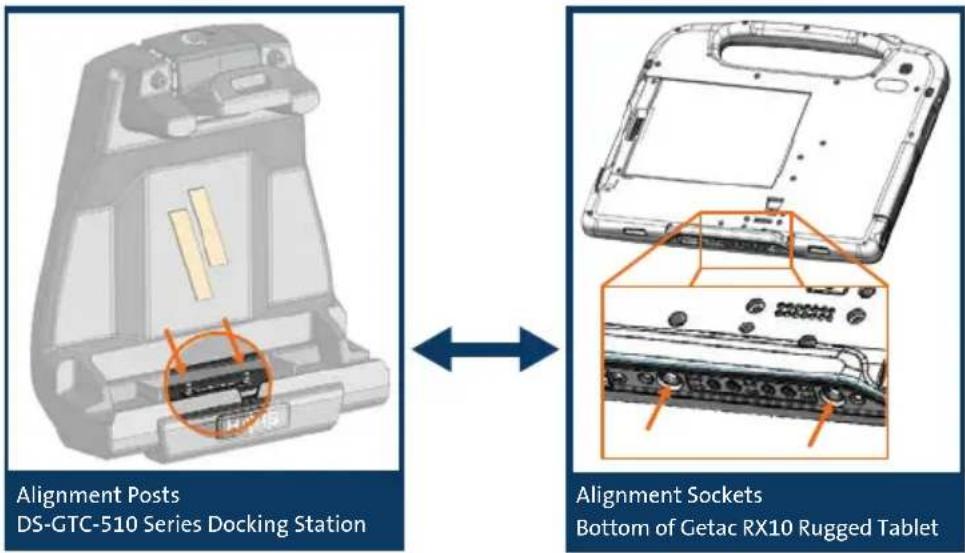
NOTE: Ensure a proper connection by aligning the tablet's Alignment Sockets with the Docking Station's Alignment Posts
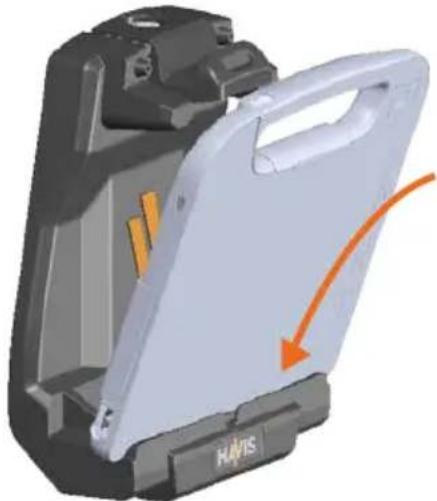
1) Hold computer with bottom angled toward Docking Station. Lower computer into the bottom of the Docking Station.
natural_image
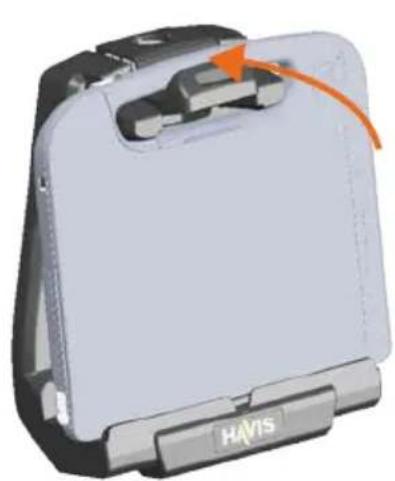
3D rendering of a white plastic device with orange arrow indicating motion or force, no visible text or symbols2) While keeping downward pressure on the computer, pivot it into Docking Station so the handle snaps into Latch Mechanism.
natural_image
3D model of a Havis laptop with an orange arrow indicating the handle (no text or symbols on the device itself)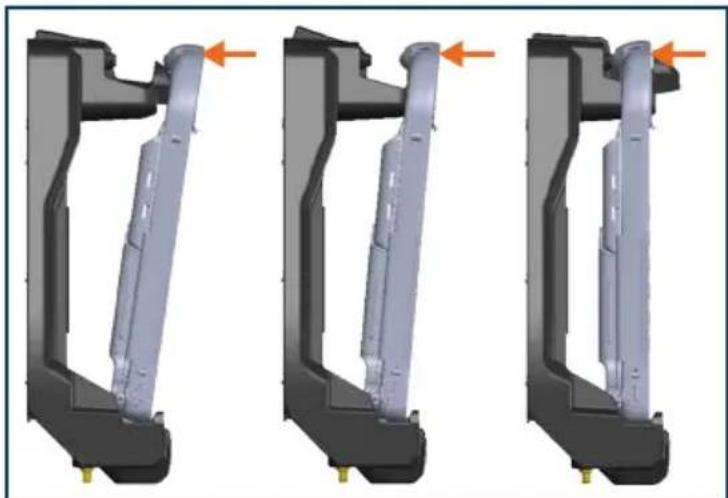
natural_image
Three identical mechanical component diagrams showing internal structure with orange arrows indicating direction (no text or symbols)
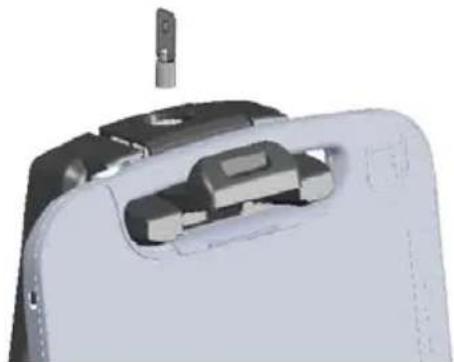
3) For theft deterrence, secure computer by locking Docking Station with supplied key (Hardware Kit Item 2).

natural_image
3D rendering of a device's internal components, showing a mechanical assembly with a metallic clip and housing (no text or symbols visible)
natural_image
Close-up of a black hard drive with an orange lock icon and directional arrow (no text or symbols)Operation - Undocking
1) If previously locked, unlock Docking Station using supplied key.
natural_image
3D rendering of a device's internal components, showing a mechanical assembly with a metallic clip (no text or symbols visible)
natural_image
Close-up of a black hard drive with a circular dial and lock icon, showing a close button (no text or symbols)2) While holding computer with one hand, push down on Latch Mechanism with thumb.

natural_image
3D model of a white ergonomic device with a black handle and orange arrow pointing to a small component, labeled 'HAVIS' at the base (no readable text or symbols beyond label)
natural_image
3D mechanical component diagram showing a lever mechanism with an orange arrow indicating direction (no text or symbols present)3) While Latch Mechansim is pushed down, carefully rock the top of the computer forward and lift out of Docking Station

text_image
Diagram of a device's internal structure with numbered annotations indicating component parts and directional arrows.
natural_image
Mechanical assembly diagram showing two views of a mechanical component with orange arrows indicating motion direction (no text or symbols)Related Products
Havis offers a wide variety of accessory products specifically for use with the DS-GTC-510 Series Docking Station. For more information or to order, please visit www.havis.com.

natural_image
Black electronic device with two cables, no visible text or symbolsLPS-116
95W Power Supply
External in-vehicle power supply and cable for Getac RX10 Rugged Tablet with cigarette lighter adaptor.
natural_image
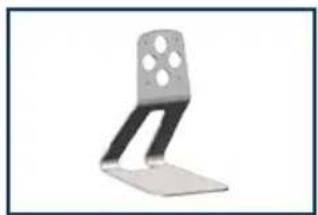
Metal bracket with four circular holes, isolated on white background (no text or symbols)DS-DA-218
Desktop Stand for Tablet Docking Stations
Durable stand for mounting tablet Docking Stations for use in the home or office.

natural_image
Close-up of a black key with metal bands and a handle, isolated on white background (no text or symbols)DS-DA-501
Replacement Keys
Set of two (2) replacement keys for DS-GTC-500 Series Docking Stations.

text_image
blank-itDS-DA-808
Screen Blanking Solution with Tamperproof Cover
Powered by Blank-it, USB Dongle & Tamperproof Cover for DS-GTC-500 Series Docking Stations.
Havis, Inc.
75 Jacksonville Road
Warminster, PA 18974
www.havis.com 1-800-524-9900