Combo8 - Pregnant Showtec - Free user manual and instructions
Find the device manual for free Combo8 Showtec in PDF.


User questions about Combo8 Showtec
0 question about this device. Answer the ones you know or ask your own.
Ask a new question about this device
Download the instructions for your Pregnant in PDF format for free! Find your manual Combo8 - Showtec and take your electronic device back in hand. On this page are published all the documents necessary for the use of your device. Combo8 by Showtec.
USER MANUAL Combo8 Showtec
natural_image
Line drawing of a mechanical device with internal components and a curved arrow indicating motion (no text or symbols)ENGLISH
Combo 8, 8" Portable Soundsystem V2
Ordercode: 935000
Table of contents
Warning 2
Safety Instructions 2
Operating Determinations 4
Connection with the mains....4
Return Procedure....5
Claims....5
Description of the device....6
Features 6
Overview - mixer....6
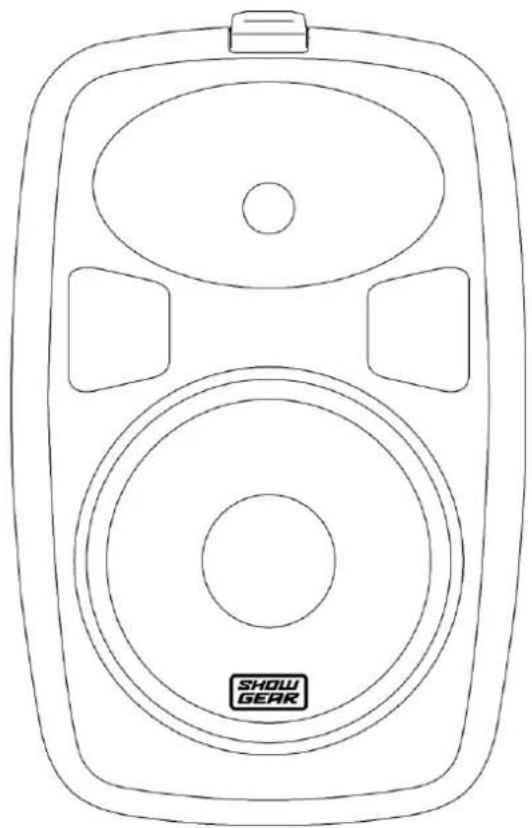
Overview – speakers ....7
Names and Functions 8
Mixer 8
Speakers....11
Installation....1
Set Up and Operation....12
Connection....12
AC Power 12
Stand-by Mode 12
Control Modes 12
- Tuner Mode....12
Auto Tuning 12
Tuning....12
Selecting Radio Stations....12
- USB/SD mode....13
Selecting Tracks....13
Starting/Pausing Playback....13
Repeat Mode 13
- Bluetooth Mode 13
Connection Example 14
Connection Cables 15
Maintenance 16
Replacing the Fuse....16
Troubleshooting 16
No Sound....16
Product Specifications....17
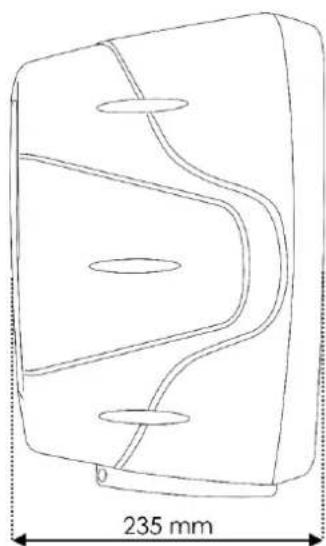
Dimensions....18
Warning

For your own safety, please read this user manual carefully before your initial start-up!

Unpacking Instructions
Immediately upon receiving this product, carefully unpack the carton and check the contents to ensure that all parts are present, and have been received in good condition. Notify the dealer immediately and retain packing material for inspection if any parts appear damaged from shipping or the carton itself shows signs of mishandling. Save the carton and all packing materials. In the event that a fixture must be returned to the factory, it is important that the fixture be returned in the original factory box and packing.
Your shipment includes:
• Showgear Combo 8, 8" Portable Soundsystem
• IEC power cable (1,5 m)
- 2 x 6,3 mm jack cable (5,75 m)
- Wired microphone
- User manual

CAUTION!
Keep this device away from rain and moisture!
Unplug mains lead before opening the housing!

Safety Instructions
Every person involved with the installation, operation and maintenance of this system has to:
- be qualified
• follow the instructions of this manual

CAUTION! Be careful with your operations.
With a dangerous voltage you can suffer a dangerous electric shock when touching the wires!

Before your initial start-up, please make sure that there is no damage caused by transportation. Should there be any, consult your dealer and do not use the system.
To maintain perfect condition and to ensure a safe operation, it is absolutely necessary for the user to follow the safety instructions and warning notes written in this manual.
Please consider that damages caused by manual modifications to the system are not subject to warranty.
This system contains no user-serviceable parts. Refer servicing to qualified technicians only.
IMPORTANT:
The manufacturer will not accept liability for any resulting damages caused by the non-observance of this manual or any unauthorized modification to the system.
• Always let the device cool down before cleaning or servicing.
- Always disconnect power from the mains, when system is not used. Only handle the power cord by the plug. Never pull out the plug by tugging the power cord.
• Always operate the unit with the AC ground wire connected to the electrical system ground.
- Avoid flames and do not put close to flammable liquids or gases.
- Avoid ground loops! Always be sure to connect the power amps and the mixing console to the same electrical circuit to ensure the same phase!
- Before changing the ground, always turn off your amplifier.
- Connecting amplifier outputs to oscilloscopes or other test equipment, while the amplifier is in bridge mode, may damage both, the amplifier and test equipment.
- Do not connect this device to a dimmer pack.
- Do not drive the inputs with a signal level higher than required to drive the equipment to full output.
- Do not insert objects into air vents.
- Do not open the device and do not modify the device.
- Do not open this device. Risk: hazardous radiation exposure.
- Do not switch the system on and off in short intervals, as this would reduce the system's life.
- Do not put your equipment next to TV, radio, etc., because of interference or distortion.
- If the external cable is damaged, it has to be replaced by a qualified technician.
- If device is dropped or struck, disconnect mains power supply immediately. Have a qualified engineer inspect for safety before operating.
- If the system has been exposed to drastic temperature fluctuation (e.g. after transportation), do not switch it on immediately. The arising condensation water might damage your system. Leave the system switched off until it has reached room temperature.
- If you connect other parts of the system, beware ground loops.
- If your Dap Audio device fails to work properly, discontinue use immediately. Pack the unit securely (preferably in the original packing material) and return it to your Dap Audio dealer for service.
- In system setup, the amplifier's output power must be 50%-100% higher than the loaded loudspeakers rated power.
- In typical use, please set the volume to 0dB position.
- Make sure that the amplifier is turned down, before turning the power on or off. In this way you can avoid supersonic frequencies, which could damage your speakers.
• Make sure that the available voltage is not higher than stated on the rear panel.
- Make sure that the power cord is never crimped or damaged. Check the device and the power cord from time to time.
- Make sure that the core diameter of extension cords and power cords is sufficient for the required power consumption of the device.
• Make sure that the signals coming into the mixer are balanced, otherwise hum could be created.
• Make sure you do not use the wrong kind of cables or defective cables.
• Make sure you use DI boxes to balance unbalanced signals; All incoming signals should be clear
- Never let the power cord come into contact with other cables! Handle the power cord and all connections with the mains with particular caution!
- Never modify, bend, mechanically strain, put pressure on, pull or heat up the power cord.
- Never strain the cable insert or the female part in the device. There must always be sufficient cable going to the device. Otherwise, the cable will be damaged, which can cause serious damage.
- Never use the device during thunderstorms, unplug the device immediately.
- Never leave various parts of the packaging (plastic bags, polystyrene foam, nails, etc.) within children's reach, as they are potential sources of danger.
- Never remove warning or informative labels from the unit.
- Never use anything to cover the ground contact.
• Only use device indoors, avoid contact with water or other liquids.
- Please read this manual carefully and keep it for future reference.
- Please turn off the power switch, when replacing the power cord, signal cable or selecting the input mode switch.
- Prevent distortion! Make sure that all components connected to the device have sufficient power ratings. Otherwise, distortion will be generated because the components are operated at their limits.
Combo 8, 8" Portable Soundsystem
- Sometimes, when you want to send one signal to more than one amplifier, you should use a signal distributor.
- The best way to avoid ground loops is connecting the electrical system ground to one central point ("star" system). In this case the mixer can act as a central point.
- This device falls under protection class I. Therefore it is essential to connect the yellow/green conductor to earth.
- The user is responsible for correct positioning and operating of this product. The manufacturer will not accept liability for damages caused by the misuse or incorrect installation of this device.
• Repairs, servicing and electric connection must be carried out by a qualified technician. - WARRANTY: Till one year after date of purchase.
Operating Determinations
This system is not designed for permanent operation. Consistent operation breaks will ensure that the system will serve you for a long time without defects.
If this system is operated in any other way, than the one described in this manual, the product may suffer damages and the warranty becomes void.
Any other operation may lead to dangers like short-circuit, burns, electric shock, etc.
You endanger your own safety and the safety of others!
Improper installation can cause serious damage to people and property!
Connection with the mains
Connect the device to the mains with the power-plug.
Always pay attention, that the right color cable is connected to the right place.
| International | EU Cable | UK Cable | US Cable | Pin |
| L | BROWN | RED | YELLOW/COPPER | FASE |
| N | BLUE | BLACK | SILVER | NULL |
| YELLOW/GREEN | GREEN | GREEN | EARTH |
Make sure that the device is always connected properly to the earth!
Improper installation can cause serious damage to people and property!

Return Procedure

Returned merchandise must be sent prepaid and in the original packing, call tags will not be issued. Package must be clearly labeled with a Return Authorization Number (RMA number). Products returned without an RMA number will be refused. Highlite will not accept the returned goods or any responsibility. Call Highlite 0031-455667723 or mail aftersales@highlite.nl and request an RMA prior to shipping the fixture. Be prepared to provide the model number, serial number and a brief description of the cause for the return. Be sure to properly pack fixture, any shipping damage resulting from inadequate packaging is the customer's responsibility. Highlite reserves the right to use its own discretion to repair or replace product(s). As a suggestion, proper UPS packing or double-boxing is always a safe method to use.
Note: If you are given an RMA number, please include the following information on a piece of paper inside the box:
01) Your name
02) Your address
03) Your phone number
04) A brief description of the symptoms
Claims
The client has the obligation to check the delivered goods immediately upon delivery for any shortcomings and/or visible defects, or perform this check after our announcement that the goods are at their disposal. Damage incurred in shipping is the responsibility of the shipper; therefore the damage must be reported to the carrier upon receipt of merchandise.
It is the customer's responsibility to notify and submit claims with the shipper in the event that a fixture is damaged due to shipping. Transportation damage has to be reported to us within one day after receipt of the delivery.
Any return shipment has to be made post-paid at all times. Return shipments must be accompanied with a letter defining the reason for return shipment. Non-prepaid return shipments will be refused, unless otherwise agreed in writing.
Complaints against us must be made known in writing or by fax within 10 working days after receipt of the invoice. After this period complaints will not be handled anymore.
Complaints will only then be considered if the client has so far complied with all parts of the agreement, regardless of the agreement of which the obligation is resulting.
Description of the device
Features
The Combo 8 is a complete plug-and-play audio system. It comes with two 8" speakers and a complete mixer with a built-in amplifier, offering 150W of digital power to your speakers. It is delivered with one wired microphone.
Its built-in MP3 player allows you to play songs directly from your USB/SD card. The built-in FM tuner lets you stay tuned to your favorite radio channel.
The Combo 8 offers a possibility to connect multiple microphones or any other external line signal, such as a laptop, CD player, MP3 player and many others.
- Woofer size: 8"
- Horn driver: 1"
- Horn coverage: 90^ H × 45^ V
• Continuous power: 150W (2 x 75W)
• Frequency response: 20Hz - 18kHz - SPL @1m: 96dB +/- 2dB
• Power supply: 90-250V AC, 50Hz - Tuner function
• USB/SD/Bluetooth function - Connections: RCA IN; XLR mic 1/2 IN; 6,3 mm jack IN; 3,5 mm jack IN
• Housing: Plastic cabinet, rubber feet, ergonomic handle - Color: Black
- Mounting: 35 mm pole mount
- Fuse: F1,6AL/250V
• Dimensions: 450 x 250 x 605 mm (LxWxH) - Weight: 12 kg
Overview - mixer

text_image
SHOW GEAR COMBO®
natural_image
Technical line drawing of a rectangular electronic device with internal components and mounting holes (no text or symbols)Fig. 01
Overview – speakers
natural_image
Line drawing of a speaker with two speakers and a display unit labeled 'SHOW GEAR' (no text or symbols beyond label)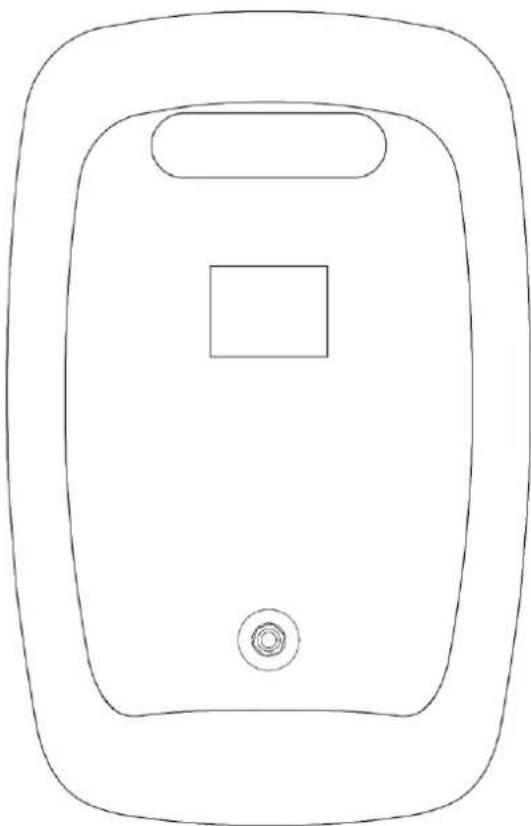
natural_image
Line drawing of a rectangular device with a square top and circular base (no text or symbols)Fig. 02
Names and Functions
Mixer

text_image
① treble ② boss ③ reverb ④ on off ⑤ volume ⑥ line ⑦ mic on off volume ⑧ mic channel 1 channel 2Fig. 03
① CH1/CH2 treble control
Turn the control to set the treble level.
② CH1/CH2 bass control
Turn the control to set the bass level.
③ CH1/CH2 reverb control
Turn the control to set the reverb level.
④ CH1/CH2 reverb switch ON/OFF
Press the button to switch reverb on/off for CH1/CH2.
⑤ CH1/CH2 volume control
Turn the control to set the volume for CH1/CH2.
⑥ CH1/CH2 6,3 mm jack connector – line level IN
Connect a line level device.
⑦ CH1/CH2 XLR connector – microphone IN
Connect the included Combo microphone.
text_image
volume mpa 0 -∞ +10 ⑧ ⑨ volume -∞ +10 ⑩ r channel 3/4 ⑪ ⑫ ⑬ ⑭ ⑮ ⑯ ⑰ ⑱ ⑲ ⑳ ⑴ ⑵ ⑶ ipur limit master volume 0 -∞ +10 ⑮ ⑯ volume -∞ +10 ⑭ ⑮ channel 5/6Fig. 04
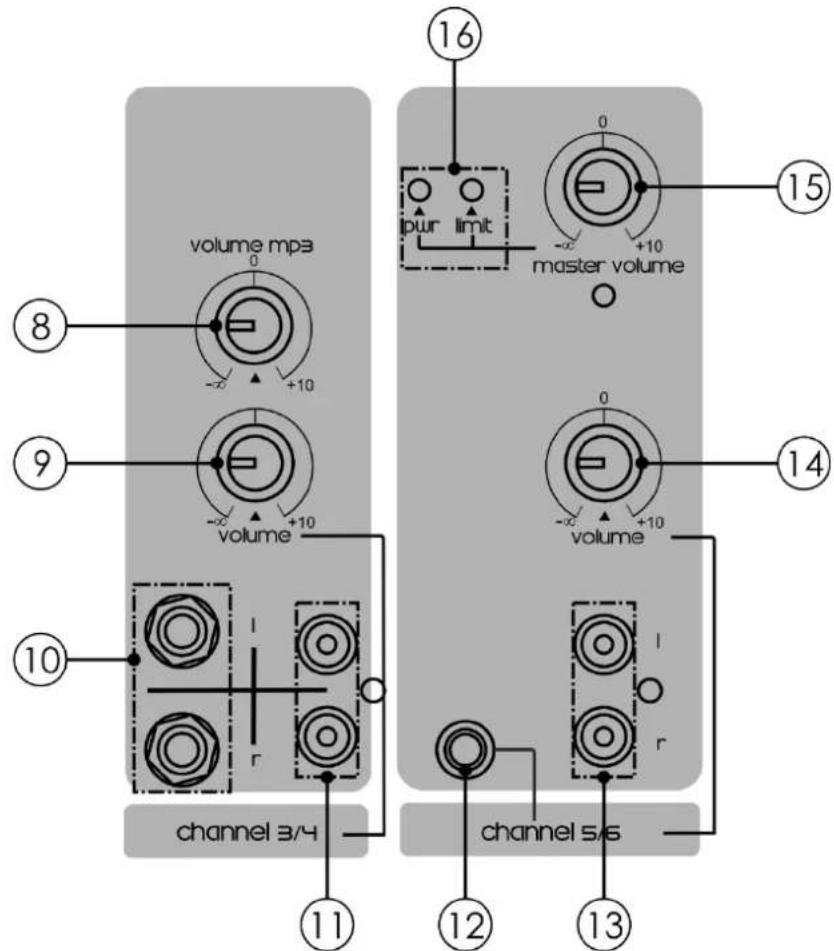
⑧ USB/SD/Tuner volume control Turn the control to set the volume for USB/SD/Tuner operation modes.
⑨ CH3/CH4 stereo volume control Turn the control to set the volume for CH3/CH4.
⑩ CH3/CH4 6,3 mm jack mono connectors left/right - line level IN Connect a line level device.
⑪ CH3/CH4 RCA unbalanced connector left/right – line level IN Connect a line level device.
⑫ CH5/CH6 3,5 mm jack stereo connector – line level IN Connect a line level device.
⑬ CH5/CH6 RCA unbalanced connector left/right – line level OUT Connect a line level device.
⑭ CH5/CH6 stereo volume control
Turn the control to set the volume for CH5/CH6.
⑮ Master volume control
Turn the control to set the volume.
⑯ LED indicators
When the PWR indicator is on, the power is on. When the LIMIT indicator lights up, it means that the device is entering clipping. Please decrease volume to avoid distortion.

text_image
MODE HOLD ON/ USB/SD BT OFF 17 18 19 20 21 22 24 23Fig. 05
⑰ SD card slot
Insert an SD card, containing music files (mp3/wav).
⑱ MODE button
Press the button to select one of the 4 operation modes: Tuner (FM), USB, SD, Bluetooth.
⑲ Play/Pause button
Press the button to start/pause playback (USB/SD mode) or start auto tuning (Tuner mode).
20 Repeat button
Press the button to set the desired repeat mode (USB/SD mode).
②1 Seek/skip backward button
Press the button to skip tracks backward. Press and hold down the button to rewind the currently selected track (USB/SD mode) or tune to the previous strongest station (Tuner mode). Repeatedly press the button to select the previous track (USB/SD mode) or the previous radio station (Tuner mode).
②2 Seek/skip forward button
Press the button to skip tracks forward. Press and hold down the button to fast forward the currently selected track (USB/SD mode) or tune to the next strongest station (Tuner mode). Repeatedly press the button to select the next track (USB/SD mode) or the next radio station (Tuner mode).
②3 USB A connector IN
Connect a USB flash drive, containing music files (mp3/wav).
②4 LED display

text_image
L R 26 27 25 + +Fig. 06
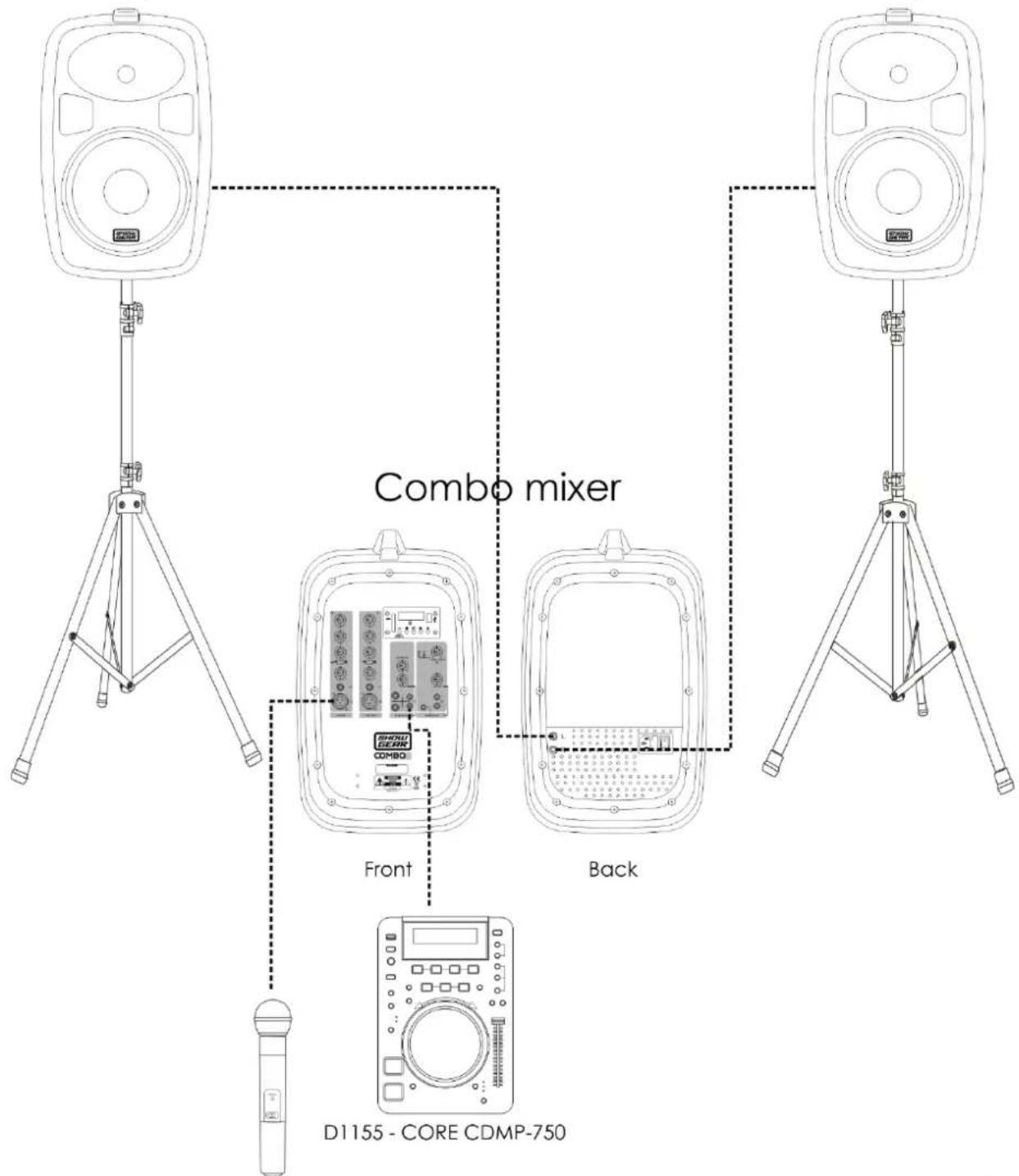
25 6,3 mm jack connectors – speaker OUT
Connect the included Combo speakers (left/right).
②6 IEC 230V AC power connector + Fuse F1,6AL/250V
27 Power switch ON/OFF
Speakers

natural_image
Simple line drawing of a rectangular device with a square top and circular base, no text or symbols present.Fig. 07

6,3 mm jack connector IN
Connect the speaker to the included Combo mixer.
Installation
Remove all packing materials from the Combo 8, 8" Portable Soundsystem. Check that all foam and plastic padding is removed. Connect all cables.
Always disconnect from electric mains power supply before cleaning or servicing. Damages caused by non-observance are not subject to warranty.
Set Up and Operation
Before plugging the unit in, always make sure that the power supply matches the product specification voltage. The power supply is printed on the back of the device.
Do not attempt to operate an 115V specification product on 230V power, or vice versa.
Connection
01) Press the power switch (27) to turn off the device.
02) Connect the Combo to the other devices which you plan to use.
CAUTION: Make sure that the power is off, when connecting the cables.
AC Power
01) Make sure the power switch (27) is in off position.
02) Plug one end of an IEC to Schuko power cable into the IEC input connector (26) and the other end into an appropriate power supply.
03) Press the power switch (27) to turn the device on.
Stand-by Mode
01) When the device is on, press and hold down the MODE button (18) for 2 seconds. The device will enter stand-by mode.
02) Repeat step 1 to switch the device on again.
Control Modes
1. Tuner Mode
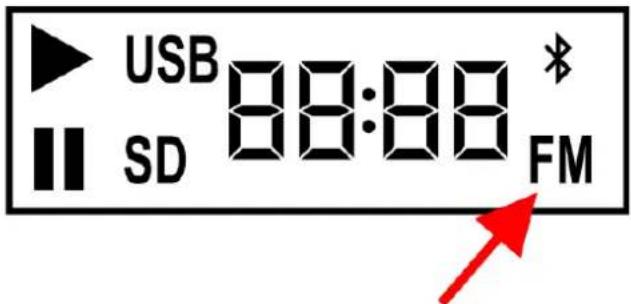
01) Press the MODE button (18) until the display shows FM.
text_image
USB 88:88 * SD FMAuto Tuning
01) Press and hold down the ▶II button for 3 seconds. The device will initiate auto tuning, which will stop every time a strong radio signal is found and stored.
02) It is also possible to stop auto tuning manually. In order to do so, press the ▶II button.
Tuning
01) Press and hold down the ◀◀ or ▶▶l button for 3 seconds. The device will initiate a backward or forward tuning and will stop every time a strong radio signal is found.
02) To manually stop tuning, press the ▶|| button.
Selecting Radio Stations
While in Tuner mode, press the ◀◀ and ▶▶I buttons to toggle through the programmed radio stations.
2. USB/SD mode
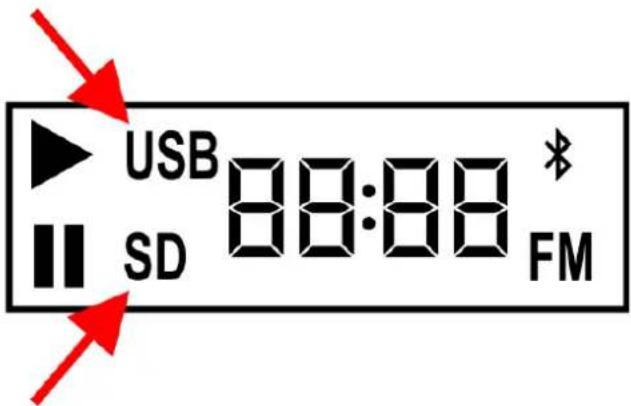
01) Press the MODE button (18) until the display shows USB or SD, depending on the preferred music source.
text_image
USB SD 88:88 * FM02) Insert a USB flash drive into the USB slot (23) or an SD card into the SD slot (17).
03) The device will now search for the supported music files (mp3/wav).
Selecting Tracks
01) Press the ◀◀ button to skip to the previous track or restart the currently selected track.
02) Press the ▶▶I button to skip to the next track.
03) Playback will begin automatically, once a new track has been selected.
Starting/Pausing Playback
01) Press the ▶ button to start playback.
02) Press the button again to pause playback.
03) Press the button again to resume playback.
Repeat Mode
01) While in USB or SD mode, press the ◀ ➤ button to select the desired repeat mode.
02) There are 4 available repeat modes:

Single track: repeats a single track several times

Random: repeats all tracks in random order

All: repeats all tracks

Folder: repeats the currently selected folder
3. Bluetooth Mode
01) Press the MODE button (18) until the display shows:

text_image
bt * *02) The Bluetooth logo will be blinking.
03) Activate Bluetooth function on your external device, search for available Bluetooth devices and pair your external device with the Combo 8 speaker (device name: Bluetooth).
04) The Bluetooth logo on the display will now stop blinking and will be continuously on. It means that the Combo 8 speaker and your Bluetooth device have been successfully paired.
05) Play music on your Bluetooth device and it will be audible on the Combo 8 speaker.
06) Only one Bluetooth device can be paired with one Combo 8 speaker.
Tips For Achieving Maximum Performance
- Keep the distance between the paired Bluetooth devices as short as possible.
- Avoid placing the Bluetooth devices near metal surfaces and obstructions.
- Perform a walk-through before performance or presentation. If dead spots are found, adjust the location of the Bluetooth devices. If dead spots remain, mark the dead spots and avoid them.
Connection Example
Combo speaker
text_image
Combo mixer Front Back D1155 - CORE CDMP-750Fig. 08
Connection Cables
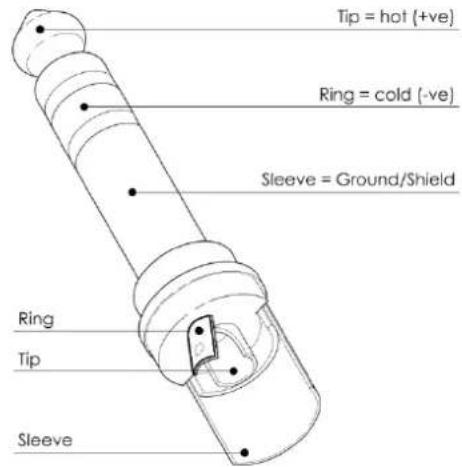
Take care of your cables, always holding them by the connectors and avoiding knots and twists when coiling them: This gives the advantage of increasing their life and reliability.
Periodically check your cables. A great number of problems (faulty contacts, ground hum, discharges, etc.) are caused entirely by using unsuitable or faulty cables.
Unbalanced

text_image
Tip = Signal Sleeve = Ground/Shield Tip SleeveBalanced
text_image
Tip = hot (+ve) Ring = cold (-ve) Sleeve = Ground/Shield Ring Tip SleeveFor these applications the unit provides 1/4" TRS and XLR connectors to easily interface with most professional audio devices. Follow the configuration examples below for your particular connection.

text_image
Pin 1 - Ground Pin 2 - Hot Pin 3 - Cold Pin 1 - Ground Pin 2 - Hot Pin 3 - Cold Tip - Hot Ring - Cold Sleeve - Ground Tip - Hot Sleeve - Ground Pin 1 - Ground Pin 2 - Hot Pin 3 - Cold Pin 1 - Ground Pin 2 - Hot Pin 3 - ColdMaintenance
The Showgear Combo 8, 8" Portable Soundsystem requires almost no maintenance.
However, you should keep the unit clean.
Disconnect the mains power supply, and then wipe the cover with a damp cloth. Do not immerse in liquid. Do not use alcohol or solvents.
Keep connections clean. Disconnect electric power, and then wipe the audio connections with a damp cloth. Make sure connections are thoroughly dry before linking equipment or supplying electric power.
Replacing the Fuse
Power surges, short-circuit or inappropriate electrical power supply may cause a fuse to burn out. If the fuse burns out, the product will not function whatsoever. If this happens, follow the directions below.
01) Unplug the unit from electric power source.
02) Insert a screwdriver into the slot in the fuse cover. Gently pry up the fuse cover. The fuse will come out.
03) Remove the used fuse. If brown or unclear, it is burned out.
04) Insert the replacement fuse into the holder where the old fuse was. Reinsert the fuse cover. Be sure to use a fuse of the same type and specification. See the product specification label for details.
Troubleshooting
No Sound
Always check if all the cables and cords are connected. Always turn off power to the area before checking the wires, to prevent electric shock.
If everything works properly and there is still no sound, revisit the manufacturer's instructions to make sure they were followed during installation. If everything was installed correctly and there is still no sound, you may want to consider bringing in a professional to take a look at your speaker.
If the speaker does not operate properly, refer servicing to a technician.
Suspect three potential problem areas as: the power supply, the speaker, the fuse.
01) Power supply. Check if the unit is plugged into an appropriate power supply.
02) The speaker. Return the Venga to your Showgear dealer.
03) The fuse. Replace the fuse. See page 16 for replacing the fuse.
04) If all of the above appears to be O.K., plug the unit in again.
05) If you are unable to determine the cause of the problem, do not open the Venga, as this may damage the unit and the warranty will become void.
06) Return the device to your Showgear dealer.
Product Specifications
| Power supply: | 90-250V AC, 50Hz |
| Woofer size: | 8" |
| Horn driver: | 1" |
| Horn coverage: | 90° H x 45° V |
| Continuous power: | 150W (2 x 75W) |
| Frequency response: | 20Hz - 18kHz |
| SPL @1m: | 96dB +/- 2dB |
| Connections: | RCA IN; XLR mic 1/2 IN; 6,3 mm jack IN; 3,5 mm jack IN |
| Housing: | Plastic cabinet, rubber feet, ergonomic handle |
| Color: | Black |
| Mounting: | 35 mm pole mount |
| Fuse: | F1,6AL/250V |
| Dimensions: | 450 x 250 x 605 mm (LxWxH) |
| Weight: | 12 kg |
Design and product specifications are subject to change without prior notice.
CE
Email: service@highlite.nl
Dimensions

text_image
605 mm 450 mm 250 mm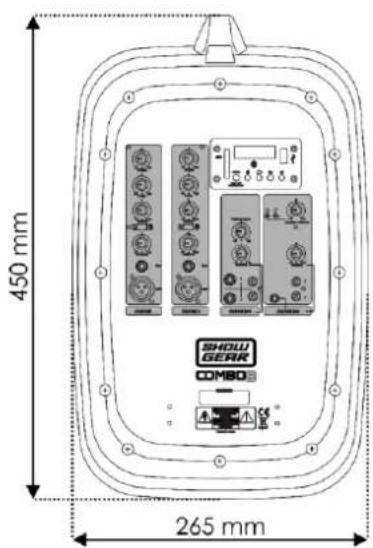
text_image
450 mm 265 mm SHOW GEAR COMBO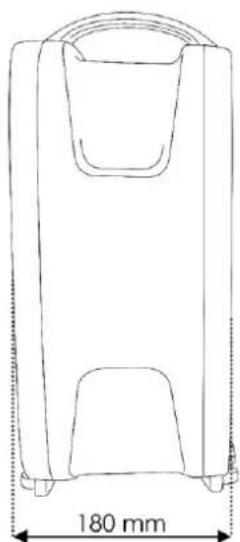
natural_image
Line drawing of a rectangular device with a handle and two internal compartments, labeled with a 180 mm dimension (no text or symbols on the device itself)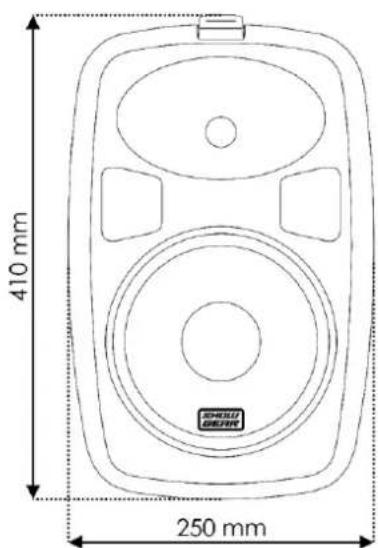
text_image
410 mm 250 mm