CN-E 30-105mm T2.8 L S - Lens CANON - Free user manual and instructions
Find the device manual for free CN-E 30-105mm T2.8 L S CANON in PDF.


User questions about CN-E 30-105mm T2.8 L S CANON
0 question about this device. Answer the ones you know or ask your own.
Ask a new question about this device
Download the instructions for your Lens in PDF format for free! Find your manual CN-E 30-105mm T2.8 L S - CANON and take your electronic device back in hand. On this page are published all the documents necessary for the use of your device. CN-E 30-105mm T2.8 L S by CANON.
USER MANUAL CN-E 30-105mm T2.8 L S CANON
CN-E30-105mm T2.8 L S CN-E30-105mm T2.8 L SP
取扱説明書
OPERATION MANUAL
使用说明书

natural_image
Close-up of a Canon 30-105 high-speed dual-lens camera lens (no text or symbols on body)Read this operation manual before using the product.
Keep the manual in place for future reference.
natural_image
Two cylindrical objects aligned on a horizontal surface, one with a slightly thicker end and the other with a thinner end (no text or symbols)ズーム/フォーカスレバー
natural_image
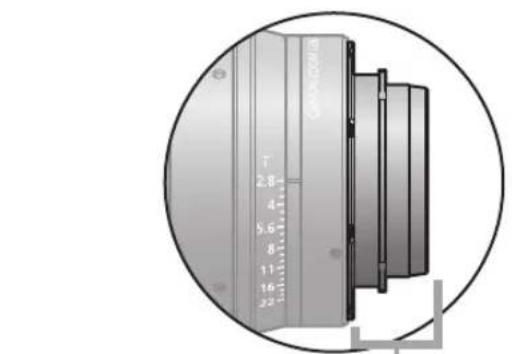
Close-up of a cylindrical mechanical component with measurement markings, enclosed in a circular frame (no visible text or symbols)PL マウント (SP タイプ)
F.B.(フランジバック)調整
natural_image
Mechanical assembly diagram showing a piston-cylinder mechanism with a 360° angle indicator (no text or symbols on the diagram itself)3
natural_image
Technical line drawings of a camera module with lens assembly (no text or symbols)
注意
natural_image
Technical illustration of a camera lens mounted on a base unit, showing mechanical components and motion direction (no text or symbols)2
natural_image
Technical illustration of a camera lens mounted on a base unit, showing mechanical components and motion direction (no text or symbols)アクセサリー取付け寸法
单位:mm
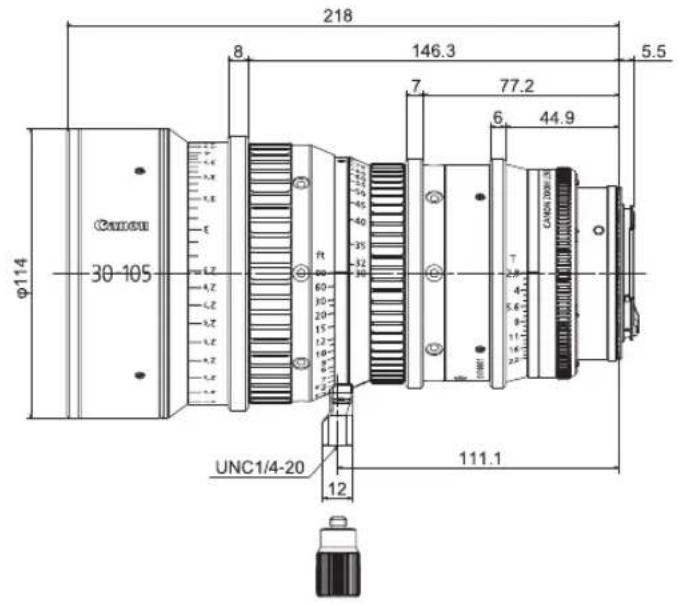
Sタイプ(EFマウント)
text_image
φ114 30-105 8 218 146.3 7 77.2 6 44.9 5.5 ft UCN1/4-20 12 111.1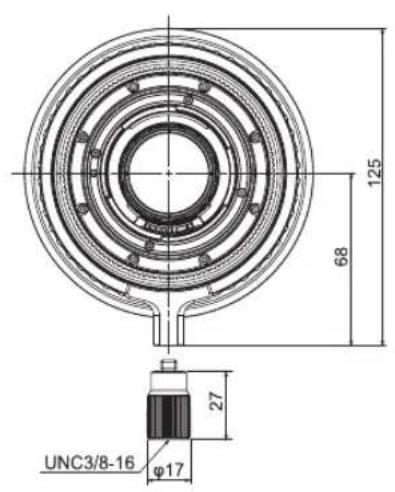
text_image
125 68 27 UNC3/8-16 φ17SPタイプ(PLマウント)
text_image
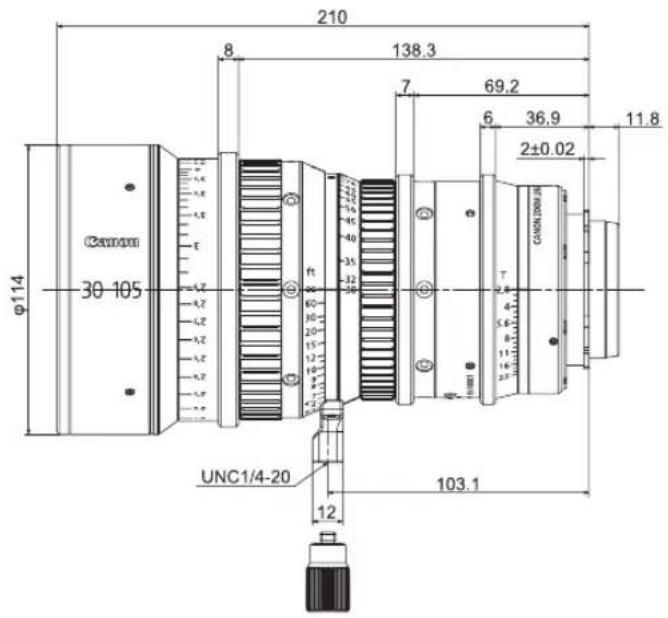
210 8 138.3 7 69.2 6 36.9 11.8 φ114 30 105 ft 60 30 20 15 12 UNC1/4-20 12 103.1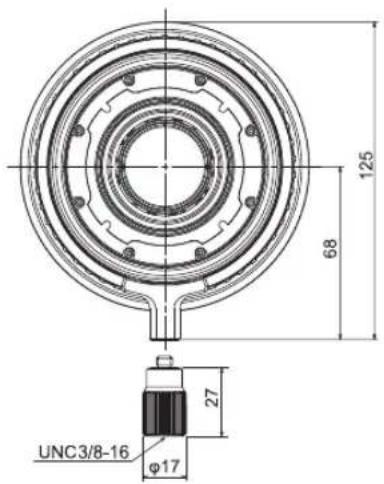
text_image
125 68 27 UNC3/8-16 φ17ギア仕様
GENERAL SAFETY INFORMATION .....4
Product Configuration ....6
Names of Parts ....7
F.B. (Back Focus) Adjustment ....8
Available Accessories 10
Dimensions of Parts 12
Specifications 13
Appendix External view ...... apx. 2
FCC REGULATIONS
This device complies with Part 15 of the FCC Rules. Operation is subject to the following two conditions: (1) This device may not cause harmful interference, and (2) this device must accept any interference received, including interference that may cause undesired operation.
Note: This equipment has been tested and found to comply with the limits for a Class B digital device, pursuant to Part 15 of the FCC Rules. These limits are designed to provide reasonable protection against harmful interference in a residential installation. This equipment generates, uses and can radiate radio frequency energy and, if not installed and used in accordance with the instructions, may cause harmful interference to radio communications. However, there is no guarantee that interference will not occur in a particular installation. If this equipment does cause harmful interference to radio or television reception, which can be determined by turning the equipment off and on, the user is encouraged to try to correct the interference by one or more of the following measures:
-- Reorient or relocate the receiving antenna.
-- Increase the separation between the equipment and receiver.
-- Connect the equipment into an outlet on a circuit different from that to which the receiver is connected.
-- Consult the dealer or an experienced radio/TV technician for help.
Do not make any changes or modifications to the equipment unless otherwise specified in the manual. If such changes or modifications should be made, you could be required to stop operation of the equipment.
Canadian Radio Interference Regulations
CAN ICES-3(B)/NMB-3(B)
European Union (and EEA) only.

This symbol indicates that this product is not to be disposed of with your household waste, according to the WEEE Directive (2002/96/EC) and your national law. This product should be handed over to a designated collection point, e.g., on an authorized one-for-one basis when you buy a new similar product or to an authorized collection site for recycling waste electrical and electronic equipment (EEE). Improper handling of this type of waste could have a possible negative impact on the environment and human health due to potentially hazardous substances that are generally associated with EEE. At the same time, your cooperation in the correct disposal of this product will contribute to the effective usage of natural resources. For more information about where you can drop off your waste equipment for recycling, please contact your local city office, waste authority, approved WEEE scheme or your household waste disposal service.
Your cooperation in the correct disposal of this product will contribute to the effective usage of natural resources and will avoid incurring administrative sanctions according to art. 50 and following of Italian legislative decree 22/97.
For more information regarding return and recycling of WEEE products, please visit www.canon-europe.com/environment.
(EEA: Norway, Iceland and Liechtenstein)
GENERAL SAFETY INFORMATION
The safety warnings and cautions provided on the product or in this operation manual must be observed.
Failure to observe these warnings and cautions provided to guard against hazards may result in injury or accident.
Read this operation manual carefully to familiarize yourself with its contents and ensure that you can operate the product properly.
Also, store this manual in a safe place where it can easily be referenced whenever required.
This operation manual uses the following symbols and terms to identify hazards to protect you and others by preventing the occurrence of accidents.

WARNING
This indicates a potentially hazardous situation which, if not heeded, may result in death or serious injury to you or others. Be sure to heed all warning notices to ensure safe operation at all times.

CAUTION
Indicates hazardous situations which, if not heeded, may result in minor or moderate injury to you or other persons, or damage to your property.
NOTE
Emphasizes essential information which, if not heeded, may render the product unworkable or cause it to function improperly.
Also, provides helpful information for operation.
HANDLING THE PRODUCT

WARNING
- Do not stare at the sun or other source of high-intensity light through the lens. Doing so could injure your eyes.

CAUTION
-
Make sure all mountings are tightened securely. If any of these mountings becomes loose, the lens may fall, possibly causing injury.
-
Inspect all mountings periodically (about every 6 months to 1 year) to make sure they are securely tightened, and tighten any loose parts. Otherwise, the lens may fall, possibly causing injury.
-
If it becomes necessary to repair this product, or to perform any operations or adjustments not mentioned in this operation manual, contact Canon's representative or the dealer who originally supplied the lens.
NOTE
-
Protect the lens from strong impacts or shocks. Striking or dropping the lens may result in a malfunction.
-
Do not bring the lens, kept in a very cold ambient temperature, into a warm room, because the lens may fog on the inside or condensation may occur. In these cases, the lens cannot be used until these problems clear. If the lens must be used under such conditions, countermeasures are recommended.
MAINTENANCE AND INSPECTION
NOTE
- Gently blow or brush away dust or dirt on the lens surface using a lens blower or a soft lens brush. Remove any fingerprints or other stains with a soft clean cotton cloth moistened with commercially available lens cleaning fluid or lens cleaning paper. Be careful not to rub dust across the lens, as the lens surface may be scratched.
- A periodic inspection about once a year is recommended.
The inspection and maintenance interval depends on the operating conditions, the frequency of use, and the environment. If required, overhaul the lens.
STORAGE

CAUTION
- Always attach the lens cap (or hood cap) and the dust cap before storing the lens. Storing the lens without these caps attached may present a fire hazard. (Very bright light, such as sunlight, may be focused by the lens and cause a fire.)
NOTE
- If the lens becomes damp because of use in fog, mist, or drizzle, wipe off the moisture with a soft dry cloth and seal the lens together with an effective desiccant in a vinyl bag to remove moisture that has entered the interior.
TO THE CUSTOMER
- Canon shall bear no responsibility for damage resulting from improper operation of this product by the customer.
- Canon shall make no guarantees about the product quality, functions, or operation manual and its marketability and suitability for the customer's purpose.
Moreover, Canon shall bear no responsibility for any damage, direct or incidental, that results from usage for the customer's purpose. - Canon shall make no guarantees about the results obtained using this product.
- The product specifications, configuration, and appearance are subject to change without prior notice.
- For further information on repairs, maintenance, or adjustments not mentioned in this operation manual, contact your Canon dealer or your Canon sales representative.
- Note that Canon may be unable to undertake servicing or repair of a product if it is modified without consulting Canon or your Canon sales representative.
CANON INC.
30-2, Shimomaruko 3-chome, Ohta-ku, Tokyo 146-8501, Japan
Canon Europe Ltd
3 The Square, Stockley Park, Uxbridge, Middlesex, UB11 1ET UK
Product Configuration
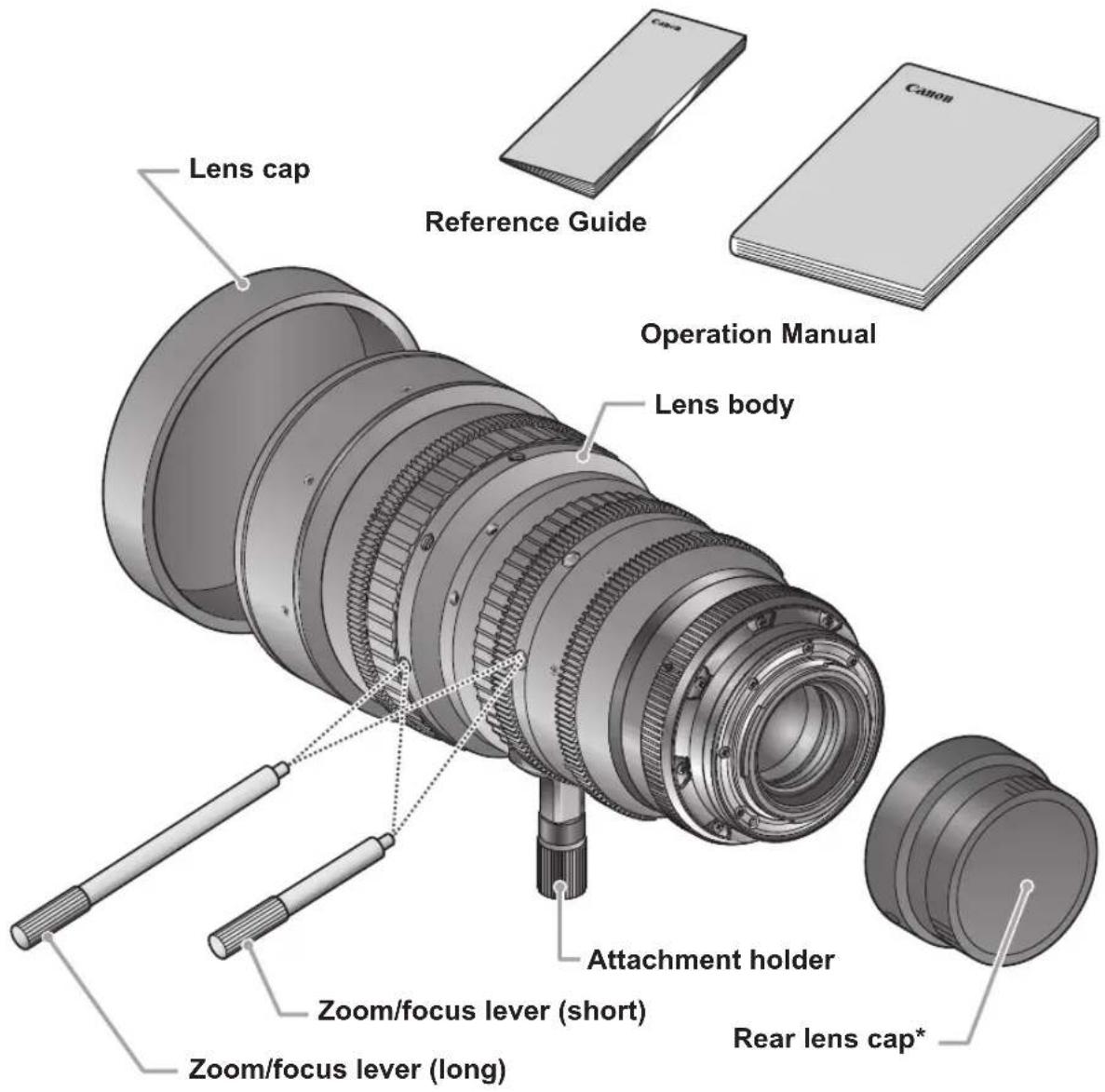
Two types of the CN-E30-105mm T2.8 L are available for the positive lock mount (S type) and the Canon EF mount (SP type). Figures in this manual are for the S type lens unless otherwise mentioned.
Lens body ....1
Lens cap ....1
Zoom/focus lever (short) ....1
Rear lens cap ....1
Zoom/focus lever (long) ....1
Operation Manual ....1
Attachment holder ....1
Reference Guide ....1
text_image
Lens cap Reference Guide Operation Manual Lens body Attachment holder Zoom/focus lever (short) Zoom/focus lever (long) Rear lens cap** The shape of the rear lens cap for the SP type differs from the figure above.
Names of Parts
Focus drive gear
Number of teeth: 133
Module: 0.8 metric module
P.C.D.: 106.4 mm
Angular rotation: 300°
Zoom drive gear
Number of teeth: 111
Module: 0.8 metric module
P.C.D.: 88.8 mm
Angular rotation: 93.5°
Iris drive gear
Number of teeth: 111
Module: 0.8 metric module
P.C.D.: 88.8 mm
Angular rotation: 55°

text_image
Canon 30-105 Angular rotation: 93.5° Module: 0.8 metric module P.C.D.: 88.8 mm Angular rotation: 55° F.B. adjuster cover Lens holder Attachment holder EF mount (S type)
text_image
Zoom/focus levers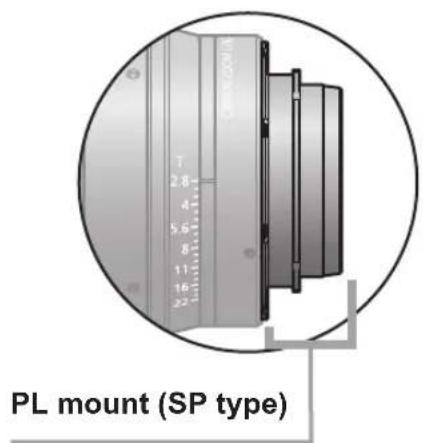
text_image
PL mount (SP type)F.B. (Back Focus) Adjustment
F.B. (back focus) of this lens can be adjusted in the following procedures.
Before starting, select an object with sharp contrast at a distance* that facilitates the
adjustment work.
* Recommended object distance range: 6 to 12 ft.
1
Remove three screws and remove the F.B. adjuster cover as in the right figure.
Note: Be sure to keep the screws for later reattachment.

text_image
6 to 12 ft. Screws x 3 F.B. adjuster cover2
Mount the lens on the camera and turn two F.B. adjuster screws counterclockwise one revolution as in the right figure.

CAUTION
Be sure to securely mount the lens on the camera mount.
Note: Be sure not to remove the screws.

text_image
Screws x 2 360 degrees3
Turn the iris ring to set the iris to fully open (T2.8).
4
Turn the zoom ring to set the lens to the telephoto end, then turn the focus ring to bring the object into focus.
5
Turn the zoom ring to set the lens to the wide angle end, then turn the F.B. adjuster to bring the object into focus.
Note: Be sure not to move the focus ring at this time.

text_image
Use the index mark and adjuster scale for back focus adjustment. F.B. adjuster6
Repeat steps 4 and 5 two or three times.
7
Secure the F.B. adjuster and reattach the F.B. adjuster cover following the reverse procedure.
Available accessories
A variety of professional camera accessories are available using 15 mm and 19 mm rod adaptors.
(When using a 19 rod, attach the supplied attachment holder to the lens holder.)

CAUTION
Be sure to use the lens holder when mounting the lens on a camera. Be sure to avoid applying excessive weight to the lens mount when the lens is mounted on a lens support.

natural_image
Technical line drawings of a camera module with lens assembly (no text or labels)1
Attach the lens to the camera tightly so that both mounting surfaces are in complete contact.
Refer to the operation manual for the respective camera for the detailed information.
natural_image
Technical illustration of a camera lens mounted on a base unit, showing mechanical components and motion direction (no text or symbols)2
Secure the attachment holder on the lens support using the clamping screw supplied with the lens support.

text_image
Lens support3
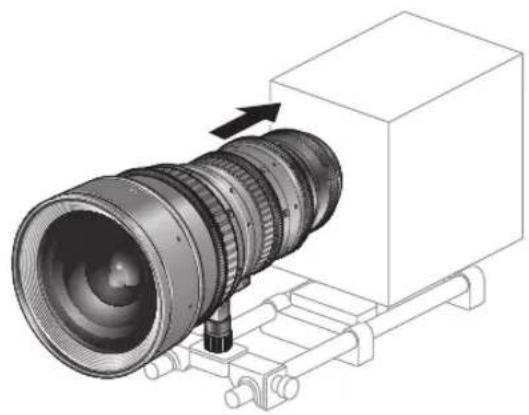
Push the lens toward the camera until both mounting surfaces are in complete contact and clamp the lens support to the rods.

natural_image
Technical illustration of a camera lens mounted on a base unit, showing mechanical components and motion arrows (no text or symbols)Dimensions of parts
Unit: mm
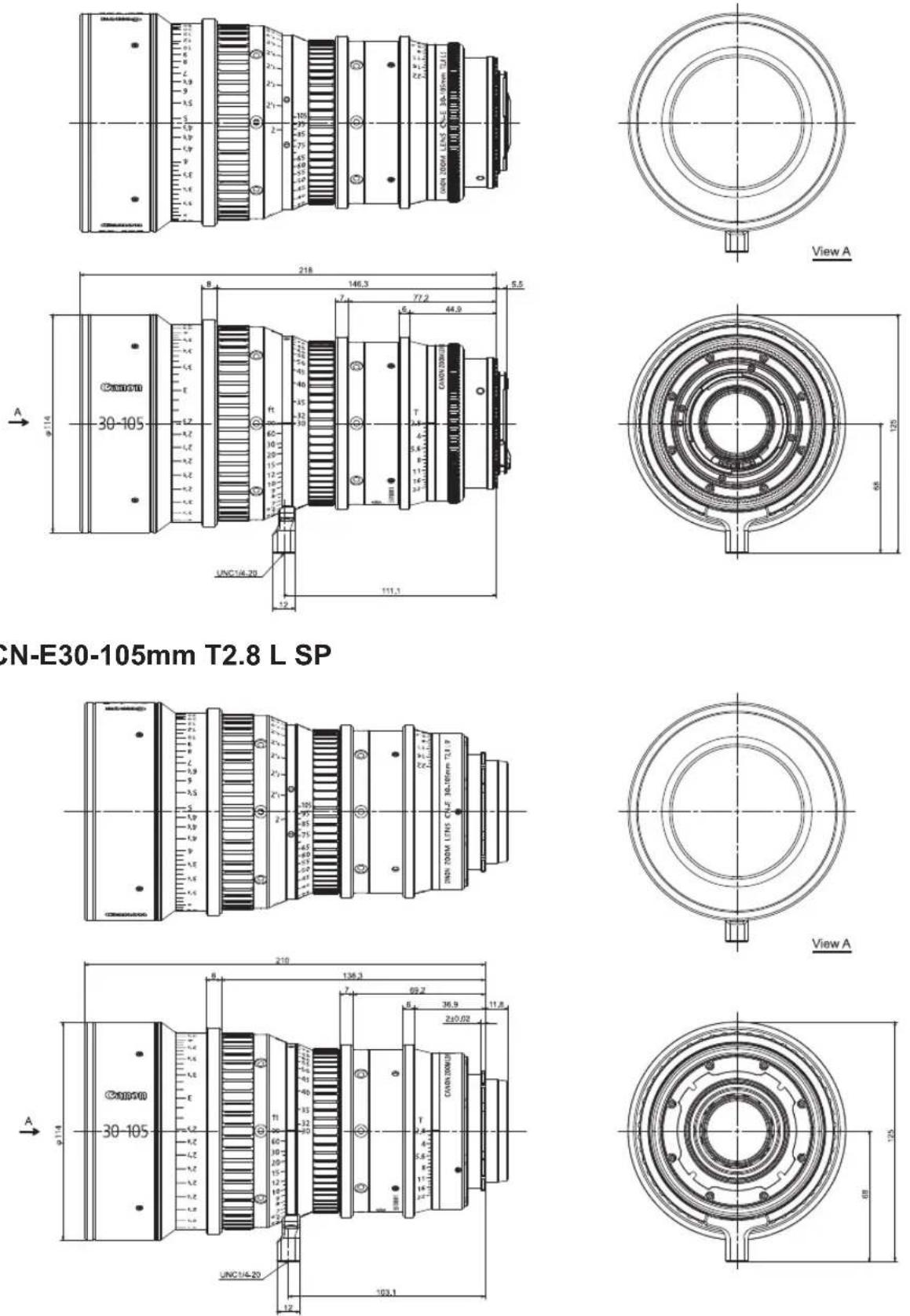
S type (EF mount)
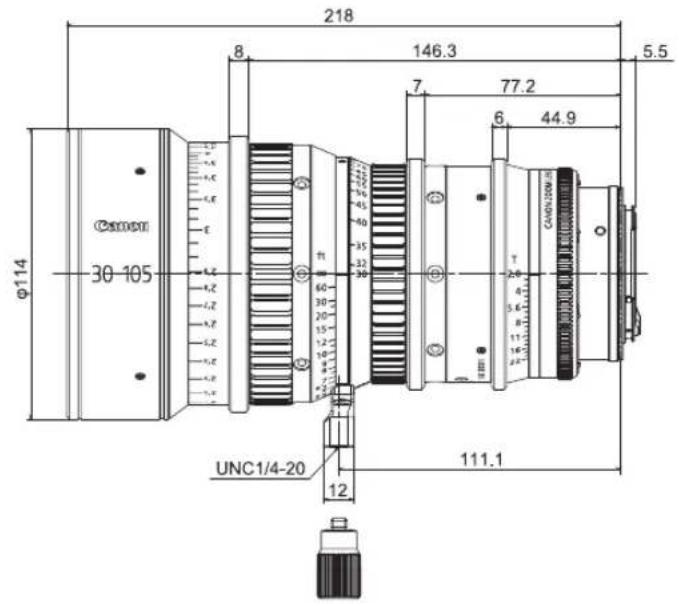
text_image
218 8 146.3 5.5 7 77.2 6 44.9 φ114 30-105 f1 30 20 15 12 10 9 8 7 6 5.6 4 3.6 2.6 T CAO/200M-10 UNC1/4-20 12 111.1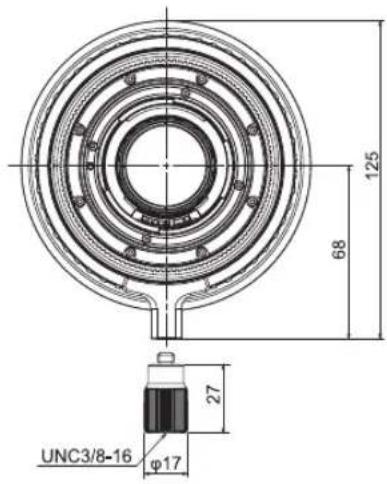
text_image
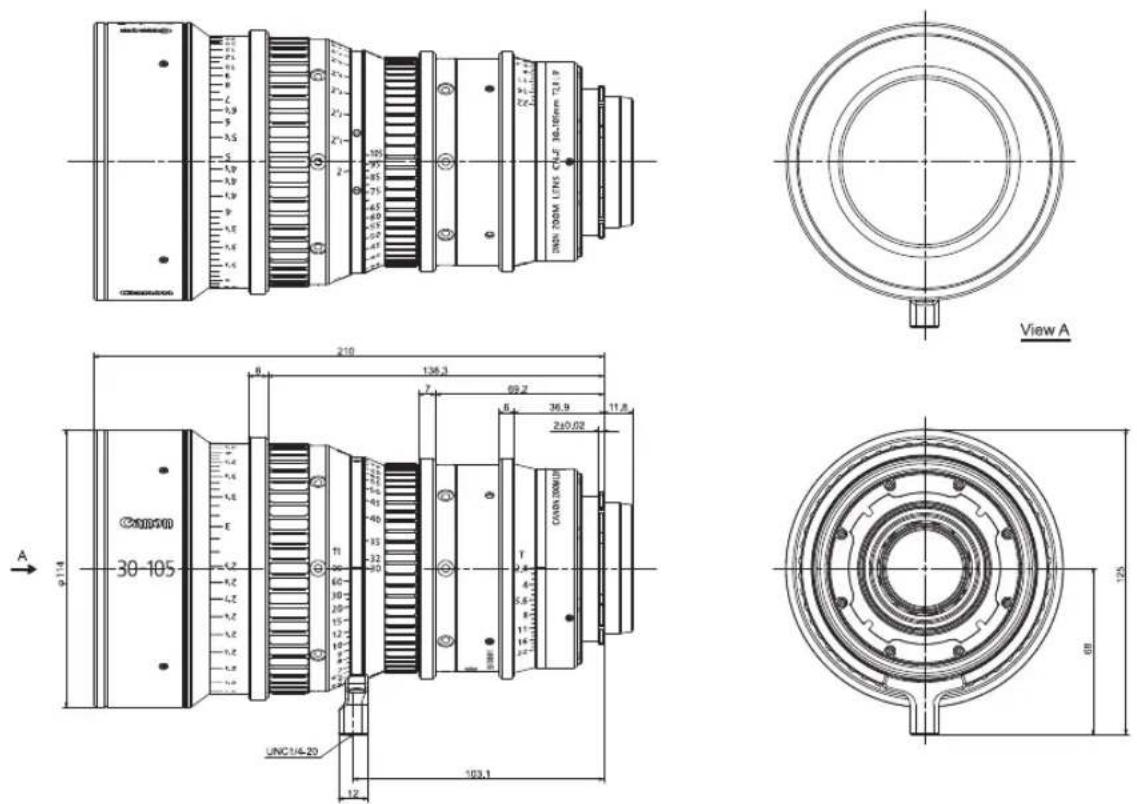
125 68 27 UNC3/8-16 φ17SP type (PL mount)

text_image
210 8 138.3 7 69.2 6 36.9 11.8 φ114 30-105 ft 60 20 15 12 10 UNC1/4-20 12 103.1
text_image
125 68 27 UNC3/8-16 φ17Spur gear specifications
| Focus drive gear Zoom drive gear Iris drive gear | |||
| Number of teeth | 133 111 111 | ||
| Module 0.8 metric module 0.8 metric module | |||
| P.C.D. 106.4 mm | 88.8 mm 88.8 mm | ||
| Angular rotation 3 | 00 degrees | 93.5 degrees | 55 degrees |
Specifications
| CN-E30-105mm T2.8 L S CN-E30-105mm T2.8 L SP | |||
| Lens Mount Canon EF PL | |||
| Focal Length 30 to 105 mm | |||
| Maximum T-stop T2.8 (f = 30 to 105) | |||
| Iris Blades 11 pieces | |||
| Coverage | Super 35mmImage Circle / H x V(1.78:1) | Φ27.5 mm/24.0 x 13.5 mm | |
| Angular Field of View(H/V) at wide angle end | 43.6 / 25.4 degrees | ||
| Angular Field of View(H/V) at telephoto end | 13.0 / 7.4 degrees | ||
| Coverage | EOS C300Image Circle / H x V(1.78:1) | Φ28.2 mm/24.6 x 13.8 mm | |
| Angular Field of View(H/V) at wide angle end | 44.6 / 25.9 degrees | ||
| Angular Field of View(H/V) at telephoto end | 13.4 / 7.5 degrees | ||
| Coverage | EOS C500Image Circle / H x V(1.9:1) | Φ29.6 mm/26.2 x 13.8 mm | |
| Angular Field of View(H/V) at wide angle end | 47.2 / 25.9 degrees | ||
| Angular Field of View(H/V) at telephoto end | 14.2 / 7.5 degrees | ||
| Minimum Object Distance(M.O.D.) | 0.6 m / (from the image sensor) | ||
| ObjectDimensions atM.O.D. | Super 35mm | 32.3 x 18.2 cm at wide angle end9.3 x 5.2 cm at telephoto end | |
| EOS C300 | 33.1 x 18.6 cm at wide angle end9.6 x 5.4 cm at telephoto end | ||
| EOS C500 | 35.3 x 18.6 cm at wide angle end10.2 x 5.4 cm at telephoto end | ||
| Focus Angular Rotation 300 degrees | |||
| Zoom Angular Rotation 93.5 degrees | |||
| Spur Gear Module 0.8 metric module | |||
| Front Diameter Φ114 mm | |||
| Length 218 mm 210 mm | |||
| Weight 2.2 kg | |||
* A variety of professional camera accessories compatible with the 15mm and 19mm rod system can be used with this lens.
* This lens is compatible with EOS cameras that have a Super 35mm or equivalent sensor, or an APS-C image sensor. The lens is not compatible with cameras that have a 35-mm full-size sensor or an APS-H sensor.
Reference Information
This lens is a full manual lens for shooting movies.
- This lens is developed primarily for movie production, and have a color balance typical for movies. This means that the color reproduction is warmer than that of EF lenses which are basically used to shoot still images. Therefore, when using both types of lens together, adjust the color balance (redo the white balance etc.) as necessary.
- In general, the depth of field becomes shallow and the focusing range becomes extremely narrow near the widest aperture and when shooting a subject at close range. In addition, this tendency increases for lenses with longer focal lengths. When shooting images, carefully check the focusing condition using the zoom mode of the finder or other means, and shoot a sufficient number of test images before performing focus operations.
(for EF mount Lens only)
- The T-numbers of this lens are indicated on the iris ring of the lens. On the other hand, the iris information from this lens to the camera uses the F-number in consideration of use together with conventional EF lenses. Therefore, the camera side displays a different value (F-number) from the indication on the iris ring of the lens.
- Information of the focal length displayed on the camera side omits the figures below the decimal point.
中文
安全使用须知 2
产品配置 4
各部位名称 5
F.B.(后焦)调整 6
可以利用的附件 8
各部位尺寸 10
规格 11
索引.... 11
Appendix(附录)
External view(外部视图)...... apx. 2
中文版使用说明书用于日本以外的国家。
安全使用须知
natural_image
Technical line drawings of a camera module with multiple lenses and frame components (no text or symbols)
注意
natural_image
Technical illustration of a camera lens mounted on a base unit, showing mechanical components and motion direction (no text or symbols)2
natural_image
Technical illustration of a camera lens mounted on a base unit, showing mechanical components and motion direction (no text or symbols)各部位尺寸
单位:mm
S型(EF基座)
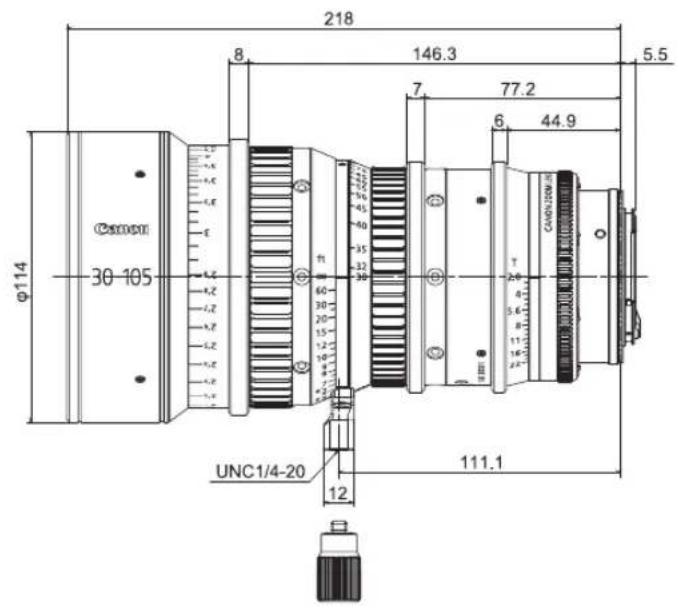
text_image
218 8 146.3 5.5 7 77.2 6 44.9 φ114 30-105 60 30 20 15 12 9 6 4 2 T CAUD/200M UNC1/4-20 12 111.1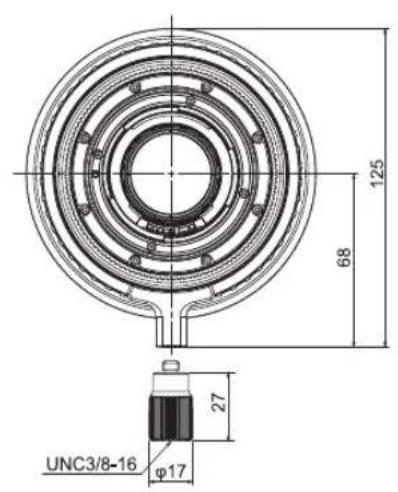
text_image
125 68 27 UNC3/8-16 φ17SP型(PL基座)

text_image
210 8 138.3 7 69.2 6 36.9 11.8 φ114 30-105 ft ACCIN 200 N UNC1/4-20 12 103.1
text_image
125 68 27 UNC3/8-16 φ17直齿轮规格
CN-E30-105mm T2.8 L S
AMERICAS
CANADA
Canon Canada, Inc.
http://www.canon.ca/pro
Canon Mexicana,S.de R.L.de C.V
http://www.canon.com.mx
+52 55 5249 4905
USA
Canon U.S.A., Inc.
http://pro.usa.canon.com
http://pro.usa.canon.com/support
(855) CINE-EOS
(855-246-3367) (USA Only)
ASIA
ASIA and HONG KONG, S.A.R.
Canon Hongkong Co., Ltd.
http://www.canon.com.hk
19/F, The Metropolis Tower, 10 Metropolis
Drive, Hunghom, Kowloon, Hong Kong
+852 3191 2333, +852 2428 3963
CHINA
佳能(中国)有限公司
SOUTH & SOUTHEAST ASIA
Canon Singapore Pte. Ltd.
http://www.canon.com.sg
BCTV
http://www.canon.com/bctv
1 HarbourFront Avenue, #04-01 Keppel Bay
Tower, Singapore 098632
(65) 6799 8888, 65) 6799 8882
JAPAN
キャノン株式会社/
キャノンマーケティングジャパン株式会社
http://canon.jp
Amstelveen, The Netherlands
Canon Europe Ltd.
http://www.canon-europe.com
3 The Square, Stockley Park
Uxbridge Middlesex
United Kingdom UB11 1ET
OCEANIA
AUSTRALIA
Canon Australia Pty Ltd.
www.canon.com.au
13-13-83 (within Australia only)
(61) 02-9805-2555
NEW ZEALAND
Canon New Zealand Ltd.
www.canon.co.nz
0800-222-666 (within New Zealand only)
C (64) 09-489-0300
Canon
キャノン株式会社
30-2, Shimomaruko 3-chome, Ohta-ku, Tokyo 146-8501, Japan
Subject to change without notice.
进口商:佳能(中国)有限公司