EXT-VGA-CAT5-142 - Informatique et périphériques Gefen - Free user manual and instructions
Find the device manual for free EXT-VGA-CAT5-142 Gefen in PDF.


User questions about EXT-VGA-CAT5-142 Gefen
0 question about this device. Answer the ones you know or ask your own.
Ask a new question about this device
Download the instructions for your Informatique et périphériques in PDF format for free! Find your manual EXT-VGA-CAT5-142 - Gefen and take your electronic device back in hand. On this page are published all the documents necessary for the use of your device. EXT-VGA-CAT5-142 by Gefen.
USER MANUAL EXT-VGA-CAT5-142 Gefen
Technical Support Hours:
8:00 AM to 5:00 PM Monday thru Friday.
Write To:
Gefen Inc.
c/o Customer Service
20600 Nordhoff St
Chatsworth, CA 91311
www.gefen.com
support@gefen.com
Notice
Gefen Inc. reserves the right to make changes in the hard ware, packaging and any accompanying doc u men ta tion without prior written notice.
2X VGA Extender is a trademark of Gefen Inc.
- Introduction
- Features
- Sender Panel Descriptions
- Receiver Panel Descriptions
- Connecting And Operating The 2X VGA Extender
- Adjusting The 2X VGA Extender
- Network Cable Wiring Diagram
- Specifications
- Warranty
Congratulations on your purchase of the 2X VGA Extender. Your complete satisfaction is very important to us.
Gefen
Gefen delivers innovative, progressive computer and electronics add-on solutions that harness integration, extension, distribution and conversion technologies. Gefen's reliable, plug-and-play products supplement cross-platform computer systems, professional audio/video environments and HDTV systems of all sizes with hard-working solutions that are easy to implement and simple to operate.
The Gefen 2X VGA Extender
The Gefen 2X VGA Extender allows you to extend VGA video at great distances, up to 1,000 feet from the video source. A single industry-standard CAT5 cable is used to carry the video signal. The 2X VGA receiver unit has two VGA video outputs, so you can connect more than one monitor if so desired at the remote location.
How It Works
You simply hook up the 2X VGA sender unit to your VGA video source using the supplied 6-foot VGA mating cable, then run your CAT-5 cable to the 2xVGA Receiver unit. At the remote end, connect your display(s) to the 2X VGA Receiver and your video will be extended fl awlessly.
OPERATION NOTES
READ THESE NOTES BEFORE INSTALLING OR OPERATING THE 2X VGA EXTENDER
- Resolutions up to WUXGA (1920 x 1200) are supported.
• Maximum extension of CAT-5 or CAT-5e distance of 1000 feet (300 meters). - Display information (EDID) is not sent back to the source. Standard VESA resolutions should be output by most computers without the need of an EDID. If using a non-VESA standard resolution or if EDID is needed, an EDID storage and relay device is necessary. Gefen recommends the use of a DVI Detective (part# EXT-DVI-EDIDN) with two VGA to DVI adapters.
Features
- Extends any VGA video source up to 1000 feet away
• Uses only one CAT-5 cable for extension
• Supports resolutions up to 1080p, 2K, and 1920 x 1200 - Allows up to 2 VGA displays at the remote end
Package Includes
(1) VGA Extender Sender Unit
(1) VGA Extender Receiver Unit
(1) 6 foot VGA Cable (M-F)
(1) 5V External Power Supply
(1) User's Manual

text_image
Gefen 2xVGA ExtenderR COLOR SHIFT ADJUST CAT-5 Red Green Blue Blue Gray FocFront Panel

text_image
VGA InputBack Panel
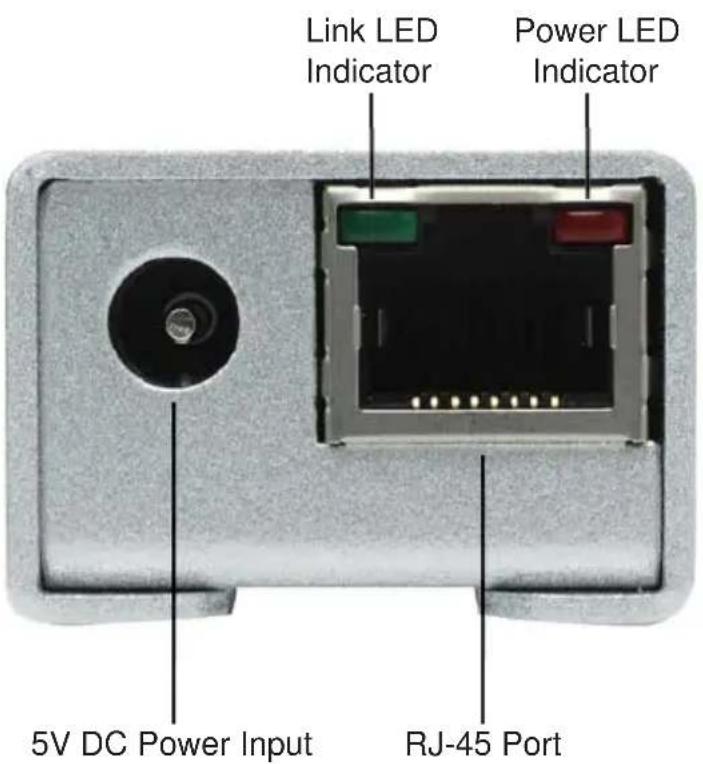
text_image
Link LED Indicator Power LED Indicator 5V DC Power Input RJ-45 PortFront Panel
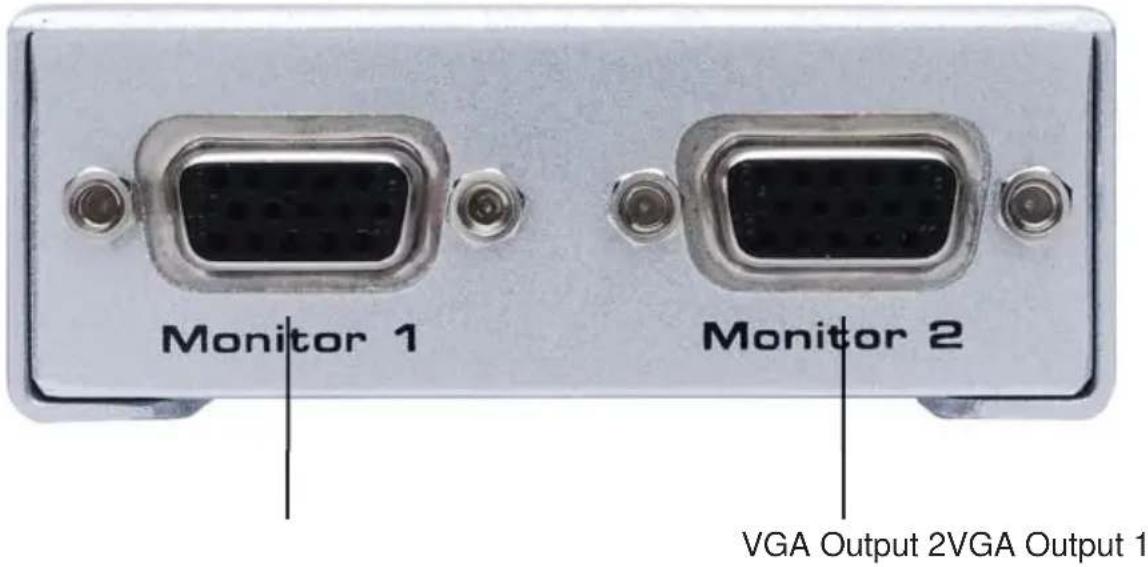
text_image
Monitor 1 Monitor 2 VGA Output 2VGA Output 1Back Panel

text_image
Link LED Indicator Power LED Indicator CAT-5 RED Green Blue BR. Focus Trim Pot RJ-45 Port Color SHIFT ADJUST Red Trim Pot Green Trim Pot Blue Trim Pot Brightness Trim PotHow to Connect the 2X VGA Extender
- Connect the VGA source to the 2X VGA Extender sender unit using the supplied VGA cable
- Connect the 2X VGA Extender sender unit and receiver unit together using a user supplied CAT-5 or CAT-5e cable.
NOTE: When terminating cabling, please adhere to the TIA/EIA-568-B specification. Please see page 7 for more details. - Connect the displays to the 2X VGA Extender using user supplied VGA cables.
- Connect the included 5V DC power supply to the 2X VGA Extender sender unit.
- Power on the display first, and the source second. The LED indicators on both the 2X VGA Extender sending and receiving units should now be lit. The receiver unit relies on power from the sender unit. If the receiver unit's LED indicators are not lit, please check the CAT-5 cabling and ensure that a proper connection has been made.
- If the image appears blurry or smeared, please refer to the next section for instructions on how to adjust the video image.
ADJUSTING THE 2X VGA EXTENDER RECEIVER
The 2X VGA Extender Receiver has a number of adjustment options to achieve optimal video quality. There are fine and coarse adjustments for focus and brightness. There is also individual color adjustments for cable skew. Please use the steps below to fine tune the video signal.
Trim Pot Adjustment Procedure
All adjustments in the following section are done via trim pots that require a small fl athead device. Please follow the steps below for instructions on how to adjust the trim pots.
- Insert a small fl athead adjustment tool into the trim pot.
- Turn the trim pot in a clockwise fashion until the trim pot stop turning. Do not force the trim pot beyond this point as it will render it useless.
- Turn the trim pot in millimeter increments in a counter-clockwise fashion until the desired adjustment point is reached.
- Remove the trim pot adjustment tool.
Brightness (AGC dip switch, Brightness trim pot)
The 2X VGA Extender receiver features an automatic gain control (AGC) for brightness. This should set the optimal brightness based on the video signal. However, manual adjustment can be done by disabling this feature. To disable AGC, remove the silver metallic tape on the underside of the 2X VGA Extender receiver to expose a 2 dip switch bank and a pair of trim pots. By default, AGC is turned on as indicated by dip switch 1 being in the ON position (Dip switch 2 is not used). Disable AGC by turning dip switch 1 to the OFF position. Adjustment to the brightness can now be done using the Brightness (Br.) trim pot, located on the back panel of the 2X VGA Extender receiver unit. Use steps 1 through 4 on the previous page to adjust the brightness trim pot.
Color Skew Correction (Red, Green, and Blue trim pots)
Varying cable quality, length, and skew may offset the convergence of the three primary colors. Red, green, and blue can individually be adjusted to compensate for cable skew. Please use steps 1 through 4 on the previous page on the trim pots for each color.
Focus (Focus and CABLE EQ trim pots)
If the image appears blurry or ghosted, the focus may need to be adjusted. Use steps 1 through 4 on the previous page on the Focus (Foc.) trim pot, located on the back panel of the 2X VGA Extender receiver unit.
The focus can be fine tuned using the CABLE EQ trim pot located on the underside of the 2X VGA Extender. Use steps 1 through 4 on the previous page to adjust the CABLE EQ trim pot.
Offset
Not for user adjustment. For service purposes only.
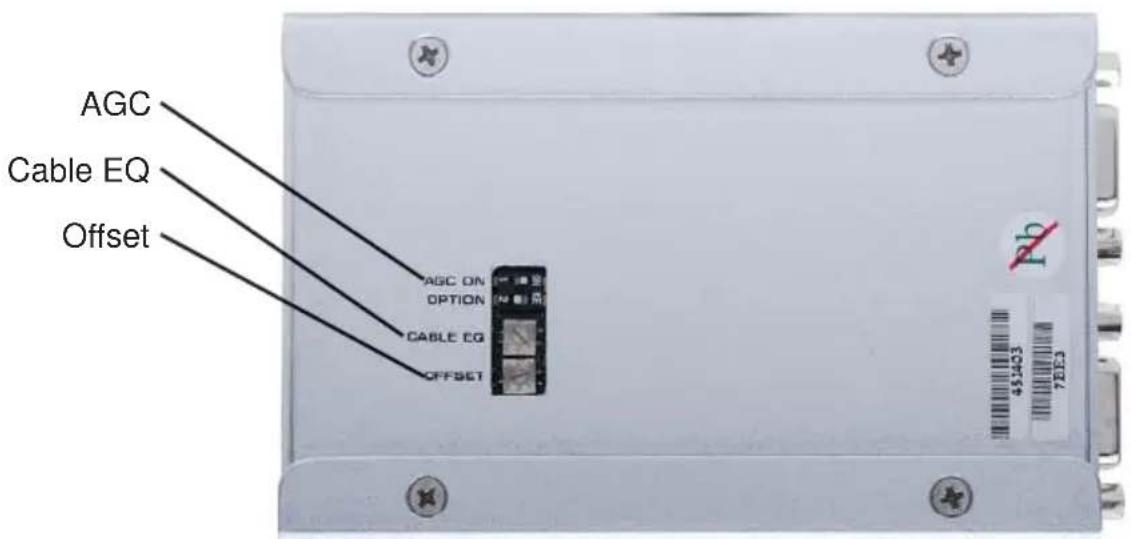
text_image
AGC Cable EQ Offset AGC ON OPTION CABLE EQ OFFSET Pb 451403 7EIE3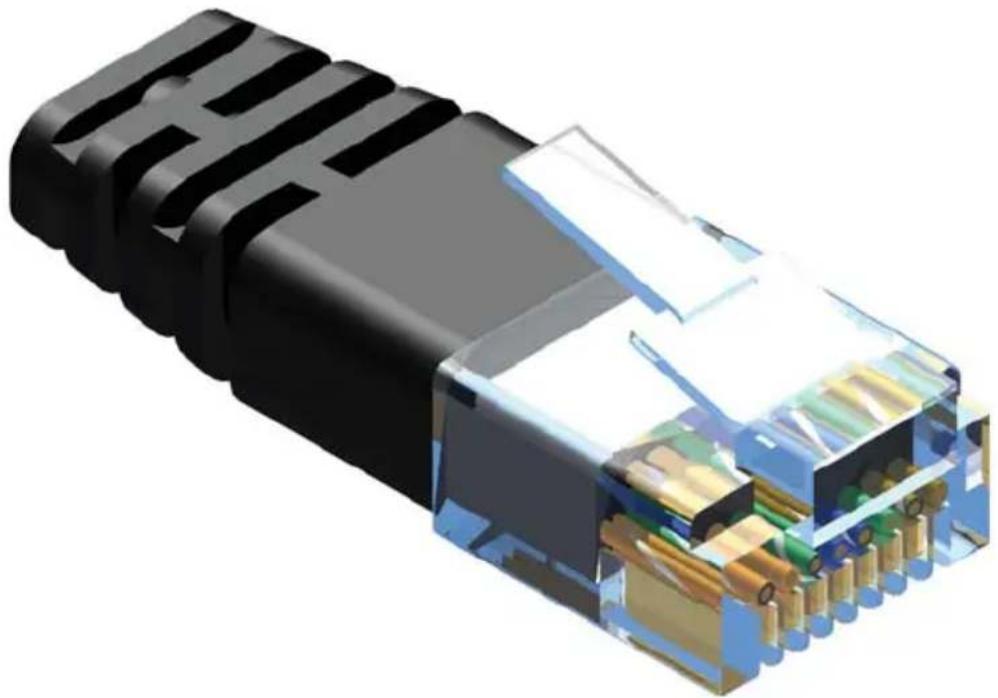
natural_image
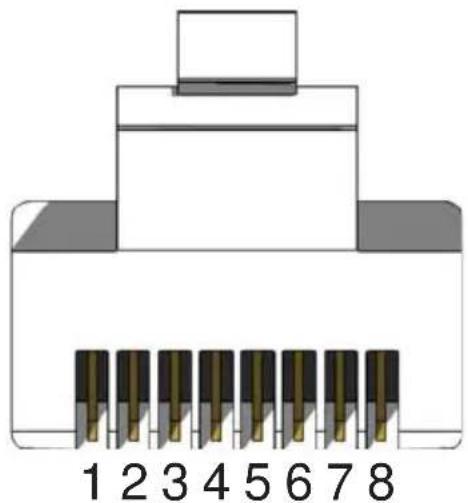
3D cutaway illustration of a black USB connector showing internal battery structure (no text or symbols)Gefen has specifically engineered their products to work with the TIA/EIA-568-B specification. Please adhere to the table below when field terminating cable for use with Gefen products. Failure to do so may produce unexpected results and reduced performance.
| Pin Color |
| 1 Orange / White |
| 2 Orange |
| 3 Green / White |
| 4 Blue |
| 5 Blue / White |
| 6 Green |
| 7 Brown / White |
| 8 Brown |
natural_image
Diagram of an Ethernet cable connector with pin numbering (1–8) and a top connector, no text or symbols present.CAT-5, CAT-5e, and CAT-6 cabling comes in stranded and solid core types. Gefen recommends using solid core cabling. CAT-6 cable is also recommended for best results.
Each cable run must be one continuous run from one end to the other. No splices or use of punch down blocks.
Video Amplifier Bandwidth 350 MHz
Input Video Signal 1.2 Volts p-p
Input Sync Signal 5 Volts p-p (TTL)
Horizontal Frequency Range 15-70 KHz
Vertical Frequency Range 30 - 170 Hz
Video In HD-15 Male
Video out ...... (2) HD-15 Female
Link Connector RJ-45 Shielded
Power Supply 5V DC
Power Consumption .... 5 Watts (max.)
Sender Dimensions 1"W x 1"H x 4"D
Receiver Dimensions 3"W x 1"H x 4"D
Shipping Weight 3 lbs.