AVE-9316 - Répartiteur AV LEVELONE - Free user manual and instructions
Find the device manual for free AVE-9316 LEVELONE in PDF.


User questions about AVE-9316 LEVELONE
0 question about this device. Answer the ones you know or ask your own.
Ask a new question about this device
Download the instructions for your Répartiteur AV in PDF format for free! Find your manual AVE-9316 - LEVELONE and take your electronic device back in hand. On this page are published all the documents necessary for the use of your device. AVE-9316 by LEVELONE.
USER MANUAL AVE-9316 LEVELONE
text_image
level® oneCAT5 A/V Extender
AVE-9300
AVE-9301
AVE-9304
AVE-9304A
AVE-9308
AVE-9316
User Manual
TABLE OF CONTENTS
Introduction
Key Features
Panel Description
✨ Installation and Operation
Specification
Order Information
Remarks
Introduction
AVE-93xx series is a broadcast system to transmit Audio and Video signals over Cat5/5e/6 cable, it can reach the distance up to 300m and by stacking more Repeaters, the whole system can extend A/V signals up to 900m. You can use different cable kit to broadcast VGA, Component, Composite, or S-video from multimedia output devices. The video quality can be adjusted very easily from the FOCUS and GAIN Control in the Receiver and Repeater. It can simplify the installation by using single Cat5/5e/6 cable and reach a longer distance; the A/V extender is a perfect extension solution for projector, plasma TV, LCD TV, LCD monitor, HDTV, and CRT, as well as in the area of Digital Signage broadcasting.
Key Features
- AVE-93xx series can send Audio and Video signals from Transmitter over Cat5/5e/6 cable, and broadcast in Receiver. The broadcasting distance is 300 meters and by stacking more Repeaters, it can extend A/V signals up to 900 meters.
- Transmitting different video type of VGA, Component, Composite, and S-Video by different cable kit
(1) PC Cable Kit: used to carry VGA Video + Audio, support all VGA format and with a maximum capacity of 2048x1536@300m
(2) HDTV Cable Kit: used to carry Component Video + Audio, support 480i. 480p, 720i, 720p, 1080i, and 1080p video format and with a maximum distance of 300m
(3) TV Cable Kit: used to carry Composite / S-Video + Audio, Support 480i, 480p and 720i video format and with a maximum distance of 300m
- Remote and local monitors and speakers can broadcast simultaneously
- Use Cat5 Enhance UTP cable (350MHz bandwidth) for better video quality
- Receiver and Repeater build in video gain and focus control to adjust the video quality
- Software free, pure hardware design, support Plug & Play
- Stackable capacity to expand the A/V broadcasting
System Devices and Function:
- One-Port Transmitter AVE-9301:
(1) Built in one set of A/V inputs
(2) Built in one set of A/V outputs to monitor the A/V signal broadcasted
(3) Built in one RJ-45 port for system output which can be connected by Cat5/5e/6 cable and send signal to Receiver
(4) Take power from power adaptor
- 4/8/16-Port Transmitter AVE-9304, AVE-9308, AVE-9316:
(1) Built in one set of A/V inputs
(2) Built in one set of A/V output to monitor the A/V signal broadcasted
(3) Built in 4/8/16 R-J45 ports for system output which can be connected by Cat5/5e/6 cable and send signal to Receiver or Repeater
- 4-Port Repeater AVE-9304A:
(4) Built in one Remote system input (RJ45) which can receive the A/V signal and with video and focus control to adjust the video quality
(5) Built in one set of A/V output to monitor the A/V signal broadcasted
(6) Built in 4 RJ-45 ports for system output which can be connected by Cat5/5e/6 cable and send signal to Receiver or Repeater
- Receiver AVE-9300:
(1) Receive A/V signal through RJ45 port, and with video and focus control, you can adjust the video quality, the maximum supported extended VGA resolution and distance up to 2048x1536@300m
(2) Built in one set of A/V outputs (VGA + Audio) to display the A/V signal broadcasted
Panel Description
1. AVE-9301 Single-Port A/V Transmitter

text_image
Level 7 One Cat.5 AV Extender POWER 1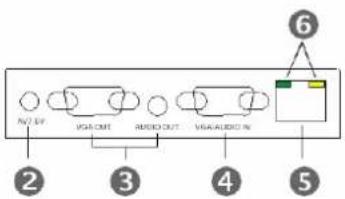
text_image
NOT VGA OUT AUDIO OUT VGA AUDIO IN ② ③ ④ ⑤ ⑥AVE-9301
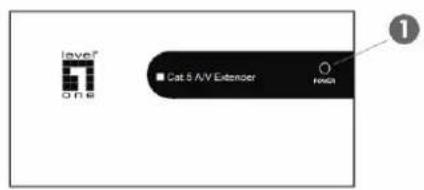
2. AVE-9300 Single-Port A/V Receiver
text_image
Level One Cat 5 A/V Extensor Touch 1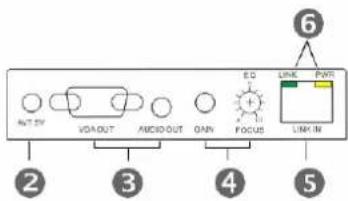
text_image
ANT.SY VOUT AVIO OUT QAN EQ LINK PART LINK IN ② ③ ④ ⑤ ⑥AVE-9300
① Power Indicator
② Power Jack
③ VGA+Audio Output
4 VGA+Audio Input
5 RJ-45 AV Output
⑥ H&V Sync Activity
① Power Indicator
② Power Jack
③ VGA+Audio Output
④ Video Control
5 RJ-45 AV Input
⑥ H&V Sync Activity
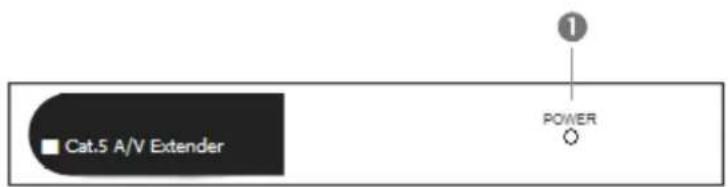
3. AVE-9304 / AVE-9308 / AVE-9316 Multi-Port A/V Transmitter
text_image
Cat.5 A/V Extender POWER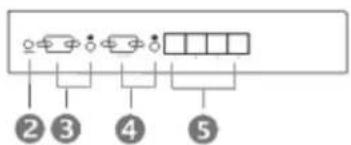
flowchart
graph TD
    A["②"] --> B["③"]
    B --> C["④"]
    C --> D["⑤"]
AVE-9304

text_image
Diagram showing labeled components or indicators with numbered labels 2 through 5, likely representing a schematic or layout.AVE-9308
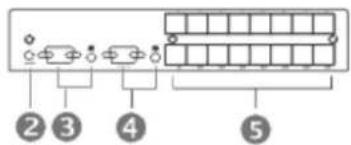
text_image
②③④⑤AVE-9316
① Power Indicator
② Power Jack
③ VGA+Audio Input
4 VGA+Audio Output
⑤ RJ-45 AV Output
- AVE-9304A Multi-Port A/V Repeater
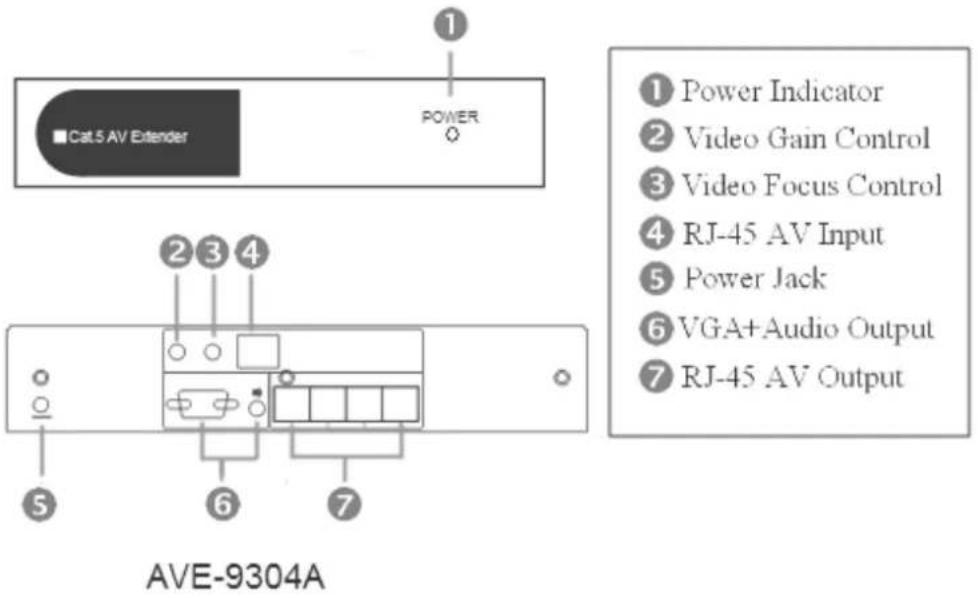
text_image
Cat 5 AV Extender POWER ① Power Indicator ② Video Gain Control ③ Video Focus Control ④ RJ-45 AV Input ⑤ Power Jack ⑥ VGA+Audio Output ⑦ RJ-45 AV Output AVE-9304A5. Cable Kits
VGA-0010
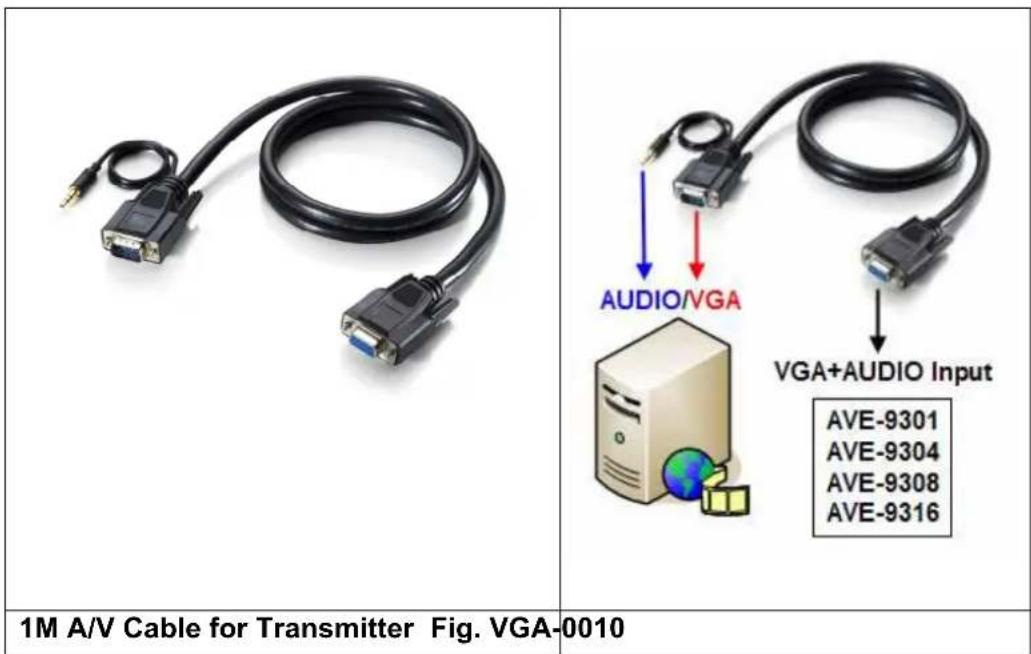
text_image
1M A/V Cable for Transmitter Fig. VGA-0010 AUDIO/VGA VGA+AUDIO Input AVE-9301 AVE-9304 AVE-9308 AVE-9316AVC-0010

text_image
AVE-9300 AUDIO/VGA Output Output Devices 1M A/V Cable for Receiver Fig. AVC-0010- RCA-9007

text_image
DVD-Player VGA+AUDIO Input AVE-9301 AVE-9304 AVE-9308 AVE-9316 0.7M RCA Cable for Player Fig. RCA-9007- RCA-9018

text_image
Output Devices (Monitor, Projector) AUDIO/VIDEO Output AVE-9300 1.8M RCA Cable for Display Fig. RCA-9018YCC-9007
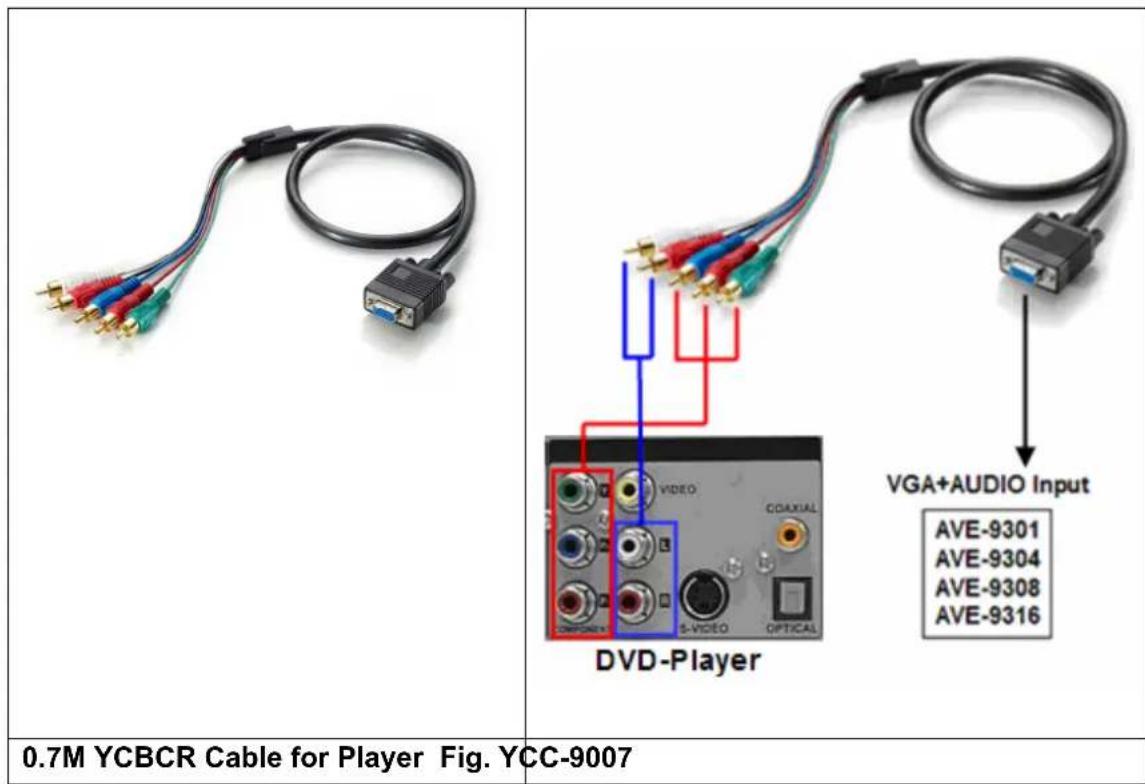
text_image
0.7M YCBCR Cable for Player Fig. YCC-9007 DVD-Player VGA+AUDIO Input AVE-9301 AVE-9304 AVE-9308 AVE-9316YCC-9018
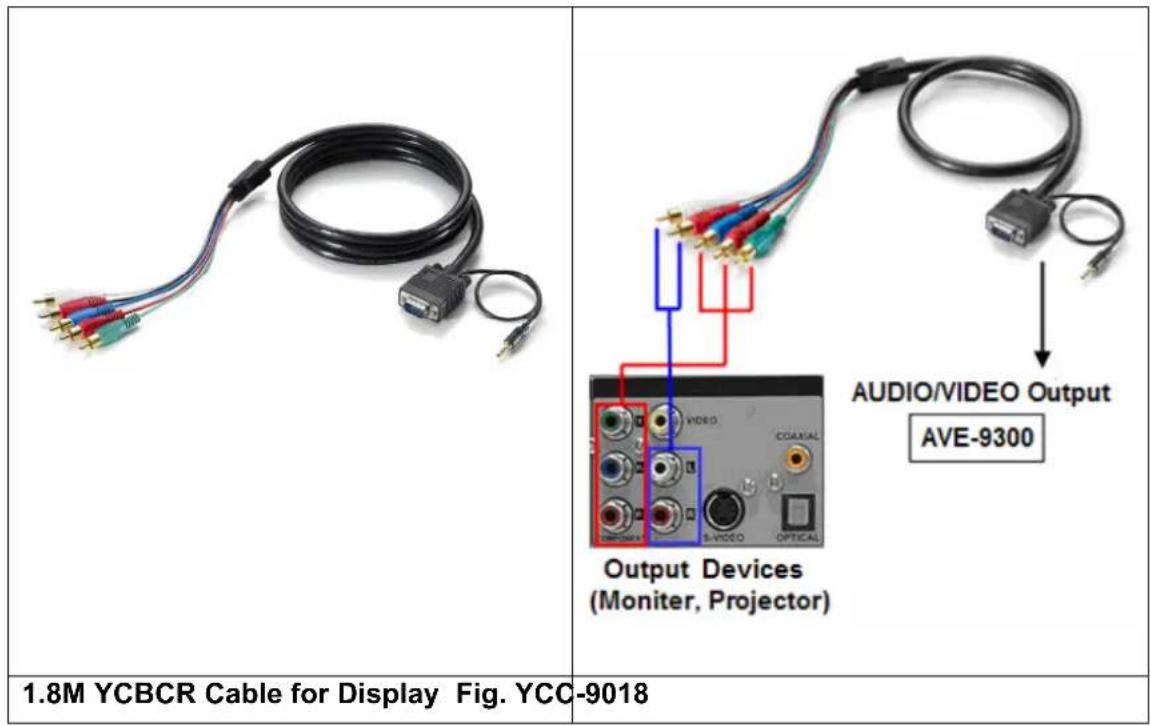
text_image
1.8M YCBCR Cable for Display Fig. YCC-9018 AUDIO/VIDEO Output AVE-9300 Output Devices (Monitor, Projector)Installation and Operation
AVE-93XX supports different video format by using different cable kit. Section 1 will describe how to extend VGA and Audio signals by PC cable kit and in Section 2&3, you should find the description of how to use HDTV(YCC-9007, YCC-9018) and TV(RCA-9007, RCA-9018) cable kit:
Section 1: Extend VGA Video and Audio by PC Cable Kit
1. AVE-9301 Single-Port Transmitter Installation:
(1) Connecting Monitor and Speaker: Take VGA-0010 cable to connect the signal from your A/V device to the "VGA+AUDIO IN" port of Transmitter box and then connect monitor and speaker to the "VGA OUT" and "AUDIO" ports. Please refer to Fig. VGA-0010.
(2) Function Test: Turn on your A/V device, the POWER LED should turn on green to indicate the POWER ON status and the LEDs above RJ-45 will blink before VGA signal is turned ON and remain ON after VGA signal is turned ON.
2. Receiver AVE-9300 installation and UTP Connection:
(1) Power Up: Plug power adapter to the Receiver and connect monitor and speaker to the "VGA OUT" and "AUDIO" port. The POWER LED will turn on green to indicate the POWER ON status and the LED above RJ-45 port should blink to indicate the A/V signal unconnected status.
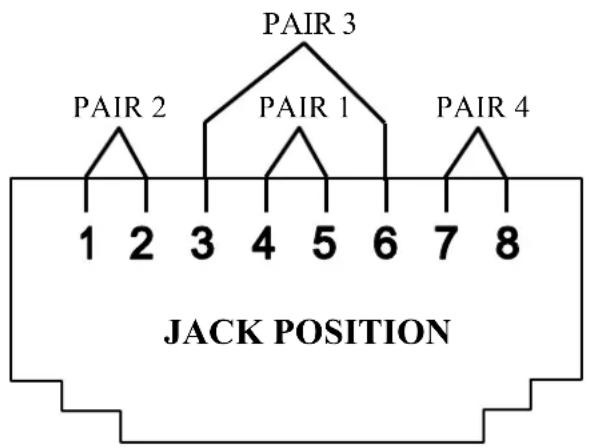
(2) Selection of UTP Cable: For best VGA resolution, please use Cat5 Enhanced cable (350MHz bandwidth) for connection, please noted that the maximum extended length of one section (one pair of Transmitter or Receiver) should not exceed 300 meters. The connector must be made by 568B/568B type.
text_image
PAIR 3 PAIR 2 PAIR 1 PAIR 4 1 2 3 4 5 6 7 8 JACK POSITION(3) Connect UTP Cable: Plug two ends of UTP cable to Transmitter and Receiver's RJ45 SYSTEM LINK ports, the Receiver's connected monitor and speaker should work now and the LEDs above RJ-45 port should remain ON. You can adjust the "FOCUS" and "GAIN" control of Receiver to have the best VGA display.
(4) Function Test: After above installation, you will be able to broadcast the A/V signal to
Receiver's connected monitor and speaker.
(5) Problem and Solving: If you find unstable image or audio problems after installation, please confirm following list or contact your direct vendor for further assistance:
A. Check if PC's VGA resolution and frequency over the limit of monitor display, if so, please change the VGA configuration from Windows Control panel.
B. Try to connect Monitor and speaker directly to a PC, and ensure the basic function of these devices.
C. When using LCD or same type monitor, there might have some image offset or blinking, please adjust the position, clock or phase of the LCD monitor, or simply press "Auto Adjust / Tune" to have a better image solution.
3. Multi-Port Model: Installation and Operation
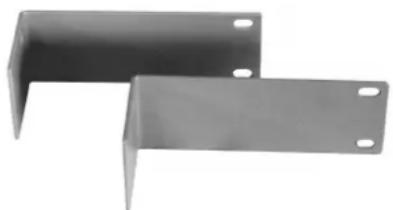
(1) Site Selection: In your first time installation, place Transmitter near the PC or A/V devices; you can use rack-mount kit to fix the system box.
natural_image
Two metallic L-bracket metal plates with mounting holes (no text or symbols visible)Rack-mount Kit for Multi-Port Unit
(2) Connecting Monitor and Speaker: Plug power adapter to the Transmitter and connect monitor and speaker to "VGA/AUDIO OUT" port. The POWER LED will turn on green to indicate the POWER ON status. Then, prepare VGA and audio cables to connect the signal from your A/V device to the "VGA/AUDIO IN" port of Transmitter box.
(3) Local Function Test: Power on your A/V device, and you should ready to do A/V broadcasting.
(4) Receiver Installation: Please follow previous section 2 for AVE-9300 to install the Receiver, and the maximum extended length of this section should not exceed 300 meters.
(5) Repeater Installation: If you wish to have more A/V displays, you can use Repeater, you may use 4-Port Repeater model to expand one A/V signal to 4 A/V signals. In the other way, you may stack more Transmitter through their local A/V port to generate more A/V RJ-45 outputs locally and the maximum local stacking capacity is limited to 4 layers to ensure good broadcasting quality.
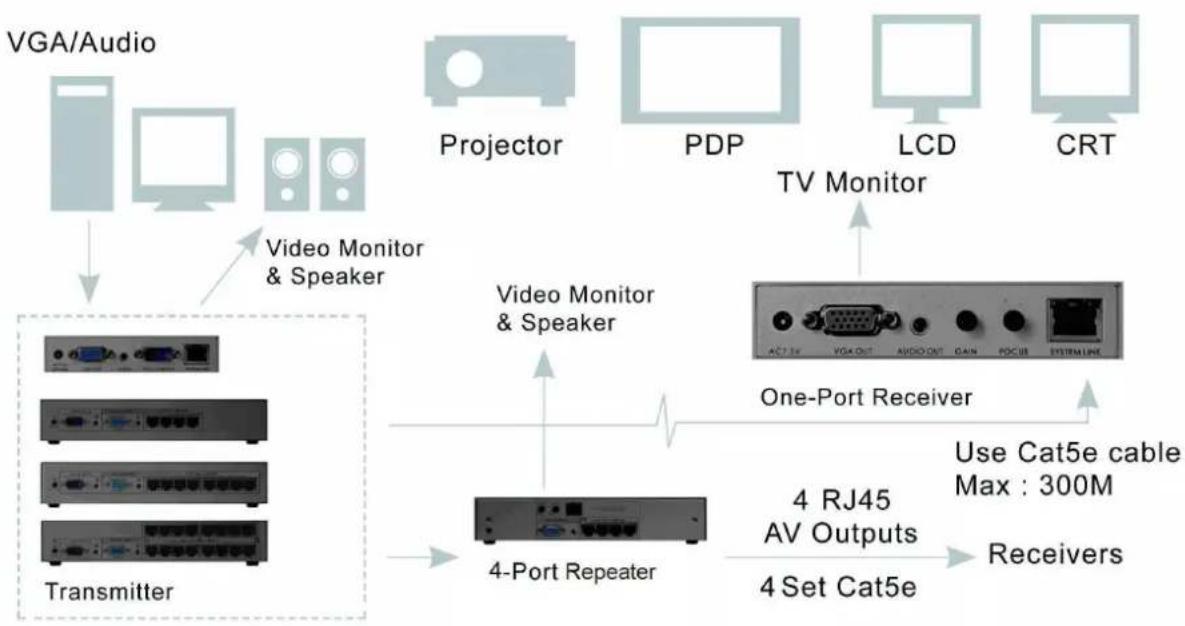
flowchart
graph TD
    A["VGA/Audio"] --> B["Transmitter"]
    C["Projector"] --> D["One-Port Receiver"]
    E["PDP"] --> D
    F["LCD"] --> D
    G["CRT"] --> D
    H["TV Monitor"] --> I["One-Port Receiver"]
    J["4-Port Repeater"] --> K["4 Set Cat5e"]
    L["4 RJ45 AV Outputs"] --> M["Use Cat5e cable Max : 300M"]
    N["Video Monitor & Speaker"] --> O["Transmitter"]
    style A fill:#f9f,stroke:#333
    style C fill:#f9f,stroke:#333
    style E fill:#f9f,stroke:#333
    style F fill:#f9f,stroke:#333
    style G fill:#f9f,stroke:#333
    style H fill:#f9f,stroke:#333
    style I fill:#ccf,stroke:#333
    style J fill:#ccf,stroke:#333
    style K fill:#ccf,stroke:#333
    style L fill:#ccf,stroke:#333
    style M fill:#ccf,stroke:#333
Expansion Diagram of Transmitter and Repeater
(6) System Expansion through UTP: This series can stack into maximum three layers of UTP section to reach more A/V outputs and depends on the display devices; you may reach a lower VGA solution than single layer. The suggested range of VGA broadcasting is 800x600@900m, 1280x1024@600m, and 2048x1536@300m. Please be noted that you must use Repeater for intermediate expansion.

flowchart
graph TD
    A["VGA/Audio"] --> B["Projector"]
    B --> C["PDP"]
    C --> D["LCD"]
    D --> E["CRT"]
    F["TV Monitor"] --> G["One-Port Receiver"]
    H["Transmitter"] --> I["4-Port Repeater 1"]
    I --> J["Cat5e cable-Layer 1"]
    I --> K["Cat5e cable-Layer 2"]
    I --> L["Cat5e cable-Layer 3"]
Stack Three Layers of A/V Extender through Cat5e to reach more Displays
- Other Integration and Application: Please contact your local dealer or distributor for further information.
Section 2: Extend Component Video and Audio by HDTV Cable Kit
For connecting player in the Transmitter, please use YCC-9007 cable; for connecting monitor in the Transmitter, Repeater, and Receiver, please use YCC-9018 cable. Please refer to Fig.YCC-9007 and Fig YCC-9018.
Section 3: Extend Composite, S-Video and Audio by TV Cable Kit
For connecting player in the Transmitter, please use RCA-9007 cable; for connecting monitor in the Transmitter, Repeater, and Receiver, please use RCA-9018 cable. Please refer to Fig. RCA -9007 and Fig RCA -9018.
Specification
| Spec AV Transmitter AV Repeater | AV Receiver | |||||
| Model AVE-9301 | AVE-9304 | AVE-9308 | AVE-9316 | AVE-9304A AVE-9300 | ||
| Description | One-Port A/V Transmitter | 4-Port A/V Transmitter | 8-Port A/V Transmitter | 16-Port A/V Transmitter | 4-Port A/V Repeater | One-Port A/V Receiver |
| AV Input AV* x 1 RJ45 x 1 RJ45 x 1 | ||||||
| AV Output | AV* x 1 RJ45 x 1 | AV* x 1 RJ45 x 4 | AV* x 1 RJ45 x 8 | AV* x 1 RJ45 x 16 | RJ45 x 4 AV* x 1 | |
| Audio Stereo | Mono | |||||
| Video CTRL -- | Video Gain and Focus | |||||
| LED | Power | |||||
| Video Quality | PC: Support all VGA format and with a maximum capacity of 2048x1536@300mHDTV: Support 480i. 480p, 720i, 720p, 1080i, and 1080p video format and Maximum distance of 300mTV: Support 480i. 480p, 720i video format and Maximum distance of 300m | |||||
| Dimension(LxWxH) | 62 x 113 x 29 | 240x180x44 | 62 x 113 x 29 | |||
| Environmental Condition | Operation Temp.: 0~50 degree CStorage Temp.: -20~60 degree CHumidity: 10~90% | |||||
Order Information
| Order Details Part Number | |
| 1-Port LR Cat.5 A/V Transmitter AVE-9301 | |
| 4-Port LR Cat.5 A/V Transmitter AVE-9304 | |
| 8-Port LR Cat.5 A/V Transmitter AVE-9308 | |
| 16-Port LR Cat.5 A/V Transmitter AVE-9316 | |
| 4+1-Port LR Cat.5 A/V Repeater AVE-9304A | |
| 1-Port LR Cat.5 A/V Receiver AVE-9300 | |
| AV Cable Kit | |
| 1M A/V Cable for Transmitter VGA-0010 | |
| 1M A/V Cable for Receiver AVC-0010 | |
| 0.7M RCA Cable for Player RCA-9007 | |
| 1.8M RCA Cable for Display RCA-9018 | |
| 0.7M YCBCR cable for Player YCC-9007 | |
| 1.8M YCBCR cable for Display YCC-9018 | |
Remarks
(1) Before operating this system, please read operation manual carefully.
(2) Please use correct power adapter and use high quality cable for optimum broadcasting.
(3) To prevent potential power damage, please don't use 2-wire extension cord and ensure AC outlets at relative devices on the same electronic phase and have correct grounding.
(4) Limited Warranty:
A. In no events shall the direct vendor's liability for direct or indirect, special, incidental or consequential damages, loss of profit, loss of business, or financial loss which may be caused by the use of the product exceeds the price paid for the product.
B. The direct vendor makes no warranty or representation, expressed or implied with respect to the contents or use of this documentation, and especially disclaims its quality, performance, merchantability, or fitness for any particular purpose.
C. The direct vendor also reserves the right to revise or update the product or documentation without obligation to notify any user of such revisions or updates. For further information, please contact your direct vendor.