HVE-9003 - Émetteur AV LEVELONE - Free user manual and instructions
Find the device manual for free HVE-9003 LEVELONE in PDF.


User questions about HVE-9003 LEVELONE
0 question about this device. Answer the ones you know or ask your own.
Ask a new question about this device
Download the instructions for your Émetteur AV in PDF format for free! Find your manual HVE-9003 - LEVELONE and take your electronic device back in hand. On this page are published all the documents necessary for the use of your device. HVE-9003 by LEVELONE.
USER MANUAL HVE-9003 LEVELONE
text_image
level® oneHDSpider™ HDMI 1.3 over Single Cat.5 Distribution Series
HVE-9000
HVE-9001
HVE-9002
HVE-9003
HVE-9004
HVE-9008
HVE-9900
User Manual
TABLE OF CONTENTS
p.2 Package Contents
p.3 Overview
p.4 Panel Description
p.14 Installation
p.20 Systematic Application Diagrams
p.21 Frequently Asked Questions
p.22 Specifications
p.25 Notice
p.26 Pin Definition
PACKAGE CONTENTS
HVE-9000 HDSpider™ Long Range Cat.5 HDMI Receiver
- HDSpider™ Long Range Cat.5 HDMI Receiver (HVE-9000)
- 5V 2A DC Power Supply Unit
- User Manual
HVE-9001 HDSpider™ Cat.5 HDMI Sender
- HDSpider™ Cat.5 HDMI Sender (HVE-9001)
- 5V 2A DC Power Supply Unit
- User Manual

HVE-9002 HDSpider™ Cat.5 HDMI Sender with Local HDMI Output
- HDSpider™ Cat.5 HDMI Sender with Local HDMI Output (HVE-9002)
- 5V 4A DC Power Supply Unit
- User Manual

natural_image
Exterior view of a black electronic device with ports and connectors (no visible text or symbols)HVE-9003 HDSpider™ Cat.5 Cascadable HDMI Sender
- HDSpider™ Cat.5 Cascadable HDMI Sender (HVE-9003)
- 5V 4A DC Power Supply Unit
- User Manual

natural_image
Exterior view of a gray network device with multiple ports and connectors (no visible text or symbols)HVE-9004 HDSpider™ 4-Port Cat.5 HDMI Sender
- 4-Port HDSpider™ HDMI Cat.5 Sender (HVE-9004)
- 5V 4A DC Power Supply Unit
- User Manual

natural_image
Exterior view of a gray network device with multiple Ethernet ports and a USB port (no visible text or labels)HVE-9008 HDSpider™ 8-Port Cat.5 HDMI Sender with Local HDMI Output
- 8-Port HDSpider™ HDMI Cat.5 Sender (HVE-9008)
- 5V 4A DC Power Supply Unit
- User Manual
natural_image
Front view of a black network switch device with multiple Ethernet ports (no visible text or labels)HVE-9900 HDSpider™ Short Range Cat.5 HDMI Receiver
- HDSpider™ Short Range Cat.5 HDMI Receiver (HVE-9900)
- User Manual

Introduction
The HDSpider™ HDMI 1.3 over Single Cat.5 Distribution Series provides the most flexible solution by which the uncompressed, unmodified, and pure digital HDMI signals with 7.1-channel audio can be transmitted to different locations over a long distance. The cascadability of HDSpider™ series is virtually unlimited, allowing you to extend HDMI/DVI displays almost anywhere.
The whole HDSpider™ series products can be easily inter-connected to suit almost even application through Cat.5/5e/6 cables. By taking the advantage of Cat.5/5e/6 cables, installation work becomes so easy and particularly cost effective wherever the distribution of HDMI signals is required.
Features
The HDSpider™ HDMI 1.3 over Single Cat.5 Distribution Series offers the users:
◇ Silicon Image (founder of HDMI) chipset embedded
✿ HDMI signal transmission via Cat.5/5e/6 cables
✿ Cat.5/5e/6 cable implementation to minimize use of high-cost HDMI cable
✿ Minimum 40m extension for 1080p resolution*
✨ Maximum extension up to 80m**
✿ Uncompressed, unmodified HDMI with 7.1-channel audio/video pure digital transmission
✨ Cascading virtually unlimited for HVE-9003
✨ Compliant with HDMI 1.2 / 1.3
Build in 8-level signal level equalizer to fine tune video quality
✿ EDID learning ability to read and store the EDID information of the display to avoid any incompatibility among displays
Software not required, purely hardware installation. Virus risk free
Note: The length depends on the characteristics and quality of the cables. Higher resolutions and longer transmission distances require low skew cables (<25ns/100m) for best performance.
*single link of HVE-9000. For connection with HVE-9900, 1080p distance at minimum 15m.
**single link at 480p resolution, with high quality, minimal delay skew Cat-6 cable
PANEL DESCRIPTION
HVE-9000 HDSpider™ Long Range Cat.5 HDMI Receiver
Input Panel
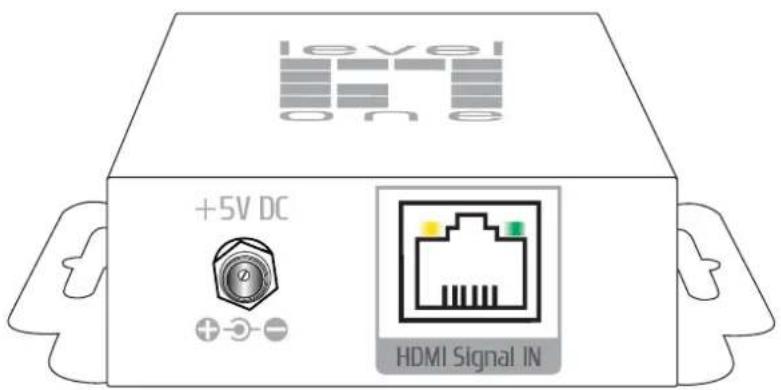
text_image
level one +5V DC HDMI Signal INHDMI Signal IN: Connect to the HDMI Signal OUT port on the HVE-9001, HVE-9002, HVE-9004, or HVE-9008 with a Cat.5e/6 cable.
+5V DC: Connect to 5V 2A DC power supply.
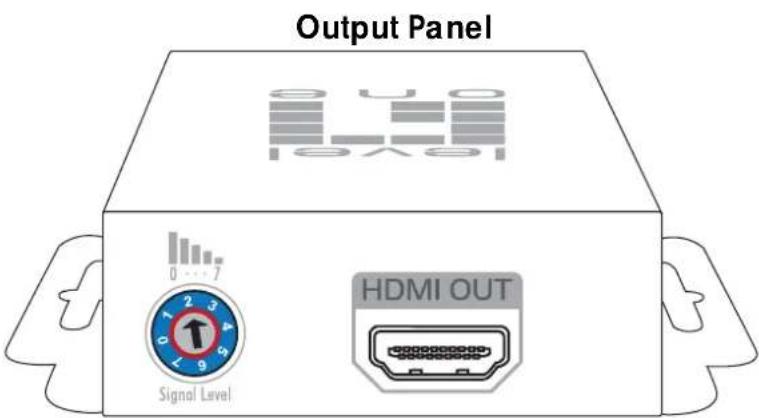
text_image
Output Panel 0 4 0 LED 16x9 0 ... 7 Signal Level HDMI OUTSignal Level: Adjust the 8-level signal equalization control to the received HDMI signals. The HDMI signal level varies from 0 (strongest) to 7 (weakest) for respective transmission length from longest possible range to short distance. Dial the Signal Level from 7 to 0 and stop turning the rotary switch whenever the audio/video is playing normally. Inappropriate signal level setting may cause overpowering issues that would shorten the product's life significantly!
HDMI OUT: Connect to a HDMI display with a HDMI male-male cable.
HVE-9001 HDSpider™ Cat.5 HDMI Sender
Output Panel
text_image
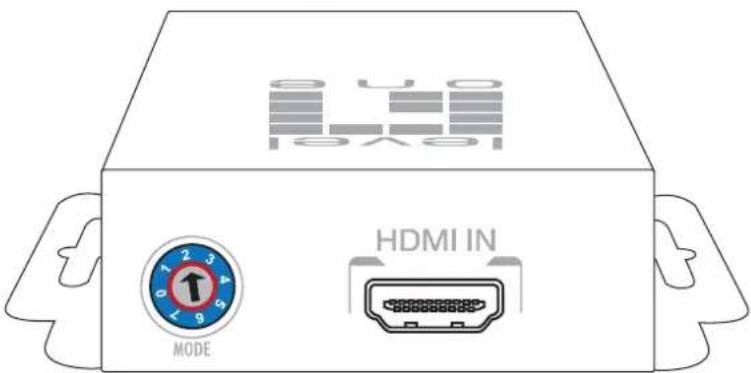
S UO 10V5 HDMI IN MODEHDMI IN: Connect to a HDMI source with a HDMI male-male cable
Mode: 0 = HDMI mode with surround sound (up to 7.1ch) audio output
1 = HDMI mode with stereo (2ch) audio output
2 = DVI mode
3 \~ 5 = Not in use
6 = Use default EDID profile
7 = Learn the EDID from the display*

Note for EDID (Extended Display Identification Data) learning
- Connect the display which you want to read EDID with a HDMI cable to HDMI-IN on HVE-9001 and dial MODE to 7 so the HVE-9001 can learn the EDID information from the connected display. The LED on the RJ-45 connector will dim and bright again in a few seconds, which indicates the EDID learning process is complete.
- Dial MODE clockwise [O] from 7 to 0 or 1 for desirable audio setting and enjoy the experience. DO NOT let the rotary control arrow pass by 6. Doing so will erase the EDID just learned and restore the default EDID profile.
Output Panel
text_image
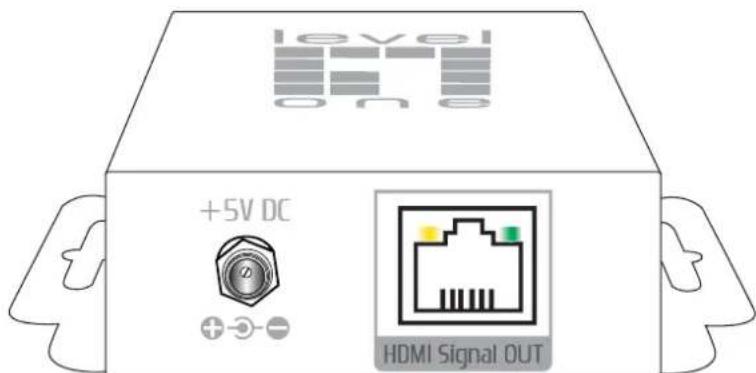
level one +5V DC HDMI Signal OUT+5V DC: Connect to 5V 2A DC power supply unit.
HDMI Signal OUT: Connect to the HDMI Signal IN of the HVE-9000 or HVE-9900 with a Cat.5e/6 cable.
HVE-9002 HDSpider™ Cat.5 HDMI Sender with Local HDMI Output
text_image
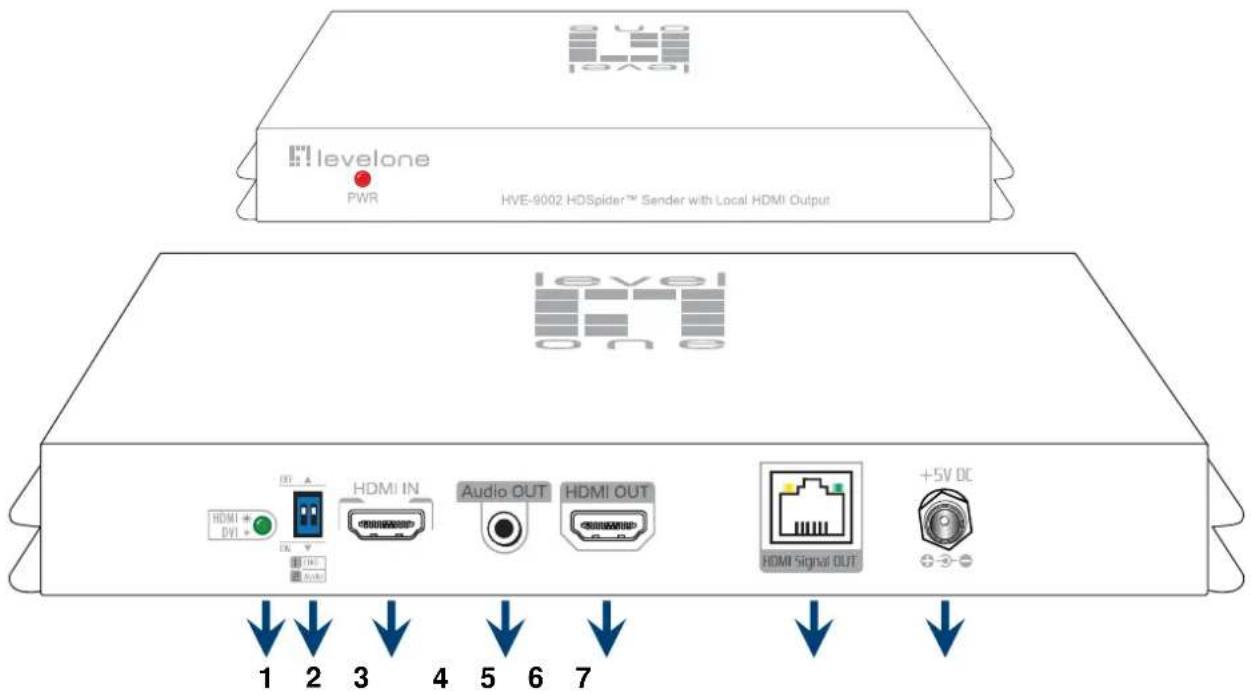
levelone PWR HVE-9002 HDSpider™ Sender with Local HDMI Output level one 1 2 3 4 5 6 7 HDMI IN Audio OUT HDMI OUT HDMI Signal OUT +5V DC- Input video format indicator [lights up for HDMI signal, lights off for DVI signal]
- DIP switch [see table below]
- HDMI IN: Connect a HDMI source with a HDMI male-male cable here
- Audio OUT: Plug in a local speaker here
- HDMI OUT: Local HDMI for connecting to a HDMI display with a HDMI male-male cable here or cascade to the HDMI IN of another HVE-9001, HVE-9002, HVE-9004, or HVE-9008.
- HDMI Signal OUT: Link to HVE-9003 for cascading; or link to HVE-9000 or HVE-9900 to another HDMI display with a Cat.5e/6 cable
- +5V DC: Connect to a 5V 4A DC power supply unit
DIP Switch
| DIP Switch Position | Video Audio Description | |||
| Pin-1 Pin-2 | ||||
| OFF [↑] | OFF [↑] | Up to 1080p | Stereo ^1 | Default Mode ^2 – 1080p & stereo audio output for most HDTVs |
| OFF [↑] | ON [↓] | 720p 1080i | Stereo | Safe Mode ^3 – Enforce the system output at 720p/1080i video and stereo audio for basic compatibility among HDTVs |
| ON [↓] | OFF [↑] | Bypass ^4 | Bypass ^4 | EDID Learning Mode ^5 – for learning EDID from the display while playing any received HDMI audio format |
| ON [↓] | ON [↓] | Bypass | Stereo | EDID Learning & Stereo mode ^5 – for learning EDID from the display while enforcing stereo output if any HDTV cannot play surround sound normally |

Note for EDID (Extended Display Identification Data) learning
- Don't plug in HDMI cable to [HDMI In] when you want to restore default EDID or learn the display's EDID.
- Please connect the display which you want to read EDID to HDMI OUT so the HVE-9002 can learn the EDID information from the connected HDTV.
- To learn EDID from HDMI display, pull up-and-down the DIP switch 1 from OFF to ON, the green light will dim and light to indicate the EDID learning process is complete. You DON'T NEED to pull up the DIP switch again unless you want to learn another EDID by pulling DIP switch 1 up and down.

Note
^1 If the HDTV shows video but without audio, please try to set audio mode to stereo.
^2 Factory default: Pin# 1-OFF[↑], Pin# 2-OFF[↑] for 1080p with stereo.
^3 If you encounter any unsolved audio/video output problem during system installation, please turn to Safe Mode (Pin#1-OFF[↑] & Pin#2-ON[↓]) to enforce the most compatible 720p stereo output for system check.
^4 Bypass means the matrix will maintain playing the original format of HDMI signals in video and perhaps audio. By setting at this mode, the users may encounter compatibility issue among different kinds of HDMI sources and displays. If you cannot get the audio and/or video output normally at the system installation, please change the DIP switch setting to default mode or even safe mode to verify the functionality of the device.
^5 Set Pin#1 at ON[↓] first then connect the HDMI Input to HDTV through a HDMI cable. Wait for 20 seconds. The EDID learning procedure will be finished. If you want to learn the EDID from another HDTV, you must set Pin#1 at OFF first and repeat this procedure.
HVE-9003 HDSpider™ Cat.5 Cascadable HDMI Sender

text_image
level One iT levelone PWR HVE-9003 HDSpider™ Cascadable HDMI Sender S U O Level SURROUND HDMI DVI STENED IN Signal In HDMI Signal IN Audio OUT HDMI OUT HDMI Signal OUT +5V DC 1 2 3 4 5 6 7-
Input video format indicator [lights up for HDMI signal, lights off for DVI signal]
-
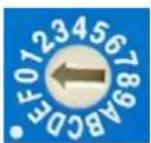
Signal Level: Adjust the 16-level equalization control corresponding to the transmission distance of receiving HDMI signals. For surround sound audio output, please adjust from 0-to-7 (longest-to-shortest transmission length). For stereo audio output, please adjust from 8-to-F (longest-to-shortest transmission length). It is recommended to adjust from 7-to-0 or from F-to-8 to find the optimal visual experience.
-
HDMI Signal IN: Link to HVE-9001, HVE-9002, HVE-9003, HVE-9004, or HVE-9008 with a Cat.5e/6 cable
-
Audio OUT: Plug in a local speaker here
-
HDMI OUT: Local HDMI for connecting to a HDMI display with a HDMI male-male cable here or cascade to the HDMI IN of another HVE-9001, HVE-9002, HVE-9004 or HVE-9008.
-
HDMI Signal OUT: Link to HVE-9003 for cascading; or link to HVE-9000 or HVE-9900 to another HDMI display with a Cat.5e/6 cable
-
+5V DC: Connect to a 5V 4A DC power supply unit
HVE-9004 HDSpider™ 4-Port Cat.5 HDMI Sender
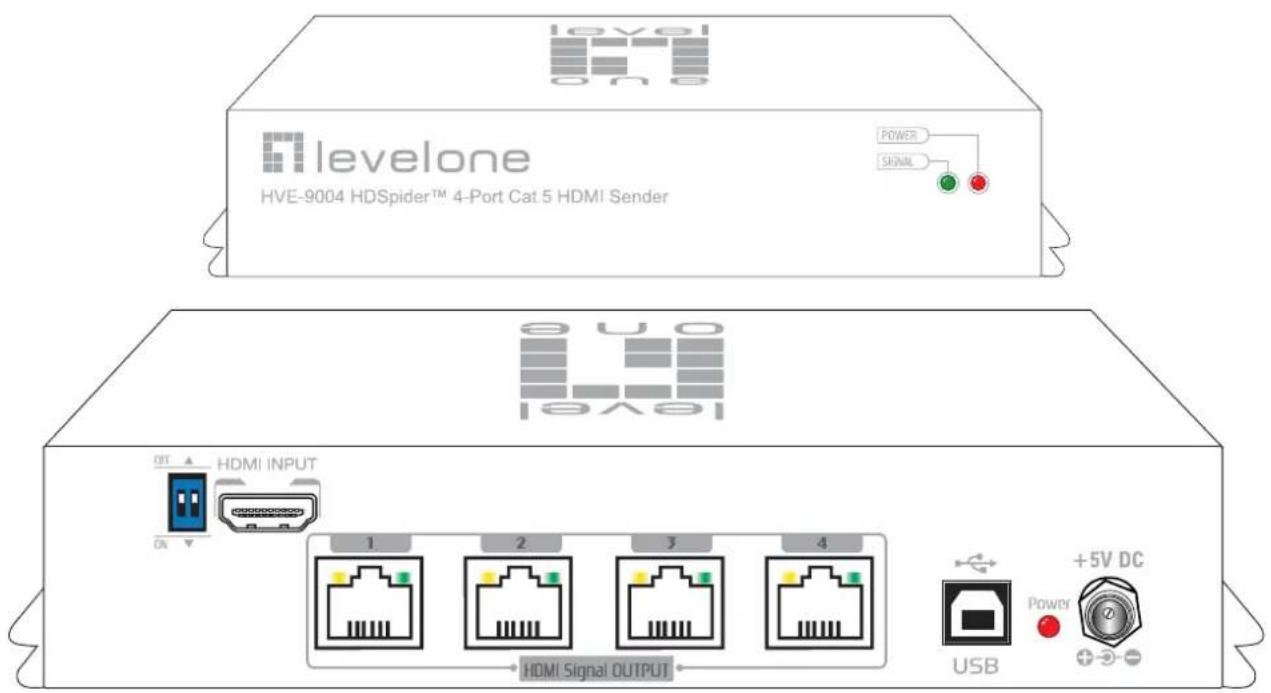
text_image
levelone HVE-9004 HDSpider™ 4-Port Cat 5 HDMI Sender POWER SIGNAL HVE HDMI INPUT 1 2 3 4 HDMI Signal OUTPUT USB +5V DC PowerDIP Switch: Please see more detail in the table below
HDMI INPUT: Connect to a HDMI source
HDMI Signal OUTPUT 1 – 4: Link to each HDMI display via a Cat.5e/6 cable with HVE-9000, HVE-9003, or HVE-9900.
USB: For firmware update (technical support use only)
+5V DC: interlocking power jack for 5V DC power supply unit
DIP Switch
| DIP Switch PositionPin-1 Pin-2 | Video Audio Description | |||
| OFF [↑] | OFF [↑] | Up to 1080p | Stereo ^1 | Default Mode ^2 – Up to 1080p & stereo audio output for most HDTVs |
| OFF [↑] | ON [↓] | Up to 720p/1080i | Stereo ^1 | Safe Mode ^3 – Enforce the system output at 720p/1080i video and stereo audio for basic compatibility among HDTV |
| ON [↓] | OFF [↑] | Bypass ^4 | Bypass ^4 | EDID Learning ^5 Mode – for learning EDID from the display while playing any received HDMI audio format |
| ON [↓] | ON [↓] | Bypass ^4 | Stereo | EDID Learning ^5 & Stereo Mode – for learning EDID from the display while enforcing stereo output if any HDTV cannot play surround sound normally |

Note for DIP switch
^1 If the HDTV shows video but without audio, please set audio mode to stereo.
^2 Factory default setting is pin-1 at OFF [↑], pin-2 at OFF [↑] for 1080p with stereo.
^3 If you encounter any unsolved audio/video output problem during system installation, please dial the DIP switch to pin-1 at OFF [↑], pin-2 at ON [▼] for safe mode to enforce the most compatible 720p stereo output for system check. However, the safe mode cannot be initiated if your HDMI sources are set to enforce 1080p output. In this case, please reconfigure your HDMI source to all resolution output for troubleshooting.
^4 Bypass means this device will maintain playing the original format of HDMI signals in video and perhaps audio. By setting at this mode, the users may encounter compatibility issue among different kinds of HDMI sources and displays. If you cannot get the audio and/or video output normally at the system installation, please change the DIP switch setting to default mode or even safe mode to verify the functionality of the device.
^5 For EDID learning function please see the next section.
EDID Learning
- To make the HVE-9004 learn the EDID of the desired display, connect the display to the HDMI INPUT port via a HDMI cable.
- Set the DIP switch position pin-1 at ON [↓].
- Reboot the HVE-9004 and you should see the green LED SIGNAL on the front panel blinking to indicate the EDID learning sequence is underway. The EDID learning sequence is complete when the LED stops blinking.
- Resume the installation. Connect the sources back to HDMI inputs and let the displays connect to the receiver units via Cat.5e/6 cable.
- Set the DIP switch pin-1 at OFF [↑] will erase the EDID profile learned from the display and restore the default EDID profile. So please do not dial the pin-1 back to OFF [↑] unless you want to use default EDID profile or learn new EDID from different HDMI display.
HVE-9008 HDSpider™ 8-Port Cat.5 HDMI Sender with Local HDMI Output

text_image
levelone HVE-9008 HOSpider™ 8-Port CatLS HDMI Sender with Local HDMI Output (GOLD) 1 ● HOME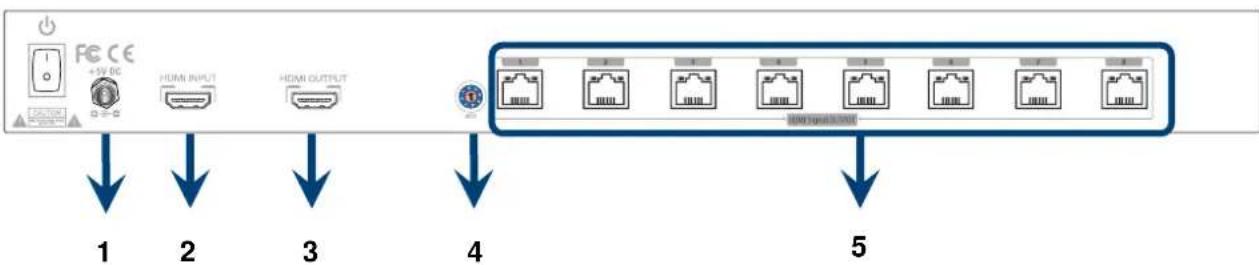
flowchart
graph TD
    A["PC CE"] --> B["+5V DC"]
    B --> C["HMI INPUT"]
    C --> D["HMI OUTPUT"]
    D --> E["Network Port"]
    E --> F["Network Port 1"]
    E --> G["Network Port 2"]
    E --> H["Network Port 3"]
    E --> I["Network Port 4"]
    E --> J["Network Port 5"]
-
+5V DC: Connect to a 5V DC power supply unit
-
HDMI IN: Connect to a HDMI source
-
HDMI OUT: Connect to a HDMI display for local monitoring or cascade to another HDMI sender (HVE-9001, HVE-9004, or HVE-9008)
-
MODE:
0 = [Video] - supports up to HDMI 1.3 output. [Audio] - supports up to 7.1ch output
1 = [Video] - supports up to HDMI 1.3 output. [Audio] - locks to stereo audio output
2 = [Video] - locks to HDMI 1.2 output. [Audio] - supports up to 7.1ch output
3 = [Video] - locks to HDMI 1.2 output. [Audio] - locks to stereo audio output
4 = [Video] - DVI display mode. [Audio] - no audio output
5 = [Safe Mode] - uses default EDID with video supported up to 720p/1080i
6 = [Default Mode] - uses default EDID with video supported up to 1080p
7 = [EDID Learning Mode] - learns EDID from the display
[For more detail info, please refer to page 6.]
- HDMI Signal OUTPUT 1-8: Link to each HDMI display via a Cat.5e/6 cable with a receiver HVE-9000 or HVE-9900 on each CAT5 output port
Audio/Video Setting
- If you cannot get the audio/video output from the connected display for the first time setup. Please follow the instructions below to check if the HVE-9008 is OK.
Step 1 – Please set the rotary arrow at Mode 5 for Safe Mode, and wait for the green LED SIGNAL on the front panel to blink for a couple seconds.
Step 2 – Please dial the rotary arrow counterclockwise [U] from Mode 5 to Mode 3. If you can get audio/video from the display, you can stay tune at this setting for 720p or 1080i and stereo audio. If you need to get 720p/1080i with 7.1ch audio output, please dial the rotary arrow counterclockwise [U] from Mode 3 to Mode 2.
Step 3 – Please dial the rotary arrow counterclockwise [O] from Mode 3 to Mode 7. Wait a few seconds until the green LED SIGNAL on the front panel dims and then lights again.
Step 4 – Please dial the rotary arrow clockwise [☐] from Mode 7 to Mode 1. You should have normal audio/video output. If not, please contact technical support.
- For desirable 1080p video output, please follow the instructions below:
Step 1 – Please set the rotary arrow at Mode 6 for Default Mode, and wait for the green LED SIGNAL on the front panel to blink for a couple seconds.
Step 2 – Please dial the rotary arrow clockwise [U] from Mode 6 to Mode 1. If you can get audio/video from the display, you can stay tune at this setting for 1080p and stereo audio. If you need to get 1080p with 7.1ch audio output, please turn the rotary arrow counterclockwise [U] from Mode 1 to Mode 0. If you cannot get the audio/video out normally, please go on the next step.
Step 3 – Please dial the rotary arrow counterclockwise [5] from Mode 0 or Mode 1 to Mode 7. Wait a few seconds until the green LED SIGNAL on the front panel dims and then lights again.
Step 4 – Please dial the rotary arrow clockwise [O] from Mode 7 to Mode 0 or Mode 1. You should have your desirable audio/video output. If not, please perform the EDID learning sequence.
EDID Learning
To learn EDID from the HDMI display, please follow the instruction below:
Step 1 – Please connect the display which you want to read EDID with a HDMI cable to the HDMI OUT port of the AT-HD19SS and set the rotary arrow at Mode 7 so the HVE-9008 can learn the EDID information from the connected display. The green LED SIGNAL on the front panel will dim and light again in a few seconds, which indicates the EDID learning procedure is complete.
Step 2 – Please turn the rotary arrow clockwise [O] from Mode 7 to Mode 0 or Mode 1 for desirable audio setting and enjoy the experience. DO NOT let the rotary arrow pass by Mode 5 and Mode 6 which will erase the EDID just learned and restore the default EDID.
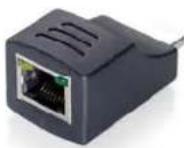
RJ-45 socket: Link from HVE9001, HVE-9002, HVE-9003, HVE-9004, HVE-9008 or HVE-9900 with a Cat.5e/6 cable
HDMI socket: Connect to a local HDMI display or projector, or the HDMI output of HVE-9002 or HVE-9003 for HDMI over Cat.5 transmission
Extends HDMI signals to one display at longer distance
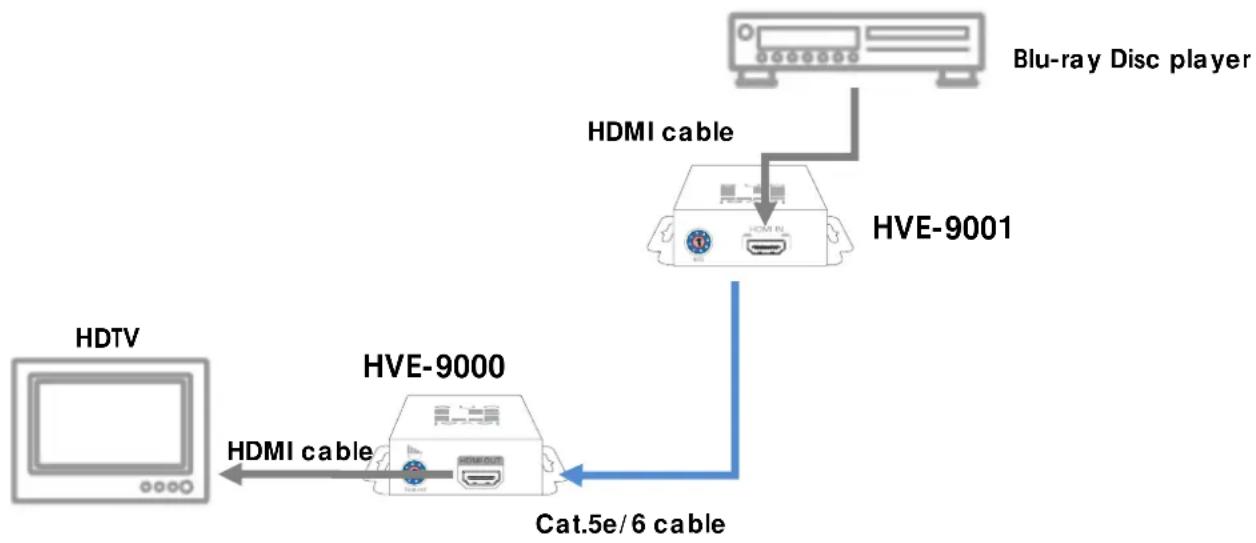
HVE-9000 & HVE-9001
- Connect HVE-9001 to a HDMI source device with a HDMI cable.
- Connect HVE-9000 to a HDMI display or projector with a HDMI cable.
- Connect a Cat.5e/6 cable between HVE-9000 and HVE-9001.
- Make sure this Cat.5e/6 cable is tightly connected and not loose.
- Plug in a 5V DC power supply unit to the power jack of HVE-9000.
-
Plug in another 5V DC power supply unit to the power jack of HVE-9001.
-
If the image on the display is flickering or blinking, adjust the rotary control switch to improve the cable skew. 0 stands for the strongest HDMI signal level for longest possible transmission length while 7 stands for the weakest HDMI signal level for short transmission length. Use a screw driver to adjust the signal level from 7 to 0 and stop turning the rotary switch whenever the audio/video is playing normally. Inappropriate signal level setting may cause overpowering issue that would shorten the product life significantly!
flowchart
graph TD
    A["HDTV"] -->|HDMI cable| B["HVE-9000"]
    B -->|Cat.5e/6 cable| C["HVE-9001"]
    C -->|HDMI cable| D["Blu-ray Disc player"]
Extends HDMI signals to one display at shorter distance
HVE-9900 & HVE-9001
- Connect HVE-9001 to a HDMI source with a HDMI cable.
- Connect HVE-9900 directly to your HDMI display or projector.
- Connect one Cat.5e/6 cable between HVE-9001 and HVE-9900.
- Make sure this Cat.5e/6 cable is tightly connected and not loose.
- Plug in the 5V DC power supply unit to the power jack of HVE-9001.

flowchart
graph TD
    A["HDTV"] -->|Cat.5e/6 cable| B["HVE-9900"]
    B --> C["HVE-9001"]
    C --> D["HDMI source"]
    C --> E["HDMI cable"]
Extends HDMI signals to next cascading device with one local display
HVE-9002
- Switch off all devices, including displays.
- Connect a local HDMI display to the HDMI out of the HVE-9002 and then connect a speaker to the 3.5mm audio socket.
- Connect to a HDMI source (such as a Blu-Ray Disc player)
- Connect HVE-9002 to HVE-9003 (for cascading), to HVE-9000 (to HDTV at long range), or HVE-9900 (to HDTV at mid range) via RJ-45 Out by a Cat.5e cable.
- Plug in 5V4A DC power supply unit.
- Power on the HDTV.
- Power on the HDMI source.
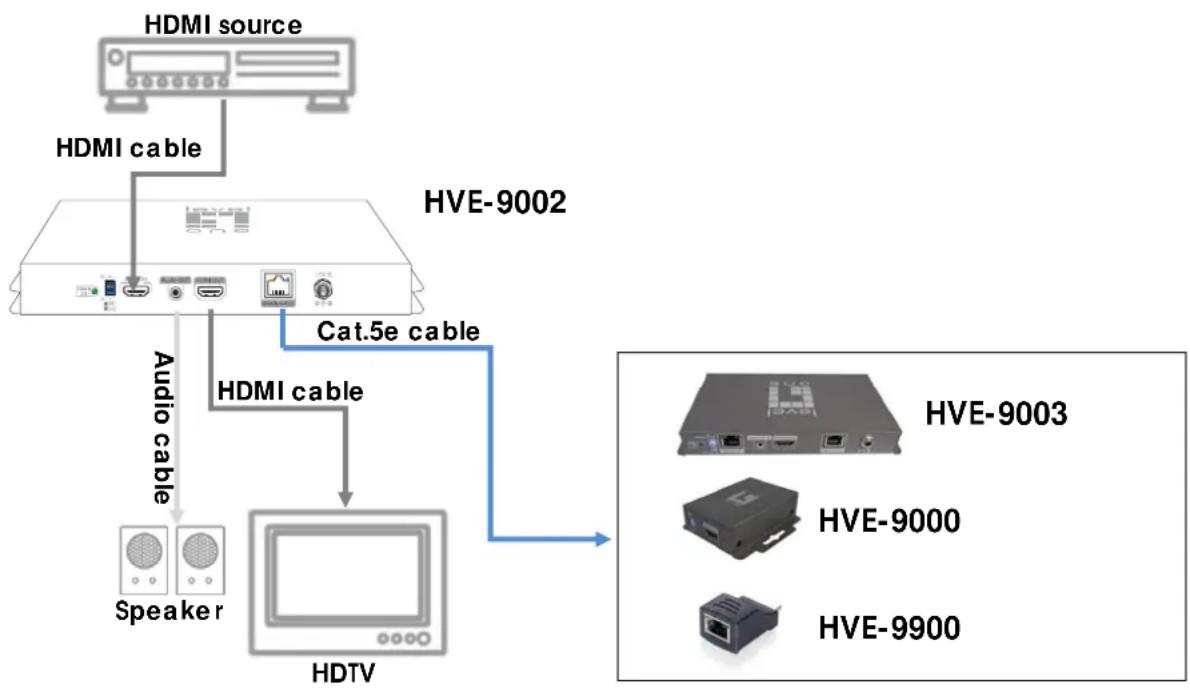
flowchart
graph TD
    A["HDMI source"] --> B["HDMI cable"]
    B --> C["HIVE-9002"]
    C --> D["Cat.5e cable"]
    D --> E["HDTV"]
    F["Speaker"] --> G["HDTV"]
    H["HIVE-9003"] --> I["HIVE-9000"]
    J["HIVE-9900"] --> K["HIVE-9900"]
Relays HDMI signals to next cascading device with one local display
HVE-9003
- Switch off all devices, including displays.
- Connect a local HDMI display to the HDMI Out of the HVE-9003 and then connect a speaker to the 3.5mm audio socket.
- Connect to HVE-9003 via RJ-45 in by a Cat.5e cable.
- Connect to next HVE-9003 (for cascading), to HVE-9000 (to HDTV at long range), or HVE-9900 (to HDTV at mid range) via RJ-45 out by a Cat.5e cable.
- Plug in 5V4A DC power supply.
- Power on the HDTV.
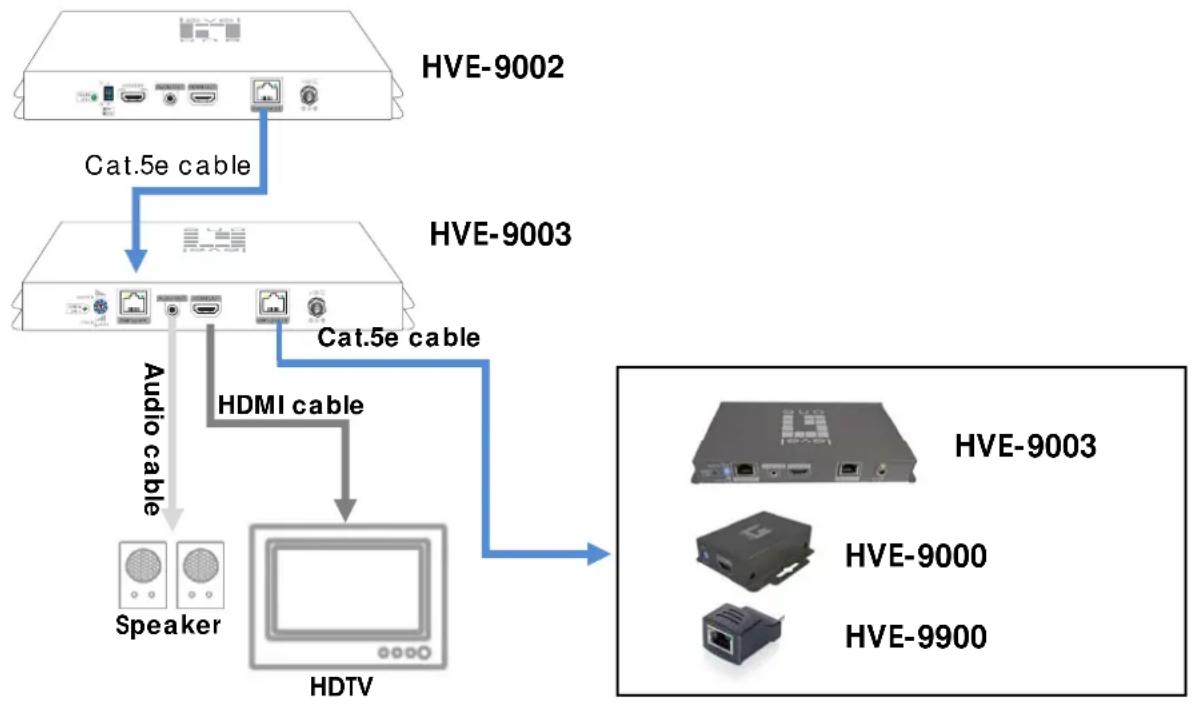
flowchart
graph TD
    A["HVE-9002"] -->|Cat.5e cable| B["HIVE-9003"]
    B -->|Audio cable| C["Speaker"]
    B -->|Cat.5e cable| D["HDMI cable"]
    D --> E["HDTV"]
    E --> F["HIVE-9003"]
    E --> G["HIVE-9000"]
    E --> H["HIVE-9900"]
Broadcasts HDMI signals to 4 remote displays from one video source
HVE-9004
- Switch off all devices, including displays.
- Connect a HDMI source device to the HDMI INPUT port.
- Connect the HVE-9000 and/or HVE-9900 as receivers via solid Cat.5e/6 cables to each HDMI Signal OUTPUT port.
- Plug in the interlocking 5V 4A DC power supply unit.
- Power on the HDMI displays.
- Power on the HDMI sources.
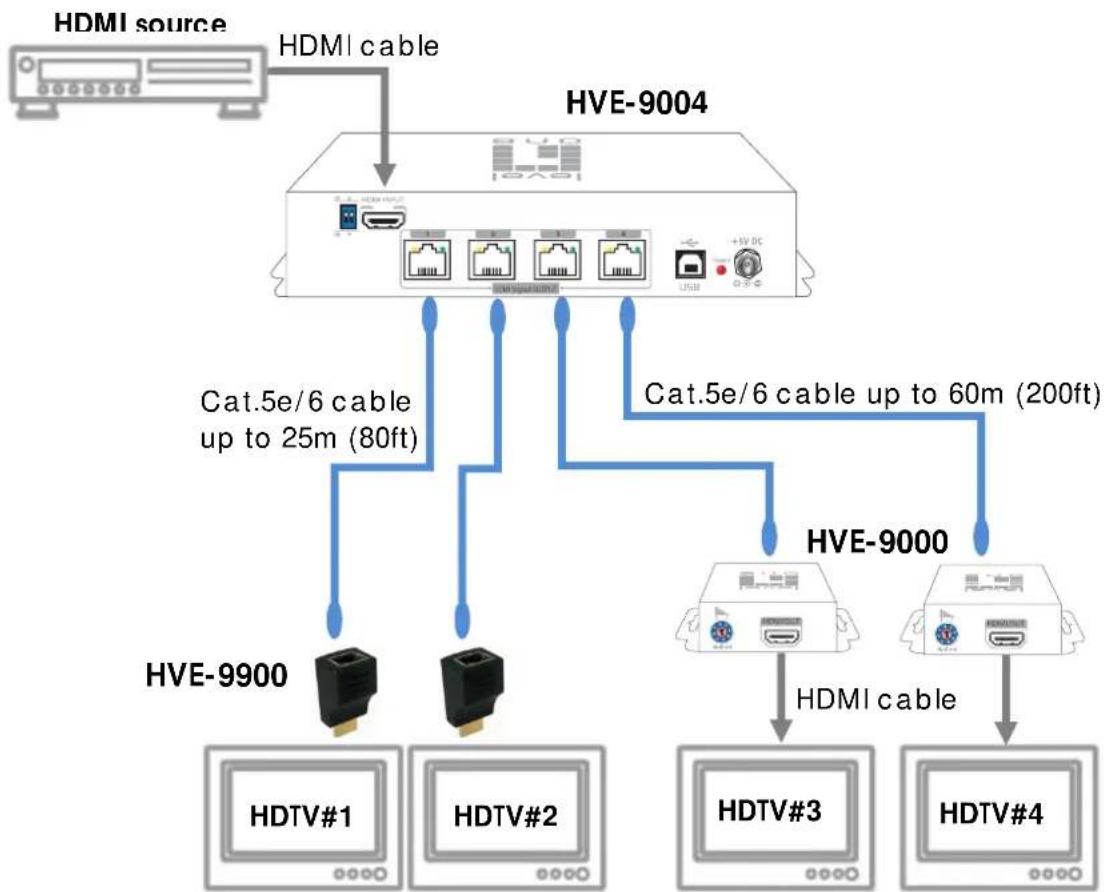
flowchart
graph TD
    A["HDMI source"] -->|HDMI cable| B["HVE-9004"]
    B --> C["Cat.5e/6 cable up to 25m (80ft)"]
    B --> D["Cat.5e/6 cable up to 60m (200ft)"]
    B --> E["HVE-9000"]
    E --> F["HDMI cable"]
    F --> G["HDTV#1"]
    F --> H["HDTV#2"]
    F --> I["HDTV#3"]
    F --> J["HDTV#4"]
Broadcasts HDMI signals to 8 remote displays from one video source
HVE-9008
- Switch off all devices, including displays.
- Connect a HDMI source device to the HDMI INPUT port.
- Connect the HVE-9000 and/or HVE-9900 as receivers via solid Cat.5e/6 cables to each HDMI Signal OUTPUT port.
- Plug in the interlocking 5V 4A DC power supply unit.
- Power on the HDMI displays.
- Power on the HDMI sources.
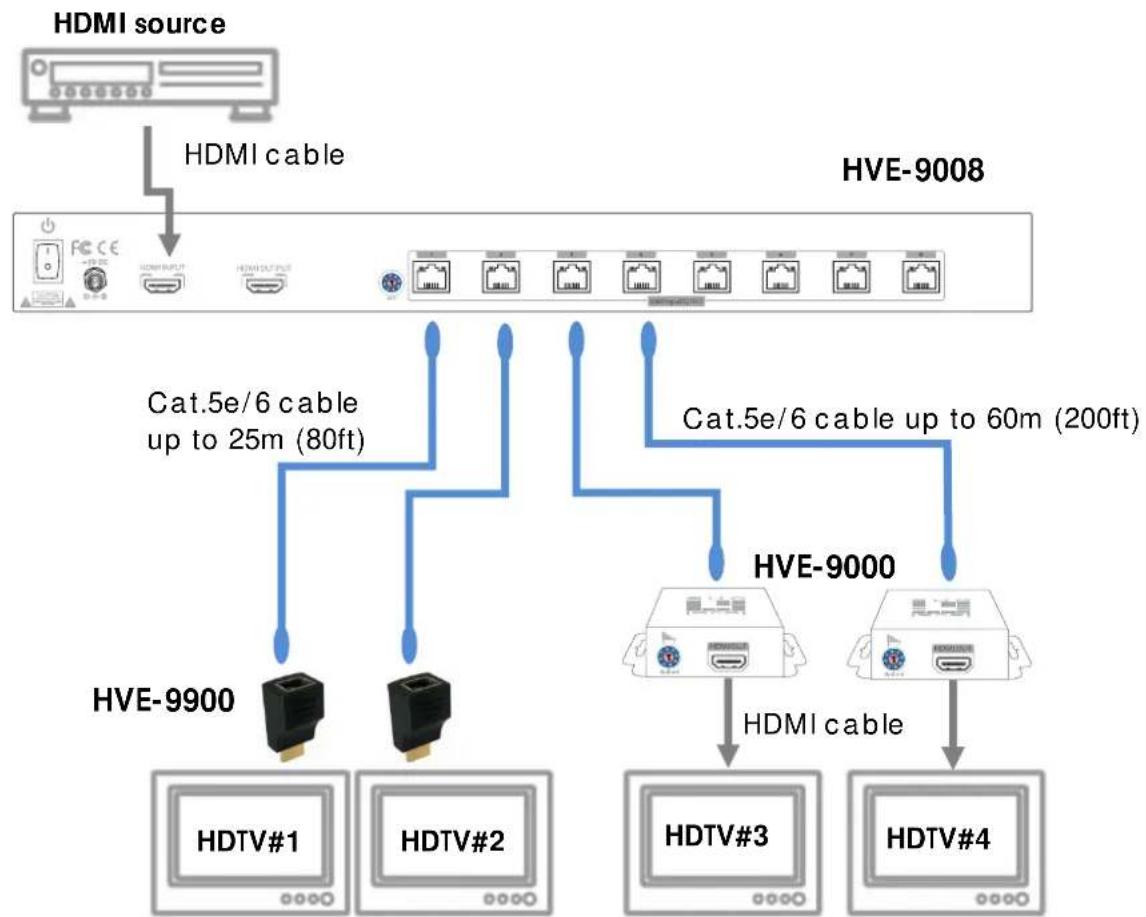
flowchart
graph TD
    A["HDMI source"] -->|HDMI cable| B["HVE-9008"]
    B --> C["Cat.5e/6 cable up to 25m (80ft)"]
    B --> D["Cat.5e/6 cable up to 60m (200ft)"]
    C --> E["HVE-9900"]
    D --> F["HVE-9000"]
    E --> G["HDTV#1"]
    E --> H["HDTV#2"]
    F --> I["HDTV#3"]
    F --> J["HDTV#4"]
    G --> K["..."]
    H --> L["..."]
    I --> M["..."]
    J --> N["..."]
SYSTEMATIC APPLICATION DIAGRAM
HVE-9002 & HVE-9003 with HVE-9000 & HVE-9900
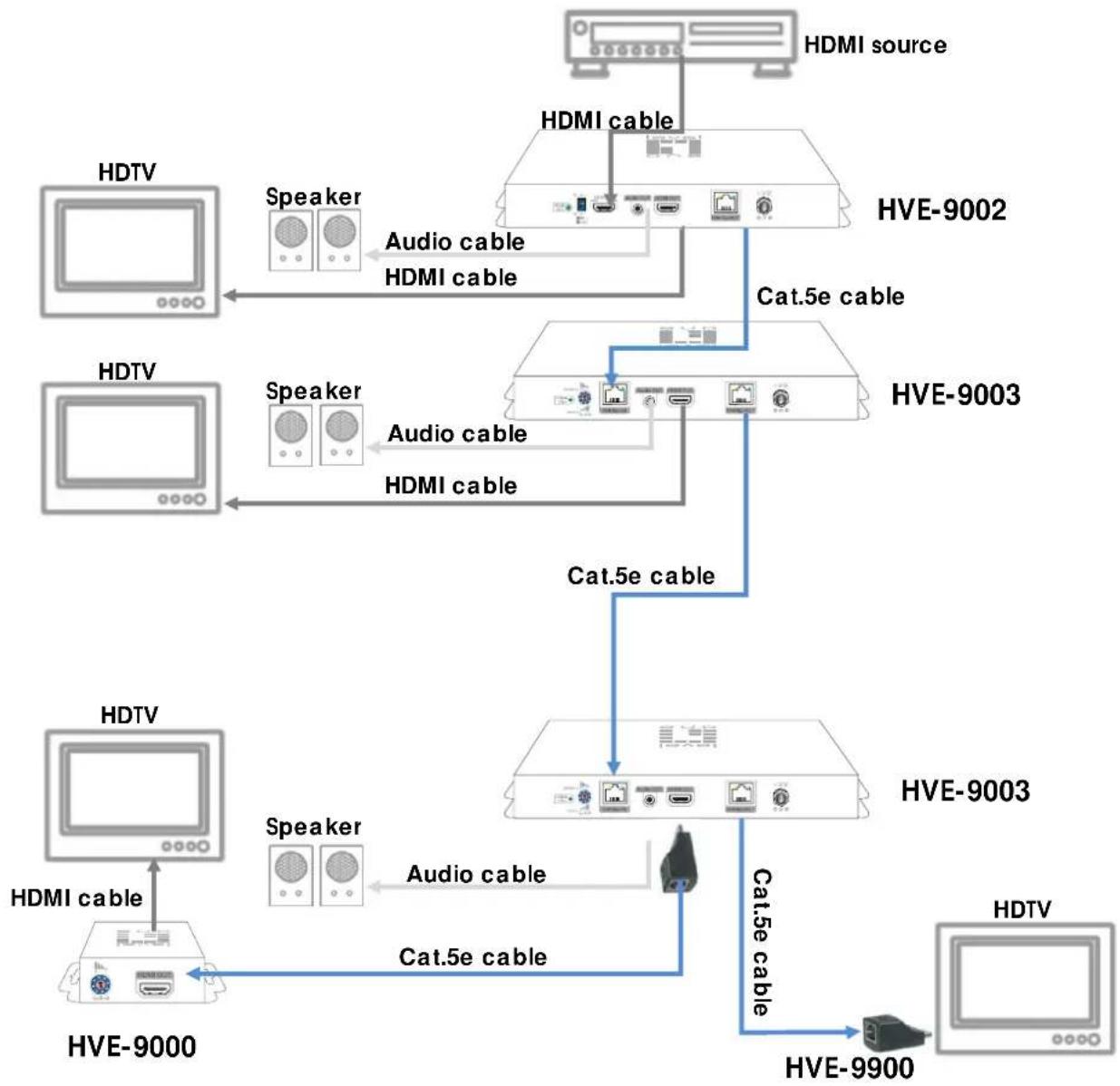
flowchart
graph TD
    A["HDMI source"] --> B["HDMI cable"]
    B --> C["HVE-9002"]
    C --> D["Cat.5e cable"]
    D --> E["HVE-9003"]
    E --> F["Cat.5e cable"]
    F --> G["HVE-9003"]
    G --> H["HIVE-9000"]
    H --> I["HDTV"]
    I --> J["HDMI cable"]
    K["HDTV"] --> L["Speaker"]
    L --> M["HDMI cable"]
    N["HDTV"] --> O["Speaker"]
    O --> P["HDMI cable"]
    Q["HDTV"] --> R["Speaker"]
    R --> S["HDMI cable"]
    T["HDTV"] --> U["Speaker"]
    U --> V["HDMI cable"]
    W["HDTV"] --> X["Speaker"]
    X --> Y["HDMI cable"]
    Z["HDTV"] --> AA["Speaker"]
    AA --> AB["HDMI cable"]
    AC["HDTV"] --> AD["Speaker"]
    AD --> AE["HDMI cable"]
    AF["HDTV"] --> AG["Speaker"]
    AG --> AH["HDMI cable"]
    AI["HDTV"] --> AJ["Speaker"]
    AJ --> AK["HDMI cable"]
FREQUENTLY ASKED QUESTIONS
| How does equalizer (EQ) work? | Equalizer is a built in electronic device used to fine tune picture quality. Please turn knob anticlockwise from 7 to 0 to get the optimal vision. If you find the display is not showing properly, please check your cable connection or it is out transmission limit. |
| What is the minimum requirement of Cat-X cable | Minimum cable requirement is Category 5 cable for HDSpiderTM series products. Please ensure all cables are terminated with RJ-45 plug according to EIA/TIA568B definition. |
| What kind of Cat-X cable is recommended? | We recommend using Category 6 or 7 STP cable for best picture quality at maximum extension. For better result please use cable with minimum delay skew. |
| I want extension above specification, is that possible? | Yes. To extend HDMI signal above specification published please use high quality HDMI cable (24 gauges) and recommended Cat-X cable. On field test, it is possible using CAT.6 cable for 50m transmission under 1080p. If further extension is required, please set HDMI source at 480p resolution. |
| I am using HVE-9900 to receive HDMI signal, but there is no image on monitor. | HVE-9900 is only intended to use for shorter transmission length. The maximum transmission length is at 15m under 1080p or 25m under 720p/1080i resolution. If your application exceeds this transmission limit, please use HDSpiderTM Long Range Cat.5 HDMI Receiver (HVE-9000) instead. |
| There is no image on display, what could be the problem? | First please check all cable is properly installed.Secondly check display source is functioning correctly. |
| It is still not working. If p | problem persist, please try the EDID learning function on HVE-9001, HVE-9002, or HVE-9004. |
SPECIFICATIONS
| Model Name HVE-9001 HVE-9004 HVE-9008 | ||||
| Technical | ||||
| Role of usage | Extender 1x4 splitter 1x9 splitter | |||
| Transmitter [TX] | ||||
| HDMI compliance HDMI | 1.3c | |||
| HDCP compliance Yes | ||||
| Video bandwidth Single-link 225MHz [6.75Gbps] | ||||
| Video support 480i / 480p / 720p / 1080i / 1080p60 up to 36-bit color depth | ||||
| HDMI over UTP cable transmission (24-bit) | Full HD (1080p) — 40m (130ft) [CAT5e] / 50m (165ft) [CAT6]HD (720p/1080i) — 50m (165ft) [CAT5e] / 60m (200ft) [CAT6] | |||
| Audio support Surround sound (up to 7.1ch) or stereo digital audio | ||||
| Signal equalization None | ||||
| Input TMDS signal 1.2 Volts [peak-to-peak] | ||||
| Input DDC signal 5 Volts [peak-to-peak, TTL] | ||||
| ESD protection | [1] Human body — ±19kV [air-gap discharge] & ±12kV [contact discharge][2] Core chipset — ±8kV | |||
| Input 1x HDMI | 1x HDMI | 1x HDMI | ||
| Output | 1x RJ-45 | 4x RJ-45 | 1x HDMI8x RJ-45 | |
| HDMI connector | Type A [19-pin female] | |||
| RJ-45 connector | WE/SS 8P8C | |||
| DIP switch | None | 2-pin | None | |
| Rotary control switch | Mode | None | Mode | |
| Mechanical | ||||
| Housing | Metal enclosure | |||
| Dimensions[L x W x H] | Model | 93 x 60 x 25mm[3.7" x 2.4" x 1"] | 215 x 85 x 40mm[8.5" x 3.3" x 1.6"] | 438 x 158 x 44mm[1'5" x 6.2" x 1.7"] |
| Package | 175 x 270 x 80mm[6.9" x 10.6" x 3.1"] | 330 x 200 x 95mm[1'1" x 7.9" x 3.7"] | 545 x 230 x 110mm[1'10" x 9.1" x 4.3"] | |
| Weight | Model | 154g [5oz] | 525 [1.2 lbs] 1.4kg [3.1 lbs] | |
| Package | 455g [1 lb] | 985 [2.2 lbs] 2.2kg [4.8 lbs] | ||
| Fixedness | Wall-mounting | 1RU rack-mounting | ||
| Power supply | 5V 2A DC | 5V 4A DC | ||
| Power consumption | 1 Watts [max] | 10 Watts [max] | 13 Watts [max] | |
| Operation temperature | 0~40°C [32~104°F] | |||
| Storage temperature | -20~60°C [-4~140°F] | |||
| Relative humidity | 20~90% RH [no condensation] | |||
| Package Contents | 1x HVE-9001 / HVE-9004/ HVE-90081x 5V power supply unit1x User manual | |||
| Model Name HVE-9002 HVE-9003 | |||
| Technical | |||
| Role of usage | 1x2 distribution amplifier (splitter) | ||
| Transmitter [TX] Transceiver [TRX] | |||
| HDMI compliance HDMI | 1.3c | ||
| HDCP compliance Yes | |||
| Video bandwidth Single-link 225MHz [6.75Gbps] | |||
| Video support 480i / 480p / 720p / 1080i / 1080p60 up to 36-bit color depth | |||
| HDMI over UTP cable transmission (24-bit) | Full HD (1080p) — 40m (130ft) [CAT5e] / 50m (165ft) [CAT6]HD (720p/1080i) — 50m (165ft) [CAT5e] / 60m (200ft) [CAT6] | ||
| Audio support Surround | sound (up to 7.1ch) or stereo digital audio | ||
| Signal equalization None | 8-level digital rotary control | ||
| Input TMDS signal 1.2 Volts [peak-to-peak] | |||
| Input DDC signal 5 Volts | [peak-to-peak, TTL] | ||
| ESD protection | [1] Human body — ±19kV [air-gap discharge] & ±12kV [contact discharge][2] Core chipset — ±8kV | ||
| Input | 1x | HDMRJ-45 | |
| Output | 1x HDMI1x RJ-451x 3.5mm audio socket | 1x HDMI1x RJ-451x 3.5mm audio socket | |
| HDMI connector Type A | [19-pin female] | ||
| RJ-45 connector | WE/SS 8P8C with 2 LED indicators | ||
| 3.5mm connector | Earphone jack for stereo audio | ||
| DIP switch | 2-pin DIP | None | |
| Rotary control switch | None | 8-level signal equalization | |
| Mechanical | |||
| Housing | Metal enclosure | ||
| Dimensions[L x W x H] | Model | 108 x 210 x 27mm [4.3" x 8.3" x 1.1"] | |
| Package | 200 x 330 x 95mm [7.9" x 1' 1" x 3.7"] | ||
| Weight | Model | 525g [1.2 lbs] | 530g [1.2 lbs] |
| Package | 980g [2.2 lbs] | 985g [2.2 lbs] | |
| Fixedness | Wall-mounting | ||
| Power supply | 5V 4A DC | ||
| Power consumption | 3 Watts [max] | ||
| Operation temperature | 0~40°C [32~104°F] | ||
| Storage temperature | -20~60°C [-4~140°F] | ||
| Relative humidity | 20~90% RH [no condensation] | ||
| Package Contents | 1x HVE-9002 or HVE-90031x 5V power supply unit1x User manual | ||
| Model Name HVE-9000 HVE-9900 | |||
| Technical | |||
| Role of usage Long range receiver [RX] Short range receiver [RX] | |||
| HDMI compliance HDMI 1.3c | |||
| HDCP compliance Yes | |||
| Video bandwidth Single-link 225MHz [6.75Gbps] | |||
| Video support 480i / 480p / 720p / 1080i / 1080p60 up to 36-bit color depth | |||
| HDMI over UTP cable transmission (24-bit) | Full HD [1080p] | 40m [130ft] for CAT5e 50m [165ft] for CAT6 | 15m [50ft] for CAT5e 18m [65ft] for CAT6 |
| HD [720p/1080i] | 50m [165ft] for CAT5e 60m [200ft] for CAT6 | 25m [80ft] for CAT5e 30m [100ft] for CAT6 | |
| Audio support Surround sound (up to 7.1ch) or stereo digital audio | |||
| Equalization 8-level digital rotary control None | |||
| Input TMDS signal 1.2 Volts [peak-to-peak] | |||
| Input DDC signal 5 Volts [peak-to-peak, TTL] | |||
| ESD protection | [1] Human body — ±19kV [air-gap discharge] & ±12kV [contact discharge] [2] Core chipset — ±8kV | ||
| Input 1x RJ-45 | 1x RJ-45 | ||
| Output | 1x HDMI 1x HDMI | ||
| HDMI connector | Type A [19-pin female] | Type A [19-pin male] | |
| RJ-45 connector | WE/SS 8P8C with 2 LED indicators | ||
| Rotary control switch | 8-level signal equalization None | ||
| Mechanical | |||
| Housing | Metal enclosure Plastic molding | ||
| Dimensions [L x W x H] | Model | 93 x 60 x 25mm [3.7" x 2.4" x 1"] | 45 x 25 x 20mm [1.8"x1"x0.8"] |
| Package | 175 x 270 x 80mm [6.9" x 10.6" x 3.1"] | 115 x 170 x 40mm [4.5" x 6.7"x1.6"] | |
| Weight | Model | 154g [5oz] 22g [0.8oz] | |
| Package | 455g [1 lb] | 90g [3.2oz] | |
| Fixedness | Wall-mounting | Direct plug-in | |
| Power supply | 5V 2A DC | None | |
| Power consumption | 1 Watt [max] | 0.5 Watt [max] | |
| Operation temperature | 0~40°C [32~104°F] | ||
| Storage temperature | -20~60°C [-4~140°F] | ||
| Relative humidity | 20~90% RH [no condensation] | ||
| Package Contents | 1x HVE-9000 1x 5V power supply unit 1x User manual | 1x HVE-9900 1x User manual | |
NOTICE
- Please read user manual carefully before operating the device.
- Please use the power supply unit accompanied with this product. Warranty does not cover for damages caused by pairing other power adaptor.
- Please check all connecting devices are properly grounded to avoid electric failure.
- This product has limited warranty for one year from defects in material and workmanship. Items that are physically damaged, misused, tempered with or altered are void of warranty. For further details please contact your distributor. In case warranty sticker is damaged or missing, warranty is void. For further details please contact your distributor.
- All of the transmission distances are measured by using Belden Cat.5e 125MHz solid UTP cables and ASTRODESIGN Video Signal Generator VG-859C as the HDMI source.
- When adjusting the signal level on the receiver unit, dial the rotary control switch from 7 to 0 and stop turning the rotary switch whenever the audio/video is playing normally. Inappropriate signal level setting may cause overpowering issues that would shorten the product's life significantly!
- The transmission length is largely affected by the type of Cat.5/5e/6 cables, the type of HDMI sources, and the type of HDMI display. The testing result shows solid UTP cables (usually in the form of 300m or 1,000ft bulk cables) can transmit a lot longer signals than stranded UTP cables (usually in the form of fixed length patch cords). Shielded STP cables are better suited than unshielded UTP cables. A solid UTP CAT5e cable shows longer transmission range than stranded STP CAT6 cable. For long extension applications, solid UTP/STP cables are the only viable choice.
- EIA/TIA-568-B termination (T568B) is preferred for better performance.
- To reduce the interference among the unshielded twisted pairs of wires in category cable, use double shielded STP cables to improve EMI problems, which is worse in long transmission.
- Because the quality of the category cables has the major effects on how long the transmission limit can achieve and how good is the received picture quality, the actual transmission range is subject to one's choice of Cat.5e/6 cables. For desired resolutions greater than 1080i or 1280x1024, a solid STP Cat.6 cable is recommended.
- If your HDMI display has multiple HDMI inputs, the first HDMI input [HDMI input #1] generally can produce better transmission performance among all HDMI inputs.
- If the HDMI or DVI device requires EDID information, use an EDID Reader/Writer to retrieve and provide the EDID information of the DVI or HDMI display.

Performance Guide for HDMI over Category Cable Transmission
| Performance rating Type of category cable | ||||
| Wiring Shielding CAT5 CAT5e CAT6 | ||||
| Solid | Unshielded (UTP) | ★★★ ★★★ | ★★★★★★ | |
| Shielded (STP) | ★★★ ★★★ | ★★★★ | ||
| Stranded | Unshielded (UTP) | ★ | ★★ | ★★ |
| Shielded (STP) | ★ | ★ | ★★ | |
| Termination | Use EIA/TIA-568-B termination (T568B) at any time | |||
PIN DEFINITION
HDMI
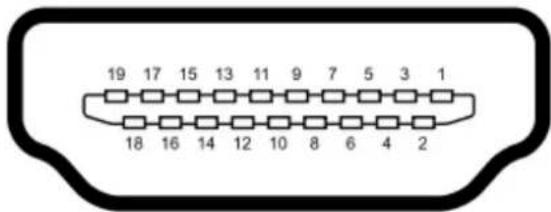
text_image
19 17 15 13 11 9 7 5 3 1 18 16 14 12 10 8 6 4 2Type A (Receptacle) HDMI
| Pin 1 | TMDS Data2+ | Pin 8 | TMDS Data0 Shield | Pin 15 | SCL |
| Pin 2 | TMDS Data2 Shield | Pin 9 | TMDS Data0- | Pin 16 | SDA |
| Pin 3 | TMDS Data2- | Pin 10 | TMDS Clock+ | Pin 17 | DDC/ CEC Ground |
| Pin 4 | TMDS Data1+ | Pin 11 | TMDS Clock Shield | Pin 18 | +5 V Power |
| Pin 5 | TMDS Data1 Shield | Pin 12 | TMDS Clock- | Pin 19 | Hot Plug Detect |
| Pin 6 | TMDS Data1- | Pin 13 | CEC | ||
| Pin 7 | TMDS Data0+ | Pin 14 | Reserved (N.C. on device) |
CAT5 [RJ-45]
T568A and T568B Wiring
| Pin | T568A Pair | T568B Pair | Wire | T568A Color | T568B Color | Pins on plug face (socket is reversed) |
| 1 | 3 | 2 | tip | white/green stripe | white/orange stripe | ![LEVELONE HVE-9003 - CAT5 [RJ-45] - 1](/content/2026/06/1186221/images/0137845734b14c8610194feb38eda57c7a414063cfede082122ef25665ace841.jpg) |
| 2 | 3 | 2 | ring | green solid | orange solid | |
| 3 | 2 | 3 | tip | white/orange stripe | white/green stripe | |
| 4 | 1 | 1 | ring | blue solid | blue solid | |
| 5 | 1 | 1 | tip | white/blue stripe | white/blue stripe | |
| 6 | 2 | 3 | ring | orange solid | green solid | |
| 7 | 4 | 4 | tip | white/brown stripe | white/brown stripe | |
| 8 | 4 | 4 | ring | brown solid | brown solid |
| Pair of Cat-5/ 5e/ 6 Cable | Definition | |
| White/orange stripe | TX0- | |
| Orange solid | TX0+ | |
| White/green stripe | TX1- | |
| Blue solid | TX2- | |
| White/blue stripe | TX2+ | |
| Green solid | TX1+ | |
| White/brown stripe | TXC- | |
| Brown solid | TXC+ | |
![LEVELONE HVE-9003 - CAT5 [RJ-45] - 2](/content/2026/06/1186221/images/7f2d633b6d452e3faf50ebef97627c0e8a55ccfca4faf1aabf304ca4c6b9af54.jpg)