COM-40FC/C/1D3S - Sound system Anchor Audio - Free user manual and instructions
Find the device manual for free COM-40FC/C/1D3S Anchor Audio in PDF.


User questions about COM-40FC/C/1D3S Anchor Audio
0 question about this device. Answer the ones you know or ask your own.
Ask a new question about this device
Download the instructions for your Sound system in PDF format for free! Find your manual COM-40FC/C/1D3S - Anchor Audio and take your electronic device back in hand. On this page are published all the documents necessary for the use of your device. COM-40FC/C/1D3S by Anchor Audio.
USER MANUAL COM-40FC/C/1D3S Anchor Audio
PortaCom Wired Intercom Owners Manual
MADE IN USA

SIX YEAR WARRANTY
A Message from the President
natural_image
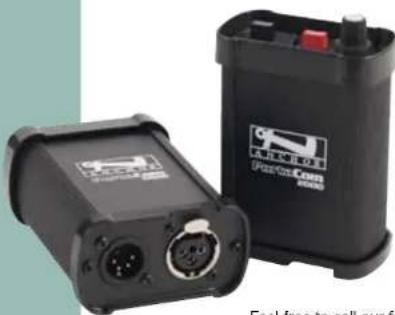
Two black industrial electronic devices with ports and a battery, no visible text or symbols on the devices themselves.Congratulations on purchasing an Anchor Audio intercom system, the choice of thousands of satisfied customers including the White House, prestigious universities, school districts nationwide, police and fire departments, and all branches of the U.S. military. Our products are made of the finest materials and built with pride in the U.S.
We've Incorporated the latest technology into your intercom system yet kept it simple to use. Just take a few minutes to review this manual to ensure the maximum enjoyment of your Anchor system. Or, you can view a demonstration video complete with a trouble shooting section at www.anchoraudio.com.
Feel free to call our friendly customer support staff at 1-800-ANCHOR1 Monday thru Friday between 7:00am and 5:00pm Pacific Standard Time with any questions. We love to hear from our customers.

Janet Jacobs, President on behalf of all Anchor employees
CONTENTS
GETTING STARTED / WARRANTY INFORMATION .... 1
Please check your new unit carefully for any damage which may have occurred during shipment. Each Anchor product is carefully inspected at the factory and packed in specially designed boxes for safe transport.
Notify the freight carrier immediately of any damage to the shipping box or product. Repack the unit in the original box and wait for inspection by the carrier's claim agent. Notify your dealer of the pending freight claim.
NOTE: All damage claims must be made with freight carrier!
RETURNING SYSTEMS FOR SERVICE OR REPAIR
For service or repair, please contact the dealer you purchased your system from or Anchor Audio Customer Service at 800.262.4671 to obtain a RA (Return Authorization) number. You may also complete an online RA request form at www.anchoraudio.com. All shipments to Anchor Audio must include a RA number and must be shipped prepaid. C.O.D. shipments will be refused and returned at your expense.
IMPORTANT: Save the shipping box & packing materials,
they were specially designed to ship your unit!
WARRANTY REGISTRATION
Visit our website at www.anchoraudio.com and select "Warranty Registration." Complete the online form to activate the two-year limited warranty on your PortaCom intercom system.
100-0081-000
PortaCom Wired Intercom Owners Manual
MADE IN USA

SIX YEAR WARRANTY

natural_image
Mannequin head with earphones and recording equipment (no visible text or symbols)- Plug headset connector into 4-pin XLR Headset Jack on belt pack
- Plug AC adapter into standard 110V AC outlet (230V AC export) then into AC Input Jack on the PC-2000 Power Console
- Connect BP-2000 Belt Packs to the Output Jacks on the PC-2000
NOTE: Make connections w/ standard mic cables.
- Set the PC-2000 Power Switch to "on"
- Adjust headset boom so microphone is close to mouth
- Adjust listening level w/ Headset Volume Control on Belt Pack
- Use Channel Switch to select between channel A or B
NOTE: The Optional RM-100 Rackmount Allows 1 or 2 PC-2000's To Mount In Standard Racks.
WHAT IS PORTACOM?
PortaCom Intercom System is a portable two-channel communication device that's simple to set up and easy to use. The main system components include:
PC-2000 Power Console, BP-2000 Belt Packs &
H-2000 & H-2000S Headsets
Station-to-station connections are made using standard microphone cable with 3-pin XLR connectors.
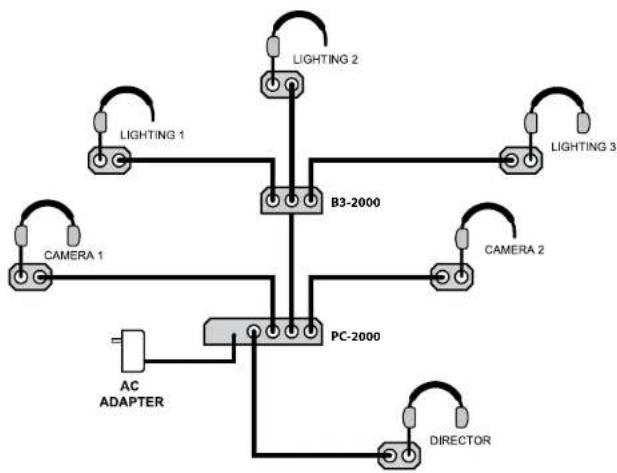
The PC-2000 Power Console has four output jacks to make a 4-headset system. You can add more headsets/users to the system by using the B3-2000 Branch Box to expand and reconfigure your system for use in almost any situation.
A typical 6-headset system using one B3-2000 is
illustrated here:
flowchart
graph TD
    A["Lighting 1"] --> B["B3-2000"]
    C["Lighting 2"] --> B
    D["CAMERA 1"] --> E["PC-2000"]
    F["CAMERA 2"] --> E
    G["AC ADAPTER"] --> E
    H["DIRECTOR"] --> E
    I["Lighting 3"] --> B
    J["Lighting 3"] --> B
    K["Director"] --> E
PortaCom Wired Intercom Owners Manual
PC-2000 POWER CONSOLE
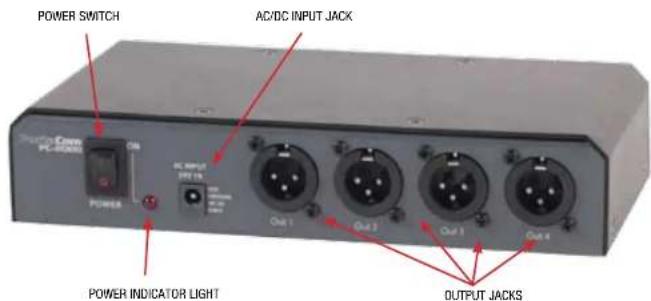
The PC-2000 Power Console can power up to 20 BP-2000 Belt Packs over a combined total of 2,500 feet of cable. It has a power switch, an input for connecting the AC adapter and four 3-pin XLR output jacks.
Using the RM-100 bracket you can mount one or two PC-2000s in a standard rack.
Belt packs are connected to the PC-2000 using standard mic cable with 3-pin XLR connectors.
BP-2000 BELT PACK
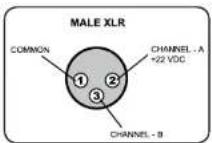
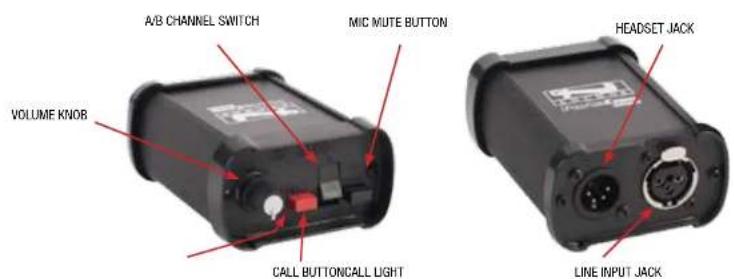
The BP-2000 Belt Pack has a female, 3-pin XLR, Line Input Jack and a male, 4-pin XLR, Headset Jack. Both jacks are located on the bottom side of the belt pack. Power is supplied through the microphone cable by the PC-2000 Power Console.
The BP-2000 controls can be found on the belt pack top and feature:
Headset Volume Control, A/B Channel Switch.
Mic Mute Button & Call Light & Button
The Headset Volume Control adjusts only the individual headset listening level, not the volume level of the entire system.
Setting the Mic Mute Button to "on" enables the headset microphone. Setting the button to "off" will short or mute the microphone. The Mic Mute Button does not affect the headset listening volume.
Pushing the Call Button will light the Call Light on all belt packs connected to the system. Use the Call Light to alert any users who may not be wearing their headsets.
H-2000 & H-2000S PORTACOM HEADSETS
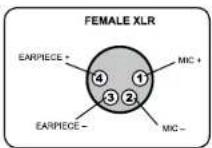
PortaCom comes with single-earpiece (H-2000S) and/or dual-earpiece (H-2000) headsets. To use plug the headset cable into the bottom of the BP-2000 Belt Pack. Adjust the headset listening level using the Headset Volume Control on the belt pack.
The headset's female 4-pin XLR connector plugs into the 4-pin XLR jack on the bottom of the belt pack. A wiring diagram of the headset connector is shown at right.
MADE IN USA

SIX YEAR WARRANTY
text_image
POWER SWITCH AC/DC INPUT JACK POWER AC INPUT 247.15 Power Out 1 Out 2 Out 3 Output jacks POWER INDICATOR LIGHTPC-2000 POWER CONSOLE - CONTROL PANEL
NEED MORE HELP? View demonstration videos on proper system setup and operation at our website: www.anchoraudio.com
NOTE: Custom length microphone cables are available from Anchor Audio.
text_image
A/B CHANNEL SWITCH MIC MUTE BUTTON VOLUME KNOR HEADSET JACK CALL BUTTONCALL LIGHT LINE INPUT JACKPB-2000 BELT PACK - TOP/BOTTOM
PortaCom Wired Intercom Owners Manual
MADE IN USA

SIX YEAR WARRANTY
PortaCom tEChNiCaL sPECiFiCatioNs
Operating Distance Up to 2,500 ft (total cable length)
Normal Line Level -15dBV
Signal-to-Noise Ratio -65dB
Distortion < 0.5%
Connecting Cables Standard 1-pair shielded mic cable
w/ 3-pin XLR (heavy-duty cable
recommended for runs over 250 ft
Compatibility Generally compatible w/ industry
standard system (call for info)
B3-2000 - Branch Box
Connectors (3-pin XLR) Input - 1 female / Output - 3 male
Dimensions 1.9" x 4.1" x 4.25"
(48×105×108mm)
Weight 19.2 oz / 0.5 kg
BP-2000-Belt pack
Input Line Connector 3-pin XLR - female
Headset Connector 4-pin XLR - male
Bridging Impedance 10k ohm min
DC Current Reqs. 20mA max
Dimensions 3.8" x 2.75" x 1.25"
(96.5×69.85×31.75mm)
Weight .40 oz./0.0113 kg
H-2000/H-2000S-Dual-Earpiece/Single-Earpiece Headset
Connector 4-pin XLR - female
Microphone Type Dynamic, low impedance
Dimensions 3.5" x 7.4" x 7.9"
(8.9 x 18.8 x 20 cm)
Weight H-200 16 oz / .45 kg
H-200S 13 oz / .37 kg
PC-2000 - Two-Channel Power Console
Output Connectors 3-pin XLR-4 male
Voltage Output 22 volts DC to belt packs
Max. Current Capacity 400mA
Max. Belt Packs 20 BP-2000 belt packs
Input Power Reqs. 24VAC, 50/60Hz, 750mA
30-40VDC,500mA
Dimensions 1.75" x 8.5" x 4.5"
(45×216×114mm)
Weight 57.6 oz / 1.63 kg
AC Power Adapter Anchor model AC-20
Input Voltage 120VAC, 60Hz
Output Voltage/Current 24VAC@750mA

Scan for PortaCom
Technical Specs

Scan for PortaCom
Brochure

Scan for PortaCom
Website

Scan for How to
Videos & Articles
ANCHOR AUDIO CUSTOMER SERVICE
800.262.4671
FOR ADDITIONAL INFORMATION
visit www.anchoraudio.com