K72334US - Knife KENSINGTON - Free user manual and instructions
Find the device manual for free K72334US KENSINGTON in PDF.


User questions about K72334US KENSINGTON
0 question about this device. Answer the ones you know or ask your own.
Ask a new question about this device
Download the instructions for your Knife in PDF format for free! Find your manual K72334US - KENSINGTON and take your electronic device back in hand. On this page are published all the documents necessary for the use of your device. K72334US by KENSINGTON.
USER MANUAL K72334US KENSINGTON
natural_image
Line drawing of a computer mouse with a separate small USB port (no text or symbols)
text_image
AAA + - AAA + -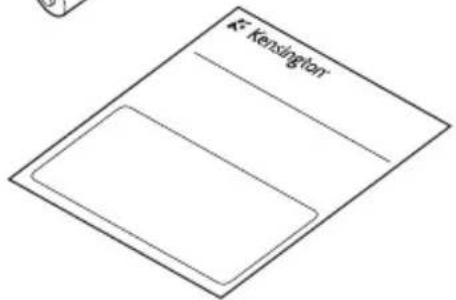
text_image
Kensington1 Install batteries
A
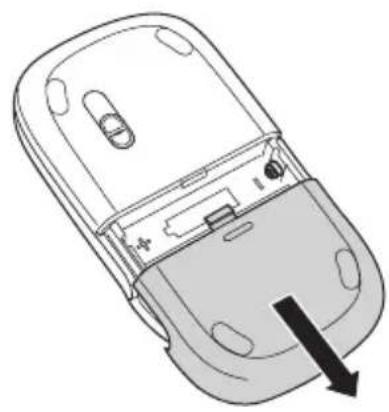
natural_image
Diagram of a mobile phone casing with an arrow indicating a component (no text or symbols present)B

text_image
Diagram showing battery assembly with two 2D and 4.5A batteries, one labeled with positive charge and arrow pointing to internal components.2 Plug in the USB receiver
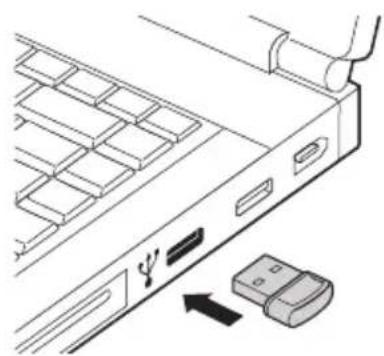
natural_image
Diagram of a server rack with ventilation slots and an attached USB flash drive (no text or symbols)3 Turn on the mouse
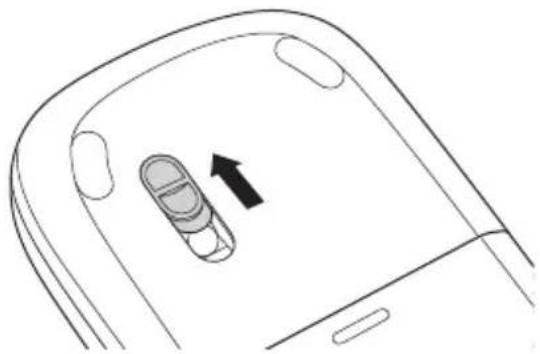
natural_image
Diagram of a smartphone rear panel showing a finger inserted into the screen, with an arrow indicating the insertion point (no text or symbols present)IMPORTANT: Placing the dongle into the mouse does NOT switch off the mouse. Taking it out does not switch it on either. The mouse is switched on or off ONLY by sliding the lens cover.
4
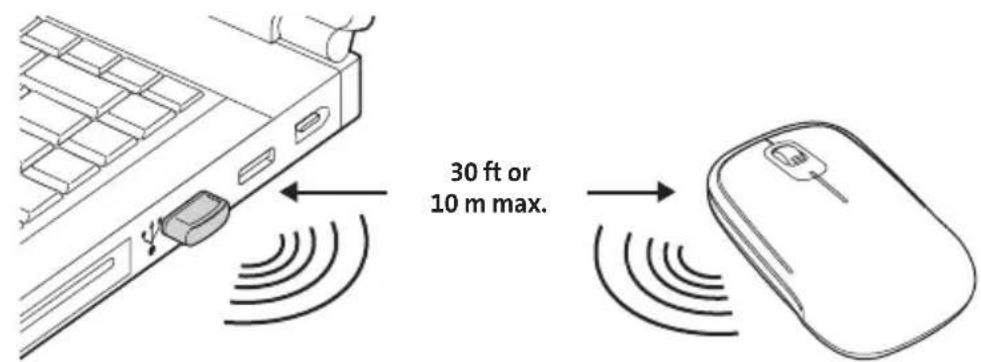
The wireless connection is made automatically
text_image
30 ft or 10 m max.5

text_image
> 10% green <=10% red6
To use tilt-scroll functionality, install the driver software if you are using Windows XP or Vista. You do not need this driver if you are on Mac OS 10.4.8 or higher. Go to www.kensington.com and download the Kensington SlimBlade Driver.
English
Compatibility
- Windows® XP and Windows Vista® operating systems
• Mac OS® X versions 10.4 or later
Tilt-Scroll Functionality
The scroll wheel on your SlimBlade mouse offers left/right tilt functionality. This feature is available for the following operating systems:
• Windows: XP or Vista
• Mac: 10.4.x or later
Common Troubleshooting Steps
-
Un-plug and re-plug the receiver.
-
Install fresh batteries in the mouse.
- Test the device on another port or computer.
- Some surfaces may "trick" the sensor, such as reflective surfaces like glass or mirrors. As a result this product will not work well on glass or mirror surfaces. The sensor should perform well on all other surfaces.
IMPORTANT: Computer User Health Information
Use of a keyboard or mouse may be linked to serious injuries or disorders. Recent medical research of occupational Injuries has linked normal, seemingly harmless activities as a potential cause of Repetitive Stress Injuries (“RSI”). Many factors may be linked to the occurrence of RSI, including a person’s own medical and physical condition, overall health, and how a person positions and uses his or her body during work and other activities (including use of a keyboard or mouse). Some studies suggest that the amount of time a person uses a keyboard or mouse may also be a factor. Consult a qualified health professional for any questions or concerns you may have about these risk factors. When using a keyboard or mouse, you may experience occasional discomfort in your hands, arms, shoulders, neck, or other parts of your body. However, if you experience symptoms such as persistent or recurring discomfort, pain, throbbing, aching, tingling, numbness, burning sensation, or stiffness, even if such symptoms occur while you are not working at your computer. DO NOT IGNORE THESE WARNING SIGNS. PROMPTLY SEE A QUALIFIED HEALTH PROFESSIONAL. These symptoms can be signs of sometimes permanently disabling RSI disorders of the nerves, muscles, tendons, or other parts of the body, such as carpal tunnel syndrome, tendonitis, tenosynovitis, and other conditions.
Technical Support
Technical support is available to all registered users of Kensington products.
Web Support
You may find the answer to your problem in the Frequently Asked Questions (FAQ) section of the Support area on the Kensington Website: www.support.kensington.com.
Telephone Support
There is no charge for technical support except long-distance charges where applicable. Please visit www.kensington.com for telephone support hours. In Europe, technical support is available by telephone Monday to Friday 09:00 to 21:00 (Central European time).
Please note the following when calling support:
- Call from a phone where you have access to your mouse.
• Be prepared to provide the following information:
— Name, address, and telephone number
— Name of the Kensington product - Make and model of your computer
– System software and version
– Symptoms of the problem and what led to them
Please call one of these numbers:
REPAIR OR REPLACEMENT OF THIS PRODUCT, AS PROVIDED HEREIN, IS YOUR EXCLUSIVE REMEDY. KENSINGTON SHALL NOT BE LIABLE FOR ANY SPECIAL, INCIDENTAL OR CONSEQUENTIAL DAMAGES, INCLUDING, BUT NOT LIMITED TO, LOST REVENUES, LOST PROFITS, LOSS OF USE OF SOFTWARE. LOSS OR RECOVERY OF DATA, RENTAL OF REPLACEMENT EQUIPMENT, DOWNTIME. DAMAGE TO PROPERTY, AND THIRD-PARTY CLAIMS, ARISING OUT OF ANY THEORY OF RECOVERY, INCLUDING WARRANTY, CONTRACT, STATUTORY OR TORT. NOTWITHSTANDING THE TERM OF ANY LIMITED WARRANTY OR ANY WARRANTY IMPLIED BY LAW, OR IN THE EVENT THAT ANY LIMITED WARRANTY FAILS OF ITS ESSENTIAL PURPOSE, IN NO EVENT WILL KENSINGTON'S ENTIRE LIABILITY EXCEED THE PURCHASE PRICE OF THIS PRODUCT. SOME STATES/COUNTIES DO NOT ALLOW THE EXCLUSION OR LIMITATION OF INCIDENTAL OR CONSEQUENTIAL DAMAGES, SO THE ABOVE LIMITATION OR EXCLUSION MAY NOT APPLY TO YOU. THIS WARRANTY GIVES YOU SPECIFIC LEGAL RIGHTS AND YOU MAY ALSO HAVE OTHER RIGHTS THAT VARY FROM STATE TO STATE AND PROVINCE TO PROVINCE.
RF TECHNICAL SPECIFICATIONS
Operating Frequency: 2.402-2.478 GHz
RF Output Power: 0dBm
FCC RADIATION EXPOSURE STATEMENT
This equipment complies with FCC radiation exposure limits set forth for an uncontrolled environment. End users must follow the specific operating instructions for satisfying RF exposure compliance. This transmitter must not be co-located or operating in conjunction with any other antenna or transmitter.
FEDERAL COMMUNICATIONS COMMISSION RADIO FREQUENCY INTERFERENCE STATEMENT
This device has been tested and found to comply with the limits for a Class B digital device, pursuant to Part 15 of the FCC Rules. These limits are designed to provide reasonable protection against harmful interference in a residential installation. This equipment generates, uses, and can radiate radio frequency energy and, if not installed and used in accordance with the instructions, may cause harmful interference to radio communications.
However, there is no guarantee that interference will not occur in a particular installation. If this equipment causes harmful interference to radio or television reception, which can be determined by turning the equipment off and on, the user is encouraged to try to correct the interference by one or more of the following measures:
• Reorient or relocate the receiving antenna.
- Increase the separation between the equipment and receiver.
- Connect the equipment into an outlet on a circuit different from that to which the receiver is connected.
- Consult the dealer or an experienced radio/TV technician for help.
MODIFICATIONS: Modifications not expressly approved by Kensington may void the user's authority to operate the device under FCC regulations and must not be made.
SHIELDED CABLES: In order to meet FCC requirements, all connections to equipment using a Kensington input device should be made using only the shielded cables.
FCC DECLARATION OF CONFORMITY COMPLIANCE STATEMENT
This product complies with Part 15 of the FCC Rules. Operation is subject to two conditions: (1) This device may not cause harmful interference, and (2) this device must accept any interference received, including interference that may cause undesired operation. As defined in Section 2.909 of the FCC Rules, the responsible party for this device is Kensington Computer Products Group, 333 Twin Dolphin Drive, Redwood Shores, CA 94065, USA.
CLASS 1 LASER SAFETY STATEMENT

This laser device complies with international standard IEC 60825-1: 2001-08, class 1 laser product and also complies with 21 CFR 1040.10 and 1040.11 except for deviation pursuant to Laser Notice No. 50 dated 7/2001:
- Emission of a parallel beam of infrared user-invisible light
- Maximum power of 716 microwatts CW, wavelength range 832-865 nanometers
- Operating temperate between 0^ C ( 32^ F) to 40^ C ( 104^ F).
While the Class 1 laser in this product is safe under normal use, the laser beam (which is invisible to the human eye, but emitted from the bottom of the mouse) should not be pointed at anyone's eyes.
CAUTION: This device has no serviceable parts. Use of controls or adjustments or performance of procedures other than those specified herein may result in hazardous radiation exposure.
SAFETY AND USAGE GUIDELINES
- In the absence of proper operation and if customer-initiated troubleshooting is unsuccessful, switch off device and contact Kensington technical support: www.kensington.com.
-
Do not disassemble product or expose it to liquid, humidity, moisture, or temperatures outside the specified operating ranges of 0^ C ( 32^ F) to 40^ C ( 104^ F).
-
If your product is exposed to out-of-range temperatures, switch it off and allow temperature to return to the normal operating range.
INFORMATION FOR EU MEMBER-STATES ONLY:

The use of the symbol indicates that this product may not be treated as household waste. By ensuring this product is disposed of correctly, you will help prevent potential negative consequences for the environment and human health, which could otherwise be caused by inappropriate waste handling of this product. For more detailed information about recycling of this product, please contact your local city office, your household waste disposal service, or the shop where you purchased the product.
Kensington and ACCO are registered trademarks of ACCO Brands. SlimBlade is a trademark of ACCO Brands. The Kensington Promise is a service mark of ACCO Brands. All other trademarks are the property of their respective owners. Patents pending.
© 2008 Kensington Computer Products Group, a division of ACCO Brands. Any unauthorized copying, duplicating, or other reproduction of the contents hereof is prohibited without written consent from Kensington Computer Products Group. All rights reserved. 10/08

The Kensington Promise
For technical support visit
Kensington Computer Products Group
A Division of ACCO Brands
333 Twin Dolphin Drive, Sixth floor
Redwood Shores, CA 94065
Designed in California, U.S.A.
by Kensington
Made in China
Patents Pending
www.kensington.com