PU-607BD-TX - Extension AV CYP - Free user manual and instructions
Find the device manual for free PU-607BD-TX CYP in PDF.


User questions about PU-607BD-TX CYP
0 question about this device. Answer the ones you know or ask your own.
Ask a new question about this device
Download the instructions for your Extension AV in PDF format for free! Find your manual PU-607BD-TX - CYP and take your electronic device back in hand. On this page are published all the documents necessary for the use of your device. PU-607BD-TX by CYP.
USER MANUAL PU-607BD-TX CYP
The information in this manual has been carefully checked and is believed to be accurate. CYP (UK) Ltd assumes no responsibility for any infringements of patents or other rights of third parties which may result from its use.
CYP (UK) Ltd assumes no responsibility for any inaccuracies that may be contained in this document. CYP (UK) Ltd also makes no commitment to update or to keep current the information contained in this document.
CYP (UK) Ltd reserves the right to make improvements to this document and/or product at any time and without notice.
COPYRIGHT NOTICE
No part of this document may be reproduced, transmitted, transcribed, stored in a retrieval system, or any of its part translated into any language or computer file, in any form or by any means—electronic, mechanical, magnetic, optical, chemical, manual, or otherwise—without express written permission and consent from CYP (UK) Ltd.
© Copyright 2011 by CYP (UK) Ltd.
All Rights Reserved.
Version 1.1 August 2011
TRADEMARK ACKNOWLEDGMENTS
All products or service names mentioned in this document may be trademarks of the companies with which they are associated.
SAFETY PRECAUTIONS
Please read all instructions before attempting to unpack, install or operate this equipment and before connecting the power supply.
Please keep the following in mind as you unpack and install this equipment:
- Always follow basic safety precautions to reduce the risk of fire, electrical shock and injury to persons.
- To prevent fire or shock hazard, do not expose the unit to rain, moisture or install this product near water.
- Never spill liquid of any kind on or into this product.
- Never push an object of any kind into this product through any openings or empty slots in the unit, as you may damage parts inside the unit.
- Do not attach the power supply cabling to building surfaces.
- Use only the supplied power supply unit (PSU). Do not use the PSU if it is damaged.
- Do not allow anything to rest on the power cabling or allow any weight to be placed upon it or any person walk on it.
- To protect the unit from overheating, do not block any vents or openings in the unit housing that provide ventilation and allow for sufficient space for air to circulate around the unit.
REVISION HISTORY
VERSION NO. DATE SUMMARY OF CHANGE
| v1.00 11/02/2014 First release | ||
CONTENTS
- Introduction......6
- Applications ......6
- Package Contents ......6
- System Requirements ......6
- Features......7
- Operation Controls and Functions .....8
6.1 Transmitter Front and Rear Panels......8
6.2 IR Cable Pin Assignment 9
6.3 D-Sub 9 Pin Definitions ...... 9 - Connection Diagram ...... 10
- Specifications....11
- Acronyms......12
1. INTRODUCTION
The PU-607BD-TX Transmitter allows uncompressed HDMI signals and IP data to be transmitted over a Single CAT5e/6/7 cable. This solution has the added features of RS-232 and 2-way IR control functionality over the same CAT5e/6/7 cable. These combined HDMI and control signals can be transmitted up to lengths of 100 metres. This Transmitter is designed to be used with the PU-607BD-RX and PU-607BDWP-RX Receivers only, which enables Bi-Directional Power over Ethernet (PoE) functionality.
2. APPLICATIONS
Household entertainment sharing and control
Lecture room display and control
■ Showroom display and control
Meeting room presentation and control
■ Classroom display and control
3. PACKAGE CONTENTS
1×PU-607BD-TXTransmitter
1×IR Blaster
×IRReceiver
1×24 V/1.25 A DC Power Adaptor
Operation Manual
4. SYSTEM REQUIREMENTS
Input HDMI source equipment such as DVD/Blu-ray player and HDMI equipped output display (TV or monitor).
5. FEATURES
Supports all v1.4 HDMI resolutions including 4K.
Supports uncompressed video/audio up to 10.2Gbps
Common supported resolutions: HDTV: 480p, 576p, 720p, 1080i, 1080p, 1080p24; PC: VGA, SVGA, XGA, WXGA, SXGA, UXGA, WUXGA.
HDMI, HDCP, & DVI compliant
Supports HDCP repeating and CEC functions
Uncompressed data transfer over single CAT cable (100m - CAT6/7; 80m - CAT5e)
Uncompressed video 1080p, 60Hz, 48bits
Audio support up to 7.1CH & Dolby TrueHD, DTS-HD
5Play™ convergence: HDMI, LAN, Bi-Directional POE & Control (IR & RS232)
Supports 3D signals
Supports Bi-Directional Power over Ethernet (PoE)
Note: Only compatible with PU-607BD-RX & PU-607BDWP-RX Receivers
6. OPERATION CONTROLS AND FUNCTIONS
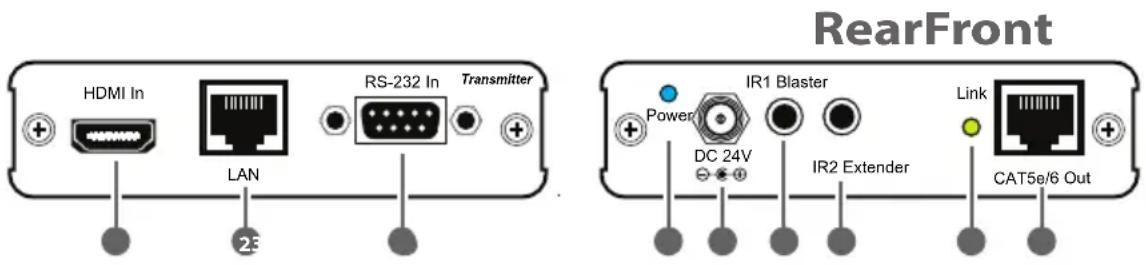
6.1 Transmitter Front and Rear Panels
text_image
RearFront HDMI In LAN RS-232 In Transmitter Power IR1 Blaster DC 24V IR2 Extender Link CAT5e/6 Out1 HDMI In: Connect to HDMI source equipment such as a DVD or Blu-ray player.
2 LAN: Connect to an internet or network connection.
3 RS-232 In: Connect to a PC or laptop with D-Sub 9 pin male cable for the transmission of RS-232 commands.
4 Power LED: This blue LED will illuminate when the device is connected to a power supply.
5 DC 24V: Plug the 24 V DC power supply into the unit and connect the adaptor to an AC outlet. Only one side of power needs to be connected to activate both transmitter and receiver.
6 IR 1 Blaster: Connect to the supplied IR blaster cable for IR signal transmission. Place the IR blaster in direct line-of-sight of the equipment to be controlled.
7 IR 2 Extender: Connect to the supplied IR receiver cables for IR signal reception. Ensure that remote being used is within the direct line-of-sight of the IR extender.
8 Link LED: The yellow LED will illuminate when both the input and output signals are connected.
9 CAT5e/6 Out: Connect to the receiver unit with a Single CAT5e/6 cable for transmission of all data signals.
6.2 IR Cable Pin Assignment

text_image
IR Blaster ① Power 5V ② IR Blaster Signal ③ NC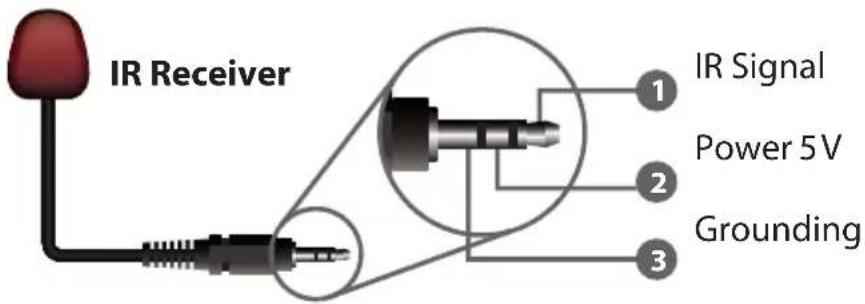
text_image
IR Receiver 1 IR Signal 2 Power 5V 3 Grounding6.3 D-Sub 9 Pin Definitions
| PinDefine TX / RX | |
| 1 N/C | |
| 2 TxD / RxD | |
| 3 RxD / TxD | |
| 4 N/C | |
| 5 GND | |
| 6 N/C | |
| 7 N/C | |
| 8 N/C | |
| 9 N/C | |
7. CONNECTION DIAGRAM

flowchart
graph TD
    A["DVD or Blu-ray Player"] -->|1.5m 60°| B["IR Blaster"]
    B --> C["Power Supply"]
    C --> D["TX"]
    D --> E["Internet Modem or Router"]
    E --> F["RS-232"]
    F --> G["RS-232 Equipped PC or Notebook"]
    H["TV or Monitor"] --> I["IR Blaster"]
    I --> J["IR Extender"]
    J --> K["3m3m 7m 60°"]
    K --> L["IR Extender"]
    L --> M["3m3m 7m 60°"]
    M --> N["IR Blaster"]
    N --> O["1.5m 60°"]
    O --> P["HDMI"]
    P --> Q["Internet Modem or Router"]
    Q --> R["RS-232 Equipped HDMI Switcher"]
    R --> S["Notebook"]
    T["RTM"] --> U["RTM"]
    V["RTM"] --> W["RTM"]
    X["RTM"] --> Y["RTM"]
    Z["RTM"] --> AA["RTM"]
Note: Only one of the units need to be connected to power, either the transmitter or receiver, on order for both to operate. In this example the transmitter is powering the receiver
8. SPECIFICATIONS
Video Bandwidth 300MHz / 9Gbps
Ethernet Speed 100 Mbps
Transmitter
Input 1×HDMI, 1×IR Extender, 1×RS-232, 1×LAN
Output 1×CAT5e/6, 1×IR Blaster
HDMI In/Out Cable Up to 10 Meters
Distance
CAT6 In/Out Cable Up to 100 Meters
Distance
HDMI In/Out Supports 480i\~1080p@50/60, 1080p@24,
Resolution VGA\~WUXGA
IR Frequency 30\~50 kHz
ESD Protection Human Body Model:
±8 kV (air-gap discharge)
±4 kV (contact discharge)
Power Supply 24 V/1.25 A DC (US/EU Standards, CE/FCC/UL certified)
Dimensions 102mm (W)×113mm (D)×25mm (H)/each
Weight 252 g (TX), 256 g (RX)
Chassis Material Aluminum
Silkscreen Color Silver
Power Consumption 13 W
Operating Temperature 0 °C\~40 °C/32 °F \~104 °F
Storage Temperature -20 °C\~60 °C/-4 °F\~140 °F
Relative Humidity 20\~90 % RH (non-condensing)
9. ACRONYMS
| ACRONYM COMPLETE TERM | |
| CAT5e Category 5 Cable | |
| CAT6 Category 6 Cable | |
| CEC Consumer Electronics Control | |
| DVIDigital Visual Interface | |
| HDCP High-bandwidth Digital Content Protection | |
| HDMIHigh Definition Multimedia Interface | |
| IR Infrared | |

CYP (UK) Ltd., Unit 7, Shepperton Business Park, Govett Avenue, Shepperton, Middlesex, TW17 8BA
Tel: +44 (0) 20 3137 9180 | Fax: +44 (0) 20 3137 6279
Email: sales@cypeurope.com
www.cypeurope.com
v1.00