UH500 - Air Humidifier N'oveen - Free user manual and instructions
Find the device manual for free UH500 N'oveen in PDF.


User questions about UH500 N'oveen
0 question about this device. Answer the ones you know or ask your own.
Ask a new question about this device
Download the instructions for your Air Humidifier in PDF format for free! Find your manual UH500 - N'oveen and take your electronic device back in hand. On this page are published all the documents necessary for the use of your device. UH500 by N'oveen.
USER MANUAL UH500 N'oveen
natural_image
White and black electric oven with digital display showing 8.8, 10, 12, and 14 seconds (no visible text or symbols on main body)INSTRUKCJA OBSŁUGI
USE INSTRUCTIONS
POLSKI s. 2
ENGLISH ...... p. 7
natural_image
White plastic door and circular button with a curved handle, no text or symbols visible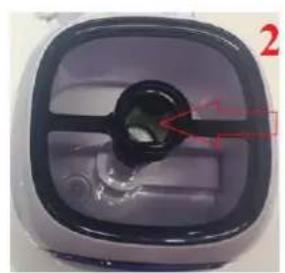
natural_image
Close-up of a purple plastic container with a black central port and red arrow pointing to it, no visible text or symbols.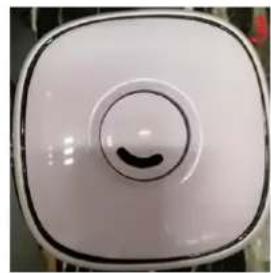
natural_image
Close-up of a white square-shaped electronic device with a black circular button and a curved knob (no text or symbols visible)ZALECENIA:
Thank you for purchasing your new Ultrasonic Humidifier.
The humidifier helps you to restore and keep an appropriate level of humidity (suggested level between 40 – 60%) and eliminate the discomfort associated with dry air. Ultrasonic humidifier uses ultrasound to break down water molecules and generate mist. Read all the safety instructions carefully before use and keep this instruction manual for future reference:
- Children of less than 3 years should be kept away unless continuously supervised.
- Children aged from 3 years and less than 8 years shall only switch on/off the appliance provided that it has been placed or installed in its intended normal operating position and they have been given supervision or instruction concerning use of the appliance in a safe way and understand the hazards involved. Children aged from 3 years and less than 8 years shall not plug in, regulate and clean the appliance or perform user maintenance.
- This appliance can be used by children aged from 8 years and above and persons with reduced physical, sensory or mental capabilities or lack of experience and knowledge if they have been given supervision or instruction concerning use of the appliance in a safe way and understand the hazards involved. Children shall not play with the appliance. Cleaning and user maintenance shall not be made by children without supervision.
- This appliance must be used under the rated voltage and frequency as indicated in rating label.
- To avoid the risk of electric shock, disconnect the plug from the electrical socket before relocating, servicing, or cleaning it.
- Disconnect the appliance from the mains before filling the water tank.
- Please switch off power before unplugging.
- Unplug power from outlet when not in use.
- Empty and dry the water tank when the device is not in use.
- Do not move the appliance while in use.
- If the supply cord is damaged, it must be replaced by the manufacturer, its service agent or a similarly qualified person.
- For indoor household use only.
-
Do not immerse the unit in any liquid.
-
To avoid the risk of electric shock do not spray with liquids. Do not touch the unit with wet or damp hands.
- Keep the unit away from any hot sources.
- Do not cover the unit. Do not place any objects on the top of the unit.
- Do not operate any appliance with a damaged cord or plug or after the appliance malfunctions or has been damaged in any manner. Return appliance to the nearest authorized service facility for examination, repair, or adjustment.
- Do not place the mist outlet close to furniture, a wall, a TV or any other appliance that could be damaged by the moisture.
- Do not overfill the water container more than the MAX mark indicates.
- Do not insert foreign objects into the device.
- If water spills on the device, immediately unplug it and allow it to dry.
- Do not use the appliance in association with a programmer, timer or other device that automatically switches it on.
- Do not switch the appliance on without water.
- Do not use the device if the water in the tank has run out.
- Always fill the tank with clean water. We recommend you use filtered or distilled water.
UNIT DESCRIPTION

text_image
Water tank cap Water level indicator Control panel Mist outlet Water level control module filter Water shortage protection Membrane
text_image
88 %RH Timer Timer SLEEP | HYGROSTAT | HUMIDIFY | PowerCONTROL PANEL
- POWER button: plug the power supply and press the power button, the LCD screen lights up and the appliance starts to work with high mist. Press again to turn off the humidifier.
- HYGROSTAT button: press once to select the desire level of humidity. The default humidity is 40% , it can be increased by 5% until 90% , the humidifier will stop working when the humidity reaches the selected humidity value.
- TIMER button: the working time can be adjusted from 1 hour to 12 hours. Press this button to display the corresponding time.
- SLEEP button: press to turn off the LCD display. Press any button to illuminate the LCD display again.
- HUMIDIFY button: press this button to adjust the humidifying level: high - medium - low. The default humidification level is high intensity.
In the case of lack of water, the device will stop working but the power light will remain on!!!
CLEANING AND MAINTENANCE
In case when the water is hard which means water contains too much calcium and magnesium, it can cause "white powder" problem and give heavy sediment on the surface of water basin, transducer and inner surface of the water tank. Sediment on the surface of transducer will make the unit work improperly.
Filling the tank with water
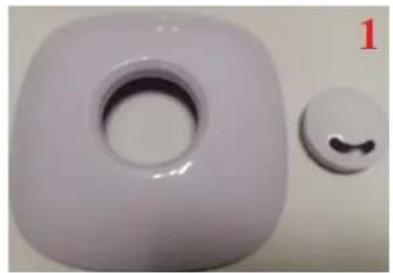
Remove the top cover (zdj. 1). Remove the water tank from the main body, fill the tank with tap water (zdj. 2) (at a temperature no higher than 40^ C ), cover the tank with the lid (zdj.
3). The device is ready for use
natural_image
White plastic door with circular opening and a small circular button on the side (no text or symbols visible)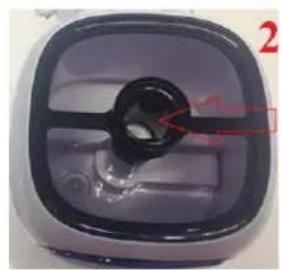
natural_image
Close-up of a purple plastic container with a black central hole and red arrow pointing to a small circular feature (no text or symbols visible)
natural_image
Close-up of a white square electronic device with a circular button and a curved black mark on the top (no text or symbols visible)WE RECOMMEND:
- Use filtered water or distilled water.
- Clean the transducer, water tank and basin unit every week.
- Change the water in water tank more often to keep it fresh.
- Clean the whole unit, and make sure to keep all parts of the unit dry completely when the unit is not in use.
HOW TO CLEAN THE TRANSDUCER:
- Put 5-10 drops of vinegar on the surface of the transducer, wait for 2-5 minutes.
- Brush out the scum on the surface.
- Rinse the transducer with clean water.
HOW TO CLEAN THE BASIN UNIT:
- Clean the water basin with soft cloth and the vinegar if there is sediment in it.
- If the sediment covers the security switch, drop the vinegar on the sediment and clean it out with the brush.
- Rinse the water basin with clean water.
Remember that before performing any activity consisting of opening, lifting or replacing disconnect the device from the power supply !!!
TROUBLESHOOTING
| Problem | Possible reasons | Solution |
| Humidifier does not work | No power supplyNo water in water tank | Connect power supply, switch onFill water into water tank |
| No mist | Selected humidity level has been reachedDefective device | Deactivate or reset the humidity levelContact Technical Service |
| Mist with strange odour | New deviceDirty water or long time staying water | Odor disappears after the first few hours of operationClean water tank, fill with clear water |
| Mist volume too low | Too much dirt in the water basinDirty water or long time staying waterLow humidifying level | Clean membraneClean water tank, fill with clear waterChange the humidifying level |
| Abnormal noise | Not enough waterThe device is tilted or on an uneven surface | Fill with waterPlace the unit on a flat, stable surface |
| Spray mist is coming out of the area around the jets | Mist nozzle or water tank misplaced | Re-install the nozzle or tank |