DuoFern Universal Actuator 9470-1 - Uncategorized RADEMACHER - Free user manual and instructions
Find the device manual for free DuoFern Universal Actuator 9470-1 RADEMACHER in PDF.


User questions about DuoFern Universal Actuator 9470-1 RADEMACHER
0 question about this device. Answer the ones you know or ask your own.
Ask a new question about this device
Download the instructions for your Uncategorized in PDF format for free! Find your manual DuoFern Universal Actuator 9470-1 - RADEMACHER and take your electronic device back in hand. On this page are published all the documents necessary for the use of your device. DuoFern Universal Actuator 9470-1 by RADEMACHER.
USER MANUAL DuoFern Universal Actuator 9470-1 RADEMACHER
DuoFern Universal Actuator 9470-1 (1-channel)
Instruction manual for the electrical connection and for commissioning
Item no. 3514 02 61
Type: 9470-1
text_image
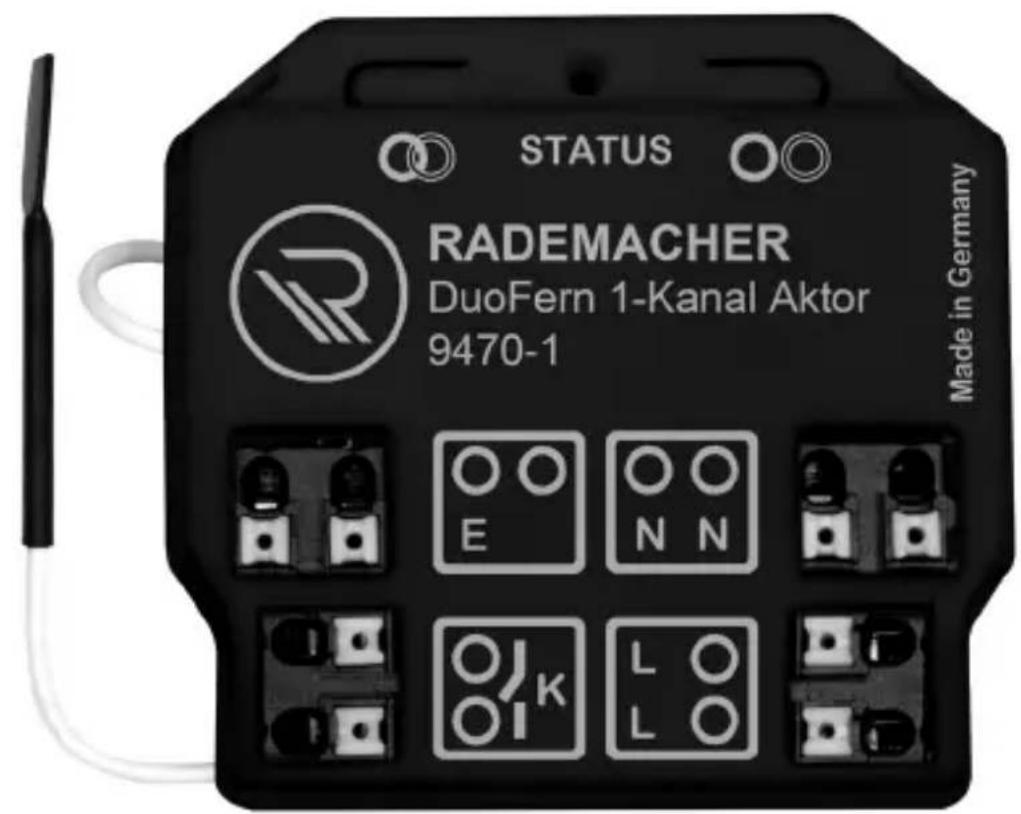
STATUS RADEMACHER DuoFern 1-Kanal Aktor 9470-1 Made in Germany1. This manual....3
1.1 How to use this manual ....3
2. Hazard symbols......4
2.1 Levels of danger and signal words....4
2.2 Symbols and depictions used....5
3. Safety instructions......6
3.1 Intended use....6
3.2 Improper use....7
3.3 Expert knowledge required by the installer....8
3.4 Glossary - definition 8
4. Included in delivery....9
5. Overview and connections....10
5.1 Operating buttons and indicator light 11
6. Functional description......12
6.1 Functional characteristics.... 13
6.2 Description of the functions and parameters....15
7. Technical specifications....17
8. Connecting the DuoFern Universal Actuator 9470-1 .... 20
8.1 Safety instructions for the electrical connection....20
8.2 Important information regarding the electrical connection.... 22
8.3 Connecting and installing the DuoFern Universal Actuator 9470-1 23
8.4 Connection diagram 24
8.5 Installation example.... 25
9. Logging DuoFern transmitters on / off......26
9.1 Logging on and off via radio code 27
10. Deleting all settings (reset)......28
11. Dismantling 28
12. Simplified EU declaration of conformity 29

1. This manual...
EN
...describes how to install, connect and commission the DuoFern Universal Actuator 9470-1.

1.1 How to use this manual
◆ Before you begin, please read this manual through completely and follow all the safety instructions.
◆ Please also read the instruction manuals of the accessories if available, as well as the instructions of the respective connected appliance.
◆ This manual is part of the product. Please store it in an easily accessible place.
When passing the DuoFern Universal Actuator 9470-1 on to a third party, this manual must be passed on as well.
◆ Damage resulting from non-compliance with this manual and the safety instructions will void the warranty. We assume no liability for any consequential damage.

2. Hazard symbols
EN
The following hazard symbols are used in this manual:

Danger to life resulting from electric shock

Danger area / dangerous situation

2.1 Levels of danger and signal words

DANGER!
This hazard will lead to serious injury or death if not avoided.

WARNING! WARNING!
This hazard may result in serious injury or death if not avoided.

CAUTION!
This hazard may result in minor or moderate injury if not avoided.

ATTENTION!
This hazard may lead to property damage.
| Depiction | Description |
| 1. | Procedures |
| 2. | |
| ◆ | Itemisation |
| 1) or a) | Lists |
 | Further useful information |
 | Please read the respective manual |

3. Safety instructions
EN
The use of defective devices can lead to personal injury and damage to property (electric shock / short circuit).
◆ Never use defective or damaged devices.
◆ Check that the DuoFern Universal Actuator 9470-1 is intact.
◆ Consult our customer service department in the event that you discover damage.

3.1 Intended use
Only use the DuoFern Universal Actuator 9470-1 for connecting and controlling electrical appliances (e.g. lighting) within the permissible load limits, see “Technical Specifications”.
The DuoFern Universal Actuator 9470-1 is suitable for connecting the mains voltage and extra-low voltage (ELV) with basic insulation.
Operating conditions
◆ Only use the DuoFern Universal Actuator 9470-1 in dry rooms.
◆ A 230 V / 50 Hz power supply, together with a site-provided disconnecting device (fuse), must be available at the installation location.
◆ The installation and operation of the radio systems is only permitted for systems and devices where a malfunction in the transmitter or receiver would not cause a danger to persons or property or where this risk is already covered by other safety equipment.

Radio systems that transmit on the same frequency can cause interference.

3.2 Improper use
Using the DuoFern Universal Actuator 9470-1 for any other purpose than previously mentioned is not permissible.

Improper use can lead to serious injuries or property damage.
◆ Never use the DuoFern Universal Actuator 9470-1 to:
- Disconnect the connected appliance
- Connect the safety extra-low voltage (SELV)
◆ Never use the radio system (e.g. DuoFern radio system) and its components for the remote control of devices and systems with increased safety-relevant requirements or where there is an accident risk. Applications of this kind require additional safety equipment. Observe the respective statutory regulations for the installation of such systems.

There is a risk to life caused through short circuiting and electric shocks if the DuoFern Universal Actuator 9470-1 is used outside or in damp rooms.
◆ Do not install and use the DuoFern Universal Actuator 9470-1 outside or in damp rooms.

3.3 Expert knowledge required by the installer
EN
The electrical connection, installation and commissioning of the DuoFern Universal Actuator 9470-1 must only be carried out by a qualified electrician in accordance with the instructions in this manual.

3.4 Glossary - definition
DuoFern
◆ RADEMACHER radio technology for controlling compatible products
WR ConfigTool
◆ RADEMACHER software for programming the DuoFern Manual Control incl. automatic software updates for the DuoFern Manual Control
SmartHome Box
◆ The SmartHome Box is a central controller unit for RADEMACHER radio products
ELV
◆ Extra-low voltage
SELV
◆ Safety extra-low voltage
text_image
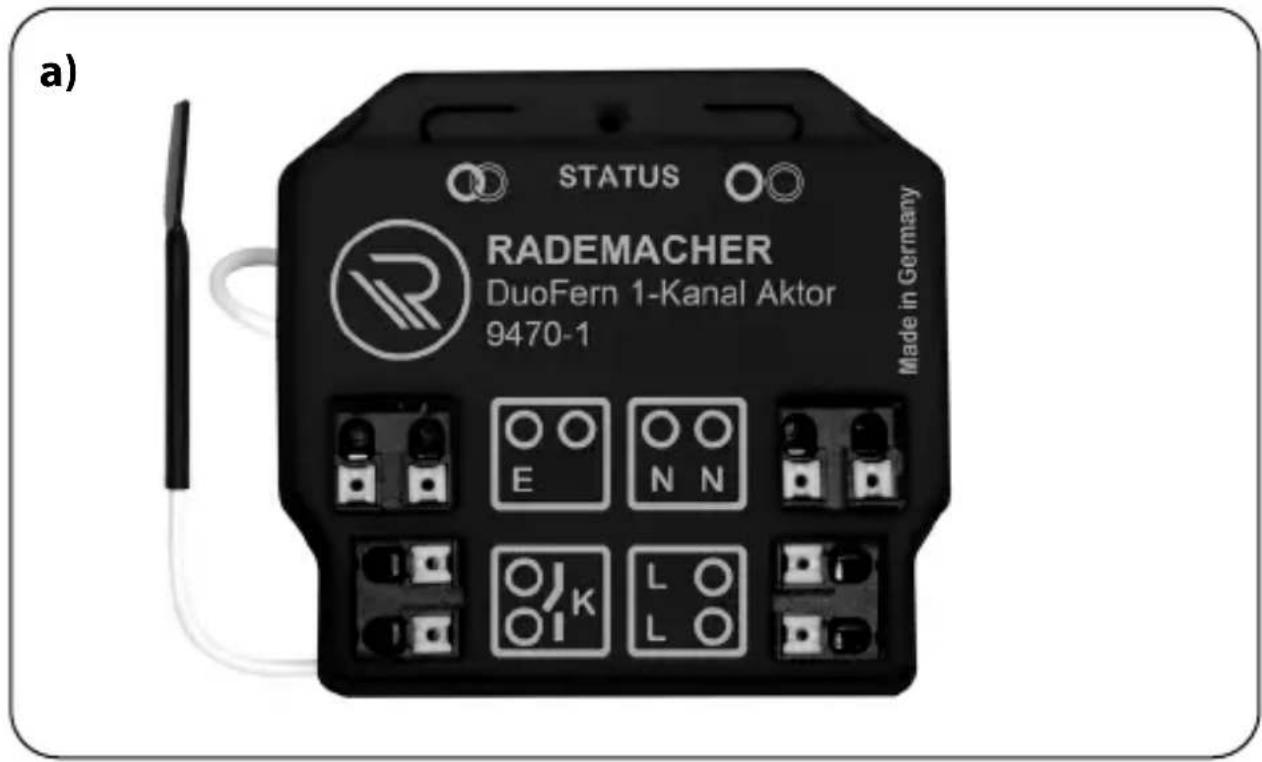
a) STATUS RADEMACHER DuoFern 1-Kanal Aktor 9470-1 Made in GermanyIncluded in delivery
a) 1 x DuoFern Universal Actuator 9470-1 incl. antenna
b) 1 x instruction manual (not illustrated)
text_image
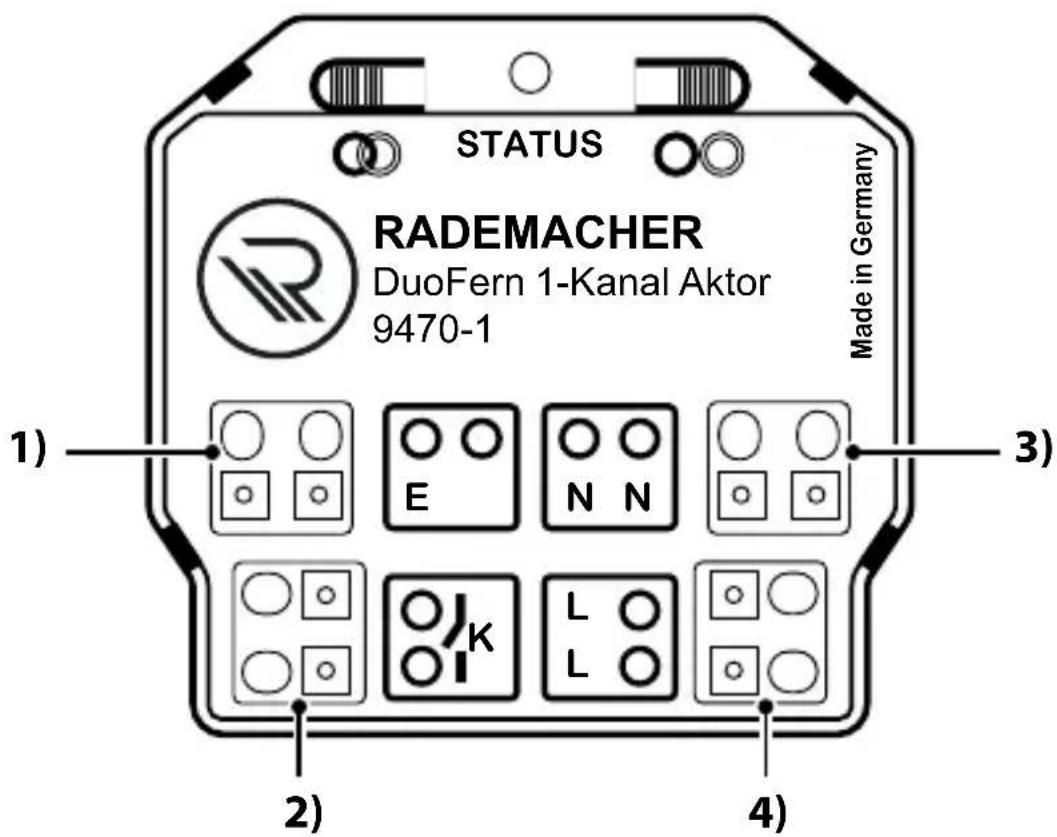
STATUS RADEMACHER DuoFern 1-Kanal Aktor 9470-1 Made in Germany 1) E N N 3) 2) K L L 4)Pos. Symbol Description
| 1) |  | Control input 230 V / 50 Hz ∧(on / off)Connection of an external switch / button for manual control on site |
| 2) |  | Relay contact [K]Connection of an electrical appliance |
| 3) |  | Neutral conductor [N]Connection of the neutral conductor |
| 4) | 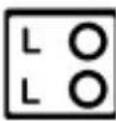 | Supply voltage [L] 230 V / 50 Hz ∼Connection of the supply voltage |

text_image
6) 5) STATUS 7) RADFMACHER GermanyPos. Symbol Description
5)

Connect button
Logging on to the DuoFern radio network or a DuoFern transmitter
6) STATUS Indicator light - status display
| green | flashing | Connection is active |
| constantly lit up | Connection or disconnection was successful | |
| brief flashing | Control command received | |
| red | flashing | Disconnection is active |
| or The overload protection has switched off the actuator | ||
| permanently lit up | Connection or disconnection was not successful |
7)

Disconnect button
◆ Logging off from the DuoFern radio network or a DuoFern transmitter
◆ Reset to the default factory settings
Controlling electrical appliances
With the DuoFern Universal Actuator 9470-1, you can connect and control electrical appliances (e.g. lighting, etc.) with up to a maximum of 3600 W.
Use in a DuoFern network
The DuoFern Universal Actuator 9470-1 can be integrated into a DuoFern network, for example, to use the range of functions of DuoFern sensors and DuoFern transmitters, such as the SmartHome Box.
Manual operation on site
An additional external switch / button can be connected to enable manual operation on site.
Installation and electrical connection
The DuoFern Universal Actuator 9470-1 is designed for flush mounting. The electrical connection is carried out by means of clamping the connecting cable in the existing spring clip.
Overload protection
When the DuoFern Universal Actuator 9470-1 is overloaded, it heats up and switches off. This state is indicated by the flashing red LED. It is not possible to switch on the connected appliance. The normal function is restored again by cooling down the actuator.

If the overload protection is triggered regularly, check whether the connected appliance lies within the technical specifications, see page 17 and whether the cable cross-sections are sufficient, see page 21 / 24.
| DuoFern SmartHome Box | ||||||||
| DuoFern Environmental Sensor | ||||||||
| DuoFern Manual Control | ||||||||
| * WR ConfigTool with DuoFern Manual Control | ||||||||
| RolloTron Comfort DuoFern / Troll Comfort DuoFern | ||||||||
| DuoFern Manual Transmitter Standard | ||||||||
| DuoFern Wall Controller | ||||||||
| Function Value | range | Factory setting | A B C D E F G | |||||
| 1. Manual operation On/Off/Dim - | ● | ● | ● | ● | ||||
| 2. Unit / light mode | Unit / light mode | Light mode | ● | |||||
| 3. Manual mode on / off on / off off | ● | ● | ● | |||||
| 4. Automatic timer on / off | on / off on | ● | ● | ● | ||||
| 5. Random function | - | - | ● | ● | ● | |||
| 6. Dawn function | - | - | ● | ● | ● | ● | ||
| 7. Automatic dawn function on / off | on / off off | ● | ● | ● | ||||
| 8. Automatic dusk function | - | - | ● | ● | ● | ● | ||
| 9. Automatic dusk function on / off | on / off off | ● | ● | ● | ||||
| 10. Sun function | - | - | ● | ● | ||||
| 11. Automatic sun function on / off | on / off off | ● | ● | ● | ||||
* The "WR ConfigTool" software can be downloaded from our website at www.rademacher.de.
| DuoFern SmartHome Box | ||||||||
| DuoFern Environmental Sensor | ||||||||
| DuoFern Manual Control | ||||||||
| * WR ConfigTool with DuoFern Manual Control | ||||||||
| RolloTron Comfort DuoFern / Troll Comfort DuoFern | ||||||||
| DuoFern Manual Transmitter Standard | ||||||||
| DuoFern Wall Controller | ||||||||
| Function Value | range | Factory setting | A B C D E F G | |||||
| 12. Connectivity test -- | ● | |||||||
| 13. Connect with radio code -- | ● | ● | ● | |||||
| 14. Reset via radio (3-stage) -- | ● | |||||||
| 15. Single-button operation -- | ||||||||
| 16. Stairwell function on / off off | ● | |||||||
| 17. Stairway time (pulse duration) *** | 100 ms - 3276 s 3 minutes | ● | ||||||
* The "WR ConfigTool" software can be downloaded from our website at www.rademacher.de.
*** Advanced switch-off warning for > 60 seconds and with uneven values
Light/device mode
By switching between the light and the device mode, the behaviour of the DuoFern Universal Actuator 9470-1 can be changed:
The range of functions changes as follows:
| Switching commands of an external DuoFern transmitter | Device mode | Light mode |
| UP On Off | ||
| STOP Off Off | ||
| DOWN Off On | ||
| Dawn function On Off | ||
| Automatic dusk function Off On |
Random function (presence simulation)
The DuoFern Universal Actuator 9470-1 can process random function switching commands. If a switching command is received which is to be delayed by the random function, then processing of the switching command is delayed by up to 30 minutes.
During the delay time, the indicator light on the DuoFern Universal Actuator 9470-1 flashes green every second.

◆ Automatic movement commands of the automatic sun function are not delayed.
◆ Automatic switching times and dusk commands are delayed.
Stairway function (on / off)
When the stairway function is active, the DuoFern Universal Actuator 9470-1 will switch off the controlled device again after the set "stairway time". An advanced switch-off warning for >60 seconds and with uneven values can optionally be set.
| Mains connection [ L / N ] | |
| Mains supply voltage: | 230 V / 50 Hz ~ |
| Consumption: Standby: < 0.5 W | |
| Control input [E]for an external manual switch / button on site | |
| Input voltage: 230 V (Ri = 200 kΩ) |
| Relay output - load contact [K] | ||
| Switching voltage: 230 V / 50 Hz ~ | ||
| Maximum switching capacity: | Ohmic load, e.g. bulbs | |
 | 16 A / 3600 W | |
| Inductive loads such as: fluorescent lamps, drives, iron core transformers, e.g. for extra-low voltage bulbs such as halogen bulbs | ||
 | 8 A / 1800 W | |
 | ||
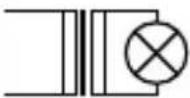 | ||
Relay output - load contact [K]
| Maximum switching capacity: | Capacitive loads such as: electronic transformers, AC/DC transformer, e.g. for extra-low voltage lamps such as halogen lamps, LEDs, etc. | |
| 8 A / 1800 W | ||

Improper use can lead to serious injuries or property damage.
◆ Small contact distance ( ), not suitable for disconnecting the device.
◆ Do not use the DuoFern Universal Actuator 9470-1 to disconnect the connected appliance.
| DuoFern radio technology | |
| Transmission frequency: 434.5 MHz | |
| Transmission power: Max. 10 mW | |
| Range: Indoors: approx. 30 m * | Outdoors: approx. 100 m* Depending on the building structure |
| Max. number of DuoFern devices: | 20 |
| General information | |
| Permissible ambient temperature range: | -20 °C to + 55 °C |
| Dimensions (W x H x D): 48.7 x 45.7 x 19.8 mm | |
| Connecting terminals: Spring resistance connecting terminals (0.1 mm ^2 - 1.5 mm ^2 ) for solid conductors | |
i
8. Connecting the DuoFern Universal Actuator 9470-1
EN
Prior to the electrical connection, check that the voltage / frequency on the type plate corresponds to that of the local mains supply.
i
8.1 Safety instructions for the electrical connection

DANGER!
There is a risk of fatal electric shock when touching electrical components.
◆ All connection and installation work must only be carried out in a de-energised state.
◆ Disconnect all phases of the mains power lead and secure it to prevent any reconnection.
◆ Check that the system is de-energised.

WARNING! WARNING!
Short-circuiting, caused when the DuoFern Universal Actuator 9470-1 is overloaded, poses a danger to life.
◆ The maximum switching capacity must not be exceeded. Please observe the details in the “Technical Specifications”, see page 18.

WARNING! WARNING!
There is a risk of short circuits and fire if the wrong connecting cable is used.
- Only use solid copper connecting cables with a cable cross-section of 1.5 mm ^2 for connecting the electrical appliance.

ATTENTION!
A defective antenna can lead to malfunctions or failure of the DuoFern Universal Actuator 9470-1.
◆ The antenna lead must not be shortened and damaged.
Connection instructions for operating with an external switch / button on site
When using the control input [E], you must connect the external switch / button and the DuoFern Universal Actuator 9470-1 to the same phase [L].
◆ The maximum length of lead to connect an external button must not exceed 10 m.
Length of insulation stripped:
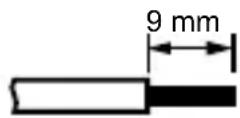
All leads must be stripped to 9 mm.

Read the specifications relating to the electrical connection detailed in the instruction manual of the electrical appliance used.
Further installation instructions
◆ In order to ensure optimal operation, the DuoFern Universa Actuator 9470-1 should not be installed on a metallic base or near metal objects.
◆ The DuoFern Universal Actuator 9470-1 is intended for flush mounting. We recommend installation in a deep 58 mm flush-mounted box or in an electronic socket.
i
8.3 Connecting and installing the DuoFern Universal Actuator 9470-1
EN
- Ensure the mains is disconnected and check whether the mains power leads are current-free.
- Securely lay the connecting cables right into the flush-mounted box of the DuoFern Universal Actuator 9470-1.
- Remove the insulation on all leads as specified above and connect them according to the following connection diagram.
- Insert the DuoFern Universal Actuator 9470-1 into the flush-mounted box and lay the connecting cables as well as the antenna in the box.
- Finally, install the cover of the flush-mounted box and switch on the electricity again.
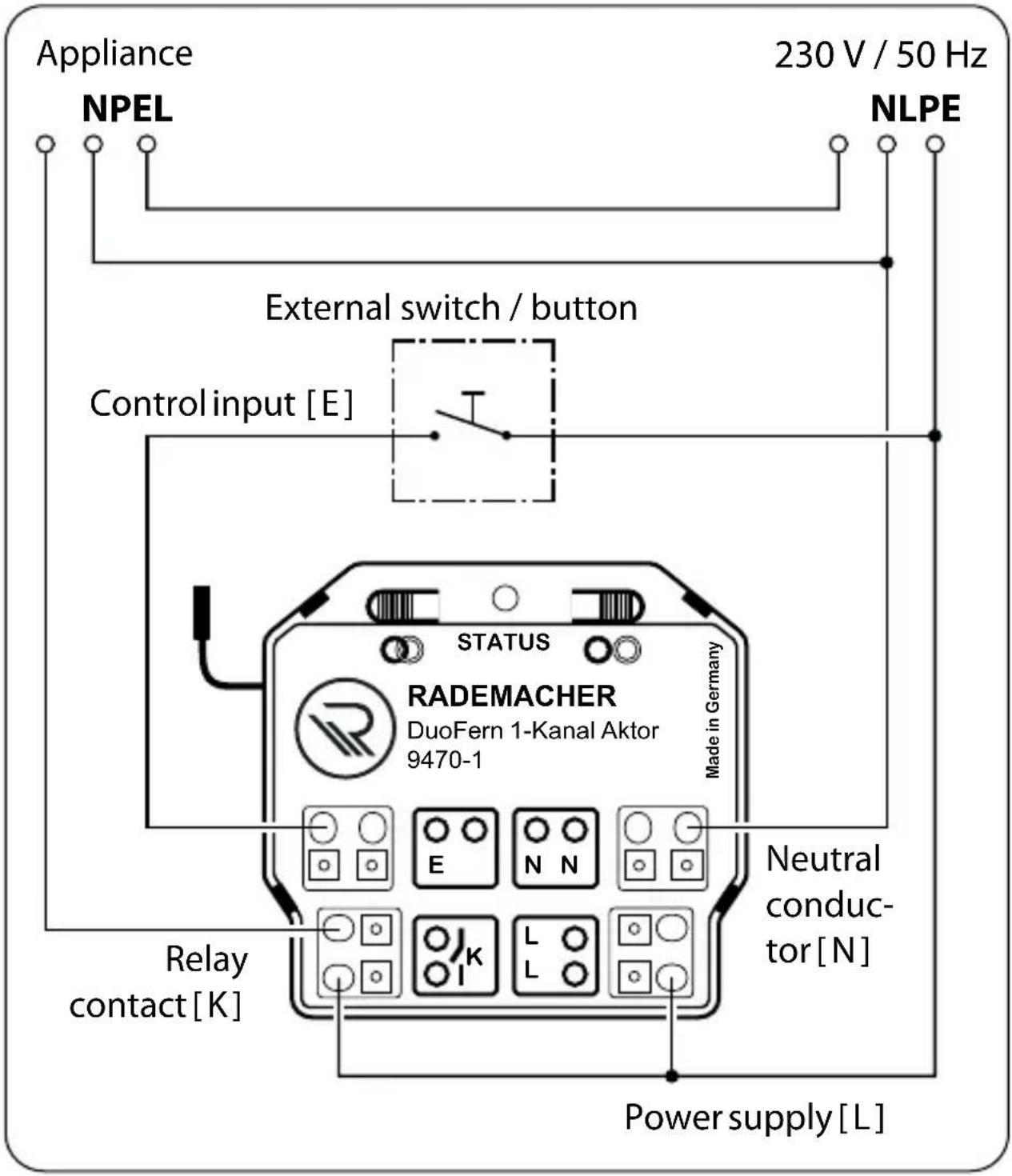
text_image
Appliance NPEL 230 V / 50 Hz NLPE External switch / button Control input [E] STATUS RADEMACHER DuoFern 1-Kanal Aktor 9470-1 Made in Germany Neutral conduc- tor [N] Relay contact [K] Power supply [L]Required connecting cable and cable cross-section for connecting the electrical appliance:
1.5 mm^2 Only use a solid copper cable with a cross-section of 1.5 mm ^2 .

text_image
230 V / 50 Hz L N PE Toggle switch 1 2 230 V / 50 Hz STATUS RADEMACHER DuoFern 1-Kanal Aktor 9470-1 Made in Germany E N N Control input [E] Relay contact [K] ApplianceInstallation with toggle switches
We recommend replacing the toggle switch with several switches connected in parallel.
You can find further circuit examples on our website at:
www.rademacher.de

9. Logging DuoFern transmitters on / off
EN
For the DuoFern Universal Actuator 9470-1 to be operated with a DuoFern transmitter, you must log each desired transmitter onto the DuoFern Universal Actuator 9470-1. You can log on a maximum of 20 DuoFern transmitters (e.g. DuoFern manual transmitter standard).
- Switch the desired DuoFern transmitter to log-on/log-off mode (please refer to the respective instruction manual).
- Press the "Connect (log-on) button" [ ] on the "Disconnect (log-off) button" [ ] of the DuoFern Universal Actuator 9470-1.
- The DuoFern Universal Actuator 9470-1 then transmits either a log-on or log-off signal.
Log-on / log-off mode remains active for 120 seconds.
- If the log-on/log-off process is successful, the STATUS LED will light up green constantly.
- Log on / log off from the next DuoFern transmitter. To do so, repeat steps 1 to 3 or else terminate the log-on / log-off process.
Observe the STATUS LED
The status LED lights up red if the log-on / log-off process fails, for example if:
◆ 20 DuoFern transmitters have already been logged on.
◆ An unsuitable device (e.g. other DuoFern Actuator) is logged on.
◆ An attempt was made to log off from a DuoFern transmitter that is not logged on.
You can control the DuoFern Universal Actuator 9470-1 directly using the radio code in order, for example, to be able to connect further DuoFern transmitters to the actuator after installation. You will find the radio code on the enclosed label and on the rear side of the DuoFern Universal Actuator 9470-1.

Please note that the use of the radio code is limited to 120 minutes after switching on the power supply

A detailed description on activating the radio code function can be found in the instruction manual of the DuoFern Manual Control and the SmartHome Box.

10. Deleting all settings (reset)
EN
A reset can be carried out to reset the DuoFern Universal Actuator 9470-1 to the default factory settings.
-
Press and hold the disconnect button for approx.
5 sec. until the STATUS LED constantly lights up red. -
All of the settings are deleted and reset to the default factory settings and the logged-on DuoFern transmitters are automatically logged off.
-
The DuoFern Universal Actuator 9470-1 is then reset to the default factory settings.

11. Dismantling

DANGER!
There is a risk of fatal electric shock when touching electrical components.
◆ Disconnect all phases of the mains power lead and secure it to prevent any reconnection. Check that the system is de-energised.
- Log the DuoFern controller off from the DuoFern network.
- Ensure the mains power is current-free and open the flush-mounted box.
- Disconnect the DuoFern Universal Actuator 9470-1 and completely remove it from the flush-mounted box.

DELTA DORE RADEMACHER GmbH hereby declares that the DuoFern Universal Actuator 9470-1 complies with the Directive 2014/53/EU (Radio Equipment Directive).
The full text of the declaration of conformity is available at the following website:
Warranty terms and conditions
Information on our warranty conditions is enclosed separately with this product.
DELTA DORE RADEMACHER GmbH
Buschkamp 7
46414 Rhede - GERMANY