U-Mic - Microphone Qtx - Free user manual and instructions
Find the device manual for free U-Mic Qtx in PDF.


User questions about U-Mic Qtx
0 question about this device. Answer the ones you know or ask your own.
Ask a new question about this device
Download the instructions for your Microphone in PDF format for free! Find your manual U-Mic - Qtx and take your electronic device back in hand. On this page are published all the documents necessary for the use of your device. U-Mic by Qtx.
USER MANUAL U-Mic Qtx
USB Powered UHF Wireless Microphone
Item ref: 171.806UK, 171.807UK
User Manual
natural_image
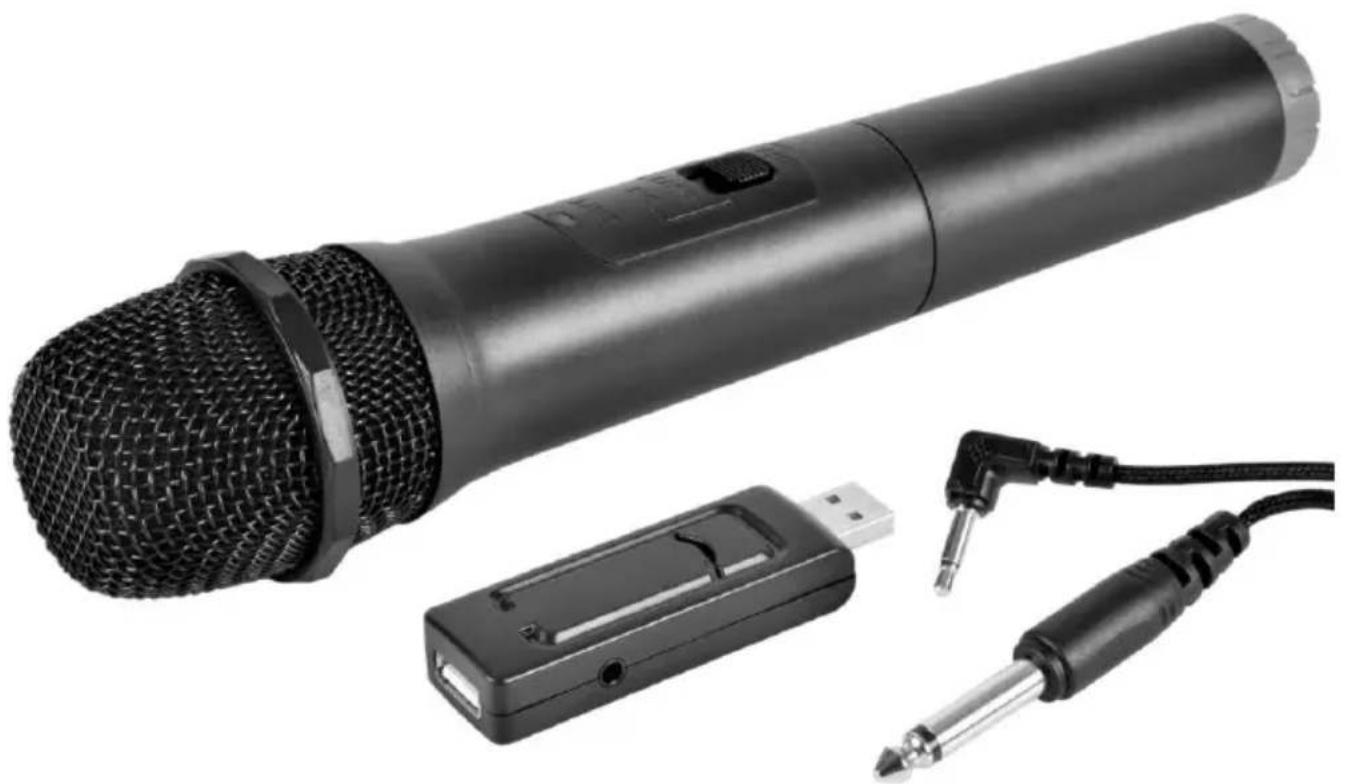
Black adjustable microphone with mesh head, connected to a USB device and two audio probes (no text or symbols visible)Version 1.0

Caution: Please read this manual carefully before operating Damage caused by misuse is not covered by the warranty
Introduction
Thank you for choosing the U-MIC for your wireless microphone requirements. This system is designed to provide a reliable, cable-free solution with minimal setup and ease of use. Please read and keep this user manual to get the best results from your product and avoid damage through misuse.
Layout
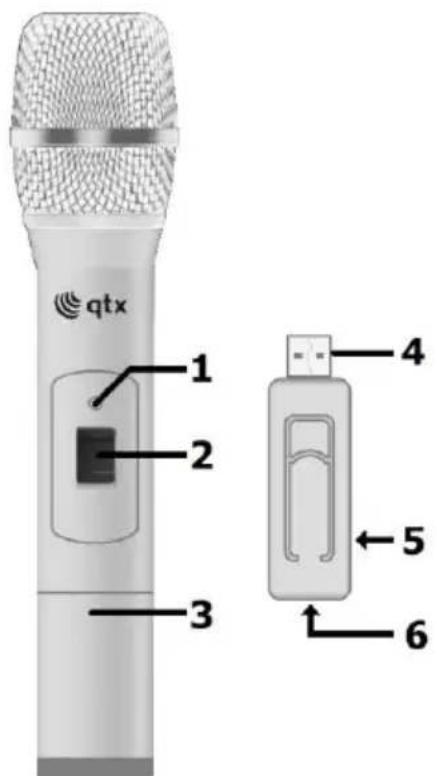
text_image
qtx 1 2 3 4 5 61 Power indicator
2 On/Mute/Off switch
3 Battery compartment
4 USB type A plug
5 3.5mm output jack
6 USB type A socket
Setting up
The U-MIC is supplied as a handheld transmitter and USB receiver with a 3.5mm to 6.3mm jack lead.
The USB type A plug (4) on the receiver should be connected to a USB port for power (5V, 500mA). This can be from a USB power adaptor or power bank for portable use if required. The connection can also be made to the receiver using an optional USB extension lead if preferred.
Note: the audio is not transmitted to the USB port. The USB is for power only.
If the USB port is a U-Disk player or computer port, the digital media (USB stick) or other peripheral device can still be connected through the receiver by connecting to the USB type A socket (6) on the rear of the receiver.
Connect the supplied 3.5mm lead from the output jack (5) on the receiver.
The U-MIC receiver is designed to connect to a microphone input jack on a mixer or amplifier. Turn down the volume level on the microphone input of the mixer or amplifier before connecting to avoid loud noises when connecting. Connect the 6.3mm plug end of the supplied lead to the appropriate microphone input jack.
The handheld transmitter has an on/off switch (2), which should be in the down position (off). Unscrew the bottom battery compartment (3) and insert 2 x AA alkaline batteries, ensuring that the polarity is the correct way around.
Move the switch up to the "on" position and the power indicator (1) should light briefly. If this LED is lit constantly, this indicates that the batteries are low on charge and need replacing with new ones.
Gradually turn up the volume level on the mixer or amplifier and speak into the handheld microphone until the sound can be heard through the connected speakers or recording equipment. Increase the volume to the required level.
When the microphone is not being used for a short time, it is possible to mute the output by sliding the on/off switch to the central "mute" position. This maintains the radio carrier signal but mutes the sound until the switch is moved back to the "on" position.
If the microphone is not being used for longer periods, turn down the volume level on the connected mixer or amplifier and switch the handheld microphone off.
For long term storage, unplug the jack and USB receiver and remove the batteries form the handheld transmitter.
Specifications
| Model | U-MIC 863.2 | U-MIC 864.9 |
| Carrier frequency | 863.2MHz | 864.9MHz |
| Power supply | USB 5V, 0.5A (receiver), 2 x AA batteries (transmitter) | |
| Frequency response | 50Hz - 15kHz | |
| Capsule | Dynamic cardioid | |
| Output connection | 3.5mm mono jack | |
| Wireless range | Up to 50m | |
| Dimensions: transmitter | 240 x 50mm∅ | |
| Weight: transmitter | 178g (no battery) | |
| Dimensions: receiver | 80 x 23 x 13mm | |
| Weight: receiver | 17g | |