XI-REAC - Musical instrument ROLAND - Free user manual and instructions
Find the device manual for free XI-REAC ROLAND in PDF.


User questions about XI-REAC ROLAND
0 question about this device. Answer the ones you know or ask your own.
Ask a new question about this device
Download the instructions for your Musical instrument in PDF format for free! Find your manual XI-REAC - ROLAND and take your electronic device back in hand. On this page are published all the documents necessary for the use of your device. XI-REAC by ROLAND.
USER MANUAL XI-REAC ROLAND
Before using this unit, carefully read the sections entitled "USING THE UNIT SAFELY" and "IMPORTANT NOTES" on backside. These sections provide important information concerning the proper operation of the unit.
Additionally, in order to find assumed that you have acquired a good group of every feature of your new unit.
read Owner's Manual in its entirety. This manual should be saved and kept on hand as a convenient reference
Copyright © 2015 ROLAND CORPORATION

natural_image
Close-up of a black electronic device with two ports and circuit boards (no visible text or symbols)Thank you, and congratulations on your choice of the XI-REAC interface module.
Installing this interface module on a Roland professional audio device enables expended audio input and output using REAC (Roland Ethernet Audio Communication).
For information on devices on which the XI-REAC Interface module can be installed, check the Roland website.
http://proav.roland.com
Panel Descriptions

| No. | Source | Explanation |
| 1 | REAC ports (1, 21) | These are RAE connectors for connecting input/output units such as inc-3608, 540518, or 540029 via Cabs Ethernet cables. For more information about Ethernet devices that you can use to make RAE connections, please read "About REAC Cables" |
| 2 | REAC Indicator | These indicate the status of RAE communication. Units: No connection with a REAC device has been established. Use: Data is being received from the REAC device, drinking: The unit is a standby for receiving data from the REAC device. |
Installing the Interface Module
Install the interface module on a compatible device.
Important Notes on Handling
To avoid the risk of damage to internal components that can be caused by static electricity, please carefully observe the following whenever you handle the interface module.
Before you touch the interface module, always first grasp a metal object touch as a water plot, so you are sure that any static electricity you might have been carrying has been discharged.
- When handling the interface module, grasp it only by the panel or the interface module's edges. Avoid touching any of the electronic components or connectors.
Before your connection any cable, make sure they do not carry a static electricity charge. Such changes can be transmitted, for example, if the other end of the cable has been in contact with a caract (or other object), where there is a static electricity buildup.
- Save the bag in which the interface module was originally shipped, and put the interface module back into it whenever you need to store or transport it.
Installing
Notes
Before installing the interface module, you must first always turn off the unit where installing and replacing its power card from the power outlet.
- Loosen the EXPANSION SLOT mounting screws (2) on the device where you're installing, and detach the panel cover.

- Insert the interface module into the EXPANSION SLOT.
* Co not to reach any of the interface module pathways or
connection terminals.
* Never use excessive force when installing a interface
module. It doesn't fit properly on the first
attempt remove the Interface module and
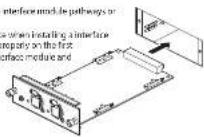
- Secure the interface module in place using the mounting screws (2).
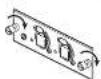
By default, the RFAC ports are fitted with RFAC caps. Remove these RFAC caps when you use the RFAC ports.
Be careful to keep removed REAC caps from becoming lost.

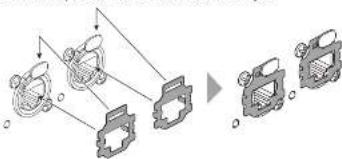
Attaching the REAC Connector Covers
When using commercially available Category 5e Ethernet cables, attach the induced RENC connector covers.
MEMO
Remove the RFAC connection costs when using Ethernet type RFAC tables (SC-0128F, SC-W1005, or W1005).
Be careful to keep removed REAC connector covers from becoming lost.
flowchart
graph TD
    A["Input Stage 1"] --> B["Process Step 1"]
    C["Input Stage 2"] --> B
    D["Input Stage 3"] --> B
    B --> E["Output Stage 4"]
    E --> F["Final Output"]
Attaching the Ferrite Cores
Attach finite cores to the cables you connect to the REAC ports. The finite cores are needed to present electromagnetic noise, the wire is attached finite cores to cables you connect in the REAC ports.
- Open an included ferrite core by spreading apart the tabs at two places.
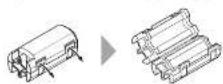
- Attach the ferrite core at a location near the plug base. Close the ferrite core by pressing down on each tao until it clicks into place.

MEMO
Connect the plug at the end where the tenile core is attached to a REAC port on the Interface module.
About REAC Cables Detaching the REAC Caps
Because Category for Ethernet cables are used, connecting DEAC devices in one another is simple and easy. Trace Cat for Ethernet cables are ordinarily used to make computer networks connections.
Ethernet Cable Types
- Crossover cable
The cables internal wiring crosses over at each RJ45 plug. This means that the connections of the RJ45 plugs at either end of the signal cable are different
- Straight cable
The table's internal wiring is arranged identically at each end.
* With this interface module, you can use either crossover cables or straight cables. For making connections to the RAC ports, we recommend using optionally available RAC cables (SC 400F, SC W100F, W100S-R wt3)
Important Notes on Handling Ethernet Cables
- Never apply strong force to Ethernet cables.
- Never and bench on Ethernet cable using a roll minus of 25 micrometers or hex, or based on room enough enough to ask.
- Year hind is undied Ethernet cables too happy
- Year no lengths of murtails. Ethicest cables to parallel cross-cap distances
- Seep Ethernet cables away from sources of noise (such as power cords, motors, and fluorescent lights).
Ethernet Connectors
Ethernet cables use RJ45 drugs. REAC devices are provided with an RJ45 connector at REAC port.
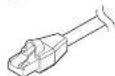
n.45 pug

REAC R45 connector
For critically important communication, protecting R45 plugs and connectors is vital in such cases, rugged Neutrik FiberCan plugs are used for the RFAC R45 plugs. Using FiberCan R45 plugs makes possible the same kind of uncontrolled connections as when using S.RI plugs.
Neublik provides EtherCon R45 plugs, as well as EtherCon plugs that you can add to or use to modify R45 plugs on third-party Ethernet cables.
Main Specifications
Channels 60 channels input x 2
channels output x 2* The number of available channels will be changed by the clouds that attain the 13 BEAC. | |
| Signal Processing Specific Frequency 96 kHz, 48 kHz, 44.1 kHz | |
| Connectors UAC ports (0, 2), 20-45 UAC port type USB COMPUTER port USB port B (mode of the panel, options only) | |
| Indicator BEAC x 7 | |
| Power Consumption 1 /W | |
| Dimensions 120 W x 160 W x 400 W mm 4/8 W x 7 $15 (0, x 1, S/B), in bus. * Pulsured performance included | |
| Weight TCO g | 5 oz |
| Operation Temperature | +5 to +40 degrees Celsius +41 to +40 degrees Fahrenheit |
| Accessories Setup Guide, BEAC cap x 2, BEAC connector cover x 3, Ferible core x 2 | |
In the interest of product improvement, the specifications and/or appearance of this unit are subject to charge without prior notice.
USING THE UNIT SAFELY
INSTRUCTIONS FOR THE PREVENTION OF FIRE, ELECTRIC SHOCK, OR INJURY TO PERSONS
About ⚠ WARNING and ⚠ CAUTION Notices
| WARNING | Used for instructions intended to alert the user to the risk of death or severe injury should the unit be used improperly. |
| CAUTION | Used for instructions intended to alert the user to the risk of injury or material damage should the unit be used improperly.*Material damage refers to damage or other adverse effects caused with respect to the home and all its furnishings, as well to domestic animals or pets. |
About the Symbols
| A | The Symbol is the user to important instructions or warnings, the specific meaning of the symbol is determined by the design contained within the principle, in the case of the symbol at left, it is used for general caution, warnings, or alerts to danger. |
| The Symbol is the user to items that must never be carried out as a forbidden. The specific thing that must not be done is indicated by the design contained within the case in the case of the symbol at left, it means that the design is not allowed. | |
| The Symbol is the user to things that must be carried out as the specific thing that must be done is indicated by the design contained within the case. In the case of the symbol at left, it means that the power cord piping must be unplugged from the sides. |
ALWAYS OBSERVE THE FOLLOWING
WARNING
Do not disassemble or modify by yourself
Do not carry out anything unless you are interested in doing it.
owner's manual otherwise you
fish causing malfunction.
Do not repair or replace parts by yourself
Referral servicing to your retailers, the crowd Poland Services
Center, or an authorized Roland
distributor, as listed on the information.
- römazon
Do not use or store in the following types of
locations
- Subject to temperature
In an open-top vehicle, near a
heating duct, on top of heat-
generating equipment or are
- Camping, Bach,
- Prepared to steam or smoke or air
• Subject to salt exposure or gas
• Lapsed to rain or are
- Entity or cavity, or are
- Subject to high levels of deformation and
shadness; or are
• Placed in a poorly ventilated location.
Do not allow foreign objects or liquids to
enter unit; never place containers with liq
Theorem
Do not piece containers containing liquid in a flower vessel on this
product. Never altra foreign
objects (e.g., flammable objects
cane, wine] or liquids (e.g., war of) due to export this contract.
Doing so may cause short circu
faculty operation, or other malfunctions
WARNING


[Non-Text]
arc
[Non-Text]
[Non-Text]
20.415
co and
cat cn.
12
h liquid
in equities
C
(
00
[NO TEXT]
©
105
WARNING
- 2014年1月1日
rit if an abnormality or
广力云智慧零售收银系统
KOIRS
[Non-Text]
turn the unit off,
[Non-Text]
request Poland Service
[Non-Text]
authorized Poland
[Non-Text]
s listed on the Inform
[Non-Text]
over fallen red or up
[Non-Text]
ed and the unit, or
[Non-Text]
or unusual order costs
[Non-Text]
has been exposed to
[Non-Text]
has become SEC, or
[Non-Text]
cies-sec appes to be or exhibit a marked
[Non-Text]
700.
[Non-Text]
protect children from
1 + u1 - 1 = ( 1 + u) u1 < 1 = u
sure that an adult is
DA
middle supervision
RA
- when using the (when holders are
nce
then a child will be used
HES
- 2017年1月1日
AC
r subject to strong imp
a Intert
on risk causing
an Can
Angeles, CA 90040 2938
S. East
※
For the USA
DECLARATION OF CONFORMITY Compliance Information Statement
Model Name: XHREAC
Type of Equipment: Audio Interface Module
Responsible Party: Bland Corporation U.S.
Address: \$100 S. Eastern
IMPORTANT NOTES
Placement
This unit may interfere with radio and
television reception. Do not use this unit in
the vicinity of such receivers.
- Noise may be produced if wireless communications device, such as
carmillal, a. 100% (such as the above, are separated in the vicinity of this
unit. Such noise could occur when receiving
or initiating a call, or while conversing.
Should you experience with problems, you should plan the such variance choices up.
they are at a greater distance from this unit,
or switch them all.
- When moved from one occasion to another
where the temperature and/or humidity is very different, may change its transportation
may form inside the unit. Damage or
malfunction may result if you attempt to us
the unit in this condition. Therefore, before using the unit, you must always stand for
using the 10 hours of a 100 h to stand to several hours until the condensation has
completely recompensed.
Do not place containers or anything else
containing liquid on top of this unit. Also,
whereverly liquid has seen space of the surface of this unit, be sure to properly use
It away using a soft, dry cloth.
Maintenance
- Never use benzene, thinners, alcohol or
solvents of any kind, to avoid the possibility
2.1.1.1.1
Additional Precautions
- Use a reasonable amount of care when using
the unit's buttons, sliders, or other controls:
and when using its jacks and connectors. People handling a tool to make sure
- When disconnecting all cables, crays the
connector itself—never pull on the cable.
This way you will avoid causing shorts, or
damage to the case's incimal clement.
10 present - a function and equipment
turn off all the units before making any
connections.
Intellectual Property Right
• MVP Moore Microacoustic Portfolios
pene to a patent portfolio conversed with
microprocessor architecture, which was
developed by Technology Properties Limited. EP11, Roland box is shared the technician.
from the IPL Group
This product contains eCROS integrated
software platform of e501 Co Ltd eCOS is a trackwork of e501 Co Ltd in years.
- Roland III AC are stürer zonbruged iordemark
or trademarks of Roland Corporation
United States and/or other countries.
• Company names and product names appearing
in the document are registered drafter trademarks of the repurchase revenue.
For China —
有关产品中所含有害物质的说明
This collection has been tested and found to comply with the limits for a Class B digital device, pursuant to Part 15 of the FCC Rules. These limits are designed to provide reasonable protection against harmful interference in a residential installation. This equipment contains, uses, and can radiate radio frequency energy and, if any installed and used in accordance with the instructions, may cause harmful interference to radio communications. However, there is no guarantee that interference will not occur in a particular installation. If this equipment does cause harmful interference to radio television reception, which can be determined by treating the equipment off and on, the user is encouraged to try to correct the interference by one or more of the following measures:
Relevant or relocate the receiving anonome.
Increase the separation between the equipment and receiver.
Connect the equipment into an outlet on a circuit different from that to which the receiver is connected.
Conduit the cellar of an experienced nation's technician for help.
This device complies with Part 15 of the FCC Rules. Operation is subject to the following two conditions:
e device may not cause harmful interference, and
[2] this device must accept any interference perceived, excluding interference that may raise undesired opsetum.
This equation
Any unauthorized changes or modifications not expressly approved by the party responsible for compliance could void the user's authority to operate the equipment.
CANICES-3 (B)/NMB-3 (B)
For the USA
사용자 안내문
This product contains chemicals known to cause cause, birth defects and other reproductive home, including lead
2038-1 Nalagawa, Iospe-chu, Oita-ku, Hememitsu. Shuoka 411-1301 JAPAN

For EU Countries

This symbol indicates that in 10 countries, this product must be collected
separately from household waste, as defined in each region. Products bearing this symbol must not be divided together with household waste.
Diges Symbol belastet, das doors Produkt in EU-Lärksten sonst.
Type of Equipment: Audio Interface Module
Responsible Party: Amara Corporation U.S.
Address: 91003 Eastern Telephone: (323)890-3700
[Non-Text]
[Non-Text]
广力云智慧零售收银系统
[Non-Text]
The Ground Truth image displays a single, solid horizontal line, which is a stylistic or background element (like a rule line on paper). According to Rule 2, such lines must be ignored by the OCR result. The provided OCR content is "____", which consists of underscores. Underscores are not equivalent to a solid line and are not permitted under the “Stylistic/Background Lines (Ignore)” rule. Outputting underscores for a stylistic line is incorrect because it misinterprets the line as a placeholder fill-in-the-blank area. Since the OCR output incorrectly rendered a stylistic line as underscores (which should be ignored), this violates the rule. Therefore, the OCR result is inconsistent with the Ground Truth.
-
[Non-Text]
[Non-Text]
[Non-Text]
[Non-Text]
[Non-Text]
[Non-Text]
[Non-Text]
[Non-Text]
[Non-Text]
[Non-Text]
[Non-Text]
[Non-Text]
[Non-Text]
[Non-Text]
[Non-Text]
[Non-Text]
[Non-Text]
[Non-Text]
[Non-Text]
[Non-Text]
[Non-Text]
[Non-Text]
[Non-Text]
[Non-Text]
[Non-Text]
[Non-Text]
[Non-Text]
[Non-Text]
[Non-Text]
[Non-Text]
[Non-Text]
[Non-Text]
[Non-Text]
[Non-Text]
[Non-Text]
[Non-Text]
[Non-Text]
[Non-Text]
[Non-Text]
[Non-Text]
[Non-Text]
[Non-Text]
[Non-Text]
[Non-Text]