PCI-1710HGU-DE - Carte d'acquisition Advantech - Free user manual and instructions
Find the device manual for free PCI-1710HGU-DE Advantech in PDF.


User questions about PCI-1710HGU-DE Advantech
0 question about this device. Answer the ones you know or ask your own.
Ask a new question about this device
Download the instructions for your Carte d'acquisition in PDF format for free! Find your manual PCI-1710HGU-DE - Advantech and take your electronic device back in hand. On this page are published all the documents necessary for the use of your device. PCI-1710HGU-DE by Advantech.
USER MANUAL PCI-1710HGU-DE Advantech
12-bit Multifunction Cards with Universal PCI Bus
User Manual
Copyright
The documentation and the software included with this product are copyrighted 2009 by Advantech Co., Ltd. All rights are reserved. Advantech Co., Ltd. reserves the right to make improvements in the products described in this manual at any time without notice. No part of this manual may be reproduced, copied, translated or transmitted in any form or by any means without the prior written permission of Advantech Co., Ltd. Information provided in this manual is intended to be accurate and reliable. However, Advantech Co., Ltd. assumes no responsibility for its use, nor for any infringements of the rights of third parties, which may result from its use.
Acknowledgements
Intel and Pentium are trademarks of Intel Corporation.
Microsoft Windows and MS-DOS are registered trademarks of
Microsoft Corp.
All other product names or trademarks are properties of their respective owners.
This Manual Covers the Following Models
- PCI-1710U
- PCI-1710HGU
- PCI-1710UL
Part No. 2003171000 1st Edition
Printed in Taiwan November 2009
Product Warranty (2 years)
Advantech warrants to you, the original purchaser, that each of its products will be free from defects in materials and workmanship for two years from the date of purchase.
This warranty does not apply to any products which have been repaired or altered by persons other than repair personnel authorized by Advantech, or which have been subject to misuse, abuse, accident or improper installation. Advantech assumes no liability under the terms of this warranty as a consequence of such events.
Because of Advantech's high quality-control standards and rigorous testing, most of our customers never need to use our repair service. If an Advantech product is defective, it will be repaired or replaced at no charge during the warranty period. For out-of-warranty repairs, you will be billed according to the cost of replacement materials, service time and freight. Please consult your dealer for more details.
If you think you have a defective product, follow these steps:
- Collect all the information about the problem encountered. (For example, CPU speed, Advantech products used, other hardware and software used, etc.) Note anything abnormal and list any onscreen messages you get when the problem occurs.
- Call your dealer and describe the problem. Please have your manual, product, and any helpful information readily available.
- If your product is diagnosed as defective, obtain an RMA (return merchandise authorization) number from your dealer. This allows us to process your return more quickly.
- Carefully pack the defective product, a fully-completed Repair and Replacement Order Card and a photocopy proof of purchase date (such as your sales receipt) in a shippable container. A product returned without proof of the purchase date is not eligible for warranty service.
- Write the RMA number visibly on the outside of the package and ship it prepaid to your dealer.
CE
This product has passed the CE test for environmental specifications when shielded cables are used for external wiring. We recommend the use of shielded cables. This kind of cable is available from Advantech. Please contact your local supplier for ordering information.
Technical Support and Assistance
Step 1. Visit the Advantech web site at www.advantech.com/support where you can find the latest information about the product.
Step 2. Contact your distributor, sales representative, or Advantech's customer service center for technical support if you need additional assistance. Please have the following information ready before you call:
- Product name and serial number
- Description of your peripheral attachments
- Description of your software (operating system, version, application software, etc.)
- A complete description of the problem
- The exact wording of any error messages
Packing List
Before setting up the system, check that the items listed below are included and in good condition. If any item does not accord with the table, please contact your dealer immediately.
• PCI-1710U/HGU/UL DA&C card
• PCI-1710U/HGU/UL User Manual
- Companion CD-ROM with DLL drivers
Safety Precaution - Static Electricity
Follow these simple precautions to protect yourself from harm and the products from damage.
-
To avoid electrical shock, always disconnect the power from your PC chassis before you work on it. Don't touch any components on the CPU card or other cards while the PC is on.
-
Disconnect power before making any configuration changes. The sudden rush of power as you connect a jumper or install a card may damage sensitive electronic components.
Contents
Chapter 1 Introduction ...... 2
1.1 Features ...... 3
1.2 Applications 4
1.3 Installation Guide 5
Figure 1.1: Installation Flow Chart .... 6
1.4 Software Overview ...... 7
1.5 Device Driver Programming Roadmap 8
1.6 Accessories.... 10
Chapter 2 Installation ...... 12
2.1 Unpacking 12
2.2 Driver Installation 13
Figure 2.1: Setup Screen of Advantech Automation Software 14
Figure 2.2: Different Options for Driver Setup ..... 14
2.3 Hardware Installation 15
2.4 Device Setup & Configuration 16
Figure 2.3:The Device Manager Dialog Box ...... 16
Figure 2.4:The Device Setting Dialog Box ...... 17
Figure 2.5:The Test Utility Dialog Box ....17
Chapter 3 Signal Connections ...... 20
3.1 Overview 20
3.2 Switch and Jumper Settings 20
Figure 3.1: Connector and Switch Locations ..... 20
Table 3.1:Board ID Setting (SW1) 21
3.3 Signal Connections.... 22
Figure 3.2:I/O Connector Pin Assignments for the PCI-1710U Series 22
3.3.1 I/O Connector Signal Description 23
Table 3.2:I/O Connector Signal Descriptions ..... 23
3.3.2 Analog Input Connections 24
Figure 3.3: Analog Output Connections ...... 27
3.3.3 Digital Signal Connections 27
3.4 Field Wiring Considerations 28
Appendix A Specifications 30
A.1 Analog Input.... 30
A.2 Analog Output 33
A.3 Digital Input 33
A.4 Digital Output.... 34
A.5 Counter/Timer 34
A.6 General 35
Appendix B Block Diagrams 38
Appendix C Calibration 40
C.1 VR Assignment .... 41 Figure C.1:PCI-1710U VR Assignment .... 41
C.2 A/D Calibration 42
C.3 D/A Calibration (PCI-1710U/HGU) 45
Introduction
This chapter introduces the PCI-1710U cards and their typical applications.
Sections include:
- Features
- Applications
- Installation Guide
- Software Overview
• Device Driver Roadmap - Accessories
Chapter 1 Introduction
The PCI-1710U/HGU is a PCI-Bus multifunction card for IBM PC/XT/AT or compatible computers. It offers the five most desired measurement and control functions:
• 12-bit A/D conversion
- D/A conversion
- Digital input
- Digital output
- Timer/counter.
A programmable-gain instrument amplifier lets you acquire different input signals without external signal conditioning. An onboard 4K word FIFO buffer provides high-speed data transfer and predictable performance under Windows. Automatic channel scanning circuitry and onboard SRAM let you perform multiple-channel A/D conversion and individual gains for each channel.
The following sections of this chapter will provide further information about features of the multifunction cards, a Quick Start for installation, together with some brief information on software and accessories for the PCI-1710U cards.
1.1 Features
• 16 single-ended or 8 differential A/D inputs, switch selectable
• 12-bit A/D converter, up to 100 kHz sampling rate
- Programmable gain for each input channel
• Automatic channel/gain scanning
- Onboard 4K word FIFO buffer with software selectable interrupt
- Software selectable Bipolar/Unipolar analog input ranges
• 16 digital inputs and 16 digital outputs, TTL compatible
- Two 12-bit analog output channels
- Onboard programmable counter
• Universal PCI-Bus (Support 3.3V or 5V PCI-Bus signal)
- BoardID switch
PCI-1710U/HGU/UL offers the following main features:
PCI-Bus Plug & Play
The PCI-1710U cards use a PCI controller to interface the card to the PCI bus. The controller fully implements the PCI bus specification Rev 2.2. All configurations related to the bus, such as base address and interrupt assignment, are automatically controlled by software. No jumper or switch is required for user configuration.
Automatic Channel/Gain Scanning
PCI-1710U/HGU/UL features an automatic channel/gain scanning circuit. This circuit, instead of your software, controls multiplexer switching during sampling. On-board SRAM stores different gain values for each channel. This combination lets user perform multi-channel high-speed sampling (up to 100 kHz) for each channel.
Onboard FIFO Memory
There are 4K samples FIFO for A/D (AI) on PCI-1710U/HGU/UL. This is an important feature for faster data transfer and more predictable performance under Windows system.
Onboard Programmable Timer/Counter
PCI-1710U/HGU/UL provides a programmable timer counter for generating pacer trigger for the A/D conversion. The timer/counter chip is 82C54, which includes three 16-bit counters of 10 MHz clock. One counter is used as an event counter for counting events coming from the input channel. The other two are cascaded together to make a 32-bit timer for pacer trigger time base.
BoardID Switch
PCI-1710U/HGU/UL has a built-in DIP switch that helps define each card's ID when multiple PCI-1710U/HGU/UL cards have been installed on the same PC chassis. The BoardID setting function is very useful when building a system with multiple PCI-1710U cards. With the correct BoardID settings, you can easily identify and access each card during hardware configuration and software programming.
Note: For detailed specifications of the 1710U/HGU/UL, please refer to Appendix A.
1.2 Applications
• Transducer and sensor measurements
• Waveform acquisition and analysis
- Process control and monitoring
• Vibration and transient analysis
Before you install your PCI-1710U/HGU/UL card, please make sure you have the following necessary components:
• PCI-1710U/HGU/UL DA&C card
• PCI-1710U/HGU/UL User Manual
- Driver software Advantech DLL drivers (included in the companion CD-ROM)
- Personal computer or workstation with a PCI-bus slot (running Windows XP/Vista/7)
• PCL-10168 Wiring cable (optional)
• ADAM-3968, PCLD-8710 Wiring board (optional)
Other optional components are also available for enhanced operation:
• ActiveDAQ Pro, LabView or other 3rd-party software
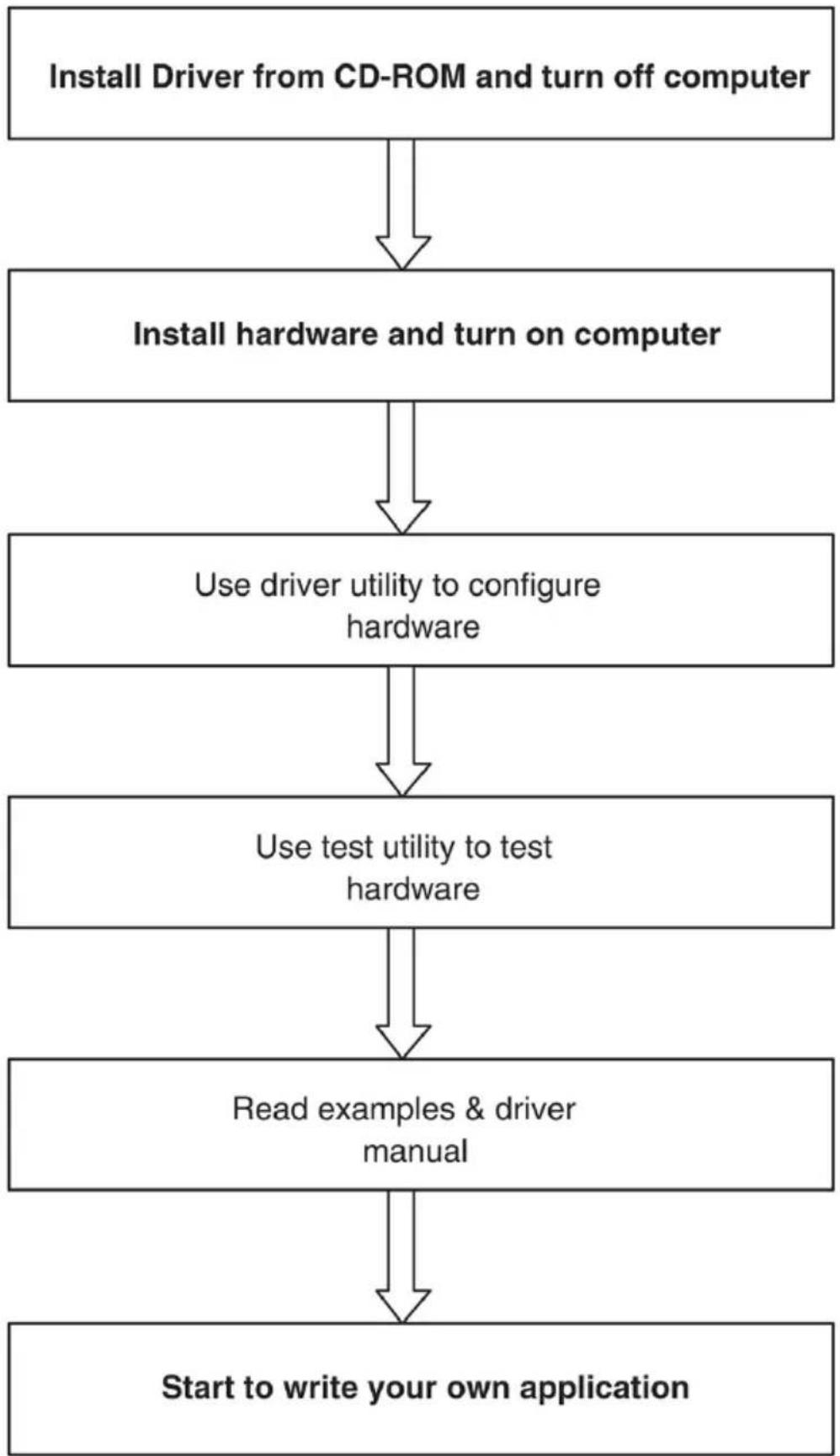
After you get the necessary components and maybe some of the accessories for enhanced operation of your multifunction card, you can then begin the installation procedure. Figure 1.1 on the next page provides a concise flow chart to give users a broad picture of the software and hardware installation procedures:
flowchart
graph TD
    A["Install Driver from CD-ROM and turn off computer"] --> B["Install hardware and turn on computer"]
    B --> C["Use driver utility to configure hardware"]
    C --> D["Use test utility to test hardware"]
    D --> E["Read examples & driver manual"]
    E --> F["Start to write your own application"]
Figure 1.1: Installation Flow Chart
Advantech offers a rich set of DLL drivers, third-party driver support and application software to help fully exploit the functions of your PCI-1710U/HGU/UL card:
• Device Drivers (on the companion CD-ROM)
- LabVIEW driver
- Advantech ActiveDAQ Pro
- WaveScan
Programming choices for DA&C cards
You may use Advantech application software such as Advantech Device Drivers. On the other hand, advanced users can use register-level programming, although this is not recommended due to its laborious and time-consuming nature.
Device Drivers
Advantech Device Driver software is included on the companion CD-ROM at no extra charge. It also comes with all Advantech DA&C cards. Advantech's Device Drivers features a complete I/O function library to help boost your application performance. Advantech Device Drivers for Windows XP/Vista/7 works seamlessly with development tools such as Visual Studio .Net, Visual C++, Visual Basic, Borland C++ Builder and Borland Delphi.
Register-level Programming
Register-level programming is available for experienced programmers who find it necessary to write code directly at the level of the device register. Since register-level programming requires much effort and time, we recommend that you use the Advantech Device Drivers instead. However, if register-level programming is indispensable, you should refer to the relevant information in Appendix C, Register Structure and Format, or to the example codes included on the companion CD-ROM.
This section will provide you a roadmap to demonstrate how to build an application from scratch using Advantech Device Drivers with your favorite development tools such as Visual Studio.Net, Visual C++, Visual Basic, Delphi and C++ Builder. The step-by-step instructions on how to build your own applications using each development tool will be given in the Device Drivers Manual. Moreover, a rich set of example source code is also given for your reference.
Programming Tools
Programmers can develop application programs with their favorite development tools:
- Visual Studio .Net
• Visual C++ and Visual Basic
• Delphi - C++ Builder
For instructions on how to begin programming works in each development tool, Advantech offers a Tutorial Chapter in the Device Drivers Manual for your reference. Please refer to the corresponding sections in this chapter on the Device Drivers Manual to begin your programming efforts. You can also look at the example source code provided for each programming tool, since they can get you very well oriented.
The Device Drivers Manual can be found on the companion CD-ROM. Alternatively, if you have already installed the Device Drivers on your system, The Device Drivers Manual can be readily accessed through the Start button:
Start/Programs/Advantech Automation/Device Manager/Device Drivers Manual
The example source code could be found under the corresponding installation folder such as the default installation path:
\Program Files\Advantech\ADSAPI\Examples
For information about using other function groups or other development tools, please refer to the Creating Windows XP/Vista/7 Application with Device Drivers chapter and the Function Overview chapter on the Device Drivers Manual.
Programming with Device Drivers Function Library
Advantech Device Drivers offer a rich function library that can be utilized in various application programs. This function library consists of numerous APIs that support many development tools, such as
Visual Studio .Net, Visual C++, Visual Basic, Delphi and C++ Builder.
According to their specific functions or services, APIs can be categorized into several function groups:
• Analog Input Function Group
• Analog Output Function Group
• Digital Input/Output Function Group
- Counter Function Group
• Port Function Group (direct I/O)
• Event Function Group
For the usage and parameters of each function, please refer to the Function Overview chapter in the Device Drivers Manual.
Troubleshooting Device Drivers Error
Driver functions will return a status code when they are called to perform a certain task for the application. When a function returns a code that is not zero, it means the function has failed to perform its designated function. To troubleshoot the Device Drivers error, you can pass the error code to DRV_GetErrorMessage function to return the error message.
Alternatively, you can refer to the Device Drivers Error Codes Appendix in the Device Drivers Manual for a detailed listing of Error Codes, Error IDs and Error Messages.
1.6 Accessories
Advantech offers a complete set of accessory products to support the PCI-1710U/HGU/UL card. These accessories include:
Wiring Cables
PCL-10168
The PCL-10168 cable is a 68-pin SCSI shielded cable for PCI-1710U/HGU/UL cards.
Wiring Boards
• ADAM-3968 68-pin DIN-rail SCSI Wiring Board
• PCLD-8710 DIN-rail Wiring Board w/ CJC
Installation
This chapter provides a packaged item checklist, proper instructions for unpacking and step-by-step procedures for both driver and card installation..
Sections include:
- Unpacking
- Driver Installation
- Hardware Installation
• Device Setup & Configuration
Chapter 2 Installation
2.1 Unpacking
After receiving your PCI-1710U/HGU/UL package, please inspect its contents first. The package should contain the following items:
• PCI-1710U, PCI-1710HGU or PCI-1710UL card
- Companion CD-ROM (Device Drivers included)
- User Manual
The PCI-1710U cards harbor certain electronic components vulnerable to electrostatic discharge (ESD). ESD can easily damage the integrated circuits and certain components if preventive measures are ignored.
Before removing the card from the antistatic plastic bag, you should take the following precautions to ward off possible ESD damage:
- Touch the metal part of your computer chassis with your hand to discharge the static electricity accumulated on your body. Alternatively, one can also use a grounding strap.
- Touch the anti-static bag to a metal part of your computer chassis before opening the bag.
- Take hold of the card only by the metal bracket when removing it out of the bag.
After taking out the card, you should first:
- Inspect the card for any possible signs of external damage (loose or damaged components, etc.). If the card is visibly damaged, please notify our service department or our local sales representative immediately. Do not install a damaged card into your system.
Also, pay extra caution to the following aspects during installation:
- Avoid physical contact with materials that could hold static electricity such as plastic, vinyl and Styrofoam.
- Whenever you handle the card, grasp it only by its edges. DO NOT TOUCH the exposed metal pins of the connector or the electronic components.
Note: Keep the anti-static bag for future use. You might need the original bag to store the card if you have to remove the card from a PC or transport it elsewhere.
2.2 Driver Installation
We recommend you install the driver before you install the PCI-1710U/HGU/UL card into your system, since this will guarantee a smooth installation process.
The Advantech Device Drivers Setup program for the PCI-1710U//HGU/UL card is included in the companion CD-ROM that is shipped with your DA&C card package. Please follow the steps below to install the driver software:
- Insert the companion CD-ROM into your CD-ROM drive.
- The Setup program will be launched automatically if you have the autoplay function enabled on your system. When the Setup Program is launched, you will see the following Setup Screen.
Note: If the autoplay function is not enabled on your computer, use Windows Explorer or Windows Run command to execute autorun.exe on the companion CD-ROM.

text_image
ADVANTECH DAQ Device Driver Disc 2009.12 Please install "Advantech Device Manager" before installing other items. Advantech Device Manager Individual Drivers Examples & Utilities Advanced Options Back Exit a.AutomationFigure 2.1: Setup Screen of Advantech Automation Software
- Select the Device Manager option to install.
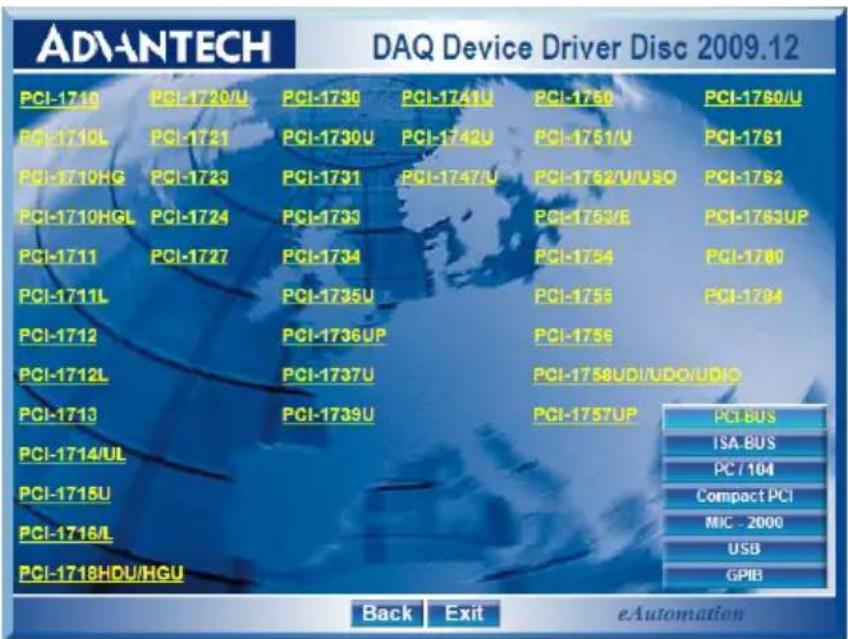
- Select the Individual Driver option.
- Select the specific device then follow the installation instructions step by step to complete your device driver installation and setup.
text_image
DAQ Device Driver Disc 2009.12 PCI-1710 PCI-1720/U PCI-1730 PCI-1741U PCI-1750 PCI-1760/U PCI-1710L PCI-1721 PCI-1730U PCI-1742U PCI-1751/U PCI-1761 PCI-1710HG PCI-1723 PCI-1731 PCI-1747/U PCI-1752/U/USQ PCI-1762 PCI-1710HGL PCI-1724 PCI-1733 PCI-1753/E PCI-1763UP PCI-1711 PCI-1727 PCI-1734 PCI-1754 PCI-1780 PCI-1711L PCI-1735U PCI-1755 PCI-1784 PCI-1712 PCI-1736UP PCI-1756 PCI-1712L PCI-1737U PCI-1758UDI/UDO/UDIO PCI-1713 PCI-1739U PCI-1757UP PCI-1714/UL PCI-1715U PCI-1716/L PCI-1718HDU/HGU Back Exit eAutomationFigure 2.2: Different Options for Driver Setup
For further information on driver-related issues, an online version of the Device Drivers Manual is available by accessing the following path:
Start/Programs/Advantech Automation/Device Manager/Device Drivers Manual
Note: Make sure you have installed the driver before you install the card (please refer to chapter 2.2 Driver Installation)
After the Device Drivers installation is completed you can install the PCI-1710U/HGU/UL card into any PCI slot on your computer. However, it is suggested that you refer to the computer's user manual or related documentation if you have any doubts. Please follow the steps below to install the card onto your system.
- Turn off your computer and unplug the power cord and cables. TURN OFF your computer before installing or removing any components on the computer.
- Remove the cover of your computer.
- Remove the slot cover on the back panel of your computer.
- Touch the metal part on the surface of your computer to neutralize the static electricity that might be on your body.
- Insert the PCI-1710U/HGU/UL card into a PCI slot. Hold the card only by its edges and carefully align it with the slot. Insert the card firmly into place. Use of excessive force must be avoided; otherwise, the card might be damaged.
- Fasten the bracket of the PCI card on the back panel rail of the computer with screws.
- Connect appropriate accessories (68-pin cable, wiring terminals, etc. if necessary) to the PCI card.
- Replace the cover of your computer chassis. Re-connect the cables you removed in step 2.
- Plug in the power cord and turn on the computer.
After your card is properly installed on your system, you can now configure your device using the Advantech Device Manager Program that has itself already been installed on your system during driver setup. A complete device installation procedure should include device setup, configuration and testing. The following sections will guide you through the Setup, Configuration and Testing of your device.
The Advantech Device Manager program is a utility that allows you to set up, configure and test your device, and later stores your settings on the system registry. These settings will be used when you call the APIs of Advantech Device Drivers.
Setting Up the Device
-
To install the I/O device for your card, you must first run the Device Manager program (by accessing Start/Programs/Advantech Automation/Device Manager/Advantech Device Manager).
-
You can then view the device(s) already installed on your system (if any) on the Installed Devices list box. If the software and hardware installation are completed, you will see PCI-1710U/HGU/UL card in the Installed Devices list.

text_image
Advantech Device Manager Your ePlatform Partner ADVANTECH Device Manager Installed Devices: My Computer 000 :Figure 2.3: The Device Manager Dialog Box
Configuring the Device
- Please click the Setup button to configure your device. On the Device Setting dialog box (Fig. 2-4), you can configure the A/D channels configuration either as 8 Differential or 16 Single-ended, specify the D/A voltage reference either as External or Internal and specify the voltage output range for the two D/A channels.

text_image
PCI-1710/L/EO/BOL/D/0L/EOU Device Setting Base Address: E800 - Max A/D Channels Configuration Channel: 0 Single Ended Differential Interrupt Channel 10 D/A Voltage Ref - Channel 1 External Internal Voltage: 0.5V D/A Voltage Ref - Channel 2 External Internal Voltage: 0.5V Help Options Cancel About Calibration OKFigure 2.4: The Device Setting Dialog Box
- After your card is properly installed and configured, you can click the Test... button to test your hardware by using the testing utility supplied.

text_image
Advantech Device Test - PCI-1710V BoardID=3 1/0=e800B Ver D1 Analog input Analog output Digital input Digital output Counter Channel No. Input range: 0 0-10V 9.9975590 Channel mode 16 single ended channels 2 0-10V 9.9975590 Sampling period: 1000 ms 3 0-10V 9.9975590 4 0-10V 9.9975590 5 0-10V 9.9975590 6 0-10V 9.9975590 7 0-10V 9.9975590 Change device ExitFigure 2.5: The Test Utility Dialog Box
For more detailed information, please refer to Chapter 2 of the Device Drivers Manual. You can also find rich examples on the CD-ROM to speed up your programming.
Signal Connections
This chapter provides useful information about how to connect input and output signals to the PCI-1710U cards via the I/O connector..
Sections include:
- Overview
- BoardID Settings
• Signal Connections
• Field Wiring Considerations
Chapter 3 Signal Connections
3.1 Overview
Maintaining signal connections is one of the most important factors in ensuring that your application system is sending and receiving data correctly. A good signal connection can avoid unnecessary and costly damage to your PC and other hardware devices. This chapter provides useful information about how to connect input and output signals to the PCI-1710U cards via the I/O connector.
3.2 Switch and Jumper Settings
PCI-1710U cards have one switch for BoardID setting.

text_image
CN1 VR4 VR5 VR1 VR2 VR3 SW1 ON 1 2 3 4Figure 3.1: Connector and Switch Locations
BoardID settings are used to set a board's unique identifier when multiple identical cards are installed in the same system.
PCI-1710U cards have a built-in DIP switch (SW1), which is used to define each card's unique identifier. You can determine the unique identifier in the register as shown in Table 3.1. If there are multiple identical cards in the same chassis, the BoardID switch helps differentiate the boards by identifying each card's device number with the switch setting. The BoardID switch's unique identifier has been set to 0 at the factory.
If you need to adjust it to other numbers, set SW1 by referring to DIP switch settings below.
| Table 3.1: Board ID Setting (SW1) | ||||
| SW1 Position 1 Position 2 Position 3 Position 4 | ||||
| BoardID ID3 ID2 ID1 ID0 | ||||
| 0 | ON ON ON ON | |||
| 1 | ON ON ON OFF | |||
| 2 | ON ON OFF ON | |||
| 3 | ON ON OFF OFF | |||
| 4 | ON OFF | ON ON | ||
| 5 | ON OFF | ON OFF | ||
| 6 | ON OFF | OFF ON | ||
| 7 | ON OFF | OFF OFF | ||
| 8 | OFF | ON ON ON | ||
| 9 | OFF | ON ON OFF | ||
| 10 | OFF | ON OFF ON | ||
| 11 | OFF | ON OFF OFF | ||
| 12 | OFF | OFF | ON ON | |
| 13 | OFF | OFF | ON OFF | |
| 14 | OFF | OFF | OFF ON | |
| 15 | OFF | OFF | OFF OFF | |
Default Setting is 0
Pin Assignment
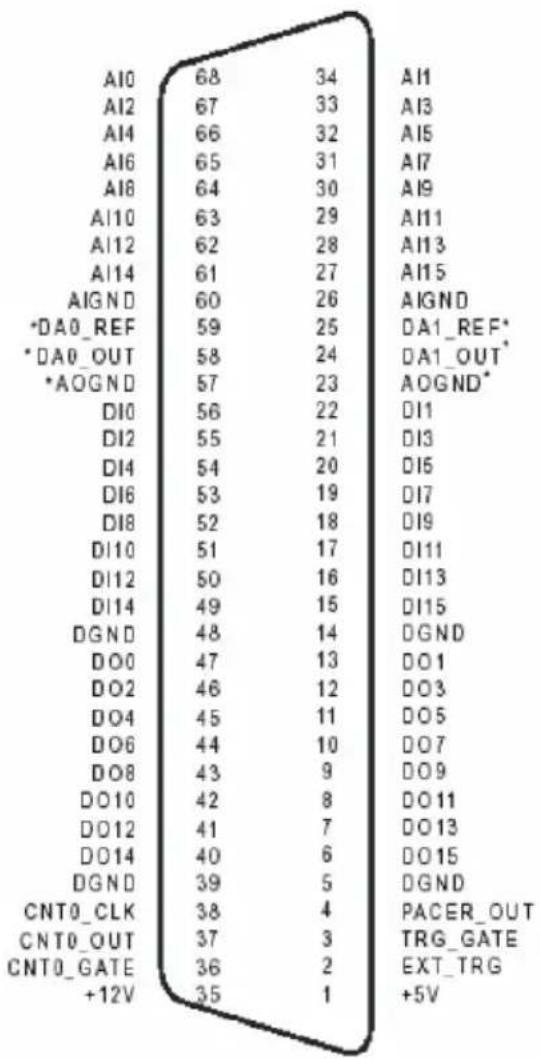
Figure 3-2 shows the pin assignments for the 68-pin I/O connector on the PCI-1710U/HGU/UL.
text_image
A10 68 34 A11 A12 67 33 A13 A14 66 32 A15 A16 65 31 A17 A18 64 30 A19 A110 63 29 A111 A112 62 28 A113 A114 61 27 A115 AIGND 60 26 AIGND *DA0_REF 59 25 DA1_REF* *DA0_OUT 58 24 DA1_OUT* *AOGND 57 23 AOGND* DI0 56 22 DI1 DI2 55 21 DI3 DI4 54 20 DI5 DI6 53 19 DI7 DI8 52 18 DI9 DI10 51 17 DI11 DI12 50 16 DI13 DI14 49 15 DI15 DGND 48 14 DGND DO0 47 13 DO1 DO2 46 12 DO3 DO4 45 11 DO5 DO6 44 10 DO7 DO8 43 9 DO9 DO10 42 8 DO11 DO12 41 7 DO13 DO14 40 6 DO15 DGND 39 5 DGND CNT0_CLK 38 4 PACER_OUT CNT0_OUT 37 3 TRG_GATE CNT0_GATE 36 2 EXT_TRG +12V 35 1 +5VFigure 3.2: I/O Connector Pin Assignments for the PCI-1710U Series
*Note: Pins 23\~25 and pins 57\~59 are not defined for PCI-1710UL
3.3.1 I/O Connector Signal Description
| Table 3.2: I/O Connector Signal Descriptions | |||
| Signal Name | Reference | Direction Description | |
| AI<0...15> | AIGND | Input | Analog Input Channels 0 through Each channel pair, AI(i = 0, 2, 4...14), can be configured as either two single-ended inputs or one differential input. |
| AIGND - - Analog Input Ground. The three ground references (AIGND, AOGND, and DGND) are connected together on the PCI-1710U/1710HGU/1710UL. | |||
| AO0_REF AO1_REF | AOGND | Input | Analog Output Channel 0/1 External Reference. |
| AO0_OUT AO1_OUT | AOGND Output Analog | Output Channels 0/1. | |
| AOGND - | - | Analog Output Ground. The three ground references (AIGND, AOGND, and DGND) are connected together on the PCI-1710U/1710HGU/1710UL. | |
| DI<0..15> DGND Input Digital Input Channels 0 through 15. | |||
| DO<0..15> | DGND | Output | Digital Output Channels 0 through 15. |
| DGND | - | - | Digital Ground. This pin supplies the reference for the digital channels at the I/O connector as well as the +5VDC and +12 VDC supply. The three ground references (AIGND, AOGND, and DGND) are connected together on the PCI-1710U/1710HGU/1710UL card. |
| CNT0_CLK | DGND | Input | Max. Input Frequency: 10 MHz |
| CNT0_OUT | DGND | Output | Counter 0 Output. |
| CNT0_GATE | DGND | Input | Counter 0 Gate Control. |
| PACER_OUT DGND Output Pacer Clock Output. This pin pulses once for each pacer clock when turned on. If A/D conversion is in the pacer trigger mode, users can use this signal as a synchronous signal for other applications. A low-to-high edge triggers A/D conversion to start. | |||
Table 3.2: I/O Connector Signal Descriptions
| TRG_GATE DGND Input A/D External | Trigger Gate. When TRG _GATE is connected to +5 V, it will enable the external trigger signal to input. When TRG _GATE is connected to DGND, it will disable the external trigger signal to input. | ||
| EXT_TRG DGND Input A/D | External Tr | Trigger. This pin is external trigger signal input for the A/D conversion. A low -to-high edge triggers A/D conversion to start. | |
| +12V DGND Output +12 VDC Source. | |||
| +5V DGND Output +5 VDC Source. | |||
3.3.2 Analog Input Connections
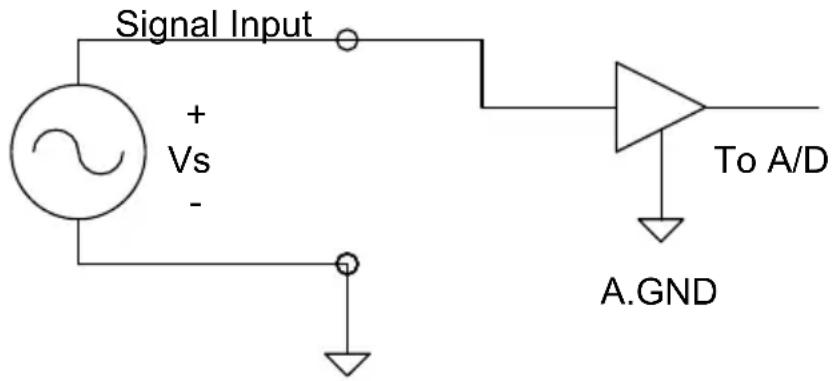
PCI-1710U/HGU/UL supports either 16 single-ended or 8 differential analog inputs.
Single-ended Channel Connections
Single-ended connections use only one signal wire per channel. The voltage on the line references to the common ground on the card. A signal source without a local ground is called a "floating" source. It is fairly simple to connect a single ended channel to a floating signal source. A standard wiring diagram looks like this:
text_image
Signal Input + Vs - A.GND To A/DA.GNDA.GND
Differential Channel Connections
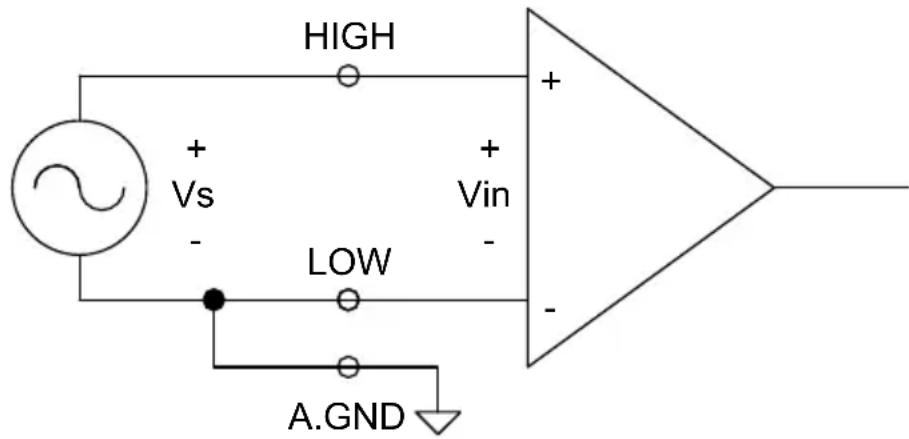
Differential input connections use two signal wires per channel. The card measures only the voltage difference between these two wires, the HI wire and the LOW wire. If the signal source has no connection to ground, it is called a "floating" source. A connection must exist between LOW and ground to define a common reference point for floating signal sources. To measure a floating sources connect the input channels as shown below:
text_image
HIGH + Vs - + Vin - LOW - A.GNDIf the signal source has one side connected to a local ground, the signal source ground and the PCI-1710U/HGU/UL ground will not be at exactly the same voltage, as they are connected through the ground return of the equipment and building wiring. The difference between the ground voltages forms a common-mode voltage.
To avoid the ground loop noise effect caused by common-mode voltages, connect the signal ground to the LOW input. Do not connect the LOW input to the PCI-1710U/HGU/UL ground directly. In some cases you may also need a wire connection between the PCI-1710U/HGU/UL ground and the signal source ground for better grounding. The following two diagrams show correct and incorrect connections for a differential input with local ground:
Correct Connection

text_image
HIGH + Vs - + Vin - LOW - Vin=Vs Vcm GNDIncorrect Connection

text_image
HIGH + Vs - + Vin - Vcm LOW - GND VAnalog Output Connection
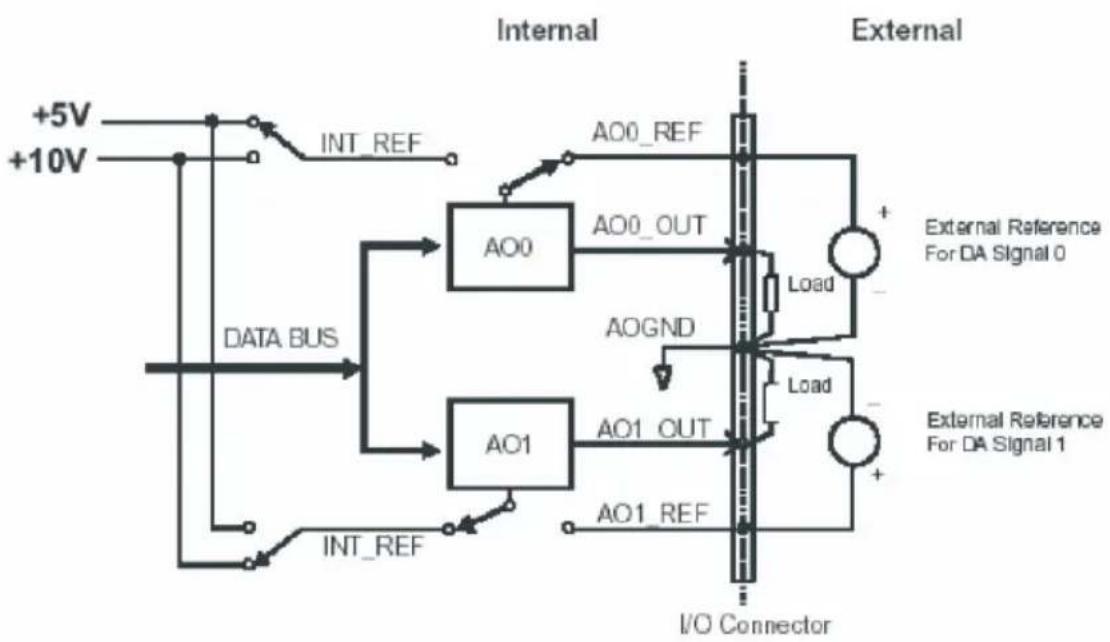
The PCI-1710U/HGU/UL provides two D/A output channels. You can use the internal precision -5 V or -10 V reference to generate 0 to +5 V or 0 to +10 V D/A output. Use an external reference for other D/A output ranges. The maximum reference input voltage is ±10 V and maximum output scaling is ±10 V. Loading current for D/A outputs should not exceed 5 mA.
Fig. 3-3 shows how to make analog output and external reference input connections on the PCI-1710U/1710HGU.
flowchart
graph TD
    A["+5V"] --> B["INT_REF"]
    C["+10V"] --> D["DATA BUS"]
    B --> E["AO0"]
    D --> F["AO1"]
    E --> G["AO0_OUT"]
    F --> H["AO1_OUT"]
    G --> I["External Reference For DA Signal 0"]
    H --> J["External Reference For DA Signal 1"]
    I --> K["Load"]
    J --> L["Load"]
    K --> M["I/O Connector"]
    L --> M
    M --> N["IO Connector"]
    style A fill:#f9f,stroke:#333
    style C fill:#f9f,stroke:#333
    style E fill:#ccf,stroke:#333
    style F fill:#ccf,stroke:#333
    style G fill:#cfc,stroke:#333
    style H fill:#cfc,stroke:#333
    style I fill:#fcc,stroke:#333
    style J fill:#fcc,stroke:#333
    style K fill:#cff,stroke:#333
    style L fill:#cff,stroke:#333
    style M fill:#ffc,stroke:#333
Figure 3.3: Analog Output Connections
3.3.3 Digital Signal Connections
The PCI-1710U/HGU has 16 digital input and 16 digital output channels. The digital I/O levels are TTL compatible. The following figure shows connections to exchange digital signals with other TTL devices:

text_image
DO TIkl Devices DI D.GND D.GNDTo receive an OPEN/SHORT signal from a switch or relay, add a pull-up resistor to ensure that the input is held at a high level when the contacts are open.

text_image
+5V 4.7K D.GND3.4 Field Wiring Considerations
When you use PCI-1710U cards to acquire data from outside, noises in the environment might significantly affect the accuracy of your measurements if due cautions are not taken. The following measures will be helpful to reduce possible interference running signal wires between signal sources and the PCI-1710U card.
- The signal cables must be kept away from strong electromagnetic sources such as power lines, large electric motors, circuit breakers or welding machines, since they may cause strong electromagnetic interference. Keep the analog signal cables away from any video monitor, since it can significantly affect a data acquisition system.
- If the cable travels through an area with significant electromagnetic interference, you should adopt individually shielded, twisted-pair wires as the analog input cable. This type of cable has its signal wires twisted together and shielded with a metal mesh. The metal mesh should only be connected to one point at the signal source ground.
- Avoid running the signal cables through any conduit that might have power lines in it.
- If you have to place your signal cable parallel to a power line that has a high voltage or high current running through it, try to keep a safe distance between them. Alternatively, you can place the signal cable at a right angle to the power line to minimize the undesirable effect.
- The signals transmitted on the cable will be directly affected by the quality of the cable. In order to ensure better signal quality, we recommend that you use the PCL-10168 shielded cable.
APPENDIX

text_image
ASpecifications
Appendix A Specifications
A.1 Analog Input
| Channels 16 sing | e-ended or 8 differential or combination | |||||||||||
| Resolution 12-bit | ||||||||||||
| FIFO Size 4k samples | ||||||||||||
| PCI-1710U/UL Max. Sampling Rate | 100 kS/s | |||||||||||
| PCI-1710HGU Max. Sampling Rate | Gain 0.5, 1 | 5, 10 | 50, 100 | 500, 1000 | ||||||||
| Speed 100 | kS/s | 35 kS/s | 7 kS/s | 770 | S/s | |||||||
| Conversion Time | 8 μs | |||||||||||
| Input Range and Gain List for PCI-1710U/UL | Gain 0.5 1 2 4 | 8 | ||||||||||
| Unipolar | N/A | 0~10 | 0~5 | 0~2.5 | 0~1.25 | |||||||
| Bipolar | ±10 | ±5 | ±2.5 | ±1.25 | ±0.625 | |||||||
| Input Range and Gain List for PCI-1710HGU | Gain | 0.5 | 1 | 5 | 10 | 50 | 100 | 500 | ||||
| Unipolar | N/A | 0~10 | N/A | 0~1 | N/A | 0~0.1 | N/A | |||||
| Bipolar | ±10 | ±5 | ±1 | ±0.5 | ±0.1 | ±0.05 | ±0.01 | |||||
| PCI-1710U/UL Drift | Gain 0.5 1 2 4 | 8 | ||||||||||
| Zero | 15 ppm/°C | |||||||||||
| Span | 25 ppm/°C | |||||||||||
| PCI-1710U/UL Small Signal BW for PGA | Gain 0.5 1 2 4 | 8 | ||||||||||
| Bandwidth | 1MHz | 3.3MHz | 3.3MHz | 2.8MHz | 1.8MHz | |||||||
| PCI-1710HGU Drift | Gain | 0.5 | 1 | 5 | 10 | 50 | 100 | 500 | ||||
| Zero | 20 ppm/°C | 50 ppm/°C | ||||||||||
| Span | 40 ppm/°C | 100 ppm/°C | ||||||||||
| PCI-1710HGU Small Signal BW for PGA | Gain 0.5 1 10 10 | 00 | 1000 | |||||||||
| Bandwidth | 0.8MHz | 3.2MHz | 3MHz | 0.65MHz | 0.065MHz | |||||||
| Max. Input Voltage* | Common mode Vol-t-age(V) | -11 | -8 | -6 | -3.8~4 | 6 | 8 | 11 | ||||
| Max. Input Voltage(V) | -2~-11 | -5.6~10 | -7.4~10 | -10~10 | -10~7.5 | -10~5.75 | -10~2 | |||||
| Input Impedance | 300 MΩ / 5pF | |||||||||||
| Trigger Mode | Software, on-board programmable pacer or external | |||||||||||
| PCI-1710U/UL Accuracy | DC INLE: ±1 LSB | |||||||||||
| Monotonicity: 12 bits | ||||||||||||
| Offset error: Adjustable to zero | ||||||||||||
| Gain 0.5 | 1 2 4 8 | |||||||||||
| Gain Error (% FSR) | 0.1 0.1 | 0.2 0.2 | 0.4 | |||||||||
| Chan- nel Type | SE/ DIFF | SE/ DIFF | DIFF DIFF DIFF | |||||||||
| AC SNR: 68dB | ||||||||||||
| ENOB: 10.5 bits | ||||||||||||
| PCI-1710HGU Accuracy | DC INLE: ±1 LSB | |||||||||||
| Monotonicity: 12 bits | ||||||||||||
| Offset error: Adjustable to zero | ||||||||||||
| Gain 0.5, | 1 5, 10 | 50, | 100 | 500 | 1000 | |||||||
| Gain Error (% FSR) | 0.1 0.2 | 0.4 0.8 | 0.8 | |||||||||
| Chan- nel Type | SE/ DIFF | SE/ DIFF | DIFF DIFF DIFF | |||||||||
| AC SNR: 68dB | ||||||||||||
| ENOB: 10.5 bits | ||||||||||||
| External TTL Trigger Input | Low | 0.4 V max. | ||||||||||
| High | 2.4 V min. | |||||||||||
*Note: The maximum input voltage may vary according to the common mode voltage as shown below:

line
| Input Voltage (V) | Common Mode Voltage (V) | |---|---| | -10, 11 | 12 | | -10, -3.8 | -4 | | -2, 11 | 12 | | 2, 11 | 12 | | -2, -11 | -12 | | 3, -11 | -12 | | 10, 4 | 4 | | 10, -11 | -12 |31 Appendix A
A.2 Analog Output
| Channels | 2 (PCI-1710U/1710HGU only) | |
| Resolution | 12-bit | |
| Output Range | Using Internal Reference 0 | ~ +5V @ -5V0 ~ +10V @ -10V |
| Using External Reference | 0 ~ +xV @ -xV (-10 ≤ x ≤ 10) | |
| Accuracy | Relative ±0.5 LSB | |
| Differential Non-linearity ±0 | .5 LSB (monotonic) | |
| Gain Error | Adjustable to zero | |
| Slew Rate | 10 V/μs | |
| Drift | 40 ppm / °C | |
| Driving Capability | 3 mA | |
| Update Rate | Static update | |
| Output Impedance | 7.5 ohm max. | |
| Setting Time | 26μs ( to ± 1/2 LSB of FSR ) | |
A.3 Digital Input
| Input Channels | 16 | |
| Input Voltage | Low 0.8V max. | |
| High 2V min. | ||
| Input Load | 10 kΩ pull-high resistor connect to 5 V | |
A.4 Digital Output
| Output Channels | 16 | |
| Output Voltage | Low 0.8 V max.@ +8.0mA (sink) | |
| High 2 V min.@ | -0.4mA(source) | |
A.5 Counter/Timer
| Counter chip | 82C54 or equivalent | |
| Channels | 3 channels, 2 channels are permanently configured as programmable pacers; 1 channel is free for user appli-cation | |
| Resolution | 16-bit | |
| Compatibility | TTL level | |
| Base Clock | Channel 2: Takes input from output of channel 1 Channel 1: 10MHz Channel 0: Internal 1MHz or external clock (10 MHz) max Selected by software | |
| Max. Input Frequency | 10MHz | |
| Clock Input | Low 0.8 V max. | |
| High 2.0 V min. | ||
| Gate Input | Low 0.8 V max. | |
| High 2.0 V min. | ||
| Counter Output | Low 0.5 V max.@+24 mA | |
| High 2.4 V min.@-15 mA | ||
A.6 General
| I/O Connector Type | 68-pin SCSI female | |
| Dimensions | 175 x 100 mm (6.9" x 3.9") | |
| Power Consumption Typical | Typical | +5 V @ 850 mA |
| Max. | +5 V @ 1 A | |
| Temperature Operating | 0~60°C (32~140°F) (refer to IEC 68-2-1,2) | |
| Storage | -20~70°C (-4~158°F) | |
| Relative Humidity Operating | 5~85%RH non-condensing (refer to IEC 68-1,-2,-3) | |
| Storage | 5~95%RH non-condensing (refer to IEC 68-1,-2,-3) | |
| Certifications | CE certified | |
APPENDIX
B
Block Diagrams
Appendix B Block Diagrams

flowchart
graph TD
    A["PCI Controller"] -->|Address Bus| B["Address Decoder"]
    A -->|INT| C["A/D & D/A Status Control Logic"]
    C --> D["16-bit Digital Output"]
    C --> E["15-bit Digital Input"]
    C --> F["12-bit D/A Output 0"]
    C --> G["12-bit D/A Output 1"]
    D --> H["COUNTER 0"]
    E --> I["COUNTER 1"]
    F --> J["COUNTER 2"]
    G --> K["ANCH_CLK"]
    L["4K Samples FIFO"] --> M["IRD Control Logic"]
    M --> N["1 MHz/10=100 KHz"]
    N --> O["COUNTER 0"]
    N --> P["COUNTER 1"]
    N --> Q["COUNTER 2"]
    O --> R["COUNTER 0"]
    P --> S["COUNTER 1"]
    Q --> T["COUNTER 2"]
    U["12-bit A/D Converter"] --> V["A/D Trigger Logic"]
    V --> W["1 MHz 0SC"]
    W --> X["COUNTER 0"]
    X --> Y["COUNTER 1"]
    Y --> Z["COUNTER 2"]
    Z --> AA["COUNTER 0"]
    AA --> AB["COUNTER 1"]
    AB --> AC["COUNTER 2"]
    AC --> AD["COUNTER 0"]
    AD --> AE["COUNTER 1"]
    AE --> AF["COUNTER 2"]
    AF --> AG["COUNTER 0"]
    AG --> AH["COUNTER 1"]
    AH --> AI["COUNTER 2"]
    AI --> AJ["COUNTER 0"]
    AJ --> AK["COUNTER 1"]
    AK --> AL["COUNTER 2"]
    AL --> AM["COUNTER 0"]
    AM --> AN["COUNTER 1"]
    AN --> AO["COUNTER 2"]
    AO --> AP["COUNTER 0"]
    AP --> AQ["COUNTER 1"]
    AQ --> AR["COUNTER 2"]
    AR --> AS["COUNTER 0"]
    AS --> AT["COUNTER 1"]
    AT --> AU["COUNTER 2"]
    AU --> AV["COUNTER 0"]
    AV --> AW["COUNTER 1"]
    AW --> AX["COUNTER 2"]
    AX --> AY["COUNTER 0"]
    AY --> AZ["COUNTER 1"]
    AZ --> BA["COUNTER 2"]
    BA --> BB["COUNTER 0"]
    BB --> BC["COUNTER 1"]
    BC --> BD["COUNTER 2"]
    BD --> BE["COUNTER 0"]
    BE --> BF["COUNTER 1"]
    BF --> BG["COUNTER 2"]
    BG --> BH["COUNTER 0"]
    BH --> BI["COUNTER 1"]
    BI --> BJ["COUNTER 2"]
    BJ --> BK["COUNTER 0"]
    BK --> BL["COUNTER 1"]
    BL --> BM["COUNTER 2"]
    BM --> BN["COUNTER 0"]
    BN --> BO["COUNTER 1"]
    BO --> BP["COUNTER 2"]
    BP --> BQ["COUNTER 0"]
    BQ --> BR["COUNTER 1"]
    BR --> BS["COUNTER 2"]
    BS --> BT["COUNTER 0"]
    BT --> BU["COUNTER 1"]
    BU --> BV["COUNTER 2"]
    BV --> BW["COUNTER 0"]
    BW --> BX["COUNTER 1"]
    BX --> BYC["COUNTER 2"]
    BYC --> BZ["COUNTER 0"]
    BZ --> CA["COUNTER 1"]
    CA --> CB["COUNTER 2"]
    CB --> CC["COUNTER 0"]
    CC --> CD["COUNTER 1"]
    CD --> CE["COUNTER 2"]
    CE --> CF["COUNTER 0"]
    CF --> GD["COUNTER 1"]
    GD --> DH["COUNTER 2"]
    DH --> DI["COUNTER 0"]
    DI --> DJ["COUNTER 1"]
    DJ --> DK["COUNTER 2"]
    DK --> DL["COUNTER 0"]
Calibration
This appendix provides brief information on PCI-1710U card calibration. Regular calibration checks are important to maintain accuracy in data acquisition and control applications.
Appendix C Calibration
PCI-1710U cards are calibrated at the factory for initial use. However, a recalibration of the analog input and the analog output function is recommended:
- Every six months.
- Everytime the analog output range is changed.
We provide the Advantech Device Manager on the companion CD-ROM to assist you with D/A and A/D calibration. The Advantech Device Manager makes calibration easy. With a variety of prompts and graphic displays, these programs will lead you through the calibration and setup procedures, showing you all the correct settings and adjustments.
Note: If you installed the program to another directory, you can find these programs in the corresponding subfolders in your destination directory.
To perform a satisfactory calibration, you will need a 412 -digit digital multi-meter and a voltage calibrator or a stable, noise-free DC voltage source.
Note: Before you calibrate the D/A function, you must turn on the power at least 15 minutes to make sure the DA&C card is already stable.
The Advantech Device Manager can be accessed through the Start button:
Start/Programs/Advantech Automation/Device Manager/Advantech Device Manager/
C.1 VR Assignment
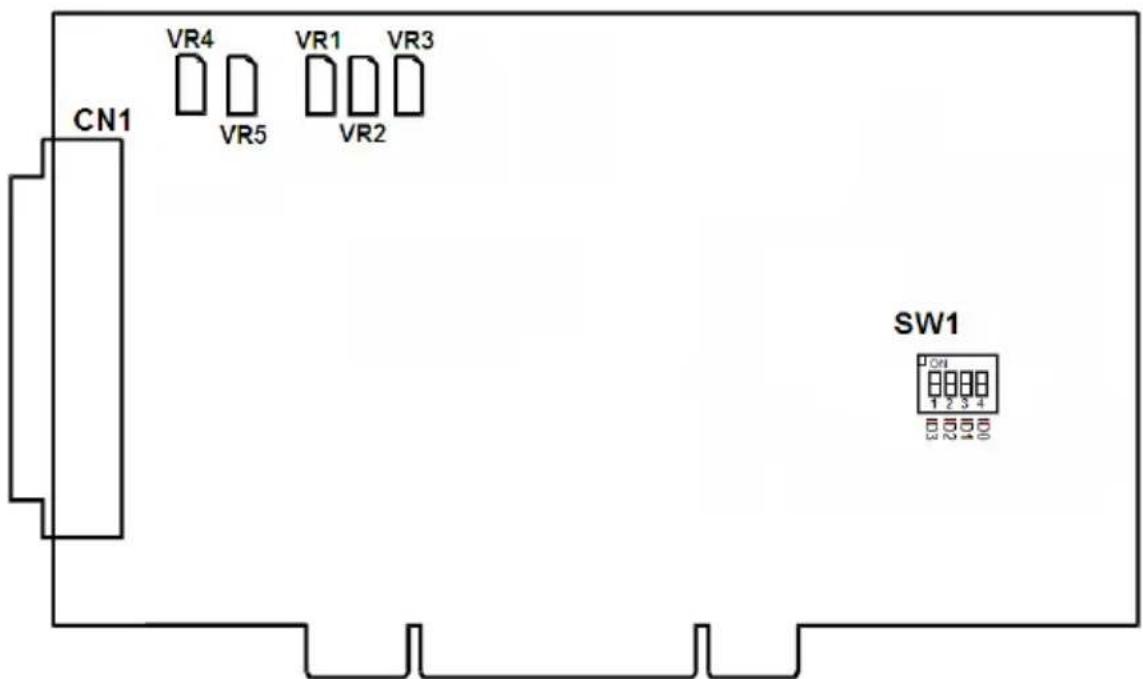
The five variable resistors (VRs) on the PCI-1710U/HGU/UL board help you make accurate adjustment on all A/D and D/A channels. See the figure in Appendix C for help finding the VRs. The following list shows the function of each VR:
| VR Function | |
| VR1 A/D unipolar offset | |
| VR2 A/D bipolar offset | |
| VR3 A/D full scale | |
| VR4 (PCI-1710U/HGU) D/A0 full scale | |
| VR5 (PCI-1710U/HGU) D/A1 full scale | |
text_image
CN1 VR4 VR5 VR1 VR2 VR3 SW1 ON 1 2 3 4 03 02 01 00Figure C.1: PCI-1710U VR Assignment
Note: Using a precision voltmeter to calibrate the A/D outputs is recommended.
Regular and accurate calibration ensures maximum possible accuracy. The A/D calibration tool in the Advantech Device Manager leads you through the whole A/D offset and gain adjustment procedure. The basic steps are outlined below:
- In the Advantech Device Manager, set analog input channel AI0 as single-ended, bipolar, range ±5 V, and set AI1 as single-ended, unipolar, range 0 to 10 V.
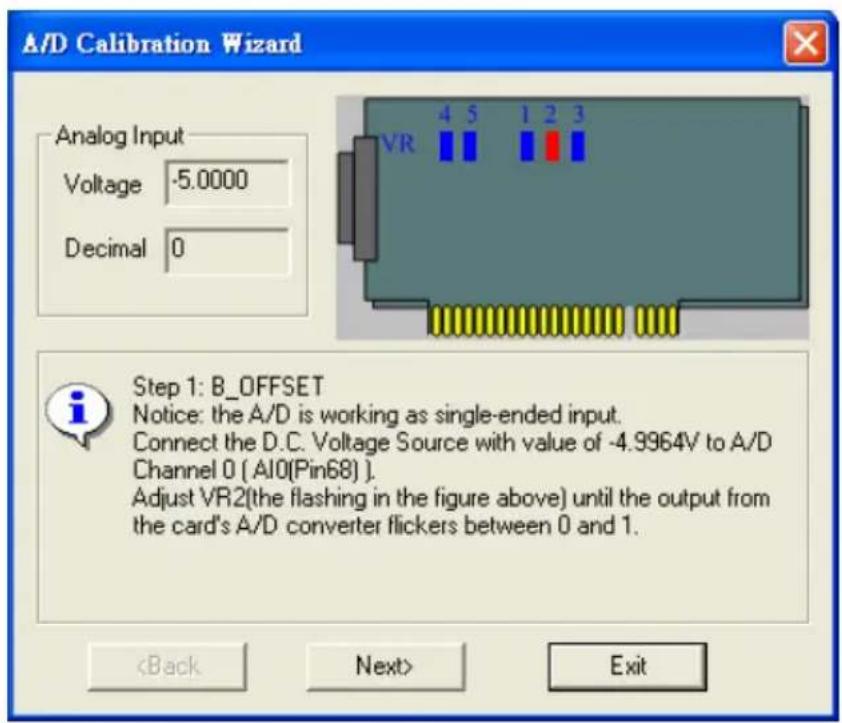
- Connect a DC voltage source with value equal to 0.5 LSB (-4.9959 V) to AI0. Adjust VR2 until the output from the card's AI0 flickers between 0 and 1.
text_image
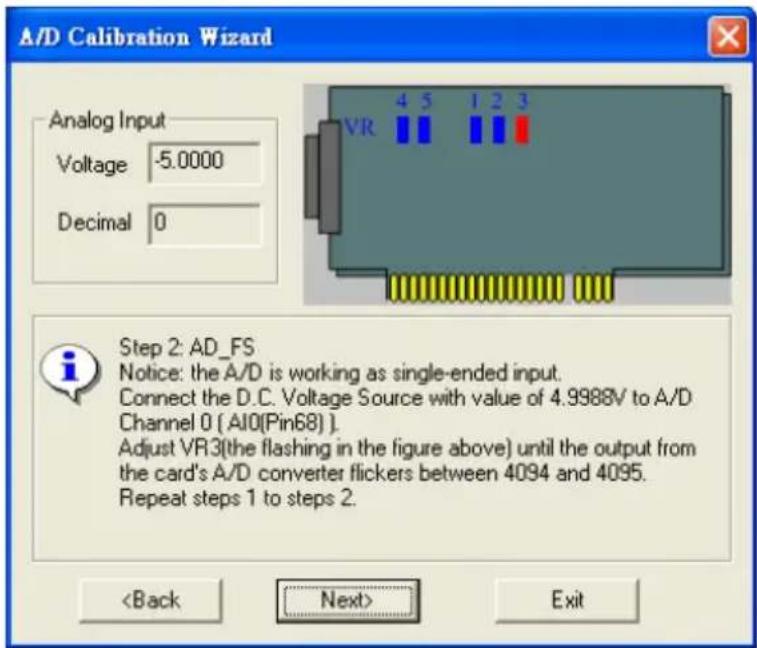
A/D Calibration Wizard Analog Input Voltage -5.0000 Decimal 0 Step 1: B_OFFSET Notice: the A/D is working as single-ended input. Connect the D.C. Voltage Source with value of -4.9964V to A/D Channel 0 ( AI0(Pin68) ) . Adjust VR2(the flashing in the figure above) until the output from the card's A/D converter flickers between 0 and 1.- Connect a DC voltage source with a value of 4094.5 LSB (4.9953 V) to AI0. Adjust VR3 until the output from the card's AI0 flickers between 4094 and 4095.
text_image
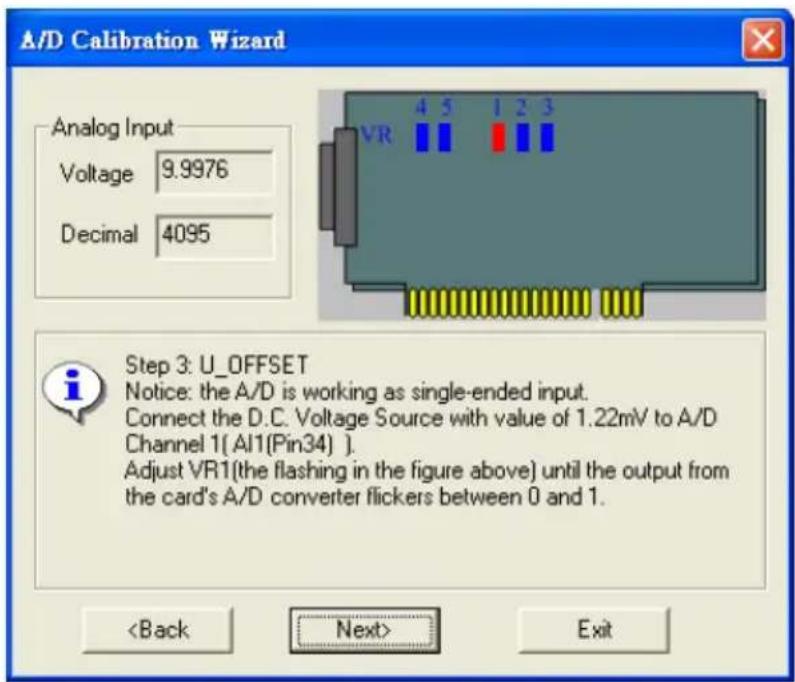
A/D Calibration Wizard Analog Input Voltage -5.0000 Decimal 0 Step 2: AD_FS Notice: the A/D is working as single-ended input. Connect the D.C. Voltage Source with value of 4.9988V to A/D Channel 0 ( AI0(Pin68) ) . Adjust VR3(the flashing in the figure above) until the output from the card's A/D converter flickers between 4094 and 4095. Repeat steps 1 to steps 2.- Connect a DC voltage source with value equal to 0.5 LSB (1.22mV) to AI1. Adjust VR1 until the output codes from the card's AI1 flickers between 0 and 1.
text_image
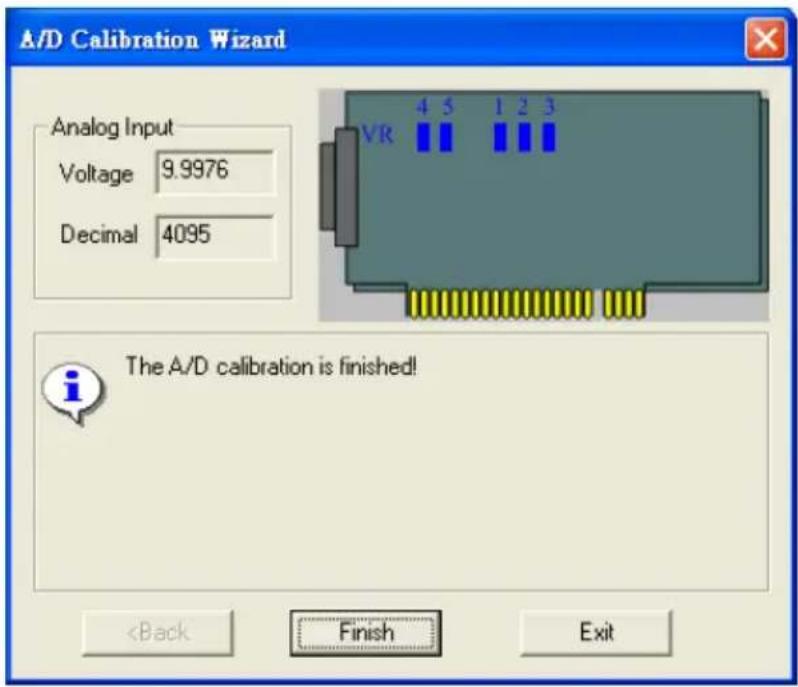
A/D Calibration Wizard Analog Input Voltage 9.9976 Decimal 4095 Step 3: U_OFFSET Notice: the A/D is working as single-ended input. Connect the D.C. Voltage Source with value of 1.22mV to A/D Channel 1(Al1(Pin34) ) . Adjust VR1(the flashing in the figure above) until the output from the card's A/D converter flickers between 0 and 1.- The A/D calibration is finished after the foregoing steps.
text_image
A/D Calibration Wizard Analog Input Voltage 9.9976 Decimal 4095 VR 4 5 1 2 3 The A/D calibration is finished!| A/D code Mapping Voltage | |||
| Hex. Dec. | Bipolar ±5V | Unipolar 0 to 10V | |
| 000h 0 -4.9 | 9971 V 0 V | ||
| 7FFh 2047 | -0.0024 V | 4.9947 V | |
| 800h 2048 | 0 V 4.9971 | V | |
| FFFh 4095 | 4.9947 V 9 | 9918 V | |