P8000 - Exercise bike Horizon Fitness - Free user manual and instructions
Find the device manual for free P8000 Horizon Fitness in PDF.


User questions about P8000 Horizon Fitness
0 question about this device. Answer the ones you know or ask your own.
Ask a new question about this device
Download the instructions for your Exercise bike in PDF format for free! Find your manual P8000 - Horizon Fitness and take your electronic device back in hand. On this page are published all the documents necessary for the use of your device. P8000 by Horizon Fitness.
USER MANUAL P8000 Horizon Fitness
natural_image
Silhouette of a person in a dynamic pose, possibly running or jumping, with no visible text or symbols.P8000
INDOOR CYCLE OWNER'S MANUAL
IMPORTANT PRECAUTIONS
SAVE THESE INSTRUCTIONS
When using an exercise product, basic precautions should always be followed. Including the following: Read all instructions before using the indoor cycle. It is the responsibility of the owner to ensure that all users of the indoor cycle are adequately interested of all warnings and precautions. If you have any questions after reading this owner's manual, contact Customer Tech Support at the number listed on the back panel.

wWARNINGg
READ AND SAVE ALL INSTRUCTIONS bEFORE ASSEmbLINg OR USING THIS INDOOR CYCLE. IT IS STRONGLY RECOMMENDED TO TAKE THE FOLLOWING SAFETY INSTRUCTIONS.
- CAUTION: If you experience chest pains, nausea, dizziness or shortness of breath, stop exercising immediately and consult your
physician before continuing. - Use this cycle for its intended purpose as described in this manual. Do not use attachments that have not been recommended by the manufacturer.
- Never operate the cycle if it is not working properly, or if it has been damaged. Contact Horizon Fitness or the authorized dealers for examination and repair.
- Do not use the cycle without proper footwear. NEVER operate the cycle with bare feet.
- Do not wear any clothing that might catch on any moving parts of this cycle.
- Keep hands and feet clear at all times from moving parts to avoid injury. Never turn the pedal cranks by hand.
- Do not dismount the cycle until the pedals are at a complete STOP.
- Do not attempt to ride the cycle in a standing position at high RPMs until you have practiced at slower speeds.
- Do not insert any object, hands or text into any openings, or expose hands, some or text to the drive mechanism or other potentially moving part of the cycle.
- Do not use any equipment that is damaged or has worn or broken parts. Use only replacement parts supplied by Horizon Fitness or the authorized clerks.
- Do not operate where aerosol (spray) products are being used or when oxygen is being administered.
- Close supervision is necessary when used near children, invalids or disabled people.
- When the cycle is in use, young children and pets should be kept at least 3 meters / 10 feet away.
- After exercising, push down on the tension knob or turn the tension knob in a clockwise direction to slow the flywheel down and decrease the potential for injury.
- Ensure that adjustment levelers (seat and handlebar height, seat and handlebar fore-and-all) are properly secured and do not interfere with range of motion during exercise.
ASSEMBLY

wWARNING
There are several areas during the assembly process that special attention must be paid. It is very important to follow the assembly instructions correctly and to make sure all parts are firmly tightened. If the assembly instructions are not followed correctly, the indoor cycle could have parts that are not tightened and will seem loose and may cause initiating noises. To prevent damages to the indoor cycle, the assembly instructions must be reviewed and corrective actions should be taken.
Before proceeding, find your indoor cycle's serial number located on the lower front of the cycle and enter it in the space provided below.
ENTER YOUR SERIAL NUMBER IN THE BOX BELOW
SERIAL NUMBER:

MODEL NAME: HORIZON P8000 INDOOR CYCLE

natural_image
Line drawing of a stationary exercise bike with no visible text or symbols- Refer to the SERIAL NUMBER and MODEL NAME when calling for service. - Be sure to enter both the SERIAL NUMBER and MODEL NAME on your warranty card.

P8000 PARTS INCLUDED

natural_image
Technical line drawings of a stationary exercise machine (A) and its corresponding mechanical components (B), with no visible text or symbols.
(F)

(G)

(H)
TOOLS/FASTENERS
□ Socket Head Screw
5 mm Allen Wrench
□ Open Wrench (13 / 14 / 15)
PARTS INCLUDED:
A) Main Frame Assembly
B) Handlebar Set
C) Seal
D: Rear Foot
E1 Front Foot
Fi Pedals
G) Quick Release Lever Set
H) Hardware Kit
NEED HELP?
It you have questions or it
there are any missing parts,
contact Customer Tech
Support. Contact information
of this manual.
PRE ASSEMBLY
UNPACKING
The PB000 Indoor Cycle is carefully inspected before it is packaged. Remove all parts from the shipping carton and foam inserts, and vary that the following parts are included in your shipment. After unpacking, dispose of the carton material properly.
CAUTION
This unit weighs 118 lbs / 54 kg. To avoid injury to the user and the unit, be sure to have proper assistance to remove or move the unit.
NOTE: During each assembly step, ensure that ALL nuts and bolts are in place and partially threaded in before completely tightening any ONE bolt.
NOTE: A light application of grease may aid in the installation of hardware. Any grease, such as lithium bike grease is recommended.
ASSEMBLY EXPLODED DIAGRAM
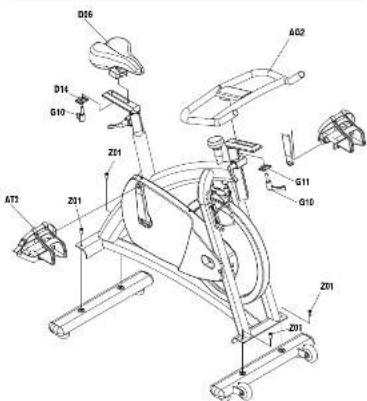
text_image
D16 D14 G10 Z21 AT3 Z01 A02 G11 G10 Z01 Z01ASSEMBLY STEP 1 ASSEMBLY STEP 2
text_image
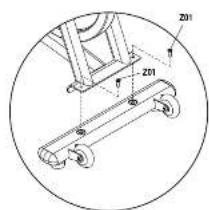
Technical diagram of a mechanical cart with labeled components Z01 and circular outline, likely for assembly or maintenance reference.A Place the front foot in position at the front of the cycle, with the transport wheels facing forward, aligning the two holes in the foot with the mating holes in the frame bracket.
B Insert the two screws (Z01) through the frame bracket and front foot. Using the #5 Allen Wrench (Z31) to tighten the screws securely.

text_image
Z01 Z01C Place the rear foot in position at the rear of the cycle, aligning the two holes in the foot with the mating holes in the frame bracket.
D Insert the two screws (Z01) through the frame bracket and front foot. Using the #5 Allen Wrench (Z31) to tighten the screws securely.
natural_image
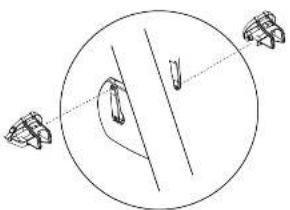
Simple line drawing of a circular object with two protruding objects and internal lines, no text or symbols present.A Install the pedals on the pedal cranks by using the Open Wrench (Z32). The closed end of the pedal cage must point forward, toward the front of the cycle.
NOTE: Be careful to align the threads correctly to avoid damage. A little grease on the threads should help the pedals to screw in easily and correctly. Turn the LEFT pedal spindle COUNTERCLOCKWISE when threading into the crank arm, and turn the right pedal spindle clockwise when threading into the crank arm.
text_image
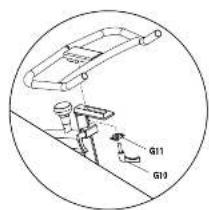
G11 G10C Place the handlebar on the handlebar stem. Position handlebar bracket beneath the handlebar stem and insert the quick release lever set (G10, G11) through the bottom bracket and into the handlebar. Turn COUNTERCLOCKWISE to tighten.
D To adjust the position of the handlebar, loosen quick release lever (G10) and slide to the desired location.
ASSEMBLY STEP 3
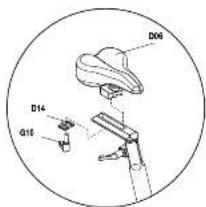
text_image
D06 D14 D16A Place the seat on the seat post.
Position seat bracket beneath the
seat post and insert the quick release
lever set (G10, D14) through the
bottom bracket and into the seat. Turn
COUNTERCLOCKWISE to lighton.
B To adjust the forward or backward position of the seat, loosen quick release lever and slide to the desired location.

natural_image
Line drawing of a stationary exercise bike with seat, legs, and front-mounted frame (no text or symbols)ASSEMBLY COMPLETE!
P500-oxo-annual-Fev1.1.pdf 10-11 97/25 11:11 A/S
| TECHNICAL DATA | |
| Frame | High tensile, corrosion-resistant frame |
| Resistance Technology | Proton brake with microadjust links and emergency ether |
| Resistentre (Lease) | Infinitely reversible with linear increase throughout resistance range |
| Drive System | Hyper smooth chain wheel system |
| Flyshoe | 20 kg / 44 lbs |
| Horizontal Adjustments | Vertical & Horizontal |
| See Adjustments | Vertical & Horizontal |
| Dimensions (Lx Wall) | 106x54m 103 cm / 42" x21" x21" |
| Product Weight | 54 kg / 115 lbs |
| Max User Weights | 150 kg / 500 lbs |
| SPECIAL FEATURES | |
| Horizontal Design | Multi-position |
| Clear | Flocking and marks |
| Perkin | Fitter with perkin with adjustable strip |
| Seat | Comfortable Sedal |
| See Post & Handlecar Sten | Post-resistant Treatment |
| Water Boltin Cage | Yes |
*specifications are subject to change without notice.

BEFORE USE
Take a functional and visual inspection of the equipment after assembly is complete. Also take the time to read all the warning labels on the bike to make sure you have the safest experience possible.

text_image
1 ft 31 cm 3 ft 92 cm 9 7 ft 214 cm 3 ftPlace the cycle on a level surface. There should be 7 feet of clearance behind the cycle, 3 feet on each side and one foot in front for the power cord. Do not place the cycle in any area that will block any vent or air openings. The cycle should not be located in a garage, covered patio, near water or outdoors.
SEAT ADJUSTMENT
Proper seat height helps ensure maximum exercise efficiency and comfort, while reducing the risk of injury. Adjust the seat height to make sure of this proper position:
- The knee joint is slightly flexed when the extended leg is at the bottom of the pedal stroke.
- Your foot ankle is over the center of the pedal.
To adjust the seat height:
Dismount the bike and release the quick release lever for the seat height adjustment. Once kioscnaed, raise or lower the seat post as necessary. When the seat is in the desired position, re-apply the quick release lever to lock the position. Note the final position mark on the seat post for future use.
To adjust the seat horizontal position:
Discount the bike and release the quick release lever under the seat and slide the seat forward or backward as desired. Re-apply the quick release lever to lock. Note the final position mark on the seat slider for future use.
HANDLEBAR ADJUSTMENT
Proper position for the handlebar is based primarily on comfort. The Indoor Cycle allows for fore and aft adjustment of the handlebar. Typically, the handlebar should be positioned slightly higher than the seat for beginning cyclists. Advanced cyclists could try different heights to get the arrangement most suitable for you.
To adjust the handlebar height:
Release the quick release lever for the handlebar height adjustment. Raise or lower the handlebar to the desired height, and then re-apply the quick release lever to lock. Note the final position mark on the handlebar stem for future use.
To adjust the handlebar horizontal position:
Loosen the quick release for the handlebar fore-and aft tension handle. Move the handlebar forward or back to the desired position, and then re-apply the quick release lever to lock. Note the final position mark on the handlebar slider for future use.
PEDAL STRAP ADJUSTMENT
Place each foot on the pedal and in the toe clip so that the ankle is centered over the pedal spindle (center of the peda). Rotate one foot to arms reach and pull up on the toe clip strap. Repeat for the other foot. Keep your knees over your feet as you pedal. To remove your foot from the toe clip, loosen the strap and pull out.
RESISTANCE ADJUSTMENT
The micro-adjust resistance knob is located just below the handlebars on the bike frame, for easier pedaling resistance control. Turn the knob in a clockwise direction to increase pedal resistance. Turn the knob in a counter clockwise direction to decrease pedal resistance.
DISMOUNTING THE CYCLE
WARNING
The Indoor Cycle uses a fixed flywheel that builds momentum and will keep the pedals turning oven after the user stops pedaling or if the user's feet flip off. DO NOT ATTEMPT TO REMOVE YOUR FEET FROM THE PEDALS OR DISMOUNT THE MACHINE UNTIL BOTH THE PEDALS AND THE FLYWHEEL HAVE COMPLETELY STOPPED. Failure to follow these instructions may lead to loss of control and the potential for serious injury.
Use one of the following methods to stop the pedals:
- Reduce your pedal speed until you come to a complete stop. - Push down on the brake knob to come to a complete stop. - Increase the resistance by turning the resistance knob in a clockwise position until you come to a complete stop.
MOVING THE CYCLE
Make sure the quick release lowers for the handlebar are tight. Stand in front of the cycle, grasping the end of the handlebars. Place one foot on the cycle's front support foot to stabilize the cycle and begin tilting the cycle toward you. The transport wheels should now be in contact with the ground and can easily roll in any direction. Be careful when moving the cycle to prevent a sudden impact that could harm the cycle or its surroundings.
STABILIZING THE CYCLE
The Indoor Cycle should operate on a level surface with no lateral movement. Check the cycle's stability by attempting to rock it side to side. If the level is not resting completely on the lock, loosen the nut with one hand to allow the level to rotate. Repeat the front and rear foot adjustment as necessary until the Cycle is stable. Lock the adjustment by tightening the nut against the front and rear foot support.

MAINTENANCE
The safety level given by the design of the PB000 Indoor Cycle can only be maintained when the equipment is regularly examined for damage and wear. Inoperable components should be replaced or the equipment should be put out of use until it is repaired.
DAILY
- Wipe down the Indoor Cycle after each use to remove sweat and moisture. Use soap and water, or a diluted non-abrasive domestic cleaner solution. Rinse to remove detergent rosoicus and then dry off.
- Before each session, inspect for loose components such as pedals or cranks prior to commencing the next use. Tighten up any loose parts.
WEEKLY
- Check for proper flywheel alignment. Torque flywheel nuts as necessary.
- Remove chain guard and check for loose chain. Adjust and lubricate the chain as necessary.
- Check to make sure the crank arms are tight to the bottom bracket.
- Inspect all parts, nuts, bolts, or screws for adjustments, replacements or maintenance.
MONTHLY
- Inspect the frame and main assembly components for rust or corrosion. Till the cycle or place in an upside down position to locate areas where rust and corrosion may develop. Use a small, wire brush to remove rust build up in small crenaraass, such as leveling feet, quick release levers and other bolt assemblies.
- Inspect all wear items for adjustments or possible part replacement. Give particular attention to the following:
A) Inapact brake pad for wear. Excessive wear or dryness indicates replacement is required.
B) Inspect seat pad for wear, Rips, tears or excessive movement indicates replacement is required. C) Inspect pedals for play. Excessive movement of pedals indicates replacement is required.
- Inspect the chain for tensioning by rotating the crank to drive the flywheel forward. Do this motion in 1/4 turns to assess if there is free play between the crank and the flywheel.
- Dryness or prolonged use may cause the height and reach adjustments for the seat and handlebar to become tight. If this is the case, the sliding assembly should be removed from the frame and have a smear of light duty grease applied along the sliding surface before assembly. Similarly, apply some light grease to the clamping assembly to ensure it does not seize up. Clean off excessive grease before reassembly.
LIMITED HOME USE WARRANTY
WEIGHT CAPACITY = 350 lbs (159 kilograms).
FRAME·LIFETIME
Horizon Fitness warrants the frame against defects in workmanship and materials for the lifetime of the original owner. (The items is defined as the welded metal base of the unit and does not include any parts that can be removed.)
PARTS·1 YEAR
Horizon Fitness warrants all original parts for a period of 1 year from the date of original purchase, so long as the device remains in the possession of the original owner.
LABOR - 1 YEAR
Horizon Fitness shall cover the labor cost for the repair of the device for a period of 1 year from the date of the original purchase, so long as the device remains in the possession of the original owner.
EXCLUSIONS AND LIMITATIONS
Who IS covered:
• The original center and is not translatable.
What IS covered:
Repair or replacement of a defective part and is the sick remedy of the warranty.
What IS NOT covered:
- Normal water and heat, improper assembly or maintenance, or installation of parts or equipment, are exclusively intended as acceptable with the environment as safe.
- Damage of failure due to accident, abuse, current, discretionary paint or plastic, irregular, shell, sandalion, fire, flood, wind, lighting, cooling, or other natural disasters of any kind, power reduction, obstruction or failure from whatever cause, unusual atmospheric conditions, collision, in-Induction of long-range into the covered art, or condensation that are used, thermol or net increase price by higher fitness.
- Incidental in consequential damages. Horizon Finance is not responsible or liable for direct, special or consequential damages, economic loss, loss of property, or profits, loss of enjoyment or use, or other consequential damages of whichever nature in
• Equipment used for commercial purposes or any use other than a single family or Husband, unknown authorised by Horizon Finance for coverage.
• Equipment owned or operated outside the US and Canada.
- Delivery assembly, installation, setup for original or replacement units or labor or other costs associated with removal or replacement of the covered unit.
- Any attempt to repair this equipment or cause a risk of injury. Horizon Finance is an responsible or liable for any damage, loss or liability arising from any personal injury. I assumed during the course of, in an case of any repair or attempted repair of your finance equipment by other than an authorized service for them. All repairs attempted by you on your finance equipment are undertaken AT YOUR OWN RISK and Horizon Finance shall have no liability for any injury to the person or property arising from such parties.
SERVICE/RETURNS
- In-home service is available within 150 miles of the nearest authorized repair center (Mkage Beyond 150 miles from an authorized service center is the responsibility of the consumer.
- All returns must be pre-authorized by Horizon Fitness
- Horizon Fitness' obligation under the warranty is limited to replacing or recovering, at Horizon Fitness' option, the name or comparable model as one of its authorized service options.
• A Hious Fitness subraced service center must receive all equipment for which a warranty claim is made. This equipment must be received with all Insight and other transportation changes, personal equipment and full shipment orders in millions. - Replacement units, parts and electronic components reconditioned to As-new Conduction by Horizon Finance in: To senders may communicate the supplied as company replacement and construct a full amount of support to us.
This warranty gives you special legal rights, and your rights may vary from state in state.

CUSTOMER TECH SUPPORT

Tel: 1-800-244-4192
Email: comments@horizonfitness.com

text_image
STOPDO NOT RETURN TO THE RETAILER
if you have any problems during assembly or if parts are missing.
For fast and friendly service, please contact one of our trained customer technicians via phone, email or our website.
Every employee at Horizon Fitness takes pride in providing you with a high quality product.
We want to know if you have a problem and we want to have an opportunity to correct it for you.
NOTE: Please read the Owner's Manual fully before contacting Customer Tech Support. Additional product information is available on our website.
www.horizonfitness.com

HORIZON
FITNESS
Horizon Fitness
1600 Landmark Drive,
Cottage Grove WI, 53527
P8000 Rev. 1.1 | © 2009 Horizon Fitness | Designed & Engineered in the U.S.A. | Made in China
P8000-owners-manual-Rev1.1.indd 16 9/1/09 11:11 AM