PowerConnect W-IAP104 - Access Point DELL - Free user manual and instructions
Find the device manual for free PowerConnect W-IAP104 DELL in PDF.


| Product Type | Indoor Access Point |
| Model | PowerConnect W-IAP104 |
| Brand | Dell |
| Wireless Standard | IEEE 802.11a/b/g/n |
| Frequency Band | 2.4 GHz and 5 GHz |
| MIMO Configuration | 2x2:2 |
| Maximum Data Rate | 300 Mbps (per band) |
| Dimensions (W x D x H) | 6.5 x 6.5 x 1.4 in (165 x 165 x 35 mm) |
| Weight | 0.66 lb (0.3 kg) |
| Power Source | Power over Ethernet (802.3af) or 12V DC adapter |
| Power Consumption | 6.5 W (typical) |
| Ethernet Ports | 1 x 10/100/1000 BASE-T (PoE in) |
| Security | WPA/WPA2, 802.1X, MAC filtering, rogue AP detection |
| Management | Web GUI, CLI, SNMP, or Dell controller |
| Mounting | Wall or ceiling mount (bracket included) |
| Operating Temperature | 32°F to 104°F (0°C to 40°C) |
| Humidity | 5% to 95% (non-condensing) |
| LED Indicators | Power, LAN, Wireless (per band) |
| Certifications | FCC, CE, IC |
| Spare Parts / Repairability | No user-serviceable parts; contact Dell support for replacements |
| Maintenance | Clean with dry cloth; keep vents clear |
| Warranty | Limited lifetime warranty (check Dell for details) |
Frequently Asked Questions - PowerConnect W-IAP104 DELL
User questions about PowerConnect W-IAP104 DELL
0 question about this device. Answer the ones you know or ask your own.
Ask a new question about this device
Download the instructions for your Access Point in PDF format for free! Find your manual PowerConnect W-IAP104 - DELL and take your electronic device back in hand. On this page are published all the documents necessary for the use of your device. PowerConnect W-IAP104 by DELL.
USER MANUAL PowerConnect W-IAP104 DELL
Dell PowerConnect W-IAP100 Series Instant Access Point
Installation Guide
The Fall Power Connect W-AP101 and W-AP105 wireless wireless points support the IEEE 98.1 (not only needed for high-performance wireless). This exceeds point loss's MEMO (Multiple-in, Multiple-out) technology and other high-throughput mode techniques in delivering high performance, 30G, 1.2 GHz and 3 GHz inaccuracy while simultaneously supporting existing 30G. Analog wireless services.
The Dell Power Connect W IAPI100 Series access points provide the following capabilities:
- Wireless transceiver
• Personal-mile snack in working hours inacity
• IEEE 502. HaOxina opendum a wireless x-ray - IEEE 902.1 Légrén opération en 3x4 wireless unit multiplier
- Compatibility with IEEE 902.3d PoE
- Central management configuration and upgrades through a Dell Power Contract W-Instant Virtual Controller
Package Contents
• W1AP104 x W1AP105 access point
• Invitational quick (the document)
• Dell PowerConnect W Instant Quick Start Guide
- Dell PowerConnect W-Series Safety, Environmental and Regulatory Information document

Note: In line your apprict there are increased, rising or damaged parts. II
possible, retain the centre, including the original parking material materials to reacetic and return the unit to the supplier. In addition,
W-IAP100 Series Hardware Overview
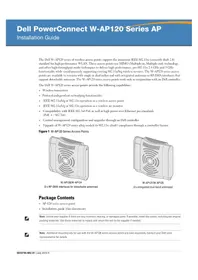
Figure 1 W-AP/00 Series From W-AP/00 series!
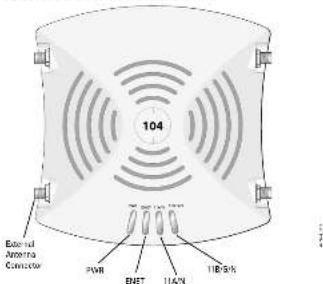
text_image
External Arizona Connector 104 POWER ENET IAN IENLEDs
The WIAF100 Series is equipped with four LEDs that indicate the status of the summary components at the LAP.
- FWR. Indicates whether or not the WIAP100 Series is powered on
• EXNET - Indicators Use the use of the W-IAF100 Series' Ethernet port - 11AN: Indicates the status of the 602.14a radio
- ISGN indicates the statistical result of the HSG10500
For information about the W-IAP100 Series' LED behavior, see Table 1 on page 2.
External Antenna Connectors
The W-IAP18 is designed to use with external antennas and repressed with four external antennas connected. The W-IAP15 is repressed with internal antennas.
Figure 2 W-1AP108 Series Rear
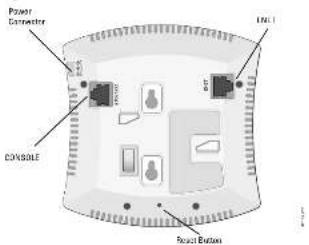
text_image
Power Connector Connect COSSIBLE Seat ButtonConsole Port
Use the console post to connect to a terminal for direct local management.
Ethernet Port
W-AP00 Series equipped with a single DC 40/100Kbps-T (KJ-15) anti-sensing, MD/MDx wheel network connectivity port. Supporting IEEE 992.34 Power river Ethernet (FoE). This port accepts 48VDC as a standard defined Powered Device (PD) from Power Sourcing Equipment (PSE) such as a FoE subspan injector, or network infrastructure that supports FoE.
DC Power Socket
IF Pak is not available; an optional Hall power adapter kit (gold separately) can be used to power the W-IAF100 Series.
Reset Button
The next option can be used to return its IAP to be my default setting. There is the IAP:
1 Power off the IAP
- Power and load the reset to be using a small can-or object, such as a paperclip.
- Power-on the IAP without releasing the reset button. The power LED will be within 5 seconds.
+ Release the reset button.
The power LED will flash again within 15 seconds operating that the reset is complicated. The IAP will now continue to test with the battery default settings

Note: If you have connected your IN AP 100 Series to a controller managed canvas AP, resetting the device will consent in back into a factory default AP.
Before You Begin

Certification: FCC Statement: Impairment Instrument of American private institution in the United States configured to non-US model controllers will be in violation of the FCC grant of equipment authorization. Any such withdrawal or intentional violation may result in a requirement by the FCC for immediate termination of operation and may be subject to limitations (47 CHF 1.80).
Caution EU Statement
Lower power ratio LAN product operating in 2.4 GHz and 5GHz bonds. Please refer to the Net Power/Current Wireless Low Band for details on recommendations.
IAP Pre-Installation Checklist
Before installing your W-IAPI10 Series IAP, ensure that you have the following: + CAT LTP cable of equivalent length
• One of the following power sources:
- IEEE 3.6-d-amplifier Power ever Ethernet (Euk) source
- The POE source can be any Power Source Equipment (PSE) controller or multipoint PSX device
- Dell power adapter kit (sold separately)
Summary of the Setup Process
Setup an W-IAPI00 Series access point by following the five tasks listed below:
1. Verify pre installation connectivity.
2. Identify the specific installation location for each IAP.
3. Install each IAP.
4. Verify post-installation connectivity.
5. Configure sich IAP.
Note: Dell, in compliance with government requirements, has designed the W1P10 Service package plans on Pail-only immunized networks arriving on
change the settings. For more information about IAP configuration refer to the Sod Power Connect Wi-FiNet Quick Start Guide and the Sod PowerConnect K-lassical User Guide.

Section: Access points are made in the information division and so such are subject to governmental regulation. Network administrators responsible for the configuration and operation of access points must comply with local broadcast regulations. Specifically, access points must use channel assignments appropriate to the location in which the access point will be used.
Identifying Specific Installation Locations
Conditions: RF Radiation Exposure Statement. This equipment complex with ICC III radiation exposure limits. This equipment should be installed and insulated with a minimum distance of 12.18 inches (0.8 cm) but between the radiator and your body for 24.9% and 5.9% operation. This transmitter must not be located or operating in conjunction with any other antenna or instrument. When operated in the 3.15 to 5.25 GHz frequency range, this device is restricted to indoor use to reduce the potential for harmful interference with co-channel Monte-Sawthe Systems.
You can mount the W-1APHD Series works paint and a wall or in the ceiling. Use the RF plasmon map general in DIL's RF Panama where application is denominant the proper installation locations. Each location should be as close as possible to the center of the intended intensity area and should be free from construction in obvious sources of interference. These RF absorbent/reflector/interference sources will impact RF propagation and should have been accounted for during the plasmon phase and adjusted for in RF plan.
Identifying Known RF Absorbers/Reflectors/Interference Sources
Identifying known RF absorbers, reflectors, and interference sources while in the field during the installation phase is critical. Make sure that these sources are taken into unmarked on what you actually an IAF to the loss losses. Examples of sources that degrade RF performance include:
• Current and break
- Objects that contain water
• Metal
• Marche 2019
• Wireless phones and headsets
Installing the IAP

Custom: Installation and service of Dell PowerConnect W. Series products should be performed by licensed service personnel only.
Using the Integrated Wall-Mounting Slots
The stylo-shaped shots on the back of the IAP can be used to attach the device upright to an indoor wall or shelf. When you choose the mounting location, allow additional space at the right of the new bar rails.
1. Since the past are on the back of the voice, make sure that you mount the IAP in one's way that there is a clear path to the Internet post, such as a prescribed mode on the mounting surface.
2. At the morning location, install two screws on the wall or shelf, 1.78 inches (H.E. end) apart. If you are adjusting the device to lay all, it is recommended that using appropriate wall anchors (not included).
5. Arg to the mounting slab on the rear of the IAP over the aches and slice, the arm into place (see Figure 3).
Figure 3 Installing the W-AP100 Series Access Point on a Wall

Using the Integrated Ceiling Tile Rail Slots
The snap-in tile rail slots on the rear of the IAP can be used to securely attach the device directly to a 1570' wide standard ceiling tile rail.

Couton: Make sure the IAP fits security on the ceiling die rail when hanging the device from the ceiling.
-
Pull the necessary cables through a prepared hole in the ceiling tile where the IAP will be placed
-
If necessary, connect the console cable to the console post on the back of the IAP. I hold the IAP next to the ceiling tile rail with the mounting slots at approximately a 30-degree angle to the ceiling tile rail loci. Figure 41. Make sure that any cable dock is above the ceiling tile.
Figure 4 Orienting the Ceiling For Rad Mounting Slats
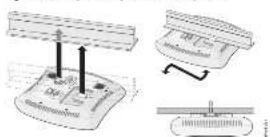
- Parking forward the ceiling tile route the IAP receiver until the device clicks into place on the ceiling tile.
Connecting Required Cables
Install cables in accordance with all applicable local and national regulations and products.
Ethernet Ports
The R45 Ethernet port (ENLT) supports 10/100/000Base-T auto-sensing MDX MDX connections. Use a 4-or S-conductor, Category 5 UTP cable up to 100 m [525 feet], long.
The 10:00:00:Mbps Ethernet port is on the back of the IAP. The port has an RJ-8 (make unique in with the previous shown in Figure 3).
Figure 5. Signa Etaeroc Port Air-Doi

Serial Console Port
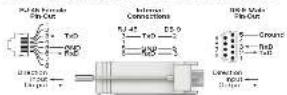
The serial console put (Gcode) allows you to connect the IAP in a serial terminal or adapter for direct local management. This part is in RJ-15 female computer with the unique digital in home. Gcode play next in print the following series:
- Connect at directly to a terminal or terminal virus using an Ethernet cable.
- Use an adobe array to convert the Rj-15 (female) to execute node: IAP (in DB-9 (female) connector, and connect the adapter to a laptop using an RS-232 cable. See Figure 1 for stimulus details of the adapter.
Figure 6 Serial Port Pin-Gut
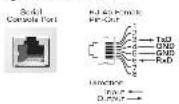
Figure 7 RJ-45 (Female) to DB-5 (Male) Molecular Adapter Conversion
Power Connection
The W-IAP100 Series has a single 12V DC power jack socket to support powering through an AC-en-DC power adapter.

Note: It both PDE and BE present are available, the IAP-see PDE seen when there is not enough PCE voltage available to power the IAP.
Verifying Post-Installation Connectivity
The integration LEDs on the IAP can be used to verify that the IAP is receiving power and maintaining successfully (see Table 1). Refer to the Dell Power Company W-Service W-Instant Quick Start Guide for further details on verifying post-installation network connectivity.
Table 1 N-APIN Series LED Behavior
LED Color/State Meaning
| P40% Oil No power to AF | |
| Green loading System Induding | |
| Red directly System enabled to radiation, control IAC | |
| Green directly Power on clear necessity | |
| ENET132/06/1000 Mbps | Oil No. link |
| Green on 1000 Mbps link | |
| Amber on 100/100 Mbps link | |
| Green loading thermal link activity | |
| T18kV, 01 GHz radio is installed | |
| Amber 3 GHz radio embedded in VCAN mode | |
| Green 1 GHz radio embedded in Tin mode | |
| Green loading 3 GHz or Kineton or III Perfect mode | |
| 1180GHz | 012/24 GHz radio installed |
| Amber 24 GHz radio installed in VCAN mode | |
| Green 24 GHz radio installed in Tin mode | |
| Green loading 22 GHz Air Monitor or IR Perfect mode | |
Product Specifications
Electrical
• Plan
- 1 x 100/100/100 Base T auto sensing Ethernet RJ +5 Interfaces
= MDI/MDX - IEEE 502.3 (100bps T), IEEE 802.3u (100bps T).
IFKE.S07.5ab [1100]Box-1
• Power on Ethernet IEEE 962.3d amplifier, 45V DC350A
- Poser:
= 12 VDC power interface, supports powering through an AC-to-DC power source.

Note: In proper adaptation, when the use provided by Dali is more in the US or Canada, it should be CLUS [NHL]. Letter, with an output rated 12 VDC minimum 1250, marked 'UPS' or "Cass 7," and variable for plugging into a connected power topology in the US and Canada.
For additional specifications or this product, please refer to the data exists. The data sheet can be found at del.com/wrosess.
Proper Disposal of Dell Equipment
For the most current information about Global Environmental Compliance and Dell products, see our website at del.com
China RoHS
Dell products also comply with China environmental characteristics requirements and are labeled with the "TFUP 10" label shown at the list.
Waste of Electrical and Electronic Equipment

Dell products at end of life are subject to separate collection and treatment in the EU Member States, Norway, and Switzerland and therefore are marked with the symbol shown at the left (crossed out wheelle bin). The treatment applied at end of life of these products in these roundles shall comply with the applicable manual laws of countries implementing Directive 2012/08EC on Waste of Electrical and Electrical Equipment (WILE).
European Union RoHS
RoHS Dell products also comply with the EU Reduction of Horizontal Subunits Directive 20025912C (RoHS). EU RoHS restricts the use of specific hardware materials in the manufacture of electrical and electronic equipment. Specifically, no internal materials under the RoHS Directive are listed including Solar used in print circuit assembly. Canadian Micro, Horizontal Electrical, and Battery. Since Dell products are subject to the exemptions listed on RoHS Directive Access 7 (Lead in serial link) printed into one instance. Products and packaging will be marked with the RoHS label shown at the left indicating conformance to the Directive.
Safety and Regulatory Compliance
DoI provides a multi-language document that contains country-specific restrictions and additional safety and regulatory information for all Dell hardware products. The Dell PowerConnect W Series Safety, Environmental, and Regulatory Information Department is included with this product.
The device is actually normally blinded and the FCC ED will be depicted on the Web will under the About menu.

Duration: 30-Metronite Systems Statement. This equipment complies with HCC-8 medication approval limits. This equipment should be introduced and operated with a minimum distance of 10.78 inch/36 cm between the mediator and your size for 2.4 inch and 5 inch operation. This manufacturer used its co-treated or depending in comparison as in any other manner or questionnaire. When operated in the 3.5 to 5.25 inch frequency range, the device is a methodised inhibitor use to reduce the potential for harmful interference with co-shares. Mobile Satellite Systems.
EMC Compliance and Warning Statement
- IEC 50601-1-2:3007
• IN6050112.2007
The W-IAP105 has been tested and found to comply with the limits of the standard for medical devices. 18: 30601-1-22007. The unit also comprises with the requirements of EN 6,001-1 2 2007, providing the presumption of compliance to the European Union's Medical Device Directive 2007/17/16. The results are designed to
provide reasonable protection against harmful interference in a typical medical installation. This equipment generates, uses and can radiate radio frequency energy, and it is not additional and useful interference with the use of an electronic device or cause harmful interference to other devices in the vicinity. However, there is no guarantee that interference will not occur in a particular metallium. If this equipment causes interference with other devices, which may be determined by turning the equipment and all and an, therefore recommended in try and current the interference by one or more of the following measures:
- Recent or relevant: the device removing the following.
- Increase the operation between the equipment. - Connect the equipment into an outlet on a circuit different from that to which the other device(s) are connected.
- Consult the manufacturer or field service technician for help
The Model W-IAF105 do not have an Applied Part as defined in IEC 60901-1. The protocol on signal electric field is Closed.
Device is not protected against impass of inputs and has a protection class of IPX2 to defined by IEC 6.001-1 and IEC 6.529. Equipment not suitable for use in the process of thermolite mixtures.
The unit is normalized "Gait power D-station" exposure functional by EC1630-1.
Power Consumption - El VIX: 902,1al power mms Echermis or 12VDC; 125A/pc external AC supplied power (adapter sold separately). Maximum power consumption 17.5W
Mechanical Desmoste: 137mm x 135mm x 4mm; 300g
Environmental Operating Temp: 10°C to +30°C; 152°F to +22°F; Humidity: 5 to 95% non-condensing. Storage Temp: -3°C to +70°C; +40°F to +156°F.
Singapore

UAE
Indonesia

Philippines (W-IAP105)

type-approval No. ESD-CEF-1004537C
Dell PowerConnect W-IAP100
Series Instant Access Point
Installation Guide

Contacting Support
| Web Site Support | |
| Main Site support.com | |
| Support Site support.dell.com | |
| Del Documentation support.dell.com/manusk | |
Copyright
Airwave Adeus Wiesh Wang, 1980. The weather is very snowy, and the air was being caused by the weather. Andes Wiesh Wang's size of the size of the air was being caused by the weather.
Certain Atrina products include Open Source software code development by initial orders, including software code subject to the Grill General Public License (GFL). Grill Lease General Public License 3.07% or other Open Source License. The Open Source command can be found in the file.
http://www.subbstnwns.com/ben_search
The use of Ardua Networks, for conducting all news and software, or all individuals in jurisdictions, to manifest, other year ends of the client's network and local courts have been considered that by which actual or comparative has a particular information that is full. Ardua Networks has been any such legal authorial trust register when against this request to the agreement of copyright on behalf of business words.

www.dell.com
Del Power Connect-WAP102 Series Insert Access Point | Installation on Cu de Port No. 104-106, 104-107, July 2019