NVR-4372 CNFS - Television NEVIR - Free user manual and instructions
Find the device manual for free NVR-4372 CNFS NEVIR in PDF.


| Product Type | Television |
| Brand | Nevir |
| Model | NVR-4372 CNFS |
| Screen Size | 43 inches (109 cm) |
| Display Technology | LED |
| Resolution | 1920 x 1080 (Full HD) |
| Contrast Ratio | 5000:1 (dynamic) |
| Refresh Rate | 60 Hz |
| Power Consumption (standby) | < 0.5 W |
| Power Consumption (typical) | 70 W |
| Dimensions (without stand) | 970 x 570 x 80 mm |
| Weight (without stand) | 7.5 kg |
| VESA Mount | 200 x 200 mm |
| Audio Output | 2 x 8 W speakers |
| HDMI Inputs | 2 (HDMI 1.4) |
| USB Inputs | 1 (USB 2.0) |
| RF Input | 1 (F-type) |
| CI Slot | 1 (CI+ 1.3) |
| Operating System | Linux-based Smart TV |
| Energy Class | A+ |
Frequently Asked Questions - NVR-4372 CNFS NEVIR
User questions about NVR-4372 CNFS NEVIR
0 question about this device. Answer the ones you know or ask your own.
Ask a new question about this device
Download the instructions for your Television in PDF format for free! Find your manual NVR-4372 CNFS - NEVIR and take your electronic device back in hand. On this page are published all the documents necessary for the use of your device. NVR-4372 CNFS by NEVIR.
USER MANUAL NVR-4372 CNFS NEVIR
natural_image
Line drawing of a double refrigerator with front and back panels (no text or symbols)natural_image
Simple line drawing of a rectangular object with two circular annotations pointing to its top and side (no text or symbols)
text_image
unscrew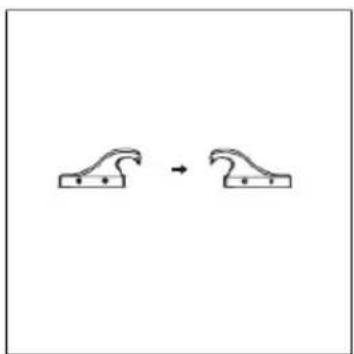
chemical
Simple chemical reaction diagram showing a curved arrow transforming into a single curved arrownatural_image
Line drawing of a mechanical assembly with a magnified inset showing internal components (no text or symbols)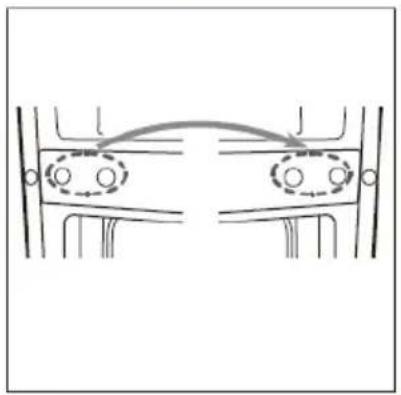
natural_image
Diagram showing two symmetrical mechanical or structural components with circular features, no text or symbols present.
natural_image
Technical line drawing of a mechanical assembly with a magnified inset showing internal components (no text or symbols)
text_image
Unscrew Screwnatural_image
Technical line drawing of a vehicle chassis with a circular inset showing mechanical components (no text or symbols)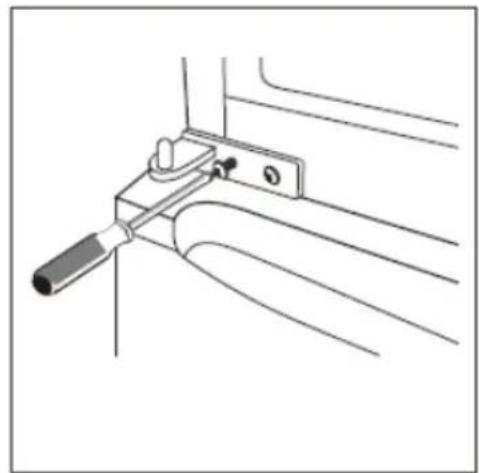
natural_image
Technical line drawing of a mechanical clamp or bracket assembly (no text or symbols)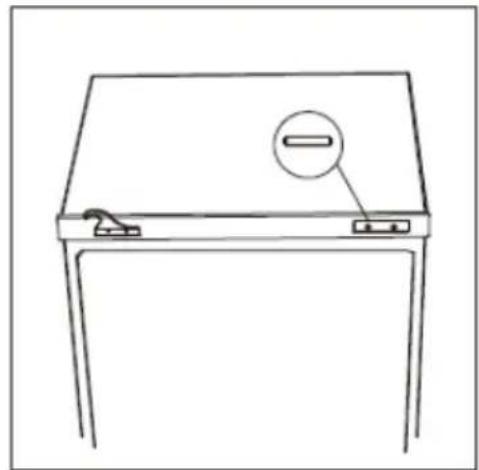
natural_image
Line drawing of a simple desk with a handle and two buttons, no text or symbols presentINSTALACIÓN
Instale la manija de la puerta
flowchart
graph LR
    A["Front refrigerator"] --> B["Arrow pointing inward"]
    B --> C["Side refrigerator with a vertical scroll inside, arrow pointing left"]
    C --> D["Arrow pointing right"]
Espaciador trasero
text_image
Two vertical signs with checkmarks and an 'X' symbol, likely indicating approval or rejection status.| Temperatura ambiente |
| +10oC to +32oC |
| +16oC to +32oC |
| +16oC to +38oC |
| +16oC to +43oC |
Ubicación
natural_image
Line drawing of a hand installing or adjusting a shelf panel on a metal shelf (no text or symbols)natural_image
Diagram of a container with two upward arrows indicating flow or movement (no text or symbols)natural_image
Simple line drawing of a dome-shaped object with internal holes and a triangular top (no text or symbols)In the interest of your safety and to ensure the correct use, before installing and first using the appliance, read this user manual carefully, including its hints and warnings. To avoid unnecessary mistakes and accidents, it is important to ensure that all people using the appliance are thoroughly familiar with its operation and safety features. Save these instructions and make sure that they remain with the appliance if it is moved or sold, so that everyone using it through its life will be properly informed on appliance use and safety.
For the safety of life and property keep the precautions of these user's instructions as the manufacturer is not responsible for damages caused by omission.
Children and vulnerable people safety
- This appliance can be used by children aged from 8 years and above and persons with reduced physical, sensory or mental capabilities or lack of experience and knowledge if they have been given super vision or instruction concerning use of the appliance in a café and understand the hazards involved.
- Children should be supervised to ensure that they do not play with the appliance.
- Cleaning and user maintenance shall not be made by children unless they are aged from 8 years and above and supervised.
- Keep all packaging well away from children. There is risk of suffocation.
- If you are discarding the appliance pull the plug out of the socket, cut the connection cable (as close to the appliance as you can) and remove the door to prevent playing children to suffer electric shock or to close themselves into it.
- If this appliance featuring magnetic door seals is to replace an older appliance having a spring lock (latch) on the door or lid, be sure to make that spring lack unusable before you discard the old appliance. This will prevent it from becoming a death trap for a child.
General safety
WARNING! Keep ventilation openings, in the appliance enclosure or in the built-in structure, clear of obstruction.
WARNING! Do not use mechanical devices or other means to accelerate the defrosting process, other than those recommended by the manufacturer.
WARNING! Do not damage the refrigerant circuit.
WARNING! Do not use other electrical appliances (such as ice cream makers) inside of refrigerating appliances, unless they are approved for this purpose by the manufacture.
- Do not store explosive substances such as aerosol cans with a flammable propellant in this appliance.
- The refrigerant isobutane (R600a) is contained within the refrigerant circuit of the appliance, a natural gas with a high level of environmental compatibility, which is nevertheless flammable.
- During transportation and installation of the appliance, be certain that none of the components of the refrigerant circuit become damaged.
- avoid open flames and sources of ignition
- thoroughly ventilate the room in which the appliance is situated
- It is dangerous to alter the specifications or modify this product in any way. Any damage to the cord may cause a short circuit, fire and/or electric shock.
- This appliance is intended to be used in household and similar applications such as
-staff kitchen areas in shops, offices and other working environments;
-farm houses and by clients in hotels, motels and other residential type environments;
- bed and breakfast type environments;
-catering and similar non-retail applications.
WARNING! Any electrical components (plug, power cord, compressor and etc.) must be replaced by a certified service agent or qualified service personnel.
- Power cord must not be lengthened.
- Make sure that the power plug is not squashed or damaged by the back of the appliance. A squashed or damaged power plug may overheat and cause a fire.
- Make sure that you can come to the mains plug of the appliance.
- Do not pull the mains cable.
- If the power plug socket is loose, do not insert the power plug. There is a risk of electric shock or fire.
- You must not operate the appliance without the lamp.
- This appliance is heavy. Care should be taken when moving it.
- Do not remove nor touch items from the freezer compartment if you hands are damp/wet, as this could cause skin abrasions or frost/freezer burns.
- Avoid prolonged exposure of the appliance to direct sunlight.
Daily use
- Do not put hot on the plastic parts in the appliance.
- Do not place food products directly against the rear wall.
- Frozen food must not be re-frozen once it has been thawed out.
- Store pre-packed frozen food in accordance with the frozen food manufacture, s instructions.
- Appliance, s manufactures storage recommendations should be strictly adhered to. Refer to relevant instructions.
- Do not place carbonated of fizzy drinks in the freezer compartment as it creates pressure on the container, which may cause it to explode, resulting in damage to the appliance.
- Ice lollies can cause frost burns if consumed straight from the appliance.
Care and cleaning
- Before maintenance, switch off the appliance and disconnect the mains plug from the mains socket.
- Do not clean the appliance with metal objects.
- Do not use sharp objects to remove frost from the appliance. Use a plastic scraper.
- Regularly examine the drain in the refrigerator for defrosted water. If necessary, clean the drain. If the drain is blocked, water will collect in the bottom of the appliance.
Installation
Important! For electrical connection carefully follow the instructions given in specific paragraphs.
- Unpack the appliance and check if there are damages on it. Do not connect the appliance if it is damaged. Report possible damages immediately to the place you bought it. In that case retain packing.
- It is advisable to wait at least four hours before connecting the appliance to allow the oil to flow back in the compressor.
- Adequate air circulation should be around the appliance, lacking this leads to overheating. To achieve sufficient ventilation follow the instructions relevant to installation.
- Wherever possible the spacers of the product should be against a wall to avoid touching or catching warm parts (compressor, con-denser) to prevent possible burn.
- The appliance must not be located close to radiators or cookers.
- Make sure that the mains plug is accessible after the installation of the appliance.
Service
- Any electrical work required to do the servicing of the appliance should be carried out by a qualified electrician or competent person.
- This product must be serviced by an authorized Service Center, and only genuine spare parts must be used.
Energy saving
- Don't put hot food in the appliance;
- Don't pack food close together as this prevents air circulating;
• Make sure food don't touch the back of the compartment(s);
- If electricity goes off, don't open the door(s);
- Don't open the door(s) frequently;
- Don't keep the door(s) open for too long time;
- Don't set the thermostat on exceeding cold temperatures;
- Some accessories, such as drawers, can be removed to get larger storage volume and lower energy consumption.
Overview

text_image
Thermostat and Light Fan and ON/OFF switch Glass Shelves Balconies Crisper Cover Crisper FreezerDrawers Leveling FeetThis illustration is only for hinting, the detail please check your appliance.
Reverse Door
Tool required: Philips screwdriver, Flat bladed screwdriver, Hexagonal spanner.
- Ensure the unit is unplugged and empty. - To take the door off, it is necessary to tilt the unit backwards. You should rest the unit on something solid so that it will not slip during the door reversing process.
- All parts removed must be saved to do the reinstallation of the door. - Do not lay the unit flat as this may damage the coolant system. - It's better that 2 people handle the unit during assembly.
-
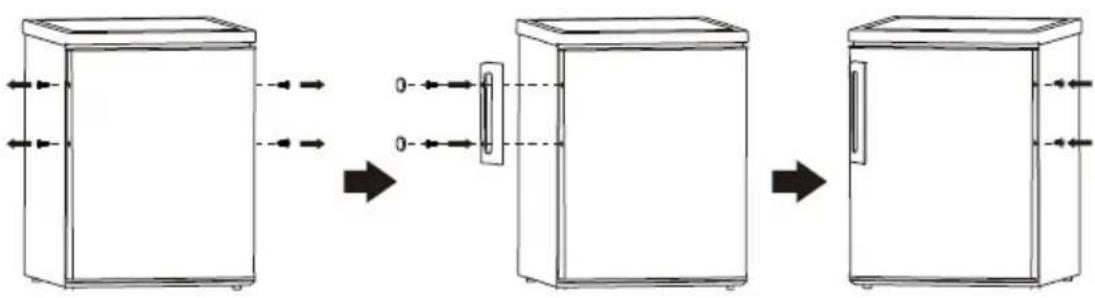
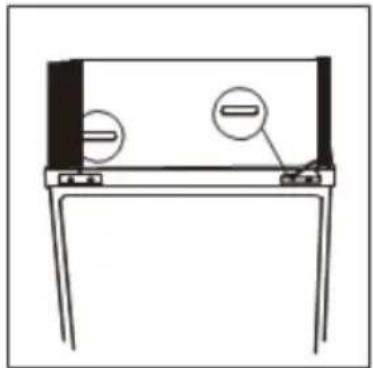
Remove two screw cover on the front plate.
-
Unscrew the hinge and then remove upper door and place it on a soft pad to avoid scratch.
-
Remove the pin with a screwdriver and flip the hinge bracket. Then refit the pin to hinge bracket.
natural_image
Simple line drawing of a device with two circular components and a base, no text or symbols present.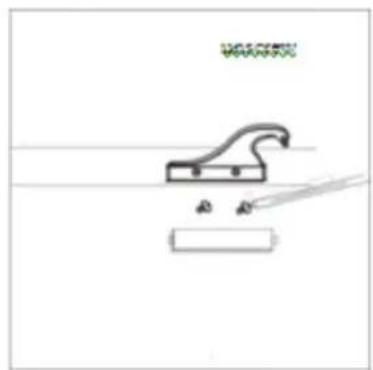
natural_image
Simple line drawing of a mechanical device with a handle and base, no text or symbols present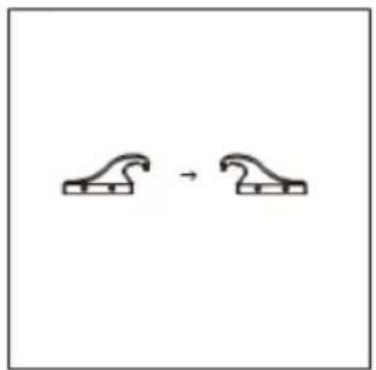
natural_image
Simple line drawing of two identical abstract shapes connected by a curved arrow (no text or symbols)- Unscrew middle hinge. Then lift lower door and place it on a soft pad to avoid scratch.

natural_image
Simple line drawing of a door with a circular inset showing a hand holding a device (no text or symbols)- Move the hinge hole covers from left side to right side.
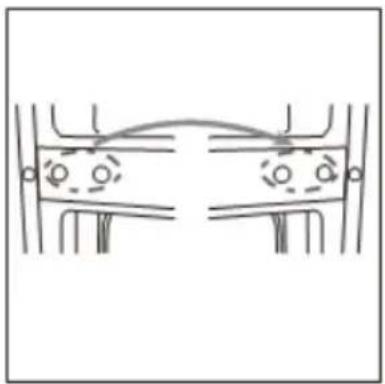
natural_image
Simple line drawing of a symmetrical mechanical or architectural component with no text or symbols- Unscrew bottom hinge. Then remove the adjustable feet from both side.
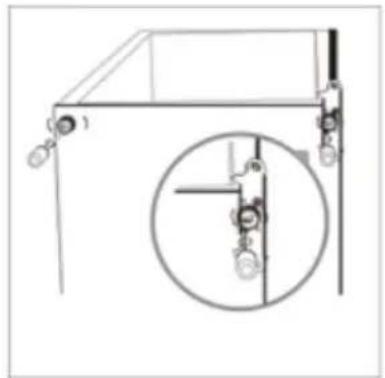
natural_image
Technical line drawing of a mechanical assembly with a magnified inset showing internal components (no text or symbols)- Unscrew and remove the bottom hinge pin, turn the bracket over and replace it.
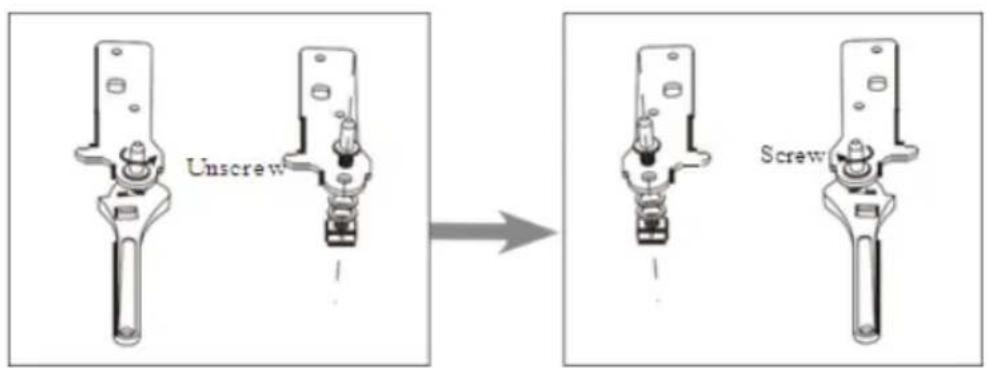
text_image
Unscrew Screw-
Refit the bracket fitting the bottom hinge pin. Replace both adjustable feet. Transfer the lower door to the property position.
-
Make the middle hinge reverse the direction180o C, then transfer it to the left property position. Make the middle hinge pin in the upper hole of the lower door, then fight the bolts.
-
Place the upper door back on. Ensure the door is aligned horizontally and vertically so that the seal are closed on all sides before finally tightening the top hinge. Then inert the hinge and screw it to the front of the unit.
-
Fix the screw cover.

natural_image
Three technical line drawings of a mechanical device with no visible text or symbolsINSTALLATION
Install door handle
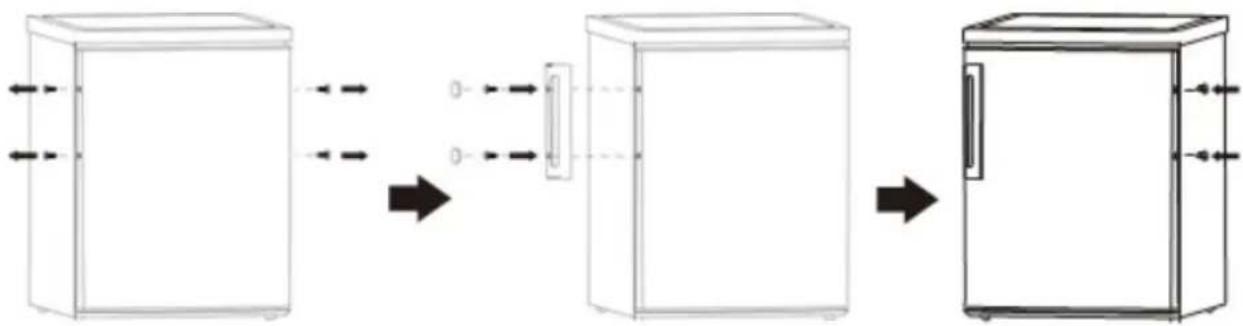
flowchart
graph LR
    A["Refrigerator with ventilation unit"] --> B["Refrigerator with cooling unit"]
    B --> C["Refrigerator with cooling unit"]
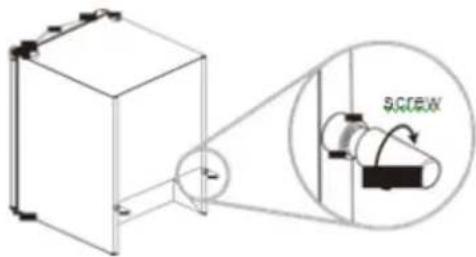
Rear spacer
Screw the rear spacers at the rear of the unit.
text_image
SACEXSpace Requirement
- Keep enough space of door open.
- Keep at least 50mm gap at two sides.

text_image
xxxmm xxxmmLevelling the unit
To do this adjust the two levelling feet at front of the unit.
If the unit is not level, the doors and magnetic seal alignments will not be covered properly.

text_image
Two identical signboards showing a checkmark and a cross symbol, likely indicating approval or rejection status.Positioning
Install this appliance at a location where the ambient temperature corresponds to the climate class indicated on the rating plate of the appliance:
| Climate class | Ambient temperature |
| SN | +10°C to +32 °C |
| N | +16°C to +32 °C |
| ST | +16°C to +38 °C |
| T | +16°C to +43 °C |
Location
The appliance should be installed well away from sources of heat such as radiators, boilers, direct sunlight etc. Ensure that air can circulate freely around the back of the cabinet. To ensure best performance, if the appliance is positioned below an overhanging wall unit, the minimum distance between the top of the cabi- net and the wall unit must be at least 100 mm. ideally, however, the appliance should not be positioned below overhanging wall units. Accurate leveling is ensured by one or more adjustable feet at the base of the cabinet.
Warning! It must be possible to disconnect the appliance from the mains power supp-ly; the plug must therefore be easily accessible after installation.
Electrical connection
Before plugging in, ensure that the voltage and frequency shown on the rating plate correspond to your domestic power supply. The appliance must be earthed. The power supply cable plug is provided with a contact for this purpose. If the domestic power supply socket is not earthed,
connect the appliance to a separate earth in compliance with current regulations, consulting a qualified electrician.
The manufacturer declines all responsibility if the above safety precautions are not observed. This appliance complies with the E.E.C. Directives
DAILY USE
First use
Cleaning the interior
Before using the appliance for the first time, wash the interior and all internal accessories with lukewarm water and some neutral soap so as to remove the typical smell of a brand new product and then dry thoroughly.
Important! Do not use detergents or abrasive powders, as these will damage the finish.
Temperature Setting
- Plug on your appliance. The internal temperature is controlled by a thermostat. There are 6(8)settings . 1 is warmest setting and 5 (7)is coldest setting and 0 is off.
- The appliance may not operate at the correct temperature if it is in a particularly hot or if you open the door often.
Freezing fresh food
- The freezer compartment is suitable for freezing fresh food and storing frozen and deep-frozen food for a long time.
- Place the fresh food to be frozen in the bottom compartment.
- The maximum amount of food that can be frozen in 24 hours is specified on the rating plate.
- The freezing process lasts 24 hours: during this period do not add other food to be frozen.
Storing frozen food
When first starting-up or after a period out of use. Before putting the product in the compartment let the appliance run at least 2 hours on the higher settings.
Important! In the event of accidental defrosting, for example the power has been off for longer than the value shown in the technical characteristics chart under “rising time”, the defrosted food must be consumed quickly or cooked immediately and then re-frozen (after cooked).
Thawing
Deep-frozen or frozen food, prior to be used, can be thawed in the fridge compartment or at room temperature, depending on the time available for this operation.
Small pieces may even be cooked still frozen, directly from the freezer. In this case, cooking will take longer.
Ice-cube
This appliance may be equipped with one or more ice-cube to produce ice.
Accessories
Movable shelves
The walls of the refrigerator are equipped with a series of runners so that the shelves can be positioned as desired.
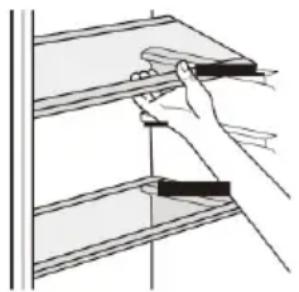
natural_image
Illustration of a hand holding a tool over a shelf with shelves (no text or symbols)Positioning the door balconies
To permit storage of food packages of various sizes, the door balconies can be placed at different heights. To make these adjustments proceed as follows: gradually pull the balcony in the direction of the arrows until it comes free, then reposition as required.
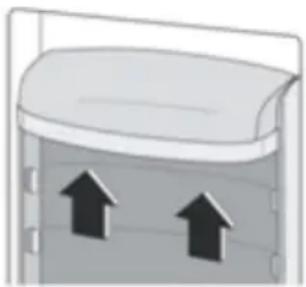
natural_image
Diagram of a container with two upward arrows indicating flow or movement (no text or symbols)Helpful hints and tips
To help you make the most of the freezing process, here are some important hints:
- the maximum quantity of food which can be frozen in 24 hrs. is shown on the rating plate;
- the freezing process takes 24 hours. No further food to be frozen should be added during this period;
- only freeze top quality, fresh and thoroughly cleaned, foodstuffs;
- prepare food in small portions to enable it to be rapidly and completely frozen and to make it possible subsequently to thaw only the quantity required;
- wrap up the food in aluminium foil or polythene and make sure that the packages are airtight;
- do not allow fresh, unfrozen food to touch food which is already frozen, thus avoiding a rise in temperature of the latter;
- lean foods store better and longer than fatty ones; salt reduces the storage life of food;
-
water ices, if consumed immediately after removal from the freezer compartment, can possibly cause the skin to be freeze burnt;
-
it is advisable to show the freezing in date on each individual pack to enable you removal from the freezer compartment, can possibly cause the skin to be freeze burnt;
- it is advisable to show the freezing in date on each individual pack to enable you to keep tab of the storage time.
Hints for storage of frozen food
To obtain the best performance from this appliance, you should:
make sure that the commercially frozen foodstuffs were adequately stored by the retailer;
be sure that frozen foodstuffs are transferred from the food store to the freezer in the shortest possible time;
not open the door frequently or leave it open longer
than absolutely necessary. Once defrosted, food
deteriorates rapidly and cannot be refrozen.
Do not exceed the storage period indicated by the food manufacture.
Hints for fresh food refrigeration
To obtain the best performance:
- Do not store warm food or evaporating liquids in the refrigerator.
- Do cover or wrap the food, particularly if it has a strong flavour.
Hints for refrigeration
Useful hints:
- Make (all types): wrap in polythene bags and place on the glass shelves above the vegetable drawer.
- For safety, store in this way only one or two days at the most.
- Cooked foods, cold dishes, etc...: these should be covered and may be placed on any shelf.
- Fruit and vegetables: these should be thoroughly cleaned and placed in the special drawer(s) provided.
- butter and cheese: these should be placed in special airtight containers or wrapped in aluminum foil or polythene bags to exclude as much air as possible.
- Milk bottle: these should have a cap and should be stored in the balconies on the door.
- Bananas, potatoes, onions and garlic, if not packed, must not be kept in the fridge.
Cleaning
For hygienic reasons the appliance interior, including interior accessories, should be cleaned regularly.
Caution! The appliance may not be connected to the mains during cleaning. Danger of electrical shock! Before cleaning switch the appliance off and remove the plug from the mains, or switch off or turn out the circuit breaker or fuse. Never clean the appliance with a steam cleaner. Moisture could accumulate in electrical components, danger of electrical shock! Hot vapors can lead to the damage of plastic parts. The appliance must be dry before it is placed back into service.
Important! Ethereal oils and organic solvents can attack plastic parts, e.g. lemon juice or the juice form orange peel, butyric acid, cleanser that contain acetic acid.
- Do not allow such substances to come into contact the appliance parts.
- Do not use any abrasive cleaners.
- Remove the food from the freezer. Store them in a cool place, well covered.
- Switch the appliance off and remove the plug from the mains, or switch off or turn out the circuit breaker of fuse.
- Clean the appliance and the interior accessories with a cloth and lukewarm water. After cleaning wipe with fresh water and rub dry.
• After everything is dry place appliance back into service.
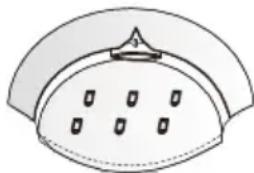
Replace the lamp
The internal light is a LED type. To replace the lamp, please contact qualified technician.
natural_image
Simple line drawing of a dome-shaped object with internal holes and a triangular top (no text or symbols)Troubleshooting
Caution! Before troubleshooting, disconnect the power supply. Only a qualified electrician of competent person must do the troubleshooting that is not in this manual.
Important! There are some sounds during normal use (compressor, refrigerant circulation).
| Problem | Possible cause | Solution |
| Appliance dose not work | Temperature regulation knob is set at number “0”. | Set the knob at other number to switch on the appliance. |
| Mains plug is not plugged in or is loose | Insert mains plug. | |
| Fuse has blown or is defective | Check fuse, replace if necessary. | |
| Socket is defective | Mains malfunctions are to be corrected by an electrician. | |
| The food is too warm. | Temperature is not properly adjusted. | Please look in the initial Temperature Setting section. |
| Door was open for an extended period. | Open the door only as long as necessary. | |
| A large quantity of warm food was placed in the appliance within the last 24 hours. | Turn the temperature regulation to a colder setting temporarily. | |
| The appliance is near a heat source. | Please look in the installation location section. | |
| Appliance cools too much | Temperature is set too cold. | Turn the temperature regulation knob to a warmer setting temporarily. |
| Unusual noises | Appliance is not level. | Re-adjust the feet. |
| The appliance is touching the wall or other objects. | Move the appliance slightly. | |
| A component, e.g. a pipe, on the rear of the appliance is touching another part of the appliance or the wall. | If necessary, carefully bend the component out of the way. | |
| Water on the floor | Water drain hole is blocked. | See the Cleaning and Care section. |
If the malfunction shows again, contact the Service Center.
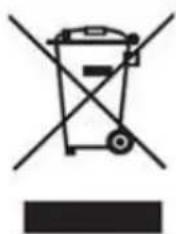
Correct Disposal of this product
natural_image
Symbol of a trash bin crossed with no text or labels, representing waste sorting or recycling (no text present)According to Waste of Electrical and Electronic Equipment (WEEE) directive, WEEE should be separately collected and treated. If at any time in future you need to dispose of this product please do NOT dispose of this product with household waste. Please send this product to WEEE collecting points where available.
In order to fulfill ruling UNE EN-60335, we indicate that if the flexible wire is damaged, it can only be substituted by a technical service recognized by NEVIR, S.A., as per special tooling is required