R-E6800XND - Fridge HITACHI - Free user manual and instructions
Find the device manual for free R-E6800XND HITACHI in PDF.


| Product Type | Refrigerator |
| Brand | Hitachi |
| Model | R-E6800XND |
| Dimensions (H x W x D) | 1790 x 780 x 720 mm |
| Net Weight | 86 kg |
| Power Supply | 220-240 V, 50 Hz, 1.5 A |
| Energy Consumption | 250 kWh/year |
| Cooling System | Frost Free (No Frost) |
| Compressor Type | Inverter Compressor |
| Temperature Control | Electronic with LED display |
| Capacity (Net) | 520 L |
| Shelves | Tempered glass shelves |
| Door Type | Double door (French door style) |
| Interior Lighting | LED lighting |
| Noise Level | 35 dB |
| Climate Class | SN-T (Subnormal to Tropical) |
| Refrigerant | R600a |
| Defrosting | Automatic defrost |
| Cleaning | Wipe with soft damp cloth, avoid abrasives |
| Safety Features | Child lock, overheat protection, voltage stabilizer |
| Spare Parts Availability | Filters, shelves, door bins, handles |
| Repairability Index | 7.5 / 10 |
| Warranty | 2 years |
| Manufacturer | Hitachi Ltd., Japan |
Frequently Asked Questions - R-E6800XND HITACHI
User questions about R-E6800XND HITACHI
0 question about this device. Answer the ones you know or ask your own.
Ask a new question about this device
Download the instructions for your Fridge in PDF format for free! Find your manual R-E6800XND - HITACHI and take your electronic device back in hand. On this page are published all the documents necessary for the use of your device. R-E6800XND by HITACHI.
USER MANUAL R-E6800XND HITACHI
HITACHI Inspire the Next
只限在新加坡·香港·越南·
印度尼西亞·印度使用
For use in Singapore, Hong Kong,
Vietnam, Indonesia and India only.
家庭用 For household use
型號 Model
R-E6800XS R-E6800XH R-E6800XV
R-E6800S R-E6800H R-E6800V
R-E6800XND R-E6800XN
R-E6800ND R-E6800N
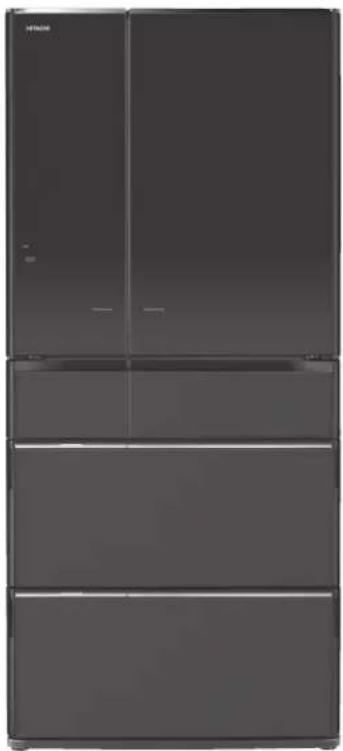
natural_image
Exterior view of a modern refrigerator with four doors (no visible text or symbols)Made in Japan
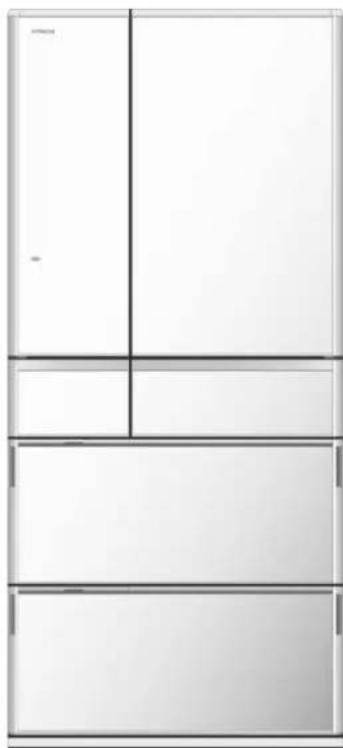
natural_image
Three stacked rectangular panels with vertical and horizontal lines, no text or symbols present.六門日本製ors
非常感謝您購買日立電冰箱。
Thank you very much for purchasing a Hitachi Refrigerator.
This refrigerator is designed for home use only.
Do not use this refrigerator for the business use and/or any purpose other than storing food.
Please read this operation manual carefully and ensure you use the appliance correctly. In particular, be sure to read the "Safety Suggestions" section of this operation manual before use.
Please keep this operation manual along with your guarantee card.
Hand over this operation manual together with the refrigerator when the refrigerator is passed to a third party and used in a different location, or when it is sent to a recycling plant.
● 購買後初次使用時。→ 10,1頁
It takes time to cool for the first time. →Pg.46, 47
It may take more than 4 \~ 24 hours to fully cool.
● Make sure that no food protrudes beyond the storage height limit of each compartment, and allow clearance between each food in each
compartment. →Pg.54, 58
Otherwise, food and/or package may not be stored in each compartment properly, and as a result, the door may not be closed completely. It may cause the refrigerator not to cool sufficiently and/or not to make ice.
特長 FEATURES
保存蔬菜的營養素及水嫩
■ 蔬果睡眠保鮮
Keeping freshness and preserving nutrients of vegetables
Aero-care Vege. Compartment
Adopted [Photocatalyst Preservation] function keeps freshness and preserves nutrients by making use of the photocatalyst at the back of the lower case of Vegetable Compartment. Thanks to the effects of carbon dioxide, it will restrict consumption of vegetables' nutrients and keep them fresh.
Keeping meat and fish fresh by [Photocatalyst Preservation] function, etc.
Vacuum Compartment
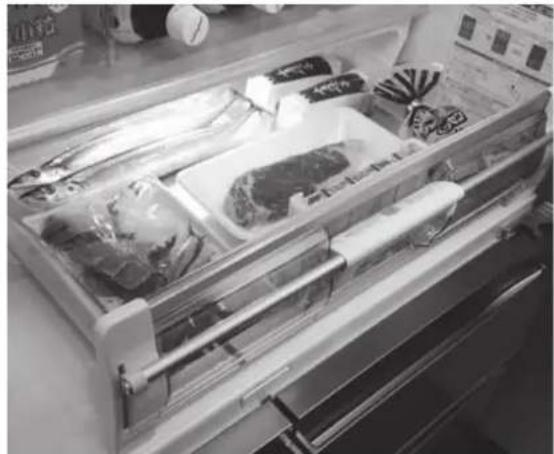
natural_image
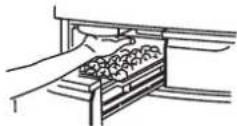
Interior view of a refrigerator drawer with packaged food items (no visible text or labels)Approx. 0.8 hPa of [Vacuum Preservation] keeps freshness and preserves nutrients by restricting oxidation. [Photocatalyst Preservation] technology used for the Vegetable Compartment and newly adopted [Antioxidant Fresh Cassette] maintain freshness.
※ Vacuum means the space where the pressure is lower than the atmosphere pressure. The pressure in the Vacuum compartment is about 0.8 hPa which is lower than the atmosphere pressure, so Hitachi calls such state as vacuum.
By using [Frost Recycle Cooling] and vacuum insulation, etc.
Energy saving & large capacity
Power consumption is reduced more thanks to various energy-saving technologies including "Frost Recycle Cooling" and others. In addition, [Energy Saving] mode is available for saving energy further.
We have devised ways of increasing the rated internal capacity by enlarging shelves, pockets and slide cases as much as possible to store more foods while using vacuum insulation to reduce the wall thickness.
正因為大容量,才能有輕鬆操作的電動功能
■ 電動冷藏室門 & 電動抽屉
Convenient Auto Drawer especially for large storage capacity
Auto Door & Auto Drawer ※ Auto Door is available only for R-E6800X type.
[三重抗菌除臭]
[Triple Power Deodorizing Effect]
A combination of 3 types of deodorizing materials deodorize various odorous substances in the refrigerator including 4 major odors such as sulfur, nitrogen, aldehyde and oxygen odors. Activities of bacteria collected by the filter are also restricted.
Deodorant filter has the effect of sterile filtration.
Testing laboratory: Boken Quality Evaluation Institute, a general incorporate foundation Test method: Film contacting method (JIS Z 2801) Name of the part used for treatment: Filter Sterilization method: applying oxidation catalyst to the filter Target: bacteria collected by the filter Test result: sterilization effect of 99% after 24 hours by using a filter only. This does not always effect on the entire refrigerator or foods.
If the ice is not made
→ 34頁
→Pg.70
冰箱内冷度不夠時
If the refrigerator is not cooled down
well → Pg.70
結霜或結露時
If frost or dew is formed
→ 35頁
→Pg.71
發出異常聲音時
Abnormal operating sound
is generated
→ 35頁
→Pg.71
發現真空冰溫可能有異常時
There is something strange with the Vacuum
Compartment
→ 36頁
with the Vacuum
→Pg.72
顯示燈閃爍時
If any indicator lamp blinks
→ 36頁
→Pg.72
目錄
使用之前
安全上的注意事項 4
確認事項 8
各室的名稱·存放食物 8
附屬品 8
操作面板的功能 9
事前準備 10
使用前的準備 10
text_image
Diagram showing electrical connections with a power outlet and a switch, marked with X symbols indicating no connection or failure.在已受損的狀態下使用時,
會引發觸電·短路·火災的危險。
natural_image
Illustration of two children playing on a staircase (no text or symbols)
● 請注意不要讓孩子們玩耍。
natural_image
Illustration of a refrigerator and a person installing or adjusting a door (no text or symbols present)
natural_image
Illustration of a child and an adult cleaning a refrigerator (no text or symbols)注意
移動・搬運時

禁止
text_image
Diagram illustrating a person climbing a wall and opening a water channel, with Chinese text labels.natural_image
Illustration of workers handling a large box on a lift, with close-ups of hands and a close-up of the lid (no text or symbols)9
natural_image
Line drawing of a door frame with a handle and guardrail (no text or symbols)通知事項
natural_image
Line drawing of a hand inserting a component into a drawer (no text or symbols)冷藏室

text_image
冷藏室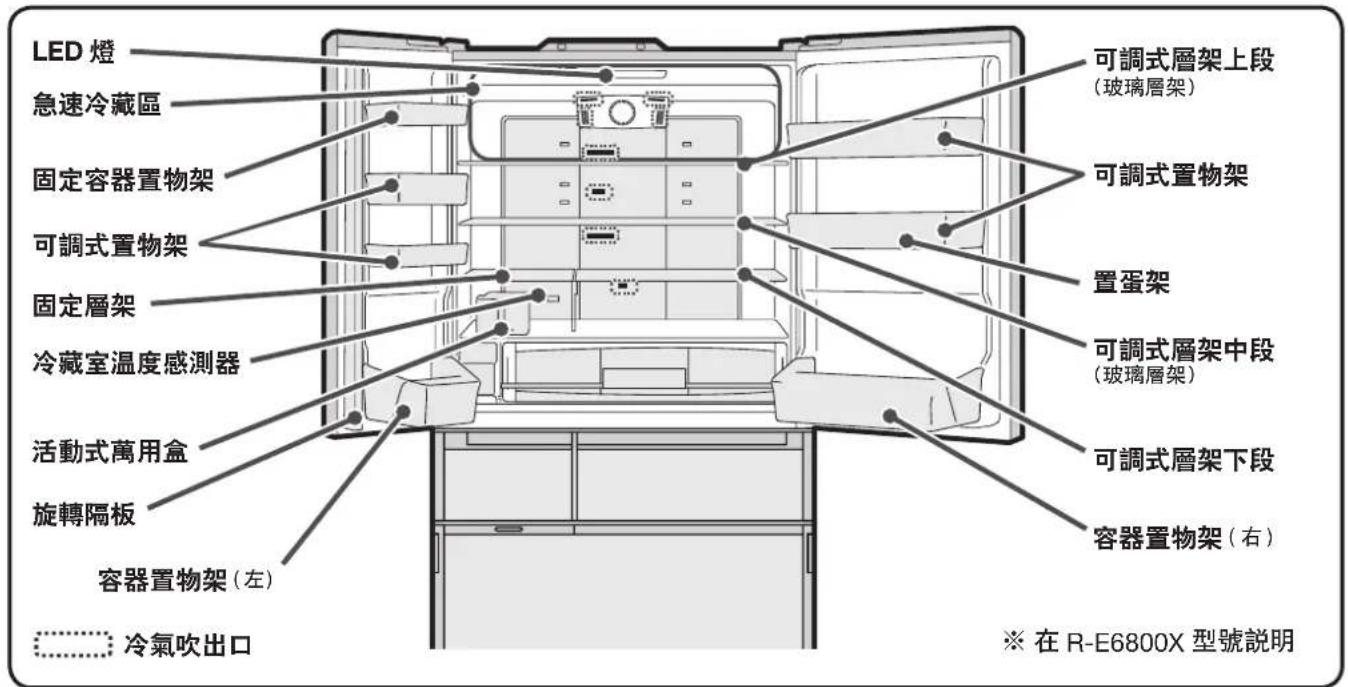
natural_image
Technical diagram of an open refrigerator interior showing internal compartments and ventilation ducts (no text or labels)■ 可調式層架(下段)
調節可分為 3 個階段。
text_image
Diagram showing three steps of a cooking or storage procedure: dropping, adding a pot, and adding a container.注意事项
natural_image
Technical line drawing of a mechanical assembly with no visible text or symbols抗氧化益鲜盒
使用前請務必將標籤撕下。

natural_image
Diagram of a hand operating a mechanical device with a black arrow indicating direction (no text or symbols present)真空冰温盒
注意事项
natural_image
Hand holding a spring-loaded object on a wooden shelf (no text or symbols visible)1
將真空冰溫盒 往內推進
注意事項

natural_image
Diagram of a hand inserting a component into a device (no text or symbols visible)2
natural_image
Hand placing a wall-mounted switch into a bracket (no text or symbols visible)通知事項
text_image
-1°C Vacuum 按下natural_image
Technical line drawing of a mechanical component with no visible text or symbols通知事項
natural_image
Line drawing of a hand pressing down on a mechanical component with an arrow indicating direction (no text or symbols)注意事项
natural_image
Diagram of a device interior with connectors and a wall-mounted panel (no text or symbols visible)側面導管
各層架·置物架·置物盒 三個月一次
請以軟布沾溫水擦拭。
卸除方法請參閱 → 32,33頁

敬请依照指示操作
natural_image
Line drawing of a hand holding a mechanical component, no text or symbols present真空冰温密封垫安装满槽
natural_image
Illustration of a hand inserting a component into a rack, with a black 'X' symbol indicating a defect or error (no text or symbols present)natural_image
Pure technical line drawing of a mechanical assembly without any text, numbers, or symbols都確認完了之後請操作下一個步驟。
儲冰盒
· 有殘留冰塊時請清除
1
關閉所有的箱門
2
text_image
Diagram of a refrigerator interior with labeled compartments and electrical connectionsA 可調式層架上段·中段(玻璃層架)
natural_image
Illustration of two hands holding a rectangular object with an arrow indicating rotation (no text or symbols)natural_image
Diagram of a mechanical assembly with a downward arrow indicating motion or force (no text or symbols present)natural_image
Line drawing of a toolbox with a handle, no text or symbols presentnatural_image
Diagram of a printer drawer with an arrow indicating a page direction (no text or symbols present)注意事項
● 請勿將門全部拆卸。 ●
3 下層的置物盒朝身體方向向上抬起。

text_image
下層置物盒SAFETY SUGGESTIONS 40
LEARN NAME & FUNCTION OF EACH PART ... 44
Name of each compartment/Food stored 44
Accessories 44
Functions of the Open Button 45
BEFORE USE 46
Preparation before use 46
Transporting your refrigerator (transport for moving) … 47
GENERAL USE
Auto Door 48
Setting the Auto Door 48
Using the Auto Door 48
Auto Drawer 49
Set the Auto Drawer 49
Using the Auto Drawer 49
REFRIGERATOR COMPARTMENT 50
Adjust the height of a pocket/shelf 50
Using a multiuse egg case 51
Adjusting temperature in a refrigerator compartment … 51
Cooling food Quickly (Quick Cooling) 51
VACUUM COMPARTMENT 52
When opening/closing the door of the Vacuum Case … 52
Change the settings of the Vacuum Compartment … 53
FREEZER COMPARTMENT 54
Using the Upper Freezer 54
Using the Lower Freezer 54
Caution on how to store foods 54
Adjust the temperature of the freezer compartment … 55
Quickly freezing foods (Quick Freezing) 55
ICE COMPARTMENT (AUTOMATIC ICE MAKER) ... 56
How to make Ice 56
Quick Ice Making 57
Stop Ice Making 57
When the "On" indicator lamp is blinks 57
Water Supply indicator 57
Stored ice amount and ice-making time of the Ice Case … 57
VEGETABLE COMPARTMENT 58
Stored foods 58
Caution on how to store foods 58
Using the Aero-care Zone 59
To cool it more [Vegetable Compartment (MAX)] …… 59
VARIOUS FUNCTIONS 60
Setting "Energy Saving" mode 60
"eco" Operation indicator lamp 60
Locking the Open Button 61
Door Alarm 61
Door Alarm and volume adjustment of the operation sound … 61
Set the condensation prevention heater to MIN. 62
Fine adjustment of the temperature (Refrigerator 63
Compartment / Freezer Compartment)
MAINTENANCE
MAINTENANCE (REGULAR CHECK) 64
Power plug/The back/floor of the refrigerator/Surface of door … 64
Each shelf/pocket/case/Door gaskets/Liquid receivers … 64
Vacuum Compartment/Auto Drawer 65
Ice Maker Cleaning 66
Water supply container/Ice tray 67
HOW TO REMOVE/ATTACH PARTS 68
Height adjustable upper and middle shelf (Glass shelf) … 68
Door pocket 68
Fixed shelf 68
Height adjustable lower shelf 68
Vacuum Case 68
Ice Case (Ice Compartment) • Upper Freezer case (Upper Freezer) … 69
Slide case and lower freezer case (Lower Freezer) 69
Upper Case, Lower Case (Vegetable Compartment) 69
How to attach the slide door (Ice Compartment/Upper Freezer/
Lower Freezer/Vegetable Compartment)
TROUBLESHOOTING
TROUBLESHOOTING 70
Initial stage 70
Open Button 70
Automatic ice making is not properly performed .... 70
Refrigerator does not cool 70
Frost and/or dew occur 71
Refrigerator cools overly 71
Door is not in a horizontal state 71
Abnormal operating sound is generated 71
Refrigerator becomes hot 71
It smells strange 72
There is something strange with the Vacuum Compartment … 72
[]display on the Open Button flashes 72
Auto Door 73
Auto Drawer 73
Others 73
AVAILABLE PARTS 74
ABOUT NON-CFC REFRIGERATORS/75
STORABLE WEIGHT
SAFETY SUGGESTIONS
Ensure to follow these precautions
When using this appliance, failure to follow safety precautions may result in personal harm, harm to other people, and also damage to property.
The following pictographs categorize and explain the level of possible harm on damage that may occur from ignoring suggestions resulting in missing the appliances.

WARNING
Suggestions headed by this pictograph indicate "There is high chance of serious injury or death" if ignored.

CAUTION
Suggestions headed by this pictograph indicate "There is a high chance of injury or damage to property" if ignored.
How the suggestions should be taken are indicated and categorized by the following symbols accompanied by explanations. (The symbols below are examples)

This symbol indicates something you must not do. (Prohibited)

This symbol indicates something you must do. (Compulsory)
This refrigerator uses flammable refrigerants. The symbol column below states the precautions on flammable refrigerants.

R600a
This symbol denotes the precautions on flammable refrigerants.

WARNING
Installation

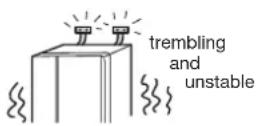
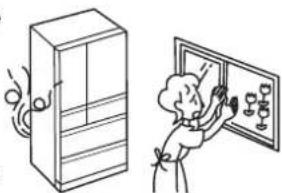
● Take measures to prevent overturning of refrigerator due to earthquake, etc.
• Overturning of the refrigerator could result in personal injury.

Wetting Prohibited
- Do not install the refrigerator in damp places or where water may splash.
- This may impair electricity insulation causing electric shock or fire.

Handling the power and power cable

● Avoid usage that may cause the wall outlet or power cord components
Prohibited Prohib
the work beyond the specified voltage. Also do not use power sources that are not a rated voltage current.
If a power source is shared with other appliances, double or multipoint adapters may heat up beyond normal levels and cause fire. - Use a wall outlet rated above 10 ampere by itself


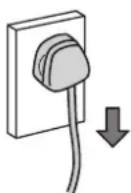
- Connect the power plug firmly to a power outlet with the cord running down.
- Connection of the power plug with the cord running up could apply stress on the cord and cause electrical short or overhe could result in electrical shock
- Incomplete connection of the power plug could result in electrical shock or fire due to heat.


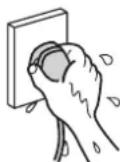
Wet Hands Prohibited
- Do not do anything that may damage the power cord or plug.
The power cord or plug should not be cut, modified, touched with hot implements, bent by force, twisted, pulled, have heavy objects placed on it, squeezed by the refrigerator, or be bound or tied up.
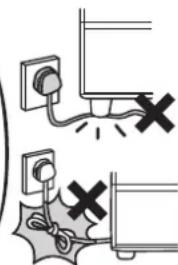
text_image
Diagram showing electrical connections with switches and power outlets, indicating disconnection or disconnection of components.Using a damaged power cord may cause electric shock, short circuits, or fire.
- Please consult with a retailer about the repair of the power cord or plug.
- Do not insert or remove the power plug with wet hands.
- This may result in electric shock.
● This appliance is not intended for use by persons (including children) with reduced physical, sensory or mental capabilities, or lack of experience and knowledge, unless they have been given supervision or instruction concerning use of the appliance by a person responsible for their safety. Children should be supervised to ensure that they do not play with the appliance.
Handling the power and power cable

● Clean the dust on the power plug frequently.
Insulation failure from moisture when dust collects on the power plug may cause fire.
- Unplug the power plug and wipe it with a dry cloth.


● Be sure to unplug the power plug before maintaining the refrigerator.
Continued use may cause electric shock or injury.

Pg.64
• Always hold the plug when unplugging it.
During use

Wetting
Prohibited
● Do not splash water on or inside the refrigerator.
- This may impair electrical insulation causing electric shock or fire.


Prohibited
● Do not put in things that may catch fire.
- Benzine, ether, LP gas, thinner, adhesives may ignite an explosion.


Wetting
Prohibited
- Do not put water containers on the refrigerator.
- Spilled water may impair insulation of electrical components causing faulty electrical currents. This may result in electric shock or fire.


Prohibited
● Do not use flammable sprays near the refrigerator.
• Sparks from points of electrical contact such as door switches may ignite a fire.


Prohibited
● Do not put things on top of the refrigerator.
- Opening and closing doors etc. may cause things placed on top of the refrigerator to fall resulting in injury.


Prohibited
● Drugs, chemicals, research and experimental substances should not be stored in the refrigerator.
- Substances that require precise conditions for storage cannot be stored in a domestic refrigerator.


Contact Prohibited
● Do not touch the machinery components of the automatic ice maker.
- There is a danger of injury when the ice trays are rotating.

Prohibited
- Do not hang on the doors or step on the various compartments.
- Injury may be caused by the refrigerator tipping over or hands getting caught between doors.

natural_image
Illustration of two children playing on a seesaw (no text or symbols)
● Children should be supervised to ensure that they do not play with the appliance.

Prohibited
● Do not remove the cover of the interior lamp.
- When the interior lamp is damaged, please contact the service centre for replacing the lamp to avoid injury.

- Do not put too much force on the door by opening it too much or leaning on the opened door.

Prohibited Prohibited
- Do not add impact to the glass door.
Concerning the refrigerant (Be careful of the following related to the use of flammable gas R600a: ISOBUTANE.)

Prohibited
- Do not scratch or damage the main body of the refrigerator with a sharp object such as screw.

Since the refrigerant used is flammable, any leakage from the pipe inside the wall may cause ignition and explosion.

- Allow clearance around the refrigerator and keep ventilation openings when installing it. Pg.46
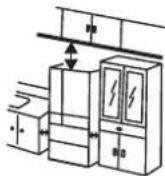
Leakage of the refrigerant may accumulate and cause ignition and explosion.

- Do not damage the refrigerant circuit. If you happen to damage the refrigerant pipe, stay away from the refrigerator and
natural_image
Illustration of a refrigerator and a person installing or adjusting a wall-mounted device (no text or symbols present)avoid using fire and electrical appliances.
Should you damage the refrigerator, open the window to ventilate and contact the authorised service centre.

- Please consult your dealer or the Recycle Hotline of the Recycle Centers in the Environmental Protection Administration when discarding the unit.

If the refrigerant is wet, it may cause ignition and explosion.

● Do not use mechanical devices or other means
Prohibited Prohib
to accelerate the defrosting process, other than those recommended by th
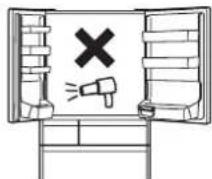
manufacturer.

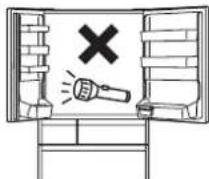
● Do not use electrical appliances inside the refrigerator.
- If the refrigerant leaks, sparks on the contact may cause ignition and explosion.

R600a
● The warning label and name plate including this symbol affixed on compressor and refrigerator should be kept throughout the life of the refrigerator.
In case of emergency

- Stop the refrigerator by unplugging it if it is not running properly or breaks down.
Continue may cause electric shock or injury.
• Always hold the plug when unplugging it.

Disassembly prohibited
- Do not disassemble, repair, or modify your refrigerator.
Injury may be caused by ignition of fire or faulty ru
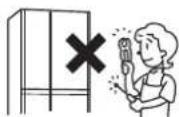
- Please consult with a retailer if any repairs or disassembly are required.

● In the event of gas leak, do not touch the refrigerator and open windows to allow ventilation.
- Sparks from points of electrical contact such as door switches may ignite explosions causing fire or burn injuries.

text_image
turn off the switchWhen discarding the unit

● Before discarding the unit or recycling, remove the door packing to avoid the risk of an infant or child to be entrapped inside.

natural_image
Illustration of a child and an adult interacting with a refrigerator (no text or symbols)When moving the refrigerator

Prohibited
- Do not move the refrigerator by using its wheels as it may damage the floor.
- Please lay a protective mat.
● Never hang the handle with a crane, etc.
● Take care not to bang the back / side of the refrigerator.


● Use the carrying handle when carrying it. Your hands may slip resulting in injury if you hold the refrigerator at other places than the carry handles.
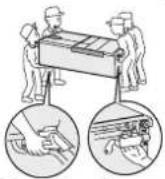
- More than 2 persons should carry the refrigerator for safety reasons.
- Carry it with the door facing upward; as shown in the illustration.
- Never hang the handle with a crane.
- Use a tape to fix an electric plug/power cord so that it may not hang down.
During use

Prohibited Prohibited of the front section.
- Do not put bottles in the Door Baskets if they do not sit properly on the bottom
of the front section.
- Forcing in items like large bottles may result in them getting tipped over, causing injury.
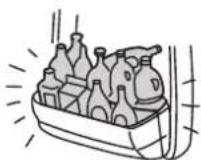

Prohibited
● Do not put the glass bottles in the Freezer Compartment.
- Bottles may break from the contents freezing and cause injury.


Prohibited
● Do not hold the top of the doors when closing them.
- If you hold the top of a door when closing it you may get your fingers caught or pinched and cause injury.
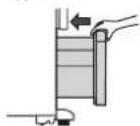

Prohibited
- Do not put your feet too close when opening the bottom door of the refrigerator.
- When opening this door you may hit the instep or other parts of your feet resulting in injury.
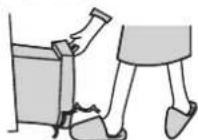

Prohibited
- Do not put your hands or feet under the base surface of the refrigerator.
When cleaning, putting your hands under the base surface of the refrigerator may result in injury by cutting them on sheet metal parts.


Prohibited
- Do not give a hard impact to the glass shelf/partition. (The glass shelf/partition may be broken, causing personal injury).

Prohibited
● Be careful not to operate the Auto Door when another person is in front of the refrigerator, which may lead to personal injury unexpectedly caused by the opening door.

● To prevent water from dripping on the floor.
Water due to dew and/or frost may drip on the floor if there is a gap clearance around the door for a long time. Close the door completely without no gap.

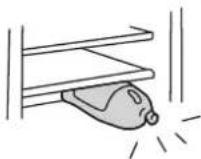

- Do not have food items protruding over the front of the shelves.
- Injury may be caused from items like bottles getting knocked over.
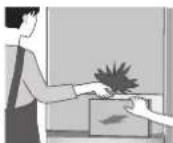
- When two or more doors are being opened or another person is using the refrigerator, make sure fingers do not get caught.
- Fingers may get caught in the spaces between doors causing injury.

Prohibited
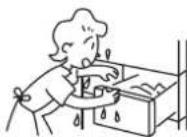
● Do not touch the food and containers inside the Freezer Compartment with wet hands.
- This may cause frost injury. (Especially in the case of metal items)

Prohibited
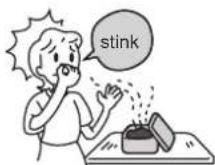
- Do not eat food that smells strange or has changed color.
- Spoiled food may cause serious sickness.

Prohibited
- Do not press the auto door switch on the Auto Door with knee, etc.
● Avoid placing anything like a bottle near the auto door compartment.
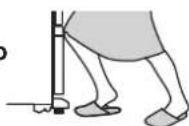

Prohibited
● Neither heat the glass surface of the glass shelf/partition nor put a hot item on it.

Prohibited
- Do not stack up food in the Multiuse Egg Case. Keep food in order within the shelf. Put juicy food in a sealed container.

● Take care to remove the glass shelf because it is heavy.
LEARN NAME & FUNCTION OF EACH PART
Name of each compartment/Food stored
Refrigerator compartment → Pg.50
About 2^ 6^
Refrigerating food
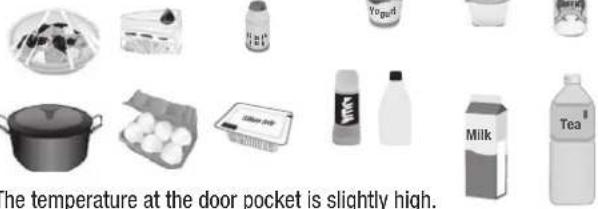
text_image
The temperature at the door pocket is slightly high.Vacuum compartment → Pg.52
About -1°C \~ 1°C
Fresh foods such as meat, fish and seafood
Vacuum and photo-catalyst help to keep foods fresh.
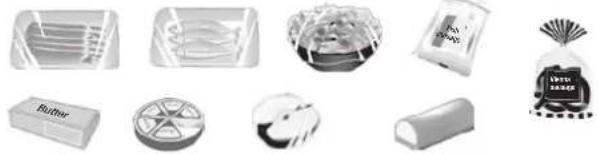
natural_image
Collection of various consumer goods and accessories including boxes, glasses, a candy, and a bag (no visible text or labels)Ice compartment
→Pg.56
About -20°C \~ -18°C
The ice cubes made by the automatic ice maker.
Upper/lower freezer
→Pg.54
About -20°C \~ -18°C
Frozen food/ice-cream/dried food
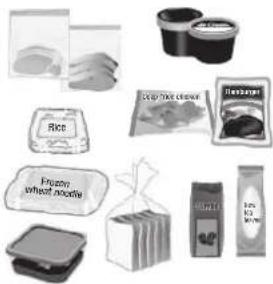
natural_image
Collection of food items including rice, instant noodles, and packaged snacks (no text or labels visible)※ The above temperatures are standard values under the condition that the refrigerator is stable with no food stored and the door closed, at ambient temperatures of 30^ C.
● Store foods in a loosely arranged way.
● It is recommended to wrap smelling foods.
Accessories
| Warranty certifi cate | Please show it for repair. |
| Specialized tool (with 2 cushions) Please use it to fix the refrigerator. |  _ _ 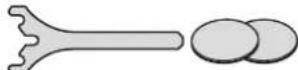 |
The Open Button is a touch panel made of glass.
If you touch MENU button, the current settings will be displayed.
The upper portion of the Open Button is the display and the lower portion is for operation.
Touch the lower portion of the Open Button to change the settings, if necessary.
Caution
- Please close the door of the refrigerator door before changing the settings.

text_image
Providing information eco It will turn on while it is working in "eco" mode. → Pg.60 It will turn on while the Open Button is locked. → Pg.61 Blink indicating any trouble. → Pg.72 Auto Door It is lit when the Auto Door is set to "ON". → Pg.48 * Only for R-E6800X type Auto Drawer It is lit when the Auto Drawer is set to "ON". → Pg.49 Water It will turn on when water in the water supply container is getting low. → Pg.57 ※All the indicator lamps are lit for the sake of explanation. ECO Auto Door Auto Drawer Water Trip Save Energy Saving Button Lock Press 3 Sec.) Freezer Auto Drawer Press 3 Sec.) Fridge Auto Door Press 3 Sec.) Ice Maker Cleaning Press 5 Sec.) Powerful Veg +1°C MENU First touch it. Adjusting temperature settings Set temperature for each compartment. Normally, use the "■■" setting. Refrigerator Compartment → Pg.51 Freezer Compartment → Pg.55 Setting an ice-making Setting a cooling mode Set the ice making mode "Quick" → Pg.57 "On" → Pg.56 "Off" → Pg.57 Set a cooling mode Set the "Fridge" → Pg.51 "Freezer" → Pg.55 "Veg" → Pg.59 Setting the Vacuum Compartment Vacuum Compartment mode. -1°C → Pg.53 +1°C → Pg.53 All lamps off → Pg.53 NoticeAbout the display
- Close all the doors before adjusting the settings. While a door of the refrigerator is opened or an indicator lamp on the display is blinking, it will not work even if you touch the Open Button.
- If you confirm the setting, touch MENU button or open the refrigerator door. The display will be lit again.
- If you touch MENU button again after finishing the operation, it will be unlit. The displayed characters will be unlit 40 seconds later without touching the MENU button again for energy-saving. However, the setting of "Energy Saving" mode, "Fridge", "Freezer" and "Quick" indicator lamps and "Off" and "Water" indicators and [ "eco" operation indicator lamp] will not be unlit.
- When opening the refrigerator door and the displayed characters are lit, they become unlit about 15 seconds after closing it.
■ About the Open Button
● Response of the touch panel may change depending on the surrounding temperature, humidity, physical condition of the user or operation status of the adjoining electric product.
● Release a finger and touch the panel again if the panel does not respond after touching it. False detection may occur (it may be kept pressed) if the time interval between key touches is too short. Response of the touch panel does not improve even if you touch it strongly.
● The panel may not respond if it is wet or dirty. Wipe it off with a dry cloth.
1
Please arrange it as shown below
● The floor should be sturdy and flat.
● Place the refrigerator away from direct sunlight and heat.
- Do not place it in damp areas, and ensure good air ventilation.
This will reduce adverse effects to refrigerating power and keep electricity cost down. This will also prevent the refrigerator from discoloring and rusting.
● The place is separated from other equipment.
To prevent disturbance (noise / scattered image) to TV and others attributable to the refrigerator.
● To cool efficiently, allow enough space around the refrigerator for radiating heat.
- The actual size of the center part of the side of the refrigerator's main body is slightly larger than the nominal size. Therefore, please allow enough space around when installing the refrigerator.
- The back of the refrigerator can be placed very close to the wall. If any vibration sound occurs and/or any discolor/dirt is found on the wall, move the refrigerator away from the wall.
Lay a board with 1cm thickness on the floor if the refrigerator is installed on the carpet, tatami mat, flooring or PVC sheet flooring which may be hollow or discolor.
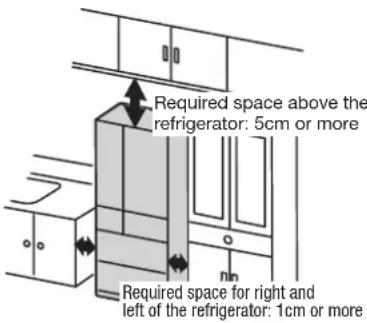
text_image
Required space above the refrigerator: 5cm or more Required space for right and left of the refrigerator: 1cm or more2
Fix the refrigerator
The adjustable mounts, which are located in the front bottom corners of the refrigerator, can be adjusted by turning them to level the refrigerator. (Make sure to use a supplied tool and 2 cushions)
1 To remove leg cover, hold both ends of it and pull it towards to you by applying some force.

text_image
Leg cover2 Place pads under the adjustable mounts.
Place pads under the adjustable mounts evenly so that they can be leveled.

text_image
Cushion (Accessory) Adjustable mounts3 Lower both adjustable mounts (left and right) by turning them to secure the refrigerator.
Clamp the supplied tool adjusting to the shape of the adjustable mounts.
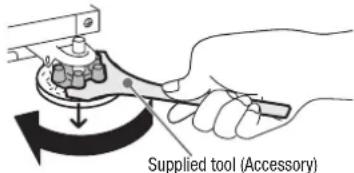
text_image
Supplied tool (Accessory)● Always wipe the adjustable mounts and floor clean before placing pads. Adherents may scratch the floor if they remain.
- Be careful not to scratch the floor with the supplied tool when turning the adjustable mount.
3
Adjusting the refrigerator adjustable mount to keep it level
● Left side or right side door may be slightly lower when the surface of the installation place is not level or either left or right leg sinks in the floor surface because of the soft floor material and the addition of food weight.
→ This does not affect the refrigerator function. Adjust the refrigerator adjustable mount to keep it level according to the procedure listed below if you want to correct it.
Correcting any left/right lean and lifting slightly the front side of the refrigerator until the door can close easily and completely.
1 With the supplied tool, turn an adjustable mount on the side so that the refrigerator is lower to make the Refrigerator Compartment door level.
The height of the door can be adjusted 1mm every one turn of the adjustable mount.
The left side of the door is lower.
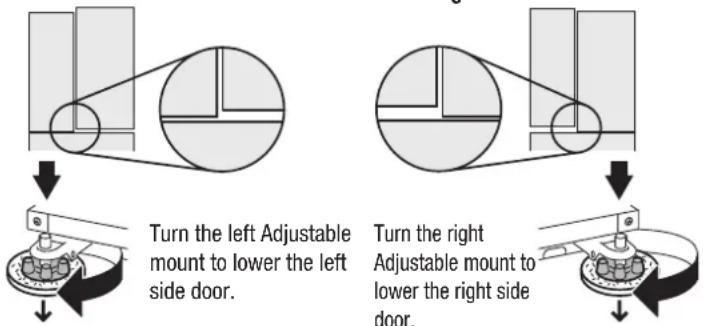
text_image
Turn the left Adjustable mount to lower the left side door. Turn the right Adjustable mount to lower the right side door.2 Insert the left and right pins of the leg cover into the mounting holes to attach the leg cover.
It may be approx. 5 days before the refrigerator conforms to the floor allowing the door to be leveled. Readjustment is required if the door is not leveled.
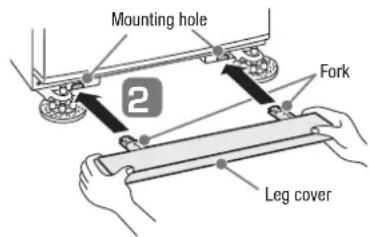
text_image
Mounting hole Fork Leg coverNotice
- When you release your hand from the refrigerator door with the door open, the door may move, but this is normal.
Peel off the seal from the Antioxidation Fresh Cassette in the Vacuum Compartment.
Peel off the seal from the Antioxidation Fresh Cassette set in front of the Vacuum Compartment before use.
- Antioxidant constituent and hot flavor will not be released until the seal is peeled off.
Caution
- Do not wash it in water.
- Do not smell it directly. It may be irritating to the nose.
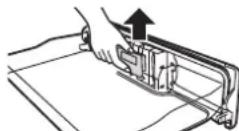

Pull it out right above. Peel off the seal, and then return it back.
Plug the power cord.
It is not a problem to plug in the power cord soon after installing the refrigerator.
Use a wall outlet exclusively when connecting the power cord. (Alternating current 220 - 240V, rated 10A or more)
- Check that the power plug or the cord is not wedged between the back of the refrigerator and the wall in order to prevent the cord from getting hot.
Cooling inside the refrigerator starts.
- It may take more than 4 hours to cool well the inside of the refrigerator, depending on conditions such as the ambient temperature or storage state of foods. It may take 24 hours or more in summer, etc.
Do not put ice cream, uncooled foods or perishable foods in it until the inside of the refrigerator is cooled well. - Perform "Ice Maker Cleaning" when using the automatic ice making function for the first time. Pg.66
● A series of ice making operation will start automatically after the inside of the refrigerator is cooled well. (When using for the first time, it may take 24 hours and more to make ice.)
Notice
● After the power plug is inserted, the cool air flap continues to work for about 2 minutes to check the state of the cool air flap (it may sound louder than usual, but it is normal).
- It may smell of plastics in the beginning when you start to use. Keep the room well-ventilated. Such smell will disappear gradually.
- If you wish to install the refrigerator in a hot spring area exposed to sulfide gas, you may need to apply anti-rust treatment to the piping. Contact your dealer in advance. Failure caused by sulfide gas will not be covered under guarantee.
- Do not peel off the seal on the back or plastics at the lower part of the side.
- When a magnet or suction cup is attached on the side of the body or the surface of a door, it may leave a mark.
- If you wish to install the refrigerator in a hot spring area exposed to sulfide gas, you may need to apply anti-rust treatment to the piping. Contact your dealer in advance. Failure caused by sulfide gas will not be covered under guarantee.
- Do not peel off the seal on the back or plastics at the lower part of the side.
- When a magnet or suction cup is attached on the side of the body or the surface of a door, it may leave a mark.
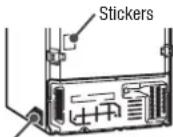
Plastic parts - Left/Right
Caution
Open the Auto Door. ※ Only for R-E6800X type
After inserting the power plug and touch the Open Button for the Auto Door, the door will be opened. Pg.48
For operation
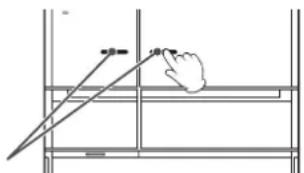
text_image
40 mmTransporting your refrigerator (transport for moving)
Take out foods or ice.
Pour off the water from the water supply container/ice tray.
Pull off the power plug.
No problem just before moving.
Remove the leg covers, and raise the adjustable mounts.
Use a tape to secure the door/power cord.
Place a sheet or cloth for protection when moving / transporting it.
To prevent damage to the floor material or water from spilling out.
Place a sheet or cloth for protection first, and then lay it back to drain water. Such as old cloth
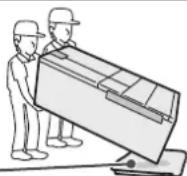
Make sure to hold the handles when carrying it with 2 persons or more.
Do not lay it down horizontally for transportation (which may cause failure of the refrigerator).

natural_image
Illustration of workers handling a large box with hand gestures, showing close-ups of hands inside (no text or symbols)See “Preparation before use” for installing the refrigerator in a new location. → Pg.46
Auto Door

text_image
Refrigerator Compartment door (left) Refrigerator Compartment door (right)You can open the door easily by touching the door lightly with your fingers thanks to the Auto Door function. (Only for R-E6800X type)
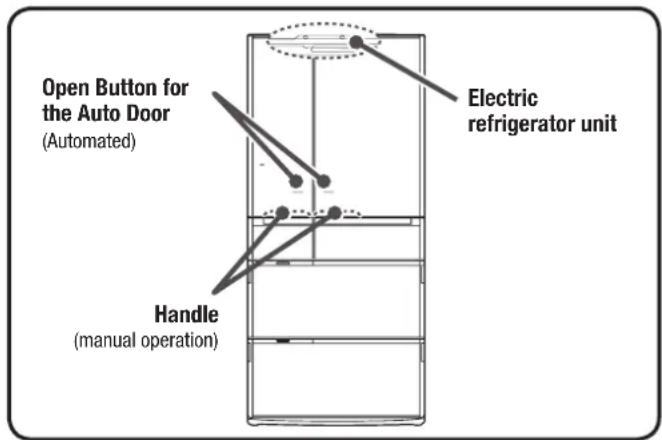
text_image
Open Button for the Auto Door (Automated) Electric refrigerator unit Handle (manual operation)
Caution
- When an infant child may use the Auto Door to make mischief, please stop the Auto Door function.
● Use fingers to operate the Open Button for the Auto Door. - Do not operate the Auto Door when another person is in front of the refrigerator (which may lead to personal injury unexpectedly by the opening door).
- Be sure to unplug the power plug before cleaning the Auto Door.
- Do not put any item on the refrigerator.
Setting the Auto Door
1
Touch button on the Open Button to turn on the indicator lamp.
All indicator lamps turn on, and then the current settings are displayed.
2
Hold down the Fridge button for 3 seconds or more until the preset sound is heard.
Auto Door function changes to "On" or "Off". Auto Door function is set to "On" before shipping. If you stop Auto Door function, set it to "Off".
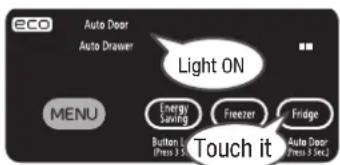
text_image
eco Auto Door Auto Drawer Light ON MENU Energy Saving Freezer Fridge Button L Press 3.5 Touch it Auto Door Press 3.5| Auto Door function | “On” (Open Button for the Auto Door is enabled) | “Off” (Open Button for the Auto Door is disabled) |
| Indicator lamp of the “Auto Door” | On Auto Door | |
| Preset sound | Long beep | 2 beeps |
Notice
- Hold the handle with your hand to open the Auto Door when it is set to "Off"
- You can't stop the Auto Door function of either "Refrigerator Compartment door (right)" or "Refrigerator Compartment door (left)" only.
Using the Auto Door
When touching the Open Button for the Auto Door, the operation sound is heard, and then it will open automatically.
When closing it, use the handle with your hand to do so (not electrically operated).
| How to open the Auto Door | Opening one door on either side | Top view of the refrigerator 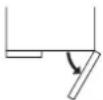 | Top view of the refrigerator Open both doors at a time |  |
| How to operate | Touch the Open Button of the door to be opened | 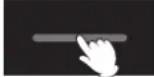 | Slide your finger from one edge of the Open Button to the other. (Doors will open in turn from the side you touch.) |  |
| Operation sound of the Auto Door | 1 beep | Long beep | ||
Notice
● Auto Door is the function to reduce the load at the opening operation when opening the refrigerator door. Opening angle of the door may vary or the door may go back a little after it is opened automatically depending on installation conditions of the refrigerator or how beverages or foods are stored in the door pocket, but this is not malfunction.
● Auto Door won't be opened when either "Ice Compartment" or "Upper Freezer" is opened.
● After touching the Open Button for the Auto Door, the operation sound may be heard when opening the door, but this is not malfunction.
- If the Open Button for the Auto Door is wet or dirty, it may not respond. Use a wet cloth to wipe off dirt, and then wipe it with a dry cloth.
- If you touch the Open Button of the Auto Door and its neighboring part at the same time, or you touch it for about one second or more, the Auto Door may not be opened automatically.
Auto Drawer
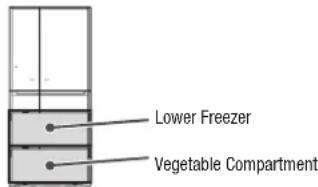
text_image
Lower Freezer Vegetable CompartmentAuto Drawer function helps you to pull out the case easily even if it is heavy with plentiful foods in.

text_image
Auto Drawer switch Handle (Right & Left) (You can also open the compartment manually.)
Warning
- Stop the Auto Drawer function if there is a chance that small children play with the Auto Drawer.
- Do not hold any portion of the door other than the handle. (This can cause pinching of fingers, which could result in injury.)
- Do not bring your foot too near the refrigerator when you press the Auto Drawer switch of the vegetable compartment. (You may knock your foot against the door and may cause injury)
● Operate the Auto Drawer switch with your hand.
● Make sure to disconnect the power plug from the power outlet before starting maintenance of the Auto Drawer.
Set the Auto Drawer
1
Touch Button on the Open Button to turn on the indicator lamp.
All indicator lamps turn on, and then the current settings are displayed.
2
Hold down the button for 3 seconds or more until the preset sound is heard.
Auto Drawer function changes to "On" or "Off".
Auto Drawer function is set to "On" before shipping.
If you stop Auto Drawer function, set it to "Off".

text_image
ECO Auto Drawer MENU Energy Saving Freezer Fridge Touch it Light ON Auto Drawer (Free 3 sec)| Auto Drawer function | “On” (Auto Drawer switch is available) | “Off” (Auto Drawer switch is not available) |
| “Auto Drawer” indicator lamp | On Auto Drawer | |
| Preset sound | Long beep | 2 beeps |
Notice
- When you set Auto Drawer to "Off", pull out the handle on the right/left manually to open.
- It is impossible to stop only one Auto Drawer function of either “Lower Freezer” or “Vegetable Compartment”.
Using the Auto Drawer
The compartment opens and LED lamp is illuminated by pressing the Auto Drawer switch with your hand.
When you close it, push the handle on the right/left to close.
(Closing of the compartment is not electrically operated.)
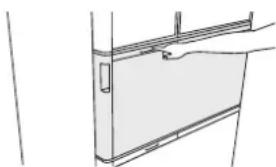
natural_image
Simple line drawing of a door frame with a handle and vertical panel (no text or symbols)Notice
- This function is to reduce an initial load when pulling out the Auto Drawer. The Auto Drawer to be pulled out by approx. 15 cm or more. The length may vary depending on installation conditions of the refrigerator, or the door may go back a little after the door is opened automatically, but it is normal.
● “Lower freezer” and “vegetable compartment” cannot be electrically opened at the same time. - When one of the “lower freezer” and “vegetable compartment” is open, the Auto Drawer function does not work.
● A sound is heard when you press the Auto Drawer switch. This is not abnormal. - Auto D rawer function doesn't work when Auto Drawer function is "Off" or in case of power outage.
● Wipe off spilled liquid soup and others on the Auto Drawer switch immediately.
Or Auto Drawer switch may fail to work, causing the door open disorderly.

natural_image
Line drawing of a hand using a tool to lift a rectangular object (no text or symbols)REFRIGERATOR COMPARTMENT
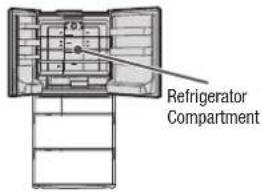
text_image
Refrigerator Compartment
text_image
LED lamp Quick Cooling corner Pocket (fixed) Height adjustable pockets Fixed shelf Refrigerator Compartment Temperature Sensor Multiuse Egg Case Swing partition Double door pockets (left) Cold Air Blowout Port Height adjustable upper shelf (Glass shelf) Height adjustable pockets Egg stand Height adjustable middle shelf (Glass shelf) Height adjustable lower shelf Double door pockets (right) ※ Explanation is in the case of R-E6800X typeCaution

Cold Air Blowout Port
● High moisture foods / canned beverages may be frozen or burst if they are placed around the Cold Air Blowout Port.
● Store hot foods in the Quick Cooling corner or on the Height adjustable shelf. If it is placed near the temperature sensor, the temperature of the Refrigerator Compartment may get too lower or dew may adhere to the panel at the back of the Refrigerator Compartment.
- Do not put too much force on the door by opening it too much or leaning on the opened door, which may cause damage to the door.
Adjust the height of a pocket/shelf
You can adjust the position of the pocket and the shelf depending on size of foods or beverages.
For how to remove/attach, see Pg.68.
■ Height adjustable pockets
■ Height adjustable shelves (upper/middle)
You can adjust the position of them depending on the height of foods or beverage.

natural_image
Diagram of an open refrigerator interior showing internal compartments and ventilation system (no text or labels)■ Height adjustable lower shelf
You can adjust them in three-stages.
● State in shipping

● Storage of pans, etc.

● Storage of milk carton, etc.
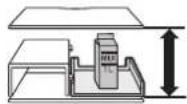
Caution
● Avoid a high impact on the glass shelf (broken glass may cause injury).
● Be careful to attach the glass shelves because they are heavy.

CAUTION
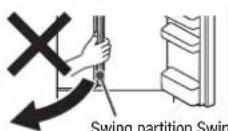
■ To open the door
- Do not hold the swing partition to open the door. (It may make it impossible to open the door.)
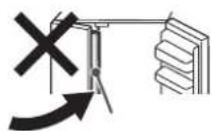
To close the door
- Do not close the door with the swing partition erected. partition (It may make it impossible to close the o
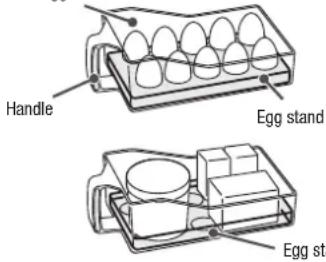
This can hold eggs and others in it and be put in the refrigerator compartment.
10 eggs can be stored in this case.
The egg pack with eggs in it can
be stored as it is.
When the egg stand is turned over, it can be used for small sized food.
Multiuse Egg Case
text_image
Handle Egg stand Egg stCaution
● Hold the carry handle securely when handling it.
- Do not stack food, otherwise they may drop.
- Do not put tall food in because they may fall down.
- Do not make ice with this container. A container may get damaged.
- If placed around the cold air blowout port, foods with a high water content, canned beverages / eggs may be frozen or burst. Keep and use them away from the cold air blowout port.
Adjusting temperature in a refrigerator compartment
1
Touch button on the Open Button to turn on the indicator lamp
All indicator lamps turn on, and then the current settings are displayed.
2
Touch 📂 on to set the temperature as you like.
Each time you touch the button, the corresponding indicator lamp changes in the order shown in the figure on the right.
The temperature is set to “■■” before shipping.
- Select■■ " in ordinary usage. The temperature may change depending on the operation states.
● If you adjust the temperature more finely. → Pg.63
Notice
● The temperatures of the Vacuum Compartment also change if selecting “■■■” or “■”.
● Temperature of the door pocket is set slightly higher than the one in the figure on the right.

flowchart
graph LR
    A["Factory setting"] --> B["Fridge"]
    B --> C["Auto Door (Press 3 Sec.)"]
    C --> D["Fridge"]
    D --> E["Auto Door (Press 3 Sec.)"]
    E --> F["Factory setting"]
    style A fill:#f9f,stroke:#333
    style B fill:#ccf,stroke:#333
    style C fill:#cfc,stroke:#333
    style D fill:#fcc,stroke:#333
    style E fill:#cff,stroke:#333
    note1["Touch it: 1 ~ Auto Door (Press 3 Sec.)"] --> A
    note2["Touch it: 2 ~ 6°C (Factory setting)"] --> A
    note3["Touch it: 1 ~ 3°C lower"] --> C
    note4["Touch it: 1 ~ 3°C higher"] --> E
※ The above temperatures are standard values in the Refrigerator Compartment under the condition that the refrigerator is stable with no food stored and the door closed, at ambient temperatures of 30^ C.
Cooling food Quickly (Quick Cooling)
1
Place the foods in the Quick Cooling Corner.
Quick Cooling corner
The food cools more quickly if it is placed at the center part near the interior wall. (the front of the Cold Air Blowout Port)
Caution
- Place canned beverages and foods with a high water content apart from the cold air blowout port.
They may be frozen or burst.
natural_image
Technical line drawing of an open refrigerator interior showing internal compartments and doorways (no text or labels)2
Touch button on the Open Button to turn on the indicator lamp.
All indicator lamps turn on, and then the current settings are displayed.
3
Touch fanhion to turn on “Fridge” indicator lamp.
“Fridge” indicator lamp is turned on during the “Fridge” operation, and other lamps will be turned off in about 40 seconds.
The operation will end automatically in about 50 minutes and “Fridge” indicator lamp will turn off.

text_image
Fridge Powerful Touch itTo cancel it
Touch Button to turn on the indicator lamp, and then touch button turn off "Fridge" indicator lamp.
VACUUM COMPARTMENT

text_image
Vacuum Compartment
text_image
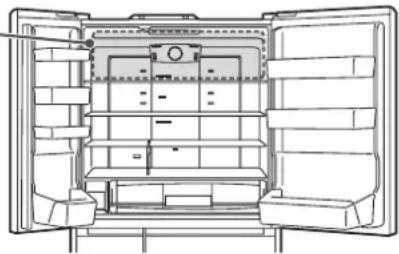
Photocatalyst & LED light Due to lights from LED lights and the effect of photocatalyst, odorous substances of foods and ethylene gas from vegetables are converted into carbon dioxide to restrict activities of the enzymes. The LED light illuminates the Vacuum Case when a door of the refrigerator is opened. Antioxidation Fresh Cassette Be sure to peel off the seal before use. → Pg.47 Antioxidant constituents and hot flavor are released from the Cassette when the Vacuum Compartment is in a vacuum state so as to preserve nutrients and keep freshness. ※ It is not required to replace it periodically. Handle Vacuum Case (With an aluminum tray) Vacuum Pump Vacuum release valve (in blue) Raise the handle to unlock it. The vacuum will be released by the vacuum release valve. Hissing sound is generated when releasing the vacuum.When opening/closing the door of the Vacuum Case
When opening the door When closing the door
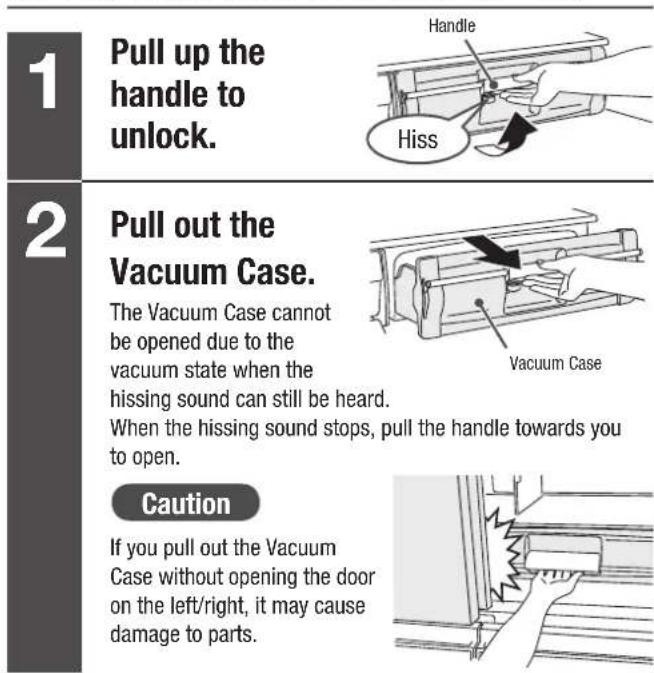
text_image
1 Pull up the handle to unlock. 2 Pull out the Vacuum Case. The Vacuum Case cannot be opened due to the vacuum state when the hissing sound can still be heard. When the hissing sound stops, pull the handle towards you to open. Caution If you pull out the Vacuum Case without opening the door on the left/right, it may cause damage to parts.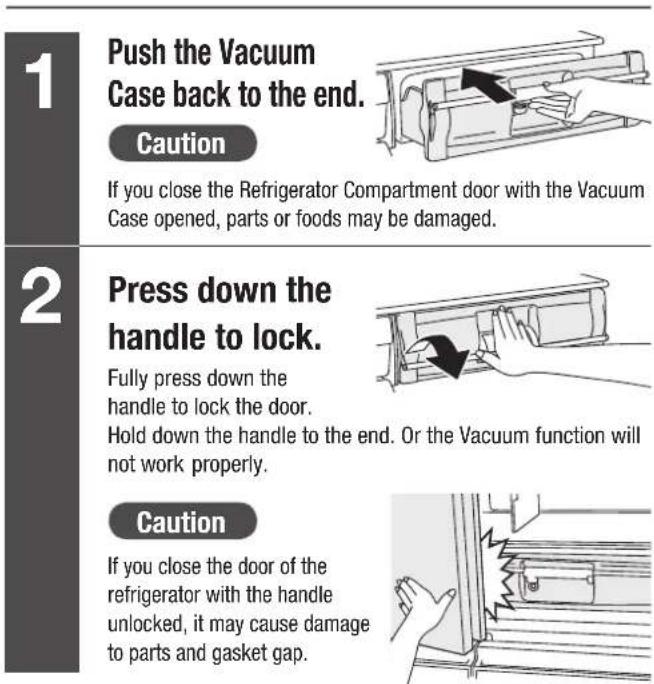
text_image
1 Push the Vacuum Case back to the end. Caution If you close the Refrigerator Compartment door with the Vacuum Case opened, parts or foods may be damaged. 2 Press down the handle to lock. Fully press down the handle to lock the door. Hold down the handle to the end. Or the Vacuum function will not work properly. Caution If you close the door of the refrigerator with the handle unlocked, it may cause damage to parts and gasket gap.Notice
● The vacuum pump is activated when the door of the Refrigerator Compartment is closed, with the Vacuum Case closed and the handle locked.
● Sound occurs upon start of the vacuum pump, which is a normal event.
The vacuum pump requires about 3 minutes to produce a vacuum after its activation. No hissing sound comes out when the Vacuum Case is opened within 3 minutes. Always wait for 3 minutes or longer before checking vacuum state.
- Adopting indirect cooling, the Vacuum Compartment requires longer time than other compartments to cool food.
- In the dark, you may see the light of LED light through the door gaskets of the Refrigerator Compartment while the photocatalyst function works.
Request
- If the antioxidant Antioxidation Fresh Cassette is dirty, wring out a wet cloth and use it to wipe it off.
Caution
- Do not rinse the Antioxidation Fresh Cassette in water. In case it is rinsed, dry it completely before use.
- Do no smell the Antioxidation Fresh Cassette directly. It may be irritating to the nose.
● Do not disassemble the Antioxidation Fresh Cassette.
1
Touch button on the Open Button to turn on the indicator lamp
All indicator lamps turn on, and then the current settings are displayed.
2
Touch 📄 on to change the settings as you like
The display switches in sequence as shown below every time the button is touched. The temperature is set to “-1°C” before shipping.
Caution
● The display will be turned off after about 40 seconds for energy saving, but the function that is set once will remain effective.

flowchart
graph LR
    A["All the lamps off."] --> B["-1°C (Factory setting)"]
    B --> C["(Non-vacuum) (Subzero)"]
    C --> D["+1°C (Subzero)"]
    D --> E["+1°C (Subzero)"]
    E --> F["+1°C (Subzero)"]
    F --> G["+1°C (Subzero)"]
    G --> H["+1°C (Subzero)"]
    H --> I["+1°C (Subzero)"]
    I --> J["+1°C (Subzero)"]
    J --> K["+1°C (Subzero)"]
    K --> L["+1°C (Subzero)"]
    L --> M["+1°C (Subzero)"]
    M --> N["+1°C (Subzero)"]
    N --> O["+1°C (Subzero)"]
    O --> P["+1°C (Subzero)"]
    P --> Q["+1°C (Subzero)"]
    Q --> R["+1°C (Subzero)"]
    R --> S["+1°C (Subzero)"]
    S --> T["+1°C (Subzero)"]
    T --> U["+1°C (Subzero)"]
    U --> V["+1°C (Subzero)"]
    V --> W["+1°C (Subzero)"]
    W --> X["+1°C (Subzero)"]
    X --> Y["+1°C (Subzero)"]
    Y --> Z["+1°C (Subzero)"]
    Z --> AA["+1°C (Subzero)"]
    AA --> AB["+1°C (Subzero)"]
    AB --> AC["+1°C (Subzero)"]
    AC --> AD["+1°C (Subzero)"]
    AD --> AE["+1°C (Subzero)"]
    AE --> AF["+1°C (Subzero)"]
    AF --> AG["+1°C (Subzero)"]
    AG --> AH["+1°C (Subzero)"]
    AH --> AI["+1°C (Subzero)"]
    AI --> AJ["+1°C (Subzero)"]
    AJ --> AK["+1°C (Subzero)"]
    AK --> AL["+1°C (Subzero)"]
    AL --> AM["+1°C (Subzero)"]
    AM --> AN["+1°C (Subzero)"]
    AN --> AO["+1°C (Subzero)"]
    AO --> AP["+1°C (Subzero)"]
    AP --> AQ["+1°C (Subzero)"]
    AQ --> AR["+1°C (Subzero)"]
    AR --> AS["+1°C (Subzero)"]
    AS --> AT["+1°C (Subzero)"]
    AT --> AU["+1°C (Subzero)"]
    AU --> AV["+1°C (Subzero)"]
    AV --> AW["+1°C (Subzero)"]
    AW --> AX["+1°C (Subzero)"]
    AX --> AY["+1°C (Subzero)"]
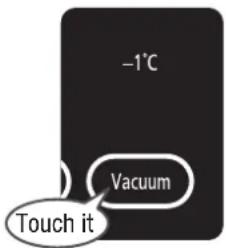
text_image
-1°C Vacuum Touch it※The above values are obtained with an ambient temperature of 30^ C, the temperature in the Vacuum compartment in a stable state with no food stored and no door opened.
Settings and food stored
Vacuum
-1°C
(About -1°C)
Vacuum OFF
+1°C
(About +1°C)
OFF
(Non-vacuum)
(About -1°C)
The following foods should be stored at “-1°C” setting.
● Meat, processed meat

● Fish, seafood, boiled fish paste

This setting is also suited for thawing. Foods high in water content may freeze.
The following foods should be stored at “+1°C” setting.
● Dairy products
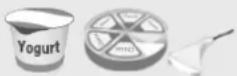
● Food which form air bubbles inside if frozen

Yogurt, cheese etc. Tofu, konnyaku, deep-fried tofu,
string konnyaku, boiled eggs etc.
● Precut vegetables and fruits ● Others

Fresh vegetables such as salad / macrophyll & fruits such as orange / kiwi fruit

Vegetables in sealed bags or airtight containers, coffee beans, tea leaves etc.
The vacuum function/photocatalyst function is disabled. This setting is recommended to store food in “sealed bags” or “sealed container s” which requires caution in storing. Foods high in water content may freeze because this is a regular ice-temperature compartment.
Food and container for which care needs to be taken during storage
● Food contained in a sealed bag
The bag may be inflated during storage, which could result in crushing of other stored food.
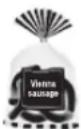


Vienna sausage, sliced cheese etc.
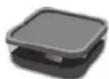
● Plastic airtight container
The lid of the container may become loose or may not stay in place during storage. Be careful when you take out the container.

Food which are not suitable for storage
● Vegetable sensitive to low temperature
The surface of the vegetable may deteriorate due to low temperature. Store it in the Vegetable Compartment.

Eggplant C

Okra, asparagus, ginger, and green pepper
Notice
Caution
● The vacuum effect will not be changed even if foods are wrapped.
● Foods high in water content may freeze if ambient temperature is low.
- The temperatures of the Vacuum Compartments also change if the temperature of Refrigerator/Freezer Compartment is set to “■■■” or “■”.
Request
Dew and/or frost may occur in the Compartment due to moisture contained in foods or in the air because the Vacuum Compartment is sealed.
● Wipe dew and/or frost off with a soft cloth wet by lukewarm water.
● Wipe water or soup spilled in the compartment soon, if any.
※ A water droplet and/or frost won't have a bad impact on performance.
Dew and/or frost

FREEZER COMPARTMENT

text_image
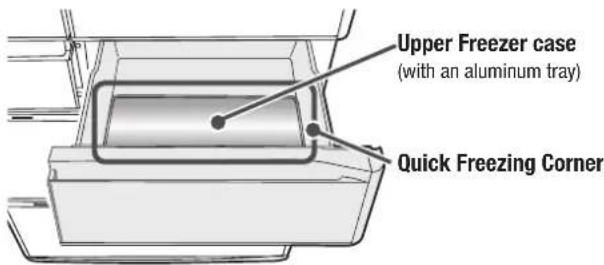
Upper Freezer Lower FreezerUsing the Upper Freezer
With Quick Freezing System, all the moisture, natural nutrients and good flavor in the foods are preserved in an instant. Pg.55
It is recommended to use this compartment when freezing meat and/or fish quickly.
text_image
Upper Freezer case (with an aluminum tray) Quick Freezing CornerStored foods
| Upper Freezer case | Freezing bag, airtight container, etc. Space for small-item and frozen food, etc. | |
| Quick Freezing Corner | When freezing meat or fish quickly | |
Using the Lower Freezer
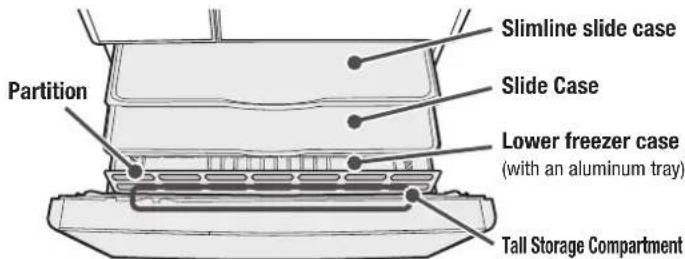
3-layer freezer case provides you with large storage space compartment and convenient reach of your freeze food items.
It is suitable for storing the food preserved for a long time and the food that melt easily such as ice cream.
text_image
Partition Slimline slide case Slide Case Lower freezer case (with an aluminum tray) Tall Storage Compartment- Move the aluminium tray in the Upper Freezer to the left side of the Slimline slide case, as it can be used as the Quick Freezing Corner.
Caution
- Do not remove the Slimline slide case and the partition.
Stored foods
| Slimline slide case | Small-item and frozen food, etc. |
| Slide Case | Freezing bag and airtight container etc. |
| Lower freezer case | Frozen food and bread ice cream etc.Tall Storage Compartment PET bottle for freezing, etc. |
Caution on how to store foods
Store foods properly depending on the height of them.
The door will not be closed completely, which leads to inefficient cooling action, and which may cause food deterioration or damage to the cases. Keep the food off from the upper slimline case and/or the slide case.
Guideline for height
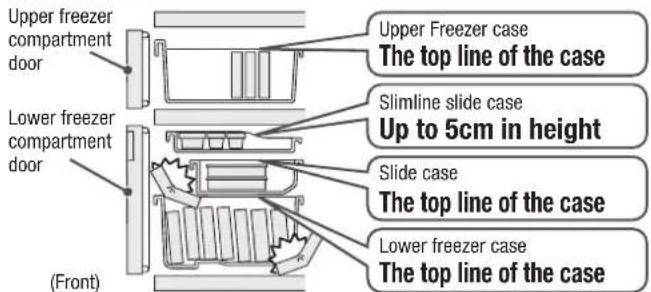
text_image
Upper freezer compartment door Lower freezer compartment door (Front) Upper Freezer case The top line of the case Slimline slide case Up to 5cm in height Slide case The top line of the case Lower freezer case The top line of the case- Do not store any 500ml PET bottle in the Slimline slide case. It may not be taken out because it expands when it is frozen.
- Do not use with the slide case removed. Food may drop to the inner part of the case, and as a result, the door may not close completely.

text_image
Tall Storage Compartment up to the height of 23.5 cm Slimline slide case Slide Case- When storing tall food in the tall storage Compartment, make sure that it does not contact with the Slimline Slide Case and/or the Slide Case.
● Store only food which can be frozen such as PET bottle which can be stored in freezer.
1
Touch Button on the Open Button to turn on the indicator lamp.
All indicator lamps turn on, and then the current settings are displayed.
2
Touch 📄️ button to set the temperature as you like
Each time you touch the button, the corresponding indicator lamp changes in the figure on the right:
The temperature is set to “■■” before shipping.
※ The temperatures are standard values under the specific condition (the surrounding temperature of 30^ C, no food stored, door closed and the temperature in the refrigerator is steady).
- Select “■■” in ordinary usage. The temperature may change depending on the operation states.
For more information about the panel for operation.→ Pg.63
Notes: For the Freezer Compartment (“■■■” Lower temperature freezing), food is stored at a lower temperature than the conventional freezing temperature. The energy consumption is approximately 20% higher than that for the conventional freezing operation.
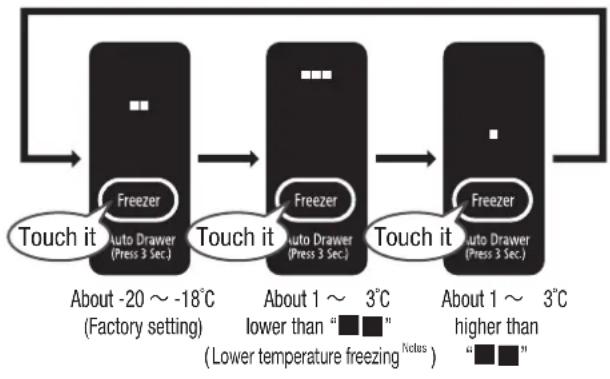
flowchart
graph LR
    A["Touch it"] --> B["Freezer"]
    B --> C["Touch it"]
    C --> D["Freezer"]
    D --> E["Touch it"]
    E --> F["Freezer"]
    style A fill:#000,stroke:#fff,color:#fff
    style B fill:#000,stroke:#fff,color:#fff
    style C fill:#000,stroke:#fff,color:#fff
    style D fill:#000,stroke:#fff,color:#fff
    style E fill:#000,stroke:#fff,color:#fff
    note1["About -20 ~ -18°C (Factory setting)"]
    note2["About 1 ~ 3°C lower than “■■” (Lower temperature freezing nodus)"]
    note3["About 1 ~ 3°C higher than “■■”"]
Notice
- If operating the refrigerator for a long time with the Freezer Compartment “■■■” selected, ice cream etc. may become hard or it may take a longer time to thaw food.
Quickly freezing foods (Quick Freezing)
1
Place the food wrapped with plastic film on the aluminium tray in the upper Freezer.
Dividing food into small pieces not only makes them freeze soon, but also be taken out easily.
Quick Freezing Corner

natural_image
Diagram of a mechanical device with internal components and alignment lines (no text or symbols)Notice
- Move the aluminum tray in the Upper Freezer to the left side of the Slimline slide case in the Lower Freezer, as it can be used as Quick Freezing Corner.
2
Touch Button on the Open Button to turn on the indicator lamp.
All indicator lamps turn on, and then the current settings are displayed.
3
Touch 📄 to turn on the “Freezer” indicator lamp.
“Freezer” indicator lamp continues to be lit during the operation, and other indicator lamps will be turned off in about 40 seconds.
The operation will end automatically in about 120 minutes, and "Freezer" indicator lamp will be turned off.
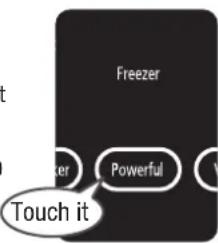
text_image
Freezer Powerful Touch itTo cancel it
Touch button on the Open Button to turn on the indicator lamp, and touch
Powerful button to turn off "Freezer" indicator lamp.
Notice
- Freezer compartment is cooled preferentially in the "Freezer" operation. For that reason, temperature of the Refrigerator Compartment may rise if opening/closing the Refrigerator Compartment door frequently.
- Warm food such as rice can be easily frozen by this function. Make sure that you never burn yourself. when putting hot food in. It is recommended to put it in after it is cooled down to the temperature where you can hold it with your hand.
- Touching [icon] in again within 60 minutes after the end of the "Freezer" operation, the lamp is illuminated, but the "Freezer" operation does not start. The operation will start after 60 minutes pass.
● Make sure to wrap the food with plastic film to prevent it from sticking on the aluminium tray.
ICE COMPARTMENT (AUTOMATIC ICE MAKER)
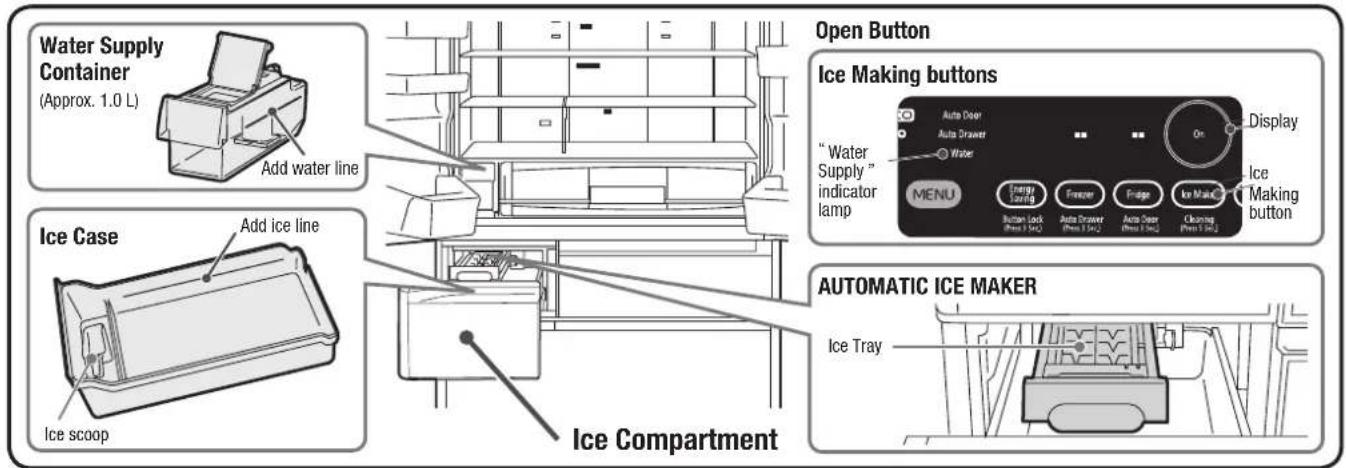
text_image
Water Supply Container (Approx. 1.0 L) Add water line Ice Case Add ice line Ice scoop Open Button Ice Making buttons "Water Supply" indicator lamp Display ON MENU Energy Lending Freezer Fridge Ice Make Cleaning Press 5 sec2 Auto Driver Press 5 sec2 Auto Driver Press 5 sec2 Ice Making button Automatic ICE MAKER Ice TrayHow to make Ice
| 1 | Touch button on the Open Button to turn on the indicator lamp. All indicator lamps turn on, and then the current settings are displayed. |
| 2 | Touch to turn on “On” indicator lamp. |
| 3 | Take off the Water Supply Container.When the “Water” indicator lamp is lit or the water level reaches to the “Add water line”, replenish water. |
| 4 | Open the lid and add water.Water level can not exceed “Container-full line”.※ Do not pour water into it beyond the full water line. |
| 5 | Replace the Water Supply Container.Push it straight beyond the “Container set position” line completely.Water will not be supplied until the water supply container is pushed to the end.※ Water may spill out the water supply container is inclined. Wipe off spilled water immediately. |
| Ice-Making starts automaticallyIce cubes are stored in the Ice Case. 12 pieces of ice cubes are made by one ice-making operation. |
| 1 | Touch button on the Open Button to turn on the indicator lamp. All indicator lamps turn on, and then the current settings are displayed. | |
| 2 | Touch button to turn on “On” indicator lamp. | 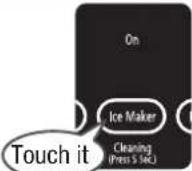 |
| 3 | Take off the Water Supply Container.When the “Water” indicator lamp is lit or the water level reaches to the “Add water line”, replenish water. |  Add water line Add water line |
| 4 | Open the lid and add water.Water level can not exceed “Container-full line”.※ Do not pour water into it beyond the full water line. | 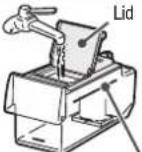 Container-full line Container-full line |
| 5 | Replace the Water Supply Container.Push it straight beyond the “Container set position” line completely.Water will not be supplied until the water supply container is pushed to the end.※ Water may spill out the water supply container is inclined. Wipe off spilled water immediately. | 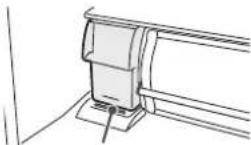 Container set position Container set position |
| Ice-Making starts automaticallyIce cubes are stored in the Ice Case 12 pieces of ice cubes are made by one ice-making operation. |  | |
Notice
It may take longer time to make ice in the following cases:
- It is used for the first time (it may take 24 hours or more).
- It is set to the "Energy Saving" mode.
• The door is opened/closed frequently.
• Large volume of foods is stored in the refrigerator at a time.
• In case of power outage. - With the low ambient temperature in winter, etc.
• After the ice tray is cleaned. - When the door of the Freezer Compartment / Ice C ompartment is not closed completely.
- When the temperature of the Freezer Compartment is set to " ■".
Perform "Ice Maker Cleaning" when making ice for the first time or for the first time in a week or more. Pg.66
Request
● WARNING: fill with potable water only.
● Water for ice making is according to your drinking standard. Quality of tap water may vary in different countries. Please check and verify with your local authority.
● Change water and clean the container at least once a week for hygiene purposes.
- If the ice made of mineral water containing a lot of mineral ingredients is put into water, white powder may come out, however this is due to those mineral ingredients and harmless.
● Furthermore, these types of water are easily contaminated with bacteria. Please wash the container usually once 3 days.

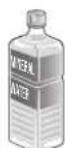
Mineral water
(Hardness: 100mg/L or less)
Filtered water or boiled water
Well water
(Required to satisfy the appropriate
water quality standard)
- Do not use the following ones because they may cause malfunction, deformation or sticking ice.



Juice drink Sports drink Carbonated drink Tea
Quick Ice Making
1
Touch Button on the Open Button to turn on the indicator lamp.
All indicator lamps turn on, and then the current settings are displayed.
2
Touch 📄Vak on to turn on “Quick” indicator lamp.
Ice cubes are made in a shorter time than that of "On" operation.
12 ice cubes are made by one ice-making operation.
"Quick" indicator continues to be lit during the "Quick" operation. Other indicator lamps will be unlit about 40 seconds later.
“Quick” operation ends automatically in about 7 hours, and it is changed to “On” mode.
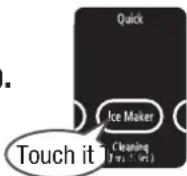
Water Supply indicator
Stop Ice Making
1
Touch button on the Open Button to turn on the indicator lamp.
All indicator lamps turn on, and then the current settings are displayed.
2
Touch 📄 to turn on "Off" indicator lamp.
Auto Ice Making is stopped and no ice cubes are made.
※ If you set to "Off" for 1 week or more,
maintain the Automatic Ice Maker.
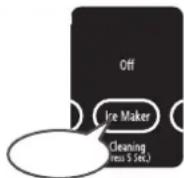
→Pg.66, 67
Notice
● "Off" indicator lamp won't turn off.
“Water” indicator lamp comes on when water in the water supply container is getting low. Replenish the container with water.
- While the “Water” indicator lamp is on, the Ice Making function doesn’t work even if the “On” and “Quick” is set.

text_image
Light ON Water MENU Open ButtonNotice
● "Water" indicator lamp turns off once (for up to 3 hours) when the left door of the Refrigerator Compartment is opened and closed while the indicator lamp is on, and it turns on again if no water is added to replenish the container.
● "Water" indicator lamp remains off when "Off" is selected for automatic ice making.
Caution
● "Water" may come on regardless of water level if the water supply container is not placed properly. Push in the container straight and completely if the indicator lamp comes on.
When the "On" indicator lamp is blinks
The ice tray may come into contact with foods within the Ice Case.
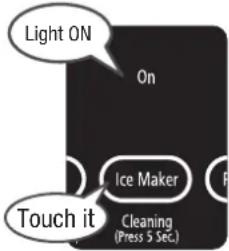
text_image
Light ON On Ice Maker Touch it Cleaning (Press 5 Sec.)Request
Empty out the Ice Case once, and then start the "Ice Maker Cleaning". → Pg.66
- Do not store any food such as frozen food other than ice in the Ice case when making ice automatically.
(Otherwise, it may not make ice, or the door may not open or parts may damage because the food interferes with the parts of the Automatic ice maker.)
Detecting Lever

Frozen food
Is any frozen food stored in the inner part of the Ice case?
Detecting Lever
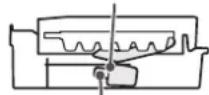
Ice scoop
Is the Ice scoop placed in the given place?
Stored ice amount and ice-making time of the Ice Case
| Stored ice amount | Normal operation | About 120 pcs |
| Ice is leveled | About 150 pcs | |
| Required time for an ice making operation | Normal “On” | About 110 minutes ~ 140 minutes |
| “Quick” | About 80 minutes |
※ The above values are obtained with an ambient temperature of 30^ C, the temperature in each compartment set to “■■” and no door opened/closed.
Notice
- Limit line of stored ice amount represents the guide line of stored ice amount when the Automatic Ice Maker makes ice with ice leveled.
If the ice is stored partially, the detecting lever may contact the ice early. As a result, the Automatic Ice Maker may stop making ice before the amount of stored ice is enough.
Request
● Gently open and close the door of the Ice Compartment, otherwise ice may fall out of the ice case onto the lower freezer.
VEGETABLE COMPARTMENT

text_image
Vegetable CompartmentPhotocatalyst & LED light
Due to LED lights and the effect of photocatalyst, odorous substances of foods and ethylene gas from foods are converted into carbon dioxide to maintain freshness.
Moisture unit
Upper Case
Lower Case
Glass partition
Locking handle
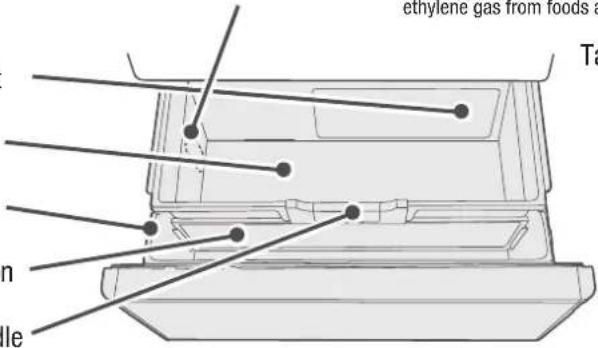
text_image
ethylene gas from foods a Tal n leTall Storage Compartment Upper space
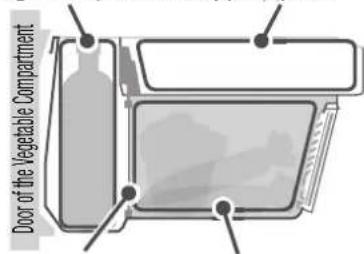
text_image
Door of the Vegetable CompartmentGlass partition Aero-care Zone
Caution
- Do not remove the moisture unit and photocatalyst from the lower case.
● The glass partition can be removed.
Stored foods
| Upper space | Unfi nished vegetables, small vegetables, fruits, etc. | |||||
| Tall Storage Compartment | Tall vegetables, 2L PET bottle, etc. | |||||
| Aero-care Zone | Leaf vegetables (spinach, Japanese Mustard Spinach etc.), large vegetables (cabbage, lettuce), etc. | |||||
 | 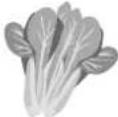 |  | 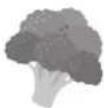 |  |  | |
Request
● Since the humidity in the Vegetable Compartment is high, dew may be formed around the Upper Case, Upper Case, on the ceiling of the Vegetable Compartment and surface of vegetables, depending on the volume or type of vegetables, but it is normal. Among others, the humidity is higher within the Aero-care Zone, which results in more amount of dew condensation. Accumulated water may cause damage to food, so use a soft cloth to wipe it off.
- If the moisture unit is blocked by a bag or container of foods, dew is formed easily. Move out the bag or container of foods from there.
● If you feel uneasy about dew condensation, wrap the foods.
- When storing dried foods such as rice, laver and others in the Vegetable Compartment, put them in a sealed container (bag) and then place them in the Vegetable Compartment. Dried foods may absorb the moisture.
Caution on how to store foods
Store foods properly depending on the height of them.
The door will not be closed securely, which leads to inefficient cooling action. Or, it may cause damage of food or each case.
Keep foods away from the bottom of the Upper case.
Guideline for height
Door of the Vegetable Compartment

text_image
Upper Case Height of stored food Lower Case (Front)- Do not pile up foods higher than the case.
- The door will not be closed securely, which leads to ineffi cient cooling action.
- It may cause damage of food, case or glass partition.
- Upper case doesn't be closed securely, so that the Photocatalyst Preservation may have no effect.
● Place too many foods/beverages forcedly in the Tall Storage.
- Some PET bottle can 't be stored, depending on its type.
- Do not put too many foods, beverages, etc. in it. The glass partition may be broken.
When opening it When closing it
1
Push the lock handle at the center of the Upper case to slide it to the end.

natural_image
Line drawing of a hand pressing down on a mechanical component with an arrow indicating direction (no text or symbols)Caution
The upper case wbnslide to the end when you don't push the lock handle.
1
Draw the lock handle at the center of the Upper case, and then slide it to the end to lock until it snaps.

text_image
Snap!※ When the Vegetable Compartment door is closed, the Upper case goes back to the original position and is locked.
To cool it more [Vegetable Compartment (MAX)]
1
Touch button on the Open Button to turn on the indicator lamp.
All indicator lamps turn on, and then the current settings are displayed.
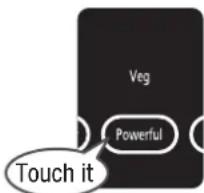
2
Touch I even on to turn on
"Veg".
Foods are stored under the temperature lower than usual (approx. 1 to 5°C rather than approx. 3 to 7°C.)
※ The above temperatures are standard values for the Vegetable Compartment under the condition that the refrigerator is stable with no food stored and the door closed, at ambient temperatures of 30^ C.
Caution
text_image
Veg Powerful Touch it- For energy saving, the display will be turned off after about 40 seconds, but the setting remains active until it is released.
To cancel it
Touch button on the Open Button to turn on the indicator lamp, and then touch button to turn off the "Veg" indicator lamp.
Notice
- If foods are kept in the "Veg" for a long time, vegetables high in water content may freeze. Release the setting of "Veg".
- You cannot set both "Veg" and "Fridge"/"Freezer" concurrently.
If it is switched to “Freezer”/“Fridge” mode during the “Veg” mode, it will not return to the “Veg” mode by itself after “Freezer”/“Fridge” is ended automatically. Set it to the “Veg” again. - When setting "Energy Saving" mode during the "Veg" mode, the cooling function is shifted to weaker cooling effects from the "Veg". Pg.60
- When the ambient temperature is low, the temperature in the case may be lower.
● The temperature of the Tall Storage Compartment is a little higher than other spaces.
Request
- If vegetables sensitive to low temperature such as eggplant and cucumber, etc. are stored with the setting "Veg", they may have pits on the surface or get discolored. In that case, release the setting of "Veg".
- While it is set to "Veg", there may be more dew condensation in the Aero-care zone. If it is undesirable that dew adheres to the stored vegetables, release the setting of "Veg".
Vegetable sensitive to low temperature

Eggplant

Cucumber

Okra, asparagus, ginger, and green pepper
VARIOUS FUNCTIONS
Setting "Energy Saving" mode
Setting to “Energy Saving” mode (Save, Trip), the operation is changed to the following modes for energy saving.
| Save (Energy Saving) |  | Save electricity by lowering the cooling capability of each compartment.Turning down the LED lights in the Refrigerator Compartment, the Vacuum Compartment and the Vegetable Compartment for power saving if the door of the Refrigerator Compartment is left open for more than 30 seconds.※ If it is set to"Save" mode, the function continues to work until the setting is released. |
 | Cooling down the inside of the refrigerator slowly leads to more reduction of power consumption.(Set it to this mode when you go out for a long time such as travel).※ When the door is opened/closed after it is set to"Trip", it will be switched to "Save" mode. |
1
Touch button on the Open Button to turn on the indicator lamp.
All indicator lamps turn on, and then the current settings are displayed.
2
Touch 📄 button to change the settings as you like.
Each time you touch the button, the corresponding indicator lamp changes in the order shown below: The Energy Saving mode is set to "Off" (all lamps off) before shipping.

flowchart
graph LR
    A["All the lamps off."] --> B["Save"]
    B --> C["Trip"]
Notice
- When both “Save” / “Trip” and “Quick (about 7 hours)” / “Freezer (about 120 minutes)” / “Fridge (about 50 minutes)” modes are set concurrently, “Quick” / “Freezer”/“Fridge” function is performed first, and it will be set to “Save” or “Trip” mode after the operations are completed. Pg.51, 55, 57
- When both "Save" / "Trip" and "Veg" modes are set concurrently, the cooling function will be weakened from the "Veg". Pg.59
- When the temperature in the “Freezer Compartment” / “Refrigerator Compartment” is set to “■”, it will not be weakened so as to maintain the freshness of foods.
Caution
● Automatic temperature control lowers cooling loads, which may cause ice cream to get soft and frost to form on frozen food. It also requires longer freezing time and ice making time.
"eco" Operation indicator lamp
When the refrigerator is operated in a manner to reduce power consumption, such as Frost Recycle Cooling, the indicator lamp is automatically lit to indicate that the refrigerator is operating in the energy saving mode.
Notice
If [“eco” Operation indicator lamp] isn’t illuminated, check the following things.
- Immediately after it is installed, or plentiful foods are stored at a time
• If the door is frequently opened / closed - If the door is not closed completely because any food/bag is wedged between the door and the body of the refrigerator.
- "Freezer," "Fridge," "Quick" or "Veg" is set.
- The ambient temperature of the refrigerator is about 35^ or higher.

text_image
"eco" Operation indicator lamp eco Auto Dra Auto Dra MENUThis can prevent erroneous operation of the Open Button or misuse by children.
When this indicator lamp (Lock of the Open Button) is illuminated, any other portion of the Open Button will not be activated by touching it.
1
Touch button on the Open Button to turn on the indicator lamp.
All indicator lamps turn on, and then the current settings are displayed.
2
Press down 3 seconds or more until the preset sound is heard.
Lock of the Open Button is changed to "On" or "Off". It is set to [π0] "Off" before shipping.
| Setting of the Open Button's lock | “On” (locked) | “Off” (unlocked) |
| “ Indicator lamp” | On | |
| Preset sound | Long beep 2 beeps | |
Notice
● Electric pulling-out operation will not be disabled even if the Lock function on the panel for operation is set as On.
When stopping the setting of Auto Door and Auto Drawer (electrical drawer compartment), unlock the Open Button, and touch the fridge
or 📄 button for 3 seconds or more until it beeps twice. →Pg.48, 49
- When connecting/disconnecting the power plug or after recovering from electric power failure, lock of the panel for operation may be released.
Door Alarm
When the door is opened for more than 1 minute, sound and light occur indicating the door is open as shown in the table below.
For R-E6800 type, no Door Alarm is installed in the Upper Freezer.
| Duration when door is open | 1 minute 2 minutes 3 minutes | ||
| Alarm sound | Long beep (3 beeps) Long beep | (5 beeps) | Long beep (continuously), Louder |
※ When the door is left open for one minute or more, the indicator lamp blinks and the characters on the Open Button is illuminated.
※ From 30 seconds onwards with the door opened, the Door Alarm sounds only when the energy saving mode is set. (The indicator lamp blinks when the door is left open for one minute or more)
※ When the indicator lamp on the display area blinks due to the Door Alarm function, the Open Button will not be activated by touching it.
Door Alarm and volume adjustment of the operation sound
You can set the sound level of the alarm louder or no alarm sound.
1
Touch button on the Open Button to turn on the indicator lamp.
All indicator lamps turn on, and then the current settings are displayed.
2
Press down 📄 on for 3 seconds or more until the preset sound is heard.
The volume level of the operation sound is changed from "Standard" to "Louder" or "Sound off". Repeat the change of settings to set the operation sound you like (see the table shown below). The sound is set to "Standard" before shipping.
| Volume level | Standard Louder Sound off Standard | |||
| Preset sound | — | 2 long beeps | Long beep 2 steps | |
(Factory setting)
Notice
- It is impossible to adjust the volume level of either door alarm or operation sound only.
- When the Door Alarm is disabled, characters on the Open Button no longer blink.
Even if the volume level is set to "Sound off", the alarm of the Ice Maker Cleaning and the operation sound when the Auto Door and the Auto Drawer are set to "ON" will sound.
- When connecting/disconnecting the power plug or after recovering from electric power failure, it will return to the standard setting where the Door Alarm sounds.
VARIOUS FUNCTIONS (CONTINUED)
Set the condensation prevention heater to MIN. (Swing partition/Partitioning iron plates)
Setting the condensation prevention heater to MIN saves energy.
When dew is formed in the swing partition or the partitioning iron plates, set it to the standard.
The temperature settings for the swing partition and the partitioning iron plates can be adjusted by four levels (1 to 4), and level 4 is the most energy saving.

text_image
Swing partition Partitioning iron plates| MIN setting of the heater | Standard → | MIN setting level 1 → | MIN setting level 2 → | MIN setting level 3 → | MIN setting level 4 → | Standard |
| Preset sound | — | Long beep Long | beep (2 beeps) Long beep (3 beeps) Long beep (4 beeps) 2 beeps | |||
Setting the swing partition
1
Open the door of the Lower Freezer Compartment.
2
Touch MENU button on the Open Button to turn on the indicator lamp.
All indicator lamps turn on, and then the current settings are displayed.
3
Press down Powerful button 3 seconds or more until the preset sound is heard.
The setting of MIN level of the dew condensation prevention heater will be switched. Repeat the above-stated operation to set it to the level you prefer (see the table above).
4
Close the door of the Lower Freezer Compartment.
Setting the partition iron plate
1
Open the door of the Lower Freezer Compartment.
2
Touch button on the Open Button to turn on the indicator lamp.
All indicator lamps turn on, and then the current settings are displayed.
3
Press down 3 seconds or more until the preset sound is heard.
The setting of MIN level of the dew condensation prevention heater will be switched. Repeat the above-stated operation to set it to the level you prefer (see the table above).
4
Close the door of the Lower Freezer Compartment.
Notice
● The setting will be returned to the standard when the power plug is disconnected and connected or power failure recovery takes place.
Fine adjustment of the temperature (Refrigerator Compartment / Freezer Compartment)
Temperature settings for Refrigerator and Freezer Compartments can be more finely adjusted by 11 levels. Usually it is recommended to use it at the setting of “■■”.
1
Open the door of the Lower Freezer Compartment.
2
Touch MENU button on the Open Button to turn on the indicator lamp.
All indicator lamps turn on, and then the current settings are displayed.
3
Press down 📄 on for 5 seconds or more until 1 beep is heard.
4
Close the door of the Lower Freezer Compartment.
5
Touch Fridge or 1000 ton to make an adjustment.
Each time you touch the button, the corresponding indicator lamp changes in the order shown below.

text_image
(■lighting ■blating ■Turn■ off) Indication lamp Setting MIN and under MIN MID. → → → → → → → MAX MAX and moreTo cancel
Follow the operations shown in Step 1, 2 and 3.
2 beeps sound and you can set the temperature by normal step (3 levels).
MAINTENANCE (REGULAR CHECK)

Warning
● Make sure to unplug the power plug when maintaining the refrigerator.
When dirt is found
● Wipe off it immediately. It is recommended to clean the hidden places once a year.
Power plug Once or twice a year
1
Unplug the power cord from the outlet.
If the dust on the power plug remains not cleaned, it may cause a fire.

2
Check the following matters.
• Is any damage found on the power cord?
- Does the power plug become hot?
※ If there is any abnormality, please consult with your dealer about it.
3
Remove the dust and wipe it with a dry cloth.
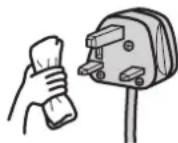
4
Connect the power plug firmly to a power outlet.

Surface of door Once a month
Wipe the surface of door using a soft cloth wet by lukewarm water, and then wipe off water with a dry cloth.
Remaining adhesives on glass surfaces, if any, can be removed clearly by using a plastic eraser to rub it and then wiping it off with a dry cloth.
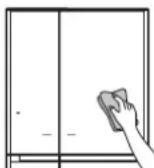
Door gaskets Once a month
Wipe it thoroughly because it can become easily dirty.

Caution
- Do not use the following items because it may cause damage and discoloration of the door, paintwork and plastic parts.
Alkaline and alkalescence detergent for kitchen, plate powder, powder soap, oil, hot water, scrubbing brush, acid, benzine, thinner, alcohol, and bleach, etc. - When using a chemical dustcloth, follow the instructions of it.
● Make sure to wipe off spilled cooking oil, citrus fruits juice and food soup. Because it may cause damage and discoloration of the door, paint work and plastic parts. - Do not wipe off lubricant applied to movable contact surfaces of cases and rails for the slide door.
- When a magnet or suction cup is attached on the side surface of the body or the surface of a door, it may leave some mark.
- When unplugging the power plug, the settings of the Open Button may be released. So check the settings.
- Do not use the following items because it may cause damage and discoloration of the door, paintwork and plastic parts.
Alkaline and alkalescence detergent for kitchen, plate powder, powder soap, oil, hot water, scrubbing brush, acid, benzine, thinner, alcohol, and bleach, etc. - When using a chemical dustcloth, follow the instructions of it.
- Do not wipe off lubricant applied to movable contact surfaces of cases and rails for the slide door.
- When a magnet or suction cup is attached on the side surface of the body or the surface of a door, it may leave some mark.
The back/floor of the refrigerator
Once or twice a year
1
Pull the leg cover and remove it.
Push it in from the front when installing it.

2
Float the Adjustable mounts from the floor and draw the refrigerator straight.
Lay the protection board etc. on the floor which can be easily scratched.
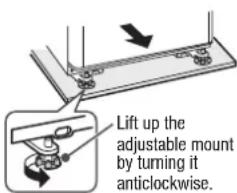
text_image
Lift up the adjustable mount by turning it anticlockwise.3
Wipe off dirt on the back of the refrigerator, duct on the side, wall and floor.
The back of the refrigerator easily becomes dirty because fine dust is accumulated on it by convection of air.

Duct on the side
Each shelf/pocket/case
Once per three months
Use a soft cloth wet by lukewarm water to wipe off.
For how to remove → Pg.68, 69

Request
- When the lower case of the Vegetable Compartment is washed with water, turn it upside down to drain water, and then wipe off water with a dry cloth. Don't use thick-pile toothbrush or scrubbing brush to wash. It may cause damage to case or moisture unit.
Liquid receivers
Once a month
Wipe off them if liquid collects and/or they becomes dirty.
Liquid receivers

1
Pull out the Vacuum Case.
For how to remove, Pg.68
Be sure to remove foods contained in the Vacuum Case.
2
Remove the Antioxidation Fresh
Cassette.
→ Pg.47
Wipe off dirt from the Antioxidation Fresh Cassette with a firmly wringed wet cloth.
3
Wipe off following parts with a soft cloth which is steeped in lukewarm water.
Aluminum Tray
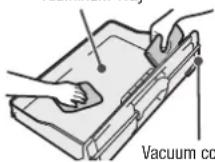
Vacuum Container
Vacuum Compartment
Gasket seat

4
Attach the Antioxidation Fresh Cassette to the Vacuum Case.
5
Attach the Vacuum Case.
For how to attach
→Pg.68
Caution
● Do not rinse the Antioxidation Fresh Cassette in water.
- Do not touch the glass on the ceiling in the compartment (photocatalyst & LED light) with a finger or do not rub it with a dry cloth. Use a wet cotton-tipped stick, etc. to remove dirt, gently, if any.
- If detergents and others except lukewarm water are used to clean the vacuum compartment gasket, the vacuum compartment gasket may be damaged, deformed or change in color, which may cause the vacuum state unable to keep well.
● Loosened vacuum compartment gasket or loose-fitting door of the Vacuum Case may cause the vacuum state unable to keep well.
When the Vacuum Compartment Gasket is dirt
1
Remove the vacuum compartment gasket from the Vacuum Case.
Grasp the tab of the vacuum compartment gasket on the observer's upper right and remove it by hand carefully.
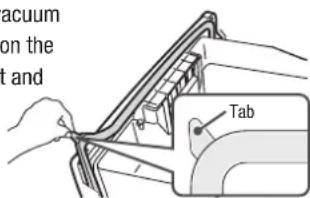
text_image
acuum on the t and Tab2
Rinse dirty portion in water using a soft sponge, etc.
※ Do not use the detergents, etc.

natural_image
Line drawing of hands holding a mechanical component (no text or symbols)
Groove for attaching the vacuum compartment gasket.
Wipe off dirt from the groove for attaching the vacuum compartment gasket.
3
Wipe off excess moisture with a dry cloth and dry it out naturally.
4
Attach the vacuum compartment gasket.
Align the tab to the notch accurately, and then combine them together.

Notch of the groove
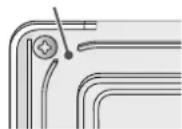
Auto Drawer
Clean the Auto Drawer unit when food falls onto or is caught in the upper part of the Auto Drawer unit and when liquid is deposited on the Auto Drawer unit.
1
Unplug the power plug.
2
Remove each case of the Lower Freezer or the Vegetable Compartment. → Pg.69
3
Remove all foods which drop or are caught in.
4
Wipe off deposited liquid soup using a soft and dry cloth.
Caution
● Make sure that water never splash to the Auto Drawer unit. Otherwise, it may cause malfunction.
- Do not disassemble the Auto Drawer unit. Otherwise, it may cause injury and/or malfunction.

Warning
● Make sure to disconnect the power plug from the power outlet before starting maintenance to avoid injury.
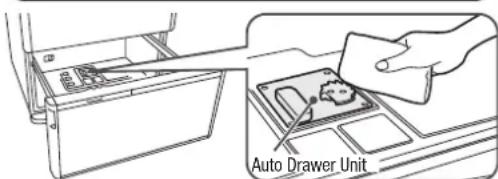
text_image
Auto Drawer UnitMAINTENANCE (CONTINUED)

Warning
- Do not place your hand in the mechanical section of the automatic ice maker. (Rotation of the ice tray may cause injury.)
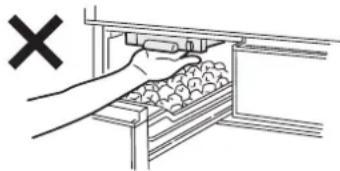
natural_image
Illustration of a hand inserting a tray into a storage unit with an 'X' symbol (no text or labels)Ice Maker Cleaning
When using for the first time
When not used for more than one week
Preparation
Be sure to check the followings before starting the operation.
Water supply container
• Water is filled in it up to the limit line.
- It is set correctly beyond the tank set position line.
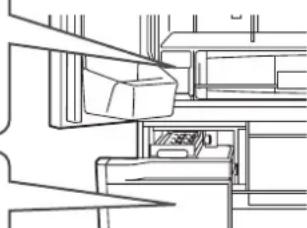
natural_image
Pure technical line drawing of a mechanical assembly without any text, numbers, or symbols1
Go to the next step after checking them.
Ice case
- If there remains ice, remove it.
2
Close all the doors.
Touch button on the Open Button to turn on the indicator lamp.
All indicator lamps turn on, and then the current settings are displayed.
3
Hold down 📞 on for 5 seconds or more until the alarm sounds.
When the 3 indicator lamps "Quick", "On" and "Off" start to blink and alarm starts to sound, stop holding the button.
"Ice Maker Cleaning" (water supply route) starts (for about 4 minutes).
- The indicator lamp will flash and the buzzer will sound for about 4 minutes.
- “Ice Maker Cleaning” can’t be interrupted.
- If you open any of the refrigerator doors during Ice Maker Cleaning, the cleaning may not work properly. Do not open or close the door until cleaning is completed.
- Door alarm sounds even if alarm is disabled. Pg.61
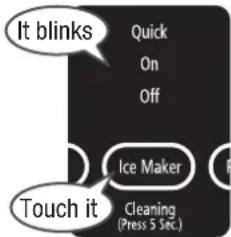
text_image
It blinks Quick On Off Ice Maker Touch it Cleaning (Press 5 Sec.)4
Place a clean towel, etc. on the bottom in the Ice Case so that the cutout of the Ice Case can be blocked after the alarm and blinking of the indicator lamp end.
Place a water-absorbing towel on the bottom in the Ice Case to prevent trapped water during the ice maker cleaning from spilling out of the cutout of the Ice Case.

text_image
Cutout Towel5
Wipe off water inside the Ice Case completely, and then set it to the Ice Compartment.
Remove the Ice Case, wipe off water inside the Ice Case, and then remove the towel. There is no problem with using water remaining in the water supply container, if any. After “Ice Maker Cleaning”, it is set to “On” mode, etc.
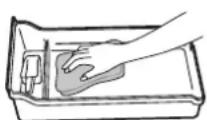
1
Remove the water supply container, and then the lid.
Take up the near side of the lid toward in the direction of the arrow, and then remove it.
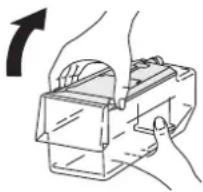
natural_image
Illustration of hands using a mechanical device to adjust or install a component (no text or symbols visible)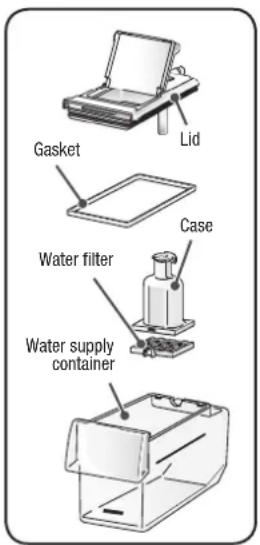
text_image
Gasket Lid Case Water filter Water supply container2
Remove the gasket from the lid and then the case.
Turn the case and remove it from the lid.
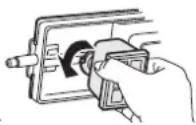
3
Remove the water filter from the case.
Pinch the tab of the water filter with fingers to unset it from the fork, and then remove the case.

4
Rinse each part of the water supply container in water.
Wash it with a soft wash sponge etc. Do not use the detergents etc.

Request
● Dry out the water filter to prevent molds and guck.
Notice
- Replace the water filter normally every 3 - 4 years.

5
Attach each part to the water supply container, pour water in and then set it.
Insert the lid from its rear side and close it in the direction of the arrow.

Notice
- Dechlorinated water such as mineral water, well water, filtered water, cool water after boiling and others tends to cause water stain / slime compared with tap water. So it is recommended to maintain once every 3 days.
- When the Ice Maker is not used for more than 1 week, dry out the water supply container, and then set it in place (dry out the water filter, among others).
When not used for more than 1 week, it is recommended to start ice
Maker Cleaning before use.
1
Touch button on the Open Button to turn on the indicator lamp.
All indicator lamps turn on, and then the current settings are displayed.
2
Touch 📂 on to turn on “Off” indicator lamp.
It stops water supply to the ice tray. ※ When "Off" indicator lamp blinks, wait for about 1 minute for it to turn on, and then follow the next steps.
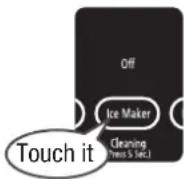
3
Open the door of the Ice Compartment, and take out the ice tray.
1 Push the level laterally. draw the frame.
3 Raise the cover (▲ part) in the direction of the arrow.
4 Remove the ice tray from the frame.

text_image
Ice tray Cover 3 2 Frame 1 Lever 44
Empty the ice tray and wash it lightly in the stream.
Do not use a sponge / cleanser, etc. Be sure not to scarify.
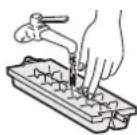
5
Open the Ice Compartment, and then attach the ice tray.
1 Set the ice tray
2 Hold down the cover to the end until it snaps.
3 Push the frame to the end until it snaps.
(Move the frame back and forth to check that it is fixed securely.)

text_image
2 Click 3 1 Click 3 iceNotice
- When the frame for the ice tray cannot be pushed into the back, the motor that drives the ice-tray may have operated. Remove the ice tray once and then push the frame alone into the back, and then touch 📣 Ice Maker button with all the doors closed to turn on "Off". After a while, the ice-tray driving motor gets ready, allowing you to mount the ice-tray.
6
Touch button on the Open Button to turn on the indicator lamp, and then touch Ice Maker button to turn on the "On" indicator lamp. Automatic Ice Making starts.
HOW TO REMOVE/ATTACH PARTS
Caution
● Before removing parts, take out all the foods on the parts.
- Do not remove parts except the ones listed here.
Please contact with a Hitachi customer service centre for cleaning such parts after removing them.
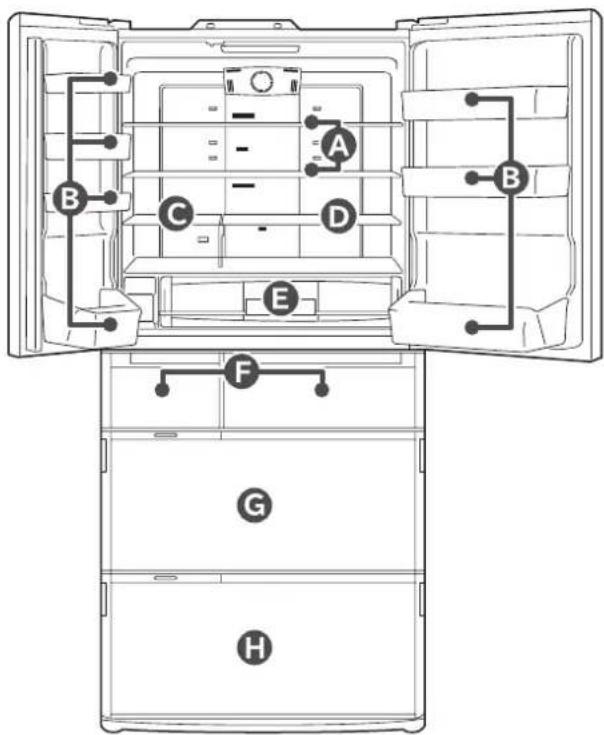
text_image
Diagram of a refrigerator interior with labeled compartments and electrical connections
Height adjustable upper and middle shelf (Glass shelf)

Slightly lift up the back of the shelf and draw it.

Forks of the shelf (Right / Left)

Raise the shelf as shown in figure, and turn it and remove it.
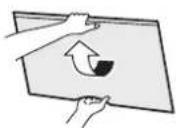
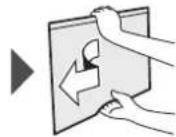
When installing the shelf, slide it until it reaches to the interior wall, then slightly lift up the back of the shelf and push it in.
(hitch the forks of the shelf to the parts on the back of the shelf)
Caution
Door may damage if drawing the shelf without turning it. Be careful to attach/remove the glass shelf because it is heavy. If it drops, it may break and cause bruise or injury.

Door pocket
Lift up the door pocket while tapping the left/right of its bottom surface, and remove it. (It is fixed a little tightly.)
Insert the door pocket fully to the end when installing it.

text_image
Tap TapCaution
If it drops, it may break and cause bruise or injury.

Fixed shelf
Draw the shelf, and pull off the 2 pins on the lower right and remove it.

text_image
Forks
Height adjustable lower shelf
Slightly lift up and pull out.

natural_image
Diagram of a mechanical assembly with a downward arrow indicating motion or force (no text or symbols present)Caution
If you pull out the shelf straight, it may hit the door.

Vacuum Case
How to remove How to attach
Pull out the Vacuum Case by slightly lifting up and moving up and down.
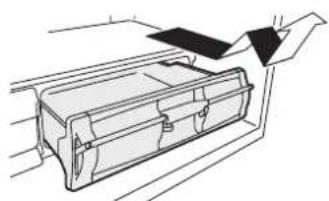
natural_image
Line drawing of a mechanical device with a handle and internal components (no text or symbols)Insert the Vacuum Case so that both right and left convex ribs on the case can slide under the guide rail of the Vacuum Container.
Lastly, hold down the handle to lock.
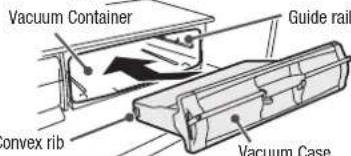
text_image
Vacuum Container Guide rail onvex rib Vacuum CaseRequest
Check that it is fixed properly by taking it in and out a few times.
F Ice Case (Ice Compartment) • Upper Freezer case (Upper Freezer)
Draw the door fully and lift up the case towards you.
Put the case bottom on the frame and set the case.
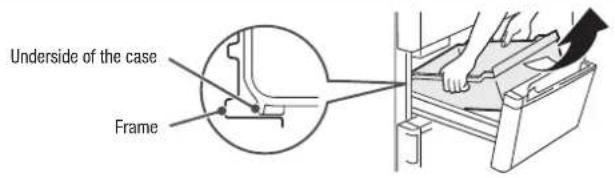
text_image
Underside of the case FrameG Slide case and lower freezer case (Lower Freezer)
1 Draw the door fully, and draw the Slimline slide case and the Slide case respectively.
Caution
- Do not remove the Slimline slide case.
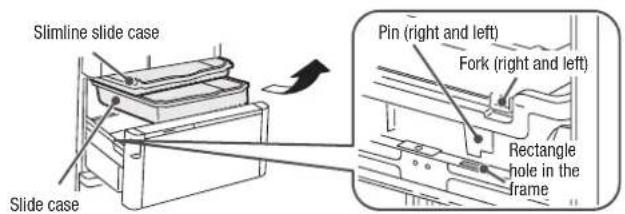
text_image
Slimline slide case Slide case Pin (right and left) Fork (right and left) Rectangle hole in the frame2 Lift up the Lower freezer case.

text_image
Lower freezer case FrameWhen installing it, insert the pins on the left/right of the Lower freezer case into the square holes on the frame to install it. Moreover, hitch the pins on the left/right of the Slide case to the outside of the Lower freezer case.
H Upper Case, Lower Case (Vegetable Compartment)
1 Draw the door fully and pull up the Upper Case as shown in the figure.
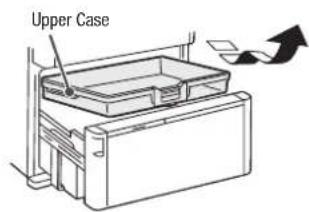
text_image
Upper Case2 Lift up both sides of the door toward you and draw it slowly, and then place it on the floor.

natural_image
Line drawing of a printer with a paper airplane inside (no text or symbols)Caution Ca
- Do not remove the door completely.
3 Lift up the Lower Case toward you.
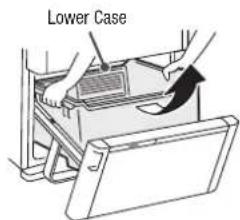
text_image
Lower Case● Be careful. Water may drip from the backside of the lower case.
Caution
● The glass partition can be removed.
- Do not remove the moisture unit and photocatalyst from the lower case.
How to attach the slide door (Ice Compartment/Upper Freezer/Lower Freezer/Vegetable Compartment)
Ice Compartment/Upper Freezer Lower Freezer/Vegetable Compartment
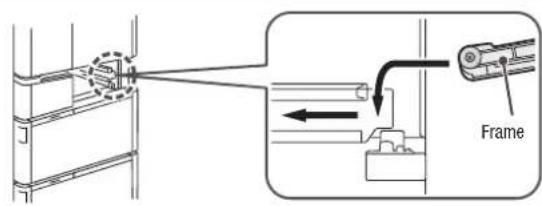
text_image
Technical diagram showing a mechanical assembly with labeled frame and directional arrow indicating motion or movement.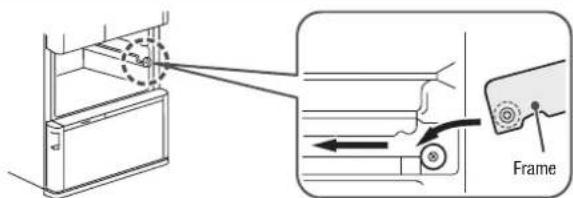
text_image
Diagram showing a door frame adjustment mechanism with labeled components and directional arrowsTROUBLESHOOTING
Check the following points before asking repair. Contact your dealer or our customer center if the problem still exists after checking them.
| When this happens Check Item How to solve/repair | |||
| Initial stage | Not cooled well. | It takes time to cool in summer or when a lot of foods are stored. | No trouble Immediately after installation, it may take more than 24 hours. |
| No ice is made. | When using for the first time, it takes time to make ice because ice making starts after cooling fully.It may take more than 24 hours to make ice according to the amount of food and the way of packing it. | No trouble Open/close the door quickly and/or minimize the number of times of opening and closing the door.Allow clearance between each food in each compartment. | |
| Open Button | The Open Button does not respond. | Isn't the setting of the Lock on the panel for operation is set to "ON" (locked)? | Cancel the lock of the Open Button. Pg.61 |
| Is Refrigerator Compartment Door open? Operate after closing it. | |||
| Isn't a water drop or dirt attached to the Open Button? Wipe it with a soft cloth. | |||
| Are you wearing gloves or applying a plaster? Touch directly with your finger. | |||
| Did you touch adjacent Open Button wrongly? Touch the target Open Button only. | |||
| Automatic ice making is not properly performed | Ice cannot be made at all. | Is the auto ice maker set to "Off"? | Set it to "On" or "Quick" mode. Pg.56, 57 |
| Is Water Supply indicator lamp turned on? Pour water into the water supply container. Pg.56, 57 | |||
| When water in the water supply container is getting low, Ice Maker may not make ice. | Add water until water level reaches to the "Container-full line" of the water supply container. Pg.56 | ||
| Is the water supply container pushed firmly until it is beyond the "container set position" line? | Push it beyond the "Container set position" line. Pg.56 | ||
| Do you push it to the end until it snaps? Push the frame back until it snaps. | Pg.71 | ||
| Is anything other than ice stored in the ice case? Remove it from the Ice Case. | |||
| Is the ice case filled with ice over the limit line of stored ice amount? Level the ice. Pg.57 | |||
| It takes a long time to make ice.There is no ice in the ice tray. | Do you open the door frequently or store a large amount of food at a time? Refrigerator may not cool fully. | Minimize the number of times of opening and closing the door until it cools fully. Allow clearance as much as possible between each stored food. | |
| It may take more than 4 hours to make ice in winter. No trouble | |||
| Immediately after changing from "Off" to "On", it may take longer than usual to make ice. | No trouble | ||
| Does any food or package caught in the door of the Freezer or Ice Compartments prevent the door from closing completely? | Remove it if it is caught. | ||
| Isn't the "Energy Saving" ("Save"/ "Trip") mode "ON"? | Exit the "Energy Saving" mode. Pg.60 | ||
| Projection is generated on ice. | It is frozen water collected in the ice tray groove. | It does not indicate any trouble. | |
| Stored ice becomes small. Ice sticks together. | Ice naturally becomes small or sticks together if ice is stored for a long term. | Dispose of old ice cubes, and try to make ice again. | |
| Do you open the door frequently or store a large amount of food at a time? | Open/close the door quickly or reduce frequency of opening and closing the door. | ||
| Was the door or the drawer not temporarily shut completely? | Close the door completely. | ||
| Small ice is made. | Small ice may be made if only a small amount of water remains in the water supply container. | Add water until water level reaches to the "Container-full line" of the water supply container. Pg.56 | |
| Connected ice is made. | If the frame is not set in place properly, ice cubes may stick each other. | Set the frame to the right place. Pg.67 | |
| If the ice tray is damaged, ice may not be easily separated from the ice tray and ice stuck together may be made. | Check that there is a flaw on the ice tray, and then consult with your dealer for replacement. | ||
| There is white impurity in ice. | It is because the fine air bubble in water is contained in ice. | This is not malfunction. | |
| Did you use mineral water to make ice? | Mineral contained in water may freeze and become white impurity in ice. It may remain after thawing in water, but it is harmless. | ||
| Ice tray frame cannot be drawn. | Is "Off" indicator lamp turned on again? | The ice tray cannot be drawn when the auto ice maker is operating. Set it to "Off". When the "Off" indicator lamp is blinking, wait for 1 minute until "Off" is lit, and then draw the ice tray. Pg.67 | |
| Refrigerator does not cool | Refrigerator does not cool.Frost and/or dew occur. Ice cream becomes soft. | Does any food or package caught in the door prevent the door from closing completely? | Remove it if it is caught. |
| Is food squeezed in? or Is a large amount of food put in at one time? | Follow the rules on the height of food that can be stored. Pg.54, 58Allow clearance between each food in each compartment. | ||
| Is the case fixed securely? | Install them correctly. Pg.69 | ||
| Food cannot be cooled enough, depending on the installation place or surrounding situation. | Check to see if the refrigerator is installed properly. Pg.46 | ||
| Isn't the "Energy Saving" ("Save"/ "Trip") mode "ON"? | Exit the "Energy Saving" mode. Pg.60 | ||
| Refrigerator may not cool fully when the temperature setting is "■". | Switch the temperature setting of the compartment where it does not fully cool to "■■" or "■■■". Pg.51, 55 | ||
| Does the temperature around the refrigerator become high due to weather (ex: in summer)? | Switch the temperature setting of the compartment where it does not fully cool to "■■■". Pg.51, 55, 59 | ||
| Temperature in the refrigerator rises little by little while its door is open.If the door is opened/closed frequently or left open for a long time, temperature cannot easily lower. | Reduce the number of times of opening and closing the door, or open/ close the door quickly. | ||
| Frost and/or dew occur | Frost and/or dew adhere to the refrigerator interior or the frame of the drawer compartment. | Was the door or the drawer not temporarily shut completely? | Check that any food or package caught in the door, and then close it completely. |
| The door may be opened/closed frequently or door may remain open for a long time. | Open or close the door quickly, or reduce frequency of opening and closing the door. | ||
| Frost or condensation may be formed when the warm air contacts with inside the compartment or the door frame. | Wipe it off with a dry cloth. | ||
| Frost or condensation is formed on the wall or any part of the freezer compartment due to the moisture in the air when the door is opened or closed. | No troubleWipe it off with a dry cloth. | ||
| Dew adheres to the outside of the refrigerator (exterior, door gaskets, door and drawer compartment etc). | Dew may adhere to those parts when the indoor humidity is high (ex: rainy day). | No troubleWipe it off with a dry cloth. | |
| When the dew-proof heater is set to low, high humidity may cause condensation on the iron partition, the door gasket or the door. | Cancel the settings of the condensation prevention heater.Wipe it off with a dry cloth. Pg.62 | ||
| When the temperature is set to “■■■”, it may cause condensation on the surface of the door. | Wipe it off with a dry cloth.Please set the temperature to “■■”. | ||
| Dew condensation occurs in the Refrigerator Compartment. | Condensation may form on the wall and/or around the cold air blowout port when the door is opened and closed frequently or the humidity is high around the refrigerator.  Dew condensation Dew condensation | No troubleWipe it off with a dry cloth. | |
| Dew condensation occurs in the Vegetable Compartment. | The humidity in the Vegetable Compartment, among others, space for aero-care zone is higher than in any other compartment. This is because it is necessary to ensure optimal freshness of vegetables, which is not a malfunction. | When it is undesirable that dew occurs, wrap food and then store. | |
| Water may drop into cases placed in the Vegetable Compartment due to dew concentration. | Water may cause damage to food, so wipe off water with a soft cloth. | ||
| If the moisture unit is blocked by food bag or container, dew may be formed in the space for aero-care zone. | Move the food bag or container blocking the moisture unit to other locations. | ||
| Refrigerator cools overly | Refrigerator cools overly Food freeze. | “■■■” is selected in the temperature setting. Switch it to “ | ■■”. Pg.51, 55 |
| The surrounding temperature is lower than 5°C. | When the ambient temperature is low, the inside of the refrigerator may cool overly. Switch the temperature setting to “■”. | ||
| Is it placed in front of the Cold Air Blowout Port? Do not place any food in front of the cold air blowout port. | |||
| Door is not in a horizontal state | Door is not in a horizontal state. | The installation site may not be level. | This does not affect the refrigerator performance. Adjust the refrigerator adjustable mount to keep it level if you want to correct it. Pg.46 |
| Does the soft floor material sink in around the legs due to the weight of stored items? | Lay a firm board which has more than 1cm thickness on the floor if the refrigerator itself inclines. | ||
| More force is required to open the door immediately after closing the door. | It is because the air that entered the Refrigerator Compartment is rapidly cooled and the pressure in the Refrigerator Compartment temporarily lowers. | This is not malfunction. | |
| Another door opens after closing 1 door. | Another door may open for a moment by the wind pressure because cool air path connects each compartment. | This is not malfunction. | |
| Abnormal operating sound is generated | Annoying sound is generated by the refrigerator. | Does the floor bend? Lay a firm board and then install the refrigerator thereon. | Pg.46 |
| Does the refrigerator come in contact with the wall or furniture, etc.? | Install the refrigerator with clearance around it. | ||
| Does the leg cover come off? Install it firmly. | Pg.46 | ||
| You may feel that the operation sound is loud because the compressor operates in high-speed under the following conditions: the refrigerator does not cool fully on the occasion such as using it for the first time, opening/closing the door frequently, the surrounding temperature is high. | The sound becomes soft after cooling fully. | ||
| When it is set to “Freezer”/“Fridge”/“Quick”, operation sound of the compressor or the fan motor gets louder because of high-speed revolution. | This is not malfunction. | ||
| Operation sound lasts long. | It is because the compressor operates in low-speed for conserving energy. | This is not malfunction. | |
| Operation sound sometimes becomes louder. | It is because the system changes the operating power of the refrigerator according to the temperature change. | This is not malfunction. | |
| When other sounds such as shown in the right table are generated by the refrigerator. | Sound like water flowing (trickling)Sound like collision (tapping)Sound like water boiling (bubbling up)Sound like meat roasting (sizzling) | These sounds are caused when the refrigerant flows or water flows/ evaporates to remove frost.This is not malfunction. | |
| Sound like squeaking (cracking) (knocking) | This sound is caused because the parts squeaks when the refrigerator temperature changes.This is not malfunction. | ||
| Sound like something is caught (clacking)Sound like roaring (honking)Sound caused immediately after closing the door (booming) | These sounds are caused when the electric parts to control the refrigerator temperature operates.This is not malfunction. | ||
| Sounds caused by the Automatic ice maker (zooming)(rattling)(clunking) | These sounds are made when ice is separated from the ice tray of the auto ice maker or water is supplied to the ice tray. These sounds are also heard every 2 or 3 hours when the water supply container is empty.This is not malfunction.To stop the sound, touch the button to change it to “Off.” Pg.57 | ||
| Sound occurs sometimes (clacking) This sound is caused when the refrigerator starts the operation to cool. | |||
| Refrigerator becomes hot | The side of the refrigerator becomes hot. Hot air comes from the bottom of the refrigerator. | Hot air may come from the bottom of the refrigerator to exhaust the heat generated when the cooling device operates. | The temperature may rise to 50 – 60 °C immediately after installation or during summer.It does not pose safety or performance problems, but avoid touching it. |
| It smells strange | Plastic smells | This smell occurs because a lot of plastic parts are used in the refrigerator, but the smell decreases gradually while cooling. | This is not malfunction. |
| Ice smells | Do the water supply container and/or water filter become dirty? Or does ice become old? | Wash them regularly to prevent "silime" and/or "fur". Pg.67 | |
| Chlorine may strongly smell because chlorine in tap water is condensed. | This is not malfunction. | ||
| It smells in the refrigerator | Is any food which strongly smells stored without any wrapping? | The deodorizing function cannot completely remove all smells Seal that kind of food with plastic film etc. | |
| There is something strange with the Vacuum Compartment | Hissing sound does not occur when opening. | Is the setting of the Vacuum Compartment to "Off (Non-vacuum)? Change the setting to "-1°C" or "+1°C". Pg.53 | |
| Is the handle pulled up? Hold down the handle to lock. | |||
| Is the handle held down to the end and locked? | The vacuum function will not work unless it is locked. Lock it. | ||
| Isn't the Vacuum Compartment Gasket removed? Install the Vacuum Compartment Gasket. | |||
Is a food package or a hair caught in the vacuum compartment gasket and the support? Wastethread Wastethread  Scraps Scraps | Remove any packing material of foods or other things which are caught in. Clean the vacuum compartment gasket if it is dirty. Pg.65 | ||
| Was the door of the Vacuum Compartment or the Refrigerator Compartment opened / closed just before? | Hissing sound may not occur because the vacuum pump enters the preparation state for starting the operation, but it does not indicate any trouble. | ||
| It is not clear whether the Vacuum Compartment has been vacuumized. | The Vacuum Compartment has been vacuumized properly if a vacuum releasing sound (hissing sound) is heard when opening it. | - | |
| The handle cannot be locked. | Is there any food etc. caught in the inner part of the Vacuum Compartment Case or the vacuum compartment gasket? | Remove any food if it is caught in. | |
| Is the Vacuum Case set in place? Attach the Vacuum Case according to the procedure. Pg.68 | |||
| Booming sound and vibration occur around the Vacuum Compartment. | This sound is caused when the vacuum pump operates. This is not malfunction. | ||
| You can stop the vacuum pump operation when you want to stop the sound (ex: night time). | Change the setting of the Vacuum Compartment to "Off". Pg.53 (It is set to Off (Non-vacuum)) | ||
| If any sound or vibration occurs frequently, some object may be caught in the Vacuum Case or the Vacuum Compartment Gasket may be dirty. | Remove any packing material of foods or other things which are caught in. Clean the vacuum compartment gasket if it is dirty. Pg.65 | ||
| Dew or frost is formed inside the Vacuum Compartment and around the Vacuum Case. | The moisture from the juicy food may cause dew condensation and/or frost adhering insider the compartment because the Vacuum Compartment is sealed.Dew and/or frost | It is recommended to wrap the juicy food with plastic film, etc. Wipe dew and/or frost off with a soft cloth wet by lukewarm water. | |
| The surface of stored vegetables is dented or gets discolored. | Is any vegetable sensitive to low temperature such as eggplant and cucumber stored? | Move them to the Vegetable Compartment. Pg.53 | |
| Food in the Vacuum Compartment freezes. | Is the Vacuum Compartment set to "-1°C" or "OFF (Non-vacuum)"? Set the "+1°C". Pg.53 | ||
| [ display on the Open Button flashes | m0 flashing | This flashing shows that there is a problem. Consult your dealer. | |
| On flashing | Some foods, etc. may come into contact with the ice tray. | Empty the Ice Compartment and do the "Ice Maker Cleaning". Pg.66 | |
| -1°C flashing | It may be in the operation check mode for serviceman. ( × 1 ) | It will return to the normal mode after about 15 minutes. There is no problem with using the refrigerator. | |
| Auto Door Auto Drawer flashing | It may be in the operation check mode for serviceman. ( × 1 ) | It will return to the normal mode after about 10 minutes. There is no problem with using the refrigerator. | |
| Quick On Off All indicator lamps flash | It is in process of Ice Maker Cleaning. Read "HOW TO MAINTAIN THE AUTOMATIC ICE MAKER". Pg.66 | ||
| Off flashing | It will flash if you "Off" during the ice making process. Check how to clean the "Ice Tray". Pg.67 | ||
| All displays flashing | Door remains open for more than 1 minute. (ex: door is not completely closed.) | Check "Door Alarm". Pg.61 | |
| Blinks other than those above | It may be in the operation check mode for serviceman. ( × 1 ) Consult your dealer. | ||
※1 Touching the button long (more than 10 seconds), the refrigerator may go into the operation check mode.
| When this happens Check Item How to solve/repair | |||
| Auto Door | Noise is loud.There is an abnormal noise. | Hitting sound (thumping sound) | This is the operating sound of the Auto Door.This is not malfunction. |
| Buzzing sound (whir) (whir) | This is the operating sound of the Electric Refrigerator Unit.This is not malfunction. | ||
| The operation sound of the Auto Door differs depending on doors (left or right). | This may vary depending on installation conditions of the refrigerator or the volume of foods stored in the door pocket.This is not malfunction. | ||
| Auto Door won't open even if touching the Control Pane. | Is the Auto Door on the light. Turn on the indicator lamp. | Auto Door Pg.48 | |
| Isn't the Ice Compartment or the Upper Freezer opened? | Close the slide door and then touch the Open Button of the Auto Door. | ||
| The Auto Door does not close. | Is any food or food bag caught on the compartment? Remove foods and others that are caught in. | ||
| Did a power failure occur or did the compartment knock against any obstacle during electrical operation? | Auto Door stops on the way, so push in the door with hand. | ||
| Auto Door does not open widely. | Don't stored beverages or foods make contact with the wall in the Refrigerator Compartment? | Remove beverages or foods that make contact with the wall. | |
| Installation site may not be leveled out. | Opening angle of the Auto Door may vary or the door may go back a little after it is opened automatically depending on installation conditions of the refrigerator, but this is not malfunction. | ||
| Auto Door moves even if it is locked on the Open Button. | Auto Door can not be locked from the Open Button. | In order to stop Auto Door, unlock the Open Button first, and then touch button for 3 seconds or more until it beeps twice. Pg.48, 61 | |
| Auto Drawer | Noise is loud.There is an abnormal noise. | Hitting sound (thumping sound) | This is the operating sound of the electrical drawer compartment.This is not malfunction. |
| Buzzing sound (whirring, grunt) | This is the operating sound of the electrical drawer compartment.This is not malfunction. | ||
| Operation sound of the Vegetable Compartment is louder than that of the Lower Freezer. | Operation sound of the "vegetable compartment" is louder than the "lower freezer". This is not malfunction. | ||
| The compartment does not open even if the electrical drawer switch is pressed. | Is the Auto Drawer light. Turn on the indicator lamp. | Auto Drawer Pg.49 | |
| Is either one of the lower freezer or the vegetable compartment open? | Close the open electrical drawer compartment and then press drawer switch for the compartment you want to open. | ||
| The Auto Drawer does not open/close. | Is any food, food bag or plastic wrap, etc. caught on the compartment? Remove foods and others that are caught in. | ||
| Did a power failure occur or did the compartment knock against any obstacle during electrical operation? | The door does not open/close smoothly because the electrical drawer function is stopped before the operation completes.Manually push in the door with strength. Otherwise, unplug the power plug with the door drawn, and connect it after 10 seconds. | ||
| The Auto Drawer does not open much. | The Auto Drawer is pulled out by approx. 15 cm or more. | The length may vary depending on installation conditions of the refrigerator, or the Auto Drawer may go back a little after the door is opened automatically.This is not malfunction. | |
| Auto Drawer moves even if it is locked on the panel for operation. | Auto Drawer can not be locked from the panel for operation. | In order to stop Auto Drawer function, unlock it first on the panel for operation, and then touch button for 3 seconds or more until it bleeps. Pg.49, 61 | |
| Others | You feel electricity a little when touching the main body of the refrigerator. | —— | The refrigerator may be charged with static electricity, but there is no problem with the safety. |
| Radio and/or television are disturbed by noises. | It is caused by the electromagnetic radiation slightly generated from this refrigerator. | Install the refrigerator away from the television, radio and interphone.It is recommended to connect the power plug to the power outlet separated from the antenna terminal and ground the refrigerator. Pg.47 | |
| There are thin lines like scratches on the plastic parts. | Those lines are caused by the liquid resin flowing when plastic is molded. | They are especially conspicuous for the transparent parts, but there is no problem with the strength. | |
| There are waving and/or distortions on the door surface, the side and the top surface of the refrigerator. | Slight waving and/or distortions are generated in the manufacturing process of the refrigerator. | They may be conspicuous according to the position of the light source and/or the brightness etc., which is not malfunction. There is no problem with the performance. | |
| The Open Button is unlit. | Approximately 40 seconds after the end of operation, indicator lamps will be turned off. | This is not malfunction.However, the setting of "Save" mode, indicator lamps of "Fridge", "Freezer" and "Quick", and indicator lamps of "Off" and "Water" and "eco operation" at work are still lit.Open the door of the Refrigerator Compartment or touch button turn it on. | |
| There is a small hole inside the door. | This hole is used to escape the air inside when filling the heat insulation material into the door during the production process.Hole (inside of the door) | It is neither a flaw nor abnormal thing. | |
| The electric supply failed. | Reduce the number of times of opening and closing the door and avoid storing food additionally until the electric supply is restored. | Please check each setting on the panel for operation after the power comes back on. | |
| The refrigerator is not expected to use for a long term. | Remove all the items in the refrigerator. | Leave all the doors open to dry the refrigerator for 2 or 3 days. Pg.64-67 | |
| When no ice-making is required. | Please turn on "Off". See "Stop Ice Making". | Pg.57 | |
| Remove frost. | Any operation to remove frost is not required because this refrigerator remove frost automatically. | Thawed water is collected in the evaporating tray and automatically evaporates. | |
| Transporting and moving care. | See "Transporting your refrigerator (transport for moving)" Pg.47 | ||
TROUBLESHOOTING (CONTINUED)
| When this happens Check Item How to solve/repair | |||
| Others | The Vegetable Compartment door doesn’t close / When the Vegetable Compartment door is opened, the upper case doesn’t go back to the locking position. | Is any food, etc. caught between the upper case and the lower case? | Remove it if any. |
Does PET bottle, food, etc. come in contact with the locking handle of the upper case?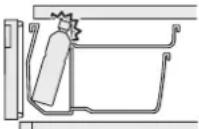 | Store PET bottle, food, etc. so that they don’t come in contact with the locking handle. | ||
| Glass is broken (door glass, glass shelf, glass partition) | —— | Do not touch a broken glass, but contact your dealer for repair soon. | |
| When a midge fly, etc. enters in the refrigerator | Are there fruit flies around it? | Keep the environment clean.Put something a fruit fly hates or fruit fly traps or something like that. | |
| Is there any food with strong flavor in the refrigerator? | Cover food with the lid so that fruit flies can’t be attracted by the flavor. | ||
| Is the door left open for a long time? Please close the door as soon as possible. | |||
AVAILABLE PARTS
If you order any part listed below, specify the model of your refrigerator to a dealer for purchasing genuine parts.
| Subject Product Name Product Model | |||
| Ice smells● Water filter may be old and dirty (available about 3 or 4 years, as a guide) | Water filter for the automatic ice maker RJK-30 |  | |
| Vacuum state can't be maintained● It may be damaged, deformed or discolored. | Vacuum compartment gasket R-C6700 321 |  | |
The following table shows the weight of food that can be stored on the shelves and in the cases.
| 零件名稱 Name of parts | R-E6800XS, R-E6800SR-E6800XH, R-E6800HR-E6800XV, R-E6800VR-E6800XND, R-E6800NDR-E6800XN, R-E6800N | ||
| 冷藏室Refrigeratorcompartment | 可調式層架上段 | Height adjustable upper shelf | 21.0kg |
| 可調式層架中段 | Height adjustable middle shelf | 21.0kg | |
| 可調式層架下段,固定層架 | Height adjustable lower shelf, Fixed shelf | 21.0kg | |
| 真空冰温室上方的層架 | Upper shelf of the vacuum compartment | 11.0kg | |
| 真空冰温室盒 | Vacuum compartment case | 5.0kg | |
| 活動式萬用盒 | Multiuse Egg Case | 2.0kg | |
| 製冰室Ice compartment | 儲冰盒 | Ice case | 請勿存放不是本自動製冰機製成的冰塊。→21頁Do not store any ice cubes other than the ones made by the automatic ice maker.→Pg.57 |
| 上層冷凍室Upper freezer | 上層冷凍盒 | Upper Freezer case | 9.0kg |
| 下層冷凍室Lower freezer | 上層滑動盒 | Slimline slide case | 5.5kg |
| 中層滑動盒 | Slide case | 7.0kg | |
| 下層冷凍盒 | Lower freezer case | 17.0kg | |
| 蔬果保鮮室Vegetable compartment | 上層滑動盒 | Upper Case | 8.5kg |
| 下層置物盒 | Lower Case | 22.0kg | |
關於廢棄之重要警告 Severe warning signs for Disposal
Cyclopentane is used in the insulation material.
The gases in insulation material require a special disposal procedure.
Please contact your local authorities in regard to the environmentally safe disposal of this product.
Please contact the following Hitachi Service Centre if power cord is damaged or service is required.
If some malfunction occurs during operation, unplug the power plug immediately and contact the service centre to have the refrigerator repaired.
18/F., Ever Gain Centre, 28 On Muk Street, Shatin,
N.T., Hong Kong, China
Tel : +852-2753-5386
Fax: +852-2753-0993
- Singapore
Hitachi Home Electronics Asia (S) Pte. Ltd.
438A Alexandra Road, #01-01/02/03,
Alexandra Technopark, Singapore 119967
Tel : +65-6536-2520
Fax: +65-6536-2521
香港
香港日立有限公司
9th Floor, Abhijeet, Mithakhali Six Roads
Navrangpura, Ahmedabad - 380006
Tel : +91-079-3532-4848/+91-079-30414747
E-mail: customercare@hitachi-hli.com
About Non-fluorocarbon refrigerator
- This refrigerator, including refrigerant and the heat insulator, is using hydrocarbon (non-fluorocarbon). The hydrocarbon is a material that does not rip up the ozone and have very little influence on global warming. It is the global environment concern material).
- R600a refrigerant is flammable. But the refrigerant is being sealed up by the refrigerate circuit, and never leak by usual use. In case of the refrigerate circuit being damaged by any chance, please avoid the use of fire and electric product, open the window and ventilate. Afterwards, please contact Hitachi Service Center.
Severe warning signs for Disposal
Cyclopentane is used as in the insulation. The gases in insulation material require a special disposal procedure. Please contact your local authorities in regard to the environmentally safe disposal of this product.

This symbol mark means that used electrical and electronic products shall not be mixed with general household waste.
Do not try to dismantle the system and unit by yourself as this could have harmful effects on your health and the environment.
Refrigerators must be treated at a specialized treatment facility for recycling and recovery and shall not be disposed of in the municipal waste stream. Please contact the installer, dealer or local authority for more information.